Doing more with LESS
   December 14, 2010 - DallasPHP
           Jake Smith


    http://joind.in/talk/view/2478
What is LESS?

• Dynamic CSS
• CSS pre-processor
• Leaner/Meaner CSS
• Minified CSS (optional)
Other Types of LESS
• SASS (Ruby)
 • http://sass-lang.com/
• Scaffold (PHP)
 • http://github.com/anthonyshort/Scaffold
• LESSPHP
 • http://leafo.net/lessphp/
SASS vs. LESS

• Not as native syntax (css) as LESS
 • SASS mimics ruby
• SASS.js under development now
• In the end it’s all about preference
LESS Features
Variables

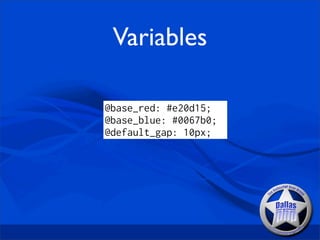
@base_red: #e20d15;
@base_blue: #0067b0;
@default_gap: 10px;
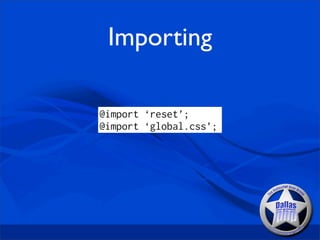
Importing

@import ‘reset’;
@import ‘global.css’;
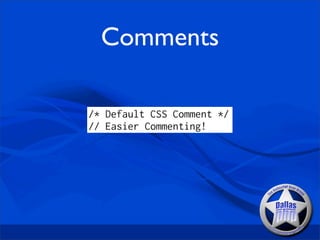
Comments

/* Default CSS Comment */
// Easier Commenting!
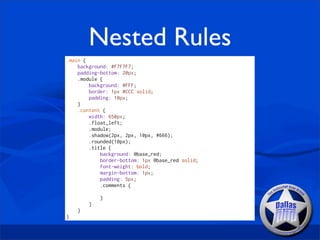
Nested Rules
.main {
    background: #F7F7F7;
    padding-bottom: 20px;
    .module {
        background: #FFF;
        border: 1px #CCC solid;
        padding: 10px;
    }
    .content {
        width: 650px;
        .float_left;
        .module;
        .shadow(2px, 2px, 10px, #666);
        .rounded(10px);
        .title {
            background: @base_red;
            border-bottom: 1px @base_red solid;
            font-weight: bold;
            margin-bottom: 1px;
            padding: 5px;
            .comments {

            }
        }
    }
}
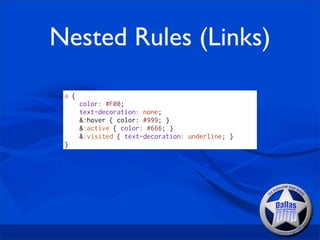
Nested Rules (Links)

 a {
       color: #F00;
       text-decoration: none;
       &:hover { color: #999; }
       &:active { color: #666; }
       &:visited { text-decoration: underline; }
 }
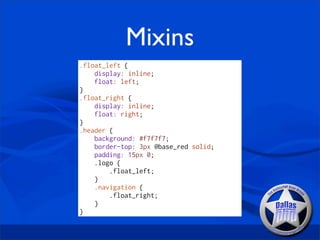
Mixins
.float_left {
    display: inline;
    float: left;
}
.float_right {
    display: inline;
    float: right;
}
.header {
    background: #f7f7f7;
    border-top: 3px @base_red solid;
    padding: 15px 0;
    .logo {
        .float_left;
    }
    .navigation {
        .float_right;
    }
}
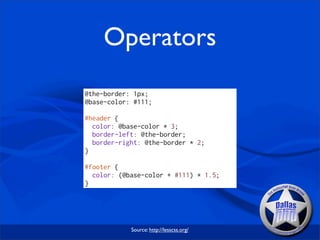
Operators
@the-border: 1px;
@base-color: #111;

#header {
  color: @base-color * 3;
  border-left: @the-border;
  border-right: @the-border * 2;
}

#footer {
  color: (@base-color + #111) * 1.5;
}


            Source: http://lesscss.org/
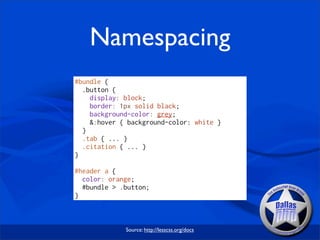
Namespacing
#bundle {
  .button {
    display: block;
    border: 1px solid black;
    background-color: grey;
    &:hover { background-color: white }
  }
  .tab { ... }
  .citation { ... }
}

#header a {
  color: orange;
  #bundle > .button;
}


             Source: http://lesscss.org/docs
Rule Sets
#defaults {
  @width: 960px;
  @color: #333;
}

#darkTheme {
    @color: #FFF;
}

.article { color: #294366; }

.comment {
  width: #defaults[@width];
  color: .article['color'];
}
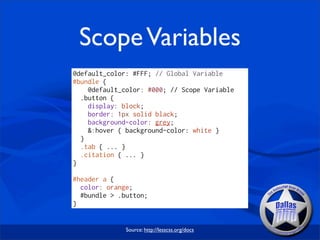
Scope Variables
@default_color: #FFF; // Global Variable
#bundle {
    @default_color: #000; // Scope Variable
  .button {
    display: block;
    border: 1px solid black;
    background-color: grey;
    &:hover { background-color: white }
  }
  .tab { ... }
  .citation { ... }
}

#header a {
  color: orange;
  #bundle > .button;
}


              Source: http://lesscss.org/docs
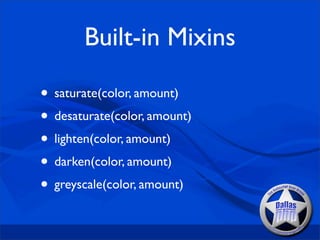
Built-in Mixins

• saturate(color, amount)
• desaturate(color, amount)
• lighten(color, amount)
• darken(color, amount)
• greyscale(color, amount)
LESS Development
Environment *nix/OSX

• Install node.js
• Install NPM (Node Package Manager)
• Install LESS
Environment Windows

• http://blog.dotsmart.net/2010/11/26/
  running-the-less-js-command-line-compiler-
  on-windows/
• lessc screen.less [output.css] [-compress]
LESS App

• Compile CSS from LESS file on save
• Ability to Minify
• Reports error line number for failed
  compiles
• Growl Notifications
              Source: http://incident57.com/less/
LESS.js


• 40 times faster than Ruby (gem)
• Caches generated CSS to local storage
  (newer browsers only)
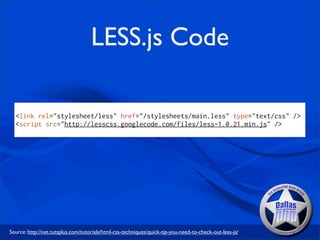
LESS.js Code

  <link rel="stylesheet/less" href="/stylesheets/main.less" type="text/css" />
  <script src="http://lesscss.googlecode.com/files/less-1.0.21.min.js" />


Source: http://net.tutsplus.com/tutorials/html-css-techniques/quick-tip-you-need-to-check-out-less-js/
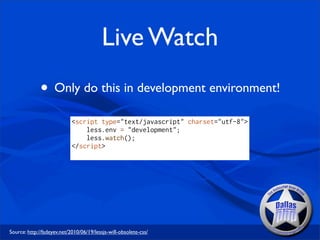
Live Watch
              • Only do this in development environment!
                            <script type="text/javascript" charset="utf-8">
                                less.env = "development";
                                less.watch();
                            </script>


Source: http://fadeyev.net/2010/06/19/lessjs-will-obsolete-css/
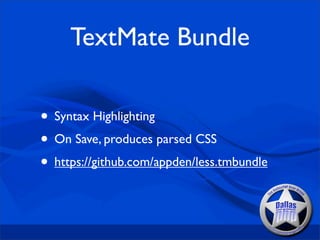
TextMate Bundle

• Syntax Highlighting
• On Save, produces parsed CSS
• https://github.com/appden/less.tmbundle
LESS Examples
Mixins
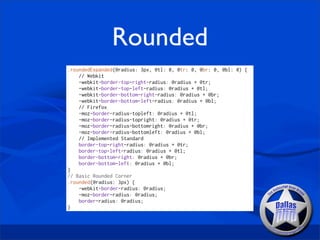
Rounded
.roundedExpanded(@radius: 3px, @tl: 0, @tr: 0, @br: 0, @bl: 0) {
    // Webkit
    -webkit-border-top-right-radius: @radius + @tr;
    -webkit-border-top-left-radius: @radius + @tl;
    -webkit-border-bottom-right-radius: @radius + @br;
    -webkit-border-bottom-left-radius: @radius + @bl;
    // Firefox
    -moz-border-radius-topleft: @radius + @tl;
    -moz-border-radius-topright: @radius + @tr;
    -moz-border-radius-bottomright: @radius + @br;
    -moz-border-radius-bottomleft: @radius + @bl;
    // Implemented Standard
    border-top-right-radius: @radius + @tr;
    border-top-left-radius: @radius + @tl;
    border-bottom-right: @radius + @br;
    border-bottom-left: @radius + @bl;
}
// Basic Rounded Corner
.rounded(@radius: 3px) {
    -webkit-border-radius: @radius;
    -moz-border-radius: @radius;
    border-radius: @radius;
}
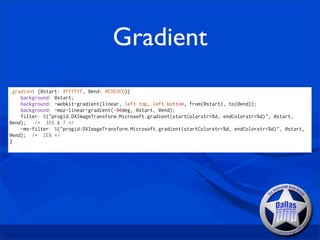
Gradient
.gradient (@start: #ffffff, @end: #EDEDED){
    background: @start;
    background: -webkit-gradient(linear, left top, left bottom, from(@start), to(@end));
    background: -moz-linear-gradient(-90deg, @start, @end);
    filter: %("progid:DXImageTransform.Microsoft.gradient(startColorstr=%d, endColorstr=%d)", @start,
@end);   /* IE6 & 7 */
    -ms-filter: %("progid:DXImageTransform.Microsoft.gradient(startColorstr=%d, endColorstr=%d)", @start,
@end); /* IE8 */
}
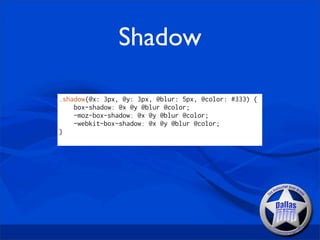
Shadow

.shadow(@x: 3px, @y: 3px, @blur: 5px, @color: #333) {
    box-shadow: @x @y @blur @color;
    -moz-box-shadow: @x @y @blur @color;
    -webkit-box-shadow: @x @y @blur @color;
}
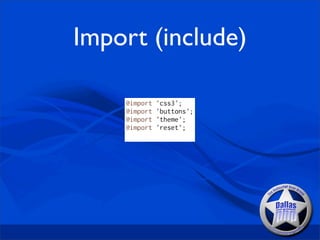
Import (include)

    @import   'css3';
    @import   'buttons';
    @import   'theme';
    @import   'reset';
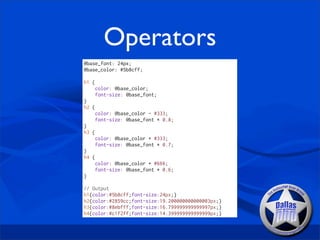
Operators
@base_font: 24px;
@base_color: #5b8cff;

h1 {
    color: @base_color;
    font-size: @base_font;
}
h2 {
    color: @base_color - #333;
    font-size: @base_font * 0.8;
}
h3 {
    color: @base_color + #333;
    font-size: @base_font * 0.7;
}
h4 {
    color: @base_color + #666;
    font-size: @base_font * 0.6;
}

// Output
h1{color:#5b8cff;font-size:24px;}
h2{color:#2859cc;font-size:19.200000000000003px;}
h3{color:#8ebfff;font-size:16.799999999999997px;}
h4{color:#c1f2ff;font-size:14.399999999999999px;}
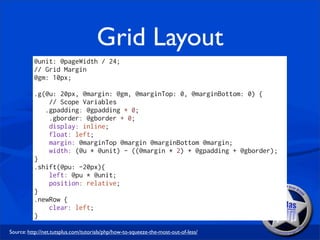
Grid Layout
          @unit: @pageWidth / 24;
          // Grid Margin
          @gm: 10px;

          .g(@u: 20px, @margin: @gm, @marginTop: 0, @marginBottom: 0) {
              // Scope Variables
             .gpadding: @gpadding + 0;
              .gborder: @gborder + 0;
              display: inline;
              float: left;
              margin: @marginTop @margin @marginBottom @margin;
              width: (@u * @unit) - ((@margin * 2) + @gpadding + @gborder);
          }
          .shift(@pu: -20px){
              left: @pu * @unit;
              position: relative;
          }
          .newRow {
              clear: left;
          }

Source: http://net.tutsplus.com/tutorials/php/how-to-squeeze-the-most-out-of-less/
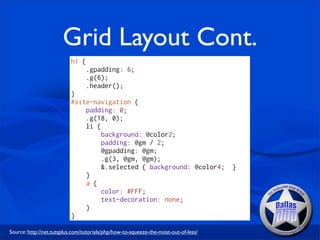
Grid Layout Cont.
                          h1 {
                                 .gpadding: 6;
                                 .g(6);
                                 .header();
                          }
                          #site-navigation {
                              padding: 0;
                              .g(18, 0);
                              li {
                                   background: @color2;
                                   padding: @gm / 2;
                                   @gpadding: @gm;
                                   .g(3, @gm, @gm);
                                   &.selected { background: @color4;                 }
                              }
                              a {
                                   color: #FFF;
                                   text-decoration: none;
                              }
                          }

Source: http://net.tutsplus.com/tutorials/php/how-to-squeeze-the-most-out-of-less/
With Great Power
 Comes Great
 Responsibility
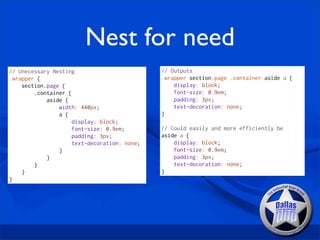
Nest for need
// Unecessary Nesting                         // Outputs
.wrapper {                                    .wrapper section.page .container aside a {
    section.page {                                display: block;
        .container {                              font-size: 0.9em;
            aside {                               padding: 3px;
                width: 440px;                     text-decoration: none;
                a {                           }
                     display: block;
                     font-size: 0.9em;        // Could easily and more efficiently be
                     padding: 3px;            aside a {
                     text-decoration: none;       display: block;
                }                                 font-size: 0.9em;
            }                                     padding: 3px;
        }                                         text-decoration: none;
    }                                         }
}
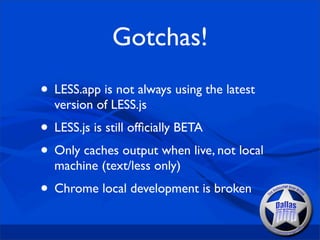
Gotchas!
• LESS.app is not always using the latest
  version of LESS.js
• LESS.js is still officially BETA
• Only caches output when live, not local
  machine (text/less only)
• Chrome local development is broken
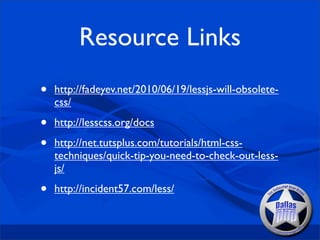
Resource Links
•   http://fadeyev.net/2010/06/19/lessjs-will-obsolete-
    css/

•   http://lesscss.org/docs

•   http://net.tutsplus.com/tutorials/html-css-
    techniques/quick-tip-you-need-to-check-out-less-
    js/

•   http://incident57.com/less/
Questions? Concerns? Complaints?
Thanks for listening!
Contact Information
[t]: @jakefolio
[e]: jake@dallasphp.org
[w]: http://www.jakefolio.com
[irc]: #dallasphp

Doing more with LESS

  • 1.
    Doing more withLESS December 14, 2010 - DallasPHP Jake Smith http://joind.in/talk/view/2478
  • 2.
    What is LESS? •Dynamic CSS • CSS pre-processor • Leaner/Meaner CSS • Minified CSS (optional)
  • 3.
    Other Types ofLESS • SASS (Ruby) • http://sass-lang.com/ • Scaffold (PHP) • http://github.com/anthonyshort/Scaffold • LESSPHP • http://leafo.net/lessphp/
  • 4.
    SASS vs. LESS •Not as native syntax (css) as LESS • SASS mimics ruby • SASS.js under development now • In the end it’s all about preference
  • 5.
  • 6.
  • 7.
  • 8.
    Comments /* Default CSSComment */ // Easier Commenting!
  • 9.
    Nested Rules .main { background: #F7F7F7; padding-bottom: 20px; .module { background: #FFF; border: 1px #CCC solid; padding: 10px; } .content { width: 650px; .float_left; .module; .shadow(2px, 2px, 10px, #666); .rounded(10px); .title { background: @base_red; border-bottom: 1px @base_red solid; font-weight: bold; margin-bottom: 1px; padding: 5px; .comments { } } } }
  • 10.
    Nested Rules (Links) a { color: #F00; text-decoration: none; &:hover { color: #999; } &:active { color: #666; } &:visited { text-decoration: underline; } }
  • 11.
    Mixins .float_left { display: inline; float: left; } .float_right { display: inline; float: right; } .header { background: #f7f7f7; border-top: 3px @base_red solid; padding: 15px 0; .logo { .float_left; } .navigation { .float_right; } }
  • 12.
    Operators @the-border: 1px; @base-color: #111; #header{ color: @base-color * 3; border-left: @the-border; border-right: @the-border * 2; } #footer { color: (@base-color + #111) * 1.5; } Source: http://lesscss.org/
  • 13.
    Namespacing #bundle { .button { display: block; border: 1px solid black; background-color: grey; &:hover { background-color: white } } .tab { ... } .citation { ... } } #header a { color: orange; #bundle > .button; } Source: http://lesscss.org/docs
  • 14.
    Rule Sets #defaults { @width: 960px; @color: #333; } #darkTheme { @color: #FFF; } .article { color: #294366; } .comment { width: #defaults[@width]; color: .article['color']; }
  • 15.
    Scope Variables @default_color: #FFF;// Global Variable #bundle { @default_color: #000; // Scope Variable .button { display: block; border: 1px solid black; background-color: grey; &:hover { background-color: white } } .tab { ... } .citation { ... } } #header a { color: orange; #bundle > .button; } Source: http://lesscss.org/docs
  • 16.
    Built-in Mixins • saturate(color,amount) • desaturate(color, amount) • lighten(color, amount) • darken(color, amount) • greyscale(color, amount)
  • 17.
  • 18.
    Environment *nix/OSX • Installnode.js • Install NPM (Node Package Manager) • Install LESS
  • 19.
    Environment Windows • http://blog.dotsmart.net/2010/11/26/ running-the-less-js-command-line-compiler- on-windows/ • lessc screen.less [output.css] [-compress]
  • 20.
    LESS App • CompileCSS from LESS file on save • Ability to Minify • Reports error line number for failed compiles • Growl Notifications Source: http://incident57.com/less/
  • 21.
    LESS.js • 40 timesfaster than Ruby (gem) • Caches generated CSS to local storage (newer browsers only)
  • 22.
    LESS.js Code <link rel="stylesheet/less" href="/stylesheets/main.less" type="text/css" /> <script src="http://lesscss.googlecode.com/files/less-1.0.21.min.js" /> Source: http://net.tutsplus.com/tutorials/html-css-techniques/quick-tip-you-need-to-check-out-less-js/
  • 23.
    Live Watch • Only do this in development environment! <script type="text/javascript" charset="utf-8"> less.env = "development"; less.watch(); </script> Source: http://fadeyev.net/2010/06/19/lessjs-will-obsolete-css/
  • 24.
    TextMate Bundle • SyntaxHighlighting • On Save, produces parsed CSS • https://github.com/appden/less.tmbundle
  • 25.
  • 26.
  • 27.
    Rounded .roundedExpanded(@radius: 3px, @tl:0, @tr: 0, @br: 0, @bl: 0) { // Webkit -webkit-border-top-right-radius: @radius + @tr; -webkit-border-top-left-radius: @radius + @tl; -webkit-border-bottom-right-radius: @radius + @br; -webkit-border-bottom-left-radius: @radius + @bl; // Firefox -moz-border-radius-topleft: @radius + @tl; -moz-border-radius-topright: @radius + @tr; -moz-border-radius-bottomright: @radius + @br; -moz-border-radius-bottomleft: @radius + @bl; // Implemented Standard border-top-right-radius: @radius + @tr; border-top-left-radius: @radius + @tl; border-bottom-right: @radius + @br; border-bottom-left: @radius + @bl; } // Basic Rounded Corner .rounded(@radius: 3px) { -webkit-border-radius: @radius; -moz-border-radius: @radius; border-radius: @radius; }
  • 28.
    Gradient .gradient (@start: #ffffff,@end: #EDEDED){ background: @start; background: -webkit-gradient(linear, left top, left bottom, from(@start), to(@end)); background: -moz-linear-gradient(-90deg, @start, @end); filter: %("progid:DXImageTransform.Microsoft.gradient(startColorstr=%d, endColorstr=%d)", @start, @end); /* IE6 & 7 */ -ms-filter: %("progid:DXImageTransform.Microsoft.gradient(startColorstr=%d, endColorstr=%d)", @start, @end); /* IE8 */ }
  • 29.
    Shadow .shadow(@x: 3px, @y:3px, @blur: 5px, @color: #333) { box-shadow: @x @y @blur @color; -moz-box-shadow: @x @y @blur @color; -webkit-box-shadow: @x @y @blur @color; }
  • 30.
    Import (include) @import 'css3'; @import 'buttons'; @import 'theme'; @import 'reset';
  • 31.
    Operators @base_font: 24px; @base_color: #5b8cff; h1{ color: @base_color; font-size: @base_font; } h2 { color: @base_color - #333; font-size: @base_font * 0.8; } h3 { color: @base_color + #333; font-size: @base_font * 0.7; } h4 { color: @base_color + #666; font-size: @base_font * 0.6; } // Output h1{color:#5b8cff;font-size:24px;} h2{color:#2859cc;font-size:19.200000000000003px;} h3{color:#8ebfff;font-size:16.799999999999997px;} h4{color:#c1f2ff;font-size:14.399999999999999px;}
  • 32.
    Grid Layout @unit: @pageWidth / 24; // Grid Margin @gm: 10px; .g(@u: 20px, @margin: @gm, @marginTop: 0, @marginBottom: 0) { // Scope Variables .gpadding: @gpadding + 0; .gborder: @gborder + 0; display: inline; float: left; margin: @marginTop @margin @marginBottom @margin; width: (@u * @unit) - ((@margin * 2) + @gpadding + @gborder); } .shift(@pu: -20px){ left: @pu * @unit; position: relative; } .newRow { clear: left; } Source: http://net.tutsplus.com/tutorials/php/how-to-squeeze-the-most-out-of-less/
  • 33.
    Grid Layout Cont. h1 { .gpadding: 6; .g(6); .header(); } #site-navigation { padding: 0; .g(18, 0); li { background: @color2; padding: @gm / 2; @gpadding: @gm; .g(3, @gm, @gm); &.selected { background: @color4; } } a { color: #FFF; text-decoration: none; } } Source: http://net.tutsplus.com/tutorials/php/how-to-squeeze-the-most-out-of-less/
  • 34.
    With Great Power Comes Great Responsibility
  • 35.
    Nest for need //Unecessary Nesting // Outputs .wrapper { .wrapper section.page .container aside a { section.page { display: block; .container { font-size: 0.9em; aside { padding: 3px; width: 440px; text-decoration: none; a { } display: block; font-size: 0.9em; // Could easily and more efficiently be padding: 3px; aside a { text-decoration: none; display: block; } font-size: 0.9em; } padding: 3px; } text-decoration: none; } } }
  • 36.
    Gotchas! • LESS.app isnot always using the latest version of LESS.js • LESS.js is still officially BETA • Only caches output when live, not local machine (text/less only) • Chrome local development is broken
  • 37.
    Resource Links • http://fadeyev.net/2010/06/19/lessjs-will-obsolete- css/ • http://lesscss.org/docs • http://net.tutsplus.com/tutorials/html-css- techniques/quick-tip-you-need-to-check-out-less- js/ • http://incident57.com/less/
  • 38.
  • 39.
    Thanks for listening! ContactInformation [t]: @jakefolio [e]: jake@dallasphp.org [w]: http://www.jakefolio.com [irc]: #dallasphp