Modularization CSS with SASS
Yan Huiyi(Dean)
RPID, RealPlayer Cloud
RealNetworks, Inc.
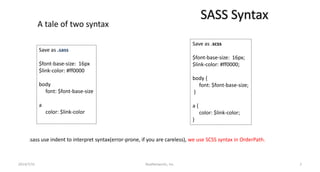
SASS Syntax
Save as .sass
$font-base-size: 16px
$link-color: #ff0000
body
font: $font-base-size
a
color: $link-color
Save as .scss
$font-base-size: 16px;
$link-color: #ff0000;
body {
font: $font-base-size;
}
a {
color: $link-color;
}
.sass use indent to interpret syntax(error-prone, if you are careless), we use SCSS syntax in OrderPath.
RealNetworks, Inc.2014/7/31 2
A tale of two syntax
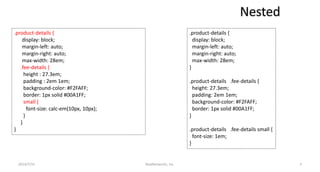
Nested
.product-details {
display: block;
margin-left: auto;
margin-right: auto;
max-width: 28em;
}
.product-details .fee-details {
height: 27.3em;
padding: 2em 1em;
background-color: #F2FAFF;
border: 1px solid #00A1FF;
}
.product-details .fee-details small {
font-size: 1em;
}
.product-details {
display: block;
margin-left: auto;
margin-right: auto;
max-width: 28em;
.fee-details {
height : 27.3em;
padding : 2em 1em;
background-color: #F2FAFF;
border: 1px solid #00A1FF;
small {
font-size: calc-em(10px, 10px);
}
}
}
RealNetworks, Inc.2014/7/31 3
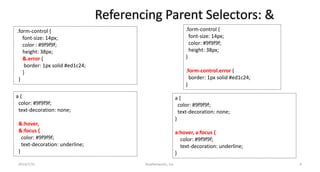
Referencing Parent Selectors: &
.form-control {
font-size: 14px;
color : #9f9f9f;
height: 38px;
&.error {
border: 1px solid #ed1c24;
}
}
.form-control {
font-size: 14px;
color: #9f9f9f;
height: 38px;
}
.form-control.error {
border: 1px solid #ed1c24;
}
a {
color: #9f9f9f;
text-decoration: none;
&:hover,
&:focus {
color: #9f9f9f;
text-decoration: underline;
}
a {
color: #9f9f9f;
text-decoration: none;
}
a:hover, a:focus {
color: #9f9f9f;
text-decoration: underline;
}
RealNetworks, Inc.2014/7/31 4
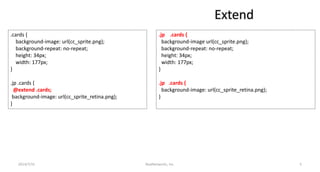
Extend
.cards {
background-image: url(cc_sprite.png);
background-repeat: no-repeat;
height: 34px;
width: 177px;
}
.jp .cards {
@extend .cards;
background-image: url(cc_sprite_retina.png);
}
.jp .cards {
background-image url(cc_sprite.png);
background-repeat: no-repeat;
height: 34px;
width: 177px;
}
.jp .cards {
background-image: url(cc_sprite_retina.png);
}
RealNetworks, Inc.2014/7/31 5
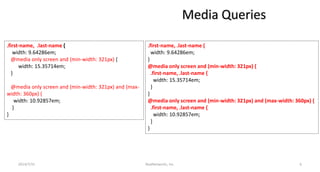
Media Queries
.first-name, .last-name {
width: 9.64286em;
@media only screen and (min-width: 321px) {
width: 15.35714em;
}
@media only screen and (min-width: 321px) and (max-
width: 360px) {
width: 10.92857em;
}
}
.first-name, .last-name {
width: 9.64286em;
}
@media only screen and (min-width: 321px) {
.first-name, .last-name {
width: 15.35714em;
}
}
@media only screen and (min-width: 321px) and (max-width: 360px) {
.first-name, .last-name {
width: 10.92857em;
}
}
RealNetworks, Inc.2014/7/31 6
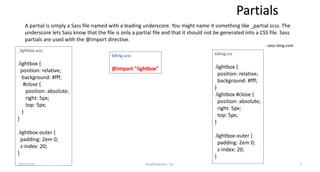
Partials
A partial is simply a Sass file named with a leading underscore. You might name it something like _partial.scss. The
underscore lets Sass know that the file is only a partial file and that it should not be generated into a CSS file. Sass
partials are used with the @import directive.
- sass-lang.com
_lightbox.scss
.lightbox {
position: relative;
background: #fff;
#close {
position: absolute;
right: 5px;
top: 5px;
}
}
.lightbox-outer {
padding: 2em 0;
z-index: 20;
}
billing.scss
@import "lightbox"
billing.css
.lightbox {
position: relative;
background: #fff;
}
.lightbox #close {
position: absolute;
right: 5px;
top: 5px;
}
.lightbox-outer {
padding: 2em 0;
z-index: 20;
}
RealNetworks, Inc.2014/7/31 7
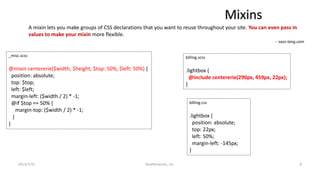
Mixins
A mixin lets you make groups of CSS declarations that you want to reuse throughout your site. You can even pass in
values to make your mixin more flexible.
- sass-lang.com
_misc.scss
@mixin centererie($width, $height, $top: 50%, $left: 50%) {
position: absolute;
top: $top;
left: $left;
margin-left: ($width / 2) * -1;
@if $top == 50% {
margin-top: ($width / 2) * -1;
}
}
billing.scss
.lightbox {
@include centererie(290px, 459px, 22px);
}
billing.css
.lightbox {
position: absolute;
top: 22px;
left: 50%;
margin-left: -145px;
}
RealNetworks, Inc.2014/7/31 8
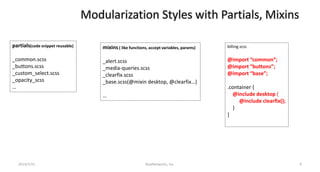
Modularization Styles with Partials, Mixins
partials(code snippet reusable)
_common.scss
_buttons.scss
_custom_select.scss
_opacity_scss
…
mixins ( like functions, accept variables, params)
_alert.scss
_media-queries.scss
_clearfix.scss
_base.scss(@mixin desktop, @clearfix…)
…
billing.scss
@import “common”;
@import “buttons”;
@import “base”;
.container {
@include desktop {
@include clearfix();
}
}
RealNetworks, Inc.2014/7/31 9
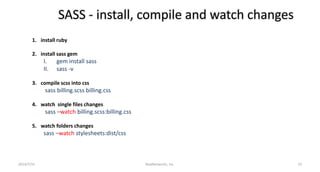
SASS - install, compile and watch changes
1. install ruby
2. install sass gem
I. gem install sass
II. sass -v
3. compile scss into css
sass billing.scss billing.css
4. watch single files changes
sass –watch billing.scss:billing.css
5. watch folders changes
sass –watch stylesheets:dist/css
RealNetworks, Inc.2014/7/31 10
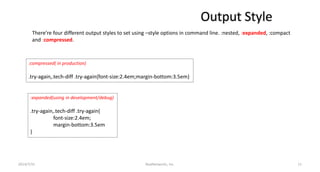
Output Style
2014/7/31 RealNetworks, Inc. 11
There’re four different output styles to set using –style options in command line. :nested, :expanded, :compact
and :compressed.
:compressed( in production)
.try-again,.tech-diff .try-again{font-size:2.4em;margin-bottom:3.5em}
:expanded(using in development/debug)
.try-again,.tech-diff .try-again{
font-size:2.4em;
margin-bottom:3.5em
}
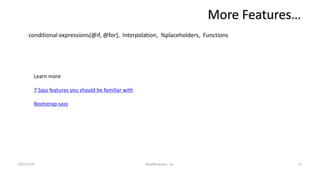
More Features…
2014/7/31 RealNetworks, Inc. 12
conditional expressions(@if, @for), Interpolation, %placeholders, Functions
Learn more
7 Sass features you should be familiar with
Bootstrap-sass
Thanks!
RealNetworks, Inc.2014/7/31 13

Modularization css with sass

  • 1.
    Modularization CSS withSASS Yan Huiyi(Dean) RPID, RealPlayer Cloud RealNetworks, Inc.
  • 2.
    SASS Syntax Save as.sass $font-base-size: 16px $link-color: #ff0000 body font: $font-base-size a color: $link-color Save as .scss $font-base-size: 16px; $link-color: #ff0000; body { font: $font-base-size; } a { color: $link-color; } .sass use indent to interpret syntax(error-prone, if you are careless), we use SCSS syntax in OrderPath. RealNetworks, Inc.2014/7/31 2 A tale of two syntax
  • 3.
    Nested .product-details { display: block; margin-left:auto; margin-right: auto; max-width: 28em; } .product-details .fee-details { height: 27.3em; padding: 2em 1em; background-color: #F2FAFF; border: 1px solid #00A1FF; } .product-details .fee-details small { font-size: 1em; } .product-details { display: block; margin-left: auto; margin-right: auto; max-width: 28em; .fee-details { height : 27.3em; padding : 2em 1em; background-color: #F2FAFF; border: 1px solid #00A1FF; small { font-size: calc-em(10px, 10px); } } } RealNetworks, Inc.2014/7/31 3
  • 4.
    Referencing Parent Selectors:& .form-control { font-size: 14px; color : #9f9f9f; height: 38px; &.error { border: 1px solid #ed1c24; } } .form-control { font-size: 14px; color: #9f9f9f; height: 38px; } .form-control.error { border: 1px solid #ed1c24; } a { color: #9f9f9f; text-decoration: none; &:hover, &:focus { color: #9f9f9f; text-decoration: underline; } a { color: #9f9f9f; text-decoration: none; } a:hover, a:focus { color: #9f9f9f; text-decoration: underline; } RealNetworks, Inc.2014/7/31 4
  • 5.
    Extend .cards { background-image: url(cc_sprite.png); background-repeat:no-repeat; height: 34px; width: 177px; } .jp .cards { @extend .cards; background-image: url(cc_sprite_retina.png); } .jp .cards { background-image url(cc_sprite.png); background-repeat: no-repeat; height: 34px; width: 177px; } .jp .cards { background-image: url(cc_sprite_retina.png); } RealNetworks, Inc.2014/7/31 5
  • 6.
    Media Queries .first-name, .last-name{ width: 9.64286em; @media only screen and (min-width: 321px) { width: 15.35714em; } @media only screen and (min-width: 321px) and (max- width: 360px) { width: 10.92857em; } } .first-name, .last-name { width: 9.64286em; } @media only screen and (min-width: 321px) { .first-name, .last-name { width: 15.35714em; } } @media only screen and (min-width: 321px) and (max-width: 360px) { .first-name, .last-name { width: 10.92857em; } } RealNetworks, Inc.2014/7/31 6
  • 7.
    Partials A partial issimply a Sass file named with a leading underscore. You might name it something like _partial.scss. The underscore lets Sass know that the file is only a partial file and that it should not be generated into a CSS file. Sass partials are used with the @import directive. - sass-lang.com _lightbox.scss .lightbox { position: relative; background: #fff; #close { position: absolute; right: 5px; top: 5px; } } .lightbox-outer { padding: 2em 0; z-index: 20; } billing.scss @import "lightbox" billing.css .lightbox { position: relative; background: #fff; } .lightbox #close { position: absolute; right: 5px; top: 5px; } .lightbox-outer { padding: 2em 0; z-index: 20; } RealNetworks, Inc.2014/7/31 7
  • 8.
    Mixins A mixin letsyou make groups of CSS declarations that you want to reuse throughout your site. You can even pass in values to make your mixin more flexible. - sass-lang.com _misc.scss @mixin centererie($width, $height, $top: 50%, $left: 50%) { position: absolute; top: $top; left: $left; margin-left: ($width / 2) * -1; @if $top == 50% { margin-top: ($width / 2) * -1; } } billing.scss .lightbox { @include centererie(290px, 459px, 22px); } billing.css .lightbox { position: absolute; top: 22px; left: 50%; margin-left: -145px; } RealNetworks, Inc.2014/7/31 8
  • 9.
    Modularization Styles withPartials, Mixins partials(code snippet reusable) _common.scss _buttons.scss _custom_select.scss _opacity_scss … mixins ( like functions, accept variables, params) _alert.scss _media-queries.scss _clearfix.scss _base.scss(@mixin desktop, @clearfix…) … billing.scss @import “common”; @import “buttons”; @import “base”; .container { @include desktop { @include clearfix(); } } RealNetworks, Inc.2014/7/31 9
  • 10.
    SASS - install,compile and watch changes 1. install ruby 2. install sass gem I. gem install sass II. sass -v 3. compile scss into css sass billing.scss billing.css 4. watch single files changes sass –watch billing.scss:billing.css 5. watch folders changes sass –watch stylesheets:dist/css RealNetworks, Inc.2014/7/31 10
  • 11.
    Output Style 2014/7/31 RealNetworks,Inc. 11 There’re four different output styles to set using –style options in command line. :nested, :expanded, :compact and :compressed. :compressed( in production) .try-again,.tech-diff .try-again{font-size:2.4em;margin-bottom:3.5em} :expanded(using in development/debug) .try-again,.tech-diff .try-again{ font-size:2.4em; margin-bottom:3.5em }
  • 12.
    More Features… 2014/7/31 RealNetworks,Inc. 12 conditional expressions(@if, @for), Interpolation, %placeholders, Functions Learn more 7 Sass features you should be familiar with Bootstrap-sass
  • 13.