














Making CSS fun again :)
About
○ Front end developer at Conrad Caine
○ Analysis and development of systems at SENAC
This is my first presentation and everything can be boring...
                      so let's drink beer!
I will talk about
○ CSS weaknesses
○ Syntax
○ Features
○ Techniques
○ ...
CSS WEAKNESSES
What's wrong with CSS?
○ No variables
○ Prefixes
○ Lack of abstraction
○ Hard to maintain (mainly in big css files)
THE SOLUTION
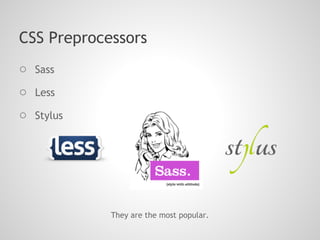
CSS Preprocessors
○ Sass
○ Less
○ Stylus


            They are the most popular.
WHAT ARE CSS
PREPROCESSORS?
What are CSS Preprocessor?
"CSS preprocessors take code written in the preprocessed
language and then convert that code into the same old css
we’ve been writing for years."
STARTING WITH SASS
About
○ Syntactically Awesome StyleSheets
○ Sass makes CSS fun again
○ Sass get installed as Ruby gem, then you need to have
   Ruby on your machine.
Installing
gem install sass
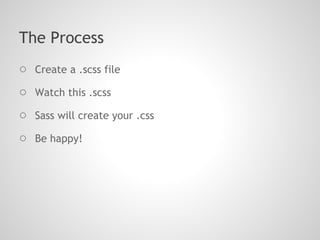
The Process
○ Create a .scss file
○ Watch this .scss
○ Sass will create your .css
○ Be happy!
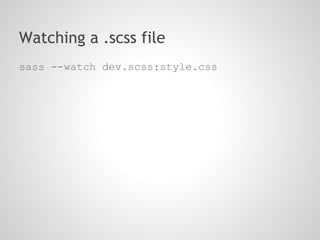
Watching a .scss file
sass --watch dev.scss:style.css
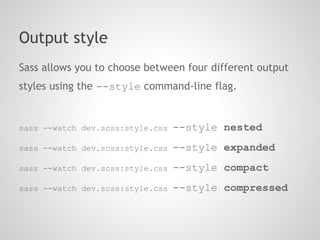
Output style
Sass allows you to choose between four different output
styles using the --style command-line flag.


sass --watch dev.scss:style.css   --style nested
sass --watch dev.scss:style.css   --style expanded
sass --watch dev.scss:style.css   --style compact
sass --watch dev.scss:style.css   --style compressed
VARIABLES
How can we do this today?
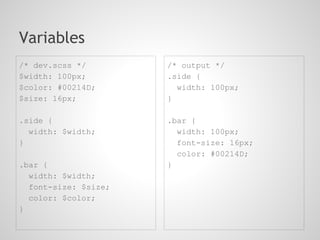
Variables
/* dev.scss */        /* output */
$width: 100px;        .side {
$color: #00214D;        width: 100px;
$size: 16px;          }

.side {               .bar {
  width: $width;        width: 100px;
}                       font-size: 16px;
                        color: #00214D;
.bar {                }
  width: $width;
  font-size: $size;
  color: $color;
}
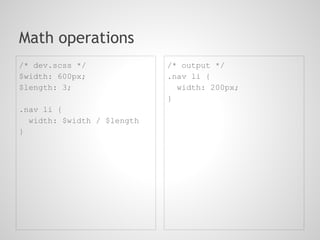
Math operations
/* dev.scss */              /* output */
$width: 600px;              .nav li {
$length: 3;                   width: 200px;
                            }
.nav li {
  width: $width / $length
}
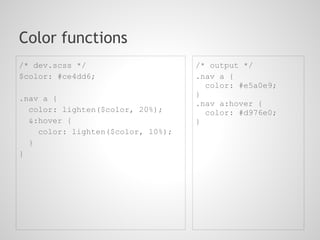
Color functions
/* dev.scss */                     /* output */
$color: #ce4dd6;                   .nav a {
                                     color: #e5a0e9;
                                   }
.nav a {
                                   .nav a:hover {
  color: lighten($color, 20%);       color: #d976e0;
  &:hover {                        }
    color: lighten($color, 10%);
  }
}
NESTING
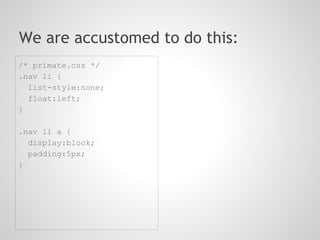
We are accustomed to do this:
/* primate.css */
.nav li {
  list-style:none;
  float:left;
}

.nav li a {
  display:block;
  padding:5px;
}
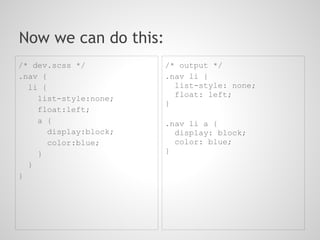
Now we can do this:
/* dev.scss */          /* output */
.nav {                  .nav li {
  li {                    list-style: none;
                          float: left;
    list-style:none;
                        }
    float:left;
    a {                 .nav li a {
       display:block;     display: block;
       color:blue;        color: blue;
    }                   }
  }
}
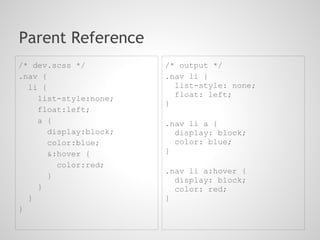
Parent Reference
/* dev.scss */          /* output */
.nav {                  .nav li {
  li {                    list-style: none;
                          float: left;
    list-style:none;
                        }
    float:left;
    a {                 .nav li a {
       display:block;     display: block;
       color:blue;        color: blue;
       &:hover {        }
         color:red;
                        .nav li a:hover {
       }
                          display: block;
    }                     color: red;
  }                     }
}
MIXINS
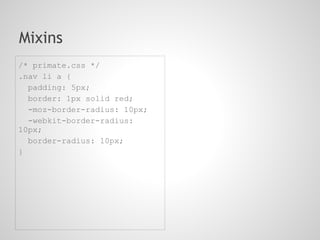
Mixins
/* primate.css */
.nav li a {
  padding: 5px;
  border: 1px solid red;
  -moz-border-radius: 10px;
  -webkit-border-radius:
10px;
  border-radius: 10px;
}
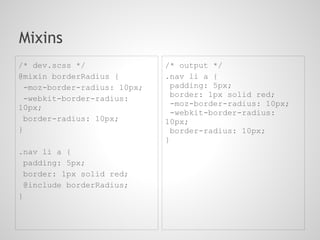
Mixins
/* dev.scss */               /* output */
@mixin borderRadius {        .nav li a {
 -moz-border-radius: 10px;     padding: 5px;
                               border: 1px solid red;
 -webkit-border-radius:
10px;                          -moz-border-radius: 10px;
                               -webkit-border-radius:
 border-radius: 10px;        10px;
}                              border-radius: 10px;
                             }
.nav li a {
 padding: 5px;
 border: 1px solid red;
 @include borderRadius;
}
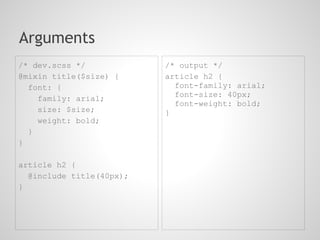
Arguments
/* dev.scss */            /* output */
@mixin title($size) {     article h2 {
  font: {                   font-family: arial;
                            font-size: 40px;
    family: arial;
                            font-weight: bold;
    size: $size;          }
    weight: bold;
  }
}

article h2 {
  @include title(40px);
}
INHERITANCE
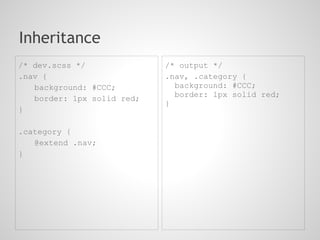
Inheritance
/* dev.scss */              /* output */
.nav {                      .nav, .category {
   background: #CCC;          background: #CCC;
                              border: 1px solid red;
   border: 1px solid red;
                            }
}

.category {
   @extend .nav;
}
INTERPOLATION
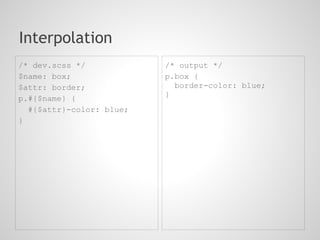
Interpolation
/* dev.scss */            /* output */
$name: box;               p.box {
$attr: border;              border-color: blue;
                          }
p.#{$name} {
  #{$attr}-color: blue;
}
@import
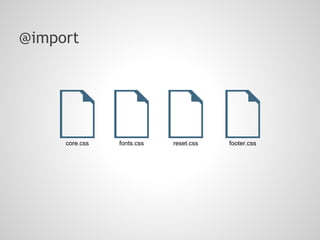
@import


     core.css   fonts.css   reset.css   footer.css
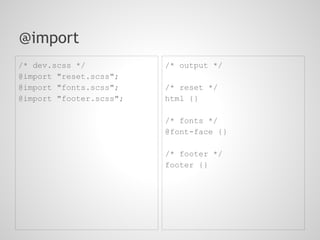
@import
/* dev.scss */           /* output */
@import "reset.scss";
@import "fonts.scss";    /* reset */
@import "footer.scss";   html {}

                         /* fonts */
                         @font-face {}

                         /* footer */
                         footer {}
Control Directives
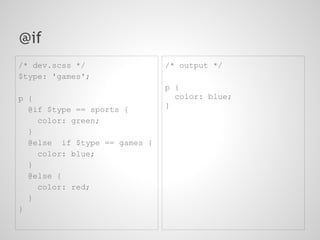
@if
/* dev.scss */                /* output */
$type: 'games';
                              p {
p {                             color: blue;
  @if $type == sports {       }
    color: green;
  }
  @else if $type == games {
    color: blue;
  }
  @else {
    color: red;
  }
}
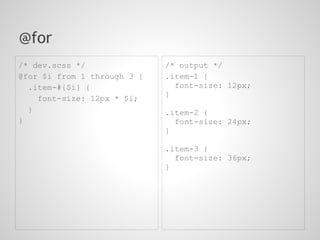
@for
/* dev.scss */               /* output */
@for $i from 1 through 3 {   .item-1 {
  .item-#{$i} {                font-size: 12px;
                             }
    font-size: 12px * $i;
  }                          .item-2 {
}                              font-size: 24px;
                             }

                             .item-3 {
                               font-size: 36px;
                             }
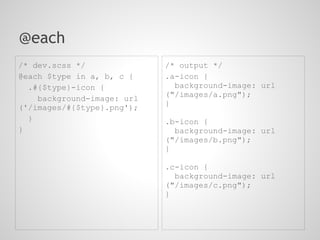
@each
/* dev.scss */              /* output */
@each $type in a, b, c {    .a-icon {
  .#{$type}-icon {            background-image: url
                            ("/images/a.png");
    background-image: url
('/images/#{$type}.png');   }
  }                         .b-icon {
}                             background-image: url
                            ("/images/b.png");
                            }

                            .c-icon {
                              background-image: url
                            ("/images/c.png");
                            }
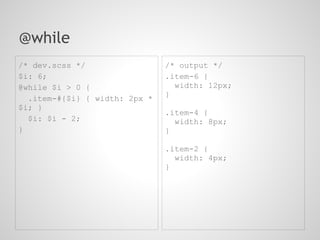
@while
/* dev.scss */                 /* output */
$i: 6;                         .item-6 {
@while $i > 0 {                  width: 12px;
                               }
  .item-#{$i} { width: 2px *
$i; }
                               .item-4 {
  $i: $i - 2;                    width: 8px;
}                              }

                               .item-2 {
                                 width: 4px;
                               }
Thank you!
○ gabrielneutzling@gmail.com
○ facebook.com/gneutzling
○ @gneutzling

Sass - Making CSS fun again.

  • 1.
  • 2.
    About ○ Front enddeveloper at Conrad Caine ○ Analysis and development of systems at SENAC
  • 3.
    This is myfirst presentation and everything can be boring... so let's drink beer!
  • 4.
    I will talkabout ○ CSS weaknesses ○ Syntax ○ Features ○ Techniques ○ ...
  • 5.
  • 6.
    What's wrong withCSS? ○ No variables ○ Prefixes ○ Lack of abstraction ○ Hard to maintain (mainly in big css files)
  • 7.
  • 8.
    CSS Preprocessors ○ Sass ○Less ○ Stylus They are the most popular.
  • 9.
  • 10.
    What are CSSPreprocessor? "CSS preprocessors take code written in the preprocessed language and then convert that code into the same old css we’ve been writing for years."
  • 11.
  • 12.
    About ○ Syntactically AwesomeStyleSheets ○ Sass makes CSS fun again ○ Sass get installed as Ruby gem, then you need to have Ruby on your machine.
  • 13.
  • 14.
    The Process ○ Createa .scss file ○ Watch this .scss ○ Sass will create your .css ○ Be happy!
  • 15.
    Watching a .scssfile sass --watch dev.scss:style.css
  • 16.
    Output style Sass allowsyou to choose between four different output styles using the --style command-line flag. sass --watch dev.scss:style.css --style nested sass --watch dev.scss:style.css --style expanded sass --watch dev.scss:style.css --style compact sass --watch dev.scss:style.css --style compressed
  • 17.
  • 18.
    How can wedo this today?
  • 19.
    Variables /* dev.scss */ /* output */ $width: 100px; .side { $color: #00214D; width: 100px; $size: 16px; } .side { .bar { width: $width; width: 100px; } font-size: 16px; color: #00214D; .bar { } width: $width; font-size: $size; color: $color; }
  • 20.
    Math operations /* dev.scss*/ /* output */ $width: 600px; .nav li { $length: 3; width: 200px; } .nav li { width: $width / $length }
  • 21.
    Color functions /* dev.scss*/ /* output */ $color: #ce4dd6; .nav a { color: #e5a0e9; } .nav a { .nav a:hover { color: lighten($color, 20%); color: #d976e0; &:hover { } color: lighten($color, 10%); } }
  • 22.
  • 23.
    We are accustomedto do this: /* primate.css */ .nav li { list-style:none; float:left; } .nav li a { display:block; padding:5px; }
  • 24.
    Now we cando this: /* dev.scss */ /* output */ .nav { .nav li { li { list-style: none; float: left; list-style:none; } float:left; a { .nav li a { display:block; display: block; color:blue; color: blue; } } } }
  • 25.
    Parent Reference /* dev.scss*/ /* output */ .nav { .nav li { li { list-style: none; float: left; list-style:none; } float:left; a { .nav li a { display:block; display: block; color:blue; color: blue; &:hover { } color:red; .nav li a:hover { } display: block; } color: red; } } }
  • 26.
  • 27.
    Mixins /* primate.css */ .navli a { padding: 5px; border: 1px solid red; -moz-border-radius: 10px; -webkit-border-radius: 10px; border-radius: 10px; }
  • 28.
    Mixins /* dev.scss */ /* output */ @mixin borderRadius { .nav li a { -moz-border-radius: 10px; padding: 5px; border: 1px solid red; -webkit-border-radius: 10px; -moz-border-radius: 10px; -webkit-border-radius: border-radius: 10px; 10px; } border-radius: 10px; } .nav li a { padding: 5px; border: 1px solid red; @include borderRadius; }
  • 29.
    Arguments /* dev.scss */ /* output */ @mixin title($size) { article h2 { font: { font-family: arial; font-size: 40px; family: arial; font-weight: bold; size: $size; } weight: bold; } } article h2 { @include title(40px); }
  • 30.
  • 31.
    Inheritance /* dev.scss */ /* output */ .nav { .nav, .category { background: #CCC; background: #CCC; border: 1px solid red; border: 1px solid red; } } .category { @extend .nav; }
  • 32.
  • 33.
    Interpolation /* dev.scss */ /* output */ $name: box; p.box { $attr: border; border-color: blue; } p.#{$name} { #{$attr}-color: blue; }
  • 34.
  • 35.
    @import core.css fonts.css reset.css footer.css
  • 36.
    @import /* dev.scss */ /* output */ @import "reset.scss"; @import "fonts.scss"; /* reset */ @import "footer.scss"; html {} /* fonts */ @font-face {} /* footer */ footer {}
  • 37.
  • 38.
    @if /* dev.scss */ /* output */ $type: 'games'; p { p { color: blue; @if $type == sports { } color: green; } @else if $type == games { color: blue; } @else { color: red; } }
  • 39.
    @for /* dev.scss */ /* output */ @for $i from 1 through 3 { .item-1 { .item-#{$i} { font-size: 12px; } font-size: 12px * $i; } .item-2 { } font-size: 24px; } .item-3 { font-size: 36px; }
  • 40.
    @each /* dev.scss */ /* output */ @each $type in a, b, c { .a-icon { .#{$type}-icon { background-image: url ("/images/a.png"); background-image: url ('/images/#{$type}.png'); } } .b-icon { } background-image: url ("/images/b.png"); } .c-icon { background-image: url ("/images/c.png"); }
  • 41.
    @while /* dev.scss */ /* output */ $i: 6; .item-6 { @while $i > 0 { width: 12px; } .item-#{$i} { width: 2px * $i; } .item-4 { $i: $i - 2; width: 8px; } } .item-2 { width: 4px; }
  • 42.
    Thank you! ○ gabrielneutzling@gmail.com ○facebook.com/gneutzling ○ @gneutzling