







CSS? Easy!
For a simple, maintainable, and sexy code.


                      i t h e x t ra b i ts of S as s
                    W
Let's talk about:

    CSS
    Sass
    Compass
    Cats
Bonjour

Je m’appelle Kaelig
2007-2012: front-ender in a French
web agency
Front-ender @responsivenews since
May 2012
It’s been a long journey
Veeeery long…
Nowadays
CSS3
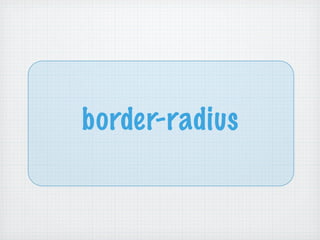
border-radius
border-image
css gradients
text-shadow
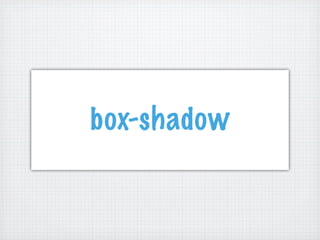
box-shadow
(animated octospider)
Colours
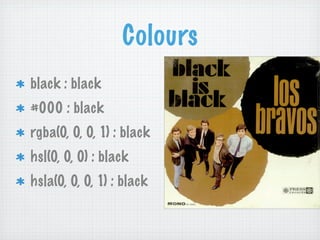
black : black
#000 : black
rgba(0, 0, 0, 1) : black
hsl(0, 0, 0) : black
hsla(0, 0, 0, 1) : black
@font-face

Typographic

 Freedom
Selectors
     E::before
     E::after
     E:nth-child()
     E[foo=bar]
     E#♥

http://www.w3.org/TR/css3-selectors/#selectors
CSS today is:
  More powerful
  Prettier
  More complex
What we are interested in:
       CSS code
What we are interested in:
       CSS code
What we are interested in:
       CSS code
     Ho w w e wri te a n d
     main t ain o u r CSS
Responsive News
Many developers
Iterative process
Many branches
Loads of CSS files
Also…
Everyone has his habits
 .camelCase
 .dash-lowercase
 .under_score
 brackets, indentation…
 Multi Line vs single line formatting
Class names can sometimes be very obscure
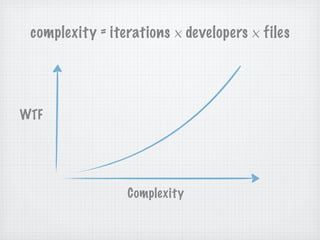
complexity = iterations × developers × files


WTF


                 Complexity
OOCSS
 more than a framework: a philosophy
 separate structure / skin
 separate form / content
 one class = one purpose


https://github.com/stubbornella/oocss/wiki
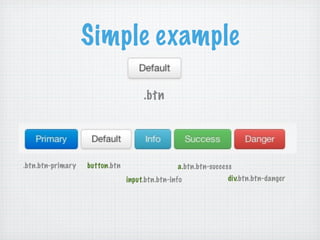
Simple example

                                     .btn


.btn.btn-primary   button.btn                   a.btn.btn-success
                                input.btn.btn-info             div.btn.btn-danger
Why OOCSS ?

Code reusability
HTML Flexibility
Rendering performances
Jumping in the project is easier
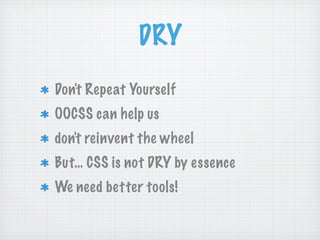
DRY
Don't Repeat Yourself
OOCSS can help us
don't reinvent the wheel
But… CSS is not DRY by essence
We need better tools!
gem install sass


http://sass-lang.com/
KISS
Keep It Simple
      …
  and Sexy
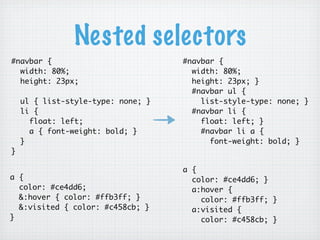
Nested selectors
#navbar {                           #navbar {
  width: 80%;                         width: 80%;
  height: 23px;                       height: 23px; }
                                      #navbar ul {
    ul { list-style-type: none; }       list-style-type: none; }
    li {                              #navbar li {
      float: left;                      float: left; }
      a { font-weight: bold; }          #navbar li a {
    }                                     font-weight: bold; }
}

                                    a {
a {                                   color: #ce4dd6; }
  color: #ce4dd6;                     a:hover {
  &:hover { color: #ffb3ff; }           color: #ffb3ff; }
  &:visited { color: #c458cb; }       a:visited {
}                                       color: #c458cb; }
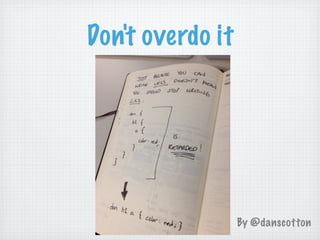
Don't overdo it


                  By @danscotton
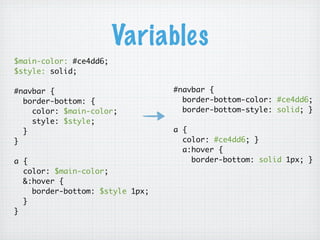
Variables
$main-color: #ce4dd6;
$style: solid;

#navbar {                        #navbar {
  border-bottom: {                 border-bottom-color: #ce4dd6;
    color: $main-color;            border-bottom-style: solid; }
    style: $style;
  }                              a {
}                                  color: #ce4dd6; }
                                   a:hover {
a {                                  border-bottom: solid 1px; }
  color: $main-color;
  &:hover {
    border-bottom: $style 1px;
  }
}
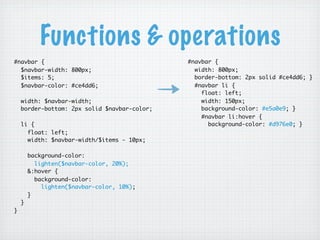
Functions & operations
#navbar {                                     #navbar {
  $navbar-width: 800px;                         width: 800px;
  $items: 5;                                    border-bottom: 2px solid #ce4dd6; }
  $navbar-color: #ce4dd6;                       #navbar li {
                                                  float: left;
    width: $navbar-width;                         width: 150px;
    border-bottom: 2px solid $navbar-color;       background-color: #e5a0e9; }
                                                  #navbar li:hover {
    li {                                            background-color: #d976e0; }
      float: left;
      width: $navbar-width/$items - 10px;

        background-color:
          lighten($navbar-color, 20%);
        &:hover {
          background-color:
            lighten($navbar-color, 10%);
        }
    }
}
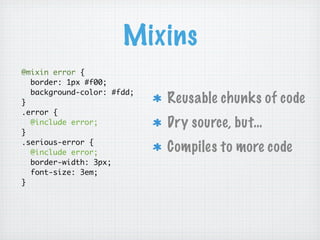
Mixins
@mixin error {
  border: 1px #f00;
  background-color: #fdd;
}                           Reusable chunks of code
.error {
  @include error;           Dry source, but…
}
.serious-error {
  @include error;           Compiles to more code
  border-width: 3px;
  font-size: 3em;
}
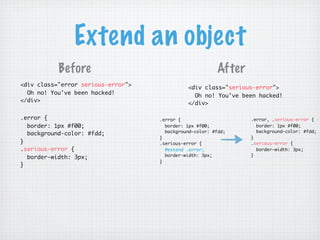
Extend an object
           Before                                        After
<div class="error serious-error">             <div class="serious-error">
  Oh no! You've been hacked!                    Oh no! You've been hacked!
</div>                                        </div>

.error {                            .error {                     .error, .serious-error {
  border: 1px #f00;                   border: 1px #f00;            border: 1px #f00;
                                      background-color: #fdd;      background-color: #fdd;
  background-color: #fdd;
                                    }                            }
}                                   .serious-error {             .serious-error {
.serious-error {                      @extend .error;              border-width: 3px;
                                      border-width: 3px;         }
  border-width: 3px;
                                    }
}
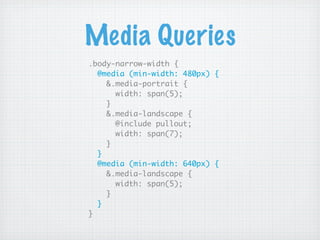
Media Queries
.body-narrow-width {
  @media (min-width: 480px) {
    &.media-portrait {
      width: span(5);
    }
    &.media-landscape {
      @include pullout;
      width: span(7);
    }
  }
  @media (min-width: 640px) {
    &.media-landscape {
      width: span(5);
    }
  }
}
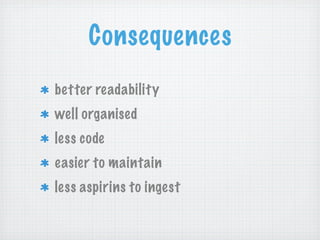
Consequences
better readability
well organised
less code
easier to maintain
less aspirins to ingest
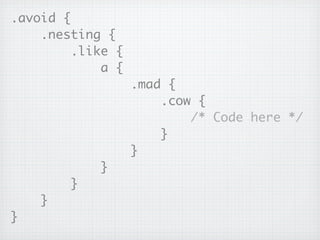
.avoid {
    .nesting {
         .like {
             a {
                   .mad {
                       .cow {
                           /* Code here */
                       }
                   }
            }
        }
    }
}
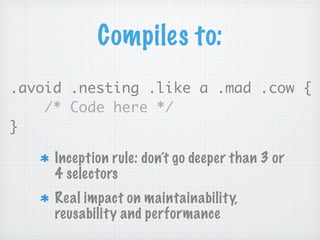
Compiles to:
.avoid .nesting .like a .mad .cow {
    /* Code here */
}

     Inception rule: don’t go deeper than 3 or
     4 selectors
     Real impact on maintainability,
     reusability and performance
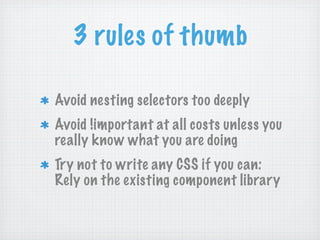
3 rules of thumb

Avoid nesting selectors too deeply
Avoid !important at all costs unless you
really know what you are doing
Try not to write any CSS if you can:
Rely on the existing component library
gem install compass


http://compass-style.org/
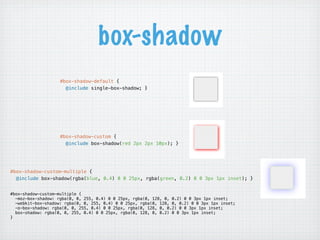
box-shadow
                    #box-shadow-default {
                      @include single-box-shadow; }


                    #box-shadow-custom {
                      @include box-shadow(red 2px 2px 10px); }


#box-shadow-custom-multiple {
  @include box-shadow(rgba(blue, 0.4) 0 0 25px, rgba(green, 0.2) 0 0 3px 1px inset); }


#box-shadow-custom-multiple {
  -moz-box-shadow: rgba(0, 0, 255, 0.4) 0 0 25px, rgba(0, 128, 0, 0.2) 0 0 3px 1px inset;
  -webkit-box-shadow: rgba(0, 0, 255, 0.4) 0 0 25px, rgba(0, 128, 0, 0.2) 0 0 3px 1px inset;
  -o-box-shadow: rgba(0, 0, 255, 0.4) 0 0 25px, rgba(0, 128, 0, 0.2) 0 0 3px 1px inset;
  box-shadow: rgba(0, 0, 255, 0.4) 0 0 25px, rgba(0, 128, 0, 0.2) 0 0 3px 1px inset;
}
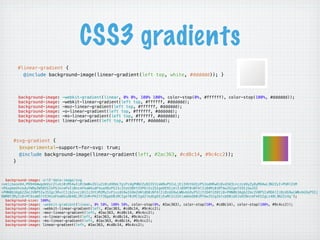
CSS3 gradients
        #linear-gradient {
          @include background-image(linear-gradient(left top, white, #dddddd)); }


        background-image:    -webkit-gradient(linear, 0% 0%, 100% 100%, color-stop(0%, #ffffff), color-stop(100%, #dddddd));
        background-image:    -webkit-linear-gradient(left top, #ffffff, #dddddd);
        background-image:    -moz-linear-gradient(left top, #ffffff, #dddddd);
        background-image:    -o-linear-gradient(left top, #ffffff, #dddddd);
        background-image:    -ms-linear-gradient(left top, #ffffff, #dddddd);
        background-image:    linear-gradient(left top, #ffffff, #dddddd);


     #svg-gradient {
       $experimental-support-for-svg: true;
       @include background-image(linear-gradient(left, #2ac363, #cd8c14, #9c4cc2));
     }


  background-image: url('data:image/svg
+xml;base64,PD94bWwgdmVyc2lvbj0iMS4wIiBlbmNvZGluZz0idXRmLTgiPz4gPHN2ZyB2ZXJzaW9uPSIxLjEiIHhtbG5zPSJodHRwOi8vd3d3LnczLm9yZy8yMDAwL3N2ZyI+PGRlZnM
+PGxpbmVhckdyYWRpZW50IGlkPSJncmFkIiBncmFkaWVudFVuaXRzPSJ1c2VyU3BhY2VPblVzZSIgeDE9IjAlIiB5MT0iNTAlIiB4Mj0iMTAwJSIgeTI9IjUwJSI
+PHN0b3Agb2Zmc2V0PSIwJSIgc3RvcC1jb2xvcj0iIzJhYzM2MyIvPjxzdG9wIG9mZnNldD0iNTAlIiBzdG9wLWNvbG9yPSIjY2Q4YzE0Ii8+PHN0b3Agb2Zmc2V0PSIxMDAlIiBzdG9wLWNvbG9yPSIj
OWM0Y2MyIi8+PC9saW5lYXJHcmFkaWVudD48L2RlZnM+PHJlY3QgeD0iMCIgeT0iMCIgd2lkdGg9IjEwMCUiIGhlaWdodD0iMTAwJSIgZmlsbD0idXJsKCNncmFkKSIgLz48L3N2Zz4g');
  background-size: 100%;
  background-image: -webkit-gradient(linear, 0% 50%, 100% 50%, color-stop(0%, #2ac363), color-stop(50%, #cd8c14), color-stop(100%, #9c4cc2));
  background-image: -webkit-linear-gradient(left, #2ac363, #cd8c14, #9c4cc2);
  background-image: -moz-linear-gradient(left, #2ac363, #cd8c14, #9c4cc2);
  background-image: -o-linear-gradient(left, #2ac363, #cd8c14, #9c4cc2);
  background-image: -ms-linear-gradient(left, #2ac363, #cd8c14, #9c4cc2);
  background-image: linear-gradient(left, #2ac363, #cd8c14, #9c4cc2);
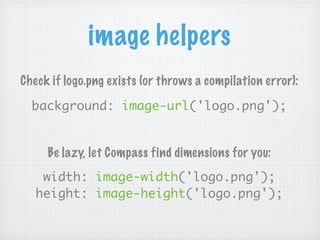
image helpers
Check if logo.png exists (or throws a compilation error):

  background: image-url('logo.png');


     Be lazy, let Compass find dimensions for you:
    width: image-width('logo.png');
   height: image-height('logo.png');
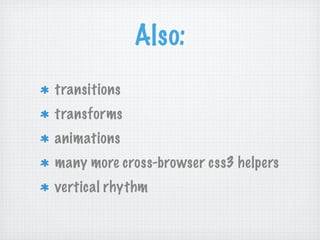
Also:
transitions
transforms
animations
many more cross-browser css3 helpers
vertical rhythm
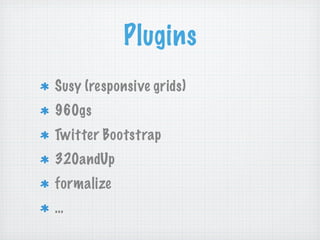
Plugins
Susy (responsive grids)
960gs
Twitter Bootstrap
320andUp
formalize
…
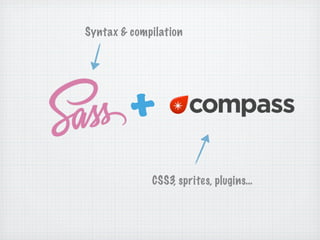
Syntax & compilation


         +
             CSS3, sprites, plugins…
With Sass & Compass
The machine is writing code,
not your fingers (be lazy)
less cross-browser debugging
more time to learn new exciting stuff
☛ become a better developer
How we use it
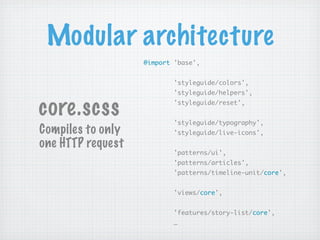
Modular architecture
                   @import 'base',


                           'styleguide/colors',
                           'styleguide/helpers',


core.scss                  'styleguide/reset',


                           'styleguide/typography',
Compiles to only           'styleguide/live-icons',
one HTTP request
                           'patterns/ui',
                           'patterns/articles',
                           'patterns/timeline-unit/core',


                           'views/core',


                           'features/story-list/core',
                           …
Mobile first with Sass
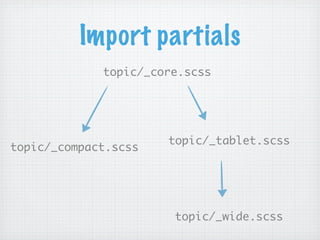
Import partials
             topic/_core.scss


                      topic/_tablet.scss
topic/_compact.scss


                       topic/_wide.scss
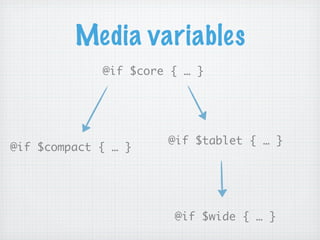
Media variables
             @if $core { … }


                      @if $tablet { … }
@if $compact { … }


                       @if $wide { … }
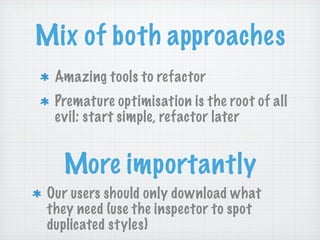
Mix of both approaches
  Amazing tools to refactor
  Premature optimisation is the root of all
  evil: start simple, refactor later


   More importantly
 Our users should only download what
 they need (use the inspector to spot
 duplicated styles)
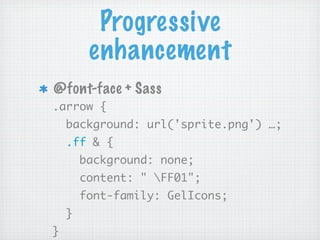
Progressive
         enhancement
@font-face + Sass
.arrow {
    background: url('sprite.png') …;
    .ff & {
        background: none;
        content: " FF01";
        font-family: GelIcons;
    }
}
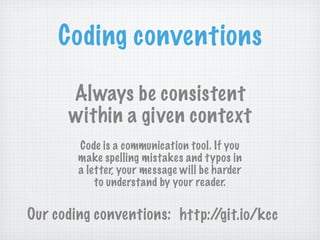
Coding conventions

      Always be consistent
      within a given context
        Code is a communication tool. If you
        make spelling mistakes and typos in
        a letter, your message will be harder
            to understand by your reader.

Our coding conventions: http://git.io/kcc
Wrapping it up
We write less code
We are always looking for ways to
write even less CSS code
Simple code is better than clever code:
don't overuse Sass
Write for the others
Merci !
github.com/kaelig             @kaelig


            Octocats from:

       http://octodex.github.com

Mobile-first OOCSS, Sass & Compass at BBC Responsive News

  • 1.
    CSS? Easy! For asimple, maintainable, and sexy code. i t h e x t ra b i ts of S as s W
  • 2.
    Let's talk about: CSS Sass Compass Cats
  • 3.
    Bonjour Je m’appelle Kaelig 2007-2012:front-ender in a French web agency Front-ender @responsivenews since May 2012
  • 5.
    It’s been along journey
  • 6.
  • 7.
  • 8.
  • 9.
  • 10.
  • 11.
  • 12.
  • 13.
  • 14.
  • 15.
  • 16.
    Colours black : black #000: black rgba(0, 0, 0, 1) : black hsl(0, 0, 0) : black hsla(0, 0, 0, 1) : black
  • 17.
  • 18.
    Selectors E::before E::after E:nth-child() E[foo=bar] E#♥ http://www.w3.org/TR/css3-selectors/#selectors
  • 19.
    CSS today is: More powerful Prettier More complex
  • 20.
    What we areinterested in: CSS code
  • 21.
    What we areinterested in: CSS code
  • 22.
    What we areinterested in: CSS code Ho w w e wri te a n d main t ain o u r CSS
  • 23.
    Responsive News Many developers Iterativeprocess Many branches Loads of CSS files
  • 24.
    Also… Everyone has hishabits .camelCase .dash-lowercase .under_score brackets, indentation… Multi Line vs single line formatting Class names can sometimes be very obscure
  • 25.
    complexity = iterations× developers × files WTF Complexity
  • 26.
    OOCSS more thana framework: a philosophy separate structure / skin separate form / content one class = one purpose https://github.com/stubbornella/oocss/wiki
  • 27.
    Simple example .btn .btn.btn-primary button.btn a.btn.btn-success input.btn.btn-info div.btn.btn-danger
  • 28.
    Why OOCSS ? Codereusability HTML Flexibility Rendering performances Jumping in the project is easier
  • 29.
    DRY Don't Repeat Yourself OOCSScan help us don't reinvent the wheel But… CSS is not DRY by essence We need better tools!
  • 30.
  • 31.
  • 33.
    Nested selectors #navbar { #navbar { width: 80%; width: 80%; height: 23px; height: 23px; } #navbar ul { ul { list-style-type: none; } list-style-type: none; } li { #navbar li { float: left; float: left; } a { font-weight: bold; } #navbar li a { } font-weight: bold; } } a { a { color: #ce4dd6; } color: #ce4dd6; a:hover { &:hover { color: #ffb3ff; } color: #ffb3ff; } &:visited { color: #c458cb; } a:visited { } color: #c458cb; }
  • 34.
    Don't overdo it By @danscotton
  • 35.
    Variables $main-color: #ce4dd6; $style: solid; #navbar{ #navbar { border-bottom: { border-bottom-color: #ce4dd6; color: $main-color; border-bottom-style: solid; } style: $style; } a { } color: #ce4dd6; } a:hover { a { border-bottom: solid 1px; } color: $main-color; &:hover { border-bottom: $style 1px; } }
  • 36.
    Functions & operations #navbar{ #navbar { $navbar-width: 800px; width: 800px; $items: 5; border-bottom: 2px solid #ce4dd6; } $navbar-color: #ce4dd6; #navbar li { float: left; width: $navbar-width; width: 150px; border-bottom: 2px solid $navbar-color; background-color: #e5a0e9; } #navbar li:hover { li { background-color: #d976e0; } float: left; width: $navbar-width/$items - 10px; background-color: lighten($navbar-color, 20%); &:hover { background-color: lighten($navbar-color, 10%); } } }
  • 37.
    Mixins @mixin error { border: 1px #f00; background-color: #fdd; } Reusable chunks of code .error { @include error; Dry source, but… } .serious-error { @include error; Compiles to more code border-width: 3px; font-size: 3em; }
  • 38.
    Extend an object Before After <div class="error serious-error"> <div class="serious-error"> Oh no! You've been hacked! Oh no! You've been hacked! </div> </div> .error { .error { .error, .serious-error { border: 1px #f00; border: 1px #f00; border: 1px #f00; background-color: #fdd; background-color: #fdd; background-color: #fdd; } } } .serious-error { .serious-error { .serious-error { @extend .error; border-width: 3px; border-width: 3px; } border-width: 3px; } }
  • 39.
    Media Queries .body-narrow-width { @media (min-width: 480px) { &.media-portrait { width: span(5); } &.media-landscape { @include pullout; width: span(7); } } @media (min-width: 640px) { &.media-landscape { width: span(5); } } }
  • 40.
    Consequences better readability well organised lesscode easier to maintain less aspirins to ingest
  • 42.
    .avoid { .nesting { .like { a { .mad { .cow { /* Code here */ } } } } } }
  • 43.
    Compiles to: .avoid .nesting.like a .mad .cow { /* Code here */ } Inception rule: don’t go deeper than 3 or 4 selectors Real impact on maintainability, reusability and performance
  • 44.
    3 rules ofthumb Avoid nesting selectors too deeply Avoid !important at all costs unless you really know what you are doing Try not to write any CSS if you can: Rely on the existing component library
  • 45.
  • 46.
    box-shadow #box-shadow-default {   @include single-box-shadow; } #box-shadow-custom {   @include box-shadow(red 2px 2px 10px); } #box-shadow-custom-multiple {   @include box-shadow(rgba(blue, 0.4) 0 0 25px, rgba(green, 0.2) 0 0 3px 1px inset); } #box-shadow-custom-multiple { -moz-box-shadow: rgba(0, 0, 255, 0.4) 0 0 25px, rgba(0, 128, 0, 0.2) 0 0 3px 1px inset; -webkit-box-shadow: rgba(0, 0, 255, 0.4) 0 0 25px, rgba(0, 128, 0, 0.2) 0 0 3px 1px inset; -o-box-shadow: rgba(0, 0, 255, 0.4) 0 0 25px, rgba(0, 128, 0, 0.2) 0 0 3px 1px inset; box-shadow: rgba(0, 0, 255, 0.4) 0 0 25px, rgba(0, 128, 0, 0.2) 0 0 3px 1px inset; }
  • 47.
    CSS3 gradients #linear-gradient {   @include background-image(linear-gradient(left top, white, #dddddd)); } background-image: -webkit-gradient(linear, 0% 0%, 100% 100%, color-stop(0%, #ffffff), color-stop(100%, #dddddd)); background-image: -webkit-linear-gradient(left top, #ffffff, #dddddd); background-image: -moz-linear-gradient(left top, #ffffff, #dddddd); background-image: -o-linear-gradient(left top, #ffffff, #dddddd); background-image: -ms-linear-gradient(left top, #ffffff, #dddddd); background-image: linear-gradient(left top, #ffffff, #dddddd); #svg-gradient {   $experimental-support-for-svg: true;   @include background-image(linear-gradient(left, #2ac363, #cd8c14, #9c4cc2)); } background-image: url('data:image/svg +xml;base64,PD94bWwgdmVyc2lvbj0iMS4wIiBlbmNvZGluZz0idXRmLTgiPz4gPHN2ZyB2ZXJzaW9uPSIxLjEiIHhtbG5zPSJodHRwOi8vd3d3LnczLm9yZy8yMDAwL3N2ZyI+PGRlZnM +PGxpbmVhckdyYWRpZW50IGlkPSJncmFkIiBncmFkaWVudFVuaXRzPSJ1c2VyU3BhY2VPblVzZSIgeDE9IjAlIiB5MT0iNTAlIiB4Mj0iMTAwJSIgeTI9IjUwJSI +PHN0b3Agb2Zmc2V0PSIwJSIgc3RvcC1jb2xvcj0iIzJhYzM2MyIvPjxzdG9wIG9mZnNldD0iNTAlIiBzdG9wLWNvbG9yPSIjY2Q4YzE0Ii8+PHN0b3Agb2Zmc2V0PSIxMDAlIiBzdG9wLWNvbG9yPSIj OWM0Y2MyIi8+PC9saW5lYXJHcmFkaWVudD48L2RlZnM+PHJlY3QgeD0iMCIgeT0iMCIgd2lkdGg9IjEwMCUiIGhlaWdodD0iMTAwJSIgZmlsbD0idXJsKCNncmFkKSIgLz48L3N2Zz4g'); background-size: 100%; background-image: -webkit-gradient(linear, 0% 50%, 100% 50%, color-stop(0%, #2ac363), color-stop(50%, #cd8c14), color-stop(100%, #9c4cc2)); background-image: -webkit-linear-gradient(left, #2ac363, #cd8c14, #9c4cc2); background-image: -moz-linear-gradient(left, #2ac363, #cd8c14, #9c4cc2); background-image: -o-linear-gradient(left, #2ac363, #cd8c14, #9c4cc2); background-image: -ms-linear-gradient(left, #2ac363, #cd8c14, #9c4cc2); background-image: linear-gradient(left, #2ac363, #cd8c14, #9c4cc2);
  • 48.
    image helpers Check iflogo.png exists (or throws a compilation error): background: image-url('logo.png'); Be lazy, let Compass find dimensions for you: width: image-width('logo.png'); height: image-height('logo.png');
  • 49.
  • 50.
    Plugins Susy (responsive grids) 960gs TwitterBootstrap 320andUp formalize …
  • 51.
    Syntax & compilation + CSS3, sprites, plugins…
  • 52.
    With Sass &Compass The machine is writing code, not your fingers (be lazy) less cross-browser debugging more time to learn new exciting stuff ☛ become a better developer
  • 53.
  • 55.
    Modular architecture @import 'base', 'styleguide/colors', 'styleguide/helpers', core.scss 'styleguide/reset', 'styleguide/typography', Compiles to only 'styleguide/live-icons', one HTTP request 'patterns/ui', 'patterns/articles', 'patterns/timeline-unit/core', 'views/core', 'features/story-list/core', …
  • 56.
  • 57.
    Import partials topic/_core.scss topic/_tablet.scss topic/_compact.scss topic/_wide.scss
  • 58.
    Media variables @if $core { … } @if $tablet { … } @if $compact { … } @if $wide { … }
  • 59.
    Mix of bothapproaches Amazing tools to refactor Premature optimisation is the root of all evil: start simple, refactor later More importantly Our users should only download what they need (use the inspector to spot duplicated styles)
  • 60.
    Progressive enhancement @font-face + Sass .arrow { background: url('sprite.png') …; .ff & { background: none; content: " FF01"; font-family: GelIcons; } }
  • 61.
    Coding conventions Always be consistent within a given context Code is a communication tool. If you make spelling mistakes and typos in a letter, your message will be harder to understand by your reader. Our coding conventions: http://git.io/kcc
  • 62.
    Wrapping it up Wewrite less code We are always looking for ways to write even less CSS code Simple code is better than clever code: don't overuse Sass Write for the others
  • 63.
    Merci ! github.com/kaelig @kaelig Octocats from: http://octodex.github.com