ITM 303
SAP SOLUTION MANAGER ALM FOCUS
AT TERUMO BCT
SRINIVASU GARAPATI
OCTOBER 21, 2014
In this session …
 This session will describe how Terumo BCT implemented Application
Lifecycle Management through Solution Manager
2
In this session …
 This session will describe how Terumo BCT implemented Application
Lifecycle Management through Solution Manager
 How we leveraged Expert Guide Implementations from SAP in
enabling ALM functionality through Solution Manager
3
In this session …
 This session will describe how Terumo BCT implemented Application
Lifecycle Management through Solution Manager
 How we leveraged Expert Guide Implementations from SAP in
enabling ALM functionality through Solution Manager
 How can you adapt Solution Manager with internal resources, without
using external consultants
4
5
Agenda
 About Terumo BCT
 Expert Guided Implementations
 Solution Manager Evolution
 Technical Operations
 Timelines
 Future Roadmap
 Wrap-up
Terumo BCT, a global leader in blood component,
therapeutic apheresis and cellular technologies.
We believe in the potential of blood
to do even more for patients than it does today.
This belief unites our organization,
inspires our innovation and strengthens
our collaboration with customers.
Terumo BCT
Unlocking the Potential of Blood
6
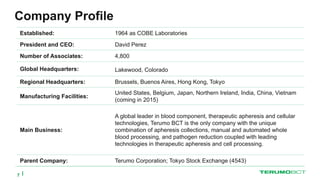
Company Profile
Established: 1964 as COBE Laboratories
President and CEO: David Perez
Number of Associates: 4,800
Global Headquarters: Lakewood, Colorado
Regional Headquarters: Brussels, Buenos Aires, Hong Kong, Tokyo
Manufacturing Facilities:
United States, Belgium, Japan, Northern Ireland, India, China, Vietnam
(coming in 2015)
Main Business:
A global leader in blood component, therapeutic apheresis and cellular
technologies, Terumo BCT is the only company with the unique
combination of apheresis collections, manual and automated whole
blood processing, and pathogen reduction coupled with leading
technologies in therapeutic apheresis and cell processing.
Parent Company: Terumo Corporation; Tokyo Stock Exchange (4543)
7
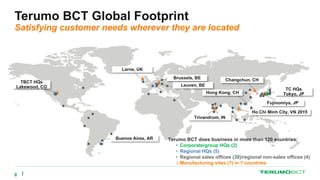
Terumo BCT Global Footprint
Satisfying customer needs wherever they are located




Hong Kong, CH
Ho Chi Minh City, VN 2015

Brussels, BE
Larne, UK
TBCT HQs
Lakewood, CO
Buenos Aires, AR Terumo BCT does business in more than 120 countries:
• Corporate/group HQs (2)
• Regional HQs (5)
• Regional sales offices (39)/regional non-sales offices (4)
∆ Manufacturing sites (7) in 7 countries


















 
 





 





Trivandrum, IN
TC HQs
Tokyo, JP
Fujinomiya, JP
Changchun, CH
Leuven, BE



 
8
9
WE IMPROVE LIVES THROUGH INNOVATION,
QUALITY AND SERVICES ENABLED BY OUR
BLOOD COMPONENT, THERAPEUTIC APHERESIS
AND CELLULAR TECHNOLOGIES.
Corporate Mission
Industry Experience with Solution Manager
 Complexity in implementation
 External consultants required for implementation
 Lack of Subject Matter Experts internally
 Maintenance difficulties
10
11
Agenda
 About Terumo BCT
 Expert Guided Implementations
 Solution Manager Evolution
 Technical Operations
 Timelines
 Future Roadmap
 Wrap-up
Expert Guided Implementations
What is EGI
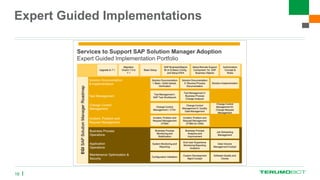
 Expert guided implementation is a new delivery methodology from SAP.
The methodology balances the combination of training, practical experience
and expertise on demand
12
Expert Guided Implementations
What is EGI
 Expert guided implementation is a new delivery methodology from SAP.
The methodology balances the combination of training, practical experience
and expertise on demand
 Expert guided implementation enables you to execute activities without
being a subject matter expert
13
Expert Guided Implementations
What is EGI
 Expert guided implementation is a new delivery methodology from SAP.
The methodology balances the combination of training, practical experience
and expertise on demand
 Expert guided implementation enables you to execute activities without
being a subject matter expert
 The methodology closes the gap between class room trainings and
consulting
14
Expert Guided Implementations
What is EGI
 Expert guided implementation is a new delivery methodology from SAP.
The methodology balances the combination of training, practical experience
and expertise on demand
 Expert guided implementation enables you to execute activities without
being a subject matter expert
 The methodology closes the gap between class room trainings and
consulting
 Expert guided implementation provides guidance for the execution phase of
your project
15
Expert Guided Implementations
16
Expert Guided Implementations
Highlighted in green indicates attended at Terumo BCT
17
18
Agenda
 About Terumo BCT
 Expert Guided Implementations
 Solution Manager Evolution
 Technical Operations
 Timelines
 Future Roadmap
 Wrap-up
19
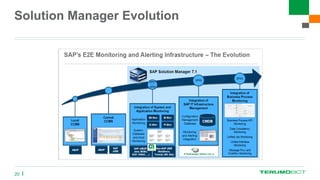
 What has changed in Solution Manager 7.1 ?
Solution Manager Evolution
20
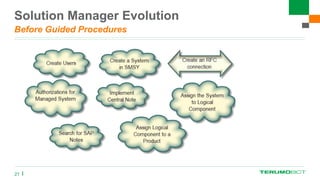
Solution Manager Evolution
Before Guided Procedures
21
Solution Manager Evolution
Before Solution Manager 7.1
22
 No clear way of executing and implementing functionality
 Very difficult to implement
 Very difficult to log the steps
 No easy way to find the status of the steps
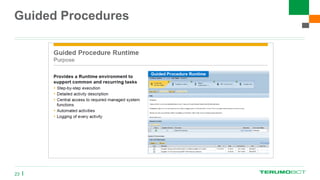
Guided Procedures
23
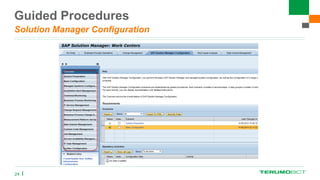
Guided Procedures
Solution Manager Configuration
24
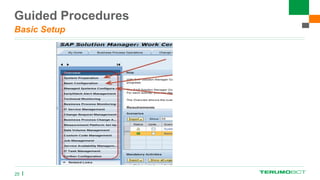
Guided Procedures
Basic Setup
25
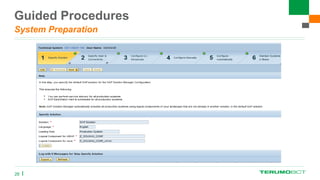
Guided Procedures
System Preparation
26
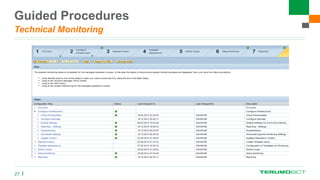
Guided Procedures
Technical Monitoring
27
Guided Procedures
Advantages
28
 Guides you step by step
 Shows you who performed the task
 Provides you the status of the step
 Automated steps
29
Agenda
 About Terumo BCT
 Expert Guided Implementations
 Solution Manager Evolution
 Technical Operations
 Timelines
 Future Roadmap
 Wrap-up
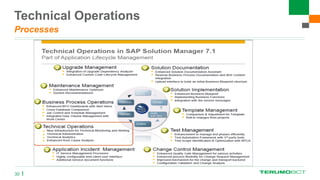
Technical Operations
Processes
30
Technical Operations
31
 New infrastructure for Technical Monitoring and Alerting
 Technical Administration
 Technical Analytics
 Enhanced Root Cause Analysis
Technical Operations
32
 New infrastructure for Technical Monitoring and Alerting
 Technical Administration
 Technical Analytics
 Enhanced Root Cause Analysis
 These work centers were all implemented at
Terumo BCT
Technical Operations
 How does Solution Manager collect the data from all managed
systems?
33
Technical Operations
 Pull Data providers
 Push Data providers
34
Technical Operations
Pull Data Providers
 Configuration: The configuration for all metrics collected by PULL data
providers is stored centrally in the directory tables of the Solution Manager
 Scheduling: The data collection is scheduled centrally on the SAP Solution
Manager
35
Technical Operations
Pull Data Providers
 Different pull data provider types:
 ST_PI: Solution Manager system calls ABAP function modules in the managed
systems which are delivered as part of ST-PI plug-in (Examples: local CCMS
metrics, Work Process status, qRFC information, …)
36
Technical Operations
Pull Data Providers
 Different pull data provider types:
 ST_PI: Solution Manager system calls ABAP function modules in the managed
systems which are delivered as part of ST-PI plug-in (Examples: local CCMS
metrics, Work Process status, qRFC information, …)
 ST: Solution Manager calls ABAP function modules which collect information from
the Solution Manager (Examples: EarlyWatch Alert results, E2E Change Analysis
results, …)
37
Technical Operations
Pull Data Providers
 Different pull data provider types:
 ST_PI: Solution Manager system calls ABAP function modules in the managed
systems which are delivered as part of ST-PI plug-in (Examples: local CCMS
metrics, Work Process status, qRFC information, …)
 ST: Solution Manager calls ABAP function modules which collect information from
the Solution Manager (Examples: Early Watch Alert results, E2E Change Analysis
results, …)
 ST_BW: Solution Manager calls ABAP function modules which collect information
from the BW system of Solution Manager (Examples: E2E Exception Analysis
results, ABAP statistic data, …)
38
Technical Operations
Pull Data Providers
 Different pull data provider types:
 ST_PI: Solution Manager system calls ABAP function modules in the managed
systems which are delivered as part of ST-PI plug-in (Examples: local CCMS
metrics, Work Process status, qRFC information, …)
 ST: Solution Manager calls ABAP function modules which collect information from
the Solution Manager (Examples: Early Watch Alert results, E2E Change Analysis
results, …)
 ST_BW: Solution Manager calls ABAP function modules which collect information
from the BW system of Solution Manager (Examples: E2E Exception Analysis
results, ABAP statistic data, …)
 DB: Solution Manager retrieves database metrics from the connections of
DBACockpit (Examples: Database backup status, Database table space usage,
…)
39
Technical Operations
Push Data Providers
 Configuration: The configuration for all metrics collected by PUSH
data providers is distributed to the Diagnostic Agents in an XML
during the setup.
 Scheduling: The data collection is scheduled locally by the agent
40
Technical Operations
Push Data Providers
Different push data provider types:
 Diagnostic Agent:
The Diagnostic Agent collects metrics locally. These metrics are then pushed to
the Solution Manager by calling a web service (Examples: OS data from
SapOsCol, Http Ping to URLs, RFC Ping to an ABAP instance, Process status in
SapStartSrv, …)
41
Technical Operations
Push Data Providers
Different push data provider types:
 Diagnostic Agent:
The Diagnostic Agent collects metrics locally. These metrics are then pushed to
the Solution Manager by calling a web service (Examples: OS data from
SapOsCol, Http Ping to URLs, RFC Ping to an ABAP instance, Process status in
SapStartSrv, …)
 Introscope:
The Introscope Enterprise Manager collects metrics which are sent to the
Solution Manager by calling a web service (Examples: J2EE metrics, BOBJ
metrics, …)
42
Technical Operations
Impact on SAP landscape
 We did not observe any spikes in CPU or Memory utilization
 Due to collection of data at different timings by data providers, no
bottlenecks (e.g., jobs running longer) were noted
 Since Diagnostic agents are updated automatically with Solution
Manager upgrades, no extra maintenance is required.
 Host Control agent upgrades can be automated, resulting in reduced
manual intervention/maintenance of each agent
43
44
Agenda
 About Terumo BCT
 Expert Guided Implementations
 Solution Manager Evolution
 Technical Operations
 Timelines
 Future Roadmap
 Wrap-up
Timelines
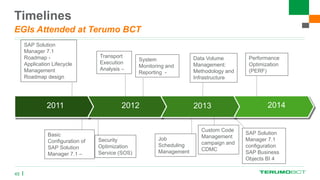
EGIs Attended at Terumo BCT
45
2011 2012 2013 2014
SAP Solution
Manager 7.1
Roadmap -
Application Lifecycle
Management
Roadmap design
Basic
Configuration of
SAP Solution
Manager 7.1 –
Job
Scheduling
Management
System
Monitoring and
Reporting -
Data Volume
Management:
Methodology and
Infrastructure
Custom Code
Management
campaign and
CDMC
SAP Solution
Manager 7.1
configuration
SAP Business
Objects BI 4
Security
Optimization
Service (SOS)
Transport
Execution
Analysis –
Performance
Optimization
(PERF)
Solution Manager Upgrades
Milestones
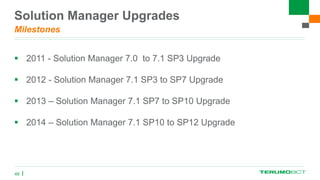
 2011 - Solution Manager 7.0 to 7.1 SP3 Upgrade
 2012 - Solution Manager 7.1 SP3 to SP7 Upgrade
 2013 – Solution Manager 7.1 SP7 to SP10 Upgrade
 2014 – Solution Manager 7.1 SP10 to SP12 Upgrade
46
Solution Manager Upgrades
Upgrade Benefits
 Important to keep up to date with Solution Manager Support pack
upgrades
47
Solution Manager Upgrades
Upgrade Benefits
 Important to keep up to date with Solution Manager Support pack
upgrades
 Upgrade ST-PI and ST-A/PI components in managed systems
regularly
48
Solution Manager Upgrades
Upgrade Benefits
 Important to keep up to date with Solution Manager Support pack
upgrades
 Upgrade ST-PI and ST-A/PI components in managed systems
regularly
 Attend Solution Manager 7.1 Roadmap session at SAP TechED &&
d-code.
49
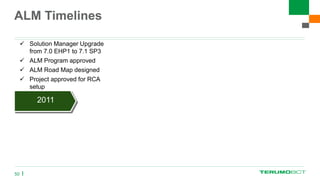
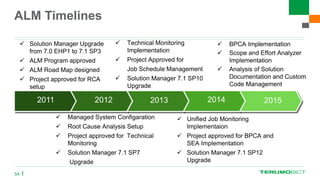
ALM Timelines
50
 Solution Manager Upgrade
from 7.0 EHP1 to 7.1 SP3
 ALM Program approved
 ALM Road Map designed
 Project approved for RCA
setup
2011 2012 2013 2014 2015
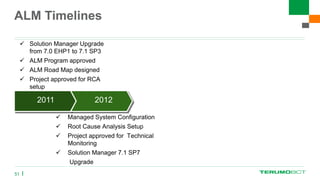
ALM Timelines
51
 Solution Manager Upgrade
from 7.0 EHP1 to 7.1 SP3
 ALM Program approved
 ALM Road Map designed
 Project approved for RCA
setup
 Managed System Configuration
 Root Cause Analysis Setup
 Project approved for Technical
Monitoring
 Solution Manager 7.1 SP7
Upgrade
2011 2012 2013 2014 2015
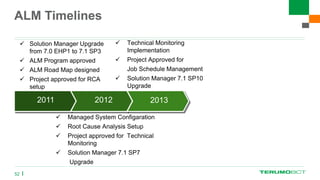
ALM Timelines
52
 Solution Manager Upgrade
from 7.0 EHP1 to 7.1 SP3
 ALM Program approved
 ALM Road Map designed
 Project approved for RCA
setup
 Technical Monitoring
Implementation
 Project Approved for
Job Schedule Management
 Solution Manager 7.1 SP10
Upgrade
 Managed System Configaration
 Root Cause Analysis Setup
 Project approved for Technical
Monitoring
 Solution Manager 7.1 SP7
Upgrade
2011 2012 2013 2014 2015
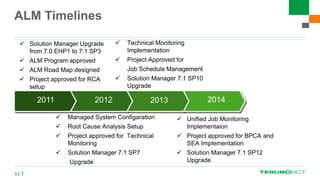
ALM Timelines
53
 Solution Manager Upgrade
from 7.0 EHP1 to 7.1 SP3
 ALM Program approved
 ALM Road Map designed
 Project approved for RCA
setup
 Technical Monitoring
Implementation
 Project Approved for
Job Schedule Management
 Solution Manager 7.1 SP10
Upgrade
 Managed System Configaration
 Root Cause Analysis Setup
 Project approved for Technical
Monitoring
 Solution Manager 7.1 SP7
Upgrade
2011 2012 2013 2014 2015
 Unified Job Monitoring
Implementaion
 Project approved for BPCA and
SEA Implementation
 Solution Manager 7.1 SP12
Upgrade
ALM Timelines
54
 Solution Manager Upgrade
from 7.0 EHP1 to 7.1 SP3
 ALM Program approved
 ALM Road Map designed
 Project approved for RCA
setup
 Technical Monitoring
Implementation
 Project Approved for
Job Schedule Management
 Solution Manager 7.1 SP10
Upgrade
 Managed System Configaration
 Root Cause Analysis Setup
 Project approved for Technical
Monitoring
 Solution Manager 7.1 SP7
Upgrade
2011 2012 2013 2014 2015
 Unified Job Monitoring
Implementaion
 Project approved for BPCA and
SEA Implementation
 Solution Manager 7.1 SP12
Upgrade
 BPCA Implementation
 Scope and Effort Analyzer
Implementation
 Analysis of Solution
Documentation and Custom
Code Management
55
Agenda
 About Terumo BCT
 Expert Guided Implementations
 Solution Manager Evolution
 Technical Operations
 Timelines
 Future Roadmap
 Wrap-up
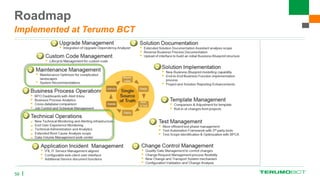
Roadmap
Implemented at Terumo BCT
56
Roadmap
Current work in progress
57
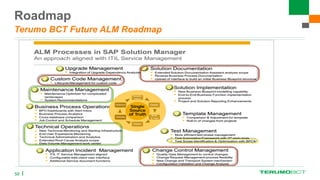
Roadmap
Terumo BCT Future ALM Roadmap
58
59
Agenda
 About Terumo BCT
 Expert Guided Implementations
 Solution Manager Evolution
 Technical Operations
 Timelines
 Future Roadmap
 Wrap-up
Benefits
 Centralized monitoring and administration through Solution Manager for entire landscape
 Job monitoring
 System exceptions
 RFC failures
 Interfaces
 Availability
 Tracking of administration tasks
 Minimal overhead to manage new systems when adding to your landscape
 We are well positioned for implementation of new work centers (e.g., BPCA and SEA)
 Advanced tools for complex troubleshooting (e.g., change analysis, trace analysis)
 We have built internal expertise
60
Key Points to Take Home
 Create a project for each phase of ALM, like a project from business –
Collect Requirements, Design, Build, Test, Deploy and Training
61
Key Points to Take Home
 Create a project for each phase of ALM, like a project from business –
Collect Requirements, Design, Build, Test, Deploy and Training
 Implement latest support packs before each phase of the project, to get
latest enhancements
62
Key Points to Take Home
 Create a project for each phase of ALM, like a project from business –
Collect Requirements, Design, Build, Test, Deploy and Training
 Implement latest support packs before each phase of the project, to get
latest enhancements
 Leverage online resources from SAP for every phase of the ALM. Use
Expert Guided Implementation services (5 free sessions per year),
RKTs and Guided procedures
63
Key Points to Take Home (Continued…)
 Allocate a Basis resource as Solution Manager Administrator
64
Key Points to Take Home (Continued…)
 Allocate a Basis resource as Solution Manager Administrator
 Maintain visibility of ALM implementation by keeping the Management
Team onboard at every stage of the project
65
Key Points to Take Home (Continued…)
 Allocate a Basis resource as Solution Manager Administrator
 Maintain visibility of ALM implementation by keeping the Management
Team onboard at every stage of the project
 Create smaller projects rather than a big blown implementation
66
Key Points to Take Home (Continued…)
 Allocate a Basis resource as Solution Manager Administrator
 Maintain visibility of ALM implementation by keeping the Management
Team onboard at every stage of the project
 Create smaller projects rather a big blown implementation
 Solution Manager is included with Enterprise Maintenance –
Leverage software you already own
67
Useful Resources
 SAP Enterprise Support Academy – Learning Studio
 https://support.sap.com/support-programs-services/solution-manager/training-
services.html
 SAP Solution Manager Homepage
 http://service.sap.com/solutionmanager
 SAP ALM Homepage
 https://support.sap.com/support-programs-services/solution-manager/processes.html
 Technical Operations Wiki on SCN
 http://wiki.scn.sap.com/wiki/display/TechOps/Home
 SAP Solution Manager setup Wiki on SCN
 http://wiki.scn.sap.com/wiki/display/SMSETUP/Home
 Solution Manager Documentation and Release Notes
 http://help.sap.com/solutionmanager71
 ALM on SAP Community Network
 http://www.sdn.sap.com/irj/sdn/alm
68
QUESTIONS
69

My Contact Information:
Srinivasu.garapati@terumobct.com
Twitter: @nysrinivas
Session Evaluation
Feedback:
 Please complete a session evaluation for this session
 Session ITM 303
70

SAP SOLUTION MANAGER ALM FOCUS AT TERUMO BCT

  • 1.
    ITM 303 SAP SOLUTIONMANAGER ALM FOCUS AT TERUMO BCT SRINIVASU GARAPATI OCTOBER 21, 2014
  • 2.
    In this session…  This session will describe how Terumo BCT implemented Application Lifecycle Management through Solution Manager 2
  • 3.
    In this session…  This session will describe how Terumo BCT implemented Application Lifecycle Management through Solution Manager  How we leveraged Expert Guide Implementations from SAP in enabling ALM functionality through Solution Manager 3
  • 4.
    In this session…  This session will describe how Terumo BCT implemented Application Lifecycle Management through Solution Manager  How we leveraged Expert Guide Implementations from SAP in enabling ALM functionality through Solution Manager  How can you adapt Solution Manager with internal resources, without using external consultants 4
  • 5.
    5 Agenda  About TerumoBCT  Expert Guided Implementations  Solution Manager Evolution  Technical Operations  Timelines  Future Roadmap  Wrap-up
  • 6.
    Terumo BCT, aglobal leader in blood component, therapeutic apheresis and cellular technologies. We believe in the potential of blood to do even more for patients than it does today. This belief unites our organization, inspires our innovation and strengthens our collaboration with customers. Terumo BCT Unlocking the Potential of Blood 6
  • 7.
    Company Profile Established: 1964as COBE Laboratories President and CEO: David Perez Number of Associates: 4,800 Global Headquarters: Lakewood, Colorado Regional Headquarters: Brussels, Buenos Aires, Hong Kong, Tokyo Manufacturing Facilities: United States, Belgium, Japan, Northern Ireland, India, China, Vietnam (coming in 2015) Main Business: A global leader in blood component, therapeutic apheresis and cellular technologies, Terumo BCT is the only company with the unique combination of apheresis collections, manual and automated whole blood processing, and pathogen reduction coupled with leading technologies in therapeutic apheresis and cell processing. Parent Company: Terumo Corporation; Tokyo Stock Exchange (4543) 7
  • 8.
    Terumo BCT GlobalFootprint Satisfying customer needs wherever they are located     Hong Kong, CH Ho Chi Minh City, VN 2015  Brussels, BE Larne, UK TBCT HQs Lakewood, CO Buenos Aires, AR Terumo BCT does business in more than 120 countries: • Corporate/group HQs (2) • Regional HQs (5) • Regional sales offices (39)/regional non-sales offices (4) ∆ Manufacturing sites (7) in 7 countries                                   Trivandrum, IN TC HQs Tokyo, JP Fujinomiya, JP Changchun, CH Leuven, BE      8
  • 9.
    9 WE IMPROVE LIVESTHROUGH INNOVATION, QUALITY AND SERVICES ENABLED BY OUR BLOOD COMPONENT, THERAPEUTIC APHERESIS AND CELLULAR TECHNOLOGIES. Corporate Mission
  • 10.
    Industry Experience withSolution Manager  Complexity in implementation  External consultants required for implementation  Lack of Subject Matter Experts internally  Maintenance difficulties 10
  • 11.
    11 Agenda  About TerumoBCT  Expert Guided Implementations  Solution Manager Evolution  Technical Operations  Timelines  Future Roadmap  Wrap-up
  • 12.
    Expert Guided Implementations Whatis EGI  Expert guided implementation is a new delivery methodology from SAP. The methodology balances the combination of training, practical experience and expertise on demand 12
  • 13.
    Expert Guided Implementations Whatis EGI  Expert guided implementation is a new delivery methodology from SAP. The methodology balances the combination of training, practical experience and expertise on demand  Expert guided implementation enables you to execute activities without being a subject matter expert 13
  • 14.
    Expert Guided Implementations Whatis EGI  Expert guided implementation is a new delivery methodology from SAP. The methodology balances the combination of training, practical experience and expertise on demand  Expert guided implementation enables you to execute activities without being a subject matter expert  The methodology closes the gap between class room trainings and consulting 14
  • 15.
    Expert Guided Implementations Whatis EGI  Expert guided implementation is a new delivery methodology from SAP. The methodology balances the combination of training, practical experience and expertise on demand  Expert guided implementation enables you to execute activities without being a subject matter expert  The methodology closes the gap between class room trainings and consulting  Expert guided implementation provides guidance for the execution phase of your project 15
  • 16.
  • 17.
    Expert Guided Implementations Highlightedin green indicates attended at Terumo BCT 17
  • 18.
    18 Agenda  About TerumoBCT  Expert Guided Implementations  Solution Manager Evolution  Technical Operations  Timelines  Future Roadmap  Wrap-up
  • 19.
    19  What haschanged in Solution Manager 7.1 ?
  • 20.
  • 21.
  • 22.
    Solution Manager Evolution BeforeSolution Manager 7.1 22  No clear way of executing and implementing functionality  Very difficult to implement  Very difficult to log the steps  No easy way to find the status of the steps
  • 23.
  • 24.
  • 25.
  • 26.
  • 27.
  • 28.
    Guided Procedures Advantages 28  Guidesyou step by step  Shows you who performed the task  Provides you the status of the step  Automated steps
  • 29.
    29 Agenda  About TerumoBCT  Expert Guided Implementations  Solution Manager Evolution  Technical Operations  Timelines  Future Roadmap  Wrap-up
  • 30.
  • 31.
    Technical Operations 31  Newinfrastructure for Technical Monitoring and Alerting  Technical Administration  Technical Analytics  Enhanced Root Cause Analysis
  • 32.
    Technical Operations 32  Newinfrastructure for Technical Monitoring and Alerting  Technical Administration  Technical Analytics  Enhanced Root Cause Analysis  These work centers were all implemented at Terumo BCT
  • 33.
    Technical Operations  Howdoes Solution Manager collect the data from all managed systems? 33
  • 34.
    Technical Operations  PullData providers  Push Data providers 34
  • 35.
    Technical Operations Pull DataProviders  Configuration: The configuration for all metrics collected by PULL data providers is stored centrally in the directory tables of the Solution Manager  Scheduling: The data collection is scheduled centrally on the SAP Solution Manager 35
  • 36.
    Technical Operations Pull DataProviders  Different pull data provider types:  ST_PI: Solution Manager system calls ABAP function modules in the managed systems which are delivered as part of ST-PI plug-in (Examples: local CCMS metrics, Work Process status, qRFC information, …) 36
  • 37.
    Technical Operations Pull DataProviders  Different pull data provider types:  ST_PI: Solution Manager system calls ABAP function modules in the managed systems which are delivered as part of ST-PI plug-in (Examples: local CCMS metrics, Work Process status, qRFC information, …)  ST: Solution Manager calls ABAP function modules which collect information from the Solution Manager (Examples: EarlyWatch Alert results, E2E Change Analysis results, …) 37
  • 38.
    Technical Operations Pull DataProviders  Different pull data provider types:  ST_PI: Solution Manager system calls ABAP function modules in the managed systems which are delivered as part of ST-PI plug-in (Examples: local CCMS metrics, Work Process status, qRFC information, …)  ST: Solution Manager calls ABAP function modules which collect information from the Solution Manager (Examples: Early Watch Alert results, E2E Change Analysis results, …)  ST_BW: Solution Manager calls ABAP function modules which collect information from the BW system of Solution Manager (Examples: E2E Exception Analysis results, ABAP statistic data, …) 38
  • 39.
    Technical Operations Pull DataProviders  Different pull data provider types:  ST_PI: Solution Manager system calls ABAP function modules in the managed systems which are delivered as part of ST-PI plug-in (Examples: local CCMS metrics, Work Process status, qRFC information, …)  ST: Solution Manager calls ABAP function modules which collect information from the Solution Manager (Examples: Early Watch Alert results, E2E Change Analysis results, …)  ST_BW: Solution Manager calls ABAP function modules which collect information from the BW system of Solution Manager (Examples: E2E Exception Analysis results, ABAP statistic data, …)  DB: Solution Manager retrieves database metrics from the connections of DBACockpit (Examples: Database backup status, Database table space usage, …) 39
  • 40.
    Technical Operations Push DataProviders  Configuration: The configuration for all metrics collected by PUSH data providers is distributed to the Diagnostic Agents in an XML during the setup.  Scheduling: The data collection is scheduled locally by the agent 40
  • 41.
    Technical Operations Push DataProviders Different push data provider types:  Diagnostic Agent: The Diagnostic Agent collects metrics locally. These metrics are then pushed to the Solution Manager by calling a web service (Examples: OS data from SapOsCol, Http Ping to URLs, RFC Ping to an ABAP instance, Process status in SapStartSrv, …) 41
  • 42.
    Technical Operations Push DataProviders Different push data provider types:  Diagnostic Agent: The Diagnostic Agent collects metrics locally. These metrics are then pushed to the Solution Manager by calling a web service (Examples: OS data from SapOsCol, Http Ping to URLs, RFC Ping to an ABAP instance, Process status in SapStartSrv, …)  Introscope: The Introscope Enterprise Manager collects metrics which are sent to the Solution Manager by calling a web service (Examples: J2EE metrics, BOBJ metrics, …) 42
  • 43.
    Technical Operations Impact onSAP landscape  We did not observe any spikes in CPU or Memory utilization  Due to collection of data at different timings by data providers, no bottlenecks (e.g., jobs running longer) were noted  Since Diagnostic agents are updated automatically with Solution Manager upgrades, no extra maintenance is required.  Host Control agent upgrades can be automated, resulting in reduced manual intervention/maintenance of each agent 43
  • 44.
    44 Agenda  About TerumoBCT  Expert Guided Implementations  Solution Manager Evolution  Technical Operations  Timelines  Future Roadmap  Wrap-up
  • 45.
    Timelines EGIs Attended atTerumo BCT 45 2011 2012 2013 2014 SAP Solution Manager 7.1 Roadmap - Application Lifecycle Management Roadmap design Basic Configuration of SAP Solution Manager 7.1 – Job Scheduling Management System Monitoring and Reporting - Data Volume Management: Methodology and Infrastructure Custom Code Management campaign and CDMC SAP Solution Manager 7.1 configuration SAP Business Objects BI 4 Security Optimization Service (SOS) Transport Execution Analysis – Performance Optimization (PERF)
  • 46.
    Solution Manager Upgrades Milestones 2011 - Solution Manager 7.0 to 7.1 SP3 Upgrade  2012 - Solution Manager 7.1 SP3 to SP7 Upgrade  2013 – Solution Manager 7.1 SP7 to SP10 Upgrade  2014 – Solution Manager 7.1 SP10 to SP12 Upgrade 46
  • 47.
    Solution Manager Upgrades UpgradeBenefits  Important to keep up to date with Solution Manager Support pack upgrades 47
  • 48.
    Solution Manager Upgrades UpgradeBenefits  Important to keep up to date with Solution Manager Support pack upgrades  Upgrade ST-PI and ST-A/PI components in managed systems regularly 48
  • 49.
    Solution Manager Upgrades UpgradeBenefits  Important to keep up to date with Solution Manager Support pack upgrades  Upgrade ST-PI and ST-A/PI components in managed systems regularly  Attend Solution Manager 7.1 Roadmap session at SAP TechED && d-code. 49
  • 50.
    ALM Timelines 50  SolutionManager Upgrade from 7.0 EHP1 to 7.1 SP3  ALM Program approved  ALM Road Map designed  Project approved for RCA setup 2011 2012 2013 2014 2015
  • 51.
    ALM Timelines 51  SolutionManager Upgrade from 7.0 EHP1 to 7.1 SP3  ALM Program approved  ALM Road Map designed  Project approved for RCA setup  Managed System Configuration  Root Cause Analysis Setup  Project approved for Technical Monitoring  Solution Manager 7.1 SP7 Upgrade 2011 2012 2013 2014 2015
  • 52.
    ALM Timelines 52  SolutionManager Upgrade from 7.0 EHP1 to 7.1 SP3  ALM Program approved  ALM Road Map designed  Project approved for RCA setup  Technical Monitoring Implementation  Project Approved for Job Schedule Management  Solution Manager 7.1 SP10 Upgrade  Managed System Configaration  Root Cause Analysis Setup  Project approved for Technical Monitoring  Solution Manager 7.1 SP7 Upgrade 2011 2012 2013 2014 2015
  • 53.
    ALM Timelines 53  SolutionManager Upgrade from 7.0 EHP1 to 7.1 SP3  ALM Program approved  ALM Road Map designed  Project approved for RCA setup  Technical Monitoring Implementation  Project Approved for Job Schedule Management  Solution Manager 7.1 SP10 Upgrade  Managed System Configaration  Root Cause Analysis Setup  Project approved for Technical Monitoring  Solution Manager 7.1 SP7 Upgrade 2011 2012 2013 2014 2015  Unified Job Monitoring Implementaion  Project approved for BPCA and SEA Implementation  Solution Manager 7.1 SP12 Upgrade
  • 54.
    ALM Timelines 54  SolutionManager Upgrade from 7.0 EHP1 to 7.1 SP3  ALM Program approved  ALM Road Map designed  Project approved for RCA setup  Technical Monitoring Implementation  Project Approved for Job Schedule Management  Solution Manager 7.1 SP10 Upgrade  Managed System Configaration  Root Cause Analysis Setup  Project approved for Technical Monitoring  Solution Manager 7.1 SP7 Upgrade 2011 2012 2013 2014 2015  Unified Job Monitoring Implementaion  Project approved for BPCA and SEA Implementation  Solution Manager 7.1 SP12 Upgrade  BPCA Implementation  Scope and Effort Analyzer Implementation  Analysis of Solution Documentation and Custom Code Management
  • 55.
    55 Agenda  About TerumoBCT  Expert Guided Implementations  Solution Manager Evolution  Technical Operations  Timelines  Future Roadmap  Wrap-up
  • 56.
  • 57.
  • 58.
  • 59.
    59 Agenda  About TerumoBCT  Expert Guided Implementations  Solution Manager Evolution  Technical Operations  Timelines  Future Roadmap  Wrap-up
  • 60.
    Benefits  Centralized monitoringand administration through Solution Manager for entire landscape  Job monitoring  System exceptions  RFC failures  Interfaces  Availability  Tracking of administration tasks  Minimal overhead to manage new systems when adding to your landscape  We are well positioned for implementation of new work centers (e.g., BPCA and SEA)  Advanced tools for complex troubleshooting (e.g., change analysis, trace analysis)  We have built internal expertise 60
  • 61.
    Key Points toTake Home  Create a project for each phase of ALM, like a project from business – Collect Requirements, Design, Build, Test, Deploy and Training 61
  • 62.
    Key Points toTake Home  Create a project for each phase of ALM, like a project from business – Collect Requirements, Design, Build, Test, Deploy and Training  Implement latest support packs before each phase of the project, to get latest enhancements 62
  • 63.
    Key Points toTake Home  Create a project for each phase of ALM, like a project from business – Collect Requirements, Design, Build, Test, Deploy and Training  Implement latest support packs before each phase of the project, to get latest enhancements  Leverage online resources from SAP for every phase of the ALM. Use Expert Guided Implementation services (5 free sessions per year), RKTs and Guided procedures 63
  • 64.
    Key Points toTake Home (Continued…)  Allocate a Basis resource as Solution Manager Administrator 64
  • 65.
    Key Points toTake Home (Continued…)  Allocate a Basis resource as Solution Manager Administrator  Maintain visibility of ALM implementation by keeping the Management Team onboard at every stage of the project 65
  • 66.
    Key Points toTake Home (Continued…)  Allocate a Basis resource as Solution Manager Administrator  Maintain visibility of ALM implementation by keeping the Management Team onboard at every stage of the project  Create smaller projects rather than a big blown implementation 66
  • 67.
    Key Points toTake Home (Continued…)  Allocate a Basis resource as Solution Manager Administrator  Maintain visibility of ALM implementation by keeping the Management Team onboard at every stage of the project  Create smaller projects rather a big blown implementation  Solution Manager is included with Enterprise Maintenance – Leverage software you already own 67
  • 68.
    Useful Resources  SAPEnterprise Support Academy – Learning Studio  https://support.sap.com/support-programs-services/solution-manager/training- services.html  SAP Solution Manager Homepage  http://service.sap.com/solutionmanager  SAP ALM Homepage  https://support.sap.com/support-programs-services/solution-manager/processes.html  Technical Operations Wiki on SCN  http://wiki.scn.sap.com/wiki/display/TechOps/Home  SAP Solution Manager setup Wiki on SCN  http://wiki.scn.sap.com/wiki/display/SMSETUP/Home  Solution Manager Documentation and Release Notes  http://help.sap.com/solutionmanager71  ALM on SAP Community Network  http://www.sdn.sap.com/irj/sdn/alm 68
  • 69.
  • 70.
    Session Evaluation Feedback:  Pleasecomplete a session evaluation for this session  Session ITM 303 70