SAP AG
2013
Operations Control Center (OCC)
Public
© 2013 SAP AG or an SAP affiliate company. All rights reserved. 2Public
Disclaimer
This presentation outlines our general product direction and should not be relied on in making a
purchase decision. This presentation is not subject to your license agreement or any other agreement
with SAP. SAP has no obligation to pursue any course of business outlined in this presentation or to
develop or release any functionality mentioned in this presentation. This presentation and SAP's
strategy and possible future developments are subject to change and may be changed by SAP at any
time for any reason without notice. This document is provided without a warranty of any kind, either
express or implied, including but not limited to, the implied warranties of merchantability, fitness for a
particular purpose, or non-infringement. SAP assumes no responsibility for errors or omissions in this
document, except if such damages were caused by SAP intentionally or grossly negligent.
© 2013 SAP AG or an SAP affiliate company. All rights reserved. 3Public
Agenda
What is an OCC?
Why do you need an OCC?
How do you set up an OCC?
What is an OCC?
© 2013 SAP AG or an SAP affiliate company. All rights reserved. 5Public
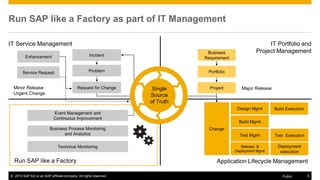
Change
Application Lifecycle ManagementRun SAP like a Factory
Business Process Monitoring
and Analytics
Build Execution
Test Execution
Deployment
execution
Build Mgmt
Test Mgmt
Release &
Deployment Mgmt
Design Mgmt
IT Service Management
Minor Release
Urgent Change
IT Portfolio and
Project Management
Project
Portfolio
Major Release
Run SAP like a Factory as part of IT Management
Business
RequirementEnhancement Incident
Problem
Request for Change
Service Request
Event Management and
Continuous Improvement
Technical Monitoring
Single
Source
of Truth
© 2013 SAP AG or an SAP affiliate company. All rights reserved. 6Public
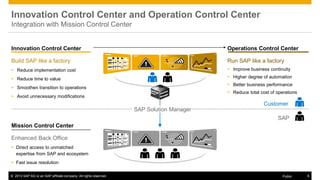
Innovation Control Center and Operation Control Center
Integration with Mission Control Center
Innovation Control Center
Build SAP like a factory
 Reduce implementation cost
 Reduce time to value
 Smoothen transition to operations
 Avoid unnecessary modifications
Mission Control Center
Enhanced Back Office
 Direct access to unmatched
expertise from SAP and ecosystem
 Fast issue resolution
Operations Control Center
Run SAP like a factory
 Improve business continuity
 Higher degree of automation
 Better business performance
 Reduce total cost of operations
SAP Solution Manager
Customer
SAP
© 2013 SAP AG or an SAP affiliate company. All rights reserved. 7Public
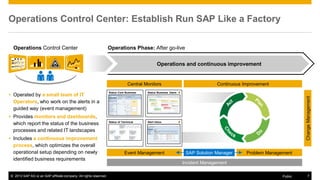
Operations Control Center: Establish Run SAP Like a Factory
Operations and continuous improvement
Operations Phase: After go-live
 Operated by a small team of IT
Operators, who work on the alerts in a
guided way (event management)
 Provides monitors and dashboards,
which report the status of the business
processes and related IT landscapes
 Includes a continuous improvement
process, which optimizes the overall
operational setup depending on newly
identified business requirements
Operations Control Center
Event Management
Incident Management
Problem Management
Continuous ImprovementCentral Monitors
SAP Solution Manager
ChangeManagement
Status Business UsersStatus Core Business
Processes
Status of Technical
Components
Alert Inbox
© 2013 SAP AG or an SAP affiliate company. All rights reserved. 8Public
The Central Monitors & Event Management
The central monitors / dashboards
 Address key operational pain points, and provide full transparency
about the status of the core business processes and the IT
landscape.
 Run on large TV screens in the Operations Control Center.
 Reports and dashboards provide detailed information to all IT support
levels (from IT Operators to the CIO).
Event Management
 Alerts are triggered in case of major exceptions and technical
problems.
 They show up in the alert inbox.
 The first analysis action, performed by IT Operators, is documented in
the alert context.
 Event Management defines the IT support process between alert
creation and alert closure.
© 2013 SAP AG or an SAP affiliate company. All rights reserved. 9Public
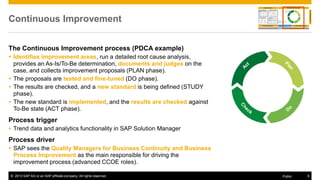
Continuous Improvement
The Continuous Improvement process (PDCA example)
 Identifies improvement areas, run a detailed root cause analysis,
provides an As-Is/To-Be determination, documents and judges on the
case, and collects improvement proposals (PLAN phase).
 The proposals are tested and fine-tuned (DO phase).
 The results are checked, and a new standard is being defined (STUDY
phase).
 The new standard is implemented, and the results are checked against
To-Be state (ACT phase).
Process trigger
 Trend data and analytics functionality in SAP Solution Manager
Process driver
 SAP sees the Quality Managers for Business Continuity and Business
Process Improvement as the main responsible for driving the
improvement process (advanced CCOE roles).
© 2013 SAP AG or an SAP affiliate company. All rights reserved. 10Public
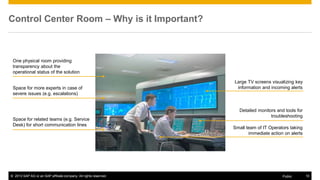
Control Center Room – Why is it Important?
One physical room providing
transparency about the
operational status of the solution
Space for more experts in case of
severe issues (e.g. escalations)
Space for related teams (e.g. Service
Desk) for short communication lines
Large TV screens visualizing key
information and incoming alerts
Detailed monitors and tools for
troubleshooting
Small team of IT Operators taking
immediate action on alerts
© 2013 SAP AG or an SAP affiliate company. All rights reserved. 11Public
Why on SAP Solution Manager 7.1?
Alerting
 New Monitoring and Alert Infrastructure with release 7.10
 Less alerts via grouping and correlation
 Tight integration into SAP CRM (incidents, tasks)
Monitoring and
Administration
 New SAP components will centrally show up here first (e.g. SAP HANA)
 Guided Procedures to support daily administration (e.g. SAP HANA)
Reporting
 BW reporting engine underneath SAP Solution Manager
 Preconfigured reports and dashboards (extendable)
Why do you need an OCC?
© 2013 SAP AG or an SAP affiliate company. All rights reserved. 13Public
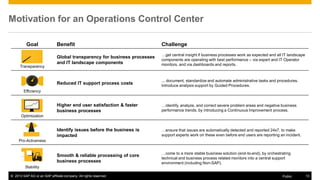
Motivation for an Operations Control Center
Goal Benefit Challenge
Transparency
Global transparency for business processes
and IT landscape components
…get central insight if business processes work as expected and all IT landscape
components are operating with best performance – via expert and IT Operator
monitors, and via dashboards and reports.
Efficiency
Reduced IT support process costs
... document, standardize and automate administrative tasks and procedures.
Introduce analysis support by Guided Procedures.
Optimization
Higher end user satisfaction & faster
business processes
…identify, analyze, and correct severe problem areas and negative business
performance trends, by introducing a Continuous Improvement process.
Pro-Activeness
Identify issues before the business is
impacted
…ensure that issues are automatically detected and reported 24x7, to make
support experts work on these even before end users are reporting an incident.
Stability
Smooth & reliable processing of core
business processes
…come to a more stable business solution (end-to-end), by orchestrating
technical and business process related monitors into a central support
environment (including Non-SAP).
© 2013 SAP AG or an SAP affiliate company. All rights reserved. 14Public
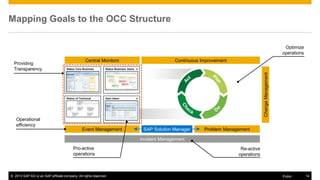
Mapping Goals to the OCC Structure
Event Management
Incident Management
Problem Management
Continuous ImprovementCentral Monitors
SAP Solution Manager
ChangeManagement
Status Business UsersStatus Core Business
Processes
Status of Technical
Components
Alert Inbox
Providing
Transparency
Operational
efficiency
Optimize
operations
Re-active
operations
Pro-active
operations
© 2013 SAP AG or an SAP affiliate company. All rights reserved. 15Public
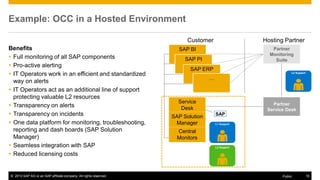
Example: OCC in a Hosted Environment
Benefits
 Full monitoring of all SAP components
 Pro-active alerting
 IT Operators work in an efficient and standardized
way on alerts
 IT Operators act as an additional line of support
protecting valuable L2 resources
 Transparency on alerts
 Transparency on incidents
 One data platform for monitoring, troubleshooting,
reporting and dash boards (SAP Solution
Manager)
 Seamless integration with SAP
 Reduced licensing costs
SAP BI
SAP PI
SAP ERP
…
Service
Desk
SAP Solution
Manager
Central
Monitors
Customer Hosting Partner
Partner
Monitoring
Suite
Partner
Service Desk
L2 Support
L2 Support
L1 Support
SAP
How do you set up an OCC?
© 2013 SAP AG or an SAP affiliate company. All rights reserved. 17Public
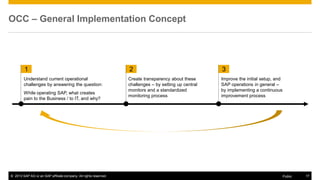
OCC – General Implementation Concept
2
Understand current operational
challenges by answering the question:
While operating SAP, what creates
pain to the Business / to IT, and why?
Create transparency about these
challenges – by setting up central
monitors and a standardized
monitoring process
Improve the initial setup, and
SAP operations in general –
by implementing a continuous
improvement process
1 3
© 2013 SAP AG or an SAP affiliate company. All rights reserved. 18Public
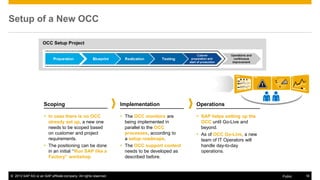
Setup of a New OCC
Scoping
 In case there is no OCC
already set up, a new one
needs to be scoped based
on customer and project
requirements.
 The positioning can be done
in an initial “Run SAP like a
Factory” workshop
Implementation
 The OCC monitors are
being implemented in
parallel to the OCC
processes, according to
a setup roadmaps.
 The OCC support content
needs to be developed as
described before.
Operations
 SAP helps setting up the
OCC until Go-Live and
beyond.
 As of OCC Go-Live, a new
team of IT Operators will
handle day-to-day
operations.
OCC Setup Project
© 2013 SAP AG or an SAP affiliate company. All rights reserved. 19Public
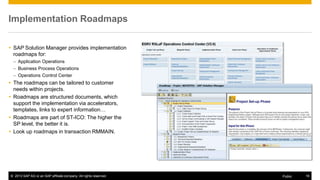
Implementation Roadmaps
 SAP Solution Manager provides implementation
roadmaps for:
– Application Operations
– Business Process Operations
– Operations Control Center
 The roadmaps can be tailored to customer
needs within projects.
 Roadmaps are structured documents, which
support the implementation via accelerators,
templates, links to expert information…
 Roadmaps are part of ST-ICO: The higher the
SP level, the better it is.
 Look up roadmaps in transaction RMMAIN.
© 2013 SAP AG or an SAP affiliate company. All rights reserved. 20Public
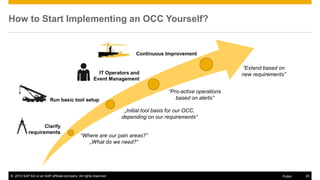
How to Start Implementing an OCC Yourself?
Clarify
requirements
Run basic tool setup
IT Operators and
Event Management
Continuous Improvement
“Where are our pain areas?”
„What do we need?“
„Initial tool basis for our OCC,
depending on our requirements“
“Pro-active operations
based on alerts”
“Extend based on
new requirements”
© 2013 SAP AG or an SAP affiliate company. All rights reserved. 21Public
More Information
White Paper on Run SAP like a Factory / OCC
https://service.sap.com/runfactory > How Run SAP like a Factory Works
WIKI on Application Operations at SDN
http://wiki.sdn.sap.com/wiki/display/TechOps/Home
Recordings (SAP TechEd Online)
Run SAP Like a Factory: Successful Business Process Monitoring
http://www.sapvirtualevents.com/teched/sessiondetails.aspx?sId=169
Run SAP Like a Factory: Technical Operation of SAP Landscapes
http://www.sapvirtualevents.com/teched/sessiondetails.aspx?sId=177
© 2013 SAP AG or an SAP affiliate company. All rights reserved. 22Public
Summary
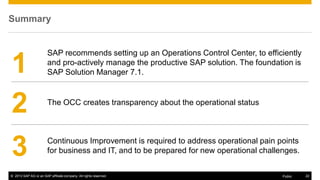
The OCC creates transparency about the operational status
Continuous Improvement is required to address operational pain points
for business and IT, and to be prepared for new operational challenges.
SAP recommends setting up an Operations Control Center, to efficiently
and pro-actively manage the productive SAP solution. The foundation is
SAP Solution Manager 7.1.1
2
3
© 2013 SAP AG or an SAP affiliate company. All rights reserved.
Thank You!
© 2014 SAP AG. All rights reserved. 43
No part of this publication may be reproduced or transmitted in any form or for any purpose
without the express permission of SAP AG. The information contained herein may be
changed without prior notice.
Some software products marketed by SAP AG and its distributors contain proprietary
software components of other software vendors.
Microsoft, Windows, Excel, Outlook, and PowerPoint are registered trademarks of Microsoft
Corporation.
IBM, DB2, DB2 Universal Database, System i, System i5, System p, System p5, System x,
System z, System z10, System z9, z10, z9, iSeries, pSeries, xSeries, zSeries, eServer,
z/VM, z/OS, i5/OS, S/390, OS/390, OS/400, AS/400, S/390 Parallel Enterprise Server,
PowerVM, Power Architecture, POWER6+, POWER6, POWER5+, POWER5, POWER,
OpenPower, PowerPC, BatchPipes, BladeCenter, System Storage, GPFS, HACMP,
RETAIN, DB2 Connect, RACF, Redbooks, OS/2, Parallel Sysplex, MVS/ESA, AIX,
Intelligent Miner, WebSphere, Netfinity, Tivoli and Informix are trademarks or registered
trademarks of IBM Corporation.
Linux is the registered trademark of Linus Torvalds in the U.S. and other countries.
Adobe, the Adobe logo, Acrobat, PostScript, and Reader are either trademarks or
registered trademarks of Adobe Systems Incorporated in the United States and/or other
countries.
Oracle and Java are registered trademarks of Oracle and/or its affiliates.
UNIX, X/Open, OSF/1, and Motif are registered trademarks of the Open Group.
Citrix, ICA, Program Neighborhood, MetaFrame, WinFrame, VideoFrame, and MultiWin are
trademarks or registered trademarks of Citrix Systems, Inc.
© 2014 SAP AG. All rights reserved.
HTML, XML, XHTML and W3C are trademarks or registered trademarks of W3C
®
, World
Wide Web Consortium, Massachusetts Institute of Technology.
SAP, R/3, SAP NetWeaver, Duet, PartnerEdge, ByDesign, SAP BusinessObjects Explorer,
StreamWork, and other SAP products and services mentioned herein as well as their
respective logos are trademarks or registered trademarks of SAP AG in Germany and other
countries.
Business Objects and the Business Objects logo, BusinessObjects, Crystal Reports,
Crystal Decisions, Web Intelligence, Xcelsius, and other Business Objects products and
services mentioned herein as well as their respective logos are trademarks or registered
trademarks of Business Objects Software Ltd. Business Objects is an
SAP company.
Sybase and Adaptive Server, iAnywhere, Sybase 365, SQL Anywhere, and other Sybase
products and services mentioned herein as well as their respective logos are trademarks or
registered trademarks of Sybase, Inc. Sybase is an SAP company.
All other product and service names mentioned are the trademarks of their respective
companies. Data contained in this document serves informational purposes only. National
product specifications may vary.
The information in this document is proprietary to SAP. No part of this document may be
reproduced, copied, or transmitted in any form or for any purpose without the express prior
written permission of SAP AG.

Operations Control Center (OCC)

  • 1.
    SAP AG 2013 Operations ControlCenter (OCC) Public
  • 2.
    © 2013 SAPAG or an SAP affiliate company. All rights reserved. 2Public Disclaimer This presentation outlines our general product direction and should not be relied on in making a purchase decision. This presentation is not subject to your license agreement or any other agreement with SAP. SAP has no obligation to pursue any course of business outlined in this presentation or to develop or release any functionality mentioned in this presentation. This presentation and SAP's strategy and possible future developments are subject to change and may be changed by SAP at any time for any reason without notice. This document is provided without a warranty of any kind, either express or implied, including but not limited to, the implied warranties of merchantability, fitness for a particular purpose, or non-infringement. SAP assumes no responsibility for errors or omissions in this document, except if such damages were caused by SAP intentionally or grossly negligent.
  • 3.
    © 2013 SAPAG or an SAP affiliate company. All rights reserved. 3Public Agenda What is an OCC? Why do you need an OCC? How do you set up an OCC?
  • 4.
  • 5.
    © 2013 SAPAG or an SAP affiliate company. All rights reserved. 5Public Change Application Lifecycle ManagementRun SAP like a Factory Business Process Monitoring and Analytics Build Execution Test Execution Deployment execution Build Mgmt Test Mgmt Release & Deployment Mgmt Design Mgmt IT Service Management Minor Release Urgent Change IT Portfolio and Project Management Project Portfolio Major Release Run SAP like a Factory as part of IT Management Business RequirementEnhancement Incident Problem Request for Change Service Request Event Management and Continuous Improvement Technical Monitoring Single Source of Truth
  • 6.
    © 2013 SAPAG or an SAP affiliate company. All rights reserved. 6Public Innovation Control Center and Operation Control Center Integration with Mission Control Center Innovation Control Center Build SAP like a factory  Reduce implementation cost  Reduce time to value  Smoothen transition to operations  Avoid unnecessary modifications Mission Control Center Enhanced Back Office  Direct access to unmatched expertise from SAP and ecosystem  Fast issue resolution Operations Control Center Run SAP like a factory  Improve business continuity  Higher degree of automation  Better business performance  Reduce total cost of operations SAP Solution Manager Customer SAP
  • 7.
    © 2013 SAPAG or an SAP affiliate company. All rights reserved. 7Public Operations Control Center: Establish Run SAP Like a Factory Operations and continuous improvement Operations Phase: After go-live  Operated by a small team of IT Operators, who work on the alerts in a guided way (event management)  Provides monitors and dashboards, which report the status of the business processes and related IT landscapes  Includes a continuous improvement process, which optimizes the overall operational setup depending on newly identified business requirements Operations Control Center Event Management Incident Management Problem Management Continuous ImprovementCentral Monitors SAP Solution Manager ChangeManagement Status Business UsersStatus Core Business Processes Status of Technical Components Alert Inbox
  • 8.
    © 2013 SAPAG or an SAP affiliate company. All rights reserved. 8Public The Central Monitors & Event Management The central monitors / dashboards  Address key operational pain points, and provide full transparency about the status of the core business processes and the IT landscape.  Run on large TV screens in the Operations Control Center.  Reports and dashboards provide detailed information to all IT support levels (from IT Operators to the CIO). Event Management  Alerts are triggered in case of major exceptions and technical problems.  They show up in the alert inbox.  The first analysis action, performed by IT Operators, is documented in the alert context.  Event Management defines the IT support process between alert creation and alert closure.
  • 9.
    © 2013 SAPAG or an SAP affiliate company. All rights reserved. 9Public Continuous Improvement The Continuous Improvement process (PDCA example)  Identifies improvement areas, run a detailed root cause analysis, provides an As-Is/To-Be determination, documents and judges on the case, and collects improvement proposals (PLAN phase).  The proposals are tested and fine-tuned (DO phase).  The results are checked, and a new standard is being defined (STUDY phase).  The new standard is implemented, and the results are checked against To-Be state (ACT phase). Process trigger  Trend data and analytics functionality in SAP Solution Manager Process driver  SAP sees the Quality Managers for Business Continuity and Business Process Improvement as the main responsible for driving the improvement process (advanced CCOE roles).
  • 10.
    © 2013 SAPAG or an SAP affiliate company. All rights reserved. 10Public Control Center Room – Why is it Important? One physical room providing transparency about the operational status of the solution Space for more experts in case of severe issues (e.g. escalations) Space for related teams (e.g. Service Desk) for short communication lines Large TV screens visualizing key information and incoming alerts Detailed monitors and tools for troubleshooting Small team of IT Operators taking immediate action on alerts
  • 11.
    © 2013 SAPAG or an SAP affiliate company. All rights reserved. 11Public Why on SAP Solution Manager 7.1? Alerting  New Monitoring and Alert Infrastructure with release 7.10  Less alerts via grouping and correlation  Tight integration into SAP CRM (incidents, tasks) Monitoring and Administration  New SAP components will centrally show up here first (e.g. SAP HANA)  Guided Procedures to support daily administration (e.g. SAP HANA) Reporting  BW reporting engine underneath SAP Solution Manager  Preconfigured reports and dashboards (extendable)
  • 12.
    Why do youneed an OCC?
  • 13.
    © 2013 SAPAG or an SAP affiliate company. All rights reserved. 13Public Motivation for an Operations Control Center Goal Benefit Challenge Transparency Global transparency for business processes and IT landscape components …get central insight if business processes work as expected and all IT landscape components are operating with best performance – via expert and IT Operator monitors, and via dashboards and reports. Efficiency Reduced IT support process costs ... document, standardize and automate administrative tasks and procedures. Introduce analysis support by Guided Procedures. Optimization Higher end user satisfaction & faster business processes …identify, analyze, and correct severe problem areas and negative business performance trends, by introducing a Continuous Improvement process. Pro-Activeness Identify issues before the business is impacted …ensure that issues are automatically detected and reported 24x7, to make support experts work on these even before end users are reporting an incident. Stability Smooth & reliable processing of core business processes …come to a more stable business solution (end-to-end), by orchestrating technical and business process related monitors into a central support environment (including Non-SAP).
  • 14.
    © 2013 SAPAG or an SAP affiliate company. All rights reserved. 14Public Mapping Goals to the OCC Structure Event Management Incident Management Problem Management Continuous ImprovementCentral Monitors SAP Solution Manager ChangeManagement Status Business UsersStatus Core Business Processes Status of Technical Components Alert Inbox Providing Transparency Operational efficiency Optimize operations Re-active operations Pro-active operations
  • 15.
    © 2013 SAPAG or an SAP affiliate company. All rights reserved. 15Public Example: OCC in a Hosted Environment Benefits  Full monitoring of all SAP components  Pro-active alerting  IT Operators work in an efficient and standardized way on alerts  IT Operators act as an additional line of support protecting valuable L2 resources  Transparency on alerts  Transparency on incidents  One data platform for monitoring, troubleshooting, reporting and dash boards (SAP Solution Manager)  Seamless integration with SAP  Reduced licensing costs SAP BI SAP PI SAP ERP … Service Desk SAP Solution Manager Central Monitors Customer Hosting Partner Partner Monitoring Suite Partner Service Desk L2 Support L2 Support L1 Support SAP
  • 16.
    How do youset up an OCC?
  • 17.
    © 2013 SAPAG or an SAP affiliate company. All rights reserved. 17Public OCC – General Implementation Concept 2 Understand current operational challenges by answering the question: While operating SAP, what creates pain to the Business / to IT, and why? Create transparency about these challenges – by setting up central monitors and a standardized monitoring process Improve the initial setup, and SAP operations in general – by implementing a continuous improvement process 1 3
  • 18.
    © 2013 SAPAG or an SAP affiliate company. All rights reserved. 18Public Setup of a New OCC Scoping  In case there is no OCC already set up, a new one needs to be scoped based on customer and project requirements.  The positioning can be done in an initial “Run SAP like a Factory” workshop Implementation  The OCC monitors are being implemented in parallel to the OCC processes, according to a setup roadmaps.  The OCC support content needs to be developed as described before. Operations  SAP helps setting up the OCC until Go-Live and beyond.  As of OCC Go-Live, a new team of IT Operators will handle day-to-day operations. OCC Setup Project
  • 19.
    © 2013 SAPAG or an SAP affiliate company. All rights reserved. 19Public Implementation Roadmaps  SAP Solution Manager provides implementation roadmaps for: – Application Operations – Business Process Operations – Operations Control Center  The roadmaps can be tailored to customer needs within projects.  Roadmaps are structured documents, which support the implementation via accelerators, templates, links to expert information…  Roadmaps are part of ST-ICO: The higher the SP level, the better it is.  Look up roadmaps in transaction RMMAIN.
  • 20.
    © 2013 SAPAG or an SAP affiliate company. All rights reserved. 20Public How to Start Implementing an OCC Yourself? Clarify requirements Run basic tool setup IT Operators and Event Management Continuous Improvement “Where are our pain areas?” „What do we need?“ „Initial tool basis for our OCC, depending on our requirements“ “Pro-active operations based on alerts” “Extend based on new requirements”
  • 21.
    © 2013 SAPAG or an SAP affiliate company. All rights reserved. 21Public More Information White Paper on Run SAP like a Factory / OCC https://service.sap.com/runfactory > How Run SAP like a Factory Works WIKI on Application Operations at SDN http://wiki.sdn.sap.com/wiki/display/TechOps/Home Recordings (SAP TechEd Online) Run SAP Like a Factory: Successful Business Process Monitoring http://www.sapvirtualevents.com/teched/sessiondetails.aspx?sId=169 Run SAP Like a Factory: Technical Operation of SAP Landscapes http://www.sapvirtualevents.com/teched/sessiondetails.aspx?sId=177
  • 22.
    © 2013 SAPAG or an SAP affiliate company. All rights reserved. 22Public Summary The OCC creates transparency about the operational status Continuous Improvement is required to address operational pain points for business and IT, and to be prepared for new operational challenges. SAP recommends setting up an Operations Control Center, to efficiently and pro-actively manage the productive SAP solution. The foundation is SAP Solution Manager 7.1.1 2 3
  • 23.
    © 2013 SAPAG or an SAP affiliate company. All rights reserved. Thank You!
  • 24.
    © 2014 SAPAG. All rights reserved. 43 No part of this publication may be reproduced or transmitted in any form or for any purpose without the express permission of SAP AG. The information contained herein may be changed without prior notice. Some software products marketed by SAP AG and its distributors contain proprietary software components of other software vendors. Microsoft, Windows, Excel, Outlook, and PowerPoint are registered trademarks of Microsoft Corporation. IBM, DB2, DB2 Universal Database, System i, System i5, System p, System p5, System x, System z, System z10, System z9, z10, z9, iSeries, pSeries, xSeries, zSeries, eServer, z/VM, z/OS, i5/OS, S/390, OS/390, OS/400, AS/400, S/390 Parallel Enterprise Server, PowerVM, Power Architecture, POWER6+, POWER6, POWER5+, POWER5, POWER, OpenPower, PowerPC, BatchPipes, BladeCenter, System Storage, GPFS, HACMP, RETAIN, DB2 Connect, RACF, Redbooks, OS/2, Parallel Sysplex, MVS/ESA, AIX, Intelligent Miner, WebSphere, Netfinity, Tivoli and Informix are trademarks or registered trademarks of IBM Corporation. Linux is the registered trademark of Linus Torvalds in the U.S. and other countries. Adobe, the Adobe logo, Acrobat, PostScript, and Reader are either trademarks or registered trademarks of Adobe Systems Incorporated in the United States and/or other countries. Oracle and Java are registered trademarks of Oracle and/or its affiliates. UNIX, X/Open, OSF/1, and Motif are registered trademarks of the Open Group. Citrix, ICA, Program Neighborhood, MetaFrame, WinFrame, VideoFrame, and MultiWin are trademarks or registered trademarks of Citrix Systems, Inc. © 2014 SAP AG. All rights reserved. HTML, XML, XHTML and W3C are trademarks or registered trademarks of W3C ® , World Wide Web Consortium, Massachusetts Institute of Technology. SAP, R/3, SAP NetWeaver, Duet, PartnerEdge, ByDesign, SAP BusinessObjects Explorer, StreamWork, and other SAP products and services mentioned herein as well as their respective logos are trademarks or registered trademarks of SAP AG in Germany and other countries. Business Objects and the Business Objects logo, BusinessObjects, Crystal Reports, Crystal Decisions, Web Intelligence, Xcelsius, and other Business Objects products and services mentioned herein as well as their respective logos are trademarks or registered trademarks of Business Objects Software Ltd. Business Objects is an SAP company. Sybase and Adaptive Server, iAnywhere, Sybase 365, SQL Anywhere, and other Sybase products and services mentioned herein as well as their respective logos are trademarks or registered trademarks of Sybase, Inc. Sybase is an SAP company. All other product and service names mentioned are the trademarks of their respective companies. Data contained in this document serves informational purposes only. National product specifications may vary. The information in this document is proprietary to SAP. No part of this document may be reproduced, copied, or transmitted in any form or for any purpose without the express prior written permission of SAP AG.