How to Use Solution Manager for
Process Modelling
              By Shane Hayes
           Principal Consultant at
                  V Over R
              Contact Shane.Hayes at Clickinquiry.net
            See blog at http://solmanhpqc.wordpress.com/
                           (c) V Over R 2013


                                                           1
What is a process model?
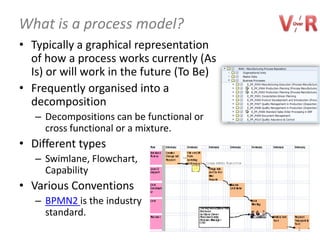
• Typically a graphical representation
  of how a process works currently (As
  Is) or will work in the future (To Be)
• Frequently organised into a
  decomposition
   – Decompositions can be functional or
     cross functional or a mixture.
• Different types
   – Swimlane, Flowchart,
     Capability
• Various Conventions
   – BPMN2 is the industry
     standard.
                                           2
Why Use Process Models & Process Model
Structures on a SAP Project
• General uses of process models.
   – Communication,
   – Training
   – Design
• Organisation of Project Artefacts
   – A decomposition structure is vital to manage the production and
     storage of project / system documentation.
   – Facilitates
       •   Planning and Tracking the project.
       •   Finding information.
       •   System maintenance after go live.
       •   Roll outs re-using project artefacts
       •   Implementing standard processes
       •   Avoiding duplication of functionality
       •   Upgrades
       •   Testing and in particular regression testing.

                                                                       3
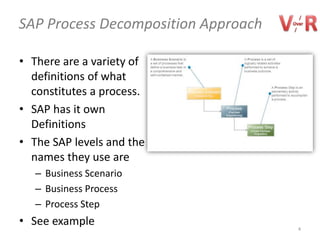
SAP Process Decomposition Approach

• There are a variety of
  definitions of what
  constitutes a process.
• SAP has it own
  Definitions
• The SAP levels and the
  names they use are
   – Business Scenario
   – Business Process
   – Process Step
• See example                        4
Best Practice is to use Reusable Components
in a number of different scenarios.

• EG
   – A Delivery Building Block can be used in the following two
     scenarios
       • Sale from Stock for Manual Order Entry
       • Sale from Stock via an EDI interface
• See animation on the next slide.


                                                                  5
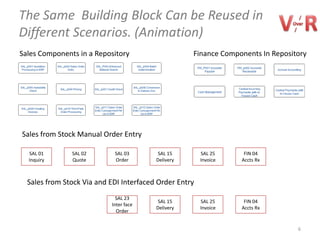
The Same Building Block Can be Reused in
Different Scenarios. (Animation)
Sales Components in a Repository                    Finance Components In Repository


Sales from Stock Manual Order Entry

  SAL 01       SAL 02        SAL 03       SAL 15     SAL 25       FIN 04
  Inquiry      Quote         Order       Delivery    Invoice     Accts Rx


  Sales from Stock Via EDI Interfaced Order Entry
                             SAL 23
                                          SAL 15     SAL 25       FIN 04
                           Inter faced
                                         Delivery    Invoice     Accts Rx
                              Order


                                                                                 6
What is a Process

• The definition of a Process can cause confusion.
   – SAP defines a Process as typically a small piece of SAP
     functionality.
   – Others may regard an entire group of scenarios, such as
     Order to Cash, as a Process.
• Recommendation
   – Rename the SAP process to Configurable Unit (CU)


                                                               7
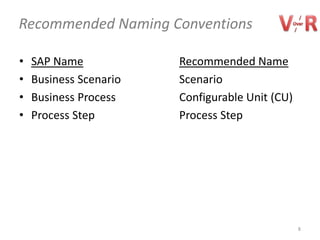
Recommended Naming Conventions

•   SAP Name            Recommended Name
•   Business Scenario   Scenario
•   Business Process    Configurable Unit (CU)
•   Process Step        Process Step


                                                 8
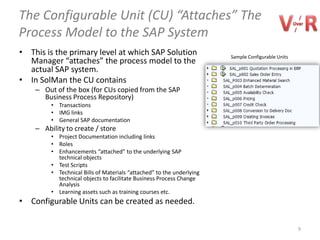
The Configurable Unit (CU) “Attaches” The
Process Model to the SAP System
• This is the primary level at which SAP Solution                      Sample Configurable Units
  Manager “attaches” the process model to the
  actual SAP system.
• In SolMan the CU contains
    – Out of the box (for CUs copied from the SAP
      Business Process Repository)
         • Transactions
         • IMG links
         • General SAP documentation
    – Ability to create / store
         • Project Documentation including links
         • Roles
         • Enhancements “attached” to the underlying SAP
           technical objects
         • Test Scripts
         • Technical Bills of Materials “attached” to the underlying
           technical objects to facilitate Business Process Change
           Analysis
         • Learning assets such as training courses etc.
• Configurable Units can be created as needed.


                                                                                                   9
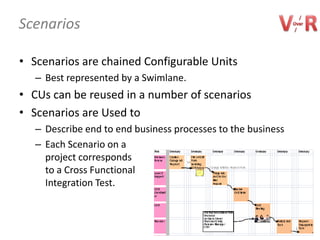
Scenarios

• Scenarios are chained Configurable Units
   – Best represented by a Swimlane.
• CUs can be reused in a number of scenarios
• Scenarios are Used to
   – Describe end to end business processes to the business
   – Each Scenario on a
     project corresponds
     to a Cross Functional
     Integration Test.


                                                              10
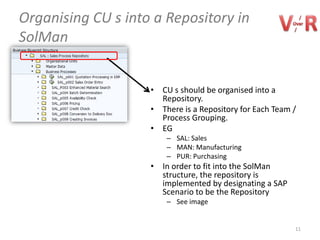
Organising CU s into a Repository in
SolMan


                    • CU s should be organised into a
                      Repository.
                    • There is a Repository for Each Team /
                      Process Grouping.
                    • EG
                        – SAL: Sales
                        – MAN: Manufacturing
                        – PUR: Purchasing
                    • In order to fit into the SolMan
                      structure, the repository is
                      implemented by designating a SAP
                      Scenario to be the Repository
                        – See image


                                                          11
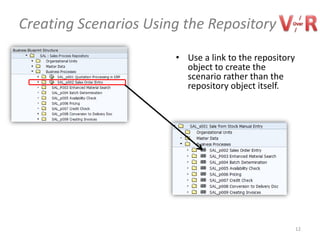
Creating Scenarios Using the Repository
                       • Use a link to the repository
                         object to create the
                         scenario rather than the
                         repository object itself.


                                                        12
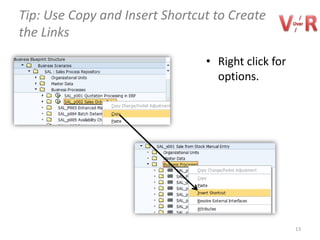
Tip: Use Copy and Insert Shortcut to Create
the Links

                                • Right click for
                                  options.


                                                    13
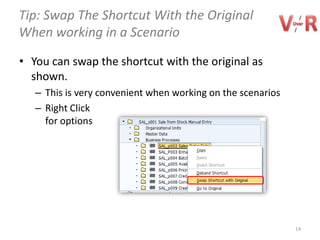
Tip: Swap The Shortcut With the Original
When working in a Scenario

• You can swap the shortcut with the original as
  shown.
   – This is very convenient when working on the scenarios
   – Right Click
     for options


                                                             14
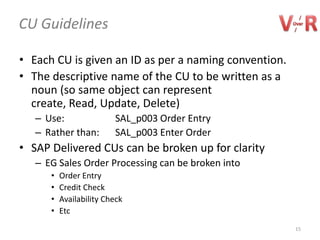
CU Guidelines

• Each CU is given an ID as per a naming convention.
• The descriptive name of the CU to be written as a
  noun (so same object can represent create, Read,
  Update, Delete)
   – Use:                SAL_p003 Order Entry
   – Rather than:        SAL_p003 Enter Order
• SAP Delivered CUs can be broken up for clarity
   – EG Sales Order Processing can be broken into
      •   Order Entry
      •   Credit Check
      •   Availability Check
      •   Etc
                                                       15
CUs Appearing on Swimlanes

• CU s are set at a level where one role carries out the
  activity.
   – If two roles are required then a second CU should be created.
       • EG a SAP delivered CU Quotation Entry might be split into Quotation
         Entry and Quotation Approval to allow two different roles to be
         mapped on a swimlane.
       • If all documentation is in the first CU, the second one should reference
         it.
• Clarification Steps on a Swimlane
   – It may be that additional steps / activities are required on a
     swimlane for clarity. If this is the case then a CU does not need
     to be created.
   – Examples
       • A manual activity like a meeting,
       • The act of printing out a quotation might be called out for clarity, even
         though it is technically part of a Quotation Entry CU.
                                                                                16
Graphical Representations of Scenarios

• Native Solution Manager does not make it
  particularly easy to draw a swimlane
   – Even with the Business Blueprinting Tool
• Recommendations on what to use will follow in a
  subsequent presentation.


                                                    17
Thank You

            (c) V Over R 2013


                                18

Process modelling in SAP Solution Manager

  • 1.
    How to UseSolution Manager for Process Modelling By Shane Hayes Principal Consultant at V Over R Contact Shane.Hayes at Clickinquiry.net See blog at http://solmanhpqc.wordpress.com/ (c) V Over R 2013 1
  • 2.
    What is aprocess model? • Typically a graphical representation of how a process works currently (As Is) or will work in the future (To Be) • Frequently organised into a decomposition – Decompositions can be functional or cross functional or a mixture. • Different types – Swimlane, Flowchart, Capability • Various Conventions – BPMN2 is the industry standard. 2
  • 3.
    Why Use ProcessModels & Process Model Structures on a SAP Project • General uses of process models. – Communication, – Training – Design • Organisation of Project Artefacts – A decomposition structure is vital to manage the production and storage of project / system documentation. – Facilitates • Planning and Tracking the project. • Finding information. • System maintenance after go live. • Roll outs re-using project artefacts • Implementing standard processes • Avoiding duplication of functionality • Upgrades • Testing and in particular regression testing. 3
  • 4.
    SAP Process DecompositionApproach • There are a variety of definitions of what constitutes a process. • SAP has it own Definitions • The SAP levels and the names they use are – Business Scenario – Business Process – Process Step • See example 4
  • 5.
    Best Practice isto use Reusable Components in a number of different scenarios. • EG – A Delivery Building Block can be used in the following two scenarios • Sale from Stock for Manual Order Entry • Sale from Stock via an EDI interface • See animation on the next slide. 5
  • 6.
    The Same BuildingBlock Can be Reused in Different Scenarios. (Animation) Sales Components in a Repository Finance Components In Repository Sales from Stock Manual Order Entry SAL 01 SAL 02 SAL 03 SAL 15 SAL 25 FIN 04 Inquiry Quote Order Delivery Invoice Accts Rx Sales from Stock Via EDI Interfaced Order Entry SAL 23 SAL 15 SAL 25 FIN 04 Inter faced Delivery Invoice Accts Rx Order 6
  • 7.
    What is aProcess • The definition of a Process can cause confusion. – SAP defines a Process as typically a small piece of SAP functionality. – Others may regard an entire group of scenarios, such as Order to Cash, as a Process. • Recommendation – Rename the SAP process to Configurable Unit (CU) 7
  • 8.
    Recommended Naming Conventions • SAP Name Recommended Name • Business Scenario Scenario • Business Process Configurable Unit (CU) • Process Step Process Step 8
  • 9.
    The Configurable Unit(CU) “Attaches” The Process Model to the SAP System • This is the primary level at which SAP Solution Sample Configurable Units Manager “attaches” the process model to the actual SAP system. • In SolMan the CU contains – Out of the box (for CUs copied from the SAP Business Process Repository) • Transactions • IMG links • General SAP documentation – Ability to create / store • Project Documentation including links • Roles • Enhancements “attached” to the underlying SAP technical objects • Test Scripts • Technical Bills of Materials “attached” to the underlying technical objects to facilitate Business Process Change Analysis • Learning assets such as training courses etc. • Configurable Units can be created as needed. 9
  • 10.
    Scenarios • Scenarios arechained Configurable Units – Best represented by a Swimlane. • CUs can be reused in a number of scenarios • Scenarios are Used to – Describe end to end business processes to the business – Each Scenario on a project corresponds to a Cross Functional Integration Test. 10
  • 11.
    Organising CU sinto a Repository in SolMan • CU s should be organised into a Repository. • There is a Repository for Each Team / Process Grouping. • EG – SAL: Sales – MAN: Manufacturing – PUR: Purchasing • In order to fit into the SolMan structure, the repository is implemented by designating a SAP Scenario to be the Repository – See image 11
  • 12.
    Creating Scenarios Usingthe Repository • Use a link to the repository object to create the scenario rather than the repository object itself. 12
  • 13.
    Tip: Use Copyand Insert Shortcut to Create the Links • Right click for options. 13
  • 14.
    Tip: Swap TheShortcut With the Original When working in a Scenario • You can swap the shortcut with the original as shown. – This is very convenient when working on the scenarios – Right Click for options 14
  • 15.
    CU Guidelines • EachCU is given an ID as per a naming convention. • The descriptive name of the CU to be written as a noun (so same object can represent create, Read, Update, Delete) – Use: SAL_p003 Order Entry – Rather than: SAL_p003 Enter Order • SAP Delivered CUs can be broken up for clarity – EG Sales Order Processing can be broken into • Order Entry • Credit Check • Availability Check • Etc 15
  • 16.
    CUs Appearing onSwimlanes • CU s are set at a level where one role carries out the activity. – If two roles are required then a second CU should be created. • EG a SAP delivered CU Quotation Entry might be split into Quotation Entry and Quotation Approval to allow two different roles to be mapped on a swimlane. • If all documentation is in the first CU, the second one should reference it. • Clarification Steps on a Swimlane – It may be that additional steps / activities are required on a swimlane for clarity. If this is the case then a CU does not need to be created. – Examples • A manual activity like a meeting, • The act of printing out a quotation might be called out for clarity, even though it is technically part of a Quotation Entry CU. 16
  • 17.
    Graphical Representations ofScenarios • Native Solution Manager does not make it particularly easy to draw a swimlane – Even with the Business Blueprinting Tool • Recommendations on what to use will follow in a subsequent presentation. 17
  • 18.
    Thank You (c) V Over R 2013 18