This document discusses asset accounting options in a Central Finance landscape in SAP S/4HANA. It describes that asset postings from source systems are not directly replicated to asset accounting in Central Finance by default. There are two main options - maintaining asset accounting decentraly in source systems, or centralizing it in the Central Finance system. The document then goes into more detail on how to set up a process to capitalize asset-related postings from source systems into a centralized asset accounting module in Central Finance.
Introduction to Asset Accounting in Central Finance with objectives and FAQs addressed.
Discusses replication of asset postings, options, limitations, and centralization benefits.
Compares decentralized asset accounting in source systems and centralized processes in Central Finance.
Describes process to settle investment orders in Central Finance, detailing steps and conditions. Introduces cost object mapping, defining characteristics, and setup for replication between systems.
Frequently asked questions regarding restrictions, configurations, migrations, and new functionalities.
Summarizes insights on managing asset accounting in a Central Finance context, encouraging feedback.
ASSET ACCOUNTING INCENTRAL FINANCE
Objectives
SAP S/4HANA Central Finance evolved from a pure advanced financial reporting system to a
central transformation platform where you can execute financial processes centrally.
In this blog post I will focus on processes in Asset Accounting and share key considerations
about setting up Asset Accounting in a Central Finance landscape in SAP S/4HANA. I will
discuss following topics and address some commonly asked questions:
Does Central Finance replicate into FI-AA (Asset Accounting)?
What are the options for Asset Accounting in Central Finance?
What are the limitations and challenges around Asset Accounting in Central Finance?
The blog post is based on S/4HANA 1909 but also applicable for lower releases, if not
mentioned otherwise. For an introduction into Central Finance, you can start reading my article
first: Different views on what is Central Finance.
2.
ASSET ACCOUNTING INCENTRAL FINANCE
In this blog post I will focus now on my view and project experiences on the options, limitations and
challenges for Asset Accounting in Central Finance, because there is a special logic how asset related
postings are replicated from source ERP system to the Central Finance system. At the end I will also
summarize important frequently asked questions. Let me start with the main question:
Does Central Finance replicate into FI-AA (Asset Accounting)?
You find the answer in Central Finance FAQ note 2184567, question #7:
No, line items that post onto a fixed asset on the source system currently post into the General Ledger on the
reconciliation account only. The reconciliation account either needs to be configured as a “normal” GL
account or mapped accordingly.
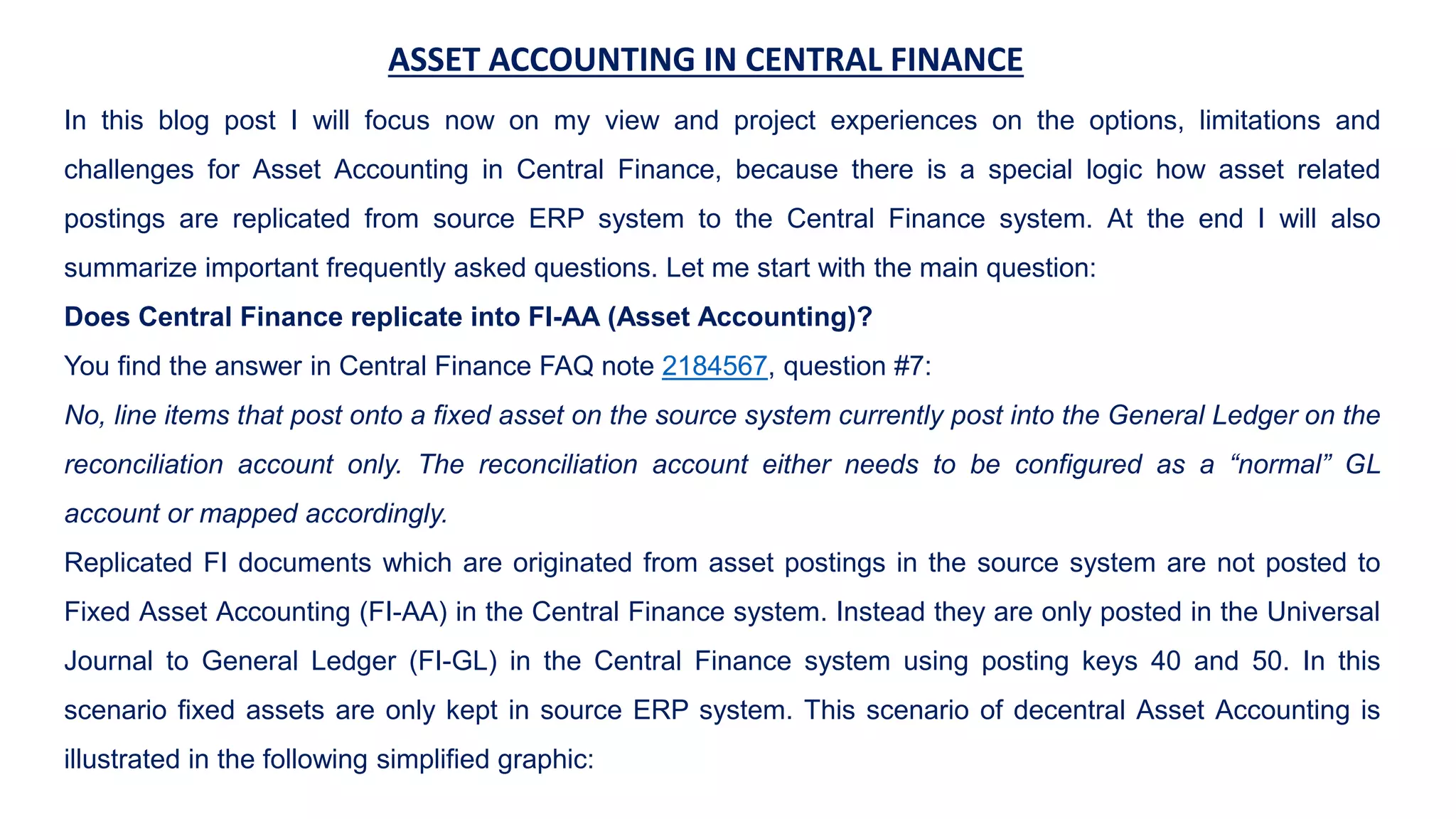
Replicated FI documents which are originated from asset postings in the source system are not posted to
Fixed Asset Accounting (FI-AA) in the Central Finance system. Instead they are only posted in the Universal
Journal to General Ledger (FI-GL) in the Central Finance system using posting keys 40 and 50. In this
scenario fixed assets are only kept in source ERP system. This scenario of decentral Asset Accounting is
illustrated in the following simplified graphic:
ASSET ACCOUNTING INCENTRAL FINANCE
What are the options for Asset Accounting in Central Finance?
We have two basic options:
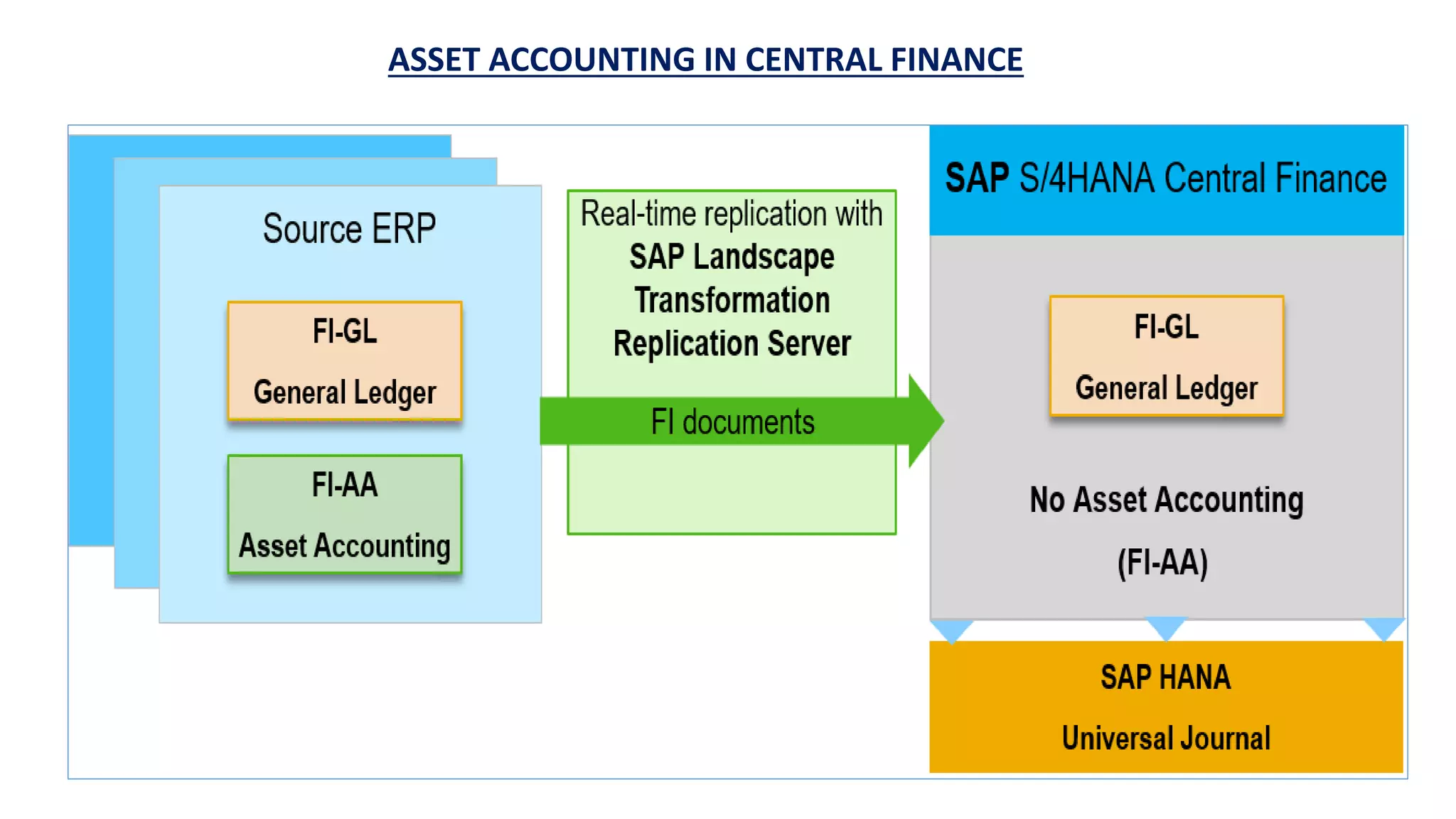
A) Asset Accounting in the source ERP system
The following graphic gives a simplified overview of the typical process in the current standard
scenario where I only focus on the relevant process steps and facts:
5.
ASSET ACCOUNTING INCENTRAL FINANCE
1.Asset accounts in the source system are defined as reconciliation accounts for fixed assets
2.Asset postings (e.g. asset acquisitions) are done in source system with asset number on reconciliation account
3.The financial document is replicated via SLT to Central Finance and asset information is deleted from asset-
related fields (e.g. fields ANLN1 and ANLN2) of the FI documents in the Central Finance Accounting Interface
4.[optional]: Asset information can be transferred to customer-defined fields in a BAdI implementation for reporting
purpose if required
5.Asset accounts in the Central Finance System are set up as non-reconciliation balance sheet accounts or
mapped to a non-reconciliation balance sheet account
Challenges and implications
All asset related postings (like asset acquisitions, depreciation, transfer, retirement), reporting and period end
closing must be done in source system. Information on single fixed assets is only available in source system. An
exception would be some customer reports, if you have transferred the asset number into a customer field and
replicated to the Central Finance system you will be able to see it. There are also limitations you must consider if
Central Payment is activated (see FAQs below).
6.
ASSET ACCOUNTING INCENTRAL FINANCE
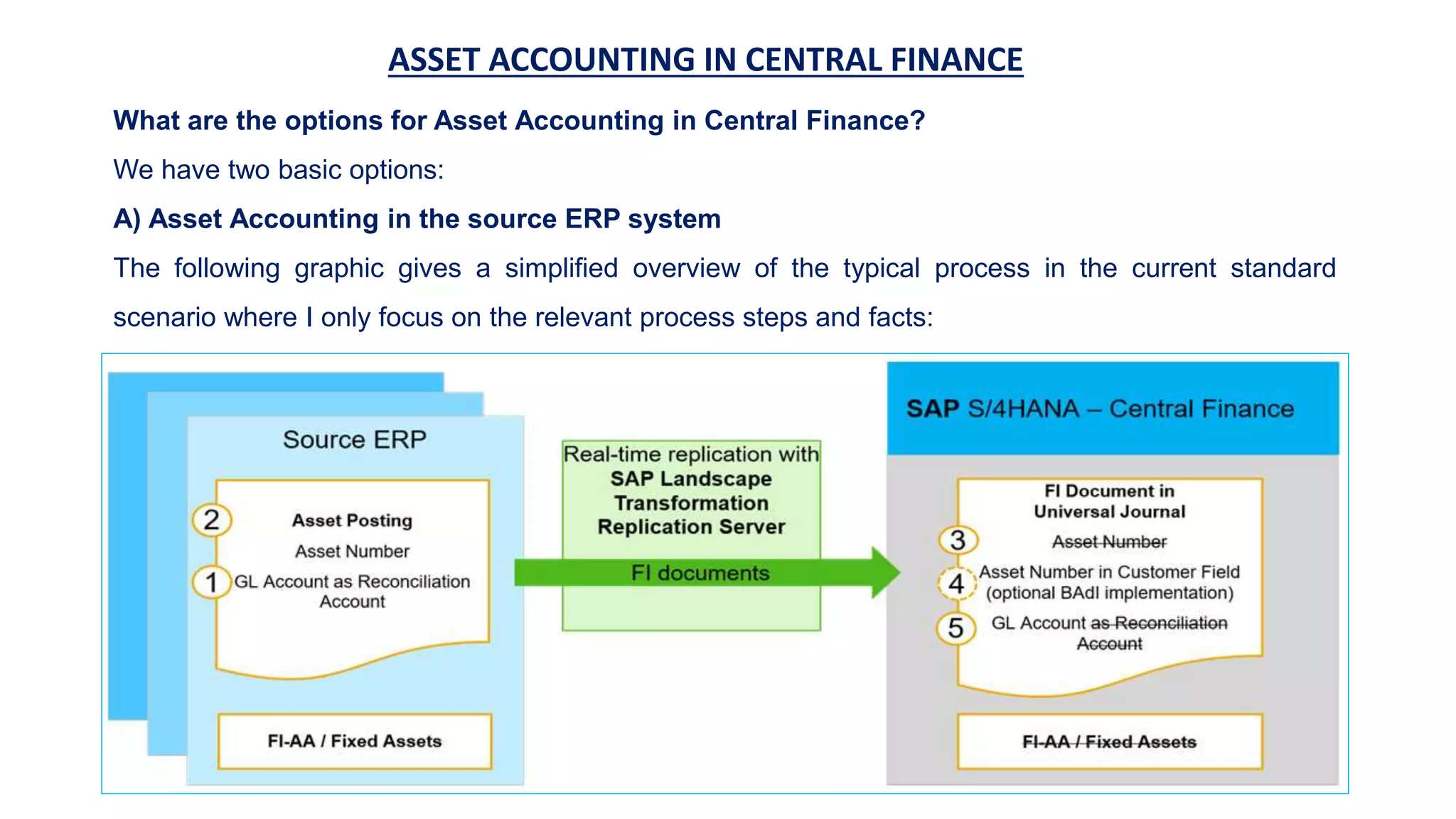
B) Asset Accounting in the Central Finance system
A step into a more centralized Finance system with more benefits would be to set up Asset Accounting
in the Central Finance system as illustrated in the following simplified picture:
7.
ASSET ACCOUNTING INCENTRAL FINANCE
Some advantages of centralization of Asset Accounting are:
Benefit from New Asset Accounting (improved parallel valuations, new depreciation calculation
logic, accelerated depreciation runs, integrated in Universal Journal)
Asset accountants can work in SAP S/4HANA with new UX / Fioris
Reduction of legacy systems for Asset Accounting
Reduction of number of postings in decentral systems
Harmonization of processes in Asset Accounting by centralizing them
Complete Financial reporting in Central Finance
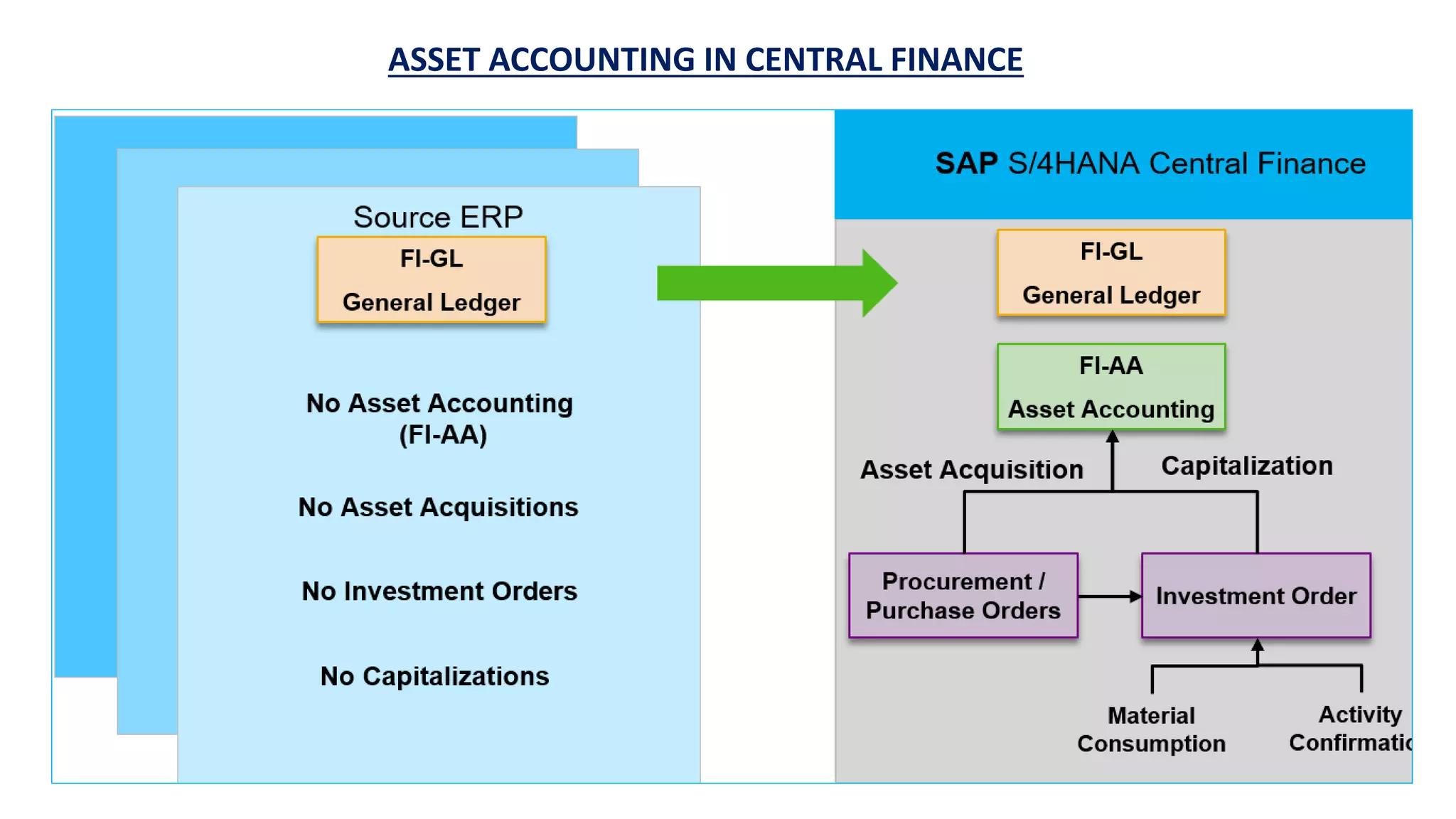
As a consequence, you can do fixed asset related postings only in Central Finance. Thus, procurement
for assets and also capitalization of investments would have to be done in the Central Finance system. I
have illustrated such a scenario in the following picture:
ASSET ACCOUNTING INCENTRAL FINANCE
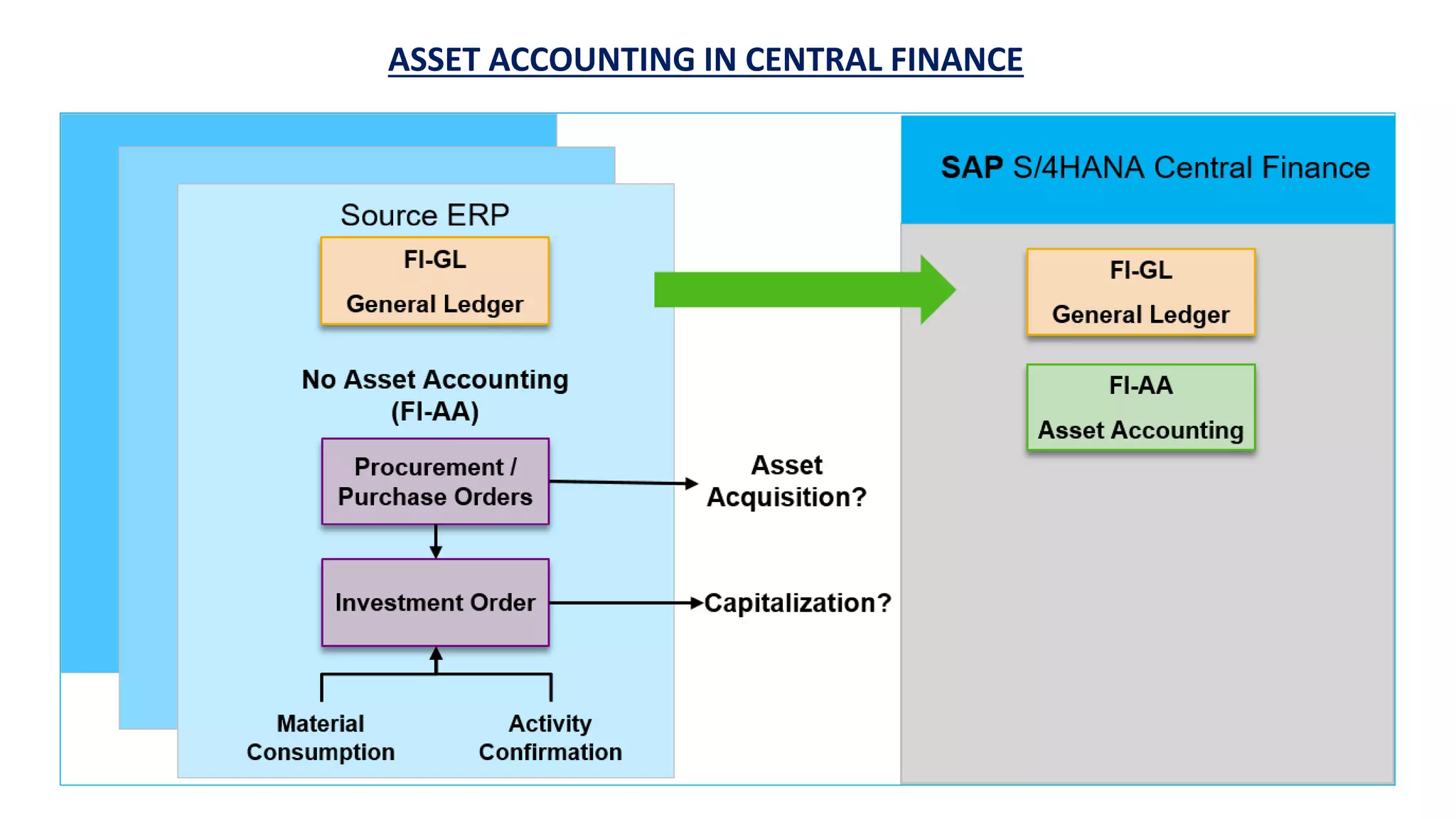
Such a scenario would have an impact on logistics processes, and you would have to
move related logistic processes to Central Finance. Many customers follow a minimal
invasive approach for their source system when implementing Central Finance. This
means that most of the logistics processes will not be changed in the source system. In
this case procurement will be done locally in the source systems including asset
acquisitions. Another important use case would be an investment process where material
consumptions and activity confirmations are posted on an investment order in source
system. This scenario is illustrated in the following picture:
ASSET ACCOUNTING INCENTRAL FINANCE
The question is, how can you bring such asset related postings (e.g. for asset acquisitions or investment orders) from
source system to Central Finance?
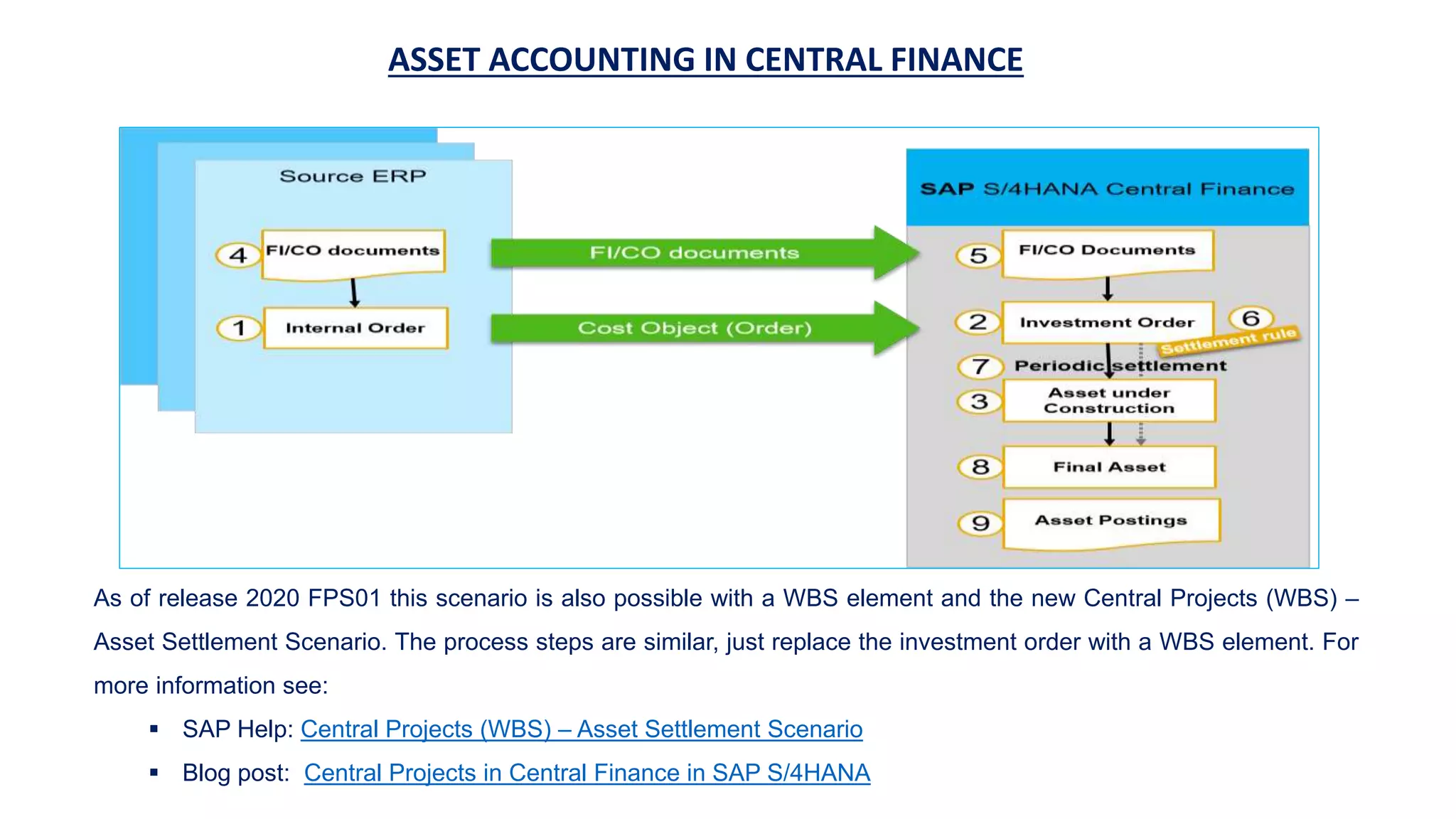
A possible solution would be to use an investment order in source system to carry asset related postings (from
purchase orders, invoices, material consumption, activity confirmation and so on) and transfer them to Central
Finance. In Central Finance the investment order is settled with standard transactions to asset under construction
and/or fixed assets. This scenario is shown in the following graphic with the following process steps:
1.Create an internal order in source without investment profile
2.Replicate the internal order as investment order in Central Finance
3.Asset under construction is automatically created for the investment order in Central Finance
4.Do FI/CO postings and CO postings in source system on internal order
5.Replicate FI/CO and CO documents from source system to Central Finance
6.Maintain settlement parameters in Central Finance (if required)
7.Settle investment order to asset under construction in Central Finance
8.Settle asset under construction to final asset in Central Finance
9.All other asset related postings and reporting are done in Central Finance only
12.
ASSET ACCOUNTING INCENTRAL FINANCE
As of release 2020 FPS01 this scenario is also possible with a WBS element and the new Central Projects (WBS) –
Asset Settlement Scenario. The process steps are similar, just replace the investment order with a WBS element. For
more information see:
SAP Help: Central Projects (WBS) – Asset Settlement Scenario
Blog post: Central Projects in Central Finance in SAP S/4HANA
13.
ASSET ACCOUNTING INCENTRAL FINANCE
The process steps in detail:
1. Create an internal order in source without investment profile
To create an internal order you can use the classical transactions KO01 in SAPGUI or the new Manage Internal Orders
Fiori app, if source system is on SAP S/4HANA. Since release 1709 this app also supports investment orders to create
asset under construction (AuC) master data directly. But in this scenario the Asset under Construction should not be
created in source but in Central Finance only.
The internal order can be used as account assignment object in source system for all postings that should be capitalized
in Central Finance: procurements with purchase orders, material consumptions, financial postings, activity recordings, …
You can also maintain a budget on the investment order and activate budget availability control in source ERP. Important:
budgeting can only be done in source and there is currently no functionality like Central Budgeting in Central Finance.
More information about planned functionalities you can find in the Road Map Explorer: Central budgeting and availability
control (for internal orders),
Another option to create an internal order in a Central Finance scenario would be to use MDG for Financial data (MDG-F).
I will focus on Central Finance in this blog and not further elaborate on this option as it is in scope of MDG and not of
Central Finance. You can find more information in SAP Help Master Data Governance – Internal Orders.
14.
ASSET ACCOUNTING INCENTRAL FINANCE
2. Replicate the internal order as investment order in Central Finance
The replication of internal orders is supported in Central Finance with the cost object framework
in Central Finance (see SAP Help Cost Object Mapping). Supported scenarios are described in
SAP note 2180924 – Supported scenarios in cost object mapping framework.
Scenarios for Cost Object Mapping
You can find the customizing activity in the IMG menu:
Financial Accounting -> Central Finance -> Central Finance: Target System Settings ->
Mapping -> Cost Object Mapping -> Cost Object Mapping -> Define Cost Object Mapping ->
Define Scenarios for Cost Object Mapping
15.
ASSET ACCOUNTING INCENTRAL FINANCE
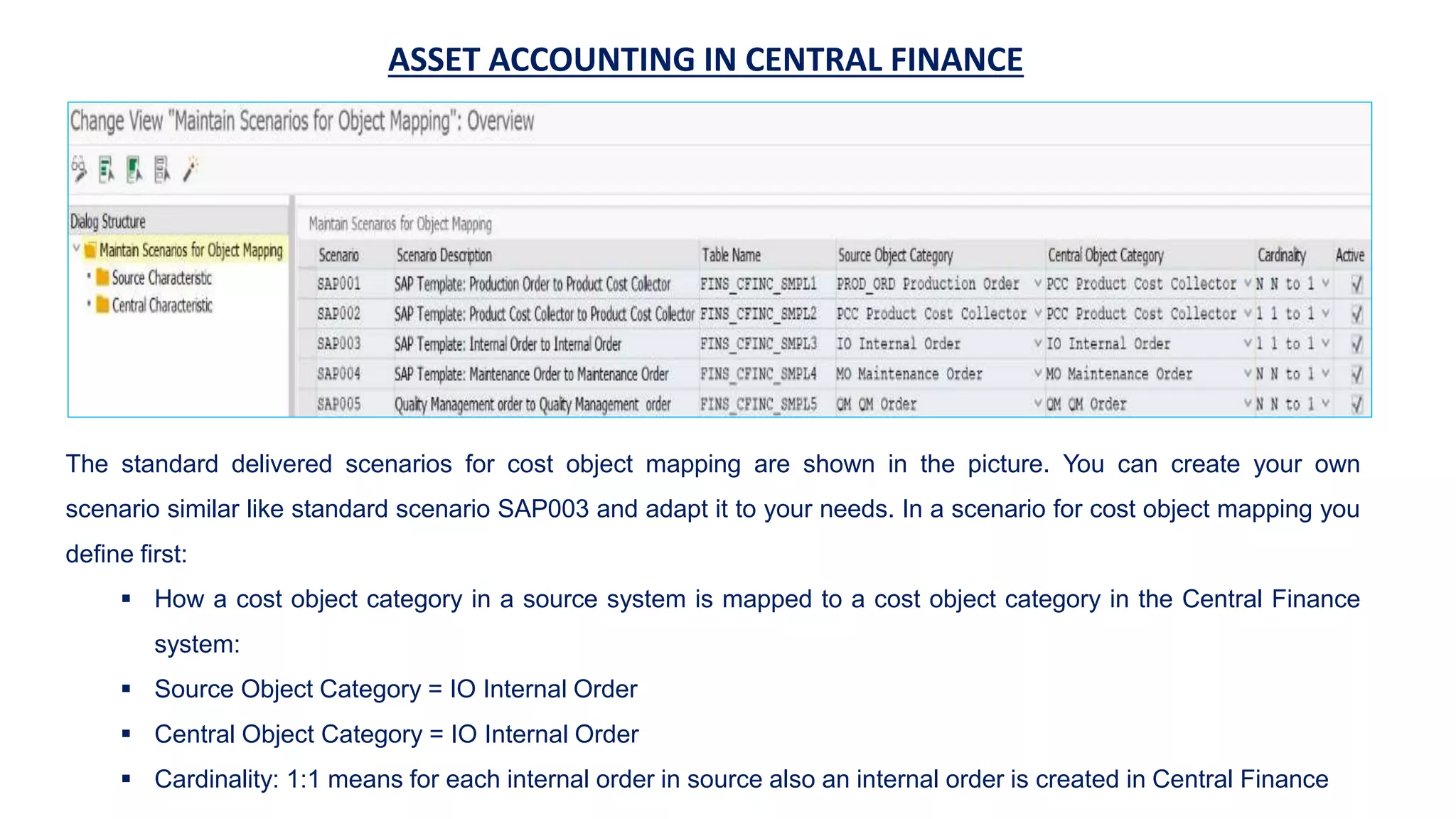
The standard delivered scenarios for cost object mapping are shown in the picture. You can create your own
scenario similar like standard scenario SAP003 and adapt it to your needs. In a scenario for cost object mapping you
define first:
How a cost object category in a source system is mapped to a cost object category in the Central Finance
system:
Source Object Category = IO Internal Order
Central Object Category = IO Internal Order
Cardinality: 1:1 means for each internal order in source also an internal order is created in Central Finance
16.
ASSET ACCOUNTING INCENTRAL FINANCE
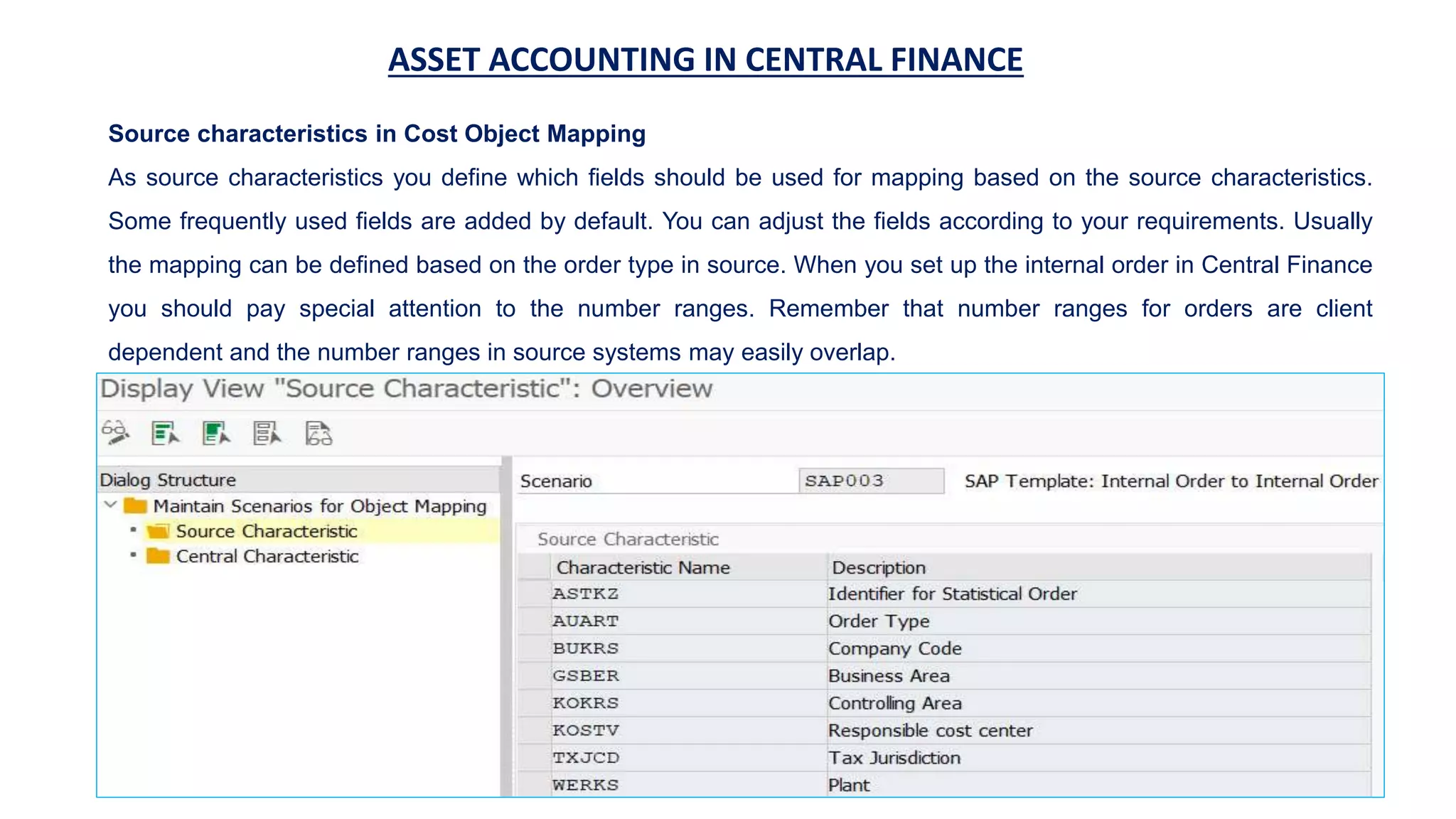
Source characteristics in Cost Object Mapping
As source characteristics you define which fields should be used for mapping based on the source characteristics.
Some frequently used fields are added by default. You can adjust the fields according to your requirements. Usually
the mapping can be defined based on the order type in source. When you set up the internal order in Central Finance
you should pay special attention to the number ranges. Remember that number ranges for orders are client
dependent and the number ranges in source systems may easily overlap.
17.
ASSET ACCOUNTING INCENTRAL FINANCE
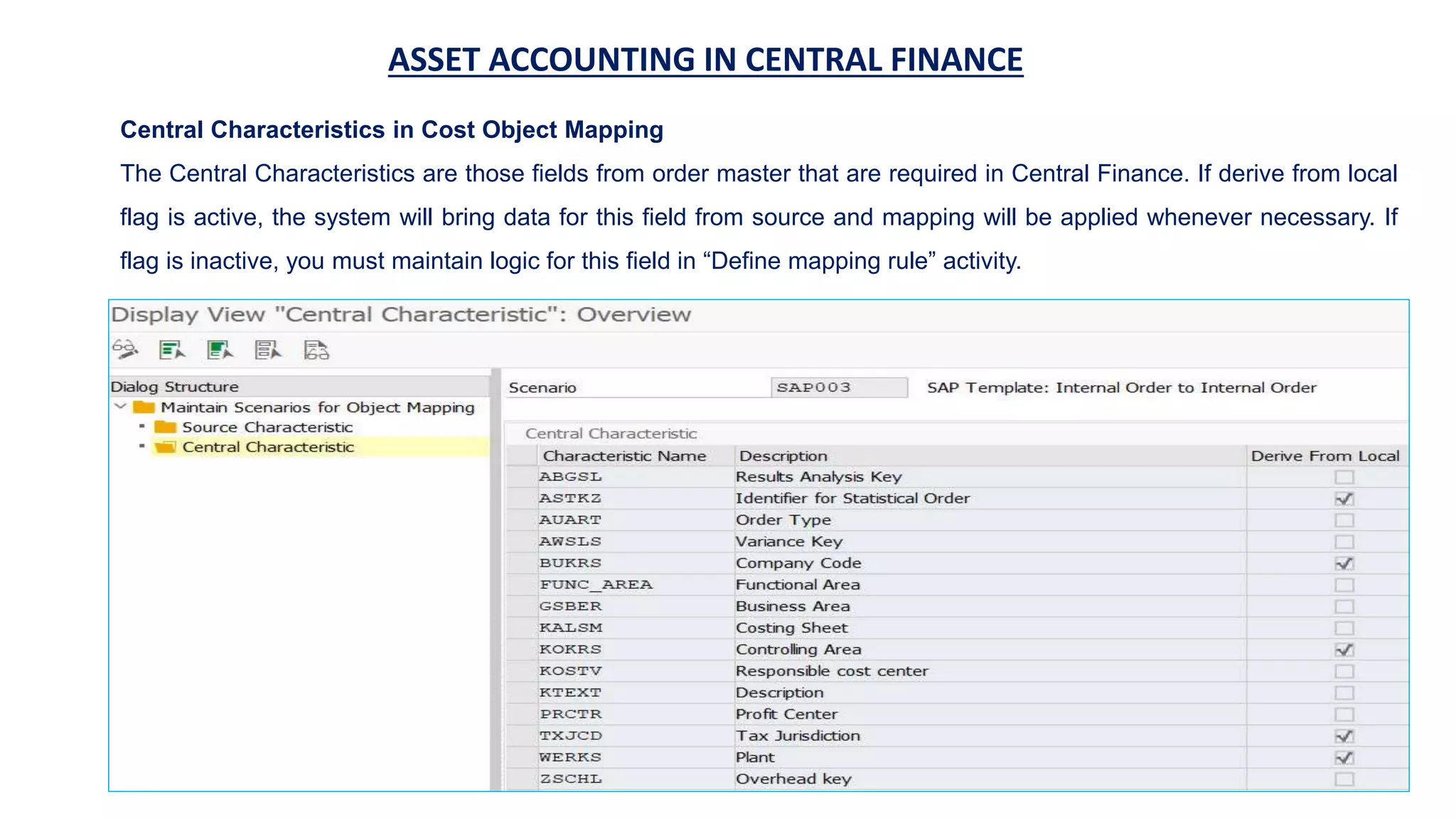
Central Characteristics in Cost Object Mapping
The Central Characteristics are those fields from order master that are required in Central Finance. If derive from local
flag is active, the system will bring data for this field from source and mapping will be applied whenever necessary. If
flag is inactive, you must maintain logic for this field in “Define mapping rule” activity.
18.
ASSET ACCOUNTING INCENTRAL FINANCE
Think carefully which fields you need as source and central characteristics, because you cannot
change a scenario if you have already replicated an order with it. A workaround would be to create
a new scenario and reassign the replicated orders.
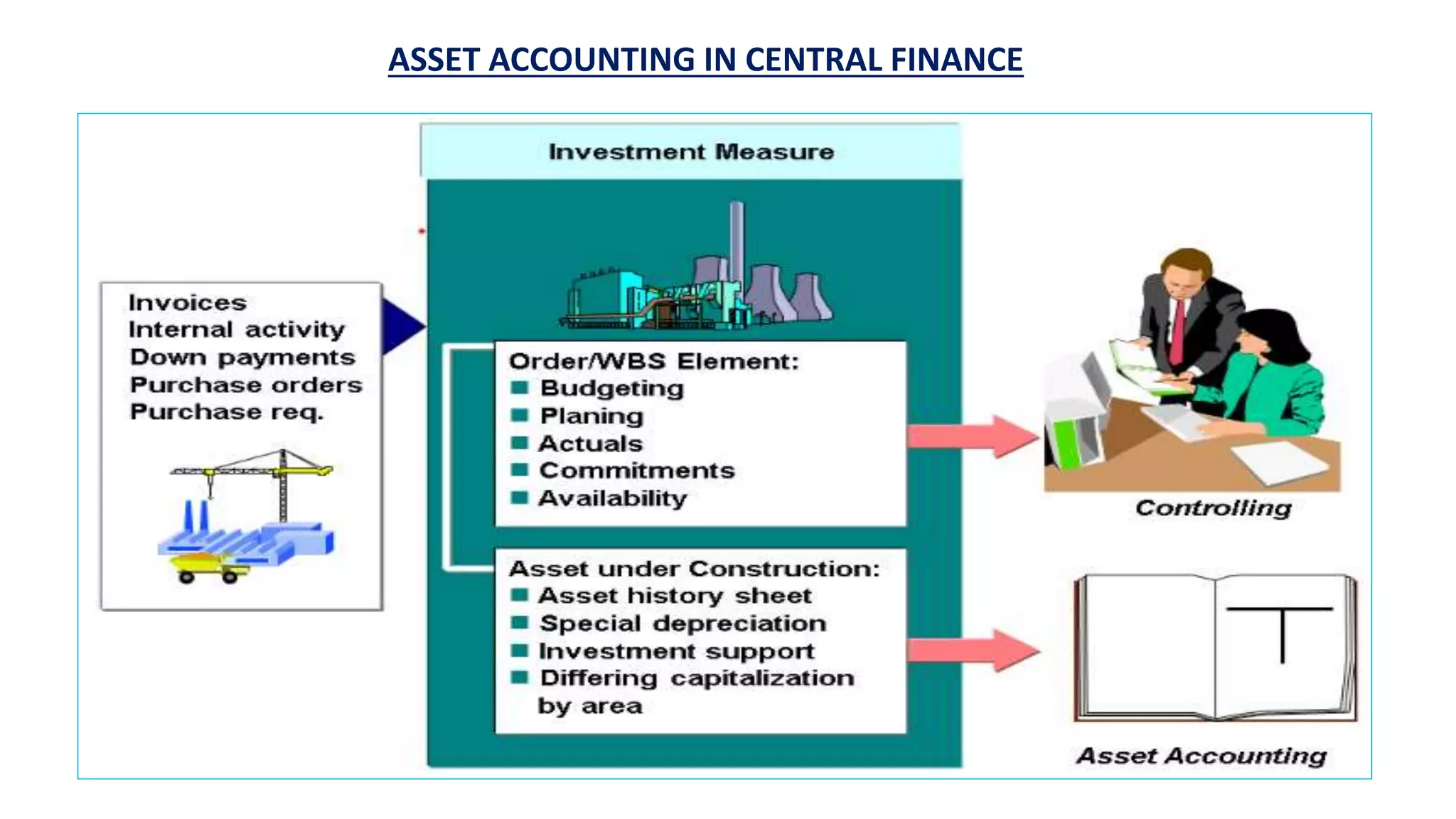
Investment Order / Investment Measure
The next step is to define the investment order in Central Finance and map the source internal
order to it. Investment orders (aka investment measures) are basically internal orders with a special
feature (see SAP Help – Investment Measures):
Investment orders have the data of an asset under construction for showing the capitalized
portions of the measure in the balance sheet with data flow as illustrated in the following picture
from SAP Help.
ASSET ACCOUNTING INCENTRAL FINANCE
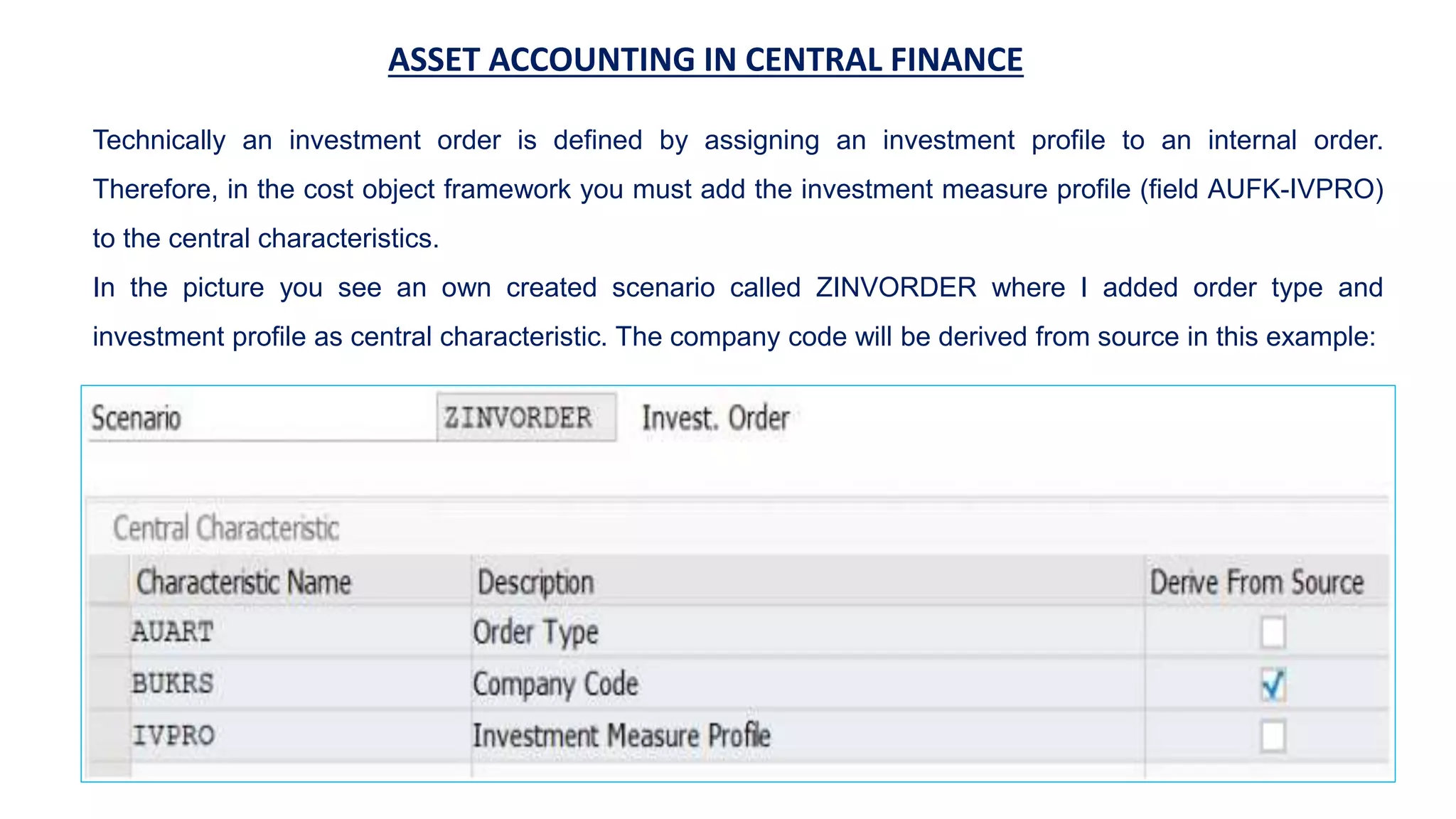
Technically an investment order is defined by assigning an investment profile to an internal order.
Therefore, in the cost object framework you must add the investment measure profile (field AUFK-IVPRO)
to the central characteristics.
In the picture you see an own created scenario called ZINVORDER where I added order type and
investment profile as central characteristic. The company code will be derived from source in this example:
21.
ASSET ACCOUNTING INCENTRAL FINANCE
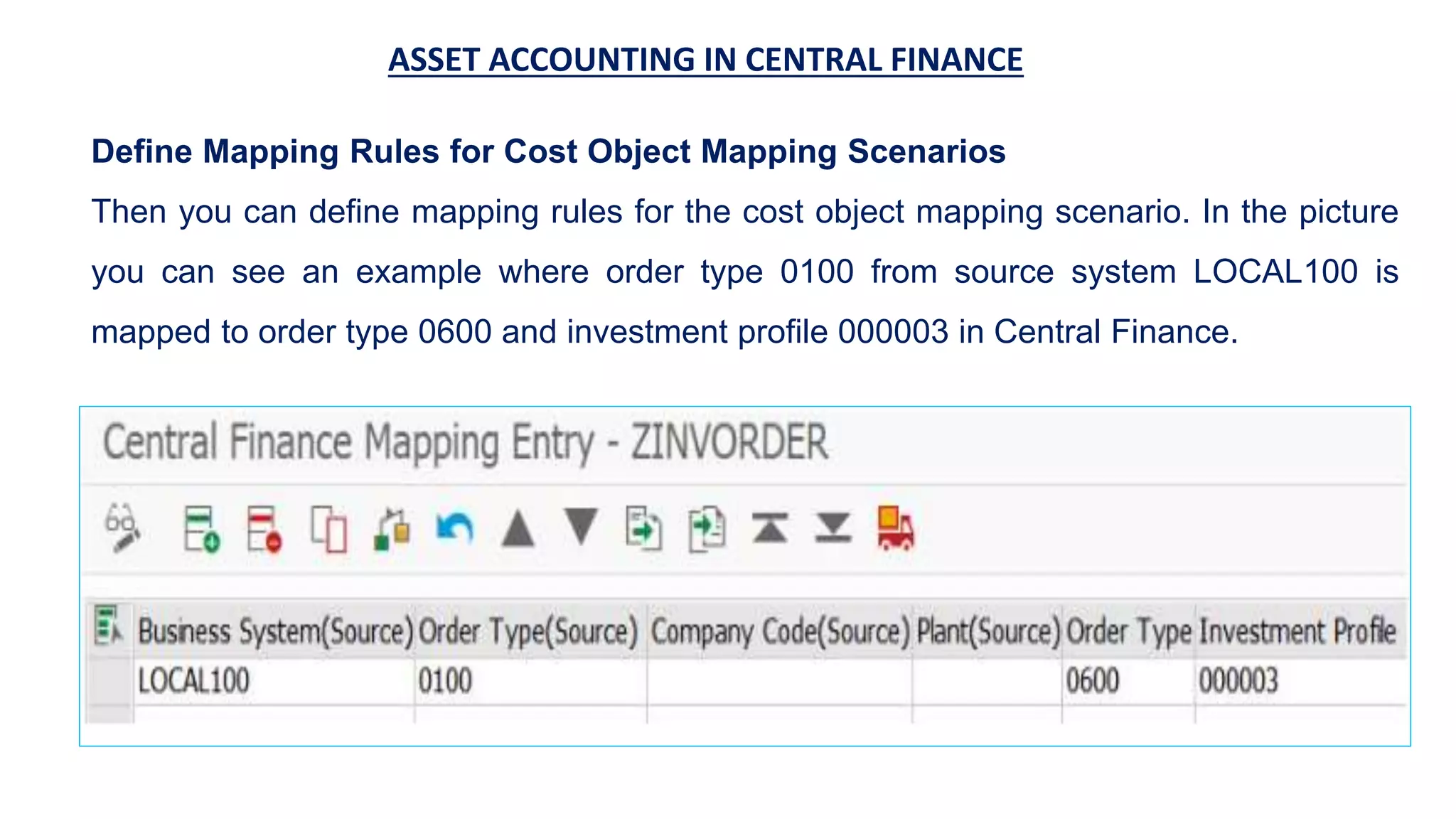
Define Mapping Rules for Cost Object Mapping Scenarios
Then you can define mapping rules for the cost object mapping scenario. In the picture
you can see an example where order type 0100 from source system LOCAL100 is
mapped to order type 0600 and investment profile 000003 in Central Finance.
22.
ASSET ACCOUNTING INCENTRAL FINANCE
You can find this customizing activity in the IMG menu:
Financial Accounting -> Central Finance -> Central Finance: Target System Settings -
> Mapping -> Cost Object Mapping -> Cost Object Mapping -> Define Cost Object
Mapping -> Define Mapping Rules for Cost Object Mapping Scenarios
Any order with order type 0100 created in source system will now be replicated to
Central Finance and created with order type 0600 and investment profile 000003.
Another option would be to assign the investment profile to a model order and assign
this model order to the order type for the investment measure in Central Finance. In
this case you must not add the field IVPRO as central characteristic in the cost object
framework, because it will cause an error when a change of the internal order master
data is replicated.
23.
ASSET ACCOUNTING INCENTRAL FINANCE
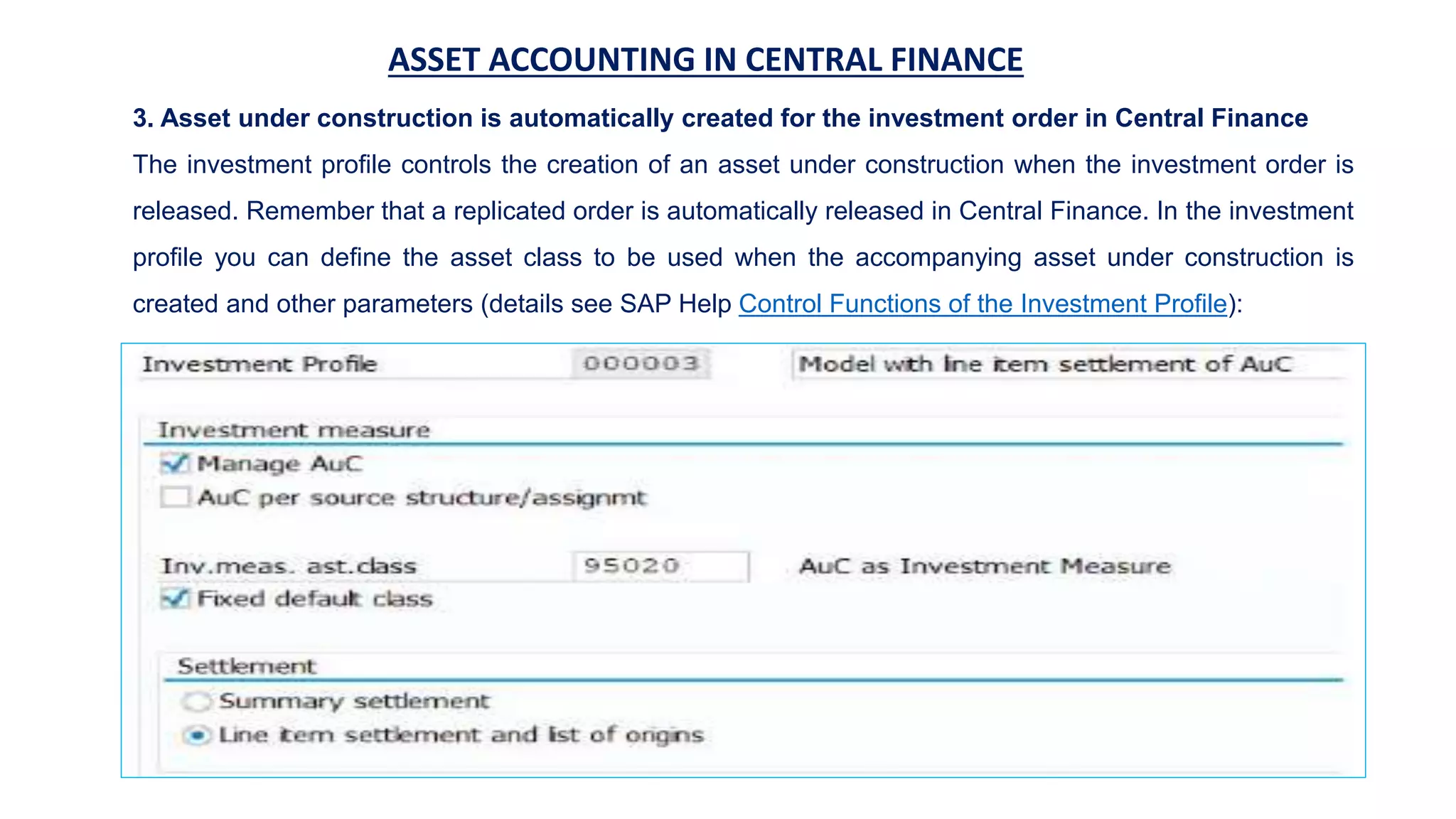
3. Asset under construction is automatically created for the investment order in Central Finance
The investment profile controls the creation of an asset under construction when the investment order is
released. Remember that a replicated order is automatically released in Central Finance. In the investment
profile you can define the asset class to be used when the accompanying asset under construction is
created and other parameters (details see SAP Help Control Functions of the Investment Profile):
24.
ASSET ACCOUNTING INCENTRAL FINANCE
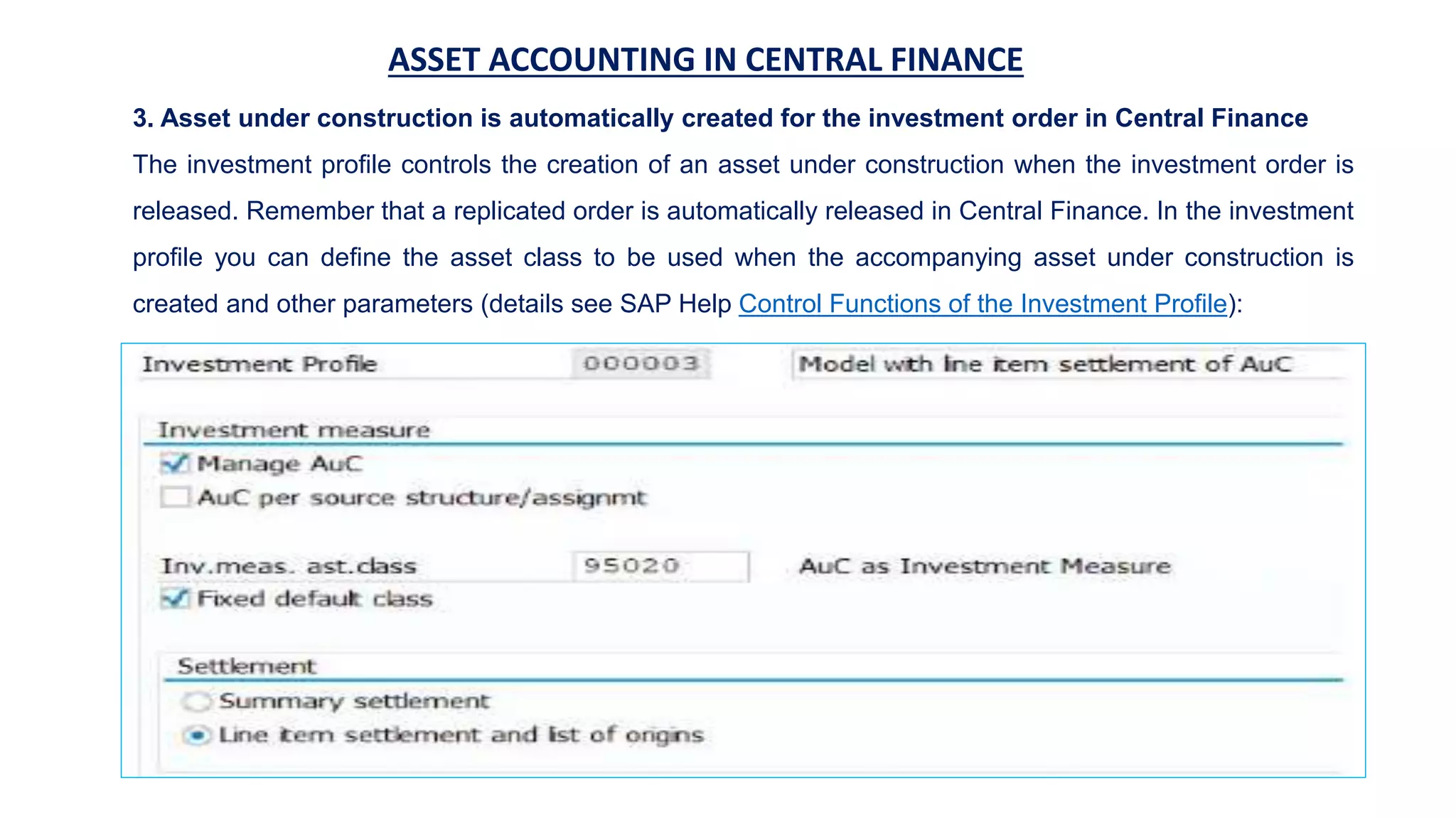
3. Asset under construction is automatically created for the investment order in Central Finance
The investment profile controls the creation of an asset under construction when the investment order is
released. Remember that a replicated order is automatically released in Central Finance. In the investment
profile you can define the asset class to be used when the accompanying asset under construction is
created and other parameters (details see SAP Help Control Functions of the Investment Profile):
25.
ASSET ACCOUNTING INCENTRAL FINANCE
4. Do FI/CO postings and CO postings in source system on internal order
After the creation and release of the order you can do all FI and CO postings on the internal order in source
system that should be capitalized in Central Finance. For this process step and the following replication to
Central Finance there are no specific asset accounting related settings required in Central Finance. That is
why I did not document it in more details in this blog post. The replication of financial posting just requires
the standard CFIN settings.
5. Replicate FI/CO and CO documents from source system to Central Finance
FI and CO postings on the internal order are automatically replicated via SLT to Central Finance. The order
number is mapped based on the information from the cost object mapping.
6. Maintain settlement parameters in Central Finance (if required)
In Central Finance you can maintain additional settlement parameters and settlement rules on the
investment order as you need. You can also already create a final asset for the later full settlement directly
from master data maintenance for orders. The system then automatically creates a full settlement rule with
the newly created asset as the receiver.
26.
ASSET ACCOUNTING INCENTRAL FINANCE
7. Settle investment order to asset under construction in Central Finance
If you do not maintain additional settlement receivers, the periodic settlement (transactions KO88 or KO8G)
settles and capitalizes all costs to the asset under construction that belongs to the investment measure.
8. Settle asset under construction to final asset in Central Finance
Finally, when the investment measure is completed you do the full settlement. During full settlement the
amounts are usually settled from asset under construction to one or more fixed assets.
Another option would be to do the final settlement from asset under Construction to fixed assets not via
order settlement in CO but in asset accounting only with transactions AIBU and AIAB.
Beginning from the settlement these steps are not specific to Central Finance. Basically, these are the
standard processes for investment measures and assets under construction in FI-AA and you can find
further information in the SAP-Help:
•Settlement of Investment Measures
•Check the Settings for Investment Orders
•Settlement of an Asset under Construction
27.
ASSET ACCOUNTING INCENTRAL FINANCE
9. Asset postings
After the asset acquisition and/or production costs are capitalized to the final asset, you can do further asset
related postings like depreciation, retirement and so on in the Central Finance system.
Challenges and implications
As soon as you start to do any posting (like central payments or settlements) in a Central Finance system for a
company code that also receives Financials documents from another source system, you must check all related
dependent processes and reporting:
Single source of truth will be only in Central Finance!
Therefore, you maybe have to move legal and tax reporting from the source system to Central Finance. Another
topic would be to think about the consequences in Controlling. As you do the depreciation postings in the Central
Finance system, you will only have a complete view on your costs of your cost centers in the Central Finance
system. This could be a challenge if you require all cost center costs in source system e.g. for actual costing in
the source system. Another issue could be an integration to Plant Maintenance (PM). PM and equipment master
data are maybe only available in source system and asset master data are available in the Central Finance
system only.
28.
ASSET ACCOUNTING INCENTRAL FINANCE
If you are going to implement Asset Accounting in the Central Finance system, be aware that Classic Asset
Accounting has been replaced by New Asset Accounting in SAP S/4HANA. Make yourself familiar with the
changes in Asset Accounting in SAP S/4HANA and important notes:
•SAP Help – Asset Accounting (FI-AA)
•SAP note 2270387 – S4TWL – Asset Accounting: Changes to Data Structure
•SAP note 2270388 – S4TWL – Asset Accounting: Parallel valuation and journal entry
I have highlighted challenges that I am aware of but maybe there are some more for specific use cases and
depending on specific additional requirements. As usually customers need to understand the possibilities but
also be aware of the restrictions and check dependencies and do adequate testing on the business
processes before going live. Another topic you must consider is the transition and legacy data transfer. I have
summarized some important FAQs that can be helpful here.
29.
ASSET ACCOUNTING INCENTRAL FINANCE
FAQs
SAP note 2184567 – Central Finance: Frequently Asked Questions (FAQ)
In this note you will find answers to following questions (and many more):
Is it allowed to configure additional FI currencies in the CFIN system which are not available in
the source system?
Does Central Finance support source system side FI transactions involving “post late”
documents such as postings from or involving New Asset Management?
Are settlement rules replicated that are assigned to cost objects?
What kind of cost objects can get replicated with the Central Finance Scenario?
Can projects/WBS elements be replicated?
Are Internal Orders still supported in SAP S/4HANA?
See SAP note 2865342 – Internal Orders in SAP S/4HANA on-premise edition.
30.
ASSET ACCOUNTING INCENTRAL FINANCE
Is it possible to execute central processes such as settlements on replicated work breakdown
structure (WBS) elements in Central Finance?
Up to S/4HANA 2020 for projects (WBS elements) only the reporting scenario is supported. Projects
replicated by ALE/IDOC can only be changed in the master system. Thus, a settlement rule cannot be
maintained in Central Finance for replicated projects and a settlement is not possible. Further restrictions
see SAP Help – ALE Business Processes: Work Breakdown Structure or Internal Order Distribution and
also roadmap below.
With S/4HANA 2020 FPS01 a new scenario for Central Projects (WBS) – Asset Settlement is available. It
allows you to run a process where you create and edit projects in a source system which are replicated to
the Central Finance system. You can settle costs posted to a work breakdown structure (WBS) element
in a source system to an asset under construction (AuC) and finally to a fixed asset in the Central
Finance system. More information you can find here:
SAP Help: Central Projects (WBS) – Asset Settlement Scenario
Blog post: Central Projects in Central Finance in SAP S/4HANA
31.
ASSET ACCOUNTING INCENTRAL FINANCE
What are the restrictions around Asset Accounting with Central Payment?
See SAP Note 2346233 – Central Payment for SAP Central Finance: Pilot Note for Activating
Central Payment: Central Payment for SAP Central Finance allows you to make centralized
payments and perform centralized clearing activities in the Central Finance system instead of
each source system. Since S/4HANA 1709, customers need to be aware of and accepting
restrictions and pass comprehensive customer testing on productive data and processes before
Central Payment going live for productive usage: […]
Decentral Asset Accounting:
Central Payment is only released for those company codes in which no re-activation of
assets is necessary after cash discount is taken or no cash discounts are used at all.
Central Asset Accounting:
No restrictions in regards of re-activation of assets in central payment scenario.
32.
ASSET ACCOUNTING INCENTRAL FINANCE
Can I run Asset Accounting for some company codes in source system and for other company
codes in Central Finance?
This would mean a mixed approach of variant A and B. Technically it would be possible to run Asset
Accounting for some company codes locally in a source system and for other company codes centrally in
Central Finance. I even discussed a business case with a customer that wanted to split Asset Accounting
within one company code. Technically it would be possible to create some asset classes in source system
and some in Central Finance system. But of course, this will raise many questions you have to consider
and to test. For example, how to do a cross-system reporting or transfer of assets between systems.
Is there a migration tool available for Asset Accounting in Central Finance?
You can use the legacy data transfer tools that are available in Asset Accounting in SAP S/4HANA (SAP
Help: Legacy Data Transfer in Asset Accounting). Currently there is not any migration or transition tool
specific for Asset Accounting in Central Finance available.
33.
ASSET ACCOUNTING INCENTRAL FINANCE
Is there a migration guide available for Asset Accounting in Central Finance?
There is a migration guide available, if you do a system conversion to SAP S/4HANA: Migration to New Asset
Accounting (FI-AA (New)). But this migration guide is only for a system conversion and it is not applicable for
Central Finance. Currently there is not any similar migration or transition guide specific for Asset Accounting in
Central Finance available. A migration and cutover plan must be designed customer specific depending on the
specific situation.
What’s New in SAP S/4HANA 2020
•Central Budgeting for Internal Orders: With Central Budgeting a remote budget check from a source system
to a Central Finance system will be active during the posting process where the budget is consumed.
What’s New in SAP S/4HANA 2020 FPS01
•Central Projects (WBS) – Asset Settlement Scenario: This new scenario allows you to settle costs posted to
a work breakdown structure (WBS) element in a source system to an asset under construction (AuC) and
finally to a fixed asset within the Central Finance system.
34.
ASSET ACCOUNTING INCENTRAL FINANCE
You can find the roadmap and latest innovations in SAP Innovation Discovery or in SAP Road Map
Explorer:
Central budgeting and availability control (for internal orders) (new in S/4HANA 2020)
Central asset accounting (new in S/4HANA 2020 FPS01)
Centralized budgeting and availability control for projects
Amplified capabilities for replicated central projects
Increase efficiency and transparency through amplified capabilities for central projects in Central
Finance
Conclusion
This blog addressed some common questions surrounding Asset Accounting in a Central Finance scenario.
With the help of an investment order you can do asset related postings in source while doing the
capitalization in Central Finance and keeping asset accounting in Central Finance only.
If you have other ideas or solutions for asset accounting in Central Finance please share your experiences,
challenges, tips and considerations.
![ASSET ACCOUNTING IN CENTRAL FINANCE
1.Asset accounts in the source system are defined as reconciliation accounts for fixed assets
2.Asset postings (e.g. asset acquisitions) are done in source system with asset number on reconciliation account
3.The financial document is replicated via SLT to Central Finance and asset information is deleted from asset-
related fields (e.g. fields ANLN1 and ANLN2) of the FI documents in the Central Finance Accounting Interface
4.[optional]: Asset information can be transferred to customer-defined fields in a BAdI implementation for reporting
purpose if required
5.Asset accounts in the Central Finance System are set up as non-reconciliation balance sheet accounts or
mapped to a non-reconciliation balance sheet account
Challenges and implications
All asset related postings (like asset acquisitions, depreciation, transfer, retirement), reporting and period end
closing must be done in source system. Information on single fixed assets is only available in source system. An
exception would be some customer reports, if you have transferred the asset number into a customer field and
replicated to the Central Finance system you will be able to see it. There are also limitations you must consider if
Central Payment is activated (see FAQs below).](https://image.slidesharecdn.com/sap-assetaccounting-221128114850-2a39e8c9/75/SAP-Asset-Accounting-pptx-5-2048.jpg)

![ASSET ACCOUNTING IN CENTRAL FINANCE
What are the restrictions around Asset Accounting with Central Payment?
See SAP Note 2346233 – Central Payment for SAP Central Finance: Pilot Note for Activating
Central Payment: Central Payment for SAP Central Finance allows you to make centralized
payments and perform centralized clearing activities in the Central Finance system instead of
each source system. Since S/4HANA 1709, customers need to be aware of and accepting
restrictions and pass comprehensive customer testing on productive data and processes before
Central Payment going live for productive usage: […]
Decentral Asset Accounting:
Central Payment is only released for those company codes in which no re-activation of
assets is necessary after cash discount is taken or no cash discounts are used at all.
Central Asset Accounting:
No restrictions in regards of re-activation of assets in central payment scenario.](https://image.slidesharecdn.com/sap-assetaccounting-221128114850-2a39e8c9/75/SAP-Asset-Accounting-pptx-31-2048.jpg)