SAP Central Finance
• SCENARIO
• You are Managing a complex and varied ERP system landscape. You want to find a solution to improve financial
reporting and processes, both in speed and accuracy. A large transformation and migration project to completely
new systems is out of the question due to time, cost, complexity and business continuity requirements.
• You want to understand if and how the SAP Central Finance solution can help transform and modernize your
Finance and Operations.
• Business Challenges
• Consolidated entity reporting
• Central Process execution
• Business model pressure
• Heterogeneous IT landscapes
• SAP and Non-SAP ERP systems
• Relational database designs
• Productivity & Effectiveness
The Central Finance Solution
• Central Finance helps companies report on financial figures sourced from
different systems.
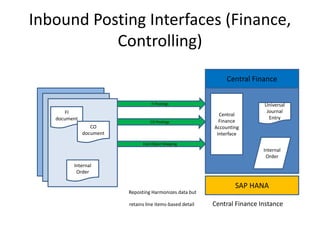
• With the Central Finance solution, there are three interfaces that feed
data from the source systems into the target system’s Accounting
Interface.
 An Interface for reporting FI/CO postings:
Financial documents that are posted in the source system get reposted as new FI documents in the
central finance system. If these posting are relevant to CO (expenses on cost elements), CO will be
updated too.
An Interface for reposting CO posting:
This interface reposts the CO postings where the CO document is the loading document. In contrast to
the interface for FI/CO postings, these are postings that are not necessarily reflected in the Financials in
the source system(Sometime only for reconciliation purposes). For example, postings on secondary cost
elements.
An interface for replicating certain cost objects ( such as production orders , internal orders, QM orders
etc.)
Universal Journal
• The posted documents are stored in the Universal journal of the SAP
Simple Finance system. It is possible to take advantage of new G/L
features within SAP Simple Finance as well as the ability of flexible
reporting based on line-items instead of pre-aggregated totals. Further
more beautiful Fiori user interfaces and reporting tools can be used in the
central finance. Reporting with the speed of HANA is available on line-item
levels.
Inbound Posting Interfaces (Finance,
Controlling)
Reposting Harmonizes data but
retains line items-based detail Central Finance Instance
FI
document
CO
document
Internal
Order
Central
Finance
Accounting
Interface
Universal
Journal
Entry
Internal
Order
SAP HANA
Central Finance
FI Postings
CO Postings
Cost Object Mapping
Procedure: Migration to Simple Finance On-
Premise Edition 1503
Especially if currently using classic G/L, but a good idea from new G/L as well.
Installation
Customizing
Data Migration
Preparation
Post Processing
• Train those involved in SAP on the new transactions and programs
• Create a blueprint for process redesign and reporting
• Perform reconciliation, period-end activities, and gather reporting snapshots for before/after
comparisons
• Install the Simple Finance On-Premise Edition 1503.
• The System backs-up index and totals tables automatically
• Customize General Ledger Accounting
• Customize and activate Asset Accounting (New)
• Customize Management Accounting (account based CO-PA)
• Migration of financial data (GL/AP/AR/CO/FI-AA/ML)
• Reconciliation & Checks within and after migration
• Perform process tests to ensure successful migration
• Transfer data to cold database area
• Update due dates and offsetting account
Old Architecture
New Architecture

Simple Finance Presentation

  • 1.
    SAP Central Finance •SCENARIO • You are Managing a complex and varied ERP system landscape. You want to find a solution to improve financial reporting and processes, both in speed and accuracy. A large transformation and migration project to completely new systems is out of the question due to time, cost, complexity and business continuity requirements. • You want to understand if and how the SAP Central Finance solution can help transform and modernize your Finance and Operations. • Business Challenges • Consolidated entity reporting • Central Process execution • Business model pressure • Heterogeneous IT landscapes • SAP and Non-SAP ERP systems • Relational database designs • Productivity & Effectiveness
  • 2.
    The Central FinanceSolution • Central Finance helps companies report on financial figures sourced from different systems. • With the Central Finance solution, there are three interfaces that feed data from the source systems into the target system’s Accounting Interface.  An Interface for reporting FI/CO postings: Financial documents that are posted in the source system get reposted as new FI documents in the central finance system. If these posting are relevant to CO (expenses on cost elements), CO will be updated too. An Interface for reposting CO posting: This interface reposts the CO postings where the CO document is the loading document. In contrast to the interface for FI/CO postings, these are postings that are not necessarily reflected in the Financials in the source system(Sometime only for reconciliation purposes). For example, postings on secondary cost elements. An interface for replicating certain cost objects ( such as production orders , internal orders, QM orders etc.)
  • 3.
    Universal Journal • Theposted documents are stored in the Universal journal of the SAP Simple Finance system. It is possible to take advantage of new G/L features within SAP Simple Finance as well as the ability of flexible reporting based on line-items instead of pre-aggregated totals. Further more beautiful Fiori user interfaces and reporting tools can be used in the central finance. Reporting with the speed of HANA is available on line-item levels.
  • 4.
    Inbound Posting Interfaces(Finance, Controlling) Reposting Harmonizes data but retains line items-based detail Central Finance Instance FI document CO document Internal Order Central Finance Accounting Interface Universal Journal Entry Internal Order SAP HANA Central Finance FI Postings CO Postings Cost Object Mapping
  • 5.
    Procedure: Migration toSimple Finance On- Premise Edition 1503 Especially if currently using classic G/L, but a good idea from new G/L as well. Installation Customizing Data Migration Preparation Post Processing • Train those involved in SAP on the new transactions and programs • Create a blueprint for process redesign and reporting • Perform reconciliation, period-end activities, and gather reporting snapshots for before/after comparisons • Install the Simple Finance On-Premise Edition 1503. • The System backs-up index and totals tables automatically • Customize General Ledger Accounting • Customize and activate Asset Accounting (New) • Customize Management Accounting (account based CO-PA) • Migration of financial data (GL/AP/AR/CO/FI-AA/ML) • Reconciliation & Checks within and after migration • Perform process tests to ensure successful migration • Transfer data to cold database area • Update due dates and offsetting account
  • 6.
  • 7.