SAMI GS   Frequency converters ACS 501
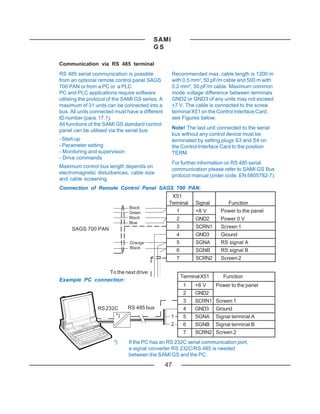
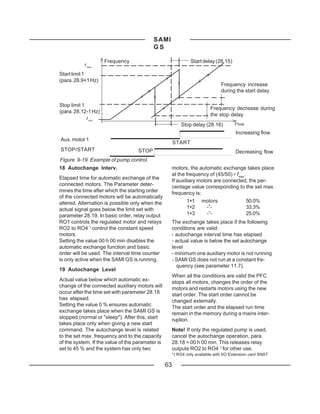
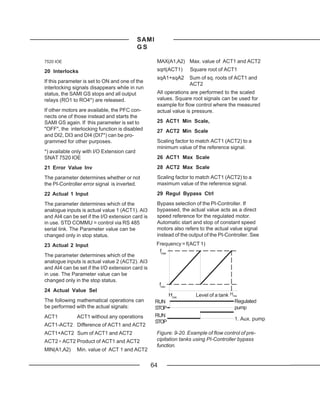
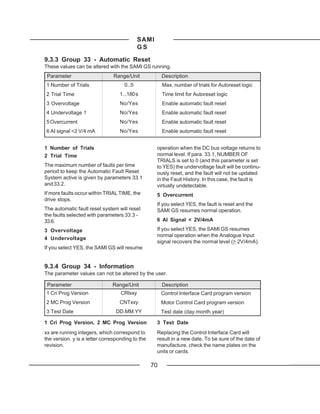
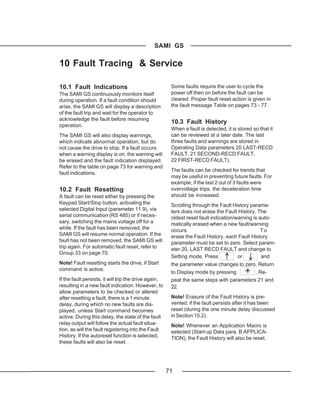
                           2.2 to 75 kW

                       User's Manual


                                EN 60019134


                        ASEA BROWN BOVERI
SAMI GS


          Frequency Converters ACS 501
                           2.2 to 75 kW

                            User's Manual


                                Code: EN 60019134 C

                                 GSVBC-UML1A1/EN
                                     1995-08-07/EP

                   v:markdocuacs500usermanu501en


   1
SAMI GS


Safety Instructions
                 ONLY A COMPETENT ELECTRICIAN SHOULD
                 CARRY OUT       THE ELECTRICAL
                            INSTALLATION


SAMI GS must always be earthed through an             The Motor Control Card's capacitors contain
earthing conductor connected to the earthing          dangerous DC voltage levels. After discon-
terminal.                                             necting the supply, wait at least 5 minutes
                                                      after the display readout on the control panel
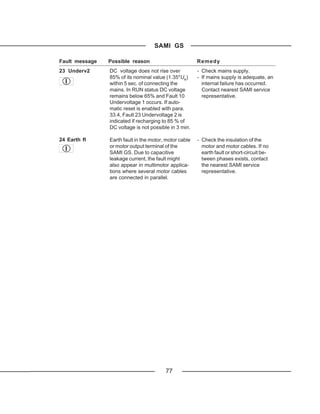
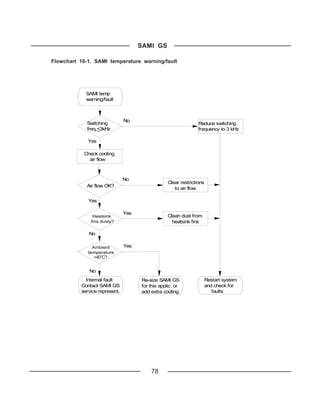
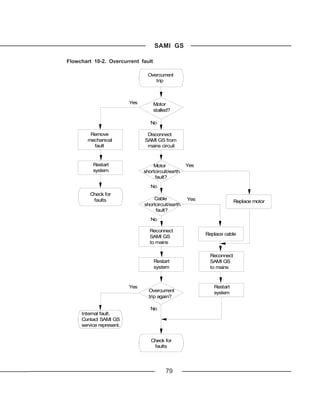
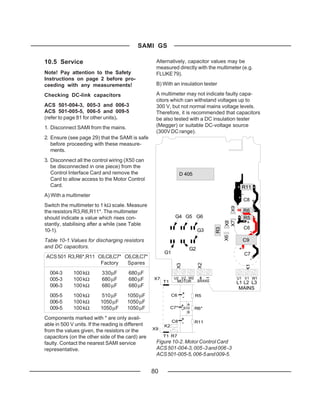
If SAMI GS is connected to a system without           has disappeared before taking any measure-
system earth, the earth fault protection must         ments.
be capable of starting at earth fault currents
containing high frequency and DC compon-              Dangerous external control voltages may be
ents. SAMI GS' earth fault protection guards          present on the relay outputs of the Control
the frequency converter only against earth            Interface Card and Option Cards.
faults occuring in the motor or the motor
cable.                                                Pay attention to the following instructions:

Fault current circuit breakers do not neces-          - Do not work on the frequency converter
sarily operate properly with frequency convert-         when power is applied.
ers. Circuit breaker function should be               - Never connect mains voltage to drive
checked for possible earth fault currents             output terminals (U2,V2,W2).
arising in a fault situation.
                                                      - Do not make any voltage withstand tests
Warning symbols                                         on any part of the unit. Disconnect motor
For your own safety please pay special                  cables before taking any measurements
attention to instructions containing these              on the motor or motor cables.
symbols.                                              - Make sure that power factor correction
                                                        capacitors are not connected between the
                                                        drive and the motor.
           Dangerous voltage
                                                      - Do not touch the IC-circuits on the Control
                                                        Interface and Motor Control Cards. Static
                                                        voltage may destroy the circuit.
           General warning
                                                      ALWAYS CHECK THAT SAMI GS IS SAFE
                                                      BY MEASURING THE DC LINK VOLTAGE
WARNINGS!                                             AND MAINS INPUT VOLTAGE!
SAMI GS contains dangerous voltages when
connected to the mains.                               Refer to the figures 5-2, 5-3 on page 18.

Note that the Motor Control Card of the SAMI
GS is at mains supply voltage potential.


                                                  2
SAMI GS


Contents

GENERAL
   Safety Instructions ................................................................................................... 2
   1 How To Use This Manual ..................................................................................... 6
   2 Delivery Checks .................................................................................................... 7
   3 General Information About SAMI GS .................................................................. 8

INSTALLATION
   4 Mechanical Installation ...................................................................................... 11
            4.1 Cooling .................................................................................................... 11
            4.2 Mounting .................................................................................................. 14
   5 Power Connections ............................................................................................ 16
            5.1 Mains Cable ............................................................................................. 16
            5.2 Motor Cable ............................................................................................. 16
            5.3 Insulation Checks .................................................................................... 17
            5.4 Terminal Connections .............................................................................. 17
   6 Control Connections ........................................................................................... 19
            6.1 Control Cables ......................................................................................... 20
            6.2 Connections of the Control Interface Card SNAT 7600/7640 ..................... 21

OPERATION
   7 Control and Parameter Logic ............................................................................ 22
            7.1 Control Panel ........................................................................................... 22
            7.2 Control Panel Operation ........................................................................... 22
            7.3 Parameter Logic ....................................................................................... 23
            7.4 Adjusting Display Contrast ....................................................................... 25
            7.5 Operating Data ......................................................................................... 25
            7.6 Control ..................................................................................................... 27


                                                            3
SAMI GS


           7.7 Keypad Control ........................................................................................ 28
           7.8 External Control ....................................................................................... 28
           7.9 Parameter Lock ....................................................................................... 29

START-UP
   8 Commissioning ................................................................................................... 29
           8.1 Safety Precautions................................................................................... 29
           8.2 Sequence of Operations ........................................................................... 30
           8.3 Installation Inspection .............................................................................. 31
           8.4 Start-Up Data Parameters ........................................................................ 31
           8.5 Checking Selected Application Macro Parameters ................................... 32
           8.6 Keypad Control Test Without Motor ......................................................... 32
           8.7 Keypad Control Test With Motor .............................................................. 32
           8.8 Drive Parameters and Their Factory Settings (Factory Macro). ................ 33
   9 Drive Parameters ................................................................................................ 37
           9.1 Main 10 - Control Connections ................................................................. 37
                    9.1.1 Group 11 - Dig/Analog Input Sel .................................................. 37
                    9.1.2 Group 12 - Analogue Inputs ......................................................... 41
                    9.1.3 Group 13 - Ref Value Scaling ...................................................... 42
                    9.1.4 Group 14 - Output Signals .......................................................... 42
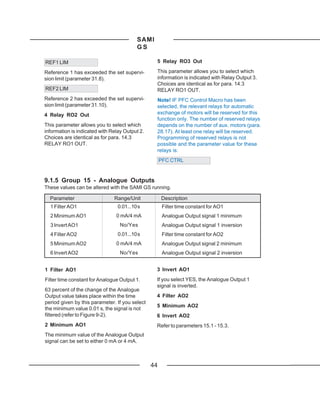
                    9.1.5 Group 15 - Analogue Outputs ...................................................... 44
                    9.1.6 Group 16 - Out Sig Scaling ......................................................... 45
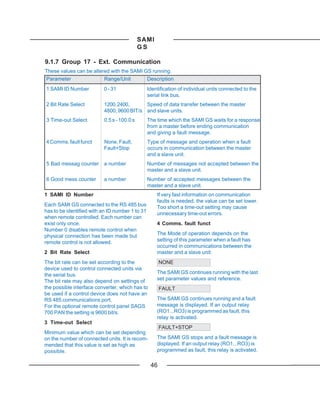
                    9.1.7 Group 17 - Ext. Communication .................................................. 46
           9.2 Main 20 - Drive ......................................................................................... 48
                    9.2.1 Group 21 - Acceler/Deceler ......................................................... 48
                    9.2.2 Group 22 - Freq/Cur Limits .......................................................... 49
                    9.2.3 Group 23 - Crit Frequencies ........................................................ 50
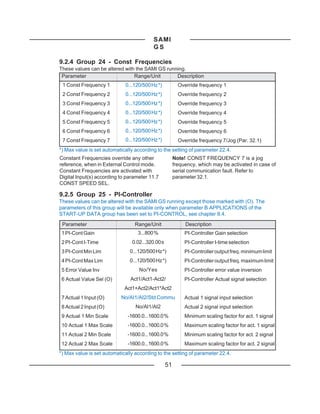
                    9.2.4 Group 24 - Const Frequencies .................................................... 51
                    9.2.5 Group 25 - PI-Controller .............................................................. 51


                                                          4
SAMI GS


                      9.2.6 Group 26 - Start/Stop .................................................................. 55
                      9.2.7 Group 27 - Motor Control ............................................................. 57
                      9.2.8 Group 28 - PFC Control .............................................................. 60
            9.3 Main 30 - Protection ................................................................................. 65
                      9.3.1Group 31 - Supervision ................................................................. 65
                      9.3.2 Group 32 - Fault Function ........................................................... 66
                      9.3.3 Group 33 - Automatic Reset........................................................ 70
                      9.3.4 Group 34 - Information ................................................................. 70

SERVICE & MAINTENANCE
   10 Fault Tracing & Service .................................................................................. 71
            10.1 Fault Indications ..................................................................................... 71
            10.2 Fault Resetting ....................................................................................... 71
            10.3 Fault History .......................................................................................... 71
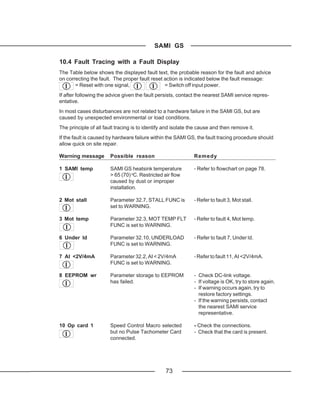
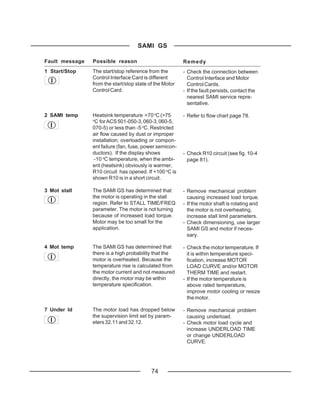
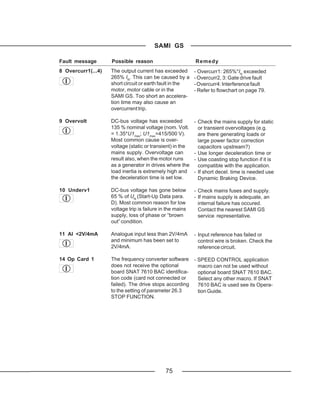
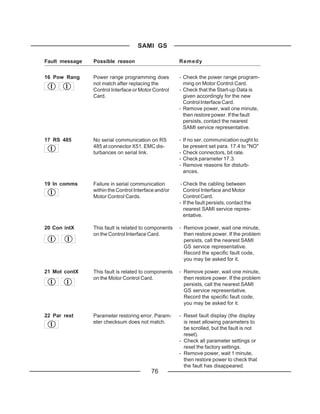
            10.4 Fault Tracing with a Fault Display .......................................................... 73
            10.5 Service ................................................................................................... 80
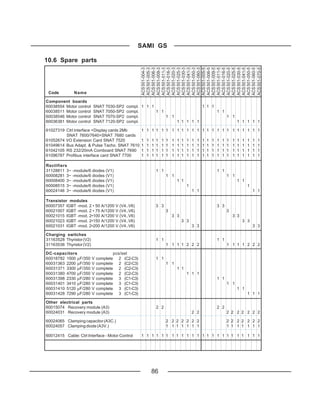
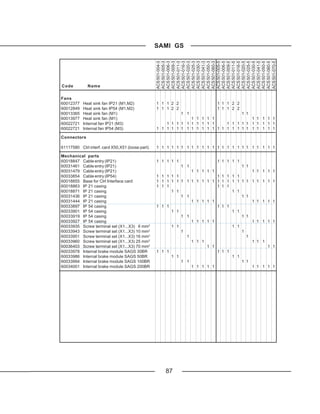
            10.6 Spare parts ............................................................................................ 86
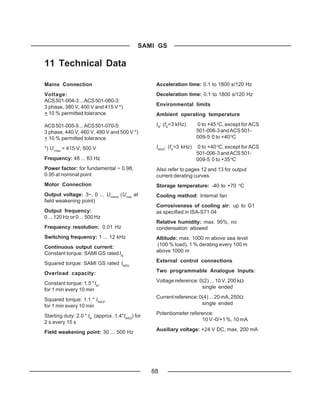
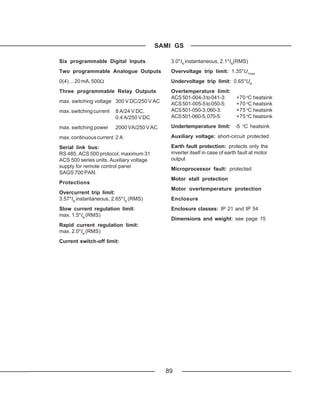
   11 Technical Data .................................................................................................. 88
   12 Options .............................................................................................................. 90
   13 Glossary ............................................................................................................. 91
   14 Index .................................................................................................................. 92


                                                             5
SAMI
                                            GS

1 How To Use This Manual

The information given in this manual is valid           Short explanations of some less commonly
only for SAMI GS frequency converters.                  used technical terms referred to in this
                                                        manual are given in the Glossary (pg. 91).
This manual gives instructions for the proper
and safe installation, start-up, operation, fault       References to titles of the different sections
tracing and service of SAMI GS frequency                of this manual are printed with a capital first
converters.                                             letter. SAMI GS parameter names and
                                                        settings are printed in capital letters when
We recommend you read this User's Manual                mentioned in the text.
carefully before starting any installation and
connections or operating your SAMI GS.                  Parameters are also referred to by using a
                                                        number, which indicates the location of the
SAMI GS user documentation also includes                parameter (32.1 means the first parameter in
an Application Macros Manual, Quick                     Group 32 of Main 30).
Reference Guide and Control Panel Opera-
tion Instruction sticker, which are included in         Should there be any questions concerning
the delivery. The sticker is to be placed on            SAMI GS, please contact the supplier or the
the front cover below the keypad.                       manufacturer.
For quick and easy use of this manual,                  The technical data and specifications are
please refer to the table of contents on                valid at the time of printing. We reserve the
pages 3 - 5 or index on pages 92 - 93.                  right to subsequent alterations.


         ABB Industry Oy
         VSD Products
         P.O. Box 184
         FIN-00381 Helsinki
         FINLAND

         Telephone: +358-0-5641
         Telefax: +358-0-564 2681
         Telex: +57-12440502 str fi


                                                    6
SAMI
                                           GS

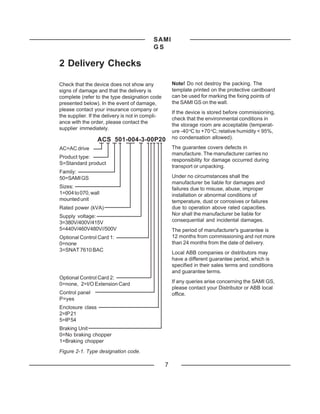
2 Delivery Checks

Check that the device does not show any               Note! Do not destroy the packing. The
signs of damage and that the delivery is              template printed on the protective cardboard
complete (refer to the type designation code          can be used for marking the fixing points of
presented below). In the event of damage,             the SAMI GS on the wall.
please contact your insurance company or
                                                      If the device is stored before commissioning,
the supplier. If the delivery is not in compli-
                                                      check that the environmental conditions in
ance with the order, please contact the
                                                      the storage room are acceptable (temperat-
supplier immediately.
                                                      ure -40 oC to +70 oC; relative humidity < 95%,
                  ACS 501-004-3-00P20                 no condensation allowed).

AC=AC drive                                           The guarantee covers defects in
                                                      manufacture. The manufacturer carries no
Product type:
                                                      responsibility for damage occurred during
S=Standard product
                                                      transport or unpacking.
Family:
50=SAMI GS                                            Under no circumstances shall the
                                                      manufacturer be liable for damages and
Sizes:                                                failures due to misuse, abuse, improper
1=004 to 070, wall                                    installation or abnormal conditions of
mounted unit                                          temperature, dust or corrosives or failures
Rated power (kVA)                                     due to operation above rated capacities.
Supply voltage:                                       Nor shall the manufacturer be liable for
3=380V/400V/415V                                      consequential and incidental damages.
5=440V/460V480V//500V                                 The period of manufacturer's guarantee is
Optional Control Card 1:                              12 months from commissioning and not more
0=none                                                than 24 months from the date of delivery.
3=SNAT 7610 BAC
                                                      Local ABB companies or distributors may
                                                      have a different guarantee period, which is
                                                      specified in their sales terms and conditions
                                                      and guarantee terms.
Optional Control Card 2:
0=none, 2=I/O Extension Card                          If any queries arise concerning the SAMI GS,
                                                      please contact your Distributor or ABB local
Control panel                                         office.
P=yes
Enclosure class
2=IP 21
5=IP 54
Braking Unit
0=No braking chopper
1=Braking chopper
Figure 2-1. Type designation code.

                                                  7
SAMI
                                          GS

3 General Information About SAMI GS

The DC-Intermediate Circuit filters the             A Control Interface Card is the link between
pulsating DC-voltage supplied by the                the operator and the SAMI. It incorporates a
Rectifier Stage.                                    control panel with an alphanumeric display
                                                    and keypad. A terminal block for external
Thanks to the diode bridge, the power taken
                                                    control connections is also located on the
from the mains is almost entirely active            Control Interface Card.
power. The power factor approaches unity.
                                                                 Note! The Control Interface Card
The Inverter Stage forms symmetrical three-                      is galvanically isolated from the
phase AC-voltage from the constant DC-
                                                                 mains potential. The card is
voltage supplied by the DC-Intermediate             connected to earth via a 10 MΩ resistance. If
Circuit.                                            needed the card can be earthed by connect-
A Motor Control Card controls the Inverter          ing with a wire X50 terminal 8 to PE terminal
Stage and monitors the operation of the             on the unit frame (see Figure 6-1).
SAMI GS.
           Note! The maximum permissible
           number of charges within one
           minute is four. Therefore in
applications where frequent sequential Start/
Stops are required, electronic Start/Stop
should be used, while the unit is powered
continuously.


                                                8
SAMI
                                             GS

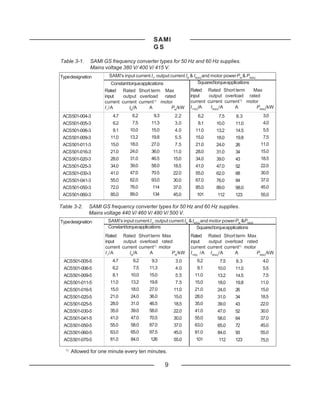
Table 3-1.     SAMI GS frequency converter types for 50 Hz and 60 Hz supplies.
               Mains voltage 380 V/ 400 V/ 415 V.
Type designation       SAMI's input current I1, output current IN & INSQ and motor power PN & PNSQ
                        Constant torque applications                  Squared torque applications
                     Rated Rated Short term Max                 Rated Rated Short term       Max
                     input    output overload    rated          input    output overload rated
                     current current current 1) motor           current current current 1) motor
                     I 1 /A      IN/A     A         PN/kW       I 1SQ/A   I NSQ /A   A         PNSQ/kW
 ACS501-004-3           4.7       6.2        9.3        2.2         6.2        7.5      8.3           3.0
 ACS501-005-3           6.2       7.5       11.3        3.0         8.1       10.0     11.0           4.0
 ACS501-006-3           8.1      10.0       15.0        4.0        11.0       13.2     14.5           5.5
 ACS501-009-3          11.0      13.2       19.8        5.5        15.0       18.0     19.8           7.5
 ACS501-011-3          15.0      18.0       27.0        7.5        21.0       24.0     26            11.0
 ACS501-016-3          21.0      24.0       36.0       11.0        28.0       31.0     34            15.0
 ACS501-020-3          28.0      31.0       46.5       15.0        34.0       39.0     43            18.5
 ACS501-025-3          34.0      39.0       58.0       18.5        41.0       47.0     52            22.0
 ACS501-030-3          41.0      47.0       70.5       22.0        55.0       62.0     68            30.0
 ACS501-041-3          55.0      62.0       93.0       30.0        67.0       76.0     84            37.0
 ACS501-050-3          72.0      76.0        114       37.0        85.0       89.0     98.0          45.0
 ACS501-060-3          85.0      89.0        134       45.0        101        112      123           55.0

Table 3-2.    SAMI GS frequency converter types for 50 Hz and 60 Hz supplies.
              Mains voltage 440 V/ 460 V/ 480 V/ 500 V.
Type designation      SAMI's input current I1, output current IN & INSQ and motor power PN &PNSQ
                      Constant torque applications                   Squared torque applications
                     Rated Rated Short term Max                 Rated Rated Short term Max
                     input    output overload rated             input    output overload rated
                     current current current1) motor            current current current1) motor
                     I 1 /A      IN/A     A          PN/kW      I 1SQ /A I NSQ/A     A          PNSQ/kW
 ACS501-005-5           4.7        6.2      9.3         3.0         6.2        7.5      8.3           4.0
 ACS501-006-5           6.2        7.5     11.3         4.0         8.1       10.0     11.0           5.5
 ACS501-009-5           8.1       10.0     15.0         5.5       11.0        13.2     14.5           7.5
 ACS501-011-5          11.0       13.2     19.8         7.5       15.0        18.0     19.8          11.0
 ACS501-016-5          15.0       18.0     27.0         11.0      21.0        24.0     26            15.0
 ACS501-020-5          21.0       24.0     36.0         15.0      28.0        31.0     34            18.5
 ACS501-025-5          28.0       31.0     46.5         18.5      35.0        39.0     43            22.0
 ACS501-030-5          35.0       39.0     58.0         22.0      41.0        47.0     52            30.0
 ACS501-041-5          41.0       47.0     70.5         30.0      55.0        58.0     64            37.0
 ACS501-050-5          55.0       58.0     87.0         37.0      63.0        65.0     72            45.0
 ACS501-060-5          63.0       65.0     97.5         45.0      81.0        84.0     93            55.0
 ACS501-070-5          81.0       84.0      126         55.0       101         112     123           75.0

  1)
       Allowed for one minute every ten minutes.

                                                   9
SAMI
                                       GS

Mains connection                  Brake connection                               Motor connection
U in                                                                                        U out


       PE                                                                          PE
                                                    IU
                                                         DC


                                  Power        Measurements         Gate
                                  supply                            drivers


                                                                                  T
                                                          Inverter control
                             Motor
                             control


       Control                                            Communication
       interface                                          with Motor control
                                                                                      X56


        X51

              Comm. with                Application control
              PC,PLC etc.
                                                                                      X55


                              2            6                  2              3
                            progr.      progr.           progr.         progr.
        X53                 Analog      Digital          Analog         Relay
                            Inputs      Inputs           Outputs        Outputs

       X50


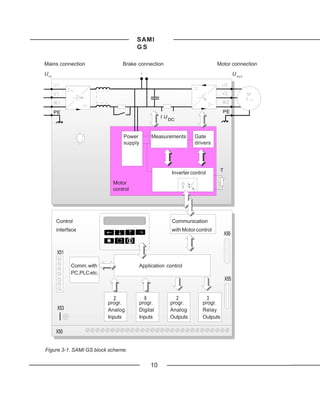
Figure 3-1. SAMI GS block scheme.

                                               10
SAMI GS


4 Mechanical Installation
SAMI GS is mounted on a wall in a vertical           If the cooling ability is reduced too much, the
position using four fixing notches at the top        thermal protection operates causing a fault
and bottom of the unit. When choosing the            indication and stopping the frequency con-
mounting location pay attention to the cool-         verter. SAMI GS can be started again when
ing needs of the SAMI GS.                            the temperature of the cooling element has
                                                     fallen below the tripping level*) (+70 oC).
                                                     The temperature of the cooling element can
4.1 Cooling                                          be read from the control panel display
SAMI GS frequency converters are provided            (Oper- ating Data, parameter 8, SAMI
with a cooling fan(s) on the bottom of the unit.     TEMPERATURE).
The ambient operating temperature for                 for types ACS 501-050-3, 060-3, 060-5 and
                                                     *)

constant torque drives, when the load current        070-5, the tripping level is +75 oC.
is (IN) and switching frequency            fS = 3
kHz, is 0 ... 45 oC, except for ACS 501-006-3
and 009-5 0 ... 40 oC. See fig. 4-2 output
current derating curves.                   The
ambient operating temperature for squared
torque drives, when the load current is (INSQ)
and switching frequency fS = 3 kHz, is 0 ... 40
o
  C, except for ACS 501-006-3 and 009-5 0 ...
35 oC. See fig. 4-2 output current derating
curves.
The cooling air must be clean and free from
corrosive materials. Where necessary the
cooling air should be filtered.
If the cooling air contains dust, clean the
cooling surfaces of the unit regularly using
compressed air and a brush.


Table 4-1. Required cooling air.

 Type ACS 501-                        [m3/h]
 004-3...006-3,   005-5...009-5           51
 009-3, 011-3, 011-5, 016-5 102
 016-3, 020-3, 020-5, 025-5 406
 025-3...060-3,   030-5...070-5         560


                                                    11
SAMI GS

Figure 4-1. Power dissipation as a function of
the switching frequency for different ACS 501
types. Output power in the following curves is
P NSQ.

                  P l o s s 600                                               -011-3
                  [W]                                                         -016-5
                            500
                                                                              -009-3
                         400                                                  -011-5

                         300                                                  -006-3
                                                                              -009-5
                         200
                                                                              -005-3
                         100                                                  -006-5

                                                                              -004-3
                                                                              -005-5
                                            3 4 5 6 7 8 9 10 11 12
                                                                f [kHz]
                P l o s s 2750                                                -060-3
                                                                              -070-5
                [W] 2500                                                      -050-3
                                                                              -060-5
                       2000                                                   -041-3
                                                                              -050-5
                        1500                                                  -030-3
                                                                              -041-5
                       1000                                                   -025-3
                                                                              -030-5
                        500                                                   -020-3
                                                                              -025-5
                                  16-70HAV.DRW
                                                                              -016-3
                                      3 4 5 6 7 8 9 10 11 12                  -020-5

Figure 4-2. Output current derating curves as             f [kHz]
a function of ambient temperature and
switching frequency.            II    out
                                      out
                     ACS 501
                                     [A]
                                      [A]
                     -006-3 I NSQ
                     -009-5 I NSQ      15

                     -005-3 I NSQ                                  12 kHz
                     -006-5 I NSQ
                     -006-3 IN
                                       10
                     -009-5 IN                                        3 kHz
                     -004-3 I NSQ
                     -005-5 I NSQ
                     -005-3 IN          5
                     -006-5 IN

                     -004-3 IN
                     -005-5 IN

                                                 10    20     30    40       T
                                                                            50 a m b Tamb
                                                                             [°C]C ]
                                                                               [o


                                                      12
SAMI GS

               I out
                 out
               [A]

                30
  ACS 501
  -011-3                                              12 kHz
  I NSQ                                                 3 kHz
  -016-5
  I NSQ         20

  -009-3
  I NSQ
  -011-5       10
  I NSQ
  -011-3 IN
  -016-5 IN

  -009-3 IN
  -011-5 IN          I out      10     20   30   40      50       T amb
                     [A]                                          [ oC]
                40
                                                           3 kHz
   ACS 501                                                12 kHz
   -020-3
   I NSQ
   -025-5
                30
   I NSQ

   -016-3
   I NSQ
   -020-5
               20
   I NSQ
   -020-3 IN
   -025-5 IN

   -016-3 IN
                                10     20   30   40      50       T amb
   -020-5 IN
                                                                  [ o C]
ACS 501
-060-3         I out [A]
I NSQ          120
-070-5                                                   3 kHz-
I NSQ                                                   12 kHz
-050-3         100
I NSQ
-060-3 IN

-060-5         80
I NSQ                                                      3 kHz
-070-5 IN                                                 12 kHz

-050-3   IN
               60
-041-3
I NSQ
-060-5   IN
-050-5
               40
I NSQ
-030-3                       25-70LOA.DRW
I NSQ
-041-3   IN                     10     20   30   40      50     T amb
-041-5                                                          [ oC]
I NSQ
-050-5   IN
-025-3                          13
I NSQ
-030-5
I NSQ
SAMI GS

                                                 4.2 Mounting
                                                 Note! Do not handle or lift the drive using the
 Cooling air outlet                              front cover. Use the bottom part for handling.
                          d (see table
                          below)                 To ensure safe installation, check that the
                                                 surface mounting is flat. Mark the fixing points
                           SAMI GS               of SAMI GS on the wall using the template
                                                 printed on the protective cardboard package
                                                 as a guide. The maximum size of the fixing
                                                 screws is 6 mm (15/64") for ACS 501-004-
                                                 3...006-3 and ACS 501-005-5...009-5 units and
                                                 8 mm (5/16") for 009-3...060-3 and 016-5...070-
                                                 5 units.
 50 mm                                  50 mm
                                                 Fix the screws to the marked positions.
                                                 Attach the unit by the fixing notches and
                                                 tighten the screws.


                                                 Note! If multiple units are installed adjacent
                                                 or above each other, the following minimum
  Cooling air                                    distances apply:
                          50 mm                  - units side by side, clearance 100 mm - units
  inlet
                                                 above each other, clearance 300 mm


    Type                       d/[mm]
    ACS 501-004...011-3           150
    ACS 501-005...016-5           150
    ACS 501-016...060-3           250
    ACS 501-020...070-5           250

Figure 4-3. Space requirement for adequate
cooling.


                                                14
SAMI GS
                L


                                              a


                                              b

                L1


H                              H1                                     H2


                                                          c

                                D


                                       ACS501-       ACS501-       ACS501-       ACS501-       ACS501-
                                       004...006-3   009...011-3   016...020-3   025...041-3   050, 060-3
                                       005...009-5   011...016-5   020...025-5   030...050-5   060, 070-5
                                       (mm)          (mm)          (mm)          (mm)          (mm)
                               L         200            250           300            350          350
                               L1        150            175           225            275          275
                               H         362            425           507            603          603
                               H1        350            400           480            575          575
                               H2        312            380           460            551          551
                               D         188            208           249            262          307
                               a             7              9             9             9            9
                               b          14              18            18            18            18
                               c             7              9             9             9            9
                              Weight
                               /kg       abt. 7.2       abt. 12       abt. 22        abt. 36      abt. 40

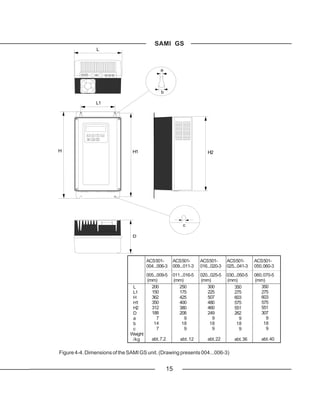
Figure 4-4. Dimensions of the SAMI GS unit. (Drawing presents 004...006-3)


                                                  15
SAMI GS


5 Power Connections

5.1 Mains Cable                                       occurring in variable frequency motor drive
SAMI GS is rated for a 380 V/400 V/415 V or           systems.
440 V/460 V/480 V/500 V 3-phase system.
                                                      To avoid disturbances
A 4-conductor screened cable (three phase
with Protective Earth) is recommended for the         Install the motor cable away from other cable
mains cabling. The cables and fuses are to            routes. Avoid long parallel runs with other ca-
be dimensioned in accordance with the out-            bles (see page 20).
put current. See Table 5-1 for minimum di-
mensions. When dimensioning cables, al-               Disturbances caused by radiation from the
ways pay attention to local authority regula-         motor cable can be reduced by mounting
tions.        Note! Remove all the compen-            chokes in the motor cable. These chokes
sation capacitors from the line side so that          may reduce the motor voltage and the maxi-
                                                      The rapid voltage changes cause capaci-
they are not powered up at the same time as
                                                      tive current through the motor cable stray ca-
the SAMI GS.
                                                      pacitances. This current rises as the switch-
                                                      ing frequency and cable length increase.
5.2 Motor Cable                                       This phenomenon can cause substantially
A 4-conductor screened cable is recom-                higher current measured by the SAMI GS
mended due to the rapid voltage changes               than the actual motor current, and can cause
                                                      overcurrent tripping. This means that when

Table 5-1. Mains & motor cables and fuse recommendations according to output current (IN, INSQ).
 Type             IN            Fuse   Cu-cable    I NSQ         Fuse   Cu-cable    Max. Cable (Cu or Al)
 ACS 501-         (A)           (A)    (mm2)       (A)           (A)    (mm2)             (mm2)
 004-3/005-5      6.2           10     3*1.5+1.5   7.5            10    3*1.5+1.5        3*2.5+2.5
 005-3/006-5      7.5           10     3*1.5+1.5   10.0           10    3*1.5+1.5        3*2.5+2.5
 006-3/009-5      10.0          10     3*1.5+1.5   13.2          16     3*2.5+2.5        3*2.5+2.5
 009-3/011-5      13.2          16     3*2.5+2.5   18.0          25     3*6.0+6.0        3*6.0+6.0
 011-3/(016-5)    18.0          25     3*6.0+6.0   24.0 (26.0)    25    3*6.0+6.0        3*6.0+6.0
 016-3/020-5      24.0          25     3*6.0+6.0   31.0          35     3*10+10           3*10+10
 020-3/025-5      31.0          35     3*10+10     39.0          50     3*16+16           3*16+16
 025-3/030-5      39.0          50     3*16+16     47.0          50     3*16+16           3*35+16
 030-3/(041-5)    47.0          50     3*16+16     62.0 (58.0)   63     3*25+16           3*35+16
 041-3/(050-5)    62.0 (58.0)   63     3*25+16     76.0 (65.0)    80    3*35+16           3*35+16
 050-3/(060-5)    76.0 (65.0)   80     3*35+16     89.0 (84.0)   100    3*50+25           3*70+35
 060-3/(070-5)    89.0 (84.0)   100    3*50+25     112           125    3*70+35           3*70+35


Table 5-2. Maximum recomm. length of the motor cable in accord. with switching frequency.
Switching        004...011-3/005...016-5 016-3...020-3/020...025-5 025-3...060-3/030-5...070-5
frequency        Screened Unscreened Screened Unscreened Screened Unscreened
  [kHz]           cable [m] cable [m]     cable [m] cable [m]       cable [m] cable [m]
    1    75       100            100 150           200         250
    12              50           75         75       100              150        200

                                                   16
SAMI GS

cable lengths given in Table 5-2 are exceed-      mum available torque. If noise problems ex-
ed for types ACS 501-004...011-3 or ACS 501-               ist, contact ABB for more detailed
005...016-5, the output choke should be used.              information.
Note! To avoid interference problems in
control cables all the cabling should be          5.3 Insulation Checks
screened and should not run parallel to the       Note! Insulation checks must be performed
motor cables (see page 20 for minimum dis-        before connecting the SAMI to the mains.
tances).                                          Before proceeding with the insulation resist-
                                                  ance measurements make sure that the
                                                  SAMI is disconnected from the mains.
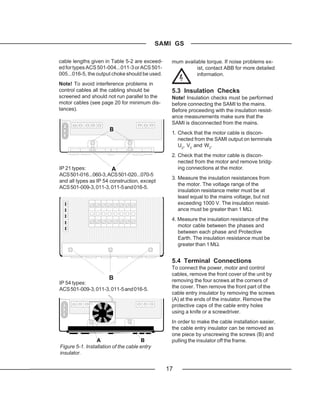
                       B
                                                  1. Check that the motor cable is discon-
                                                     nected from the SAMI output on terminals
                                                     U2, V2 and W2.
                                                  2. Check that the motor cable is discon-
                                                     nected from the motor and remove bridg-
IP 21 types:            A                            ing connections at the motor.
ACS 501-016...060-3, ACS 501-020...070-5
                                                  3. Measure the insulation resistances from
and all types as IP 54 construction, except
                                                     the motor. The voltage range of the
ACS 501-009-3, 011-3, 011-5 and 016-5.
                                                     insulation resistance meter must be at
                                                     least equal to the mains voltage, but not
                                                     exceeding 1000 V. The insulation resist-
                                                     ance must be greater than 1 MΩ.
                                                  4. Measure the insulation resistance of the
                                                     motor cable between the phases and
                                                     between each phase and Protective
                                                     Earth. The insulation resistance must be
                                                     greater than 1 MΩ.


                                                  5.4 Terminal Connections
                                                  To connect the power, motor and control
                                                  cables, remove the front cover of the unit by
                       B                          removing the four screws at the corners of
IP 54 types:
ACS 501-009-3, 011-3, 011-5 and 016-5.            the cover. Then remove the front part of the
                                                  cable entry insulator by removing the screws
                                                  (A) at the ends of the insulator. Remove the
                                                  protective caps of the cable entry holes
                                                  using a knife or a screwdriver.
                                                  In order to make the cable installation easier,
                                                  the cable entry insulator can be removed as
                                                  one piece by unscrewing the screws (B) and
                 A                     B          pulling the insulator off the frame.
Figure 5-1. Installation of the cable entry
insulator.


                                                17
SAMI GS

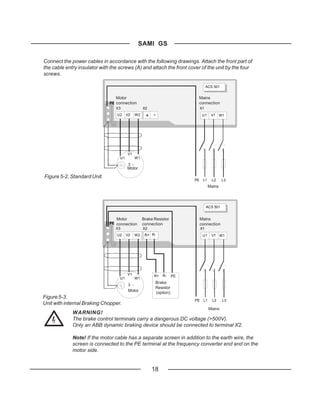
Connect the power cables in accordance with the following drawings. Attach the front part of
the cable entry insulator with the screws (A) and attach the front cover of the unit by the four
screws.

                                                                                   ACS 501


                                 Motor                                    Mains
                              PE connection                               connection
                                 X3                X2                         X1
                                 U2     V2    W2    + -                        U1    V1 W1


                                         V1
                                   U1         W1
                                         3
                                         Motor

Figure 5-2. Standard Unit.
                                                                         PE    L1     L2     L3
                                                                                    Mains


                                                                                   ACS 501


                                 Motor             Brake Resistor             Mains
                              PE connection        connection                 connection
                                 X3                X2                         X1
                                 U2     V2    W2    R+ R-                      U1    V1 W1


                                         V1              R+   R-    PE
                                   U1         W1
                                         3
                                                         Brake
                                                         Resistor
                                         Motor           (option)
Figure 5-3.
                                                                         PE    L1     L2     L3
Unit with internal Braking Chopper.
                                                                                    Mains
             WARNING!
             The brake control terminals carry a dangerous DC voltage (>500V).
             Only an ABB dynamic braking device should be connected to terminal X2.

             Note! If the motor cable has a separate screen in addition to the earth wire, the
             screen is connected to the PE terminal at the frequency converter end and on the
             motor side.


                                                        18
SAMI
                                           GS

6 Control Connections

                                              X57
                                                              X56


                  X54
                                                              X60
                      TERM NO
                  1             S3S4
                            NO                                           X55
                                S4S3
                                S1S2
                        I   U                            K1      K2      K3
               7                S2S1
               X51
                                            X50
        X53


              1
              1   2 3 4 5 6 7 8 9 1011 121314 151617 181920   212223   242526   32
                                                                                 272829


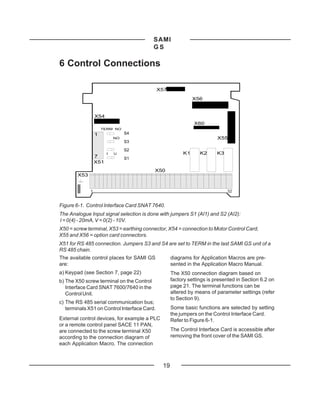
Figure 6-1. Control Interface Card SNAT 7640.
The Analogue Input signal selection is done with jumpers S1 (AI1) and S2 (AI2):
I = 0(4) - 20mA, V = 0(2) - 10V.
X50 = screw terminal, X53 = earthing connector, X54 = connection to Motor Control Card,
X55 and X56 = option card connectors.
X51 for RS 485 connection. Jumpers S3 and S4 are set to TERM in the last SAMI GS unit of a
RS 485 chain.
The available control places for SAMI GS            diagrams for Application Macros are pre-
are:                                                sented in the Application Macro Manual.
a) Keypad (see Section 7, page 22)                  The X50 connection diagram based on
b) The X50 screw terminal on the Control            factory settings is presented in Section 6.2 on
   Interface Card SNAT 7600/7640 in the             page 21. The terminal functions can be
   Control Unit.                                    altered by means of parameter settings (refer
                                                    to Section 9).
c) The RS 485 serial communication bus;
   terminals X51 on Control Interface Card.         Some basic functions are selected by setting
                                                    the jumpers on the Control Interface Card.
External control devices, for example a PLC         Refer to Figure 6-1.
or a remote control panel SACE 11 PAN,
are connected to the screw terminal X50             The Control Interface Card is accessible after
according to the connection diagram of              removing the front cover of the SAMI GS.
each Application Macro. The connection


                                               19
SAMI
                                          GS

6.1 Control Cables                                     must be protected by using varistors or RC
Control cables for the SAMI GS should be               units (AC) or a diode (DC). The protection
0.5 - 1.0 mm2 screened, multi-core cables.             components should be installed onto the coil
                                                       of the relay or contactor being controlled and
The cable screens should be earthed at the             not on the terminals of X50. When using an
PE of the frequency converter chassis.                 RC unit, note that the leakage current of the
When planning the cabling between the                  RC circuit must be less than the holding
SAMI GS and an automation device, such as              current of the controlled contactor or relay.
a PLC, attention should be given to interfer-
ence suppression, signal levels, galvanic
isolation, etc. These cables should be
separated from the mains and motor cables
and not running in parallel with them (mini-
mum separation 300 mm if parallel run
< 10 m; add 300 mm for every 10 m). There
should be no additional control components
(contactors or relays) inside the SAMI GS
and no control cables other than those of the
SAMI GS.
The control connections of the SAMI GS are
galvanically isolated from mains potential
and have a 10 MΩ resistance from the
inverter frame i.e. PE. Because of this, there
is no need to connect X50/2,4,6 and 8 (logic
GND) to TE or PE. However, it could prove
useful to do this if EMC problems occur.
Analogue input and output signals:
A separate twisted pair must always be used
for each individual signal.
Digital inputs:
It is strongly recommended to use screened
cables for digital inputs (DI). An external
+24V supply for the digital inputs (DI1 to DI6)
must not be used.
Relay outputs:
If relay outputs (RO) operate on 24 V DC, the
signals can be routed to the same cable
used for the digital inputs. If twisted cables
are used, digital output and input should
never be in the same pair. If 110 V/230 V AC
is connected to a relay output, a separate
cable without screen can be used for these
signals.
Note! If the relay outputs are used to control
inductive loads (e.g. relays, contactors) they

                                                  20
SAMI
                                                               GS

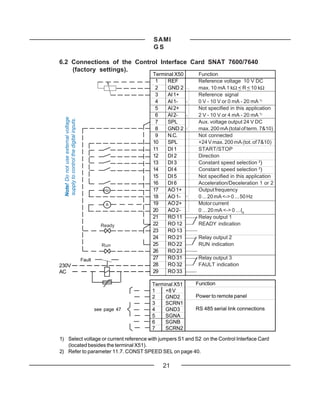
6.2 Connections of the Control Interface Card SNAT 7600/7640
    (factory settings).
                                                               Terminal X50    Function
                                                                1   REF        Reference voltage 10 V DC
                                                                2   GND 2      max. 10 mA 1 kΩ < R < 10 kΩ
                                                                3   AI 1+      Reference signal
                                                                4   AI 1-      0 V - 10 V or 0 mA - 20 mA 1)
                                                                5   AI 2+      Not specified in this application
                                                                6   AI 2-      2 V - 10 V or 4 mA - 20 mA 1)
 Note! Do not use external voltage
 supply to control the digital inputs.


                                                                7   SPL        Aux. voltage output 24 V DC
                                                                8   GND 2      max. 200 mA (total of term. 7&10)
                                                                9   N.C.       Not connected
                                                               10   SPL        +24 V max. 200 mA (tot. of 7&10)
                                                               11   DI 1       START/STOP
                                                               12   DI 2       Direction
                                                               13   DI 3       Constant speed selection 2)
                                                               14   DI 4       Constant speed selection 2)
                                                               15   DI 5       Not specified in this application
                                                               16   DI 6       Acceleration/Deceleration 1 or 2
                                                    Hz         17   AO 1+      Output frequency
                                                               18   AO 1-      0 ... 20 mA <-> 0 ... 50 Hz
                                                     A         19   AO 2+      Motor current
                                                               20   AO 2-      0 ... 20 mA <-> 0 ... IN
                                                               21   RO 11      Relay output 1
                                                   Ready       22   RO 12      READY indication
                                                               23   RO 13
                                                               24   RO 21      Relay output 2
                                                    Run        25   RO 22      RUN indication
                                                               26   RO 23
                                         Fault                 27   RO 31      Relay output 3
230V                                                           28   RO 32      FAULT indication
AC                                                             29   RO 33

                                                               Terminal X51   Function
                                                               1    +8 V
                                                               2    GND2      Power to remote panel
                                                               3    SCRN1
                                                 see page 47   4    GND3      RS 485 serial link connections
                                                               5    SGNA
                                                               6    SGNB
                                                               7    SCRN2

1) Select voltage or current reference with jumpers S1 and S2 on the Control Interface Card
   (located besides the terminal X51).
2) Refer to parameter 11.7. CONST SPEED SEL on page 40.

                                                                   21
SAMI
                                         GS

                                                     7 Control and
                                                     Parameter Logic

                                                     7.1 Control Panel
Main name                 Rotation direction         The control panel, situated on top of the
                          -->   forward              Control Interface Card, incorporates a 2 by
                          <--   reverse              20 character, alphanumeric LCD and a
                                                     keypad.

  DRIVE                                              The operational information, parameters, as
                                                     well as fault indications are displayed in nine
  20 MAIN                          R1[ -->           languages*): English, Finnish, Swedish, Ger-
  I]                                                 man, Dutch, French, Danish, Spanish and
                                                     Italian. The language selection is made in
                                                     Start-Up Data Group parameter A LAN-
Main number     Control place     Run status         GUAGE (refer to page 31).
                [ ]   Keypad      I = Run            *) Factory setting is English.
                      External    0 = Stop

                                                     7.2 Control Panel Operation
                                                     Panel keys
                                                            Selects the Setting mode and saves
                                                            the selected parameter value.
Parameter number       Active reference
and name               R1=Ref 1 R2=Ref 2                    Selects Operating Data as well as
                                                            Main, Group and Parameter levels. In
                                                            Setting mode, returns to the Display
  2     ACCELER TIME 1                                      mode without changing the Param-
  [       30 s   ] R1[ -->                 I]               eter value.
                                                            In Display mode selects the next/
                                                            previous Main, Group or Parameter.
Parameter value         Mode indication                     In Setting mode increases/de-
                        [ ]  Setting mode                   creases parameter value.
                             Display mode
                                                            Changes the rotation direction in
                                                            Keypad control (refer to parameter
Figure 7-1. Control panel displays. Note that               11.8 on page 40).
all the indications may not be visible at the
same time.                                                  Starts and stops the motor in Keypad
                                                            control. Resets faults, warnings and
                                                            supervision indications.
                                                     Note! To accelerate the rate of change of
                                                     parameter value, keep the        or
                                                     button depressed continuously.

                                                22
SAMI
                                               GS

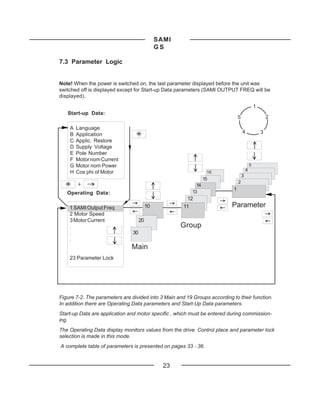
7.3 Parameter Logic


Note! When the power is switched on, the last parameter displayed before the unit was
switched off is displayed except for Start-up Data parameters (SAMI OUTPUT FREQ will be
displayed).
                                                                                                1
   Start-up Data:
                                                                                5                       2

    A   Language
    B   Application                                                                 4               3
    C   Applic. Restore
    D   Supply Voltage
    E   Pole Number
    F   Motor nom Current
    G   Motor nom Power                                                                     5
    H   Cos phi of Motor                                          16                    4
                                                                                    3
                                                                 15
        +                                                                       2
                                                            14
                                                          13
                                                                            1
   Operating Data:
                                                       12
    1 SAMI Output Freq                    10          11                   Parameter
    2 Motor Speed
    3 Motor Current                  20
    .                                                 Group
    .                           30
    .
                               Main
    23 Parameter Lock


Figure 7-2. The parameters are divided into 3 Main and 19 Groups according to their function.
In addition there are Operating Data parameters and Start-Up Data parameters.
Start-up Data are application and motor specific , which must be entered during commission-
ing.
The Operating Data display monitors values from the drive. Control place and parameter lock
selection is made in this mode.
A complete table of parameters is presented on pages 33 - 36.


                                                 23
SAMI
                                           GS

Figure 7-3. Example of control panel operation:
Let us suppose that you want to set the parameter 22.1 MINIMUM FREQUENCY to 3Hz. The
following example explains the procedure.

        1   SAMI OUTPUT FREQ
               45.5 Hz R1[ --> I ]
                                                  Press to Main level

        CONT CONNECTIONS
        10 MAIN     R1[ --> I ]

                       or                         Select the required Main level

        DRIVE
        20 MAIN              R1[ --> I ]
                                                  Press to Group level

        ACCELER/DECELER
        21 GROUP    R1[ --> I ]

                       or                         Select the required Group

        FREQ/CUR       LIMITS
        22 GROUP           R1[ --> I ]
                                                  Press to Parameter level

        1   MINIMUM FREQUENCY                     Select the required Parameter
             5 . 00 Hz R1[ --> I ]                by        and        keys

                                                  Change to Setting mode
                                                  Brackets indicate that the
        1   MINIMUM FREQUENCY
                                                  parameter value can now be
        [    5 . 00 Hz ] R1[ --> I ]
                                                  changed
                                                  Set the parameter value
        1   MINIMUM FREQUENCY                     To cancel the change and return
        [    3 . 00 Hz ] R1[ --> I ]              to Display mode, press
                                                  Save the selected value to
                                                  permanent memory
        1   MINIMUM FREQUENCY                     Brackets disappear indicating
             3 . 00 Hz R1[ --> I ]                that the parameter value is
                                                  stored in memory
                                                  Return to Operating Data
        1 SAMI OUTPUT FREQ                        parameter 1 SAMI OUTPUT
             45.5 Hz R1[ --> I ]                  FREQ


                                             24
SAMI
                                               GS

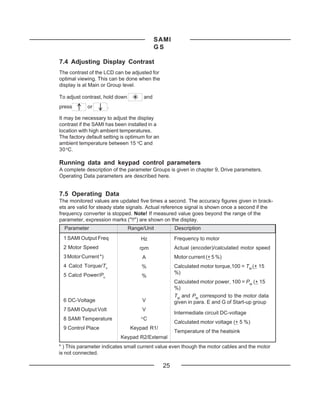
7.4 Adjusting Display Contrast
The contrast of the LCD can be adjusted for
optimal viewing. This can be done when the
display is at Main or Group level.

To adjust contrast, hold down            and
press       or        .

It may be necessary to adjust the display
contrast if the SAMI has been installed in a
location with high ambient temperatures.
The factory default setting is optimum for an
ambient temperature between 15 oC and
30 oC.

Running data and keypad control parameters
A complete description of the parameter Groups is given in chapter 9, Drive parameters.
Operating Data parameters are described here.


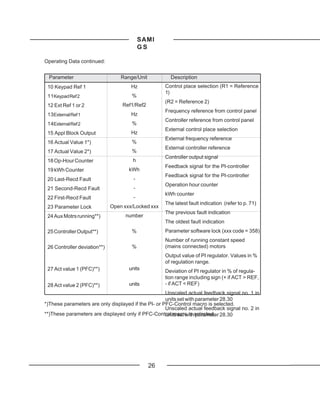
7.5 Operating Data
The monitored values are updated five times a second. The accuracy figures given in brack-
ets are valid for steady state signals. Actual reference signal is shown once a second if the
frequency converter is stopped. Note! If measured value goes beyond the range of the
parameter, expression marks ("!!") are shown on the display.
  Parameter                     Range/Unit            Description
 1 SAMI Output Freq                  Hz               Frequency to motor
 2 Motor Speed                      rpm               Actual (encoder)/calculated motor speed
 3 Motor Current *)                  A                Motor current (+ 5 %)
 4 Calcd Torque/Tn                   %                Calculated motor torque,100 = TM (+ 15
 5 Calcd Power/Pn                                     %)
                                     %
                                                      Calculated motor power, 100 = PM (+ 15
                                                      %)
                                                      TM and PM correspond to the motor data
 6 DC-Voltage                        V                given in para. E and G of Start-up group
 7 SAMI Output Volt                  V
                                                      Intermediate circuit DC-voltage
 8 SAMI Temperature                  o
                                         C
                                                      Calculated motor voltage (+ 5 %)
 9 Control Place                Keypad R1/
                                                      Temperature of the heatsink
                           Keypad R2/External
* ) This parameter indicates small current value even though the motor cables and the motor
is not connected.

                                                 25
SAMI
                                           GS

Operating Data continued:


 Parameter                        Range/Unit          Description
 10 Keypad Ref 1                      Hz            Control place selection (R1 = Reference
                                                    1)
 11Keypad Ref 2                       %
                                                    (R2 = Reference 2)
 12 Ext Ref 1 or 2                Ref1/Ref2
                                                    Frequency reference from control panel
 13External Ref 1                     Hz
                                                    Controller reference from control panel
 14External Ref 2                     %
                                                    External control place selection
 15 Appl Block Output                 Hz
                                                    External frequency reference
 16 Actual Value 1*)                  %
                                                    External controller reference
 17 Actual Value 2*)                  %
                                                    Controller output signal
 18 Op-Hour Counter                   h
                                                    Feedback signal for the PI-controller
 19 kWh Counter                      kWh
                                                    Feedback signal for the PI-controller
 20 Last-Recd Fault                    -
                                                    Operation hour counter
 21 Second-Recd Fault                  -
                                                    kWh counter
 22 First-Recd Fault                   -
                                                    The latest fault indication (refer to p. 71)
 23 Parameter Lock            Open xxx/Locked xxx
                                                    The previous fault indication
 24 Aux Motrs running**)            number
                                                    The oldest fault indication
 25 Controller Output**)              %             Parameter software lock (xxx code = 358)
                                                    Number of running constant speed
 26 Controller deviation**)           %             (mains connected) motors
                                                    Output value of PI regulator. Values in %
                                                    of regulation range.
 27 Act value 1 (PFC)**)             units
                                                    Deviation of PI regulator in % of regula-
                                                    tion range including sign (+ if ACT > REF,
 28 Act value 2 (PFC)**)             units          - if ACT < REF)
                                                     Unscaled actual feedback signal no. 1 in
                                                     units set with parameter 28.30
*)These parameters are only displayed if the PI- or PFC-Control macro is selected.
                                                     Unscaled actual feedback signal no. 2 in
**)These parameters are displayed only if PFC-Control macro is selected. 28.30
                                                     units set with parameter


                                               26
SAMI
                                                                  GS

7.6 Control
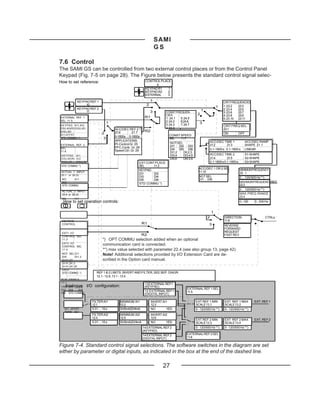
The SAMI GS can be controlled from two external control places or from the Control Panel
Keypad (Fig. 7-5 on page 28). The Figure below presents the standard control signal selec-
How to set reference:                                    CONTROL PLACE
                                                               9
                                                         KEYPAD R1   1
                                                         KEYPAD R2   2
                                                         EXTERNAL    3

           KEYPAD REF 1                                       1                                                  CRIT FREQUENCIES
               10                                         2                                                      1: 23.2       23.3
                                                                                                           1
           KEYPAD REF 2                                                                                          2: 23.4       23.5
               11                                             3       CONST FREQUEN-
                                                                                               1
                                                                                                                 3: 23.6       23.7
                                                                      CIES                 2                     4: 23.8       23.9
EXTERNAL REF 1                                           R1           1: 24.1   5: 24.5                          5: 23.10      23.11
SEL 11.5                                                              2: 24.2   6:24.6
                                 1                                                          3
KEYPAD AI1,AI2                                                        3: 24.3   7: 24.7                          CRIT FREQ SEL.
D3U,4D(R) DI3U,4D                    ACC/DEC REF 2 T.                 4: 24.4                                    23.1
DI5U,6D                              21.6        21.7   R2
AI1JOYST
                            2                                                                                    ON      OFF
                                     0-1800s 0-1800s                    CONST SPEED
STD COMMU *)                 3                                          SEL   11.7
                                     APPLICATIONS:                                                     ACC/DEC TIME 1              ACC/DEC RAMP
                                     PI-Control Gr. 25                  NOT SEL
EXTERNAL REF 2                                                          DI1 DI2 DI3                    21.2       21.3             SHAPE 21.1
SEL                                  PFC-Contr. Gr. 28
                                     Speed Ctrl. Gr. 29                 DI4 DI5 DI6                    0.1-1800 s 0.1-1800 s       LINEAR
11.6                                                                    DI1,2   DII,2,3
 KEYPAD AI1                                                             DI3,4   DI3,4,5                ACC/DEC TIME 2              S1-SHAPE
 D3U,4D(R) AI2                                                          DI5,6   DI4,5,6                21.4         21.5           S2-SHAPE
 DI3U,4D   DI5U,6D                                  EXT CONT PLACE                                     0.1-1800 s 0.1-1800 s       S3-SHAPE
 STD COMMU *)                                       SEL     11.2
                                                                                            ACC/DEC 1 OR 2 SEL                 MINIMUM FREQUENCY
                                                    KEYPAD
 ACTUAL 1 INPUT                                                                             11.10                              22 . 1
 25.7 or 28.22
                                                    DI1     DI2
                                                    DI3     DI4                             NOT SEL                            0 ... 120/500 Hz **)
 NO     AI1                                         DI5     DI6                             DI1 ... DI6
 AI2                                                                                                                           MAXIMUM FREQUENCYREF
                                                    STD COMMU *)                                                               22.2
 STD COMMU
                                                                                                                               0 ... 120/500 Hz **)
 ACTUAL 2 INPUT
 25.8 or 28.23                                                                                                                 MAX. FREQ. RANGE
                                                                                                                               22.4
 NO       AI1
  How to set operation controls:
 AI2
                                                                                                                               0...120     0...500 Hz


                                                                                                       1
                                                                                                   2             DIRECTION                            CTRLs
 KEYPAD                                                                                                          11.8
 CONTROL                                                R1                                          3            REVERSE
                                                                                                                 FORWARD
 EXT1 I/O                                                                                                        REQUEST
 CONTROL SEL
                                                        R2                                                       FAST REV
 11.3                        *) OPT COMMU selection added when an optional
 EXT2 I/O
 CONTROL SEL
                             communication card is connected.
 11.4                        **) max value selected with parameter 22.4 (see also group 13, page 42)
 NOT SEL DI1
 DI6      DI1,2
                             Note! Additional selections provided by I/O Extension Card are de-
 DI1P,2P                     scribed in the Option card manual.
 DI1P,2P,3
 DI1P,2P,3P
 DI6,5
 STD COMMU *)           REF 1 & 2 LIMITS, INVERT AND FILTER, SEE SEP. DIAGR.
                        12.1 - 12.6, 13.1 - 13.4                                                                                       LOHKOA_ D.DRW
 RUN ENABLE
 11.1
                                                         13 EXTERNAL REF1
   Analogue I/O configuration:
 Y E S DI1 DI2                                           (KEYPAD)
 DI3 DI4   DI5                                                                       EXTERNAL REF 1 SEL
                                                         13 EXTERNAL REF1            11.5
 DI6 STD COMMU                                           (DIGITAL INPUT)

                     FILTER AI1         MINIMUM AI1           INVERT AI1                  EXT REF 1 MIN           EXT REF 1 MAX            EXT. REF 1
                     12.1               12.2                  12.3                        SCALE 13.1              SCALE 13.2
   AI1 JOYST.        0.01 ... 10 s      0V/0mA/2V/4mA         NO       YES                0 - 120/500 Hz **)      0 - 120/500 Hz **)
   TERM. 3&4
                     FILTER AI2         MINIMUM AI2           INVERT AI2
                     12.4               12.5                  12.6
                                                                                          EXT REF 2 MIN           EXT REF 2 MAX            EXT. REF 2
                     0.01 ... 10 s      0V/0mA/2V/4mA         NO       YES                SCALE 13.3              SCALE 13.4
                                                        14 EXTERNAL REF 2                 0 - 120/500 Hz **)      0 - 120/500 Hz **)
                                                        (KEYPAD)
                                                        14 EXTERNAL REF 2            EXTERNAL REF 2 SEL
                                                        (DIGITAL INPUT)              11.6

Figure 7-4. Standard control signal selections. The software switches in the diagram are set
either by parameter or digital inputs, as indicated in the box at the end of the dashed line.

                                                                    27
SAMI
                                             GS

tions.                                                    the frequency reference, select parameter 10
                                                          KEYPAD REF1, press the            key and
Select Operating Data parameter                           use the        and        keys to increase
9, CONTROL PLACE, KEYPAD R1/                              or decrease the keypad reference.
KEYPAD R2 for keypad control (Control
place is Ref 1 or Ref 2 accordingly) or                   When in keypad control using reference 1,
EXTERNAL for external control. The valid                  it is possible to change the keypad refer-
control place is indicated on the display.                ence value while monitoring any of the
[ ] around the direction and run indicators               measured values 1-8. For example, you can
means keypad control and without [ ] means                monitor parameter 7, SAMI OUTPUT VOLT
                                                          while changing the frequency. To do this,
                                                          select the measured value you prefer, press
                    Keypad control                                key and set the reference frequency
                    (R1 or R2)                            with            and         keys.
                    External control                      If the SAMI GS is running with an external
                    (manual)                              reference and the CONTROL PLACE is
                                       10987654321
External control                       10987654321
                                       10987654321
                                       10987654321
for example a PLC                                         changed to KEYPAD R1, it is possible to
(automatic)                                               transfer the current value of the external
                                                          reference to KEYPAD REF1.

                                R1                        Example: The SAMI GS is receiving a fre-
                                                          quency reference from a transducer via X50.
                                                          You want to temporarily override the external
                                R2
                                                          frequency reference. Select CONTROL
                                                          PLACE, KEYPAD R1 and press             and
external control. In addition R1 means Ref 1
                                                                . The SAMI GS puts the value of the
and R2 Ref 2 (Figure 7-1).
                                                          external reference into KEYPAD REF1. You
Figure 7-5. Control places.                               may now control the drive manually by
                                                          KEYPAD REF1.

7.7 Keypad Control                                        If you enter Display mode by pressing
                                                          after selecting CONTROL PLACE, KEYPAD
When Keypad R1 or Keypad R2 is selected                   R1, the value of parameter KEYPAD REF1
from Operating Data parameter 9, SAMI GS                  will be the set MINIMUM FREQUENCY.
will operate according to the commands                    Keypad Reference 2
which are given via the Keypad.
                                                          Keypad Reference 2 goes through an
          = START/STOP button                             application block, where it can be manip-
        = FORWARD/REVERSE                                 ulated. Keypad Reference 2 can be used as
         button                                           a controller reference and it can be given its
Reference                                                 own acceleration/deceleration ramps (Refer
signal = see parts Keypad Reference 1                     to parameters 21.6 and 21.7 on page 49).
          and Keypad Reference 2
Keypad Reference 1                                        7.8 External Control
                                                          The external control place (Ref1/Ref2) is
Operating Data parameter 10 KEYPAD                        selected with digital input 1-6 or Operating
REF1 is a direct frequency reference. To set


                                                     28
SAMI
                                            GS

Data parameter 12, EXT REF 1 OR 2 de-
pending on the setting of parameter 11.2
                                                   8 Commissioning
EXT CONT PLACE SEL (Keypad, DI1-DI6).
External Reference 1                               8.1 Safety Precautions
External frequency reference from control          Before commissioning, observe the follow-
place R1. The signal source selection is           ing warnings.
made with parameter 11.5 EXTERNAL REF1
SEL. Refer to page 37 for available options.       The Motor Control Card is at mains potential
                                                   when the SAMI GS is connected to the
External Reference 2                               mains. This voltage is extremely dangerous
External Reference 2 goes through an               and can cause severe injury and even death
application block, where it can be manip-          if you come in contact with it.
ulated as Keypad Reference 2. The signal           When the supply voltage is disconnected, it
source selection is made with parameter            will take about 5 minutes before the capaci-
11.6, EXTERNAL REF2 SEL. Refer to page             tors in the intermediate DC circuit are dis-
37 for available options.                          charged to a safe voltage. Do not take any
                                                   further actions within the frequency converter
7.9 Parameter Lock                                 for at least these five minutes.
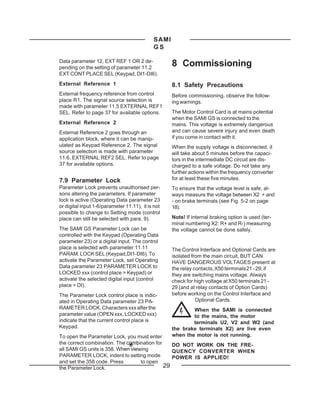
Parameter Lock prevents unauthorised per-          To ensure that the voltage level is safe, al-
sons altering the parameters. If parameter         ways measure the voltage between X2 + and
lock is active (Operating Data parameter 23        - on brake terminals (see Fig. 5-2 on page
or digital input 1-6/parameter 11.11), it is not   18).
possible to change to Setting mode (control
place can still be selected with para. 9).         Note! If internal braking option is used (ter-
                                                   minal numbering X2: R+ and R-) measuring
The SAMI GS Parameter Lock can be                  the voltage cannot be done safely.
controlled with the Keypad (Operating Data
parameter 23) or a digital input. The control
place is selected with parameter 11.11             The Control Interface and Optional Cards are
PARAM. LOCK SEL (Keypad,DI1-DI6). To               isolated from the main circuit, BUT CAN
activate the Parameter Lock, set Operating         HAVE DANGEROUS VOLTAGES present at
Data parameter 23 PARAMETER LOCK to                the relay contacts, X50 terminals 21 - 29, if
LOCKED xxx (control place = Keypad) or             they are switching mains voltage. Always
activate the selected digital input (control       check for high voltage at X50 terminals 21 -
place = DI).                                       29 (and at relay contacts of Option Cards)
The Parameter Lock control place is indic-         before working on the Control Interface and
ated in Operating Data parameter 23 PA-                       Optional Cards.
RAMETER LOCK. Characters xxx after the                     When the SAMI is connected
parameter value (OPEN xxx, LOCKED xxx)                     to the mains, the motor
indicate that the current control place is                 terminals U2, V2 and W2 (and
Keypad.                                            the brake terminals X2) are live even
To open the Parameter Lock, you must enter         when the motor is not running.
the correct combination. The combination for    DO NOT WORK ON THE FRE-
all SAMI GS units is 358. When viewing          QUENCY CONVERTER WHEN
PARAMETER LOCK, indent to setting mode          POWER IS APPLIED!
and set the 358 code. Press        to open
the Parameter Lock.                          29
SAMI
                                        GS

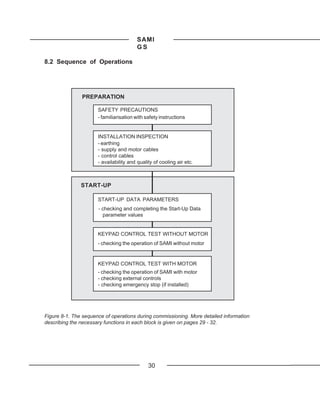
8.2 Sequence of Operations


               PREPARATION

                      SAFETY PRECAUTIONS
                      - familiarisation with safety instructions


                      INSTALLATION INSPECTION
                      - earthing
                      - supply and motor cables
                      - control cables
                      - availability and quality of cooling air etc.


               START-UP

                      START-UP DATA PARAMETERS
                      - checking and completing the Start-Up Data
                        parameter values


                      KEYPAD CONTROL TEST WITHOUT MOTOR
                      - checking the operation of SAMI without motor


                      KEYPAD CONTROL TEST WITH MOTOR
                      - checking the operation of SAMI with motor
                      - checking external controls
                      - checking emergency stop (if installed)


Figure 8-1. The sequence of operations during commissioning. More detailed information
describing the necessary functions in each block is given on pages 29 - 32.


                                              30
SAMI
                                            GS

8.3 Installation Inspection                             A LANGUAGE in Setting mode.
Inspect the mechanical and electrical instal-           A LANGUAGE
lation of the SAMI for compliance with the
prevailing electrical installation regulations          Select the preferred language. Press
and the installation instructions contained in          to confirm the selection and move to the next
Sections 4 - 6.                                         parameter.
Note! Ensure the motor cable is discon-                 B APPLICATIONS
nected before proceeding with the Keypad
                                                        Refer to the Application Macro Manual for
control test without motor (see page 32).
                                                        complete information concerning the Ap-
Ensure the following is inspected:                      plication Macros. Select the Application
                                                        Macro which best corresponds to your appli-
- protective earthing of the SAMI and the
                                                        cation. The parameter settings in each
  motor
                                                        Macro can be set separately to adapt to
- supply and motor cables (cable cross                  your application. Press         to move to
  section, fuse protection, connections,                the next parameter.
  cable screen earthing; see Table 5-1, 5-2
                                                        C APPLIC. RESTORE
  and Figure 5-2, 5-3 on pages 16 and 18)
- control cables (connections, cable screen             This parameter allows you to retrieve the
  earthing, location as far as possible from            factory settings of the selected Application
  the power cables); for analogue input                 Macro. Press           to move to the next
  signal selection, see Figure 6-1                      parameter.

- quantity and quality of cooling air for the           D SUPPLY VOLTAGE (U N )
  SAMI, see section 4.1                                 E POLE NUMBER
- check that the on/off switches of all external
                                                        F MOTOR NOM CURRENT (IM )
  controls (if existing) are set to off. Make
  sure that starting of the motor is allowed.           G MOTOR NOM POWER (PM)
- connect the SAMI to the mains. Check by               H COS PHI OF MOTOR
  measurement that the voltage between
  U1-V1, U1-W1 and V1-W1 is UN + 10 %.                  Set the correct values corresponding to the
                                                        supply network and the driven motor.
                                                        Press        to move to the next parameter.
8.4 Start-Up Data Parameters
Power up the SAMI. The display shows                    When you have scrolled through all the
Operating Data parameter 1, SAMI OUTPUT                 parameters A-H and pressed           after
FREQ at the first power up. Before proceed-             setting the parameter H COS PHI OF MO-
ing with the commissioning, check and                   TOR, the display shows again Operating
complete the Start-Up Data parameter                    Data parameter 1 SAMI OUTPUT FREQ.
values.
                                                        Note! If the nominal current of the motor is
While viewing para. 1, SAMI OUTPUT                      different from the nominal current of the
FREQ, first press       and hold, then press            SAMI GS, set parameter 27.3 MOTOR
      .The display shows parameter                      POWER accordingly (refer to page 57).


                                                   31
SAMI
                                             GS

8.5 Checking Selected Application                         10. If everything is operating normally, turn
    Macro Parameters                                        off SAMI and disconnect it from the mains.
Selected macro parameters have default                                Note! Wait at least 5 minutes af-
settings which suit most purposes. The pa-                            ter the display readout has disap-
rameters which are not included in the Appli-                         peared before taking any further
cation Macro retain the factory settings. If it is        action within the SAMI.
necessary to adjust the parameter values,
                                                          (For fault tracing information, refer to Section
refer to the instructions in Sections 7 and 9.
                                                          10 page 71)
Use the parameter list in the Application
Macro Manual (or Table on pages 33 - 36) to
record your settings. Only selected macro                 8.7 Keypad Control Test With
parameters will be displayed (e.g. Parame-                    Motor
ter group 25 for PI-Control and group 28 for              1. Connect the motor to the SAMI (after first
PFC-Control.                                                 making sure that the SAMI is discon-
                                                             nected from the mains).
8.6 Keypad Control Test Without
                                                          2. Connect the SAMI to the mains and switch
    Motor                                                    power on.
1. If the motor is connected to the SAMI,
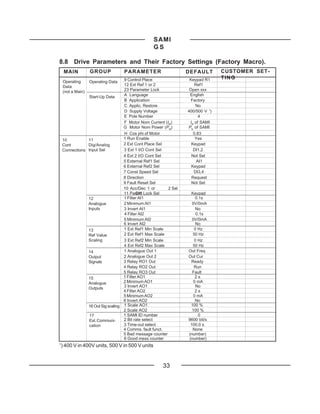
disconnect it (after first making sure that               3. Select Operating Data, 9 CONTROL
the SAMI is disconnected from the mains).                    PLACE, KEYPAD R1 (see Section 7,
2. Connect the SAMI to the mains and switch                  Control and Parameter Logic).
power on.                                                 4. Select KEYPAD REF 1. Choose 0.5Hz.
3. Set the DIRECTION (par. 11.8) to
REQUEST.                                                               Warning! If rotation direction is
4. Select Operating Data, 9 CONTROL                                    critical, do not increase speed
PLACE, KEYPAD R1 (see Section 7,                                       reference more than necessary
Control and Parameter Logic).                             after start to make sure the motor is running in
5. Return to para. 1 SAMI OUTPUT FREQ.                    the right direction. If the rotation direction is
                                                          not correct swap 2 of the motor cable
6. Give a start command by pushing              .         connections.
The run status indicator on the display
should show "I".                                          5. Give a start command by pushing              .

7. Use          key to change the rotation                6. Check the Operating Data parameter
direction. The rotation direction display                    values for normal operation.
should change accordingly.                                7. Change to Setting Mode and increase the
8. Change to the Setting Mode and control                    reference. Verify that the frequency is
the reference frequency. Return to Dis-                      increasing. Increase the frequency to
play mode by pressing            .                           50 Hz. Return to Display Mode.
9. Check the Operating Data parameter                     8. If external controls, analogue outputs,
values.                                                      relay outputs, PI-controller or other
Parameter 7, SAMI OUTPUT VOLTAGE                             control equipment are used in the
should increase with the frequency. Pro-                     application, check that they operate
grammed maximum voltage is reached at                        correctly.
the field weakening frequency (default is                 9.Test the functioning of the emergency
50 Hz).                                                     stop (if installed).


                                                     32
SAMI
                                                  GS

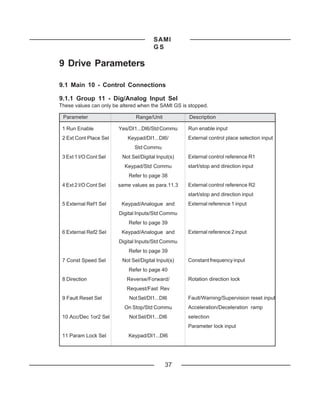
8.8 Drive Parameters and Their Factory Settings (Factory Macro).
     MAIN          GROUP            PARAMETER                    DEFAULT        CUSTOMER SET-
                                   9 Control Place                Keypad R1     TING
    Operating      Operating Data
    Data                           12 Ext Ref 1 or 2                 Ref1
    (not a Main)                   23 Parameter Lock              Open xxx
                Start-Up Data      A Language                     English
                                   B Application                   Factory
                                   C Applic. Restore                 No
                                   D Supply Voltage              400/500 V 1)
                                   E Pole Number                       4
                                   F Motor Nom Current (IM)       IN of SAMI
                                   G Motor Nom Power (PM)        PN of SAMI
                                   H Cos phi of Motor               0.83
    10          11                 1 Run Enable                      Yes
    Cont        Dig/Analog         2 Ext Cont Place Sel            Keypad
    Connections Input Sel          3 Ext 1 I/O Cont Sel             DI1,2
                                   4 Ext 2 I/O Cont Sel            Not Sel
                                   5 External Ref1 Sel                AI1
                                   6 External Ref2 Sel             Keypad
                                   7 Const Speed Sel                DI3,4
                                   8 Direction                     Request
                                   9 Fault Reset Sel               Not Sel
                                   10 Acc/Dec 1 or       2 Sel
                                   11 Param Lock Sel
                                           DI6                    Keypad
                12                 1 Filter AI1                      0.1s
                Analogue           2 Minimum AI1                   0V/0mA
                Inputs             3 Invert AI1                      No
                                   4 Filter AI2                      0.1s
                                   5 Minimum AI2                   0V/0mA
                                   6 Invert AI2                      No
                13                 1 Ext Ref1 Min Scale             0 Hz
                Ref Value          2 Ext Ref1 Max Scale            50 Hz
                Scaling            3 Ext Ref2 Min Scale             0 Hz
                                   4 Ext Ref2 Max Scale            50 Hz
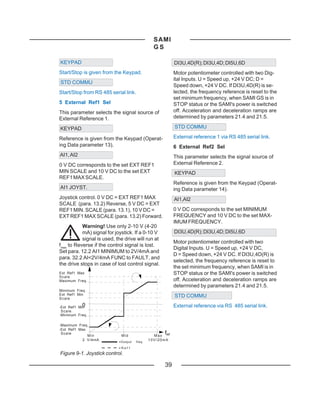
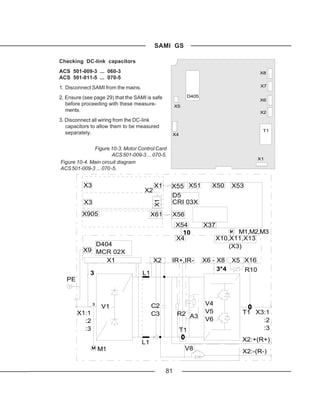
                14                 1 Analogue Out 1              Out Freq
                Output             2 Analogue Out 2              Out Cur
                Signals            3 Relay RO1 Out                Ready
                                   4 Relay RO2 Out                  Run
                                   5 Relay RO3 Out                 Fault
                15                 1 Filter AO1                      2s
                Analogue           2 Minimum AO1                    0 mA
                Outputs            3 Invert AO1                      No
                                   4 Filter AO2                      2s
                                   5 Minimum AO2                    0 mA
                                   6 Invert AO2                      No
                16 Out Sig scaling 1 Scale AO1                    100 %
                                   2 Scale AO2                     100 %
                 17                1 SAMI ID number                   0
                 Ext. Communi-     2 Bit rate select             9600 bit/s
                 cation            3 Time-out select              100.0 s
                                   4 Comms. fault funct.           None
                                   5 Bad message counter         (number)
                                   6 Good mess counter           (number)
1
    ) 400 V in 400V units, 500 V in 500 V units


                                                      33
SAMI
                                        GS

MAIN    GROUP               PARAMETER               DEFAULT        CUSTOMER SETTING

20      21                  1 Acc/Dec Ramp Shape      Linear
Drive   Acceler/Deceler     2 Acceler Time 1             3s
                            3 Deceler Time 1             3s
                            4 Acceler Time 2            60 s
                            5 Deceler Time 2            60 s
                            6 Acceler Ref2 Time          60 s
                            7 Deceler Ref2 Time         60 s
        22                  1 Minimum Frequency         0 Hz
        Freq/Cur Limits     2 Maximum Frequency        50 Hz
                            3 Output Current          1.5*IN [A]
                            4 Maximum Freq. range     120 Hz
        23                  1 Crit Freq Select          Off
        Crit Frequencies    2 Crit Freq1 Low            0 Hz
                            3 Crit Freq1 High           0 Hz
                            4 Crit Freq2 Low            0 Hz
                            5 Crit Freq2 High           0 Hz
                            6 Crit Freq3 Low            0 Hz
                            7 Crit Freq3 High           0 Hz
                            8 Crit Freq4 Low            0 Hz
                            9 Crit Freq4 High           0 Hz
                            10 Crit Freq5 Low           0 Hz
                            11 Crit Freq5 High          0 Hz
        24                  1 Const Frequency 1         5 Hz
        Const               2 Const Frequency 2       10 Hz
        Frequencies         3 Const Frequency 3       15 Hz
                            4 Const Frequency 4       20 Hz
                            5 Const Frequency 5       25 Hz
                            6 Const Frequency 6       40 Hz
                            7 Const Frequency 7       50 Hz
        25                  1 PI-Cont Gain            100 %
        PI-Controller       2 PI-Cont I-Time            60 s
        (Parameters         3 PI-Cont Min Lim         25 Hz
        available only if   4 PI-Cont Max Lim         50 Hz
        PI- Control         5 Error Value Inv            No
        macro has been      6 Actual Value Sel          Act1
        selected)           7 Actual 1 Input             No
                            8 Actual 2 Input             No
                            9 Actual1 Min Scale           0
                            10 Actual1 Max Scale          0
                            11 Actual2 Min Scale          0
                            12 Actual2 Max Scale          0
        26                  1 Start Function          Ramp
        Start/Stop          2 Torque Boost Cur       1.5*IN [A]
                            3 Stop Function           Coast
                            4 Brake Chopper              No
                            5 DC-Holding                Off
                            6 DC-Hold Voltage       0.01*UN [V]
                            7 DC-Brake Voltage      0.01*UN [V]
                            8 DC-Brake Time              0s


                                             34
SAMI
                                          GS

 MAIN    GROUP               PARAMETER               DEFAULT       CUSTOMER SETTING
20                          1 Switching Freq             3 kHz
        27
Drive                       2 SAMI Max Out Volt     100%*UN [V]
        Motor Control
                            3 Motor Power              Rated
                            4 U/f Ratio                Linear
                            5 Field Weak Point          50 Hz
                            6 IR-Compensation             No
                            7 IR-Comp Voltage        0.01*UN [V]
                            8 IR-Comp Range                0 Hz
                            9 Slip Compensation           Off
                            10 Nominal Slip               4%
                            11 O/U Volt Control           On
        28                  1 PI-cont gain             250.0 %
        PFC-Control         2 PI-cont I-time              3s
        (Parameters         3 Reference step 1           0%
        available only if   4 Reference step 2           0%
        PFC-control         5 Reference step 3           0%
        macro has been      6 Sleep delay               60 s
        selected)           7 Sleep level              24 Hz
                            8 Wake-up level            35.0 %
                            9 Start freq 1             51.0 Hz
                            10 Start freq 2            51.0 Hz
                            11 Start freq 3            51.0 Hz
                            12 Low freq 1               25 Hz
                            13 Low freq 2                5 Hz
                            14 Low freq 3                25 Hz
                            15 Aux mot start DLY          5s
                            16 Aux mot stop DLY           3s
                            17 NBR of aux motos             1
                            18 Autochang interv.          72 h
                            19 Autochange level        45.0 %
                            20 Interlocks                 ON
                            21 Error value inv            NO
                            22 Actual 1 input             AI 2
                            23 Actual 2 input             NO
                            24 Actual value sel          ACT1
                            25 ACT1 min scale           100 %
                            26 ACT1 max scale           100 %
                            27 ACT2 min scale          100 %
                            28 ACT2 max scale           100 %
                            29 Regul Bypass CTRL         NO
                            30 Display Unit              bar
                            31 Display Unit Scale       1000
                            32 NBR of Decimals              2


                                              35
SAMI
                                           GS

 MAIN         GROUP            PARAMETER             DEFAULT         CUSTOMER SETTING
                              1 Output Freq1 Func        No
30           31
                              2 Output Freq1 Lim           0
Protection   Supervision
                              3 Output Freq2 Func        No
                              4 Output Freq2 Lim           0
                              5 Current Func             No
                              6 Current Lim            0*IN [A]
                              7 Ref1 Func                No
                              8 Ref1 Lim                0 Hz
                              9 Ref2 Func                No
                              10 Ref2 Lim               0%
                              11 Supervis messages       Off
             32               1 Serial Fault Func       Stop
             Fault Function   2 AI <2V/4mA Func          No
                              3 Mot Temp Flt Func      Warning
                              4 Motor Therm Time     see Table 9-1
                              5 Motor Load Curve       150 %
                              6 External Fan              No
                              7 Stall Func             Warning
                              8 Stall Current         1.2*IN [A]
                              9 Stall Time/Freq       20 s/25 Hz
                              10 Underload Func           No
                              11 Underload Time         600 s
                              12 Underload Curve           1
             33               1 Number of Trials           2
             Automatic        2 Trial Time               30 s
             Reset            3 Overvoltage              No
                              4 Undervoltage            Yes
                              5 Overcurrent              No
                              6 AI Signal <2V/4mA        No
             34               1 Cri Prog Version
             Information      2 MC Prog Version
                              3 Test Date


                                                36
SAMI
                                       GS

9 Drive Parameters

9.1 Main 10 - Control Connections

9.1.1 Group 11 - Dig/Analog Input Sel
These values can only be altered when the SAMI GS is stopped.

 Parameter                     Range/Unit            Description

 1 Run Enable           Yes/DI1...DI6/Std Commu     Run enable input
 2 Ext Cont Place Sel       Keypad/DI1...DI6/       External control place selection input
                              Std Commu
 3 Ext 1 I/O Cont Sel    Not Sel/Digital Input(s)   External control reference R1
                          Keypad/Std Commu          start/stop and direction input
                            Refer to page 38
 4 Ext 2 I/O Cont Sel   same values as para.11.3    External control reference R2
                                                    start/stop and direction input
 5 External Ref1 Sel     Keypad/Analogue and        External reference 1 input
                        Digital Inputs/Std Commu
                            Refer to page 39
 6 External Ref2 Sel     Keypad/Analogue and        External reference 2 input
                        Digital Inputs/Std Commu
                            Refer to page 39
 7 Const Speed Sel       Not Sel/Digital Input(s)   Constant frequency input
                            Refer to page 40
 8 Direction               Reverse/Forward/         Rotation direction lock
                           Request/Fast Rev
 9 Fault Reset Sel          Not Sel/DI1...DI6       Fault/Warning/Supervision reset input
                          On Stop/Std Commu         Acceleration/Deceleration ramp
 10 Acc/Dec 1or2 Sel        Not Sel/DI1...DI6       selection
                                                    Parameter lock input
 11 Param Lock Sel          Keypad/DI1...DI6


                                            37
SAMI
                                          GS

1 Run Enable                                           DI1
This parameter selects the source of the Run       0 V DC = Stop and +24 V DC = Start (Rotation
Enable signal.                                     direction is fixed to Forward).
YES                                                    DI1,2
Run Enable signal active.                          Start/Stop is connected to DI1 and Reverse
DI1...DI6                                          to D2. DI2 = 0 V DC = Forward and DI2 =
                                                   +24 V DC = Reverse.
To activate the Run Enable signal, the
selected Digital Input must be connected to            DI1P,2P
+24 V DC. If the Digital Input comes to 0 V        Start/Stop commands are given separately
DC, the drive will coast to stop.                  using pulse signals. Start is connected to
STD COMMU                                          DI 1 and is activated with +24 V DC pulse if
                                                   Stop (DI2) is connected to +24 V DC. During
Run Enable signal can be activated via             normal operation, DI2 is connected to
RS 485 serial link.                                +24 V DC. If DI2 is disconnected with a pulse,
                                                   SAMI GS stops.
2 Ext Cont Place Sel
                                                       DI1P,2P,3
This parameter defines how to select the
external control place (EXT REF1/EXT               DI1 and DI2 as previously. Reverse is
REF2).                                             connected to DI3. 0 V DC = Forward, +24 V
                                                   DC = Reverse.
KEYPAD
                                                       DI1P,2P,3P
The selection is made with Operating Data
parameter 12 EXT REF 1 OR 2.                       Start and Reverse commands are given
                                                   simultaneously with two separate pulses.
DI1...DI6
                                                   Stop command is given separately. Start
Choose a Digital Input; 0 V DC = EXT REF1          Forward is connected to DI1 and is activated
and +24 V DC = EXT REF2.                           with +24 V DC pulse if Stop (DI3) is con-
                                                   nected to +24 V DC. Start Reverse is con-
STD COMMU                                          nected to DI2 and is activated as Start
Selection of external reference via serial link    Forward. Stop is connected to DI3. During
RS 485.                                            normal operation, DI3 is connected to +24 V
                                                   DC. IF DI3 is disconnected with a pulse,
3 Ext 1 I/O Cont Sel                               SAMI GS stops.
4 Ext 2 I/O Cont Sel
                                                       DI6
This parameter selects the Digital Inputs
used for Start/Stop and Reverse commands           DI6 = 0 V DC = Stop and DI6 = +24 V DC =
when using External Reference 1 (External          Start. Rotation direction is fixed to Forward.
Ref. 2).                                               DI6,5
NOT SEL                                            Start/Stop is connected to DI6 (as previ-
No Digital Input selected.                         ously) and Reverse to the DI5. DI5 = 0 V DC
                                                   = Forward.


                                                  38
SAMI
                                                GS

KEYPAD                                                      DI3U,4D(R); DI3U,4D; DI5U,6D
Start/Stop is given from the Keypad.                        Motor potentiometer controlled with two Dig-
                                                            ital Inputs. U = Speed up, +24 V DC; D =
STD COMMU
                                                            Speed down, +24 V DC. If DI3U,4D(R) is se-
Start/Stop from RS 485 serial link.                         lected, the frequency reference is reset to the
                                                            set minimum frequency, when SAMI GS is in
5 External Ref1 Sel                                         STOP status or the SAMI's power is switched
This parameter selects the signal source of                 off. Acceleration and deceleration ramps are
External Reference 1.                                       determined by parameters 21.4 and 21.5.

KEYPAD                                                      STD COMMU

Reference is given from the Keypad (Operat-                 External reference 1 via RS 485 serial link.
ing Data parameter 13).                                     6 External Ref2 Sel
AI1, AI2                                                    This parameter selects the signal source of
0 V DC corresponds to the set EXT REF1                      External Reference 2.
MIN SCALE and 10 V DC to the set EXT                        KEYPAD
REF1 MAX SCALE.
                                                            Reference is given from the Keypad (Operat-
AI1 JOYST.                                                  ing Data parameter 14).
Joystick control. 0 V DC = EXT REF1 MAX                     AI1,AI2
SCALE (para. 13.2) Reverse, 5 V DC = EXT
REF1 MIN. SCALE (para. 13.1), 10 V DC =                     0 V DC corresponds to the set MINIMUM
EXT REF1 MAX SCALE (para. 13.2) Forward.                    FREQUENCY and 10 V DC to the set MAX-
                                                            IMUM FREQUENCY.
           Warning! Use only 2-10 V (4-20
           mA) signal for joystick. If a 0-10 V             DI3U,4D(R); DI3U,4D; DI5U,6D
           signal is used, the drive will run at
                                                            Motor potentiometer controlled with two
fmax to Reverse if the control signal is lost.
                                                            Digital Inputs. U = Speed up, +24 V DC,
Set para. 12.2 AI1 MINIMUM to 2V/4mA and
                                                            D = Speed down, +24 V DC. If DI3U,4D(R) is
para. 32.2 AI<2V/4mA FUNC to FAULT, and
                                                            selected, the frequency reference is reset to
the drive stops in case of lost control signal.
                                                            the set minimum frequency, when SAMI is in
Ext Ref1 Max                                                STOP status or the SAMI's power is switched
Scale
Maximum Freq.                                               off. Acceleration and deceleration ramps are
                                                            determined by parameters 21.4 and 21.5.
Minimum Freq.
Ext Ref1 Min                                                STD COMMU
Scale
            0
-Ext Ref1 Min                                               External reference via RS 485 serial link.
 Scale
-Minimum Freq.

-Maximum Freq.
-Ext Ref1 Max
 Scale
              Min            Mid
                                                      f
                                                M a x ref
           2 V/4mA                            10V/20mA
                            =Output   freq.
                            =Ref1
Figure 9-1. Joystick control.

                                                      39
SAMI
                                         GS

7 Const Speed Sel                               8 Direction
This parameter defines which Digital Inputs     This parameter allows rotation direction to
are used to select Constant Speeds.             be fixed.
NOT SEL                                            FORWARD
No Digital Input selected.                      Direction is fixed to Forward.
DI1 (DI2, DI3, DI4, DI5, DI6)                       REVERSE
Constant speed number 1 (DI1 = Constant         Direction is fixed to Reverse.
speed 1 etc.) connected to Digital Input 1.
+24 V DC = Constant Speed activated.                REQUEST

DI1,2                                           The rotation direction is selected by Digital
                                                Inputs as defined in parameters 11.3 and
Three Constant Speeds (1-3) are selected        11.4 or by keypad pushbutton.
with two Digital Inputs.
                                                   FAST REV
  DI1 DI2
                                                This function works like REQUEST. How-
  0 0         No Constant Speed
                                                ever, when parameter 26.3 STOP FUNC-
  1 0         Constant Speed 1
                                                TION is set to COAST, the modulator starts
  0 1         Constant Speed 2
                                                to operate in a reverse direction immedi-
  1 1         Constant Speed 3
                                                ately after Reverse is requested. This
DI3,4                                           procedure results in fast reversing.
                                                Note! Fast reverse function does not oper-
DI5,6
                                                ate if the selected start function (parameter
Three Constant Speeds (1-3) are selected        26.1) is Flying Start (or Flying + TQB).
with two Digital Inputs as in DI1,2.
                                                9 Fault Reset Sel
DI1,2,3
                                                Fault Reset signal resets faults, warnings
Seven Constant Speeds (1-7) are selected        and supervision indications. The reset is
with three Digital Inputs.                      activated by a transition from +24V to 0V.

  DI1 DI2 DI3                                      DI1 (DI2, DI3, DI4, DI5, DI6)

  0       0   0     No Constant Speed           Reset signal can be connected to any of the
  1       0   0     Constant Speed 1            Digital Inputs 1-6.
  0       1   0     Constant Speed 2
                                                   NOT SEL
  1       1   0     Constant Speed 3
  0       0   1     Constant Speed 4            The Fault Reset function is not activated.
  1       0   1     Constant Speed 5
  0       1   1     Constant Speed 6               ON STOP
  1       1   1     Constant Speed 7            Fault is reset by Stop command (Start/Stop
DI3,4,5                                         is selected by DI1;DI1,2 or STD COMMU as
                                                selected by parameters 11.3 and 11.4).
DI4,5,6
                                                   STD COMMU
Refer to DI1,2,3.
                                                Fault resetting via RS 485 serial link.

                                              40
SAMI
                                               GS

10 Acc/Dec 1 or 2 Sel                                   11 Param. Lock Sel
This parameter defines which Digital Input              This parameter selects the control place for
(1 - 6) is used to select Acceleration/Decel-           Parameter Lock.
eration Ramp 1 or 2.                                    If you select KEYPAD, Parameter Lock is
 0 V DC = Acc/Dec Time 1                                controlled with Operating Data parameter 23,
 24 V DC = Acc/Dec Time 2.                              PARAMETER LOCK. If you select a Digital
                                                        Input (1-6), 0 V DC = Open and +24 V DC =
                                                        Locked.

9.1.2 Group 12 - Analogue Inputs
These values can be altered with the SAMI GS running.

  Parameter                         Range/Unit           Description
  1 Filter AI1                       0.01...10 s          Filter time constant for AI1
  2 Minimum AI1             0 V/0 mA or 2 V/4 mA          Analogue Input signal 1 minimum value
  3 Invert AI1                        No/Yes              Analogue Input signal 1 inversion
  4 Filter AI2                       0.01...10 s          Filter time constant for AI2
  5 Minimum AI2             0 V/0 mA or 2 V/4 mA          Analogue Input signal 2 minimum value
  6 Invert AI2                        No/Yes              Analogue Input signal 2 inversion


1 Filter AI1                                            2 Minimum AI1
Filter time constant for Analogue Input 1.              Analogue input signal can be set to a mini-
63 percent of the change of the Analogue                mum of either 0 V/0 mA or 2 V/4 mA. The
Input value takes place within the time period          latter value provides a "living zero" function
given by this parameter. If you select the              (see page 66, para. 32.2 AI<2 V/4 mA
minimum value 0.01 s, the signal is not                 FUNC). Refer to page 19 for selection
filtered.                                               between current and voltage input.
                                                        3 Invert AI1
[%]
                                                        If you select YES, the Analogue Input 1
                   Unfiltered signal                    signal is inverted (minimum reference
100                                                     corresponds to maximum output frequency).
                                                        This can be used, for example to invert the
 63                                                     feedback signal to control a reference in
                                                        liquid level control.
                           Filtered signal
                                                        4 Filter AI2
                                                        5 Minimum AI2
                                                        6 Invert AI2
             FILTER AI1
                                                        Refer to parameters 12.1 - 12.3.
Figure 9-2. Filter time constant.

                                                   41
SAMI
                                          GS

9.1.3 Group 13 - Ref Value Scaling
These values can be altered with the SAMI GS running.

  Parameter                   Range/Unit         Description
  1 Ext Ref1 Min Scale      0...120/500 Hz *)         External reference 1 minimum value
                                                      Cannot be set > Ext Ref1 Max Scale
  2 Ext Ref1 Max Scale      0...120/500 Hz*)          External reference 1 maximum value
                                                      Cannot be set < Ext Ref1 Min Scale
  3 Ext Ref2 Min Scale      0...120/500 Hz *)         External reference 2 minimum value
                                                      Cannot be set > Ext Ref2 Max Scale
  4 Ext Ref2 Max Scale      0...120/500 Hz *)         External reference 2 maximum value
                                                      Cannot be set < Ext Ref2 Min Scale


  Max                           120 Hz               *) Max value is set automatically according
                                para. 13.2              to the setting of parameter 22.4.

                                para. 13.1           Note! If max./min. frequency setting is
                                                     changed (para. 22.1, 22.2), the setting of
   Min                          0Hz
                                                     parameters 13.1 and 13.2 changes accord-
    Ext ref1                 f out
                                                     ingly. Parameter 13.3 and 13.4 are not
Figure 9-3. External Reference scaling.
                                                     available with Macros PI- or PFC-Control.


9.1.4 Group 14 - Output Signals
These values can only be altered when SAMI GS is stopped.
   Parameter                  Range/Unit              Description
  1 Analogue Out 1                                    Analogue Output 1 content
  2 Analogue Out 2               Refer to             Analogue Output 2 content
                              the text below
  3 Relay RO1 Out           for the available         Relay Output 1 content
  4 Relay RO2 Out               selections            Relay Output 2 content
  5 Relay RO3 Out                                     Relay Output 3 content


1 Analogue Out 1                                     OUT CUR            = Output current
This parameter allows you to select which            MOT TORQ           = Motor torque
output signal is connected to Analogue               MOT POWER          = Motor power
Output 1 (current signal).
                                                     V/DC-LINK          = DC-link voltage
NOT USED
                                                     MOT VOLT           = Motor voltage
OUT FREQ            = Output frequency
MOT SPEED           = Motor speed


                                                42
SAMI
                                            GS

Additional selections available with the PFC          SAMI HEATF
Control Macro.
                                                      SAMI overheat protection has tripped. The
ERROR VAL          = Scaled difference of             tripping level is 70 oC (75 oC for 050...060-3
                    ACT and REF values                and 060...070-5).
PICON OUTP         = PI-regulator output              FAULT/WARN
ACTUAL 1           = Unscaled actual value 1          Relay activated if any fault or warning oc-
                                                      curs. See messages, Section 10.4.
ACTUAL 2           = Unscaled actual value 2
                                                      WARNING
PICON REF          = Reference of PI regulator
                                                      Relay is activated if any warning occurs. See
2 Analogue Out 2
                                                      warning messages, Section 10.4.
Refer to previous parameter.
                                                      SAMI HEATW
3 Relay RO1 Out
                                                      The heatsink temperature has exceeded the
This parameter allows you to select which             warning level 65 oC. (70 oC).
information is indicated with Relay Output 1.
                                                      REVERSED
Relay Output 1 is activated (according to the
setting) if:                                          Reverse is selected.
NOT USED                                              EXT. CTRL
No relay activity wanted.                             External control selected.
READY                                                 REF2 SEL
The SAMI GS is ready to function.                     Reference 2 selected.
RUN                                                   CONST FREQ
The motor controller is active, and the motor         A Constant Frequency (1-7) is selected.
is running.
                                                      Uc REG LIM
FAULT
                                                      Voltage regulator is activated (by Motor
Any fault occurs. See Fault History (page 71)         Control software).
for more details.
                                                      FREQ1 LIM
FAULT (-1)
                                                      Output frequency has exceeded the supervi-
Reversed function of FAULT, i.e. the relay is         sion limit 1 (parameter 31.2).
normally activated and it releases on a fault.
See fault messages Section 10.4.                      FREQ2 LIM

STALL FLT                                             Output frequency has exceeded the supervi-
                                                      sion limit 2 (parameter 31.4).
Stall protection has tripped.
                                                      CUR LIM
MHEAT FLT
                                                      Motor current has exceeded the set current
Motor overheat protection has tripped.                limit (parameter 31.6).


                                                 43
SAMI
                                          GS

REF1 LIM                                         5 Relay RO3 Out

Reference 1 has exceeded the set supervi-        This parameter allows you to select which
sion limit (parameter 31.8).                     information is indicated with Relay Output 3.
                                                 Choices are identical as for para. 14.3
REF2 LIM                                         RELAY RO1 OUT.
Reference 2 has exceeded the set supervi-        Note! IF PFC Control Macro has been
sion limit (parameter 31.10).                    selected, the relevant relays for automatic
4 Relay RO2 Out                                  exchange of motors will be reserved for this
                                                 function only. The number of reserved relays
This parameter allows you to select which        depends on the number of aux. motors (para.
information is indicated with Relay Output 2.    28.17). At least one relay will be reserved.
Choices are identical as for para. 14.3          Programming of reserved relays is not
RELAY RO1 OUT.                                   possible and the parameter value for these
                                                 relays is:
                                                     PFC CTRL


9.1.5 Group 15 - Analogue Outputs
These values can be altered with the SAMI GS running.

  Parameter                    Range/Unit            Description
  1 Filter AO1                   0.01...10 s          Filter time constant for AO1
  2 Minimum AO1                 0 mA/4 mA             Analogue Output signal 1 minimum
  3 Invert AO1                    No/Yes              Analogue Output signal 1 inversion
  4 Filter AO2                   0.01...10 s          Filter time constant for AO2
  5 Minimum AO2                 0 mA/4 mA             Analogue Output signal 2 minimum
  6 Invert AO2                    No/Yes              Analogue Output signal 2 inversion


1 Filter AO1                                     3 Invert AO1
Filter time constant for Analogue Output 1.      If you select YES, the Analogue Output 1
                                                 signal is inverted.
63 percent of the change of the Analogue
Output value takes place within the time         4 Filter AO2
period given by this parameter. If you select
                                                 5 Minimum AO2
the minimum value 0.01 s, the signal is not
filtered (refer to Figure 9-2).                  6 Invert AO2
2 Minimum AO1                                    Refer to parameters 15.1 - 15.3.
The minimum value of the Analogue Output
signal can be set to either 0 mA or 4 mA.


                                                44
SAMI
                                            GS

9.1.6 Group 16 - Out Sig Scaling
These values can be altered with the SAMI GS running.
  Parameter                    Range/Unit               Description
  1 Scale AO1                   10...1000 %              Analogue Output signal 1 scaling factor
  2 Scale AO2                   10...1000 %              Analogue Output signal 2 scaling factor

1 Scale AO1, 2 Scale AO2                               If the desired value should be < 20 mA, the
                                                       scaling factor is calculated as follows:
This parameter is the scaling factor for the
Analogue Output 1 (2) signal. If you select            a) Minimum output is 0 mA
100 %, the nominal value of the output signal
corresponds to 20 mA.                                  X [%] = 100 % * IAO * Y / (20 mA * Z)

The nominal values for output signal Y are             b) Minimum output is 4 mA
as follows:
                                                       X [%] = 100 % * (IAO - 4 mA) * Y/(16 mA * Z)
Frequency: 50 Hz
                                                       X [%] = scaling value
Speed:        motor speed at 50 Hz accord-
                                                       I AO  = desired output current 0(4) - 20 mA
              ing to motor pole number
                                                       Y     = the nominal value in units of se-
Current:      nominal current of motor (IM)                    lected output signal
Power:        nominal power of motor (PM)              Z     = the desired value in units of output
Torque:       nom. power of motor PM/speed                     signal which corresponds to IAO
              (motor data given in Start-Up              IAO
              Data)                                    [mA]
DC Voltage: DC voltage is 1.35 * nominal
              supply voltage (UN, Start up              20
              Data par. D).                                                   100 %
Mot. Volt.:   UN, Start up Data para. D
Note! If the output voltage is set higher than                   200 %
UN (para. 27.2. > 1), the scaling factor should         10                            50 %
be < 100 % to reach max voltage with 20 mA.
With PFC macro the nominal values are:                   4
Reference value, actual value 1, actual
value 2, PI-Controller output = 100 % of
scaled values.                                               0            0.5∗Y                1∗Y
Error value: +100 % = 20 mA; -100 % = 0 mA              Figure 9-4. Scaling value.
(4 mA). This means that 0 % correspond to
10 mA (12 mA).
If the desired value should be 20 mA, the
scaling factor is calculated as follows:
X [%]= 100 % * Y / Z


                                                  45
SAMI
                                            GS

9.1.7 Group 17 - Ext. Communication
These values can be altered with the SAMI GS running.
Parameter                Range/Unit        Description
1 SAMI ID Number          0 - 31                 Identification of individual units connected to the
                                                 serial link bus.
2 Bit Rate Select         1200, 2400,      Speed of data transfer between the master
                          4800, 9600 BIT/s and slave units.
3 Time-out Select         0.5 s - 100.0 s        The time which the SAMI GS waits for a response
                                                 from a master before ending communication
                                                 and giving a fault message.
4 Comms. fault funct      None, Fault,           Type of message and operation when a fault
                          Fault+Stop             occurs in communication between the master
                                                 and a slave unit.
5 Bad messag counter      a number               Number of messages not accepted between the
                                                 master and a slave unit.
6 Good mess counter       a number               Number of accepted messages between the
                                                 master and a slave unit.
1 SAMI ID Number                                     If very fast information on communication
                                                     faults is needed, the value can be set lower.
Each SAMI GS connected to the RS 485 bus             Too short a time-out setting may cause
has to be identified with an ID number 1 to 31       unnecessary time-out errors.
when remote controlled. Each number can
exist only once.                                     4 Comms. fault funct
Number 0 disables remote control when
physical connection has been made but                The Mode of operation depends on the
remote control is not allowed.                       setting of this parameter when a fault has
                                                     occurred in communications between the
2 Bit Rate Select                                    master and a slave unit:
The bit rate can be set according to the               NONE
device used to control connected units via
the serial bus.                                      The SAMI GS continues running with the last
The bit rate may also depend on settings of          set parameter values and reference.
the possible interface converter, which has to         FAULT
be used if a control device does not have an
RS 485 communications port.                          The SAMI GS continues running and a fault
For the optional remote control panel SAGS           message is displayed. If an output relay
700 PAN the setting is 9600 bit/s.                   (RO1...RO3) is programmed as fault, this
                                                     relay is activated.
3 Time-out Select
                                                       FAULT+STOP
Minimum value which can be set depending
on the number of connected units. It is recom-       The SAMI GS stops and a fault message is
mended that this value is set as high as             displayed. If an output relay (RO1...RO3) is
possible.                                            programmed as fault, this relay is activated.

                                                  46
SAMI
                                          GS

Communication via RS 485 terminal
RS 485 serial communication is possible                Recommended max. cable length is 1200 m
from an optional remote control panel SAGS             with 0.5 mm2, 50 pF/m cable and 500 m with
700 PAN or from a PC or a PLC.                         0.2 mm2, 50 pF/m cable. Maximum common
PC and PLC applications require software               mode voltage difference between terminals
utilising the protocol of the SAMI GS series. A        GND2 or GND3 of any units may not exceed
maximum of 31 units can be connected into a            +7 V. The cable is connected to the screw
bus. All units connected must have a different         terminal X51 on the Control Interface Card,
ID number (para. 17.1).                                see Figures below.
All functions of the SAMI GS standard control
                                                       Note! The last unit connected to the serial
panel can be utilised via the serial bus:
                                                       bus without any control device must be
- Start-up                                             terminated by setting plugs S3 and S4 on
- Parameter setting                                    the Control Interface Card to the position
- Monitoring and supervision                           TERM.
- Drive commands
                                                       For further information on RS 485 serial
Maximum control bus length depends on
                                                       communication please refer to SAMI GS Bus
electromagnetic disturbances, cable size
                                                       protocol manual (order code: EN 5805782-7).
and cable screening.
Connection of Remote Control Panel SAGS 700 PAN:
                                                    X51
                                                   Terminal        Signal        Function
                               Black
                               Green                     1         +8 V       Power to the panel
                               Black                     2         GND2       Power 0 V
                               Blue
     SAGS 700 PAN                                        3         SCRN1      Screen 1
                                                         4         GND3       Ground
                                Orange                   5         SGNA       RS signal A
                                Black
                                                         6         SGNB       RS signal B
                                                         7         SCRN2      Screen 2

                To the next drive
                                                             Terminal X51      Function
Example PC connection:
                                                              1    +8 V     Power to the panel
                                                              2    GND2
                                                              3    SCRN1 Screen 1
                 RS 232C       RS 485 bus                     4    GND3 Ground
                       *)                          1          5    SGNA Signal terminal A
                                                   2          6    SGNB Signal terminal B
                                                              7    SCRN2 Screen 2
                        *)     If the PC has an RS 232C serial communication port,
                               a signal converter RS 232C/RS 485 is needed
                               between the SAMI GS and the PC.
                                                  47
SAMI
                                           GS

9.2 Main 20 - Drive

9.2.1 Group 21 - Acceler/Deceler
These values can be altered with the SAMI GS running.

 Parameter                          Range/Unit           Description
 1 Acc/Dec Ramp Shape Linear/S1...S3 Shape Accel./Decel. ramp shape selection
 2 Acceler Time 1                   0.1...1800 s         Time for fmin - fmax acceleration ramp 1
 3 Deceler Time 1                   0.1...1800 s         Time for fmax - fmin deceleration ramp 1
 4 Acceler Time 2                   0.1...1800 s         Time for fmin - fmax acceleration ramp 2
 5 Deceler Time 2                   0.1...1800 s         Time for fmax - fmin deceleration ramp 2
 6 Acceler Ref2 Time                0.1...1800 s         Ref2 acceleration ramp time for 0 - 100 %
 7 Deceler Ref2 Time                0.1...1800 s         Ref2 deceleration ramp time for 100 - 0 %

ffout
  out
                                                        S1-SHAPE
 [Hz]
 50                                                 Suitable for ramp times less than one sec-
                                                    ond.
          Linear                                        S2-SHAPE
                               S1                   Suitable for ramp times less than
                                                    1.5 seconds.
                                                        S3-SHAPE
                     S2                             Suitable for ramp times up to 15 seconds.

                    S3                              2 Acceler Time 1, 3 Deceler Time 1
                                                    4 Acceler Time 2, 5 Deceler Time 2
                       1 1,25           2t t [s]    These times correspond to the time required
Figure 9-5. Acceleration/deceleration ramp          for the output frequency to change from
shapes: Linear, S1, S2 and S3.                      MINIMUM to MAXIMUM FREQUENCY and
                                                    vice versa. Regardless of the settings, the
1 Acc/Dec Ramp Shape                                maximum theoretical acceleration/decelera-
                                                    tion is 120Hz/0.1s (max slope = 1200Hz/s)
This parameter allows you to select the
                                                    and the minimum 120 Hz/1800s (min slope =
shape of the acceleration/deceleration
                                                    0.067 Hz/s). The time required for the accel-
ramp. The available options are (refer to
                                                    eration from zero to minimum frequency
Figure 9-5):
                                                    depends on the ACCELER TIME (accelera-
LINEAR                                              tion = fmax - fmin/acceleration time).

Suitable for drives requiring steady accel-
eration/deceleration and/or slow ramps.


                                                   48
SAMI
                                             GS

Note! The SAMI GS incorporates a bus                     The maximum (minimum) recommended
controller that prevents overcurrent and                 acceleration (deceleration) for the nominal
overvoltage trips caused by too fast                     size motor is 40 Hz in 1 second. If the motor
acceleration and deceleration for a given                rating is less than the nominal power of the
system (by increasing the acceleration/                  SAMI GS, smaller settings can be used.
deceleration settings).
                                                         If the reference signal changes more slowly
If a small number is entered for the                     than the acceleration or deceleration time,
acceleration time in a system with high                  the output frequency change will follow the
inertia, the acceleration time will be limited           reference signal. If the reference signal
by the OUTPUT CURRENT (parameter                         changes faster than the acceleration or
22.3). Conversely, if a small number is                  deceleration time, the output frequency
entered for deceleration time in such a                  change will be limited by the parameters.
system, the deceleration time will be limited
                                                         6 Acceler Ref2 Time
by the DC link bus regulator. In some cases,
                                                         7 Deceler Ref2 Time
the motor will take a long time to come to a
stop. If a short deceleration time is critical to        These times correspond to the time required
your application, we suggest you add a                   for the reference to change from 0 to 100 %
dynamic braking device to your system.                   and vice versa.

9.2.2 Group 22 - Freq/Cur Limits
These values can be altered with the SAMI GS running.
 Parameter                    Range/Unit        Description
1 Minimum Frequency            0...120/500 Hz *)         Minimum operating frequency (fmin)
2 Maximum Frequency            0...120/500 Hz *)         Maximum operating frequency (fmax)
3 Output Current                0.5...2.0*IN [A ]        Output current limit
4 Max. Freq. Range          0 - 120 Hz/0 - 500 Hz*) Normal/Extended Range for ACS 501
*) Max value is set automatically according to the setting of parameter 22.4.

1 Minimum Frequency                                      Note! Current limitation time is not
2 Maximum Frequency                                      supervised. Excessive overcurrent may
                                                         cause SAMI to stop the drive due to
The MINIMUM FREQUENCY represents the                     overtemperature.
minimum output frequency available. In a
similar fashion, the MAXIMUM FREQUENCY                   Note! If a value greater than 1.5 is entered,
is the maximum output frequency available                the SAMI will automatically decrease the limit
(see para. 13.1 and 13.2).                               to 1.5 when the output frequency is higher
                                                         than 0.74 ∗ FIELD WEAK POINT.
3 Output Current
                                                         4 Max. freq. Range
This setting determines the max.output cur-
rent the SAMI GS will supply to the motor. If            This Parameter extends the setting range of
the rated current of the motor is lower than the         parameter 22.1/22.2/13.1 to 13.4/23.2 to
rated current of the SAMI GS, the current limit          23.11/24.1 to 24.7/28.7/28.9 to 28.14/31.2/ 31.4
is recommended to be set in accordance                   and 31.8.
with the motor rating in standard applications.

                                                    49
SAMI
                                          GS

9.2.3 Group 23 - Crit Frequencies
These values can be altered with the SAMI running.
  Parameter                   Range / Unit         Description
  1 Crit Freq Select               Off / On             Critical frequency jump over logic
  2 Crit Freq 1 Low           0...120/500 Hz *)         Critical frequency 1 start
  3 Crit Freq 1 High          0...120/500 Hz *)         Critical frequency 1 end
  4 Crit Freq 2 Low           0...120/500 Hz *)         Critical frequency 2 start
  5 Crit Freq 2 High          0...120/500 Hz *)         Critical frequency 2 end
  6 Crit Freq 3 Low           0...120/500 Hz *)         Critical frequency 3 start
  7 Crit Freq 3 High          0...120/500 Hz *)         Critical frequency 3 end
  8 Crit Freq 4 Low           0...120/500 Hz *)         Critical frequency 4 start
  9 Crit Freq 4 High          0...120/500 Hz *)         Critical frequency 4 end
  10 Crit Freq 5 Low          0...120/500 Hz *)         Critical frequency 5 start
   11 Crit Freq 5 High        0...120/500 Hz *)       Critical frequency 5 end
*) Max value is set automatically according to the setting of parameter 22.4.

In some systems it may be necessary to             If, due to e.g. bearing wear, another reson-
avoid some frequencies because of reson-           ance occurs at 34 - 36 Hz, the critical fre-
ance problems. With this Group it is possible      quency table can be added to as follows:
to set up five different frequency ranges
                                                   6 CRIT FREQ 3 LOW                34 Hz
which the frequency converter will skip. It is
                                                   7 CRIT FREQ 3 HIGH               36 Hz
not necessary that, for example, 4 CRIT
FREQ 2 LOW be greater than 3 CRIT FREQ             Note! Scale the range to 0 Hz for those
1 HIGH, providing the LOW parameter of any         Critical frequencies which are not used.
one set is lower than the HIGH parameter of        f motor
the same set. Sets may overlap, but the skip           [H z]
will be from the lower LOW value to the
                                                         52
higher HIGH value.
                                                         46
The Critical Frequency settings are activated
with parameter 1 CRIT FREQ SELECT (Yes).
Example: A fan system has severe vibration               23
problems from 18 Hz to 23 Hz and from 46 Hz              18
to 52 Hz. The speed reference is set to
60 Hz. Set the parameters as follows (set the
"HIGH" value first before setting the "LOW"
                                                                   f 1low f 1high      f 2low   f 2high f ref
value):
                                                                     18    23          46       52      [Hz]
2 CRIT FREQ 1 LOW         18 Hz                    Figure 9-6. Example of Critical Frequencies
3 CRIT FREQ 1 HIGH        23 Hz                    settings in a fan system with vibration prob-
4 CRIT FREQ 2 LOW         46 Hz                    lems at the frequency ranges 18 Hz - 23 Hz
5 CRIT FREQ 2 HIGH        52 Hz                    and 46 Hz - 52 Hz.

                                                  50
SAMI
                                          GS

9.2.4 Group 24 - Const Frequencies
These values can be altered with the SAMI GS running.
 Parameter                      Range/Unit       Description
 1 Const Frequency 1         0...120/500 Hz *)           Override frequency 1
 2 Const Frequency 2         0...120/500 Hz *)           Override frequency 2
 3 Const Frequency 3         0...120/500 Hz *)           Override frequency 3
 4 Const Frequency 4         0...120/500 Hz *)           Override frequency 4
 5 Const Frequency 5         0...120/500 Hz *)           Override frequency 5
 6 Const Frequency 6         0...120/500 Hz *)           Override frequency 6
 7 Const Frequency 7         0...120/500 Hz *)           Override frequency 7/Jog (Par. 32.1)
*) Max value is set automatically according to the setting of parameter 22.4.
Constant Frequencies override any other                Note! CONST FREQUENCY 7 is a jog
reference, when in External Control mode.              frequency, which may be activated in case of
Constant Frequencies are activated with                serial communication fault. Refer to
Digital Input(s) according to parameter 11.7           parameter 32.1.
CONST SPEED SEL.

9.2.5 Group 25 - PI-Controller
These values can be altered with the SAMI GS running except those marked with (O). The
parameters of this group will be available only when parameter B APPLICATIONS of the
START-UP DATA group has been set to PI-CONTROL, see chapter 8.4.
 Parameter                       Range/Unit                 Description
 1 PI-Cont Gain                    3...800 %                PI-Controller Gain selection
 2 PI-Cont I-Time               0.02...320.00 s             PI-Controller I-time selection
 3 PI-Cont Min Lim             0...120/500 Hz *)            PI-Controller output freq. minimum limit
 4 PI-Cont Max Lim             0...120/500 Hz *)            PI-Controller output freq. maximum limit
 5 Error Value Inv                 No/Yes                   PI-Controller error value inversion
 6 Actual Value Sel (O)        Act1/Act1-Act2/              PI-Controller Actual signal selection
                             Act1+Act2/Act1*Act2
 7 Actual 1 Input (O)      No/AI1/AI2/Std Commu             Actual 1 signal input selection
 8 Actual 2 Input (O)             No/AI1/AI2                Actual 2 signal input selection
 9 Actual 1 Min Scale         -1600.0...1600.0 %            Minimum scaling factor for act. 1 signal
 10 Actual 1 Max Scale        -1600.0...1600.0 %            Maximum scaling factor for act. 1 signal
 11 Actual 2 Min Scale        -1600.0...1600.0 %            Minimum scaling factor for act. 2 signal
 12 Actual 2 Max Scale        -1600.0...1600.0 %            Maximum scaling factor for act. 2 signal
*) Max value is set automatically according to the setting of parameter 22.4.

                                                  51
SAMI
                                           GS

1 PI-Cont Gain                                     For operation with PI-Controller the value for
                                                   PI-CONT GAIN, determined by the operation
This parameter defines the gain of the PI-         as P-controller, is divided by 2 and put to
Controller included in the Application Macros      para. 25.1. The PI-CONT I-TIME is set to a
of the SAMI GS. Setting range is 3...800 %.        low value e.g. 10 s. The drive response
If you select 100 %, a 10 % change in error        (motor frequency) to small reference steps is
value causes the controller output to change       monitored. The PI-CONT-I-TIME is in-
by 1.5 Hz.                                         creased until overshoot is observed. This
If the parameter value is set to 3.0 %, the PI-    should be done within the whole speed
Controller operates as an I-Controller.            range and with reference steps suitable for
                                                   this application until drive response over-
2 PI-Cont I-Time                                   shooting is within acceptable range.
If the parameter value is set to 320.00 s, the                             normal
PI-Controller operates as a P-Controller.                                  I-Time too short
                                                                           I-Time too long
How to start up the PI-Controller
To start the PI-controller it is useful to
measure the motor frequency and reference
it to the PI-controller (Ref 2). This can be
done by setting the parameter 14.1 and 14.2
accordingly.
First the PI-CONT I-TIME is set to 320 s to op-
erate with a P-Controller. The PI-CONT GAIN
is set to a small value (e.g. default value
100%). With small reference steps (1 %) the
response (motor frequency) is monitored.           Figure 9-8. Frequency response to reference
The PI-CONT-GAIN is increased until the            step with PI-Controller.
drive ceases to be overcompensated (see
                                                   PI-Controller fine tuning can be done by
Figure 9-7). This should be done within the
                                                   small changes of the above determined
whole speed range (approx. 100 rpm steps).
                                                   values.
Finally the reference steps are increased to
suitable values for this application.              3 PI-Cont Min Lim
                         normal
                                                   The minimum value of the PI-Controller
                         overcompensated
                                                   frequency output. The limit cannot be set
                         undercompensated
                                                   less than para. 22.1 MINIMUM FRE-
                                                   QUENCY.
                                                   4 PI-Cont Max Lim
                                                   The maximum value of the PI-Controller
                                                   frequency output. The limit cannot be set
                                                   greater than para. 22.2 MAXIMUM FRE-
                                                   QUENCY.


Figure 9-7. Frequency response to reference
step with P-Controller.

                                                  52
SAMI
                                                GS

5 Error Value Inv                                                    With the minimum and maximum values of
                                                                     the reference span (Y1min, Y1max) and the
This parameter allows you to invert the Error                        actual span (X1min, X1max) in units (V, mA) the
Value (and thus the operation of the PI-                             values are transformed to percentages:
Controller).
                                 Error value
                                                                     Y1´min = [(Y1min - Y0min) / ∆Y0 ] * 100 %
                                                                     Y1´max = [(Y1max - Y0min) / ∆Y0 ] * 100 %
                                                                     X1´min = [(X1min - X0min) / ∆X0 ] * 100 %
                                        PI-Controller
                                        output                       X1´max = [(X1max - X0min)/ ∆X0 ] * 100%
           Gain
                                                                     Span of the reference value (∆Y1´) and the
                                                        t            actual value (∆X1´) as a percentage:
                             PI-CONT I-TIME
Figure 9-9. PI-Controller.                                           ∆Y1´= Y1´max - Y1´min
6 Actual value selection                                             ∆X1´= X1´max - X1´min

This parameter defines how the feedback for                          Calculation of the maximum actual value
the PI-Controller is calculated. Two analogue                        (Xs´max) and the minimum actual values as a
values (Act1 and Act2) can be subtracted,                            percentage (Xs´min) of full reference scale
added or multiplied; also Act1 can be                                (Y0´=100%, Y0´=0%):
selected on its own.                                                 ACT1(2) MAX SCALE:
7 Actual 1 Input, 8 Actual 2 Input                                   Xs´max = X1´max+(100%-Y1´max)*∆X1´/∆Y1´
This parameter selects the input terminal for                        ACT1(2) MIN SCALE:
Act1 (Act2).
                                                                     Xs´min = X1´min + (0% - Y1´min) * ∆X1´/ ∆Y1´
9 Act1 min Scale, 10 Act1 max Scale


                                                                                                              max


                                                                                                                          max
11 Act2 min Scale,
                                                                           X 0 min
                                                                           X 1 min


                                                                                                           X1


                                                                                                                     X0
12 Act2 max Scale                                                   [%]                            [mA]
                                                                                      2   4   6   8 10 12 14 16 18 20Y0
                                                               Y 0 ´ m a x 100
Actual value signals can be scaled to                          Y 1 ´ max
                                                                                                                10 Y 1 m a x
                                                                                                                        max

correspond to the required regulation range                                 90                                    9
                                                                                            ∆ X0
                                                                            80                                    8
with the minimum and maximum value                                          70                                    7
scaling parameters.                                                         60    ∆Y1´                            6
Scaling values can be determined using the                                  50
                                                                                                        ∆ Y0
                                                                                                                  5 [V]
nomogram in figure 9-11 and the formulae as                                 40                                    4
                                                                Y 1 ´ m i n 30                                    3 Y1 min
stated below.
                                                                            20                                    2
Range of the reference value (∆Y0) and the                                  10            ∆X1´                    1
actual value (∆X0) in units (V, mA):                              Y 0 ´ min
                                                                                                                      Y0 min
                                                                                  10 20 30 40 50 60 70 80 90 100 [%]
∆Y0 = Y0max - Y0min
                                                        X S ´ min


                                                                          X 0 ´ min
                                                                          X 1 ´ min


                                                                                                         X 1 ´ max
                                                                                                         X S ´ max


                                                                                                                     X 0 ´ max


∆X0 = X0max - X0min

                                                                    Figure 9-10. Basics of scaling factors.


                                                            53
SAMI
                                                      GS

Example:
The pressure of a pipe system is to be controlled between 0 and 10 bar.
Pressure transducer for 0 to 10 bar with output span 3 to 9 V, output range 2 to 10 V.
Reference signal is 4 to 20 mA, where 6.4 mA = 0 bar and 16 mA = 10 bar.

      Reference value
                                                                                                     ACT1(2) MAX SCALE
 [mA][V] [mA][V][%]
                                                                                                       Xs´max    = 118.75
 20 10    20 10 100

 18   9   18   9 90

 16   8   16   8 80     75

          14   7 70
 14   7
          12   6 60
 12 6
          10   5 50
 10 5     8    4 40

  8   4   6    3 30

          4    2 20     15
  6   3
          2    1 10
  4   2                          12.5                                                         87.5          Actual value

      Xs´ min = -6.25        10         20       30    40    50       60        70       80   90      100       110    [%]
ACT1(2) MIN SCALE            1          2         3    4      5       6          7        8   9       10         [v]
                             2          4        6     8     10       12        14       16   18      20     [mA]
                        2         3          4         5      6            7         8        9        10    [v]

                        4         6          8         10        12        14        16       18       20    [mA]

Figure 9-11. Scaling of actual value.
∆Y0 = Y0max - Y0min = 20 - 4 = 16 mA
∆X0 = X0max - X0min = 10 - 2 = 8 V
Y1´min = [(Y1min - Y0min)/∆Y0] * 100 % = [(6.4 - 4)/16] * 100 % = 15 %
Y1´max = [(Y1max - Y0min)/∆Y0] * 100 % = [(16 - 4)/16] * 100 % = 75 %
X1´min = [(X1min - X0min)/∆X0] * 100 % = [(3 - 2)/8] * 100 % = 12.5 %
X1´max = [(X1max - X0min)/∆X0] * 100 % = [(9 - 2)/8] * 100 % = 87.5 %
∆Y1´= Y1´max - Y1´min = 75 - 15 = 60 %
∆X1´= X1´max - X1´min = 87.5 - 12.5 = 75 %
Xs´max = X1´max + (100 % -Y1´max)*∆X1´/∆Y1´ = 87.5 + (100 - 75) * 75/60 = 118.75 %
Xs´min = X1´min + (0 % - Y1´min) * ∆X1´/∆Y1´ = 12.5 + (0 - 15) * 75/60 = -6.25 %
ACT1(2) MAX SCALE = 118.8 %
ACT1(2) MIN SCALE = -6.3 %
The Result has been drawn in Figure 9-11 above.


                                                            54
SAMI
                                             GS

9.2.6 Group 26 - Start/Stop
These values can only be altered when the SAMI GS is stopped except those marked with (I).
  Parameter                    Range/Unit               Description
1 Start Function           Ramp/Flying/Torq              Conditions during motor acceleration
                           Boost/Flying+TQB
2 Torque Boost Cur            0.5...2.0*IN [A]           Torque Boost current level selection
3 Stop Function (I)      Coast/Ramp/DC-Brake             Conditions during motor deceleration
4 Brake Chopper (I)              No/Yes                  Dynamic Braking Device activation
5 DC Holding                      Off/On                 Enable DC Holding
6 DC-Hold Voltage           0.01...0.1 * UN [V]          Voltage set for DC Holding
7 DC-Brake Voltage          0.01...0.1 * UN [V]          Voltage set for DC injection braking
8 DC-Brake Time                  0...250 s               Duration of DC injection braking

1 Start Function                                       TORQ BOOST
This parameter determines how the SAMI                 Automatic start current boost, which may be
will start.                                            necessary in drives with high starting torque.
                                                       Allows using start current higher than the limit
RAMP
                                                       set with para. 22.3. Automatic torque boost is
Ramp acceleration as set in Group 21.                  active only from 0 Hz to 20 Hz or until the ref-
                                                       erence speed is reached. Torque boost is
FLYING                                                 not activated if the output frequency falls be-
Use this setting to start the motor if it is           low 20 Hz while running.
already rotating, such as in a fan drive.The           See also IR COMPENSATION in Group 27.
drive will start smoothly at the present fre-
quency instead of starting at 0 Hz.
Selecting FLYING ensures the drive will ride
through short interruptions of the mains
supply.
Note! Flying start searches for the running            FLYING + TQB
speed by applying a small torque to the load
at the MAXIMUM FREQUENCY and                           Both Flying Start and Torque Boost
decreasing the output frequency until the              functions are active.
load speed is found. If the motor is not               2 Torque Boost Cur
coupled to a load or the load has low inertia,
the shaft speed will follow this search                The current level used in Torque boost is set
program. Flying start doesn't work properly if         by this parameter. Keep the boost current as
several motors are connected to the                    low as possible for the application.
SAMI GS.


                                                  55
SAMI
                                         GS

3 Stop Function                                    5 DC Holding
This parameter determines how the SAMI             If this parameter is set to YES,
will stop the drive.                               the DC HOLDING feature is enabled.
 COAST                                             When both reference and output frequencies
                                                   drop below 1.5 Hz, the frequency converter
The frequency converter ceases to supply
                                                   will stop generating rotating waveforms and
voltage and the motor coasts to a stop.            inject a DC-voltage to the motor. The voltage
 RAMP                                              value is set with the DC-HOLD VOLTAGE.
                                                   When the reference frequency goes above
Ramp deceleration as set in Group 21.              1.5 Hz, the DC-voltage will be removed and
           Note! If the drive is stopped by        the frequency converter resumes normal
           the RUN ENABLE signal, the              operation.
           SAMI GS will stop by coasting           DC Holding has no effect when the START
           regardless of the STOP FUNC-            signal is deactivated.
           TION setting.
                                                   Note! Injecting DC voltage into the motor
 DC BRAKE                                          may cause motor overheating. In applica-
DC injection braking stops the motor by            tions where long DC-Holding times are
applying DC-voltage to the stator windings.        required, ensure the DC-HOLD VOLTAGE is
By using DC braking, the motor can be              set at a low value, avoiding motor over-
stopped in the shortest possible time, without     heating due to high motor current. During
the use of a dynamic braking device.               long DC-Hold periods the DC Hold function
                                                   cannot prevent the motor shaft rotating, when
4 Braking Chopper                                  a constant load is applied to the motor.
If a dynamic braking device is used, the           7 DC-Brake Voltage
braking torque can be increased by setting
this parameter to YES.                             When the stop function (para. 26.3) is set to
                                                   DC BRAKE, this parameter sets the DC-
                                                   voltage injected into the motor. The factory
                                                   setting is suitable for a nominal size motor. If
f MOTOR                DC-Hold
                                                   braking is too effective, decrease this value.
                                                   If braking is not sufficient, increase this value.
                                                   8 DC-Brake Time
REF                                                When the stop function is set to DC BRAKE,
                                              t    this parameter sets the DC injection time in
                                                   seconds. If the braking time is too short, the
1.5 Hz                                             drive stops by coasting once the DC-BRAKE
                                                   TIME has elapsed.
                                              t

Figure 9-12 DC Holding.


                                                  56
SAMI
                                            GS

9.2.7 Group 27 - Motor Control
These values can only be altered when the SAMI GS is stopped, except those marked with (I).
  Parameter                     Range/Unit              Description
1 Switching Freq               1.0 - 12.0 kHz            Modulator frequency
2 SAMI Max Out Volt          0.15...1.05*UN [V]          Maximum motor voltage selection
3 Motor Power             Rated/<Rated/>Rated            INmotor/INSAMI-ratio for Motor Controller
4 U/f Ratio                   Linear/Squared/            Voltage to frequency relationship in region
                                 Automatic               below Field Weakening Point
5 Field Weak Point               30...500 Hz             Threshold for nominal voltage
6 IR Compensation          No/Manual/Automatic           Low speed torque boost function
7 IR-Comp Voltage            0.01...0.15*UN [V]          Voltage level in manual IR Compensation
8 IR-Comp Range                 0...FWP [Hz]             Zero point in manual IR Compensation
9 Slip Compensation (I)            Off/On                Automatic slip reduction
10 Nominal Slip (I)              0.1...10 %              Nominal slip of the motor
11 O/U Volt Control (I)            Off/On                Over-/Undervoltage Controller


1 Switching Freq                                       or higher (>RATED) than the nominal current
                                                       of the SAMI.
Motor noise can be minimised by adjusting
the switching frequency to a value that does           4 U/f Ratio
not create resonances in the motor system.
The optimum switching frequency is the                 LINEAR
lowest frequency at which noise is accept-             The voltage of the motor changes linearly
able. This frequency may not be the same               with frequency in the constant flux area.
for identical motor systems.                           Linear U/f ratio is normally used where the
As switching frequency increases, inverter             load's torque characteristics is linear with
                                                       speed (refer to Figure 9-13).
efficiency goes down (refer to Figure 4-1. on
page 12), so it is best to use a low switching         SQUARED
frequency if the application can tolerate
noise.                                                 The voltage of the motor is maintained in the
                                                       constant flux area less than in the case of
2 SAMI Max Out Volt                                    Linear U/f. The motor is undermagnetised so
This parameter sets the maximum output                 noise and motor losses are reduced.
voltage (fundamental) of the SAMI.                     Squared U/f ratio is normally used in ap-
                                                       plications where the load torque character-
3 Motor Power                                          istic is proportional to the square of the
                                                       speed, such as centrifugal pump and fan
To ensure accurate operation of the Motor              drives.
Control Card, it is important to indicate
whether the nominal current of the motor is
the same (RATED +20 %), lower (<RATED)

                                                  57
SAMI
                                               GS

U / U MAX
    N                                                      AUTOMATIC
[%] Constant flux range
       Constant flux range
 100                                                   The motor voltage is automatically control-
                                                       led to minimise motor losses and noise. This
                                                       setting is suitable for a drive which has a
           Linear
            Linear                                     slowly changing load torque and a motor that
           U/f ratio
            U/f ratio                                  operates mainly below nominal load.
  50
                                                       Note! If SQUARED or AUTOMATIC is
                                                       selected, then para. 27.6 IR COMPENSA-
                                                       TION shoud not be set to AUTOMATIC.
                    Squared
                    Squared
  10                U/f ratio                          5 Field Weak Point
       0          Field weakening point f f [Hz]
                   Field weakening point  [Hz]         The Field Weakening Point is the frequency
Figure 9-13. The voltage to frequency ratio in         at which the output voltage reaches the max-
the frequency range 0 Hz to the field weaken-          imum motor voltage (para. 27.2). Above this
ing point can be set to either LINEAR,                 frequency, the voltage remains at the set
SQUARED or AUTOMATIC.                                  maximum value (UMAX). Also see Figure
                                                       9-15.
  U           Constant flux        Field weak. area
                                                       6 IR Compensation
U max                                                  This parameter allows extra torque at
                                                       speeds between 0.1 Hz and the set field
                                                       weakening point. The parameter differs from
                                                       the TORQ BOOST option of the START
                                                       FUNCTION in that it is always valid in the
                                                       above mentioned speed range.

                                 50 Hz                     NO
               Field weakening points f[Hz]            No compensation wanted.
Figure 9-14. Field weakening point.
                                                           MANUAL
UMAX
  [V]       Constant flux       Field weak. area       The compensation voltage and range are
 380                                                   given by the user (parameters 7 and 8 in this
                                                       Group).
                                                           AUTOMATIC
 240
                                                       The IR-Compensation voltage is automat-
                                                       ically controlled as a function of effective
                                                       motor current. This setting is suitable when
                                                       the need for IR Compensation changes and
                                                       manual control of the Compensation voltage
                                                       is difficult.
                       50 60            f f [Hz]
Figure 9-15. By adjusting the field weaken-            Note! If AUTOMATIC is selected, then
ing point and SAMI MAX OUT VOLT, motors                LINEAR should be selected in para. 27.4
other than those of rated voltage can be               U/F RATIO.
used.
                                                      58
SAMI
                                            GS
U[V]
U [V]                                                   Small motors can take higher compensation
         Constant flux   Field weak. area               than larger motors because the winding
   d                                                    resistance is higher. If the load torque is high,
                                                        use just enough IR-compensation to drive
                                                        the load.
                                                        8 IR-Comp Range
                                                        This parameter defines the frequency at
                                                        which the Manual IR COMPENSATION
  a                                                     reduces to zero. The compensation voltage
                                                        reduces linearly with increasing frequency.
        b           c                    [Hz]
                                      f [Hz]
Figure 9-16. IR COMPENSATION is imple-                  9 Slip Compensation
mented by applying extra voltage to the                 A squirrel-cage motor will slip under load.
motor.                                                  This slip can be compensated by increasing
a=IR-COMP VOLTAGE                                       the frequency as the current increases. By
b=IR-COMP RANGE                                         setting this parameter to ON, slip is reduced
c=FIELD WEAKENING POINT                                 to approximately 10 % of the original value. If
d=SAMI MAX OUT VOLT                                     you require exceptionally precise speed
                                                        control, you may want to use a frequency
                                                        controller with tachometer feed-back control.
Speed                                                   Contact your local SAMI representative for
 [rpm]                                                  more information.
                 Compensated speed
 1000                                                   10 Nominal Slip

  990                                                   For the precise operation of the Slip Com-
                                                        pensation function, it is necessary for the
  980                                                   SAMI to know the nominal slip of the motor.
                                                        Nominal slip is given as a percentage of the
  970
           Uncompensated speed                          synchronous speed.
  960
                                                        Nominal slip of the motor sN [%] can be
                                                        derived from synchronous speed ns and
                                            Load
                                                        nominal speed nN:
Figure 9-17. Slip compensation reduces slip             sN = 100% ∗ (ns - nN)/ns
under load (Example: 6-pole motor).
                                                        11 O/U Volt Control
                                                        This parameter allows you to turn off the
7 IR-Comp Voltage                                       Over-/Undervoltage Controller. This may be
The compensation voltage level in MANUAL                useful for example, if the supply network
IR COMPENSATION. Keep the boost                         voltage varies more than + 10 % and the
voltage as low as possible for the applica-             application will not tolerate the O/U Controller
tion, as the motor will overheat rapidly or an          controlling the output frequency in accord-
overcurrent fault may occur when a high level           ance with the supply voltage. (An under-/
of compensation is applied.                             overvoltage trip may occur, instead).


                                                   59
SAMI
                                          GS

9.2.8 Group 28 - PFC Control
These values can be altered with the SAMI GS running except those marked with (O). The
Parameters of this group will be available only when parameter B APPLICATIONS of the
START-UP DATA group has been set to PFC CTRL, see Section 8.4.
Parameter                 Range/Unit        Description
1 PI-Cont Gain             3...800.0 %      PI-Controller Gain selection
2 PI-Cont I-Time           0.1...320 s      PI-Controller I-time selection
3 Reference Step 1         0...100.0 %      Reference step when the first aux. motor is
                                            started (in % of actual value)
4 Reference Step 2         0...100.0 %      Reference step when the second aux. motor is
                                            started (in % of actual value)
5 Reference Step 3         0...100.0 %      Reference step when the third aux. motor is
                                            started (in % of actual value)
6 Sleep Delay              0...3600 s       Delay time for switch off with sleep function
7 Sleep Level           0...120/500 Hz *)   Frequency value to stop SAMI GS with sleep
                                            function
8 Wake Up Level            0...100.0 %      Actual value for restarting when sleep function is
                                            active (in % of scaled actual value)
9 Start Freq 1          0...120/500 Hz *)   Output frequency at which the first aux. motor will
                                            start. The start frequency has a fixed 1 Hz hyster-
                                            esis.
10 Start Freq 2         0...120/500 Hz *) Output frequency at which the second aux. motor
                                          will start. The start frequency has a fixed 1 Hz
                                          hysteresis.
11Start Freq 3          0...120/500 Hz *) Output frequency at which the third aux. motor will
                                          start. The start frequency has a fixed 1 Hz hyster-
                                          esis.
12 Low Freq 1           0...120/500 Hz *) Frequency level for stopping the first aux. motor
13 Low Freq 2           0...120/500 Hz *) Frequency level for stopping the second aux.
                                          motor
14 Low Freq 3           0...120/500 Hz *) Frequency level for stopping the third aux. motor
15 Aux Mot Start DLY       0...3600 s       Start delay for the auxiliary motors
16 Aux Mot Stop DLY        0...3600 s       Stop delay for the auxiliary motors
17 NBR of Aux Motors          0...3         Number of auxiliary motors
18 Autochange Interv.     0 min...168 h     Elapsed time for automatic exchange of con-
                                            nected motors

                                              60
SAMI
                                             GS

 Parameter                     Range/Unit        Description
 19 Autochange Level(O)        0...100.0 %       Actual value level for automatic exchange of
                                                 connected aux. motors
 20 Interlocks (O)                On/Off         Enables/disables the interlocking function of aux.
                                                 motors
 21 Error Value Inv (O)          No/Yes          Determines whether or not the PI-Controller error
                                                 signal is inverted
 22 Actual 1 Input (O)         No/AI1-AI4/       Actual 1 signal input selection
                               Std Commu
 23 Actual 2 Input (O)         No/AI1-AI4        Actual 2 signal input selection
 24 Actual Value Sel(O)      f(ACT1, ACT2)       PFC Controller actual value selection
 25 ACT1 Min Scale         -1600 %...+1600 % Minimum scaling factor for actual 1 signal
 26 ACT1 Max Scale         -1600 %...+1600 % Maximum scaling factor for actual 1 signal
 27 ACT2 Min Scale         -1600 %...+1600 % Minimum scaling factor for actual 2 signal
 28 ACT2 Max Scale         -1600 %...+1600 % Maximum scaling factor for actual 2 signal
 29 Regul Bypass Ctrl            No/Yes          Bypass selection of the PI-Controller
 30 Display Unit                No/[Unit]        Selection of unit for ACT1 and ACT2
 31 Displ Unit Scale            0...50000        Scaling factor for display unit
 32 NBR of Decimals                0...5         Number of decimal digits of the displayed actual
                                                 values.
 *) Max value is automatically set according to the setting of parameter 22.4.
1 PI-Cont Gain,                                       6 Sleep Delay
2 PI-Cont I-Time
                                                      If the output frequency remains below the
See description PI-Control Section 9.2.5              sleep level frequency (parameter 28.7)
                                                      longer than the sleep delay set with this
3 Reference Step 1,                                   parameter, the SAMI GS is stopped auto-
4 Reference Step 2,
                                                      matically. If the sleep delay is set to 0 s, the
5 Reference Step 3                                    sleep function is disabled.
Reference value increase after start of the           7 Sleep Level
first (second, third) aux. motor, e.g. in pump
applications with two (or more) pumps, the            If the output frequency remains below the
reference value of the regulated pump can             frequency set with this parameter longer than
be increased with this parameter to corre-            the sleep delay (parameter 28.6) the SAMI
spond to the increased system pressure.               GS stops automatically. The PFC Function
                                                      supervises actual value changes and re-
                                                      starts the SAMI GS when the wake-up level
                                                      (para. 28.8) is exceeded.

                                                 61
SAMI
                                            GS

8 Wake Up Level
Level is a percentage of the set reference                set wake-up level while the sleep function is
range. This parameter determines the level                active, the SAMI GS will restart when the
of the actual value at which the SAMI GS will             actual value goes below the new set refer-
restart. If the reference value is set below the          ence value as shown in Figure 9-18 below.
                                                          Note! Wake-up level is calculated from the
                                                          scaled actual value. For example, with 4 to 5
                  Actual value                            bar scaled actual value range a 10 % wake-
                                                          up level corresponds to 4.1 bar.


Wake-up level
para. 28.8
                                                                                                  Time
                    Frequency                        Sleep delay time
                                                     para. 28.6 t d
                                           t < td                        "Sleep time"


   Sleep level
   para. 28.7

                                                                                                  Time
     Regulated
     pump
                                                                  STOP            START
Figure 9-18. Example of the sleep function.

9 Start Freq 1                                        15 Aux Mot Start DLY
10 Start Freq 2                                       Start delay of auxiliary motors to prevent
                                                      starting at a momentary crossing of the start
11 Start Freq 3
                                                      limit, e.g. due to pressure impacts in water
Output frequency at which the first (second,          supply systems.
third) auxiliary motor will start. The start          16 Aux Mot Stop DLY
frequency has a fixed 1 Hz hysteresis.
                                                      Stop delay of the aux. motors to prevent
12 Low Freq 1                                         stopping at a momentary crossing of the
13 Low Freq 2                                         stop limit, e.g. due to pressure impacts in
                                                      water supply systems.
14 Low Freq 3
                                                      17 NBR of Aux Motors
Minimum frequency to the regulated motor
after start of the first (second, third) auxiliary    Number of auxiliary motors.
motor. If the output frequency goes below this
limit by 1 Hz, the auxiliary motor will stop.


                                                     62
SAMI
                                           GS

                     Frequency                                  Start delay (28.15)
           f max

Start limit 1
(para. 28.9+1 Hz)
                                                                                Frequency increase
                                                                                during the start delay

Stop limit 1
                                                                           Frequency decrease during
(para. 28.12-1 Hz)
                                                                           the stop delay
            f min
                                                           Stop delay (28.16)          Flow

                                                                                        Increasing flow
Aux. motor 1
                                                       START
STOP/START                          STOP                                                Decreasing flow
Figure 9-19. Example of pump control.
18 Autochange Interv.                                  motors, the automatic exchange takes place
                                                       at the frequency of (45/50) ∗ fmax.
Elapsed time for automatic exchange of the
                                                       If auxiliary motors are connected, the per-
connected motors. The Parameter deter-                 centage value corresponding to the set max.
mines the time after which the starting order          frequency is:
of the connected motors will be automatically
altered. Alternation is possible only when the                 1+1 motors                  50.0%
actual signal goes below the limit set with                    1+2      -”-                33.3%
parameter 28.19. In basic order, relay output                  1+3      -”-                25.0%
RO1 controls the regulated motor and relays            The exchange takes place if the following
RO2 to RO4 *) control the constant speed               conditions are valid:
motors.                                                - autochange interval time has elapsed
Setting the value 00 h 00 min disables the             - actual value is below the set autochange
automatic exchange function and basic                  level
order will be used. The interval time counter          - minimum one auxiliary motor is not running
is only active when the SAMI GS is running.            - SAMI GS does not run at a constant fre-
                                                         quency (see parameter 11.7).
19 Autochange Level
                                                       When all the conditions are valid the PFC
Actual value below which automatic ex-                 stops all motors, changes the order of the
change of the connected auxiliary motors will
                                                       motors and restarts motors using the new
occur after the time set with parameter 28.18          start order. The start order cannot be
has elapsed.                                           changed externally.
Setting the value 0 % ensures automatic
                                                       The start order and the elapsed run time
exchange takes place when the SAMI GS is               remain in the memory during a mains inter-
stopped (normal or "sleep"). After this, start         ruption.
takes place only when giving a new start
command. The autochange level is related               Note! If only the regulated pump is used,
to the set max. frequency and to the capacity          cancel the autochange operation, para.
of the system. If the value of the parameter is        28.18 = 00 h 00 min. This releases relay
set to 45 % and the system has only two                outputs RO2 to RO4 *) for other use.
                                                       *) RO4 only available with I/O Extension card SNAT

                                                  63
SAMI
                                            GS

7520 IOE                                           MAX(A1,A2) Max. value of ACT1 and ACT2
20 Interlocks                                      sqrt(ACT1)        Square root of ACT1
                                                   sqA1+sqA2         Sum of sq. roots of ACT1 and
If this parameter is set to ON and one of the
                                                                     ACT2
interlocking signals disappears while in run
status, the SAMI GS stops and all output           All operations are performed to the scaled
relays (RO1 to RO4*) are released.                 values. Square root signals can be used for
                                                   example for flow control where the measured
If other motors are available, the PFC con-        actual value is pressure.
nects one of those instead and starts the
SAMI GS again. If this parameter is set to         25 ACT1 Min Scale,
"OFF", the interlocking function is disabled       27 ACT2 Min Scale
and DI2, DI3 and DI4 (DI7*) can be pro-
grammed for other purposes.                        Scaling factor to match ACT1 (ACT2) to a
                                                   minimum value of the reference signal.
*) available only with I/O Extension card
SNAT 7520 IOE                                      26 ACT1 Max Scale
21 Error Value Inv                                 28 ACT2 Max Scale
The parameter determines whether or not            Scaling factor to match ACT1 (ACT2) to a
the PI-Controller error signal is inverted.        maximum value of the reference signal.
22 Actual 1 Input                                  29 Regul Bypass Ctrl
The parameter determines which of the              Bypass selection of the PI-Controller. If
analogue inputs is actual value 1 (ACT1). AI3      bypassed, the actual value acts as a direct
and AI4 can be set if the I/O extension card is    speed reference for the regulated motor.
in use. STD COMMU = control via RS 485             Automatic start and stop of constant speed
serial link. The Parameter value can be            motors also refers to the actual value signal
changed only in stop status.                       instead of the output of the PI-Controller. See
23 Actual 2 Input                                  Frequency = f(ACT 1)
                                                    fmax
The parameter determines which of the
analogue inputs is actual value 2 (ACT2). AI3
and AI4 can be set if the I/O extension card is
in use. The Parameter value can be
changed only in the stop status.
                                                       fmin
24 Actual Value Sel
                                                              Hmin     Level of a tank Hmax
The following mathematical operations can          RUN                                   Regulated
be performed with the actual signals:              STOP                                  pump
ACT1          ACT1 without any operations          RUN
                                                                                        1. Aux. pump
                                                   STOP
ACT1-ACT2 Difference of ACT1 and ACT2
ACT1+ACT2 Sum of ACT1 and ACT2                     Figure: 9-20. Example of flow control of pre-
ACT2 ∗ ACT2 Product of ACT1 and ACT2               cipitation tanks using PI-Controller bypass
                                                   function.
MIN(A1,A2)    Min. value of ACT 1 and ACT2


                                                  64
SAMI
                                              GS

Figure below.                                          l/min, m3/min.
30 Display Unit                                        31 Displ Unit Scale
Unit of ACT 1 and ACT 2 shown on the                   Scaling factor for display unit.
display. Units: bar, %, m/s, C (= °C), kPa,
                                                       32 NBR of Decimals
                                                       Number of decimal digits of the displayed
9.3 Main 30 - Protection                               actual values.

9.3.1Group 31 - Supervision
These values can be altered with the SAMI GS running.
 Parameter                     Range/Unit              Description
 1 Output Freq1 Func       No/Lowlimit/Highlimit       Output Frequency 1 supervision
 2 Output Freq1 Lim           0...120/500 Hz*)         Output Frequency 1 supervision limit
 3 Output Freq2 Func       No/Lowlimit/Highlimit       Output Frequency 2 supervision
 4 Output Freq2 Lim           0...120/500 Hz*)         Output Frequency 2 supervision limit
 5 Current Func            No/Lowlimit/Highlimit       Motor Current supervision
 6 Current Lim                  0...2*IN [A]           Motor Current supervision limit
 7 Ref1 Func               No/Lowlimit/Highlimit       Reference 1 supervision
 8 Ref1 Lim                   0...120/500 Hz*)         Reference 1 supervision limit
 9 Ref2 Func               No/Lowlimit/Highlimit       Reference 2 supervision
 10 Ref2 Lim                     0...100 %             Reference 2 supervision limit
 11Supervis Messages              On/Off           Supervision messages on the display
*) Max. value is set automatically according to the setting of parameter 22.4.

                                                       5 Current Func
* SAMI SUPERVISION *
                                                       Motor Current supervision. Operation as in
2 ACT FREQ 1 R1[ --> I ]                               parameter 1 OUTPUT FREQ1 FUNC.

Figure 9-21. Example of supervision display.           7 Ref1 Func, 9 Ref2 Func
                                                       Reference supervision. Operation as param-
1 Output Freq1 Func                                    eter 1 OUTPUT FREQ1 FUNC.

3 Output Freq2 Func                                    11 Supervis Messages

These parameters allow you to activate an              ON                = Supervision messages
Output Frequency supervision function.                 will be shown on the display.
A Relay Output (para. 14.3 - 14.5) and the dis-
                                                       OFF               = Supervision messages
play are used to indicate that the Output Fre-
                                                       will not be shown on the display. Relays
quency has dropped below (LOWLIMIT) or
                                                       operate if programmed for supervision
exceeded (HIGHLIMIT) the supervision limit.
                                                       signals.

                                                  65
SAMI
                                           GS

9.3.2 Group 32 - Fault Function
These values can be altered with the SAMI running.

  Parameter                   Range/Unit            Description
1 Serial Fault Func         Stop/Const Freq          Operation following Serial Comm. fault
2 AI < 2 V/4 mA Func       No/Warning/Fault/         Operation following AI<2 V/4 mA fault
                               Const Freq
3 Mot Temp Flt Func         No/Warning/Fault         Operation following motor overtemp.
4 Motor Therm Time            300...10000 s          Time for 63 % motor temperature rise
5 Motor Load Curve             50...150 %            Motor current maximum limit
6 External Fan                   No/Yes              Motor equipped with external cooling fan
7 Stall Func                No/Warning/Fault         Operation following motor stall
8 Stall Current               0...1.5*IN [A]         Current limit for Stall Protection logic
9 Stall Time/Freq         10s/15Hz or 20s/25Hz       Time/Freq. limit for Stall Protection logic
                               or 30s/35Hz
10 Underload Func           No/Warning/Fault         Operation following Underload fault
11 Underload Time               0...600 s            Time limit for Underload logic
12 Underload Curve                 1...5             Torque limit for Underload logic


1 Serial Fault Func                               2 AI < 2V/4mA Func
This parameter allows you to select the           This parameter allows you to select the pre-
preferred operation in case of a malfunction      ferred operation when the Analogue Input
in the serial communication between the           (1 or 2) signal drops below 2V/4mA and the
Control Interface and Motor Control Card.         minimum is set to 2V/4mA ("living zero").
STOP                                                NO
The SAMI GS stops according to the setting        No activity required.
of parameter 26.3, STOP FUNCTION.
                                                    WARNING
CONST FREQ
                                                  Warning indication on display.
The SAMI drives the motor at constant
frequency selected with parameter 24.7.             FAULT

Note! If the selected control place is            Fault indication on display and the drive has
KEYPAD, the SAMI GS stops in case of a            stopped according to the setting of param-
serial communication fault.                       eter 26.3 STOP FUNCTION.
                                                    CONST FREQ
                                                  The SAMI GS drives the motor with the con-
                                                  stant frequency selected by parameter 24.7.


                                               66
SAMI
                                       GS

                                                 3 Mot Temp Flt Func
 Motor
 load                                            This parameter defines the operation of the
                                                 motor thermal protection function.
                                                 NO
                                                 No activity required.
 Temp.                                 tt        WARNING
 rise
                                                 Warning indication is displayed when the
                                                 motor temperature reaches the warning level
 100 %                                           (95 % of the nominal value).
 63 %                                            FAULT
                                                 Warning indication at warning level and fault
                                                 indication + stop when the motor temperature
                                       tt        reaches 100 % level.
         MOTOR THERM TIME
                                                 4 Motor Therm Time
Figure 9-22. Motor thermal time.
                                                 MOTOR THERM TIME is the time period
I/I N Constant flux Field weak. area
 I/IN                                            within which the motor temperature reaches
 [%]                                             63 percent of the final temperature rise. As a
                           150 %                 rule of thumb, MOTOR THERMAL TIME =
150                                              120 ∗ t6 (t6 in seconds is given by the motor
                           100 %                 manufacturer). SAMI GS automatically
100                                              selects a typical motor thermal time as a
                                                 default value according to the selected
                           50 %
50                                               motor power and pole number. Table 9-1,
                                                 page 68.
                                                 5 Motor Load Curve
                                                 6 External Fan
Figure 9-23. Motor load curve
(EXTERNAL FAN = NO).                             The motor connected to the SAMI GS can be
                                                 protected from overheating by the motor
I/I N
 I/IN                                            thermal protection. The SAMI GS will calcu-
      Constant flux Field weak. area             late the temperature rise of the motor using
 [%]
                            150 %
150                                              the following assumptions:
                                                 - the ambient temperature is 40 oC
                            100 %
100                                              - the motor is at ambient when power is
                                                    applied to the SAMI GS
                            50 %                 - when stopped, the motor cooling time is
 50
                                                    4 times the cooling time when running
                                                 Motor heating is calculated assuming a load
                                                 curve. The load curve is defined by the
Figure 9-24. Motor load curve                    MOTOR LOAD CURVE and EXTERNAL
(EXTERNAL FAN = YES).                            FAN parameters.

                                            67
SAMI
                                             GS

Table 9-1. Default values of motor thermal          If MOTOR LOAD CURVE is set to 100 %, the
times when motor power and pole number              Motor Thermal Protection allows the motor to
are selected from START-UP Data group.              be loaded with nominal current. The load
These values are typical for each motor             curve level should be adjusted if, for ex-
size. Default value of pole number is 4.            ample, the ambient temperature differs from
                                                    the nominal value.
                  Number of poles
                                                    The motor temperature will rise above nom-
                   2          4          6          inal when the motor operates in the region
      PN           t          t          t          above the curve, and will fall when operated
    [ kW ]        [s]        [s]        [s]         below the curve. The rate of heating and
                                                    cooling is set by MOTOR THERM TIME.
     2.2          660        1020       1440
                                                    Because of the simple thermal model used
     3.0          720        1060       1560
                                                    for calculating temperature rise, this tech-
     4.0          780        1140       1740
                                                    nique of thermal protection may cause
     5.5          900        1260       1760
                                                    undesirable trips when the motor is run
     7.5          970        1380       1860
                                                    continuously at low frequencies. If your
     11          1140        1560       2040
                                                    application requires continuous running at
     15          1200        1740       2340
                                                    frequencies lower than 25 Hz, you may need
    18.5         1260        1860       2340
                                                    to provide external cooling.
     22          1380        2040       2760
     30          1680        2220       2940        When using external cooling, set EXTER-
     37          1860        2460       3180        NAL FAN to YES. The load curve will be
     45          2040        2640       3420        fixed to 70 % current at 0 Hz.
     55          2220        2820       3660
     75          2400        3120       3960                   Note! Motor thermal protection
                                                               will not protect the motor if the
                                                               cooling efficiency of the motor is
I                                                              reduced due to dust and dirt.
                                                    7 Stall Func
           Stall region                             This parameter defines the operation (NO/
                                                    WARNING/FAULT) of the Stall Protection.
                                                    The protection is activated if
                             Stall current          1) the motor current exceeds the limit set in
                                                       parameter 32.8, STALL CURRENT,
                                                    2) the output frequency is below the level set
                                                       in parameter 32.9, STALL TIME/FREQ
                   Stall frequency             f       and
                                                    3) The motor current remains above and the
Figure 9-25. Stall Protection.
                                                       output frequency below the set level
                                                       longer than the period set in parameter
                                                       32.9.


                                                   68
SAMI
                                                GS

                                                               10 Underload Func
TM                                                             A process malfunction can sometimes ap-
               Underload Curve                                 pear as a removal of motor load, which is
                                                               detected by underload protection. The pro-
                                                               tection is activated if
                                                               1) the motor torque drops below the load
                                                                  curve selected in parameter 32.12,
                                                                  UNDERLOAD CURVE
                              Underload region                 2) the motor torque remains below the load
                                                                  curve longer than the period set in param-
                                                                  eter 32.11, UNDERLOAD TIME and
     5 Hz                                           f f        3) the output frequency is more than 5 Hz.
Figure 9-26. Underload Protection.                             The protection function assumes that the
                                                               drive is equipped with a nominal size motor.
T/TN
T/TN                                                           Select NO/WARNING/FAULT as desired.
[%]
                                                               Refer to Figure 9-27, for UNDERLOAD
100          Constant flux   Field weak. area                  CURVE selection.

 80                          3

 60                          2

 40                          1                  5

 20
                                           4
     0
         0      20    40     60    80   100 120
                                           f f[Hz]
                                               [Hz]
Figure 9-27. The five available curve types in
parameter 32.12 UNDERLOAD CURVE.


                                                          69
SAMI
                                             GS
9.3.3 Group 33 - Automatic Reset
These values can be altered with the SAMI GS running.
 Parameter                     Range/Unit              Description
1 Number of Trials                   0...5             Max. number of trials for Autoreset logic
2 Trial Time                      1...180 s            Time limit for Autoreset logic
3 Overvoltage                     No/Yes               Enable automatic fault reset
4 Undervoltage 1                  No/Yes               Enable automatic fault reset
5 Overcurrent                     No/Yes               Enable automatic fault reset
6 AI signal <2 V/4 mA             No/Yes               Enable automatic fault reset


1 Number of Trials                                  operation when the DC bus voltage returns to
2 Trial Time                                        normal level. If para. 33.1, NUMBER OF
                                                    TRIALS is set to 0 (and this parameter is set
The maximum number of faults per time               to YES) the undervoltage fault will be continu-
period to keep the Automatic Fault Reset            ously reset, and the fault will not be updated
System active is given by parameters 33.1           in the Fault History. In this case, the fault is
and 33.2.                                           virtually undetectable.
If more faults occur within TRIAL TIME, the         5 Overcurrent
drive stops.
                                                    If you select YES, the fault is reset and the
The automatic fault reset system will reset         SAMI GS resumes normal operation.
the faults selected with parameters 33.3 -
33.6.                                               6 AI Signal < 2V/4mA

3 Overvoltage                                       If you select YES, the SAMI GS resumes
                                                    normal operation when the Analogue Input
4 Undervoltage
                                                    signal recovers the normal level (> 2V/4mA).
If you select YES, the SAMI GS will resume


9.3.4 Group 34 - Information
The parameter values can not be altered by the user.

 Parameter                     Range/Unit              Description
1 Cri Prog Version                 CRIxxy              Control Interface Card program version
2 MC Prog Version                 CNTxxy               Motor Control Card program version
3 Test Date                      DD.MM.YY              Test date (day.month.year)

1 Cri Prog Version, 2 MC Prog Version               3 Test Date
xx are running integers, which correspond to        Replacing the Control Interface Card will
the version. y is a letter corresponding to the     result in a new date. To be sure of the date of
revision.                                           manufacture, check the name plates on the
                                                    units or cards.

                                                  70
SAMI GS

10 Fault Tracing & Service

10.1 Fault Indications                                  Some faults require the user to cycle the
The SAMI GS continuously monitors itself                power off then on before the fault can be
during operation. If a fault condition should           cleared. Proper fault reset action is given in
arise, the SAMI GS will display a description           the fault message Table on pages 73 - 77.
of the fault trip and wait for the operator to
acknowledge the fault before resuming
                                                        10.3 Fault History
operation.
                                                        When a fault is detected, it is stored so that it
The SAMI GS will also display warnings,                 can be reviewed at a later date. The last
which indicate abnormal operation, but do               three faults and warnings are stored in
not cause the drive to stop. If a fault occurs          Operating Data parameters 20 LAST-RECD
when a warning display is on, the warning will          FAULT, 21 SECOND-RECD FAULT,
be erased and the fault indication displayed.           22 FIRST-RECD FAULT).
Refer to the table on page 73 for warning and
                                                        The faults can be checked for trends that
fault indications.
                                                        may be useful in preventing future faults. For
                                                        example, if the last 2 out of 3 faults were
10.2 Fault Resetting                                    overvoltage trips, the deceleration time
A fault can be reset either by pressing the             should be increased.
Keypad Start/Stop button, activating the                Scrolling through the Fault History parame-
selected Digital Input (parameter 11.9), via            ters does not erase the Fault History. The
serial communication (RS 485) or if neces-              oldest reset fault indication/warning is auto-
sary, switching the mains voltage off for a             matically erased when a new fault/warning
while. If the fault has been removed, the               occurs.                                   To
SAMI GS will resume normal operation. If the            erase the Fault History, each Fault History
fault has not been removed, the SAMI GS will            parameter must be set to zero. Select param-
trip again. For automatic fault reset, refer to         eter 20, LAST RECD FAULT and change to
Group 33 on page 70.
                                                        Setting mode. Press            or         and
Note! Fault resetting starts the drive, if Start        the parameter value changes to zero. Return
command is active.
                                                        to Display mode by pressing        . Re-
If the fault persists, it will trip the drive again,    peat the same steps with parameters 21 and
resulting in a new fault indication. However, to        22.
allow parameters to be checked or altered
after resetting a fault, there is a 1 minute            Note! Erasure of the Fault History is pre-
delay, during which no new faults are dis-              vented, if the fault persists after it has been
played, unless Start command becomes                    reset (during the one minute delay discussed
active. During this delay, the state of the fault       in Section 10.2).
relay output will follow the actual fault situa-        Note! Whenever an Application Macro is
tion, as will the fault registering into the Fault      selected (Start-up Data para. B APPLICA-
History. If the autoreset function is selected,         TION), the Fault History will also be reset.
these faults will also be reset.


                                                       71
SAMI GS

                                              Note! Undervoltage faults are stored in the
                                              Fault History only when Automatic Reset is
  **    SAMI WARNING      **                  off. Supervision limit indications are not
  7 A I < 2V/4mA R1[ --> I ]                  stored in the Fault History but remain on
                                              display until reset by pressing I/O or by
                                              external fault reset. The source of external
                                              fault reset can be selected by parameter
  ***   SAMI FAULT    **                      11.9.
  *                                           Note! Factory testing of the SAMI GS in-
  8 OVER CURR1 R1[ --> I ]                    cludes tripping function. However, the Fault
Figure 10-1. Examples of warning and fault    History is always erased before shipment,
displays.                                     which means that any faults within the history
                                              have occurred after shipment.


                                             72
SAMI GS

10.4 Fault Tracing with a Fault Display
The Table below shows the displayed fault text, the probable reason for the fault and advice
on correcting the fault. The proper fault reset action is indicated below the fault message:
       = Reset with one signal,                 = Switch off input power.
If after following the advice given the fault persists, contact the nearest SAMI service repres-
entative.
In most cases disturbances are not related to a hardware failure in the SAMI GS, but are
caused by unexpected environmental or load conditions.
The principle of all fault tracing is to identify and isolate the cause and then remove it.
If the fault is caused by hardware failure within the SAMI GS, the fault tracing procedure should
allow quick on site repair.

Warning message        Possible reason                         Remedy

1 SAMI temp            SAMI GS heatsink temperature            - Refer to flowchart on page 78.
                       > 65 (70) oC. Restricted air flow
                       caused by dust or improper
                       installation.

2 Mot stall            Parameter 32.7, STALL FUNC is           - Refer to fault 3, Mot stall.
                       set to WARNING.

3 Mot temp             Parameter 32.3, MOT TEMP FLT            - Refer to fault 4, Mot temp.
                       FUNC is set to WARNING.

6 Under ld             Parameter 32.10, UNDERLOAD              - Refer to fault 7, Under ld.
                       FUNC is set to WARNING.

7 AI <2V/4mA           Parameter 32.2, AI < 2V/4mA             - Refer to fault 11, AI <2V/4mA.
                       FUNC is set to WARNING.

8 EEPROM wr            Parameter storage to EEPROM             - Check DC-link voltage.
                       has failed.                             - If voltage is OK, try to store again.
                                                               - If warning occurs again, try to
                                                                 restore factory settings.
                                                               - If the warning persists, contact
                                                                 the nearest SAMI service
                                                                 representative.

10 Op card 1           Speed Control Macro selected            - Check the connections.
                       but no Pulse Tachometer Card            - Check that the card is present.
                       connected.


                                                 73
SAMI GS

Fault message   Possible reason                          Remedy
1 Start/Stop    The start/stop reference from the        - Check the connection between
                Control Interface Card is different        Control Interface and Motor
                from the start/stop state of the Motor     Control Cards.
                Control Card.                            - If the fault persists, contact the
                                                           nearest SAMI service repre-
                                                           sentative.

2 SAMI temp     Heatsink temperature >70 oC (>75         - Refer to flow chart page 78.
                o
                 C for ACS 501-050-3, 060-3, 060-5,
                070-5) or less than -5 oC. Restricted
                air flow caused by dust or improper
                installation; overloading or compon-
                ent failure (fan, fuse, power semicon-
                ductors). If the display shows           - Check R10 circuit (see fig. 10-4
                 -10 oC temperature, when the ambi-        page 81).
                ent (heatsink) obviously is warmer,
                R10 circuit has opened. If +100 oC is
                shown R10 is in a short circuit.

3 Mot stall     The SAMI GS has determined that          - Remove mechanical problem
                the motor is operating in the stall        causing increased load torque.
                region. Refer to STALL TIME/FREQ         - If the motor shaft is rotating and
                parameter. The motor is not turning        the motor is not overheating,
                because of increased load torque.          increase stall limit parameters.
                Motor may be too small for the           - Check dimensioning, use larger
                application.                               SAMI GS and motor if neces-
                                                           sary.

4 Mot temp      The SAMI GS has determined that          - Check the motor temperature. If
                there is a high probability that the       it is within temperature speci-
                motor is overheated. Because the           fication, increase MOTOR
                temperature rise is calculated from        LOAD CURVE and/or MOTOR
                the motor current and not measured         THERM TIME and restart.
                directly, the motor may be within        - If the motor temperature is
                temperature specification.                 above rated temperature,
                                                           improve motor cooling or resize
                                                           the motor.

7 Under ld      The motor load has dropped below         - Remove mechanical problem
                the supervision limit set by param-        causing underload.
                eters 32.11 and 32.12.                   - Check motor load cycle and
                                                           increase UNDERLOAD TIME
                                                           or change UNDERLOAD
                                                           CURVE.


                                           74
SAMI GS

Fault message       Possible reason                        Remedy
8 Overcurr1(...4)   The output current has exceeded        - Overcurr1: 265%*IN exceeded
                    265% IN. This can be caused by a       - Overcurr2, 3: Gate drive fault
                    short circuit or earth fault in the    - Overcurr4: Interference fault
                    motor, motor cable or in the           - Refer to flowchart on page 79.
                    SAMI GS. Too short an accelera-
                    tion time may also cause an
                    overcurrent trip.

9 Overvolt          DC-bus voltage has exceeded            - Check the mains supply for static
                    135 % nominal voltage (nom. Volt.        or transient overvoltages (e.g.
                    = 1.35*U1max; U1max=415/500 V).          are there generating loads or
                    Most common cause is over-               large power factor correction
                    voltage (static or transient) in the     capacitors upstream?)
                    mains supply. Overvoltage can          - Use longer deceleration time or
                    result also, when the motor runs       - Use coasting stop function if it is
                    as a generator in drives where the       compatible with the application.
                    load inertia is extremely high and     - If short decel. time is needed use
                    the deceleration time is set low.        Dynamic Braking Device.

10 Underv1          DC-bus voltage has gone below          - Check mains fuses and supply.
                    65 % of UN (Start-Up Data para.        - If mains supply is adequate, an
                    D). Most common reason for low           internal failure has occured.
                    voltage trip is failure in the mains     Contact the nearest SAMI GS
                    supply, loss of phase or “brown          service representative.
                    out” condition.

11 AI <2V/4mA       Analogue input less than 2V/4mA        - Input reference has failed or
                    and minimum has been set to              control wire is broken. Check the
                    2V/4mA.                                  reference circuit.

14 Op Card 1        The frequency converter software - SPEED CONTROL application
                    does not receive the optional      macro can not be used without
                    board SNAT 7610 BAC identifica-    optional board SNAT 7610 BAC.
                    tion code (card not connected or   Select any other macro. If SNAT
                    failed). The drive stops according 7610 BAC is used see its Opera-
                    to the setting of parameter 26.3   tion Guide.
                    STOP FUNCTION.


                                              75
SAMI GS

Fault message   Possible reason                       Remedy


16 Pow Rang     Power range programming does          - Check the power range program-
                not match after replacing the           ming on Motor Control Card.
                Control Interface or Motor Control    - Check that the Start-up Data is
                Card.                                   given accordingly for the new
                                                        Control Interface Card.
                                                      - Remove power, wait one minute,
                                                        then restore power. If the fault
                                                        persists, contact the nearest
                                                        SAMI service representative.

17 RS 485       No serial communication on RS         - If no ser. communication ought to
                485 at connector X51. EMC dis-          be present set para. 17.4 to "NO"
                turbances on serial link.             - Check connectors, bit rate.
                                                      - Check parameter 17.3.
                                                      - Remove reasons for disturb-
                                                        ances.

19 In comms     Failure in serial communication        - Check the cabling between
                within the Control Interface and/or      Control Interface and Motor
                Motor Control Cards.                     Control Card.
                                                      - If the fault persists, contact the
                                                         nearest SAMI service repres-
                                                         entative.

20 Con intX     This fault is related to components   - Remove power, wait one minute,
                on the Control Interface Card.          then restore power. If the problem
                                                        persists, call the nearest SAMI
                                                        GS service representative.
                                                        Record the specific fault code,
                                                        you may be asked for it.

21 Mot contX    This fault is related to components   - Remove power, wait one minute,
                on the Motor Control Card.              then restore power. If the problem
                                                        persists, call the nearest SAMI
                                                        GS service representative.
                                                        Record the specific fault code,
                                                        you may be asked for it.

22 Par rest     Parameter restoring error. Param-     - Reset fault display (the display
                eter checksum does not match.           is reset allowing parameters to
                                                        be scrolled, but the fault is not
                                                        reset).
                                                      - Check all parameter settings or
                                                        reset the factory settings.
                                                      - Remove power, wait 1 minute,
                                                        then restore power to check that
                                                        the fault has disappeared.
                                          76
SAMI GS

Fault message   Possible reason                         Remedy
23 Underv2      DC voltage does not rise over           - Check mains supply.
                85% of its nominal value (1.35*UN)      - If mains supply is adequate, an
                within 5 sec. of connecting the           internal failure has occurred.
                mains. In RUN status DC voltage           Contact nearest SAMI service
                remains below 65% and Fault 10            representative.
                Undervoltage 1 occurs. If auto-
                matic reset is enabled with para.
                33.4, Fault 23 Undervoltage 2 is
                indicated if recharging to 85 % of
                DC voltage is not possible in 3 min.

24 Earth fl     Earth fault in the motor, motor cable   - Check the insulation of the
                or motor output terminal of the           motor and motor cables. If no
                SAMI GS. Due to capacitive                earth fault or short-circuit be-
                leakage current, the fault might          tween phases exists, contact
                also appear in multimotor applica-        the nearest SAMI service
                tions where several motor cables          representative.
                are connected in parallel.


                                         77
SAMI GS

Flowchart 10-1. SAMI temperature warning/fault


             SAMI temp
             warning/fault


                                No
             Switching                                            Reduce switching
             freq.<3kHz                                           frequency to 3 kHz

              Yes

            Check cooling
              air flow


                                No
                                                   Clear restrictions
             Air flow OK?
                                                      to air flow

              Yes

                                Yes
                Heatsink                           Clean dust from
               fins dusty?                           heatsink fins

              No

                Ambient         Yes
              temperature
                 >40°C?
                >40 C?


              No
             Internal fault           Re-size SAMI GS                   Restart system
           Contact SAMI GS            for this applic. or               and check for
           service represent.         add extra cooling                    faults


                                          78
SAMI GS

Flowchart 10-2. Overcurrent fault

                                  Overcurrent
                                     trip


                          Yes       Motor
                                    stalled?

                                   No

         Remove                  Disconnect
        mechanical              SAMI GS from
          fault                  mains circuit


          Restart                   Motor            Yes
          system                shortcircuit/earth
                                     fault?
                                   No
         Check for
          faults                    Cable            Yes                Replace motor
                                shortcircuit/earth
                                     fault?
                                   No

                                   Reconnect
                                                           Replace cable
                                   SAMI GS
                                   to mains

                                                            Reconnect
                                    Restart                 SAMI GS
                                    system                  to mains


                          Yes                                 Restart
                                  Overcurrent                 system
                                  trip again?

                                   No
     Internal fault.
     Contact SAMI GS
     service represent.


                                   Check for
                                    faults


                                          79
SAMI GS

10.5 Service                                        Alternatively, capacitor values may be
                                                    measured directly with the multimeter (e.g.
Note! Pay attention to the Safety                   FLUKE 79).
Instructions on page 2 before pro-
ceeding with any measurements!                      B) With an insulation tester

Checking DC-link capacitors                         A multimeter may not indicate faulty capa-
                                                    citors which can withstand voltages up to
ACS 501-004-3, 005-3 and 006-3                      300 V, but not normal mains voltage levels.
ACS 501-005-5, 006-5 and 009-5                      Therefore, it is recommended that capacitors
(refer to page 81 for other units).                 be also tested with a DC insulation tester
1. Disconnect SAMI from the mains.                  (Megger) or suitable DC-voltage source
                                                    (300V DC range).
2. Ensure (see page 29) that the SAMI is safe
   before proceeding with these measure-
   ments.
3. Disconnect all the control wiring (X50 can
   be disconnected in one piece) from the
   Control Interface Card and remove the                          D 405
   Card to allow access to the Motor Control
   Card.                                                                                              R11
A) With a multimeter                                                                                  -
                                                                                                        C8 +
Switch the multimeter to 1 kΩ scale. Measure


                                                                                               X9
the resistors R3,R6,R11*. The multimeter                                                                R6
should indicate a value which rises con-                       G4 G5 G6                                 R5
                                                                                                         +
                                                                                          X8
                                                                                          X7
stantly, stabilising after a while (see Table
                                                                                                        C6
                                                                                     R3

10-1).                                                                       G3                              -
                                                                                          X6

Table 10-1.Values for discharging resistors                                                             C9
and DC capacitors.                                                      G2                          +
                                                        G1                                              C7
ACS 501 R3,R6*,R11 C6,C8,C7* C6,C8,C7*                                                                    -
                    Factory   Spares
                                                                             X2
                                                               X3


                                                                                                        X1


  004-3      100 kΩ        330µF       680 µF
  005-3      100 kΩ        680 µF      680 µF      X7
                                                        T1
                                                              U2 V2 W2
                                                               MOTOR         BRAKE
                                                                                                    U1 V1 W1
                                                                                                    L1 L2 L3
  006-3      100 kΩ        680 µF      680 µF                                                        MAINS
  005-5      100 kΩ       510 µF       1050 µF               C6     +       R5
                                                                    -
  006-5      100 kΩ       1050 µF      1050 µF                      A
  009-5      100 kΩ       1050 µF      1050 µF               C7* +S10
                                                                 -          R6*
                                                                        B
Components marked with * are only avail-                            +
                                                             C8 -           R11
able in 500 V units. If the reading is different        K2
                                                   X9
from the values given, the resistors or the
capacitors (on the other side of the card) are          T1 R7
faulty. Contact the nearest SAMI service            Figure 10-2. Motor Control Card
representative.                                     ACS 501-004-3, 005 -3 and 006 -3
                                                    ACS 501-005-5, 006-5 and 009-5.


                                                   80
SAMI GS

Checking DC-link capacitors
ACS 501-009-3 ... 060-3                                                             X8
ACS 501-011-5 ... 070-5
1. Disconnect SAMI from the mains.                                                  X7

2. Ensure (see page 29) that the SAMI is safe              D405
                                                                                    X6
   before proceeding with these measure-             X5
   ments.                                                                           X2
3. Disconnect all wiring from the DC-link
   capacitors to allow them to be measured
                                                                                     T1
   separately.                                       X4


              Figure 10-3. Motor Control Card
                       ACS 501-009-3 ... 070-5.
                                                                                    X1
Figure 10-4. Main circuit diagram
ACS 501-009-3 ... 070 -5.


          X3                              X1      X55 X51           X50     X53
                                     X2
                                                  D5
          X3                                      CRI 03X
                                          X1


          X905                            X61     X56
                                                      X54         X37
                                                        10                     M1,M2,M3
                                                      X4                X10,X11,X13
             D404                                                           (X3)
          X9 MCR 02X
                X1                        X2      IR+,IR-         X6 - X8 X5 X16
                                                                       3*4   R10
             3                       L1
   PE


               3
                   V1                     C2                      V4
        X1:1                              C3          R2 A3       V5           T1 X3:1
          :2                                                      V6                :2
          :3                                              T1                        :3

                                     L1                                        X2:+(R+)
                   M1                                      V8                  X2:-(R-)


                                                81
SAMI GS

Measurements                                        IGBT module measurements
A) With multimeter                                  ACS 501-004-3 ... 060-3
                                                    ACS 501-005-5 ... 070-5
1. Switch the multimeter to 1 kΩ scale.
2. Connect the positive measuring wire to the       Note! The IGBT transistor is sensitive to
   + pole of the capacitor and negative wire        static discharges. Ensure that the meter and
   to the - pole. Note! In digital instruments      its operator are properly grounded during
   the + pole of the instrument is positive         measurement.
   when measuring resistance. In analog
   instruments the + pole is usually negative.      1. Disconnect the SAMI from the mains.
3. The multimeter should now read a small
   resistance which then rises towards infinity.    2. Ensure (see page 29) that the SAMI is safe
   If the reading remains below 100 kΩ, the            before proceeding with these measure-
   capacitor must be replaced. Contact the             ments.
   nearest SAMI service representative.
                                                    3. Disconnect motor cable.
Alternatively, capacitor values may be
measured directly with the multimeter (e.g.         4. Disconnect all the control wiring (X50 can
FLUKE 79).                                             be disconnected in one piece) from the
                                                       Control Interface Card and remove the
B) With an insulation tester                           Card to allow access to the Motor Control
A multimeter may not indicate faulty capa-             Card.
citors which can withstand voltages up to
300 V, but not normal mains voltage levels.         5. (Only in 009-3...060-3, 011-5...070-5)
Therefore, it is recommended that capacitors           Disconnect terminals X6, X7 and X8 on the
be also tested with a DC insulation tester             Motor Control Card.
(Megger) or suitable DC-voltage source.
                                                    6. (Only for 009-3...060-3, 011-5...070-5)
1. Connect the + wire to the + pole of the             Disconnect all the control wiring from the
   capacitor and the - wire to the - pole.             Motor Control Card and remove the Card
                                                       to allow access to the IGBTs.
2. Select 300 V DC range.
3. Switch on the tester.                            7. Use the multimeter and select the Diode
                                                       Test function.
4. The tester should now read a small
   resistance, which then rises towards             8. Make measurements according to the
   infinity.                                           following tables.
5. Continue the measurement until the tester
                                                    9. If the readings are different from the Table
   reading has stabilised or the voltage falls
                                                       values, contact the nearest SAMI service
   suddenly.
                                                       representative.
6. If the reading suddenly falls, the capacitor
   must be replaced. Contact the nearest
   SAMI service representative.


                                                   82
SAMI GS

Table 10-1. IGBT module measurements                Table 10-3. IGBT module measurements
(Collector - Emitter) ACS 501-004 -3 ... 006 -3,    (ACS 501-009 -3 ...060-3, 011-5 ... 070-5).
005-5 ... 009-5.                                    Example: Connect + wire to C1 and - wire to
                                                    E1. The reading should be ∞.
   Multi-     X3    Multi-    X2       Reading          Multi-   Tran- Multi-   Tran-    Reading
   meter            meter                               meter    sistor meter   sistor
       +     U2        −          +    ≅ 0.4 V            +       C_     −       E_         ∞
       +     U2        −          −       ∞               −       C_     +       E_      ≅ 0.35 V
       +     V2        −          +    ≅ 0.4 V
                                                          +       B_     −       C_         ∞
       +     V2        −          −       ∞               +       B_     −       E_         ∞
       +     W2        −          +    ≅ 0.4 V
       +     W2        −          −       ∞                                     C1
       −     U2        +          +       ∞
       −     U2        +          −    ≅ 0.4 V
       −     V2        +          +       ∞                B1
                                                                                E1
       −     V2        +          −    ≅ 0.4 V
                                                           E1                   C2
       −     W2        +          +       ∞
       −     W2        +          −    ≅ 0.4 V
Example: Connect the + wire to the U2 pole of              B2
terminal X3 and the - wire to the + pole of
terminal X2. The reading should be approx.                 E2                   E2
0.4 V. Refer to Figure 10-2 for measuring
points.
Note! If terminal X2 is marked R+ and R- ,
measure + and - from the DC link capacitors         Checking rectifier
(see Figure10-2).                                   ACS 501-004-3 ... 006-3
Table 10-2. IGBT module measurements                ACS 501-005-5 ... 009-5
(Gate (Base)- Emitter and Gate (Base)-
Collector).                                         1. Disconnect SAMI from the mains.
ACS 501-004 -3 ... 006 -3, 005-5 ... 009-5.
                                                    2. Ensure (see page 29) that the SAMI is safe
 Multi-     MC      Multi-   X2       X3   Read.       before proceeding with these measure-
 meter      Card    meter                   [V]        ments.

   +        G1        −               U2   ≅ 1.5    3. Disconnect all the control wiring (X50 can
   +        G1        −       +            ≅ 1.5       be disconnected in one piece) from the
   +        G2        −               V2   ≅ 1.5       Control Interface Card and remove the
   +        G2        −       +            ≅ 1.5       Card to allow access to the Motor Control
   +        G3        −               W2   ≅ 1.5       Card.
   +        G3        −       +            ≅ 1.5
                                                    4. Disconnect the choke wires from terminals
   +        G4        −               U2   ≅ 1.2
                                                       X6, X7, X8 and X9.
   +        G4        −       −            ≅ 1.2
   +        G5        −               V2   ≅ 1.2    5. Select Diode Test function from the
   +        G5        −       −            ≅ 1.2       multimeter. If your multimeter does not
   +        G6        −               W2   ≅ 1.2       have a Diode Test function, proceed to
   +        G6        −       −            ≅ 1.2       "Alternative measurement" on page 84.


                                                   83
SAMI GS

6. Connect the negative measuring wire to              Checking rectifier
   X6.
                                                       ACS 501-009 -3 ... 060-3
7. Measure all the phase poles of terminal             ACS 501-011-5 ... 070-5
   X1. The reading should be about 0.5 V.
                                                       1. Disconnect SAMI from the mains.
8. Change polarity of the multimeter wires
                                                       2. Ensure (see page 29) that the SAMI is safe
   and repeat the measurement. The reading
   should be infinity.                                    before proceeding with these measure-
                                                          ments.
9. Make a measurement between X6 and X8.
   The reading should be about 0.8 V and               3. Disconnect all the control wiring (X50 can
   infinity. If the readings are different from the       be disconnected in one piece) from the
                                                          Control Interface Card and remove the
   values given, the rectifier module must be
   changed.                                               Card. Disconnect all the control wiring from
                                                          the Motor Control Card and remove the
Alternative measurement                                   Card to allow access to the rectifier.
10.Select 1kΩ range on the multimeter (not             4. Disconnect all wires from the rectifier
  Diode Test function).                                   terminals.
11. Carry out the measurements (6 - 9) as              5. Select Diode Test function on the
  above. The reading should be 100 Ω ...                  multimeter. If your multimeter does not
  10 kΩ and infinity accordingly. Note! In                have a Diode Test function, proceed to
  digital instruments, the + pole of the instru-          alternative measurement on page 85.
  ment is positive when measuring resist-
  ance. In analogue instruments, the + pole            6. Connect the negative measuring wire to
  is usually negative.                                    the positive rectifier terminal.

12. Connect the positive measuring wire to
  X8. Repeat all the measurements against                  0.5 V
  the negative pole.                                       100 Ω ...10 kΩ
13. If the readings are different from the
  values given, the rectifier module must be                          +
  changed.                                                            -                  +
                                                                                  ~
                                                                                  ~
                                                                                  ~       -


                                                       7. Measure all the rectifier phase poles. The
                                                          reading should be about 0.5 V.


                                                      84
SAMI GS

8. Change polarity of the multimeter wires
   and repeat the measurement. The reading
                                                             0.5 V
   should be infinity.
                                                             100 Ω ...10 kΩ

                                                                        +
         ∞                                                              -
                                                                                    ~
                                                                                            +
                   +                                                                ~
                   -                    +                                           ~       -
                                ~
                                ~
                                ~        -


9. Meassure between + and - of the rectifier.
   The reading should be about 0.8 V and
                                                            ∞
   infinity. If the readings are different from the
   values given, the rectifier module must be                       +
   changed.                                                         -                   +
                                                                                ~
Alternative measurement
                                                                                ~
10. Select 1kΩ range on the multimeter (not                                     ~       -
  Diode Test function).
11. Carry out the measurements (6.-9.) as
  above. The reading should be 100 Ω ...
                                                       13. If the readings are different from the
  10 kΩ and infinity accordingly. Note! In
                                                         values given, the rectifier module must be
  digital instruments, the + pole of the instru-
                                                         changed.
  ment is positive when measuring resist-
  ance. In analogue instruments, the + pole
  is usually negative.
12. Connect the positive measuring wire to
  the negative pole of the rectifier. Repeat
  all the measurements against the negative
  pole.


                                                      85
SAMI GS

10.6 Spare parts


                                                        ACS 501-004-3
                                                        ACS 501-005-3
                                                        ACS 501-006-3
                                                        ACS 501-009-3
                                                        ACS 501-011-3
                                                        ACS 501-016-3
                                                        ACS 501-020-3
                                                        ACS 501-025-3
                                                        ACS 501-030-3
                                                        ACS 501-041-3
                                                        ACS 501-050-3
                                                        ACS 501-060-3
                                                        ACS 501-005-5
                                                        ACS 501-006-5
                                                        ACS 501-009-5
                                                        ACS 501-011-5
                                                        ACS 501-016-5
                                                        ACS 501-020-5
                                                        ACS 501-025-5
                                                        ACS 501-030-5
                                                        ACS 501-041-5
                                                        ACS 501-050-5
                                                        ACS 501-060-5
                                                        ACS 501-070-5
 Code         Name

Component boards
60038554 Motor control    SNAT 7030-SP2        compl. 1 1 1                   1 1 1
60038511 Motor control    SNAT 7050-SP2        compl.       1 1                     1 1
60038546 Motor control    SNAT 7070-SP2        compl.           1 1                     1 1
60036381 Motor control    SNAT 7120-SP2        compl.               1 1 1 1 1               1 1 1 1 1

61027319 Ctrl interface +Display cards 2Mb              1 1 1 1 1 1 1 1 1 1 1 1 1 1 1 1 1 1 1 1 1 1 1 1
         SNAT 7600/7640+SNAT 7680 cards
61052674 I/O Extension Card SNAT 7520                   1   1   1   1   1   1   1   1   1   1   1   1   1   1   1   1   1   1   1   1   1   1   1   1
61049614 Bus Adapt. & Pulse Tacho. SNAT 7610            1   1   1   1   1   1   1   1   1   1   1   1   1   1   1   1   1   1   1   1   1   1   1   1
61042105 RS 232/20mA Comboard SNAT 7690                 1   1   1   1   1   1   1   1   1   1   1   1   1   1   1   1   1   1   1   1   1   1   1   1
61096787 Profibus interface card SNAT 7700              1   1   1   1   1   1   1   1   1   1   1   1   1   1   1   1   1   1   1   1   1   1   1   1

Rectifiers
31128811 3~ -module/6 diodes (V1)                                   1 1                                             1 1
60008281 3~ -module/6 diodes (V1)                                           1 1                                             1 1
60008400 3~ -module/6 diodes (V1)                                                   1 1                                             1 1
60008515 3~ -module/6 diodes (V1)                                                           1                                               1
60024146 3~ -module/6 diodes (V1)                                                               1 1                                             1 1

Transistor modules
60007357 IGBT -mod. 2 • 50 A/1200 V (V4..V6)                        3 3                                             3 3
60021007 IGBT -mod. 2 • 75 A/1200 V (V4..V6)                                3                                               3
60021015 IGBT -mod. 2•100 A/1200 V (V4..V6)                                     3 3                                             3 3
60021023 IGBT -mod. 2•150 A/1200 V (V4..V6)                                             3 3                                             3 3
60021031 IGBT -mod. 2•200 A/1200 V (V4..V6)                                                     3 3                                             3 3

Charging switches
31163528 Thyristor (V2)                                             1 1                                             1 1
31163536 Thyristor (V2)                                                     1 1 1 1 2 2 2                                   1 1 1 1 2 2 2

DC-capacitors                            pcs/set
60018782 1500 µF/350      V   complete      2 (C2-C3)               1 1
60031363 2200 µF/350      V   complete      2 (C2-C3)                       1 1
60031371 3300 µF/350      V   complete      2 (C2-C3)                               1 1
60031380 4700 µF/350      V   complete      2 (C2-C3)                                       1 1 1
60031398 2330 µF/280      V   complete      3 (C1-C3)                                                               1 1
60031401 3410 µF/280      V   complete      3 (C1-C3)                                                                       1 1
60031410 5120 µF/280      V   complete      3 (C1-C3)                                                                               1 1
60031428 7290 µF/280      V   complete      3 (C1-C3)                                                                                       1 1 1

Other electrical parts
60015074 Recovery module (A3)                                       2 2                                             2 2
60024031 Recovery module (A3)                                                                   2 2                         2 2 2 2 2 2 2

60024065 Clamping capacitor (A3C.)                                          2 2 2 2 2 2 2                                   2 2 2 2 2 2 2
60024057 Clamping diode (A3V.)                                              1 1 1 1 1 1 1                                   1 1 1 1 1 1 1

60012415 Cable: Ctrl Interface - Motor Control          1 1 1 1 1 1 1 1 1 1 1 1 1 1 1 1 1 1 1 1 1 1 1 1


                                                                86
SAMI GS


                                                  ACS 501-004-3
                                                  ACS 501-005-3
                                                  ACS 501-006-3
                                                  ACS 501-009-3
                                                  ACS 501-011-3
                                                  ACS 501-016-3
                                                  ACS 501-020-3
                                                  ACS 501-025-3
                                                  ACS 501-030-3
                                                  ACS 501-041-3
                                                  ACS 501-050-3
                                                  ACS 501-060-3
                                                  ACS 501-005-5
                                                  ACS 501-006-5
                                                  ACS 501-009-5
                                                  ACS 501-011-5
                                                  ACS 501-016-5
                                                  ACS 501-020-5
                                                  ACS 501-025-5
                                                  ACS 501-030-5
                                                  ACS 501-041-5
                                                  ACS 501-050-5
                                                  ACS 501-060-5
                                                  ACS 501-070-5
Code          Name

Fans
60012377   Heat sink fan IP21 (M1,M2)             1 1 1 2 2                     1 1 1 2 2
60012849   Heat sink fan IP54 (M1,M2)             1 1 1 2 2                     1 1 1 2 2
60013365   Heat sink fan (M1)                                 1 1                   1 1
60013977   Heat sink fan (M1)                                   1 1 1 1 1               1 1 1 1 1
60022721   Internal fan IP21 (M3)                     1 1 1 1 1 1 1 1 1 1     1 1 1 1 1 1 1 1 1 1
60022721   Internal fan IP54 (M3)                 1 1 1 1 1 1 1 1 1 1 1 1 1 1 1 1 1 1 1 1 1 1 1 1

Connectors

61117580 Ctrl interf. card X50,X51 (loose part)   1 1 1 1 1 1 1 1 1 1 1 1 1 1 1 1 1 1 1 1 1 1 1 1

Mechanical parts
60018847 Cable entry (IP21)                       1 1 1 1 1                     1 1 1 1 1
60031461 Cable entry (IP21)                                   1 1                           1 1
60031479 Cable entry (IP21)                                         1 1 1 1 1           1 1       1 1 1
60033854 Cable entry (IP54)                       1 1 1 1 1               1 1 1 1 1
60018855 Base for Ctrl Interface card             1 1 1 1 1 1 1 1 1 1 1 1 1 1 1 1 1 1 1 1 1       1 1 1
60018863 IP 21 casing                             1 1 1                   1 1 1
60018871 IP 21 casing                                   1 1                     1 1
60031436 IP 21 casing                                       1 1                     1 1
60031444 IP 21 casing                                           1 1 1 1 1               1 1       1 1 1
60033897 IP 54 casing                             1 1 1                   1 1 1
60033901 IP 54 casing                                   1 1                     1 1
60033919 IP 54 casing                                       1 1                     1 1
60033927 IP 54 casing                                           1 1 1 1 1               1 1       1 1 1
60033935 Screw terminal set (X1...X3) 6 mm2             1 1                     1 1
60033943 Screw terminal set (X1...X3) 10 mm2                1                       1
60033951 Screw terminal set (X1...X3) 16 mm2                  1                       1
60033960 Screw terminal set (X1...X3) 25 mm2                    1 1 1                   1 1       1
60036403 Screw terminal set (X1...X3) 70 mm2                          1 1                             1 1
60033978 Internal brake module SAGS 30BR          1 1 1                   1 1 1
60033986 Internal brake module SAGS 50BR                1 1                     1 1
60033994 Internal brake module SAGS 100BR                   1 1                     1 1
60034001 Internal brake module SAGS 200BR                       1 1 1 1 1               1 1       1 1 1


                                                     87
SAMI GS

11 Technical Data

Mains Connection                                  Acceleration time: 0.1 to 1800 s/120 Hz
Voltage:                                          Deceleration time: 0.1 to 1800 s/120 Hz
ACS 501-004-3 ... ACS 501-060-3:
3 phase, 380 V, 400 V and 415 V *)                Environmental limits
+ 10 % permitted tolerance                        Ambient operating temperature

ACS 501-005-5 ... ACS 501-070-5:                  IN: (fS=3 kHz)     0 to +45 oC, except for ACS
3 phase, 440 V, 460 V, 480 V and 500 V *)                            501-006-3 and ACS 501-
+ 10 % permitted tolerance                                           009-5 0 to +40 oC

*) U1max = 415 V; 500 V                           INSQ: (fS=3 kHz)   0 to +40 oC, except for ACS
                                                                     501-006-3 and ACS 501-
Frequency: 48 ... 63 Hz                                              009-5 0 to +35 oC
Power factor: for fundamental ~ 0.98,             Also refer to pages 12 and 13 for output
0.95 at nominal point                             current derating curves.
Motor Connection                                  Storage temperature: -40 to +70 oC
Output voltage: 3~, 0 ... Umains (Umax at         Cooling method: Internal fan
field weakening point)
                                                  Corrosiveness of cooling air: up to G1
Output frequency:                                 as specified in ISA-S71.04
0 ... 120 Hz or 0 ... 500 Hz
                                                  Relative humidity: max. 95%, no
Frequency resolution: 0.01 Hz                     condensation allowed
Switching frequency: 1 ... 12 kHz                 Altitude: max. 1000 m above sea level
Continuous output current:                        (100 % load), 1 % derating every 100 m
Constant torque: SAMI GS rated IN                 above 1000 m

Squared torque: SAMI GS rated INSQ                External control connections

Overload capacity:                                Two programmable Analogue Inputs:

Constant torque: 1.5 * IN,                        Voltage reference: 0(2) ... 10 V, 200 kΩ
for 1 min every 10 min                                                single ended

Squared torque: 1.1 * INSQ,                       Current reference: 0(4) ... 20 mA, 250Ω
for 1 min every 10 min                                                single ended

Starting duty: 2.0 * IN (approx. 1.4*INSQ) for    Potentiometer reference:
                                                                      10 V -0/+1 %, 10 mA
2 s every 15 s
                                                  Auxiliary voltage: +24 V DC, max. 200 mA
Field weakening point: 30 ... 500 Hz


                                                 88
SAMI GS

Six programmable Digital Inputs              3.0*IN instantaneous, 2.1*IN(RMS)
Two programmable Analogue Outputs            Overvoltage trip limit: 1.35*U1max
0(4) ... 20 mA, 500Ω                         Undervoltage trip limit: 0.65*UN
Three programmable Relay Outputs             Overtemperature limit:
                                             ACS 501-004-3 to 041-3:        +70 oC heatsink
max. switching voltage 300 V DC/250 V AC     ACS 501-005-5 to 050-5:        +70 oC heatsink
max. switching current   8 A/24 V DC,        ACS 501-050-3, 060-3:          +75 oC heatsink
                         0.4 A/250 V DC      ACS 501-060-5, 070-5:          +75 oC heatsink

max. switching power     2000 VA/250 V AC    Undertemperature limit: -5 oC heatsink

max. continuous current 2 A                  Auxiliary voltage: short-circuit protected

Serial link bus:                             Earth fault protection: protects only the
RS 485, ACS 500 protocol, maximum 31         inverter itself in case of earth fault at motor
ACS 500 series units. Auxiliary voltage      output
supply for remote control panel
                                             Microprocessor fault: protected
SAGS 700 PAN.
                                             Motor stall protection
Protections
                                             Motor overtemperature protection
Overcurrent trip limit:
3.57*IN instantaneous, 2.65*IN (RMS)         Enclosure
Slow current regulation limit:               Enclosure classes: IP 21 and IP 54
max. 1.5*IN (RMS)
                                             Dimensions and weight: see page 15
Rapid current regulation limit:
max. 2.0*IN (RMS)
Current switch-off limit:


                                            89
SAMI GS

12 Options
Remote control box                                 requiring galvanically isolated inputs and
                                                   outputs.
SACE 11 BOX, SACE 12 BOX,
                                                   For further information please refer to the
SACE 20 BOX, SACE 21 BOX
                                                   Installation and Operation Guide EN
A remote control box is an external control        58057843.
device connected to the terminal block of the
Control Interface Card or an Optional Control      Bus Adapter and Pulse Tachometer
Card.                                              Interface Card SNAT 7610 BAC
Remote control panel                               SNAT 7610 BAC is a bus adapter and pulse
                                                   tachometer interface card which includes a
SACE 11 PAN, SACE 12 PAN                           speed control Application Macro. The
A remote control panel is an external control      Tachometer interface includes three gal-
device connected to the terminal block of the      vanically isolated tachometer signal chan-
Control Interface Card or an Optional Control      nels.
Card. The panel is mounted in the operator’s
control desk or cubicle.                           The Communication board interface enables
                                                   connection of an ABB high speed serial com-
Remote control panel              SAGS 700         munication board with an ISBX connector.
PAN
                                                   For further information please refer to the
A remote control panel can be used to              Installation and Operation Guide EN
control a maximum of 31 ACS 500 frequency          58057835.
converters individually or all together. The
panel is connected on Terminal X 51 to RS          Profibus Interface Card SNAT 7700
485 interface. In addition to Standard Control     PRI
Panel functions, the panel also has addi-          SNAT 7700 is a serial communication board
tional features such as network control, up-       that enables a PLC or PC to control an
and down loading of parameters (e.g. be-           ACS 500 series frequency converter through
tween drives) and common drive control for         Profibus compatible communication channel.
all connected drives. The panel functions as
a master controller for bus-connected drives       For further information please refer to the
but it can be set to a HOLD state where it         Installation and Operation Guide
cannot send or receive messages.                   EN 61096710.

For further information please refer to the        Dynamic braking device
User Manual EN 58057584.
                                                   Effective motor braking and thus short decel-
Input/Output Extension Card                        eration times are achieved by using an
SNAT 7520 IOE                                      internal braking chopper with an external
                                                   resistor.
SNAT 7520 IOE is an input/output extension
card with three digital and two analogue           RFI filter
inputs, two analogue and two relay outputs. It
                                                   An RFI (Radio Frequency Interference) filter
can be used, for example, with PFC Control
                                                   should be used when extremely sensitive
when more than 3 motors are to be control-
                                                   equipment is in the vicinity of the SAMI GS.
led. In general, it can be used in applications


                                                  90
SAMI GS

13 Glossary

Brake control
                                                     setting the parameter 32.2 AI <2V/4mA FUNC
If the deceleration time (Group 21) is set very      to WARNING or FAULT, which causes a
short and the motor load has high inertia, the       warning/fault indication if input is less than 4
DC bus voltage will rise too high causing a          mA (2 V).
fault indication during braking. If the decelera-
tion time cannot be set longer, an optional          Memory
brake control device (dynamic braking                Place where data and instructions are stored
device) must be used.                                for use by the program.
DC bus                                               Parameter
Intermediate DC link where the mains voltage         A memory address that is used to store data
is rectified and filtered. The nominal DC bus        for use by the program. The complete table
voltage corresponds 1.35 * U1.                       of parameters is presented on pages 33-36.
Default                                              Slip compensation
Value provided for a parameter as a part of          Refer to page 59.
the program when the drive is started initially
(= factory setting).
EEPROM
Electrically Erasable Programmable Read
Only Memory. Memory that can be changed
with an electrical signal, but retains the data
when power is removed. The parameters
and the control programs are stored in the
EEPROM.
Field weakening point
Refer to page 58.
IR compensation
Refer to page 58.
Joystick control
Refer to page 39.
Living zero
Setting the minimum value of the Analogue
Input to 4 mA (2 V) provides the operator with
a “living zero” function. The existence of a
control signal can then be supervised by


                                                    91
1995-08-07
                                   EN 60019134 C


ASEA BROWN BOVERI

ABB Industry Oy
VSD Products
P.O. Box 184
FIN-00381 Helsinki
FINLAND
Telephone +358-0-5641
Telefax      +358-0-5642681
Telex        +57-12440502 str fi

ABB Sami GS 501 Manual

  • 1.
    SAMI GS Frequency converters ACS 501 2.2 to 75 kW User's Manual EN 60019134 ASEA BROWN BOVERI
  • 2.
    SAMI GS Frequency Converters ACS 501 2.2 to 75 kW User's Manual Code: EN 60019134 C GSVBC-UML1A1/EN 1995-08-07/EP v:markdocuacs500usermanu501en 1
  • 4.
    SAMI GS Safety Instructions ONLY A COMPETENT ELECTRICIAN SHOULD CARRY OUT THE ELECTRICAL INSTALLATION SAMI GS must always be earthed through an The Motor Control Card's capacitors contain earthing conductor connected to the earthing dangerous DC voltage levels. After discon- terminal. necting the supply, wait at least 5 minutes after the display readout on the control panel If SAMI GS is connected to a system without has disappeared before taking any measure- system earth, the earth fault protection must ments. be capable of starting at earth fault currents containing high frequency and DC compon- Dangerous external control voltages may be ents. SAMI GS' earth fault protection guards present on the relay outputs of the Control the frequency converter only against earth Interface Card and Option Cards. faults occuring in the motor or the motor cable. Pay attention to the following instructions: Fault current circuit breakers do not neces- - Do not work on the frequency converter sarily operate properly with frequency convert- when power is applied. ers. Circuit breaker function should be - Never connect mains voltage to drive checked for possible earth fault currents output terminals (U2,V2,W2). arising in a fault situation. - Do not make any voltage withstand tests Warning symbols on any part of the unit. Disconnect motor For your own safety please pay special cables before taking any measurements attention to instructions containing these on the motor or motor cables. symbols. - Make sure that power factor correction capacitors are not connected between the drive and the motor. Dangerous voltage - Do not touch the IC-circuits on the Control Interface and Motor Control Cards. Static voltage may destroy the circuit. General warning ALWAYS CHECK THAT SAMI GS IS SAFE BY MEASURING THE DC LINK VOLTAGE WARNINGS! AND MAINS INPUT VOLTAGE! SAMI GS contains dangerous voltages when connected to the mains. Refer to the figures 5-2, 5-3 on page 18. Note that the Motor Control Card of the SAMI GS is at mains supply voltage potential. 2
  • 5.
    SAMI GS Contents GENERAL Safety Instructions ................................................................................................... 2 1 How To Use This Manual ..................................................................................... 6 2 Delivery Checks .................................................................................................... 7 3 General Information About SAMI GS .................................................................. 8 INSTALLATION 4 Mechanical Installation ...................................................................................... 11 4.1 Cooling .................................................................................................... 11 4.2 Mounting .................................................................................................. 14 5 Power Connections ............................................................................................ 16 5.1 Mains Cable ............................................................................................. 16 5.2 Motor Cable ............................................................................................. 16 5.3 Insulation Checks .................................................................................... 17 5.4 Terminal Connections .............................................................................. 17 6 Control Connections ........................................................................................... 19 6.1 Control Cables ......................................................................................... 20 6.2 Connections of the Control Interface Card SNAT 7600/7640 ..................... 21 OPERATION 7 Control and Parameter Logic ............................................................................ 22 7.1 Control Panel ........................................................................................... 22 7.2 Control Panel Operation ........................................................................... 22 7.3 Parameter Logic ....................................................................................... 23 7.4 Adjusting Display Contrast ....................................................................... 25 7.5 Operating Data ......................................................................................... 25 7.6 Control ..................................................................................................... 27 3
  • 6.
    SAMI GS 7.7 Keypad Control ........................................................................................ 28 7.8 External Control ....................................................................................... 28 7.9 Parameter Lock ....................................................................................... 29 START-UP 8 Commissioning ................................................................................................... 29 8.1 Safety Precautions................................................................................... 29 8.2 Sequence of Operations ........................................................................... 30 8.3 Installation Inspection .............................................................................. 31 8.4 Start-Up Data Parameters ........................................................................ 31 8.5 Checking Selected Application Macro Parameters ................................... 32 8.6 Keypad Control Test Without Motor ......................................................... 32 8.7 Keypad Control Test With Motor .............................................................. 32 8.8 Drive Parameters and Their Factory Settings (Factory Macro). ................ 33 9 Drive Parameters ................................................................................................ 37 9.1 Main 10 - Control Connections ................................................................. 37 9.1.1 Group 11 - Dig/Analog Input Sel .................................................. 37 9.1.2 Group 12 - Analogue Inputs ......................................................... 41 9.1.3 Group 13 - Ref Value Scaling ...................................................... 42 9.1.4 Group 14 - Output Signals .......................................................... 42 9.1.5 Group 15 - Analogue Outputs ...................................................... 44 9.1.6 Group 16 - Out Sig Scaling ......................................................... 45 9.1.7 Group 17 - Ext. Communication .................................................. 46 9.2 Main 20 - Drive ......................................................................................... 48 9.2.1 Group 21 - Acceler/Deceler ......................................................... 48 9.2.2 Group 22 - Freq/Cur Limits .......................................................... 49 9.2.3 Group 23 - Crit Frequencies ........................................................ 50 9.2.4 Group 24 - Const Frequencies .................................................... 51 9.2.5 Group 25 - PI-Controller .............................................................. 51 4
  • 7.
    SAMI GS 9.2.6 Group 26 - Start/Stop .................................................................. 55 9.2.7 Group 27 - Motor Control ............................................................. 57 9.2.8 Group 28 - PFC Control .............................................................. 60 9.3 Main 30 - Protection ................................................................................. 65 9.3.1Group 31 - Supervision ................................................................. 65 9.3.2 Group 32 - Fault Function ........................................................... 66 9.3.3 Group 33 - Automatic Reset........................................................ 70 9.3.4 Group 34 - Information ................................................................. 70 SERVICE & MAINTENANCE 10 Fault Tracing & Service .................................................................................. 71 10.1 Fault Indications ..................................................................................... 71 10.2 Fault Resetting ....................................................................................... 71 10.3 Fault History .......................................................................................... 71 10.4 Fault Tracing with a Fault Display .......................................................... 73 10.5 Service ................................................................................................... 80 10.6 Spare parts ............................................................................................ 86 11 Technical Data .................................................................................................. 88 12 Options .............................................................................................................. 90 13 Glossary ............................................................................................................. 91 14 Index .................................................................................................................. 92 5
  • 8.
    SAMI GS 1 How To Use This Manual The information given in this manual is valid Short explanations of some less commonly only for SAMI GS frequency converters. used technical terms referred to in this manual are given in the Glossary (pg. 91). This manual gives instructions for the proper and safe installation, start-up, operation, fault References to titles of the different sections tracing and service of SAMI GS frequency of this manual are printed with a capital first converters. letter. SAMI GS parameter names and settings are printed in capital letters when We recommend you read this User's Manual mentioned in the text. carefully before starting any installation and connections or operating your SAMI GS. Parameters are also referred to by using a number, which indicates the location of the SAMI GS user documentation also includes parameter (32.1 means the first parameter in an Application Macros Manual, Quick Group 32 of Main 30). Reference Guide and Control Panel Opera- tion Instruction sticker, which are included in Should there be any questions concerning the delivery. The sticker is to be placed on SAMI GS, please contact the supplier or the the front cover below the keypad. manufacturer. For quick and easy use of this manual, The technical data and specifications are please refer to the table of contents on valid at the time of printing. We reserve the pages 3 - 5 or index on pages 92 - 93. right to subsequent alterations. ABB Industry Oy VSD Products P.O. Box 184 FIN-00381 Helsinki FINLAND Telephone: +358-0-5641 Telefax: +358-0-564 2681 Telex: +57-12440502 str fi 6
  • 9.
    SAMI GS 2 Delivery Checks Check that the device does not show any Note! Do not destroy the packing. The signs of damage and that the delivery is template printed on the protective cardboard complete (refer to the type designation code can be used for marking the fixing points of presented below). In the event of damage, the SAMI GS on the wall. please contact your insurance company or If the device is stored before commissioning, the supplier. If the delivery is not in compli- check that the environmental conditions in ance with the order, please contact the the storage room are acceptable (temperat- supplier immediately. ure -40 oC to +70 oC; relative humidity < 95%, ACS 501-004-3-00P20 no condensation allowed). AC=AC drive The guarantee covers defects in manufacture. The manufacturer carries no Product type: responsibility for damage occurred during S=Standard product transport or unpacking. Family: 50=SAMI GS Under no circumstances shall the manufacturer be liable for damages and Sizes: failures due to misuse, abuse, improper 1=004 to 070, wall installation or abnormal conditions of mounted unit temperature, dust or corrosives or failures Rated power (kVA) due to operation above rated capacities. Supply voltage: Nor shall the manufacturer be liable for 3=380V/400V/415V consequential and incidental damages. 5=440V/460V480V//500V The period of manufacturer's guarantee is Optional Control Card 1: 12 months from commissioning and not more 0=none than 24 months from the date of delivery. 3=SNAT 7610 BAC Local ABB companies or distributors may have a different guarantee period, which is specified in their sales terms and conditions and guarantee terms. Optional Control Card 2: 0=none, 2=I/O Extension Card If any queries arise concerning the SAMI GS, please contact your Distributor or ABB local Control panel office. P=yes Enclosure class 2=IP 21 5=IP 54 Braking Unit 0=No braking chopper 1=Braking chopper Figure 2-1. Type designation code. 7
  • 10.
    SAMI GS 3 General Information About SAMI GS The DC-Intermediate Circuit filters the A Control Interface Card is the link between pulsating DC-voltage supplied by the the operator and the SAMI. It incorporates a Rectifier Stage. control panel with an alphanumeric display and keypad. A terminal block for external Thanks to the diode bridge, the power taken control connections is also located on the from the mains is almost entirely active Control Interface Card. power. The power factor approaches unity. Note! The Control Interface Card The Inverter Stage forms symmetrical three- is galvanically isolated from the phase AC-voltage from the constant DC- mains potential. The card is voltage supplied by the DC-Intermediate connected to earth via a 10 MΩ resistance. If Circuit. needed the card can be earthed by connect- A Motor Control Card controls the Inverter ing with a wire X50 terminal 8 to PE terminal Stage and monitors the operation of the on the unit frame (see Figure 6-1). SAMI GS. Note! The maximum permissible number of charges within one minute is four. Therefore in applications where frequent sequential Start/ Stops are required, electronic Start/Stop should be used, while the unit is powered continuously. 8
  • 11.
    SAMI GS Table 3-1. SAMI GS frequency converter types for 50 Hz and 60 Hz supplies. Mains voltage 380 V/ 400 V/ 415 V. Type designation SAMI's input current I1, output current IN & INSQ and motor power PN & PNSQ Constant torque applications Squared torque applications Rated Rated Short term Max Rated Rated Short term Max input output overload rated input output overload rated current current current 1) motor current current current 1) motor I 1 /A IN/A A PN/kW I 1SQ/A I NSQ /A A PNSQ/kW ACS501-004-3 4.7 6.2 9.3 2.2 6.2 7.5 8.3 3.0 ACS501-005-3 6.2 7.5 11.3 3.0 8.1 10.0 11.0 4.0 ACS501-006-3 8.1 10.0 15.0 4.0 11.0 13.2 14.5 5.5 ACS501-009-3 11.0 13.2 19.8 5.5 15.0 18.0 19.8 7.5 ACS501-011-3 15.0 18.0 27.0 7.5 21.0 24.0 26 11.0 ACS501-016-3 21.0 24.0 36.0 11.0 28.0 31.0 34 15.0 ACS501-020-3 28.0 31.0 46.5 15.0 34.0 39.0 43 18.5 ACS501-025-3 34.0 39.0 58.0 18.5 41.0 47.0 52 22.0 ACS501-030-3 41.0 47.0 70.5 22.0 55.0 62.0 68 30.0 ACS501-041-3 55.0 62.0 93.0 30.0 67.0 76.0 84 37.0 ACS501-050-3 72.0 76.0 114 37.0 85.0 89.0 98.0 45.0 ACS501-060-3 85.0 89.0 134 45.0 101 112 123 55.0 Table 3-2. SAMI GS frequency converter types for 50 Hz and 60 Hz supplies. Mains voltage 440 V/ 460 V/ 480 V/ 500 V. Type designation SAMI's input current I1, output current IN & INSQ and motor power PN &PNSQ Constant torque applications Squared torque applications Rated Rated Short term Max Rated Rated Short term Max input output overload rated input output overload rated current current current1) motor current current current1) motor I 1 /A IN/A A PN/kW I 1SQ /A I NSQ/A A PNSQ/kW ACS501-005-5 4.7 6.2 9.3 3.0 6.2 7.5 8.3 4.0 ACS501-006-5 6.2 7.5 11.3 4.0 8.1 10.0 11.0 5.5 ACS501-009-5 8.1 10.0 15.0 5.5 11.0 13.2 14.5 7.5 ACS501-011-5 11.0 13.2 19.8 7.5 15.0 18.0 19.8 11.0 ACS501-016-5 15.0 18.0 27.0 11.0 21.0 24.0 26 15.0 ACS501-020-5 21.0 24.0 36.0 15.0 28.0 31.0 34 18.5 ACS501-025-5 28.0 31.0 46.5 18.5 35.0 39.0 43 22.0 ACS501-030-5 35.0 39.0 58.0 22.0 41.0 47.0 52 30.0 ACS501-041-5 41.0 47.0 70.5 30.0 55.0 58.0 64 37.0 ACS501-050-5 55.0 58.0 87.0 37.0 63.0 65.0 72 45.0 ACS501-060-5 63.0 65.0 97.5 45.0 81.0 84.0 93 55.0 ACS501-070-5 81.0 84.0 126 55.0 101 112 123 75.0 1) Allowed for one minute every ten minutes. 9
  • 12.
    SAMI GS Mains connection Brake connection Motor connection U in U out PE PE IU DC Power Measurements Gate supply drivers T Inverter control Motor control Control Communication interface with Motor control X56 X51 Comm. with Application control PC,PLC etc. X55 2 6 2 3 progr. progr. progr. progr. X53 Analog Digital Analog Relay Inputs Inputs Outputs Outputs X50 Figure 3-1. SAMI GS block scheme. 10
  • 13.
    SAMI GS 4 MechanicalInstallation SAMI GS is mounted on a wall in a vertical If the cooling ability is reduced too much, the position using four fixing notches at the top thermal protection operates causing a fault and bottom of the unit. When choosing the indication and stopping the frequency con- mounting location pay attention to the cool- verter. SAMI GS can be started again when ing needs of the SAMI GS. the temperature of the cooling element has fallen below the tripping level*) (+70 oC). The temperature of the cooling element can 4.1 Cooling be read from the control panel display SAMI GS frequency converters are provided (Oper- ating Data, parameter 8, SAMI with a cooling fan(s) on the bottom of the unit. TEMPERATURE). The ambient operating temperature for for types ACS 501-050-3, 060-3, 060-5 and *) constant torque drives, when the load current 070-5, the tripping level is +75 oC. is (IN) and switching frequency fS = 3 kHz, is 0 ... 45 oC, except for ACS 501-006-3 and 009-5 0 ... 40 oC. See fig. 4-2 output current derating curves. The ambient operating temperature for squared torque drives, when the load current is (INSQ) and switching frequency fS = 3 kHz, is 0 ... 40 o C, except for ACS 501-006-3 and 009-5 0 ... 35 oC. See fig. 4-2 output current derating curves. The cooling air must be clean and free from corrosive materials. Where necessary the cooling air should be filtered. If the cooling air contains dust, clean the cooling surfaces of the unit regularly using compressed air and a brush. Table 4-1. Required cooling air. Type ACS 501- [m3/h] 004-3...006-3, 005-5...009-5 51 009-3, 011-3, 011-5, 016-5 102 016-3, 020-3, 020-5, 025-5 406 025-3...060-3, 030-5...070-5 560 11
  • 14.
    SAMI GS Figure 4-1.Power dissipation as a function of the switching frequency for different ACS 501 types. Output power in the following curves is P NSQ. P l o s s 600 -011-3 [W] -016-5 500 -009-3 400 -011-5 300 -006-3 -009-5 200 -005-3 100 -006-5 -004-3 -005-5 3 4 5 6 7 8 9 10 11 12 f [kHz] P l o s s 2750 -060-3 -070-5 [W] 2500 -050-3 -060-5 2000 -041-3 -050-5 1500 -030-3 -041-5 1000 -025-3 -030-5 500 -020-3 -025-5 16-70HAV.DRW -016-3 3 4 5 6 7 8 9 10 11 12 -020-5 Figure 4-2. Output current derating curves as f [kHz] a function of ambient temperature and switching frequency. II out out ACS 501 [A] [A] -006-3 I NSQ -009-5 I NSQ 15 -005-3 I NSQ 12 kHz -006-5 I NSQ -006-3 IN 10 -009-5 IN 3 kHz -004-3 I NSQ -005-5 I NSQ -005-3 IN 5 -006-5 IN -004-3 IN -005-5 IN 10 20 30 40 T 50 a m b Tamb [°C]C ] [o 12
  • 15.
    SAMI GS I out out [A] 30 ACS 501 -011-3 12 kHz I NSQ 3 kHz -016-5 I NSQ 20 -009-3 I NSQ -011-5 10 I NSQ -011-3 IN -016-5 IN -009-3 IN -011-5 IN I out 10 20 30 40 50 T amb [A] [ oC] 40 3 kHz ACS 501 12 kHz -020-3 I NSQ -025-5 30 I NSQ -016-3 I NSQ -020-5 20 I NSQ -020-3 IN -025-5 IN -016-3 IN 10 20 30 40 50 T amb -020-5 IN [ o C] ACS 501 -060-3 I out [A] I NSQ 120 -070-5 3 kHz- I NSQ 12 kHz -050-3 100 I NSQ -060-3 IN -060-5 80 I NSQ 3 kHz -070-5 IN 12 kHz -050-3 IN 60 -041-3 I NSQ -060-5 IN -050-5 40 I NSQ -030-3 25-70LOA.DRW I NSQ -041-3 IN 10 20 30 40 50 T amb -041-5 [ oC] I NSQ -050-5 IN -025-3 13 I NSQ -030-5 I NSQ
  • 16.
    SAMI GS 4.2 Mounting Note! Do not handle or lift the drive using the Cooling air outlet front cover. Use the bottom part for handling. d (see table below) To ensure safe installation, check that the surface mounting is flat. Mark the fixing points SAMI GS of SAMI GS on the wall using the template printed on the protective cardboard package as a guide. The maximum size of the fixing screws is 6 mm (15/64") for ACS 501-004- 3...006-3 and ACS 501-005-5...009-5 units and 8 mm (5/16") for 009-3...060-3 and 016-5...070- 5 units. 50 mm 50 mm Fix the screws to the marked positions. Attach the unit by the fixing notches and tighten the screws. Note! If multiple units are installed adjacent or above each other, the following minimum Cooling air distances apply: 50 mm - units side by side, clearance 100 mm - units inlet above each other, clearance 300 mm Type d/[mm] ACS 501-004...011-3 150 ACS 501-005...016-5 150 ACS 501-016...060-3 250 ACS 501-020...070-5 250 Figure 4-3. Space requirement for adequate cooling. 14
  • 17.
    SAMI GS L a b L1 H H1 H2 c D ACS501- ACS501- ACS501- ACS501- ACS501- 004...006-3 009...011-3 016...020-3 025...041-3 050, 060-3 005...009-5 011...016-5 020...025-5 030...050-5 060, 070-5 (mm) (mm) (mm) (mm) (mm) L 200 250 300 350 350 L1 150 175 225 275 275 H 362 425 507 603 603 H1 350 400 480 575 575 H2 312 380 460 551 551 D 188 208 249 262 307 a 7 9 9 9 9 b 14 18 18 18 18 c 7 9 9 9 9 Weight /kg abt. 7.2 abt. 12 abt. 22 abt. 36 abt. 40 Figure 4-4. Dimensions of the SAMI GS unit. (Drawing presents 004...006-3) 15
  • 18.
    SAMI GS 5 PowerConnections 5.1 Mains Cable occurring in variable frequency motor drive SAMI GS is rated for a 380 V/400 V/415 V or systems. 440 V/460 V/480 V/500 V 3-phase system. To avoid disturbances A 4-conductor screened cable (three phase with Protective Earth) is recommended for the Install the motor cable away from other cable mains cabling. The cables and fuses are to routes. Avoid long parallel runs with other ca- be dimensioned in accordance with the out- bles (see page 20). put current. See Table 5-1 for minimum di- mensions. When dimensioning cables, al- Disturbances caused by radiation from the ways pay attention to local authority regula- motor cable can be reduced by mounting tions. Note! Remove all the compen- chokes in the motor cable. These chokes sation capacitors from the line side so that may reduce the motor voltage and the maxi- The rapid voltage changes cause capaci- they are not powered up at the same time as tive current through the motor cable stray ca- the SAMI GS. pacitances. This current rises as the switch- ing frequency and cable length increase. 5.2 Motor Cable This phenomenon can cause substantially A 4-conductor screened cable is recom- higher current measured by the SAMI GS mended due to the rapid voltage changes than the actual motor current, and can cause overcurrent tripping. This means that when Table 5-1. Mains & motor cables and fuse recommendations according to output current (IN, INSQ). Type IN Fuse Cu-cable I NSQ Fuse Cu-cable Max. Cable (Cu or Al) ACS 501- (A) (A) (mm2) (A) (A) (mm2) (mm2) 004-3/005-5 6.2 10 3*1.5+1.5 7.5 10 3*1.5+1.5 3*2.5+2.5 005-3/006-5 7.5 10 3*1.5+1.5 10.0 10 3*1.5+1.5 3*2.5+2.5 006-3/009-5 10.0 10 3*1.5+1.5 13.2 16 3*2.5+2.5 3*2.5+2.5 009-3/011-5 13.2 16 3*2.5+2.5 18.0 25 3*6.0+6.0 3*6.0+6.0 011-3/(016-5) 18.0 25 3*6.0+6.0 24.0 (26.0) 25 3*6.0+6.0 3*6.0+6.0 016-3/020-5 24.0 25 3*6.0+6.0 31.0 35 3*10+10 3*10+10 020-3/025-5 31.0 35 3*10+10 39.0 50 3*16+16 3*16+16 025-3/030-5 39.0 50 3*16+16 47.0 50 3*16+16 3*35+16 030-3/(041-5) 47.0 50 3*16+16 62.0 (58.0) 63 3*25+16 3*35+16 041-3/(050-5) 62.0 (58.0) 63 3*25+16 76.0 (65.0) 80 3*35+16 3*35+16 050-3/(060-5) 76.0 (65.0) 80 3*35+16 89.0 (84.0) 100 3*50+25 3*70+35 060-3/(070-5) 89.0 (84.0) 100 3*50+25 112 125 3*70+35 3*70+35 Table 5-2. Maximum recomm. length of the motor cable in accord. with switching frequency. Switching 004...011-3/005...016-5 016-3...020-3/020...025-5 025-3...060-3/030-5...070-5 frequency Screened Unscreened Screened Unscreened Screened Unscreened [kHz] cable [m] cable [m] cable [m] cable [m] cable [m] cable [m] 1 75 100 100 150 200 250 12 50 75 75 100 150 200 16
  • 19.
    SAMI GS cable lengthsgiven in Table 5-2 are exceed- mum available torque. If noise problems ex- ed for types ACS 501-004...011-3 or ACS 501- ist, contact ABB for more detailed 005...016-5, the output choke should be used. information. Note! To avoid interference problems in control cables all the cabling should be 5.3 Insulation Checks screened and should not run parallel to the Note! Insulation checks must be performed motor cables (see page 20 for minimum dis- before connecting the SAMI to the mains. tances). Before proceeding with the insulation resist- ance measurements make sure that the SAMI is disconnected from the mains. B 1. Check that the motor cable is discon- nected from the SAMI output on terminals U2, V2 and W2. 2. Check that the motor cable is discon- nected from the motor and remove bridg- IP 21 types: A ing connections at the motor. ACS 501-016...060-3, ACS 501-020...070-5 3. Measure the insulation resistances from and all types as IP 54 construction, except the motor. The voltage range of the ACS 501-009-3, 011-3, 011-5 and 016-5. insulation resistance meter must be at least equal to the mains voltage, but not exceeding 1000 V. The insulation resist- ance must be greater than 1 MΩ. 4. Measure the insulation resistance of the motor cable between the phases and between each phase and Protective Earth. The insulation resistance must be greater than 1 MΩ. 5.4 Terminal Connections To connect the power, motor and control cables, remove the front cover of the unit by B removing the four screws at the corners of IP 54 types: ACS 501-009-3, 011-3, 011-5 and 016-5. the cover. Then remove the front part of the cable entry insulator by removing the screws (A) at the ends of the insulator. Remove the protective caps of the cable entry holes using a knife or a screwdriver. In order to make the cable installation easier, the cable entry insulator can be removed as one piece by unscrewing the screws (B) and A B pulling the insulator off the frame. Figure 5-1. Installation of the cable entry insulator. 17
  • 20.
    SAMI GS Connect thepower cables in accordance with the following drawings. Attach the front part of the cable entry insulator with the screws (A) and attach the front cover of the unit by the four screws. ACS 501 Motor Mains PE connection connection X3 X2 X1 U2 V2 W2 + - U1 V1 W1 V1 U1 W1 3 Motor Figure 5-2. Standard Unit. PE L1 L2 L3 Mains ACS 501 Motor Brake Resistor Mains PE connection connection connection X3 X2 X1 U2 V2 W2 R+ R- U1 V1 W1 V1 R+ R- PE U1 W1 3 Brake Resistor Motor (option) Figure 5-3. PE L1 L2 L3 Unit with internal Braking Chopper. Mains WARNING! The brake control terminals carry a dangerous DC voltage (>500V). Only an ABB dynamic braking device should be connected to terminal X2. Note! If the motor cable has a separate screen in addition to the earth wire, the screen is connected to the PE terminal at the frequency converter end and on the motor side. 18
  • 21.
    SAMI GS 6 Control Connections X57 X56 X54 X60 TERM NO 1 S3S4 NO X55 S4S3 S1S2 I U K1 K2 K3 7 S2S1 X51 X50 X53 1 1 2 3 4 5 6 7 8 9 1011 121314 151617 181920 212223 242526 32 272829 Figure 6-1. Control Interface Card SNAT 7640. The Analogue Input signal selection is done with jumpers S1 (AI1) and S2 (AI2): I = 0(4) - 20mA, V = 0(2) - 10V. X50 = screw terminal, X53 = earthing connector, X54 = connection to Motor Control Card, X55 and X56 = option card connectors. X51 for RS 485 connection. Jumpers S3 and S4 are set to TERM in the last SAMI GS unit of a RS 485 chain. The available control places for SAMI GS diagrams for Application Macros are pre- are: sented in the Application Macro Manual. a) Keypad (see Section 7, page 22) The X50 connection diagram based on b) The X50 screw terminal on the Control factory settings is presented in Section 6.2 on Interface Card SNAT 7600/7640 in the page 21. The terminal functions can be Control Unit. altered by means of parameter settings (refer to Section 9). c) The RS 485 serial communication bus; terminals X51 on Control Interface Card. Some basic functions are selected by setting the jumpers on the Control Interface Card. External control devices, for example a PLC Refer to Figure 6-1. or a remote control panel SACE 11 PAN, are connected to the screw terminal X50 The Control Interface Card is accessible after according to the connection diagram of removing the front cover of the SAMI GS. each Application Macro. The connection 19
  • 22.
    SAMI GS 6.1 Control Cables must be protected by using varistors or RC Control cables for the SAMI GS should be units (AC) or a diode (DC). The protection 0.5 - 1.0 mm2 screened, multi-core cables. components should be installed onto the coil of the relay or contactor being controlled and The cable screens should be earthed at the not on the terminals of X50. When using an PE of the frequency converter chassis. RC unit, note that the leakage current of the When planning the cabling between the RC circuit must be less than the holding SAMI GS and an automation device, such as current of the controlled contactor or relay. a PLC, attention should be given to interfer- ence suppression, signal levels, galvanic isolation, etc. These cables should be separated from the mains and motor cables and not running in parallel with them (mini- mum separation 300 mm if parallel run < 10 m; add 300 mm for every 10 m). There should be no additional control components (contactors or relays) inside the SAMI GS and no control cables other than those of the SAMI GS. The control connections of the SAMI GS are galvanically isolated from mains potential and have a 10 MΩ resistance from the inverter frame i.e. PE. Because of this, there is no need to connect X50/2,4,6 and 8 (logic GND) to TE or PE. However, it could prove useful to do this if EMC problems occur. Analogue input and output signals: A separate twisted pair must always be used for each individual signal. Digital inputs: It is strongly recommended to use screened cables for digital inputs (DI). An external +24V supply for the digital inputs (DI1 to DI6) must not be used. Relay outputs: If relay outputs (RO) operate on 24 V DC, the signals can be routed to the same cable used for the digital inputs. If twisted cables are used, digital output and input should never be in the same pair. If 110 V/230 V AC is connected to a relay output, a separate cable without screen can be used for these signals. Note! If the relay outputs are used to control inductive loads (e.g. relays, contactors) they 20
  • 23.
    SAMI GS 6.2 Connections of the Control Interface Card SNAT 7600/7640 (factory settings). Terminal X50 Function 1 REF Reference voltage 10 V DC 2 GND 2 max. 10 mA 1 kΩ < R < 10 kΩ 3 AI 1+ Reference signal 4 AI 1- 0 V - 10 V or 0 mA - 20 mA 1) 5 AI 2+ Not specified in this application 6 AI 2- 2 V - 10 V or 4 mA - 20 mA 1) Note! Do not use external voltage supply to control the digital inputs. 7 SPL Aux. voltage output 24 V DC 8 GND 2 max. 200 mA (total of term. 7&10) 9 N.C. Not connected 10 SPL +24 V max. 200 mA (tot. of 7&10) 11 DI 1 START/STOP 12 DI 2 Direction 13 DI 3 Constant speed selection 2) 14 DI 4 Constant speed selection 2) 15 DI 5 Not specified in this application 16 DI 6 Acceleration/Deceleration 1 or 2 Hz 17 AO 1+ Output frequency 18 AO 1- 0 ... 20 mA <-> 0 ... 50 Hz A 19 AO 2+ Motor current 20 AO 2- 0 ... 20 mA <-> 0 ... IN 21 RO 11 Relay output 1 Ready 22 RO 12 READY indication 23 RO 13 24 RO 21 Relay output 2 Run 25 RO 22 RUN indication 26 RO 23 Fault 27 RO 31 Relay output 3 230V 28 RO 32 FAULT indication AC 29 RO 33 Terminal X51 Function 1 +8 V 2 GND2 Power to remote panel 3 SCRN1 see page 47 4 GND3 RS 485 serial link connections 5 SGNA 6 SGNB 7 SCRN2 1) Select voltage or current reference with jumpers S1 and S2 on the Control Interface Card (located besides the terminal X51). 2) Refer to parameter 11.7. CONST SPEED SEL on page 40. 21
  • 24.
    SAMI GS 7 Control and Parameter Logic 7.1 Control Panel Main name Rotation direction The control panel, situated on top of the --> forward Control Interface Card, incorporates a 2 by <-- reverse 20 character, alphanumeric LCD and a keypad. DRIVE The operational information, parameters, as well as fault indications are displayed in nine 20 MAIN R1[ --> languages*): English, Finnish, Swedish, Ger- I] man, Dutch, French, Danish, Spanish and Italian. The language selection is made in Start-Up Data Group parameter A LAN- Main number Control place Run status GUAGE (refer to page 31). [ ] Keypad I = Run *) Factory setting is English. External 0 = Stop 7.2 Control Panel Operation Panel keys Selects the Setting mode and saves the selected parameter value. Parameter number Active reference and name R1=Ref 1 R2=Ref 2 Selects Operating Data as well as Main, Group and Parameter levels. In Setting mode, returns to the Display 2 ACCELER TIME 1 mode without changing the Param- [ 30 s ] R1[ --> I] eter value. In Display mode selects the next/ previous Main, Group or Parameter. Parameter value Mode indication In Setting mode increases/de- [ ] Setting mode creases parameter value. Display mode Changes the rotation direction in Keypad control (refer to parameter Figure 7-1. Control panel displays. Note that 11.8 on page 40). all the indications may not be visible at the same time. Starts and stops the motor in Keypad control. Resets faults, warnings and supervision indications. Note! To accelerate the rate of change of parameter value, keep the or button depressed continuously. 22
  • 25.
    SAMI GS 7.3 Parameter Logic Note! When the power is switched on, the last parameter displayed before the unit was switched off is displayed except for Start-up Data parameters (SAMI OUTPUT FREQ will be displayed). 1 Start-up Data: 5 2 A Language B Application 4 3 C Applic. Restore D Supply Voltage E Pole Number F Motor nom Current G Motor nom Power 5 H Cos phi of Motor 16 4 3 15 + 2 14 13 1 Operating Data: 12 1 SAMI Output Freq 10 11 Parameter 2 Motor Speed 3 Motor Current 20 . Group . 30 . Main 23 Parameter Lock Figure 7-2. The parameters are divided into 3 Main and 19 Groups according to their function. In addition there are Operating Data parameters and Start-Up Data parameters. Start-up Data are application and motor specific , which must be entered during commission- ing. The Operating Data display monitors values from the drive. Control place and parameter lock selection is made in this mode. A complete table of parameters is presented on pages 33 - 36. 23
  • 26.
    SAMI GS Figure 7-3. Example of control panel operation: Let us suppose that you want to set the parameter 22.1 MINIMUM FREQUENCY to 3Hz. The following example explains the procedure. 1 SAMI OUTPUT FREQ 45.5 Hz R1[ --> I ] Press to Main level CONT CONNECTIONS 10 MAIN R1[ --> I ] or Select the required Main level DRIVE 20 MAIN R1[ --> I ] Press to Group level ACCELER/DECELER 21 GROUP R1[ --> I ] or Select the required Group FREQ/CUR LIMITS 22 GROUP R1[ --> I ] Press to Parameter level 1 MINIMUM FREQUENCY Select the required Parameter 5 . 00 Hz R1[ --> I ] by and keys Change to Setting mode Brackets indicate that the 1 MINIMUM FREQUENCY parameter value can now be [ 5 . 00 Hz ] R1[ --> I ] changed Set the parameter value 1 MINIMUM FREQUENCY To cancel the change and return [ 3 . 00 Hz ] R1[ --> I ] to Display mode, press Save the selected value to permanent memory 1 MINIMUM FREQUENCY Brackets disappear indicating 3 . 00 Hz R1[ --> I ] that the parameter value is stored in memory Return to Operating Data 1 SAMI OUTPUT FREQ parameter 1 SAMI OUTPUT 45.5 Hz R1[ --> I ] FREQ 24
  • 27.
    SAMI GS 7.4 Adjusting Display Contrast The contrast of the LCD can be adjusted for optimal viewing. This can be done when the display is at Main or Group level. To adjust contrast, hold down and press or . It may be necessary to adjust the display contrast if the SAMI has been installed in a location with high ambient temperatures. The factory default setting is optimum for an ambient temperature between 15 oC and 30 oC. Running data and keypad control parameters A complete description of the parameter Groups is given in chapter 9, Drive parameters. Operating Data parameters are described here. 7.5 Operating Data The monitored values are updated five times a second. The accuracy figures given in brack- ets are valid for steady state signals. Actual reference signal is shown once a second if the frequency converter is stopped. Note! If measured value goes beyond the range of the parameter, expression marks ("!!") are shown on the display. Parameter Range/Unit Description 1 SAMI Output Freq Hz Frequency to motor 2 Motor Speed rpm Actual (encoder)/calculated motor speed 3 Motor Current *) A Motor current (+ 5 %) 4 Calcd Torque/Tn % Calculated motor torque,100 = TM (+ 15 5 Calcd Power/Pn %) % Calculated motor power, 100 = PM (+ 15 %) TM and PM correspond to the motor data 6 DC-Voltage V given in para. E and G of Start-up group 7 SAMI Output Volt V Intermediate circuit DC-voltage 8 SAMI Temperature o C Calculated motor voltage (+ 5 %) 9 Control Place Keypad R1/ Temperature of the heatsink Keypad R2/External * ) This parameter indicates small current value even though the motor cables and the motor is not connected. 25
  • 28.
    SAMI GS Operating Data continued: Parameter Range/Unit Description 10 Keypad Ref 1 Hz Control place selection (R1 = Reference 1) 11Keypad Ref 2 % (R2 = Reference 2) 12 Ext Ref 1 or 2 Ref1/Ref2 Frequency reference from control panel 13External Ref 1 Hz Controller reference from control panel 14External Ref 2 % External control place selection 15 Appl Block Output Hz External frequency reference 16 Actual Value 1*) % External controller reference 17 Actual Value 2*) % Controller output signal 18 Op-Hour Counter h Feedback signal for the PI-controller 19 kWh Counter kWh Feedback signal for the PI-controller 20 Last-Recd Fault - Operation hour counter 21 Second-Recd Fault - kWh counter 22 First-Recd Fault - The latest fault indication (refer to p. 71) 23 Parameter Lock Open xxx/Locked xxx The previous fault indication 24 Aux Motrs running**) number The oldest fault indication 25 Controller Output**) % Parameter software lock (xxx code = 358) Number of running constant speed 26 Controller deviation**) % (mains connected) motors Output value of PI regulator. Values in % of regulation range. 27 Act value 1 (PFC)**) units Deviation of PI regulator in % of regula- tion range including sign (+ if ACT > REF, 28 Act value 2 (PFC)**) units - if ACT < REF) Unscaled actual feedback signal no. 1 in units set with parameter 28.30 *)These parameters are only displayed if the PI- or PFC-Control macro is selected. Unscaled actual feedback signal no. 2 in **)These parameters are displayed only if PFC-Control macro is selected. 28.30 units set with parameter 26
  • 29.
    SAMI GS 7.6 Control The SAMI GS can be controlled from two external control places or from the Control Panel Keypad (Fig. 7-5 on page 28). The Figure below presents the standard control signal selec- How to set reference: CONTROL PLACE 9 KEYPAD R1 1 KEYPAD R2 2 EXTERNAL 3 KEYPAD REF 1 1 CRIT FREQUENCIES 10 2 1: 23.2 23.3 1 KEYPAD REF 2 2: 23.4 23.5 11 3 CONST FREQUEN- 1 3: 23.6 23.7 CIES 2 4: 23.8 23.9 EXTERNAL REF 1 R1 1: 24.1 5: 24.5 5: 23.10 23.11 SEL 11.5 2: 24.2 6:24.6 1 3 KEYPAD AI1,AI2 3: 24.3 7: 24.7 CRIT FREQ SEL. D3U,4D(R) DI3U,4D ACC/DEC REF 2 T. 4: 24.4 23.1 DI5U,6D 21.6 21.7 R2 AI1JOYST 2 ON OFF 0-1800s 0-1800s CONST SPEED STD COMMU *) 3 SEL 11.7 APPLICATIONS: ACC/DEC TIME 1 ACC/DEC RAMP PI-Control Gr. 25 NOT SEL EXTERNAL REF 2 DI1 DI2 DI3 21.2 21.3 SHAPE 21.1 SEL PFC-Contr. Gr. 28 Speed Ctrl. Gr. 29 DI4 DI5 DI6 0.1-1800 s 0.1-1800 s LINEAR 11.6 DI1,2 DII,2,3 KEYPAD AI1 DI3,4 DI3,4,5 ACC/DEC TIME 2 S1-SHAPE D3U,4D(R) AI2 DI5,6 DI4,5,6 21.4 21.5 S2-SHAPE DI3U,4D DI5U,6D EXT CONT PLACE 0.1-1800 s 0.1-1800 s S3-SHAPE STD COMMU *) SEL 11.2 ACC/DEC 1 OR 2 SEL MINIMUM FREQUENCY KEYPAD ACTUAL 1 INPUT 11.10 22 . 1 25.7 or 28.22 DI1 DI2 DI3 DI4 NOT SEL 0 ... 120/500 Hz **) NO AI1 DI5 DI6 DI1 ... DI6 AI2 MAXIMUM FREQUENCYREF STD COMMU *) 22.2 STD COMMU 0 ... 120/500 Hz **) ACTUAL 2 INPUT 25.8 or 28.23 MAX. FREQ. RANGE 22.4 NO AI1 How to set operation controls: AI2 0...120 0...500 Hz 1 2 DIRECTION CTRLs KEYPAD 11.8 CONTROL R1 3 REVERSE FORWARD EXT1 I/O REQUEST CONTROL SEL R2 FAST REV 11.3 *) OPT COMMU selection added when an optional EXT2 I/O CONTROL SEL communication card is connected. 11.4 **) max value selected with parameter 22.4 (see also group 13, page 42) NOT SEL DI1 DI6 DI1,2 Note! Additional selections provided by I/O Extension Card are de- DI1P,2P scribed in the Option card manual. DI1P,2P,3 DI1P,2P,3P DI6,5 STD COMMU *) REF 1 & 2 LIMITS, INVERT AND FILTER, SEE SEP. DIAGR. 12.1 - 12.6, 13.1 - 13.4 LOHKOA_ D.DRW RUN ENABLE 11.1 13 EXTERNAL REF1 Analogue I/O configuration: Y E S DI1 DI2 (KEYPAD) DI3 DI4 DI5 EXTERNAL REF 1 SEL 13 EXTERNAL REF1 11.5 DI6 STD COMMU (DIGITAL INPUT) FILTER AI1 MINIMUM AI1 INVERT AI1 EXT REF 1 MIN EXT REF 1 MAX EXT. REF 1 12.1 12.2 12.3 SCALE 13.1 SCALE 13.2 AI1 JOYST. 0.01 ... 10 s 0V/0mA/2V/4mA NO YES 0 - 120/500 Hz **) 0 - 120/500 Hz **) TERM. 3&4 FILTER AI2 MINIMUM AI2 INVERT AI2 12.4 12.5 12.6 EXT REF 2 MIN EXT REF 2 MAX EXT. REF 2 0.01 ... 10 s 0V/0mA/2V/4mA NO YES SCALE 13.3 SCALE 13.4 14 EXTERNAL REF 2 0 - 120/500 Hz **) 0 - 120/500 Hz **) (KEYPAD) 14 EXTERNAL REF 2 EXTERNAL REF 2 SEL (DIGITAL INPUT) 11.6 Figure 7-4. Standard control signal selections. The software switches in the diagram are set either by parameter or digital inputs, as indicated in the box at the end of the dashed line. 27
  • 30.
    SAMI GS tions. the frequency reference, select parameter 10 KEYPAD REF1, press the key and Select Operating Data parameter use the and keys to increase 9, CONTROL PLACE, KEYPAD R1/ or decrease the keypad reference. KEYPAD R2 for keypad control (Control place is Ref 1 or Ref 2 accordingly) or When in keypad control using reference 1, EXTERNAL for external control. The valid it is possible to change the keypad refer- control place is indicated on the display. ence value while monitoring any of the [ ] around the direction and run indicators measured values 1-8. For example, you can means keypad control and without [ ] means monitor parameter 7, SAMI OUTPUT VOLT while changing the frequency. To do this, select the measured value you prefer, press Keypad control key and set the reference frequency (R1 or R2) with and keys. External control If the SAMI GS is running with an external (manual) reference and the CONTROL PLACE is 10987654321 External control 10987654321 10987654321 10987654321 for example a PLC changed to KEYPAD R1, it is possible to (automatic) transfer the current value of the external reference to KEYPAD REF1. R1 Example: The SAMI GS is receiving a fre- quency reference from a transducer via X50. You want to temporarily override the external R2 frequency reference. Select CONTROL PLACE, KEYPAD R1 and press and external control. In addition R1 means Ref 1 . The SAMI GS puts the value of the and R2 Ref 2 (Figure 7-1). external reference into KEYPAD REF1. You Figure 7-5. Control places. may now control the drive manually by KEYPAD REF1. 7.7 Keypad Control If you enter Display mode by pressing after selecting CONTROL PLACE, KEYPAD When Keypad R1 or Keypad R2 is selected R1, the value of parameter KEYPAD REF1 from Operating Data parameter 9, SAMI GS will be the set MINIMUM FREQUENCY. will operate according to the commands Keypad Reference 2 which are given via the Keypad. Keypad Reference 2 goes through an = START/STOP button application block, where it can be manip- = FORWARD/REVERSE ulated. Keypad Reference 2 can be used as button a controller reference and it can be given its Reference own acceleration/deceleration ramps (Refer signal = see parts Keypad Reference 1 to parameters 21.6 and 21.7 on page 49). and Keypad Reference 2 Keypad Reference 1 7.8 External Control The external control place (Ref1/Ref2) is Operating Data parameter 10 KEYPAD selected with digital input 1-6 or Operating REF1 is a direct frequency reference. To set 28
  • 31.
    SAMI GS Data parameter 12, EXT REF 1 OR 2 de- pending on the setting of parameter 11.2 8 Commissioning EXT CONT PLACE SEL (Keypad, DI1-DI6). External Reference 1 8.1 Safety Precautions External frequency reference from control Before commissioning, observe the follow- place R1. The signal source selection is ing warnings. made with parameter 11.5 EXTERNAL REF1 SEL. Refer to page 37 for available options. The Motor Control Card is at mains potential when the SAMI GS is connected to the External Reference 2 mains. This voltage is extremely dangerous External Reference 2 goes through an and can cause severe injury and even death application block, where it can be manip- if you come in contact with it. ulated as Keypad Reference 2. The signal When the supply voltage is disconnected, it source selection is made with parameter will take about 5 minutes before the capaci- 11.6, EXTERNAL REF2 SEL. Refer to page tors in the intermediate DC circuit are dis- 37 for available options. charged to a safe voltage. Do not take any further actions within the frequency converter 7.9 Parameter Lock for at least these five minutes. Parameter Lock prevents unauthorised per- To ensure that the voltage level is safe, al- sons altering the parameters. If parameter ways measure the voltage between X2 + and lock is active (Operating Data parameter 23 - on brake terminals (see Fig. 5-2 on page or digital input 1-6/parameter 11.11), it is not 18). possible to change to Setting mode (control place can still be selected with para. 9). Note! If internal braking option is used (ter- minal numbering X2: R+ and R-) measuring The SAMI GS Parameter Lock can be the voltage cannot be done safely. controlled with the Keypad (Operating Data parameter 23) or a digital input. The control place is selected with parameter 11.11 The Control Interface and Optional Cards are PARAM. LOCK SEL (Keypad,DI1-DI6). To isolated from the main circuit, BUT CAN activate the Parameter Lock, set Operating HAVE DANGEROUS VOLTAGES present at Data parameter 23 PARAMETER LOCK to the relay contacts, X50 terminals 21 - 29, if LOCKED xxx (control place = Keypad) or they are switching mains voltage. Always activate the selected digital input (control check for high voltage at X50 terminals 21 - place = DI). 29 (and at relay contacts of Option Cards) The Parameter Lock control place is indic- before working on the Control Interface and ated in Operating Data parameter 23 PA- Optional Cards. RAMETER LOCK. Characters xxx after the When the SAMI is connected parameter value (OPEN xxx, LOCKED xxx) to the mains, the motor indicate that the current control place is terminals U2, V2 and W2 (and Keypad. the brake terminals X2) are live even To open the Parameter Lock, you must enter when the motor is not running. the correct combination. The combination for DO NOT WORK ON THE FRE- all SAMI GS units is 358. When viewing QUENCY CONVERTER WHEN PARAMETER LOCK, indent to setting mode POWER IS APPLIED! and set the 358 code. Press to open the Parameter Lock. 29
  • 32.
    SAMI GS 8.2 Sequence of Operations PREPARATION SAFETY PRECAUTIONS - familiarisation with safety instructions INSTALLATION INSPECTION - earthing - supply and motor cables - control cables - availability and quality of cooling air etc. START-UP START-UP DATA PARAMETERS - checking and completing the Start-Up Data parameter values KEYPAD CONTROL TEST WITHOUT MOTOR - checking the operation of SAMI without motor KEYPAD CONTROL TEST WITH MOTOR - checking the operation of SAMI with motor - checking external controls - checking emergency stop (if installed) Figure 8-1. The sequence of operations during commissioning. More detailed information describing the necessary functions in each block is given on pages 29 - 32. 30
  • 33.
    SAMI GS 8.3 Installation Inspection A LANGUAGE in Setting mode. Inspect the mechanical and electrical instal- A LANGUAGE lation of the SAMI for compliance with the prevailing electrical installation regulations Select the preferred language. Press and the installation instructions contained in to confirm the selection and move to the next Sections 4 - 6. parameter. Note! Ensure the motor cable is discon- B APPLICATIONS nected before proceeding with the Keypad Refer to the Application Macro Manual for control test without motor (see page 32). complete information concerning the Ap- Ensure the following is inspected: plication Macros. Select the Application Macro which best corresponds to your appli- - protective earthing of the SAMI and the cation. The parameter settings in each motor Macro can be set separately to adapt to - supply and motor cables (cable cross your application. Press to move to section, fuse protection, connections, the next parameter. cable screen earthing; see Table 5-1, 5-2 C APPLIC. RESTORE and Figure 5-2, 5-3 on pages 16 and 18) - control cables (connections, cable screen This parameter allows you to retrieve the earthing, location as far as possible from factory settings of the selected Application the power cables); for analogue input Macro. Press to move to the next signal selection, see Figure 6-1 parameter. - quantity and quality of cooling air for the D SUPPLY VOLTAGE (U N ) SAMI, see section 4.1 E POLE NUMBER - check that the on/off switches of all external F MOTOR NOM CURRENT (IM ) controls (if existing) are set to off. Make sure that starting of the motor is allowed. G MOTOR NOM POWER (PM) - connect the SAMI to the mains. Check by H COS PHI OF MOTOR measurement that the voltage between U1-V1, U1-W1 and V1-W1 is UN + 10 %. Set the correct values corresponding to the supply network and the driven motor. Press to move to the next parameter. 8.4 Start-Up Data Parameters Power up the SAMI. The display shows When you have scrolled through all the Operating Data parameter 1, SAMI OUTPUT parameters A-H and pressed after FREQ at the first power up. Before proceed- setting the parameter H COS PHI OF MO- ing with the commissioning, check and TOR, the display shows again Operating complete the Start-Up Data parameter Data parameter 1 SAMI OUTPUT FREQ. values. Note! If the nominal current of the motor is While viewing para. 1, SAMI OUTPUT different from the nominal current of the FREQ, first press and hold, then press SAMI GS, set parameter 27.3 MOTOR .The display shows parameter POWER accordingly (refer to page 57). 31
  • 34.
    SAMI GS 8.5 Checking Selected Application 10. If everything is operating normally, turn Macro Parameters off SAMI and disconnect it from the mains. Selected macro parameters have default Note! Wait at least 5 minutes af- settings which suit most purposes. The pa- ter the display readout has disap- rameters which are not included in the Appli- peared before taking any further cation Macro retain the factory settings. If it is action within the SAMI. necessary to adjust the parameter values, (For fault tracing information, refer to Section refer to the instructions in Sections 7 and 9. 10 page 71) Use the parameter list in the Application Macro Manual (or Table on pages 33 - 36) to record your settings. Only selected macro 8.7 Keypad Control Test With parameters will be displayed (e.g. Parame- Motor ter group 25 for PI-Control and group 28 for 1. Connect the motor to the SAMI (after first PFC-Control. making sure that the SAMI is discon- nected from the mains). 8.6 Keypad Control Test Without 2. Connect the SAMI to the mains and switch Motor power on. 1. If the motor is connected to the SAMI, disconnect it (after first making sure that 3. Select Operating Data, 9 CONTROL the SAMI is disconnected from the mains). PLACE, KEYPAD R1 (see Section 7, 2. Connect the SAMI to the mains and switch Control and Parameter Logic). power on. 4. Select KEYPAD REF 1. Choose 0.5Hz. 3. Set the DIRECTION (par. 11.8) to REQUEST. Warning! If rotation direction is 4. Select Operating Data, 9 CONTROL critical, do not increase speed PLACE, KEYPAD R1 (see Section 7, reference more than necessary Control and Parameter Logic). after start to make sure the motor is running in 5. Return to para. 1 SAMI OUTPUT FREQ. the right direction. If the rotation direction is not correct swap 2 of the motor cable 6. Give a start command by pushing . connections. The run status indicator on the display should show "I". 5. Give a start command by pushing . 7. Use key to change the rotation 6. Check the Operating Data parameter direction. The rotation direction display values for normal operation. should change accordingly. 7. Change to Setting Mode and increase the 8. Change to the Setting Mode and control reference. Verify that the frequency is the reference frequency. Return to Dis- increasing. Increase the frequency to play mode by pressing . 50 Hz. Return to Display Mode. 9. Check the Operating Data parameter 8. If external controls, analogue outputs, values. relay outputs, PI-controller or other Parameter 7, SAMI OUTPUT VOLTAGE control equipment are used in the should increase with the frequency. Pro- application, check that they operate grammed maximum voltage is reached at correctly. the field weakening frequency (default is 9.Test the functioning of the emergency 50 Hz). stop (if installed). 32
  • 35.
    SAMI GS 8.8 Drive Parameters and Their Factory Settings (Factory Macro). MAIN GROUP PARAMETER DEFAULT CUSTOMER SET- 9 Control Place Keypad R1 TING Operating Operating Data Data 12 Ext Ref 1 or 2 Ref1 (not a Main) 23 Parameter Lock Open xxx Start-Up Data A Language English B Application Factory C Applic. Restore No D Supply Voltage 400/500 V 1) E Pole Number 4 F Motor Nom Current (IM) IN of SAMI G Motor Nom Power (PM) PN of SAMI H Cos phi of Motor 0.83 10 11 1 Run Enable Yes Cont Dig/Analog 2 Ext Cont Place Sel Keypad Connections Input Sel 3 Ext 1 I/O Cont Sel DI1,2 4 Ext 2 I/O Cont Sel Not Sel 5 External Ref1 Sel AI1 6 External Ref2 Sel Keypad 7 Const Speed Sel DI3,4 8 Direction Request 9 Fault Reset Sel Not Sel 10 Acc/Dec 1 or 2 Sel 11 Param Lock Sel DI6 Keypad 12 1 Filter AI1 0.1s Analogue 2 Minimum AI1 0V/0mA Inputs 3 Invert AI1 No 4 Filter AI2 0.1s 5 Minimum AI2 0V/0mA 6 Invert AI2 No 13 1 Ext Ref1 Min Scale 0 Hz Ref Value 2 Ext Ref1 Max Scale 50 Hz Scaling 3 Ext Ref2 Min Scale 0 Hz 4 Ext Ref2 Max Scale 50 Hz 14 1 Analogue Out 1 Out Freq Output 2 Analogue Out 2 Out Cur Signals 3 Relay RO1 Out Ready 4 Relay RO2 Out Run 5 Relay RO3 Out Fault 15 1 Filter AO1 2s Analogue 2 Minimum AO1 0 mA Outputs 3 Invert AO1 No 4 Filter AO2 2s 5 Minimum AO2 0 mA 6 Invert AO2 No 16 Out Sig scaling 1 Scale AO1 100 % 2 Scale AO2 100 % 17 1 SAMI ID number 0 Ext. Communi- 2 Bit rate select 9600 bit/s cation 3 Time-out select 100.0 s 4 Comms. fault funct. None 5 Bad message counter (number) 6 Good mess counter (number) 1 ) 400 V in 400V units, 500 V in 500 V units 33
  • 36.
    SAMI GS MAIN GROUP PARAMETER DEFAULT CUSTOMER SETTING 20 21 1 Acc/Dec Ramp Shape Linear Drive Acceler/Deceler 2 Acceler Time 1 3s 3 Deceler Time 1 3s 4 Acceler Time 2 60 s 5 Deceler Time 2 60 s 6 Acceler Ref2 Time 60 s 7 Deceler Ref2 Time 60 s 22 1 Minimum Frequency 0 Hz Freq/Cur Limits 2 Maximum Frequency 50 Hz 3 Output Current 1.5*IN [A] 4 Maximum Freq. range 120 Hz 23 1 Crit Freq Select Off Crit Frequencies 2 Crit Freq1 Low 0 Hz 3 Crit Freq1 High 0 Hz 4 Crit Freq2 Low 0 Hz 5 Crit Freq2 High 0 Hz 6 Crit Freq3 Low 0 Hz 7 Crit Freq3 High 0 Hz 8 Crit Freq4 Low 0 Hz 9 Crit Freq4 High 0 Hz 10 Crit Freq5 Low 0 Hz 11 Crit Freq5 High 0 Hz 24 1 Const Frequency 1 5 Hz Const 2 Const Frequency 2 10 Hz Frequencies 3 Const Frequency 3 15 Hz 4 Const Frequency 4 20 Hz 5 Const Frequency 5 25 Hz 6 Const Frequency 6 40 Hz 7 Const Frequency 7 50 Hz 25 1 PI-Cont Gain 100 % PI-Controller 2 PI-Cont I-Time 60 s (Parameters 3 PI-Cont Min Lim 25 Hz available only if 4 PI-Cont Max Lim 50 Hz PI- Control 5 Error Value Inv No macro has been 6 Actual Value Sel Act1 selected) 7 Actual 1 Input No 8 Actual 2 Input No 9 Actual1 Min Scale 0 10 Actual1 Max Scale 0 11 Actual2 Min Scale 0 12 Actual2 Max Scale 0 26 1 Start Function Ramp Start/Stop 2 Torque Boost Cur 1.5*IN [A] 3 Stop Function Coast 4 Brake Chopper No 5 DC-Holding Off 6 DC-Hold Voltage 0.01*UN [V] 7 DC-Brake Voltage 0.01*UN [V] 8 DC-Brake Time 0s 34
  • 37.
    SAMI GS MAIN GROUP PARAMETER DEFAULT CUSTOMER SETTING 20 1 Switching Freq 3 kHz 27 Drive 2 SAMI Max Out Volt 100%*UN [V] Motor Control 3 Motor Power Rated 4 U/f Ratio Linear 5 Field Weak Point 50 Hz 6 IR-Compensation No 7 IR-Comp Voltage 0.01*UN [V] 8 IR-Comp Range 0 Hz 9 Slip Compensation Off 10 Nominal Slip 4% 11 O/U Volt Control On 28 1 PI-cont gain 250.0 % PFC-Control 2 PI-cont I-time 3s (Parameters 3 Reference step 1 0% available only if 4 Reference step 2 0% PFC-control 5 Reference step 3 0% macro has been 6 Sleep delay 60 s selected) 7 Sleep level 24 Hz 8 Wake-up level 35.0 % 9 Start freq 1 51.0 Hz 10 Start freq 2 51.0 Hz 11 Start freq 3 51.0 Hz 12 Low freq 1 25 Hz 13 Low freq 2 5 Hz 14 Low freq 3 25 Hz 15 Aux mot start DLY 5s 16 Aux mot stop DLY 3s 17 NBR of aux motos 1 18 Autochang interv. 72 h 19 Autochange level 45.0 % 20 Interlocks ON 21 Error value inv NO 22 Actual 1 input AI 2 23 Actual 2 input NO 24 Actual value sel ACT1 25 ACT1 min scale 100 % 26 ACT1 max scale 100 % 27 ACT2 min scale 100 % 28 ACT2 max scale 100 % 29 Regul Bypass CTRL NO 30 Display Unit bar 31 Display Unit Scale 1000 32 NBR of Decimals 2 35
  • 38.
    SAMI GS MAIN GROUP PARAMETER DEFAULT CUSTOMER SETTING 1 Output Freq1 Func No 30 31 2 Output Freq1 Lim 0 Protection Supervision 3 Output Freq2 Func No 4 Output Freq2 Lim 0 5 Current Func No 6 Current Lim 0*IN [A] 7 Ref1 Func No 8 Ref1 Lim 0 Hz 9 Ref2 Func No 10 Ref2 Lim 0% 11 Supervis messages Off 32 1 Serial Fault Func Stop Fault Function 2 AI <2V/4mA Func No 3 Mot Temp Flt Func Warning 4 Motor Therm Time see Table 9-1 5 Motor Load Curve 150 % 6 External Fan No 7 Stall Func Warning 8 Stall Current 1.2*IN [A] 9 Stall Time/Freq 20 s/25 Hz 10 Underload Func No 11 Underload Time 600 s 12 Underload Curve 1 33 1 Number of Trials 2 Automatic 2 Trial Time 30 s Reset 3 Overvoltage No 4 Undervoltage Yes 5 Overcurrent No 6 AI Signal <2V/4mA No 34 1 Cri Prog Version Information 2 MC Prog Version 3 Test Date 36
  • 39.
    SAMI GS 9 Drive Parameters 9.1 Main 10 - Control Connections 9.1.1 Group 11 - Dig/Analog Input Sel These values can only be altered when the SAMI GS is stopped. Parameter Range/Unit Description 1 Run Enable Yes/DI1...DI6/Std Commu Run enable input 2 Ext Cont Place Sel Keypad/DI1...DI6/ External control place selection input Std Commu 3 Ext 1 I/O Cont Sel Not Sel/Digital Input(s) External control reference R1 Keypad/Std Commu start/stop and direction input Refer to page 38 4 Ext 2 I/O Cont Sel same values as para.11.3 External control reference R2 start/stop and direction input 5 External Ref1 Sel Keypad/Analogue and External reference 1 input Digital Inputs/Std Commu Refer to page 39 6 External Ref2 Sel Keypad/Analogue and External reference 2 input Digital Inputs/Std Commu Refer to page 39 7 Const Speed Sel Not Sel/Digital Input(s) Constant frequency input Refer to page 40 8 Direction Reverse/Forward/ Rotation direction lock Request/Fast Rev 9 Fault Reset Sel Not Sel/DI1...DI6 Fault/Warning/Supervision reset input On Stop/Std Commu Acceleration/Deceleration ramp 10 Acc/Dec 1or2 Sel Not Sel/DI1...DI6 selection Parameter lock input 11 Param Lock Sel Keypad/DI1...DI6 37
  • 40.
    SAMI GS 1 Run Enable DI1 This parameter selects the source of the Run 0 V DC = Stop and +24 V DC = Start (Rotation Enable signal. direction is fixed to Forward). YES DI1,2 Run Enable signal active. Start/Stop is connected to DI1 and Reverse DI1...DI6 to D2. DI2 = 0 V DC = Forward and DI2 = +24 V DC = Reverse. To activate the Run Enable signal, the selected Digital Input must be connected to DI1P,2P +24 V DC. If the Digital Input comes to 0 V Start/Stop commands are given separately DC, the drive will coast to stop. using pulse signals. Start is connected to STD COMMU DI 1 and is activated with +24 V DC pulse if Stop (DI2) is connected to +24 V DC. During Run Enable signal can be activated via normal operation, DI2 is connected to RS 485 serial link. +24 V DC. If DI2 is disconnected with a pulse, SAMI GS stops. 2 Ext Cont Place Sel DI1P,2P,3 This parameter defines how to select the external control place (EXT REF1/EXT DI1 and DI2 as previously. Reverse is REF2). connected to DI3. 0 V DC = Forward, +24 V DC = Reverse. KEYPAD DI1P,2P,3P The selection is made with Operating Data parameter 12 EXT REF 1 OR 2. Start and Reverse commands are given simultaneously with two separate pulses. DI1...DI6 Stop command is given separately. Start Choose a Digital Input; 0 V DC = EXT REF1 Forward is connected to DI1 and is activated and +24 V DC = EXT REF2. with +24 V DC pulse if Stop (DI3) is con- nected to +24 V DC. Start Reverse is con- STD COMMU nected to DI2 and is activated as Start Selection of external reference via serial link Forward. Stop is connected to DI3. During RS 485. normal operation, DI3 is connected to +24 V DC. IF DI3 is disconnected with a pulse, 3 Ext 1 I/O Cont Sel SAMI GS stops. 4 Ext 2 I/O Cont Sel DI6 This parameter selects the Digital Inputs used for Start/Stop and Reverse commands DI6 = 0 V DC = Stop and DI6 = +24 V DC = when using External Reference 1 (External Start. Rotation direction is fixed to Forward. Ref. 2). DI6,5 NOT SEL Start/Stop is connected to DI6 (as previ- No Digital Input selected. ously) and Reverse to the DI5. DI5 = 0 V DC = Forward. 38
  • 41.
    SAMI GS KEYPAD DI3U,4D(R); DI3U,4D; DI5U,6D Start/Stop is given from the Keypad. Motor potentiometer controlled with two Dig- ital Inputs. U = Speed up, +24 V DC; D = STD COMMU Speed down, +24 V DC. If DI3U,4D(R) is se- Start/Stop from RS 485 serial link. lected, the frequency reference is reset to the set minimum frequency, when SAMI GS is in 5 External Ref1 Sel STOP status or the SAMI's power is switched This parameter selects the signal source of off. Acceleration and deceleration ramps are External Reference 1. determined by parameters 21.4 and 21.5. KEYPAD STD COMMU Reference is given from the Keypad (Operat- External reference 1 via RS 485 serial link. ing Data parameter 13). 6 External Ref2 Sel AI1, AI2 This parameter selects the signal source of 0 V DC corresponds to the set EXT REF1 External Reference 2. MIN SCALE and 10 V DC to the set EXT KEYPAD REF1 MAX SCALE. Reference is given from the Keypad (Operat- AI1 JOYST. ing Data parameter 14). Joystick control. 0 V DC = EXT REF1 MAX AI1,AI2 SCALE (para. 13.2) Reverse, 5 V DC = EXT REF1 MIN. SCALE (para. 13.1), 10 V DC = 0 V DC corresponds to the set MINIMUM EXT REF1 MAX SCALE (para. 13.2) Forward. FREQUENCY and 10 V DC to the set MAX- IMUM FREQUENCY. Warning! Use only 2-10 V (4-20 mA) signal for joystick. If a 0-10 V DI3U,4D(R); DI3U,4D; DI5U,6D signal is used, the drive will run at Motor potentiometer controlled with two fmax to Reverse if the control signal is lost. Digital Inputs. U = Speed up, +24 V DC, Set para. 12.2 AI1 MINIMUM to 2V/4mA and D = Speed down, +24 V DC. If DI3U,4D(R) is para. 32.2 AI<2V/4mA FUNC to FAULT, and selected, the frequency reference is reset to the drive stops in case of lost control signal. the set minimum frequency, when SAMI is in Ext Ref1 Max STOP status or the SAMI's power is switched Scale Maximum Freq. off. Acceleration and deceleration ramps are determined by parameters 21.4 and 21.5. Minimum Freq. Ext Ref1 Min STD COMMU Scale 0 -Ext Ref1 Min External reference via RS 485 serial link. Scale -Minimum Freq. -Maximum Freq. -Ext Ref1 Max Scale Min Mid f M a x ref 2 V/4mA 10V/20mA =Output freq. =Ref1 Figure 9-1. Joystick control. 39
  • 42.
    SAMI GS 7 Const Speed Sel 8 Direction This parameter defines which Digital Inputs This parameter allows rotation direction to are used to select Constant Speeds. be fixed. NOT SEL FORWARD No Digital Input selected. Direction is fixed to Forward. DI1 (DI2, DI3, DI4, DI5, DI6) REVERSE Constant speed number 1 (DI1 = Constant Direction is fixed to Reverse. speed 1 etc.) connected to Digital Input 1. +24 V DC = Constant Speed activated. REQUEST DI1,2 The rotation direction is selected by Digital Inputs as defined in parameters 11.3 and Three Constant Speeds (1-3) are selected 11.4 or by keypad pushbutton. with two Digital Inputs. FAST REV DI1 DI2 This function works like REQUEST. How- 0 0 No Constant Speed ever, when parameter 26.3 STOP FUNC- 1 0 Constant Speed 1 TION is set to COAST, the modulator starts 0 1 Constant Speed 2 to operate in a reverse direction immedi- 1 1 Constant Speed 3 ately after Reverse is requested. This DI3,4 procedure results in fast reversing. Note! Fast reverse function does not oper- DI5,6 ate if the selected start function (parameter Three Constant Speeds (1-3) are selected 26.1) is Flying Start (or Flying + TQB). with two Digital Inputs as in DI1,2. 9 Fault Reset Sel DI1,2,3 Fault Reset signal resets faults, warnings Seven Constant Speeds (1-7) are selected and supervision indications. The reset is with three Digital Inputs. activated by a transition from +24V to 0V. DI1 DI2 DI3 DI1 (DI2, DI3, DI4, DI5, DI6) 0 0 0 No Constant Speed Reset signal can be connected to any of the 1 0 0 Constant Speed 1 Digital Inputs 1-6. 0 1 0 Constant Speed 2 NOT SEL 1 1 0 Constant Speed 3 0 0 1 Constant Speed 4 The Fault Reset function is not activated. 1 0 1 Constant Speed 5 0 1 1 Constant Speed 6 ON STOP 1 1 1 Constant Speed 7 Fault is reset by Stop command (Start/Stop DI3,4,5 is selected by DI1;DI1,2 or STD COMMU as selected by parameters 11.3 and 11.4). DI4,5,6 STD COMMU Refer to DI1,2,3. Fault resetting via RS 485 serial link. 40
  • 43.
    SAMI GS 10 Acc/Dec 1 or 2 Sel 11 Param. Lock Sel This parameter defines which Digital Input This parameter selects the control place for (1 - 6) is used to select Acceleration/Decel- Parameter Lock. eration Ramp 1 or 2. If you select KEYPAD, Parameter Lock is 0 V DC = Acc/Dec Time 1 controlled with Operating Data parameter 23, 24 V DC = Acc/Dec Time 2. PARAMETER LOCK. If you select a Digital Input (1-6), 0 V DC = Open and +24 V DC = Locked. 9.1.2 Group 12 - Analogue Inputs These values can be altered with the SAMI GS running. Parameter Range/Unit Description 1 Filter AI1 0.01...10 s Filter time constant for AI1 2 Minimum AI1 0 V/0 mA or 2 V/4 mA Analogue Input signal 1 minimum value 3 Invert AI1 No/Yes Analogue Input signal 1 inversion 4 Filter AI2 0.01...10 s Filter time constant for AI2 5 Minimum AI2 0 V/0 mA or 2 V/4 mA Analogue Input signal 2 minimum value 6 Invert AI2 No/Yes Analogue Input signal 2 inversion 1 Filter AI1 2 Minimum AI1 Filter time constant for Analogue Input 1. Analogue input signal can be set to a mini- 63 percent of the change of the Analogue mum of either 0 V/0 mA or 2 V/4 mA. The Input value takes place within the time period latter value provides a "living zero" function given by this parameter. If you select the (see page 66, para. 32.2 AI<2 V/4 mA minimum value 0.01 s, the signal is not FUNC). Refer to page 19 for selection filtered. between current and voltage input. 3 Invert AI1 [%] If you select YES, the Analogue Input 1 Unfiltered signal signal is inverted (minimum reference 100 corresponds to maximum output frequency). This can be used, for example to invert the 63 feedback signal to control a reference in liquid level control. Filtered signal 4 Filter AI2 5 Minimum AI2 6 Invert AI2 FILTER AI1 Refer to parameters 12.1 - 12.3. Figure 9-2. Filter time constant. 41
  • 44.
    SAMI GS 9.1.3 Group 13 - Ref Value Scaling These values can be altered with the SAMI GS running. Parameter Range/Unit Description 1 Ext Ref1 Min Scale 0...120/500 Hz *) External reference 1 minimum value Cannot be set > Ext Ref1 Max Scale 2 Ext Ref1 Max Scale 0...120/500 Hz*) External reference 1 maximum value Cannot be set < Ext Ref1 Min Scale 3 Ext Ref2 Min Scale 0...120/500 Hz *) External reference 2 minimum value Cannot be set > Ext Ref2 Max Scale 4 Ext Ref2 Max Scale 0...120/500 Hz *) External reference 2 maximum value Cannot be set < Ext Ref2 Min Scale Max 120 Hz *) Max value is set automatically according para. 13.2 to the setting of parameter 22.4. para. 13.1 Note! If max./min. frequency setting is changed (para. 22.1, 22.2), the setting of Min 0Hz parameters 13.1 and 13.2 changes accord- Ext ref1 f out ingly. Parameter 13.3 and 13.4 are not Figure 9-3. External Reference scaling. available with Macros PI- or PFC-Control. 9.1.4 Group 14 - Output Signals These values can only be altered when SAMI GS is stopped. Parameter Range/Unit Description 1 Analogue Out 1 Analogue Output 1 content 2 Analogue Out 2 Refer to Analogue Output 2 content the text below 3 Relay RO1 Out for the available Relay Output 1 content 4 Relay RO2 Out selections Relay Output 2 content 5 Relay RO3 Out Relay Output 3 content 1 Analogue Out 1 OUT CUR = Output current This parameter allows you to select which MOT TORQ = Motor torque output signal is connected to Analogue MOT POWER = Motor power Output 1 (current signal). V/DC-LINK = DC-link voltage NOT USED MOT VOLT = Motor voltage OUT FREQ = Output frequency MOT SPEED = Motor speed 42
  • 45.
    SAMI GS Additional selections available with the PFC SAMI HEATF Control Macro. SAMI overheat protection has tripped. The ERROR VAL = Scaled difference of tripping level is 70 oC (75 oC for 050...060-3 ACT and REF values and 060...070-5). PICON OUTP = PI-regulator output FAULT/WARN ACTUAL 1 = Unscaled actual value 1 Relay activated if any fault or warning oc- curs. See messages, Section 10.4. ACTUAL 2 = Unscaled actual value 2 WARNING PICON REF = Reference of PI regulator Relay is activated if any warning occurs. See 2 Analogue Out 2 warning messages, Section 10.4. Refer to previous parameter. SAMI HEATW 3 Relay RO1 Out The heatsink temperature has exceeded the This parameter allows you to select which warning level 65 oC. (70 oC). information is indicated with Relay Output 1. REVERSED Relay Output 1 is activated (according to the setting) if: Reverse is selected. NOT USED EXT. CTRL No relay activity wanted. External control selected. READY REF2 SEL The SAMI GS is ready to function. Reference 2 selected. RUN CONST FREQ The motor controller is active, and the motor A Constant Frequency (1-7) is selected. is running. Uc REG LIM FAULT Voltage regulator is activated (by Motor Any fault occurs. See Fault History (page 71) Control software). for more details. FREQ1 LIM FAULT (-1) Output frequency has exceeded the supervi- Reversed function of FAULT, i.e. the relay is sion limit 1 (parameter 31.2). normally activated and it releases on a fault. See fault messages Section 10.4. FREQ2 LIM STALL FLT Output frequency has exceeded the supervi- sion limit 2 (parameter 31.4). Stall protection has tripped. CUR LIM MHEAT FLT Motor current has exceeded the set current Motor overheat protection has tripped. limit (parameter 31.6). 43
  • 46.
    SAMI GS REF1 LIM 5 Relay RO3 Out Reference 1 has exceeded the set supervi- This parameter allows you to select which sion limit (parameter 31.8). information is indicated with Relay Output 3. Choices are identical as for para. 14.3 REF2 LIM RELAY RO1 OUT. Reference 2 has exceeded the set supervi- Note! IF PFC Control Macro has been sion limit (parameter 31.10). selected, the relevant relays for automatic 4 Relay RO2 Out exchange of motors will be reserved for this function only. The number of reserved relays This parameter allows you to select which depends on the number of aux. motors (para. information is indicated with Relay Output 2. 28.17). At least one relay will be reserved. Choices are identical as for para. 14.3 Programming of reserved relays is not RELAY RO1 OUT. possible and the parameter value for these relays is: PFC CTRL 9.1.5 Group 15 - Analogue Outputs These values can be altered with the SAMI GS running. Parameter Range/Unit Description 1 Filter AO1 0.01...10 s Filter time constant for AO1 2 Minimum AO1 0 mA/4 mA Analogue Output signal 1 minimum 3 Invert AO1 No/Yes Analogue Output signal 1 inversion 4 Filter AO2 0.01...10 s Filter time constant for AO2 5 Minimum AO2 0 mA/4 mA Analogue Output signal 2 minimum 6 Invert AO2 No/Yes Analogue Output signal 2 inversion 1 Filter AO1 3 Invert AO1 Filter time constant for Analogue Output 1. If you select YES, the Analogue Output 1 signal is inverted. 63 percent of the change of the Analogue Output value takes place within the time 4 Filter AO2 period given by this parameter. If you select 5 Minimum AO2 the minimum value 0.01 s, the signal is not filtered (refer to Figure 9-2). 6 Invert AO2 2 Minimum AO1 Refer to parameters 15.1 - 15.3. The minimum value of the Analogue Output signal can be set to either 0 mA or 4 mA. 44
  • 47.
    SAMI GS 9.1.6 Group 16 - Out Sig Scaling These values can be altered with the SAMI GS running. Parameter Range/Unit Description 1 Scale AO1 10...1000 % Analogue Output signal 1 scaling factor 2 Scale AO2 10...1000 % Analogue Output signal 2 scaling factor 1 Scale AO1, 2 Scale AO2 If the desired value should be < 20 mA, the scaling factor is calculated as follows: This parameter is the scaling factor for the Analogue Output 1 (2) signal. If you select a) Minimum output is 0 mA 100 %, the nominal value of the output signal corresponds to 20 mA. X [%] = 100 % * IAO * Y / (20 mA * Z) The nominal values for output signal Y are b) Minimum output is 4 mA as follows: X [%] = 100 % * (IAO - 4 mA) * Y/(16 mA * Z) Frequency: 50 Hz X [%] = scaling value Speed: motor speed at 50 Hz accord- I AO = desired output current 0(4) - 20 mA ing to motor pole number Y = the nominal value in units of se- Current: nominal current of motor (IM) lected output signal Power: nominal power of motor (PM) Z = the desired value in units of output Torque: nom. power of motor PM/speed signal which corresponds to IAO (motor data given in Start-Up IAO Data) [mA] DC Voltage: DC voltage is 1.35 * nominal supply voltage (UN, Start up 20 Data par. D). 100 % Mot. Volt.: UN, Start up Data para. D Note! If the output voltage is set higher than 200 % UN (para. 27.2. > 1), the scaling factor should 10 50 % be < 100 % to reach max voltage with 20 mA. With PFC macro the nominal values are: 4 Reference value, actual value 1, actual value 2, PI-Controller output = 100 % of scaled values. 0 0.5∗Y 1∗Y Error value: +100 % = 20 mA; -100 % = 0 mA Figure 9-4. Scaling value. (4 mA). This means that 0 % correspond to 10 mA (12 mA). If the desired value should be 20 mA, the scaling factor is calculated as follows: X [%]= 100 % * Y / Z 45
  • 48.
    SAMI GS 9.1.7 Group 17 - Ext. Communication These values can be altered with the SAMI GS running. Parameter Range/Unit Description 1 SAMI ID Number 0 - 31 Identification of individual units connected to the serial link bus. 2 Bit Rate Select 1200, 2400, Speed of data transfer between the master 4800, 9600 BIT/s and slave units. 3 Time-out Select 0.5 s - 100.0 s The time which the SAMI GS waits for a response from a master before ending communication and giving a fault message. 4 Comms. fault funct None, Fault, Type of message and operation when a fault Fault+Stop occurs in communication between the master and a slave unit. 5 Bad messag counter a number Number of messages not accepted between the master and a slave unit. 6 Good mess counter a number Number of accepted messages between the master and a slave unit. 1 SAMI ID Number If very fast information on communication faults is needed, the value can be set lower. Each SAMI GS connected to the RS 485 bus Too short a time-out setting may cause has to be identified with an ID number 1 to 31 unnecessary time-out errors. when remote controlled. Each number can exist only once. 4 Comms. fault funct Number 0 disables remote control when physical connection has been made but The Mode of operation depends on the remote control is not allowed. setting of this parameter when a fault has occurred in communications between the 2 Bit Rate Select master and a slave unit: The bit rate can be set according to the NONE device used to control connected units via the serial bus. The SAMI GS continues running with the last The bit rate may also depend on settings of set parameter values and reference. the possible interface converter, which has to FAULT be used if a control device does not have an RS 485 communications port. The SAMI GS continues running and a fault For the optional remote control panel SAGS message is displayed. If an output relay 700 PAN the setting is 9600 bit/s. (RO1...RO3) is programmed as fault, this relay is activated. 3 Time-out Select FAULT+STOP Minimum value which can be set depending on the number of connected units. It is recom- The SAMI GS stops and a fault message is mended that this value is set as high as displayed. If an output relay (RO1...RO3) is possible. programmed as fault, this relay is activated. 46
  • 49.
    SAMI GS Communication via RS 485 terminal RS 485 serial communication is possible Recommended max. cable length is 1200 m from an optional remote control panel SAGS with 0.5 mm2, 50 pF/m cable and 500 m with 700 PAN or from a PC or a PLC. 0.2 mm2, 50 pF/m cable. Maximum common PC and PLC applications require software mode voltage difference between terminals utilising the protocol of the SAMI GS series. A GND2 or GND3 of any units may not exceed maximum of 31 units can be connected into a +7 V. The cable is connected to the screw bus. All units connected must have a different terminal X51 on the Control Interface Card, ID number (para. 17.1). see Figures below. All functions of the SAMI GS standard control Note! The last unit connected to the serial panel can be utilised via the serial bus: bus without any control device must be - Start-up terminated by setting plugs S3 and S4 on - Parameter setting the Control Interface Card to the position - Monitoring and supervision TERM. - Drive commands For further information on RS 485 serial Maximum control bus length depends on communication please refer to SAMI GS Bus electromagnetic disturbances, cable size protocol manual (order code: EN 5805782-7). and cable screening. Connection of Remote Control Panel SAGS 700 PAN: X51 Terminal Signal Function Black Green 1 +8 V Power to the panel Black 2 GND2 Power 0 V Blue SAGS 700 PAN 3 SCRN1 Screen 1 4 GND3 Ground Orange 5 SGNA RS signal A Black 6 SGNB RS signal B 7 SCRN2 Screen 2 To the next drive Terminal X51 Function Example PC connection: 1 +8 V Power to the panel 2 GND2 3 SCRN1 Screen 1 RS 232C RS 485 bus 4 GND3 Ground *) 1 5 SGNA Signal terminal A 2 6 SGNB Signal terminal B 7 SCRN2 Screen 2 *) If the PC has an RS 232C serial communication port, a signal converter RS 232C/RS 485 is needed between the SAMI GS and the PC. 47
  • 50.
    SAMI GS 9.2 Main 20 - Drive 9.2.1 Group 21 - Acceler/Deceler These values can be altered with the SAMI GS running. Parameter Range/Unit Description 1 Acc/Dec Ramp Shape Linear/S1...S3 Shape Accel./Decel. ramp shape selection 2 Acceler Time 1 0.1...1800 s Time for fmin - fmax acceleration ramp 1 3 Deceler Time 1 0.1...1800 s Time for fmax - fmin deceleration ramp 1 4 Acceler Time 2 0.1...1800 s Time for fmin - fmax acceleration ramp 2 5 Deceler Time 2 0.1...1800 s Time for fmax - fmin deceleration ramp 2 6 Acceler Ref2 Time 0.1...1800 s Ref2 acceleration ramp time for 0 - 100 % 7 Deceler Ref2 Time 0.1...1800 s Ref2 deceleration ramp time for 100 - 0 % ffout out S1-SHAPE [Hz] 50 Suitable for ramp times less than one sec- ond. Linear S2-SHAPE S1 Suitable for ramp times less than 1.5 seconds. S3-SHAPE S2 Suitable for ramp times up to 15 seconds. S3 2 Acceler Time 1, 3 Deceler Time 1 4 Acceler Time 2, 5 Deceler Time 2 1 1,25 2t t [s] These times correspond to the time required Figure 9-5. Acceleration/deceleration ramp for the output frequency to change from shapes: Linear, S1, S2 and S3. MINIMUM to MAXIMUM FREQUENCY and vice versa. Regardless of the settings, the 1 Acc/Dec Ramp Shape maximum theoretical acceleration/decelera- tion is 120Hz/0.1s (max slope = 1200Hz/s) This parameter allows you to select the and the minimum 120 Hz/1800s (min slope = shape of the acceleration/deceleration 0.067 Hz/s). The time required for the accel- ramp. The available options are (refer to eration from zero to minimum frequency Figure 9-5): depends on the ACCELER TIME (accelera- LINEAR tion = fmax - fmin/acceleration time). Suitable for drives requiring steady accel- eration/deceleration and/or slow ramps. 48
  • 51.
    SAMI GS Note! The SAMI GS incorporates a bus The maximum (minimum) recommended controller that prevents overcurrent and acceleration (deceleration) for the nominal overvoltage trips caused by too fast size motor is 40 Hz in 1 second. If the motor acceleration and deceleration for a given rating is less than the nominal power of the system (by increasing the acceleration/ SAMI GS, smaller settings can be used. deceleration settings). If the reference signal changes more slowly If a small number is entered for the than the acceleration or deceleration time, acceleration time in a system with high the output frequency change will follow the inertia, the acceleration time will be limited reference signal. If the reference signal by the OUTPUT CURRENT (parameter changes faster than the acceleration or 22.3). Conversely, if a small number is deceleration time, the output frequency entered for deceleration time in such a change will be limited by the parameters. system, the deceleration time will be limited 6 Acceler Ref2 Time by the DC link bus regulator. In some cases, 7 Deceler Ref2 Time the motor will take a long time to come to a stop. If a short deceleration time is critical to These times correspond to the time required your application, we suggest you add a for the reference to change from 0 to 100 % dynamic braking device to your system. and vice versa. 9.2.2 Group 22 - Freq/Cur Limits These values can be altered with the SAMI GS running. Parameter Range/Unit Description 1 Minimum Frequency 0...120/500 Hz *) Minimum operating frequency (fmin) 2 Maximum Frequency 0...120/500 Hz *) Maximum operating frequency (fmax) 3 Output Current 0.5...2.0*IN [A ] Output current limit 4 Max. Freq. Range 0 - 120 Hz/0 - 500 Hz*) Normal/Extended Range for ACS 501 *) Max value is set automatically according to the setting of parameter 22.4. 1 Minimum Frequency Note! Current limitation time is not 2 Maximum Frequency supervised. Excessive overcurrent may cause SAMI to stop the drive due to The MINIMUM FREQUENCY represents the overtemperature. minimum output frequency available. In a similar fashion, the MAXIMUM FREQUENCY Note! If a value greater than 1.5 is entered, is the maximum output frequency available the SAMI will automatically decrease the limit (see para. 13.1 and 13.2). to 1.5 when the output frequency is higher than 0.74 ∗ FIELD WEAK POINT. 3 Output Current 4 Max. freq. Range This setting determines the max.output cur- rent the SAMI GS will supply to the motor. If This Parameter extends the setting range of the rated current of the motor is lower than the parameter 22.1/22.2/13.1 to 13.4/23.2 to rated current of the SAMI GS, the current limit 23.11/24.1 to 24.7/28.7/28.9 to 28.14/31.2/ 31.4 is recommended to be set in accordance and 31.8. with the motor rating in standard applications. 49
  • 52.
    SAMI GS 9.2.3 Group 23 - Crit Frequencies These values can be altered with the SAMI running. Parameter Range / Unit Description 1 Crit Freq Select Off / On Critical frequency jump over logic 2 Crit Freq 1 Low 0...120/500 Hz *) Critical frequency 1 start 3 Crit Freq 1 High 0...120/500 Hz *) Critical frequency 1 end 4 Crit Freq 2 Low 0...120/500 Hz *) Critical frequency 2 start 5 Crit Freq 2 High 0...120/500 Hz *) Critical frequency 2 end 6 Crit Freq 3 Low 0...120/500 Hz *) Critical frequency 3 start 7 Crit Freq 3 High 0...120/500 Hz *) Critical frequency 3 end 8 Crit Freq 4 Low 0...120/500 Hz *) Critical frequency 4 start 9 Crit Freq 4 High 0...120/500 Hz *) Critical frequency 4 end 10 Crit Freq 5 Low 0...120/500 Hz *) Critical frequency 5 start 11 Crit Freq 5 High 0...120/500 Hz *) Critical frequency 5 end *) Max value is set automatically according to the setting of parameter 22.4. In some systems it may be necessary to If, due to e.g. bearing wear, another reson- avoid some frequencies because of reson- ance occurs at 34 - 36 Hz, the critical fre- ance problems. With this Group it is possible quency table can be added to as follows: to set up five different frequency ranges 6 CRIT FREQ 3 LOW 34 Hz which the frequency converter will skip. It is 7 CRIT FREQ 3 HIGH 36 Hz not necessary that, for example, 4 CRIT FREQ 2 LOW be greater than 3 CRIT FREQ Note! Scale the range to 0 Hz for those 1 HIGH, providing the LOW parameter of any Critical frequencies which are not used. one set is lower than the HIGH parameter of f motor the same set. Sets may overlap, but the skip [H z] will be from the lower LOW value to the 52 higher HIGH value. 46 The Critical Frequency settings are activated with parameter 1 CRIT FREQ SELECT (Yes). Example: A fan system has severe vibration 23 problems from 18 Hz to 23 Hz and from 46 Hz 18 to 52 Hz. The speed reference is set to 60 Hz. Set the parameters as follows (set the "HIGH" value first before setting the "LOW" f 1low f 1high f 2low f 2high f ref value): 18 23 46 52 [Hz] 2 CRIT FREQ 1 LOW 18 Hz Figure 9-6. Example of Critical Frequencies 3 CRIT FREQ 1 HIGH 23 Hz settings in a fan system with vibration prob- 4 CRIT FREQ 2 LOW 46 Hz lems at the frequency ranges 18 Hz - 23 Hz 5 CRIT FREQ 2 HIGH 52 Hz and 46 Hz - 52 Hz. 50
  • 53.
    SAMI GS 9.2.4 Group 24 - Const Frequencies These values can be altered with the SAMI GS running. Parameter Range/Unit Description 1 Const Frequency 1 0...120/500 Hz *) Override frequency 1 2 Const Frequency 2 0...120/500 Hz *) Override frequency 2 3 Const Frequency 3 0...120/500 Hz *) Override frequency 3 4 Const Frequency 4 0...120/500 Hz *) Override frequency 4 5 Const Frequency 5 0...120/500 Hz *) Override frequency 5 6 Const Frequency 6 0...120/500 Hz *) Override frequency 6 7 Const Frequency 7 0...120/500 Hz *) Override frequency 7/Jog (Par. 32.1) *) Max value is set automatically according to the setting of parameter 22.4. Constant Frequencies override any other Note! CONST FREQUENCY 7 is a jog reference, when in External Control mode. frequency, which may be activated in case of Constant Frequencies are activated with serial communication fault. Refer to Digital Input(s) according to parameter 11.7 parameter 32.1. CONST SPEED SEL. 9.2.5 Group 25 - PI-Controller These values can be altered with the SAMI GS running except those marked with (O). The parameters of this group will be available only when parameter B APPLICATIONS of the START-UP DATA group has been set to PI-CONTROL, see chapter 8.4. Parameter Range/Unit Description 1 PI-Cont Gain 3...800 % PI-Controller Gain selection 2 PI-Cont I-Time 0.02...320.00 s PI-Controller I-time selection 3 PI-Cont Min Lim 0...120/500 Hz *) PI-Controller output freq. minimum limit 4 PI-Cont Max Lim 0...120/500 Hz *) PI-Controller output freq. maximum limit 5 Error Value Inv No/Yes PI-Controller error value inversion 6 Actual Value Sel (O) Act1/Act1-Act2/ PI-Controller Actual signal selection Act1+Act2/Act1*Act2 7 Actual 1 Input (O) No/AI1/AI2/Std Commu Actual 1 signal input selection 8 Actual 2 Input (O) No/AI1/AI2 Actual 2 signal input selection 9 Actual 1 Min Scale -1600.0...1600.0 % Minimum scaling factor for act. 1 signal 10 Actual 1 Max Scale -1600.0...1600.0 % Maximum scaling factor for act. 1 signal 11 Actual 2 Min Scale -1600.0...1600.0 % Minimum scaling factor for act. 2 signal 12 Actual 2 Max Scale -1600.0...1600.0 % Maximum scaling factor for act. 2 signal *) Max value is set automatically according to the setting of parameter 22.4. 51
  • 54.
    SAMI GS 1 PI-Cont Gain For operation with PI-Controller the value for PI-CONT GAIN, determined by the operation This parameter defines the gain of the PI- as P-controller, is divided by 2 and put to Controller included in the Application Macros para. 25.1. The PI-CONT I-TIME is set to a of the SAMI GS. Setting range is 3...800 %. low value e.g. 10 s. The drive response If you select 100 %, a 10 % change in error (motor frequency) to small reference steps is value causes the controller output to change monitored. The PI-CONT-I-TIME is in- by 1.5 Hz. creased until overshoot is observed. This If the parameter value is set to 3.0 %, the PI- should be done within the whole speed Controller operates as an I-Controller. range and with reference steps suitable for this application until drive response over- 2 PI-Cont I-Time shooting is within acceptable range. If the parameter value is set to 320.00 s, the normal PI-Controller operates as a P-Controller. I-Time too short I-Time too long How to start up the PI-Controller To start the PI-controller it is useful to measure the motor frequency and reference it to the PI-controller (Ref 2). This can be done by setting the parameter 14.1 and 14.2 accordingly. First the PI-CONT I-TIME is set to 320 s to op- erate with a P-Controller. The PI-CONT GAIN is set to a small value (e.g. default value 100%). With small reference steps (1 %) the response (motor frequency) is monitored. Figure 9-8. Frequency response to reference The PI-CONT-GAIN is increased until the step with PI-Controller. drive ceases to be overcompensated (see PI-Controller fine tuning can be done by Figure 9-7). This should be done within the small changes of the above determined whole speed range (approx. 100 rpm steps). values. Finally the reference steps are increased to suitable values for this application. 3 PI-Cont Min Lim normal The minimum value of the PI-Controller overcompensated frequency output. The limit cannot be set undercompensated less than para. 22.1 MINIMUM FRE- QUENCY. 4 PI-Cont Max Lim The maximum value of the PI-Controller frequency output. The limit cannot be set greater than para. 22.2 MAXIMUM FRE- QUENCY. Figure 9-7. Frequency response to reference step with P-Controller. 52
  • 55.
    SAMI GS 5 Error Value Inv With the minimum and maximum values of the reference span (Y1min, Y1max) and the This parameter allows you to invert the Error actual span (X1min, X1max) in units (V, mA) the Value (and thus the operation of the PI- values are transformed to percentages: Controller). Error value Y1´min = [(Y1min - Y0min) / ∆Y0 ] * 100 % Y1´max = [(Y1max - Y0min) / ∆Y0 ] * 100 % X1´min = [(X1min - X0min) / ∆X0 ] * 100 % PI-Controller output X1´max = [(X1max - X0min)/ ∆X0 ] * 100% Gain Span of the reference value (∆Y1´) and the t actual value (∆X1´) as a percentage: PI-CONT I-TIME Figure 9-9. PI-Controller. ∆Y1´= Y1´max - Y1´min 6 Actual value selection ∆X1´= X1´max - X1´min This parameter defines how the feedback for Calculation of the maximum actual value the PI-Controller is calculated. Two analogue (Xs´max) and the minimum actual values as a values (Act1 and Act2) can be subtracted, percentage (Xs´min) of full reference scale added or multiplied; also Act1 can be (Y0´=100%, Y0´=0%): selected on its own. ACT1(2) MAX SCALE: 7 Actual 1 Input, 8 Actual 2 Input Xs´max = X1´max+(100%-Y1´max)*∆X1´/∆Y1´ This parameter selects the input terminal for ACT1(2) MIN SCALE: Act1 (Act2). Xs´min = X1´min + (0% - Y1´min) * ∆X1´/ ∆Y1´ 9 Act1 min Scale, 10 Act1 max Scale max max 11 Act2 min Scale, X 0 min X 1 min X1 X0 12 Act2 max Scale [%] [mA] 2 4 6 8 10 12 14 16 18 20Y0 Y 0 ´ m a x 100 Actual value signals can be scaled to Y 1 ´ max 10 Y 1 m a x max correspond to the required regulation range 90 9 ∆ X0 80 8 with the minimum and maximum value 70 7 scaling parameters. 60 ∆Y1´ 6 Scaling values can be determined using the 50 ∆ Y0 5 [V] nomogram in figure 9-11 and the formulae as 40 4 Y 1 ´ m i n 30 3 Y1 min stated below. 20 2 Range of the reference value (∆Y0) and the 10 ∆X1´ 1 actual value (∆X0) in units (V, mA): Y 0 ´ min Y0 min 10 20 30 40 50 60 70 80 90 100 [%] ∆Y0 = Y0max - Y0min X S ´ min X 0 ´ min X 1 ´ min X 1 ´ max X S ´ max X 0 ´ max ∆X0 = X0max - X0min Figure 9-10. Basics of scaling factors. 53
  • 56.
    SAMI GS Example: The pressure of a pipe system is to be controlled between 0 and 10 bar. Pressure transducer for 0 to 10 bar with output span 3 to 9 V, output range 2 to 10 V. Reference signal is 4 to 20 mA, where 6.4 mA = 0 bar and 16 mA = 10 bar. Reference value ACT1(2) MAX SCALE [mA][V] [mA][V][%] Xs´max = 118.75 20 10 20 10 100 18 9 18 9 90 16 8 16 8 80 75 14 7 70 14 7 12 6 60 12 6 10 5 50 10 5 8 4 40 8 4 6 3 30 4 2 20 15 6 3 2 1 10 4 2 12.5 87.5 Actual value Xs´ min = -6.25 10 20 30 40 50 60 70 80 90 100 110 [%] ACT1(2) MIN SCALE 1 2 3 4 5 6 7 8 9 10 [v] 2 4 6 8 10 12 14 16 18 20 [mA] 2 3 4 5 6 7 8 9 10 [v] 4 6 8 10 12 14 16 18 20 [mA] Figure 9-11. Scaling of actual value. ∆Y0 = Y0max - Y0min = 20 - 4 = 16 mA ∆X0 = X0max - X0min = 10 - 2 = 8 V Y1´min = [(Y1min - Y0min)/∆Y0] * 100 % = [(6.4 - 4)/16] * 100 % = 15 % Y1´max = [(Y1max - Y0min)/∆Y0] * 100 % = [(16 - 4)/16] * 100 % = 75 % X1´min = [(X1min - X0min)/∆X0] * 100 % = [(3 - 2)/8] * 100 % = 12.5 % X1´max = [(X1max - X0min)/∆X0] * 100 % = [(9 - 2)/8] * 100 % = 87.5 % ∆Y1´= Y1´max - Y1´min = 75 - 15 = 60 % ∆X1´= X1´max - X1´min = 87.5 - 12.5 = 75 % Xs´max = X1´max + (100 % -Y1´max)*∆X1´/∆Y1´ = 87.5 + (100 - 75) * 75/60 = 118.75 % Xs´min = X1´min + (0 % - Y1´min) * ∆X1´/∆Y1´ = 12.5 + (0 - 15) * 75/60 = -6.25 % ACT1(2) MAX SCALE = 118.8 % ACT1(2) MIN SCALE = -6.3 % The Result has been drawn in Figure 9-11 above. 54
  • 57.
    SAMI GS 9.2.6 Group 26 - Start/Stop These values can only be altered when the SAMI GS is stopped except those marked with (I). Parameter Range/Unit Description 1 Start Function Ramp/Flying/Torq Conditions during motor acceleration Boost/Flying+TQB 2 Torque Boost Cur 0.5...2.0*IN [A] Torque Boost current level selection 3 Stop Function (I) Coast/Ramp/DC-Brake Conditions during motor deceleration 4 Brake Chopper (I) No/Yes Dynamic Braking Device activation 5 DC Holding Off/On Enable DC Holding 6 DC-Hold Voltage 0.01...0.1 * UN [V] Voltage set for DC Holding 7 DC-Brake Voltage 0.01...0.1 * UN [V] Voltage set for DC injection braking 8 DC-Brake Time 0...250 s Duration of DC injection braking 1 Start Function TORQ BOOST This parameter determines how the SAMI Automatic start current boost, which may be will start. necessary in drives with high starting torque. Allows using start current higher than the limit RAMP set with para. 22.3. Automatic torque boost is Ramp acceleration as set in Group 21. active only from 0 Hz to 20 Hz or until the ref- erence speed is reached. Torque boost is FLYING not activated if the output frequency falls be- Use this setting to start the motor if it is low 20 Hz while running. already rotating, such as in a fan drive.The See also IR COMPENSATION in Group 27. drive will start smoothly at the present fre- quency instead of starting at 0 Hz. Selecting FLYING ensures the drive will ride through short interruptions of the mains supply. Note! Flying start searches for the running FLYING + TQB speed by applying a small torque to the load at the MAXIMUM FREQUENCY and Both Flying Start and Torque Boost decreasing the output frequency until the functions are active. load speed is found. If the motor is not 2 Torque Boost Cur coupled to a load or the load has low inertia, the shaft speed will follow this search The current level used in Torque boost is set program. Flying start doesn't work properly if by this parameter. Keep the boost current as several motors are connected to the low as possible for the application. SAMI GS. 55
  • 58.
    SAMI GS 3 Stop Function 5 DC Holding This parameter determines how the SAMI If this parameter is set to YES, will stop the drive. the DC HOLDING feature is enabled. COAST When both reference and output frequencies drop below 1.5 Hz, the frequency converter The frequency converter ceases to supply will stop generating rotating waveforms and voltage and the motor coasts to a stop. inject a DC-voltage to the motor. The voltage RAMP value is set with the DC-HOLD VOLTAGE. When the reference frequency goes above Ramp deceleration as set in Group 21. 1.5 Hz, the DC-voltage will be removed and Note! If the drive is stopped by the frequency converter resumes normal the RUN ENABLE signal, the operation. SAMI GS will stop by coasting DC Holding has no effect when the START regardless of the STOP FUNC- signal is deactivated. TION setting. Note! Injecting DC voltage into the motor DC BRAKE may cause motor overheating. In applica- DC injection braking stops the motor by tions where long DC-Holding times are applying DC-voltage to the stator windings. required, ensure the DC-HOLD VOLTAGE is By using DC braking, the motor can be set at a low value, avoiding motor over- stopped in the shortest possible time, without heating due to high motor current. During the use of a dynamic braking device. long DC-Hold periods the DC Hold function cannot prevent the motor shaft rotating, when 4 Braking Chopper a constant load is applied to the motor. If a dynamic braking device is used, the 7 DC-Brake Voltage braking torque can be increased by setting this parameter to YES. When the stop function (para. 26.3) is set to DC BRAKE, this parameter sets the DC- voltage injected into the motor. The factory setting is suitable for a nominal size motor. If f MOTOR DC-Hold braking is too effective, decrease this value. If braking is not sufficient, increase this value. 8 DC-Brake Time REF When the stop function is set to DC BRAKE, t this parameter sets the DC injection time in seconds. If the braking time is too short, the 1.5 Hz drive stops by coasting once the DC-BRAKE TIME has elapsed. t Figure 9-12 DC Holding. 56
  • 59.
    SAMI GS 9.2.7 Group 27 - Motor Control These values can only be altered when the SAMI GS is stopped, except those marked with (I). Parameter Range/Unit Description 1 Switching Freq 1.0 - 12.0 kHz Modulator frequency 2 SAMI Max Out Volt 0.15...1.05*UN [V] Maximum motor voltage selection 3 Motor Power Rated/<Rated/>Rated INmotor/INSAMI-ratio for Motor Controller 4 U/f Ratio Linear/Squared/ Voltage to frequency relationship in region Automatic below Field Weakening Point 5 Field Weak Point 30...500 Hz Threshold for nominal voltage 6 IR Compensation No/Manual/Automatic Low speed torque boost function 7 IR-Comp Voltage 0.01...0.15*UN [V] Voltage level in manual IR Compensation 8 IR-Comp Range 0...FWP [Hz] Zero point in manual IR Compensation 9 Slip Compensation (I) Off/On Automatic slip reduction 10 Nominal Slip (I) 0.1...10 % Nominal slip of the motor 11 O/U Volt Control (I) Off/On Over-/Undervoltage Controller 1 Switching Freq or higher (>RATED) than the nominal current of the SAMI. Motor noise can be minimised by adjusting the switching frequency to a value that does 4 U/f Ratio not create resonances in the motor system. The optimum switching frequency is the LINEAR lowest frequency at which noise is accept- The voltage of the motor changes linearly able. This frequency may not be the same with frequency in the constant flux area. for identical motor systems. Linear U/f ratio is normally used where the As switching frequency increases, inverter load's torque characteristics is linear with speed (refer to Figure 9-13). efficiency goes down (refer to Figure 4-1. on page 12), so it is best to use a low switching SQUARED frequency if the application can tolerate noise. The voltage of the motor is maintained in the constant flux area less than in the case of 2 SAMI Max Out Volt Linear U/f. The motor is undermagnetised so This parameter sets the maximum output noise and motor losses are reduced. voltage (fundamental) of the SAMI. Squared U/f ratio is normally used in ap- plications where the load torque character- 3 Motor Power istic is proportional to the square of the speed, such as centrifugal pump and fan To ensure accurate operation of the Motor drives. Control Card, it is important to indicate whether the nominal current of the motor is the same (RATED +20 %), lower (<RATED) 57
  • 60.
    SAMI GS U / U MAX N AUTOMATIC [%] Constant flux range Constant flux range 100 The motor voltage is automatically control- led to minimise motor losses and noise. This setting is suitable for a drive which has a Linear Linear slowly changing load torque and a motor that U/f ratio U/f ratio operates mainly below nominal load. 50 Note! If SQUARED or AUTOMATIC is selected, then para. 27.6 IR COMPENSA- TION shoud not be set to AUTOMATIC. Squared Squared 10 U/f ratio 5 Field Weak Point 0 Field weakening point f f [Hz] Field weakening point [Hz] The Field Weakening Point is the frequency Figure 9-13. The voltage to frequency ratio in at which the output voltage reaches the max- the frequency range 0 Hz to the field weaken- imum motor voltage (para. 27.2). Above this ing point can be set to either LINEAR, frequency, the voltage remains at the set SQUARED or AUTOMATIC. maximum value (UMAX). Also see Figure 9-15. U Constant flux Field weak. area 6 IR Compensation U max This parameter allows extra torque at speeds between 0.1 Hz and the set field weakening point. The parameter differs from the TORQ BOOST option of the START FUNCTION in that it is always valid in the above mentioned speed range. 50 Hz NO Field weakening points f[Hz] No compensation wanted. Figure 9-14. Field weakening point. MANUAL UMAX [V] Constant flux Field weak. area The compensation voltage and range are 380 given by the user (parameters 7 and 8 in this Group). AUTOMATIC 240 The IR-Compensation voltage is automat- ically controlled as a function of effective motor current. This setting is suitable when the need for IR Compensation changes and manual control of the Compensation voltage is difficult. 50 60 f f [Hz] Figure 9-15. By adjusting the field weaken- Note! If AUTOMATIC is selected, then ing point and SAMI MAX OUT VOLT, motors LINEAR should be selected in para. 27.4 other than those of rated voltage can be U/F RATIO. used. 58
  • 61.
    SAMI GS U[V] U [V] Small motors can take higher compensation Constant flux Field weak. area than larger motors because the winding d resistance is higher. If the load torque is high, use just enough IR-compensation to drive the load. 8 IR-Comp Range This parameter defines the frequency at which the Manual IR COMPENSATION a reduces to zero. The compensation voltage reduces linearly with increasing frequency. b c [Hz] f [Hz] Figure 9-16. IR COMPENSATION is imple- 9 Slip Compensation mented by applying extra voltage to the A squirrel-cage motor will slip under load. motor. This slip can be compensated by increasing a=IR-COMP VOLTAGE the frequency as the current increases. By b=IR-COMP RANGE setting this parameter to ON, slip is reduced c=FIELD WEAKENING POINT to approximately 10 % of the original value. If d=SAMI MAX OUT VOLT you require exceptionally precise speed control, you may want to use a frequency controller with tachometer feed-back control. Speed Contact your local SAMI representative for [rpm] more information. Compensated speed 1000 10 Nominal Slip 990 For the precise operation of the Slip Com- pensation function, it is necessary for the 980 SAMI to know the nominal slip of the motor. Nominal slip is given as a percentage of the 970 Uncompensated speed synchronous speed. 960 Nominal slip of the motor sN [%] can be derived from synchronous speed ns and Load nominal speed nN: Figure 9-17. Slip compensation reduces slip sN = 100% ∗ (ns - nN)/ns under load (Example: 6-pole motor). 11 O/U Volt Control This parameter allows you to turn off the 7 IR-Comp Voltage Over-/Undervoltage Controller. This may be The compensation voltage level in MANUAL useful for example, if the supply network IR COMPENSATION. Keep the boost voltage varies more than + 10 % and the voltage as low as possible for the applica- application will not tolerate the O/U Controller tion, as the motor will overheat rapidly or an controlling the output frequency in accord- overcurrent fault may occur when a high level ance with the supply voltage. (An under-/ of compensation is applied. overvoltage trip may occur, instead). 59
  • 62.
    SAMI GS 9.2.8 Group 28 - PFC Control These values can be altered with the SAMI GS running except those marked with (O). The Parameters of this group will be available only when parameter B APPLICATIONS of the START-UP DATA group has been set to PFC CTRL, see Section 8.4. Parameter Range/Unit Description 1 PI-Cont Gain 3...800.0 % PI-Controller Gain selection 2 PI-Cont I-Time 0.1...320 s PI-Controller I-time selection 3 Reference Step 1 0...100.0 % Reference step when the first aux. motor is started (in % of actual value) 4 Reference Step 2 0...100.0 % Reference step when the second aux. motor is started (in % of actual value) 5 Reference Step 3 0...100.0 % Reference step when the third aux. motor is started (in % of actual value) 6 Sleep Delay 0...3600 s Delay time for switch off with sleep function 7 Sleep Level 0...120/500 Hz *) Frequency value to stop SAMI GS with sleep function 8 Wake Up Level 0...100.0 % Actual value for restarting when sleep function is active (in % of scaled actual value) 9 Start Freq 1 0...120/500 Hz *) Output frequency at which the first aux. motor will start. The start frequency has a fixed 1 Hz hyster- esis. 10 Start Freq 2 0...120/500 Hz *) Output frequency at which the second aux. motor will start. The start frequency has a fixed 1 Hz hysteresis. 11Start Freq 3 0...120/500 Hz *) Output frequency at which the third aux. motor will start. The start frequency has a fixed 1 Hz hyster- esis. 12 Low Freq 1 0...120/500 Hz *) Frequency level for stopping the first aux. motor 13 Low Freq 2 0...120/500 Hz *) Frequency level for stopping the second aux. motor 14 Low Freq 3 0...120/500 Hz *) Frequency level for stopping the third aux. motor 15 Aux Mot Start DLY 0...3600 s Start delay for the auxiliary motors 16 Aux Mot Stop DLY 0...3600 s Stop delay for the auxiliary motors 17 NBR of Aux Motors 0...3 Number of auxiliary motors 18 Autochange Interv. 0 min...168 h Elapsed time for automatic exchange of con- nected motors 60
  • 63.
    SAMI GS Parameter Range/Unit Description 19 Autochange Level(O) 0...100.0 % Actual value level for automatic exchange of connected aux. motors 20 Interlocks (O) On/Off Enables/disables the interlocking function of aux. motors 21 Error Value Inv (O) No/Yes Determines whether or not the PI-Controller error signal is inverted 22 Actual 1 Input (O) No/AI1-AI4/ Actual 1 signal input selection Std Commu 23 Actual 2 Input (O) No/AI1-AI4 Actual 2 signal input selection 24 Actual Value Sel(O) f(ACT1, ACT2) PFC Controller actual value selection 25 ACT1 Min Scale -1600 %...+1600 % Minimum scaling factor for actual 1 signal 26 ACT1 Max Scale -1600 %...+1600 % Maximum scaling factor for actual 1 signal 27 ACT2 Min Scale -1600 %...+1600 % Minimum scaling factor for actual 2 signal 28 ACT2 Max Scale -1600 %...+1600 % Maximum scaling factor for actual 2 signal 29 Regul Bypass Ctrl No/Yes Bypass selection of the PI-Controller 30 Display Unit No/[Unit] Selection of unit for ACT1 and ACT2 31 Displ Unit Scale 0...50000 Scaling factor for display unit 32 NBR of Decimals 0...5 Number of decimal digits of the displayed actual values. *) Max value is automatically set according to the setting of parameter 22.4. 1 PI-Cont Gain, 6 Sleep Delay 2 PI-Cont I-Time If the output frequency remains below the See description PI-Control Section 9.2.5 sleep level frequency (parameter 28.7) longer than the sleep delay set with this 3 Reference Step 1, parameter, the SAMI GS is stopped auto- 4 Reference Step 2, matically. If the sleep delay is set to 0 s, the 5 Reference Step 3 sleep function is disabled. Reference value increase after start of the 7 Sleep Level first (second, third) aux. motor, e.g. in pump applications with two (or more) pumps, the If the output frequency remains below the reference value of the regulated pump can frequency set with this parameter longer than be increased with this parameter to corre- the sleep delay (parameter 28.6) the SAMI spond to the increased system pressure. GS stops automatically. The PFC Function supervises actual value changes and re- starts the SAMI GS when the wake-up level (para. 28.8) is exceeded. 61
  • 64.
    SAMI GS 8 Wake Up Level Level is a percentage of the set reference set wake-up level while the sleep function is range. This parameter determines the level active, the SAMI GS will restart when the of the actual value at which the SAMI GS will actual value goes below the new set refer- restart. If the reference value is set below the ence value as shown in Figure 9-18 below. Note! Wake-up level is calculated from the scaled actual value. For example, with 4 to 5 Actual value bar scaled actual value range a 10 % wake- up level corresponds to 4.1 bar. Wake-up level para. 28.8 Time Frequency Sleep delay time para. 28.6 t d t < td "Sleep time" Sleep level para. 28.7 Time Regulated pump STOP START Figure 9-18. Example of the sleep function. 9 Start Freq 1 15 Aux Mot Start DLY 10 Start Freq 2 Start delay of auxiliary motors to prevent starting at a momentary crossing of the start 11 Start Freq 3 limit, e.g. due to pressure impacts in water Output frequency at which the first (second, supply systems. third) auxiliary motor will start. The start 16 Aux Mot Stop DLY frequency has a fixed 1 Hz hysteresis. Stop delay of the aux. motors to prevent 12 Low Freq 1 stopping at a momentary crossing of the 13 Low Freq 2 stop limit, e.g. due to pressure impacts in water supply systems. 14 Low Freq 3 17 NBR of Aux Motors Minimum frequency to the regulated motor after start of the first (second, third) auxiliary Number of auxiliary motors. motor. If the output frequency goes below this limit by 1 Hz, the auxiliary motor will stop. 62
  • 65.
    SAMI GS Frequency Start delay (28.15) f max Start limit 1 (para. 28.9+1 Hz) Frequency increase during the start delay Stop limit 1 Frequency decrease during (para. 28.12-1 Hz) the stop delay f min Stop delay (28.16) Flow Increasing flow Aux. motor 1 START STOP/START STOP Decreasing flow Figure 9-19. Example of pump control. 18 Autochange Interv. motors, the automatic exchange takes place at the frequency of (45/50) ∗ fmax. Elapsed time for automatic exchange of the If auxiliary motors are connected, the per- connected motors. The Parameter deter- centage value corresponding to the set max. mines the time after which the starting order frequency is: of the connected motors will be automatically altered. Alternation is possible only when the 1+1 motors 50.0% actual signal goes below the limit set with 1+2 -”- 33.3% parameter 28.19. In basic order, relay output 1+3 -”- 25.0% RO1 controls the regulated motor and relays The exchange takes place if the following RO2 to RO4 *) control the constant speed conditions are valid: motors. - autochange interval time has elapsed Setting the value 00 h 00 min disables the - actual value is below the set autochange automatic exchange function and basic level order will be used. The interval time counter - minimum one auxiliary motor is not running is only active when the SAMI GS is running. - SAMI GS does not run at a constant fre- quency (see parameter 11.7). 19 Autochange Level When all the conditions are valid the PFC Actual value below which automatic ex- stops all motors, changes the order of the change of the connected auxiliary motors will motors and restarts motors using the new occur after the time set with parameter 28.18 start order. The start order cannot be has elapsed. changed externally. Setting the value 0 % ensures automatic The start order and the elapsed run time exchange takes place when the SAMI GS is remain in the memory during a mains inter- stopped (normal or "sleep"). After this, start ruption. takes place only when giving a new start command. The autochange level is related Note! If only the regulated pump is used, to the set max. frequency and to the capacity cancel the autochange operation, para. of the system. If the value of the parameter is 28.18 = 00 h 00 min. This releases relay set to 45 % and the system has only two outputs RO2 to RO4 *) for other use. *) RO4 only available with I/O Extension card SNAT 63
  • 66.
    SAMI GS 7520 IOE MAX(A1,A2) Max. value of ACT1 and ACT2 20 Interlocks sqrt(ACT1) Square root of ACT1 sqA1+sqA2 Sum of sq. roots of ACT1 and If this parameter is set to ON and one of the ACT2 interlocking signals disappears while in run status, the SAMI GS stops and all output All operations are performed to the scaled relays (RO1 to RO4*) are released. values. Square root signals can be used for example for flow control where the measured If other motors are available, the PFC con- actual value is pressure. nects one of those instead and starts the SAMI GS again. If this parameter is set to 25 ACT1 Min Scale, "OFF", the interlocking function is disabled 27 ACT2 Min Scale and DI2, DI3 and DI4 (DI7*) can be pro- grammed for other purposes. Scaling factor to match ACT1 (ACT2) to a minimum value of the reference signal. *) available only with I/O Extension card SNAT 7520 IOE 26 ACT1 Max Scale 21 Error Value Inv 28 ACT2 Max Scale The parameter determines whether or not Scaling factor to match ACT1 (ACT2) to a the PI-Controller error signal is inverted. maximum value of the reference signal. 22 Actual 1 Input 29 Regul Bypass Ctrl The parameter determines which of the Bypass selection of the PI-Controller. If analogue inputs is actual value 1 (ACT1). AI3 bypassed, the actual value acts as a direct and AI4 can be set if the I/O extension card is speed reference for the regulated motor. in use. STD COMMU = control via RS 485 Automatic start and stop of constant speed serial link. The Parameter value can be motors also refers to the actual value signal changed only in stop status. instead of the output of the PI-Controller. See 23 Actual 2 Input Frequency = f(ACT 1) fmax The parameter determines which of the analogue inputs is actual value 2 (ACT2). AI3 and AI4 can be set if the I/O extension card is in use. The Parameter value can be changed only in the stop status. fmin 24 Actual Value Sel Hmin Level of a tank Hmax The following mathematical operations can RUN Regulated be performed with the actual signals: STOP pump ACT1 ACT1 without any operations RUN 1. Aux. pump STOP ACT1-ACT2 Difference of ACT1 and ACT2 ACT1+ACT2 Sum of ACT1 and ACT2 Figure: 9-20. Example of flow control of pre- ACT2 ∗ ACT2 Product of ACT1 and ACT2 cipitation tanks using PI-Controller bypass function. MIN(A1,A2) Min. value of ACT 1 and ACT2 64
  • 67.
    SAMI GS Figure below. l/min, m3/min. 30 Display Unit 31 Displ Unit Scale Unit of ACT 1 and ACT 2 shown on the Scaling factor for display unit. display. Units: bar, %, m/s, C (= °C), kPa, 32 NBR of Decimals Number of decimal digits of the displayed 9.3 Main 30 - Protection actual values. 9.3.1Group 31 - Supervision These values can be altered with the SAMI GS running. Parameter Range/Unit Description 1 Output Freq1 Func No/Lowlimit/Highlimit Output Frequency 1 supervision 2 Output Freq1 Lim 0...120/500 Hz*) Output Frequency 1 supervision limit 3 Output Freq2 Func No/Lowlimit/Highlimit Output Frequency 2 supervision 4 Output Freq2 Lim 0...120/500 Hz*) Output Frequency 2 supervision limit 5 Current Func No/Lowlimit/Highlimit Motor Current supervision 6 Current Lim 0...2*IN [A] Motor Current supervision limit 7 Ref1 Func No/Lowlimit/Highlimit Reference 1 supervision 8 Ref1 Lim 0...120/500 Hz*) Reference 1 supervision limit 9 Ref2 Func No/Lowlimit/Highlimit Reference 2 supervision 10 Ref2 Lim 0...100 % Reference 2 supervision limit 11Supervis Messages On/Off Supervision messages on the display *) Max. value is set automatically according to the setting of parameter 22.4. 5 Current Func * SAMI SUPERVISION * Motor Current supervision. Operation as in 2 ACT FREQ 1 R1[ --> I ] parameter 1 OUTPUT FREQ1 FUNC. Figure 9-21. Example of supervision display. 7 Ref1 Func, 9 Ref2 Func Reference supervision. Operation as param- 1 Output Freq1 Func eter 1 OUTPUT FREQ1 FUNC. 3 Output Freq2 Func 11 Supervis Messages These parameters allow you to activate an ON = Supervision messages Output Frequency supervision function. will be shown on the display. A Relay Output (para. 14.3 - 14.5) and the dis- OFF = Supervision messages play are used to indicate that the Output Fre- will not be shown on the display. Relays quency has dropped below (LOWLIMIT) or operate if programmed for supervision exceeded (HIGHLIMIT) the supervision limit. signals. 65
  • 68.
    SAMI GS 9.3.2 Group 32 - Fault Function These values can be altered with the SAMI running. Parameter Range/Unit Description 1 Serial Fault Func Stop/Const Freq Operation following Serial Comm. fault 2 AI < 2 V/4 mA Func No/Warning/Fault/ Operation following AI<2 V/4 mA fault Const Freq 3 Mot Temp Flt Func No/Warning/Fault Operation following motor overtemp. 4 Motor Therm Time 300...10000 s Time for 63 % motor temperature rise 5 Motor Load Curve 50...150 % Motor current maximum limit 6 External Fan No/Yes Motor equipped with external cooling fan 7 Stall Func No/Warning/Fault Operation following motor stall 8 Stall Current 0...1.5*IN [A] Current limit for Stall Protection logic 9 Stall Time/Freq 10s/15Hz or 20s/25Hz Time/Freq. limit for Stall Protection logic or 30s/35Hz 10 Underload Func No/Warning/Fault Operation following Underload fault 11 Underload Time 0...600 s Time limit for Underload logic 12 Underload Curve 1...5 Torque limit for Underload logic 1 Serial Fault Func 2 AI < 2V/4mA Func This parameter allows you to select the This parameter allows you to select the pre- preferred operation in case of a malfunction ferred operation when the Analogue Input in the serial communication between the (1 or 2) signal drops below 2V/4mA and the Control Interface and Motor Control Card. minimum is set to 2V/4mA ("living zero"). STOP NO The SAMI GS stops according to the setting No activity required. of parameter 26.3, STOP FUNCTION. WARNING CONST FREQ Warning indication on display. The SAMI drives the motor at constant frequency selected with parameter 24.7. FAULT Note! If the selected control place is Fault indication on display and the drive has KEYPAD, the SAMI GS stops in case of a stopped according to the setting of param- serial communication fault. eter 26.3 STOP FUNCTION. CONST FREQ The SAMI GS drives the motor with the con- stant frequency selected by parameter 24.7. 66
  • 69.
    SAMI GS 3 Mot Temp Flt Func Motor load This parameter defines the operation of the motor thermal protection function. NO No activity required. Temp. tt WARNING rise Warning indication is displayed when the motor temperature reaches the warning level 100 % (95 % of the nominal value). 63 % FAULT Warning indication at warning level and fault indication + stop when the motor temperature tt reaches 100 % level. MOTOR THERM TIME 4 Motor Therm Time Figure 9-22. Motor thermal time. MOTOR THERM TIME is the time period I/I N Constant flux Field weak. area I/IN within which the motor temperature reaches [%] 63 percent of the final temperature rise. As a 150 % rule of thumb, MOTOR THERMAL TIME = 150 120 ∗ t6 (t6 in seconds is given by the motor 100 % manufacturer). SAMI GS automatically 100 selects a typical motor thermal time as a default value according to the selected 50 % 50 motor power and pole number. Table 9-1, page 68. 5 Motor Load Curve 6 External Fan Figure 9-23. Motor load curve (EXTERNAL FAN = NO). The motor connected to the SAMI GS can be protected from overheating by the motor I/I N I/IN thermal protection. The SAMI GS will calcu- Constant flux Field weak. area late the temperature rise of the motor using [%] 150 % 150 the following assumptions: - the ambient temperature is 40 oC 100 % 100 - the motor is at ambient when power is applied to the SAMI GS 50 % - when stopped, the motor cooling time is 50 4 times the cooling time when running Motor heating is calculated assuming a load curve. The load curve is defined by the Figure 9-24. Motor load curve MOTOR LOAD CURVE and EXTERNAL (EXTERNAL FAN = YES). FAN parameters. 67
  • 70.
    SAMI GS Table 9-1. Default values of motor thermal If MOTOR LOAD CURVE is set to 100 %, the times when motor power and pole number Motor Thermal Protection allows the motor to are selected from START-UP Data group. be loaded with nominal current. The load These values are typical for each motor curve level should be adjusted if, for ex- size. Default value of pole number is 4. ample, the ambient temperature differs from the nominal value. Number of poles The motor temperature will rise above nom- 2 4 6 inal when the motor operates in the region PN t t t above the curve, and will fall when operated [ kW ] [s] [s] [s] below the curve. The rate of heating and cooling is set by MOTOR THERM TIME. 2.2 660 1020 1440 Because of the simple thermal model used 3.0 720 1060 1560 for calculating temperature rise, this tech- 4.0 780 1140 1740 nique of thermal protection may cause 5.5 900 1260 1760 undesirable trips when the motor is run 7.5 970 1380 1860 continuously at low frequencies. If your 11 1140 1560 2040 application requires continuous running at 15 1200 1740 2340 frequencies lower than 25 Hz, you may need 18.5 1260 1860 2340 to provide external cooling. 22 1380 2040 2760 30 1680 2220 2940 When using external cooling, set EXTER- 37 1860 2460 3180 NAL FAN to YES. The load curve will be 45 2040 2640 3420 fixed to 70 % current at 0 Hz. 55 2220 2820 3660 75 2400 3120 3960 Note! Motor thermal protection will not protect the motor if the cooling efficiency of the motor is I reduced due to dust and dirt. 7 Stall Func Stall region This parameter defines the operation (NO/ WARNING/FAULT) of the Stall Protection. The protection is activated if Stall current 1) the motor current exceeds the limit set in parameter 32.8, STALL CURRENT, 2) the output frequency is below the level set in parameter 32.9, STALL TIME/FREQ Stall frequency f and 3) The motor current remains above and the Figure 9-25. Stall Protection. output frequency below the set level longer than the period set in parameter 32.9. 68
  • 71.
    SAMI GS 10 Underload Func TM A process malfunction can sometimes ap- Underload Curve pear as a removal of motor load, which is detected by underload protection. The pro- tection is activated if 1) the motor torque drops below the load curve selected in parameter 32.12, UNDERLOAD CURVE Underload region 2) the motor torque remains below the load curve longer than the period set in param- eter 32.11, UNDERLOAD TIME and 5 Hz f f 3) the output frequency is more than 5 Hz. Figure 9-26. Underload Protection. The protection function assumes that the drive is equipped with a nominal size motor. T/TN T/TN Select NO/WARNING/FAULT as desired. [%] Refer to Figure 9-27, for UNDERLOAD 100 Constant flux Field weak. area CURVE selection. 80 3 60 2 40 1 5 20 4 0 0 20 40 60 80 100 120 f f[Hz] [Hz] Figure 9-27. The five available curve types in parameter 32.12 UNDERLOAD CURVE. 69
  • 72.
    SAMI GS 9.3.3 Group 33 - Automatic Reset These values can be altered with the SAMI GS running. Parameter Range/Unit Description 1 Number of Trials 0...5 Max. number of trials for Autoreset logic 2 Trial Time 1...180 s Time limit for Autoreset logic 3 Overvoltage No/Yes Enable automatic fault reset 4 Undervoltage 1 No/Yes Enable automatic fault reset 5 Overcurrent No/Yes Enable automatic fault reset 6 AI signal <2 V/4 mA No/Yes Enable automatic fault reset 1 Number of Trials operation when the DC bus voltage returns to 2 Trial Time normal level. If para. 33.1, NUMBER OF TRIALS is set to 0 (and this parameter is set The maximum number of faults per time to YES) the undervoltage fault will be continu- period to keep the Automatic Fault Reset ously reset, and the fault will not be updated System active is given by parameters 33.1 in the Fault History. In this case, the fault is and 33.2. virtually undetectable. If more faults occur within TRIAL TIME, the 5 Overcurrent drive stops. If you select YES, the fault is reset and the The automatic fault reset system will reset SAMI GS resumes normal operation. the faults selected with parameters 33.3 - 33.6. 6 AI Signal < 2V/4mA 3 Overvoltage If you select YES, the SAMI GS resumes normal operation when the Analogue Input 4 Undervoltage signal recovers the normal level (> 2V/4mA). If you select YES, the SAMI GS will resume 9.3.4 Group 34 - Information The parameter values can not be altered by the user. Parameter Range/Unit Description 1 Cri Prog Version CRIxxy Control Interface Card program version 2 MC Prog Version CNTxxy Motor Control Card program version 3 Test Date DD.MM.YY Test date (day.month.year) 1 Cri Prog Version, 2 MC Prog Version 3 Test Date xx are running integers, which correspond to Replacing the Control Interface Card will the version. y is a letter corresponding to the result in a new date. To be sure of the date of revision. manufacture, check the name plates on the units or cards. 70
  • 73.
    SAMI GS 10 FaultTracing & Service 10.1 Fault Indications Some faults require the user to cycle the The SAMI GS continuously monitors itself power off then on before the fault can be during operation. If a fault condition should cleared. Proper fault reset action is given in arise, the SAMI GS will display a description the fault message Table on pages 73 - 77. of the fault trip and wait for the operator to acknowledge the fault before resuming 10.3 Fault History operation. When a fault is detected, it is stored so that it The SAMI GS will also display warnings, can be reviewed at a later date. The last which indicate abnormal operation, but do three faults and warnings are stored in not cause the drive to stop. If a fault occurs Operating Data parameters 20 LAST-RECD when a warning display is on, the warning will FAULT, 21 SECOND-RECD FAULT, be erased and the fault indication displayed. 22 FIRST-RECD FAULT). Refer to the table on page 73 for warning and The faults can be checked for trends that fault indications. may be useful in preventing future faults. For example, if the last 2 out of 3 faults were 10.2 Fault Resetting overvoltage trips, the deceleration time A fault can be reset either by pressing the should be increased. Keypad Start/Stop button, activating the Scrolling through the Fault History parame- selected Digital Input (parameter 11.9), via ters does not erase the Fault History. The serial communication (RS 485) or if neces- oldest reset fault indication/warning is auto- sary, switching the mains voltage off for a matically erased when a new fault/warning while. If the fault has been removed, the occurs. To SAMI GS will resume normal operation. If the erase the Fault History, each Fault History fault has not been removed, the SAMI GS will parameter must be set to zero. Select param- trip again. For automatic fault reset, refer to eter 20, LAST RECD FAULT and change to Group 33 on page 70. Setting mode. Press or and Note! Fault resetting starts the drive, if Start the parameter value changes to zero. Return command is active. to Display mode by pressing . Re- If the fault persists, it will trip the drive again, peat the same steps with parameters 21 and resulting in a new fault indication. However, to 22. allow parameters to be checked or altered after resetting a fault, there is a 1 minute Note! Erasure of the Fault History is pre- delay, during which no new faults are dis- vented, if the fault persists after it has been played, unless Start command becomes reset (during the one minute delay discussed active. During this delay, the state of the fault in Section 10.2). relay output will follow the actual fault situa- Note! Whenever an Application Macro is tion, as will the fault registering into the Fault selected (Start-up Data para. B APPLICA- History. If the autoreset function is selected, TION), the Fault History will also be reset. these faults will also be reset. 71
  • 74.
    SAMI GS Note! Undervoltage faults are stored in the Fault History only when Automatic Reset is ** SAMI WARNING ** off. Supervision limit indications are not 7 A I < 2V/4mA R1[ --> I ] stored in the Fault History but remain on display until reset by pressing I/O or by external fault reset. The source of external fault reset can be selected by parameter *** SAMI FAULT ** 11.9. * Note! Factory testing of the SAMI GS in- 8 OVER CURR1 R1[ --> I ] cludes tripping function. However, the Fault Figure 10-1. Examples of warning and fault History is always erased before shipment, displays. which means that any faults within the history have occurred after shipment. 72
  • 75.
    SAMI GS 10.4 FaultTracing with a Fault Display The Table below shows the displayed fault text, the probable reason for the fault and advice on correcting the fault. The proper fault reset action is indicated below the fault message: = Reset with one signal, = Switch off input power. If after following the advice given the fault persists, contact the nearest SAMI service repres- entative. In most cases disturbances are not related to a hardware failure in the SAMI GS, but are caused by unexpected environmental or load conditions. The principle of all fault tracing is to identify and isolate the cause and then remove it. If the fault is caused by hardware failure within the SAMI GS, the fault tracing procedure should allow quick on site repair. Warning message Possible reason Remedy 1 SAMI temp SAMI GS heatsink temperature - Refer to flowchart on page 78. > 65 (70) oC. Restricted air flow caused by dust or improper installation. 2 Mot stall Parameter 32.7, STALL FUNC is - Refer to fault 3, Mot stall. set to WARNING. 3 Mot temp Parameter 32.3, MOT TEMP FLT - Refer to fault 4, Mot temp. FUNC is set to WARNING. 6 Under ld Parameter 32.10, UNDERLOAD - Refer to fault 7, Under ld. FUNC is set to WARNING. 7 AI <2V/4mA Parameter 32.2, AI < 2V/4mA - Refer to fault 11, AI <2V/4mA. FUNC is set to WARNING. 8 EEPROM wr Parameter storage to EEPROM - Check DC-link voltage. has failed. - If voltage is OK, try to store again. - If warning occurs again, try to restore factory settings. - If the warning persists, contact the nearest SAMI service representative. 10 Op card 1 Speed Control Macro selected - Check the connections. but no Pulse Tachometer Card - Check that the card is present. connected. 73
  • 76.
    SAMI GS Fault message Possible reason Remedy 1 Start/Stop The start/stop reference from the - Check the connection between Control Interface Card is different Control Interface and Motor from the start/stop state of the Motor Control Cards. Control Card. - If the fault persists, contact the nearest SAMI service repre- sentative. 2 SAMI temp Heatsink temperature >70 oC (>75 - Refer to flow chart page 78. o C for ACS 501-050-3, 060-3, 060-5, 070-5) or less than -5 oC. Restricted air flow caused by dust or improper installation; overloading or compon- ent failure (fan, fuse, power semicon- ductors). If the display shows - Check R10 circuit (see fig. 10-4 -10 oC temperature, when the ambi- page 81). ent (heatsink) obviously is warmer, R10 circuit has opened. If +100 oC is shown R10 is in a short circuit. 3 Mot stall The SAMI GS has determined that - Remove mechanical problem the motor is operating in the stall causing increased load torque. region. Refer to STALL TIME/FREQ - If the motor shaft is rotating and parameter. The motor is not turning the motor is not overheating, because of increased load torque. increase stall limit parameters. Motor may be too small for the - Check dimensioning, use larger application. SAMI GS and motor if neces- sary. 4 Mot temp The SAMI GS has determined that - Check the motor temperature. If there is a high probability that the it is within temperature speci- motor is overheated. Because the fication, increase MOTOR temperature rise is calculated from LOAD CURVE and/or MOTOR the motor current and not measured THERM TIME and restart. directly, the motor may be within - If the motor temperature is temperature specification. above rated temperature, improve motor cooling or resize the motor. 7 Under ld The motor load has dropped below - Remove mechanical problem the supervision limit set by param- causing underload. eters 32.11 and 32.12. - Check motor load cycle and increase UNDERLOAD TIME or change UNDERLOAD CURVE. 74
  • 77.
    SAMI GS Fault message Possible reason Remedy 8 Overcurr1(...4) The output current has exceeded - Overcurr1: 265%*IN exceeded 265% IN. This can be caused by a - Overcurr2, 3: Gate drive fault short circuit or earth fault in the - Overcurr4: Interference fault motor, motor cable or in the - Refer to flowchart on page 79. SAMI GS. Too short an accelera- tion time may also cause an overcurrent trip. 9 Overvolt DC-bus voltage has exceeded - Check the mains supply for static 135 % nominal voltage (nom. Volt. or transient overvoltages (e.g. = 1.35*U1max; U1max=415/500 V). are there generating loads or Most common cause is over- large power factor correction voltage (static or transient) in the capacitors upstream?) mains supply. Overvoltage can - Use longer deceleration time or result also, when the motor runs - Use coasting stop function if it is as a generator in drives where the compatible with the application. load inertia is extremely high and - If short decel. time is needed use the deceleration time is set low. Dynamic Braking Device. 10 Underv1 DC-bus voltage has gone below - Check mains fuses and supply. 65 % of UN (Start-Up Data para. - If mains supply is adequate, an D). Most common reason for low internal failure has occured. voltage trip is failure in the mains Contact the nearest SAMI GS supply, loss of phase or “brown service representative. out” condition. 11 AI <2V/4mA Analogue input less than 2V/4mA - Input reference has failed or and minimum has been set to control wire is broken. Check the 2V/4mA. reference circuit. 14 Op Card 1 The frequency converter software - SPEED CONTROL application does not receive the optional macro can not be used without board SNAT 7610 BAC identifica- optional board SNAT 7610 BAC. tion code (card not connected or Select any other macro. If SNAT failed). The drive stops according 7610 BAC is used see its Opera- to the setting of parameter 26.3 tion Guide. STOP FUNCTION. 75
  • 78.
    SAMI GS Fault message Possible reason Remedy 16 Pow Rang Power range programming does - Check the power range program- not match after replacing the ming on Motor Control Card. Control Interface or Motor Control - Check that the Start-up Data is Card. given accordingly for the new Control Interface Card. - Remove power, wait one minute, then restore power. If the fault persists, contact the nearest SAMI service representative. 17 RS 485 No serial communication on RS - If no ser. communication ought to 485 at connector X51. EMC dis- be present set para. 17.4 to "NO" turbances on serial link. - Check connectors, bit rate. - Check parameter 17.3. - Remove reasons for disturb- ances. 19 In comms Failure in serial communication - Check the cabling between within the Control Interface and/or Control Interface and Motor Motor Control Cards. Control Card. - If the fault persists, contact the nearest SAMI service repres- entative. 20 Con intX This fault is related to components - Remove power, wait one minute, on the Control Interface Card. then restore power. If the problem persists, call the nearest SAMI GS service representative. Record the specific fault code, you may be asked for it. 21 Mot contX This fault is related to components - Remove power, wait one minute, on the Motor Control Card. then restore power. If the problem persists, call the nearest SAMI GS service representative. Record the specific fault code, you may be asked for it. 22 Par rest Parameter restoring error. Param- - Reset fault display (the display eter checksum does not match. is reset allowing parameters to be scrolled, but the fault is not reset). - Check all parameter settings or reset the factory settings. - Remove power, wait 1 minute, then restore power to check that the fault has disappeared. 76
  • 79.
    SAMI GS Fault message Possible reason Remedy 23 Underv2 DC voltage does not rise over - Check mains supply. 85% of its nominal value (1.35*UN) - If mains supply is adequate, an within 5 sec. of connecting the internal failure has occurred. mains. In RUN status DC voltage Contact nearest SAMI service remains below 65% and Fault 10 representative. Undervoltage 1 occurs. If auto- matic reset is enabled with para. 33.4, Fault 23 Undervoltage 2 is indicated if recharging to 85 % of DC voltage is not possible in 3 min. 24 Earth fl Earth fault in the motor, motor cable - Check the insulation of the or motor output terminal of the motor and motor cables. If no SAMI GS. Due to capacitive earth fault or short-circuit be- leakage current, the fault might tween phases exists, contact also appear in multimotor applica- the nearest SAMI service tions where several motor cables representative. are connected in parallel. 77
  • 80.
    SAMI GS Flowchart 10-1.SAMI temperature warning/fault SAMI temp warning/fault No Switching Reduce switching freq.<3kHz frequency to 3 kHz Yes Check cooling air flow No Clear restrictions Air flow OK? to air flow Yes Yes Heatsink Clean dust from fins dusty? heatsink fins No Ambient Yes temperature >40°C? >40 C? No Internal fault Re-size SAMI GS Restart system Contact SAMI GS for this applic. or and check for service represent. add extra cooling faults 78
  • 81.
    SAMI GS Flowchart 10-2.Overcurrent fault Overcurrent trip Yes Motor stalled? No Remove Disconnect mechanical SAMI GS from fault mains circuit Restart Motor Yes system shortcircuit/earth fault? No Check for faults Cable Yes Replace motor shortcircuit/earth fault? No Reconnect Replace cable SAMI GS to mains Reconnect Restart SAMI GS system to mains Yes Restart Overcurrent system trip again? No Internal fault. Contact SAMI GS service represent. Check for faults 79
  • 82.
    SAMI GS 10.5 Service Alternatively, capacitor values may be measured directly with the multimeter (e.g. Note! Pay attention to the Safety FLUKE 79). Instructions on page 2 before pro- ceeding with any measurements! B) With an insulation tester Checking DC-link capacitors A multimeter may not indicate faulty capa- citors which can withstand voltages up to ACS 501-004-3, 005-3 and 006-3 300 V, but not normal mains voltage levels. ACS 501-005-5, 006-5 and 009-5 Therefore, it is recommended that capacitors (refer to page 81 for other units). be also tested with a DC insulation tester 1. Disconnect SAMI from the mains. (Megger) or suitable DC-voltage source (300V DC range). 2. Ensure (see page 29) that the SAMI is safe before proceeding with these measure- ments. 3. Disconnect all the control wiring (X50 can be disconnected in one piece) from the Control Interface Card and remove the D 405 Card to allow access to the Motor Control Card. R11 A) With a multimeter - C8 + Switch the multimeter to 1 kΩ scale. Measure X9 the resistors R3,R6,R11*. The multimeter R6 should indicate a value which rises con- G4 G5 G6 R5 + X8 X7 stantly, stabilising after a while (see Table C6 R3 10-1). G3 - X6 Table 10-1.Values for discharging resistors C9 and DC capacitors. G2 + G1 C7 ACS 501 R3,R6*,R11 C6,C8,C7* C6,C8,C7* - Factory Spares X2 X3 X1 004-3 100 kΩ 330µF 680 µF 005-3 100 kΩ 680 µF 680 µF X7 T1 U2 V2 W2 MOTOR BRAKE U1 V1 W1 L1 L2 L3 006-3 100 kΩ 680 µF 680 µF MAINS 005-5 100 kΩ 510 µF 1050 µF C6 + R5 - 006-5 100 kΩ 1050 µF 1050 µF A 009-5 100 kΩ 1050 µF 1050 µF C7* +S10 - R6* B Components marked with * are only avail- + C8 - R11 able in 500 V units. If the reading is different K2 X9 from the values given, the resistors or the capacitors (on the other side of the card) are T1 R7 faulty. Contact the nearest SAMI service Figure 10-2. Motor Control Card representative. ACS 501-004-3, 005 -3 and 006 -3 ACS 501-005-5, 006-5 and 009-5. 80
  • 83.
    SAMI GS Checking DC-linkcapacitors ACS 501-009-3 ... 060-3 X8 ACS 501-011-5 ... 070-5 1. Disconnect SAMI from the mains. X7 2. Ensure (see page 29) that the SAMI is safe D405 X6 before proceeding with these measure- X5 ments. X2 3. Disconnect all wiring from the DC-link capacitors to allow them to be measured T1 separately. X4 Figure 10-3. Motor Control Card ACS 501-009-3 ... 070-5. X1 Figure 10-4. Main circuit diagram ACS 501-009-3 ... 070 -5. X3 X1 X55 X51 X50 X53 X2 D5 X3 CRI 03X X1 X905 X61 X56 X54 X37 10 M1,M2,M3 X4 X10,X11,X13 D404 (X3) X9 MCR 02X X1 X2 IR+,IR- X6 - X8 X5 X16 3*4 R10 3 L1 PE 3 V1 C2 V4 X1:1 C3 R2 A3 V5 T1 X3:1 :2 V6 :2 :3 T1 :3 L1 X2:+(R+) M1 V8 X2:-(R-) 81
  • 84.
    SAMI GS Measurements IGBT module measurements A) With multimeter ACS 501-004-3 ... 060-3 ACS 501-005-5 ... 070-5 1. Switch the multimeter to 1 kΩ scale. 2. Connect the positive measuring wire to the Note! The IGBT transistor is sensitive to + pole of the capacitor and negative wire static discharges. Ensure that the meter and to the - pole. Note! In digital instruments its operator are properly grounded during the + pole of the instrument is positive measurement. when measuring resistance. In analog instruments the + pole is usually negative. 1. Disconnect the SAMI from the mains. 3. The multimeter should now read a small resistance which then rises towards infinity. 2. Ensure (see page 29) that the SAMI is safe If the reading remains below 100 kΩ, the before proceeding with these measure- capacitor must be replaced. Contact the ments. nearest SAMI service representative. 3. Disconnect motor cable. Alternatively, capacitor values may be measured directly with the multimeter (e.g. 4. Disconnect all the control wiring (X50 can FLUKE 79). be disconnected in one piece) from the Control Interface Card and remove the B) With an insulation tester Card to allow access to the Motor Control A multimeter may not indicate faulty capa- Card. citors which can withstand voltages up to 300 V, but not normal mains voltage levels. 5. (Only in 009-3...060-3, 011-5...070-5) Therefore, it is recommended that capacitors Disconnect terminals X6, X7 and X8 on the be also tested with a DC insulation tester Motor Control Card. (Megger) or suitable DC-voltage source. 6. (Only for 009-3...060-3, 011-5...070-5) 1. Connect the + wire to the + pole of the Disconnect all the control wiring from the capacitor and the - wire to the - pole. Motor Control Card and remove the Card to allow access to the IGBTs. 2. Select 300 V DC range. 3. Switch on the tester. 7. Use the multimeter and select the Diode Test function. 4. The tester should now read a small resistance, which then rises towards 8. Make measurements according to the infinity. following tables. 5. Continue the measurement until the tester 9. If the readings are different from the Table reading has stabilised or the voltage falls values, contact the nearest SAMI service suddenly. representative. 6. If the reading suddenly falls, the capacitor must be replaced. Contact the nearest SAMI service representative. 82
  • 85.
    SAMI GS Table 10-1.IGBT module measurements Table 10-3. IGBT module measurements (Collector - Emitter) ACS 501-004 -3 ... 006 -3, (ACS 501-009 -3 ...060-3, 011-5 ... 070-5). 005-5 ... 009-5. Example: Connect + wire to C1 and - wire to E1. The reading should be ∞. Multi- X3 Multi- X2 Reading Multi- Tran- Multi- Tran- Reading meter meter meter sistor meter sistor + U2 − + ≅ 0.4 V + C_ − E_ ∞ + U2 − − ∞ − C_ + E_ ≅ 0.35 V + V2 − + ≅ 0.4 V + B_ − C_ ∞ + V2 − − ∞ + B_ − E_ ∞ + W2 − + ≅ 0.4 V + W2 − − ∞ C1 − U2 + + ∞ − U2 + − ≅ 0.4 V − V2 + + ∞ B1 E1 − V2 + − ≅ 0.4 V E1 C2 − W2 + + ∞ − W2 + − ≅ 0.4 V Example: Connect the + wire to the U2 pole of B2 terminal X3 and the - wire to the + pole of terminal X2. The reading should be approx. E2 E2 0.4 V. Refer to Figure 10-2 for measuring points. Note! If terminal X2 is marked R+ and R- , measure + and - from the DC link capacitors Checking rectifier (see Figure10-2). ACS 501-004-3 ... 006-3 Table 10-2. IGBT module measurements ACS 501-005-5 ... 009-5 (Gate (Base)- Emitter and Gate (Base)- Collector). 1. Disconnect SAMI from the mains. ACS 501-004 -3 ... 006 -3, 005-5 ... 009-5. 2. Ensure (see page 29) that the SAMI is safe Multi- MC Multi- X2 X3 Read. before proceeding with these measure- meter Card meter [V] ments. + G1 − U2 ≅ 1.5 3. Disconnect all the control wiring (X50 can + G1 − + ≅ 1.5 be disconnected in one piece) from the + G2 − V2 ≅ 1.5 Control Interface Card and remove the + G2 − + ≅ 1.5 Card to allow access to the Motor Control + G3 − W2 ≅ 1.5 Card. + G3 − + ≅ 1.5 4. Disconnect the choke wires from terminals + G4 − U2 ≅ 1.2 X6, X7, X8 and X9. + G4 − − ≅ 1.2 + G5 − V2 ≅ 1.2 5. Select Diode Test function from the + G5 − − ≅ 1.2 multimeter. If your multimeter does not + G6 − W2 ≅ 1.2 have a Diode Test function, proceed to + G6 − − ≅ 1.2 "Alternative measurement" on page 84. 83
  • 86.
    SAMI GS 6. Connectthe negative measuring wire to Checking rectifier X6. ACS 501-009 -3 ... 060-3 7. Measure all the phase poles of terminal ACS 501-011-5 ... 070-5 X1. The reading should be about 0.5 V. 1. Disconnect SAMI from the mains. 8. Change polarity of the multimeter wires 2. Ensure (see page 29) that the SAMI is safe and repeat the measurement. The reading should be infinity. before proceeding with these measure- ments. 9. Make a measurement between X6 and X8. The reading should be about 0.8 V and 3. Disconnect all the control wiring (X50 can infinity. If the readings are different from the be disconnected in one piece) from the Control Interface Card and remove the values given, the rectifier module must be changed. Card. Disconnect all the control wiring from the Motor Control Card and remove the Alternative measurement Card to allow access to the rectifier. 10.Select 1kΩ range on the multimeter (not 4. Disconnect all wires from the rectifier Diode Test function). terminals. 11. Carry out the measurements (6 - 9) as 5. Select Diode Test function on the above. The reading should be 100 Ω ... multimeter. If your multimeter does not 10 kΩ and infinity accordingly. Note! In have a Diode Test function, proceed to digital instruments, the + pole of the instru- alternative measurement on page 85. ment is positive when measuring resist- ance. In analogue instruments, the + pole 6. Connect the negative measuring wire to is usually negative. the positive rectifier terminal. 12. Connect the positive measuring wire to X8. Repeat all the measurements against 0.5 V the negative pole. 100 Ω ...10 kΩ 13. If the readings are different from the values given, the rectifier module must be + changed. - + ~ ~ ~ - 7. Measure all the rectifier phase poles. The reading should be about 0.5 V. 84
  • 87.
    SAMI GS 8. Changepolarity of the multimeter wires and repeat the measurement. The reading 0.5 V should be infinity. 100 Ω ...10 kΩ + ∞ - ~ + + ~ - + ~ - ~ ~ ~ - 9. Meassure between + and - of the rectifier. The reading should be about 0.8 V and ∞ infinity. If the readings are different from the values given, the rectifier module must be + changed. - + ~ Alternative measurement ~ 10. Select 1kΩ range on the multimeter (not ~ - Diode Test function). 11. Carry out the measurements (6.-9.) as above. The reading should be 100 Ω ... 13. If the readings are different from the 10 kΩ and infinity accordingly. Note! In values given, the rectifier module must be digital instruments, the + pole of the instru- changed. ment is positive when measuring resist- ance. In analogue instruments, the + pole is usually negative. 12. Connect the positive measuring wire to the negative pole of the rectifier. Repeat all the measurements against the negative pole. 85
  • 88.
    SAMI GS 10.6 Spareparts ACS 501-004-3 ACS 501-005-3 ACS 501-006-3 ACS 501-009-3 ACS 501-011-3 ACS 501-016-3 ACS 501-020-3 ACS 501-025-3 ACS 501-030-3 ACS 501-041-3 ACS 501-050-3 ACS 501-060-3 ACS 501-005-5 ACS 501-006-5 ACS 501-009-5 ACS 501-011-5 ACS 501-016-5 ACS 501-020-5 ACS 501-025-5 ACS 501-030-5 ACS 501-041-5 ACS 501-050-5 ACS 501-060-5 ACS 501-070-5 Code Name Component boards 60038554 Motor control SNAT 7030-SP2 compl. 1 1 1 1 1 1 60038511 Motor control SNAT 7050-SP2 compl. 1 1 1 1 60038546 Motor control SNAT 7070-SP2 compl. 1 1 1 1 60036381 Motor control SNAT 7120-SP2 compl. 1 1 1 1 1 1 1 1 1 1 61027319 Ctrl interface +Display cards 2Mb 1 1 1 1 1 1 1 1 1 1 1 1 1 1 1 1 1 1 1 1 1 1 1 1 SNAT 7600/7640+SNAT 7680 cards 61052674 I/O Extension Card SNAT 7520 1 1 1 1 1 1 1 1 1 1 1 1 1 1 1 1 1 1 1 1 1 1 1 1 61049614 Bus Adapt. & Pulse Tacho. SNAT 7610 1 1 1 1 1 1 1 1 1 1 1 1 1 1 1 1 1 1 1 1 1 1 1 1 61042105 RS 232/20mA Comboard SNAT 7690 1 1 1 1 1 1 1 1 1 1 1 1 1 1 1 1 1 1 1 1 1 1 1 1 61096787 Profibus interface card SNAT 7700 1 1 1 1 1 1 1 1 1 1 1 1 1 1 1 1 1 1 1 1 1 1 1 1 Rectifiers 31128811 3~ -module/6 diodes (V1) 1 1 1 1 60008281 3~ -module/6 diodes (V1) 1 1 1 1 60008400 3~ -module/6 diodes (V1) 1 1 1 1 60008515 3~ -module/6 diodes (V1) 1 1 60024146 3~ -module/6 diodes (V1) 1 1 1 1 Transistor modules 60007357 IGBT -mod. 2 • 50 A/1200 V (V4..V6) 3 3 3 3 60021007 IGBT -mod. 2 • 75 A/1200 V (V4..V6) 3 3 60021015 IGBT -mod. 2•100 A/1200 V (V4..V6) 3 3 3 3 60021023 IGBT -mod. 2•150 A/1200 V (V4..V6) 3 3 3 3 60021031 IGBT -mod. 2•200 A/1200 V (V4..V6) 3 3 3 3 Charging switches 31163528 Thyristor (V2) 1 1 1 1 31163536 Thyristor (V2) 1 1 1 1 2 2 2 1 1 1 1 2 2 2 DC-capacitors pcs/set 60018782 1500 µF/350 V complete 2 (C2-C3) 1 1 60031363 2200 µF/350 V complete 2 (C2-C3) 1 1 60031371 3300 µF/350 V complete 2 (C2-C3) 1 1 60031380 4700 µF/350 V complete 2 (C2-C3) 1 1 1 60031398 2330 µF/280 V complete 3 (C1-C3) 1 1 60031401 3410 µF/280 V complete 3 (C1-C3) 1 1 60031410 5120 µF/280 V complete 3 (C1-C3) 1 1 60031428 7290 µF/280 V complete 3 (C1-C3) 1 1 1 Other electrical parts 60015074 Recovery module (A3) 2 2 2 2 60024031 Recovery module (A3) 2 2 2 2 2 2 2 2 2 60024065 Clamping capacitor (A3C.) 2 2 2 2 2 2 2 2 2 2 2 2 2 2 60024057 Clamping diode (A3V.) 1 1 1 1 1 1 1 1 1 1 1 1 1 1 60012415 Cable: Ctrl Interface - Motor Control 1 1 1 1 1 1 1 1 1 1 1 1 1 1 1 1 1 1 1 1 1 1 1 1 86
  • 89.
    SAMI GS ACS 501-004-3 ACS 501-005-3 ACS 501-006-3 ACS 501-009-3 ACS 501-011-3 ACS 501-016-3 ACS 501-020-3 ACS 501-025-3 ACS 501-030-3 ACS 501-041-3 ACS 501-050-3 ACS 501-060-3 ACS 501-005-5 ACS 501-006-5 ACS 501-009-5 ACS 501-011-5 ACS 501-016-5 ACS 501-020-5 ACS 501-025-5 ACS 501-030-5 ACS 501-041-5 ACS 501-050-5 ACS 501-060-5 ACS 501-070-5 Code Name Fans 60012377 Heat sink fan IP21 (M1,M2) 1 1 1 2 2 1 1 1 2 2 60012849 Heat sink fan IP54 (M1,M2) 1 1 1 2 2 1 1 1 2 2 60013365 Heat sink fan (M1) 1 1 1 1 60013977 Heat sink fan (M1) 1 1 1 1 1 1 1 1 1 1 60022721 Internal fan IP21 (M3) 1 1 1 1 1 1 1 1 1 1 1 1 1 1 1 1 1 1 1 1 60022721 Internal fan IP54 (M3) 1 1 1 1 1 1 1 1 1 1 1 1 1 1 1 1 1 1 1 1 1 1 1 1 Connectors 61117580 Ctrl interf. card X50,X51 (loose part) 1 1 1 1 1 1 1 1 1 1 1 1 1 1 1 1 1 1 1 1 1 1 1 1 Mechanical parts 60018847 Cable entry (IP21) 1 1 1 1 1 1 1 1 1 1 60031461 Cable entry (IP21) 1 1 1 1 60031479 Cable entry (IP21) 1 1 1 1 1 1 1 1 1 1 60033854 Cable entry (IP54) 1 1 1 1 1 1 1 1 1 1 60018855 Base for Ctrl Interface card 1 1 1 1 1 1 1 1 1 1 1 1 1 1 1 1 1 1 1 1 1 1 1 1 60018863 IP 21 casing 1 1 1 1 1 1 60018871 IP 21 casing 1 1 1 1 60031436 IP 21 casing 1 1 1 1 60031444 IP 21 casing 1 1 1 1 1 1 1 1 1 1 60033897 IP 54 casing 1 1 1 1 1 1 60033901 IP 54 casing 1 1 1 1 60033919 IP 54 casing 1 1 1 1 60033927 IP 54 casing 1 1 1 1 1 1 1 1 1 1 60033935 Screw terminal set (X1...X3) 6 mm2 1 1 1 1 60033943 Screw terminal set (X1...X3) 10 mm2 1 1 60033951 Screw terminal set (X1...X3) 16 mm2 1 1 60033960 Screw terminal set (X1...X3) 25 mm2 1 1 1 1 1 1 60036403 Screw terminal set (X1...X3) 70 mm2 1 1 1 1 60033978 Internal brake module SAGS 30BR 1 1 1 1 1 1 60033986 Internal brake module SAGS 50BR 1 1 1 1 60033994 Internal brake module SAGS 100BR 1 1 1 1 60034001 Internal brake module SAGS 200BR 1 1 1 1 1 1 1 1 1 1 87
  • 90.
    SAMI GS 11 TechnicalData Mains Connection Acceleration time: 0.1 to 1800 s/120 Hz Voltage: Deceleration time: 0.1 to 1800 s/120 Hz ACS 501-004-3 ... ACS 501-060-3: 3 phase, 380 V, 400 V and 415 V *) Environmental limits + 10 % permitted tolerance Ambient operating temperature ACS 501-005-5 ... ACS 501-070-5: IN: (fS=3 kHz) 0 to +45 oC, except for ACS 3 phase, 440 V, 460 V, 480 V and 500 V *) 501-006-3 and ACS 501- + 10 % permitted tolerance 009-5 0 to +40 oC *) U1max = 415 V; 500 V INSQ: (fS=3 kHz) 0 to +40 oC, except for ACS 501-006-3 and ACS 501- Frequency: 48 ... 63 Hz 009-5 0 to +35 oC Power factor: for fundamental ~ 0.98, Also refer to pages 12 and 13 for output 0.95 at nominal point current derating curves. Motor Connection Storage temperature: -40 to +70 oC Output voltage: 3~, 0 ... Umains (Umax at Cooling method: Internal fan field weakening point) Corrosiveness of cooling air: up to G1 Output frequency: as specified in ISA-S71.04 0 ... 120 Hz or 0 ... 500 Hz Relative humidity: max. 95%, no Frequency resolution: 0.01 Hz condensation allowed Switching frequency: 1 ... 12 kHz Altitude: max. 1000 m above sea level Continuous output current: (100 % load), 1 % derating every 100 m Constant torque: SAMI GS rated IN above 1000 m Squared torque: SAMI GS rated INSQ External control connections Overload capacity: Two programmable Analogue Inputs: Constant torque: 1.5 * IN, Voltage reference: 0(2) ... 10 V, 200 kΩ for 1 min every 10 min single ended Squared torque: 1.1 * INSQ, Current reference: 0(4) ... 20 mA, 250Ω for 1 min every 10 min single ended Starting duty: 2.0 * IN (approx. 1.4*INSQ) for Potentiometer reference: 10 V -0/+1 %, 10 mA 2 s every 15 s Auxiliary voltage: +24 V DC, max. 200 mA Field weakening point: 30 ... 500 Hz 88
  • 91.
    SAMI GS Six programmableDigital Inputs 3.0*IN instantaneous, 2.1*IN(RMS) Two programmable Analogue Outputs Overvoltage trip limit: 1.35*U1max 0(4) ... 20 mA, 500Ω Undervoltage trip limit: 0.65*UN Three programmable Relay Outputs Overtemperature limit: ACS 501-004-3 to 041-3: +70 oC heatsink max. switching voltage 300 V DC/250 V AC ACS 501-005-5 to 050-5: +70 oC heatsink max. switching current 8 A/24 V DC, ACS 501-050-3, 060-3: +75 oC heatsink 0.4 A/250 V DC ACS 501-060-5, 070-5: +75 oC heatsink max. switching power 2000 VA/250 V AC Undertemperature limit: -5 oC heatsink max. continuous current 2 A Auxiliary voltage: short-circuit protected Serial link bus: Earth fault protection: protects only the RS 485, ACS 500 protocol, maximum 31 inverter itself in case of earth fault at motor ACS 500 series units. Auxiliary voltage output supply for remote control panel Microprocessor fault: protected SAGS 700 PAN. Motor stall protection Protections Motor overtemperature protection Overcurrent trip limit: 3.57*IN instantaneous, 2.65*IN (RMS) Enclosure Slow current regulation limit: Enclosure classes: IP 21 and IP 54 max. 1.5*IN (RMS) Dimensions and weight: see page 15 Rapid current regulation limit: max. 2.0*IN (RMS) Current switch-off limit: 89
  • 92.
    SAMI GS 12 Options Remotecontrol box requiring galvanically isolated inputs and outputs. SACE 11 BOX, SACE 12 BOX, For further information please refer to the SACE 20 BOX, SACE 21 BOX Installation and Operation Guide EN A remote control box is an external control 58057843. device connected to the terminal block of the Control Interface Card or an Optional Control Bus Adapter and Pulse Tachometer Card. Interface Card SNAT 7610 BAC Remote control panel SNAT 7610 BAC is a bus adapter and pulse tachometer interface card which includes a SACE 11 PAN, SACE 12 PAN speed control Application Macro. The A remote control panel is an external control Tachometer interface includes three gal- device connected to the terminal block of the vanically isolated tachometer signal chan- Control Interface Card or an Optional Control nels. Card. The panel is mounted in the operator’s control desk or cubicle. The Communication board interface enables connection of an ABB high speed serial com- Remote control panel SAGS 700 munication board with an ISBX connector. PAN For further information please refer to the A remote control panel can be used to Installation and Operation Guide EN control a maximum of 31 ACS 500 frequency 58057835. converters individually or all together. The panel is connected on Terminal X 51 to RS Profibus Interface Card SNAT 7700 485 interface. In addition to Standard Control PRI Panel functions, the panel also has addi- SNAT 7700 is a serial communication board tional features such as network control, up- that enables a PLC or PC to control an and down loading of parameters (e.g. be- ACS 500 series frequency converter through tween drives) and common drive control for Profibus compatible communication channel. all connected drives. The panel functions as a master controller for bus-connected drives For further information please refer to the but it can be set to a HOLD state where it Installation and Operation Guide cannot send or receive messages. EN 61096710. For further information please refer to the Dynamic braking device User Manual EN 58057584. Effective motor braking and thus short decel- Input/Output Extension Card eration times are achieved by using an SNAT 7520 IOE internal braking chopper with an external resistor. SNAT 7520 IOE is an input/output extension card with three digital and two analogue RFI filter inputs, two analogue and two relay outputs. It An RFI (Radio Frequency Interference) filter can be used, for example, with PFC Control should be used when extremely sensitive when more than 3 motors are to be control- equipment is in the vicinity of the SAMI GS. led. In general, it can be used in applications 90
  • 93.
    SAMI GS 13 Glossary Brakecontrol setting the parameter 32.2 AI <2V/4mA FUNC If the deceleration time (Group 21) is set very to WARNING or FAULT, which causes a short and the motor load has high inertia, the warning/fault indication if input is less than 4 DC bus voltage will rise too high causing a mA (2 V). fault indication during braking. If the decelera- tion time cannot be set longer, an optional Memory brake control device (dynamic braking Place where data and instructions are stored device) must be used. for use by the program. DC bus Parameter Intermediate DC link where the mains voltage A memory address that is used to store data is rectified and filtered. The nominal DC bus for use by the program. The complete table voltage corresponds 1.35 * U1. of parameters is presented on pages 33-36. Default Slip compensation Value provided for a parameter as a part of Refer to page 59. the program when the drive is started initially (= factory setting). EEPROM Electrically Erasable Programmable Read Only Memory. Memory that can be changed with an electrical signal, but retains the data when power is removed. The parameters and the control programs are stored in the EEPROM. Field weakening point Refer to page 58. IR compensation Refer to page 58. Joystick control Refer to page 39. Living zero Setting the minimum value of the Analogue Input to 4 mA (2 V) provides the operator with a “living zero” function. The existence of a control signal can then be supervised by 91
  • 94.
    1995-08-07 EN 60019134 C ASEA BROWN BOVERI ABB Industry Oy VSD Products P.O. Box 184 FIN-00381 Helsinki FINLAND Telephone +358-0-5641 Telefax +358-0-5642681 Telex +57-12440502 str fi