Moon    Control unit
                MC424


              EN - Instructions and warnings for installation and use

               IT - Istruzioni ed avvertenze per l’installazione e l’uso

 FR - Instructions et avertissements pour l’installation et l’utilisation

       ES - Instrucciones y advertencias para la instalación y el uso

        DE - Installierungs-und Gebrauchsanleitungen und Hinweise

              PL - Instrukcje i ostrzeżenia do instalacji i użytkowania

     NL - Aanwijzingen en aanbevelingen voor installatie en gebruik
ENGLISH


                                                                                                                                                                                                      EN
                                                                                                                  GENERAL SAFETY WARNINGS AND PRECAUTIONS


                                                                                                                Safety warnings
                                                                                                                • IMPORTANT! – This manual contains important instructions and warn-
                                                                                                                  ings for personal safety. Incorrect installation could cause serious physical
                                                                                                                  injury. Read all parts of the manual carefully before starting work. If in doubt,
                                                                                                                  interrupt installation and contact the Nice Service Centre for clarifications.
                                                                                                                • IMPORTANT! – Important instructions: keep this manual in a safe place
                                                                                                                  to enable future product maintenance and disposal procedures.

                                                                                                                Installation warnings
                                                                                                                • Before commencing installation, check that the product is suitable for the

Summary                                                                                                           intended kind of use (see paragraph 2.2 “Limits of use” and chapter “Product
                                                                                                                  technical specifications”). If not suitable, do NOT proceed with installation.
                                                                                                                • During installation, handle the product with care, avoiding the risk of crushing,
                                                                                                                  impact, dropping or contact with any type of liquid. Never place the product
     GENERAL SAFETY WARNINGS AND PRECAUTIONS . . . . . . . . . 1                                                  near sources of heat or expose to naked flames. This may damage product
1 – PRODUCT DESCRIPTION . . . . . . . . . . . . . . . . . . . . . . . . . . . . . . . . 1                         components and cause malfunctions, fire or hazardous situations. If this oc-
                                                                                                                  curs, suspend installation immediately and contact the Nice Service Centre.
2 – INSTALLATION . . . . . . . . . . . . . . . . . . . . . . . . . . . . . . . . . . . . . . . . . . 1
                                                                                                                • Never make modifications to any part of the product. Operations other than
     2.1 - PRELIMINARY CHECKS FOR INSTALLATION . . . . . . . . . . . . . 2                                        as specified can only cause malfunctions. The manufacturer declines all liabil-
     2.2 - PRODUCT APPLICATION LIMITS . . . . . . . . . . . . . . . . . . . . . . . 2                             ity for damage caused by makeshift modifications to the product.
                                                                                                                • The product should not be used by children or people with impaired physical,
     2.3 - INSTALLATION . . . . . . . . . . . . . . . . . . . . . . . . . . . . . . . . . . . . . . 2             sensorial or mental capacities or who have not received adequate training in
     2.4 - ELECTRICAL CONNECTIONS . . . . . . . . . . . . . . . . . . . . . . . . . . 2                           the safe use of the product.
           2.4.1 - Notes on connections . . . . . . . . . . . . . . . . . . . . . . . . . . . 3                 • On the power line to the system, install a device for disconnection from the
           2.4.2 - Type of ALT input . . . . . . . . . . . . . . . . . . . . . . . . . . . . . . . 3              power mains with a gap between contacts that assures complete disconnec-
                                                                                                                  tion in the conditions of overvoltage category III.
           2.4.3 - Examples of photocell connections: with the STANDBY
                                                                                                                • Connect the control unit to an electric power line equipped with an earthing
                   function active and the Phototest function disabled . . . 3
                                                                                                                  system.
           2.4.4 - Examples of photocell connections: with the Phototest .
                                                                                                                • The product’s packaging materials must be disposed of in full compliance
                   function active and the STANDBY function disabled . . . 3                                      with local regulations.
     2.5 - INITIAL START-UP AND ELECTRICAL CONNECTIONS . . . . . . 3
     2.6 - AUTOMATIC LIMIT SWITCH SEARCH . . . . . . . . . . . . . . . . . . . . 3
3 – TESTING AND COMMISSIONING . . . . . . . . . . . . . . . . . . . . . . . . . . 4
     3.1 - TESTING . . . . . . . . . . . . . . . . . . . . . . . . . . . . . . . . . . . . . . . . . . . 4         1      PRODUCT DESCRIPTION
     3.2 - COMMISSIONING . . . . . . . . . . . . . . . . . . . . . . . . . . . . . . . . . . . . 4
4 – DIAGNOSTICS . . . . . . . . . . . . . . . . . . . . . . . . . . . . . . . . . . . . . . . . . . 4           The MC424 control unit has been designed to control Wingo 24 V electro-
                                                                                                                mechanical actuators, for automated swing gates or doors. IMPORTANT! –
5 – PROGRAMMING . . . . . . . . . . . . . . . . . . . . . . . . . . . . . . . . . . . . . . . . 4               Any uses other than those specified herein or in environmental conditions
     5.1 - PRESET FUNCTIONS . . . . . . . . . . . . . . . . . . . . . . . . . . . . . . . . . 4                 other than as stated in this manual are to be considered improper and are
                                                                                                                strictly prohibited!
     5.2 - PROGRAMMABLE FUNCTIONS . . . . . . . . . . . . . . . . . . . . . . . . 4
                                                                                                                The MC424 control unit operates on the basis of a current sensitivity system
           5.2.1 - Direct programming . . . . . . . . . . . . . . . . . . . . . . . . . . . . 4                 which checks the load of the motors connected to it. The system automatically
           5.2.2 - First level programming: first part . . . . . . . . . . . . . . . . . 4                      detects travel stops, memorises the running time of each motor and recognis-
           5.2.3 - First level programming: second part . . . . . . . . . . . . . . 5                           es obstacles during normal movement. This feature makes installation easier as
           5.2.4 - Second level functions . . . . . . . . . . . . . . . . . . . . . . . . . . 5                 there is no need to adjust the working times nor the leaf delay.
                                                                                                                The control unit is pre-programmed for the normal functions, while more spe-
     5.3 - PROGRAMMING MODES . . . . . . . . . . . . . . . . . . . . . . . . . . . . . 5
                                                                                                                cific functions can be chosen following a simple procedure (see chapter 5).
           5.3.1 - First level programming: functions . . . . . . . . . . . . . . . . . 6
                                                                                                                The control unit is designed to be powered by PS124 buffer batteries as emer-
           5.3.2 - Second level programming: parameters . . . . . . . . . . . . 6                               gency power supply in the event of a mains power failure (for further information
           5.3.3 - Deletion of memory . . . . . . . . . . . . . . . . . . . . . . . . . . . . . 6               see chapter 6.2). It is also designed to be connected to the “Solemyo” solar
           5.3.4 - Example of first level programming . . . . . . . . . . . . . . . . 7                         energy system (for further information see chapter 6.3).
           5.3.5 - Example of second level programming . . . . . . . . . . . . . 7
           5.3.6 - Programming diagrame . . . . . . . . . . . . . . . . . . . . . . . . . 8
6 – FURTHER DETAILS: accessories . . . . . . . . . . . . . . . . . . . . . . . . . . 9
     6.1 - CONNECTING A RADIO RECEIVER . . . . . . . . . . . . . . . . . . . . . . 9
     6.2 - CONNECTING MODEL PS124 BUFFER BATTERY . . . . . . . . . . 9
                                                                                                                   2      INSTALLATION

     6.3 - CONNECTING THE SOLEMYO SYSTEM . . . . . . . . . . . . . . . . . . 9                                  In order to explain certain terms and aspects of an automatic 2-leaf swing door
7 – TROUBLESHOOTING (troubleshooting guide) . . . . . . . . . . . . . . . 9                                     or gate system refer to the typical system shown in fig 1.
8 – PRODUCT MAINTENANCE . . . . . . . . . . . . . . . . . . . . . . . . . . . . . . . 9                         Key to fig. 1:
                                                                                                                1. Wingo 24 V electromechanical actuator
     DISPOSAL OF THE PRODUCT . . . . . . . . . . . . . . . . . . . . . . . . . . . . 9                          2. Electromechanical actuator
     TECHNICAL CHARACTERISTICS OF THE PRODUCT . . . . . . . . 10                                                3. Lucy24 flashing light
                                                                                                                4. Key-operated selector switch
     EC DECLARATION OF CONFORMITY . . . . . . . . . . . . . . . . . . . . . 10                                  5. “PHOTO” pair of photocells
     RADIO RECEIVER: SMXI - SMIXS . . . . . . . . . . . . . . . . . . . . . . . . 11                            6. “FOTO1” pair of photocells
                                                                                                                7. “PHOTO2” pair of photocells
     1 - PRODUCT DESCRIPTION . . . . . . . . . . . . . . . . . . . . . . . . . . . . . . 11                     8. Control unit
     2 - AERIAL INSTALLATION . . . . . . . . . . . . . . . . . . . . . . . . . . . . . . . . 11
     3 - MEMORISING A REMOTE CONTROL . . . . . . . . . . . . . . . . . . . . 11                                 In particular, please note that:
     4 - DELETING ALL TRANSMITTERS . . . . . . . . . . . . . . . . . . . . . . . . 12                           • Refer to the product instructions for the characteristics and connection of the
                                                                                                                  photocells.
     TECHNICAL CHARACTERISTICS OF THE PRODUCT . . . . . . . . . . 12                                            • Activation of the “PHOTO” pair of photocells have no effect on the gate dur-
     IMAGES . . . . . . . . . . . . . . . . . . . . . . . . . . . . . . . . . . . . . . . . . . . . . I - VII     ing opening, while they reverse movement during closing.
                                                                                                                                                                                        English – 1
• Activation of the “PHOTO 1” pair of photocells stops both the opening and           • The control unit is supplied in an enclosure that if correctly installed assures
       closing manoeuvres.
EN

                                                                                           an IP54 protection rating. The control unit is therefore suitable for installation
     • Activation of the “PHOTO2” pair of photocells (connected to the suitably pro-       outdoors.
       grammed AUX input) has no effect during closing while they invert movement
                                                                                           • Fix the control unit to a flat, vertical, non-removable surface that is adequate-
       during opening.
                                                                                           ly protected from potential impacts. Important! – The bottom of the control unit
     To check the parts of the control unit see fig. 2.                                    must be at least 40 cm from the ground.
     Key to fig. 2:                                                                        • Insert the dedicated cable clamps or pipe glands into the lower part of the
                                                                                           enclosure (fig. 4). Important! – If the cable protection tubes end in a pit, it is
     A.          24V power supply connector
     B.          M1 motor connector                                                        likely that condensation will form inside the control unit, which will damage the
     C.          PS124 buffer battery connector / Solemyo solar energy supply              electronic board. In this case, protect the control unit adequately so as to pre-
                 system (for further details see chapter 6.3)                              vent the formation of condensation.
     D.          500mA F type services fuse                                                • The cable clamps can be inserted on the long side of the enclosure only if the
     E.          Selector switch for delaying the opening of motor M1 or M2                control unit is installed in a protected indoor environment.
     F.          M2 motor terminal
                                                                                           To install the other devices present in the automation, refer to the relevant
     G.          Flashing light output terminal
     H.          Gate open indicator or electric lock output terminal                      instruction manuals.
     I.          24Vdc terminals for services and phototest
     L.          Input terminals                                                           2.4 - Electrical connections
     L1…L5.      Input and programming LEDs
                                                                                           IMPORTANT!
     M.          Terminal for radio aerial
     N.          “SM” radio receiver connector                                             – All electrical connections must be made with the unit disconnected from
     O.          Programming/diagnostics connector                                         the mains power supply and with the buffer battery disconnected, if pres-
     P1, P2, P3. Programming buttons and LEDs                                              ent in the automation.
                                                                                           – Connections must be made exclusively by qualified personnel.
     2.1 - Preliminary checks for installation                                             – Make sure that all the electric cables used are of a suitable type.
     Before proceeding with installation, check the condition of the product compo-        01. Loosen the screws of the cover.
     nents, suitability of the selected model and conditions of the intended installa-
                                                                                           02. Prepare the electrical cable routing holes.
     tion environment:
     • Ensure that all conditions of use remain within the limits of product application   03. Connect the cables as shown in the wiring diagram in fig. 5. To connect
     and within the “Product technical specifications”.                                         the electric power cable, see fig. 6. Note – To facilitate cable connections,
     • Ensure that the selected installation environment is compatible with the over-           the terminals can be removed from their seats.
     all dimensions of the product (fig. 3).                                               • With the exception of the photocell inputs when the PHOTOTEST function is
     • Ensure that the selected surfaces for product installation are solid and guar-        activated, if the inputs of the NC (Normally Closed) contacts are not in use
     antee a stable fixture.                                                                 they should be jumped with the “COMMON” terminal. Refer to paragraph
     • Make sure that the fixing zone is not subject to flooding. If necessary, mount        2.4.3 for further information.
     the product raised from the ground.
                                                                                           • If there is more than one NC contact on the same input, they must be con-
     • Ensure that the space around the product enables easy and safe completion
     of manual manoeuvres.                                                                   nected in SERIES.
     • Make sure that the automation is provided with mechanical stops on both             • If the inputs of the NO (Normally Open) contacts are not used they should be
     closing and opening.                                                                    left free.
                                                                                           • If there is more than one NO contact on the same input, they must be con-
     2.2 - Product application limits                                                        nected in PARALLEL.
     The product may be used exclusively with Wingo 24 V gearmotors.                       • The contacts must be electromechanical and potential-free. Stage connec-
                                                                                             tions, such as those defined as “PNP”, “NPN”, “Open Collector”, etc. are not
     2.3 - Installation                                                                      allowed.
     To install the control unit, proceed as shown in fig. 4. Also observe the follow-     • If the leafs overlap, use jumper E (Fig. 6) to select which motor starts up first
     ing warnings:                                                                           during opening.

     Key to figs. 2 - 5a - 5b - 5c:
     Terminals Function                         Description                                                                                Type of cable
     L-N-          Power supply line            Mains power supply                                                                         3 x 1,5 mm2
     1÷3           Motor 1                      M1 motor connection                                                                        3 x 1,5 mm2
     1÷3           Motor 2                      M2 motor connection (Note 1)                                                               3 x 1,5 mm2
     4÷5           Flashing light               Connection of flashing light 24 V       max 25 W                                           2 x 1 mm2
     6÷7           Open Gate indicator /        Connection for Open Gate Indicator 24 V           max 5 W or Electric lock12 V             SCA:                2 x 0,5 mm2
                   Elect.Lock                   max 25 VA (“See chapter 5 - Programming”)                                                  Electric lock:      2 x 1 mm2
     8             Common 24 V                  Power Supply +24 V          for TX photocells with phototest (max. 100 mA); “COMMON”       1 x 0,5 mm2
                   (with standby / phototest)   for all inputs, safety, with STAND BY function activated (Note 2)
     9             0V                           Power supply 0V         for services                                                       1 x 0,5 mm2
     10            24 V                         Power input for services, without “Standby” (24 V max 200 mA)                              1 x 0,5 mm2
     11            Common 24 V                  Common for all inputs (+24 V         ) without “Standby”                                   1 x 0,5 mm2
     12            STOP                         Input with STOP function (emergency, safety shutdown) (Note 3)                             1 x 0,5 mm2
     13            PHOTO                        NC Input for safety devices (photocells, sensitive edges)                                  1 x 0,5 mm2
     14            PHOTO 1                      NC Input for safety devices (photocells, sensitive edges)                                  1 x 0,5 mm2
     15            STEP BY STEP                 Input for cyclical functioning (OPEN-STOP-CLOSE-STOP)                                      1 x 0,5 mm2
     16            AUX                          Auxiliary input (Note 4)                                                                   1 x 0,5 mm2
     17÷18         Aerial                       Connection for the radio receiver aerial                                                   screened cable type RG58

     Note 1 – This is not used for single leaf gates (the control unit automatically recognises if only one motor has been installed).
     Note 2 – The “Stand By” function serves to reduce consumptions. For further details on the electrical connections refer to paragraph 2.4.1 “Stand by/Phototest
     connection” and for programming refer to chapter 5.2.3 “Stand by/Phototest function”.
     Note 3 – The STOP input can be used for “NC” or constant resistance 8.2 kΩ contacts (please refer to the “Programming” chapter)
     Note 4 – The AUX factory auxiliary input is programmed with the “Partial open type 1” function but can be programmed with any of the following functions:
     Function                            Input type                Description
     PARTIAL OPEN TYPE 1                 NO                        Fully opens the upper leaf
     PARTIAL OPEN TYPE 2                 NO                        Opens the two leaf half way
     OPEN                                NO                        Only carries out the opening manoeuvre
     CLOSE                               NO                        Only carries out the closing manoeuvre
     2 – English
PHOTO 2                                       NC                         PHOTO 2 function


                                                                                                                                                                                      EN
DISABLED                                      —                          No function


2.4.1 - Notes about connections                                                             2.5 - Initial start-up and electrical connections
Most connections are extremely simple and many of them are direct connec-                   IMPORTANT! – Connections must be made exclusively by qualified per-
tions to a single user point or contact. The following figures show examples of             sonnel.
how to connect external devices:                                                            After powering up the control unit, check that all the LEDs flash rapidly for a few
• Stand By / Phototest connection                                                           seconds, then perform the following checks:
The Stand-by function is active as standard. It is excluded automatically only              1. Check that there is a voltage of approximately 30Vdc on terminals 9-10. If
when the Phototest function is activated. Note - The Stand-by and Phototest                    not, unplug the unit immediately and carefully check the connections and
functions are alternatives as one excludes the other.                                          input voltage.
The Stand-by function allows consumptions to be reduced. Three types of con-                2. After initially flashing rapidly, the P1 LED will indicate the control unit is work-
   nections can be obtained:                                                                   ing correctly by flashing regularly at 1 second intervals. When there is a vari-
- with “stand by” active (energy saving); see electrical diagram in fig. 5a                    ation in the inputs, the “P1” led will rapidly flash twice to show that the input
- standard connection: without “Stand by” and without “Phototest”; see electrical              has been recognised.
   diagram in fig. 5b                                                                       3. If the connections are correct, the LED for the “NC”-type inputs will be on,
- without “Stand by” and with “Phototest”; see electrical diagram in fig. 5c                   while those for the “NO” type inputs must be off. See fig. A and Table 2.
When the “Stand-by” function is active, 1 minute after the end of a manoeuvre
the control unit goes into Stand-by, turning off the Inputs and Outputs to
reduce consumptions. The status is indicated by the “OK” LED which begins to                    A
flash more slowly. WARNING – If the control unit is powered from a photovolta-
ic panel (“Solemyo” system) or a buffer battery, the “Stand-by” function must be
activated as shown in the electrical diagram in fig. 5a.
When the “Stand-by” function is not required, the “Phototest” function may be
activated. This verifies at the beginning of a manoeuvre that the connected pho-
tocells operate correctly. To use this function, first connect the photocells appro-
priately (see electrical diagram in fig. 5c) and then activate the function.
Note – When the phototest is activated, the inputs subjected to the test proce-
dure are PHOTO, PHOTO1 and PHOTO2. If one of these inputs is not used it
must be connected to terminal no. 8.
                                                                                                                                 TABLE 2
                                                                                            INPUT                 INPUT TYPE                           STATUS LED
• Key switch connection
                                                                                            STOP                  STOP NC                              L1 On
Example 1 (fig. 7a): How to connect the switch in order to perform the STEP-
                                                                                                                  CONSTANT RESISTANCE                  L1 On
BY-STEP and STOP functions
                                                                                                                  STOP 8.2 KΩ
Example 2 (fig.7b): How to connect the switch in order to perform the STEP-
BY-STEP and one of the auxiliary input functions (PARTIAL OPENING, OPEN                     PHOTO                 NC                                   L2 On
ONLY, CLOSE ONLY …)                                                                         FOTO1                 NC                                   L3 On
Note – For electrical connections with the “Stand By” function active, see                  STEP-BY-STEP          NO                                   L4 Off
“Stand By/Phototest function” in this paragraph 2.4.1.                                      AUX                   OPEN PARTIALLY type 1 - NO           L5 Off
• Connection for Gate Open Indicator / Electric lock (fig. 8)                                                     OPEN PARTIALLY type 2 - NO           L5 Off
If the gate open indicator has been programmed, the output can be used as an                                      OPEN ONLY - NO                       L5 Off
open gate indicator light. The light, flashes slowly during opening and quickly                                   CLOSE ONLY - NO                      L5 Off
during closing; If it is on but does not flash, this indicates that the gate is open.
If the light is off, the gate is closed. Se the output has been programmed as an                                  FOTO2 - NC                           L5 On
electric lock, it is activated for 3 seconds each time opening begins.
                                                                                            4. Check that the relative LEDs switch on and off when the devices connected
2.4.2 - STOP type input                                                                        to the inputs are operated.
                                                                                            5. Check that by pressing P2 both motors perform a short opening manoeuvre,
The MC424 control unit can be programmed for two types of STOP input:                          and the motor of the upper leaf starts first. Block the manoeuvre by press-
- NC type STOP for connecting up to NC type contacts.                                          ing P2 again. If the motors do not start up for opening, invert the polarities of
- Constant resistance STOP. It enables the user to connect up to the control                   the motor cables. If, however, the first one to move is not the upper leaf,
  unit of devices with 8.2kΩ constant resistance (e.g. sensitive edges). The                   operate jumper E (fig. 2).
  input measures the value of the resistance and disables the manoeuvre when
  the resistance is outside the nominal value. Devices with normally open “NO”              2.6 - Automatic search system for the limit switches
  or normally closed “NC” contacts, or multiple devices, even of different types,           On the successful completion of the various controls, start the automatic
  can be connected to the constant resistance STOP input, provided that                     search system phase for the limit switches. This work is necessary as the
  appropriate adjustments are made; see Table 1.                                            MC424 control unit must “measure” how long the opening and closing
WARNING! – If the constant resistance STOP input is used to connect                         manoeuvres take This procedure is completely automatic and detects the
devices with safety functions, only the devices with 8.2 KΩ constant will                   mechanical opening and closing stops by measuring the load on the motors.
resistance output guarantee the fail-safe category 3.                                       Warning! – If this procedure has already been carried out, in order to
                                                                                            reactivate it, the user must first delete the memory (see the “Memory de-
                                               TABLE 1                                      letion” chapter). In order to check whether the memory contains any limit
                                                                                            switch parameters, turn the power supply to the control unit on and then
 second device type:


                                               1st device type:                             off again. If all the LEDs flash rapidly for approximately 6 seconds, the
                               NO                       NC                   8,2 KΩ         memory is empty. If, however, they only flash for 3 seconds, the memory
                                                                                            already contains some limit switch parameters.
                               In parallel (note 1)     (note 2)             In parallel
                                                                                            Before starting limit switch searching, make sure that all the safety devices are
                        NC     (note 2)                 In series (note 3)   In series      enabled (STOP, PHOTO and PHOTO1). The procedure will be immediately
                       8,2KΩ   In parallel              In series            (note 4)       interrupted if a safety device triggers or a command arrives. Ideally the doors
                                                                                            should be half open, although they can be in any position.
Notes to Table 1:                                                                           Procedure – Press the P2 button (fig. 2) to start begin searching which
                                                                                            includes:
Note 1 – Any number of NO devices can be connected to each other in paral-
lel, with an 8.2KΩ termination resistance (fig. 9a). For electrical connections             - Both motors open briefly.
with the “Stand By” function active, see “Stand By/Phototest function” in this              - Motor closes the lower leaf until it reaches the mechanical closing stop.
paragraph 2.4.1.                                                                            - The upper leaf motor closes until it reaches the mechanical closing stop.
                                                                                            - The motor of the upper leaf begins to open.
Note 2 – The NO and NC combination can be obtained by placing the two con-                  - After the programmed delay, opening of the lower leaf begins. If the delay is
tacts in parallel, and placing an 8.2KΩ resistance in series with the NC contact.             insufficient, block the search by pressing P1 (fig. 2), then modify the time (see
It is, therefore, possible to combine 3 devices: NO, NC and 8.2KΩ (fig. 9b).                  chapter 5).
Note 3 – Any number of NC devices can be connected in series to each other                  - The control unit measures the movement required for the motors to reach the
and to an 8.2KΩ resistance (fig. 9c).                                                         opening mechanical stops.
Note 4 – Only one device with an 8.2KΩ constant resistance output can be                    - Complete closing manoeuvre. The motors can start at different times, the aim
connected; multiple devices must be connected “in cascade” with a single                      is to prevent the leafs from shearing by maintaining a suitable delay.
8.2KΩ termination resistance (fig. 9d).                                                     - End of the procedure with memorisation of all measurements.
                                                                                                                                                                        English – 3
All these phases must take place one after the other without any interference
     from the operator. If the procedure does not continue correctly, it must be inter-
                                                                                               4
EN


     rupted with the P1 button. Repeat the procedure, modifying some parameters if
                                                                                                      DIAGNOSTICS
     necessary, for example the current sensitivity cut-in thresholds (see chapter 5).

                                                                                          The diagnostics LED P2 (fig. 2) indicates any problems or malfunctions re-
                                                                                          vealed by the control unit during the manoeuvre.
                                                                                          A sequence with a certain number of flashes indicates the type of problem and

        3          TESTING AND COMMISSIONING                                              remains active until the following manoeuvre begins. The table below sum-
                                                                                          marises this information:

                                                                                          Number                      Type of malfunction
     These are the most important phases of automation set-up for ensuring maxi-          Led P2 flashes
     mum system safety. The test can also be performed as a periodic check of
                                                                                          1                           M1 current sensitivity device triggering
     automation devices. Testing and commissioning of the automation must be
     performed by skilled and qualified personnel, who are responsible for the tests      2                           M2 current sensitivity device triggering
     required to verify the solutions adopted according to the risks present, and for     3                           STOP input cut-in during the manoeuvre
     ensuring observance of all legal provisions, standards and regulations, and in       4                           Phototest error
     particular all requirements of the standard EN 12445, which establishes the test
                                                                                          5                           Output overcurrent gate open indicator or electric lock
     methods for checking automations for doors and gates.
     The additional or optional devices must undergo a specific test for functionality
     and correct interaction with MC424. Refer to the instruction manuals of the
     individual devices.

     3.1 - Testing
     The testing sequence refers to the control unit programmed with the preset
                                                                                               5      PROGRAMMING

     functions. See paragraph 5.1:
     • Make sure that the activation of the STEP-BY-STEP input generates the fol-         The MC424 control unit features some programmable functions. These func-
       lowing sequence of movements: “Open, Stop, Close, Stop”.                           tions are pre-set in a typical configuration which satisfies most automatic sys-
     • Make sure that the activation of the AUX input (Type 1 partial opening function)   tems. These functions can be changed at any time, both before and after
       manages the “Open, Stop, Close, Stop” sequence of the motor of the upper           searching automatically for limit switches, by carrying out the relevant program-
       leaf only, while the motor of the lower leaf remains in the closed position.       ming procedure; see paragraph 5.3.
     • Perform an opening manoeuvre and check that:                                       5.1 - Preset functions
     - the gate continues the opening manoeuvre when PHOTO is engaged                     •   Motor movement:                        fast
     - the opening manoeuvre stops when PHOTO1 is engaged and only continues              •   Automatic closing:                     enabled
       when PHOTO1 is disengaged                                                          •   Condominium function:                  disabled
     - The manoeuvre stops when PHOTO2 (if installed) is engaged and the closing          •   Pre-flashing                           disabled
       manoeuvre starts                                                                   •   Close after photo:                     disabled
     • Make sure that the motor switches off when the door reaches the mechanical         •   Opening delay:                         level 2 (10%)
       stop.                                                                              •   STAND BY / Phototest:                  Stand by
     • Perform an opening manoeuvre and check that:                                       •   Gate open indicator/Electric Lock:     Gate open indicator
                                                                                          •   STOP input:                            NC type
     - The manoeuvre stops when PHOTO is engaged and the opening manoeuvre
                                                                                          •   Heavy gates:                           disabled
       starts
                                                                                          •   Proportional gate open indicator:      disabled
     - The manoeuvre stops when PHOTO1 is engaged and the opening manoeu-
                                                                                          •   Pause time:                            20 seconds
       vre starts again when PHOTO1 is disengaged
                                                                                          •   Auxiliary input:                       type 1 partial opening (only the
     - the gate continues the closing manoeuvre when PHOTO 2 is engaged                                                              upper leaf motor is activated)
     • Check that the stopping devices connected to the STOP input immediately            • Current sensitivity:                     Level 2
       stop all movement.
     • Check that the level of the obstacle detection system is suitable for the appli-
                                                                                          5.2 - Programmable functions
       cation:                                                                            To ensure the system is best suited to the user’s requirements, and safe in the
                                                                                          various different conditions of use, the MC424 control unit offers the possibility
     - During both the opening and the closing manoeuvres, prevent the leaf from          to programme several functions or parameters, as well as the function of a
       moving by placing an obstacle and check that the manoeuvre inverts before          number of inputs and outputs.
       exceeding the force set down by law
     • Other checks may be required depending on which devices are connected to           5.2.1 - Direct programming
       the inputs.                                                                        • Slow/rapid movement: The user can choose the speed of movement of the
     Warning – If an obstacle is detected as moving in the same direction for 2             gate, at any time (with the motor arrested) simply by operating the P3 key (fig.
     consecutive manoeuvres in the same direction, the control unit partially               2) at any time the control unit is not being programmed. If LED L3 is off, this
     inverts both motors for just 1 second. At the following command, the leafs             shows that the slow movement has been set, if on the fast one has.
     begin the opening manoeuvre and the first current sensitivity cut-in for
                                                                                          5.2.2 - Level one programming: part one
     each motor is considered as a mechanical stop during the opening cycle.
     The same happens when the mains power supply is switched on: the first               • Automatic closing: This function features an automatic closing cycle after
     command is always an opening manoeuvre and the first obstacle is                       the programmed pause time; the pause time is factory set to 20 seconds but
     always considered as a mechanical stop during the opening cycle.                       it can be modified to 5, 10, 20, 40 or 80 seconds.
                                                                                              If the function is not activated, the system will run “semi-automatically”.
     3.2 - Commissioning                                                                  • “Condominium” function: This function is useful when the automatic sys-
     Commissioning can only be performed after positive results of all test                 tem is radio-commanded by many different people. If this function is active,
     phases.                                                                                each command received triggers an opening manoeuvre that cannot be inter-
                                                                                            rupted by further commands. If the function has been deactivated, a com-
     1 Prepare the automation technical documentation, which must contain the               mand causes: OPEN-STOP-CLOSE-STOP.
       following documents: overall drawing of the automation, electrical wiring
                                                                                          • Pre-flashing: This function activates the flashing light before the manoeuvre
       diagram, risk assessment and relative solutions adopted (refer to the rele-
                                                                                            begins for a time that can be programmed to 3 seconds.
       vant forms on our website www.niceforyou.com), manufacturer’s declara-
       tion of conformity for all devices used and installer’s declaration of con-            If the function is disabled, the light will start flashing when the manoeuvre
       formity.                                                                               starts.
     2 Affix a dataplate on the gate, specifying at least the following data: type of     • Close after photo: During the automatic closing cycle, this function reduces
       automation, name and address of manufacturer (responsible for commis-                the pause time to 4 seconds after the PHOTO photocell has disengaged, i.e.
       sioning), serial number, year of construction and CE mark.                           the gate closes 4 seconds after the user has passed through it. If the function
     3 Before commissioning the automation, ensure that the owner is adequately             is disabled, the whole programmed pause time will pass.
       informed of all associated risks and hazards.                                      • Opening delay: During opening, this function causes a delay in the activation
     4 – English
of the lower leaf motor compared with the upper one This is necessary in              There are two different programming levels:
  order to prevent the leafs from getting stuck. There is always a standard delay


                                                                                                                                                                                     EN
                                                                                        • At level 1, the functions can be enabled or disabled. Each Led (L1, L2…L5)
  during closing, calculated automatically by the control unit in order to ensure         corresponds to a function: if the Led is on, the function is active; if it is off, it is
  the same delay as the one programmed for opening.                                       deactivated.
5.2.3 - Level one programming: part two                                                 Level one consists in 2 parts which can be selected using the P3 button. The
                                                                                        corresponding LED P3 indicates which of the 2 parts has been selected.
• Stand By / Phototest function: The control unit has the “Stand-by” function
  preset. If this function is active, 1 minute after the end of a manoeuvre the
  control unit turns off the “Stand-by” output (terminal no. 8) and all the Inputs                      Level one (P1 Led lit): part one ( P3 Led off)
  and other Outputs to reduce consumptions (see electrical diagram in fig. 5a).
  This function is obligatory if the control unit is powered exclusively with Sole-     L1 Led           L2 Led              L3 Led            L4 Led             L5 Led
  myo photovoltaic panels. It is also recommended if the control panel is pow-          Closing          Function            Pre-flash         Close after        Delay in
  ered from the electric mains and if you wish to extend emergency operation            Automatic        Condominium                           photo              opening
  with the buffer battery PS124. As an alternative to the “Stand-by” function,
  the “Phototest” function may be activated. This verifies at the beginning of a
  manoeuvre that the connected photocells operate correctly. To use this func-                           Level one (P1 Led lit): part two (P3 Led lit)
  tion, connect the photocells correctly (see electrical diagram in fig. 5c) and        L1 Led           L2 Led              L3 Led            L4 Led             L5 Led
  then activate the function.
                                                                                        Stand By /       Electric lock       Resistance        Heavy gates        Gate open
• Open gate indicator light / electric lock: If the function is activated, termi-
                                                                                        Phototest                            stop                                 proportional
  nals 6-7 can be used to connect up the electric lock. If the function is deacti-
  vated, terminals 6-7 can be used to connect up a 24V gate open indicator.
• NC Type or Constant Resistance STOP Input: If the function is activated,              • It is possible to pass to the second level from level one of part one. At this
  the STOP input is set to “8.2KΩ Constant Resistance”. In this case, there               second level the user can choose the parameter relating to the function. A
  must be a 8.2KΩ +/-25% resistance between the common and the input to                   different value corresponds to each LED which must be associated to the
  enable the operation. If the function is not set, the configuration of the STOP         parameter.
  input will enable it to function with NC type contacts.
                                                                                                         Level one (P1 Led lit): part one (led P3 off)
• Light/heavy gates : If the function is activated, the control unit enables the
  user to manage heavy gates, setting the acceleration ramps and slowdown               L1 Led           L2 Led              L3 Led            L4 Led             L5 Led
  speeds during closing differently. If the function is deactivated, the control unit   Closing          Function            Pre-flashing      Close after        Delay in
  will be set to manage light gates.                                                    automatic        condominium                           photo              opening
• Proportional gate open indicator: If the function is activated, the gate open
  indicator output will be set with the proportional flashing light. This means that
  during opening, the flashing becomes more intense as the leafs come nearer
  to the opening stops; vice-versa, for closing, the flashing becomes less
  intense as the leafs come nearer to the closing stops. If the function is deacti-
                                                                                                                              Level two:
  vated, the light will flash slowly during opening and rapidly during closing.
                                                                                        Parameter:       Parameter:          Parameter:        Parameter:         Parameter:
5.2.4 - Level two functions                                                             Time             AUX input           Time              Current            Leaf delay
• Pause time: The pause time, namely the time which lapses between opening              pause                                discharge         sensitivity
  and closing during automatic functioning, can be programmed to 5, 10, 20,             L1: 5s           L1: Open            L1: no            L1: Level 1        L1: 5%s
  40, and 80 seconds.                                                                                    partial TYPE 1      discharge         (more sensitive)
• Auxiliary input AUX: The control unit offers an auxiliary input which can be          L2: 10s          L2: Open            L2: 0.3s          L2: Level 2        L2: 10%
  set to carry out one of the following 6 functions:                                                     partial TYPE 2
  - Partial opening type 1: this carries out the same function as the STEP-BY-          L3: 20s          L3: Open Only       L3: 0.7s          L3: Level 3        L3: 20%
  STEP input. It causes only the upper leaf to open. It only works if the gate is       L4: 40s          L4: Close Only      L4: 1.3s          L4: Level 4        L4: 30%
  closed completely, otherwise the command is interpreted as if it were a               L5: 80s          L5: Photo 2         L5: 2s            L5: Level 5        L5: 40%
  STEP-BY-STEP comman.                                                                                                                         (less sensitive)
  - Partial opening type 2: this carries out the same function as the STEP-BY-                           All LEDs off:                         All LEDs off:
  STEP input. It causes the two leafs to open for half the time it would take                            input                                 Level 6
  them to open completely. It only works if the gate is closed completely, other-                        not used                              (max current
  wise the command is interpreted as if it were a STEP-BY-STEP command.                                                                        sensitività )
  - Open only: this input only causes opening in the Open-Stop-Open-Stop
  sequence.
  - Close only: this input only causes closing in the Open-Stop-Open-Stop
  sequence.                                                                                              Level one (P1 Led lit): part two (P3 Led lit)
  - Photo 2: this carries out the function of the “PHOTO 2” safety device.              L1 Led           L2 Led              L3 Led            L4 Led             L5 Led
  - Disabled: the input will not carry out any function
                                                                                        Stand By /       Electric lock       Resistance        Heavy gates        Gate open
• Discharge time: At the end of the Closing manoeuvre, after the leafs have             Phototest                            stop                                 proportional
  reached the totally closed position, the motor continues to “push” the leaf for
  a brief interval, to ensure perfect closure. Immediately afterwards, this func-
  tion activates a very brief inversion of movement to reduce excessive pres-
  sure exerted by the motor on the leafs.
• Current sensitivity: The control unit is equipped with a system which meas-
  ures the current absorbed by the two motors used to detect the mechanical
  stops and any obstacles when the gate is moving. Since the current ab-
  sorbed depends on a number of conditions, including the weight of the gate,
  friction, wind and variations in voltage, the cut-in threshold can be changed.
  There are 6 levels: 1 is the most sensitive (minimum force), 6 is the least sen-
  sitive (maximum force).
  WARNING! – If the “current sensitivity” function (together with other
  vital features) is adjusted correctly, the system will comply with Euro-
  pean standards, EN 12453 and EN 12445, which require techniques or
  devices to be used to limit force and danger during the functioning of
  automatic gates and doors are moved.
• Leaf delay: The delay in starting up the motor of the lower leaf can be pro-
  grammed to 5, 10, 20, 30 or 40% of the working time.

5.3 - Programming
All the functions described in paragraph 5.2 “Programmable functions” chapter
can be selected by means of a programming phase which terminates by mem-
orising the choices made. The control unit therefore has a memory which stores
the functions and parameters relative to the automation process.
The P1, P2 and P3 buttons are used for all the programming phases, while the
5 LEDs (L1, L2…L5) indicate the selected parameter.
                                                                                                                                                                       English – 5
5.3.1 - Level one programming: functions                                             has been selected, short flashes indicate the function has been deactivated;
                                                                                          long flashes indicate the function has been activated. Press P3 to pass from
EN

     At level 1, the functions can be enabled or disabled. At level one, LED P1 is
     always on; if LEDs L1, L2…L5 are on, the functions are activated; if the LEDs        part one programming to part two programming, and vice-versa.
     are off, the functions are deactivated. A flashing LED indicates which function


                                                          TABLE A1 - Entering level one programming
        01. Press and hold down buttons P1 and P2 for at least 3 seconds
            The programming mode has been entered if all the Leds start flashing quickly                                                               P1    P2


                                                       TABLE A2 - Activating or deactivating a function
        01. Press P1 repeatedly until the flashing Led reaches the function required
                                                                                                                                            P1
        02. Press P1 repeatedly until the flashing Led reaches the function required
                                                                                                                                                            P2


                                     TABLE A3 - To pass from part one to part two of level one (and vice-versa)
        01. Press P3. button
                                                                                                                                                            P3


                                                  TABLE A4 - To exit level one and save the modifications
        01. Press P1 and then immediately P2, holding them both down for at least 3 seconds
                                                                                                                                                       P1        P2   3s

                                                 TABLE A5 - Exiting level one and delete the modifications
        01. Either press P1 for at least 3 seconds, or wait for 1 minute, or disconnect the power supply
                                                                                                                                       3s    P1        or             60s

                                                                                                                                                  or


     5.3.2 - Level two programming: parameters                                            reached from level one. At level 2 the P1 Led flashes quickly while the 5 Leds
     The function parameter can be chosen at level two. Level two can only be             (L1, L2…L5) indicate the selected parameter.


                                                          TABLE B1 - Entering level two programming
        01. Enter level one programming by pressing P1 and P2 for at least 3 seconds
                                                                                                                                                       P1    P2       3s
        02. Select the function by pressing P1 until the flashing Led reaches the point required
                                                                                                                                            P1

        03. Enter level two by pressing the P2 button for at least 3 seconds
                                                                                                                                                            P2        3s

                                                               TABLE B2 - Selecting the parameter
        01. Press P2 repeatedly until the Led reaches the desired parameter
                                                                                                                                            P2


                                                                 TABLE B3 - Returning to level one
        01. Press P1
                                                                                                                                                            P1


                                                   TABLE B4 - Exiting level one and saving modifications
        01. Press P1 and then immediately P2, holding them both down for at least 3 seconds
                                                                                                                                                       P1        P2


                                                 TABLE B5 - Exiting level one and cancelling modifications
        01. Either press P1 for at least 3 seconds, or wait for 1 minute, or disconnect the power supply
                                                                                                                                       3s    P1        or             60s

                                                                                                                                                  or


     5.3.3 - Memory deletion                                                              performing this simple operation: WARNING – As all the functions return to
     Each new programme replaces the previous settings. It is usually unnecessary         their pre-set values after the memory is deleted, a new search for the lim-
     to “delete all” the parameters”. If required, the memory can be totally deleted by   it switches must be carried out.
     6 – English
TABLE C1 - Delete memory


                                                                                                                                                                                   EN
   01. Switch the power supply to the control box off, and wait until all the LEDs have gone off (remove fuse F1 if necessary)

   02. Press P1 and P2 on the board down and keep them pressed down
                                                                                                                                                  P1        P2

   03. Switch the power supply on again

   04. Wait at least 3 seconds before releasing the two keys
                                                                                                                                                  P1        P2         3s
   If the memory was deleted correctly, all the Leds will switch off for 1 second


5.3.4 - Example of level one programming                                            the “Condominium” function, for example, and prepare the “Gate Open Indica-
The following examples show how to activate or deactivate a level one function,     tor” output in order to activate the electric lock.


                                                      Example of level one programming:
                                       activate the “Condominium” function and “Electric lock” output

   01. Access the level one programming mode by pressing P1 and P2, and keeping them pressed down for at least 3 seconds
                                                                                                                                                  P1        P2         3s
   02. Press P1 once to move the flashing Led to the Led 2 (the flashes will be short)                                                                 2
                                                                                                                                          P1 x1

   03. Activate the “Condominium” function by pressing P2 (the flashes will be longer)
                                                                                                                                                       P2

   04. Press P3 once in order to activate part two (the P3 LED will switch on)
                                                                                                                                                       P3

   05. Press P1 once to move the flashing Led to the Led 2 (the flashes will be short)                                                    P1           2

   06. Activate the “Electric lock” output by pressing P2 (the flashes will be longer)
                                                                                                                                                       P2

   07. Exit programming (with memorisation) by pressing P1 and then immediately P2, holding them both down
                                                                                                                                                  P1        P2         3s
       for at least 3 seconds


5.3.5 - Example of level two programming                                            modify current sensitivity intil “level 5”.
This example shows how to modify a level two parameter, for example, how to


                                     Example of level two programming: modifying “current sensitivity”

   01. Access the level one programming mode by pressing P1 and P2 for at least 3 seconds
                                                                                                                                                  P1        P2         3s
   02. Press P1 three times to move the flashing Led to the Led 4                                                                                                4
                                                                                                                                          P1 x3

   03. Access level two by pressing P2 for at least 3 seconds
                                                                                                                                                       P2              3s
   04. Press P2 three times until Led 5 switches on                                                                                                                   5
                                                                                                                                          P2 x3

   05. Return to level one by pressing P1                                                                                                              P1

   06. Exit programming (with memorisation) by pressing P1 and then immediately P2, holding them both down                                        P1        P2
       for at least 3 seconds                                                                                                                                          3s


                                                                                                                                                                     English – 7
5.3.6 - Programming diagram                                                                   This figure also shows the functions and parameters either as they were initially
                                                                                                   or following total memory deletion.
EN

     The following figure shows the complete programming diagram of the functions
     and relative parameters.


                         Normal
                        operation                                                                       P1
                   Led P1 Slow flashing
                                                           ALT   Photo Photo      Step   AUX
                                                                         1         by                   P2
                                                                                  step

                                                                                                        P3

                               P1              P1+P2
            P1+P2
                           for 3 secs        for 3 secs
          for 3 secs
                           (NO SAVE)           (SAVE)


                                                                                                        P1                                                                      P1
                        Level one
              Led P1 On permanently                       Autom. Cond. Pre-    Close     Opening
                                                                                                             On       P3
                                                                                                                                Stand Electric Resist. Heavy Proportional
                                                                                                                                                                                      On
                                                          closing     flashing after     delay          P2   Off                by /    Lock STOP. gates        Gate            P2    Off
                                                                               Photo                                            Phototest                      Open

                                                                                                        P3                                                                      P3


                                                                                 PAUSE TIME

                        P2                                                                              P1
                                        P1
                    for 3 secs
                                                            5      10     20      40     80
                                                                                                        P2
                                                                        seconds

                                                                                                        P3

                                                                         AUXILIARY INPUT (*)

                                                                                                        P1
                        Level two
               Led P1 Rapid flashing                      type 1 type 2 only     only Photo 2
                                                            p.o    p.o opening closing                  P2

                                                                                                        P3

                                                                                 DISCHARGE

                                                                                                        P1
                                                           0      0,3     0,7     1,3    2
                                                                                                        P2
                                                                        seconds

                                                                                                        P3

                                                                        CURRENT SENSITIVITY

                                                                                                        P1
                                                                                                                               (*)
                                                            1      2       3       4      5
                                                                                                        P2                     a.p. type 1          type 1 partial open, upper leaf
                                                                         Level                                                                      moves [N.O.]
                                                                                                        P3
                                                                                                                               a.p. type 2          type 2 partial opening, both
                                                                 All Leds off · max. current sensitivity                                            motors move for 1/2 the working
                                                                                                                                                    time set [N.O.]
                                                                           OPENING DELAY
                                                                                                                               Only open            open   stop   open   stop…
                                                                                                        P1                                          [N.O.]

                                                            5      10     20      30     40                                    Only closed          close   stop   close   stop…
                                                                                                        P2
                                                                                                                                                    [N.O.]
                                                                          %

                                                                                                        P3                     Photo 2              used as photo 2 [N.C.]


     8 – English
the mechanical stops, therefore). This is considered as an obstacle and

   6                                                                                   causes an inversion. To find out if the current sensitivity device has triggered,


                                                                                                                                                                            EN
          FURTHER DETAILS: accessories                                                 count how many times the Diagnostics LED flashes: 1 flash indicates that the
                                                                                       current sensitivity device triggered on account of motor 1, 2 flashes indicate
                                                                                       that this was caused by motor 2.
6.1 - Connecting a radio receiver
The control unit has a connector for fitting a 4 channel radio card complete with
SM slot. This remote control device functions by means of transmitters which
act on the inputs as per the following table:
Output Receiver
N° 1
                           Control unit input
                           Step by step
                                                                                        8      PRODUCT MAINTENANCE

N° 2                       AUX (reset value: Partially Open 1)
N° 3                       “Open only”                                               As the MC424 control unit is electronic it requires no particular maintenance.
N° 4                       “Close only”                                              However, at least every six months the efficiency of the entire system must be
                                                                                     checked according to the information described in chapter 3.
6.2 - Connecting model PS124 buffer battery
PS124 buffer batteries can be used to supply the control unit in case of net-
work blackouts. To install and connect the battery, proceed as shown in fig. 10.

6.3 - Connecting the Solemyo system                                                                     DISPOSAL OF THE PRODUCT
The control unit is designed to be powered with the “Solemyo” photovoltaic
system (photovoltaic panel and 24 V battery). To connect the Solemyo battery
to the control unit, use the socket on the control unit that is normally used for    This product is an integral part of the automation, and therefore, they
the buffer battery (see paragraph 6.2).                                              must be disposed of together.
                                                                                     As for the installation operations, at the end of the life of this product, the dis-
IMPORTANT!                                                                           mantling operations must be performed by qualified personnel.
- When the automation is powered by the “Solemyo” system, it MUST
NOT BE POWERED at the same time from the electrical mains.                           This product is made from different types of materials: some can be recycled,
- The Solemyo system can be used only if the Standby function on the con-            others must be disposed of. Please inform yourselves on the recycling or dis-
trol unit is ON and the connections are as shown in the diagram in fig. 5a.          posal systems provided for by the laws in force in your area, for this category of
                                                                                     product.
                                                                                     CAUTION! – some parts of the product can contain polluting or dangerous
                                                                                     substances which, if dispersed in the environment, may cause serious harm to
                                                                                     the environment and human health.
                                                                                     As indicated by the symbol at the side, it is forbidden to
          TROUBLESHOOTING
   7      (troubleshooting guide)
                                                                                     throw this product into domestic refuse. Therefore, follow the
                                                                                     “separated collection” instructions for disposal, according to
                                                                                     the methods provided for by local regulations in force, or
                                                                                     redeliver the product to the retailer at the moment of pur-
No LEDs are on:                                                                      chase of a new, equivalent product.
• Check whether the control unit is powered (measure a voltage of about
                                                                                     CAUTION! – the regulations in force at local level may envisage heavy sanc-
   30Vdc at terminals 9-10 (or 24 Vdc with battery power).
                                                                                     tions in case of abusive disposal of this product.
• Check the 2 fuses, if not even the P1 Led is on or flashing a serious fault has
   probably occurred and the control unit must therefore be replaced.

The P1 LED flashes regularly but the input LED’s L1, L2...L5 do not reflect
the state of the respective inputs
• Switch the unit off for the moment in order to exit a possible programming
  phase.
• Carefully check the connections on terminals 11 to 16.

LED P1 flashes every 4 seconds
• The control unit is in Stand by status.

The “Automatic search” procedure does not start up
• The “Automatic search” procedure only starts if it has never been performed
  before or if the memory has been deleted. To check whether the memory is
  empty switch off the unit for a moment. When it is switched on again, all the
  Leds should flash rapidly for about 6 seconds. If they only flash for 3 sec-
  onds, the memory already contains valid values. If a new “Automatic search”
  is required, the memory must be completely deleted.

The “Automatic search” procedure has never been performed but it either
does not start or it behaves incorrectly
• The system and all the safety devices must be operative in order to activate
  the “Automatic search” procedure.
• Make sure that no device connected to the inputs cuts in during the “Auto-
  matic search” procedure.
• In order for the “Automatic search” procedure to start correctly, the input
  Leds must be on as shown in fig. 11, the P1 Led must flash once a second.

The “Automatic search” procedure was performed correctly but the
manoeuvre does not start
• Check that the safety device (STOP, PHOTO, PHOTO1 and, if installed,
  PHOTO2) Leds are on and that the relative command Led (STEP-BY-STEP
  or AUX) remains on for the entire duration of the command.
• If the “Phototest” function is activated but the photocells do not function cor-
  rectly, the DIAGNOSTICS LED indicates the fault by flashing four times.

The gate inverts the direction while moving
An inversion is caused by:
• The photocells triggering (PHOTO2 during the opening manoeuvre, PHOTO
  or PHOTO1 during the closing manoeuvre). In this case, check the photocell
  connections and input LEDs.
• The current sensitivity device triggers while the motors are moving (not near
                                                                                                                                                              English – 9
EN

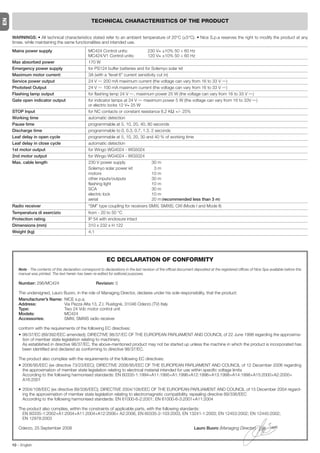
                                                      TECHNICAL CHARACTERISTICS OF THE PRODUCT


     WARNINGS: • All technical characteristics stated refer to an ambient temperature of 20°C (±5°C). • Nice S.p.a reserves the right to modify the product at any
     timee, while maintaining the same functionalities and intended use.

     Mains power supply                             MC424 Control units:              230 V~ ±10% 50 ÷ 60 Hz
                                                    MC424/V1 Control units:           120 V~ ±10% 50 ÷ 60 Hz
     Max absorbed power                             170 W
     Emergency power supply                         for PS124 buffer batteries and for Solemyo solar kit
     Maximum motor current:                         3A (with a “level 6” current sensitivity cut in)
     Service power output                           24 V      200 mA maximum current (the voltage can vary from 16 to 33 V )
     Phototest Output                               24 V      100 mA maximum current (the voltage can vary from 16 to 33 V )
     Flashing lamp output                           for flashing lamp 24 V , maximum power 25 W (the voltage can vary from 16 to 33 V )
     Gate open indicator output                     for indicator lamps at 24 V     maximum power 5 W (the voltage can vary from 16 to 33V )
                                                    or electric locks 12 V~ 25 W
     STOP Input                                     for NC contacts or constant resistance 8,2 KΩ +/- 25%
     Working time                                   automatic detection
     Pause time                                     programmable at 5, 10, 20, 40, 80 seconds
     Discharge time                                 programmable to 0, 0.3, 0.7, 1.3, 2 seconds
     Leaf delay in open cycle                       programmable at 5, 10, 20, 30 and 40 % of working time
     Leaf delay in close cycle                      automatic detection
     1st motor output                               for Wingo WG4024 - WG5024
     2nd motor output                               for Wingo WG4024 - WG5024
     Max. cable length                              230 V power supply                   30 m
                                                    Solemyo solar power kit                3m
                                                    motors                               10 m
                                                    other inputs/outputs                 30 m
                                                    flashing light                       10 m
                                                    SCA                                  30 m
                                                    electric lock                        10 m
                                                    aerial                               20 m (recommended less than 3 m)
     Radio receiver                                 “SM” type coupling for receivers SMXI, SMXIS, OXI (Mode I and Mode II)
     Temperatura di esercizio                       from - 20 to 50 °C
     Protection rating                              IP 54 with enclosure intact
     Dimensions (mm)                                310 x 232 x H 122
     Weight (kg)                                    4,1


                                                                EC DECLARATION OF CONFORMITY
        Note - The contents of this declaration correspond to declarations in the last revision of the official document deposited at the registered offices of Nice Spa available before this
        manual was printed. The text herein has been re-edited for editorial purposes.

        Number: 296/MC424                                Revision: 0

        The undersigned, Lauro Buoro, in the role of Managing Director, declares under his sole responsibility, that the product:
        Manufacturer’s Name: NICE s.p.a.
        Address:               Via Pezza Alta 13, Z.I. Rustignè, 31046 Oderzo (TV) Italy
        Type:                  Two 24 Vdc motor control unit
        Models:                MC424
        Accessories:           SMXI, SMXIS radio receiver

        conform with the requirements of the following EC directives:
        • 98/37/EC (89/392/EEC amended); DIRECTIVE 98/37/EC OF THE EUROPEAN PARLIAMENT AND COUNCIL of 22 June 1998 regarding the approxima-
          tion of member state legislation relating to machinery.
          As established in directive 98/37/EC, the above-mentioned product may not be started up unless the machine in which the product is incorporated has
          been identified and declared as conforming to directive 98/37/EC.

        The product also complies with the requirements of the following EC directives:
        • 2006/95/EEC (ex directive 73/23/EEC); DIRECTIVE 2006/95/EEC OF THE EUROPEAN PARLIAMENT AND COUNCIL of 12 December 2006 regarding
          the approximation of member state legislation relating to electrical material intended for use within specific voltage limits
          According to the following harmonised standards: EN 60335-1:1994+A11:1995+A1:1996+A12:1996+A13:1998+A14:1998+A15:2000+A2:2000+
          A16:2001

        • 2004/108/EEC (ex directive 89/336/EEC); DIRECTIVE 2004/108/EEC OF THE EUROPEAN PARLIAMENT AND COUNCIL of 15 December 2004 regard-
          ing the approximation of member state legislation relating to electromagnetic compatibility, repealing directive 89/336/EEC
          According to the following harmonised standards: EN 61000-6-2:2001; EN 61000-6-3:2001+A11:2004

        The product also complies, within the constraints of applicable parts, with the following standards:
          EN 60335-1:2002+A1:2004+A11:2004+A12:2006+ A2:2006, EN 60335-2-103:2003, EN 13241-1:2003; EN 12453:2002; EN 12445:2002;
          EN 12978:2003

        Oderzo, 25 September 2008                                                                                       Lauro Buoro (Managing Director)


     10 – English
EN
   smxi - smixs radio receiver                                                                                                                                0682


                                                                                         The receiver features 4 outputs, all available on the underlying connector. To
                                                                                         find out which function is performed by each output, see chapter 6.1.
   1       PRODUCT DESCRIPTION
                                                                                         During the transmitter code memorisation phase, one of these two options may
                                                                                         be chosen:
SMXI and SMXIS are 4-channel radio receivers for control units equipped with             Mode I - Table B1: Each transmitter button activates the corresponding out-
SM-type connector. The peculiarity of compatible transmitters is that the identi-        put in the receiver, that is, button 1 activates output 1, button 2 activates output
fication code is different for each transmitter. Therefore, in order to allow the        2, and so on. In this case there is a single memorisation phase for each trans-
                                                                                         mitter; during this phase, it doesn’t matter which button is pressed and just one
receiver to recognise a determined transmitter, the recognition code must be
                                                                                         memory sector is occupied.
memorised. This operation must repeated for each transmitter required to com-
municate with the control unit.                                                          Mode II - Table B2: Each transmitter button can be associated with a partic-
                                                                                         ular output in the receiver, e.g., button 1 activates output 2, button 2 activates
Notes:                                                                                   output 1, and so on. In this case, the transmitter must be memorised, pressing
– Up to a maximum of 256 transmitters can be memorised in the receiver. No               the required button, for each output to activate. Naturally, each button can acti-
one transmitter can be cancelled; all the codes must be deleted                          vate just one output while the same output can be activated by more than one
– For more advanced functions use the appropriate programming unit.                      button. One memory section is occupied for each button.


                      TABLE B1 - Mode I memorising (All buttons are memorised on the related receiver output)

   01. Press and hold down the receiver button for at least 3 seconds                                                                                                3s
                                                                                                                                                       RX

   02. Release the button when the Led lights up
                                                                                                                                                       RX

   03. Push, for at least 2 seconds, any of the buttons of the transmitter to be memorised within 10 seconds
                                                                                                                                                       TX            2s
   Note – If the procedure was memorised correctly, the Led on the receiver will flash 3 times. If there are other transmitters
   to memorise, repeat step 3 within another 10 seconds. The memorisation phase finishes if no new codes are received                                                x3
   for 10 seconds.


                    TABLE B2 - Mode II memorising (A specific receiver output can be associated to each button)

   01. Press and release the receiver button as many times as the number of the desired output (Once for output No. 1,
       twice for output No. 2)                                                                                                                         RX


   02. Check that the LED emits the same number of flashes as the desired output, repeated over 10 seconds in regular
       intervals (1 flash if output No. 1, 2 flashes if output No. 2)

   03. Within 10 seconds press the desired button on the transmitter to be memorised, holding it down for at least 2 seconds.
                                                                                                                                                       TX
                                                                                                                                                                     2s
   Note – If the procedure was memorised correctly, the Led on the receiver will flash 3 times. If there are other transmitters
   to memorise, repeat step 3 within another 10 seconds. The memorisation phase finishes if no new codes are received                                                x3
   for 10 seconds.


                                                                                         The procedures for memorising the remote controls must be performed within

   2       INSTALLING THE AERIAL                                                         a certain time limit; please read and understand the whole procedure before
                                                                                         starting.
                                                                                         In order to carry out the following procedure, it is necessary to use the button
                                                                                         located on the box of the radio receiver (reference A, Fig. 1a), and the corre-
The receiver requires an ABF or ABFKIT type aerial to work properly; without an          sponding LED (reference B, Fig. 1a) to the left of the button.
aerial the range is limited to just a few metres. The aerial must be installed as
high as possible; if there are metal or reinforced concrete structures nearby you
can install the aerial on top. If the cable supplied with the aerial is too short, use
a coaxial cable with 50-Ohm impedance (e.g. low dispersion RG58), the cable
must be no longer than 10 m.                                                                1a
If the aerial is installed in a place that is not connected to earth (masonry struc-
tures), the braid’s terminal can be earthed to provide a larger range of action.
The earth point must, of course, be local and of good quality. If an ABF or
ABFKIT aerial cannot be installed, you can get quite good results using the
length of wire supplied with the receiver as the aerial, laying it flat.


   3       MEMORISING A REMOTE CONTROL


WARNING – When the memorisation phase is activated, any trans-
mitter correctly recognised within the reception range of the radio
is memorised. Consider this aspect with care and remove the aeri-
al if necessary to reduce the capacity of the receiver.
                                                                                                                                                                 English – 11
Remote memorising                                                                      output must be pressed on the first transmitter as must the button required to
                                                                                            be memorised on the second. You need to read all the instructions in advance
EN

     It is possible to enter a new transmitter in the receiver memory without using
     the keypad. A previously memorised and operational remote control must be              so you can perform the operations in sequence without interruptions. Now, with
     available. The new transmitter will “inherit” the characteristics of the previously    the two remote controls (the NEW one requiring code memorisation and the
     memorised one. Therefore, if the first transmitter is memorised in mode I, the         OLD one that is already memorised), position yourself within the operating
     new one will also be memorised in mode I and any of the buttons of the trans-          range of the radio controls (within maximum range) and carry out the instruc-
     mitter can be pressed. If the first transmitter is memorised in mode II the new        tions listed in the table.
     one will also be memorised in mode II but the button activating the required


                                                                     TABLE B3 - Remote Memorising
        01. Press the button on the NEW transmitter for at least 5 seconds and then release
                                                                                                                                            TX        x5s        TX

        02. Press the button on the OLD transmitter 3 times slowly
                                                                                                                                           TX    1s   TX    1s   TX   1s
        03. Press the button on the NEW transmitter slowly and then release
                                                                                                                                                      TX              x1
        Note – If there are other transmitters to memorise, repeat the above steps for each new transmitter.


        4       DELETING ALL TRANSMITTERS


     All the memorised codes can be deleted as follows:


                                                                 TABLE B4 - Deleting all transmitters
        01. Press the receiver button and hold it down
                                                                                                                                                       RX

        02. Wait for the Led to light up, then wait for it to switch off and then wait for it to flash 3 times
                                                                                                                                                                      x3
        03. Release the button exactly during the third flash
                                                                                                                                                       RX             3°
        Note – if the procedure was performed correctly, the Led will flash 5 times after a few moments.
                                                                                                                                                                      x5


                                                  TECHNICAL CHARACTERISTICS OF THE PRODUCT

     WARNINGS: • All technical characteristics stated refer to an ambient temperature of 20°C (±5°C). • Nice S.p.a reserves the right to modify the product at any
     timee, while maintaining the same functionalities and intended use. • The range of the transmitters and the reception capacity of the receivers may be subject to
     interference that may alter their performance. In the event of interference, Nice cannot guarantee the effective capacity of their devices.


      Receivers:                                SMXI                                                             SMXIS
      Decoding                                  Rolling code 52 bit FLOR                                         Rolling code 64 bit SMILO
      Transmitter compatibility                 FLOR, VERY VR, NICE WAY, ERGO, PLANO, NICE ONE                   SMILO
      Frequency                                 433.92 MHz                                                       433.92 MHz
      Input impedance                           52 KΩ                                                            52 KΩ
      Outputs                                   4 (on SM connector)                                              4 (on SM connector)
      Sensitivity                               better than 0.5 µV                                               better than 0.5 µV
      Working temp.                             from -10°C to + 55° C                                            from -10°C to + 55° C


      Transmitters:                             FLO2R                                                            SMILO
      Buttons                                   1, 2 or 4 according to the versions                              2 or 4
      Power input                               12 V    Batt. 23 A                                               12 V     Batt. 23 A
      Absorption                                10 mA                                                            25 mA
      Transmission frequency                    433.92 MHz                                                       433.92 MHz
      Working temp.                             from -10°C to + 55° C                                            from -10°C to + 55° C
      Radiated power                            estimated approximately 1 mW E.R.P.                              estimated approximately 1 mW E.R.P.
      Range                                     estimated 200 m (outdoors); 35 m (indoors)                       estimated 200 m (outdoors); 35 m (indoors)
      Dimensions / Weight                       69 x 39 x 15,5 mm / 31 g.                                        Ø 48 mm x H 14 mm - 14 g
      Encoding                                  digital (4.5 x10¹⁵ combinations)                                 digital (18 x 1015 combinations)


     12 – English
ITALIANO                                                                            AVVERTENZE E PRECAUZIONI GENERALI


                                                                                                              Avvertenze per la sicurezza
                                                                                                              • ATTENZIONE! – Il presente manuale contiene importanti istruzioni e


                                                                                                                                                                                                         IT
                                                                                                                avvertenze per la sicurezza delle persone. Un’installazione errata può cau-
                                                                                                                sare gravi ferite. Prima di iniziare il lavoro è necessario leggere attentamente
                                                                                                                tutte le parti del manuale. In caso di dubbi, sospendere l’installazione e richie-
                                                                                                                dere chiarimenti al Servizio Assistenza Nice.
                                                                                                              • ATTENZIONE! – Istruzioni importanti: conservare questo manuale per
                                                                                                                eventuali interventi futuri di manutenzione e di smaltimento del prodotto.

                                                                                                              Avvertenze per l’installazione

Sommario                                                                                                      • Prima di iniziare l’installazione verificare se il presente prodotto è adatto al tipo
                                                                                                                di utilizzo desiderato (vedere paragrafo 2.2 “Limiti d’impiego” e capitolo
                                                                                                                “Caratteristiche tecniche del prodotto”). Se non è adatto, NON procedere
                                                                                                                all’istallazione.
     AVVERTENZE E PRECAUZIONI GENERALI . . . . . . . . . . . . . . . . . . 1                                  • Durante l’installazione maneggiare con cura il prodotto evitando schiaccia-
1 – DESCRIZIONE DEL PRODOTTO . . . . . . . . . . . . . . . . . . . . . . . . . . . 1                            menti, urti, cadute o contatto con liquidi di qualsiasi natura. Non mettere il
                                                                                                                prodotto vicino a fonti di calore, né esporlo a fiamme libere. Tutte queste azio-
2 – INSTALLAZIONE . . . . . . . . . . . . . . . . . . . . . . . . . . . . . . . . . . . . . . . . 1             ni possono danneggiarlo ed essere causa di malfunzionamenti o situazioni di
     2.1 - VERIFICHE PRELIMINARI ALL’INSTALLAZIONE . . . . . . . . . . . 2                                      pericolo. Se questo accade, sospendere immediatamente l’installazione e
                                                                                                                rivolgersi al Servizio Assistenza Nice.
     2.2 - LIMITI D’IMPIEGO DEL PRODOTTO . . . . . . . . . . . . . . . . . . . . . 2                          • Non eseguire modifiche su nessuna parte del prodotto. Operazioni non per-
     2.3 - INSTALLAZIONE . . . . . . . . . . . . . . . . . . . . . . . . . . . . . . . . . . . . 2              messe possono causare solo malfunzionamenti. Il costruttore declina ogni
                                                                                                                responsabilità per danni derivanti da modifiche arbitrarie al prodotto.
     2.4 - COLLEGAMENTI ELETTRICI . . . . . . . . . . . . . . . . . . . . . . . . . . . 2                     • Il prodotto non è destinato ad essere usato da persone (bambini compresi) le
           2.4.1 - Note sulle connessioni . . . . . . . . . . . . . . . . . . . . . . . . . . 3                 cui capacità fisiche, sensoriali o mentali siano ridotte, oppure con mancanza
                                                                                                                di esperienza o di conoscenza, a meno che esse abbiano potuto beneficiare,
           2.4.2 - Tipologia di ingresso ALT . . . . . . . . . . . . . . . . . . . . . . . . 3
                                                                                                                attraverso l’intermediazione di una persona responsabile della loro sicurezza,
           2.4.3 - Esempi di collegamenti fotocellule: con la funzione . . . .                                  di una sorveglianza o di istruzioni riguardanti l’uso del prodotto.
                   STAND BY attiva e la funzione fototest disattiva . . . . . . 3                             • Non permettere ai bambini di giocare con i dispositivi di comando dell’auto-
           2.4.4 - Esempi di collegamenti fotocellule: con la funzione . . . .                                  mazione. Tenere i trasmettitori lontano dalla portata dei bambini
                   fototest attiva e la funzione STAND BY disattiva . . . . . . 3                             • I bambini devono essere sorvegliati per sincerarsi che non giochino con l’ap-
                                                                                                                parecchio.
     2.5 - PRIMA ACCENSIONE E VERIFICA DEI COLLEGAMENTI . . . . . 3                                           • Prevedere nella rete di alimentazione dell’impianto un dispositivo di disconnes-
                                                                                                                sione con una distanza di apertura dei contatti che consenta la disconnessio-
     2.6 - RICERCA AUTOMATICA DEI FINECORSA . . . . . . . . . . . . . . . . 3
                                                                                                                ne completa nelle condizioni dettate dalla categoria di sovratensione III.
3 – COLLAUDO E MESSA IN SERVIZIO . . . . . . . . . . . . . . . . . . . . . . . . 4                            • La Centrale deve essere collegata ad una linea di alimentazione elettrica
                                                                                                                dotata di messa a terra di sicurezza.
     3.1 - COLLAUDO . . . . . . . . . . . . . . . . . . . . . . . . . . . . . . . . . . . . . . . . . 4       • Il materiale dell’imballo del prodotto deve essere smaltito nel pieno rispetto
     3.2 - MESSA IN SERVIZIO . . . . . . . . . . . . . . . . . . . . . . . . . . . . . . . . . . 4              della normativa locale.
4 – DIAGNOSTICA . . . . . . . . . . . . . . . . . . . . . . . . . . . . . . . . . . . . . . . . . . 4
5 – PROGRAMMAZIONE . . . . . . . . . . . . . . . . . . . . . . . . . . . . . . . . . . . . . 4
     5.1 - FUNZIONI PRE-IMPOSTATE . . . . . . . . . . . . . . . . . . . . . . . . . . . 4
     5.2 - FUNZIONI PROGRAMMABILI . . . . . . . . . . . . . . . . . . . . . . . . . . 4                          1       DESCRIZIONE DEL PRODOTTO
           5.2.1 - Programmazione diretta . . . . . . . . . . . . . . . . . . . . . . . . . 4
           5.2.2 - Programmazione di primo livello: prima parte . . . . . . . 4                               La centrale MC424 è destinata al comando di attuatori elettromeccanici Wingo
           5.2.3 - Programmazione di primo livello: seconda parte . . . . . 5                                 a 24 V, per l’automazione di cancelli o porte ad ante battenti. ATTENZIONE! –
           5.2.4 - Funzioni di secondo livello . . . . . . . . . . . . . . . . . . . . . . . 5                Qualsiasi altro uso diverso da quello descritto e in condizioni ambientali
                                                                                                              diverse da quelle riportate in questo manuale è da considerarsi improprio
     5.3 - MODALITÀ DI PROGRAMMAZIONE . . . . . . . . . . . . . . . . . . . . . 5                             e vietato!
           5.3.1 - Programmazione primo livello: funzioni . . . . . . . . . . . . . 6                         La centrale MC424 dispone di un sistema che verifica lo sforzo dei motori ad
           5.3.2 - Programmazione secondo livello: parametri . . . . . . . . . 6                              essa collegati (amperometrica), questo sistema permette di rilevare automatica-
           5.3.3 - Cancellazione della memoria . . . . . . . . . . . . . . . . . . . . . 6                    mente i finecorsa, memorizzare il tempo lavoro di ogni singolo motore e di rico-
           5.3.4 - Esempio di programmazione primo livello . . . . . . . . . . . 7                            noscere eventuali ostacoli durante il movimento normale. Questa caratteristica
                                                                                                              rende più semplice l’installazione visto che non serve nessuna regolazione dei
           5.3.5 - Esempio di programmazione secondo livello . . . . . . . . 7                                tempi di lavoro e di sfasamento delle ante.
           5.3.6 - Schema per la programmazione . . . . . . . . . . . . . . . . . . 8                         La centrale è pre-programmata sulle funzioni normalmente richieste, eventual-
6 – APPROFONDIMENTI: accessori . . . . . . . . . . . . . . . . . . . . . . . . . . . 9                        mente attraverso una semplice procedura si possono scegliere funzioni più
                                                                                                              specifiche (vedere capitolo 5).
     6.1 - COLLEGAMENTO DI UN RICEVITORE RADIO . . . . . . . . . . . . . 9
                                                                                                              La centrale, è predisposta per essere alimentata da batterie tampone PS124
     6.2 - COLLEGAMENTO DELLA BATTERIA TAMPONE MOD. PS124 9                                                   come alimentazione di emergenza, in caso di mancanza di tensione di rete (per
                                                                                                              approfondimenti vedere capitolo 6.2); è anche predisposta per essere collega-
     6.3 - COLLEGAMENTO DEL SISTEMA SOLEMYO . . . . . . . . . . . . . . 9
                                                                                                              ta al sistema di alimentazione ad energia solare “Solemyo” (per approfondimen-
7 – COSA FARE SE...(guida alla risoluzione dei problemi) . . . . . . . 9                                      ti vedere capitolo 6.3).
8 – MANUTENZIONE DEL PRODOTTO . . . . . . . . . . . . . . . . . . . . . . . . . 9
     SMALTIMENTO DEL PRODOTTO . . . . . . . . . . . . . . . . . . . . . . . . . . 9
     CARATTERISTICHE TECNICHE DEL PRODOTTO . . . . . . . . . . . 10
     CE DICHIARAZIONE DI CONFORMITÀ . . . . . . . . . . . . . . . . . . . . 10                                   2       INSTALLAZIONE
     RICEVITORE RADIO: SMXI - SMIXS . . . . . . . . . . . . . . . . . . . . . . 11
     1 - DESCRIZIONE DEL PRODOTTO . . . . . . . . . . . . . . . . . . . . . . . . . 11                        Per chiarire alcuni termini ed alcuni aspetti di un impianto di automazione per
     2 - INSTALLAZIONE ANTENNA . . . . . . . . . . . . . . . . . . . . . . . . . . . . 11                     porte o cancelli a 2 ante a battente fare riferimento all’impianto tipico mostrato
                                                                                                              in fig. 1.
     3 - MEMORIZZAZIONE DI UN TELECOMANDO . . . . . . . . . . . . . . . 11
     4 - CANCELLAZIONE DI TUTTI I TRASMETTITORI . . . . . . . . . . . . . 12                                  Legenda fig. 1:
                                                                                                              1. Attuatore elettromeccanico Wingo a 24 V
     CARATTERISTICHE TECNICHE DEL PRODOTTO . . . . . . . . . . . . . . 12
                                                                                                              2. Attuatore elettromeccanico Wingo a 24 V
     IMMAGINI . . . . . . . . . . . . . . . . . . . . . . . . . . . . . . . . . . . . . . . . . . . I - VII   3. Lampeggiante Lucy24
                                                                                                                                                                                          Italiano – 1
4.   Selettore a chiave                                                                     2.2 - Limiti d’impiego del prodotto
     5.   Coppia di fotocellule “FOTO”                                                           Il prodotto può essere utilizzato esclusivamente con i motoriduttori Wingo a 24 V.
     6.   Coppia di fotocellule “FOTO1”
     7.   Coppia di fotocellule “FOTO2”
     8.   Centrale di comando                                                                    2.3 - Installazione
                                                                                                 Per il fissaggio della Centrale, procedere come mostrato in fig. 4. Inoltre, rispet-
      In particolare ricordiamo che:
                                                                                                 tare le seguenti avvertenze:
     • Per le caratteristiche e il collegamento delle fotocellule fare riferimento alle istru-
IT


                                                                                                 • La centrale viene fornita in un contenitore che, se adeguatamente installato,
        zioni specifiche del prodotto.
                                                                                                 garantisce un grado di protezione classificato IP54. Pertanto la centrale è adat-
     • L’intervento della coppia di fotocellule “FOTO” in apertura non ha effetto men-
                                                                                                 ta ad essere installata anche all'esterno.
        tre provoca una inversione durante la chiusura.
     • L’intervento della coppia di fotocellule “FOTO1” blocca la manovra sia in                 • Fissare la centrale su una superficie irremovibile, verticale, piana e adeguata-
        apertura che in chiusura.                                                                mente protetta da possibili urti. Attenzione! – La parte inferiore della centrale
     • L’intervento della coppia di fotocellule “FOTO2” (collegata sull’ingresso AUX             deve distare almeno 40 cm dal terreno.
        opportunamente programmato) in chiusura non ha effetto mentre provoca                    • Inserire gli appositi passacavi o passatubi nella parte inferiore del contenitore
        una inversione durante l’apertura.                                                       (fig. 4). Attenzione! – Se i tubi di protezione dei cavi terminano in un pozzetto,
                                                                                                 è probabile che all'interno del contenitore della centrale si formi della condensa,
     Per verificare le parti della centrale vedere fig. 2.                                       danneggiando così la scheda elettronica. In questo caso, proteggere adegua-
     Legenda fig. 2:                                                                             tamente la centrale in modo da prevenire la formazione di condensa.
     A.              Connettore alimentazione 24 V                                               • È possibile inserire i passacavi sul lato lungo del contenitore soltanto se la
     B.              Connettore motore M1                                                        centrale viene installata all'interno, in ambiente protetto.
     C.              Connettore per batteria tampone PS124 / sistema di alimentazione            Per eseguire l’installazione degli altri dispositivi presenti nell’automazione, fare
                     a energia solare Solemyo (per approfondimenti vedere capitolo 6.3)          riferimento ai rispettivi manuali d’istruzioni.
     D.              Fusibile servizi (500 mA) tipo F
                                                                                                 2.4 - Collegamenti elettrici
     E.              Selettore ritardo apertura motore M1 o M2
     F.              Morsetto motore M2                                                                                             ATTENZIONE!
     G.              Morsetto uscita lampeggiante                                                – Tutti i collegamenti elettrici devono essere eseguiti in assenza di alimen-
     H.              Morsetto uscita SCA o elettroserratura                                      tazione elettrica di rete e con la batteria tampone scollegata, se presente
     I:              Morsetti 24 Vdc per servizi e fototest                                      nell’automazione.
     L.              Morsetti per ingressi                                                       – Le operazioni di collegamento devono essere eseguite esclusivamente
                                                                                                 da personale qualificato.
     L1…L5.          Led ingressi e programmazione
                                                                                                 – Verificare che tutti i cavi elettrici da utilizzare siano del tipo adatto.
     M.              Morsetto per antenna radio
     N.              Innesto “SM” per ricevitore radio                                           01. Svitare le viti del coperchio;
     O.              Connettore per programmazione/diagnostica                                   02. Predisporre i fori per il passaggio dei cavi elettrici;
                                                                                                 03. Eseguire i collegamenti dei cavi facendo riferimento allo schema elettrico di
     P1, P2, P3. Pulsanti e led per programmazione
                                                                                                       fig. 5. Per collegare il cavo dell’alimentazione elettrica, vedere fig. 6.
     2.1 - Verifiche preliminari all’installazione                                                     Nota – Per facilitare i collegamenti dei cavi, è possibile estrarre i morsetti
                                                                                                       dalle proprie sedi.
     Prima di procedere all’installazione, è necessario verificare l’integrità dei com-
     ponenti del prodotto, l’adeguatezza del modello scelto e l’idoneità dell’ambien-            • Gli ingressi dei contatti di tipo NC (Normalmente Chiuso), se non usati, van-
     te destinato all’installazione:                                                                no ponticellati con “COMUNE” (escluso gli ingressi delle fotocellule se viene
     • Verificare che tutte le condizioni di utilizzo rientrino nei “limiti d’impiego” e nel-       attivata la funzione FOTOTEST, per chiarimenti vedere il paragrafo 2.4.3).
     le “Caratteristiche tecniche” del prodotto”.                                                • Se per lo stesso ingresso ci sono più contatti NC vanno posti in SERIE tra di
     • Verificare che l’ambiente scelto per l’installazione sia compatibile con l’ingom-            loro.
     bro totale del prodotto (fig. 3).                                                           • Gli ingressi dei contatti di tipo NA (Normalmente Aperto) se non usati vanno
     • Verificare che la superficie scelta per l’installazione del prodotto sia solida e            lasciati liberi.
     possa garantire un fissaggio stabile.                                                       • Se per lo stesso ingresso ci sono più contatti NA vanno posti in PARALLELO
     • Verificare che la zona di fissaggio non sia soggetta ad allagamenti; prevedere               tra di loro.
     il montaggio del prodotto adeguatamente sollevato da terra.                                 • I contatti devono essere assolutamente di tipo elettromeccanico e svincolati
     • Verificare che lo spazio intorno al prodotto consenta una facile e sicura ese-               da qualsiasi potenziale, non sono ammessi collegamenti a stadi tipo quelli
     cuzione delle manovre manuali.                                                                 definiti "PNP", "NPN", "Open Collector" ecc.
     • Verificare che nell’automazione siano presenti gli arresti meccanici sia in Chiu-         • Nel caso di ante sovrapposte, tramite il ponticello E (fig. 2) è possibile sele-
     sura sia in Apertura.                                                                          zionare quale motore deve partire per primo in apertura.

     Legenda delle fig. 2 - 5a - 5b - 5c:
     Morsetti Funzione                 Descrizione                                                                                                Tipo cavo
     L-N-           Linea di alim.              Alimentazione da rete                                                                             3 x 1,5 mm2
     1÷3            Motore 1                    Collegamento del motore M1                                                                        3 x 1,5 mm2
     1÷3            Motore 2                    Collegamento del motore M2 (Nota 1)                                                               3 x 1,5 mm2
     4÷5            Lampeggiante                Collegamento del lampeggiante 24 V            max 25 W                                            2 x 1 mm2
     6÷7            SCA / Elettroserratura      Collegamento per Spia Cancello Aperto 24 V           max 5 W o Elettroserratura 12 V              SCA:                2 x 0,5 mm2
                                                max 25 VA (vedere capitolo 5 - Programmazione)                                                    Elettroserratura:   2 x 1 mm2
     8              Comune 24 V                 Alimentazione +24 V per TX fotocellule con fototest (max 100 mA); “COMUNE”                        1 x 0,5 mm2
                    (con stand by / fototest)   per tutti gli ingressi di sicurezza, con funzione STAND BY attiva (Nota 2)
     9              0V                          Alimentazione 0 V         per servizi                                                             1 x 0,5 mm2
     10             24 V                        Alimentazione servizi, senza “Stand by” (24 V         max 200 mA)                                 1 x 0,5 mm2
     11             Comune 24 V                 Comune per tutti gli ingressi (+24 V       ) senza “Stand by”                                     1 x 0,5 mm2
     12             ALT                         Ingresso con funzione di STOP (emergenza, blocco di sicurezza) (Nota 3)                           1 x 0,5 mm2
     13             FOTO                        Ingresso NC per dispositivi di sicurezza (fotocellule, bordi sensibili)                           1 x 0,5 mm2
     14             FOTO1                       Ingresso NC per dispositivi di sicurezza (fotocellule, bordi sensibili)                           1 x 0,5 mm2
     15             PASSO-PASSO                 Ingresso per funzionamento ciclico (APRE-STOP-CHIUDE-STOP)                                        1 x 0,5 mm2
     16             AUX                         Ingresso ausiliario (Nota 4)                                                                      1 x 0,5 mm2
     17÷18          Antenna                     Collegamento antenna del ricevitore radio                                                         cavo schermato tipo RG58

     Nota 1 – Non usato per cancelli ad una sola anta (la centrale riconosce automaticamente se c’è un solo motore installato)
     Nota 2 – La funzione “Stand By” serve per ridurre i consumi; per approfondimenti sui collegamenti elettrici vedere paragrafo 2.4.1 “Collegamento Stand by/Foto-
     test” e per la programmazione vedere capitolo 5.2.3 “Funzione Stand by/Fototest.
     Nota 3 – L’ingresso ALT può essere utilizzato per contatti NC oppure a resistenza costante 8,2 KΩ (vedere capitolo “Programmazione”)
     Nota 4 – L’ingresso ausiliario AUX di fabbrica è programmato con la funzione “Apre parziale tipo 1”, ma può essere programmato con una delle seguenti funzioni:
     Funzione                             Tipo ingresso               Descrizione
     APRE PARZIALE TIPO 1                 NA                          Apre completamente l’anta superiore
     2 – Italiano
APRE PARZIALE TIPO 2                            NA                             Aprono le 2 ante fino a metà della corsa
APRE                                            NA                             Esegue solo la manovra di apre
CHIUDE                                          NA                             Esegue solo la manovra di chiude
FOTO 2                                          NC                             Funzione FOTO 2
ESCLUSO                                         --                             Nessuna funzione


                                                                                                                                                                                                  IT
2.4.1 - Note sulle connessioni                                                                         Nota 3 – Uno o più dispositivi NC si possono collegare in serie tra di loro e ad
La maggior parte dei collegamenti è estremamente semplice, buona parte sono                            una resistenza di 8,2KΩ senza alcun limite di quantità (fig. 9c).
collegamenti diretti ad un singolo utilizzatore o contatto. Nella figure seguenti                      Nota 4 – Solo un dispositivo con uscita a resistenza costante 8,2 KΩ può esse-
sono indicati alcuni esempi su come collegare i dispositivi esterni:                                   re collegato; eventualmente più dispositivi devono essere collegati “in cascata”
                                                                                                       con una sola resistenza di terminazione da 8,2 KΩ (fig. 9d).
• Collegamento Stand By / Fototest
La funzione Stand-by è attiva di serie; viene esclusa automaticamente solo quan-                       2.5 - Prima accensione e verifica dei collegamenti
do si attiva la funzione Fototest. Nota - Le funzioni Stand-by e Fototest sono
alternative, in quanto una esclude l'altra.                                                            ATTENZIONE! – Le operazioni di collegamento devono essere eseguite
La funzione Stand-by permette di ridurre i consumi; è possibile ottenere tre tipi di                   esclusivamente da personale qualificato.
collegamento:                                                                                          Dopo aver dato alimentazione elettrica alla Centrale di comando, verificare che
- con “stand by” attivo (risparmio energetico); vedere schema elettrico di fig. 5a                     tutti i Led lampeggino velocemente per qualche secondo; poi eseguire le
- collegamento standard: senza “stand by” e senza “fototest”; vedere schema                            seguenti verifiche:
  elettrico di fig. 5b                                                                                 1. Verificare che sui morsetti 9-10 sia presente una tensione di circa 30 Vdc; se
- senza “stand by” e con “fototest”; vedere schema elettrico di fig. 5c                                    i valori non corrispondono togliere subito alimentazione e verificare con
Con la funzione “Stand-by” attiva, trascorso 1 minuto dal termine di una mano-                             maggior attenzione i collegamenti e la tensione di alimentazione.
vra, la centrale entra in Stand-by, spegnendo tutti gli Ingressi e le Uscite per                       2. Dopo il lampeggio veloce iniziale, il Led P1 segnala il corretto funzionamen-
ridurre i consumi. Lo stato viene segnalato dal led “OK” che inizia a lampeggia-                           to della centrale con un lampeggio regolare con cadenza di un secondo.
re più lentamente. AVVERTENZA - Se la centrale è alimentata con un pannello                                Quando sugli ingressi si ha una variazione, il LED “P1” effettua un doppio
fotovoltaico (sistema “Solemyo”) o con una batteria tampone, è necessario atti-                            lampeggio veloce segnalando che è stato riconosciuto l’ingresso.
vare la funzione “Stand-by” come schema elettrico di fig. 5a.                                          3. Se i collegamenti sono corretti, gli ingressi di tipo “NC”, devono avere il cor-
Quando la funzione “Stand-by” non serve, si può attivare la funzione “Fototest”                            rispondente Led acceso, mentre gli ingressi di tipo “NA”, devono avere il
che permette di verificare, all’inizio di una manovra, il corretto funzionamento                           corrispondente Led spento. Vedere fig. A e Tabella 2.
delle fotocellule collegate. Per utilizzare questa funzione occorre prima collegare
opportunamente le fotocellule (vedere vedere schema elettrico di fig. 5c) e poi
attivare la funzione.                                                                                      A
Nota – Attivando il fototest, gli ingressi soggetti alla procedura di test sono
FOTO, FOTO1 e FOTO2. Se uno di questi ingressi non è utilizzato è necessario
collegarlo al morsetto n° 8.
• Collegamento Selettore a chiave
Esempio 1 (fig. 7a): Come collegare il selettore per effettuare le funzioni PAS-
SO-PASSO e ALT
Esempio 2 (fig. 7b): Come collegare il selettore per effettuare le funzioni PAS-
SO PASSO e una di quelle previste dall’ingresso ausiliario (APERTURA PARZIA-
LE, SOLO APRE, SOLO CHIUDE…)
Nota – Per i collegamenti elettrici con la funzione “Stand By” attiva, vedere                                                             TABELLA 2
“Funzione Stand By/Fototest” in questo paragrafo 2.4.1.                                                INGRESSO              TIPO INGRESSO                        STATO LED
• Collegamento Spia Cancello Aperto / Elettroserratura (fig. 8)                                        ALT                   ALT NC                               L1 Acceso
Se programmato S.C.A., l’uscita può essere usata come spia cancello aperto.                                                  ALT RESISTENZA                       L1 Acceso
La spia, lampeggia lentamente in apertura mentre, in chiusura lampeggia velo-                                                COSTANTE 8,2 KΩ
cemente; rimane accesa fissa con cancello fermo aperto e spenta con cancello                           FOTO                  NC                                   L2 Acceso
chiuso. Se l’uscita è programmata come elettroserratura, viene attivata per 3
secondi ad ogni inizio manovra di apertura.                                                            FOTO1                 NC                                   L3 Acceso
                                                                                                       P.P.                  NA                                   L4 Spento
2.4.2 - Tipologia di ingresso ALT                                                                      AUX                   APRE PARZIALE tipo 1 - NA            L5 Spento
La centrale MC424 può essere programmata per due tipologie di ingresso ALT:                                                  APRE PARZIALE tipo 2 - NA            L5 Spento
- Alt tipo NC per collegamento a contatti tipo NC.
- Alt a resistenza costante. Permette di collegare alla centrale dispositivi con                                             SOLO APRE - NA                       L5 Spento
  uscita a resistenza costante 8,2 KΩ (es. bordi sensibili). L’ ingresso misura il                                           SOLO CHIUDE - NA                     L5 Spento
  valore della resistenza e toglie il consenso alla manovra quando la resistenza                                             FOTO2 - NC                           L5 Acceso
  esce dal valore nominale. Con opportuni accorgimenti è possibile collegare
  all’ingresso alt a resistenza costante anche dispositivi con contatti normal-                        4. Verificare che agendo sui dispositivi collegati sugli ingressi si spengano o si
  mente aperti “NA” normalmente chiusi “NC” ed eventualmente più di un                                    accendano i relativi Led.
  dispositivo, anche di tipo diverso; vedere Tabella 1.                                                5. Verificare che premendo il tasto P2, entrambi i motori effettuano una breve
ATTENZIONE! – Se l’ingresso Alt a resistenza costante è usato per colle-                                  manovra di apertura con il motore dell’anta superiore che parte per primo.
gare dispositivi con funzioni di sicurezza, solo i dispositivi con uscita a resi-                         Bloccare la manovra ripremendo il tasto P2. Se i motori non partono in aper-
stenza costante 8,2 KΩ garantiscono la categoria 3 di sicurezza ai guasti.                                tura, invertire le polarità dei cavi motore, mentre se il primo a muoversi non è
                                                                                                          quello dell’anta superiore, agire sul ponticello E (fig. 2).
                                               TABELLA 1
                                               1° dispositivo tipo:                                    2.6 - Ricerca automatica dei finecorsa
 2° dispositivo tipo:


                                NA                         NC                      8,2 KΩ              Terminate le verifiche si può dare inizio alla fase ricerca automatica degli arresti
                                                                                                       meccanici, questa operazione è necessaria perché la centrale MC424 deve
                         NA     In parallelo (nota 1)      (nota 2)                In parallelo        “misurare” i tempi di durata delle manovre di apertura e chiusura. Questa pro-
                         NC     (nota 2)                   In serie (nota 3)       In serie            cedura è completamente automatica e si basa sulla misura dello sforzo dei
                                                                                                       motori per il rilevamento degli arresti meccanici in apertura e chiusura.
                        8,2KΩ   In parallelo               In serie                (nota 4)
                                                                                                       Attenzione! – Se questa procedura è già stata eseguita per poterla riatti-
                                                                                                       vare occorre prima cancellare a memoria (vedere capitolo “Cancellazione
Note alla Tabella 1:                                                                                   della memoria”). Per verificare se la memoria contiene i parametri dei fine-
Nota 1 – Uno o più dispositivi NA si possono collegare in parallelo tra di loro                        corsa, spegnere e poi riaccendere l’alimentazione alla centrale. Se tutti i
senza alcun limite di quantità con una resistenza di terminazione da 8,2 KΩ                            Led lampeggiano velocemente per circa 6 secondi la memoria è vuota; se
(fig. 9a). Per i collegamenti elettrici con la funzione “Stand By” attiva, vedere                      il lampeggio dura solo 3 secondi, la memoria contiene già i parametri dei
“Funzione Stand By/Fototest” in questo paragrafo 2.4.1.                                                finecorsa.
Nota 2 – La combinazione NA ed NC è possibile ponendo i 2 contatti in paral-                           Prima di iniziare la ricerca dei finecorsa, verificare che tutti i dispositivi di sicu-
lelo tra loro con l’avvertenza di porre in serie al contatto NC una resistenza da                      rezza diano il loro consenso (ALT, FOTO e FOTO1 attivi). L’attivazione di una
8,2 KΩ (è quindi possibile anche la combinazione di 3 dispositivi: NA, NC e 8,2                        sicurezza o l’arrivo di un comando durante la procedura, ne provoca l’interru-
KΩ (fig. 9b).                                                                                          zione immediata. Le ante possono essere in una qualunque posizione ma è
                                                                                                                                                                                   Italiano – 3
preferibile che siano circa a metà corsa.                                               1 Realizzare il fascicolo tecnico dell’automazione che dovrà comprendere i
     Procedura – Premere il pulsante P2 (fig. 2) per avviare la fase di ricerca che            seguenti documenti: un disegno complessivo dell’automazione, lo schema
     prevede:                                                                                  dei collegamenti elettrici effettuati, l’analisi dei rischi presenti e le relative
     - Breve apertura di entrambi i motori.                                                    soluzioni adottate (vedere nel sito www.niceforyou.com i moduli da com-
                                                                                               pilare), la dichiarazione di conformità del fabbricante di tutti i dispositivi uti-
     - Chiusura del motore dell’anta inferiore fino all’arresto meccanico in chiusura.
                                                                                               lizzati e la dichiarazione di conformità compilata dall’installatore.
     - Chiusura del motore dell’anta superiore fino all’arresto meccanico in chiusura.
                                                                                             2 Apporre sul cancello una targhetta contenente almeno i seguenti dati: tipo
     - Inizio apertura del motore dell’anta superiore.
IT


                                                                                               di automazione, nome e indirizzo del costruttore (responsabile della “messa
     - Dopo lo sfasamento previsto, inizio apertura dell’anta inferiore. Se lo sfasa-          in servizio”), numero di matricola, anno di costruzione e marchio “CE”.
       mento non è sufficiente, bloccare la ricerca premendo il tasto P1 (fig. 2), quin-     3 Prima di mettere in servizio l’automatismo informare adeguatamente il pro-
       di modificare il tempo (vedere capitolo 5).                                             prietario sui pericoli ed i rischi residui ancora presenti.
     - La centrale esegue la misura del movimento necessario affinché del i motori
       raggiungono gli arresti meccanici in apertura.
     - Manovra completa di chiusura. I motori possono partire in momenti diversi, lo
       scopo è di arrivare in chiusura mantenendo uno sfasamento idoneo per evi-
       tare il pericolo di cesoiamento tra le ante.
     - Fine della procedura con memorizzazione di tutte le misure effettuate.
                                                                                                  4     DIAGNOSTICA
     Tutte queste fasi avvengono una di seguito all’altra, senza nessun intervento
     da parte dell’operatore. Se per qualche motivo la procedura non avanza corret-
     tamente, è necessario interromperla premendo il tasto P1. Quindi ripetere la            Il led Diagnostica P2 (fig. 2) segnala eventuali anomalie o comportamenti rileva-
     procedura, eventualmente modificando dei parametri, ad esempio le soglie di             ti dalla centrale durante la manovra.
     intervento dell’amperometrica (vedere il capitolo 5).                                   Una sequenza con un determinato numero di lampeggi indica il tipo di proble-
                                                                                             ma e rimane attivo fino all’inizio della manovra successiva. Qui sotto la tabella
                                                                                             riassuntiva:

                                                                                             Numero                      Tipo di anomalia
                                                                                             Lampeggi led P2
         3          COLLAUDO E MESSA IN SERVIZIO
                                                                                             1                           Intervento amperometrica M1
                                                                                             2                           Intervento amperometrica M2
     Queste sono le fasi più importanti nella realizzazione dell’automazione, al fine di     3                           Intervento ingresso ALT durante la manovra
     garantire la massima sicurezza dell’impianto. Il collaudo può essere usato              4                           Errore Fototest
     anche per verificare periodicamente i dispositivi che compongono l’automazio-           5                           Sovracorrente uscita SCA o elettroserratura
     ne. Le fasi del collaudo e della messa in servizio dell’automazione devono esse-
     re eseguite da personale qualificato ed esperto che dovrà farsi carico di stabili-
     re le prove necessarie a verificare le soluzioni adottate nei confronti dei rischi
     presenti, e di verificare il rispetto di quanto previsto da leggi, normative e rego-
     lamenti: in particolare, di tutti i requisiti della norma EN 12445 che stabilisce i
     metodi di prova per la verifica degli automatismi per cancelli.
     I dispositivi aggiuntivi oppure opzionali, devono essere sottoposti ad uno speci-
     fico collaudo, sia per quanto riguarda la funzionalità sia per quanto riguarda la
                                                                                                  5     PROGRAMMAZIONE

     loro corretta interazione con MC424; quindi, fare riferimento ai manuali istruzio-
     ni dei singoli dispositivi.                                                             La centrale MC424 dispone di alcune funzioni programmabili. Queste funzioni
                                                                                             vengono pre-impostate in una configurazione tipica che soddisfa la maggior
     3.1 - Collaudo                                                                          parte delle automazioni. Le funzioni possono essere cambiate in qualsiasi
     La sequenza di verifiche si riferisce alla centrale programmata con le funzioni         momento, sia prima che dopo la fase di ricerca automatica dei finecorsa, attra-
     pre-impostate, vedere il paragrafo 5.1:                                                 verso una opportuna procedura di programmazione; vedere paragrafo 5.3.
     • Verificare che l’attivazione dell’ingresso PASSO-PASSO attivi la sequenza
       “Apre, Stop, Chiude, Stop”.                                                           5.1 - Funzioni pre-impostate
     • Verificare che l’attivazione dell’ingresso AUX (funzione apertura parziale Tipo       •   Movimento motori:        veloce
       1) gestisca la sequenza “Apre, Stop, Chiude, Stop” solo del motore dell’anta          •   Chiusura automatica:     attiva
       superiore mentre, il motore dell’anta inferiore rimane fermo in chiusura.
                                                                                             •   Condominiale:            disattivo
     • Far partire una manovra di apertura e verificare che:
     - Impegnando FOTO il cancello continui la manovra di apertura                           •   Prelampeggio:            disattivo
     - impegnando FOTO1 la manovra si fermi fino a quando FOTO1 si disimpegna,               •   Richiudi dopo foto:      disattivo
       poi la manovra riprenderà il suo movimento di apertura                                •   Ritardo in apertura:     livello 2 (10%)
     - Se installata FOTO2, dopo aver impegnato questo dispositivo, la manovra               •   STAND BY / Fototest:     Stand by
       deve fermarsi e ripartire in chiusura                                                 •   SCA/Elettroserratura:    SCA
     • Verificare che quando l’anta raggiunge l’arresto meccanico in apertura, i             •   Ingresso ALT:            tipo NC
       motori vengano spenti.
                                                                                             •   Cancelli pesanti:        disattivo
     • Far partire una manovra di chiusura e verificare che:
     - Impegnando FOTO la manovra si fermi e riprenda in apertura.                           •   SCA proporzionale:       disattivo
     - Impegnando FOTO1 la manovra si fermi fino a quando FOTO1 si disimpegna,               •   Tempo pausa:             20 secondi
       e poi la manovra riparta in apertura                                                  •   Ingresso ausiliario:     apertura parziale Tipo 1 (attiva solo motore
     - impegnando FOTO2 il cancello continui la manovra di chiusura                                                       dell’anta superiore)
     • Verificare che i dispositivi di arresto collegati all’ingresso di ALT provochino      • Sensibilità amperometrica: Grado 2
       l’arresto immediato di qualsiasi movimento in corso
     • Verificare che il livello del sistema di rilevamento ostacoli sia idoneo all’appli-   5.2 - Funzioni programmabili
       cazione:                                                                              Per rendere l’impianto più adatto alle esigenze dell’utilizzatore e più sicure nelle
     - Durante la manovra, sia in apertura che in chiusura, impedire il movimento            varie condizioni d’uso, la centrale MC424 permette di programmare alcune fun-
       dell’anta simulando un ostacolo e verificare che la manovra si inverta prima di       zioni o parametri, nonché la funzione di alcuni ingressi ed uscite.
       superare la forza prevista dalle normative
     • Altre verifiche possono essere richieste in funzione dei dispositivi collegati
       sugli ingressi.                                                                       5.2.1 - Programmazioni dirette
                                                                                             • Movimento Lento/Veloce: È possibile scegliere la velocità di movimento del
     Attenzione – Se per 2 manovre consecutive nella stessa direzione viene                    cancello in qualunque momento (con motore fermo) agendo semplicemente
     rilevato un ostacolo, la centrale effettua un’inversione parziale di entram-              sul tasto P3 (fig. 2) quando la centrale non si trova in uno stato di program-
     bi i motori per 1 solo secondo. Al comando successivo le ante partono in                  mazione. Il led P3 spento indica che è impostato il movimento lento, acceso
     apertura e il primo intervento di amperometrica per ogni motore viene                     che è impostato quello veloce.
     considerato come arresto meccanico in apertura. Questo è lo stesso
     comportamento che si ha quando si ripristina l’alimentazione di rete: il                5.2.2 - Programmazioni di primo livello: prima parte
     primo comando è sempre di apertura e il primo ostacolo viene considera-
     to sempre come arresto meccanico in apertura.                                           • Chiusura automatica: Questa funzione prevede una chiusura automatica
                                                                                               dopo il tempo pausa programmato, inizialmente il tempo pausa è impostato
     3.2 - Messa in servizio                                                                   a 20 secondi ma può essere modificato a 5, 10, 20, 40, 80 secondi.
     La messa in servizio può avvenire solo dopo aver eseguito con esito posi-                 Se la funzione non è attivata, il comportamento è di tipo “semiautomatico”.
     tivo tutte le fasi di collaudo.                                                         • Funzione “Condominiale”: Questo comportamento è utile quando molte
     4 – Italiano
persone usano l’automazione con comando via radio. Se questa funzione è                modificare la soglia di intervento. Sono previsti 6 livelli: grado 1 è quello più
  attiva, ogni comando ricevuto provoca una manovra di apertura che non può              sensibile (forza minima), grado 6 è quello meno sensibile (forza massima).
  essere interrotta da ulteriori impulsi di comando. Se la funzione non è attiva-        ATTENZIONE! – La funzione “amperometrica” opportunamente regolata
  ta, un comando provoca: APRE-STOP-CHIUDE-STOP.                                         (assieme ad altri indispensabili accorgimenti) può essere utile per l’osser-
• Prelampeggio: La funzione permette di attivare il lampeggiante prima dell’ini-         vanza delle normative europee, EN 12453 ed EN 12445, che richiedono
  zio della manovra per il tempo di 3 secondi.                                           l’utilizzo di tecniche o dispositivi al fine di limitare le forze e la pericolosità
  Se la funzione non è attivata, il lampeggiante inizia a lampeggiare alla parten-       nel movimento delle porte e cancelli automatici.


                                                                                                                                                                                         IT
  za della manovra.                                                                    • Ritardo anta: Il ritardo in partenza del motore dell’anta inferiore può essere
• Richiudi dopo foto: Con la chiusura automatica, la funzione permette di                programmato al 5, 10, 20, 30 o 40% del tempo lavoro.
  ridurre il tempo pausa a 4 secondi dopo il disimpegno della fotocellula FOTO,
  cioè il cancello si chiude 4 secondi dopo che l’utilizzatore è transitato. Se la     5.3 - Modalità di programmazione
  funzione non è attivata viene effettuato tutto il tempo di pausa programmato
                                                                                       Tutte le funzioni descritte nel paragrafo 5.2 “Funzioni programmabili”, possono
• Ritardo in apertura: Questa funzione provoca in apertura un ritardo nell’atti-       essere scelte attraverso una fase di programmazione che termina con la
  vazione del motore dell’anta inferiore rispetto a quella superiore necessario        memorizzazione delle scelte fatte. Nella centrale c’è una memoria che mantie-
  per evitare che le ante possano incagliarsi. Lo sfasamento in chiusura è sem-        ne le funzioni e i parametri relativi all’automazione.
  pre presente ed è calcolato automaticamente dalla centrale in modo da otte-
                                                                                       Per tutte le fasi di programmazione si utilizzano i tasti P1 P2 e P3, mentre i 5
  nere lo stesso sfasamento programmato in apertura.
                                                                                       Led L1,L2…L5 indicheranno il parametro selezionato.
5.2.3 - Programmazioni di primo livello: seconda parte                                 Sono previsti 2 livelli di programmazione:
• Funzione Stand By / Fototest: La centrale ha la funzione “Stand by” pre-
                                                                                       • Nel primo livello è possibile attivare o disattivare le funzioni. Ogni Led L1,
  impostata; se questa è attiva, dopo 1 minuto dal termine di una manovra, la
                                                                                          L2…L5 corrisponde ad una funzione, se il Led è acceso la funzione è attiva,
  centrale spegne l’uscita “Stand by” (morsetto n° 8), tutti gli Ingressi e le altre
                                                                                          se spento è disattiva.
  Uscite per ridurre i consumi (vedere schema elettrico di fig. 5a). Questa fun-
                                                                                       l primo livello è costituito da 2 parti selezionabili premendo il tasto P3. Il corri-
  zione è obbligatoria se la centrale viene alimentata esclusivamente con pan-
                                                                                       spondente LED P3 indica quale delle 2 parti è selezionata.
  nelli fotovoltaici Solemyo. È consigliata anche se la centrale è alimentata dal-
  la rete elettrica e si desidera aumentare il funzionamento in emergenza con
  batteria tampone PS124. In alternativa allo “Stand by”, può essere attivata la                 Primo livello (Led P1 fisso): prima parte (led P3 spento)
  funzione “Fototest” che verifica il corretto funzionamento delle fotocellule col-
  legate all’inizio di una manovra. Per utilizzare questa funzione occorre colle-
                                                                                       Led L1           Led L2                 Led L3          Led L4                Led L5
  gare correttamente le fotocellule (vedere schema elettrico di fig. 5c) e poi atti-   Chiusura         Funzione               Prelampeggio    Richiudi dopo         Ritardo in
  vare la funzione.                                                                    automatica       condominiale                           foto                  apertura
• Uscita Spia cancello Aperto / Elettroserratura: Se la funzione è attivata, i
  morsetti 6-7 possono essere utilizzati per collegare l’elettroserratura. Se la                 Primo livello (Led P1 fisso): seconda parte (led P3 acceso)
  funzione non è attivata, i morsetti 6-7 possono essere utilizzati per collegare
  una spia di segnalazione di cancello aperto (24 V).                                  Led L1           Led L2                 Led L3          Led L4                Led L5
• Ingresso ALT tipo NC o a Resistenza costante: Se la funzione è attivata,             Stand By /       Elettroserratura       Alt resistivo   Cancelli              SCA
  l’ingresso di ALT è impostato a “Resistenza Costante 8.2 KΩ”, in questo caso         Fototest                                                pesanti               proporzionale
  per dare il consenso alla manovra, tra il comune e l’ingresso deve essere pre-
  sente una resistenza da 8.2 KΩ +/-25%. Se la funzione non è impostata, l’in-
                                                                                       • Dal primo livello della prima parte, è possibile passare al secondo livello in
  gresso di ALT è configurato per funzionare con contatti del tipo NC.
                                                                                         cui è possibile scegliere il parametro relativo alla funzione, ad ogni Led corri-
• Cancelli Leggeri/Pesanti: Se la funzione è attivata, la centrale prevede la            sponde un diverso valore da associare al parametro.
  possibilità di gestire cancelli pesanti impostando in modo differente le rampe
  di accelerazione e le velocità di rallentamento in chiusura. Se la funzione non                Primo livello (Led P1 fisso): prima parte (led P3 spento)
  è attivata, la centrale è impostata per gestire cancelli leggeri.
• SCA proporzionale: Se la funzione è attivata, l’uscita SCA è impostata con           Led L1           Led L2                 Led L3          Led L4                Led L5
  lampeggio proporzionale, ossia nella manovra di apertura l’intensità del lam-        Chiusura         Funzione               Prelampeggio    Richiudi dopo         Ritardo in
  peggio va aumentando man mano che le ante si avvicinano ai finecorsa di              automatica       condominiale                           foto                  apertura
  apertura, viceversa nella manovra di chiusura l’intensità del lampeggio va
  diminuendo man mano che le ante si avvicinano ai finecorsa di chiusura. Se
  la funzione non è attivata, si ha un lampeggio lento in apertura e veloce in
  chiusura.
                                                                                                                              Secondo livello:
5.2.4 - Funzioni di secondo livello                                                    Parametro:       Parametro:             Parametro:      Parametro:            Parametro:
• Tempo pausa: Il tempo pausa, ossia il tempo intercorso tra la fine di una            Tempo            Ingresso AUX           Tempo           Sensibilità           Ritardo anta
  manovra di apertura e l’inizio della chiusura automatica, può essere program-        pausa                                   scaricamento    amperometrica
  mato a 5, 10, 20, 40, e 80 secondi.                                                  L1: 5s           L1: Apre               L1: nessun      L1: Grado 1           L1: 5%s
• Ingresso ausiliario AUX: La centrale prevede un ingresso ausiliario che può                           parziale TIPO 1        scaricamento    (più sensibile)
  essere configurato in una delle seguenti 6 funzioni:                                 L2: 10s          L2: Apre               L2: 0,3s        L2: Grado 2           L2: 10%
  - Apertura parziale tipo 1: esegue la stessa funzione dell’ingresso PASSO-PAS-                        parziale TIPO 2
  SO provocando l’apertura solo dell’anta superiore. Funziona solo da cancello         L3: 20s          L3: Solo Apre          L3: 0,7s        L3: Grado 3           L3: 20%
  completamente chiuso, altrimenti il comando viene interpretato come se fosse un
                                                                                       L4: 40s          L4: Solo Chiude        L4: 1,3s        L4: Grado 4           L4: 30%
  comando PASSO-PASSO
                                                                                       L5: 80s          L5: Foto 2             L5: 2s          L5: Grado 5           L5: 40%
  - Apertura parziale tipo 2: esegue la stessa funzione dell’ingresso PASSO-
                                                                                                                                               (meno sensibile)
  PASSO provocando l’apertura delle due ante per metà del tempo previsto
  per l’apertura totale. Funziona solo da cancello completamente chiuso, altri-                         Tutti i LED spenti:                    Tutti i LED spenti:
  menti il comando viene interpretato come se fosse un comando PASSO-                                   ingresso                               Grado 6
  PASSO                                                                                                 non usato                              (amperometrica
  - Solo Apre: questo ingresso esegue solo l’apertura con la sequenza Apre-                                                                    max)
  Stop-Apre-Stop
  - Solo Chiude: questo ingresso esegue solo la chiusura con la sequenza
                                                                                                 Primo livello (Led P1 fisso): seconda parte (led P3 acceso)
  Chiude-Stop-Chiude-Stop
  - Foto 2: esegue la funzione del dispositivo di sicurezza “FOTO 2”                   Led L1           Led L2                 Led L3          Led L4                Led L5
  - Escluso: l’ingresso non gestisce nessuna funzione                                  Stand By /       Elettroserratura       Alt resistivo   Cancelli              SCA
• Tempo di scaricamento: al termine della manovra di Chiusura, dopo che le             Fototest                                                pesanti               proporzionale
  ante hanno raggiunto la chiusura totale, il motore blocca le ante con la forza
  programmata. Subito dopo, se questa funzione è attiva, viene comandata
  una brevissima inversione del moto allo scopo di allentare la pressione in
  eccesso esercitata dal motore sulle ante.
• Sensibilità amperometrica: La centrale dispone di un sistema per la misura
  della corrente assorbita dai due motori che viene usato per rilevare i finecorsa
  meccanici ed eventuali ostacoli durante il movimento del cancello. Poiché la
  corrente assorbita dipende da condizioni variabili (peso cancello, attriti vari,
  colpi di vento, variazioni di tensione, ecc..) è stata prevista la possibilità di
                                                                                                                                                                          Italiano – 5
5.3.1 - Programmazione primo livello: funzioni                                            selezionata, se il lampeggio è breve la funzione è disattiva, se il lampeggio è lun-
     Nel primo livello è possibile attivare o disattivare le funzioni. Nel primo livello il    go la funzione è attiva. Per passare dalla programmazione prima parte alla sec-
     Led P1 è sempre acceso, i Led L1,L2…L5 accesi indicano le funzioni attive, i              onda parte e viceversa premere il tasto P3.
     Led spenti indicano le funzioni disattive. Il Led lampeggiante indica la funzione


                                                TABELLA A1 - Per entrare nella programmazione primo livello
IT


         01. Tenere premuti i tasti P1 e P2 per almeno 3 secondi
             Un lampeggio veloce di tutti i Led indica che si è entrati in programmazione                                                                    P1    P2


                                                       TABELLA A2 - Per attivare o disattivare una funzione
         01. Premere ripetutamente P1 fino a portare il Led lampeggiante sulla funzione desiderata
                                                                                                                                                    P1
         02. Premere P2 per attivare o disattivare la funzione
                                                                                                                                                                  P2


                              TABELLA A3 - Per passare dalla prima alla seconda parte del primo livello (e viceversa)
         01. Premere il pulsante P3
                                                                                                                                                                  P3


                                            TABELLA A4 - Per uscire dal primo livello confermando le modifiche
         01. Tenere premuto il tasto P1 e immediatamente dopo il tasto P2, mantenendoli premuti per almeno 3 secondi
                                                                                                                                                             P1        P2   3s

                                             TABELLA A5 - Per uscire dal primo livello annullando le modifiche
         01. Premere P1 per almeno 3 secondi, oppure attendere 1 minuto, oppure spegnere alimentazione
                                                                                                                                               3s    P1 oppure              60s

                                                                                                                                                    oppure


     5.3.2 - Programmazione secondo livello: parametri                                         Nel secondo livello il Led P1 lampeggia velocemente mentre gli altri 5 led
     Nel secondo livello è possibile scegliere i parametri relativi alle funzioni. Il secon-   L1,L2…L5 indicano il parametro selezionato.
     do livello si raggiunge solo passando per il primo livello.


                                              TABELLA B1 - Per entrare nella programmazione secondo livello
         01. Entrare in programmazione primo livello premendo P1 e P2 per almeno 3 secondi
                                                                                                                                                             P1    P2       3s
         02. Selezionare la funzione premendo P1 fino a portare il Led lampeggiante sul punto desiderato
                                                                                                                                                    P1

         03. Entrare nel secondo livello tenendo premuto il tasto P2 per almeno 3 secondi
                                                                                                                                                                  P2        3s

                                                                 TABELLA B2 - Per scegliere parametro
         01. Premere ripetutamente P2 fino a portare il Led sul parametro desiderato
                                                                                                                                                    P2


                                                               TABELLA B3 - Per tornare al primo livello
         01. Premere il pulsante P1
                                                                                                                                                                  P1


                                            TABELLA B4 - Per uscire dal primo livello confermando le modifiche
         01. Tenere premuto il tasto P1 e immediatamente dopo il tasto P2, mantenendoli premuti per almeno 3 secondi
                                                                                                                                                             P1        P2   3s


                                             TABELLA B5 - Per uscire dal primo livello annullando le modifiche
         01. Premere P1 per almeno 3 secondi, oppure attendere 1 minuto, oppure spegnere alimentazione
                                                                                                                                               3s    P1 oppure              60s

                                                                                                                                                    oppure


     5.3.3 - Cancellazione della memoria                                                       ATTENZIONE – Dopo la cancellazione della memoria, tutte le funzioni
     Ogni nuova programmazione sostituisce le impostazioni precedenti, quindi nor-             ritornano ai valori pre-impostati ed è necessario procedere ad una nuova
     malmente non è necessario “cancellare tutti i parametri”. In ogni caso la can-            ricerca dei finecorsa.
     cellazione totale della memoria è possibile con questa semplice operazione:
     6 – Italiano
TABELLA C1 - Per cancellare la memoria

   01. Spegnere l’alimentazione alla centrale ed aspettare che tutti i LED siano spenti (eventualmente togliere il fusibile F1)

   02. Premere e tenere premuti i due tasti P1 e P2 sulla scheda
                                                                                                                                               P1        P2


                                                                                                                                                                                 IT
   03. Ridare alimentazione alla centrale

   04. Attendere almeno 3 secondi quindi rilasciare i due tasti
                                                                                                                                               P1        P2         3s
   Se la cancellazione della memoria è andata a buon fine tutti il led si spengono per 1 secondo


5.3.4 - Esempio di programmazione primo livello                                      zione al primo livello, come esempio si attiverà la funzione “Condominiale” e si
In questi esempi riporteremo i passi necessari per attivare e disattivare una fun-   predispone l’uscita “SCA” per attivare l’elettroserratura.


                                                  Esempio di programmazione primo livello:
                                attivare la funzione “Condominiale” e attivare uscita per “elettroserratura”

   01. Entrare in programmazione primo livello premendo P1 e P2 per almeno 3 secondi
                                                                                                                                               P1        P2         3s
   02. Premere 1 volta P1 fino a portare il Led lampeggiante sul led 2 (il lampeggio è breve)                                                       2
                                                                                                                                       P1 x1

   03. Attivare la funzione “Condominiale” premendo P2 (il lampeggio sarà lungo)
                                                                                                                                                    P2

   04. Premere una volta P3 per attivare la seconda parte (si accende il led di P3)
                                                                                                                                                    P3

   05. Premere 1 volta P1 per portare il Led lampeggiante sul led 2 (il lampeggio è breve)                                             P1           2

   06. Attivare l’uscita “Elettroserratura” premendo P2 (il lampeggio sarà lungo)
                                                                                                                                                    P2

   07. Uscire dalla programmazione, con memorizzazione, tenendo premuto il tasto P1 e immediatamente dopo il tasto P2,
       mantenendoli premuti per almeno 3 secondi                                                                                               P1        P2
                                                                                                                                                                    3s


5.3.5 - Esempio di programmazione secondo livello                                    secondo livello, come esempio si modificherà la sensibilità dell’amperometrica
In questo esempio riporteremo i passi necessari per modificare un parametro al       fino a “livello 5”.


                     Esempio di programmazione secondo livello: modificare la “sensibilità dell’amperometrica”

   01. Entrare in programmazione primo livello premendo P1 e P2 per almeno 3 secondi
                                                                                                                                               P1        P2         3s
   02. Premere 3 volte P1 fino a portare il Led lampeggiante sul led 4                                                                                        4
                                                                                                                                      P1 x3

   03. Passare al secondo livello premendo P2 per almeno 3 secondi
                                                                                                                                                    P2              3s
   04. Premere 3 volte P2 fino a che il led 5 è acceso                                                                                                             5
                                                                                                                                      P2 x3

   05. Tornare al primo livello premendo P1                                                                                                         P1

   06. Uscire dalla programmazione, con memorizzazione, tenendo premuto il tasto P1 e immediatamente dopo il tasto P2,
       mantenendoli premuti per almeno 3 secondi                                                                                               P1        P2
                                                                                                                                                                    3s


                                                                                                                                                                  Italiano – 7
5.3.6 - Schema per la programmazione                                                           ni ed i parametri pre-impostati inizialmente o dopo una cancellazione completa
     Nella seguente figura è riportato lo schema completo della programmazione                      della memoria.
     delle funzioni e dei relativi parametri. Nella stessa figura sono indicate le funzio-
IT


                    Funzionamento
                       Normale                                                                          P1
               Led P1 lampeggio lento
                                                           ALT     Foto    Foto     Passo   AUX
                                                                            1       Passo               P2

                                                                                                        P3

                               P1              P1+P2
            P1+P2
                            per 3 sec         per 3 sec
           per 3 sec
                           (non salva)         (salva)


                                                                                                        P1                                                                      P1
                      Primo Livello
                    Led P1 acceso fisso                   Chius. Cond.     Prel.    Rich.   Rit.
                                                                                                             On       P3
                                                                                                                               Stantby Elettros. ALT    Canc.     SCA
                                                                                                                                                                                       On
                                                          Auto                      Dopo    Aper.       P2   Off                Fotot.           Res.   Pesanti   Prop.         P2     Off
                                                                                    foto

                                                                                                        P3                                                                      P3


                                                                                  TEMPO PAUSA

                        P2                                                                              P1
                                         P1
                     per 3 sec
                                                            5       10      20       40     80
                                                                                                        P2
                                                                          secondi

                                                                                                        P3

                                                                     INGRESSO AUSILIARIO (*)

                                                                                                        P1
                    Secondo Livello
              Led P1 lampeggio veloce                      a.p.   a.p.     solo      solo Foto 2
                                                          Tipo 1 Tipo 2    apre     chiude              P2

                                                                                                        P3

                                                                             SCARICAMENTO

                                                                                                        P1
                                                            0      0,3      0,7      1,3     2
                                                                                                        P2
                                                                          secondi

                                                                                                        P3

                                                                 SENSIBILITÀ AMPEROMETRICA

                                                                                                        P1
                                                                                                                               (*)
                                                            1       2       3         4      5
                                                                                                        P2                     a.p. TIPO 1          Apertura parziale tipo 1,
                                                                           grado                                                                    movimento della sola anta
                                                                                                                                                    superiore [contatto N.A.]
                                                                                                        P3

                                                                 tutti i Led spenti · amperometrica max                        a.p. TIPO 2          Apertura parziale tipo 2,
                                                                                                                                                    movimento di entrambi i motori
                                                                          RITARDO IN APERTURA                                                       per 1/2 del tempo lavoro
                                                                                                                                                    [contatto N.A.]
                                                                                                        P1
                                                                                                                               Solo Open            open   stop   open   stop...
                                                            5       10      20       30     40                                                      [contatto N.A.]
                                                                                                        P2
                                                                            %
                                                                                                                               Solo Chiude          chiude   stop   chiude   stop...
                                                                                                        P3                                          [contatto N.A.]

                                                                                                                               Photo 2              Utilizzato come photo 2
                                                                                                                                                    [contatto N.C.]


     8 – Italiano
inversione. Per controllare se è avvenuto un intervento amperometrica conta-

   6      APPROFONDIMENTI: accessori
                                                                                      re i lampeggi del LED Diagnostica: 1 lampeggio segnala l’intervento di ampe-
                                                                                      rometrica sul motore 1, 2 lampeggi sul motore 2.


6.1 - Collegamento di un ricevitore radio
La centrale dispone di un connettore per l’inserimento di una scheda radio a 4


                                                                                                                                                                             IT
canali con innesto SM, che permette di comandare la centrale a distanza trami-
te trasmettitori che agiscono sugli ingressi come dalla seguente tabella:              8       MANUTENZIONE DEL PRODOTTO
Uscita Ricevitore        Ingresso centrale
N° 1                     Passo Passo                                                La centrale MC424, come parte elettronica, non necessita di alcuna manuten-
N° 2                     AUX (valore preimpostato: Apre parziale 1)                 zione particolare. Verificare comunque periodicamente, almeno ogni 6 mesi, la
N° 3                     “Solo Apre”                                                perfetta efficienza dell’intero impianto secondo quanto riportato nel capitolo 3.
N° 4                     “Solo Chiude”

6.2 - Collegamento della batteria tampone mod. PS124
La centrale è predisposta per essere alimentata da batterie tampone PS124 in
caso di mancanza di tensione di rete. Per eseguire l’installazione e il collega-
mento della batteria, procedere come mostrato in fig. 10.                                            SMALTIMENTO DEL PRODOTTO

6.3 - Collegamento del sistema Solemyo
La centrale è predisposta per essere alimentata con il sistema di alimentazione     Questo prodotto è parte integrante dell’automazione, e dunque, deve
fotovoltaica “Solemyo” (pannello fotovoltaico e batteria a 24 V). Per collegare     essere smaltito insieme con essa.
l'accumulatore di Solemyo alla centrale, utilizzare su quest'ultima la presa nor-   Come per le operazioni d’installazione, anche al termine della vita di questo
malmente utilizzata per la batteria tampone (vedere paragrafo 6.2).                 prodotto, le operazioni di smantellamento devono essere eseguite da persona-
IMPORTANTE!                                                                         le qualificato.
- Quando l’automazione viene alimentata dal sistema “Solemyo”, questa               Questo prodotto è costituito da vari tipi di materiali: alcuni possono essere rici-
NON DEVE ESSERE ALIMENTATA contemporaneamente anche dalla rete                      clati, altri devono essere smaltiti. Informatevi sui sistemi di riciclaggio o smalti-
elettrica.                                                                          mento previsti dai regolamenti vigenti sul vostro territorio, per questa categoria
- Il sistema “Solemyo” può essere utilizzato solo se nella centrale è attiva        di prodotto.
(ON) la funzione “Stand by” e se le connessioni rispettano lo schema di             Attenzione! – alcune parti del prodotto possono contenere sostanze inquinan-
fig. 5a.                                                                            ti o pericolose che, se disperse nell’ambiente, potrebbero provocare effetti dan-
                                                                                    nosi sull’ambiente stesso e sulla salute umana.
                                                                                    Come indicato dal simbolo a lato, è vietato gettare questo
                                                                                    prodotto nei rifiuti domestici. Eseguire quindi la “raccolta
                                                                                    separata” per lo smaltimento, secondo i metodi previsti dai
          COSA FARE SE...
   7      (guida alla risoluzione dei problemi)
                                                                                    regolamenti vigenti sul vostro territorio, oppure riconsegnare
                                                                                    il prodotto al venditore nel momento dell’acquisto di un nuo-
                                                                                    vo prodotto equivalente.
Nessun LED risulta acceso:                                                          Attenzione! – i regolamenti vigenti a livello locale possono prevedere pesanti
                                                                                    sanzioni in caso di smaltimento abusivo di questo prodotto.
• Verificare se la centrale è alimentata: misurare sui morsetti 9-10 una tensione
  di circa 30 Vdc (oppure 24 Vdc con alimentazione a batteria).
• Verificare i 2 fusibili, se neppure il Led P1 è acceso o lampeggiante è proba-
  bile sia presente un guasto grave quindi la centrale dovrà essere sostituita.
Il Led P1 lampeggia regolarmente ma i led ingressi L1, L2...L5 non rispec-
chiano lo stato dei rispettivi ingressi
• Spegnere momentaneamente l’alimentazione per uscire da una possibile
   fase di programmazione.
• Verificare con attenzione i collegamenti sui morsetti 11..16
Il Led P1 lampeggia ogni 4 secondi
• La centrale è nello stato di Stand by.
Non si avvia la procedura di “Ricerca automatica”
• La procedura di “Ricerca automatica” si attiva solo se non è mai stata effet-
  tuata o se la memoria è stata cancellata. Per verificare se la memoria è vuota
  spegnere momentaneamente l’alimentazione, all’accensione tutti i LED devo-
  no lampeggiare velocemente per circa 6 secondi. Se lampeggiano solo per 3
  secondi la memoria contiene già valori validi. Se si vuole eseguire una nuova
  “Ricerca automatica” è necessario cancellare completamente la memoria.
La “Ricerca automatica” non è mai stata eseguita ma la procedura non si
avvia o si comporta erroneamente
• Per attivare la procedura di “Ricerca automatica” è necessario che l’impianto
  con tutti i dispositivi di sicurezza risulti funzionante.
• Assicurarsi che nessun dispositivo collegato agli ingressi intervenga durante
  la “Ricerca automatica”.
• Perché la “Ricerca automatica” si avvii correttamente, i Led sugli ingressi
  devono essere accesi come indicato in fig. 11, il Led P1 deve lampeggiare
  una volta al secondo.
La “Ricerca automatica”è stata eseguita correttamente ma la manovra
non parte
• Verificare che i LED delle sicurezze (ALT, FOTO, FOTO1 ed eventualmente
  FOTO2) siano accesi e che il LED del comando che viene attivato (PASSO-
  PASSO o AUX) si accenda per la durata del comando.
• Se è attivo il funzionamento “Fototest” e le fotocellule non funzionano corret-
  tamente, il Led DIAGNOSTICA segnala l’anomalia con 4 lampeggi.
Durante il movimento il cancello effettua un’inversione
Le cause che provocano un’inversione sono:
• Un intervento delle fotocellule (FOTO2 in apertura, FOTO o FOTO1 durante la
  chiusura); in questo caso controllare i collegamenti delle fotocellule ed even-
  tualmente verificare i LED di segnalazione degli ingressi.
• Un intervento dell’amperometrica durante la corsa dei motori (quindi non vici-
  no agli arresti meccanici) viene considerato come ostacolo e provoca una
                                                                                                                                                              Italiano – 9
CARATTERISTICHE TECNICHE DEL PRODOTTO


     AVVERTENZE: • Tutte le caratteristiche tecniche riportate, sono riferite ad una temperatura ambientale di 20°C (± 5°C). • Nice S.p.a. si riserva il diritto di appor-
     tare modifiche al prodotto in qualsiasi momento lo riterrà necessario, mantenendone comunque la stessa funzionalità e destinazione d’uso.
IT


     Alimentazione di rete                          Centrale MC424:              230 V~ ±10% 50 - 60 Hz
                                                    Centrale MC424/V1:           120 V~ ±10% 50 - 60 Hz
     Potenza max assorbita                          170 W
     Alimentazione di emergenza                     predisposta per batterie tampone PS124 e per kit solare Solemyo
     Corrente massima motori                        3 A (con livello intervento amperometrica “grado 6”)
     Uscita alimentazione servizi                   24 V      corrente massima 200 mA (la tensione può variare da 16 a 33 V               )
     Uscita fototest                                24 V      corrente massima 100 mA (la tensione può variare da 16 a 33 V               )
     Uscita lampeggiante                            per lampeggianti 24 V         , potenza massima 25 W (la tensione può variare da 16 a 33 V               )
     Uscita spia cancello                           per lampade 24 V      potenza massima 5 W (la tensione può variare da 16 a 33 V                  )
                                                    oppure elettroserrature 12 V~ 25 W
     Ingresso ALT                                   per contatti NC oppure resistenza costante 8,2 KΩ +/- 25%
     Tempo lavoro                                   rilevato automaticamente
     Tempo pausa                                    programmabile a 5, 10, 20, 40, 80 secondi
     Tempo scaricamento                             programmabile a 0, 0,3, 0,7, 1,3, 2 secondi
     Ritardo anta in apertura                       programmabile a 5, 10, 20, 30 e 40% del tempo lavoro
     Ritardo anta in chiusura                       rilevato automaticamente
     Uscita 1° motore                               per motori Wingo WG4024 - WG5024
     Uscita 2° motore                               per motori Wingo WG4024 - WG5024
     Lunghezza max cavi                             alimentazione 230 V              30 m
                                                    alimentazione kit solare Solemyo 3 m
                                                    motori                           10 m
                                                    altri ingressi/uscite            30 m
                                                    lampeggiante                     10 m
                                                    SCA                              30 m
                                                    elettroserratura                 10 m
                                                    antenna                          20 m (consigliato minore di 3 m)
     Ricevitore radio                               Innesto tipo “SM” per ricevitori SMXI, SMXIS, OXI (Modo I e Modo II)
     Temperatura di esercizio                       da - 20 a 50 °C
     Grado di protezione                            IP 54 a contenitore integro
     Dimensioni (mm)                                310 x 232 x H 122
     Peso (kg)                                      4,1


                                                               DICHIARAZIONE CE DI CONFORMITÀ
         Nota - Il contenuto di questa dichiarazione corrisponde a quanto dichiarato nell’ultima revisione disponibile, prima della stampa di questo manuale, del documento ufficiale depo-
         sitato presso la sede di Nice Spa. Il presente testo è stato riadattato per motivi editoriali.

         Numero: 296/MC424                                Revisione: 0

         Il sottoscritto Lauro Buoro in qualità di Amministratore Delegato, dichiara sotto la propria responsabilità che il prodotto:
         Nome produttore: NICE s.p.a.
         Indirizzo:              Via Pezza Alta 13, Z.I. Rustignè, 31046 Oderzo (TV) Italia
         Tipo:                   Centrale di comando a 2 motori 24 Vd.c.
         Modelli:                MC424
         Accessori:              Ricevente radio SMXI, SMXIS

         Risulta conforme a quanto previsto dalle seguenti direttive comunitarie:
         • 98/37/CE (89/392/CEE modificata) DIRETTIVA 98/37/CE DEL PARLAMENTO EUROPEO E DEL CONSIGLIO del 22 giugno 1998 concernente il ravvici-
           namento delle legislazioni degli Stati membri relative alle macchine
           Come previsto dalla direttiva 98/37/CE si avverte che non è consentita la messa in servizio del prodotto sopra indicato finché la macchina, in cui il pro-
           dotto è incorporato, non sia stata identificata e dichiarata conforme alla direttiva 98/37/CE.
         Inoltre il prodotto risulta conforme a quanto previsto dalle seguenti direttive comunitarie:
         • 2006/95/CEE(ex direttiva 73/23/CE) DIRETTIVA 2006/95/CE DEL PARLAMENTO EUROPEO E DEL CONSIGLIO del 12 dicembre 2006 concernente il
           ravvicinamento delle legislazioni degli Stati membri relative al materiale elettrico destinato ad essere adoperato entro taluni limiti di tensione
           Secondo le seguenti norme armonizzate: EN 60335-1:1994+A11:1995+A1:1996+A12:1996+A13:1998+A14:1998+A15:2000+A2:2000+A16:2001
         • 2004/108/CEE(ex direttiva 89/336/CEE) DIRETTIVA 2004/108/CE DEL PARLAMENTO EUROPEO E DEL CONSIGLIO del 15 dicembre 2004 concer-
           nente il ravvicinamento delle legislazioni degli Stati membri relative alla compatibilità elettromagnetica e che abroga la direttiva 89/336/CEE
           Secondo le seguenti norme armonizzate: EN 61000-6-2:2001; EN 61000-6-3:2001+A11:2004
         Inoltre risulta conforme; limitatamente per le parti applicabili, alle seguenti norme:
           EN 60335-1:2002+A1:2004+A11:2004+A12:2006+ A2:2006, EN 60335-2-103:2003, EN 13241-1:2003; EN 12453:2002; EN 12445:2002;
           EN 12978:2003

         Oderzo, 25 settembre 2008
                                                                                                                      Lauro Buoro (Amministratore Delegato)


     10 – Italiano
smxi - smixs ricevitore radio                                                                                                                                   0682


                                                                                                                                                                                      IT
                                                                                       Il ricevitore dispone di 4 uscite Tutte disponibili sul connettore sottostante, per
                                                                                       sapere quale funzione è svolta da ogni uscita vedere capitolo 6.1.
   1      DESCRIZIONE DEL PRODOTTO
                                                                                       Nella fase di memorizzazione del codice del trasmettitore è possibile scegliere
                                                                                       tra queste 2 opzioni:
SMXI, SMXIS sono ricevitori radio a 4 canali per centrali dotate dell’inesto SM. I     Modo I - Tabella B1: ogni tasto del trasmettitore attiva la corrisponde uscita
trasmettitori compatibili hanno la particolarità che il codice di riconoscimento       nel ricevitore, cioè il tasto 1 attiva l’uscita 1, il tasto 2 attiva l’uscita 2, e così via.
risulta diverso per ogni trasmettitore. Quindi per permettere al ricevitore di rico-   In questo caso c’è un’unica fase di memorizzazione per ogni trasmettitore,
noscere un determinato trasmettitore occorre procedere alla memorizzazione             durante questa fase non ha importanza quale tasto viene premuto, e viene
del codice di riconoscimento. Questa operazione di inserimento va ripetuta per         occupato un solo posto in memoria.
ogni trasmettitore che si voglia utilizzare per comandare la centrale.                 Modo II - Tabella B2: ad ogni tasto del trasmettitore può essere associata
Note:                                                                                  una particolare uscita del ricevitore, esempio il tasto 1 attiva l’uscita 2, il tasto 2
– Nel ricevitore posso essere memorizzati fino ad un massimo di 256 trasmet            attiva l’uscita 1, eccetera. In questo caso bisogna memorizzare il trasmettitore,
titori. Non è prevista la cancellazione di un singolo trasmettitore ma solo la can-    premendo il tasto desiderato, per ogni uscita da attivare. Naturalmente ogni
cellazione totale di tutti i codici.                                                   tasto può attivare una sola uscita, mentre la stessa uscita può essere attivata
– Per funzioni più avanzate utilizzare l’apposita unità di programmazione.             da più tasti. Viene occupato un posto in memoria per ogni tasto.

             TABELLA B1 - Memorizzazione modo I (tutti i tasti vengono memorizzati sulla rispettiva uscita della ricevente)

   01. Premere e tenere premuto il pulsante sul ricevitore per almeno 3 secondi                                                                                           3s
                                                                                                                                                           RX

   02. Quando il Led si accende, rilasciare il pulsante
                                                                                                                                                           RX

   03. Entro 10 secondi premere per almeno 2 secondi un qualsiasi tasto del trasmettitore da memorizzare
                                                                                                                                                           TX             2s
   Nota – se la memorizzazione è andata a buon fine il Led sul ricevitore farà 3 lampeggi se ci sono altri trasmettitori da
   memorizzare, ripetere il passo 3 entro altri 10 secondi la fase di memorizzazione termina se per 10 secondi non vengono                                                x3
   ricevuti nuovi codici


          TABELLA B2 - Memorizzazione modo II (ad ogni tasto può essere associata una particolare uscita della ricevente)

   01. Premere e rilasciare il pulsante sul ricevitore un numero di volte uguale all'uscita desiderata
       (1 volta per uscita n°1, 2 volte per uscita n°2)                                                                                                     RX


   02. Verificare che il Led emette un numero di lampeggi uguali all'uscita voluta, ripetuti a cadenza regolare nei 10 sec.
       (1 lampeggio se uscita n°1, 2 lampeggi se uscita n°2)

   03. Entro 10 secondi premere per almeno 2 secondi il tasto desiderato del trasmettitore da memorizzare                                                                 2s
                                                                                                                                                           TX

   Nota – se la memorizzazione è andata a buon fine il Led sul ricevitore farà 3 lampeggi se ci sono altri trasmettitori da
   memorizzare, ripetere il passo 3 entro altri 10 secondi la fase di memorizzazione termina se per 10 secondi non vengono                                                x3
   ricevuti nuovi codici


                                                                                       Le procedure per la memorizzazione dei telecomandi hanno un tempo limite

   2      INSTALLAZIONE ANTENNA
                                                                                       per essere eseguite; è necessario quindi leggere e comprendere tutta la proce-
                                                                                       dura prima di iniziare le operazioni.
                                                                                       Per eseguire la procedura seguente, è necessario utilizzare il pulsante presen-
                                                                                       te sul box del ricevitore radio (riferimento A, fig. 1a) ed il rispettivo Led (riferi-
Per ottenere un buon funzionamento il ricevitore necessita di un’antenna di tipo       mento B, fig. 1a) alla sinistra del tasto.
ABF o ABFKIT; senza antenna la portata si riduce a pochi metri. L’antenna deve
essere installata più in alto possibile; in presenza di strutture metalliche o di
cemento armato, installare l’antenna al di sopra di queste. Se il cavo in dotazio-
ne all’antenna è troppo corto, impiegare cavo coassiale con impedenza 50 ohm
(es. RG58 a bassa perdita), il cavo non deve superare la lunghezza di 10 m.
                                                                                          1a
Qualora l’antenna installata dove non ci sia un buon piano di terra (strutture
murarie) è possibile collegare il morsetto della calza a terra ottenendo così una
maggiore portata. Naturalmente la presa di terra deve essere nelle vicinanze e
di buona qualità. Nel caso non sia possibile installare l’antenna accordata ABF
o ABFKIT si possono ottenere dei discreti risultati usando come antenna lo
spezzone di filo fornito col ricevitore, montato disteso.


   3      MEMORIZZAZIONE DI UN TELECOMANDO


ATTENZIONE – Quando si attiva la fase di memorizzazione, qualsia-
si trasmettitore correttamente riconosciuto nel raggio di ricezione
della radio viene memorizzato. Valutare con attenzione questo
aspetto, eventualmente staccare l’antenna per ridurre la capacità
del ricevitore.
                                                                                                                                                                      Italiano – 11
Memorizzazione a distanza                                                              modo II anche il nuovo sarà memorizzato in modo II ma occorre premere, nel
     È possibile memorizzare un nuovo trasmettitore nella memoria del ricevitore            primo trasmettitore il tasto che attiva l’uscita desiderata, e nel secondo tra-
     senza agire direttamente sul tastino. È necessario disporre di un telecomando          smettitore il tasto che si vuol memorizzare. È necessario leggere tutte le istru-
     già memorizzato e funzionante. Il nuovo trasmettitore “erediterà” le caratteristi-     zioni per poi eseguire le operazioni una dopo l’altra senza interruzioni. Ora con i
     che di quello già memorizzato. Quindi se il primo trasmettitore è memorizzato in       due telecomandi che chiameremo NUOVO quello con il codice da inserire, e
     modo I anche il nuovo sarà memorizzato in modo I e si potranno premere uno             VECCHIO quello già memorizzato, porsi nel raggio di azione dei radiocomandi
     qualunque dei tasti dei trasmettitori. Se il primo trasmettitore è memorizzato in      (entro la portata massima) ed eseguire i passi riportati in tabella.
IT


                                                            TABELLA B3 - Memorizzazione a distanza
        01. Premere per almeno 5 secondi il tasto sul NUOVO trasmettitore, poi rilasciare
                                                                                                                                                TX         x5s           TX

        02. Premere lentamente per 3 volte il tasto sul VECCHIO trasmettitore
                                                                                                                                                TX   1s    TX    1s      TX   1s
        03. Premere lentamente per 1 volta il tasto sul NUOVO trasmettitore, poi rilasciare
                                                                                                                                                           TX                 x1
        Nota – se ci sono altri trasmettitori da memorizzare, ripetere tutti i passi per ogni nuovo trasmettitore


        4        CANCELLAZIONE DI TUTTI I TRASMETTITORI


     È possibile cancellare tutti i codici presenti in memoria con la seguente procedura:


                                                      TABELLA B4 - Cancellazione di tutti i trasmettitori
        01. Premere e tenere premuto il pulsante sul ricevitore
                                                                                                                                                            RX

        02. Aspettare che il Led si accenda, poi aspettare che si spenga, quindi aspettare che emetta 3 lampeggi
                                                                                                                                                                              x3
        03. Rilasciare il tasto esattamente durante il 3° lampeggio
                                                                                                                                                            RX                3°
        Nota – se a procedura è andata a buon fine, dopo qualche istante, il Led emetterà 5 lampeggi
                                                                                                                                                                              x5


                                                    CARATTERISTICHE TECNICHE DEL PRODOTTO

     AVVERTENZE: • Tutte le caratteristiche tecniche riportate, sono riferite ad una temperatura ambientale di 20°C (± 5°C). • Nice S.p.a. si riserva il diritto di appor-
     tare modifiche al prodotto in qualsiasi momento lo riterrà necessario, mantenendone comunque la stessa funzionalità e destinazione d’uso. • La portata dei tra-
     smettitori e la capacità di ricezione dei Ricevitori può essere soggetta ad interferenze che ne possono alterare le prestazioni. Nei casi di queste interferenze, Nice
     non può offrire nessuna garanzia circa la reale portata dei propri dispositivi.


       Ricevitori:                             SMXI                                                                 SMXIS
       Decodifica                               Rolling code a 52 bit FLOR                                           Rolling code a 64 bit SMILO
       Compatibilità trasmettitori             FLOR, VERY VR, NICE WAY, ERGO, PLANO, NICE ONE                       SMILO
       Frequenza                               433.92 MHz                                                           433.92 MHz
       Impedenza di ingresso                   52 KΩ                                                                52 KΩ
       Uscite                                  4 (su connettore SM)                                                 4 (su connettore SM)
       Sensibilità                             migliore di 0.5 µV                                                   migliore di 0.5 µV
       Temperatura di funzionamento            da -10° C a + 55° C                                                  da -10° C a + 55° C


       Trasmettitori:                          FLO2R                                                                SMILO
       Tasti                                   1, 2 oppure 4 a seconda delle versioni                               2 oppure 4
       Alimentazione                           12 V    Batt. 23 A                                                   12 V    Batt. 23 A
       Assorbimento                            10 mA                                                                25 mA
       Frequenza di trasmissione               433.92 MHz                                                           433.92 MHz
       Temp. di funzionamento                  da -10° C a + 55° C                                                  a -10° C a + 55° C
       Potenza irradiata                       stimata circa 1 mW E.R.P.                                            stimata circa 1 mW E.R.P.
       Portata                                 stimata 200 m (all’esterno); 35 m (se all’interno di edifici)         stimata 200 m (all’esterno); 35 m (se all’interno di edifici)
       Dimensioni / Peso                       69 x 39 x 15,5 mm / 31 g.                                            Ø 48 mm x H 14 mm - 14 g
       Codifica                                 digitale (4,5 milioni di miliardi di combinazioni)                   digitale (18 miliardi di miliardi di combinazioni)


     12 – Italiano
FRANÇAIS                                                                               RECOMMANDATIONS ET PRÉCAUTIONS
                                                                                                                                    GÉNÉRALES

                                                                                                                 Recommandations pour la sécurité
                                                                                                                 • ATTENTION ! – Ce guide contient des instructions et des recommanda-
                                                                                                                   tions importantes pour la sécurité des personnes. Une installation erro-
                                                                                                                   née peut causer de graves blessures. Avant de procéder à l’installation, il faut
                                                                                                                   lire attentivement toutes les parties du guide. En cas de doutes, suspendre
                                                                                                                   l’installation et demander des éclaircissements au Service Assistance Nice.
                                                                                                                 • ATTENTION ! – Instructions importantes : conserver avec soin ce guide


                                                                                                                                                                                                         FR
                                                                                                                   pour faciliter les éventuelles interventions futures de maintenance ou de
                                                                                                                   mise au rebut du produit.

Sommaire                                                                                                         Avertissements pour l’installation
                                                                                                                 • Avant de commencer l’installation, vérifier si le présent produit est adapté au
                                                                                                                   type d’utilisation désirée (voir paragraphe 2.2 « Limites d’utilisation » et chapi-
     AVERTISSEMENTS ET PRÉCAUTIONS GÉNÉRALES . . . . . . . . . 1                                                   tre « Caractéristiques techniques du produit »). S’il n’est pas adapté, NE PAS
1 – DESCRIPTION DU PRODUIT . . . . . . . . . . . . . . . . . . . . . . . . . . . . . . 1                           procéder à l’installation.
                                                                                                                 • Au cours de l’installation, manipuler le produit avec précaution en évitant les
2 – INSTALLATION . . . . . . . . . . . . . . . . . . . . . . . . . . . . . . . . . . . . . . . . . . 1             écrasements, les chocs, les chutes ou le contact avec des liquides de n’im-
     2.1 - CONTRÔLES AVANT L’INSTALLATION . . . . . . . . . . . . . . . . . . . 2                                  porte quelle nature. Ne pas mettre le produit à proximité de fortes sources de
                                                                                                                   chaleur ni l’exposer à des flammes vives. Toutes ces actions peuvent l’en-
     2.2 - LIMITES D’UTILISATION DU PRODUIT . . . . . . . . . . . . . . . . . . . 2                                dommager et causer des problèmes de fonctionnement ou des situations de
     2.3 - INSTALLATION . . . . . . . . . . . . . . . . . . . . . . . . . . . . . . . . . . . . . . 2              danger. Si cela se produit, suspendre immédiatement l’installation et s’adres-
                                                                                                                   ser au service après-vente Nice.
     2.4 - CONNEXIONS ÉLECTRIQUES . . . . . . . . . . . . . . . . . . . . . . . . . . 2                          • Ne pas effectuer de modifications sur une partie quelconque du produit. Les
           2.4.1 - Notes sur les connexions . . . . . . . . . . . . . . . . . . . . . . . . 3                      opérations non autorisées ne peuvent que provoquer des problèmes de
           2.4.2 - Typologie d’entrée HALTE . . . . . . . . . . . . . . . . . . . . . . . . 3                      fonctionnement. Le constructeur décline toute responsabilité pour les dom-
                                                                                                                   mages dérivant de modifications arbitraires au produit.
           2.4.3 - Exemples de connexions photocellules : avec la fonction                                       • Le produit n’est pas destiné à être utilisé par des personnes (enfants com-
           STAND-BY active et la fonction phototest désactive . . . . . . . . 3                                    pris) aux capacités physiques, sensorielles ou mentales réduites, ou man-
           2.4.4 - Exemples de connexions photocellules : avec la fonction                                         quant d’expérience ou de connaissances, à moins que celles-ci aient pu
           phototest active et la fonction STAND-BY désactivée . . . . . . . 3                                     bénéficier, par l’intermédiaire d’une personne responsable de leur sécurité,
                                                                                                                   d’une surveillance ou d’instructions sur l’utilisation du produit.
     2.5 - PREMIÈRE MISE EN SERVICE ET VÉRIFICATION . . . . . . . . . . .                                        • Ne pas laisser les enfants jouer avec les dispositifs de commande de l’auto-
     DES CONNEXIONSI . . . . . . . . . . . . . . . . . . . . . . . . . . . . . . . . . . . . . . 3                 matisme. Conserver les émetteurs hors de portée des enfants.
                                                                                                                 • Les enfants doivent être surveillés pour s’assurer qu’ils ne jouent pas avec
     2.6 - RECHERCHE AUTOMATIQUE DES FINS DE COURSE . . . . . . 3                                                  l’appareil.
3 – ESSAI ET MISE EN SERVICE . . . . . . . . . . . . . . . . . . . . . . . . . . . . . 4                         • Prévoir, sur la ligne d’alimentation de l’installation, un dispositif de déconne-
                                                                                                                   xion avec une distance d’ouverture des contacts permettant la déconnexion
     3.1 - ESSAI . . . . . . . . . . . . . . . . . . . . . . . . . . . . . . . . . . . . . . . . . . . . . . 4     complète dans les conditions prescrites par la catégorie de surtension III.
     3.2 - MISE EN SERVICE . . . . . . . . . . . . . . . . . . . . . . . . . . . . . . . . . . . 4               • La logique de commande doit être connectée à une ligne d’alimentation élec-
                                                                                                                   trique avec mise à la terre.
4 – DIAGNOSTIC . . . . . . . . . . . . . . . . . . . . . . . . . . . . . . . . . . . . . . . . . . . 4           • Les matériaux de l’emballage du produit doivent être mis au rebut dans le
5 – PROGRAMMATION . . . . . . . . . . . . . . . . . . . . . . . . . . . . . . . . . . . . . . 4                    plein respect des normes locales en vigueur.

     5.1 - FONCTIONS PRÉPROGRAMMÉES . . . . . . . . . . . . . . . . . . . . . . 5
     5.2 - FONCTIONS PROGRAMMABLES . . . . . . . . . . . . . . . . . . . . . . . 5
           5.2.1 - Programmation directe . . . . . . . . . . . . . . . . . . . . . . . . . . 5
           5.2.2 - Programmation de premier niveau : première partie . . 5                                          1       DESCRIPTION DU PRODUIT
           5.2.3 - Programmation de premier niveau : deuxième partie . . 5
           5.2.4 - Fonctions de deuxième niveau . . . . . . . . . . . . . . . . . . . . 5                        La logique de commande MC424 est destinée à la commande d’opérateurs
     5.3 - MODALITÉS DE PROGRAMMATION . . . . . . . . . . . . . . . . . . . . 5                                  électromécaniques Wingo à 24 V, pour l’automatisation de portes ou portails
           5.3.1 - Programmation de premier niveau : fonctions . . . . . . . 6                                   battants. ATTENTION ! - Toute autre utilisation que celle décrite et dans
                                                                                                                 des conditions ambiantes différentes de celles indiquées dans ce guide
           5.3.2 - Programmation de deuxième niveau : paramètres . . . . 6                                       doit être considérée comme impropre et interdite !
           5.3.3 - Effacement de la mémoire . . . . . . . . . . . . . . . . . . . . . . . 6                      La logique de commande MC424 dispose d’un système qui vérifie l’effort des
           5.3.4 - Exemple de programmation de premier niveauo . . . . . 7                                       moteurs qui lui sont connectés (ampèremétrique) ; ce système permet de
           5.3.5 - Exemple de programmation de deuxième niveau . . . . . 7                                       détecter automatiquement les fins de course, de mémoriser le temps de travail
                                                                                                                 de chaque moteur et de reconnaître les éventuels obstacles au cours d’une
           5.3.6 - Schéma pour la programmation . . . . . . . . . . . . . . . . . . . 8
                                                                                                                 manœuvre normale. Cette caractéristique facilite l’installation vu qu’il n’y a
6 – APPROFONDISSEMENTS : accessoires . . . . . . . . . . . . . . . . . . . . 9                                   besoin d’aucun réglage des temps de travail et de décalage des vantaux.
                                                                                                                 La logique de commande est préprogrammée sur les fonctions normalement
     6.1 - CONNEXION D’UN RÉCEPTEUR RADIO . . . . . . . . . . . . . . . . . . 9                                  demandées ; éventuellement, à travers une simple procédure, on peut choisir
     6.2 - CONNEXION DE LA BATTERIE TAMPON MOD. PS1244 . . . . . 9                                               des fonctions plus spécifiques (voir chapitre 5).
                                                                                                                 La logique de commande est prévue pour être alimentées par des batteries
     6.3 - CONNEXION DU SYSTÈME SOLEMYO . . . . . . . . . . . . . . . . . . . 9                                  tampon PS124 comme alimentation de secours, en cas de coupure de la ten-
7 – QUE FAIRE SI…(guide en cas de problèmes) . . . . . . . . . . . . . . . 9                                     sion de secteur (pour tout détail voir chapitre 6.2) ; elle est prévue également
                                                                                                                 pour être connectée au système d’alimentation à énergie solaire « Solemyo »
8 – MAINTENANCE DU PRODUIT . . . . . . . . . . . . . . . . . . . . . . . . . . . . . 9                           (pour tout détail voir chapitre 6.3).
     MISE AU REBUT DU PRODUIT . . . . . . . . . . . . . . . . . . . . . . . . . . . . 9
     CARACTÉRISTIQUES TECHNIQUES DU PRODUIT . . . . . . . . . . 10
     CE DÉCLARATION DE CONFORMITÉ . . . . . . . . . . . . . . . . . . . . . 10
     RÉCEPTEUR RADIO : SMXI - SMIXS . . . . . . . . . . . . . . . . . . . . . . 11                                  2       INSTALLATION
     1 - DESCRIPTION DU PRODUIT . . . . . . . . . . . . . . . . . . . . . . . . . . . 11
     2 - INSTALLATION ANTENNE . . . . . . . . . . . . . . . . . . . . . . . . . . . . . . 11                     Pour préciser certains termes et certains aspects d’une installation d’automati-
     3 - MÉMORISATION D’UN ÉMETTEUR . . . . . . . . . . . . . . . . . . . . . . 11                               sation de portes ou portails à 2 battants, se référer à l’installation typique illus-
                                                                                                                 trée fig. 1.
     4 - EFFACEMENT DE TOUS LES ÉMETTEURS . . . . . . . . . . . . . . . . 12
                                                                                                                 Légende fig. 1 :
     CARACTÉRISTIQUES TECHNIQUES DU PRODUIT . . . . . . . . . . . . 12
                                                                                                                 1. Opérateur électromécanique Wingo à 24 V
     IMAGES . . . . . . . . . . . . . . . . . . . . . . . . . . . . . . . . . . . . . . . . . . . . . I - VII    2. Opérateur électromécanique Wingo à 24 V
                                                                                                                                                                                          Français – 1
3.   Clignotant Lucy24                                                                   2.2 - Limites d’utilisation du produit
     4.   Sélecteur à clé                                                                     Le présent produit peut être utilisé exclusivement avec les opérateurs Wingo à 24 V.
     5.   Paire de photocellules « PHOTO »
     6.   Paire de photocellules « PHOTO1 »                                                   2.3 - Installation
     7.   Paire de photocellules « PHOTO2 »
     8.   Logique de commande                                                                 Pour la fixation de la Logique, procéder comme indiqué fig. 4. Par ailleurs, res-
                                                                                              pecter les consignes suivantes :
      En particulier nous rappelons que :                                                     • La logique de commande est fournie dans un boîtier qui, s’il est correctement
     • Pour les caractéristiques et la connexion des photocellules se référer aux ins-        installé, garantit un indice de protection IP54. Par conséquent, la logique de
       tructions spécifiques du produit.                                                      commande est adaptée pour être installée aussi à l’extérieur.
     • L’intervention de la paire de photocellules « PHOTO » en ouverture n’a pas             • Fixer la logique de commande sur une surface inamovible, verticale, plate et à
       d’effet tandis qu’elle provoque une inversion durant la fermeture.                     l’abri du risque de chocs. Attention ! – La partie inférieure de la logique doit se
     • L’intervention de la paire de photocellules « PHOTO1 » bloque la manœuvre              trouver à au moins 40 cm au dessus du sol.
FR


       aussi bien en ouverture qu’en fermeture.                                               • Monter les passe-câbles ou les passe-gaines dans la partie inférieure du boî-
     • L’intervention de la paire de photocellules « PHOTO2 » (connectée à l’entrée           tier (fig. 4). Attention ! – Si les gaines de protection des câbles aboutissent à un
       AUX opportunément programmée) en fermeture n’a pas d’effet tandis qu’elle              puisard, il est probable que de la condensation se formera à l’intérieur du boî-
       provoque une inversion durant l’ouverture.                                             tier de la logique en endommageant par conséquent la carte électronique.
                                                                                              Dans ce cas, protéger la logique de commande de manière adéquate afin
     Pour vérifier les parties de la logique de commande, voir fig. 2.                        d’empêcher la formation de condensation.
     Légende fig. 2 :                                                                         • On peut monter les passe-câbles sur le côté long du boîtier uniquement si la
     A.          Connecteur alimentation 24 V                                                 logique de commande est installée à l’intérieur, dans un endroit protégé.
     B.          Connecteur moteur M1                                                         Pour effectuer l’installation des autres dispositifs présents dans l’automatisme,
     C.          Connecteur pour batterie tampon PS124 / système d’alimentation               se référer aux guides d’instructions respectives.
                 à énergie solaire Solemyo (pour tout détail voir chapitre 6.3)
     D.          Fusible services (500 mA) type F
                                                                                              2.4 - Connexions électriques
     E.          Sélecteur retard ouverture moteur M1 ou M2                                                                      ATTENTION !
     F.          Borne moteur M2                                                              – Toutes les connexions électriques doivent être effectuées en l’absence
     G.          Borne sortie clignotant                                                      d’alimentation de secteur et avec la batterie tampon déconnectée si elle
     H.          Borne sortie SCA (voyant portail ouvert) ou serrure électrique               est présente dans l’installation.
     I.          Bornes 24 Vcc pour services et phototest                                     – Les opérations de branchement doivent être effectuées exclusivement
     L.          Bornes pour entrées                                                          par du personnel qualifié.
     L1…L5.      Leds entrées et programmation                                                – Vérifier que tous les câbles électriques à utiliser sont du type adapté.
     M.          Borne pour antenne radio                                                     01. Dévisser les vis du couvercle ;
     N.          Connecteur « SM » pour récepteur radio                                       02. Préparer les trous pour le passage des câbles électriques ;
     O.          Connecteur pour programmation/diagnostic                                     03. Procéder à la connexion des câbles en se référant au schéma électrique
     P1, P2, P3. Touches et leds pour programmation                                                de la fig. 5. Pour connecter le câble de l’alimentation électrique, voir fig. 6.
                                                                                                   Note – Pour faciliter les connexions des câbles, on peut extraire les bornes
     2.1 - Contrôles avant l’installation                                                          de leur logement.
     Avant d’effectuer l’installation, il est nécessaire de vérifier l’intégrité des compo-   • Les entrées des contacts de type NF (Normalement Fermé), si elles ne sont
     sants du produit, l’adéquation du modèle choisi et son adaptation au lieu prévu             pas utilisées, doivent être shuntées avec « COMMUN » (à l’exclusion des
     pour son installation :                                                                     entrées des photocellules si la fonction PHOTOTEST est activée, pour tout
     • Vérifier que toutes les conditions d’application rentrent dans les « limites d’uti-       détail voir le paragraphe 2.4.3).
     lisation » et dans les « caractéristiques techniques » du produit.                       • S’il y a plusieurs contacts NF pour la même entrée, ils doivent être mis en
     • Vérifier que l’environnement choisi pour l’installation est compatible avec l’en-         SÉRIE entre eux.
     combrement total du produit (fig. 3).                                                    • Les entrées des contacts de type NO (Normalement Ouvert), si elles ne sont
     • Vérifier que la surface choisie pour l’installation du produit est solide et peut         pas utilisées, doivent être laissées libres.
     garantir une fixation stable.                                                            • S’il y a plusieurs contacts NO pour la même entrée, ils doivent être mis en
     • Vérifier que la zone de fixation n’est pas sujette à inondation ; prévoir le mon-         PARALLÈLE entre eux.
     tage du produit à une hauteur suffisante par rapport au sol.                             • Les contacts doivent absolument être de type électromécanique et libres de
     • Vérifier que l’espace autour du produit permet une exécution facile et sûre               tout potentiel, les connexions à étages type « PNP », « NPN », « Open Col-
     des manœuvres manuelles.                                                                    lector » etc. ne sont pas admises.
     • Vérifier la présence de butées mécaniques dans l’installation aussi bien en            • En cas de vantail superposé, à l’aide du cavalier E (fig. 2) il est possible de
     Fermeture qu’en Ouverture.                                                                  sélectionner quel moteur doit démarrer en premier en ouverture.
     Légende des fig. 2 - 5a - 5b - 5c :
     Bornes Fonction                   Description                                                                                              Type de câble
     L-N-           Ligne d’alim.               Alimentation de secteur                                                                         3 x 1,5 mm2
     1÷3            Moteur 1                    Connexion du moteur M1                                                                          3 x 1,5 mm2
     1÷3            Moteur 2                    Connexion du moteur M2 (Note 1)                                                                 3 x 1,5 mm2
     4÷5            Clignotant                  Connexion du clignotant 24 V       max 25 W                                                     2 x 1 mm2
     6÷7            SCA / Serrure électrique    Connexion pour Voyant Portail Ouvert 24 V      max. 5 W ou Serrure électrique 12 V              SCA:                2 x 0,5 mm2
                                                max. 25 VA (voir chapitre 5 - Programmation)                                                    Serrure électrique :2 x 1 mm2
     8              Commun 24 V                 Alimentation +24 V pour TX photocellules avec phototest (max. 100 mA) ; « COMMUN »              1 x 0,5 mm2
                    (avec stand-by / phototest) pour toutes les entrées de sécurité, avec fonction STAND-BY active (Note 2)
     9              0V                          Alimentation 0 V     pour services                                                              1 x 0,5 mm2
     10             24 V                        Alimentation services, sans « Stand-by » (24 V max. 200 mA)                                     1 x 0,5 mm2
     11             Comune 24 V                 Commun pour toutes les entrées (+24 V ) sans « Stand-by »                                       1 x 0,5 mm2
     12             HALTE                       Entrée avec fonction de STOP (urgence, blocage de sécurité) (Note 3)                            1 x 0,5 mm2
     13             PHOTO                       Entrée NF pour dispositifs de sécurité (photocellules, bords sensibles)                         1 x 0,5 mm2
     14             PHOTO1                      Entrée NF pour dispositifs de sécurité (photocellules, bords sensibles)                         1 x 0,5 mm2
     15             PAS À PAS                   Entrée pour fonctionnement cyclique (OUVRE-STOP-FERME-STOP)                                     1 x 0,5 mm2
     16             AUX                         Entrée auxiliaire (Note 4)                                                                      1 x 0,5 mm2
     17÷18          Antenne                     Connexion antenne du récepteur radio                                                            câble blindé type RG58

     Note 1 – Non utilisée pour portails à un seul battant (la logique de commande reconnaît automatiquement s’il n’y a qu’un seul moteur installé)
     Note 2 – La fonction « Stand-by » sert à réduire les consommations ; pour tout détail sur les connexions électriques voir paragraphe 2.4.1 « Connexion Stand-
     by/Phototest » et pour la programmation voir chapitre 5.2.3 « Fonction Stand-by/Phototest ».
     Note 3 – L’entrée HALTE peut être utilisée pour des contacts NF ou à résistance constante 8,2 kΩ (voir chapitre « Programmation »)
     Note 4 – L’entrée auxiliaire AUX est programmée en usine avec la fonction « Ouverture partielle type 1 », mais elle peut être programmée avec l’une des fonctions
     suivantes :
     Fonction                                 Type d’entrée              Description
     OUVERTURE PARTIELLE TYPE 1               NO                         Le vantail supérieur s’ouvre complètement
     2 – Français
OUVERTURE PARTIELLE TYPE 2                              NO                       Les 2 vantaux s’ouvrent jusqu’à mi-course
OUVERTURE                                               NO                       Seule la manœuvre d’ouverture est exécutée
FERMETURE                                               NO                       Seule la manœuvre de fermeture est exécutée
PHOTO 2                                                 NF                       Fonction PHOTO 2
EXCLU                                                   --                       Aucune fonction


2.4.1 - Notes sur les connexions                                                                Note 2 – Il est possible de combiner NO et NF en mettant les deux contacts en
La plupart des connexions sont extrêmement simples, une bonne partie d’en-                      parallèle, en prenant la précaution de mettre en série au contact NF une résis-
tre elles sont des connexions directes à une unique utilisation ou à un seul                    tance de 8,2 kΩ (il est donc possible de combiner 3 dispositifs : NO, NF et 8,2
contact. Les figures ci-après donnent quelques exemples sur comment con-                        kΩ (fig. 9b).


                                                                                                                                                                                      FR
necter les dispositifs extérieurs :                                                             Note 3 – Un ou plusieurs dispositifs NO peuvent être connectés en série entre
                                                                                                eux et à une résistance de 8,2 kΩ sans aucune limite de quantité (fig. 9c).
• Connexion Stand-by / Phototest
                                                                                                Note 4 – Seul un dispositif avec sortie à résistance constante 8,2 kΩ peut être
La fonction Stand-by est active de série ; elle est exclue automatiquement uni-
                                                                                                connecté ; éventuellement, plusieurs dispositifs doivent être connectés « en
quement quand on désire activer la fonction Phototest. Note - Les fonctions
                                                                                                cascade » avec une seule résistance terminale de 8,2 kΩ (fig. 9d).
Stand-by et Phototest sont alternatives, dans la mesure où l’une exclut l’autre.
La fonction permet de réduire la consommation d’énergie on peut obtenir trois                   2.5 - Première mise en service et vérification des connexions
types de connexions :
- avec « stand-by » actif (économie d’énergie) ; voir schéma électrique fig. 5a                 ATTENTION ! – Les opérations de branchement doivent être effectuées
- connexion standard : sans « stand-by » et sans « phototest »; voir schéma                     exclusivement par du personnel qualifié.
  électrique fig. 5b                                                                            Après avoir alimenté électriquement la logique de commande, vérifier que tou-
- sans « stand-by » et avec « phototest » ; voir schéma électrique fig. 5c                      tes les leds clignotent rapidement pendant quelques secondes ; ensuite, effec-
Avec la fonction « Stand-by » active, 1 minute après la fin d’une manœuvre, la                  tuer les contrôles suivants :
logique de commande entre en Stand-by, en éteignant toutes les Entrées et les                   1. Vérifier qu’il y a aux bornes 9-10 une tension d’environ 30 Vcc ; si les valeurs
Sorties pour réduire la consommation d’énergie. L’état est signalé par la led                      ne correspondent pas, couper immédiatement l’alimentation et vérifier plus
« OK » qui commence à clignoter plus lentement. AVERTISSEMENT - Si la                              attentivement les connexions et la tension d’alimentation.
logique de commande est alimentée par un panneau photovoltaïque (système                        2. Après le clignotement rapide initial, la led P1 signale le fonctionnement cor-
« Solemyo ») ou une batterie tampon, il faut activer la fonction « Stand-by »                      rect de la logique par un clignotement régulier au rythme d’une seconde.
conformément au schéma électrique fig. 5a.                                                         Quand on a une variation sur les entrées, la led « P1 » effectue un double cli-
Quand la fonction « Stand-by » n’est pas utilisée, on peut activer la fonction                     gnotement rapide en signalant que l’entrée a été reconnue.
« Phototest » qui permet de vérifier, au début d’une manœuvre, le fonctionne-                   3. Si les connexions sont correctes, les entrées de type « NF » doivent avoir la
ment correct des photocellules connectées. Pour utiliser cette fonction, il faut                   led correspondante allumée tandis que les entrées de type « NO », doivent
d’abord connecter correctement les photocellules (voir schéma électrique fig.                      avoir la led correspondante éteinte. Voir fig. A et Tableau 2.
5c) puis activer la fonction.
                                                                                                                                 TABLEAU 2
Note – En activant le phototest, les entrées sujettes à la procédure de test sont
PHOTO, PHOTO1 et PHOTO2. Si l’une de ces entrées n’est pas utilisée, il faut
la connecter à la borne n° 8.
                                                                                                    A
• Connexion Sélecteur à clé
Exemple 1 (fig. 7a) : Comment connecter le sélecteur pour effectuer les fonc-
tions PAS À PAS et HALTE
Exemple 2 (fig. 7b) : Comment connecter le sélecteur pour effectuer les fonc-
tions PAS À PAS et l’une de celles prévues par l’entrée auxiliaire (OUVERTURE
PARTIELLE, SEULEMENT OUVERTURE, SEULEMENT FERMETURE…)
Note – Pour les connexions électriques avec la fonction « Stand-by » active,
voir « Fonction Stand-by/Phototest » dans ce paragraphe 2.4.1.
• Connexion Voyant Portail Ouvert / Serrure électrique (fig. 8)                                 ENTRÉE               TYPE ENTRÉE                            ÉTAT LED
Si elle est programmée comme « S.C.A. », la sortie peut être utilisée comme
voyant portail ouvert. Le voyant clignote lentement en ouverture tandis qu’en                   HALTE                HALTE NF                               L1 Allumée
fermeture il clignote rapidement ; il reste allumé fixe quand le portail est ouvert                                  HALTE RÉSISTANCE                       L1 Allumée
à l’arrêt et éteint avec le portail fermé. Si la sortie est programmée comme ser-                                    CONSTANTE 8,2KΩ
rure électrique, elle est activée pendant 3 secondes à chaque début de ma-                      PHOTO                NF                                     L2 Allumée
nœuvre d’ouverture.
                                                                                                PHOTO1               NF                                     L3 Allumée
2.4.2 - Typologie d’entrée HALTE                                                                PAS-À-PAS            NO                                     L4 Éteinte
La logique de commande MC424 peut être programmée pour deux typologies                          AUX                  OUV. PARTIELLE type 1 - NO             L5 Éteinte
d’entrée HALTE :
                                                                                                                     OUV. PARTIELLE type 2 - NO             L5 Éteinte
- Halte type NF pour connexion à des contacts type NF.
- Halte à résistance constante. Elle permet de connecter à la logique des                                            SEULEMENT OUVERTURE - NO               L5 Éteinte
  dispositifs avec sortie à résistance constante 8,2 kΩ (ex. bords sensibles).                                       SEULEMENT FERMETURE - NO               L5 Éteinte
  L’entrée mesure la valeur de la résistance et nie l’accord à la manœuvre
                                                                                                                     PHOTO2 NF                              L5 Allumée
  quand la résistance sort des limites de la valeur nominale. En prenant cer-
  taines dispositions, il est possible de connecter à l’entrée halte à résistance
  constante également des dispositifs avec contacts normalement ouverts                         4. Vérifier qu’en agissant sur les dispositifs connectés aux entrées, les leds cor-
  « NO » normalement fermés « NF » et éventuellement plus d’un dispositif,                          respondantes s’allument ou s’éteignent.
  même de type différent ; Voir Tableau 1.                                                      5. Vérifier qu’en pressant la touche P2, les deux moteurs effectuent une brève
                                                                                                    manœuvre d’ouverture avec le moteur du vantail supérieur qui démarre en
ATTENTION ! – Si l’entrée Halte à résistance constante est utilisée pour
                                                                                                    premier. Bloquer la manœuvre en pressant de nouveau la touche P2. Si les
connecter des dispositifs avec fonctions de sécurité, seuls les dispositifs
                                                                                                    moteurs ne démarrent pas en ouverture, inverser les polarités des câbles
avec sortie à résistance constante 8,2 kΩ garantissent la catégorie 3 de
                                                                                                    moteur, tandis que si le premier à démarrer n’est pas celui du vantail supé-
sécurité aux pannes.
                                                                                                    rieur, agir sur le cavalier E (fig. 2).
                                              TABLEAU 1                                         2.6 - Recherche automatique des fins de course
                                              1er dispositif type:                              Quand les contrôles sont terminés, on peut commencer la recherche automa-
 2e dispositif type:


                               NO                         NF                  8,2KΩ             tique des butées mécaniques, cette opération est nécessaire parce que la
                                                                                                logique de commande MC424 doit « mesurer » les temps de durée des ma-
                        NO     En parallèle (note 1)      (note 2)            En parallèle      nœuvres d’ouverture et de fermeture. Cette procédure est complètement auto-
                        NF     (note 2)                   En série (note 3)   En série          matique et se base sur la mesure de l’effort des moteurs pour la détection des
                                                                                                butées mécaniques en ouverture et en fermeture.
                       8,2KΩ   En parallèle               En série            (note 4)
                                                                                                Attention ! – Si cette procédure a déjà été exécutée, pour pouvoir la
                                                                                                réactiver, il faut d’abord effacer la mémoire (voir chapitre « Effacement de
Notes sur le Tableau 1 :                                                                        la mémoire »). Pour vérifier si la mémoire contient les paramètres des fins
Note 1 – Un ou plusieurs dispositifs NO peuvent être connectés en parallèle                     de course, éteindre puis rallumer l’alimentation de la logique de comman-
entre eux sans aucune limite de quantité avec une résistance terminale de 8,2                   de. Si toutes les leds clignotent rapidement pendant environ 6 secondes
kΩ (fig. 9a). Pour les connexions électriques avec la fonction « Stand-by »                     la mémoire est vide ; si le clignotement ne dure que 3 secondes, la mé-
active, voir « Fonction Stand-by/Phototest » dans ce paragraphe 2.4.1.                          moire contient déjà les paramètres des fins de course.
                                                                                                                                                                       Français – 3
Avant de commencer la recherche des fins de course, vérifier que tous les dis-           3.2 - Mise en service
     positifs de sécurité donnent leur accord (HALTE, PHOTO et PHOTO1 actifs).                La mise en service ne peut avoir lieu que si toutes les phases d’essai ont
     L’activation d’une sécurité ou l’arrivée d’une commande durant la procédure,             été effectuées avec résultat positif.
     en provoque l’interruption immédiate. Les vantaux peuvent se trouver dans une
     position mais il est préférable qu’ils soient environ à mi-course.                       1 Réaliser le dossier technique de l’automatisme qui devra comprendre les
                                                                                                  documents suivants : le dessin d’ensemble de l’automatisme, le schéma
     Procédure – Presser la touche P2 (fig. 2) pour lancer la phase de recher-                    des connexions électriques, l’analyse des risques présents et les solutions
     che qui prévoit :                                                                            adoptées (voir les documents à remplir sur le site www.niceforyou.com), la
     - Brève ouverture des deux moteurs.                                                          déclaration de conformité du fabricant de tous les dispositifs utilisés et la
     - Fermeture du moteur du vantail inférieur jusqu’à la butée mécanique en fermeture.          déclaration de conformité remplie par l’installateur.
     - Fermeture du moteur du vantail supérieur jusqu’à la butée mécanique en fer-            2 Appliquer sur le portail une plaquette contenant au moins les données sui-
       meture.                                                                                    vantes : type d’automatisme, nom et adresse du constructeur (responsable
     - Début ouverture du moteur du vantail supérieur.                                            de la « mise en service »), numéro de série, année de construction et mar-
FR


     - Après le décalage prévu, début ouverture du vantail inférieur. Si le décalage              que CE ;
       est insuffisant, bloquer la recherche en pressant la touche P1 (fig. 2), puis          3 Avant de mettre l’automatisme en service, informer de manière adéquate le
       modifier le temps (voir chapitre 5).                                                       propriétaire sur les risques résiduels.
     - La logique de commande effectue la mesure du mouvement nécessaire pour
       que les moteurs atteignent les butées mécaniques en ouverture.
     - Manœuvre complète de fermeture. Les moteurs peuvent partir à des
       moments différents, le but est d’arriver en fermeture en maintenant un déca-
       lage approprié pour éviter le danger de cisaillement entre les vantaux.
     - Fin de la procédure avec mémorisation de toutes les mesures effectuées.
                                                                                                   4     DIAGNOSTIC

     Toutes ces phases ont lieu l’une après l’autre, sans aucune intervention de la
     part de l’opérateur. Si pour une raison quelconque la procédure ne s’exécute             La led Diagnostic P2 (fig. 2) signale les éventuelles anomalies ou comporte-
     pas correctement, il faut l’interrompre en pressant la touche P1. Répéter                ments détectés par la logique de commande durant la manœuvre.
     ensuite la procédure, éventuellement en modifiant des paramètres, par exem-              Une séquence avec un nombre de clignotements donnés indique le type de
     ple les seuils d’intervention de la fonction ampèremétrique (voir le chapitre 5).        problème et reste active jusqu’au début de la manœuvre successive. Ci-après,
                                                                                              tableau récapitulatif :

                                                                                              Numéro                        Type d’anomalie

        3       ESSAI ET MISE EN SERVICE                                                      Clignotements LED P2
                                                                                              1                             Intervention fonction ampèremétrique M1
                                                                                              2                             Intervention fonction ampèremétrique M2
     Il s’agit des phases les plus importantes dans la réalisation de l’automatisation        3                             Intervention entrée HALTE durant la manœuvre
     afin de garantir la sécurité maximum de l’installation. La procédure d’essai peut
                                                                                              4                             Erreur phototest
     être utilisée aussi pour vérifier périodiquement les dispositifs qui composent
     l’automatisation. Les phases de l’essai et de la mise en service de l’automa-            5                             Surintensité sortie SCA ou serrure électrique
     tisme doivent être effectuées par du personnel qualifié et expérimenté qui devra
     se charger d’établir les essais nécessaires pour vérifier les solutions adoptées
     en fonction du risque présent et s’assurer du respect de tout que ce qui est
     prévu par les lois, les normes et les réglementations, en particulier, de toutes les
     prescriptions de la norme EN 12445 qui établit les méthodes d’essai pour le
     contrôle des automatismes de portails.
                                                                                                   5     PROGRAMMATION
     Les dispositifs supplémentaires ou en option, doivent être soumis à un essai
     spécifique, aussi bien en ce qui concerne leur bon fonctionnement que leur               La logique de commande MC424 dispose de certaines fonctions programma-
     interaction correcte avec MC424 ; se référer par conséquent aux guides d’ins-            bles. Ces fonctions sont préprogrammées dans une configuration typique qui
     tructions de chaque dispositif.                                                          satisfait la plupart des automatismes. Les fonctions peuvent être changées à
                                                                                              tout moment, aussi bien avant qu’après la phase de recherche automatique
     3.1 - Essai                                                                              des fins de course, à travers une procédure de programmation spécifique ; voir
     La séquence de vérifications se réfère à la logique de commande programmée               paragraphe 5.3.
     avec les fonctions préprogrammées, voir le paragraphe 5.1 :
     • Vérifier que l’activation de l’entrée PAS À PAS active la séquence « Ouverture,        5.1 - Fonctions préprogrammées
       Stop, Fermeture, Stop ».                                                               •   Mouvement moteurs :             rapide
     • Vérifier que l’activation de l’entrée AUX (fonction ouverture partielle Type 1) gère   •   Fermeture automatique :         active
       la séquence « Ouverture, Stop, Fermeture, Stop » seulement du moteur du van-           •   Fonctionnement collectif :      désactivé
       tail supérieur tandis que le moteur du vantail inférieur reste arrêté en fermeture.    •   Préclignotement :               désactivé
     • Commander une manœuvre d’ouverture et vérifier que :                                   •   Refermeture immédiate après
     - Quand on sollicite PHOTO, le portail continue la manœuvre d’ouverture.                     passage devant photocellule :   désactivée
     - Quand on sollicite PHOTO1, la manœuvre s’arrête jusqu’à ce que PHOTO1                  •   Retard en ouverture :           niveau 2 (10%)
       soit libérée, puis la manœuvre reprend le mouvement d’ouverture.                       •   STAND-BY / Phototest :          Stand-by
     - Si PHOTO2 est installée, après avoir sollicité ce dispositif, la manœuvre doit         •   SCA/Serrure électrique :        SCA
       s’arrêter puis repartir en fermeture.                                                  •   Entrée HALTE :                  type NF
     • Vérifier que quand le vantail arrive à la butée de fin de course mécanique en          •   Portails lourds :               désactivée
       ouverture, les moteurs s’éteignent.                                                    •   SCA proportionnel :             désactivée
     • Commander une manœuvre de fermeture et vérifier que :                                  •   Temps de pause :                20 secondes
     - Quand on sollicite PHOTO, la manœuvre s’arrête et repart en ouverture.                 •   Entrée auxiliaire :             ouverture partielle Type 1 (active uniquement
     - Quand on sollicite PHOTO1, la manœuvre s’arrête jusqu’à ce que PHOTO1                                                      le moteur du vantail supérieur)
       soit libérée, puis la manœuvre reprend le mouvement d’ouverture                        • Sensibilité ampèremétrique :      Degré 2
     - Quand on sollicite PHOTO2, le portail continue la manœuvre de fermeture
     • Vérifier que les dispositifs d’arrêt connectés à l’entrée STOP provoquent l’ar-        5.2 - Fonctions programmables
       rêt immédiat de n’importe quel mouvement en cours.
     • Vérifier que le niveau du système de détection des obstacles est adapté à              Pour rendre l’installation plus adaptée aux exigences de l’utilisateur et plus sûre
       l’application :                                                                        dans les différentes conditions d’utilisation, la logique de commande MC424
     - Durant la manœuvre, aussi bien en ouverture qu’en fermeture, empêcher le               permet de programmer certaines fonctions ou paramètres, ainsi que la fonction
       mouvement du vantail en simulant un obstacle et vérifier que la manœuvre               de certaines entrées et sorties.
       s’invertit avant de dépasser la force prévue par les normes.                           5.2.1 - Programmazioni dirette
     • D’autres vérifications pourront être nécessaires en fonction des dispositifs
       connectés aux entrées.                                                                 • Mouvement Lent/Rapide : Il est possible de choisir la vitesse de mouve-
                                                                                                ment du portail à tout moment (avec moteur à l’arrêt) en agissant simplement
     Attention – Si pendant 2 manœuvres consécutives dans la même direc-                        sur la touche P3 (fig. 2) quand la logique de commande ne se trouve pas
     tion un obstacle est libéré, la logique de commande effectue une inver-                    dans un état de programmation. La led P3 éteinte indique que le mouvement
     sion partielle des deux moteurs pendant 1 seule seconde. À la commande                     lent est programmé, vice versa la led allumée correspond au mouvement
     successive, les vantaux partent en ouverture et la première intervention                   rapide.
     de la fonction ampèremétrique pour chaque moteur est considérée
     comme butée mécanique en ouverture. On a le même comportement                            5.2.2 - Programmation de premier niveau : première partie
     quand l’alimentation de secteur est rétablie : la première commande est                  • Fermeture automatique : Cette fonction prévoit une fermeture automatique
     toujours d’ouverture et le premier obstacle est toujours considéré comme                   après le temps de pause programmé, initialement le temps de pause est fixé
     butée mécanique en ouverture.                                                              à 20 secondes mais il peut être modifié à 5, 10, 20, 40, 80 secondes.
     4 – Français
Si la fonction n’est pas active, le comportement est de type « semi-auto-          • Sensibilité ampèremétrique : La logique de commande dispose d’un sys-
    matique ».                                                                           tème pour la mesure du courant absorbé par les deux moteurs qui est utilisé
•   Fonction collective : Cette fonction est utile quand beaucoup de personnes           pour détecter les fins de course mécaniques et les éventuels obstacles
    utilisent l’automatisme avec commande par radio. Si cette fonction est               durant le mouvement du portail. Le courant absorbé dépendant de condi-
    active, chaque commande reçue provoque une manœuvre d’ouverture qui                  tions variables (poids portail, frottements divers, coups de vent, variations de
    ne peut pas être interrompue par d’autres impulsions de commande. Si la              tension, etc..) il a été prévu de pouvoir modifier le seuil d’intervention. Il est
    fonction n’est pas activée, une commande provoque : OUV.-STOP-FERM.-                 prévu 6 niveaux : le degré 1 est le plus sensible (force minimum), le degré 6
    STOP.                                                                                est le moins sensible (force maximum).
•   Préclignotement : La fonction permet d’activer le clignotant avant le début          ATTENTION ! – La fonction « ampèremétrique » opportunément réglée
    de la manœuvre pendant 3 secondes.                                                   (ainsi que d’autres aspects indispensables) peut être utile pour le res-
    Si la fonction n’est pas activée, le clignotant commence à clignoter au com-         pect des normes européennes, EN 12453 et EN 12445, qui demandent
    mencement de la manœuvre.                                                            l’utilisation de techniques ou dispositifs afin de limiter les forces et la


                                                                                                                                                                                        FR
•   Refermeture immédiate après passage devant photocellule : Avec la fer-               dangerosité dans le mouvement des portes et portails automatiques.
    meture automatique, la fonction permet de réduire le temps de pause à 4            • Retard vantail : Le retard au démarrage du moteur du vantail inférieur peut
    secondes après la libération de la photocellule PHOTO, c’est-à-dire que le           être programmé à 5, 10, 20, 30 ou 40% du temps de travail.
    portail se ferme 4 secondes après le passage de l’utilisateur. Si la fonction
    n’est pas activée, tout le temps de pause programmé s’écoule.                      5.3 - Modalités de programmation
•   Retard en ouverture : Cette fonction provoque en ouverture un retard dans          Toutes les fonctions décrites dans le paragraphe 5.2 « Fonctions programma-
    l’activation du moteur du vantail inférieur par rapport au vantail supérieur       bles », peuvent être choisies à travers une phase de programmation qui se ter-
    nécessaire pour éviter que les vantaux puissent se coincer. Le décalage en         mine par la mémorisation des choix effectués. Dans la logique de commande, il
    fermeture est toujours présent et est calculé automatiquement par la logique       y a une mémoire qui maintient les fonctions et les paramètres relatifs à l’auto-
    de manière à obtenir le même décalage programmé en ouverture.                      matisme.
                                                                                       Pour toutes les phases de programmation on utilise les touches P1 P2 et P3,
5.2.3 - Programmation de premier niveau : deuxième partie                              tandis que les 5 leds L1,L2…L5 indiqueront le paramètre sélectionné.
• Fonction stand-by / Phototest : La logique de commande a la fonction                 Il est prévu 2 niveaux de programmation :
  « Stand-by » préprogrammée ; si cette fonction est active, 1 minute après la
  fin d’une manœuvre, la logique de commande éteint la sortie « Stand-by »             • Dans le premier niveau il est possible d’activer ou de désactiver les fonc-
  (borne n°8), toutes les Entrées et les Sorties pour réduire la consommation             tions. Chaque led L1, L2…L5 correspond à une fonction, si la led est allu-
  d’énergie (voir schéma électrique fig. 5a). Cette fonction est obligatoire si la        mée, la fonction est active, si elle est éteinte, elle est désactivée.
  logique de commande est alimentée exclusivement par des panneaux photo-              Le premier niveau est constitué de 2 parties sélectionnables en pressant la
  voltaïques Solemyo. Elle est conseillée également si la logique de commande          touche P3. La LED P3 correspondante indique laquelle des 2 parties est sélec-
  est alimentée par le secteur électrique et si l’on souhaite augmenter le fonc-       tionnée.
  tionnement en urgence avec batterie tampon PS124. En alternative à la fonc-
  tion « Stand-by », on peut activer la fonction « Phototest » qui vérifier le fonc-       Premier niveau (led P1 fixe) : première partie (led P3 éteinte)
  tionnement correct des photocellules connectées au début d’une manœu-
  vre. Pour utiliser cette fonction, il faut d’abord connecter correctement les        Led L1          Led L2               Led L3            Led L4                  Led L5
  photocellules (voir schéma électrique fig. 5c) puis activer la fonction.             Fermeture       Fonction             Préclignotement   Referme après           Retard
• Sortie voyant portail ouvert /Serrure électrique : Si la fonction est activée,       automatique     collective                             photo                   en ouverture
  les bornes 6-7 peuvent être utilisées pour connecter la serrure électrique. Si
  la fonction n’est pas activée, les bornes 6-7 peuvent être utilisées pour
  connecter un voyant de signalisation de portail ouvert (24 V).                          Premier niveau (led P1 fixe) : deuxième partie (led P3 allumée)
• Entrée HALTE type NF à résistance constante : Si la fonction est activée,            Led L1          Led L2               Led L3            Led L4                  Led L5
  l’entrée de HALTE est programmée à « résistance constante 8,2 kΩ », dans
  ce cas pour autoriser la manœuvre, entre le commun et l’entrée il doit y avoir       Stand by /      Serrure              Halte résistif    Portails lourds         SCA
  une résistance de 8,2 kΩ +/-25%. Si la fonction n’est pas programmée, l’en-          Phototest                                                                      proportionnel
  trée de HALTE est configurée pour fonctionner avec des contacts de type NF.
• Portails légers/lourds : Si la fonction est activée, la logique de commande          • Du premier niveau de la première partie, on peut passer au deuxième
  prévoit la possibilité de gérer des portails lourds en réglant de manière diffé-       niveau où il est possible de choisir le paramètre relatif à la fonction, à chaque
  rente les rampes d’accélération et les vitesses de ralentissement en ferme-            led correspond une valeur différente à associer au paramètre.
  ture. Si la fonction n’est pas activée, la logique de commande est program-
  mée pour gérer des portails légers.
                                                                                           Premier niveau (led P1 fixe) : première partie (led P3 éteinte)
• SCA proportionnel : Si la fonction est activée, la sortie SCA est programmée
  avec clignotement proportionnel, c’est-à-dire que dans la manœuvre d’ou-             Led L1          Led L2               Led L3            Led L4                  Led L5
  verture l’intensité du clignotement augmente au fur et à mesure que les van-         Fermeture       Fonction             Préclignotement   Referme après           Décalage
  taux se rapprochent des fins de course d’ouverture, vice versa dans la               automatique     collective                             photo                   en ouverture
  manœuvre de fermeture l’intensité du clignotement diminue au fur et à
  mesure que les vantaux se rapprochent des fins de course de fermeture. Si la
  fonction n’est pas activée, on a un clignotement lent en ouverture et rapide
  en fermeture.
                                                                                                                          Deuxième niveau :
5.2.4 - Fonctions de deuxième niveau                                                   Paramètre :     Paramètre :          Paramètre :       Paramètre :             Paramètre :
• Temps de pause : Le temps de pause, c’est-à-dire le temps écoulé entre la            Temps           Entrée AUX           Temps de          Sensibilité             Retard
  fin d’une manœuvre d’ouverture et le début de la fermeture automatique,              de pause                             décharge          ampèremétrique          vantail
  peut être programmé à 5, 10, 20, 40, et 80 secondes.
                                                                                       L1 : 5s         L1 : Ouvverture      L1 : Aucune       L1 : Degré 1            L1 : 5%s
• Entrée auxiliaire AUX : La logique de commande prévoit une entrée auxi-                              partielle type 1     décharge          (plus sensible)
  liaire qui peut être configurée dans l’une des 6 fonctions suivantes :
                                                                                       L2 : 10s        L2 : Ouvverture      L2 : 0,3s         L2 : Degré 2            L2 : 10%
  - Ouverture partielle type 1 : effectue la même fonction que l’entrée PAS À
                                                                                                       partielle type 2
  PAS en provoquant l’ouverture uniquement du vantail supérieur. Fonctionne
  uniquement avec le portail complètement fermé, autrement la commande est             L3 : 20s        L3 : Seulement       L3 : 0,7s         L3 : Degré 3            L3 : 20%
  interprétée comme s’il s’agissait d’une commande PAS À PAS                                           Ouverture
  - Ouverture partielle type 2 : effectue la même fonction que l’entrée PAS À          L4 : 40s        L4 : Seulement       L4 : 1,3s         L4 : Degré 4            L4 : 30%
  PAS en provoquant l’ouverture des deux vantaux pour la moitié du temps                               Fermeture
  prévu pour l’ouverture totale. Fonctionne uniquement avec le portail complè-         L5 : 80s        L5 : Photo 2         L5 : 2s           L5 : Degré 5            L5 : 40%
  tement fermé, autrement la commande est interprétée comme s’il s’agissait                                                                   (moins sensible)
  d’une commande PAS À PAS
  - Seulement Ouverture : cette entrée effectue uniquement l’ouverture avec                            Toutes les                             Toutes les éteintes :
  la séquence Ouv.-Stop-Ouv.-Stop                                                                      leds éteintes :                        Degré 6 (sensibilité
  - Seulement Fermeture : cette entrée effectue uniquement la fermeture                                entrée non                             ampèremétrique
  avec la séquence Ferm.-Stop-Ferm.-Stop                                                               utilisée                               max.)
  - Photo 2 : effectue la fonction du dispositif de sécurité « PHOTO 2 »
  - Exclu : l’entrée ne gère aucune fonction
                                                                                          Premier niveau (led P1 fixe) : deuxième partie (led P3 allumée)
• Temps de décharge : à la fin de la manœuvre de Fermeture, quand les van-
  taux ont atteint la fermeture totale, le moteur bloque les vantaux avec la force     Led L1          Led L2               Led L3            Led L4                  Led L5
  programmée. Juste après, si cette fonction de commande est active, une               Stand by /      Serrure électrique Halte résistif      Portails lourds         SCA
  brève inversion du mouvement est commandée afin de décharger la pression
                                                                                       Phototest                                                                      proportionnel
  en excès exercée par le moteur sur les vantaux.
                                                                                                                                                                         Français – 5
5.3.1 - Programmation de premier niveau : fonctions                                 désactivées. La led clignotante indique la fonction sélectionnée, si le clignote-
     Dans le premier niveau il est possible d’activer ou de désactiver les fonctions.    ment est bref la fonction est désactivée, si le clignotement est long la fonction
     Dans le premier niveau la led P1 est toujours allumée, les leds L1,L2…L5 allu-      est active. Pour passer de la programmation première partie à la deuxième par-
     mées indiquent les fonctions actives, les leds éteintes indiquent les fonctions     tie et vice versa presser la touche P3.


                                           TABLEAU A1 - Pour entrer dans la programmation premier niveau
        01. Presser les touches P1 et P2 pendant au moins 3 secondes
            Un clignotement rapide de toutes les leds indique que l’on est entré en programmation                                                   P1        P2
FR


                                                  TABLEAU A2 - Pour activer ou désactiver une fonction
        01. Presser plusieurs fois de suite P1 jusqu’à porter la led clignotante sur la fonction désirée
                                                                                                                                             P1
        02. Presser P2 pour activer ou désactiver la fonction
                                                                                                                                                             P2


                      TABLEAU A3 - Pour passer de la première à la deuxième partie du premier niveau (et vice versa)
        01. Presser la touche P3
                                                                                                                                                             P3


                                   TABLEAU A4 - Pour sortir du premier niveau en confirmant les modifications
        01. Appuyer sur la touche P1 puis juste après sur la touche P2, en les maintenant enfoncées pendant au moins 3 secondes
                                                                                                                                                        P1        P2   3s

                                     TABLEAU A5 - Pour sortir du premier niveau en annulant les modifications
        01. Presser P1 pendant au moins 3 secondes, ou attendre 1 minute, ou éteindre l’alimentation
                                                                                                                                        3s    P1    ou                 60s

                                                                                                                                                   ou


     5.3.2 - Programmation de deuxième niveau : paramètres                               niveau.
     Dans le deuxième niveau il est possible de choisir les paramètres relatifs aux      Dans le deuxième niveau, la led P1 clignote rapidement tandis que les 5 autres
     fonctions. Le deuxième niveau est atteint uniquement en passant par le premier      leds L1,L2…L5 indiquent le paramètre sélectionné.


                                         TABLEAU B1 - Pour entrer dans la programmation deuxième niveau
        01. Entrer en programmation premier niveau en pressant les touches P1 et P2 pendant au moins 3 secondes
                                                                                                                                                    P1        P2       3s
        02. Sélectionner la fonction en pressant P1 jusqu’à ce que la led clignotante se déplace sur le point désiré
                                                                                                                                             P1

        03. Entrer dans le deuxième niveau en pressant la touche P2 pendant au moins 3 secondes
                                                                                                                                                             P2        3s

                                                            TABLEAU B2 - Pour choisir le paramètre
        01. Presser plusieurs fois P2 jusqu’à ce que la led se déplace sur le paramètre désiré
                                                                                                                                             P2


                                                        TABLEAU B3 - Pour revenir au premier niveau
        01. Presser la touche P1
                                                                                                                                                             P1


                                   TABLEAU B4 - Pour sortir du premier niveau en confirmant les modifications
        01. Appuyer sur la touche P1 puis juste après sur la touche P2, en les maintenant enfoncées pendant au moins 3 secondes
                                                                                                                                                        P1        P2   3s

                                     TABLEAU B5 - Pour sortir du premier niveau en annulant les modifications
        01. Presser P1 pendant au moins 3 secondes, ou attendre 1 minute, ou éteindre l’alimentation
                                                                                                                                        3s    P1        ou             60s

                                                                                                                                                   ou


     5.3.3 - Effacement de la mémoire                                                    ATTENTION - Après l’effacement de la mémoire, toutes les fonctions
     Chaque nouvelle programmation remplace les précédentes, normalement, il             reviennent aux valeurs préprogrammées et il est nécessaire de procéder
     n’est donc pas nécessaire « d’effacer tous les paramètres ». Dans tous les cas,     à une nouvelle recherche des fins de course.
     l’effacement total de la mémoire est possible avec cette simple opération :
     6 – Français
TABLEAU C1 - Pour effacer la mémoire

   01. Éteindre l’alimentation de la logique de commande et attendre que toutes les leds soient éteintes
       (éventuellement enlever le fusible F1)

   02. Presser et maintenir enfoncées les deux touches P1 et P2 sur la carte électronique
                                                                                                                                                 P1        P2

   03. Remettre la logique sous tension


                                                                                                                                                                               FR
   04. Attendre au moins 3 secondes puis relâcher les deux touches
                                                                                                                                                 P1        P2       3s
   Si l’effacement de la mémoire a été effectué correctement, toutes les leds s’éteignent pendant 1 seconde


5.3.4 - Exemple de programmation de premier niveau                                     fonction « Collective » et la programmation de la sortie « SCA » pour activer la
Ci-après, nous indiquons les étapes nécessaires pour activer et désactiver une         serrure électrique.
fonction au premier niveau ; nous prenons comme exemple l’activation de la

                                              Exemple de programmation de premier niveau :
                              activer la fonction « collective » et activer la sortie pour « serrure électrique »

   01. Entrer en programmation premier niveau en pressant les touches P1 et P2 pendant au moins 3 secondes
                                                                                                                                                 P1        P2       3s
   02. Presser 1 fois P1 jusqu’à ce que le clignotement se déplace sur la led 2 (le clignotement est bref)                                            2
                                                                                                                                         P1 x1

   03. Activer la fonction « Collective » en pressant P2 (le clignotement sera long)
                                                                                                                                                      P2

   04. Presser une fois P3 pour activer la deuxième partie (la led de P3 s’allume)
                                                                                                                                                      P3

   05. Presser 1 fois P1 jusqu’à ce que le clignotement se déplace sur la led 2 (le clignotement est bref)                               P1           2

   06. Activer la sortie « Serrure électrique » en pressant P2 (le clignotement sera long)
                                                                                                                                                      P2

   07. Sortir de la programmation, avec mémorisation, en appuyant sur la touche P1 puis juste après sur la touche P2,
       en les maintenant enfoncées pendant au moins 3 secondes                                                                                   P1        P2       3s


5.3.5 - Exemple de programmation de deuxième niveau                                    deuxième niveau ; nous prenons comme exemple la modification de la sensibi-
Ci-après, nous indiquons les étapes nécessaires pour modifier un paramètre au          lité ampèremétrique jusqu’au « niveau 5 ».


                    Exemple de programmation de deuxième niveau : modifier la « sensibilité ampèremétrique »

   01. Entrer en programmation premier niveau en pressant les touches P1 et P2 pendant au moins 3 secondes
                                                                                                                                                 P1        P2       3s
   02. Presser 3 fois la touche P1 pour déplacer la led clignotante sur la led 4                                                                                4
                                                                                                                                        P1 x3

   03. Passer au deuxième niveau en pressant P2 pendant au moins 3 secondes
                                                                                                                                                      P2            3s
   04. Presser 3 fois P2 jusqu’à ce que la led 5 s’allume                                                                                                           5
                                                                                                                                        P2 x3

   05. Revenir au premier niveau en pressant P1                                                                                                       P1

   06. Sortir de la programmation, avec mémorisation, en appuyant sur la touche P1 puis juste après sur la touche P2,
       en les maintenant enfoncées pendant au moins 3 secondes                                                                                   P1        P2       3s


                                                                                                                                                                Français – 7
5.3.6 - Schéma pour la programmation                                                                    les fonctions et les paramètres préprogrammés initialement ou après un efface-
     La figure ci-dessous donne le schéma complet de la programmation des fonc-                              ment complet de la mémoire.
     tions et des paramètres correspondants. Dans la même figure sont indiquées


                    Fonctionnement
                        normal                                                                                   P1
FR


            Led P1 Clignotement lent
                                                                  HALTE Photo Photo           Pas    AUX
                                                                                1            à-pas               P2

                                                                                                                 P3

                                   P1                P1+P2
           P1+P2
                            pendant 3 s           pendant 3 s
         pendant 3 s
                           (ne pas sauvegarder)   (sauvegarder)


                                                                                                                 P1                                                                      P1
                    Premier Niveau
                    Led P1 allumée fixe                           Autom. Collectif Précl. Referme Décalage
                                                                                                                      On       P3
                                                                                                                                         Stand-by Serrure Stop Portails SCA
                                                                                                                                                                                               On
                                                                                          ap. photo              P2   Off                Phototest        résistif lourds proport.       P2    Off


                                                                                                                 P3                                                                      P3


                                                                                      Temps de pause

                        P2                                                                                       P1
                                             P1
                    pendant 3 s
                                                                    5       10      20        40     80
                                                                                                                 P2
                                                                                  secondes

                                                                                                                 P3

                                                                                    Entrée auxiliaire (*)

                                                                                                                 P1
                Deuxième niveau
           Led P1 clignotement rapide                              o.p.   o.p.     ouvre     ferme Photo 2
                                                                  type 1 type 2    seul.      seul.              P2

                                                                                                                 P3

                                                                                             Décharge

                                                                                                                 P1
                                                                    0       0,3     0,7       1,3     2
                                                                                                                 P2
                                                                                  secondes

                                                                                                                 P3

                                                                            Sensibilité ampèremétrique

                                                                                                                 P1
                                                                                                                                      (*)
                                                                    1       2        3        4       5                               o.p. TYPE 1         Ouverture partielle type 1,
                                                                                                                 P2
                                                                                   degré                                                                  mouvement uniquement du vantail
                                                                                                                                                          supérieur [contact N.O.]
                                                                                                                 P3
                                                                                                                                      o.p. TYPE 2         Ouverture partielle type 2,
                                                                    toutes les LED éteintes · force ampèremétrique max.
                                                                                                                                                          mouvement des deux moteurs
                                                                                  Décalage en ouverture                                                   pour la moitié du temps de travail
                                                                                                                                                          [contact N.O.]
                                                                                                                 P1
                                                                                                                                      Seulement           ouverture   stop   ouvre   stop...
                                                                    5       10      20        30     40                               ouverture           [contact N.O.]
                                                                                                                 P2
                                                                                     %
                                                                                                                                      Seulemen            fermeture   stop   ferme   stop...
                                                                                                                 P3
                                                                                                                                      fermeture           [contact N.O.]

                                                                                                                                      Photo 2             utilisé comme photo 2
                                                                                                                                                          [contact N.F.]


     8 – Français
PHOTO1 durant la fermeture) ; dans ce cas, contrôler les connexions des

   6      APPROFONDISSEMENTS : accessoires
                                                                                       photocellules et vérifier éventuellement les leds de signalisation des entrées.
                                                                                     • Une intervention de la fonction ampèremétrique durant la course des
                                                                                       moteurs (et donc pas à proximité des butées mécaniques) est considérée
                                                                                       comme un obstacle et provoque une inversion. Pour contrôler s’il y a eu une
6.1 - Connexion d’un récepteur radio                                                   intervention de la fonction ampèremétrique, compter les clignotements de la
La logique de commande dispose d’un connecteur pour l’embrochage d’une                 led Diagnostic : 1 clignotement signale l’intervention de la fonction ampère-
carte radio à 4 canaux avec connecteur SM, qui permet de commander la                  métrique sur le moteur n° 1, 2 clignotements sur le moteur n° 2.
logique de commande à distance au moyen d’émetteurs qui agissent sur les
entrées conformément au tableau ci-dessous :
Sortie Récepteur         Entrée Logique de commande


                                                                                                                                                                          FR
N° 1                     Pas à pas
N° 2
N° 3
                         AUX (valeur préprogrammée : Ouverture partielle 1)
                         « Seulement ouverture »
                                                                                        8      MAINTENANCE DU PRODUIT
N° 4                     « Seulement fermeture »
                                                                                     La logique de commande MC424, en tant que partie électronique, n’a besoin
6.2 - Connexion de la batterie tampon mod. PS124                                     d’aucune maintenance particulière. Vérifier toutefois périodiquement, au moins
La logique de commande est prévue pour être alimentée par des batteries tam-         tous les 6 mois, le bon fonctionnement de toute l’installation suivant ce qui est
pon PS124 en cas de coupure de courant de secteur. Pour effectuer l’installa-        indiqué dans le chapitre 3.
tion et la connexion de la batterie, procéder comme indiqué fig. 10.

6.3 - Connexion du système Solemyo
La logique de commande est prévue pour être alimentée par le système d’ali-
mentation photovoltaïque « Solemyo » (panneau photovoltaïque et batterie à 24                          MISE AU REBUT DU PRODUIT
V). Pour connecter l’accumulateur de « Solemyo » à la logique, utiliser sur celle-
ci la prise normalement utilisée pour la batterie tampon (voir paragraphe 6.2).
IMPORTANT !                                                                          Ce produit est partie intégrante de l’automatisme et doit donc être mis au
- Quand l’automatisme est alimenté par le système « Solemyo », il NE DOIT            rebut avec ce dernier.
PAS ÊTRE ALIMENTÉ simultanément aussi par le secteur électrique.
- Le système « Solemyo » peut être utilisé seulement si dans la logique de           Comme pour l’installation, à la fin de la durée de vie de ce produit, les opéra-
commande la fonction « Stand-by » est activée (ON) et si les connexions              tions de démantèlement doivent être effectuées par du personnel qualifié.
respectent le schéma de la fig. 5a.                                                  Ce produit est constitué de différents types de matériaux : certains peuvent être
                                                                                     recyclés, d’autres doivent être mis au rebut. Informez-vous sur les systèmes de
                                                                                     recyclage ou de mise au rebut prévus par les règlements, en vigueur dans votre
                                                                                     pays, pour cette catégorie de produit.
                                                                                     Attention ! – certains composants du produit peuvent contenir des substances
                                                                                     polluantes ou dangereuses qui pourraient avoir des effets nuisibles sur l’envi-
                                                                                     ronnement et sur la santé des personnes s’ils étaient jetés dans la nature.
          QUE FAIRE SI…
   7      (guide pour la résolution des problèmes)                                   Comme l’indique le symbole ci-contre, il est interdit de jeter
                                                                                     ce produit avec les ordures ménagères. Par conséquent, uti-
                                                                                     liser la méthode de la « collecte sélective » pour la mise au
Aucune LED n’est allumée :                                                           rebut des composants conformément aux prescriptions des
• Vérifier si la logique de commande est alimentée : vérifier la présence aux        normes en vigueur dans le pays d’utilisation ou restituer le
   bornes 9-10 d’une tension d’environ 30 Vcc (ou 24 Vcc avec alimentation           produit au vendeur lors de l’achat d’un nouveau produit
   par batterie).                                                                    équivalent.
• Vérifier les 2 fusibles, si la led P1 n’est pas allumée ou clignotante elle non    Attention ! – les règlements locaux en vigueur peuvent appliquer de lourdes
   plus, on est probablement en présence d’une panne grave et la logique de          sanctions en cas d’élimination illicite de ce produit.
   commande devra être remplacée.
La led P1 clignote régulièrement mais les leds entrées L1, L2...L5 ne reflè-
tent pas l’état des entrées respectives
• Éteindre momentanément l’alimentation pour sortir d’une éventuelle phase
  de programmation.
• Vérifier attentivement les connexions sur les bornes 11..16
La led P1 clignote toutes les 4 secondes
• La logique de commande est en « stand-by ».
La procédure de « Recherche automatique » ne démarre pas
• La procédure de « Recherche automatique » s’active uniquement si elle n’a
  jamais été effectuée ou si la mémoire a été effacée. Pour vérifier si la mémoire
  est vide, éteindre momentanément l’alimentation, à l’allumage toutes les leds
  doivent clignoter rapidement pendant environ 6 secondes. Si elles ne cligno-
  tent que pendant 3 secondes, la mémoire contient déjà des valeurs valables.
  Si l’on veut effectuer une nouvelle « Recherche automatique » il faut effacer
  complètement la mémoire.
La « Recherche automatique » n’a jamais été effectuée mais la procédure
ne démarre pas ou se comporte de façon erronée
• Pour activer la procédure de « Recherche automatique » il faut que l’installa-
  tion et tous les dispositifs de sécurité fonctionnent parfaitement.
• S’assurer qu’aucun dispositif connecté aux entrées n’intervient durant la
  « Recherche automatique ».
• Pour que la « Recherche automatique » démarre correctement, les leds sur
  les entrées doivent être allumées comme indiqué fig. 11, la led P1 doit cli-
  gnoter au rythme d’une seconde.
La « Recherche automatique » a été effectuée correctement mais la
manœuvre ne démarre pas
• Vérifier que les leds des sécurités (HALTE, PHOTO, PHOTO1 et éventuelle-
  ment PHOTO2) sont allumées et que la led de la commande qui est activée
  (PAS À PAS ou AUX) s’allume pendant la durée de la commande.
• Si le fonctionnement « Phototest » est activé et que les photocellules ne
  fonctionnent pas correctement, la led DIAGNOSTIC signale l’anomalie par 4
  clignotements.
Durant le mouvement, le portail effectue une inversion
Les causes qui provoquent une inversion sont :
• Une intervention des photocellules (PHOTO2 en ouverture, PHOTO ou
                                                                                                                                                           Français – 9
CARACTÉRISTIQUES TECHNIQUES DU PRODUIT


     AVERTISSEMENTS : • Toutes les caractéristiques techniques indiquées se réfèrent à une température ambiante de 20 °C (± 5 °C). • Nice S.p.a. se réserve le
     droit d’apporter des modifications au produit à tout moment si elle le jugera nécessaire, en garantissant dans tous les cas les mêmes fonctions et le même type
     d’utilisation prévu.

     Alimentation de secteur                      Logique de commande MC424:230 V~ ±10% 50 - 60 Hz
                                                  Logique de commande MC424/V1:      120 V~ ±10% 50 - 60 Hz
     Puissance max. absorbée                      170 W
FR


     Alimentation de secours                      par batteries tampon PS124 et par kit solaire Solemyo
     Courant maximum moteurs                      3 A (avec niveau intervention fonction ampèremétrique « degré 6 »)
     Sortie alimentation services                 24 V     courant maximum 200 mA (la tension peut varier de 16 à 33 V               )
     Sortie phototest                             24 V     courant maximum 100 mA (la tension peut varier de 16 à 33 V               )
     Sortie clignotant                            pour clignotants 24 V         , puissance maximum 25 W (la tension peut varier de 16 à 33 V            )
     Sortie voyant portail                        pour lampes 24 V      puissance maximum 5 W (la tension peut varier de 16 à 33 V                )
                                                  ou serrure électrique 12 V~ 25 W
     Entrée HALTE                                 pour contacts NF ou résistance constante 8,2 KΩ +/- 25%
     Temps de travail                             mesuré automatiquement
     Temps de pause                               programmable à 5, 10, 20, 40, 80 secondes
     Temps de décharge                            programmable à 0, 0,3, 0,7, 1,3, 2 secondes
     Retard vantail en ouverture                  programmable à 5, 10, 20, 30 e 40% du temps de travail
     Retard vantail en fermeture                  mesuré automatiquement
     Sortie 1 moteur
              er                                  pour moteurs Wingo WG4024 - WG5024
     Sortie 2e moteur                             pour moteurs Wingo WG4024 - WG5024
     Longueur max. câbles                         alimentation 230 V               30 m
                                                  alimentation kit solaire Solemyo  3m
                                                  moteursi                         10 m
                                                  autres entrées/sorties           30 m
                                                  clignotant                       10 m
                                                  SCA                              30 m
                                                  serrure électrique               10 m
                                                  antenne                          20 m (longueur conseillée : moins de 3 m)
     Récepteur radio                              connecteur type « SM » pour récepteurs SMXI, SMXIS, OXI (Mode I et Mode II)
     Température de service                       de - 20 à 50 °C
     Indice de protection                         IP 54 (avec boîtier intact)
     Dimensions (mm)                              310 x 232 x H 122
     Poids (kg)                                   4,1


                                                             DÉCLARATION CE DE CONFORMITÉ
        Note - Le contenu de cette déclaration de conformité correspond à la dernière révision disponible - avant l’impression de la présente notice technique – du document officiel
        déposé au siège de Nice S.p.a. Ce texte a été réélaboré pour des raisons d’édition.

        Numéro : 296/MC424                              Révision : 0

        Je soussigné Lauro Buoro en qualité d’Administrateur Délégué, déclare sous mon entière responsabilité que le produit :
        Nom du producteur : NICE s.p.a.
        Adresse :              Via Pezza Alta 13, 31046 Z.I. Rustignè, Oderzo (TV) Italie
        Type :                 Logique de commande pour 2 moteurs 24 V c.c.
        Modèles :              MC424
        Accessoires :          Récepteur radio SMXI, SMXIS

        Est conforme à ce qui est prévu par les directives communautaires suivantes :
        • 98/37/CE (89/392/CEE modifiée) DIRECTIVE 98/37/CE DU PARLEMENT EUROPÉEN ET DU CONSEIL du 22 juin 1998 concernant le rapprochement
          des législations des États membres relatives aux machines
          Comme le prévoit la directive 98/37/CE, nous avertissons que la mise en service du produit susmentionné n’est pas autorisée tant que la machine dans
          laquelle le produit est incorporé n’a pas été identifiée et déclarée conforme à la directive 98/37/CE.
        Le produit est aussi conforme à ce qui est prévu par les directives communautaires suivantes :
        • 2006/95/CEE (ex directive 73/23/CE), DIRECTIVE 2006/95/CE DU PARLEMENT EUROPÉEN ET DU CONSEIL du 12 décembre 2006 concernant le rap-
          prochement des législations des États membres relatives au matériel électrique destiné à être employé dans certaines limites de tension
          Selon les normes harmonisées suivantes : EN 60335-1:1994+A11:1995+A1:1996+A12:1996+A13:1998+A14:1998+A15:2000+A2:2000+A16:2001
        • 2004/108/CEE (ex directive 89/336/CEE), DIRECTIVE 2004/108/CE DU PARLEMENT EUROPÉEN ET DU CONSEIL du 15 décembre 2004 concernant
          le rapprochement des législations des États membres relatives à la compatibilité électromagnétique et abrogeant la directive 89/336/CEE
          Selon les normes harmonisées suivantes : EN 61000-6-2:2001; EN 61000-6-3:2001+A11:2004
        En outre, il est conforme, uniquement en ce qui concerne les parties applicables, aux normes suivantes :
          EN 60335-1:2002+A1:2004+A11:2004+A12:2006+ A2:2006, EN 60335-2-103:2003, EN 13241-1:2003; EN 12453:2002; EN 12445:2002;
          EN 12978:2003

        Oderzo, 25 septembre 2008
                                                                                                                  Lauro Buoro (Administrateur Délégué)


     10 – Français
smxi - smixs récepteur radio                                                                                                                              0682


                                                                                       Le récepteur dispose de 4 sorties, toutes disponibles sur le connecteur situé en


                                                                                                                                                                               FR
   1      DESCRIPTION DU PRODUIT
                                                                                       dessous, pour savoir quelle fonction est assurée par chaque sortie voir chapitre 6.1.
                                                                                       Dans la phase de mémorisation du code de l’émetteur, il est possible choisir
                                                                                       entre ces 2 options :
                                                                                       Mode I - Tableau B2 : Chaque touche de l’émetteur active la sortie corres-
SMXI, SMXIS sont des récepteurs radio à 4 canaux pour logiques de com-
                                                                                       pondante dans le récepteur, c’est-à-dire que la touche 1 active la sortie 1, la
mandes munies de connecteur SM. Les émetteurs compatibles ont pour parti-
cularité que le code de reconnaissance est différent pour chaque émetteur.             touche 2 active la sortie 2, et ainsi de suite. Dans ce cas, il y a une seule phase
Ainsi, pour permettre au récepteur de reconnaître un émetteur donné, il faut           de mémorisation pour chaque émetteur ; peu importe, durant cette phase,
procéder à la mémorisation du code de reconnaissance. Cette opération de               quelle touche est pressée et un seul emplacement est occupé dans la mémoire.
mémorisation doit être répétée pour chaque émetteur que l’on souhaite utiliser         Mode II - Tableau B2 : On peut associer à chaque touche de l’émetteur une
pour commander la logique de commande.                                                 sortie particulière du récepteur, par exemple la touche 1 active la sortie 2, la
Notes :                                                                                touche 2 active la sortie 2, et ainsi de suite. Dans ce cas, il faut mémoriser
– Dans le récepteur, on peut mémoriser jusqu’à un maximum de 256 émet-                 l’émetteur, en appuyant sur la touche voulue, pour chaque sortie à activer.
teurs. Il n’est pas prévu de pouvoir effacer seulement un émetteur mais unique-        Naturellement chaque touche peut activer une seule sortie, tandis que la même
ment la totalité des codes.                                                            sortie peut être activée par plusieurs touches. À chaque touche correspond
– Pour des fonctions avancées, utiliser l’unité de programmation prévue à cet effet.   d’occupation d’un emplacement dans la mémoire.


            TABLEAU B1 - Mémorisation mode I (toutes les touches sont mémorisées sur la sortie respective du récepteur)

   01. Presser et maintenir enfoncée la touche sur le récepteur pendant au moins 3 secondes                                                                        3s
                                                                                                                                                      RX

   02. Quand la led s’allume, relâcher la touche
                                                                                                                                                      RX

   03. Dans les 10 secondes qui suivent, presser pendant au moins 2 secondes une touche quelconque de l’émetteur à mémoriser
                                                                                                                                                      TX           2s
   Note – si la mémorisation a été effectuée correctement, la led sur le récepteur émettra 3 clignotements ; s’il y a d’autres
   émetteurs à mémoriser, répéter la phase 3 dans les 10 secondes qui suivent ; la phase de mémorisation prend fin si                                              x3
   aucun nouveau code n’est reçu dans les 10 secondes qui suivent une mémorisation


             TABLEAU B2 - Mémorisation mode II (à chaque touche peut être associée une sortie particulière du récepteur)

   01. Presser et relâcher la touche sur le récepteur un nombre de fois égal à la sortie désirée
       (1 fois pour sortie n°1, 2 fois pour sortie n°2)                                                                                               RX


   02. Vérifier que la led émet un nombre de clignotements égal à la sortie désirée, répétés à un rythme régulier dans les
       10 secondes (1 clignotement si sortie n°1, 2 clignotements si sortie n°2)

   03. Dans les 10 secondes qui suivent, presser pendant au moins 2 secondes la touche désirée de l’émetteur à mémoriser                                            2s
                                                                                                                                                      TX

   Note – si la mémorisation a été effectuée correctement, la led sur le récepteur émettra 3 clignotements ; s’il y a d’autres
   émetteurs à mémoriser, répéter la phase 3 dans les 10 secondes qui suivent ; la phase de mémorisation prend fin si aucun                                         x3
   nouveau code n’est reçu dans les 10 secondes qui suivent une mémorisation


                                                                                       Les procédures pour la mémorisation des émetteurs ont un temps d’exécution

   2      INSTALLATION ANTENNE
                                                                                       limite ; Il faut donc lire et comprendre toute la procédure avant de commencer
                                                                                       les opérations.
                                                                                       Pour effectuer la procédure ci-après, il faut utiliser la touche présente sur le boî-
                                                                                       tier du récepteur radio (référence A, fig. 1a) et la led correspondante (référence
Pour obtenir un bon fonctionnement le récepteur a besoin d’une antenne type            B, fig. 1a) à gauche de la touche.
ABF ou ABFKIT ; sans antenne, la portée se réduit à quelques mètres. L’an-
tenne doit être installée le plus en hauteur possible ; en présence de structures
en métal ou en béton armé, installer l’antenne au-dessus de celles-ci. Si le
câble fourni avec l’antenne est trop court, utiliser un câble coaxial avec une
                                                                                          1a
impédance de 50 ohms (ex. RG58 à faible perte), le câble ne doit pas dépasser
la longueur de 10 m.
Si l’antenne et installée dans un endroit dépourvu d’un bon plan de terre (struc-
tures en maçonnerie) il est possible de connecter la borne du conducteur exté-
rieur à la terre en améliorant ainsi la portée. Naturellement la prise de terre doit
être à proximité et de bonne qualité. S’il n’est pas possible d’installer l’antenne
accordée ABF ou ABFKIT on peut obtenir de bons résultats en utilisant comme
antenne le bout de fil fourni avec le récepteur, en le montant étendu à plat.


   3      MÉMORISATION D’UN ÉMETTEUR


ATTENTION – Quand on active la phase de mémorisation, n’importe
quel émetteur correctement reconnu dans le rayon de réception de
la radio est mémorisé. Évaluer attentivement cet aspect, débrancher
éventuellement l’antenne pour réduire la capacité du récepteur.
                                                                                                                                                               Français – 11
Mémorisation à distance                                                               mode II mais il faut presser, sur le premier émetteur, la touche qui active la sor-
     Il est possible de mémoriser un nouvel émetteur dans la mémoire du récep-             tie désirée, et sur le deuxième émetteur, la touche que l’on désire mémoriser.
     teur sans agir directement sur la touche. Pour cela, il faut disposer d’un émet-      Il faut lire toutes les instructions pour exécuter ensuite toutes les opérations
     teur déjà mémorisé et fonctionnant correctement. Le nouvel émetteur « héri-           l’une après l’autre, sans interruptions. Maintenant, avec les deux émetteurs
     tera » des caractéristiques de celui qui est déjà mémorisé. Par conséquent, si        que nous appellerons NOUVEAU celui avec le code à insérer, et ANCIEN celui
     le premier émetteur est mémorisé en mode I, le nouveau sera mémorisé lui              déjà mémorisé, se placer dans le rayon d’action des radiocommandes (dans
     aussi en mode I et on pourra presser une touche quelconque des émetteurs.             les limites de portée maximum) et effectuer les étapes indiquées dans le
     Si l’émetteur est mémorisé en mode I, le nouveau sera mémorisé lui aussi en           tableau.


                                                            TABLEAU B3 - Mémorisation à distance
FR


        01. Presser pendant au moins 5 secondes la touche sur le NOUVEL émetteur, puis la relâcher
                                                                                                                                             TX         x5s        TX

        02. Presser lentement 3 fois la touche sur l’ANCIEN émetteur
                                                                                                                                             TX   1s    TX    1s   TX     1s
        03. Presser lentement 1 fois la touche sur le NOUVEL émetteur, puis la relâcher
                                                                                                                                                        TX                x1
        Note – s’il y a d’autres émetteurs à mémoriser, répéter toutes les phases pour chaque nouvel émetteur


        4       EFFACEMENT DE TOUS LES ÉMETTEURS


     Il est possible d’effacer tous les codes présents dans la mémoire avec la procédure suivante :


                                                      TABLEAU B4 - Effacement de tous les émetteurs
        01. Presser et maintenir enfoncée la touche sur le récepteur
                                                                                                                                                         RX

        02. Attendre que la led s’allume puis attendre qu’elle s’éteigne et enfin attendre qu’elle émette 3 clignotements
                                                                                                                                                                          x3
        03. Relâcher la touche exactement durant le 3e clignotement
                                                                                                                                                         RX               3°
        Note – Si la procédure a été effectuée correctement, au bout de quelques instants, la led émettra 5 clignotements
                                                                                                                                                                          x5


                                                  CARACTÉRISTIQUES TECHNIQUES DU PRODUIT

     AVERTISSEMENTS : • Toutes les caractéristiques techniques indiquées se réfèrent à une température ambiante de 20 °C (± 5 °C). • Nice S.p.a. se réserve le
     droit d’apporter des modifications au produit à tout moment si elle le jugera nécessaire, en garantissant dans tous les cas les mêmes fonctions et le même type
     d’utilisation prévu. • La portée des émetteurs et la capacité de réception des récepteurs peut être sujette à des interférences qui peuvent en altérer les perfor-
     mances. En cas d’interférences, Nice ne peut offrir aucune garantie sur la portée réelle de ses dispositifs.


      Récepteurs :                            SMXI                                                                SMXIS
      Décodage                                Code tournant à 52 bits FLOR                                        Code tournant à 64 bits SMILO
      Compatibilité émetteurs                 FLOR, VERY VR, NICE WAY, ERGO, PLANO, NICE ONE                      SMILO
      Fréquence                               433.92 MHz                                                          433.92 MHz
      Impédance d’entrée                      52 KΩ                                                               52 KΩ
      Sorties                                 4 (sur connecteur SM)                                               4 (sur connecteur SM)
      Sensibilité                             supérieure à 0.5 µV                                                 supérieure à 0.5 µV
      Température de fonctionnement           de -10 °C à + 55° C                                                 de -10 °C à + 55° C


      Émetteurs :                             FLO2R                                                               SMILO
      Touches                                 1, 2 ou 4 suivant les versions                                      2 ou 4
      Alimentation                            12 V    Batt. 23 A                                                  12 V     Batt. 23 A
      Absorption                              10 mA                                                               25 mA
      Fréquence de transmission               433.92 MHz                                                          433.92 MHz
      Temp. de fonctionnement                 de -10 °C à + 55° C                                                 de -10 °C à + 55° C
      Puissance rayonnée                      estimée à environ 1 mW PAR                                          estimée à environ 1 mW PAR
      Portée                                  estimée à 200 m (à l’extérieur) ; 35 m (à l’intérieur d’édifices)   estimée à 200 m (à l’extérieur) ; 35 m (à l’intérieur
                                                                                                                  d’édifices)
      Dimensions / poids                      69 x 39 x 15,5 mm / 31 g.                                           Ø 48 mm x H 14 mm - 14 g
      Codage                                  numérique (4,5 millions de milliards de combinaisons)               numérique (18 milliards de milliards de combinaisons)


     12 – Français
ESPAÑOL                                                                                ADVERTENCIAS Y PRECAUCIONES
                                                                                                                                    GENERALES

                                                                                                              Advertencias de seguridad
                                                                                                              • ¡ATENCIÓN! – El presente manual contiene instrucciones y advertencias
                                                                                                                importantes para la seguridad de las personas. Una instalación incorrecta
                                                                                                                podría provocar heridas graves. Antes de comenzar a trabajar es necesario
                                                                                                                leer detenidamente todas las partes del manual. Si tuviera dudas, suspenda la
                                                                                                                instalación y solicite aclaraciones al Servicio de Asistencia de Nice.
                                                                                                              • ¡ATENCIÓN! – Instrucciones importantes: guarde este manual para
                                                                                                                cuando deba llevar a cabo los trabajos de mantenimiento o cuando
                                                                                                                deba eliminar el producto.

                                                                                                              Advertencias para la instalación
Índice                                                                                                        • Antes de comenzar la instalación, controle que el producto sea adecuado


                                                                                                                                                                                                    ES
                                                                                                                para el tipo de uso deseado (véase el párrafo 2.2 “Límites de empleo” y el ca-
                                                                                                                pítulo “Características técnicas del producto”). Si no fuera adecuado, NO lo
     ADVERTENCIAS Y PRECAUCIONES GENERALES . . . . . . . . . . . 1                                              instale.
                                                                                                              • Durante la instalación manipule con cuidado el producto, evitando aplasta-
1 – DESCRIPCIÓN DEL PRODUCTO . . . . . . . . . . . . . . . . . . . . . . . . . . . 1                            mientos, golpes, caídas o contacto con líquidos de cualquier tipo. No colo-
2 – INSTALACIÓN . . . . . . . . . . . . . . . . . . . . . . . . . . . . . . . . . . . . . . . . . . . 1         que el producto cerca de fuentes de calor ni lo exponga al fuego. Esto podría
                                                                                                                averiarlo y provocar desperfectos de funcionamiento o situaciones peligro-
     2.1 - CONTROLES PRELIMINARES A LA INSTALACIÓN . . . . . . . . . 2                                          sas. Si así fuera, suspenda inmediatamente la instalación y contacte con el
     2.2 - LÍMITES DE EMPLEO DEL PRODUCTO . . . . . . . . . . . . . . . . . . 2                                 Servicio de Asistencia Nice.
                                                                                                              • No modifique ninguna pieza del producto. Las operaciones no permitidas
     2.3 - INSTALACIÓN . . . . . . . . . . . . . . . . . . . . . . . . . . . . . . . . . . . . . . 2            pueden provocar desperfectos de funcionamiento. El fabricante no se asumi-
     2.4 - CONEXIONES ELÉCTRICAS . . . . . . . . . . . . . . . . . . . . . . . . . . . 2                        rá ninguna responsabilidad por daños originados por modificaciones arbitra-
                                                                                                                rias hechas al producto.
           2.4.1 - Notas sobre las conexiones . . . . . . . . . . . . . . . . . . . . . . 3                   • El producto no está destinado para ser utilizado por personas (niños inclui-
           2.4.2 - Tipo de entrada ALT . . . . . . . . . . . . . . . . . . . . . . . . . . . . 3                dos) cuyas capacidades físicas, sensoriales o mentales sean reducidas, o sin
           2.4.3 - Ejemplos de conexiones de las fotocélulas: con la . . . .                                    experiencia ni conocimientos, salvo que dichas personas estén acompaña-
                   función STAND BY activa y la función fototest desactivada 3                                  das por una persona responsable de su seguridad o hayan sido instruidas
                                                                                                                sobre el uso del producto.
           2.4.4 - Ejemplos de conexiones de las fotocélulas: con la . . . . .
                                                                                                              • No permita que los niños jueguen con los dispositivos de mando del auto-
                   función fototest activa y la función STAND BY desactivada 3                                  matismo. Mantenga los transmisores lejos del alcance de los niños.
     2.5 - PRIMER ENCENDIDO Y CONTROL DE LAS CONEXIONES . . . 3                                               • Vigile los niños para que no jueguen con el aparato.
                                                                                                              • Monte en la red de alimentación de la instalación un dispositivo de desconexión
     2.6 - BÚSQUEDA AUTOMÁTICA DE LOS FINES DE CARRERA . . . . 3                                                con una distancia de apertura de los contactos que permita la desconexión
3 – ENSAYO Y PUESTA EN SERVICIO . . . . . . . . . . . . . . . . . . . . . . . . . 4                             completa de las condiciones establecidas para la categoría III de sobretensión.
                                                                                                              • Conecte la Central a una línea de alimentación eléctrica equipada con pues-
     3.1 - ENSAYO . . . . . . . . . . . . . . . . . . . . . . . . . . . . . . . . . . . . . . . . . . . . 4     ta a tierra de seguridad.
     3.2 - PUESTA EN SERVICIO . . . . . . . . . . . . . . . . . . . . . . . . . . . . . . . . 4               • El material de embalaje del producto deberá ser eliminado respetando la nor-
                                                                                                                mativa local.
4 – DIAGNÓSTICO . . . . . . . . . . . . . . . . . . . . . . . . . . . . . . . . . . . . . . . . . . 4
5 – PROGRAMACIÓN . . . . . . . . . . . . . . . . . . . . . . . . . . . . . . . . . . . . . . . 4
     5.1 - FUNCIONES PRECONFIGURADAS . . . . . . . . . . . . . . . . . . . . . . 4
     5.2 - FUNCIONES PROGRAMABLES . . . . . . . . . . . . . . . . . . . . . . . . . 4
                                                                                                                 1      DESCRIPCIÓN DEL PRODUCTO
           5.2.1 - Programación directa . . . . . . . . . . . . . . . . . . . . . . . . . . . 4
           5.2.2 - Programación de primer nivel: primera parte . . . . . . . . 4                              La central MC424 está destinada al accionamiento de los actuadores electro-
           5.2.3 - Programación de primer nivel: segunda parte . . . . . . . 5                                mecánicos Wingo de 24 V para la automatización de cancelas o puertas de
                                                                                                              hojas de batiente. ¡ATENCIÓN! – ¡Cualquier empleo diferente de aquel
           5.2.4 - Funciones de segundo nivel . . . . . . . . . . . . . . . . . . . . . . 5
                                                                                                              descrito y en condiciones ambientales diversas de aquellas indicadas en
     5.3 - MODALIDADES DE PROGRAMACIÓN . . . . . . . . . . . . . . . . . . . 5                                este manual debe ser considerado inadecuado y está prohibido!
           5.3.1 - Programación de primer nivel: funciones . . . . . . . . . . . 6                            La central MC424 incorpora un sistema que controla el esfuerzo de los moto-
           5.3.2 - Programación de segundo nivel: parámetros . . . . . . . . 6                                res conectados (dispositivo amperimétrico); este sistema permite detectar
           5.3.3 - Borrado de la memoria . . . . . . . . . . . . . . . . . . . . . . . . . . 6                automáticamente los fines de carrera, memorizar el tiempo de funcionamiento
                                                                                                              de cada motor y reconocer los obstáculos durante el movimiento normal.
           5.3.4 - Ejemplo de programación de primer nivel . . . . . . . . . . . 7                            Dicha característica facilita la instalación porque no sirve regular los tiempos de
           5.3.5 - Ejemplo de programación de segundo nivel . . . . . . . . . 7                               funcionamiento y de desincronización de las hojas.
           5.3.6 - Esquema para la programación . . . . . . . . . . . . . . . . . . . 8                       La central está preprogramada en las funciones solicitadas normalmente; de
6 – MÁS INFORMACIONES: accesorios . . . . . . . . . . . . . . . . . . . . . . . . 9                           ser necesario, mediante un procedimiento sencillo se pueden seleccionar fun-
                                                                                                              ciones más específicas (véase el capítulo 5).
     6.1 - CONEXIÓN DE UN RECEPTOR . . . . . . . . . . . . . . . . . . . . . . . . . 9
                                                                                                              La central está preparada para ser alimentada con baterías compensadoras
     6.2 - CONEXIÓN DE LA BATERÍA COMPENSADORA MOD. PS124 .9                                                  PS124 como alimentación de emergencia en el caso de corte de la tensión de
                                                                                                              red (para más informaciones consulte el capítulo 6.2); también está preparada
     6.3 - CONEXIÓN DEL SISTEMA SOLEMYO . . . . . . . . . . . . . . . . . . . . 9
                                                                                                              para ser conectada al sistema de alimentación de energía solar “Solemyo”
7 – QUÉ HACER SI… (guía para solucionar los problemas) . . . . . . 9                                          (para más informaciones consulte el capítulo 6.3).
8 – MANTENIMIENTO DEL PRODUCTO . . . . . . . . . . . . . . . . . . . . . . . . 9
     ELIMINACIÓN DEL PRODUCTO . . . . . . . . . . . . . . . . . . . . . . . . . . . 9
     CARACTERÍSTICAS TÉCNICAS DEL PRODUCTO . . . . . . . . . . . 10
     DECLARACIÓN DE CONFORMIDAD CE . . . . . . . . . . . . . . . . . . . 10                                      2      INSTALACIÓN
     RECEPTOR: SMXI - SMIXS . . . . . . . . . . . . . . . . . . . . . . . . . . . . . . 11
     1 - DESCRIPCIÓN DEL PRODUCTO . . . . . . . . . . . . . . . . . . . . . . . . 11                          Para más aclaraciones sobre algunos términos y aspectos de una instalación
     2 - INSTALACIÓN DE LA ANTENA . . . . . . . . . . . . . . . . . . . . . . . . . . 11                      de automatización para puertas o cancelas de 2 hojas de batiente, tome como
                                                                                                              referencia la instalación típica que se muestra en la fig. 1.
     3 - MEMORIZACIÓN DE UN TELEMANDO . . . . . . . . . . . . . . . . . . . 11
     4 - BORRADO DE TODOS LOS TRANSMISORES . . . . . . . . . . . . . . 12                                     Leyenda fig. 1:
                                                                                                              1. Actuador electromecánico Wingo de 24 V
     CARACTERÍSTICAS TÉCNICAS DEL PRODUCTO . . . . . . . . . . . . . 12                                       2. Actuador electromecánico Wingo de 24 V
     IMÁGENES . . . . . . . . . . . . . . . . . . . . . . . . . . . . . . . . . . . . . . . . . . I - VII     3. Luz intermitente Lucy24
                                                                                                                                                                                      Español – 1
4.   Selector de llave                                                               2.2 - Límites de empleo del producto
     5.   Par de fotocélulas “FOTO”                                                       El producto se debe utilizar únicamente con los motorreductores Wingo de 24 V.
     6.   Par de fotocélulas “FOTO1”
     7.   Par de fotocélulas “FOTO2”                                                      2.3 - Instalación
     8.   Central de mando
                                                                                          Para fijar la Central, proceda como se muestra en la fig. 4. También respete las
      Se recuerda que:                                                                    siguientes advertencias:
     • Para las características y la conexión de las fotocélulas, consulte las instruc-   • La central se entrega en una caja que, si se la instala correctamente, garanti-
       ciones específicas del producto.                                                   za un grado de protección IP54. Por consiguiente, la central es adecuada para
     • La activación del par de fotocélulas “FOTO” durante la apertura no tiene nin-      ser instalada incluso en exteriores.
       gún efecto, mientras que provoca una inversión durante el cierre.                  • Fije la central sobre una superficie fija, vertical, en plano y protegida adecua-
     • La activación del par de fotocélulas “FOTO1” bloquea el movimiento de aper-        damente de posibles golpes. ¡Atención! – La parte inferior de la central debe
       tura y de cierre.                                                                  quedar a al menos 40 cm del suelo.
     • La activación del par de fotocélulas “FOTO2” (conectado en la entrada AUX          • Monte los prensaestopas o pasatubos en la parte inferior de la caja (fig. 4).
       programada adecuadamente) durante el cierre no tiene ningún efecto, mien-          ¡Atención! – Si los tubos de protección de los cables terminaran en un pozo,
       tras que provoca una inversión durante la apertura.                                es probable que en el interior de la caja de la central se forme condensado,
     Para comprobar las piezas de la central, véase la fig. 2.                            averiando la tarjeta electrónica. En este caso, proteja adecuadamente la central
                                                                                          para prevenir la formación de condensado.
ES


     Leyenda fig. 2:
                                                                                          • Es posible colocar los prensaestopas del lado más largo de la caja única-
     A.          Conector de alimentación de 24 V                                         mente si la central fuera instalada en interiores, en un entorno protegido.
     B.          Conector del motor M1                                                    Para instalar los demás dispositivos presentes en la automatización, consulte
     C.          Conector para la batería compensadora PS124 / sistema de                 los manuales de instrucción respectivos.
                 alimentación de energía solar Solemyo (para más informaciones,
                 véase el capítulo 6.3)                                                   2.4 - Conexiones eléctricas
     D.          Fusible para los equipos de servicio (500 mA) tipo F
     E.          Selector de retardo de la apertura del motor M1 o M2                                                         ¡ATENCIÓN!
     F.          Borne del motor M2                                                       – Todas las conexiones eléctricas deben hacerse con la corriente eléctri-
     G.          Borne de salida de la luz intermitente                                   ca de red desactivada y con la batería compensadora desconectada, si
     H.          Borne de salida SCA o electrocerradura                                   estuviera presente en el automatismo.
     I.          Bornes de 24 Vdc para los equipos de servicio y fototest                 – Las operaciones de conexión deben ser realizadas exclusivamente por
     L.          Bornes para las entradas                                                 personal cualificado.
     L1…L5.      Led de entradas y programación                                           – Controle que todos los cables eléctricos que deba utilizar sean adecuados.
     M.          Borne para la antena radio                                               01. Desenrosque los tornillos de la tapa;
     N.          Conexión “SM” para el receptor                                           02. Prepare los orificios para pasar los cables eléctricos;
     O.          Conector para la programación/diagnóstico                                03. Conecte los cables tomando como referencia el esquema eléctrico de la
     P1, P2, P3. Botones y leds de programación                                                fig. 5. Para conectar el cable de la alimentación eléctrica, véase la fig. 6.
                                                                                               Nota – Para facilitar las conexiones de los cables es posible quitar los bor-
     2.1 - Controles preliminares para la instalación                                          nes de sus alojamientos.
     Antes de proceder con la instalación, controle la integridad de los componen-        • Si no se utilizaran las entradas de los contactos NC (Normalmente Cerrado), de-
     tes del producto, que el modelo corresponda con el pedido y que sea idóneo              ben ser puenteadas con “COMÚN” (excluidas las entradas de las fotocélulas si
     para el entorno en el cual deberá ser instalado.                                        se activara la función FOTOTEST; para más aclaraciones, véase el párrafo 2.4.3).
     • Controle que todas las condiciones de uso estén dentro de los “límites de          • Si para la misma entrada hubiera varios contactos NC, habrá que conectar-
     empleo” y “Características técnicas del producto”.                                      los en SERIE entre sí.
     • Controle que el entorno escogido para la instalación sea compatible con las        • Si no se utilizaran las entradas de los contactos NA (Normalmente Abierto),
     medidas totales del producto (fig. 3).                                                  déjelas libres.
     • Controle que la superficie escogida para la instalación del producto sea sóli-     • Si para la misma entrada hubiera varios contactos NC, habrá que conectar-
     da y que pueda garantizar una fijación estable.                                         los en PARALELO entre sí.
     • Controle que la zona de fijación no pueda inundarse; prevea el montaje del         • Los contactos deben ser, obligatoriamente, electromecánicos y sin potencia;
     producto levantado del suelo.                                                           no se admiten conexiones en etapas como aquellas denominadas “PNP”,
     • Controle que el espacio alrededor del producto permita una ejecución fácil y          “NPN”, “Open Collector”, etc.
     segura de los movimientos manuales.                                                  • En el caso de hojas superpuestas, mediante el puente de conexión E (fig. 2)
     • Controle que en el automatismo se encuentren los topes mecánicos de Cie-              es posible seleccionar el motor que debe arrancar primero durante el movi-
     rre y de Apertura.                                                                      miento de apertura.

     Leyenda de las figs. 2 - 5a - 5b - 5c:
     Bornes   Función                  Descripción                                                                                        Tipo de cable
     L-N-          Línea de alim.              Alimentación de red                                                                        3 x 1,5 mm2
     1÷3           Motor 1                     Conexión del motor M1                                                                      3 x 1,5 mm2
     1÷3           Motor 2                     Conexión del motor M2 (Nota 1)                                                             3 x 1,5 mm2
     4÷5           Luz intermitente            Conexión de la luz intermitente 24 V    máx 25 W                                           2 x 1 mm2
     6÷7           SCA / Electrocerradura      Conexión para Indicador Cancela Abierta 24 V        máx. 5 W o Electrocerradura 12 V       SCA:                2 x 0,5 mm2
                                               max 25 VA (vedere capitolo 5 - Programmazione)                                             Elettroserratura:   2 x 1 mm2
     8             Común 24 V                  Alimentazione +24 V per TX fotocellule con fototest (max 100 mA); “COMÚN” para i           1 x 0,5 mm2
                   (con stand by / fototest)   todas las entradas de seguridad, con función STAND BY activa (Nota 2)
     9             0V                          Alimentación de 0 V     para los equipos de servicio                                       1 x 0,5 mm2
     10            24 V                        Alimentación de los equipos de servicio, sin “Stand by” (24 V    máx 200 mA)               1 x 0,5 mm2
     11            Común 24 V                  Común para todas las entradas (+24 V       ) sin “Stand by”                                1 x 0,5 mm2
     12            ALT                         Entrada con función de PARADA (emergencia, bloqueo de seguridad) (Nota 3)                  1 x 0,5 mm2
     13            FOTO                        Entrada NC para dispositivos de seguridad (fotocélulas, bandas sensibles)                  1 x 0,5 mm2
     14            FOTO1                       Entrada NC para dispositivos de seguridad (fotocélulas, bandas sensibles)                  1 x 0,5 mm2
     15            PASO A PASO                 Entrada para funcionamiento cíclico (ABRIR-STOP-CERRAR-STOP)                               1 x 0,5 mm2
     16            AUX                         Entrada auxiliar (Nota 4)                                                                  1 x 0,5 mm2
     17÷18         Antena                      Conexión antena del receptor                                                               cable blindado tipo RG58

     Nota 1 – No utilizada para cancelas de una sola hoja (la central reconoce automáticamente si hay un solo motor instalado)
     Nota 2 – La función “Stand By” sirve para disminuir los consumos; para más informaciones sobre las conexiones eléctricas, véase el párrafo 2.4.1 “Conexión
     Stand by/Fototest” y, para la programación, véase el capítulo 5.2.3 “Función Stand by/Fototest"
     Nota 3 – La entrada ALT puede utilizarse para los contactos NC o bien con resistencia constante 8,2 KΩ (véase el capítulo “Programación”)
     Nota 4 – La entrada auxiliar AUX está programada de fábrica con la función “Abrir parcial tipo 1”, pero puede programarse con una de las siguientes funciones:
     Función                             Tipo entrada             Descripción
     ABRIR PARCIAL TIPO 1                NA                       Abre completamente la hoja superior
     2 – Español
ABRIR PARCIAL TIPO 2                           NA                         Abre las 2 hojas hasta la mitad de la carrera
ABRIR                                          NA                         Ejecuta sólo el movimiento de apertura
CERRAR                                         NA                         Ejecuta sólo el movimiento de cierre
FOTO 2                                         NC                         Función FOTO 2
DESACTIVADA                                    --                         Ninguna función

2.4.1 - Notas sobre las conexiones                                                                Nota 3 – Uno o varios dispositivos NC se pueden conectar en serie entre sí y a
La mayoría de las conexiones son muy sencillas de hacer; una gran parte de                        una resistencia de 8,2KΩ sin ningún límite de cantidad (fig. 9c).
éstas son conexiones directas a un solo equipo o contacto. En las siguientes                      Nota 4 – Sólo un dispositivo con salida de resistencia constante 8,2 KΩ puede
figuras se muestran algunos ejemplos para conectar los dispositivos exteriores:                   conectarse; si fuera necesario, varios dispositivos pueden conectarse “en cas-
                                                                                                  cada” con una sola resistencia de terminación de 8,2 KΩ (fig. 9d).
• Conexión Stand By / Fototest
La función Stand-by está activa de serie; se desactiva automáticamente sólo                       2.5 - Primer encendido y control de las conexiones eléctricas
cuando se activa la función Fototest. Nota - Las funciones Stand-by y Fototest
son alternativas porque una desactiva la otra.                                                    ¡ATENCIÓN! – Las operaciones de conexión deben ser realizadas exclu-
La función Stand-by permite reducir los consumos; es posible obtener tres                         sivamente por personal cualificado.


                                                                                                                                                                                     ES
tipos de conexiones:                                                                              Después de haber conectado la alimentación eléctrica de la Central de mando,
- con “stand by” activa (ahorro de energía); véase el esquema eléctrico de la fig. 5a             controle que todos los Leds destellen rápidamente durante algunos segundos;
- conexión estándar: sin “stand by” y sin “fototest”; véase el esquema eléctrico                  posteriormente realice los siguientes controles:
  de la fig. 5b                                                                                   1. Controle que en los bornes 9-10 haya una tensión de alrededor de 30 Vdc;
- sin “stand by” y con “fototest”; véase el esquema eléctrico de la fig. 5c                          si los valores fueran incorrectos, corte inmediatamente la alimentación y
Con la función “Stand-by” activa, transcurrido un minuto desde el final de un                        controle detenidamente las conexiones y la tensión de alimentación.
movimiento, la central se colocará en Stand-by, apagando todas las Entradas y                     2. Después del destello rápido inicial, el Led P1 señalará el funcionamiento
las Salidas para disminuir los consumos. La condición será señalada por el led                       correcto de la central con un destello regular cada un segundo. Cuando en
“OK” que comenzará a destellar más lento. ADVERTENCIA – Si la central                                las entradas se produzca una variación, el LED “P1” realizará dos destellos
estuviera alimentada con un panel fotovoltaico (sistema “Solemyo”) o con una                         rápidos que significa que la entrada ha sido reconocida.
batería compensadora, habrá que activar la función “Stand-by”, tal como se                        3. Si las conexiones son correctas, las entradas “NC” deberán tener el Led
muestra en el esquema eléctrico de fig. 5a.                                                          encendido, mientras que las entradas “NA” deberán tener el Led apagado.
Cuando no sirva la función “Stand-by”, se podrá activar la función “Fototest”                        Véanse la fig. A y la Tabla 2.
que permite comprobar, al comienzo de un movimiento, el funcionamiento
correcto de las fotocélulas conectadas. Para utilizar esta función primero habrá
que conectar oportunamente las fotocélulas (véase el esquema eléctrico de la
fig. 5c) y después activar la función.                                                                A
Nota – Activando el fototest, las entradas que intervienen en el procedimiento
de test son FOTO, FOTO1 y FOTO2. Si no se utilizara una de estas entradas,
habrá que conectarla al borne n° 8.
• Conexión Selector de llave
Ejemplo 1 (fig. 7a): Cómo conectar el selector para las funciones PASO A
PASO y ALT
Ejemplo 2 (fig. 7b): Cómo conectar el selector para las funciones PASO A
PASO y una de aquellas previstas para la entrada auxiliar (APERTURA PAR-
CIAL, SÓLO ABRIR, SÓLO CERRAR, etc.)
                                                                                                                                     TABLA 2
Nota – Para las conexiones eléctricas con la función “Stand By” activa, véase
“Función Stand By/Fototest” en este párrafo 2.4.1.                                                ENTRADA                 TIPO ENTRADA                  CONDICIÓN LED
• Conexión Indicador Cancela Abierta / Electrocerradura (fig. 8)                                  ALT                     ALT NC                        L1 Encendido
Si estuviera programado S.C.A., la salida podrá utilizarse como indicador cance-                                          ALT RESISTENCIA               L1 Encendido
la abierta. El indicador destellará lentamente durante la apertura, mientras que                                          CONSTANTE 8,2 KΩ
destellará rápidamente durante el cierre; quedará encendido con luz fija cuando
la cancela esté detenida en posición abierta y quedará apagado cuando la can-                     FOTO                    NC                            L2 Encendido
cela esté cerrada. Si la salida estuviera programada como electrocerradura, se                    FOTO1                   NC                            L3 Encendido
activará durante 3 segundos cada vez que comience el movimiento de apertura.                      P.P.                    NA                            L4 Apagado
2.4.2 - Tipo de entrada ALT                                                                       AUX                     ABRIR PARCIAL tipo 1 - NA     L5 Apagado
La central MC424 puede programarse para dos tipos de entrada ALT:                                                         ABRIR PARCIAL tipo 2 - NA     L5 Apagado
- Alt tipo NC para la conexión a contactos NC.
- Alt de resistencia constante. Permite conectar a la central dispositivos con                                            SÓLO ABRIR - NA               L5 Apagado
  salida de resistencia constante 8,2 KΩ (ejemplo bandas sensibles). La entra-                                            SÓLO CERRAR - NA              L5 Apagado
  da mide el valor de la resistencia y desactiva el movimiento cuando la resis-                                           FOTO2 NC                      L5 Encendido
  tencia sale del valor nominal. Mediante oportunas soluciones, también es
  posible conectar en la entrada alt de resistencia constante algunos dispositi-
                                                                                                  4. Controle que al activar los dispositivos conectados en las entradas se apa-
  vos con contactos normalmente abiertos “NA”, normalmente cerrados “NC”
                                                                                                     guen o se enciendan los Leds correspondientes.
  y varios dispositivos, incluso de diferentes tipos; véase la Tabla 1.
                                                                                                  5. Compruebe que al pulsar el botón P2 ambos motores realicen un movi-
¡ATENCIÓN! – Si se utilizara la entrada ALT de resistencia constante para                            miento breve de apertura, arrancando primero el motor de la hoja superior.
conectar dispositivos con funciones de seguridad, sólo los dispositivos                              Bloquee el movimiento pulsando de nuevo el botón P2. Si los motores no
con salida de resistencia constante 8,2 KΩ garantizan la categoría de
                                                                                                     arrancaran en el sentido de apertura, invierta las polaridades de los cables
seguridad 3 contra las averías.
                                                                                                     del motor, mientras que si el primer motor que se mueve no es el de la hoja
                                                                                                     superior, cambie el puente de conexión E (fig. 2).
                                               TABLA 1
                                              1° dispositivo tipo:
                                                                                                  2.6 - Búsqueda automática de los fines de carrera
 2° dispositivo tipo:


                                                                                                  Finalizados los controles, se puede comenzar con la etapa de búsqueda auto-
                                NA                        NC                  8,2 KΩ              mática de los topes mecánicos que sirve para que la central MC424 “mida” los
                         NA     En paralelo (nota 1)      (nota 2)            En paralelo         tiempos de duración de los movimientos de apertura y cierre. Este procedi-
                                                                                                  miento es completamente automático y se basa sobre la medición del esfuerzo
                         NC     (nota 2)                  En serie (nota 3)   En serie
                                                                                                  de los motores para la detección de los topes mecánicos de apertura y cierre.
                        8,2KΩ   En paralelo               En serie            (nota 4)            ¡Atención! – Si ya se hubiera hecho este procedimiento, para reactivarlo,
                                                                                                  primero habrá que borrar la memoria (véase el capítulo “Borrado de la
Notas de la Tabla 1:                                                                              memoria”). Para comprobar si la memoria contiene los parámetros de los
Nota 1 – Uno o varios dispositivos NA se pueden conectar en paralelo entre sí                     fines de carrera, corte y active nuevamente la alimentación de la central.
sin límites de cantidad con una resistencia de terminación de 8,2 KΩ (fig. 9a).                   Si todos los Leds destellaran rápidamente durante 6 segundos, significa
Para las conexiones eléctricas con la función “Stand By” activa, véase “Función                   que la memoria está vacía; si el destello durara sólo 3 segundos, significa
Stand By/Fototest” en este párrafo 2.4.1.                                                         que la memoria contiene los parámetros de los fines de carrera.
Nota 2 – La combinación NA y NC es posible colocando los 2 contactos en                           Antes de comenzar la búsqueda de los fines de carrera, controle que todos los
paralelo entre sí, teniendo cuidado en conectar en serie el contacto NC con                       dispositivos de seguridad den su autorización (ALT, FOTO y FOTO1 activos). La
una resistencia de 8,2 KΩ [también es posible la combinación de 3 dispositi-                      activación de un dispositivo de seguridad o la llegada de un mando durante el
vos: NA, NC y 8,2 KΩ (fig. 9b)].                                                                  procedimiento provoca la interrupción inmediata. Las hojas pueden estar en
                                                                                                                                                                       Español – 3
cualquier posición, pero es preferible que estén en la mitad de la carrera.             1 Realice el expediente técnico de la automatización que deberá incluir los
     Procedimiento – Pulse el botón P2 (fig. 2) para comenzar la etapa de bús-                 siguientes documentos: un dibujo de conjunto de la automatización, el
     queda deseada:                                                                            esquema de las conexiones eléctricas hechas, el análisis de los riesgos
     - Breve apertura de ambos motores.                                                        presentes y soluciones adoptadas (véase en la página web www.nicefor-
     - Cierre del motor de la hoja inferior hasta la parada mecánica durante el cierre.        you.com los formularios a cumplimentar), la declaración de conformidad
     - Cierre del motor de la hoja superior hasta la parada mecánica durante el cierre.        del fabricante de todos los dispositivos utilizados y la declaración de con-
     - Comienzo de la apertura del motor de la hoja superior.                                  formidad cumplimentada por el instalador.
     - Después de la desincronización prevista, comienzo de la apertura de la hoja           2 Aplique en la cancela una placa con los siguientes datos: tipo de automati-
       inferior. Si la desincronización no fuera suficiente, bloquee la búsqueda pul-          zación, nombre y dirección del fabricante (responsable de la “puesta en ser-
       sando el botón P1 (fig. 2) y modifique el tiempo (véase el capítulo 5).                 vicio”), número de matrícula, año de fabricación y marcado “CE”.
     - La central realiza la medición del movimiento necesario para que los motores          3 Antes de poner en servicio el automatismo, informe adecuadamente al
       alcancen los topes mecánicos de apertura.                                               dueño sobre los peligros y riesgos presentes.
     - Movimiento completo de cierre. Los motores pueden arrancar en diferentes
       momentos; la finalidad es llegar al cierre manteniendo una desincronización
       adecuada para evitar el peligro de amputación entre las hojas.
     - Fin del procedimiento con memorización de todas las mediciones efectuadas.

                                                                                                 4     DIAGNÓSTICO
ES


     Todas estas etapas se llevan a cabo una detrás de otra, sin que el operador
     deba intervenir. Si por algún motivo el procedimiento no avanzara correcta-
     mente, habrá que interrumpirla pulsando el botón P1. Repita el procedimiento
     modificando los parámetros, por ejemplo los umbrales de activación del dispo-           El led Diagnóstico P2 (fig. 2) señala posibles desperfectos o comportamientos
     sitivo amperimétrico (véase el capítulo 5).                                             detectados por la central durante el movimiento.
                                                                                             Una secuencia de un determinado número de destellos indica el tipo de pro-
                                                                                             blema y quedará activo hasta que comience el movimiento siguiente. A conti-
                                                                                             nuación, indicamos una tabla recapitulativa:

        3       ENSAYO Y PUESTA EN SERVICIO                                                  Número
                                                                                             Destellos led P2
                                                                                                                      Tipo de desperfecto

                                                                                             1                        Activación amperimétrico M1
     Estas son las etapas más importantes en la realización de la automatización             2                        Activación amperimétrico M2
     para garantizar la seguridad máxima de la instalación. El ensayo también pue-
                                                                                             3                        Activación entrada ALT durante el movimiento
     de utilizarse para comprobar periódicamente los dispositivos que componen la
     automatización. El ensayo y la puesta en servicio de la automatización deben            4                        Error fototest
     ser realizados por personal cualificado y experto que deberá establecer los             5                        Sobrecorriente salida SCA o electrocerradura
     ensayos necesarios para verificar las soluciones adoptadas para los riesgos
     presentes, y deberá controlar que se respeten las leyes, normativas y regla-
     mentos, especialmente todos los requisitos de la norma EN 12445 que esta-
     blece los métodos de ensayo de las automatizaciones para cancelas.
     Los dispositivos adicionales u opcionales deben ser sometidos a una prueba
     específica, tanto en lo que concierne el funcionamiento como en lo que con-
     cierne su interacción correcta con MC424; por consiguiente, tome como refe-                 5     PROGRAMACIÓN
     rencia los manuales de instrucciones de cada dispositivos.

     3.1 - Ensayo                                                                            La central MC424 incorpora algunas funciones programables. Estas funciones
                                                                                             están preconfiguradas en una regulación típica que sirve para la mayoría de los
     La secuencia de control se refiere a la central programada con las funciones
                                                                                             automatismos. Las funciones pueden cambiarse en cualquier momento, es
     preconfiguradas, véase el párrafo 5.1:
                                                                                             decir antes o después de la búsqueda automática de los fines de carrera, rea-
     • Controle que la activación de la entrada PASO A PASO active la secuencia
                                                                                             lizando un procedimiento de programación; véase el párrafo 5.3.
       “Abrir, Stop, Cerrar, Stop”.
     • Controle que la activación de la entrada AUX (función apertura parcial Tipo 1) go-
       bierne la secuencia “Abrir, Stop, Cerrar, Stop” sólo del motor de la hoja superior,
                                                                                             5.1 - Funciones preconfiguradas
       mientras que el motor de la hoja inferior quede detenido en la posición de cierre.    • Movimiento motores:           rápido
     • Active un movimiento de apertura y controle que:                                      • Cierre automático:            activo
     - cubriendo FOTO la cancela siga el movimiento de apertura.                             • Comunitario:                  desactivado
     - cubriendo FOTO1 el movimiento se detenga hasta que FOTO1 quede libre,                 • Destello previo:              desactivado
       posteriormente la maniobra deberá reanudar su movimiento de apertura.
                                                                                             • Cerrar después de fotocélula: desactivado
     - si está instalada FOTO2, tras haber cubierto este dispositivo, el movimiento
       deberá detenerse y arrancar con un movimiento de cierre.                              • Retardo en apertura:          nivel 2 (10%)
     • Controle que cuando la hoja llega al tope mecánico de apertura, los motores           • STAND BY / Fototest:          Stand by
       se detengan.                                                                          • SCA/Electrocerradura:         SCA
     • Active una maniobra de cierre y controle que:                                         • Entrada ALT:                  tipo NC
     - cubriendo FOTO la maniobra se detenga y que se reanude la maniobra de                 • Cancelas pesadas:             desactivado
       apertura.
     - cubriendo FOTO1 la maniobra se detenga hasta que FOTO1 quede libre, lue-              • SCA proporcional:             desactivado
       go la maniobra deberá reanudar su movimiento de apertura.                             • Tiempo de pausa:              20 segundos
     - cubriendo FOTO2 la cancela siga la maniobra de cierre.                                • Entrada auxiliar:             apertura parcial Tipo 1 (activa sólo el motor
     • Controle que los dispositivos de parada conectados a la entrada de ALT pro-                                           de la hoja superior)
       voquen la parada inmediata de cualquier movimiento que se esté efectuando.            • Sensibilidad amperimétrica: Grado 2
     • Controle que el nivel del sistema de detección de obstáculos sea idóneo para
       la aplicación:                                                                        5.2 - Funciones programables
     - durante el movimiento de apertura y de cierre, impida que la hoja se mueva
                                                                                             Para que la instalación sea más adecuada a las necesidades del usuario y más
       simulando un obstáculo y controle que el movimiento invierta el sentido antes
                                                                                             segura durante el uso, la central MC424 permite programar algunas funciones
       de superar la fuerza prevista por las normativas.
                                                                                             o parámetros y la función de algunas entradas y salidas.
     • Otros controles pueden ser necesarios según los dispositivos conectados a
       las entradas.
                                                                                             5.2.1 - Programaciones directas
     Atención – Si durante dos movimientos consecutivos en la misma direc-
                                                                                             • Movimiento Lento/Rápido: en cualquier momento es posible seleccionar la
     ción se detectara un obstáculo, la central realizará una inversión parcial
                                                                                               velocidad de movimiento de la cancela (con el motor detenido) utilizando
     de ambos motores durante un segundo. Al accionar nuevamente el man-
     do, las hojas se abrirán y la primera activación del dispositivo amperimé-                simplemente el botón P3 (fig. 2) cuando la central no está en condición de
     trico de cada motor será considerada como una parada mecánica duran-                      programación. El led P3 apagado indica que se ha configurado el movimien-
     te la apertura. Esto es lo mismo que sucede cuando se restablece la ali-                  to lento, encendido indica que se ha configurado el movimiento rápido.
     mentación de red: el primer mando siempre es de apertura y el primer
     obstáculo será considerado como parada mecánica durante la apertura.                    5.2.2 - Programaciones de primer nivel: primera parte
                                                                                             • Cierre automático: esta función prevé un cierre automático después del
     3.2 - Puesta en servicio                                                                  tiempo de pausa programado; inicialmente el tiempo de pausa está configura-
     La puesta en servicio puede llevarse a cabo sólo después de haber reali-                  do en 20 segundos pero puede ser modificado en 5, 10, 20, 40, 80 segundos.
     zado correctamente todas las etapas de ensayo.                                            Si la función estuviera desactivada, el comportamiento será “semiautomático”.
     4 – Español
• Función “Comunitaria”: este comportamiento es útil cuando muchas per-                 corriente absorbida por los dos motores que se utiliza para detectar los fines
  sonas utilizan el automatismo con accionamiento mediante radio. Si esta fun-          de carrera mecánicos y los posibles obstáculos durante el movimiento de la
  ción estuviera activa, cada mando recibido provoca un movimiento de aper-             cancela. Dado que la corriente absorbida depende de condiciones variables
  tura que no podrá ser interrumpido por otros impulsos de mando. Si la funci-          (peso de la cancela, fricciones, ráfagas de viento, variaciones de tensión,
  ón no estuviera activa, un mando provocará: ABRIR-STOP-CERRAR-STOP.                   etc.) se ha previsto la posibilidad de modificar el umbral de activación. Hay
• Destello previo: la función permite activar durante 3 segundos el destello            previstos 6 niveles: el grado 1 es aquel más sensible (fuerza mínima), el gra-
  antes de comenzar un movimiento.                                                      do 6 es aquel menos sensible (fuerza máxima).
  Si la función estuviera desactivada, la luz intermitente comenzará a destellar        ATENCIÓN! – La función “amperimétrica” regulada correctamente (jun-
  cuando comience el movimiento.                                                        to con otras soluciones indispensables) puede ser útil para la observan-
                                                                                        cia de las normativas europeas EN 12453 y EN 12445, que requieren el
• Cerrar después de foto: con el cierre automático, la función permite dismi-           uso de técnicas o dispositivos para limitar las fuerzas y el peligro
  nuir el tiempo de pausa en 4 segundos después de que la fotocélula FOTO               durante los movimientos de las puertas y cancelas automáticas.
  quede descubierta, es decir que la cancela se cerrará 4 segundos después
  de que el usuario haya pasado. Si la función no estuviera activa, transcurrirá      • Retardo hoja: el retardo durante el arranque del motor de la hoja inferior se
  todo el tiempo de pausa programado.                                                   puede programar en 5, 10, 20, 30 ó 40 % del tiempo de funcionamiento.
• Retardo en apertura: esta función provoca un retardo durante la apertura
  de la activación del motor de la hoja inferior respecto de la hoja superior que     5.3 - Modalidades de programación


                                                                                                                                                                                     ES
  sirve para que las hojas no se encastren entre sí. La desincronización duran-       Todas las funciones descritas en el párrafo 5.2 “Funciones programables” pue-
  te el cierre siempre está activa y es calculada automáticamente por la central      den seleccionarse realizando una etapa de programación que finaliza con la
  a fin de obtener la misma desincronización programada para la apertura.             memorización de dicha selección. La central incorpora una memoria que man-
                                                                                      tiene las funciones y los parámetros relativos al automatismo.
5.2.3 - Programaciones de primer nivel: segunda parte
                                                                                      Para todas las etapas de programación se utilizan los botones P1 P2 y P3,
• Función Stand By / Fototest: la central tiene la función “Stand by” precon-         mientras que los 5 Leds L1,L2…L5 indicarán el parámetro seleccionado.
  figurada; si estuviera activa, después de un minuto a partir del final de un
                                                                                      Hay previstos 2 niveles de programación:
  movimiento, la central apagará la salida “Stand by” (borne n° 8), todas las
  entradas y las demás salidas a fin de disminuir los consumos (véase el
                                                                                      • En el primer nivel es posible activar o desactivar las funciones. Cada Led
  esquema eléctrico de la fig. 5a). Esta función es obligatoria si la central está
                                                                                        L1, L2…L5 corresponde a una función, si el Led estuviera encendido, la fun-
  alimentada exclusivamente con paneles fotovoltaicos Solemyo. También es
                                                                                        ción estará activa; si estuviera apagado, estará desactivada.
  aconsejable cuando la central esté alimentada por la red eléctrica y se dese-
                                                                                      El primer nivel está formado de 2 partes que se pueden seleccionar con el
  ara aumentar el funcionamiento de emergencia con la batería compensado-             botón P3. El LED P3 correspondiente indica la parte seleccionada.
  ra PS124. Como alternativa al “Stand by” se podrá activar la función “Foto-
  test” que controla el funcionamiento correcto de las fotocélulas conectadas
  al inicio de un movimiento. Para utilizar esta función primero habrá que                  Primer nivel (Led P1 fijo): primera parte (led P3 apagado)
  conectar correctamente las fotocélulas (véase el esquema eléctrico de la fig.
  5c) y después activar la función.                                                   Led L1         Led L2                  Led L3            Led L4              Led L5
• Salida Indicador Cancela Abierta / Electrocerradura: si la función estuvie-         Cierre         Función                 Destello previo   Cerrar después      Retardo en
  ra activa, los bornes 6-7 podrán ser utilizados para conectar la electrocerra-      automático     comunitario                               foto                apertura
  dura. Si la función no estuviera activa, los bornes 6-7 podrán ser utilizados
  para conectar un indicador luminoso de cancela abierta (24 V).
                                                                                            Primer nivel (Led P1 fijo): segunda parte (led P3 encendido)
• Entrada ALT NC o de Resistencia constante: si la función estuviera activa,
  la entrada ALT estará regulada en “Resistencia Constante 8.2 KΩ”, en este           Led L1         Led L2                  Led L3            Led L4              Led L5
  caso, para dar la autorización al movimiento, entre el común y la entrada de-
                                                                                      Stand By /     Electrocerradura        Alt resistiva     Cancelas            SCA
  be haber una resistencia de 8.2 KΩ +/-25%. Si la función no estuviera regu-
                                                                                      Fototest                                                 pesadas             proporcional
  lada, la entrada ALT estará configurada para funcionar con contactos NC.
• Cancelas Ligeras/Pesadas: si la función estuviera activa, la central prevé la       • Desde el primer nivel de la primera parte es posible pasar al segundo nivel
  posibilidad de gobernar cancelas pesadas configurando de manera diferente             donde es posible seleccionar el parámetro relativo a la función; a cada Led
  las rampas de aceleración y las velocidades de desaceleración durante el              corresponde un valor diferente a asociar al parámetro.
  cierre. Si la función no estuviera activa, la central estará regulada para gober-
  nar cancelas ligeras.
• SCA proporcional: si la función estuviera activa, la salida SCA estará regula-            Primer nivel (Led P1 fijo): primera parte (led P3 apagado)
  da con destello proporcional, es decir en el movimiento de apertura la inten-       Led L1         Led L2                  Led L3            Led L4              Led L5
  sidad del destello aumentará a medida que las hojas se acerquen a los fines
  de carrera de apertura; viceversa, en el movimiento de cierre la intensidad del     Cierre         Función                 Destello previo   Cerrar después      Retardo en
                                                                                      automático     comunitario                               foto                apertura
  destello disminuirá a medida que las hojas se acerquen a los fines de carrera
  de cierre. Si la función estuviera desactivada, el destello será lento durante la
  apertura y rápido durante el cierre.

5.2.4 - Funciones de segundo nivel                                                                                          Segundo nivel:
• Tiempo de pausa: el tiempo de pausa, es decir, el tiempo que transcurre             Parámetro:     Parámetro:              Parámetro:        Parámetro:          Parámetro:
  desde el final de un movimiento de apertura hasta el comienzo del cierre
  automático, puede ser programado en 5, 10, 20, 40 y 80 segundos.                    Tiempo         Entrada AUX             Tiempo            Sensibilidad        Retardo hoja
                                                                                      pausa          descarga                amperimétrico
• Entrada auxiliar AUX: la central incorpora una entrada auxiliar que puede
                                                                                      L1: 5s         L1: Abrir               L1: ninguna       L1: Grado 1         L1: 5%s
  ser configurada en una de las siguientes 6 funciones:
                                                                                                     parcial TIPO 1          descarga          (más sensible)
  - Apertura parcial tipo 1: ejecuta la misma función que la entrada PASO A           L2: 10s        L2: Abrir               L2: 0,3s          L2: Grado 2         L2: 10%
  PASO provocando la apertura sólo de la hoja superior. Funciona sólo con la                         parcial TIPO 2
  cancela completamente cerrada, en caso contrario el mando será interpreta-
  do como si fuera un mando PASO A PASO                                               L3: 20s        L3: Sólo Abrir          L3: 0,7s          L3: Grado 3         L3: 20%
  - Apertura parcial tipo 2: ejecuta la misma función que la entrada PASO A           L4: 40s        L4: Sólo Cerrar         L4: 1,3s          L4: Grado 4         L4: 30%
  PASO provocando la apertura de las dos hojas durante la mitad del tiempo            L5: 80s        L5: Foto 2              L5: 2s            L5: Grado 5         L5: 40%
  previsto para la apertura total. Funciona sólo con la cancela completamente                                                                  (menos sensible)
  cerrada, en caso contrario el mando será interpretado como si fuera un man-                        Todos los LEDs                            Todos los LEDs
  do PASO A PASO                                                                                     apagados:                                 apagados: Grado 6
  - Sólo Abrir: esta entrada ejecuta sólo la apertura con la secuencia Abrir-                        entrada no utilizada                      (amperimétrico
  Stop-Abrir-Stop                                                                                                                              máx.)
  - Sólo Cerrar: esta entrada ejecuta sólo el cierre con la secuencia Cerrar-
  Stop-Cerrar-Stop
  - Foto 2: ejecuta la función del dispositivo de seguridad “FOTO 2”                        Primer nivel (Led P1 fijo): segunda parte (led P3 encendido)
  - Desactivada: la entrada no gobierna ninguna función
                                                                                      Led L1         Led L2                  Led L3            Led L4              Led L5
• Tiempo de descarga: al final del Cierre, después de que las hojas se hayan          Stand By /     Electrocerradura        Alt resistiva     Cancelas            SCA
  cerrado totalmente, el motor bloqueará las hojas con la fuerza programada.
                                                                                      Fototest                                                 pesadas             proporcional
  Inmediatamente después, si esta función estuviera activa, se accionará una
  breve inversión del movimiento a fin de disminuir la presión excesiva ejercida
  por el motor sobre las hojas.
• Sensibilidad amperimétrica: la central incorpora un sistema para medir la
                                                                                                                                                                       Español – 5
5.3.1 - Programación de primer nivel: funciones                                        Led intermitente indica la función seleccionada, si el destello fuera breve la fun-
     En el primer nivel es posible activar o desactivar las funciones. En el primer nivel   ción estará desactivada, si el destello fuera largo la función estará activa. Para
     el Led P1 siempre está encendido, los Leds L1,L2…L5 encendidos indican las             pasar de la programación primera parte a la segunda parte y viceversa, pulse el
     funciones activas, los Leds apagados indican las funciones desactivadas. El            botón P3.


                                                 TABLA A1 - Para entrar en la programación de primer nivel
        01. Mantenga pulsados los botones P1 y P2 durante al menos 3 segundos
            Un destello rápido de todos los Leds indicará que se entra en programación                                                                    P1    P2


                                                        TABLA A2 - Para activar o desactivar una función
        01. Pulse varias veces el botón P1 hasta que el Led intermitente se coloque en la función deseada
                                                                                                                                                 P1
        02. Pulse P2 para activar o desactivar la función
ES


                                                                                                                                                               P2


                            TABLA A3 - Para pasar desde la primera a la segunda parte del primer nivel (y viceversa)
        01. Pulse el botón P3
                                                                                                                                                               P3


                                         TABLA A4 - Para salir del primer nivel confirmando las modificaciones
        01. Mantenga pulsado el botón P1 e, inmediatamente después, el botón P2, manteniéndolos pulsados durante
            al menos 3 segundos
                                                                                                                                                          P1        P2   3s


                                           TABLA A5 - Para salir del primer nivel anulando las modificaciones
        01. Pulse el botón P1 durante al menos 3 segundos, o bien espere un minuto o apague la alimentación
                                                                                                                                            3s    P1 o bien              60s

                                                                                                                                                 o bien


     5.3.2 - Programación de segundo nivel: parámetros                                      En el segundo nivel el Led P1 destella rápidamente mientras que los demás 5
     En el segundo nivel es posible seleccionar los parámetros relativos a las funcio-      Leds L1,L2…L5 indican el parámetro seleccionado.
     nes. Al segundo nivel se llega pasando por el primer nivel.


                                               TABLA B1 - Para entrar en la programación de segundo nivel
        01. Entre en la programación de primer nivel pulsando P1 y P2 durante al menos 3 segundos
                                                                                                                                                          P1    P2       3s
        02. Seleccione la función pulsando P1 hasta que el Led intermitente se coloque en el punto deseado
                                                                                                                                                 P1

        03. Entre en el segundo nivel manteniendo pulsado el botón P2 durante al menos 3 segundos
                                                                                                                                                               P2        3s

                                                             TABLA B2 - Para seleccionar el parámetro
        01. Pulse varias veces el botón P2 hasta que el Led se coloque en el parámetro deseado
                                                                                                                                                 P2


                                                               TABLA B3 - Para volver al primer nivel
        01. Pulse el botón P1
                                                                                                                                                               P1


                                         TABLA B4 - Para salir del primer nivel confirmando las modificaciones
        01. Mantenga pulsado el botón P1 e, inmediatamente después, el botón P2, manteniéndolos pulsados durante
            al menos 3 segundos
                                                                                                                                                          P1        P2
                                                                                                                                                                         3s

                                           TABLA B5 - Para salir del primer nivel anulando las modificaciones
        01. Pulse el botón P1 durante al menos 3 segundos, o bien espere un minuto o apague la alimentación
                                                                                                                                            3s    P1 o bien              60s

                                                                                                                                                 o bien


     5.3.3 - Borrado de la memoria                                                          operación: ATENCIÓN – Después de borrar la memoria, todas las funcio-
     Cada vez que se realiza una nueva programación se sustituyen las configura-            nes vuelven a los valores preconfigurados y será necesario proceder con
     ciones anteriores; por consiguiente, no es necesario "borrar todos los paráme-         una nueva búsqueda de los fines de carrera.
     tros”. De todas maneras, la memoria se puede borrar completamente con esta
     6 – Español
TABLA C1 - Para borrar la memoria

   01. Apague la alimentación de la central y espere que todos los LEDs estén apagados (de ser necesario quite el fusible F1)

   02. Pulse y mantenga pulsados los dos botones P1 P2 en la tarjeta
                                                                                                                                          P1        P2

   03. Active de nuevo la alimentación de la central

   04. Espere al menos 3 segundos y suelte los dos botones
                                                                                                                                          P1        P2       3s
   Si la memoria se hubiera borrado correctamente, todos los leds se apagarán durante un segundo


                                                                                                                                                                       ES
5.3.4 - Ejemplo de programación de primer nivel                                   una función de primer nivel; como ejemplo se activará la función “Comunitario”
En estos ejemplos indicaremos los pasos necesarios para activar o desactivar      y se preparará la salida “SCA” para activar la electrocerradura.


                                                Ejemplo de programación de primer nivel:
                               activar la función “Comunitario” y activar la salida para “electrocerradura”

   01. Entre en la programación de primer nivel pulsando P1 y P2 durante al menos 3 segundos
                                                                                                                                          P1        P2       3s
   02. Pulse una vez el botón P1 hasta que el Led intermitente se coloque en el led 2 (el destello será breve)                                 2
                                                                                                                                  P1 x1

   03. Active la función "Comunitario" pulsando P2 (el destello será largo)
                                                                                                                                               P2

   04. Pulse una vez el botón P3 para activar la segunda parte (se encenderá el led de P3)
                                                                                                                                               P3

   05. Pulse una vez el botón P1 hasta que el Led intermitente se coloque en el led 2 (el destello será breve)                     P1          2

   06. Active la salida "Electrocerradura" pulsando P2 (el destello será largo)
                                                                                                                                               P2

   07. Salga de la programación, después de memorizar las modificaciones, manteniendo pulsado el botón P1 e,
       inmediatamente después, el botón P2, manteniéndolos pulsados durante al menos 3 segundos                                           P1        P2
                                                                                                                                                             3s


5.3.5 - Ejemplo de programación de segundo nivel                                  de segundo nivel; como ejemplo se modificará la sensibilidad amperimétrica
En este ejemplo se indican los pasos necesarios para modificar un parámetro       hasta el “nivel 5”.


                       Ejemplo de programación de segundo nivel: modificar la “sensibilidad amperimétrica”

   01. Entre en la programación de primer nivel pulsando P1 y P2 durante al menos 3 segundos
                                                                                                                                          P1        P2       3s
   02. Pulse tres veces el botón P1 hasta que el Led intermitente se coloque en el led 4                                                                 4
                                                                                                                                  P1 x3

   03. Pase al segundo nivel pulsando P2 durante al menos 3 segundos
                                                                                                                                               P2            3s
   04. Pulse tres veces el botón P2 hasta que el led 5 se encienda                                                                                           5
                                                                                                                                  P2 x3

   05. Vuelva al primer nivel pulsando P1
                                                                                                                                               P1

   06. Salga de la programación, después de memorizar las modificaciones, manteniendo pulsado el botón P1 e,
       inmediatamente después, el botón P2, manteniéndolos pulsados durante al menos 3 segundos                                           P1        P2
                                                                                                                                                             3s


                                                                                                                                                         Español – 7
5.3.6 - Esquema para la programación                                                                       los parámetros preconfigurados antes o después de borrar completamente la
     En la siguiente figura se indica el esquema completo de la programación de las                             memoria.
     funciones y de sus parámetros. En la misma figura se indican las funciones y


                   Funcionamiento
                       Normal                                                                                        P1
               Led P1 Destello lento
                                                           STOP Fotocélula Fotocélula Paso a        AUX
                                                                               1       Paso                          P2

                                                                                                                     P3
ES


                              P1             P1+P2
            P1+P2
                           por 3 seg       por 3 seg
           por 3 seg
                         (no memorizar)    (memorizar)


                                                                                                                     P1                                                                          P1
                       Primer Nivel
           Led P1 encendido continuo                       Cierre   Comunitario Destello   Cerrar     Retardo
                                                                                                                          On      P3
                                                                                                                                           Stand by Electrocer. Stop      Puertas SCA
                                                                                                                                                                                                      On
                                                           auto.                 previo    después Apertura          P2   Off              Fototest             resistivo pesadas proporcional   P2   Off
                                                                                           de
                                                                                           fotocélula
                                                                                                                     P3                                                                          P3


                                                                                 TIEMPO DE PAUSA

                      P2                                                                                             P1
                                      P1
                   por 3 seg
                                                              5        10        20         40       80
                                                                                                                     P2
                                                                             segundos

                                                                                                                     P3

                                                                             ENTRADA AUXILIAR (*)

                                                                                                                     P1
                    Segundo Nivel
               Led P1 destello rápido                       a.p.   a.p.         sólo        sólo Fotocélula
                                                           Tipo 1 Tipo 2        abrir      cerrar    2               P2

                                                                                                                     P3

                                                                                           DESCARGA

                                                                                                                     P1
                                                              0        0,3       0,7        1,3       2
                                                                                                                     P2
                                                                             segundos

                                                                                                                     P3

                                                           SENSIBILIDAD SISTEMA AMPERIMÉTRICO

                                                                                                                     P1
                                                                                                                                          (*)
                                                              1         2         3          4        5                                   a.p. TIPO 1             Apertura parcial tipo 1,
                                                                                                                     P2
                                                                               grado                                                                              movimiento de la hoja superior
                                                                                                                                                                  [contacto N.A.]
                                                                                                                     P3
                                                                                                                                          a.p. TIPO 2             Apertura parcial tipo 2,
                                                         todos los Leds apagados · sistema amperimétrico max
                                                                                                                                                                  movimiento de ambos motores
                                                                    RETARDO DURANTE APERTURA                                                                      durante la mitad del tiempo de
                                                                                                                                                                  funcionamiento [contacto N.A.]
                                                                                                                     P1
                                                                                                                                          Sólo Abrir              abrir   stop   abrir   stop...
                                                              5        10        20         30       40                                                           [contacto N.A.]
                                                                                                                     P2
                                                                                  %
                                                                                                                                          Sólo Cerrar             cerrar   stop   cerrar   stop...
                                                                                                                     P3                                           [contacto N.A.]

                                                                                                                                          Foto 2                  Utilizado como foto 2
                                                                                                                                                                  [contacto N.C.]


     8 – Español
los motores (es decir no cercano a los topes mecánicos) es considerada

   6      MÁS INFORMACIONES: accesorios
                                                                                       como un obstáculo y provoca una inversión. Para controlar si se ha activado
                                                                                       el dispositivo amperimétrico, cuente los destellos del LED Diagnóstica: un
                                                                                       destello señala la activación del dispositivo amperimétrico en el motor 1, dos
                                                                                       destellos en el motor 2.
6.1 - Conexión de un receptor
La central incorpora un conector para conectar una tarjeta radio de 4 canales
con enchufe SM que permite accionar la central a distancia mediante transmi-
sores que actúan sobre las entradas, tal como indicado en la siguiente tabla:
Salida Receptor
N° 1
                         Entrada central
                         Paso a paso
                                                                                        8      MANTENIMIENTO DEL PRODUCTO

N° 2                     AUX (valor preconfigurado: Abrir parcial 1)
N° 3                     “Sólo Abrir”                                                La central MC424, como elemento electrónico, no necesita ningún tipo de
N° 4                     “Sólo Cerrar”                                               mantenimiento específico. De todas maneras, compruebe periódicamente, al
                                                                                     menos cada 6 meses, que la instalación interior funcione según las indicacio-
6.2 - Conexión de la batería compensadora mod. PS124                                 nes dadas en el capítulo 3.


                                                                                                                                                                          ES
La central puede ser alimentada con baterías de compensación PS124 en ca-
so de corte de tensión de red. Para instalar y conectar la batería, proceda
como se muestra en la fig. 10.

6.3 - Conexión del sistema Solemyo
                                                                                                      ELIMINACIÓN DEL PRODUCTO
La central puede ser alimentada con el sistema de alimentación fotovoltaica
“Solemyo” (panel fotovoltaico y batería de 24 V). Para conectar el acumulador
de Solemyo a la central, utilice en esta última el conector hembra utilizado nor-
malmente para la batería de compensación (véase el párrafo 6.2).                     Este producto forma parte integrante del automatismo y, por consiguien-
                                                                                     te, deberá ser eliminado junto con éste.
¡IMPORTANTE!
- Cuando el automatismo está alimentado por el sistema “Solemyo”, NO                 Al igual que para las operaciones de instalación, también al final de la vida útil
DEBE ESTAR ALIMENTADO simultáneamente por la red eléctrica.                          de este producto las operaciones de desguace deben ser llevadas a cabo por
- El sistema “Solemyo” puede utilizarse solamente si en la central está              personal experto.
activa (ON) la función “Stand by” y si las conexiones respetan el esquema            Este producto está formado de varios tipos de materiales: algunos podrán ser
de fig. 5a.                                                                          reciclados y otros deberán ser eliminados. Infórmese sobre los sistemas de
                                                                                     reciclaje o de eliminación previstos por las normativas vigentes locales para
                                                                                     esta categoría de productos.
                                                                                     ¡Atención! – algunas piezas del producto pueden contener sustancias conta-
                                                                                     minantes o peligrosas que, si se las abandonara en el medio ambiente, podrían
          QUÉ HACER SI ...                                                           provocar efectos perjudiciales para el mismo medio ambiente y para la salud
   7      (guía para solucionar los problemas)                                       humana.
                                                                                     Tal como indicado por el símbolo de aquí al lado, está prohi-
                                                                                     bido arrojar este producto en los residuos urbanos. Realice
No se enciende ningún LED                                                            la “recogida selectiva” para la eliminación, según los méto-
• Controle que la central esté alimentada: mida en los bornes 9-10 una tensión       dos previstos por las normativas vigentes locales, o bien
  de alrededor de 30 Vdc (o bien 24 Vdc con alimentación con batería).               entregue el producto al vendedor cuando compre un nuevo
• Controle los 2 fusibles; si ni siquiera el Led P1 se enciendiera o destellara es   producto equivalente.
  probable que haya un desperfecto grave y entonces habrá que sustituir la           ¡Atención! – las normas locales vigentes pueden prever sanciones importantes
  central.                                                                           en el caso de eliminación abusiva de este producto.
El Led P1 destella regularmente pero los leds entradas L1, L2...L5 no
señalan la condición de las respectivas entradas
• Apague momentáneamente la alimentación para salir de una etapa de pro-
  gramación.
• Controle detenidamente las conexiones en los bornes 11..16
El Led P1 destella cada 4 segundos
• La central está en la condición de Stand by.
El procedimiento de “Búsqueda automática” no comienza
• El procedimiento de “Búsqueda automática” se activa sólo si nunca se había
   realizado antes o si se ha borrado la memoria. Para comprobar que la
   memoria está vacía, apague momentáneamente la alimentación, al reencen-
   derse, todos los LEDs deberán destellar rápidamente durante unos 6 segun-
   dos. Si destellaran sólo durante tres segundos, significa que la memoria ya
   contiene los valores válidos. Si se deseara realizar una nueva “Búsqueda
   automática”, tendrá que borrar completamente la memoria.
Nunca se ha realizado la “Búsqueda automática” pero el procedimiento
no comienza o lo hace incorrectamente
• Para activar el procedimiento de “Búsqueda automática” es necesario que la
  instalación y todos sus dispositivos de seguridad funcionen correctamente.
• Asegúrese de que no se active ningún dispositivo conectado a las entradas
  durante la “Búsqueda automática”.
• Para que la “Búsqueda automática” comience correctamente, los Leds en
  las entradas deberán estar encendidos tal como indicado en la fig. 11, el
  Led P1 deberá destellar una vez por segundo.
La “Búsqueda automática” se ha ejecutado correctamente pero el movi-
miento no comienza
• Controle que los LEDs de los dispositivos de seguridad (ALT, FOTO, FOTO1
  y FOTO2 en su caso) estén encendidos y que el LED del mando que se acti-
  ve (PASO A PASO o AUX) se encienda durante toda la duración del mando.
• Si el funcionamiento “Fototest” estuviera activo y las fotocélulas no funciona-
  ran correctamente, el Led DIAGNÓSTICO señalará el desperfecto con 4
  destellos.
Durante el movimiento la cancela realiza una inversión
Los motivos que provocan una inversión son:
• Una activación de las fotocélulas (FOTO2 durante la apertura, FOTO o
  FOTO1 durante el cierre); en este caso controle las conexiones de las foto-
  células y compruebe los LEDs de señalización de las entradas.
• Una activación del dispositivo amperimétrico durante el funcionamiento de
                                                                                                                                                            Español – 9
CARACTERÍSTICAS TÉCNICAS DEL PRODUCTO


     AVVERTENZE: • Tutte le caratteristiche tecniche riportate, sono riferite ad una temperatura ambientale di 20°C (± 5°C). • Nice S.p.a. si riserva il diritto di appor-
     tare modifiche al prodotto in qualsiasi momento lo riterrà necessario, mantenendone comunque la stessa funzionalità e destinazione d’uso.

     Alimentación de red                                  Central MC424:                          230 V~ ±10% 50 - 60 Hz
                                                          Central MC424/V1:                       120 V~ ±10% 50 - 60 Hz
     Potencia máx. absorbida                              170 W
     Alimentación de emergencia                           predispuesta para batería tampón PS124 y para kit solar Solemyo
     Corriente máxima motores                             3 A (con nivel de activación amperimétrica “grado 6”))
     Salida alimentación equipos de servicio              24 V      corriente máxima 200 mA (la tensión puede variar de 16 a 33 V              )
     Salida fototest                                      24 V      corriente máxima 100 mA (la tensión puede variar de 16 a 33 V              )
ES


     Salida luz intermitente                              para luces intermitentes 24 V        , potencia máxima 25 W (la tensión puede variar de 16 a 33 V              )
     Salida indicador cancela                             para luz 24 V    potencia máxima 5 W (la tensión puede variar de 16 a 33 V                )
                                                          o bien electrocerraduras 12 V~ 25 W
     Entrada ALT                                          para contactos NC o resistencia constante 8,2 KΩ +/- 25%
     Tiempo de funcionamiento                             medido automáticamente
     Tiempo de pausa                                      programable a 5, 10, 20, 40, 80 segundos
     Tiempo de descarga                                   programable en 0, 0,3, 0,7, 1,3, 2 segundos
     Retardo hoja durante la apertura                     programable en 5, 10, 20, 30, 40% del tiempo de funcionamiento
     Retardo hoja durante el cierre                       medido automáticamente
     Salida 1° motor                                      para motores Wingo WG4024 - WG5024
     Salida 2° motor                                      para motores Wingo WG4024 - WG5024
     Longitud máx. de los cables                          alimentación 230 V             30 m
                                                          alimentación kit solar Solemyo  3m
                                                          motores                        10 m
                                                          otras entradas/salidas         30 m
                                                          luz intermitente               10 m
                                                          SCA                            30 m
                                                          electrocerradura               10 m
                                                          antena                         20 m (aconsejado menos de 3 m)
     Receptor                                             Enchufe “SM” para receptores SMXI, SMXIS, OXI (Modo I y Modo II)
     Temperatura de funcionamiento                        de - 20 a 50 °C
     Clase de protección                                  IP 54 con caja íntegra
     Dimensiones (mm)                                     310 x 232 x H 122
     Peso (kg)                                            4,1


                                                            DECLARACIÓN DE CONFORMIDAD CE
        Nota - el contenido de esta declaración corresponde a aquello declarado en la última revisión disponible, antes de la impresión de este manual, del documento oficial deposita-
        do en la sede de Nice Spa. El texto de este manual ha sido readaptado por motivos de impresión.

        Número: 296/MC424                              Revisión: 0

        El suscrito Lauro Buoro, en su carácter de Administrador Delegado, declara bajo su responsabilidad que el producto:
        Nombre del fabricante:          NICE s.p.a.
        Dirección:            Via Pezza Alta 13, Z.I. Rustignè, 31046 - Oderzo (TV) Italia
        Tipo:                 Central de mando de 2 motores de 24 Vd.c.
        Modelos:              MC424
        Accesorios:           Receptor SMXI, SMXIS

        Satisface los requisitos previstos por las siguientes directivas comunitarias:
        • 98/37/CE (89/393/CEE modificada) DIRECTIVA 98/37/CE DEL PARLAMENTO EUROPEO Y DEL CONSEJO del 22 de junio de 1998 acerca de la apro-
          ximación de las legislaciones de los Estados miembros relativas a las máquinas
          Tal como previsto por la directiva 98/37/CE se advierte que está prohibido poner en servicio el producto antedicho hasta que la máquina en la que está
          incorporado no sea identificada y declarada conforme a la directiva 98/37/CE.
        Además el producto es conforme a las prescripciones de las siguientes directivas comunitarias:
        • 2006/95/CEE (ex Directiva 73/23/CE) DIRECTIVA 2006/95/CE DEL PARLAMENTO EUROPEO Y DEL CONSEJO del 12 de diciembre de 2006 acerca de
          la aproximación de las legislaciones de los Estados miembros relativas al material eléctrico destinado a ser utilizado dentro de dichos límites de tensión
          Según las siguientes normas armonizadas: EN 60335-1:1994+A11:1995+A1:1996+A12:1996+A13:1998+A14:1998+A15:2000+A2:2000+A16:2001
        • 2004/108/CEE (ex Directiva 89/336/CEE) DIRECTIVA 2004/108/CE DEL PARLAMENTO EUROPEO Y DEL CONSEJO del 15 de diciembre de 2004
          acerca de la aproximación de las legislaciones de los Estados miembros relativas a la compatibilidad electromagnética y que abroga la Directiva
          89/336/CEE
          Según las siguientes normas armonizadas: EN 61000-6-2:2001, EN 61000-6-3:2001+A11:2004
        También es conforme, sólo para las piezas aplicables, a las siguientes normas:
          EN 60335-1:2002+A1:2004+A11:2004+A12:2006+ A2:2006, EN 60335-2-103:2003, EN 13241-1:2003; EN 12453:2002; EN 12445:2002;
          EN 12978:2003

        Oderzo, 25 de septiembre 2008
                                                                                                                   Lauro Buoro (Administrador Delegado)


     10 – Español
smxi - smixs receptor                                                                                                                               0682


                                                                                   El receptor incorpora 4 salidas disponibles en el conector inferior; para conocer
                                                                                   la función de cada salida, véase el capítulo 6.1.
   1      DESCRIPCIÓN DEL PRODUCTO
                                                                                   Durante la memorización del código del transmisor es posible seleccionar entre
                                                                                   estas dos opciones:
SMXI y SMXIS son receptores de 4 canales para centrales que incorporan un          Modo I - Tabla B1: Cada botón del transmisor activa la salida correspon-
enchufe SM. Los transmisores compatibles tienen la particularidad de que el có-    diente en el receptor, es decir el botón 1 activa la salida 1, el botón 2 activa la


                                                                                                                                                                         ES
digo de reconocimiento sea diferente para cada transmisor. Por lo tanto, para      salida 2 y así sucesivamente. En este caso, para cada transmisor existe una
que el receptor reconozca un determinado transmisor, es necesario memorizar        única etapa de memorización y durante esta etapa no es importante el botón
el código de reconocimiento. Dicha operación de memorización deberá repetir-       que se pulse; en la memoria se ocupa un solo lugar.
se para cada transmisor que se desee utilizar en el accionamiento de la central.   Modo II - Tabla B2: A cada botón del transmisor se le puede asociar una
Notas:                                                                             salida específica del receptor, por ejemplo el botón 1 activa la salida 2, el botón
– En el receptor se pueden memorizar hasta un máximo de 256 transmisores.          2 activa la salida 1, etc.. En este caso hay que memorizar el transmisor pulsan-
No está previsto borrar un solo transmisor sino que está previsto borrar única-    do el botón deseado para cada salida a activar. Naturalmente, cada botón pue-
mente todos los códigos.                                                           de activar una sola salida, mientras que la misma salida puede ser activada por
– Para funciones más avanzadas, utilice la unidad de programación específica.      varios botones. Cada botón ocupa un lugar en la memoria.


             TABLA B1 - Memorización modo I (todos los botones son memorizados en la salida respectiva del receptor)

   01. Pulse y mantenga pulsado el botón en el receptor durante al menos 3 segundos                                                                           3s
                                                                                                                                                RX

   02. Cuando se encienda el Led, suelte el botón
                                                                                                                                                RX

   03. Antes de 10 segundos, pulse durante al menos 2 segundos cualquier botón del transmisor que deba memorizar
                                                                                                                                                TX            2s
   Nota – si la memorización fuera correcta, el Led del receptor destellará 3 veces y, si hubiera que memorizar otros
   transmisores, repita el punto 3 antes de transcurridos otros 10 segundos. La memorización termina si durante                                               x3
   10 segundos no se reciben nuevos códigos


                TABLA B2 - Memorización modo II (a cada botón se le puede asociar una salida específica del receptor)

   01. Pulse y suelte el botón del receptor una cantidad de veces equivalente a la salida deseada
       (1 vez para la salida n° 1, 2 veces para la salida n°2)                                                                                   RX


   02. Controle que el Led emita una cantidad de destellos equivalente a la salida deseada, repetidos con una frecuencia
       regular dentro de los 10 seg. (1 destello si la salida es la n° 1, 2 destellos si la salida es la n° 2)

   03. Antes de 10 segundos, pulse durante al menos 2 segundos el botón deseado del transmisor que se ha de memorizar                                         2s
                                                                                                                                                TX

   Nota – si la memorización fuera correcta, el Led del receptor destellará 3 veces y si hubiera que memorizar otros
   transmisores, repita el punto 3 antes de transcurridos otros 10 segundos. La memorización termina si durante                                               x3
   10 segundos no se reciben nuevos códigos a memorizar


                                                                                   Los procedimientos para la memorización de los telemandos tienen un límite

   2      INSTALACIÓN DE LA ANTENA
                                                                                   de tiempo para realizarlos; por consiguiente es necesario leer y entender todo
                                                                                   el procedimiento antes de comenzar las operaciones.
                                                                                   Para realizar el siguiente procedimiento, utilice el botón presente en la caja del
                                                                                   receptor (referencia A, fig. 1a) y el Led (referencia B, fig. 1a) situado a la
Para obtener un funcionamiento correcto, el receptor necesita una antena tipo      izquierda del botón.
ABF o ABFKIT; sin la antena, el alcance se limita a pocos metros. La antena
debe instalarse lo más alto posible; ante la presencia de estructuras metálicas
o de cemento armado, instale la antena por encima de estas. Si el cable sumi-
nistrado con la antena fuera muy corto, utilice un cable coaxial con impedancia
50 ohm (ej. RG58 de baja pérdida), el cable no debe medir más de 10 m de
                                                                                      1a
longitud.
Si la antena estuviera instalada en una pared, es posible conectar el borne de
la trenza a tierra para obtener un mayor alcance. Naturalmente la toma a tierra
debe estar cerca y ser de buena calidad. Si no fuera posible instalar la antena
sintonizada ABF o ABFKIT se podrán obtener resultados discretos utilizando
como antena el trozo de hilo suministrado con el receptor, montado extendido.


   3      MEMORIZACIÓN DE UN TELEMANDO


ATENCIÓN – Cuando se active la etapa de memorización, se memo-
rizará cualquier transmisor reconocido correctamente que se
encuentre dentro del radio de recepción de la onda radio. Evalúe
con atención este aspecto y, de ser necesario, desconecte la ante-
na para reducir la capacidad del receptor.
                                                                                                                                                         Español – 11
Memorización a distancia                                                          1, pero será necesario en el primer transmisor pulsar el botón que activa la sali-
     Es posible memorizar un nuevo transmisor en la memoria del receptor sin utili-    da deseada, y en el segundo transmisor el botón que se desea memorizar.
     zar directamente el botón. Es necesario tener a mano un telemando ya memo-        Para realizar las operaciones una después de otra sin interrupciones, es nece-
     rizado y que funcione. El nuevo transmisor "heredará" las características del     sario leer todas las instrucciones. Entonces, con los dos transmisores, que lla-
     transmisor memorizado. Por consiguiente, si el primer transmisor está memori-     maremos NUEVO a aquel con el código a memorizar y VIEJO a aquel memori-
     zado en modo I, el nuevo transmisor también se memorizará en modo I y se          zado, colóquese dentro del radio de acción de los radiomandos (alcance máxi-
     podrá pulsar cualquier botón de los transmisores. Si el primer transmisor está    mo) y realice los pasos indicados en la tabla.
     memorizado en modo 1, también el nuevo transmisor se memorizará en modo


                                                            TABLA B3 - Memorización a distancia
        01. Pulse durante al menos 5 segundos el botón en el NUEVO transmisor; después suéltelo
                                                                                                                                        TX        x5s         TX

        02. Pulse lentamente 3 veces el botón en el transmisor VIEJO
                                                                                                                                        TX   1s   TX     1s   TX   1s
        03. Pulse lentamente 1 vez el botón en el transmisor NUEVO; después suéltelo
ES


                                                                                                                                                   TX              x1
        Nota – si hubiera que memorizar otros transmisores, repita todos los pasos para cada transmisor nuevo


        4      BORRADO DE TODOS LOS TRANSMISORES


     Mediante el siguiente procedimiento es posible borrar todos los códigos memorizados:


                                                      TABLA B4 - Borrado de todos los transmisores
        01. Pulse y mantenga pulsado el botón en el receptor
                                                                                                                                                    RX

        02. Espere que el Led se encienda y que se apague; posteriormente espere que emita 3 destellos
                                                                                                                                                                   x3
        03. Suelte el botón exactamente durante el 3° destello
                                                                                                                                                    RX             3°
        Nota – si el procedimiento se concluye correctamente, transcurrido un instante, el Led destellará 5 veces
                                                                                                                                                                   x5


                                                  CARACTERÍSTICAS TÉCNICAS DEL PRODUCTO

     ADVERTENCIAS: • Todas las características técnicas indicadas se refieren a una temperatura de 20°C (± 5°C). • Nice S.p.a. se reserva el derecho de modificar
     el producto en cualquier momento que lo considere necesario, manteniendo las mismas funcionalidades y el mismo uso previsto. • El alcance de los transmisores
     y la capacidad de recepción de los Receptores puede estar afectada por interferencias que podrían alterar las prestaciones. En casos de interferencias, Nice no
     ofrece ninguna garantía sobre el alcance real de sus dispositivos.


      Receptores:                            SMXI                                                            SMXIS
      Decodificación                         Rolling code de 52 bit FLOR                                     Rolling code de 64 bit SMILO
      Compatibilidad transmisores            FLOR, VERY VR, NICE WAY, ERGO, PLANO, NICE ONE                  SMILO
      Frecuencia                             433.92 MHz                                                      433.92 MHz
      Impedancia de entrada                  52 KΩ                                                           52 KΩ
      Salidas                                4 (en conector SM)                                              4 (en conector SM)
      Sensibilidad                           superior a 0.5 µV                                               superior a 0.5 µV
      Temperatura de funcionamiento          de -10° C a + 55° C                                             de -10° C a + 55° C


      Transmisores:                          FLO2R                                                           SMILO
      Botones                                1, 2 según las versiones                                        2ó4
      Alimentación                           12 V    Bat. 23 A                                               12 V    Bat. 23 A
      Absorción                              10 mA                                                           25 mA
      Frecuencia de transmisión              433.92 MHz                                                      433.92 MHz
      Temp. de funcionamiento                de -10° C a + 55° C                                             de -10° C a + 55° C
      Potencia irradiada                     estimada en alrededor de 1 mW e.r.p                             estimada en alrededor de 1 mW e.r.p
      Alcance                                estimado en 200 m (en exteriores); 35 m                         estimado en 200 m (en exteriores); 35 m
                                             (en interiores de edificios)                                    (en interiores de edificios)
      Dimensiones / Peso                     69 x 39 x 15,5 mm / 31 g.                                       Ø 48 mm x H 14 mm - 14 g
      Codificación                           digital (4,50 mil billones de combinaciones)                    digital (18 trillones de combinaciones)


     12 – Español
DEUTSCH                                                                        ALLGEMEINE SICHERHEITSHINWEISE UND
                                                                                                                             MASSNAHMEN

                                                                                                           Sicherheitshinweise
                                                                                                           • ACHTUNG! – Das vorliegende Handbuch enthält für die Sicherheit von
                                                                                                             Personen wichtige Anweisungen und Hinweise. Die Personen können dur-
                                                                                                             ch eine falsche Installation schwer verletzt werden. Daher ist es wichtig, alle
                                                                                                             Abschnitte des Handbuchs vor Installationsbeginn zu lesen. Im Zweifelsfall die
                                                                                                             Installation unterbrechen und den Nice Kundendienst um Erklärungen bitten.
                                                                                                           • ACHTUNG! – Wichtige Anweisungen: Bewahren Sie das vorliegende
                                                                                                             Handbuch auf, um zukünftige Entsorgungs- oder Wartungsarbeiten am
                                                                                                             Produkt zu erleichtern.

Inhaltsverzeichnis                                                                                         Hinweise zur Installation
                                                                                                           • Vor der Installation prüfen, ob dieses Produkt für die gewünschte Anwendung
                                                                                                             geeignet ist (siehe Abschnitt 2.2 “Anwendungslimits“ und Kapitel „Technische
     ALLGEMEINE SICHERHEITSHINWEISE UND MASSNAHMEN . . 1                                                     Produkteigenschaften“). Wenn es nicht geeignet ist, NICHT zur Installation
1 – BESCHREIBUNG DES PRODUKTS . . . . . . . . . . . . . . . . . . . . . . . . . 1                            fortschreiten.
                                                                                                           • Das Produkt bei der Installation vorsichtig behandeln; keinen Quetschungen,
2 – INSTALLATION . . . . . . . . . . . . . . . . . . . . . . . . . . . . . . . . . . . . . . . . . . 1       Stößen, Stürzen oder Kontakt mit beliebigen Flüssigkeiten aussetzen. Das


                                                                                                                                                                                               DE
     2.1 - ÜBERPRÜFUNGEN VOR DER INSTALLATION . . . . . . . . . . . . . 2                                    Produkt keinen Wärmequellen oder offenen Flammen aussetzen. Solche
                                                                                                             Handlungen können es schädigen und Betriebsstörungen oder Gefahren ver-
     2.2 - EINSATZGRENZEN DES PRODUKTS . . . . . . . . . . . . . . . . . . . . 2                             ursachen. Sollte dies der Fall sein, die Installation unverzüglich unterbrechen
                                                                                                             und den Nice Kundendienst kontaktieren.
     2.3 - INSTALLATION . . . . . . . . . . . . . . . . . . . . . . . . . . . . . . . . . . . . . . 2
                                                                                                           • Keine Änderungen am Produkt vornehmen. Unerlaubte Vorgänge können
     2.4 - ELEKTRISCHE ANSCHLÜSSE . . . . . . . . . . . . . . . . . . . . . . . . . . 2                      mangelhafte Funktionen hervorrufen. Der Hersteller übernimmt keinerlei Haf-
           2.4.1 - Anmerkungen zu den Anschlüssen . . . . . . . . . . . . . . . . 3                          tung für Schäden, die durch willkürlich veränderte Produkte entstanden sind.
                                                                                                           • Das Produkt darf nicht von Personen (einschließlich Kindern) verwendet wer-
           2.4.2 - Typologie eines Eingangs STOPP . . . . . . . . . . . . . . . . . . 3
                                                                                                             den, deren physische, empfindungsbezogene oder geistige Fähigkeiten ein-
           2.4.3 - Anschlussbeispiele von Photozellen mit aktiver Funktion                                   geschränkt sind, oder die keine Erfahrung oder Kenntnisse besitzen, außer
                   STAND BY und deaktivierter Funktion Phototest . . . . . . 3                               wenn diese mittels einer für ihre Sicherheit verantwortlichen Person überwacht
           2.4.4 - Anschlussbeispiele von Photozellen mit aktivierter . . . . .                              werden oder Anleitungen über die Anwendung des Produkts erhalten haben.
                   Phototestfunktion und deaktivierter Funktion STAND BY 3                                 • Kinder dürfen nicht mit den Steuerungen der Automatisierung spielen. Die
                                                                                                             Sender nicht in der Reichweite von Kindern halten.
     2.5 - ERSTES EINSCHALTEN UND ÜBERPRÜFUNG DER . . . . . . . . .                                        • Kinder müssen überwacht werden, um sicherzustellen, dass sie nicht mit
           ELEKTRISCHEN ANSCHLÜSSE . . . . . . . . . . . . . . . . . . . . . . . . . 3                       dem Gerät spielen.
                                                                                                           • Im Speisungsnetz der Anlage eine Trennvorrichtung mit einem Kontaktöff-
     2.6 - AUTOMATISCHE SUCHE DER ENDANSCHLÄGE . . . . . . . . . . 3                                         nungsabstand vorsehen, der die vollständige Trennung laut den Vorschriften
3 – ABNAHME UND INBETRIEBSETZUNG . . . . . . . . . . . . . . . . . . . . . 4                                 der Überspannungskategorie III ermöglicht.
                                                                                                           • Die Steuerung muss an einer elektrischen Versorgungsleitung mit Sicher-
     3.1 - ABNAHME . . . . . . . . . . . . . . . . . . . . . . . . . . . . . . . . . . . . . . . . . . 4     heitserdung angeschlossen sein.
     3.2 - INBETRIEBSETZUNG . . . . . . . . . . . . . . . . . . . . . . . . . . . . . . . . . 4            • Das Verpackungsmaterial des Produkts muss unter voller Einhaltung der ört-
                                                                                                             lichen Vorschriften entsorgt werden.
4 – DIAGNOSE . . . . . . . . . . . . . . . . . . . . . . . . . . . . . . . . . . . . . . . . . . . . . 4
5 – PROGRAMMIERUNG . . . . . . . . . . . . . . . . . . . . . . . . . . . . . . . . . . . . . 4
     5.1 - BEREITS PROGRAMMIERTE FUNKTIONEN . . . . . . . . . . . . . . . 4
     5.2 - PROGRAMMIERBARE FUNKTIONEN . . . . . . . . . . . . . . . . . . . . 4
           5.2.1 - Direktprogrammierung . . . . . . . . . . . . . . . . . . . . . . . . . . 5
                                                                                                              1      BESCHREIBUNG DES PRODUKTS

           5.2.2 - Erste Programmierungsstufe: Teil 1 . . . . . . . . . . . . . . . . 5
                                                                                                           Der Zweck der Steuerung MC424 ist die Schaltung von 24 V elektromechani-
           5.2.3 - Erste Programmierungsstufe: Teil 2 . . . . . . . . . . . . . . . . 5                    schen Toröffnern Wingo für die Automatisierung von Toren oder Drehtoren;
           5.2.4 - Funktionen auf 2. Stufe . . . . . . . . . . . . . . . . . . . . . . . . . . 5           ACHTUNG! – Jeder andere Einsatz ist unzulässig und verboten, auch ein
     5.3 - 2 PROGRAMMIERUNGSMODALITÄTEN . . . . . . . . . . . . . . . . . 5                                Einsatz unter anderen Bedingungen, als hier aufgeführt, ist als falsch zu
                                                                                                           betrachten und somit verboten!
           5.3.1 - Erste Programmierungsstufe: Funktionen . . . . . . . . . . . 6
                                                                                                           Die Funktionsweise der Steuerung MC424 beruht auf einem System, das die
           5.3.2 - Zweite Programmierungsstufe: Parameter . . . . . . . . . . 6                            Kraftaufwendung der Antriebe misst (Strommessung), die an ihr angeschlossen
           5.3.3 - Löschen des Speichers . . . . . . . . . . . . . . . . . . . . . . . . . . 6             sind. Das System ermöglicht es, die Endlaufstellung automatisch wahrzuneh-
           5.3.4 - Erste Programmierungsstufe: Beispiel . . . . . . . . . . . . . . 7                      men, die Arbeitszeit eines jeden Antriebs zu speichern und eventuelle Hinder-
           5.3.5 - Zweite Programmierungsstufe: Beispiel . . . . . . . . . . . . 7                         nisse beim Normalbetrieb zu entdecken. Diese Eigenschaften machen die
                                                                                                           Installation einfacher, da eine Einstellung der Betriebszeiten und der Verschie-
           5.3.6 - Programmierungsschema . . . . . . . . . . . . . . . . . . . . . . . . 8
                                                                                                           bung der Torflügel nicht erforderlich ist.
6 – WEITERE AUSKÜNFTE Zubehör . . . . . . . . . . . . . . . . . . . . . . . . . . 9                        Die gewöhnlich gewünschten Funktionen sind bereits programmiert; mit einem
     6.1 - ANSCHLUSS EINES FUNKEMPFÄNGERS . . . . . . . . . . . . . . . . 9                                einfachen Verfahren können auch spezifischere Funktionen programmiert wer-
                                                                                                           den (siehe Kapitel 5).
     6.2 - ANSCHLUSS DER PUFFERBATTERIE MOD. PS124 . . . . . . . . 9
                                                                                                           Die Steuerung kann bei Stromausfall über eine Pufferbatterie PS124 gespeist
     6.3 - ANSCHLUSS DES SYSTEMS SOLEMYO . . . . . . . . . . . . . . . . . 9                               werden. Wenn Netzspannung fehlt (zur Vertiefung siehe Kapitel 6.2) ist sie auch
                                                                                                           vorgerüstet, um an das Solarspeisungssystem „Solemyo“ angeschlossen wer-
7 – WAS TUN WENN... (Leitfaden zum Lösen von Problemen) . . . . 9                                          den zu können (zur Vertiefung siehe Kapitel 6.3).
8 – WARTUNG DES PRODUKTS . . . . . . . . . . . . . . . . . . . . . . . . . . . . . . 9
     ENTSORGUNG DES PRODUKTS . . . . . . . . . . . . . . . . . . . . . . . . . . 9
     TECHNISCHE MERKMALE DES PRODUKTS . . . . . . . . . . . . . . . 10
     CE-KONFORMITÄTSERKLÄRUNG . . . . . . . . . . . . . . . . . . . . . . . . 10                              2      INSTALLATION
     FUNKEMPFÄNGER: SMXI - SMIXS . . . . . . . . . . . . . . . . . . . . . . . 11
     1 - BESCHREIBUNG DES PRODUKTS . . . . . . . . . . . . . . . . . . . . . . 11                          Um einige Ausdrücke und Aspekte einer Automatisierungsanlage für 2-flügeli-
     2 - ANTENNENINSTALLATION . . . . . . . . . . . . . . . . . . . . . . . . . . . . . 11                 ge Drehtüren oder Drehtore zu klären, beziehen Sie sich auf das typische
                                                                                                           Anwendungsbeispiel auf Abb.1.
     3 - SPEICHERUNG EINER FERNSTEUERUNG . . . . . . . . . . . . . . . . 11
     4 - LÖSCHEN ALLER SENDER . . . . . . . . . . . . . . . . . . . . . . . . . . . . . 12                 Zeichenerklärung Abb. 1:
                                                                                                           1. 24 V Elektromechanischer Toröffner Wingo
     TECHNISCHE MERKMALE DES PRODUKTS . . . . . . . . . . . . . . . . . 12                                 2. 24 V Elektromechanischer Toröffner Wingo
     DARSTELLUNGEN . . . . . . . . . . . . . . . . . . . . . . . . . . . . . . . . . . . . I - VII         3. Blinkleuchte Lucy24
                                                                                                                                                                                 Deutsch – 1
4. Schlüsseltaster                                                                2.3 - Installation
     5. Photozellenpaar “PHOTO”                                                        Zur Befestigung der Steuerung wie in Abb. 4 gezeigt vorgehen. Weiterhin befol-
     6. Photozellenpaar “PHOTO1”                                                       gen Sie diese Hinweise:
     7. Photozellenpaar “PHOTO2”
                                                                                       • Die Steuerung wird in einem Behälter geliefert, der bei korrekter Installation,
     8. Steuerung
                                                                                       einen unter IP54 eingestuften Schutzgrad garantiert. Somit kann die Steuerung
     Insbesondere erinnern wir daran, dass:                                            auch extern installiert werden.
     • Für die Merkmale und den Anschluss der Photozellen auf die jeweiligen           • Die Steuerung auf eine unbewegliche, vertikale, flache und vor Stößen
       Anweisungen des Produkts Bezug zu nehmen ist.                                   geschützte Oberfläche befestigen. Achtung! - Der untere Teil der Steuerung
     • Der Eingriff des Photozellenpaars “PHOTO” ist beim Öffnen wirkungslos,          muss mindestens 40 cm vom Boden abstehen.
       während es beim Schließvorgang für das Umkehren der Bewegung sorgt;             • Die hierfür vorgesehenen Kabel- oder Rohrführungen in den unteren Teil des
     • Der Eingriff des Photozellenpaars “PHOTO1” blockiert die Bewegung sowohl        Behälters einfügen (Abb. 4). Achtung! - Wenn die Schutzrohre der Kabel in
       beim Öffnen als auch beim Schließen.                                            einem Schacht enden, ist es wahrscheinlich, dass innerhalb des Behälters der
     • Der Eingriff des Photozellenpaars “PHOTO2” (am entsprechend program-            Steuerung Kondenswasser entsteht und so die elektronische Karte beschädigt.
       mierten Eingang AUX angeschlossen) hat beim Schließen keine Auswirkung,         In diesem Fall muss die Steuerung entsprechend geschützt werden, um einer
       wogegen es beim Öffnen für das Umkehren der Bewegung sorgt.                     Kondenswasserbildung vorzubeugen.
     Zur Prüfung der Steuerungsteile siehe Abb. 2.                                     • Es ist möglich, die Kabelführungen entlang der langen Seite des Behälters
     Zeichenerklärung Abb. 2:                                                          einzusetzen, wenn die Steuerung intern in einer geschützten Umgebung instal-
                                                                                       liert wird.
     A.           Verbinder der 24V Versorgung
     B.           Verbinder für Antrieb M1                                             Um die Installation der anderen Vorrichtungen in der Automatisierung auszufüh-
     C.           Verbinder für Pufferbatterie PS124 / Speisungssystem mit             ren, bezieht man sich auf die jeweiligen Gebrauchsanleitungen.
                  Solarenergie Solemyo (zur Vertiefung siehe Kapitel 6.3)
                                                                                       2.4 - Elektrische Anschlüsse
DE


     D.           Sicherung der Nebeneinrichtungen (500mA) Typ F
     E.           Wählschalter für Öffnungsverzögerung von Antrieb M1 oder M2                                             ACHTUNG!
     F.           Klemme für Antrieb M2                                                – Alle Anschlüsse müssen ohne Netzstromspeisung und bei abgetrennter
     G.           Klemme für Blinkleuchteausgang                                       Pufferbatterie ausgeführt werden, wenn diese in der Automatisierung vor-
     H.           Klemme für Ausgang von SCA oder Elektroschloss                       handen ist.
     I.           24Vdc Klemmen für Nebeneinrichtungen und Phototest
                                                                                       – Die Anschlussarbeiten dürfen nur von qualifiziertem Personal ausge-
     L.           Klemmen für Eingänge
                                                                                       führt werden.
     L1…L5.       LEDs Eingänge und Programmierung
     M.           Klemme für Funkantenne                                               – Prüfen, ob alle zu verwendenden Stromkabel geeignet sind.
     N.           Steckvorrichtung “SM” für Funkempfänger                              01. Die Deckelschrauben abschrauben;
     O.           Verbinder für Programmierung/Diagnose                                02. Die Bohrungen zum Durchführen der Elektrokabel vorbereiten;
     P1, P2, P3. Tasten und LEDs für die Programmierung                                03. Die Anschlüsse der Kabel in Bezug auf den Schaltplan Abb. 5 ausführen.
                                                                                            Zum Anschluss des Kabels der Stromspeisung siehe Abb. 6.
     2.1 - Überprüfungen vor der Installation                                               Hinweis – Zur Erleichterung der Kabelanschlüsse können die Klemmen
     Vor Arbeitsbeginn die Eignung des gewählten Modells und der für die Installati-        aus ihrem Sitz gezogen werden.
     on bestimmten Umgebung prüfen:                                                    • Die Eingänge der NC-Kontakte (gewöhnlich geschlossen) müssen, falls nicht
     • Prüfen, ob alle Anwendungsbedingungen innerhalb der “Anwendungslimits”            benutzt, mit dem “GEMEINSAMEN LEITER” überbrückt werden (mit Aus-
     liegen und den “Technischen Eigenschaften” des Produkts entsprechen.                nahme der Eingänge der Photozellen, falls die Funktion PHOTOTEST akti-
     • Prüfen, ob die zur Installation gewählte Umgebung mit dem Gesamtplatzbe-          viert wird; für weitere Erläuterungen siehe Punkt 2.4.3).
     darf des Produkts kompatibel ist (Abb. 3).
                                                                                       • Falls für den gleichen Eingang mehrere NC-Kontakte vorhanden sind, müs-
     • Prüfen, ob die für die Installation gewählte Oberfläche solide ist und daher
                                                                                         sen sie untereinander SERIENGESCHALTET werden.
     eine stabile Befestigung garantieren kann.
     • Prüfen, ob sich der Bereich, in dem das Produkt befestigt wird, nicht über-     • Die Eingänge der NO-Kontakte (gewöhnlich geöffnete Kontakte) sind, falls
     schwemmt werden kann; das Produkt ggf. über dem Boden installieren.                 nicht benützt, frei zu lassen.
     • Prüfen, ob der Platz um das Produkt eine leichte und sichere Ausführung der     • Falls für den gleichen Eingang mehrere NO-Kontakte vorhanden sind, müs-
     Handbewegungen ermöglicht.                                                          sen sie untereinander PARALLEL GESCHALTET werden.
     • Prüfen, ob in der Automatisierung mechanische Stopps während des Schlie-        • Die Kontakte müssen unbedingt elektromechanischmechanische Kontakte
     ßens und Öffnens vorliegen.                                                         und frei von jedem Potential sein; stufenweise Anschlüsse wie “PNP”,
                                                                                         “NPN”, “Open Collector” usw. sind unzulässig.
     2.2 - Einsatzgrenzen des Produkts                                                 • Im Falle von überlagerten Torflügeln, kann mit Hilfe der Überbrückung E
     Das Produkt darf nur mit den Toröffnern Wingo 24V eingesetzt werden.                (Abb. 2) gewählt werden, welcher Antrieb zur Öffnung zuerst starten muss.


     Zeichenerklärung der Abb. 2 - 5a - 5b - 5c:
     Klemmen Funktion                    Beschreibung                                                                                 Kabeltyp
     L-N-          Netzstromleitung            Netzstromversorgung                                                                    3 x 1,5 mm2
     1÷3           Antrieb 1                   Anschluss des Antriebs M1                                                              3 x 1,5 mm2
     1÷3           Antrieb 2                   Anschluss des Antriebs M2 (Hinweis 1)                                                  3 x 1,5 mm2
     4÷5           Blinkleuchte                Anschluss der Blinkleuchte, 24 V       max 25 W                                        2 x 1 mm2
     6÷7           SCA / Elektroschloss        Anschluss für Kontrolllampe Tor Geöffnet 24 V         max 5 W oder für                 SCA:                2 x 0,5 mm2
                                               Elektroschloss 12 V      max 25 VA (siehe Kapitel 5 - Programmierung)                  Elektroschloss:     2 x 1 mm2
     8             Gemeinsamer Leiter 24 V     +24V       Versorgung TX-Photozellen für Phototest (max. 100mA); “GEMEINSAM”           1 x 0,5 mm2
                   (mit Standby / Phototest)   für alle Sicherheitseingänge, mit aktivierter Funktion STAND BY (Hinweis 2)
     9             0V                          0V       Versorgung für Nebeneinrichtungen                                             1 x 0,5 mm2
     10            24 V                        Speisung Nebeneinrichtungen, ohne Standby (24 V            max 200 mA)                 1 x 0,5 mm2
     11            Gemeinsamer Leiter 24V      Gemeinsamer Leiter für alle Eingänge (+24 V        ) ohne “Stand by”                   1 x 0,5 mm2
     12            STOPP                       Eingang mit STOP-Funktion (Notfall, Sicherheitsabschaltung) (Hinweis 3)                1 x 0,5 mm2
     13            PHOTO                       NC-Eingang für Sicherheitsvorrichtungen (Photozellen, Schaltleisten)                   1 x 0,5 mm2
     14            PHOTO1                      NC-Eingang für Sicherheitsvorrichtungen (Photozellen, Schaltleisten)                   1 x 0,5 mm2
     15            SCHRITTBETRIEB              Eingang für zyklischen Betrieb (ÖFFNET-STOPP-SCHLIESST-STOPP)                          1 x 0,5 mm2
     16            AUX                         Hilfseingang (Hinweis 4)                                                               1 x 0,5 mm2
     17÷18         Antenne                     Anschluss der Antenne des Funkempfängers                                               Abschirmkabel RG58

     Hinweis 1 – Nicht für einteilige Tore benützt (die Steuerung erkennt automatisch, wenn nur ein Antrieb installiert ist).
     Hinweis 2 – Die Funktion “Stand By” dient zur Reduzierung des Verbrauchs; zur Vertiefung der Stromanschlüsse siehe Abschnitt 2.4.1 “Anschluss Stand by/Pho-
     totest” und zur Programmierung siehe Kapitel 5.2.3 “Funktion Stand by/Phototest.
     Hinweis 3 – Der Eingang STOPP kann für NC-Kontakte oder mit konstantem 8,2 KΩ Widerstand benutzt werden (siehe Kapitel “Programmierung”)
     Hinweis 4 – Der werkseitige Nebenanschluss AUX wird mit der Funktion “Teilöffnung Typ 1” programmiert, kann aber mit einer der folgenden Funktionen program-
     miert werden:
     2 – Deutsch
Funktion                                       Eingangstyp              Beschreibung
TEILÖFFNUNG TYP 1                              NO                       Öffnet überlagerten Flügel ganz
TEILÖFFNUNG TYP 2                              NO                       Die 2 Flügel öffnen sich bis zur Hälfte des Laufs
ÖFFNET                                         NO                       führt nur die Öffnungsbewegung aus
SCHLIESST                                      NO                       führt nur die Schließbewegung aus
PHOTO 2                                        NC                       Funktion PHOTO 2
ABGESTELLT                                     --                       Keine Funktion

2.4.1 - Anmerkungen zu den Verbindungen                                                         Anmerkungen zur Tabelle 1:
Die meisten Verbindungen sind sehr einfach, großteils handelt es sich um Di-                    Anmerkung 1 – Eine oder mehrere NO-Vorrichtungen können untereinander
rektverbindungen zu einem einzelnen Verbraucher oder Kontakt. Auf den fol-                      ohne Einschränkung der Menge mit einem Endwiderstand von 8,2KΩ parallel
genden Abbildungen ist mit einigen Beispielen gezeigt, wie die externen Vor-                    geschaltet werden (Abb. 9a). Für die Stromanschlüsse mit aktivierter Funktion
richtungen anzuschließen sind:                                                                  “Stand By” siehe “Funktion Stand By/Phototest” in diesem Abschnitt 2.4.1.
• Anschluss Standby / Phototest                                                                 Anmerkung 2 – Die Kombination von NO und NC ist möglich, wenn die 2 Kon-
Die Funktion Standby ist serienmäßig aktiv; sie wird automatisch ausgeschlos-                   takte untereinander parallel geschaltet werden, wobei am NC-Kontakt ein
sen, wenn die Funktion Phototest aktiviert werden soll. Hinweis - Die Funktio-                  8,2KΩ Widerstand seriengeschaltet werden muss (was heißt, dass auch eine
nen Stand-by und Phototest erfolgen alternativ, da eine die andere ausschließt.                 Kombination von drei Vorrichtungen -NO, NC und 8,2KΩ- möglich ist). (Abb. 9b).
Die Funktion Standby ermöglicht die Reduzierung des Verbrauchs; es ist mög-                     Anmerkung 3 – Eine oder mehrere NC-Vorrichtungen können untereinander
lich, drei Anschlussarten zu erreichen:                                                         und an einen 8,2KΩ Widerstand ohne Einschränkung der Menge serienge-
- Bei aktivem “Standby” (Energieeinsparung); siehe Schaltplan Abb. 5a.                          schaltet werden. (Abb. 9c)
- Standardanschluss: Ohne “Standby” und ohne “Phototest”; siehe Schaltplan                      Anmerkung 4 – Nur eine Vorrichtung mit Ausgang mit konstantem 8,2KΩ


                                                                                                                                                                                  DE
                                                                                                Widerstand kann angeschlossen sein; mehrere Vorrichtungen müssen eventu-
   Abb. 5b.
                                                                                                ell mit nur einem Endwiderstand von 8,2KΩ kaskadengeschaltet sein (Abb. 9d)
- Ohne “Standby” und ohne “Phototest”; siehe Schaltplan Abb. 5c.
Mit der aktiven Funktion “Standby” geht die Steuerung 1 Minute nach einer Be-                   2.5 - Erstes Einschalten und Überprüfung der Elektrischen
wegung auf Standby über, wobei alle Eingänge und Ausgänge zur Reduzierung                             Anschlüsse
des Verbrauchs ausgeschaltet werden. Der Zustand wird durch die Led “OK”
angezeigt, die langsamer zu blinken beginnt. HINWEIS - Wenn die Steuerung                       ACHTUNG! – Die Anschlussarbeiten dürfen nur von qualifiziertem Perso-
mit einem Photovoltaikkollektor (System “Solemyo”) oder mit einer Pufferbatte-                  nal ausgeführt werden.
rie gespeist wird, wird die Funktion “Standby” laut Schaltplan Abb. 5a aktiviert.               Nachdem die Steuerung stromgespeist wurde, prüfen, ob alle Leds ein paar
Wenn die Funktion “Standby2 nicht nötig ist, kann die Funktion “Phototest” ak-                  Sekunden schnell blinken; dann die folgenden Prüfungen vornehmen:
tiviert werden, die ab Beginn einer Bewegung die korrekte Funktion der ange-                    1.Prüfen, ob an den Klemmen 9-10 eine Spannung von ca. 30Vdc vorhanden
schlossenen Photozellen prüft. Zur Anwendung dieser Funktion müssen zuerst                         ist; falls die Werte nicht übereinstimmen, die Versorgung unverzüglich ab-
die Photozellen angeschlossen (siehe Schaltplan Abb. 5c) und dann die Funk-                        trennen und Anschlüsse sowie Versorgungsspannung genauer überprüfen.
tion aktiviert werden.                                                                          2. Nach dem anfänglichen Schnellblinken meldet die LED P1 den korrekten
Hinweis – Nach Aktivierung des Phototests lauten die einem Testverfahren un-                       Betrieb der Steuerung durch ein reguläres Blinken einmal pro Sekunde.
terworfenen Eingänge PHOTO, PHOTO1 und PHOTO2. Wenn einer dieser Ein-                              Wenn eine Variation an den Eingängen erfolgt, führt die LED “P1” ein schnel-
gänge nicht benützt wird, muss er an die Klemme Nr. 8 angeschlossen werden.                        les Doppelblinken aus und meldet somit, dass der Eingang erkannt ist.
                                                                                                3. Falls die Anschlüsse korrekt sind, müssen die “NC”-Eingänge die jeweilige
• Anschluss des Schlüsseltasters                                                                   LED eingeschaltet haben, wogegen die “NO”- Eingänge die jeweilige LED
Beispiel 1 (Abb. 7a): Anschluss des Schlüsseltasters zur Durchführung der                          ausgeschaltet haben müssen. Siehe Abb. A und Tabelle 2.
Funktionen SCHRITTBETRIEB und STOPP.
Beispiel 2 (Abb. 7b): Anschluss des Schlüsseltasters zur Durchführung der
Funktionen SCHRITTBETRIEB und einer der Funktionen, die für den Hilfsein-
                                                                                                    A
gang vorgesehen sind (TEILÖFFNUNG, NUR ÖFFNUNG, NUR SCHLIES-
SUNG...)
Hinweis – Für die Stromanschlüsse mit aktivierter Funktion “Stand By” siehe
“Funktion Stand By/Phototest” in diesem Abschnitt 2.4.1.
• Anschluss der Kontrolllampe Tor Geöffnet / Elektroschlosses
(Abb. 8)
Falls S.C.A. programmiert ist, kann der Ausgang als Kontrolllampe Tor Geöffnet
benutzt werden. Bei Öffnung erfolgt ein langsames Blinken, beim Schließen ein
Schnellblinken. Ein fest leuchtendes Licht bedeutet, dass das Tor geöffnet ist
und steht; ausgeschaltet dagegen bei geschlossenem Tor. Falls der Ausgang                                                       TABELLE 2
als Elektroschloss programmiert ist, wird das Elektroschloss 3 Sekunden lang                    EINGANG               EINGANGSTYP                     ZUSTAND LED
bei jedem Öffnungsbeginn aktiviert.                                                             STOPP                 STOPP NC                        L1 Ein
2.4.2 - Typologie eines Eingangs STOPP                                                                                STOPP KONSTANTER                L1 Ein
                                                                                                                      WIDERSTAND 8,2 KΩ
Die Steuerung MC424 kann für zwei Typologien des Eingangs STOPP pro-
grammiert werden:                                                                               PHOTO                 NC                              L2 Ein
- Stopp mit NC für den Anschluss an NC-Kontakte.                                                PHOTO1                NC                              L3 Ein
- Stopp mit konstantem Widerstand Für den Anschluss an der Steuerung                            P.P.                  NO                              L4 Aus
  von Vorrichtungen mit Ausgang mit konstantem 8,2KΩ Widerstand (z.B.
                                                                                                AUX                   TEILÖFFNUNG Typ 1 - NO          L5 Aus
  Schaltleisten). Der Eingang misst den Wert des Widerstands und gibt die
  Zustimmung zur Bewegung nicht, wenn der Widerstand nicht innerhalb des                                              TEILÖFFNUNG Typ 2 - NO          L5 Aus
  Nennwertes ist. Durch geeignete Maßnahmen können am Eingang Stopp mit                                               NUR ÖFFNUNG - NO                L5 Aus
  konstantem Widerstand auch Vorrichtungen mit gewöhnlich geöffneten NO-                                              NUR SCHLIEßUNG - NO             L5 Aus
  Kontakten, gewöhnlich geschlossenen NC-Kontakten und ggf. mehr als eine
  Vorrichtung auch anderen Typs angeschlossen werden. Hierzu nach Tabelle                                             PHOTO2 - NC                     L5 Ein
  1 vorgehen:
ACHTUNG! – Falls der Eingang Stopp mit konstantem Widerstand für                                4. Prüfen, dass sich die jeweiligen LEDs ein- oder ausschalten, wenn man die
den Anschluss von Vorrichtungen mit Sicherheitsfunktionen benutzt wird,                             Vorrichtungen betätigt, die an den Eingängen angeschlossen sind.
garantieren nur die Vorrichtungen mit Ausgang mit konstantem 8,2KΩ                              5. Prüfen, dass durch Druck auf Taste P2 beide Antriebe eine kurze Öffnungs-
Widerstand die Sicherheitsklasse 3 gegen Störungen.                                                 bewegung ausführen, wobei der Antrieb des oberen Torflügels als erster
                                                                                                    starten muss. Die Bewegung durch erneuten Druck auf Taste P2 anhalten.
                                                                                                    Falls die Antriebe nicht während der Öffnung starten, die Polung der
                                              TABELLE 1                                             Antriebskabel umkehren; falls dagegen als erster nicht der Antrieb des obe-
                                               1. Vorrichtung Typ:                                  ren Torflügels startet, die Überbrückung E betätigen (Abb. 2).
 2. Vorrichtung Typ:


                               NO                    NC                 8,2KΩ
                                                                                                2.6 - Automatische Suche der Endanschläge
                        NO     Parallel geschaltet   (Anmerkung 2)      Parallel geschaltet
                                                                                                Nachdem die Überprüfungen und Einstellungen beendet sind, kann man auf
                               (Anmerkung 1)
                                                                                                die automatische Suche der mechanischen Endanschläge übergehen; dieser
                        NC     (Anmerkung 2)         Seriengeschaltet   Seriengeschaltet        Vorgang ist notwendig, weil die Steuerung MC424 die Zeitdauer der Öffnungs-
                                                     (Anmerkung 3)                              und Schließbewegungen “messen” muss. Dieses Verfahren zur Erkennung der
                       8,2KΩ   Parallel geschaltet   Seriengeschaltet   (Anmerkung 4)           mechanischen Endanschläge während der Öffnung und Schließung ist voll-
                                                                                                kommen automatisch und beruht auf der Kraftmessung der Antriebe.
                                                                                                                                                                    Deutsch – 3
Achtung! – Falls dieses Verfahren bereits ausgeführt worden ist, muss              • Je nach den mit den Eingängen verbundenen Vorrichtungen könnten weitere
     vor seiner erneuten Durchführung der Speicher gelöscht werden (siehe                 Kontrollen nötig sein.
     Kapitel “Löschen des Speichers”). Um zu prüfen, ob der Speicher die
                                                                                        Achtung – Wenn bei zwei hintereinander ausgeführten Bewegungen in die
     Parameter der Endanschläge enthält, die Versorgung zur Steuerung ab-
                                                                                        gleiche Richtung ein Hindernis wahrgenommen wird, führt die Steuerung
     schalten, dann wieder einschalten. Falls alle LEDs ca. 6 Sekunden schnell
                                                                                        nur 1 Sekunde lang eine teilweise Richtungsumkehrung beider Antriebe
     blinken, ist der Speicher leer; falls das Schnellblinken nur 3 Sekunden
                                                                                        aus. Beim nächsten Steuerbefehl beginnt die Öffnung der Torflügel, und
     dauert, enthält der Speicher bereits die Parameter der Endanschläge.
                                                                                        der erste Eingriff der Strommessung für jeden Antrieb wird als Endan-
     Vor Beginn der Suche der Endanschläge muss geprüft werden, ob alle Sicher-         schlag während der Öffnung betrachtet. Dasselbe erfolgt, wenn die Netz-
     heitsvorrichtungen ihre Zustimmung geben (STOPP, PHOTO und PHOTO1                  stromversorgung wieder hergestellt wird: Der erste Befehl ist immer eine
     aktiviert). Die Aktivierung einer Sicherheitsvorrichtung oder die Ankunft eines    Öffnung und das erste Hindernis wird immer als Endanschlag während
     Steuerbefehls während dem Verfahren verursacht dessen unverzügliche Unter-         der Öffnung betrachtet.
     brechung. Die Torflügel können sich in beliebiger Stellung befinden, vorzugs-
     weise sollten sie aber auf ca. Hälfte Lauf sein.                                   3.2 - Inbetriebsetzung
     Verfahren – Den Druckknopf P2 (Abb. 2) drücken, dann die Suchphase zu              Die Inbetriebsetzung darf erst erfolgen, nachdem alle Abnahmephasen
     starten, die folgendes vorsieht:                                                   erfolgreich beendet sind.
     - Kurze Öffnung durch beide Antriebe.
                                                                                        1 Erstellten Sie die technischen Unterlagen der Automation. Sie müssen min-
     - Schließung durch den Antrieb des unteren Flügels bis zum mechanischen
                                                                                            destens folgendes umfassen: Eine Gesamtzeichnung der Automatisierung,
       Endanschlag während der Schließung.
                                                                                            der Plan der ausgeführten Stromanschlüsse, die Analyse der vorhandenen
     - Schließung des Antriebs des oberen Flügels bis zum mechanischen Endan-
                                                                                            Risiken und die entsprechenden angewendeten Lösungen (siehe die aus-
       schlag während der Schließung.
                                                                                            zufüllenden Formulare im Internet unter www.niceforyou.com), die Konfor-
     - Öffnung durch den Antrieb des oberen Flügels.
                                                                                            mitätserklärung des Herstellers für alle benutzten Vorrichtungen und die
     - Nach der vorgesehenen Verstellung beginnt die Öffnung des unteren Torflü-
                                                                                            vom Installateur ausgefüllte Konformitätserklärung .
DE


       gels. Sollte die Verstellung nicht ausreichend sein, die Suche durch Druck auf
                                                                                        2 Bringen Sie am Tor ein Schild mit mindestens folgenden Daten an: Automa-
       Taste P1 (Abb. 2) unterbrechen, dann die Zeit ändern (siehe Kapitel 5).
                                                                                            tionstyp, Name und Adresse des Herstellers (Verantwortlicher der “Inbe-
     - Die Steuerung nimmt die Messung der Bewegung vor, damit die Antriebe die
                                                                                            triebsetzung”), Seriennummer, Baujahr und CE-Markierung.
       mechanischen Endanschläge bei Öffnung erreichen.
                                                                                        3 Informieren Sie den Inhaber vor der Inbetriebsetzung der Automation über
     - Vollständige Schließbewegung. Die Antriebe können zu verschiedenen Zeiten
                                                                                            die noch vorhandenen Gefahren und Risiken.
       starten. Der Zweck ist, dass die Schließung mit einer bestimmten Verstellung
       erfolgt, so dass die Torflügel nicht zusammenstoßen.
     - Ende des Verfahrens mit Speicherung aller durchgeführten Messungen.
     Alle Abläufe müssen hintereinander ohne Eingriff des Bedieners erfolgen.
     Sollte das Verfahren aus irgendeinem Grund nicht korrekt fortschreiten, muss
     es durch Druck auf Taste P1 unterbrochen werden. Dann das Verfahren wie-
                                                                                             4     DIAGNOSE

     derholen und ggf. die Parameter ändern, z.B. die Eingriffsgrenzen der Strom-
     messung (siehe Kapitel 5).                                                         Die LED Diagnose P2 (Abb. 2) zeigt eventuelle Störungen oder ungewöhnliche
                                                                                        Verhalten an, die von der Steuerung während der Bewegung wahrgenommen
                                                                                        werden.
                                                                                        Das Problem wird durch eine bestimmte Anzahl an Blinkvorgängen angegeben;
                                                                                        die Anzeige bleibt bis zum Beginn der nächsten Bewegung aktiviert. Es folgt
        3      ABNAHME UND INBETRIEBSETZUNG                                             eine zusammenfassende Tabelle:

                                                                                        Anzahl Blinkvorgänge       Störung
     Um die höchste Sicherheit der Anlage zu gewährleisten, sind das die wichtigs-      von LED P2
     ten Phasen bei der Realisierung der Automation. Das Abnahmeverfahren kann
                                                                                        1                          Ansprechen der Strommessung von M1
     auch für die regelmäßigen Überprüfungen der Vorrichtungen benutzt werden,
     aus denen die Automation besteht. Die Abnahme und die Inbetriebsetzung der         2                          Ansprechen der Strommessung von M2
     Automation müssen von erfahrenem Fachpersonal ausgeführt werden, das die           3                          Auslösung des Eingangs STOPP während der
     erforderlichen Tests zur Überprüfung der je nach vorhandenem Risiko ange-                                     Bewegung
     wendeten Lösungen festzulegen und die Einhaltung der von Gesetzen, Vor-            4                          Fehler bei Phototest
     schriften und Verordnungen vorgesehenen Punkte zu überprüfen hat. Insbe-
     sondere aller Anforderungen der Norm EN 12445, in der die Testmethoden zur         5                          Überstrom an Ausgang SCA oder Elektroschloss
     Überprüfung von Torautomatismen festgelegt sind.
     Die zusätzlichen oder optionalen Vorrichtungen müssen einer spezifischen
     Abnahme unterzogen werden, was die Funktionstüchtigkeit und ihre korrekte
     Zwischenwirkung mit MC424 betrifft; somit bezieht man sich auf die Gebrau-
     chsanleitungen der einzelnen Vorrichtungen                                              5     PROGRAMMIERUNG

     3.1 - Abnahme
     Die Prüfungsfolge bezieht sich auf die mit den voreingestellten Funktionen pro-    Die Steuerung POA1 verfügt über einige programmierbare Funktionen. Nach
     grammierte Steuerung; siehe Abschnitt 5.1:                                         der Suchphase werden diese in einer bestimmten Konfiguration vorprogram-
     • Prüfen, ob die Aktivierung des Eingangs SCHRITTBETRIEB folgende Se-              miert, die den meisten Automatisierungen gerecht wird. Die Funktionen können
       quenz verursacht: Öffnet - Stopp - Schließt - Stopp.                             jederzeit sowohl vor als auch nach der automatischen Suchphase der Endan-
     • Prüfen, ob die Aktivierung des Eingangs AUX (Funktion Teilöffnung Typ 1) fol-    schläge durch einen entsprechenden Programmiervorgang geändert werden;
       gende Sequenz verursacht: Öffnet-Stopp-Schließt-Stopp nur mit dem An-            siehe Abschnitt 5.3.
       trieb des oberen Flügels, wogegen der Antrieb des unteren Flügels während        5.1 - Bereits programmierte Funktionen
       der Schließung stehen bleibt.
     • Eine Öffnungsbewegung starten und folgendes überprüfen:                          •   Antriebsbewegung:                     Schnell
     - Durch Aktivierung von PHOTO muss das Tor die Öffnungsbewegung fortsetzen.        •   Automatische Schließung:              aktiviert
     - Durch Aktivierung von PHOTO1 muss die Bewegung stoppen, bis PHOTO1               •   Wohnblockbetrieb:                     deaktiviert
       wieder frei ist, dann wird die Öffnungsbewegung fortgesetzt.                     •   Vorwarnen:                            deaktiviert
     - Falls PHOTO2 installiert ist, muss die Bewegung nach Aktivierung dieser Vor-     •   Erneutes Schließen nach Photo:        deaktiviert
       richtung anhalten und dann während der Schließung erfolgen.                      •   Verzögerung während der Öffnung       Stufe 2 (10%)
     • Prüfen, ob sich die Antriebe abschalten, wenn der Torflügel den mechani-         •   STAND BY / Phototest:                 Stand by
       schen Endanschlag während der Öffnung erreicht.                                  •   SCA/Elektroschloss:                   SCA
     • Eine Schließbewegung starten und folgendes überprüfen:                           •   Eingang STOPP:                        Typ NC
     - Durch Aktivierung von PHOTO muss die Bewegung stoppen, dann erfolgt              •   Schwere Tore:                         deaktiviert
       eine Öffnung.                                                                    •   SCA proportional:                     deaktiviert
     - Durch Aktivierung von PHOTO1 muss die Bewegung stoppen, bis PHOTO1               •   Pausezeit:                            20 Sekunden
       wieder frei ist, dann erfolgt eine Öffnung.                                      •   Hilfseingang:                         Teilöffnung Typ 1 (aktiviert nur den
     - Durch Aktivierung von PHOTO2 setzt das Tor die Schließbewegung fort.                                                       Antrieb des oberen Torflügels)
     • Prüfen, ob die am Eingang STOPP angeschlossenen Notvorrichtungen das             • Ansprechvermögen der Strommessung       Stufe 2
       unverzügliche Anhalten jeder laufenden Bewegung verursachen.
     • Prüfen, ob die Stufe des Systems, das die Hindernisse wahrnimmt, der jewei-      5.2 - Programmierbare Funktionen
       ligen Anwendung entspricht.                                                      Damit die Anlage dem Bedarf des Benutzers besser angepasst werden kann
     - Während der Öffnungs- bzw. Schließbewegung ein Hindernis simulieren und          und unter den verschiedenen Einsatzbedingungen sicherer ist, können mit der
       prüfen, ob die Bewegungsrichtung wechselt, bevor die in den Normen vorge-        Steuerung MC424 einige Funktionen oder Parameter sowie die Funktion eini-
       schriebene Kraft überschritten wird.                                             ger Ein- und Ausgänge programmiert werden.
     4 – Deutsch
5.2.1 - Direktprogrammierung                                                           - Nur Schließung: Dieser Eingang führt nur die Schließung aus, mit der
• Langsame/schnelle Bewegung: Die Bewegungsgeschwindigkeit des Tors                    Sequenz Schließt - Stopp - Schließt - Stopp.
  kann jederzeit (bei stehendem Antrieb) einfach durch die Betätigung von Tas-         - Photo 2: führt die Funktion der Sicherheitsvorrichtung “PHOTO 2” aus
  te P3 (Abb. 2) gewählt werden, wobei sich die Steuerung aber nicht im Pro-           - Aus: der Eingang führt keine Funktion aus
  grammierungsstatus befinden darf. Die ausgeschaltete LED L3 bedeutet,              • Entladungszeit: Am Ende der Schließbewegung, nachdem die Flügel ganz
  dass die langsame Geschwindigkeit eingestellt ist, wenn sie leuchtet, ist die        geschlossen sind, sperrt der Antrieb die Flügel mit der programmierten Kraft-
  schnelle Geschwindigkeit eingestellt.                                                ausübung. Gleich danach verursacht diese aktivierte Funktion eine sehr kur-
                                                                                       ze Umkehrung, um den überschüssigen Druck zu entladen, den der Antrieb
5.2.2 - Erste Programmierungsstufe: Teil 1                                             auf die Torflügel ausübt.
• Automatische Schließung: Diese Funktion sieht ein automatisches Schlie-            • Ansprechvermögen der Strommessung: Die Steuerung verfügt über ein
  ßen nach der programmierten Pausezeit vor; ursprünglich ist die eingestellte         System zur Messung der Stromaufnahme der beiden Antriebe, das benutzt
  Pausezeit 20 Sekunden, kann aber auf 5, 10, 20, 40 oder 80 Sekunden                  wird, um die mechanischen Endanschläge und eventuelle Hindernisse wäh-
  geändert werden.                                                                     rend der Torbewegung wahrzunehmen. Da die Stromaufnahme von verschie-
  Wenn die Funktion deaktiviert ist, so ist das Verhalten “halbautomatisch”.           denen Bedingungen abhängt (Torgewicht, Reibungen, Windstöße, Span-
• Funktion “Wohnblockbetrieb”: Diese Funktion ist nützlich, wenn mehrere               nungsschwankungen usw.), besteht die Möglichkeit, die Eingriffsgrenze zu
  Personen die Automatisierung mit der Funksteuerung bedienen. Wenn diese              ändern. Es sind 6 Stufen vorgesehen: Stufe 1 ist die empfindlichste (Mindest-
  Funktion aktiviert ist, verursacht jeder erhaltene Steuerbefehl eine Öffnungs-       kraft), Stufe 6 die weniger empfindliche (Höchstkraft).
  bewegung, die durch weitere Befehle nicht unterbrochen werden kann.                  ACHTUNG! – Die sachgemäß eingestellte “Strommessfunktion” (ge-
  Wenn die Funktion deaktiviert ist, verursacht ein Steuerbefehl ein ÖFFNET -          meinsam mit anderen nötigen Maßnahmen) kann für die Einhaltung der
  STOPP - SCHLIESST - STOPP.                                                           europäischen Normen EN 12453 und EN 12445, welche den Einsatz von
• Vorwarnen: Mit dieser Funktion kann die Blinkleuchte vor Beginn der Bewe-            Techniken oder Vorrichtungen fordert, um die Kräfte zu begrenzen und
  gung für eine Zeit von 3 Sekunden aktiviert werden.                                  die Gefahr durch die Bewegung automatischer Türen und Tore einzu-
  Wenn die Funktion deaktiviert ist, so beginnt die Blinkleuchte das Blinken am        schränken, nützlich sein.


                                                                                                                                                                                         DE
  Beginn der Bewegung.                                                               • Verzögerungszeit Torflügel: Der Einschaltverzug des Antriebs des unteren Tor-
• Erneutes Schließen nach Photo: Durch die automatische Schließung kann                flügels kann auf 5, 10, 20, 30 oder 40% der Arbeitszeit programmiert werden.
  mit dieser Funktion die Pausezeit nach dem Freiwerden der Photozelle PHO-
  TO auf 4 Sekunden verkürzt werden, d.h. dass sich das Tor 4 Sekunden               5.3 - Programmierungsmodalitäten
  nach Durchgang des Benutzers schließen wird. Wenn die Funktion deaktiviert         Alle in Kapitel 5.2 “programmierbare Funktionen” beschriebenen Funktionen
  ist, wird die ganze programmierte Pausezeit ablaufen.                              können während des Programmierens ausgewählt und anschließend gespei-
• Verzögerung während der Öffnung Diese Funktion verursacht während der              chert werden. Der Speicher in der Steuerung erhält die Funktionen und Para-
  Öffnung einen Einschaltverzug des Antriebs des unteren Torflügels im Ver-          meter der Automatisierung aufrecht.
  gleich zum oberen, so dass sich die beiden Torflügel nicht verfangen können.       Für alle Programmierungsphasen werden die Tasten P1, P2 und P3 verwendet,
  Die Verstellung während der Schließung ist immer vorhanden und wird auto-          wogegen die 5 LEDs L1, L2…L5 den gewählten Parameter angeben werden.
  matisch von der Steuerung berechnet, so dass dieselbe Verstellung wie wäh-         Es sind 2 Programmierungsstufen vorgesehen:
  rend der Öffnung erfolgt.
5.2.3 - Erste Programmierungsstufe: Teil 2                                                    Erste Stufe (LED P1 leuchtet fest): Teil 1 (LED P3 aus)
• Funktion Stand By / Phototest: Die Steuerung weist eine voreingestellte            Led L1            Led L2                Led L3             Led L4              Led L5
  Funktion “Stand by” auf; wenn diese aktiv ist, schaltet die Steuerung 1 Minu-      Automatische      Funktion              Vorwarnen          Erneutes Schließen Verzögerung während
  te ab dem Ende einer Bewegung den Ausgang “Stand by” (Klemme Nr. 8),               Schließung        Wohnblockbetrieb                         nach Foto          der Öffnung
  alle Eingänge und Ausgänge zur Reduzierung des Verbrauchs aus (siehe
  Schaltplan Abb. 5a). Diese Funktion ist obligatorisch, wenn die Steuerung
  ausschließlich mit Photovoltaikkollektoren Solemyo gespeist wird. Auch emp-                     Erste Stufe (LED P1 leuchtet fest): Teil 2 (LED P3 ein)
  fohlen, wenn die Steuerung durch das Stromnetz gespeist wird und die Not-
  fallfunktion mit Pufferbatterie PS124 erhöht werden soll. Alternativ zum           Led L1            Led L2                Led L3             Led L4              Led L5
  “Stand by” kann die Funktion “Phototest” aktiviert werden, die die korrekte        STAND BY /        Elektroschloss        Stopp durch           Schwere Tore     SCA
  Funktion der angeschlossenen Photozellen am Beginn einer Bewegung prüft.           Phototest                               resistiven Widerstand                  proportional
  Zur Anwendung dieser Funktion müssen die Photozellen korrekt angeschlos-
  sen (siehe Schaltplan Abb. 5c) und dann die Funktion aktiviert werden.             • Auf der ersten Stufe können die Funktionen aktiviert bzw. deaktiviert wer-
• Ausgang Kontrolllampe Tor Geöffnet (SCA) / Elektroschloss Wenn die                   den. Jede LED L1, L2…L5 entspricht einer Funktion; die Funktion ist aktiviert,
  Funktion aktiviert ist, können die Klemmen 6-7 für den Anschluss eines               wenn die LED leuchtet, und deaktiviert, wenn die LED nicht leuchtet.
  Codeschlosses benutzt werden. Wenn die Funktion deaktiviert ist, können            Die erste Stufe besteht aus 2 Teilen, die durch Druck auf Taste P3 auszuwählen
  die Klemmen 6-7 für den Anschluss einer Kontrolllampe Tor Geöffnet (24V)           sind. Die entsprechende LED P3 zeigt an, welcher der 2 Teile ausgewählt ist.
  benutzt werden.
• Eingang STOPP, NC-Typ oder mit konstantem Widerstand Wenn die                               Erste Stufe (LED P1 leuchtet fest): Teil 1 (LED P3 aus)
  Funktion aktiviert ist, so ist der Eingang STOPP auf “konstanter 8,2KΩ Wider-
  stand” eingestellt; in diesem Fall muss, damit die Zustimmung zur Bewegung         Led L1            Led L2                Led L3             Led L4              Led L5
  erteilt wird, zwischen gemeinsamen Leiter und dem Eingang ein Widerstand           Automatische      Funktion              Vorwarnen          Erneutes Schließen Verzögerung während
  von 8,2KΩ +/-25% vorhanden sein. Wenn die Funktion deaktiviert ist, so             Schließung        Wohnblockbetrieb                         nach Foto          der Öffnung
  funktioniert der Eingang STOPP mit NC-Kontakten.
• Leichte / schwere Tore: Wenn die Funktion aktiviert ist, kann die Steuerung
  auch schwere Tore betreiben, indem sie Beschleunigung und Verlangsamung
  während der Schließung anders einstellt. Wenn die Funktion deaktiviert ist, so
  ist die Steuerung auf leichte Tore eingestellt.                                                                            Zweite Stufe:
• SCA proportional: Wenn die Funktion aktiviert ist, so ist der Ausgang SCA
  auf Proportionalblinken eingestellt, d.h. dass während der Öffnung das Blin-       Parameter:        Parameter:            Parameter:         Parameter:          Parameter:
  ken immer schneller erfolgen wird, je mehr sich die Torflügel den Endanschlä-      Pausezeit         Eingang AUX           Entladungszeit     Ansprechvermögen    Verzögerungszeit
  gen während der Öffnung nähern, und immer langsamer während der Schlie-                                                                       Strommessung        Torflügel
  ßung, je mehr sich die Torflügel den Endanschlägen während der Schließung
                                                                                     L1: 5 Sek.        L1: Öffnen            L1: kein Zubehör   L1: Stufe 1         L1: 5%
  nähern. Wenn die Funktion deaktiviert ist, erfolgt ein langsames Blinken wäh-
                                                                                                       teilweise Typ 1       Entladen           (empfindlicher)
  rend der Öffnung und ein schnelles während der Schließung.
                                                                                     L2: 10 Sek.       L2: Öffnen            L2: 0,3 Sek.       L2: Stufe 2         L2: 10%
5.2.4 - Funktionen auf 2. Stufe                                                                        teilweise Typ 2
• Pausezeit: Die Pausezeit bzw. die Zeit zwischen den Öffnungs- und Schließ-         L3: 20 Sek.       L3: NUR ÖFFNUNG       L3: 0,7 Sek.       L3: Stufe 3         L3: 20%
  bewegungen beim automatischen Betrieb, kann auf 5, 10, 20, 40 und 80 Se-           L4: 40 Sek.       L4: NUR SCHLIESSUNG   L4: 1,3 Sek.       L4: Stufe 4         L4: 30%
  kunden programmiert werden.
                                                                                     L5: 80 Sek.       L5: Photo 2           L5: 2 Sek.         L5: Stufe 5           L5: 40%
• Hilfseingang AUX: Die Steuerung hat einen Hilfseingang, der auf eine der 6
                                                                                                                                                (weniger empfindlich)
  folgenden Funktionen konfiguriert werden kann:
  - Teilöffnung Typ 1: erfüllt dieselbe Funktion wie der Eingang SCHRITTBE-                            Alle LEDs aus:                           Alle LEDs aus:
  TRIEB und löst nur die Öffnung des oberen Torflügels aus. Funktioniert nur                           EINGANG                                  Stufe 6 (max.
  mit ganz geschlossenem Tor, andernfalls wird der Befehl wie ein SCHRITT-                             Nicht benützt                            Strommessung)
  BETRIEB-Befehl ausgelegt.
  - Teilöffnung Typ 2: erfüllt dieselbe Funktion wie der Eingang SCHRITTBE-
  TRIEB und löst die Öffnung der beiden Torflügel für die Hälfte der Zeit aus, die                 Erste Stufe LED P1 leuchtet fest): Teil 2 (LED P3 ein)
  für die Ganzöffnung vorgesehen ist. Funktioniert nur mit ganz geschlossenem
                                                                                     Led L1            Led L2                Led L3             Led L4              Led L5
  Tor, andernfalls wird der Befehl wie ein SCHRITTBETRIEB-Befehl ausgelegt.
  - Nur Öffnung: diese Funktion führt nur die Öffnung aus, mit der Sequenz           STAND BY /        Elektroschloss        Stopp durch           Schwere Tore     SCA
  Öffnet - Stopp - Öffnet - Stopp                                                    Phototest                               resistiven Widerstand                  proportional
                                                                                                                                                                         Deutsch – 5
5.3.1 - Erste Programmierungsstufe: Funktionen                                   LEDs die deaktivierten Funktionen. Die blinkende LED bedeutet, dass die Funk-
     Auf der ersten Stufe können die Funktionen aktiviert bzw. deaktiviert werden.    tion gewählt ist, wenn das Blinken kurz ist, ist die Funktion deaktiviert, bei lan-
     Auf der ersten Stufe ist die LED P1 immer eingeschaltet, die eingeschalteten     gem Blinken ist die Funktion aktiviert. Zum Übergang von Teil 1 der Program-
     LEDs L1,L2…L5 geben die aktivierten Funktionen an, die ausgeschalteten           mierung auf Teil 2 und umgekehrt, Taste P3 drücken.


                                                TABELLE A1: Zugang zur ersten Programmierungsstufe
        01. Tasten P1 und P2 mindestens 3 Sekunden lang gedrückt halten
            Ein Schnellblinken aller LEDs bedeutet, dass man sich unter Programmierung befindet                                                    P1    P2


                                              TABELLE A2 - Aktivieren oder Deaktivieren einer Funktion
        01. Mehrmals P1 drücken, bis die blinkende LED auf der gewünschten Funktion ist
                                                                                                                                           P1
        02. P2 drücken, um die Funktion zu aktivieren oder zu deaktivieren
                                                                                                                                                        P2


                                 TABELLE A3 - Übergang von Teil 1 auf Teil 2 der ersten Stufe (und umgekehrt)
        01. Taste P3 drücken
DE


                                                                                                                                                        P3


                                 TABELLE A4 - Ausgang aus der ersten Stufe und Bestätigung der Änderungen
        01. Die Taste P1 und sofort danach die Taste P2 gedrückt halten, diese mindestens 3 Sekunden gedrückt halten
                                                                                                                                                   P1        P2   3s

                                TABELLE A5 - Ausgang aus der ersten Stufe ohne Bestätigung der Änderungen
        01. P1 mindestens 3 Sekunden lang gedrückt halten oder 1 Minute warten oder die Versorgung abschalten
                                                                                                                                      3s    P1   oder             60s

                                                                                                                                            oder


     5.3.2 - Zweite Programmierungsstufe: Parameter                                   Auf der zweiten Stufe blinkt die LED P1 schnell, wogegen die 5 anderen LEDs
     Auf der zweiten Stufe kann man die Parameter der jeweiligen Funktionen wäh-      L1, L2…L5 den gewählten Parameter angeben.
     len. Die zweite Stufe erreicht man erst nach Durchgang der ersten.


                                              TABELLE B1 - Zugang zur zweiten Programmierungsstufe
        01. Durch Druck von P1 und P2 für mindestens 3 Sekunden auf die erste Programmierungsstufe gehen
                                                                                                                                                   P1    P2       3s
        02. Die Funktion durch Druck auf P1 auswählen, bis sich die blinkende LED auf der gewünschten Funktion befindet
                                                                                                                                           P1

        03. Taste P2 mindestens 3 Sekunden lang gedrückt halten und so auf die zweite Stufe gehen
                                                                                                                                                        P2        3s

                                                          TABELLE B2 - Auswahl des Parameters
        01. Mehrmals P2 drücken, bis die blinkende LED auf dem gewünschten Parameter ist
                                                                                                                                           P2


                                                         TABELLE B3 - Rückkehr zur ersten Stufe
        01. Taste P1 drücken
                                                                                                                                                        P1


                                 TABELLE B4 - Ausgang aus der ersten Stufe und Bestätigung der Änderungen
        01. Die Taste P1 und sofort danach die Taste P2 gedrückt halten, diese mindestens 3 Sekunden gedrückt halten.
                                                                                                                                                   P1        P2   3s

                                TABELLE B5 - Ausgang aus der ersten Stufe ohne Bestätigung der Änderungen
        01. P1 mindestens 3 Sekunden lang gedrückt halten oder 1 Minute warten oder die Versorgung abschalten
                                                                                                                                      3s    P1   oder             60s

                                                                                                                                            oder


     5.3.3 - Löschen des Speichers                                                    dem Löschen des Speichers kehren alle Funktionen auf die vorprogram-
     Jede neue Programmierung ersetzt die früheren Einstellungen, deshalb ist es      mierten Werte zurück und die Suche der mechanischen Endanschläge
     gewöhnlich nicht nötig, “alle Parameter zu löschen”. Allerdings kann der Spei-   muss neu ausgeführt werden.
     cher mit diesem einfachen Vorgang ganz gelöscht werden: ACHTUNG – Nach
     6 – Deutsch
TABELLE C1 - Löschen des Speichers

   01. Die Stromversorgung zur Steuerung abschalten und warten, dass alle LEDs ausgeschaltet sind
       (ggf. die Sicherung F1 entfernen)

   02. Die beiden Tasten P1 P2 auf der Steuerkarte drücken und gedrückt halten
                                                                                                                                          P1        P2

   03. Die Stromversorgung zur Steuerung wieder einschalten

   04. Mindestens 3 Sekunden warten, dann die beiden Tasten loslassen
                                                                                                                                          P1        P2       3s
   Falls das Löschen des Speichers erfolgreich war, werden sich alle LEDs 1 Sekunde lang ausschalten


5.3.4 - Erste Programmierungsstufe: Beispiel                                      die Funktion “Wohnblockbetrieb” aktiviert und der Ausgang “SCA” auf die Akti-
In diesen Beispielen geben wir die Schritte an, die notwendig sind, um eine       vierung des Elektroschlosses eingestellt.
Funktion der ersten Stufe zu aktivieren bzw. zu deaktivieren. Als Beispiel wird


                                                                                                                                                                       DE
                                            Erste Programmierungsstufe – Beispiel:
                Aktivierung der Funktion “Wohnblockbetrieb” und Aktivierung des Ausgangs auf “Elektroschloss”

   01. Durch Druck von P1 und P2 für mindestens 3 Sekunden auf die erste Programmierungsstufe gehen
                                                                                                                                          P1        P2       3s
   02. 1 Mal P1 drücken, bis sich die Blinkanzeige auf LED 2 befindet (kurzes Blinken)                                                         2
                                                                                                                                  P1 x1

   03. Die Funktion “Wohnblockbetrieb” durch Druck auf P2 aktivieren (langes Blinken)
                                                                                                                                               P2

   04. 1 Mal P3 drücken, um den zweiten Teil zu aktivieren (die LED von P3 leuchtet auf)
                                                                                                                                               P3

   05. 1 Mal P1 drücken, bis sich die Blinkanzeige auf LED 2 befindet (kurzes Blinken)                                            P1           2

   06. Den Ausgang “Elektroschloss” durch Druck auf P2 aktivieren (langes Blinken)
                                                                                                                                               P2

   07. Aus der Programmierung mit Speicherung gehen, indem die Taste P1 und sofort danach die Taste P2 gedrückt
       gehalten wird; diese mindestens 3 Sekunden gedrückt halten                                                                         P1        P2       3s


5.3.5 - Zweite Programmierungsstufe: Beispiel                                     Parameter der zweiten Stufe zu ändern. Als Beispiel wird das Ansprechvermö-
In diesem Beispiel geben wir die Schritte an, die notwendig sind, um einen        gen der Strommessung bis auf “Stufe 5” geändert.


               Zweite Programmierungsstufe – Beispiel: Änderung des “Ansprechvermögens der Strommessung”

   01. Durch Druck von P1 und P2 für mindestens 3 Sekunden auf die erste Programmierungsstufe gehen
                                                                                                                                          P1        P2       3s
   02. 3 Mal P1 drücken, bis sich die Blinkanzeige auf LED 4 befindet                                                                                    4
                                                                                                                                  P1 x3

   03. Durch mindestens 3 Sekunden langen Druck auf P2 auf die zweite Stufe übergehen
                                                                                                                                               P2            3s
   04. 3 Mal P2 drücken, bis LED 5 aufleuchtet                                                                                                               5
                                                                                                                                 P2 x3

   05. Durch Druck auf P1 zur ersten Stufe zurückkehren                                                                                        P1

   06. Aus der Programmierung mit Speicherung gehen, indem die Taste P1 und sofort danach die Taste P2 gedrückt
       gehalten wird; diese mindestens 3 Sekunden gedrückt halten                                                                         P1        P2       3s


                                                                                                                                                         Deutsch – 7
5.3.6 - Programmierungsschema                                                                                                                 auch die ursprünglich eingegebenen Funktionen und Parameter bzw. die Funk-
     Auf der folgenden Abbildung ist das komplette Programmierungsschema der                                                                       tionen und Parameter angegeben, die nach einem vollständigen Löschen des
     Funktionen und der jeweiligen Parameter gezeigt. Auf dieser Abbildung sind                                                                    Speichers eingestellt sind.


                   Normalbetrieb                                                                                                                       P1
             Led P1 Langsamblinken


                                                                                                                  Schrittbetrieb
                                                             STOP           Foto                  Foto                               AUX
                                                                                                   1                                                   P2

                                                                                                                                                       P3

                                P1              P1+P2
            P1+P2
                           3 Sek.lang        3 Sek.lang
          3 Sek.lang
                         (nicht speichert)    (speichert)
DE


                                                                                                                                                       P1                                                                                                          P1
                       Erste Stufe


                                                                                                                                                                               Phototest
                                                                                                   Vorwarnen


                                                                                                                  Zulauf nach Foto


                                                                                                                                                                                                                                 Schwere Tore


                                                                                                                                                                                                                                                SCA proportional
                                                                             Wohnblockbetrieb


                                                                                                                                                                                                         Stop durch resistiven
                                                                                                                                                                                           Codeschloss
                                                                                                                                                                               Stand by
               Led P1 leuchtet fest
                                                             Automatische


                                                                                                                                     Verzögerung       P2   On       P3                                                                                            P2   On
                                                             Schließung


                                                                                                                                     in Öffnung
                                                                                                                                                            Off                                                                                                         Off


                                                                                                                                                                                                         Widerstand
                                                                                                                                                       P3                                                                                                          P3


                                                                                                                 PAUSEZEIT

                       P2                                                                                                                              P1
                                        P1
                   3 Sek.lang
                                                                  5          10                    20            40                    80
                                                                                                                                                       P2
                                                                                                Sekunden

                                                                                                                                                       P3

                                                                                                   HILFSEINGANG (*)

                                                                                                                                                       P1
                     Zweite Stufe
                                                                                                                  Nur Schließung
                                                                                                   Nur Öffnung


              Led P1 Schnellblinken                           o.p.           o.p.                                                    Foto 2
                                                             Typ 1          Typ 2                                                                      P2

                                                                                                                                                       P3

                                                                                                                 ENTLADEN

                                                                                                                                                       P1
                                                                  0         0,3                   0,7            1,3                     2
                                                                                                                                                       P2
                                                                                                Sekunden

                                                                                                                                                       P3

                                                               ANSPRECHVERMÖGEN STROMMESSUNG

                                                                                                                                                       P1
                                                                                                                                                                          (*)
                                                                  1             2                    3               4                   5                                T.Ö. Typ 1                      Teilöffnung Typ 1,
                                                                                                                                                       P2
                                                                                                  Stufe
                                                                                                                                                                                                          Bewegung des oberen Flügels
                                                                                                                                                                                                          [NO-Kontakt]
                                                                                                                                                       P3
                                                                                                                                                                          T.Ö. Typ 2                      Teilöffnung Typ 2,
                                                            alle Leuchtanzeigen aus · max. Stromaufnahme                                                                                                  Bewegung beider Antriebe für
                                                                            VERZÖGERUNG IN ÖFFNUNG                                                                                                        die Hälfte der Arbeitszeit
                                                                                                                                                                                                          [NO-Kontakt]
                                                                                                                                                       P1
                                                                                                                                                                          Nur Öffnung                     öffnet   Stopp   öffnet   Stopp...
                                                                                                                                                                                                          [NO-Kontakt]
                                                                  5          10                    20            30                    40
                                                                                                                                                       P2
                                                                                                   %                                                                      Nur Schließung schließt   Stopp   schließt   Stopp...
                                                                                                                                                       P3                                [NO-Kontakt.]

                                                                                                                                                                          Photo 2                         als Photo 2 benutzt
                                                                                                                                                                                                          [NC-Kontakt]


     8 – Deutsch
• Ein Ansprechen der Strommessung während des Betriebs der Antriebe (also

   6      WEITERE AUSKÜNFTE Zubehör
                                                                                     entfernt von den mechanischen Endanschlägen) wird als Hindernis gedeutet
                                                                                     und verursacht eine Umkehrung. Um zu prüfen, ob die Strommessung ein-
                                                                                     gegriffen hat, zählen, wie oft die DIAGNOSE-LED blinkt: 1 Blinken zeigt an,
                                                                                     dass das Ansprechen der Strommessung an Antrieb 1 erfolgte, 2 Mal Blin-
6.1 - Anschluss eines Funkempfängers                                                 ken an Antrieb 2.
An der Steuerung befindet sich ein Verbinder für das Einstecken einer 4-kanali-
gen SM-Funkkarte, mit der die Steuerung über Sender, die nach der folgenden
Tabelle auf die Eingänge einwirken, ferngesteuert werden kann.
Empfängerausgang         Eingang der Steuerung
Nr. 1
Nr. 2
                         Schrittbetrieb
                         AUX (wieder eingestellter Wert: Teilöffnung Typ 1)
                                                                                      8      WARTUNG DES PRODUKTS
Nr. 3                    “Nur Öffnung”
Nr. 4                    “Nur Schließung”                                          Die Steuerung MC424, ein elektronisches Element, bedarf keiner besonderen
                                                                                   Wartung. Dennoch regelmäßig mindestens alle 6 Monate die einwandfreie Effi-
6.2 - Anschluss der Pufferbatterie Mod. PS124                                      zienz der ganzen Anlage nach den Angaben in Kapitel 3 kontrollieren.
Die Steuerung kann bei Stromausfall über eine Pufferbatterie PS124 gespeist
werden. Zur Ausführung der Installation und Anschluss der Batterie, wie in
Abb. 10 gezeigt vorgehen.

6.3 - Anschluss des Systems Solemyo
                                                                                                  ENTSORGUNG DES PRODUKTS
Die Steuerung ist vorgerüstet, um mit dem Photovoltaik-Speisungssystem


                                                                                                                                                                   DE
“Solemyo” gespeist zu werden (Photovoltaikkollektor und 24V-Batterie). Um den
Speicher “Solemyo” an die Steuerung anzuschließen, für diese die normalerwei-
se für die Pufferbatterie bestimmte Steckdose verwenden (siehe Abb. 6.2).          Das vorliegende Produkt ist Bestandteil der Automation und muss daher
                                                                                   zusammen mit ihr entsorgt werden.
WICHTIG!
- Wenn die Automatisierung durch das System “Solemyo” gespeist wird,               Wie die Installationsarbeiten muss auch die Abrüstung am Ende der Lebens-
darf sie NICHT GLEICHZEITIG auch durch das Stromnetz gespeist werden.              dauer dieses Produkts durch Fachpersonal ausgeführt werden.
- Das System “Solemyo” kann nur verwendet werden, wenn in der Steue-               Dieses Produkt besteht aus verschiedenen Stoffen, von denen einige recycelt
rung die Funktion „Stand by" Aktiv ist (ON) und wenn die Anschlüsse das            werden können, andere müssen hingegen entsorgt werden. Informieren Sie
Schema der Abb. 5a einhalten.                                                      sich über die Recycling- oder Entsorgungssysteme für dieses Produkt, die von
                                                                                   den in Ihrem Gebiet gültigen Verordnungen vorgesehen sind.
                                                                                   Achtung! – Bestimmte Teile des Produkts können Schadstoffe oder gefährliche
                                                                                   Substanzen enthalten, die, falls in die Umwelt geworfen, schädliche Wirkungen
                                                                                   auf die Umwelt und die Gesundheit der Menschen haben könnten.
                                                                                   Wie durch das Symbol seitlich angegeben, ist es verboten,
          WAS TUN, WENN…
   7      (Leitfaden zum Lösen von Problemen)
                                                                                   dieses Produkt zum Haushaltsmüll zu geben. Daher getrennt
                                                                                   gemäß den Methoden entsorgen, die von den in Ihrem
                                                                                   Gebiet gültigen Verordnungen vorgesehen sind, oder das
                                                                                   Produkt dem Verkäufer beim Kauf eines neuen, gleichwerti-
Keine LED ein:                                                                     gen Produkts zurückgeben.
• Prüfen Sie, ob die Steuerung gespeist ist. An den Klemmen 9-10 eine Span-        Achtung! – die örtlichen Verordnungen können schwere Strafen im Fall einer
   nung von zirka 30 Vdc messen (oder 24Vdc bei Batteriespeisung).                 widerrechtlichen Entsorgung dieses Produkts vorsehen.
• Die beiden Sicherungen überprüfen; sollte nicht einmal die LED P1 einge-
   schaltet sein oder blinken, könnte es sich um einen schwereren Schaden
   handeln, deshalb muss die Steuerung ausgetauscht werden.
Die LED P1 blinkt regelmäßig, aber die LEDs EINGÄNGE L1, L2.. L5 spie-
geln den Status der entsprechenden Eingänge nicht wider.
• Die Stromversorgung vorübergehend ausschalten, um aus einer möglichen
  Programmierphase auszusteigen.
• Die Verbindungen an den Klemmen 11..16 genau überprüfen.
Die Led P1 blinkt alle 4 Sekunden.
• Die Steuerung ist im Zustand Standby.
Das “automatische Suchverfahren” erfolgt nicht
• Das “automatische Suchverfahren” erfolgt nur, wenn es vorher nie ausgeführt
  wurde oder wenn der Speicher gelöscht wurde. Um festzustellen, ob der
  Speicher leer ist, die Stromversorgung vorübergehend ausschalten; beim
  Einschalten müssen alle LEDs ca. 6 Sekunden lang schnell blinken. Wenn sie
  nur 3 Sekunden lang blinken, enthält der Speicher bereits gültige Werte. Für
  eine neue “automatische Suche” muss der Speicher ganz gelöscht werden.
Das “automatische Suchverfahren” ist noch nie ausgeführt worden, trotz-
dem erfolgt das Verfahren nicht oder falsch
• Um das “automatische Suchverfahren” zu aktivieren, muss die ganze Anlage
  mit allen Sicherheitsvorrichtungen funktionieren.
• Sicher stellen, dass keine der mit den Eingängen verbundene Vorrichtungen
  während der “automatischen Suche” ausgelöst wird.
• Damit die “automatische Suche” korrekt beginnt, müssen die LEDs an den
  Eingängen wie in Abb. 11 angegeben eingeschaltet sein. LED P1 muss ein-
  mal pro Sekunde blinken.
Die “automatische Suche” wurde korrekt durchgeführt, aber es erfolgt
keine Bewegung.
• Prüfen, dass die LEDs der Sicherheitsvorrichtungen (STOPP, PHOTO, PHO-
  TO1 und eventuell PHOTO2) eingeschaltet sind und die LED des aktivierten
  Steuerbefehls (SCHRITTBETRIEB oder AUX) während des Befehls aufleuchtet.
• Falls die Funktion “Phototest” aktiviert ist und die Photozellen nicht korrekt
  funktionieren, meldet die DIAGNOSE-LED die Störung durch ein 4-maliges
  Blinken.
Während der Bewegung führt das Tor eine Umkehrung aus.
Die Ursachen für eine Umkehrung sind:
• Ein Ansprechen der Photozellen (PHOTO2 während der Öffnung, PHOTO
  oder PHOTO1 während der Schließung); in diesem Fall die Verbindungen der
  Photozellen und ggf. die Anzeige-LEDs der Eingänge überprüfen.
                                                                                                                                                     Deutsch – 9
TECHNISCHE MERKMALE DES PRODUKTS


     HINWEISE: • Alle angegebenen technischen Merkmale beziehen sich auf eine Temperatur von 20°C (± 5°C). • Nice S.p.a. behält sich das Recht vor, jederzeit für
     notwendig betrachtete Änderungen am Produkt vorzunehmen, wobei Funktionalitäten und Einsatzzweck beibehalten werden.

     Netzstromversorgung                                              Steuerung MC424: 230 V~ ±10% 50 - 60 Hz
                                                                      Steuerung MC424/V1: 120 V~ ±10% 50 - 60 Hz
     Max. Leistungsaufnahme                                           170 W
     Notversorgung                                                    vorgerüstet für Pufferbatterien PS124 und für Solar-Kit Solemyo
     Max. Stromaufnahme der Antriebe                                  3 A (Ansprechen der Strommessung “Stufe 6”)
     Ausgang für die Versorgung von Nebeneinrichtungen                24 V       24Vdc Höchststrom 200mA (Spannung von 16 bis 33 V               dc)
     Ausgang Phototest                                                24 V       dc Höchststrom 100mA (Spannung von 16 bis 33 V            dc)
     Ausgang Blinkleuchte                                             für 24 V     dc Blinkleuchten, Höchstleistung 25W (Spannung von 16 bis 33 V              dc)
     Ausgang Kontrolllampe Tor                                        für 24 V   24Vdc Lampen, Höchstleistung 5W (Spannung von 16 bis 33 V                  dc)
                                                                      oder Elektroschloss 12 V~ 25 W
     Eingang Stopp                                                    für NC-Kontakte oder konstanten 8,2 KΩ Widerstand +/- 25%
DE


     Arbeitszeit                                                      automatisch gemessen
     Pausezeit                                                        programmierbar auf 5, 10, 20, 40, 80 Sekunden
     Entladungszeit                                                   programmierbar auf 0, 0,3, 0,7, 1,3, 2 Sekunden
     Verzögerung Torflügel während der Öffnung                        programmierbar auf 5, 10, 20, 30, 40% der Arbeitszeit
     Verzögerung Torflügel während der Schließung                     automatisch gemessen
     Ausgang 1. Antrieb                                               für Antriebe Wingo WG4024 - WG5024
     Ausgang 2. Antrieb                                               für Antriebe Wingo WG4024 - WG5024
     Max. Kabellänge                                                  Stromversorgung 230 V 30 m
                                                                      Speisung über Solar-Kit Solemyo 3 m
                                                                      Antriebe             10 m
                                                                      andere Eingänge/Ausgänge         30 m
                                                                      Blinkleuchte         10 m
                                                                      SCA                  30 m
                                                                      Elektroschloss       10 m
                                                                      Antenne              20 m (unter 3 m empfohlen)
     Funkempfänger                                                    Kupplung Typ “SM” für Empfänger SMXI, SMXIS, OXI (Modus I und Modus II)
     Betriebstemperatur                                               von -20 bis 50 °C
     Schutzart                                                        IP 54 (unbeschädigtes Gehäuse)
     Abmessungen (mm)                                                 310 x 232 x H 122
     Gewicht (kg)                                                     4,1


                                                               CE-KONFORMITÄTSERKLÄRUNG
        Anmerkung - Der Inhalt dieser Konformitätserklärung entspricht dem der letzten verfügbaren Revision der offiziellen Unterlagen vor dem Druck dieses Handbuchs, die sich im
        Firmensitz der Nice S.p.a. befinden Der hier vorliegende Text wurde aus Herausgebergründen angepasst.

        Nr.: 296/MC424                    Revision: 0

        Der Unterzeichnete Lauro Buoro erklärt als Geschäftsführer unter seiner Haftung, dass das Produkt:
        Herstellername:      NICE s.p.a.
        Adresse:             Via Pezza Alta 13, Z.I. Rustignè, 31046 Oderzo (TV) Italien
        Typ:                 Steuerung mit 2 Antrieben 24 Vdc.
        Modelle:             MC424
        Zubehör:             Funkempfänger SMXI, SMXIS

        mit den Vorschriften der folgenden gemeinschaftlichen Richtlinien konform ist:
        • 98/37/EG (89/392/EWG geändert) RICHTLINIE 98/37/EG DES EUROPAPARLAMENTS UND DES EUROPARATES vom 22. Juni 1998 für die Annähe-
          rung der Gesetzgebung der Mitgliedstaaten bezüglich Maschinen.
          Wie von der Richtlinie 98/37/EG vorgesehen, wird darauf hingewiesen, dass die Inbetriebsetzung des oben genannten Produkts erst gestattet ist, nach-
          dem die Maschine, in die das Produkt eingegliedert ist, als konform mit der Richtlinie 98/37/EG gekennzeichnet und erklärt worden ist.
        Außerdem ist das Produkt mit den Vorschriften der folgenden gemeinschaftlichen Richtlinien konform:
        • 2006/95/EWG (ehemalige Richtlinie 73/23/EG) RICHTLINIE 2006/95/EG DES EUROPÄISCHEN PARLAMENTS UND DES RATES vom 12. Dezember
          2006 zur Angleichung der Rechtsvorschriften der Mitgliedstaaten betreffend elektrische Betriebsmittel zur Verwendung innerhalb bestimmter Span-
          nungsgrenzen
          Gemäß der folgenden harmonisierten Normen: EN 60335-1:1994+A11:1995+A1:1996+A12:1996+A13:1998+A14:1998+A15:2000+A2:2000+A16:2001
        • 2004/108/EWG (ehemalige Richtlinie 89/336/EWG) RICHTLINIE 2004/108/EG DES EUROPÄISCHEN PARLAMENTS UND DES RATES vom 15. Dezem-
          ber 2004 zur Angleichung der Rechtsvorschriften der Mitgliedstaaten über die elektromagnetische Verträglichkeit und zur Aufhebung der Richtlini89
          336e//EWG
          Gemäß der folgenden harmonisierten Normen: EN 61000-6-2:2001; EN 61000-6-3:2001+A11:2004
        Außerdem, nur was die anwendbaren Teile betrifft, mit folgenden Normen konform:
          EN 60335-1:2002+A1:2004+A11:2004+A12:2006+ A2:2006, EN 60335-2-103:2003, EN 13241-1:2003; EN 12453:2002; EN 12445:2002;
          EN 12978:2003

        Oderzo, den 25. September 2008
                                                                                                                          Lauro Buoro (Geschäftsführer)


     10 – Deutsch
smxi - smixs Funkempfänger                                                                                                                      0682


                                                                                  Der Empfänger hat 4 Ausgänge, die alle am Verbinder unten zur Verfügung ste-
                                                                                  hen; um zu wissen, welche Funktion jeder Ausgang hat, wird auf die Anweisun-
   1      BESCHREIBUNG DES PRODUKTS                                               gen laut Kapitel 6.1 verwiesen.
                                                                                  In der Speicherphase der Codenummer des Senders stehen 2 Möglichkeiten
                                                                                  zur Auswahl:
SMXI, SMXIS sind 4-Kanal-Funkempfänger für Steuerungen, die mit Steckver-         Modus I - Tabelle B1: Jede Taste des Senders aktiviert den entsprechenden
binder SM ausgestattet sind. Die kompatiblen Sender haben die Besonderheit,       Ausgang des Empfängers, d.h. die Taste 1 aktiviert Ausgang 1, Taste 2 aktiviert
dass der Erkennungscode für jeden Sender anders ist. Damit der Empfänger          Ausgang 2, usw. In diesem Fall gibt es nur eine Speicherphase für jeden Sen-
einen bestimmten Sender erkennt, muss der Erkennungscode gespeichert              der. Während dieser Phase ist es unwichtig, welche Taste gedrückt wird, es
werden. Dieser Vorgang wird für jeden Sender, der zur Steuerung der Steuer-       wird nur eine einzige Speicherstelle besetzt.
zentrale benutzt werden soll, einzeln wiederholt.                                 Modus II - Tabelle B1: Jeder Taste des Senders kann ein bestimmter Aus-
Anmerkungen:                                                                      gang des Empfängers zugeordnet werden, z.B. Taste 1 aktiviert Ausgang 2,


                                                                                                                                                                    DE
– Im Empfänger können bis max. 256 Sender gespeichert werden. Ein einzelner       Taste 2 aktiviert Ausgang 1 usw. In diesem Fall muss der Sender gespeichert
Sender kann nicht gelöscht werden, die Codenummern können nur alle gleich-        werden, indem man die gewünschte Taste für jeden Ausgang, der aktiviert wer-
zeitig gelöscht werden.                                                           den soll, drückt. Natürlich kann jede Taste nur einen einzigen Ausgang aktivie-
- Für fortgeschrittenere Funktionen verwenden Sie bitte das spezielle Program-    ren, während derselbe Ausgang durch Drücken mehrerer Tasten aktiviert wer-
mierungsgerät.                                                                    den kann. Für jede Taste wird nur eine Speicherstelle belegt.


                  TABELLE B1 - Speichern I (Alle Tasten werden am jeweiligen Ausgang des Empfängers gespeichert)

   01. Drücken Sie den Druckknopf mindestens 3 Sekunden lang                                                                                             3s
                                                                                                                                            RX

   02. Wenn die Leuchtanzeige aufleuchtet, lassen Sie den Druckknopf los
                                                                                                                                            RX

   03. Innerhalb von 10 Sekunden mindestens 2 Sekunden lang auf eine beliebige Taste des zu speichernden Senders drücken                                 2s
                                                                                                                                            TX

   Anmerkung – Wenn richtig gespeichert wurde, leuchtet die Leuchtanzeige des Empfängers dreimal auf. Wenn Sie weitere
   Sender speichern möchten, wiederholen Sie den Vorgang 3 innerhalb von weiteren 10 Sekunden                                                            x3


           TABELLE B2 - Speichern Art II (Jeder Taste kann ein besonderer Ausgang des Empfängers zugeordnet werden)

   01. Drücken Sie den Druckknopf auf dem Empfänger und lassen Sie ihn sooft los, wie die Zahl des gewünschten
       Ausgangs ist (1 Mal für Ausgang Nr. 1, 2 Mal für Ausgang Nr. 2)                                                                       RX


   02. Prüfen, ob die LED sooft blinkt, wie der gewünschte Ausgang lautet (regelmäßig in 10 Sekunden wiederholt)
       (1 Mal Blinken für Ausgang Nr. 1, 2 Mal Blinken für Ausgang Nr. 2)

   03. Drücken Sie die gewünschte Taste des zu speichernden Senders innerhalb von 10 Sekunden mindestens 2 Sekunden lang                                 2s
                                                                                                                                             TX

   Anmerkung – Wenn richtig gespeichert wurde, leuchtet die Leuchtanzeige des Empfängers dreimal auf. Wenn Sie
   weitere Sender speichern möchten, wiederholen Sie Vorgang 3 innerhalb von weiteren 10 Sekunden                                                        x3


                                                                                  Die Speichervorgänge zum Speichern der Fernbedienungen sind zeitlich

   2      INSTALLIEREN EINER ANTENNE
                                                                                  begrenzt: deshalb ist es wichtig, sich den ganzen Speichervorgang vor dem
                                                                                  Speichern durchzulesen und zu verstehen.
                                                                                  Zur Durchführung des folgenden Verfahrens müssen die Taste am Gehäuse
                                                                                  des Funkempfängers (siehe A, Abb. 1b) und die jeweilige Led (siehe B, Abb.
Für einen einwandfreien Betrieb muss der Empfänger mit einer ABF- oder ABF-       1b) links neben der Taste benutzt werden.
KIT-Antenne ausgestattet werden; ohne Antenne ist die Leistung auf wenige
Meter begrenzt. Die Antenne muss so hoch wie möglich angebracht werden;
wenn Strukturen aus Metall oder Stahlbeton vorhanden sind, installieren Sie die
Antenne über diesen Strukturen. Wenn das zur Antenne gehörige Kabel zu kurz
ist, benutzen Sie ein Koaxialkabel mit 50 Ohm Impedanz (z.B. RG58 mit niedri-        1a
gem Verlust), das Kabel darf nicht länger als 10 m sein.
Wenn die Antenne nicht auf einer ebenen Unterlage (Wand) montiert wird, kann
die Klemme des Geflechts geerdet werden, um eine größere Leistung zu
gewährleisten. Natürlich muss die Erdung sachgemäß in der Nähe ausgeführt
werden. Sollte die Montage einer ABF- oder ABFKIT-Antenne unmöglich sein,
können gute Ergebnisse mit der dem Empfänger beiliegenden Leitung als
Antenne erzielt werden.


   3      SPEICHERN EINER FERNBEDIENUNG


ACHTUNG – In der Speicherphase wird jeder richtig erkannte
Sender im Empfangsbereich des Funks gespeichert. Beachten
Sie dies aufmerksam und stecken Sie eventuell die Antenne
aus, um die Leistung des Empfängers zu reduzieren.
                                                                                                                                                     Deutsch – 11
Fernspeicherung                                                                   allerdings muss auf dem ersten Sender die Taste gedrückt werden, die den
     Ein neuer Sender kann im Speicher des Empfängers auch ohne Drücken des            gewünschten Ausgang aktiviert und auf dem zweiten Sender die Taste, die
     Tastenfeldes gespeichert werden, wenn man eine bereits gespeicherte und           gespeichert werden soll. Vor der Durchführung der einzelnen Vorgänge müssen
     funktionierende Fernbedienung besitzt. Der neue Sender erhält die Eigenschaf-     alle Anweisungen gelesen werden. Sich nun mit den beiden Fernbedienungen
     ten des bereits gespeicherten Senders. Deshalb wird der neue Sender auf           (die, in die der Code eingegeben werden muss, werden wir mit NEU bezeich-
     Modus I gespeichert, wenn der alte Sender auf Modus I gespeichert ist. Dazu       nen, die, mit dem bereits gespeicherten Code, mit ALT) in den Aktionskreis der
     kann eine beliebige Sendertaste gedrückt werden. Wenn der erste Sender auf        Funksteuerungen (innerhalb der maximalen Reichweite) begeben und die in der
     Modus II gespeichert wurde, wird auch der neue auf Modus II gespeichert;          Tabelle verzeichneten Schritte durchführen.


                                                                  TABELLE B3 - Fernspeicherung
        01. Mindestens 5 Sek. auf die Taste des NEUEN Senders drücken, dann loslassen
                                                                                                                                      TX        x5s         TX

        02. Mal langsam auf die Taste des ALTEN Senders drücken
                                                                                                                                      TX   1s   TX     1s   TX    1s
        03. 1 Mal langsam auf die Taste des NEUEN Senders drücken, dann loslassen
                                                                                                                                                 TX               x1
        Anmerkung – Zur Speicherung weiterer Sender, alle Schritte für jeden neuen Sender wiederholen
DE


        4      LÖSCHEN ALLER SENDER


     Dank folgendem Ablauf können alle Codenummern des Speichers gelöscht werden.


                                                             TABELLE B4 - Löschen aller Sender
        01. Drücken Sie den Empfängern und halten Sie ihn gedrückt
                                                                                                                                                  RX

        02. Warten Sie bis die Leuchtanzeige angeht und anschließend wieder ausgeht, solange, bis diese dreimal aufgeleuchtet hat
                                                                                                                                                                  x3
        03. Lassen Sie die Taste genau während dem 3. Blinken los
                                                                                                                                                  RX              3°
        Anmerkung – Wenn der Vorgang richtig ausgeführt wurde, leuchtet die Leuchtanzeige kurz danach fünfmal auf
                                                                                                                                                                  x5


                                                     TECHNISCHE MERKMALE DES PRODUKTS

     HINWEISE: • Alle angegebenen technischen Merkmale beziehen sich auf eine Temperatur von 20°C (± 5°C). • Nice S.p.a. behält sich das Recht vor, jederzeit für
     notwendig betrachtete Änderungen am Produkt vorzunehmen, wobei Funktionalitäten und Einsatzzweck beibehalten werden. • Die Reichweite der Sender und
     die Empfangskapazität der Empfänger kann Störungen unterworfen sein, die die Leistungen beeinträchtigen. Im Fall von Interferenzen kann Nice daher die effek-
     tive Reichweite ihrer Vorrichtungen nicht garantieren.


      Empfänger:                             SMXI                                                           SMXIS
      Decodierung                            Rolling code 52 bit FLOR                                       Rolling code 64 bit SMILO
      Kompatibilität der Sender              FLOR, VERY VR, NICE WAY, ERGO, PLANO, NICE ONE                 SMILO
      Frequenz                               433.92 MHz                                                     433.92 MHz
      Eingangsimpedanz                       52 KΩ                                                          52 KΩ
      Ausgänge                               4 (auf Verbinder SM)                                           4 (auf Verbinder SM)
      Empfindlichkeit                        besser als 0.5 µV                                              besser als 0.5 µV
      Betriebstemperatur                     -10° C bis + 55° C                                             -10° C bis + 55° C


      SENDER:                                FLO2R                                                          SMILO
      Tasten                                 1, 2 oder 4 je nach Version                                    2 oder 4
      Stromversorgung                        12 V    Batt. 23 A                                             12 V    Batt. 23 A
      Aufnahme                               10 mA                                                          25 mA
      Übertragungsfrequenz                   433.92 MHz                                                     433.92 MHz
      Betriebstemp.                          -10° C bis + 55° C                                             -10° C bis + 55° C
      Abgestrahlte Leistung                  Geschätzt: ca. 1 mW e.r.p.                                     Geschätzt: ca. 1 mW e.r.p.
      Reichweite                             Geschätzt: 200 m (außen); 35 m (in Gebäuden)                   Geschätzt: 200 m (außen); 35 m (in Gebäuden)
      Abmessungen / Gewicht                  69 x 39 x 15,5 mm / 31 g.                                      Ø 48 mm x H 14 mm - 14 g
      Codierung                              digital (4,5 Millionen Milliarden an Kombinationen)            Digital (18 Milliarden Milliarden an Kombinationen)


     12 – Deutsch
POLSKI                                                                          INSTRUKCJE I ZALECENIA DOTYCZĄCE
                                                                                                                                 BEZPIECZEŃSTWA

                                                                                                               Zalecenia dotyczące bezpieczeństwa
                                                                                                               • UWAGA! – Niniejsza instrukcja zawiera uwagi i zalecenia ważne dla be-
                                                                                                                 zpieczeństwa osób obsługujących urządzenie. Nieprawidłowo wykonana
                                                                                                                 instalacja może być przyczyną poważnych obrażeń. Dlatego też przed rozpo-
                                                                                                                 częciem pracy należy dokładnie przeczytać każdą część instrukcji. Przerwać
                                                                                                                 instalowanie urządzenia w przypadku wątpliwości jakiegokolwiek charakteru i
                                                                                                                 zwrócić się o ewentualne wyjaśnienia do Serwisu Technicznego Nice.

Spis treści                                                                                                    • UWAGA! – starannie przechowywać tę instrukcję w celu ułatwienia
                                                                                                                 ewentualnych operacji konserwacji i utylizacji urządzenia.

                                                                                                               Zalecenia dotyczące instalacji
     INSTRUKCJE I ZALECENIA DOTYCZĄCE BEZPIECZEŃSTWA . 1                                                       • Przed rozpoczęciem instalacji sprawdź, czy urządzenie jest odpowiednie dla
1 – OPIS URZĄDZENIA . . . . . . . . . . . . . . . . . . . . . . . . . . . . . . . . . . . . . . 1                określonego zastosowania (patrz paragraf 2.2 “Ograniczenia zastosowania”
                                                                                                                 oraz rozdział “Parametry techniczne urządzenia”).
2 – INSTALACJA . . . . . . . . . . . . . . . . . . . . . . . . . . . . . . . . . . . . . . . . . . . 1          Jeżeli nie jest ono odpowiednie NIE przystępuj do jego instalacji.
                                                                                                               • Podczas montażu ostrożnie obchodź się z urządzeniem, unikaj zgnieceń,
     2.1 - KONTROLA WSTĘPNA DO WYKONANIA PODCZAS . . . . . . . . .
                                                                                                                 uderzeń, upadków lub zetknięcia z jakimikolwiek płynami. Nie umieszczaj
           INSTALACJA . . . . . . . . . . . . . . . . . . . . . . . . . . . . . . . . . . . . . . . 2            urządzenia w pobliżu źródeł ciepła i nie narażaj go na działanie otwartego
     2.2 - OGRANICZENIA ZASTOSOWANIA URZĄDZENIA . . . . . . . . . . 2                                            ognia. Opisane wyżej sytuacje mogą być przyczyną uszkodzenia urządzenia,
                                                                                                                 jego nieprawidłowego funkcjonowania lub też mogą powodować zagrożenia.
     2.3 - INSTALACJA . . . . . . . . . . . . . . . . . . . . . . . . . . . . . . . . . . . . . . . 2            Jeżeli jednak doszłoby do którejś z opisanych wyżej sytuacji natychmiast
                                                                                                                 przerwij montaż i zwróć się o pomoc do Serwisu Technicznego Nice.
     2.4 - PODŁĄCZENIA ELEKTRYCZNE . . . . . . . . . . . . . . . . . . . . . . . . . 2                         • Nie wprowadzaj modyfikacji do żadnej części urządzenia. Operacje niedo-
           2.4.1 - Uwagi dotyczące połączeń . . . . . . . . . . . . . . . . . . . . . . . 3                      zwolone mogą wyłącznie powodować jego nieprawidłowe funkcjonowanie.


                                                                                                                                                                                                   PL
           2.4.2 - Rodzaje wejścia STOP . . . . . . . . . . . . . . . . . . . . . . . . . . 3                    Producent zrzeka się wszelkiej odpowiedzialności za szkody, wynikające z
           2.4.3 - Przykłady połączenia fotokomórek: z aktywną funkcją . .                                       samowolnie wykonywanych modyfikacji urządzenia.
                                                                                                               • Urządzenie nie jest przeznaczone do użytku przez osoby, (włącznie z dziećmi)
                   STAND BY i nieaktywną funkcją fototest . . . . . . . . . . . . 3                              o zredukowanych zdolnościach fizycznych, czuciowych i umysłowych lub
           2.4.4 - Przykłady połączenia fotokomórek: z aktywną funkcją . .                                       nieposiadające doświadczenia w obsłudze lub znajomości urządzenia, chyba
                   fototest i nieaktywną funkcją STAND BY . . . . . . . . . . . . 3                              że mogły one skorzystać, poprzez pośrednictwo osoby odpowiedzialnej za
                                                                                                                 ich bezpieczeństwo, z nadzoru lub instrukcji dotyczących obsługi.
     2.5 - PIERWSZE WŁĄCZENIE I KONTROLA POŁĄCZEŃ . . . . . . . . . 3                                          • Nie pozwalaj dzieciom bawić się urządzeniami sterującymi automatyką. Prze-
     2.6 - AUTOMATYCZNE WYSZUKIWANIE POŁOŻEŃ KRAŃCOWYCH 3                                                        chowuj nadajniki z dala od zasięgu dzieci.
                                                                                                               • Dzieci muszą znajdować się pod nadzorem osób dorosłych, których obo-
3 – PRÓBA ODBIORCZA I PRZEKAZANIE DO EKSPLOATACJI . . . . 4                                                      wiązkiem jest upewnić się, że nie bawią się one urządzeniem.
                                                                                                               • Na linii zasilającej automatykę, prowadzącej z sieci elektrycznej należy prze-
     3.1 - PRÓBA ODBIORCZA . . . . . . . . . . . . . . . . . . . . . . . . . . . . . . . . . 4                   widzieć wbudowanie urządzenia rozłączającego zasilanie i gwarantującego
     3.2 - PRZEKAZANIE DO EKSPLOATACJI . . . . . . . . . . . . . . . . . . . . . . 4                             odległość pomiędzy stykami, umożliwiającą całkowite rozłączenie w warun-
                                                                                                                 kach III kategorii przepięcia.
4 – DIAGNOSTYKA . . . . . . . . . . . . . . . . . . . . . . . . . . . . . . . . . . . . . . . . . 4            • Podłącz centralę do linii zasilania elektrycznego wyposażoną w uziemienie.
5 – PROGRAMOWANIE . . . . . . . . . . . . . . . . . . . . . . . . . . . . . . . . . . . . . . 4                • Opakowanie urządzenia musi być zlikwidowane zgodnie z odpowiednimi
                                                                                                                 przepisami obowiązującymi na danym terytorium.
     5.1 - FUNKCJE USTAWIONE FABRYCZNIE . . . . . . . . . . . . . . . . . . . . 4
     5.2 - FUNKCJE PROGRAMOWALNE . . . . . . . . . . . . . . . . . . . . . . . . . 4
           5.2.1 - Programowanie bezpośrednie . . . . . . . . . . . . . . . . . . . . 5
           5.2.2 - Funkcje na pierwszym poziomie programowania: . . . . .
                   pierwsza część . . . . . . . . . . . . . . . . . . . . . . . . . . . . . . . . . . . 5
                                                                                                                  1      OPIS URZĄDZENIA

           5.2.3 - Funkcje na pierwszym poziomie programowania: . . . . .
                   druga część . . . . . . . . . . . . . . . . . . . . . . . . . . . . . . . . . . . 5         Centrala MC424 przeznaczona jest do sterowania siłowników elektromecha-
           5.2.4 - Funkcje na drugim poziomieprogramowania . . . . . . . . 5                                   nicznych Wingo na 24V, wykorzystywanych do automatyzacji bram lub drzwi
                                                                                                               skrzydłowych. UWAGA! – Każde inne jej zastosowanie, odmienne od opi-
     5.3 - TRYB PROGRAMOWANIA . . . . . . . . . . . . . . . . . . . . . . . . . . . . . 5                      sanego oraz zastosowanie w warunkach środowiskowych odmiennych
           5.3.1 - Programowanie na pierwszym poziomie: funkcje . . . . . 6                                    od podanych w tej instrukcji jest niewłaściwe i zabronione!
           5.3.2 - Programowanie na drugim poziomie: parametry . . . . . 6                                     Centrala MC424 wyposażona jest w system weryfikujący obciążenie silników
           5.3.3 - Kasowanie pamięci . . . . . . . . . . . . . . . . . . . . . . . . . . . . . 6               do niej podłączonych (amperometryka); ten system służy do automatycznego
                                                                                                               odczytywania pozycji krańcowych, zapisywania czasu pracy każdego silnika
           5.3.4 - Przykład programowania na pierwszym poziomie . . . . 7                                      oraz do wykrywania ewentualnych przeszkód, które mogą wystąpić podczas
           5.3.5 - Przykład programowania na drugim poziomie . . . . . . . 7                                   normalnego ruchu. Ta cecha ułatwia jego instalowanie, ponieważ nie wymaga
           5.3.6 - Schemat programowania . . . . . . . . . . . . . . . . . . . . . . . . 8                     regulacji czasu pracy i przesunięcia fazowego skrzydeł bramy.
                                                                                                               Centrala została zaprogramowana fabrycznie na funkcje najczęściej używane;
6 – SZCZEGÓŁOWE INFORMACJE o akcesoriach . . . . . . . . . . . . . . 9
                                                                                                               możliwy jest wybór dodatkowych, specyficznych funkcji z zastosowaniem pro-
     6.1 - PODŁĄCZENIE ODBIORNIKA RADIOWEGO . . . . . . . . . . . . . . . 9                                    stej procedury programowania (patrz rozdział 5).
     6.2 - PODŁĄCZENIE AKUMULATORA AWARYJNEGO MOD. PS124 . 9                                                   Centrala jest przystosowana do zasilania pobieranego z akumulatora awaryjne-
                                                                                                               go PS124, realizującego zasilanie awaryjne w przypadku przerwy w dopływie
     6.3 - PODŁĄCZENIE SYSTEMU SOLEMYO . . . . . . . . . . . . . . . . . . . . 9                               napięcia sieciowego, (aby uzyskać więcej informacji należy przeczytać rozdział
                                                                                                               6.2). Jest ona również przystosowana do podłączenia do systemu zasilania
7 – CO ZROBIĆ JEŚLI...(przewodnik do rozwiązywania problemów) 9                                                energią słoneczną - “Solemyo”, (aby uzyskać więcej informacji należy przeczy-
8 – KONSERWACJA URZĄDZENIA . . . . . . . . . . . . . . . . . . . . . . . . . . . . 9                           tać rozdział 6.3).
     UTYLIZACJA URZĄDZENIA . . . . . . . . . . . . . . . . . . . . . . . . . . . . . . . 9
     PARAMETRY TECHNICZNE URZĄDZENIA . . . . . . . . . . . . . . . . . 10
     DEKLARACJA ZGODNOŚCI CE . . . . . . . . . . . . . . . . . . . . . . . . . . 10
     ODBIORNIK RADIOWY: SMXI - SMIXS . . . . . . . . . . . . . . . . . . . . 11
                                                                                                                  2      INSTALACJA

     1 - OPIS URZĄDZENIA . . . . . . . . . . . . . . . . . . . . . . . . . . . . . . . . . . . 11
                                                                                                               Mając na celu wyjaśnienie niektórych pojęć i aspektów dotyczących drzwi lub
     2 - INSTALOWANIE ANTENY . . . . . . . . . . . . . . . . . . . . . . . . . . . . . . 11                    bram dwuskrzydłowych przedstawiamy poniżej typową instalację rys. 1.
     3 - WCZYTYWANIE PILOTA . . . . . . . . . . . . . . . . . . . . . . . . . . . . . . . 11                   Legenda rys. 1:
     4 - KASOWANIE WSZYSTKICH KODÓW NADAJNIKÓW . . . . . . . . 12                                              1. Siłownik elektromechaniczny Wingo na 24V
     PARAMETRY TECHNICZNE URZĄDZENIA . . . . . . . . . . . . . . . . . . . 12                                  2. Silownik elektromechaniczny Wingo na 24V
                                                                                                               3. Lampa ostrzegawcza Lucy24
     ZDJĘCIA . . . . . . . . . . . . . . . . . . . . . . . . . . . . . . . . . . . . . . . . . . . . I - VII   4. Przełącznik kluczowy
                                                                                                                                                                                      Polski – 1
5. Dwie fotokomórki “FOTO”                                                        2.3 - Instalacja
     6. Dwie fotokomórki “FOTO1”                                                       Podczas mocowania centrali należy postępować jak pokazano na rys. 4.
     7. Dwie fotokomórki “FOTO2”                                                       Ponadto należy również przestrzegać następujące zalecenia:
     8. Centrala sterująca
                                                                                       • Centrala jest dostarczana w obudowie, która, jeżeli zostanie odpowiednio
     W szczególności przypominamy, że:                                                 zamontowana, gwarantuje stopień zabezpieczenia sklasyfikowany jako IP54.
     • Dane techniczne oraz sposób podłączenia fotokomórek zamieszczone są we          Dlatego też centrala jest dostosowana do montażu również na zewnątrz.
        właściwych instrukcjach urządzenia.                                            • Przymocuj centralę na powierzchni stabilnej, pionowej, płaskiej i odpowiednio
     • Zadziałanie dwóch fotokomórek “FOTO” nie daje żadnego efektu podczas            zabezpieczonej przed uderzeniami.
        otwierania bramy, powoduje natomiast zmianę kierunku podczas jej zamykania.    Uwaga! – Dolna część centrali musi znajdować się na wysokości co najmniej
     • Zadziałanie dwóch fotokomórek “FOTO1” powoduje zablokowanie manewru             40 cm nad podłożem.
        zarówno podczas otwierania jak i podczas zamykania bramy.                      • Włóż specjalne dławice kablowe lub przelotki do dolnej części obudowy (rys. 4).
     • Zadziałanie dwóch fotokomórek “FOTO2”, (podłączonych do odpowiednio             Uwaga! – Jeżeli końce rurek zabezpieczających kable znajdują się w studzien-
        zaprogramowanego wejścia AUX) nie daje żadnego efektu podczas zamyka-          ce, możliwe jest, że wewnątrz obudowy centrali powstanie kondensat pary
        nia bramy, powoduje natomiast zmianę kierunku podczas jej otwierania.          wodnej, który może przyczynić się do uszkodzenia płyty elektronicznej. W tym
     Aby rozpoznać elementy centrali należy obejrzeć rys. 2.                           przypadku należy odpowiednio zabezpieczyć centralę w sposób zapobiegają-
     Legenda do rys. 2:                                                                cy powstawaniu kondensatu.
     A.             Złącze zasilania 24V                                               • Dławice kablowe (doprowadzenie przewodów) można umieścić na dłuższym
     B.             Złącze silnika M1                                                  boku obudowy jedynie w przypadku, kiedy centrala jest instalowana wewnątrz
     C.             Złącze akumulatora awaryjnego PS124 lub systemu zasilania          budynków, w zabezpieczonym otoczeniu.
                    słonecznego Solemyo (aby uzyskać więcej informacji należy          Aby zamontować inne urządzenia znajdujące się w automatyce należy zastoso-
                    przeczytać rozdział 6.3)                                           wać się do odpowiednich instrukcji obsługi.
     D.             Bezpiecznik topikowy dla urządzeń (500mA) typu F
     E.             Przełącznik opóźnienia silnika M1 lub M2                           2.4 - Podłączenia elektryczne
     F.             Złącze silnika M2                                                                                    UWAGA!
     G.             Zacisk wyjściowy lampy ostrzegawczej                               – Wszystkie podłączenia elektryczne muszą być wykonywane po wcze-
     H.             Zacisk wyjścia SCA lub zamka elektrycznego                         śniejszym odłączeniu napięcie sieciowego i akumulatora awaryjnego,
     I.             Zaciski 24Vps do zasilania urządzeń zewnętrznych i fototestu       jeżeli występuje w automacie.
PL


     L.             Zaciski dla wejść alarmowych i sterujących                         – Operacje podłączenia muszą być wykonywane wyłącznie przez perso-
     L1…L5.         Diody stanu wejść i programowania                                  nel wykwalifikowany.
     M.             Zacisk do podłączenia anteny
                                                                                       – Sprawdź, czy wszystkie zastosowane przewody elektryczne są odpo-
     N.             Złącze “SM” dla odbiornika radiowego
                                                                                       wiedniego typu.
     O.             Złącze do programowania/diagnostyki
     P1, P2, P3. Przyciski i diody wykorzystywane do programowania                     01. Wykręć śruby z pokrywy centrali;
                                                                                       02. Wykonaj otwory umożliwiające przeprowadzenie przewodów elektrycznych;
     2.1 - Kontrola wstępna do wykonania przed instalacją                              03. Podczas wykonywania podłączeń odwołaj się do schematu elektrycznego
                                                                                            zamieszczonego na rys. 5. Aby podłączyć przewód zasilający obejrzyj rys. 6.
     Przed przystąpieniem do instalacji urządzenia należy sprawdzić stan jego kom-
                                                                                            Uwaga – Aby ułatwić podłączenia przewodów możesz wyjąć zaciski z
     ponentów, dostosowanie wybranego modelu do danej bramy, jak również
                                                                                            gniazd w płycie centrali.
     warunki otoczenia instalacji.
     • Sprawdź, czy wszystkie warunki zastosowania są zgodne z “Ograniczeniami         • W przypadku, kiedy wejścia styków typu NC (Zwykle Zamknięty) nie są uży-
     zastosowania” oraz “Parametrami technicznymi urządzenia”.                            wane należy zmostkować je z zaciskiem “WSPÓLNY”, (za wyjątkiem wejść
     • Sprawdź, czy otoczenie wybrane do montażu nie koliduje z całkowitymi               fotokomórek w przypadku, gdy włączona jest funkcja FOTOTEST. Szczegó-
     wymiarami gabarytowymi urządzenia (rys. 3).                                          łowe wyjaśnienia są zamieszczone w paragrafie 2.4.3).
     • Sprawdź, czy powierzchnia wybrana do montażu urządzenia jest trwała i           • Jeżeli do tego samego wejścia podłączysz kilka styków typu NC, musisz je
     może zagwarantować stabilne jego przymocowanie.                                      połączyć ze sobą SZEREGOWO.
     • Sprawdź, czy strefa mocowania nie jest narażona na zalanie i zamontuj urzą-     • W przypadku, kiedy wejścia styków typu NO (Zwykle Otwarte) nie będą uży-
     dzenie na odpowiedniej wysokości nad ziemią.                                         wane nie mogą być do nich podłączane żadne przewody.
                                                                                       • Jeżeli do tego samego wejścia podłączysz kilka styków typu NO musisz je
     • Sprawdź, czy przestrzeń znajdująca się wokół urządzenia umożliwia łatwe i
                                                                                          połączyć ze sobą RÓWNOLEGLE.
     bezpieczne wykonywanie manewrów w trybie ręcznym.
                                                                                       • Styki muszą być typu elektromechanicznego i muszą być pozbawione jakie-
     • Sprawdź, czy automatyka wyposażona jest w NIEZBĘDNE ograniczniki me-               gokolwiek potencjału; nie są dozwolone podłączenia typu “PNP”, “NPN”,
     chaniczne, funkcjonujące zarówno podczas zamykania jak i otwierania bramy.           “Open Collector” itp.
                                                                                       • W wypadku, gdy skrzydła bramy nakładają się na siebie, możesz wybrać
     2.2 - Ograniczenia zastosowania urządzenia                                           przy pomocy mostka E (rys. 2), który silnik powinien włączyć się jako pierw-
     Urządzenie może być używane wyłącznie z motoreduktorami Wingo na 24V.                szy podczas otwierania.
     Legenda do rys. 2 - 5a - 5b - 5c:
     Zaciski  Funkcja                  Opis                                                                                           Rodzaj przewodu
     L-N-         Zasilanie                     Zasilanie sieciowe 230Vpp/50Hz                                                        3 x 1,5 mm2
     1÷3          Silnik 1                      Podłączenie silnika M1                                                                3 x 1,5 mm2
     1÷3          Silnik 2                      Podłączenie silnika M2 (Uwaga 1)                                                      3 x 1,5 mm2
     4÷5          Lampa ostrzegawcza            Podłączenie lampy ostrzegawczej 24 V        max 25 W                                  2 x 1 mm2
     6÷7          SCA / Zamek elektryczny       Podłączenie dla Kontrolki stanu bramy 24 V      max 5W lub Zamka elektrycznego 12 V   SCA:               2 x 0,5 mm2
                                                max 25 VA (patrz rozdział 5 - Programowanie)                                          Zamek elektryczny: 2 x 1 mm2
     8            Wspólne 24 V                  Zasilanie +24 V     dla TX fotokomórek z fototestem (max 100mA);                      1 x 0,5 mm2
                  (z funkcją stand by/fototest) “WSPóLNE” dla wszystkich (Uwaga 2)
     9            0V                            Zasilanie urządzeń 0V                                                                 1 x 0,5 mm2
     10           24 V                          Zasilanie urządzeń, bez funkcji “Stand by” (24 V    max 200 mA)                       1 x 0,5 mm2
     11           Wspólne 24 V                  Wspólne dla wszystkich wejść (+24 V      ) nie zawierających “Stand by”               1 x 0,5 mm2
     12           STOP                          Wejście z funkcją STOP (awaryjne zatrzymanie, blokada zabezpieczająca) (Uwaga 3)      1 x 0,5 mm2
     13           FOTOKOMÓRKA                   Wejście typu NC przeznaczone dla urządzeń zabezpieczających (fotokomórki,             1 x 0,5 mm2
                                                listwy bezpieczeństwa)
     14           FOTO1                         Wejście typu NC dla urządzeń zabezpieczających (fotokomórki, listwy bezpieczeństwa)   1 x 0,5 mm2
     15           KROK po KROKU                 Wejście przeznaczone dla sterowania w trybie: OTWARCIE-STOP-ZAMKNIĘCIE-STOP)          1 x 0,5 mm2
     16           AUX                           Wejście pomocnicze (Uwaga 4)                                                          1 x 0,5 mm2
     17÷18        Antena                        Podłączenie anteny odbiornika radiowego                                               przewód koncentryczny,
                                                                                                                                      ekranowany typu RG58

     Uwaga 1 – Nie używany do bram jednoskrzydłowych (centrala rozpoznaje automatycznie, czy został zamontowany tylko jeden silnik)
     Uwaga 2 – Funkcja “Stand By” służy do zmniejszenia zużycia energii; aby uzyskać więcej informacji o połączeniach elektrycznych przeczytaj paragraf 2.4.1 “Pod-
     łączenie Stand by/Fototest”, natomiast w przypadku programowania przeczytaj rozdział 5.2.3 “Funkcja Stand by/Fototest”
     Uwaga 3 – Wejście STOP może być używane dla styków typu NC lub ze stałą rezystancją 8,2kΩ (przeczytaj rozdział “Programowanie”)
     Uwaga 4 – Wejście pomocnicze AUX jest zaprogramowane fabrycznie dla funkcji “Otwarcie częściowe typu 1”, może być również przeprogramowane na jedną z
     następujących funkcji:
     2 – Polski
Funkcja                                              Typ wejścia             Opis
OTWARCIE CZęścIOWE TYPU 1                            NO                      Otwiera całkowicie górne skrzydło
OTWARCIE CZęśCIOWE TYPU 2                            NO                      Otwiera oba skrzydła do połowy
OTWARCIE                                             NO                      Wykonuje tylko manewr otwierania
ZAMYKANIE                                            NO                      Wykonuje tylko manewr zamykania
FOTO 2                                               NC                      Funkcja FOTO 2
WYKLUCZONY                                           --                      Brak funkcji

2.4.1 - Uwagi dotyczące połączeń                                                             dzeń typu NO z rezystancją końcowa 8,2 KΩ bez żadnego ograniczenia ilo-
Większość połączeń jest nadzwyczaj prosta, część z nich są to bezpośrednie po-               ściowego (rys. 9a). Przed wykonaniem połączeń elektrycznych z aktywną funk-
łączenia z pojedynczym urządzeniem lub stykiem. Na zamieszczonych niżej ry-                  cją “Stand By” należy przeczytać rozdział “Funkcja Stand By/Fototest”, za-
sunkach przedstawione są niektóre przykłady połączeń urządzeń zewnętrznych:                  mieszczony w paragrafie 2.4.1.
                                                                                             Uwaga 2 – Kombinacja NO i NC są możliwe przy równoległym połaczeniu obu
• Połączenie Stand By / Fototest                                                             rodzajów styków, pod warunkiem, że styki NC zostaną dodatkowo szeregowo
Funkcja Stand-by jest ustawiana fabrycznie, jako aktywna; zostanie ona auto-                 połączone z rezystancją 8,2 KΩ (jest więc również możliwa kombinacja 3 urzą-
matycznie wyłączona jedynie w przypadku uaktywnienia funkcji Fototest. Uwa-                  dzeń: NO, NC i 8,2 KΩ (fig. 9b).
ga - Funkcje Stand-by i Fototest mogą być uaktywniane na przemian, ponie-                    Uwaga 3 – Istnieje możliwość szeregowego połączenia jednego lub kilku urządzeń
waż wykluczają się wzajemnie.                                                                typu NO lub z rezystancją 8,2KΩ bez żadnego ograniczenia ilościowego (rys. 9c).
Funkcja Stand-by umożliwia zredukowanie zużycia energii elektrycznej; jest                   Uwaga 4 – Do wyjścia o stałej rezystancji 8,2 KΩ można podłączyć tylko jedno
możliwe uzyskania trzech rodzajów połączeń:                                                  urządzenie; można ewentualnie podłączyć kilka urządzeń do tylko jednej rezy-
- z aktywną funkcją “stand by” (oszczędność energii); patrz schemat elektrycz-               stancji końcowej 8,2 KΩ wykorzystując “połączenie kaskadowe” (rys. 9d).
  ny na rys. 5a
- połączenie standard: bez funkcji “stand by” i bez funkcji “fototest”; patrz                2.5 - Pierwsze włączenie i kontrola połączeń
  schemat elektryczny na rys. 5b
- bez funkcji “stand by” i z funkcją “fototest”; patrz schemat elektryczny na rys. 5c        UWAGA! – Operacje podłączenia muszą być wykonywane wyłącznie
                                                                                             przez personel wykwalifikowany.
W przypadku, kiedy aktywna jest funkcja “Stand-by”, po upłynięciu 1 minuty od
zakończenia manewru centrala przechodzi do stanu Stand-by („uśpienia”),                      Po podłączeniu zasilania elektrycznego do centrali sterującej należy sprawdzić,


                                                                                                                                                                                PL
wyłączając wszystkie wejścia i wyjścia w celu zredukowania zużycia energii.                  czy wszystkie diody będą szybko migać przez kilka sekund, następnie należy
Ten stan zostanie zasygnalizowany przez diodę “OK”, która zaczyna migać                      wykonać następujące kontrole:
wolniej. UWAGA - Jeżeli centrala jest zasilana z panelu słonecznego (system                  1. Sprawdź, czy na zaciskach 9-10 jest obecne napięcie o wartości około
“Solemyo”) lub z akumulatora awaryjnego, należy uaktywnić funkcję “Stand-                       30Vps; jeżeli wartości nie są zgodne natychmiast odłącz napięcie i dokład-
by”, jak pokazano na schemacie elektrycznym przedstawionym na rys. 5a.                          nie sprawdź połączenia oraz napięcie zasilania sieciowego.
W przypadku, kiedy funkcja “Stand-by” nie jest konieczna, można uaktywnić                    2. Po początkowym szybkim miganiu dioda P1 sygnalizuje prawidłowe funk-
funkcję “Fototest”, która umożliwia sprawdzenie prawidłowego funkcjonowania                     cjonowanie centrali za pomocą regularnego migania z częstotliwością raz
podłączonych fotokomórek na początku manewru. Aby móc wykorzystać tę                            na sekundę. Kiedy na którymś z wejść alarmowych lub sterujących nastąpi
funkcję należy najpierw odpowiednio podłączyć fotokomórki (patrz schemat                        zmiana, DIODA “P1” wykona podwójne szybkie błyśnięcie sygnalizujące, że
elektryczny na rys. 5c) i następnie uaktywnić funkcję.                                          stan wejścia został zmieniony.
Uwaga – Po uaktywnieniu funkcji fototest, wejścia, które podlegają procedurze                3. Jeżeli połączenia są wykonane prawidłowo, odpowiadająca wejściom typu
testu są to wejścia: FOTO, FOTO1 i FOTO2. Jeżeli któreś z tych wejść nie będ-                   “NC” dioda musi się świecić, nie może natomiast świecić się dioda odpo-
zie używane należy je połączyć z zaciskiem nr 8.                                                wiadająca wejściom typu “NO”. Patrz rys. A i Tabela 2.
• Podłączenie przełącznika kluczowego
Przykład 1 (rys. 7a): Jak należy podłączyć przełącznik kluczowy, aby wykonać                     A
funkcje KROK po KROKU i STOP
Przyklad 2 (rys. 7b): Jak należy podłączyć przełącznik, aby wykonać funkcje
KROK po KROKU oraz jedną z funkcji przewidzianych przez wejście pomocni-
cze, (OTWARCIE CZĘŚCIOWE, TYLKO OTWARCIE, TYLKO ZAMKNIĘCIE…)
Uwaga – Przed wykonaniem podłączeń elektrycznych z aktywną funkcją “Sta-
nd By” należy przeczytać rozdział “Funkcja Stand By/Fototest” zamieszczony w
paragrafie 2.4.1.
• Podłączenie Kontrolki Stanu Bramy / Zamka elektrycznego (rys. 8)
Jeżeli wyjście 6-7 zostało zaprogramowane, jako „kontrolka stanu bramy”,
lampka do niego podłączona podczas otwierania bramy miga powoli, nato-                                                       TABELA 2
miast podczas jej zamykania miga szybko; świeci się światełkiem stałym pod-                  WEJŚCIE             TYP WEJŚCIA                             STAN DIODY
czas, kiedy brama jest nieruchoma w pozycji otwartej (całkowicie lub częścio-                STOP                STOP NC                                 L1 Świeci
wo) i nie świeci się podczas, kiedy jest ona zamknięta. Jeżeli wyjście zostało
                                                                                                                 STOP REZYSTANCJA                        L1 Świeci
zaprogramowane, jako zamek elektryczny, zostanie ono uaktywnione przez 3
                                                                                                                 STAŁA 8,2 KΩ
sekundy na początku każdego manewru otwierania.
                                                                                             FOTO                NC                                      L2 Świeci
2.4.2 - Rodzaje wejścia STOP                                                                 FOTO1               NC                                      L3 Świeci
Centrala MC424 może zostać zaprogramowana na dwa rodzaje wejść STOP:                         P.P.                NO                                      L4 Zgaszona
- Stop typu NC umożliwiający połączenie ze stykami typu NC.
                                                                                             AUX                 OTWARCIE CZĘŚCIOWE typu 1 - NO          L5 Zgaszona
- Stop ze stałą rezystancją. Umożliwia podłączenie do centrali urządzeń
   zawierających wyjście o stałej rezystancji 8,2 KΩ (np. listwy rezystancyjne).                                 OTWARCIE CZĘŚCIOWE typu 2 - NO          L5 Zgaszona
   Wejście mierzy wartość rezystancji i nie wydaje zezwolenia na wykonanie                                       TYLKO OTWARCIE - NO                     L5 Zgaszona
   manewru w przypadku odchyłek od wartości nominalnej. Posługując się
                                                                                                                 TYLKO ZAMKNIĘCIE - NO                   L5 Zgaszona
   tabelą 1, można również podłączyć do wejścia stop o stałej rezystancji urzą-
   dzenia ze stykami zwykle otwartymi typu “NO”, zwykle zamkniętymi typu                                         FOTO2 - NC                              L5 Świeci
   “NC” oraz ewentualnie kilka dodatkowych urządzeń, nawet różnego typu.
UWAGA! – Jeżeli wejście Stop o stałej rezystancji jest wykorzystywane                        4. Sprawdź, czy w czasie zadziałania urządzeń podłączonych do wejść odpo-
do podłączenia urządzeń pełniących funkcje zabezpieczające, jedynie                             wiednie diody zgasną lub się zaświecą.
urządzenia z wyjściem o stałej rezystancji 8,2 KΩ gwarantują 3-ą katego-                     5. Sprawdź, czy po wciśnięciu przycisku P2 oba silniki wykonają krótki ruch
rię bezpieczeństwa.                                                                             otwierania oraz czy silnik skrzydła wierzchniego włączy się, jako pierwszy.
                                                                                                Zatrzymaj wykonywany manewr ponownie wciskając przycisk P2. Jeżeli
                                              TABELA 1                                          któryś z silników nie ruszy w stronę otwierania bramy należy zamienić bie-
                                                                                                gunowość przewodów zasilania tego silnika, jeżeli natomiast jako pierwszy
                                              1-e urządzenie typu                               nie włączy się silnik uruchamiający skrzydło wierzchnie należy przestawić
                                                                                                mostek E (rys. 2).
 2-e urządzenie typu


                               NO                     NC                     8,2 KΩ
                        NO     Połączenie równoległe (uwaga 2)               Połączenie      2.6 - Automatyczne wyszukiwanie położeń krańcowych
                               (uwaga 1)                                     równoległe      Po zakończeniu weryfikacji można rozpocząć fazę automatycznego wyszuki-
                                                                                             wania położeń ograniczników mechanicznych. Ta operacja jest niezbędna,
                        NC     (uwaga 2)              Połączenie szeregowe   Połączenie
                                                                                             ponieważ centrala MC424 musi “zmierzyć” czas trwania manewrów otwierania
                                                      (uwaga 3)              szeregowe
                                                                                             i zamykania. Ta procedura jest całkowicie automatyczna i opiera się na pomia-
                       8,2KΩ   Połączenie równoległe Połączenie szeregowe    (uwaga 4)       rze obciążenia silników podczas wyszukiwania ograniczników mechanicznych
                                                                                             otwierania i zamykania.
Uwagi do Tabeli 1:                                                                           Uwaga! – Jeżeli ta procedura została już wykonana, aby móc ją ponownie
Uwaga 1 – Istnieje możliwość równoległego połączenia jednego lub kilku urzą-                 uruchomić należy najpierw skasować pamięć, (przeczytaj rozdział “Kaso-
                                                                                                                                                                   Polski – 3
wanie pamięci”). Aby sprawdzić, czy pamięć zawiera już parametry poło-              nia manewru zostanie zmieniony przed przekroczeniem siły przewidzianej
     żeń granicznych należy odłączyć i ponownie podłączyć zasilanie do cen-              przez obowiązujące przepisy
     trali. Jeżeli wszystkie diody będą szybko migać przez około 6 sekund,             • W zależności od rodzaju urządzeń podłączonych do wejść centrali może być
     oznacza to, że pamięć jest pusta; jeżeli natomiast miganie potrwa tylko 3           wymagane wykonanie dodatkowych prób.
     sekundy pamięć zawiera już parametry położeń krańcowych.
                                                                                       Uwaga – Jeżeli podczas wykonywania dwóch kolejnych manewrów w tym
     Przed rozpoczęciem wyszukiwania położeń krańcowych sprawdź, czy wszyst-
                                                                                       samym kierunku zostanie wykryta przeszkoda, centrala zmieni kierunek
     kie urządzenia zabezpieczające udzielają pozwolenia na ruch (wejścia STOP,
                                                                                       obu silników na czas 1 sekundy. Po wydaniu następnego polecenia skrzy-
     FOTO i FOTO1 – odpowiednie diody się świecą). Uaktywnienie zabezpieczenia
     lub podanie jakiejś komendy sterującej podczas trwania procedury powoduje         dła otworzą się, a pierwsze zadziałanie funkcji amperometrycznej dla każ-
     natychmiastowe przerwanie ruchu. Podczas wykonywania tej operacji skrzydła        dego silnika, zostanie rozpoznane, jako ogranicznik mechaniczny otwie-
     bramy mogą znajdować się w dowolnej pozycji, jednakże zalecamy, aby znaj-         rania. To samo zachowanie uzyskiwane jest w przypadku ponownego
     dowały się one mniej-więcej w połowie uchylenia.                                  podłączenia zasilania sieciowego: pierwsze polecenie (na wejście krok po
                                                                                       kroku) spowoduje zawsze otwieranie a pierwsza przeszkoda zostanie roz-
     Procedura – Wciśnij przycisk P2 (rys. 2), aby rozpocząć fazę wyszukiwa-           poznana zawsze, jako ogranicznik mechaniczny otwierania.
     nia, która przewiduje:
     - Krótki ruch obu siłowników w kierunku otwierania.                               3.2 - Przekazanie do eksploatacji
     - Zamknięcie skrzydła spodniego, aż do ogranicznika mechanicznego zamykania.
     - Zamknięcie skrzydła wierzchniego, aż do ogranicznika mechanicznego              Przekazanie urządzenia do eksploatacji może nastąpić dopiero po wyko-
       zamykania.                                                                      naniu wszystkich faz próby odbiorczej i uzyskaniu wyniku pozytywnego.
     - Otwieranie skrzydła wierzchniego – do pełnego otwarcia.                         1 Przygotuj książkę techniczną automatu, która musi zawierać następujące do-
     - Po przewidzianym opóźnieniu rozpoczyna się otwieranie skrzydła spodniego           kumenty: rysunek całościowy automatu, schemat wykonanych połączeń ele-
       – do pełnego otwarcia. Jeżeli opóźnienie nie jest wystarczające, należy            ktrycznych, analizę występujących zagrożeń i odnośne, zastosowane rozwią-
       zatrzymać procedurę wciskając przycisk P1 (rys. 2) i następnie zmienić czas        zania, (na stronie www.niceforyou.com znajdziesz formularze do wypełnie-
       opóźnienia (patrz rozdział 5).                                                     nia), deklaracje zgodności producenta dla wszystkich zastosowanych urzą-
     - W czasie otwierania obu skrzydeł centrala dokonuje pomiaru drogi (czasu) aż        dzeń oraz deklarację zgodności automatyki, wypełnioną przez instalatora.
       do osiągnięcia przez siłowniki ograniczników mechanicznych otwierania.          2 Zawieś na bramie tabliczkę, zawierającą co najmniej następujące dane: typ
     - Kompletny manewr zamykania. Silniki rozpoczną pracę z przesunięciem cza-           automatu, nazwę i adres producenta (osoby odpowiedzialnej za “przekaza-
       sowym, którego celem jest zabezpieczenie przed zakleszczeniem obu skrzy-           nie do eksploatacji”), numer seryjny, rok produkcji i oznakowanie “CE”.
       deł o siebie oraz uniknięcie niebezpieczeństwa zgniecenia przeszkody znaj-      3 Przed przekazaniem automatu do eksploatacji należy odpowiednio poinformo-
       dującej się pomiędzy skrzydłami.                                                   wać właściciela o zagrożeniach i występującym nadal ryzyku szczątkowym.
PL


     - Zakończenie procedury przy całkowicie zamkniętej bramie, z zapamiętaniem
       wszystkich wykonanych pomiarów.
     Wszystkie te fazy następują jedna po drugiej, bez interwencji operatora. Jeżeli
     z jakiegokolwiek powodu procedura nie jest wykonywana prawidłowo przerwij
     ją wciskając przycisk P1. Następnie powtórz procedurę, ewentualnie zmień
     parametry, na przykład progi czułości amperometrycznej (przeczytaj rozdział 5).
                                                                                            4     DIAGNOSTYKA


                                                                                       Dioda Diagnostyka (rys. 2) sygnalizuje ewentualne anomalie lub błędy odczyta-
                                                                                       ne przez centralę podczas ruchu.
                  PRÓBA ODBIORCZA I PRZEKAZANIE DO
        3         EKSPLOATACJI
                                                                                       Seria określonej ilości błysków wskazuje rodzaj problemu i sygnalizacja ta
                                                                                       pozostaje aktywna aż do rozpoczęcia następnego ruchu. Poniżej zamieszczo-
                                                                                       na jest tabela podsumowująca:
     Poniżej opisane są najważniejsze etapy następujące podczas realizacji automa-     Ilość błysków             Typ anomalii
     tyki, mające na celu zagwarantowanie maksymalnego bezpieczeństwa. Próba           diody P2
     odbiorcza może być wykonywana również w celu przeprowadzenia okresowej            1                         Interwencja amperometryczna silnika M1
     kontroli urządzeń, które składają się na automatykę. Etapy próby odbiorczej i
     przekazania automatyki do eksploatacji muszą być wykonywane przez perso-          2                         Interwencja amperometryczna silnika M2
     nel wykwalifikowany i doświadczony, który musi ustalić niezbędne rodzaje prób,    3                         Interwencja wejścia STOP podczas ruchu
     mające na celu sprawdzenie rozwiązań zastosowanych w stosunku do wystę-           4                         Błąd fototestu
     pujących niebezpieczeństw oraz sprawdzenie przestrzegania zaleceń, przewi-
                                                                                       5                         Przeciążenie wyjścia SCA lub zamka elektrycznego
     dzianych przez obowiązujące przepisy i ustawy: w szczególności muszą być
     spełniane wszystkie wymogi normy EN 12445, która ustala metody prób wery-
     fikacyjnych przeznaczone dla automatyki do bram.
     Urządzenia dodatkowe lub opcjonalne muszą zostać poddane specyficznej
     próbie odbiorczej, zarówno pod względem funkcjonalności jak i prawidłowego
     współdziałania z MC424; w związku z tym należy odwołać się do instrukcji
     obsługi tych urządzeń.                                                                 5     PROGRAMOWANIE

     3.1 - Próba odbiorcza
     Kolejność wykonywanych operacji dotyczy centrali już zaprogramowanej, z           Centrala MC424 posiada kilka funkcji programowalnych. Są one ustawiane
     funkcjami w ustawieniu fabrycznym (przeczytaj paragraf 5.1).                      fabrycznie w konfiguracji, która jest odpowiednia dla przeciętnej automatyki.
                                                                                       Funkcje mogą być zmieniane w każdej chwili, zarówno przed jak i po wykona-
     • Sprawdź, czy uaktywnienie wejścia KROK po KROKU powoduje uaktywnie-             niu automatycznego wyszukiwania pozycji krańcowych, z zastosowaniem
       nie bramy w sekwencji ruchów: “Otwieranie, Stop, Zamykanie, Stop”.              odpowiedniej procedury programowania; patrz paragraf 5.3.
     • Sprawdź, czy uaktywnienie wejścia AUX (funkcja częściowego otwarcia Typu
       1) powoduje Otwieranie, Stop, Zamykanie, Stop - tylko siłownika skrzydła        5.1 - Funkcje ustawione fabrycznie
       wierzchniego, podczas kiedy siłownik skrzydła spodniego pozostaje nieru-
                                                                                       •   Ruch silników:                        szybki
       chomy w pozycji zamkniętej.
                                                                                       •   Automatyczne zamykanie:               aktywne
     • Włącz manewr otwierania i sprawdź, czy:
     - Po zasłonięciu linii FOTO brama kontynuuje otwieranie                           •   Funkcjonowanie w bloku mieszkalnym:   nieaktywne
     - Po zasłonięciu FOTO1 manewr zostanie zatrzymany dopóki FOTO1 nie zosta-         •   Miganie wstępne lampy:                nieaktywne
       nie odsłonięta, i następnie zostanie wznowiony - nadal w kierunku otwierania    •   Zamknij po foto:                      nieaktywne
     - Jeżeli FOTO2 została zainstalowana, po jej zasłonięciu manewr otwierania        •   Opóźnienie podczas otwierania:        poziom 2 (10%)
       musi zostać zatrzymany, po czym zostanie on wznowiony w stronę zamykania        •   STAND BY/Fototest:                    Stand by
     • Sprawdź, czy w momencie, kiedy skrzydła dotrą do ogranicznika mechanicz-        •   SCA/Zamek elektryczny:                SCA
       nego otwierania silniki wyłączą się.                                            •   Wejście STOP:                         typu NC
     • Włącz manewr zamykania i sprawdź, czy:                                          •   Ciężkie bramy:                        nieaktywne
     - Po zasłonięciu FOTO manewr zostanie zatrzymany i następnie zostanie wz-
                                                                                       •   SCA proporcjonalny:                   nieaktywne
       nowiony w stronę otwierania.
     - Po zasłonięciu FOTO1 manewr zostanie zatrzymany, dopóki FOTO1 nie zo-           •   Pauza przed zamknięciem:              20 sekund
       stanie odsłonięta i następnie zostanie wznowiony - ale w stronę otwierania      •   Wejście pomocnicze AUX:               otwieranie częściowe Typu 1
     - Po zasłonięciu FOTO2 brama kontynuuje wykonywanie manewru zamykania                                                       (tylko skrzydło wierzchnie)
     • Sprawdź, czy urządzenia zatrzymujące, podłączone do wejścia STOP, powo-         • Czułość amperometryczna:                2 poziom
       dują natychmiastowe zatrzymanie każdego wykonywanego ruchu, bez wz-
       ględu na jego kierunek.                                                         5.2 - Funkcje programowalne
     • Sprawdź, czy poziom czułości systemu wykrywania przeszkód jest odpowie-         Aby dostosować instalację do potrzeb użytkownika i uczynić ją bardziej bez-
       dni dla danego zastosowania:                                                    pieczną w różnych warunkach zastosowania, centrala MC424 umożliwia prze-
     - Podczas wykonywania manewru, zarówno otwierania jak i zamykania, zablo-         programowanie kilku funkcji lub ich parametrów oraz zmianę funkcjonowania
       kuj ruch skrzydła symulując przeszkodę i sprawdź, czy kierunek wykonywa-        niektórych wejść i wyjść.
     4 – Polski
5.2.1 - Programowanie bezpośrednie                                                      ną siłą. Bezpośrednio po ich dociśnięciu, jeżeli ta funkcja jest aktywna, nastę-
• Ruchy Wolny/Szybki: Prędkość ruchu bramy może być zmieniana w każdej                  puje krótki ruch silników w przeciwną stronę - w celu zmniejszenia nadmier-
  chwili (przy niepracujących silnikach), poprzez wciśnięcie przycisku P3 (rys. 2),     nego nacisku, wywieranego przez siłowniki na oba skrzydła.
  podczas kiedy centrala nie znajduje się w stanie programowania. Zgaszona dio-       • Czułość amperometryczna: Centrala wyposażona jest w system służący do
  da P3 wskazuje, że został ustawiony ruch wolny, dioda świecąca - ruch szybki.         pomiaru prądu pobieranego przez oba silniki, co jest wykorzystywane do
                                                                                        wykrywania ograniczników mechanicznych oraz ewentualnych przeszkód
5.2.2 - Funkcje na pierwszym poziomie: pierwsza część                                   podczas ruchu bramy. Ponieważ prąd pobierany zależy od zmiennych
• Automatyczne zamykanie: Ta funkcja przewiduje automatyczne zamykanie                  warunków (ciężar bramy, różny poziom tarcia, uderzenia wiatru, zmiany
  bramy po zaprogramowanym czasie przerwy; początkowo czas ten jest usta-               napięcia, itp..) została przewidziana możliwość zmiany progu czułości układu.
  wiony na 20 sekund, ale może zostać zmieniony na 5, 10, 20, 40 i 80 sekund.           Przewidzianych jest 6 różnych poziomów: stopień 1 jest najbardziej czuły
                                                                                        (najniższa siła), stopień 6 jest najmniej czuły (najwyższa siła).
  Jeżeli ta funkcja nie jest aktywna urządzenie funkcjonuje w trybie “półauto-
  matycznym”.                                                                           UWAGA! – Odpowiednio wyregulowana funkcja “amperometryczna”
• Funkcja “Blok mieszkalny”: Ta funkcja jest użyteczna w przypadku używa-               (wraz z innymi niezbędnymi zmianami) może być użyteczna dla prze-
  nia automatyki przez wiele osób, za pomocą pilotów radiowych. Jeżeli ta               strzegania przepisów europejskich, dyrektywy EN 12453 i EN 12445,
  funkcja jest aktywna, manewr otwierania nie może być przerwany przez inne             które wymagają zastosowania odpowiednich technik lub urządzeń w
  impulsy sterujące – innych użytkowników. Jeżeli funkcja nie jest aktywna,             celu ograniczenia siły oraz stopnia niebezpieczeństwa podczas ruchu
  kolejne polecenia różnych użytkowników powodują sekwencję ruchów:                     drzwi i bram automatycznych.
  OTWARCIE-STOP-ZAMKNIĘCIE-STOP.                                                      • Opóźnienie skrzydła: Opóźnienie dla włączenia silnika skrzydła spodniego
• Miganie wstępne: Ta funkcja umożliwia uaktywnienie lampy ostrzegawczej                może zostać zaprogramowane na 5, 10, 20, 30 lub 40% czasu trwania peł-
  na 3 sekundy przed rozpoczęciem manewru.                                              nego manewru.
  Jeżeli funkcja nie jest aktywna, lampa ostrzegawcza zaczyna migać przy roz-
  poczęciu ruchu.                                                                     5.3 - Programowanie
• Zamknij po foto: Podczas automatycznego zamykania bramy funkcja ta                  Wszystkie funkcje opisane w paragrafie 5.2 “Funkcje programowalne” mogą
  umożliwia skrócenie czasu trwania przerwy do 4 sekund, po uprzednim prze-           być wybierane podczas fazy programowania, która kończy się zapamiętaniem
  cięciu i odsłonięciu linii FOTO. Oznacza to, że brama zamknie się po upływie        dokonanego wyboru. W centrali znajduje się pamięć, w której zachowywane są
  4 sekund od przejścia użytkownika. Jeżeli funkcja nie jest aktywna zostanie         wszystkie funkcje i parametry automatyki.
  odliczony zaprogramowany czas przerwy.
                                                                                      Podczas programowania wykorzystywane są przyciski P1, P2 i P3, natomiast 5
• Opóźnienie podczas otwierania: Ta funkcja powoduje opóźnienie urucho-
                                                                                      diod: L1,L2…L5 wskazuje wybraną funkcję/parametr.
  mienia silnika skrzydła spodniego w stosunku do skrzydła wierzchniego pod-


                                                                                                                                                                                    PL
  czas otwierania bramy; to opóźnienie jest niezbędne w celu uniknięcia zablo-        Przewidziane są dwa poziomy programowania:
  kowania się skrzydeł bramy. Przesunięcie fazowe podczas zamykania bramy             • Na pierwszym poziomie jest możliwe uaktywnianie lub wyłączanie funkcji.
  jest zawsze aktywne i jest ono obliczane automatycznie przez centralę, w              Każda dioda: L1, L2…L5 odpowiada jednej funkcji. Jeżeli dioda świeci się
  sposób umożliwiający uzyskanie tego samego przesunięcia, które zostało                oznacza to, że dana funkcja jest aktywna, jeżeli natomiast dioda nie świeci –
  zaprogramowane podczas otwierania.                                                    dana funkcja jest nieaktywna.
                                                                                      Pierwszy poziom składa się z dwóch części wybieranych przyciskiem P3. Odpo-
5.2.3 - Funkcje na pierwszym poziomie programowania: druga część                      wiadająca mu DIODA P3 wskazuje, która z dwóch części została wybrana.
• Funkcja Stand By/Fototest: Centrala realizuje funkcję “Stand by” w usta-
  wieniu fabrycznym; jeżeli jest ona aktywna, centrala wyłącza wyjście “Stand            Poziom pierwszy (Dioda P1 świeci): część pierwsza (Dioda P3 zgaszona)
  by” (zacisk nr 8) oraz wszystkie wejścia i pozostałe wyjścia, w celu obniżenia
  zużycia energii po upływie 1 minuty od zakończenia ostatniego manewru;              Dioda L1       Dioda L2             Dioda L3        Dioda L4             Dioda L5
  (patrz schemat elektryczny na rys. 5a). Ta funkcja jest obowiązkowa, jeżeli
                                                                                      Zamykanie      Blok                 Miganie         Zamknij po           Opóźnienie
  centrala jest zasilana wyłącznie z paneli słonecznych Solemyo. Jest zalecana
                                                                                      automatyczne   mieszkalny           wstępne         fotokomórce          podczas otwierania
  również w przypadku, kiedy centrala jest zasilana z sieci elektrycznej i zamie-
  rza się rozszerzyć jej możliwości poprzez zastosowanie akumulatora awaryj-
  nego PS124. Alternatywą “Stand by” jest funkcja “Fototest”, która sprawdza               Poziom pierwszy (Dioda P1 świeci): część druga (Dioda P3 zapalona)
  prawidłowe działanie fotokomórek na początku każdego manewru. Aby móc
  wykorzystać tę funkcję należy najpierw odpowiednio podłączyć fotokomórki            Dioda L1       Dioda L2             Dioda L3        Dioda L4             Dioda L5
  (patrz schemat elektryczny na rys. 5c) i następnie uaktywnić tą funkcję.            Stand By /     Zamek                Stop zu         Bramy ciężkie        SCA
• Wyjście Kontrolka stanu bramy (SCA)/Zamek elektryczny: Jeżeli ta funk-
  cja jest aktywna, zaciski 6-7 mogą być używane do podłączenia zamka elek-           Fototest       elektryczny          rezystancją                          proporcjonalny
  trycznego. Jeżeli funkcja nie jest aktywna zaciski 6-7 mogą być używane do
  podłączenia kontrolki sygnalizującej stan bramy (24V).                              • Z pierwszej części pierwszego poziomu trybu programowania można przejść
• Wejście STOP typu NC lub o stałej rezystancji: Jeżeli ta funkcja jest ak-             do drugiego poziomu, w którym jest możliwe wybranie parametru odpo-
  tywna, wejście STOP jest ustawione na “Stałą Rezystancję 8,2k ”, w tym                wiadającego danej funkcji; każdej diodzie odpowiada inna wartość parametru.
  przypadku, aby uzyskać pozwolenie na wykonanie manewru, pomiędzy
  wspólnym a wejściem musi być podłączona rezystancja wartości 8,2k +/-                  Poziom pierwszy (Dioda P1 świeci): część pierwsza (Dioda P3 zgaszona)
  25%. Jeżeli funkcja nie jest włączona, wejście STOP jest skonfigurowane do
  współpracy ze stykami typu NC.                                                      Dioda L1       Dioda L2             Dioda L3        Dioda L4             Dioda L5
• Bramy lekkie/ciężkie: Jeżeli ta funkcja jest aktywna centrala umożliwia auto-       Zamykanie      Blok                 Miganie         Zamknij po           Opóźnienie
  matyzację bram ciężkich, zarządzając w specjalny sposób przyspieszaniem             automatyczne   mieszkalny           wstępne         fotokomórce          podczas otwierania
  skrzydeł przy otwieraniu oraz zwalnianiem podczas zamykania. Jeżeli funkcja
  nie jest aktywna centrala jest ustawiona na obsługę bram lekkich.
• SCA proporcjonalny: Jeżeli ta funkcja jest aktywna wyjście SCA jest usta-
  wione na miganie proporcjonalne: podczas otwierania bramy natężenie miga-
  nia wzrasta stopniowo, proporcjonalnie do zbliżania się skrzydeł do położenia                                           Drugi poziom:
  pełnego otwarcia, i odwrotnie, podczas zamykania natężenie migania zmniej-
  sza się stopniowo, w miarę zbliżania się skrzydeł do pozycji pełnego zmknię-
                                                                                      Parametr:      Parametr:            Parametr:       Parametr:            Parametr:
  cia. Jeżeli ta funkcja nie jest aktywna, kontrolka miga wolno podczas otwiera-      Czas trwania   Wejście AUX          Czas            Czułość              Opóźnienie
  nia i szybko podczas zamykania.                                                     przerwy                             odprężenia      amperometryczna      skrzydła
                                                                                      L1: 5s         L1: Otwarcie         L1: brak        L1: 1-y stopień      L1: 5%s
5.2.4 - Funkcje na drugim poziomie programowania
                                                                                                     częściowe TYPU 1     odprężenia      (większa czułość)
• Czas trwania przerwy: Czas trwania przerwy, czyli czas upływający pomiędzy          L2: 10s        L2: Otwarcie         L2: 0,3s        L2: 2-i stopień      L2: 10%
  zakończeniem manewru otwierania i rozpoczęciem manewru automatycznego                              częściowe TYPU 2
  zamykania może zostać zaprogramowany na 5, 10, 20, 40 i 80 sekund.
• Wejście pomocnicze AUX: Centrala posiada wejście pomocnicze, które                  L3: 20s        L3: Tylko Otwarcie   L3: 0,7s        L3: 3-i stopień      L3: 20%
  może realizować jedną z 6 funkcji:                                                  L4: 40s        L4: Tylko Zamknięcie L4: 1,3s        L4: 4-y stopień      L4: 30%
  - Otwieranie częściowe typu 1: działa jak wejście KROK po KROKU, ale
                                                                                      L5: 80s        L5: Foto 2           L5: 2s          L5: 5-y stopień      L5: 40%
  powoduje ruch tylko skrzydła wierzchniego. Działa tak tylko w przypadku bra-
                                                                                                                                          (mniejsza czułość)
  my całkowicie zamkniętej, w przeciwnym przypadku polecenie jest rozumia-
  ne, jako polecenie KROK po KROKU dla obu skrzydeł.                                                 Wszystkie DIODY                      Wszystkie DIODY
  - Otwieranie częściowe typu 2: działa jak wejście KROK po KROKU, powo-                             zgaszone: wejście                    zgaszone:
  dując jednak otwarcie obu skrzydeł bramy do połowy skoku. Działa tak tylko                         nie wykorzystane                     6-y stopień
  w przypadku bramy całkowicie zamkniętej, w przeciwnym przypadku polece-                                                                 (amperometryczny
  nie jest rozumiane jakoklasyczne polecenie KROK po KROKU – z pełnym                                                                     max. siła)
  zakresem ruchu obu skrzydeł.
  - Tylko Otwarcie: sekwencja ruchów: Otwieranie-Stop-Otwieranie-Stop…
  - Tylko Zamknięcie: sekwencja ruchów: Zamykanie-Stop-Zamykanie-Stop…                  Poziojm pierwszy (Dioda P1 świeci się): część druga (Dioda P3 świeci się)
  - Foto 2: pełni funkcję wejścia dla linii “FOTO 2”                                  Dioda L1       Dioda L2             Dioda L3        Dioda L4             Dioda L5
  - Wykluczony: nie steruje żadną funkcją- wejście nieaktywne.
• Czas odprężenia: po zakończeniu manewru zamykania i po całkowitym                   Stand By /     Zamek                Stop zu         Bramy ciężkie        SCA
  zamknięciu się skrzydeł bramy siłowniki dociskają skrzydła z zaprogramowa-          Fototest       elektryczny          rezystancją                          proporcjonalny

                                                                                                                                                                      Polski – 5
5.3.1 - Programowanie na pierwszym poziomie: funkcje                             mowania; jeżeli miganie jest krótkie (czas świecenia krótszy niż czas pauzy)
     Na pierwszym poziomie jest możliwe uaktywnianie lub wyłączanie poszczegól-       funkcja ta jest nieaktywna, jeżeli natomiast miganie jest długie (czas świecenia
     nych funkcji. Na tym poziomie dioda P1 świeci się zawsze; świecące się diody     dłuższy niż czas pauzy) funkcja jest aktywna. Aby przejść z pierwszej części
     L1, L2…L5 wskazują funkcje aktywne, natomiast nie świecące się diody wska-       programowania do drugiej części i odwrotnie wciśnij przycisk P3.
     zują funkcje nieaktywne. Migająca dioda wskazuje funkcję wybraną do progra-


                                          TABELA A1 - Aby wejść do programowania pierwszego poziomu
        01. Wciśnij i przytrzymaj przyciski P1 i P2 przez co najmniej 3 sekundy
            Krótkie miganie wszystkich diod wskazuje wejście do programowania                                                                    P1        P2


                                                    TABELA A2 - Aby uaktywnić lub wyłączyć funkcję
        01. Kilkakrotnie wciśnij przycisk P1, aż do uzyskania migania diody odpowiadającej wybranej funkcji
                                                                                                                                         P1
        02. Wciśnij krótko przycisk P2, aby uaktywnić lub wyłączyć daną funkcję
                                                                                                                                                          P2


                      TABELA A3 - Aby przejść z pierwszej części pierwszego poziomu do drugiej części (i odwrotnie)
        01. Wciśnij przycisk P3
                                                                                                                                                          P3


                              TABELA A4 - Aby wyjść z pierwszego poziomu zatwierdzając wprowadzone zmiany
PL


        01. Przytrzymaj wciśnięty najpierw przycisk P1 i zaraz po nim przycisk P2 przez co najmniej 3 sekundy
                                                                                                                                                     P1        P2   3s

                                  TABELA A5 - Aby wyjść z pierwszego poziomu anulując wprowadzone zmiany
        01. Wciśnij i przytrzymaj przycisk P1 przez co najmniej 3 sekundy lub odczekaj 1 minutę lub wyłącz zasilanie
                                                                                                                                    3s    P1     lub                60s

                                                                                                                                               lub


     5.3.2 - Programowanie na drugim poziomie: parametry                              Na drugim poziomie dioda P1 szybko miga a diody L1,L2…L5 wskazują
     Na drugim poziomie można ustawić parametr odpowiadający danej funkcji. Do        wybrany parametr.
     drugiego poziomu można przejść wyłącznie przez pierwszy poziom.


                                            TABELA B1 - Aby wejść do programowania drugiego poziomu
        01. Wejdź do programowania pierwszego poziomu wciskając przyciski P1 i P2 przez co najmniej 3 sekundy
                                                                                                                                                 P1        P2       3s
        02. Wybierz funkcję wciskając P1, aż do uzyskania migania diody we właściwym miejscu
                                                                                                                                         P1

        03. Wejdź do drugiego poziomu trzymając wciśnięty przycisk P2 przez co najmniej 3 sekundy
                                                                                                                                                          P2        3s

                                                             TABELA B2 - Aby wybrać parametr
        01. Kilkakrotnie wciśnij przycisk P2, aż do uzyskania migania diody odpowiadającej danemu parametrowi
                                                                                                                                         P2


                                                    TABELA B3 - Aby wrócić do pierwszego poziomu
        01. Wciśnij przycisk P1
                                                                                                                                                          P1


                              TABELA B4 - Aby wyjść z pierwszego poziomu zatwierdzając wprowadzone zmiany
        01. Przytrzymaj wciśnięty najpierw przycisk P1 i zaraz po nim przycisk P2 przez co najmniej 3 sekundy
                                                                                                                                                     P1        P2   3s

                                  TABELA B5 - Aby wyjść z pierwszego poziomu anulując wprowadzone zmiany
        01. Wciśnij i przytrzymaj przycisk P1przez co najmniej 3 sekundy lub odczekaj 1 minutę lub wyłącz zasilanie
                                                                                                                                    3s    P1     lub                60s

                                                                                                                                               lub


     5.3.3 - Kasowanie pamięci                                                        UWAGA – Po skasowaniu pamięci wszystkie funkcje powracają do
     Każde nowe programowanie zastępuje poprzednie ustawienia, w związku z            fabrycznie ustawionych wartości i jest konieczne ponowne wyszukiwanie
     tym zwykle nie jest konieczne “kasowanie wszystkich parametrów”. Całkowi-        pozycji krańcowych.
     te skasowanie pamięci jest możliwe dzięki wykonaniu tej prostej operacji:
     6 – Polski
TABELA C1 - Aby skasować pamięć

   01. Odłącz zasilanie od centrali i odczekaj, aż wszystkie DIODY zgasną (ewentualnie wyjmij bezpiecznik F1)

   02. Wciśnij i przytrzymaj oba przyciski P1 P2 znajdujące się w centrali
                                                                                                                                        P1        P2

   03. Ponownie podłącz zasilanie do centrali

   04. Odczekaj co najmniej 3 sekundy, następnie zwolnij oba przyciski
                                                                                                                                        P1        P2        3s
   Jeżeli kasowanie pamięci zostało wykonane prawidłowo, wszystkie diody zgasną na 1 sekundę


5.3.4 - Przykład programowania na pierwszym poziomie                              uaktywniona funkcja “Blok mieszkalny” a wyjście “SCA” zostanie przeprogra-
Na poniższych przykładach zostaną wskazane kroki, niezbędne dla uaktywnie-        mowane dla podłączenia zamka elektrycznego.
nia lub wyłączenia danej funkcji na pierwszym poziomie; jako przykład zostanie


                                          Przykład programowania pierwszego poziomu:
                        uaktywnienie funkcji “Blok mieszkalny” oraz wyjścia SCA dla “zamka elektrycznego”

   01. Wejdź do programowania pierwszego poziomu wciskając przyciski P1 i P2 przez co najmniej 3 sekundy
                                                                                                                                        P1        P2        3s


                                                                                                                                                                        PL
   02. Wciśnij jeden raz przycisk P1, dopóki nie zacznie migać dioda 2 (miganie jest krótkie)                                                2
                                                                                                                                P1 x1

   03. Uaktywnij funkcję “Blok mieszkalny” wciskając P2 (miganie diody 2 będzie teraz długie)
                                                                                                                                             P2

   04. Wciśnij jeden raz przycisk P3, aby przejść do drugiej części pierwszego poziomu programowania
       (zaświeci się dioda przy przycisku P3)                                                                                                P3


   05. Wciśnij jeden raz przycisk P1, dopóki nie zacznie migać dioda 2 (miganie będzie krótkie)                                 P1           2

   06. Uaktywnij wyjście “Zamek elektryczny” wciskając P2 (miganie będzie teraz długie)
                                                                                                                                             P2

   07. Wyjdź z procedury programowania z wczytywaniem trzymając wciśnięty najpierw przycisk P1 i zaraz po nim
       przycisk P2 przez co najmniej 3 sekundy                                                                                          P1        P2        3s


5.3.5 - Przykład programowania na drugim poziomie                                 zmiany parametru na drugim poziomie; jako przykład zostanie zmieniona czu-
Na poniższym przykładzie zostaną wskazane kroki niezbędne dla dokonania           łość amperometryczna - na “poziom 5”.


                          Przykład programowania drugiego poziomu: zmiana “czułości amperometrycznej”

   01. Wejdź do programowania pierwszego poziomu wciskając przyciski P1 i P2 przez co najmniej 3 sekundy
                                                                                                                                        P1        P2        3s
   02. Wciśnij trzy razy przycisk P1, dopóki nie zacznie migać dioda 4                                                                                 4
                                                                                                                                P1 x3

   03. Przejdź do drugiego poziomu wciskając przycisk P2 przez co najmniej 3 sekundy
                                                                                                                                             P2             3s
   04. Wciśnij trzy razy przycisk P2, dopóki dioda 5 nie zaświeci się                                                                                      5
                                                                                                                               P2 x3

   05. Wróć do pierwszego poziomu wciskając przycisk P1                                                                                      P1

   06. Wyjdź z procedury programowania z wczytywaniem trzymając wciśnięty najpierw przycisk P1 i zaraz po nim
       przycisk P2 przez co najmniej 3 sekundy                                                                                          P1        P2        3s


                                                                                                                                                           Polski – 7
5.3.6 - Schemat programowania                                                                           funkcje i parametry ustawione fabrycznie lub po całkowitym skasowaniu
     Na poniższym rysunku przedstawiony jest kompletny schemat programowania                                 pamięci.
     funkcji i odnośnych parametrów. Na tym samym rysunku pokazane są również


                       Normalny stan
                          pracy                                                                                  P1
                  Dioda P1 błyska wolno
                                                                 STOP     F oto    Foto     Krok    AUX
                                                                                    1        po                  P2
                                                                                            kroku

                                                                                                                 P3

                                  P1               P1+P2     -- Najpierw P1 !
            P1+P2
                              przez 3 s.         przez 3 s.
          przez 3 s.
                            (rezygnacja)        (zapamietaj)


                                                                                                                 P1                                                                     P1
                         Poziom 1
              Dioda P1 świeci na stałe                          Autom. z.mieszk. Wstęp. Zamknij Opóźnienie                             Stand Elektro- Rezyst. Ciężkie P roporcionalne
                                                                                                                      Wł.     P3                                                             Wł.
                                                                zamyk.         świecenie  po    otwierania       P2                    by       zamek STO P bramy światełko             P2
PL


                                                                                                                      Wył.                                                                   Wył.
                                                                                         Foto                                          Fototest

                                                                                                                 P3                                                                     P3


                                                                                           CZAS PAUZY

                        P2                                                                                       P1
                                           P1
                    przez 3 s.
                                                                    5       10      20      40      80
                                                                                                                 P2
                                                                                  sekund

                                                                                                                 P3

                                                                          WEJŚCIE UNIWERSALNE AUX (*)

                                                                                                                 P1
                          Poziom 2
                  Dioda P1 błyska szybko                         furtka   furtka   tylko tylko Foto 2
                                                                  typ 1     typ 2 otwiera zamyka                 P2

                                                                                                                 P3

                                                                                          ODPRĘŻENIE

                                                                                                                 P1
                                                                   0       0,3      0,7     1,3      2
                                                                                                                 P2
                                                                                  sekund

                                                                                                                 P3

                                                                            SIŁA NACISKU SKRZYDEŁ

                                                                                                                 P1                (*)
                                                                                                                                   “furtka” 1 -      Otwieranie częściowe 1-go typu,
                                                                    1       2        3       4       5                             go TYPU           ruch samego skrzydła wierzchniego
                                                                                                                 P2                                  [wejście typu N.A.]
                                                                                   Poziom

                                                                                                                 P3                “furtka” 2 -      Otwieranie częściowe 2-go typu,
                                                                                                                                   go TYPU           ruch obu silników
                                                                  Wszystkie diody zgaszone - największa siła                                         przez połowę czasu pracy
                                                                                                                                                     [wejście typu N.A.]
                                                                    OPÓŹNIENIE DRUGIEGO SKRZYDŁA
                                                                                                                                   Tylko             otwieranie   stop   otwieranie   stop...
                                                                                                                 P1                Otwieranie        [wejście typu N.A.]

                                                                    5       10      20      30      40
                                                                                                                 P2                Tylko             zamykanie   stop   zamykanie   stop...
                                                                                    %                                              Zamknięcie        [wejście typu N.A.]
                                                                                                                 P3
                                                                                                                                   Foto 2            Wykorzystywany jako foto 2
                                                                                                                                                     [wejście typu N.C.]


     8 – Polski
podczas zamykania); w tym przypadku należy sprawdzić połączenia fotoko-

   6      SZCZEGÓŁOWE INFORMACJE o akcesoriach
                                                                                   mórek i ewentualnie sprawdzić DIODY przy odpowiednich wejściach.
                                                                                 • Interwencja amperometryczna podczas pracy silników (a więc w pewnej
                                                                                   odległości od ograniczników mechanicznych), działa ona, jak po rozpoznaniu
                                                                                   przeszkody i powoduje zmianę kierunku - rewers. Aby sprawdzić, czy nastą-
6.1 - Podłączanie odbiornika radiowego                                             piła interwencja amperometryczna należy policzyć błyski DIODY Diagnosty-
Centrala wyposażona jest w złącze typu SM, dla wpięcia 4-kanałowego odbior-        ka: 1 błysk sygnalizuje interwencję amperometryczną silnika 1, 2 błyski
nika radiowego, przy pomocy którego możliwe jest zdalne sterowanie automa-         sygnalizują interwencję silnika 2.
tyką za pomocą nadajników radiowych, jak pokazano w poniższej tabeli:
Wyjście odbiornika     Wejście centrali
Nr 1                   Krok po Kroku
Nr 2                   AUX (fabrycznie: Otwieranie częściowe typu 1)
Nr 3
Nr 4
                       “Tylko Otwieranie”
                       “Tylko Zamykanie”
                                                                                    8      KONSERWACJA URZĄDZENIA

6.2 - Podłączanie akumulatora awaryjnego mod. PS124                              Centrala MC424 jako element elektroniczny nie wymaga żadnej szczególnej
Centrala jest przystosowana do zasilania z akumulatora awaryjnego PS124 w        konserwacji. Mimo to sprawdzaj okresowo, co najmniej raz na 6 miesięcy, pra-
przypadku przerwy w zasilaniu z sieci. Aby zainstalować i podłączyć akumula-     widłowe działanie całej instalacji i skuteczność zabezpieczeń, zgodnie z zalece-
tor należy postępować jak pokazano na rys. 10.                                   niami zamieszczonymi w rozdziale 3.

6.3 - Podłączanie systemu Solemyo
Centrala jest przystosowana do zasilania przez system zasilania energią sło-
neczną "Solemyo" (panel słoneczny i akumulator na 24V). Aby podłączyć aku-
mulator Solemyo do centrali należy wykorzystać w niej gniazdko przeznaczone
dla akumulatora awaryjnego (patrz paragraf 6.2).                                                     UTYLIZACJA URZĄDZENIA
WAŻNE!
- Podczas, kiedy automatyka jest zasilana przez system “Solemyo”, nie


                                                                                                                                                                     PL
MOŻE ONA BYĆ jednocześnie ZASILANA z sieci elektrycznej.                         To urządzenie jest integralną częścią automatu, dlatego też powinno
- System “Solemyo” może być używany wyłącznie, jeśli w centrali jest             zostać zlikwidowane razem z nim.
aktywna (ON) funkcja “Stand by” oraz jeśli połączenia zostały wykonane           Zarówno podczas wykonywania operacji instalacji jak również po zakończeniu
zgodnie ze schematami zamieszczonymi na rys. 5a.                                 okresu eksploatacji urządzenia, operacje utylizacji muszą być wykonywane
                                                                                 przez personel wykwalifikowany.
                                                                                 Niniejsze urządzenie składa się z różnych rodzajów materiałów: niektóre z nich
                                                                                 mogą być ponownie używane, inne nadają się do wyrzucenia. Należy zgroma-
                                                                                 dzić niezbędne informacje dotyczące placówek zajmujących się recyrkulacją
                                                                                 lub utylizacją materiałów, zgodnie z przepisami obowiązującymi dla danej kate-
          CO ZROBIĆ JEŚLI…
   7      (przewodnik do rozwiązywania problemów)
                                                                                 gorii urządzenia na Waszym terytorium.
                                                                                 Uwaga! – niektóre części urządzenia mogą zawierać substancje zanieczysz-
                                                                                 czające lub niebezpieczne, które jeżeli zostaną porzucone w otoczeniu, mogą
                                                                                 wywierać szkodliwy wpływ na środowisko i zdrowie ludzkie.
Nie świeci się żadna DIODA:
                                                                                 Jak wskazuje symbol zamieszczony obok, zabrania się
• Sprawdź, czy centrala jest zasilana: zmierz napięcie na zaciskach 9-10,
                                                                                 wyrzucania urządzenia razem z odpadami domowymi. Nale-
   powinno ono wynosić około 30Vps (lub 24Vps w przypadku zasilania pobie-
                                                                                 ży więc przeprowadzić “selektywną zbiórkę odpadów”,
   ranego z akumulatora).                                                        zgodnie z metodami przewidzianymi przez przepisy obowią-
• Sprawdź oba bezpieczniki; jeżeli dioda P1 nie świeci się lub nie miga możli-   zujące na Waszym terytorium lub oddać urządzenie do
   we, że nastąpiło poważne uszkodzenie, w związku z tym należy wymienić         sprzedawcy podczas dokonywania zakupu nowego ekwi-
   centralę.                                                                     walentnego urządzenia.
Dioda P1 miga prawidłowo ale diody wejść L1, L2...L5 nie wskazują stanu          Uwaga! – lokalne przepisy mogą przewidywać wysokie kary za nielegalną likwi-
odpowiadających im wejść                                                         dację niniejszego urządzenia.
• Wyłącz chwilowo zasilanie, aby wyjść z fazy programowania.
• Dokładnie sprawdź połączenia na zaciskach 11..16
Dioda P1 miga co 4 sekundy
• Centrala znajduje się w stanie Stand by.
Nie włącza się procedura “Automatyczne wyszukiwanie”
• Procedura “Automatyczne wyszukiwanie” uaktywnia się wyłącznie, jeśli nie
  była nigdy wcześniej aktywna lub jeżeli pamięć została skasowana. Aby
  sprawdzić, czy pamięć jest pusta należy chwilowo wyłączyć zasilanie. Po
  jego ponownym włączeniu wszystkie DIODY powinny szybko migać przez
  około 6 sekund. Jeżeli migają one tylko przez 3 sekundy oznacza to, że w
  pamięci zachowane są już jakieś wartości. Jeżeli zamierza się wykonać nowe
  “Automatyczne wyszukiwanie” należy najpierw całkowicie skasować pamięć.
“Automatyczne wyszukiwanie” nie zostało nigdy wykonane, jednakże
procedura nie uruchamia się lub zachowuje się w sposób nieprawidłowy
• Aby uaktywnić procedurę “Automatycznego wyszukiwania” instalacja i
  wszystkie urządzenia zabezpieczające muszą funkcjonować prawidłowo.
• Upewnij się, że żadne z urządzeń zabezpieczających, podłączonych do cen-
  trali nie jest w stanie alarmu podczas “Automatycznego wyszukiwania”.
• Aby “Automatyczne wyszukiwanie” mogło zostać uruchomione, diody na
  wejściach muszą świecić się, jak pokazano na rys. 11, dioda P1 musi migać
  w odstępach jednosekundowych.
“Automatyczne wyszukiwanie” zostało prawidłowo wykonane, ale ruch
nie rozpoczyna się
• Sprawdź, czy DIODY bezpieczeństwa (STOP, FOTO, FOTO1 i ewentualnie
  FOTO2) świecą się, a DIODA dotycząca wejścia (polecenia), które zostanie
  uaktywnione (KROK po KROKU lub AUX) zaświeci się na czas trwania tego
  polecenia – podania na wejście impulsu sterującego.
• Jeżeli została uaktywniona funkcja “Fototest” a fotokomórki nie funkcjonują
  prawidłowo, dioda DIAGNOSTYKA sygnalizuje anomalię za pomocą 4 bły-
  sków.
Podczas ruchu bramy następuje zmiana kierunku
Przyczyny, które powodują zmianę kierunku są następujące:
• Interwencja fotokomórek (FOTO2 podczas otwierania, FOTO lub FOTO1
                                                                                                                                                        Polski – 9
PARAMETRY TECHNICZNE URZĄDZENIA


     ZALECENIA: • Wszystkie podane parametry techniczne dotyczą temperatury otoczenia 20°C (± 5°C). • Nice S.p.a. zastrzega sobie prawo do wprowadzania w
     urządzeniu zmian w każdej chwili, kiedy uzna je za konieczne, zachowując te same funkcje i przeznaczenie.

     Zasilanie sieciowe                                   Centrala MC424:           230 V~ ±10% 50 - 60 Hz
                                                          Centrala MC424/V1:        120 V~ ±10% 50 - 60 Hz
     Maks. moc pobierana                                  170 W
     Zasilanie awaryjne                                   przystosowane dla akumulatora awaryjnego PS124 oraz dla zestawu słonecznego Solemyo
     Maksymalny prąd silników                             3 A (poziom zadziałania amperometrycznego “6-o stopnia”)
     Wyjście zasilające urządzenia dodatkowe              24 V    prąd maksymalny 200mA (napięcie może zmieniać się od 16 do 33V              )
     Wyjście fototest                                     24 V    prąd maksymalny 100mA (napięcie może zmieniać się od 16 do 33 V                 )
     Wyjście lampy ostrzegawczej                          dla lamp ostrzegawczych 24 V       , maksymalna moc 25W (napięcie może zmieniać się od 16 do 33 V              )
     Wyjście lampki stanu bramy                           dla żarówek 24 V     maksymalna moc 5W (napięcie może zmieniać się od 16 do 33 V              )
                                                          lub zamki elektryczne 12 V~ 25 W
     Wejście STOP                                         dla styków typu NC lub o stałej rezystancji 8,2 KΩ +/- 25%
     Czas pracy                                           odczytywany automatycznie
     Czas trwania przerwy                                 programowalny na 5, 10, 20, 40, 80 sekund
     Czas odprężenia                                      programowalny na 0, 0,3, 0,7, 1,3, 2 sekund
     Opóźnienie skrzydła podczas otwierania               programowalne na 5, 10, 20, 30 i 40% czasu pełnego ruchu
PL


     Opóźnienie skrzydła podczas zamykania                odczytywane automatycznie
     Wyjście 1-go silnika                                 dla siłowników Wingo WG4024 - WG5024
     Wyjście 2-go silnika                                 dla siłowników Wingo WG4024 - WG5024
     Maksymalna długość przewodów                         zasilanie 230Vpp                      30 m
                                                          zasilanie zestawu słonecznego Solemyo  3m
                                                          silniki                               10 m
                                                          inne wejścia/wyjścia                  30 m
                                                          lampa ostrzegawcza                    10 m
                                                          SCA                                   30 m
                                                          zamek elektyczny                      10 m
                                                          antena                                20 m (zalecany przewód krótszy od 3m)
     Odbiornik radiowy                                    Gniazdo typu “SM” dla odbiorników SMXI, SMXIS, OXI (Tryb I i Tryb II)
     Temperatura eksploatacji                             od - 20 do 50 °C
     Stopień zabezpieczenia                               IP 54 (z zamkniętą obudową)
     Wymiary (mm)                                         310 x 232 x H 122
     Waga (kg)                                            4,1


                                                                 DEKLARACJA ZGODNOŚCI CE
         Uwaga - Zawartość niniejszej deklaracji odpowiada oświadczeniom znajdującym się w dokumencie urzędowym, złożonym w siedzibie firmy Nice S.p.a., a w szczególności w
         ostatniej korekcie dostępnej przed wydrukowaniem tej instrukcji. Tekst w niej zawarty został dostosowany w celach wydawniczych.

         Numer: 296/MC424                 Wydanie: 0

         Niżej podpisany Lauro Buoro w charakterze Członka Zarządu Spółki, oświadcza na własna odpowiedzialność, że urządzenie:
         Nazwa producenta: NICE s.p.a.
         Adres:               Via Pezza Alta 13, Z.I. Rustignè, 31046 - Oderzo (TV) Włochy
         Tipo:                Centrala sterująca na 2 silniki 24 Vd.c.
         Modelli:             MC424
         Accessori:           Odbiornik radiowy SMXI, SMXIS

         Jest zgodne z założeniami następujących dyrektyw unijnych:
         • 98/37/WE (zmodyfikowana 89/392/EWG), DYREKTYWA 98/37/WE PARLAMENTU EUROPEJSKIEGO I RADY z dnia 22 czerwca 1998 roku, w sprawie
           zbliżenia legislacyjnego krajów członkowskich dotycząca maszyn
           Jak przewidziano w dyrektywie 98/37/WE ostrzega się, że nie jest dozwolone wprowadzanie wyżej wymienionego urządzenia do eksploatacji, dopóki
           producent maszyny, w którą zostanie ono wbudowane, nie wykona identyfikacji i deklaracji zgodnie z dyrektywą 98/37/WE.
         Ponadto urządzenie jest zgodne z założeniami następujących dyrektyw unijnych:
         • 2006/95/EWG(ex dyrektywa 73/23/WE), DYREKTYWA 2006/95/WE PARLAMENTU EUROPEJSKIEGO I RADY z dnia 12 grudnia 2006 roku, dotycząca zbli-
           żenia legislacyjnego krajów członkowskich, w odniesieniu do materiałów elektrycznych, przeznaczonych do pracy w niektórych ograniczeniach napięciowych
           Zgodnie z następującymi normami zharmonizowanymi:
           EN 60335-1:1994+A11:1995+A1:1996+A12:1996+A13:1998+A14:1998+A15:2000+A2:2000+A16:2001
         • 2004/108/EWG(ex dyrektywa 89/336/EWG), DYREKTYWA 2004/108/WE PARLAMENTU EUROPEJSKIEGO I RADY z dnia 15 grudnia 2004 roku, doty-
           cząca zbliżenia legislacyjnego krajów członkowskich dotycząca kompatybilności elektromagnetycznej i która uchyla dyrektywę 89/336/EWG
           Zgodnie z następującymi normami zharmonizowanymi: EN 61000-6-2:2001; EN 61000-6-3:2001+A11:2004
         Ponadto jest zgodne w sposób ograniczony dla zastosowanych elementów z następującymi normami:
           EN 60335-1:2002+A1:2004+A11:2004+A12:2006+ A2:2006, EN 60335-2-103:2003, EN 13241-1:2003; EN 12453:2002; EN 12445:2002;
           EN 12978:2003

         Oderzo, dnia 25 września 2008 roku
                                                                                                             Lauro Buoro (Członek Zarządz Spółki)


     10 – Polski
smxi - smixs odbiornik radiowy                                                                                                                   0682


                                                                                 odbiorniku złączu; aby dowiedzieć się, która funkcja jest wykonywana przez
                                                                                 każde wyjście należy przeczytać rozdział 6.1.
   1      OPIS URZĄDZENIA                                                        Podczas fazy wczytywania kodu nadajnika można wybrać jedną, spośród
                                                                                 przedstawionych niżej dwóch opcji:
                                                                                 Tryb I - Tabela B1: Każdy kolejny przycisk nadajnika uaktywnia odpowiednie
SMXI, SMXIS są 4-kanałowymi odbiornikami radiowymi przeznaczonymi dla            wyjście w odbiorniku, czyli przycisk 1 uaktywnia wyjście 1, przycisk 2 uaktyw-
central wyposażonych w gniazdo SM. Specyficzną cechą kompatybilnych z            nia wyjście 2, przycisk 3 – wyjście 3 i przycisk 4 – wyjście 4. W tym przypadku
nimi nadajników jest kod rozpoznawania, który jest inny dla każdego nadajnika.   dla danego nadajnika obowiązuje tylko jedna procedura wczytania; podczas tej
W związku z tym, aby umożliwić odbiornikowi rozpoznanie określonego nadaj-       fazy nie jest ważne, który przycisk nadajnika zostanie wciśnięty. Wczytają się od
nika należy rozpocząć od wczytania kodu rozpoznawania. Tę operację wczyty-       razu wszystkie a w pamięci odbiornika zostanie zajęte tylko jedno miejsce (jed-
wania należy powtórzyć dla każdego nadajnika, który zamierza się wykorzystać     na komórka pamięci).
do sterowania centralą.
                                                                                 Tryb II - Tabela B2: Do każdego przycisku nadajnika może zostać przypisa-
Uwagi:                                                                           ne DOWOLNE(!) wyjście w odbiorniku, na przykład przycisk 1 uaktywnia wyj-
– W odbiorniku można zapamietać maksymalnie do 256 nadajników. Nie jest          ście 2, przycisk 4 uaktywnia wyjście 1, i tak dalej. W tym przypadku należy
przewidziane kasowanie kodu pojedynczego nadajnika, mogą jedynie zostać          wczytać nadajnik, wciskając ten przycisk, który ma potem uruchamiać dane
skasowane wszystkie kody.                                                        wyjście odbiornika (czyli daną funkcję). Oczywiście każdy przycisk może uak-
– W przypadku funkcji bardziej zaawansowanych należy wykorzystać specjalne       tywniać tylko jedno wyjście, natomiast to samo wyjście może być uaktywniane
urządzenie do programowania.                                                     przez kilka przycisków. W tym trybie wczytywania każdy przycisk zajmuje jedno
Odbiornik posiada 4 wyjścia. Każde z nich jest dostępne w znajdującym się w      miejsce w pamięci odbiornika.


                                                                                                                                                                      PL
   TABELA B1 - Wczytywanie w trybie I (wszystkie przyciski zostaną kolejno przyporządkowane odpowiadającym im wyjściom odbiornika)

   01. Wciśnij i przytrzymaj przycisk na odbiorniku przez co najmniej trzy sekundy                                                                        3s
                                                                                                                                             RX

   02. Kiedy zaświeci się dioda zwolnij przycisk
                                                                                                                                             RX

   03. W ciągu 10 sekund przytrzymaj wciśnięty przez co najmniej 2 sekundy dowolny przycisk wczytywanego nadajnika
                                                                                                                                             TX           2s
   Uwaga – jeżeli wczytywanie zostało wykonane prawidłowo, dioda na odbiorniku wykona 3 błyski, jeżeli zamierza się
   wczytać dodatkowe nadajniki należy powtórzyć krok 3 w ciągu następnych 10 sekund; faza wczytywania zakończy się,                                       x3
   jeżeli w ciągu tych 10 sekund nie zostaną odebrane przez odbiornik nowe kody


        TABELA B2 - Wczytywanie w trybie II (każdemu dowolnemu przyciskowi może zostać przypisane dowolne wyjście odbiornika)

   01. Krótko naciskaj przycisk na odbiorniku taką ilość razy, która odpowiada wybranej funkcji (czyli wybranemu wyjściu
       odbiornika: 1 raz dla wyjścia nr 1, 2 razy dla wyjścia nr 2, 3 razy dla wyjścia 3, 4 razy dla wyjścia 4)                              RX


   02. Sprawdź, czy dioda wykona tę samą ilość błysków, która odpowiada wybranemu wyjściu, błyski muszą powtarzać
       się z regularną częstotliwością przez 10 sek. (1 błyśnięcie dla wyjścia nr 1, 2 błyśnięcia dla wyjścia nr 2 itd.)

   03. W ciągu 10 sekund naciśnij i przytrzymaj przez co najmniej 2 sekundy odpowiedni przycisk wczytywanego nadajnika                                    2s
                                                                                                                                             TX

   Uwaga – jeżeli wczytywanie zostało wykonane prawidłowo, dioda na odbiorniku wykona 3 błyski; w przypadku, kiedy
   zamierza się wczytać dodatkowe nadajniki należy powtórzyć krok 3 w ciągu następnych 10 sekund; faza wczytywania                                        x3
   zostanie zakończona, jeżeli w ciągu tych 10 sekund nie zostaną odebrane przez odbiornik nowe kody

                                                                                 ględnić te właściwości, ewentualnie odłączyć antenę, aby zapobiec

   2      INSTALOWANIE ANTENY
                                                                                 wczytywaniu nieautoryzowanych odbiorników.
                                                                                 Procedury wczytywania pilotów muszą zostać wykonane w określonym czasie;
                                                                                 przed rozpoczęciem operacji należy więc najpierw przeczytać i zrozumieć całą
                                                                                 procedurę.
Aby odbiornik funkcjonował prawidłowo należy zamontować i podłączyć do           Aby wykonać poniższą procedurę należy wykorzystać przycisk znajdujący się
niego antenę typu ABF lub ABFKIT; bez właściwej anteny zasięg urządzenia jest    na obudowie odbiornika radiowego (odniesienie A, rys. 1a) i odpowiednią dio-
redukowany do kilku metrów. Antenę należy umieścić najwyżej jak tylko jest to    dę (odniesienie B, rys. 1a)), znajdującą się po lewej stronie przycisku.
możliwe, ponad ewentualnymi konstrukcjami metalowymi lub wykonanymi z
betonu zbrojonego, jeśli znajdują się one w pobliżu. Jako przewód antenowy na-
leży zastosować przewód koncentryczny z impedancją 50 (np. RG58 o niskich
stratach), długość przewodu nie może przekraczać 10m.                                1a
W przypadku, kiedy antena została zainstalowana w miejscu nie połączonym z
“ziemią” (konstrukcje murowane) w celu zwiększenia zasięgu można połączyć
oplot przewodu z lokalnym uziemieniem dobrej jakości. W przypadku, kiedy nie
jest możliwe zainstalowanie anteny typu ABF lub ABFKIT, można uzyskać
dosyć dobre wyniki używając w jej zastępstwie kawałka przewodu dołączone-
go fabrycznie do każdego odbiornika radiowego, próbując różne jego ustawie-
nia w przestrzeni.


   3      WCZYTYWANIE PILOTA


UWAGA – Po uruchomieniu procedury wczytywania pilotów nastąpi
wczytanie każdego nadajnika (działającego w tym systemie) prawi-
dłowo rozpoznanego w zasięgu odbioru radiowego. Należy uwz-
                                                                                                                                                        Polski – 11
Wczytywanie “na odległość”                                                        Wtedy na “starym” nadajniku należy wcisnąć przycisk, który uaktywnia dane
     Istnieje możliwość wczytania nowego nadajnika do pamięci odbiornika bez           wyjście odbiornika radiowego, natomiast na “nowym” nadajniku należy wci-
     konieczności bezpośredniego wciskania przycisku tego odbiornika. W tym celu       snąć ten przycisk, który dane wyjście też ma uaktywniać. Przeczytaj wszystkie
     należy posiadać wczytany wcześniej i funkcjonujący pilot – “stary”. “Nowy”        instrukcje, aby móc następnie wykonać kolejne operacje nie przerywając ich.
     nadajnik “przyjmie” parametry “starego” nadajnika. W związku z tym, jeżeli        Teraz, trzymając w rękach oba piloty - NOWY (którego kod chcemy wczytać do
     pierwszy nadajnik został wczytany w trybie I również nowy nadajnik zostanie       odbiornika) oraz STARY (który jest już wczytany), ustaw się w pobliżu odbiorni-
     wczytany w trybie I; w czasie wczytywania będzie można wcisnąć dowolny            ka radiowego, w zasięgu działania pilotów i wykonaj kroki zamieszczone w
     przycisk na nadajniku “starym” i dowolny na “nowym”. Jeżeli “stary” nadajnik      tabeli.
     został wczytany w trybie II, “nowy” nadajnik też zostanie wczytany w trybie II.


                                                           TABELA B3 - Wczytywanie na odległość
        01. Przytrzymaj wciśnięty przez co najmniej 5 sekund przycisk na NOWYM nadajniku i następnie zwolnij
                                                                                                                                      TX        x5s        TX

        02. Wciśnij powoli trzy razy przycisk STAREGO nadajnika
                                                                                                                                      TX   1s   TX    1s   TX   1s
        03. Wciśnij powoli jeden raz przycisk na NOWYM nadajniku
                                                                                                                                                TX              x1
        Uwaga – jeżeli należy wczytać dodatkowe nadajniki powtórz wszystkie kroki dla każdego nowego nadajnika


        4          KASOWANIE WSZYSTKICH NADAJNIKÓW
PL


     Istnieje możliwość skasowania wszystkich kodów znajdujących się w pamięci z zastosowaniem następującej procedury:


                                           TABELA B4 - Usuwanie z pamięci kodów wszystkich nadajników
        01. Wciśnij i przytrzymaj przycisk na odbiorniku
                                                                                                                                                 RX

        02. Odczekaj, dopóki nie zaświeci się dioda, następnie odczekaj dopóki nie zgaśnie, teraz odczekaj aż wykona 3 błyski
                                                                                                                                                                x3
        03. Zwolnij przycisk dokładnie podczas 3 błysku
                                                                                                                                                 RX             3°
        Uwaga – jeżeli procedura została wykonana prawidłowo, po kilku chwilach dioda wykona 5 błysków
                                                                                                                                                                x5


                                                       PARAMETRY TECHNICZNE URZĄDZENIA

     ZALECENIA: • Wszystkie podane parametry techniczne dotyczą temperatury otoczenia 20°C (± 5°C). • Nice S.p.a. zastrzega sobie prawo do wprowadzania
     zmian w urządzeniu w każdej chwili, kiedy uzna je za konieczne, zachowując te same funkcje i przeznaczenie. • Zasięg nadajników i zdolność odbioru odbiorni-
     ków może ulegać zakłóceniom, które mogą zmieniać ich osiągi. W tym przypadku firma Nice nie może udzielić żadnej gwarancji na rzeczywisty zasięg własnych
     urządzeń.


      Odbiorniki:                             SMXI                                                          SMXIS
       Dekodowanie                            Z kodowaniem Rolling code na 52 bity FLOR                     Z kodowaniem Rolling code na 64 bity SMILO
       Kompatybilność nadajników              FLOR, VERY VR, NICE WAY, ERGO, PLANO, NICE ONE                SMILO
       Częstotliwość                          433.92 MHz                                                    433.92 MHz
       Impedancja wejściowa                   52 K                                                          52 K
       Wyjścia                                4 (na złączu SM)                                              4 (na złączu SM)
       Czułość                                większa od 0.5 μV                                             większa od 0.5 μV
       Temperatura pracy                      od -10°C do + 55° C                                           od -10°C do + 55° C


      Nadajniki:                              FLO2R                                                         SMILO
       Przyciski                              1, 2 lub 4 w zależności od wersji                             2 lub 4
       Zasilanie                              12 V    Batt. 23 A                                            12 V      Batt. 23 A
       Pobór prądu                            10 mA                                                         25 mA
       Częstotliwość transmisji               433.92 MHz                                                    433.92 MHz
       Temp. funkcjonowania                   od -10°C do +55°C                                             od -10°C do +55°C
       Moc promieniowania                     oszacowana na około 1mW E.R.P.                                oszacowana na około 1mW E.R.P.
       Zasięg                                 do 200m (na zewnątrz); do 35m (wewnątrz budynków)             do 200m (na zewnątrz); do 35m (wewnątrz budynków)
       Wymiary/Waga                           69 x 39 x 15,5 mm / 31 g.                                     Ø 48 mm x H 14 mm - 14 g
       Kodowanie                              cyfrowe (4,5 miliona miliardów kombinacji)                    cyfrowe (18 miliardów miliardów kombinacji)


     12 – Polski
NEDERLANDS                                                                                      ALGEMENE AANBEVELINGEN EN
                                                                                                                              VOORZORGSMAATREGELEN

                                                                                                            Aanbevelingen voor de veiligheid
                                                                                                            • LET OP! – Deze handleiding bevat belangrijke aanwijzingen voor de
                                                                                                              veiligheid van de betrokken personen. Een onjuiste installatie kan ernstig
                                                                                                              letsel veroorzaken. Alvorens met de werkzaamheden te beginnen dient u de
                                                                                                              handleiding volledig door te lezen. In geval van twijfel, het product niet instal-
                                                                                                              leren en opheldering vragen aan de klantenservice van Nice.
                                                                                                            • LET OP! – Belangrijke aanwijzingen: bewaar deze handleiding voor even-
                                                                                                              tuele toekomstige onderhoudswerkzaamheden of de verwerking als afval

Inhoudsopgave                                                                                                 van het afgedankte product.

                                                                                                            Aanbevelingen voor de installatie
                                                                                                            • Voordat u met de installatie begint, dient u te controleren of dit product
     ALGEMENE AANBEVELINGEN EN VOORZORGSMAATREGELEN 1
                                                                                                              geschikt is voor het beoogde gebruik (zie paragraaf 2.2 “Gebruikslimieten” en
1 – BESCHRIJVING VAN HET PRODUCT . . . . . . . . . . . . . . . . . . . . . . . 1                              het hoofdstuk “Technische gegevens van het product”). Als het product niet
                                                                                                              geschikt is, dient u het NIET te installeren.
2 – INSTALLAZIONE . . . . . . . . . . . . . . . . . . . . . . . . . . . . . . . . . . . . . . . . 1         • Behandel het product gedurende de installatie voorzichtig en voorkom
     2.1 - CONTROLES VOORAFGAAND AAN DE INSTALLATIE . . . . . . 2                                             samendrukking, stoten, valpartijen of contact met vloeistoffen van welke
                                                                                                              soort dan ook. Plaats het product niet in de buurt van warmtebronnen en stel
     2.2 - GEBRUIKSLIMIETEN VAN HET PRODUCT . . . . . . . . . . . . . . . . 2                                 hem niet bloot aan open vuur. Een dergelijke handelswijze kan het product
     2.3 - INSTALLATIE . . . . . . . . . . . . . . . . . . . . . . . . . . . . . . . . . . . . . . . 2        beschadigen en storingen of gevaarlijke situaties veroorzaken. Als dit
                                                                                                              gebeurt, de installatie onmiddellijk onderbreken en contact opnemen met de
     2.4 - ELEKTRISCHE AANSLUITINGEN . . . . . . . . . . . . . . . . . . . . . . . . 2                        klantenservice van Nice.
           2.4.1 - Opmerkingen over de aansluitingen . . . . . . . . . . . . . . . . 3                      • Voer geen wijzigingen uit op onderdelen van het product. Niet-toegestane
           2.4.2 - Typologie ingang ALT . . . . . . . . . . . . . . . . . . . . . . . . . . . 3               handelingen zullen slechts storingen in de werking veroorzaken. De fabrikant
                                                                                                              aanvaardt geen aansprakelijkheid voor schade die het gevolg is van op wille-
           2.4.3 - Voorbeelden van aansluitingen fotocellen met geactiveerde
                                                                                                              keurige wijze gewijzigde inrichtingen.
                   STAND BY-functie en gedeactiveerde fototest-functie . 3                                  • Het product is niet bestemd om gebruikt te worden door personen (inclusief
           2.4.4 - Voorbeelden van aansluitingen met geactiveerde . . . . . .                                 kinderen) wier fysieke, zintuiglijke of mentale vermogens beperkt zijn of die


                                                                                                                                                                                                   NL
                   fototest-functie en gedeactiveerde STAND BY-functie .3                                     niet over genoeg ervaring of kennis beschikken, tenzij deze personen onder
                                                                                                              toezicht staan van een persoon die voor hun veiligheid verantwoordelijk is of
     2.5 - EERSTE INSCHAKELING EN CONTROLE VAN DE . . . . . . . . . . .                                       instructies hebben ontvangen over het gebruik van het product.
           AANSLUITINGEN . . . . . . . . . . . . . . . . . . . . . . . . . . . . . . . . . . . . 3          • Laat kinderen niet met de bedieningsinrichtingen van de automatisering spe-
                                                                                                              len. Houd de zenders buiten bereik van kinderen.
     2.6 - AUTOMATISCH ZOEKEN VAN DE EINDAANSLAGEN . . . . . . . 3
                                                                                                            • Kinderen dienen in het oog te worden gehouden om er zeker van te zijn dat
3 – EINDTEST EN INBEDRIJFSTELLING . . . . . . . . . . . . . . . . . . . . . . . 4                             ze niet met het apparaat spelen.
                                                                                                            • In het voedingsnet van de installatie dient een afkoppelingsinrichting te wor-
     3.1 - EINDTEST . . . . . . . . . . . . . . . . . . . . . . . . . . . . . . . . . . . . . . . . . . 4
                                                                                                              den geïnstalleerd met een openingsafstand tussen de contacten die een vol-
     3.2 - INBEDRIJFSTELLING . . . . . . . . . . . . . . . . . . . . . . . . . . . . . . . . . 4              ledige afkoppeling toelaat in de condities die worden voorgeschreven door
                                                                                                              de overspanningscategorie III.
4 – DIAGNOSTIEK . . . . . . . . . . . . . . . . . . . . . . . . . . . . . . . . . . . . . . . . . . 4       • De besturingseenheid moet worden aangesloten op een elektrische voe-
5 – PROGRAMMERING . . . . . . . . . . . . . . . . . . . . . . . . . . . . . . . . . . . . . . 4               dingsleiding die correct geaard is.
                                                                                                            • De afvalverwerking van het verpakkingsmateriaal van het product moet vol-
     5.1 - VOORINGESTELDE FUNCTIES . . . . . . . . . . . . . . . . . . . . . . . . . 4                        gens de plaatselijk geldende regels plaatsvinden.
     5.2 - PROGRAMMEERBARE FUNCTIES . . . . . . . . . . . . . . . . . . . . . . 5
           5.2.1 - Directe programmering . . . . . . . . . . . . . . . . . . . . . . . . . . 5
           5.2.2 - Programmering eerste niveau: eerste deel . . . . . . . . . . 5
           5.2.3 - Programmering eerste niveau: tweede deel . . . . . . . . . 5
           5.2.4 - Functies tweede niveau . . . . . . . . . . . . . . . . . . . . . . . . . 5
                                                                                                               1      BESCHRIJVING VAN HET PRODUCT

     5.3 - PROGRAMMEERMODI . . . . . . . . . . . . . . . . . . . . . . . . . . . . . . . 5
                                                                                                            De besturingseenheid MC424 is bestemd voor het aansturen van elektrome-
           5.3.1 - Programmering eerste niveau: functies . . . . . . . . . . . . . 6
                                                                                                            chanische 24 V aandrijvingen Wingo, voor de automatisering van poorten of
           5.3.2 - Programmering tweede niveau: parameters . . . . . . . . . 6                              deuren met draaivleugels. LET OP! – Ieder gebruik dat afwijkt van wat hier
           5.3.3 - Wissen van het geheugen . . . . . . . . . . . . . . . . . . . . . . . . 6                beschreven is en in andere omgevingscondities dan in deze handleiding
           5.3.4 - Voorbeeld van programmering eerste niveau . . . . . . . . 7                              zijn vermeld dient als oneigenlijk en dus als verboden te worden
           5.3.5 - Voorbeeld van programmering tweede niveau . . . . . . . 7                                beschouwd!
           5.3.6 - Programmeerschema . . . . . . . . . . . . . . . . . . . . . . . . . . . 8                De besturingseenheid MC424 beschikt over een systeem dat de belasting van
                                                                                                            de op de eenheid aangesloten motoren verifieert (amperometrisch), met dit sys-
6 – VERDERE DETAILS: accessoires . . . . . . . . . . . . . . . . . . . . . . . . . . 9                      teem kunnen de eindaanslagen automatisch gedetecteerd worden, de bedrijfs-
     6.1 - AANSLUITING VAN EEN RADIO-ONTVANGER . . . . . . . . . . . . . 9                                  tijd van elke afzonderlijke motor in het geheugen opgeslagen worden en even-
                                                                                                            tuele obstakels tijdens de normale beweging herkend worden. Dit kenmerk
     6.2 - AANSLUITING VAN DE BUFFERBATTERIJ MOD. PS124 . . . . . 9                                         maakt het installeren veel eenvoudiger gezien het feit dat er geen enkele instel-
                                                                                                            ling van de bedrijfstijden en vertraging van de ene vleugel ten opzichte van de
     6.3 - AANSLUITING VAN HET SOLEMYO-SYSTEEM . . . . . . . . . . . . 9
                                                                                                            andere (faseverschil) nodig is.
7 – WAT TE DOEN ALS...                                                                                      De besturingseenheid is voorgeprogrammeerd op de normaal vereiste functies;
    (handleiding voor het oplossen van problemen) . . . . . . . . . . . . . 9                               eventueel kunnen er via een eenvoudige procedure meer specifieke functies
8 – ONDERHOUD VAN HET PRODUCT . . . . . . . . . . . . . . . . . . . . . . . . . 9                           gekozen worden (zie hoofdstuk 5).
                                                                                                            Het is mogelijk de besturingseenheid bij een stroomuitval van stroom te voor-
     AFDANKEN VAN HET PRODUCT . . . . . . . . . . . . . . . . . . . . . . . . . . 9                         zien via de bufferbatterijen PS124 (zie voor meer details hoofdstuk 6.2); de
     TECHNISCHE GEGEVENS VAN HET PRODUCT . . . . . . . . . . . . . 10                                       besturingseenheid kan ook worden aangesloten op het voedingssysteem op
                                                                                                            zonne-energie “Solemyo” (zie voor meer details hoofdstuk 6.3).
     EG-VERKLARING VAN OVEREENSTEMMING . . . . . . . . . . . . . . . 10
     RADIO-ONTVANGER: SMXI - SMIXS . . . . . . . . . . . . . . . . . . . . . . 11
     1 - BESCHRIJVING VAN HET PRODUCT . . . . . . . . . . . . . . . . . . . . . 11
     2 - INSTALLATIE ANTENNE . . . . . . . . . . . . . . . . . . . . . . . . . . . . . . . 11
     3 - OPSLAAN VAN EEN AFSTANDSBEDIENING . . . . . . . . . . . . . . . 11
                                                                                                               2      INSTALLATIE

     4 - WISSEN VAN ALLE ZENDERS . . . . . . . . . . . . . . . . . . . . . . . . . . 12
                                                                                                            Om enkele termen en aspecten van een automatiseringsinstallatie voor deuren
     TECHNISCHE GEGEVENS VAN HET PRODUCT . . . . . . . . . . . . . . . 12
                                                                                                            of poorten met 2 vleugels te verduidelijken, verwijzen wij u naar de standaardin-
     AFBEELDINGEN . . . . . . . . . . . . . . . . . . . . . . . . . . . . . . . . . . . . . I - VII         stallatie die te zien is op afb. 1.
                                                                                                                                                                                 Nederlands – 1
Legenda afb. 1:                                                                   2.2 - Gebruikslimieten van het product
     1. Elektromechanische 24 V aandrijving Wingo                                      Het product mag uitsluitend gebruikt worden met de 24 V Wingo reductiemotoren.
     2. Elektromechanische 24 V aandrijving Wingo
     3. Knipperlicht Lucy24                                                            2.3 - Installatie
     4. Sleutelschakelaar                                                              Ga voor de bevestiging van de besturingseenheid te werk zoals te zien is op
     5. Stel fotocellen “FOTO”                                                         afb. 4. Neem daarnaast de volgende aanbevelingen in acht:
     6. Stel fotocellen “FOTO1”                                                        • De besturingseenheid wordt geleverd in een kast die, indien adequaat geïn-
     7. Stel fotocellen “FOTO2”                                                        stalleerd, beschermingsklasse IP54 garandeert. De besturingseenheid is daar-
     8. Besturingseenheid                                                              om ook geschikt voor installatie buitenshuis.
     Met name herinneren wij aan het volgende:                                         • Bevestig de besturingseenheid op een vaste, verticale en vlakke ondergrond,
     • Voor de kenmerken en de aansluiting van de fotocellen gelieve u de specifie-    op een plaats waar hij beschermd is tegen mogelijke stoten. Let op! – Het
       ke instructies van het product te raadplegen.                                   onderste gedeelte van de besturingseenheid moet zich op een afstand van
     • De activering van het stel fotocellen “FOTO” heeft bij de openingsbeweging      minstens 40 cm van de grond bevinden.
       geen effect, terwijl bij de sluitbeweging een omkering wordt bewerkstelligd.    • Installeer de hiervoor bestemde kabel- of buisdoorvoeren in het onderste
     • De activering van het stel fotocellen “FOTO1” blokkeert de manoeuvre zowel      gedeelte van de kast (afb. 4). Let op! – Als de beschermbuizen van de kabels
       bij de openings- als bij de sluitbeweging.                                      uitkomen in een put, is het waarschijnlijk dat er zich binnen de kast van de
     • De activering van het stel fotocellen “FOTO2” aangesloten op de daarvoor        besturingseenheid condens zal vormen, die beschadiging van de elektronische
       geprogrammeerde ingang AUX) heeft bij de sluitbeweging geen effect, terwijl     kaart veroorzaakt. In dit geval dient u te zorgen voor een afdoende bescher-
       bij de openingsbeweging een omkering wordt bewerkstelligd.                      ming van de besturingseenheid, om condensvorming te voorkomen.
     Zie, om de onderdelen van de besturingseenheid te controleren, afb. 2.            • De kabeldoorvoeren kunnen alleen op de lange zijde van de kast worden
                                                                                       geïnstalleerd als de besturingseenheid binnenshuis, op een beschermde
     Legenda afb. 2:                                                                   plaats, wordt opgesteld.
     A.           Connector 24 V stroomtoevoer                                         Zie voor de installatie van de overige inrichtingen van de automatisering de
     B.           Connector motor M1                                                   betreffende instructiehandleidingen.
     C.           Connector voor bufferbatterij PS124 / voedingssysteem op
                  zonne-energie Solemyo (zie voor meer details hoofdstuk 6.3)          2.4 - Elektrische aansluitingen
     D.           Zekering gebruikers (500 mA) type F                                                                      LET OP!
     E.           Keuzeschakelaar vertraging opening motor M1 of M2                    – Bij het uitvoeren van elektrische aansluitingen mag de installatie abso-
     F.           Klem motor M2                                                        luut niet op de netspanning zijn aangesloten en moet de bufferbatterij van
     G.           Klem uitgang knipperlicht                                            de automatisering, indien aanwezig, zijn afgekoppeld.
     H.           Klem uitgang SCA (lampje Poort Open) of elektrisch slot              – De aansluitwerkzaamheden mogen uitsluitend door gekwalificeerd per-
     I:           24 Vdc klemmen voor gebruikers en fototest                           soneel worden uitgevoerd.
     L.           Klemmen voor ingangen
NL


                                                                                       – Controleer of alle gebruikte elektriciteitskabels van het juiste type zijn.
     L1…L5.       Leds ingangen en programmering
     M.           Klem voor radioantenne                                               01. Draai de schroeven van het deksel los;
     N.           Plug-in “SM” voor radio-ontvanger                                    02. Maak de gaten voor het doorvoeren van de elektriciteitskabels;
     O.           Connector voor programmering/diagnostiek                             03. Sluit de kabels aan volgens het elektrische schema van afb. 5. Zie voor de
     P1, P2, P3. Drukknoppen en leds voor programmering                                     aansluiting van de voedingskabel afb. 6.
                                                                                            Opmerking – Om het aansluiten van de kabels te vergemakkelijken, is het
     2.1 - Controles voorafgaand aan de installatie                                         mogelijk de klemmen uit hun behuizingen te halen.
     Voordat u gaat installeren dient u te controleren of de onderdelen van het pro-   • De ingangen van de contacten van het type NC (normaal gesloten), indien niet
     duct intact zijn, het gekozen model adequaat is en de omgeving van installatie      gebruikt, dienen via een geleidingsbrug met “GEMEENSCHAPPELIJK” ver-
     geschikt:                                                                           bonden te worden (met uitzondering van de ingangen van de fotocellen indien
     • Controleer of alle gebruikscondities stroken met de “gebruikslimieten” en de      de functie FOTOTEST geactiveerd wordt, zie voor details paragraaf 2.4.3).
     “Technische gegevens van het product”.                                            • Als er voor dezelfde ingang meerdere NC contacten zijn, dan worden die
     • Controleer of de voor de installatie gekozen ruimte compatibel is met de          onderling SERIEEL geschakeld.
     totaalafmetingen van het product (afb. 3).                                        • De ingangen van de contacten van het type NO (normaal open) dienen,
     • Controleer of het voor de installatie van het product gekozen vlak van stevig     indien niet gebruikt, vrij gehouden te worden.
     materiaal is en een stabiele bevestiging kan verzekeren.                          • Als er voor dezelfde ingang meerdere NO contacten zijn, dan worden die
     • Controleer of er op de plaats van bevestiging geen kans op wateroverlast          onderling PARALLEL geschakeld.
     bestaat; monteer het product hoog genoeg boven de grond.                          • De contacten moeten absoluut van het elektromechanische type zijn en
     • Controleer of er genoeg ruimte rond het product is om de handmatige               mogen geen enkel potentiaal hebben; aansluitingen in fasen, zoals “PNP”,
     manoeuvres gemakkelijk en veilig uit te kunnen voeren.                              “NPN”, “Open Collector” etc., zijn niet toegelaten.
     • Controleer of de mechanische stops voor zowel de Sluitbeweging als de           • In het geval van boven elkaar geplaatste vleugels kunt u, via de geleidings-
     Openingsbeweging van de automatisering aanwezig zijn.                               brug E (afb. 2) selecteren welke motor bij het openen als eerste moet starten.

     Legenda van de afb. 2 - 5a - 5b - 5c:
     Klemmen Functie                  Beschrijving                                                                                    Kabeltype
     L-N-        Voedingsleiding             Netvoeding                                                                               3 x 1,5 mm2
     1÷3         Motor 1                     Aansluiting van de motor M1                                                              3 x 1,5 mm2
     1÷3         Motor 2                     Aansluiting van de motor M2 (Opmerking 1)                                                3 x 1,5 mm2
     4÷5         Knipperlicht                Aansluiting van het knipperlicht 24 V    max. 25 W                                       2 x 1 mm2
     6÷7         SCA (lampje Poort           Aansluiting voor lampje Poort Open 24 V      max. 5 W of elektrische slot 12 V           SCA:               2 x 0,5 mm2
                 Open) / Elektrisch slot     max. 25 VA ((zie hoofdstuk 5 - Programmering)                                            Elektrisch slot:   2 x 1 mm2
     8           Gemeenschappelijk 24 V      Voeding +24 V voor TX fotocellen met fototest (max.100 mA); “GEMEENSCHAPPELIJK”          1 x 0,5 mm2
                 (met stand by / fototest)   voor alle veiligheidsingangen, met geactiveerde STAND BY-functie (Opmerking 2)
     9           0V                          0V     Voeding voor gebruikers                                                           1 x 0,5 mm2
     10          24 V                        Voeding gebruikers, zonder “Stand by” (24 V       max. 200 mA)                           1 x 0,5 mm2
     11          Gemeenschappelijk 24 V      Gemeenschappelijk voor alle ingangen (+24 V        ) zonder “Stand by”                   1 x 0,5 mm2
     12          ALT                         Ingang met STOP-functie (noodstop, veiligheidsblokkering) (Opmerking 3)                  1 x 0,5 mm2
     13          FOTO                        NC ingang voor veiligheidsinrichtingen (fotocellen, contactlijsten)                      1 x 0,5 mm2
     14          FOTO1                       NC ingang voor veiligheidsinrichtingen (fotocellen, contactlijsten)                      1 x 0,5 mm2
     15          STAP-VOOR-STAP              Ingang voor cyclische werking (OPEN-STOP-SLUIT-STOP)                                     1 x 0,5 mm2
     16          AUX                         Hulpingang (Opmerking 4)                                                                 1 x 0,5 mm2
     17÷18       Antenne                     Aansluiting antenne van de radio-ontvanger                                               afgeschermde kabel type RG58

     Opmerking 1 – Niet gebruikt voor poorten met één enkele vleugel (de besturingseenheid herkent automatisch of er één enkele motor geïnstalleerd is)
     Opmerking 2 – De “Stand By”-functie dient ervoor het stroomverbruik te verminderen; zie voor meer details over de elektrische aansluitingen paragraaf 2.4.1
     “Aansluiting Stand by/Fototest” en voor de programmering hoofdstuk 5.2.3 “Functie Stand by/Fototest
     Opmerking 3 – De ingang ALT kan gebruikt worden voor NC contacten of op constante weerstand van 8,2 KΩ (zie het hoofdstuk “Programmering”)
     Opmerking 4 – In de fabriek is de hulpingang AUX geprogrammeerd met de functie “Open gedeeltelijk type 1”, maar deze ingang kan ook met één van de vol-
     gende functies geprogrammeerd worden:
     2 – Nederlands
Functie                                        Type ingang            Beschrijving
OPEN GEDEELTELIJK TYPE 1                       NO                     De bovenste vleugel gaat helemaal open
OPEN GEDEELTELIJK TYPE 2                       NO                     De 2 vleugels gaan half open
OPEN                                           NO                     Alleen de openingsmanoeuvre wordt uitgevoerd
SLUIT                                          NO                     Alleen de sluitmanoeuvre wordt uitgevoerd
FOTO 2                                         NC                     Functie FOTO 2
UITGESLOTEN                                    --                     Geen enkele functie

2.4.1 - Opmerkingen over de aansluitingen                                                   Opmerkingen bij Tabel 1:
Het merendeel van de aansluitingen is uiterst eenvoudig, voor een groot deel                Opmerking 1 – Eén of meerdere NO inrichtingen kunnen zonder enige beperking
betreft het rechtstreekse aansluitingen op één enkele gebruiker of contact. Op              van het aantal inrichtingen onderling parallel geschakeld worden met een eind-
onderstaande afbeeldingen zijn enkele voorbeelden gegeven over hoe u exter-                 weerstand van 8,2 KΩ (afb. 9a). Zie voor de elektrische aansluitingen met geac-
ne inrichtingen dient aan te sluiten:                                                       tiveerde “Stand By”-functie “Functie Stand By/Fototest” in deze paragraaf 2.4.1.
• Aansluiting Stand By / Fototest                                                           Opmerking 2 – De combinatie NO en NC is mogelijk door de 2 contacten
De Stand-by-functies is standaard actief; de functie wordt alleen automatisch               onderling parallel te schakelen waarbij in serie met het NC contact een weer-
uitgesloten wanneer de functie Fototest geactiveerd wordt. Opmerking - De                   stand van 8,2 KΩ geschakeld moet worden ((ook de combinatie van 3 inrichtin-
functies Stand-by en Fototest kunnen alleen om de beurt actief zijn, de ene                 gen: NO, NC en 8,2 KΩ is dus mogelijk (afb. 9b).
                                                                                            Opmerking 3 – Eén of meer NC inrichtingen kunnen onderling in serie en met
functie sluit de andere namelijk uit.
                                                                                            een weerstand van 8,2KΩ worden verbonden zonder enige beperking van het
De Stand-by-functie maakt het mogelijk het stroomverbruik te verminderen; er
                                                                                            aantal inrichtingen (afb. 9c).
zijn drie soorten aansluitingen mogelijk:                                                   Opmerking 4 – Alleen een inrichting met een uitgang met constante weerstand
- met “stand by” actief (energiebesparing); zie het schakelschema van afb. 5a               8,2 KΩ kan aangesloten worden; eventueel moeten meerdere inrichtingen “in
- standaard aansluiting: zonder “stand by” en zonder “fototest”; zie het scha-              cascadeschakeling” met een enkele eind- weerstand van 8,2 KΩ aangesloten
  kelschema van afb. 5b                                                                     worden (afb. 9d).
- zonder “stand by” en met “fototest”; zie het schakelschema van afb. 5c
Met geactiveerde “Stand-by”-functie zal de besturingseenheid, 1 minuut na het               2.5 - Eerste inschakeling en controle van de aansluitingen
beëindigen van een manoeuvre, in Stand-by schakelen; hierbij worden alle                    LET OP! – De aansluitwerkzaamheden mogen uitsluitend door gekwalifi-
ingangen en uitgangen uitgeschakeld, om zo stroom te besparen. Deze status                  ceerd personeel worden uitgevoerd.
wordt gesignaleerd door de led “OK” die langzamer gaat knipperen. WAAR-
SCHUWING - Als de besturingseenheid wordt gevoed met een zonnepaneel                        Na stroom aan de besturingseenheid te hebben gegeven, dient u te controleren
(“Solemyo”-systeem) of bufferbatterij, is het noodzakelijk de “Stand-by”-functie            of alle leds gedurende enkele seconden snel knipperen. Voer vervolgens de vol-
te activeren zoals in het schakelschema van afb. 5a.                                        gende controles uit:


                                                                                                                                                                               NL
Wanneer de “Stand-by”-functie niet nodig is, kan de “Fototest”-functie geacti-              1. Controleer of op de klemmen 9-10 een spanning van ongeveer 30 Vdc staat;
veerd worden. Hiermee kunt u aan het begin van een manoeuvre controleren of                     als dat niet het geval is, sluit de stroomvoorziening dan onmiddellijk af en
de aangesloten fotocellen correct werken. Om deze functie te gebruiken dient                    controleerde aansluitingen en de spanning van de stroomvoorziening beter.
u eerst de fotocellen correct aan te sluiten (zie schakelschema van afb. 5c) en             2. Na eerst snel geknipperd te hebben, signaleert de led P1 dat de besturings-
vervolgens de functie te activeren.                                                             eenheid correct functioneert door regelmatig te knipperen, met tussenpo-
                                                                                                zen van een seconde. Wanneer er een variatie op de ingangen is, zal de
Opmerking – Als u de fototest activeert, zijn de aan de testprocedure onder-                    LED “P1” tweemaal snel knipperen waarmee aangegeven wordt dat de
worpen ingangen FOTO, FOTO1 en FOTO2. Als één van deze ingangen niet                            ingang herkend is.
wordt gebruikt, moet deze op de klem 8 aangesloten worden.                                  3. Als de aansluitingen correct zijn, moeten de desbetreffende leds van de
• Aansluiting sleutelschakelaar                                                                 ingangen van het type “NC” branden, terwijl de bij de ingangen van het type
Voorbeeld 1 (afb. 7a): De keuzeschakelaar aansluiten om de functies STAP-                       “NO” horende leds uit moeten zijn. Zie afb. A en Tabel 2.
VOOR-STAP en ALT uit te voeren.
Voorbeeld 2 (afb. 7b): De sleutelschakelaar aansluiten om de functies STAP-
VOOR-STAP en één van de voor de hulpingang voorziene functies (OPEN                            A
GEDEELTELIJK, ALLEEN OPENEN, ALLEEN SLUITEN...) uit te voeren.
Opmerking – Zie voor de elektrische aansluitingen met geactiveerde “Stand
By”-functie “Functie Stand By/Fototest” in deze paragraaf 2.4.1.
• Aansluiting lampje Poort Open / Elektrische slot (afb. 8)
Als de SCA (lampje Poort Open) geprogrammeerd is, kan de uitgang gebruikt
worden als lampje Poort Open. Het lampje knippert langzaam gedurende de
openingsbeweging en snel bij de sluitbeweging; het brandt vast bij stilstaande
geopende poort en is uit wanneer de poort gesloten is. Als de uitgang gepro-
grammeerd is als elektrisch slot, wordt hij bij ieder begin van een openingsma-
noeuvre 3 seconden lang geactiveerd.                                                                                          TABEL 2
                                                                                            INGANG               TYPE INGANG                              STATUS LED
2.4.2 - Typologie ingang ALT                                                                ALT                  ALT NC                                   L1 aan
De besturingseenheid MC424 kan geprogrammeerd worden voor twee soorten                                           ALT WEERSTAND                            L1 aan
ALT-ingangen:                                                                                                    CONTANTE 8,2 KΩ
- Alt type NC voor aansluiting op contacten van het type NC.                                FOTO                 NC                                       L2 aan
- Alt met constante weerstand. Hiermee kunt u inrichtingen met een uitgang
                                                                                            FOTO1                NC                                       L3 aan
  met constante weerstand 8,2 KΩ (bijv. contactlijsten) op de besturingseen-
  heid aansluiten. De ingang meet de waarde van de weerstand en trekt toe-                  P.P.                 NO                                       L4 uit
  stemming voor de manoeuvre in wanneer de weerstand buiten het nominale                    AUX                  OPEN GEDEELTELIJK type 1 - NO            L5 uit
  bereik komt. Met de juiste aanpassingen kunt u op de Alt-ingang met con-                                       OPEN GEDEELTELIJK type 2 - NO            L5 uit
  stante weerstand ook inrichtingen met normaal geopende (“NO”) contacten,
  normaal gesloten (“NC”) contacten en eventueel meer dan één inrichting, ook                                    ALLEEN OPENEN - NO                       L5 uit
  van verschillend type, aansluiten, zie Tabel 1.                                                                ALLEEN SLUITEN - NO                      L5 uit
LET OP! – Als de Alt-ingang met constante weerstand gebruikt wordt om                                            FOTO2 - NC                               L5 aan
inrichtingen met veiligheidsfuncties aan te sluiten, garanderen alleen de
inrichtingen met uitgang met constante weerstand 8,2 KΩ de veiligheids-                     4. Verifieer dat, wanneer u de inrichtingen activeert die op de ingangen aange-
categorie 3 tegen storingen.                                                                   sloten zijn, de desbetreffende leds uitgaan of gaan branden.
                                                                                            5. Verifieer dat, wanneer u op toets P2 drukt, beide motoren een korte ope-
                                                                                               ningsmanoeuvre uitvoeren waarbij de motor van de bovenste vleugel als
                                                TABEL 1                                        eerste start. Onderbreek de manoeuvre door opnieuw op toets P2 te druk-
                                               1e inrichting type:                             ken. Als de motor bij het openen niet starten, dient u de polen van de motor-
                                                                                               kabels om te draaien. Als de eerste motor die start niet de motor van de
                               NO                   NC                8,2 KΩ
 2e inrichting type:


                                                                                               bovenste vleugel is, dient u de geleidingsbrug E (afb. 2) om te zetten.
                        NO     Parallelschakeling   (opmerking 2)     Parallelschakeling    2.6 - Automatisch zoeken van de eindaanslagen
                               (opmerking 1)
                                                                                            Na afloop van de controles kunt beginnen met het automatisch zoeken van de
                        NC     (opmerking 2)        Serieschakeling   Serieschakeling       mechanische stops; dit is nodig omdat de besturingseenheid MC424 de duur
                                                    (opmerking 3)                           van de openings- en sluitmanoeuvres moet “meten”. Deze procedure is geheel
                       8,2KΩ   Parallelschakeling   Serieschakeling   (opmerking 4)         automatisch en baseert zich op het meten van de belasting van de motoren om
                                                                                            de mechanische stops bij opening en sluiting te detecteren.
                                                                                                                                                              Nederlands – 3
Let op! - Als deze procedure reeds is uitgevoerd dient u, om deze                      manoeuvre wordt omgekeerd voordat de door de normen voorgeschreven
     opnieuw te activeren, eerst het geheugen te wissen (zie hoofdstuk “Wis-                kracht wordt overschreden.
     sen van het geheugen”). Om te controleren of het geheugen de parame-                 • Afhankelijk van de met de ingangen verbonden inrichtingen kunnen er nog
     ters van de eindaanslagen bevat, eerst de stroomvoorziening van de                     andere controles vereist zijn.
     besturingseenheid uit- en vervolgens weer inschakelen. Als alle leds                 Let op – Als er gedurende 2 achtereenvolgende manoeuvres in dezelfde
     ongeveer 6 seconden snel knipperen is het geheugen leeg; als ze maar 3               richting een obstakel wordt gedetecteerd, zal de besturingseenheid een
     seconden knipperen,bevat het geheugen de parameters van de eindaan-                  gedeeltelijke omkering van beide motoren uitvoeren die slechts 1 secon-
     slagen reeds.                                                                        de duurt. Bij de volgende bedieningsinstructie starten de vleugels in de
     Alvorens met het zoeken van de eindaanslagen te beginnen dient u te controle-        openingsrichting en wordt de eerste activering van de stroommeting voor
     ren of alle veiligheidsinrichtingen hun toestemming daarvoor geven (ALT, FOTO        elke motor beschouwd als mechanische stop bij de openingsbeweging.
     en FOTO1 geactiveerd). Activering van een veiligheidsinrichting of het binnen-       De automatisering gedraagt zich op dezelfde manier als bij een hervatting
     komen van een bedieningsinstructie tijdens de procedure heeft tot gevolg dat         van de netvoeding: de eerste instructie is altijd voor een openingsma-
     deze onmiddellijk onderbroken wordt. De vleugels kunnen zich in iedere wille-        noeuvre en het eerste obstakel wordt altijd beschouwd als mechanische
     keurige positie bevinden, maar het verdient de voorkeur dat ze ongeveer hal-         stop bij de openingsbeweging.
     verwege staan.
     Procedure – Druk op de knop P2 (afb. 2) om de zoekfase te starten. Deze
                                                                                          3.2 - Inbedrijfstelling
     fase bestaat uit:                                                                    Inbedrijfstelling kan alleen plaatsvinden nadat alle fasen van de eindtest
     - Korte openingsbeweging van beide motoren.                                          met succes zijn afgesloten.
     - Sluitbeweging van de motor van de onderste vleugel tot aan de mechanische          1 Maak een technisch dossier van de automatisering, dat de volgende docu-
       stop van de sluitbeweging.                                                            menten moet omvatten: een overzichtstekening van de automatisering, het
     - Sluitbeweging van de motor van de bovenste vleugel tot aan de mechani-                schema van de tot stand gebrachte elektrische aansluitingen, de risicoana-
       sche stop van de sluitbeweging.                                                       lyse en de toegepaste oplossingen (zie op de site www.niceforyou.com de
     - Begin openingsbeweging van de motor van de bovenste vleugel.                          formulieren die moeten worden ingevuld), de verklaring van overeenstem-
     - Na het voorziene faseverschil (vertraging), begin openingsbeweging van de             ming van de fabrikant van alle gebruikte inrichtingen en de door de installa-
       onderste vleugel. Als de vertraging niet voldoende is, dient u het zoeken te          teur ingevulde verklaring van overeenstemming.
       onderbreken met de toets P1 (afb. 2), en vervolgens de tijdsinstelling te ver-     2 Breng een plaatje op de poort aan met daarop tenminste de volgende ge-
       anderen (zie hoofdstuk 5).                                                            gevens: type automatisering, naam en adres van de fabrikant (verantwoor-
     - De besturingseenheid meet de beweging die nodig is om de motoren de                   delijk voor de “inbedrijfstelling”), serienummer, bouwjaar en “CE”-keurmerk.
       mechanische stops van de openingsbeweging te laten bereiken.                       3 Alvorens de automatisering in bedrijf te stellen, dient u de eigenaar afdoen-
     - Complete sluitmanoeuvre. De motoren kunnen op verschillende momenten                  de te informeren over de gevaren en restrisico’s die nog aanwezig zijn.
       starten, het doel hiervan is bij het bereiken van de gesloten stand een fase-
       verschil (vertraging) te handhaven die volstaat om het gevaar voor interferen-
       tie tussen de vleugels te vermijden.
     - Einde van de procedure met opslag in het geheugen van alle verrichte metingen.
                                                                                               4      DIAGNOSTIEK
NL


     Al deze fasen worden de een na de ander uitgevoerd, zonder dat de gebruiker
     iets hoeft te doen. Als de procedure om welke reden dan ook niet goed ver-
     loopt, dient u hem te onderbreken door op de toets P1 te drukken. Vervolgens
     herhaalt u de procedure, waarbij u eventueel parameters wijzigt, bijvoorbeeld        De led Diagnostiek P2 (afb. 2) signaleert eventuele storingen of ongewone
     de activeringsdrempel van de stroommeting (zie hoofdstuk 5).                         gedragingen die door de besturingseenheid tijdens de manoeuvre geconstate-
                                                                                          erd worden.
                                                                                          Het soort probleem wordt door een reeks met een bepaald aantal knipperingen
                                                                                          aangegeven en deze signalering blijft tot de volgende manoeuvre actief. Hier
        3      EINDTEST EN INBEDRIJFSTELLING                                              volgt een overzichtstabel:

                                                                                          Aantal                       Soort storing
                                                                                          Knipperingen led P2
     Dit zijn de belangrijkste fasen bij de aanleg van de automatisering teneinde een
     zo groot mogelijke veiligheid van de installatie te garanderen. De eindtest kan      1                            Activering stroommeting M1
     ook gebruikt worden om de inrichtingen, waaruit de automatisering is opgebo-         2                            Activering stroommeting M2
     uwd, periodiek te controleren. De fasen van de eindtest en de inbedrijfstelling      3                            Activering ingang ALT tijdens de manoeuvre
     van de automatisering moeten worden uitgevoerd door gekwalificeerd en erva-
     ren personeel dat dient te bepalen welke tests in functie van de bestaande risi-     4                            Fout Fototest
     co’s noodzakelijk zijn en te controleren of de wettelijke voorschriften, normen en   5                            Overstroom uitgang SCA of elektrisch slot
     regels en met name alle vereisten van norm EN 12445, die de testmethodes vo-
     or de controle van automatiseringen voor poorten bepaalt, in acht genomen zijn.
     De extra of optionele inrichtingen moeten worden onderworpen aan een speci-
     fieke eindtest, zowel voor wat betreft de werking als voor wat betreft de juiste
     interactie met de MC424; raadpleeg de instructiehandleidingen van de afzon-
     derlijke inrichtingen.                                                                    5      PROGRAMMERING
     3.1 - Eindtest
     De reeks van tests heeft betrekking op de besturingseenheid die geprogram-           De besturingseenheid MC424 beschikt over enkele programmeerbare functies.
     meerd is met de vooringestelde functies, zie paragraaf 5.1:                          Deze functies worden vooringesteld in een standaardconfiguratie die voor het
     • Controleer of de activering van de ingang STAP-VOOR-STAP de reeks                  grootste deel van de automatiseringen voldoende geschikt is. Deze functies
       “Open, Stop, Sluit, Stop” activeert.                                               kunnen op elk gewenst moment gewijzigd worden, zowel voor als na de auto-
     • Controleer of de activering van de ingang AUX (functie gedeeltelijk openen         matische zoekfase van de eindaanslagen, via een speciale programmerings-
       Type 1) de reeks: Open, Stop,Sluit, Stop” van alleen de motor van de boven-        procedure; zie paragraaf 5.3.
       ste vleugel aanstuurt, terwijl de motor van de onderste vleugel in gesloten
       stand blijft staan.                                                                5.1 - Vooringestelde functies
     • Laat een openingsmanoeuvre van start gaan en controleer of het volgende            •   Beweging motoren:        snel
       gebeurt:                                                                           •   Automatisch sluiten:     actief
     - bij het afdekken van FOTO zet de poort de openingsmanoeuvre voort.                 •   Woonblok:                gedeactiveerd
     - bij het afdekken van FOTO1 stopt de manoeuvre totdat FOTO1 weer vrij is,           •   Voorwaarschuwing:        gedeactiveerd
       daarna wordt de openingsmanoeuvre voortgezet.                                      •   Sluit na foto:           gedeactiveerd
     - Indien FOTO2 geïnstalleerd is, moet de manoeuvre nadat deze inrichting             •   Vertraging bij openen:   niveau 2 (10%)
       afgedekt is, stoppen en moet de poort naar gesloten stand teruglopen.              •   STAND BY / Fototest:     Stand by
     • Controleer of, wanneer de vleugel de mechanische stop van de openingsbe-           •   SCA/Elektrisch slot:     SCA
       weging bereikt,de motoren worden uitgeschakeld.                                    •   Ingang ALT:              type NC
     • Laat een sluitmanoeuvre van start gaan en controleer het volgende:                 •   Zware poorten:           gedeactiveerd
     - bij het afdekken van FOTO stopt de manoeuvre stopt de manoeuvre totdat             •   SCA proportioneel:       gedeactiveerd
       FOTO1 weer vrij is.                                                                •   Pauzeduur:               20 seconden
     - bij het afdekken van FOTO1 stopt de manoeuvre totdat FOTO1 weer vrij is,           •   Hulpingang:              gedeeltelijke opening Type 1 (activeert alleen de
       en wordt de manoeuvre vervolgens voortgezet in openingsrichting.                                                motor van de bovenste vleugel)
     - bij het afdekken van FOTO2 zet de poort de sluitmanoeuvre voort.                   • Gevoeligheid stroommeting: Klasse 2
     • Controleer of de stopinrichtingen die zijn verbonden met de ingang ALT iede-
       re beweging onmiddellijk stopzetten.                                               5.2 - Programmeerbare functies
     • Controleer of het niveau van het obstakeldetectiesysteem geschikt is voor de       Opdat de installatie beter aansluit op de eisen van de gebruiker en veiliger is bij
       toepassing:                                                                        de verschillende gebruikscondities, bestaat de mogelijkheid via de besturings-
     - Verhinder gedurende de manoeuvre (zowel bij het openen als bij het sluiten)        eenheid MC424 bepaalde functies of parameters en de functie van bepaalde
       de beweging van de vleugel om een obstakel te simuleren en controleer of de        ingangen en uitgangen programmeren.
     4 – Nederlands
5.2.1 - Directe programmering                                                            - Foto 2: voert de functie van de veiligheidsinrichting “FOTO 2” uit
• Langzame/snelle beweging: Het is op elk willekeurig moment mogelijk de                 - Uitgesloten: de ingang beheert geen enkele functie
  bewegingssnelheid van de poort te kiezen (met stilstaande motor), hiervoor ge-       • Drukafvoertijd: na afloop van de sluitmanoeuvre, nadat de vleugels volledig
  bruikt u de toets P3 (afb. 2) wanneer de centrale zich niet in een programme-          gesloten zijn, blokkeert de motor de vleugels met een geprogrammeerde
  erstatus bevindt. Als de led P3 uit is, betekent dit dat de langzame beweging is       kracht. Meteen daarna wordt, als deze functie actief is, een zeer korte omke-
  ingesteld, als de led brandt betekent dit dat de hoge snelheid is ingesteld.           ring van de beweging aangestuurd die ervoor dient de overtollige druk die de
                                                                                         motor op de vleugels uitoefent af te voeren.
5.2.2 - Programmering eerste niveau: eerste deel
                                                                                       • Gevoeligheid stroommeting: de besturingseenheid beschikt over een sys-
• Automatisch sluiten: met deze functie wordt de poort na afloop van de ge-              teem voor het meten van de door de twee motoren opgenomen stroom dat
  programmeerde pauzeduur automatisch gesloten, aanvankelijk is de pauze-                gebruikt wordt om de mechanische eindaanslagen en eventuele obstakels tij-
  duur ingesteld op 20 seconden maar dit kan in 5,10,20,40 of 80 seconden                dens de beweging van de poort te detecteren. Aangezien de opgenomen
  gewijzigd worden.                                                                      stroom afhangt van verschillende omstandigheden (gewicht poort, allerlei
  Als de functie niet wordt geactiveerd, is het gedrag van de poort “semi-auto-          soorten wrijvingen, windstoten, spanningsvariaties, etc..) is er voorzien in een
  matisch”.                                                                              mogelijkheid de activeringsdrempel te veranderen. Er zijn 6 niveaus voorzien:
• Functie “Woonblok”: deze functie is nuttig wanneer er veel mensen zijn die             graad 1 is de gevoeligste (minimumkracht), graad 6 is de minst gevoelige
  de installatie met een afstandbediening gebruiken. Als deze functie geactive-          (maximumkracht).
  erd is, veroorzaakt elke ontvangen bedieningsinstructie een openingsma-
                                                                                         LET OP! – De functie “stroommeting” kan, wanneer deze correct is
  noeuvre die niet door verdere bedieningsimpulsen onderbroken kan worden.
                                                                                         afgesteld (in combinatie met andere noodzakelijke maatregelen) nuttig
  Als de functie niet geactiveerd is, veroorzaakt een bedieningsinstructie
                                                                                         zijn voor het in acht nemen van de Europese voorschriften, EN 12453 en
  OPEN-STOP-SLUIT-STOP.
                                                                                         EN 12445, die het gebruik van technieken of inrichtingen vereisen die
• Voorwaarschuwing: Met deze functie kan het waarschuwingslicht geacti-
                                                                                         tot doel hebben de krachten en het gevaar van bewegende automati-
  veerd worden voordat de manoeuvre van start gaat, het licht wordt 3 secon-
                                                                                         sche deuren en poorten te beperken.
  den ingeschakeld.
  Als de functie niet wordt geactiveerd, gaat het waarschuwingslicht knipperen         • Vertraging vleugel: de vertraging in het starten van de motor van de onderste vle-
  als de manoeuvre van start gaat.                                                       ugel kan op 5, 10, 20, 30 of 40% van de bedrijfsduur geprogrammeerd worden.
• Sluit na foto: in geval van automatische sluiting kunt u met deze functie de
                                                                                       5.3 - Programmeermodi
  pauzeduur op 4 seconden terugbrengen nadat de fotocel FOTO is vrijge-
  maakt, dat wil zeggen de poort sluit 4 seconden nadat de gebruiker er door-          Alle in paragraaf 5.2 “Programmeerbare functies” beschreven functies kunnen via
  heen is gegaan. Als de functie niet wordt geactiveerd, heeft de pauzeduur de         een programmeringsfase geselecteerd worden. Aan het eind van deze fase wor-
  geprogrammeerde duur.                                                                den de gemaakte keuzes in het geheugen opgeslagen. In de besturingseenheid zit
• Vertraging bij openen: met deze functie verkrijgt u bij het openen een ver-          een geheugen dat de functies en de parameters van de automatisering bewaart.
  traging in de activering van de onderste vleugel ten opzichte van de bovenste        Voor alle programmeringsfasen worden de toetsen P1 P2 en P3 gebruikt, terwijl
  vleugel om te voorkomen dat de vleugels tegen elkaar kunnen slaan. Het               de 5 leds L1 ,L2…L5 de geselecteerde parameter aangeven.
  faseverschil bij het sluiten is altijd aanwezig en wordt automatisch door de         Er zijn 2 programmeringsniveaus:
  besturingseenheid berekend om altijd hetzelfde geprogrammeerde fasever-


                                                                                                                                                                                   NL
                                                                                       • Op het eerste niveau kunt u de functies activeren of deactiveren. Elke Led
  schil bij het openen te verkrijgen.                                                     L1, L2…. L5 behoort bij een bepaalde functie; als de led brandt, is die func-
5.2.3 - Programmering eerste niveau: tweede deel                                          tie geactiveerd, als de led uit is, is die functie niet geactiveerd.
• Functie Stand By / Fototest: op de besturingseenheid is de functie “Stand            Het eerste niveau bestaat uit 2 delen welke u kunt selecteren door op toets P3
  by” vooringesteld; als deze functie actief is zal de besturingseenheid 1 minuut      te drukken. De bijbehorende LED P3 geeft aan welk van de 2 delen geselec-
  na afloop van een manoeuvre de uitgang“Stand by” (klem 8), alle ingangen en          teerd is.
  de andere uitgangen uitschakelen om het stroomverbruik te beperken (zie het             Eerste niveau (Led P1 brandt continu): eerste deel (led P3 uit)
  schakelschema van afb. 5a). Deze functie is verplicht indien de besturings-
  eenheid uitsluitend via Solemyo zonnepanelen wordt gevoed. De functie                Led L1          Led L2                 Led L3          Led L4              Led L5
  wordt ook aanbevolen wanneer de besturingseenheid via het elektriciteitsnet          Automatisch     Functie                Voorwaarschu-   Sluit na            Vertraging bij
  wordt gevoed en u de werking op noodvoeding (bufferbatterij PS124) wilt ver-         sluiten         woonblok               wing            foto                openen
  hogen. Als alternatief voor “Stand by” kan de functie “Fototest” worden geac-
  tiveerd: deze functie controleert aan het begin van een manoeuvre of de aan-
  gesloten fotocellen correct werken. Om deze functie te gebruiken, dient u de             Eerste niveau (Led P1 brandt continu): tweede deel (led P3 aan)
  fotocellen correct aan te sluiten (zie schakelschema van afb. 5c) en vervol-
  gens de functie te activeren.
                                                                                       Led L1          Led L2                 Led L3          Led L4              Led L5
• Uitgang lampje Poort Open / Elektrisch slot: als de functie wordt geactive-          Stand By /      Elektrisch slot        Alt door        Zware               SCA
  erd, kunnen de klemmen 6-7 gebruikt worden om het elektrische slot aan te            Fototest                               weerstand       poorten             proportioneel
  sluiten. Als de functie niet wordt geactiveerd, kunnen de klemmen 6-7 ge-
  bruikt worden voor aansluiting van een controlelampje voor poort open (24 V).        • Vanuit het eerste niveau van het eerste deel kunt u overgaan naar het tweede
• Ingang ALT van het type NC of met Constante weerstand: als de functie                  niveau waar u de bij die functie behorende parameter kunt selecteren; elke
  wordt geactiveerd, wordt de ALT ingang op “Constante weerstand 8.2 KΩ”                 led komt met een andere aan de parameter te koppelen waarde overeen.
  ingesteld, in dit geval moet er, om toestemming voor de manoeuvre te geven,
  tussen de gemeenschappelijke geleider en de ingang een weerstand van 8.2                Eerste niveau (Led P1 brandt continu): eerste deel (led P3 uit)
  KΩ +/-25% aanwezig zijn. Als de functie niet is ingesteld, wordt de ingang
  ALT geconfigureerd om te werken met contacten van het type NC.                       Led L1          Led L2                 Led L3          Led L4              Led L5
• Lichte/zware poorten: als de functie wordt geactiveerd, kan de besturingseen-        Automatisch     Functie                Voorwaarschu-   Sluit na            Vertraging bij
  heid ook zware poorten aansturen door de versnelling en de vertragingssnel-          sluiten         woonblok               wing            foto                openen
  heid bij het sluiten op een andere manier in te stellen. Als de functie niet wordt
  geactiveerd, is de besturingseenheid ingesteld om lichte poorten aan te sturen.
• SCA proportioneel: als deze functie wordt geactiveerd, is de uitgang SCA
  op proportioneel knipperen ingesteld, ofwel bij de openingsmanoeuvre gaat
  de lamp steeds sneller knipperen naarmate de vleugels dichterbij de ope-                                                   Tweede niveau:
  ningseindaanslagen komen, daarentegen wordt bij de sluitmanoeuvre het
  knipperen minder intensief al naar gelang de vleugels dichterbij de sluitings-       Parameter:      Parameter:             Parameter:      Parameter:          Parameter:
  eindaanslagen komen. Als de functie niet wordt geactiveerd, knippert het             Pauze-          Ingang AUX             Drukafvoer-     Gevoeligheid        Vertraging
  licht langzaam bij het openen en snel bij het sluiten.                               duur                                   tijd            stroommeting        vleugel
                                                                                       L1: 5s          L1: Open               L1: geen        L1: Graad 1         L1: 5%s
5.2.4 - Functies tweede niveau
                                                                                                       gedeeltelijk TYPE 1    drukafvoer      (gevoeliger)
• Pauzeduur: de pauzeduur, oftewel de tijd die verstrijkt tussen het einde van         L2: 10s         L2: Open               L2: 0,3s        L2: Graad 2         L2: 10%
  een openingsmanoeuvre en het begin van de automatische sluiting, kan op                              gedeeltelijk TYPE 2
  5, 10, 20, 40 en 80 seconden geprogrammeerd worden.
                                                                                       L3: 20s         L3: Alleen openen L3: 0,7s             L3: Graad 3         L3: 20%
• Hulpingang AUX: De besturingseenheid heeft een hulpingang die kan wor-
  den geconfigureerd voor één van de volgende 6 functies:                              L4: 40s         L4: Alleen sluiten     L4: 1,3s        L4: Graad 4         L4: 30%
  - Gedeeltelijk openen type 1: deze voert dezelfde functie als de ingang              L5: 80s         L5: Foto 2             L5: 2s          L5: Graad 5         L5: 40%
  STAP-VOOR-STAP uit en veroorzaakt alleen de opening van de bovenste                                                                         (minder gevoelig)
  vleugel. Deze functie werkt alleen als de poort helemaal dicht is, anders wordt
                                                                                                       Alle LEDs uit:                         Alle LEDs uit:
  ze geïnterpreteerd alsof het een bedieningsinstructie STAP-VOOR-STAP was.                            ingang                                 Graad 6
  - Gedeeltelijk openen type 2: deze voert dezelfde functie als de ingang                              niet gebruikt                          (stroommeting
  STAP-VOOR-STAP uit en veroorzaakt de opening van de beide vleugels voor                                                                     max)
  de helft van de tijd die voorzien is voor volledige opening. Deze functie werkt
  alleen als de poort helemaal dicht is, anders wordt ze geïnterpreteerd alsof
                                                                                           Eerste niveau (Led P1 brandt continu): tweede deel (led P3 aan)
  het een bedieningsinstructie STAP-VOOR-STAP was.
  - Alleen openen: deze ingang voert alleen de opening uit met de volgorde             Led L1          Led L2                 Led L3          Led L4              Led L5
  Open-Stop-Open-Stop
                                                                                       Stand By /      Elektrisch slot        Alt door        Zware               SCA
  - Alleen sluiten: deze ingang voert alleen de sluiting uit met de volgorde
  Sluit-Stop-Sluit-Stop                                                                Fototest                               weerstand       poorten             proportioneel

                                                                                                                                                                  Nederlands – 5
5.3.1 - Programmering eerste niveau: functies                                       zijn. De knipperende led geeft de geselecteerde functie aan; als het lampje snel
     Op het eerste niveau kunt u de functies activeren of deactiveren. Op het eerste     knippert betekent dit dat de functie niet actief is, als het lampje langzaam knip-
     niveau is de led P1 altijd aan en geven de brandende leds L1, L2…L5 de actieve      pert is de functie actief. Om van het eerste deel van de programmeringnaar naar
     functies aan, terwijl de niet-brandende leds aangeven dat de functies niet actief   het tweede deel over te gaan, en omgekeerd, dient u op toets P3 te drukken.


                                                 TABEL A1 - Oproepen van programmering eerste niveau
        01. Houd de toetsen P1 en P2 tenminste gedurende 3 seconden ingedrukt
            Snel knipperen van alle leds geeft aan dat de programmeermodus geactiveerd werd                                                             P1    P2


                                                    TABEL A2 - Activeren of deactiveren van een functie
        01. Druk meermaals op P1 totdat de knipperende led op de gewenste functie is gekomen
                                                                                                                                             P1
        02. Druk op P2 om deze functie te activeren of te deactiveren
                                                                                                                                                             P2


                        TABEL A3 - Overgaan van eerste deel naar tweede deel van het eerste niveau (en omgekeerd)
        01. Druk op de toets P3
                                                                                                                                                             P3


                                  TABEL A4 - Verlaten van het eerste niveau met bevestiging van de wijzigingen
        01. Houd de toets P1 ingedrukt en onmiddellijk daarna de toets P2, en houd beide toetsen minstens 3 seconden ingedrukt
                                                                                                                                                        P1        P2    3s

                                   TABEL A5 - Verlaten van het eerste niveau met annulering van de wijzigingen
        01. Druk tenminste 3 seconden op P1, of wacht 1 minuut, of schakel de stroomvoorziening uit
NL


                                                                                                                                        3s    P1        of             60s,

                                                                                                                                                   of


     5.3.2 - Programmering tweede niveau: parameters                                     Op het tweede niveau knippert de led P1 snel, terwijl de andere 5 leds L1, L2...
     Op het tweede niveau kunt u de parameters met betrekking tot de functies            L5 de geselecteerde parameter aangeven.
     selecteren. U kunt alleen via het eerste naar het tweede niveau gaan.


                                                 TABEL B1 - Oproepen van programmering tweede niveau
        01. Roep de programmering eerste niveau op door tenminste 3 seconden op P1 en P2 te drukken
                                                                                                                                                        P1    P2        3s
        02. Selecteer de functie door op de toets P1 te drukken totdat de knipperende led op het gewenste punt staat
                                                                                                                                             P1

        03. Ga het tweede niveau binnen door de toets P2 tenminste 3 seconden ingedrukt te houden
                                                                                                                                                             P2         3s

                                                             TABEL B2 - Kiezen van een parameter
        01. Druk meermaals op P2 totdat de led op de gewenste parameter is gekomen
                                                                                                                                             P2


                                                        TABEL B3 - Teruggaan naar het eerste niveau
        01. Druk op de toets P1
                                                                                                                                                             P1


                                  TABEL B4 - Verlaten van het eerste niveau met bevestiging van de wijzigingen
        01. Houd de toets P1 ingedrukt en onmiddellijk daarna de toets P2, en houd beide toetsen minstens 3 seconden ingedrukt
                                                                                                                                                        P1        P2    3s

                                   TABEL B5 - Verlaten van het eerste niveau met annulering van de wijzigingen
        01. Druk tenminste 3 seconden op P1, of wacht 1 minuut, of schakel de stroomvoorziening uit
                                                                                                                                        3s    P1        of             60s

                                                                                                                                                   of


     5.3.3 - Wissen van het geheugen                                                     delingen te verrichten: LET OP – Nadat het geheugen is gewist keren alle
     Bij elke nieuwe programmering worden de voorgaande instellingen vervangen,          functies op de vooraf ingestelde waarden terug en dient u opnieuw de
     het is dus normaal gesproken niet nodig “alle parameters te wissen”. In elke ge-    eindaanslagen te zoeken.
     val kunt u het geheugen helemaal wissen door onderstaande eenvoudige han-
     6 – Nederlands
TABEL C1 - Wissen van het geheugen

   01. Schakel de stroomvoorziening naar de besturingseenheid uit en wacht totdat alle LEDs uit zijn
       (verwijder eventueel de zekering F1)

   02. Druk op de twee toetsen P1 P2 op de kaart en houd die ingedrukt
                                                                                                                                            P1        P2

   03. Schakel de stroomvoorziening naar de besturingseenheid weer in

   04. Wacht tenminste 3 seconden en laat vervolgens de twee toetsen los
                                                                                                                                            P1        P2         3s
   Als het wissen van het geheugen tot een goed einde is gekomen gaan alle leds 1 seconde uit


5.3.4 - Voorbeeld van programmering eerste niveau                                   ring van de functie "Woonblok" en voorbereiding van de uitgang "SCA" om het
In deze voorbeelden laten wij u de stappen zien die noodzakelijk zijn om een        elektrische slot te activeren.
functie op het eerste niveau te activeren of te deactiveren, bijvoorbeeld active-


                                              Voorbeeld van programmering eerste niveau:
                               activeer de functie “Woonblok” en activeer de uitgang voor “elektrisch slot”

   01. Roep de programmering eerste niveau op door tenminste 3 seconden op P1 en P2 te drukken
                                                                                                                                            P1        P2         3s
   02. Druk 1 maal op P1 totdat de knipperende led op led 2 staat (led knippert snel)                                                            2
                                                                                                                                    P1 x1

   03. Activeer de functie "Woonblok" door op P2 te drukken (led knippert langzaam)
                                                                                                                                                 P2


                                                                                                                                                                            NL
   04. Druk één maal op P3 voor het activeren van deel twee (de led van P3 gaat aan)
                                                                                                                                                 P3

   05. Druk 1 maal op P1 om de knipperende led op led 2 te brengen (led knippert snel)                                               P1          2

   06. Activeer de uitgang "Elektrisch slot" door op P2 te drukken (led knippert langzaam)
                                                                                                                                                 P2

   07. Sluit de programmering af, na de gegevens te hebben opgeslagen door de toets P1 ingedrukt te houden en
       onmiddellijk daarna de toets P2, en beide toetsen minstens 3 seconden ingedrukt te houden                                            P1        P2         3s


5.3.5 - Voorbeeld van programmering tweede niveau                                   meter op het tweede niveau te wijzigen; als voorbeeld wijzigen we de gevoelig-
In dit voorbeeld laten wij u de stappen zien die noodzakelijk zijn om een para-     heid van de stroommeting op “niveau 5”.


          Voorbeeld van programmering van het tweede niveau: wijzigen van de “gevoeligheid van de stroommeting”

   01. Roep de programmering eerste niveau op door tenminste 3 seconden op P1 en P2 te drukken
                                                                                                                                            P1        P2         3s
   02. Druk 3 maal op P1 totdat de knipperende led op led 4 komt                                                                                            4
                                                                                                                                    P1 x3

   03. Ga naar het tweede niveau door tenminste 3 seconden op P2 te drukken
                                                                                                                                                 P2              3s
   04. Druk 3 maal op P2 totdat de led 5 gaat branden                                                                                                           5
                                                                                                                                    P2 x3

   05. Ga terug naar het eerste niveau door op P1 te drukken                                                                                     P1

   06. Sluit de programmering af, na de gegevens te hebben opgeslagen door de toets P1 ingedrukt te houden en
       onmiddellijk daarna de toets P2, en beide toetsen minstens 3 seconden ingedrukt te houden                                            P1        P2         3s


                                                                                                                                                           Nederlands – 7
5.3.6 - Programmeerschema                                                                      de functies en parameters aangegeven die aanvankelijk of na volledig wissen
     Op onderstaande afbeelding vindt u het complete schema voor programmering                      van het geheugen vooringesteld (fabrieksinstelling) zijn.
     van de functies en de daarbij horende parameters. Op deze afbeelding zijn ook


                Normale Werking                                                                          P1
            Led P1 knippert langzaam
                                                         STOP   Foto       Foto     Stap   AUX
                                                                            1       voor                 P2
                                                                                    Stap

                                                                                                         P3


            P1+P2           P1              P1+P2     - Eerst P1!
                        gedurende        gedurende
          gedurende       3 sec.            3 sec.
            3 sec.     (bewaart niet)     (bewaart)


                                                                                                         P1                                                                 P1
                  Eerste niveau
              Led P1 brandt continu                      Auto. Woonbl. VrW.        Terug   Vertr.
                                                                                                              On      P3
                                                                                                                               Stand Elektros. STOP Zware    SCA
                                                                                                                                                                                  On
                                                         Sluiten                   na foto Open.         P2   Off              by              Wrst. Poorten Prop.          P2    Off
                                                                                                                               Fototest

                                                                                                         P3                                                                 P3
NL


                                                                                  PAUZEDUUR

                     P2                                                                                  P1
                 gedurende          P1
                   3 sec.                                  5        10      20      40      80
                                                                                                         P2
                                                                         seconden

                                                                                                         P3

                                                                             HULPINGANG (*)

                                                                                                         P1
                 Tweede niveau
               Led P1 knippert snel                       a.p.   a.p. Alleen Alleen Foto 2
                                                         Type 1 Type 2 openen sluiten                    P2

                                                                                                         P3

                                                                                  DRUKAFVOER

                                                                                                         P1
                                                           0     0,3       0,7      1,3     2
                                                                                                         P2
                                                                         seconden

                                                                                                         P3

                                                               GEVOELIGHEID STROOMMETING

                                                                                                         P1                   (*)
                                                                                                                              a.p. TYPE 1         Gedeeltelijke opening type 1,
                                                           1        2       3        4      5
                                                                                                         P2                                       alleen manoeuvre van de
                                                                          graad                                                                   bovenste vleugel [NO contact]
                                                                                                         P3
                                                                                                                              a.p. TYPE 2         Gedeeltelijke opening type 2,
                                                                alle Leds uit. - max. stroommeting                                                manoeuvre van beide motoren
                                                                                                                                                  gedurende de 1/2 van de
                                                                VERTRAGING IN HET OPENEN                                                          bedrijfstijd [NO contact]

                                                                                                         P1                   Alleen openen open   stop   open   stop...
                                                                                                                                            [NO contact]
                                                           5        10      20      30      40
                                                                                                         P2
                                                                            %
                                                                                                                              Alleen sluiten sluit   stop   sluit   stop...
                                                                                                                                             [NO contact]
                                                                                                         P3
                                                                                                                              Foto 2              Gebruikt als foto 2
                                                                                                                                                  [NC contact]


     8 – Nederlands
• De fotocellen (FOTO2 bij opening, FOTO of FOTO1 tijdens sluiting) treden in

   6      VERDERE DETAILS: accessoires
                                                                                      werking; controleer in dit geval de aansluitingen van de fotocellen en verifieer
                                                                                      eventueel de signaleringbedlampjes van de ingangen.
                                                                                    • De stroommeting treedt in werking wanneer de motoren draaien (dus niet
                                                                                      dichtbij de mechanische stops) en dit wordt als een obstakel gezien waar-
6.1 - Aansluiting van een radio-ontvanger                                             door de vleugel omkeert. Om na te gaan of de stroommeting in werking is
De besturingseenheid is voorzien van een connector voor het insteken van een          gekomen dient u te tellen hoeveel maal de led Diagnostiek knippert: 1 maal
radiokaart met 4 kanalen met plug-in SM, die het mogelijk maakt de bestu-             knipperen geeft aan dat de stroommeting op motor 1 in werking is gekomen,
ringseenheid op afstand te bedienen via zenders die de ingangen aansturen,            2 maal op motor 2.
zoals in de volgende tabel te zien is:
Uitgang ontvanger        Ingang besturingseenheid
Nr. 1                    Stap-voor-stap
Nr. 2                    AUX (vooringestelde waarde: Open gedeeltelijk 1)
Nr. 3
Nr. 4
                         “Alleen openen”
                         “Alleen sluiten”
                                                                                       8      ONDERHOUD VAN HET PRODUCT

6.2 - Aansluiting van de bufferbatterij mod. PS124                                  Voor de besturingseenheid MC424 als elektronische component is geen enkel
De besturingseenheid kan bij een stroomuitval gevoed worden via de bufferbat-       speciaal onderhoud vereist. Controleer echter periodiek, minstens eenmaal in
terij PS124. Voor het installeren en aansluiten van de batterij gaat u te werk      de 6 maanden, aan de hand van de aanwijzingen uit hoofdstuk 3 of de gehele
zoals aangegeven op afb. 10.                                                        installatie in goede staat van werking is.

6.3 - Aansluiting van het Solemyo-systeem
De besturingseenheid kan ook van stroom voorzien worden via het voedings-
systeem op zonne-energie "Solemyo" (zonnepaneel en batterij van 24 V). Om
de accumulator van Solemyo aan te sluiten op de besturingseenheid, gebruikt
u op de besturingseenheid de aansluiting die normaal gebruikt wordt voor de
                                                                                                    AFDANKEN VAN HET PRODUCT
bufferbatterij (zie paragraaf 6.2).
BELANGRIJK!
- Wanneer de automatisering van stroom wordt voorzien door het sys-                 Dit product maakt integraal deel uit van de automatisering en moet dan
teem “Solemyo”, mag deze NIET TEGELIJKERTIJD OOK GEVOED wor-                        ook samen met de automatisering worden afgedankt.
den door het elektriciteitsnet.                                                     De ontmantelingwerkzaamheden aan het eind van de levensduur van dit pro-
- Het systeem “Solemyo” kan alleen gebruikt worden indien in de bestu-              duct moeten, net als de installatiewerkzaamheden, worden uitgevoerd door


                                                                                                                                                                         NL
ringseenheid de functie “Stand by” geactiveerd is (ON) en de aansluitin-            gekwalificeerd personeel.
gen overeenstemmen met het schema van afb. 5a.                                      Dit product is opgebouwd uit verschillende soorten materiaal: sommigen hier-
                                                                                    van kunnen gerecycled worden, anderen moeten als afval worden verwerkt.
                                                                                    Win informatie in over de recycling- of afvalverwerkingsystemen die voor deze
                                                                                    productcategorie zijn voorzien door de in uw land geldende voorschriften.
                                                                                    Let op! – Sommige delen van het product kunnen vervuilende of gevaarlijke
                                                                                    substanties bevatten die, indien ze in het milieu terechtkomen, schadelijke
          WAT TE DOEN ALS...
   7      (leidraad bij het oplossen van de problemen)
                                                                                    effecten kunnen hebben op de omgeving of op de gezondheid van personen.
                                                                                    Zoals aangegeven door het symbool hiernaast, is het verbo-
                                                                                    den dit product met het gewone huisvuil weg te gooien. Volg
Er brandt geen enkele LED:                                                          een “gescheiden afvalverwerking” volgens de methodes die
                                                                                    voorzien zijn door de in uw land geldende voorschriften, of
• Controleer of de besturingseenheid stroom krijgt: op de klemmen 9-10 moet
                                                                                    lever het product weer in bij de verkoper op het moment dat
   u een spanning van ongeveer 30 Vdc meten (of 24 Vdc met batterijvoeding).
                                                                                    u een nieuw gelijksoortig product aanschaft.
• Controleer de 2 zekeringen, als de led P1 niet brandt of knippert gaat het
   waarschijnlijk om een ernstige storing en dient de besturingseenheid ver-        Let op! – De plaatselijk geldende voorschriften kunnen zware sancties voorzien
   vangen te worden.                                                                in het geval u de voorschriften voor afvalverwerking van dit product niet
                                                                                    opvolgt.
De led P1 knippert normaal maar de leds van de ingangen L1, L2...L5
komen niet met de staat van de desbetreffende ingangen overeen
• Schakel de stroomvoorziening even uit om een eventuele programmeringsfa-
   se te verlaten.
• Controleer nauwkeurig de aansluitingen op de klemmen 11..16.
De led P1 knippert iedere 4 seconden
• De besturingseenheid is in de status Stand by.
De procedure “Automatisch zoeken” gaat niet van start
• De procedure “Automatisch zoeken” wordt alleen geactiveerd als die nooit is
   uitgevoerd of als het geheugen is gewist. Om te controleren of het geheugen
   leeg is, dient u de stroomvoorziening even uit te schakelen: als u de stroom
   weer inschakelt dienen alle leds 6 seconden snel te knipperen. Als ze maar 3
   seconden knipperen, bevat het geheugen al geldige waarden. Als u een
   nieuwe procedure “Automatisch zoeken” wilt uitvoeren, dient u het geheu-
   gen eerst compleet te wissen.
De procedure “Automatisch zoeken” is nooit uitgevoerd, maar de proce-
dure gaat niet van start of verloopt niet goed
• Voor het activeren van de procedure “Automatisch zoeken” dient de installa-
   tie met alle veiligheidsinrichtingen te werken.
• Vergewis u ervan dat geen enkele op de ingangen aangesloten inrichting in
   werking treedt tijdens het “Automatisch zoeken”.
• Om het “Automatisch zoeken” correct te laten starten, moeten de leds op de
   ingangen branden zoals aangegeven op afb. 11, en moet de led P1 eenmaal
   per seconden knipperen.
De procedure”Automatisch zoeken”is correct uitgevoerd maar de
manoeuvre gaat niet van start
• Controleer of de LEDs van de beveiligingen (ALT, FOTO, FOTO1 en eventueel
   FOTO2) branden en of de LEDs van de bedieningsinstructie die geactiveerd
   wordt (STAP-VOOR-STAP of AUX) gaat branden voor de duur van de bedie-
   ningsinstructie.
• Als de functie “Fototest” actief is en de fotocellen niet correct functioneren,
   signaleert de led DIAGNOSTIEK de storing door 4 maal te knipperen.
Tijdens de manoeuvre keert de poort om
De oorzaken voor een omkering zijn:
                                                                                                                                                        Nederlands – 9
TECHNISCHE GEGEVENS VAN HET PRODUCT


     WAARSCHUWING: • Alle vermelde technische kenmerken hebben betrekking op een omgevingstemperatuur van 20°C (± 5°C). • Nice S.p.a. behoudt zich het
     recht voor om, op elk moment dat dit noodzakelijk geacht wordt, wijzigingen aan het product aan te brengen, waarbij hoe dan ook de functionaliteit en de
     gebruiksbestemming ervan gelijk blijven.

     Netvoeding                                     Besturingseenheid MC424:                230 V~ ±10% 50 - 60 Hz
                                                    Besturingseenheid MC424/V1:             120 V~ ±10% 50 - 60 Hz
     Max. opgenomen vermogen                        170 W
     Noodvoeding                                    geschikt voor gebruik met bufferbatterij PS124 en voor zonne-energieset Solemyo
     Maximumstroom motoren                          3 A (met activeringsniveau stroommeting“graad 6”)
     Uitgang stroomvoorziening gebruikers           24 V     maximumstroom 200 mA (de spanning kan variëren van 16 tot 33 V                 )
     Uitgang fototest                               24 V     maximumstroom 100 mA (de spanning kan variëren van 16 tot 33 V                 )
     Uitgang knipperlicht                           voor 24 V      , knipperlichten, maximumvermogen 25 W (de spanning kan variëren van 16 tot 33 V                  )
     Uitgang lampje poort                           voor 24 V     lampje maximumvermogen 5 W (de spanning kan variëren van 16 tot 33 V                   )
                                                    of elektrische sloten van 12 V~ 25 W
     Ingang ALT                                     voor NC contacten of constante weerstand 8,2 KΩ +/- 25%
     Bedrijfstijd                                   automatisch gedetecteerd
     Pauzeduur                                      programmeerbaar op 5, 10, 20, 40, 80 seconden
     Drukafvoertijd                                 programmeerbaar op 0, 0,3, 0,7, 1,3, 2 seconden
     Vertraging vleugel bij opening                 programmeerbaar op 5, 10, 20, 30 en 40% van de bedrijfstijd
     Vertraging vleugel bij sluiting                automatisch gedetecteerd
     Uitgang 1 motor
               e                                    voor motoren Wingo WG4024 - WG5024
     Uitgang 2e motor                               voor motoren Wingo WG4024 - WG5024
     Max. lengte kabels                             voeding 230 V                   30 m
NL


                                                    voeding zonne-energieset Solemyo 3 m
                                                    motoren                         10 m
                                                    overige ingangen/uitgangen      30 m
                                                    knipperlicht                    10 m
                                                    SCA                             30 m
                                                    elektrisch slot                 10 m
                                                    antenne                         20 m (een lengte van minder dan 3 m wordt aanbevolen)
     Radio-ontvanger                                Plug-in type “SM” voor ontvangers SMXI, SMXIS, OXI (Modus I en Modus II)
     Bedrijfstemperatuur                            van - 20 tot 50 °C
     Beschermingsklasse                             IP 54 met intacte kast
     Afmetingen (mm)                                310 x 232 x H 122
     Gewicht (kg)                                   4,1


                                                      EG-VERKLARING VAN OVEREENSTEMMING
        Opmerking - De inhoud van deze verklaring stemt overeen met hetgeen verklaard is in de laatste revisie die beschikbaar was voor het ter perse gaan van deze handleiding, van
        het officiële document dat is neergelegd bij de vestiging van Nice Spa. Deze tekst werd om uitgeversredenen heraangepast.

        Nummer: 296/MC424                              Herziening: 0

        Ondergetekende Lauro Buoro, in diens hoedanigheid van Gedelegeerd Bestuurder, verklaart onder eigen verantwoordelijkheid dat het product:
        Naam fabrikant:    NICE s.p.a.
        Adres:             Via Pezza Alta 13, Z.I. Rustignè, 31046 Oderzo (TV) Italië
        Type:              Besturingseenheid met 2 motoren 24 Vd.c.
        Modellen:          MC424
        Accessoires:       Radio-ontvanger SMXI, SMXIS

        Voldoet aan hetgeen voorzien wordt door de volgende communautaire richtlijnen:
        • 98/37/EG (gewijzigde 89/392/EEG) RICHTLIJN 98/37/EG VAN HET EUROPESE PARLEMENT EN VAN DE RAAD d.d. 22 juni 1998 te zijn betreffende
          harmonisering in de wetgeving van de Lidstaten met betrekking tot machines
          Zoals voorzien in de richtlijn 98/37/EG waarschuwt men dat het niet toegestaan is bovenstaand product in bedrijf te stellen wanneer de machine waarin
          dit product is ingebouwd niet geïdentificeerd is en conform de richtlijn 98/37/EG verklaard is.
        Bovendien voldoet het product aan hetgeen voorzien wordt door de volgende communautaire richtlijnen:
        • 2006/95/EEG (ex richtlijn 73/23/EG) RICHTLIJN 2006/95/EG VAN HET EUROPESE PARLEMENT EN DE RAAD van 12 december 2006 met betrekking
          tot de onderlinge aanpassing van de wetgevingen van de Lidstaten met betrekking tot elektrisch materiaal dat bestemd is om binnen bepaalde span-
          ningslimieten gebruikt te worden
          Volgens de volgende geharmoniseerde normen: EN 60335-1:1994+A11:1995+A1:1996+A12:1996+A13:1998+A14:1998+A15:2000+A2:2000+A16:2001
        • 2004/108/EEG(ex richtlijn 89/336/EEG) RICHTLIJN 2004/108/EG VAN HET EUROPESE PARLEMENT EN DE RAAD van 15 december 2004 met betrek-
          king tot de onderlinge aanpassing van de wetgevingen van de Lidstaten met betrekking tot de elektromagnetische compatibiliteit waarmee de richtlijn
          89/336/EEG wordt afgeschaft
          Volgens de volgende geharmoniseerde normen: EN 61000-6-2:2001; EN 61000-6-3:2001+A11:2004
        En daarnaast, beperkt tot de van toepassing zijnde onderdelen, voldoet aan de volgende normen:
          EN 60335-1:2002+A1:2004+A11:2004+A12:2006+ A2:2006, EN 60335-2-103:2003, EN 13241-1:2003; EN 12453:2002; EN 12445:2002;
          EN 12978:2003

        Oderzo, 25 september 2008
                                                                                                                 Lauro Buoro (Gedelegeerd Bestuurder)


     10 – Nederlands
smxi - smixs radio-ontvanger                                                                                                                    0682


                                                                                  De ontvanger beschikt over 4 uitgangen, allemaal beschikbaar op de onderlig-
                                                                                  gende connector, om te weten welke functie door elk van de uitgangen wordt
   1      BESCHRIJVING VAN HET PRODUCT                                            uitgevoerd raadpleegt u hoofdstuk 6.1.
                                                                                  Bij de opslagfase van de zendercode kunt u tussen de volgende 2 opties kiezen:
SMXI, SMXIS zijn radio-ontvangers met 4 kanalen voor besturingseenheden vo-       Modus I - Tabel B1: Iedere toets van de zender activeert de overeenkomsti-
orzien van een plug-in SM. De compatibele zenders hebben de eigenschap dat        ge uitgang van de ontvanger, dat wil zeggen, toets 1 activeert uitgang 1, toets
de herkenningscode voor elke zender verschillend is. Opdat de ontvanger een       2 activeert uitgang 2 enzovoorts. In dit geval is er een enkele opslagfase voor
bepaalde zender kan herkennen, dient u daarom de herkenningscode in het ge-       elke zender, gedurende deze fase maakt het niet uit welke toets er wordt inge-
heugen op te slaan. Elke zender die u voor het aansturen van de besturingseen-    drukt, en er wordt slechts één plaats in het geheugen bezet.
heid wilt gebruiken, dient afzonderlijk in het geheugen te worden opgeslagen.     Modus II - Tabel B2: Aan iedere toets van de zender kan een bepaalde uit-
Opmerkingen:                                                                      gang van de ontvanger worden gekoppeld, bijvoorbeeld toets 1 activeert uit-
– Er kunnen maximaal 256 zenders in het geheugen van de ontvanger opgesla-        gang 2, toets 2 activeert uitgang 1 enzovoorts. In dit geval moet de zender in
gen worden. Het is niet mogelijk één aparte zender wissen, alleen totaal wissen   het geheugen worden opgeslagen door voor iedere te activeren uitgang de
van alle codes is mogelijk.                                                       gewenste toets in te drukken. Uiteraard kan iedere toets slechts één uitgang
– Voor meer gecompliceerde functies gelieve u de speciale programmerings-         activeren, terwijl dezelfde uitgang door meerdere toetsen geactiveerd kan wor-
eenheid te gebruiken.                                                             den. Voor iedere toets wordt één geheugenplaats bezet.

       TABEL B1 - Geheugenopslag modus I (alle toetsen worden op de betreffende uitgang van de ontvanger opgeslagen)

   01. Druk op de toets op de ontvanger en houd die tenminste 3 seconden ingedrukt                                                                       3s
                                                                                                                                            RX


                                                                                                                                                                    NL
   02. Wanneer de led gaat branden laat u de toets los
                                                                                                                                            RX

   03. Druk binnen 10 seconden tenminste 2 seconden lang op een willekeurige toets van de in het geheugen te bewaren zender
                                                                                                                                            TX           2s
   Opmerking – als het opslaan goed verlopen is zal de led op de ontvanger 3 maal knipperen, als er nog andere zenders
   moeten worden opgeslagen, herhaalt u stap 3 binnen 10 seconden, de opslagfase wordt afgesloten als er gedurende                                       x3
   10 seconden geen nieuwe codes meer binnenkomen


      TABEL B2 - Geheugenopslag modus II (aan iedere toets kan een bepaalde uitgang van de ontvanger worden gekoppeld)

   01. Druk zoveel maal op de toets op de ontvanger als overeenkomt met de gewenste uitgang
       (1 maal voor uitgang 1, 2 maal voor uitgang 2)                                                                                        RX


   02. Controleer of het aantal maal dat de led knippert, met regelmatige tussenpozen van 10 seconden, gelijk is aan het
       nummer van de gewenste uitgang (1 maal knipperen voor uitgang nr. 1, 2 maal knipperen voor uitgang nr. 2)

   03. Druk binnen 10 seconden tenminste 2 seconden op de gewenste toets van de zender die bewaard moet worden                                           2s
                                                                                                                                             TX

   Opmerking – als het opslaan goed verlopen is zal de led op de ontvanger 3 maal knipperen, als er nog andere zenders
   moeten worden opgeslagen, herhaalt u stap 3 binnen 10 seconden, de opslagfase wordt afgesloten als er gedurende                                       x3
   10 seconden geen nieuwe codes meer binnenkomen

                                                                                  hieraan en koppel eventueel de antenne af om de ontvangst van de

   2      INSTALLATIE ANTENNE
                                                                                  ontvanger te verkleinen.
                                                                                  De procedures voor opslag van de afstandsbedieningen hebben een maxi-
                                                                                  mumtijd waarbinnen ze uitgevoerd moeten worden; u dient dus eerst de gehe-
                                                                                  le procedure aandachtig door te nemen alvorens te beginnen.
Voor een goede ontvangst van de ontvanger hebt u een antenne van het type         Om de volgende procedure uit te voeren, moet u de knop op de box van de
ABF of ABFKIT nodig; zonder antenne wordt het bereik tot enkele meters            radio-ontvanger (referentie A, afb. 1a) en de bijbehorende led (referentie B,
beperkt. De antenne moet zo hoog mogelijk gemonteerd worden; bij aanwezig-        afb. 1a) links van de toets gebruiken.
heid van structuren van metaal of gewapend beton, dient u de antenne hoger
dan deze structuren te monteren. Als de bij de antenne geleverde kabel te kort
is, gebruikt u een coaxiale kabel met impedantie 50 ohm (bijv. RG58 met laag
                                                                                     1a
verlies), de kabel mag niet langer dan 10 meter zijn.
Wanneer de antenne geïnstalleerd is op een plaats waar geen goed grondvlak is
(gemetselde structuren) is het mogelijk het kabelomhulsel met de aarde te ver-
binden om het bereik zo te vergroten. Het spreekt vanzelf dat de aardverbinding
zich in de nabijheid moet bevinden en van goede kwaliteit moet zijn. Indien het
niet mogelijk is de specifieke antenne ABF of ABFKIT te installeren, kunnen ook
redelijke resultaten worden verkregen door het bij de ontvanger geleverde stuk
draad als antenne te gebruiken (liggend gemonteerd).


   3      OPSLAAN VAN EEN AFSTANDSBEDIENING


LET OP – Wanneer de procedure voor geheugenopslag geactiveerd
wordt, wordt elke correct herkende zender binnen het ontvangst-
bereik van de radio-ontvanger in het geheugen opgeslagen. Denk
                                                                                                                                                  Nederlands – 11
Geheugenopslag op afstand                                                            modus II bewaard worden maar dient u bij de eerste zender op die toets te
     U kunt een nieuwe zender in het geheugen van de ontvanger opslaan zonder             drukken die de gewenste uitgang activeert, en bij de tweede zender de toets
     de toets te gebruiken. U dient dan over een afstandsbediening te beschikken          die u wilt opslaan. U dient alle aanwijzingen eerst goed door te nemen om de
     welke al in het geheugen is opgeslagen en die goed werkt. De nieuwe zender           handelingen daarna zonder onderbrekingen uit te voeren. Nu gaat u met de
     “erft” de eigenschappen van de reeds opgeslagen zender. Dus als de eerste            twee afstandsbedieningen, waarvan we die waar de code moet worden inge-
     zender is opgeslagen in modus I, zal ook de nieuwe zender in modus I worden          voerd NIEUWE zullen noemen, en die welke de code reeds in het geheugen
     opgeslagen en kan op een willekeurige toets van de zenders worden gedrukt.           heeft OUDE, binnen het bereik van de radio-ontvangers staan (binnen het maxi-
     Als de eerste zender in modus II opgeslagen is, zal ook de nieuwe zender in          male bereik) en voert u de in de tabel opgevoerde stappen uit.


                                                          TABEL B3 - Geheugenopslag op afstand
        01. Druk tenminste 5 seconden op de toets op de NIEUWE zender, laat hem daarna los
                                                                                                                                          TX        x5s         TX

        02. Druk 3 maal langzaam op de toets op de OUDE zender
                                                                                                                                          TX   1s    TX    1s   TX   1s
        03. Druk 1 maal langzaam op de toets op de NIEUWE zender, laat hem daarna los
                                                                                                                                                     TX              x1
        Opmerking – als er nog andere zenders in het geheugen moeten worden opgeslagen dient u alle stappen voor elke nieuwe zender uit te voeren


        4       WISSEN VAN ALLE ZENDERS


     U kunt alle in het geheugen aanwezige codes met onderstaande procedures wissen:


                                                             TABEL B4 - Wissen van alle zenders
NL


        01. Druk op de toets op de ontvanger en houd die ingedrukt
                                                                                                                                                      RX

        02. Wacht totdat de led gaat branden, wacht nu tot de led uit gaat en wacht vervolgens tot hij 3 maal knippert
                                                                                                                                                                     x3
        03. Laat de toets exact gedurende de 3de knippering los
                                                                                                                                                      RX             3°
        Opmerking – als de procedure tot een goed einde is gekomen, zal de led na enige ogenblikken 5 maal knipperen
                                                                                                                                                                     x5


                                                    TECHNISCHE GEGEVENS VAN HET PRODUCT

     WAARSCHUWING: • Alle vermelde technische kenmerken hebben betrekking op een omgevingstemperatuur van 20°C (± 5°C). • Nice S.p.a. behoudt zich het
     recht voor om, op elk moment dat dit noodzakelijk geacht wordt, wijzigingen aan het product aan te brengen, waarbij hoe dan ook de functionaliteit en de
     gebruiksbestemming ervan gelijk blijven. • Het bereik van de zenders en de ontvangstcapaciteit van de ontvangers kan onderhevig zijn aan interferenties, die de
     prestaties ervan kunnen beïnvloeden. In dergelijke gevallen kan Nice geen enkele garantie bieden met betrekking tot het effectieve bereik van haar inrichtingen.


      Ontvangers:                            SMXI                                                              SMXIS
      Decodering                             Rolling code 52 bit FLOR                                          Rolling code 64 bit SMILO
      Compatibiliteit zenders                FLOR, VERY VR, NICE WAY, ERGO, PLANO, NICE ONE                    SMILO
      Frequentie                             433.92 MHz                                                        433.92 MHz
      Ingangsimpedantie                      52 KΩ                                                             52 KΩ
      Uitgangen                              4 (op connector SM)                                               4 (op connector SM)
      Gevoeligheid                           beter dan 0.5 µV                                                  beter dan 0.5 µV
      Bedrijfstemperatuur                    van -10° C tot + 55° C                                            van -10° C tot + 55° C


      Zenders:                                FLO2R                                                            SMILO
      Toetsen                                1, 2 of 4 afhankelijk van de uitvoeringen                         2 of 4
      Voeding                                12 V    batt. 23 A                                                12 V     batt. 23 A
      Stroomopname                           10 mA                                                             25 mA
      Zendfrequentie                         433.92 MHz                                                        433.92 MHz
      Bedrijfstemperatuur                    van -10° C tot + 55° C                                            van -10° C tot + 55° C
      Uitgestraald vermogen                  geschat op circa 1 mW E.R.P.                                      Geschat op circa 1 mW E.R.P.
      Bereik                                 geschat op 200 m (buiten); 35 m (in gebouwen)                     geschat op 200 m (buiten); 35 m (in gebouwen)
      Afmetingen / Gewicht                   69 x 39 x 15,5 mm / 31 g.                                         Ø 48 mm x H 14 mm - 14 g
      Codering                               digitaal (4,5 miljoen miljard combinaties)                        digitaal (18 miljard miljard combinaties)


     12 – Nederlands
EN
                        IT
                        FR
EN - Images


                        ES
                        DE
IT - Immagini


                        PL
FR - Images


                        NL
ES - Imágenes


DE - Bilder


PL - Zdjęcia


NL - Afbeeldingen


                    I
1


                         3

                 8
                                                                                                                           4
                 7             5                                                                     5

                                              1                                     2
     7


             6                                                                                                                 6


     2
                                                                     EN - E = Electric jumper            DE - E = Brücke
                                                         M1
                                                                     IT - E = Ponticello elettrico       PL - E = Mostek elektryczny
                                                                     FR - E = Cavalier électrique        NL - E = Elektrische
                                                                     ES - E = Conexión eléctrico                  geleidingsbrug
         L                                         M2
         N


                                     E    F       G     H       I             L             M


                                         1 2 3    4 5   6 7   8 9 10 11 12 13 14 15 16

                                                                                                               L1...L5


                                                                                                               P1
                     D

                                                                                                               P2

                     C
                                                                                                               P3


                                                                                                                N
                     B
                             1 2 3


                                                                                                                O
                     A


II
3                                                 232 mm            122 mm


                               310 mm


 4                                                                                 205


                                                                                                   237
5a
                                                                              TX         RX
EN- Connection with “Stand by” active (energy saving)

IT - Collegamento con “Stand by” attivo (risparmio energetico)

FR - Connexion avec « stand-by » actif (économie d’énergie)

ES - Conexión con “Stand by” activo (ahorro energético)
                                                                                              PHOTO2
DE- Anschluss mit aktivem “Standby” (Energieeinsparung)”

PL - Połączenie z aktywną funkcją “Stand by” (oszczędność energii)

NL - Aansluiting met “Stand by” actief (energiebesparing)


                                                                                                         III
5b
                                                                                  TX    RX
     EN- Standard connection: without using Standby or Phototest

     IT - Collegamento standard: senza utilizzare “Stand by” e senza “Fototest”

     FR - Connexion standard : sans utiliser « Stand by » et sans « Phototest »

     ES - Conexión estándar: sin utilizar “Stand by” y sin “Fototest”

     DE- Standardanschluss: ohne Nutzung des “Stand by” und ohne “Fototest”

     PL - Połączenie standard: bez wykorzystywania funkcji “Stand by”
          i bez “Fototestu”

     NL - Standaard aansluiting: zonder gebruik van “Stand by”
          en zonder "Fototest”


     5c
                                                                                   TX    RX
     EN- Connection without “Stand by” with “Phototest”

     IT - Collegamento senza “Stand by” con “Fototest”

     FR - Connexion sans « stand-by » et avec « phototest »

     ES - Conexión sin “Stand by” con “Fototest”

     DE- Ohne “Standby” und ohne “Phototest”

     PL - Połączenie bez funkcji “Stand by” i z funkcją “Fototest”

     NL - Aansluiting zonder “Stand by” met “Fototest”


      6


IV
7a                                                                             7b


   STEP BY STEP                                        ALT                          STEP BY STEP                                                AUX


                         NC NO   C      C    NO NC                                                        NC NO   C       C        NO NC


                    15                                                                               15
                    11                                                                               11
                    11                                                                               11
                    12                                                                               16


EN- For the ALT connection with “Stand by” active, connect terminal
no. 8 and not no. 11
                                                                                8

IT - Per il collegamento ALT, con “stand by” attiva, collegare il                                                     6        7
morsetto n° 8 e non il n° 11


FR - Pour la connexion HALTE, avec « stand-by » actif, connecter la
                                                                                 33 V                                                             12 V~
borne n° 8 et pas la n° 11
                                                                                 max 5 W                                                          max 25 VA

ES - Para la conexión ALT, con “stand by” activo, conecte el borne n°
8 y no el n° 11


DE- Für den Anschluss STOPP, bei aktivem Standby, die Klemme Nr.                         6
8 und nicht 11 anschließen
                                                                                         7
PL - Aby wykonać połączenie STOP z aktywną funkcją “stand by”
należy połączyć zacisk nr 8 a nie nr 11


NL - Voor de aansluiting ALT, met actieve “stand by”, sluit u de klem
8 aan en niet de klem 11


                                                                               NC
9a      11                                           9b      11                                              9c           11

                    NA     NA                                           NA

                                     8,2KΩ                                                   8,2KΩ                                         NC   NC        8,2KΩ


        12                                                   12                                                           12


EN- With Stand by active connect terminal no. 8 and not no. 11            DE- Bei aktivem Standby, die Klemme Nr. 8 und und nicht 11 anschließen
IT - Con Stand by attiva collegare il morsetto n° 8 e non il n° 11        PL - Z aktywną funkcją Stand by należy połączyć zacisk nr 8 a nie nr 11
FR - Avec Stand-by actif connecter la borne n° 8 et pas la n° 11          NL - Met actieve Stand by sluit u klem 8 aan en niet klem 11
ES - Con “Stand by” activo, conecte el borne n° 8 y no el n° 11


 9d                                          1                                       2                                                n                   8,2KΩ
        11
        12                            Sensitive edge                       Sensitive edge                                     Sensitive edge

                                 IT -   Bordo sensibile                 IT -   Bordo sensibile                        IT -     Bordo sensibile
                                 FR -   Bord sensible                   FR -   Bord sensible                          FR -     Bord sensible
                                 ES -   Banda sensible                  ES -   Banda sensible                         ES -     Banda sensible
                                 DE -   Schaltleiste                    DE -   Schaltleiste                           DE -     Schaltleiste
                                 PL -   Listwa optyczna                 PL -   Listwa optyczna                        PL -     Listwa optyczna
                                 NL -   Contactlijst                    NL -   Contactlijst                           NL -     Contactlijst

                                                                                                                                                                  V
10   11


VI
Headquarters                   Nice Worldwide                    Nice España Madrid           Nice Turkey
                                                                                      Mostoles Madrid España       Kadikoy Istanbul Turkey
                     Nice SpA                       Nice France                       Ph. +34.(0)9.16.16.33.00     Ph. +90.216.456.34.97
                     Oderzo TV Italia               Buchelay France                   Fax +34.(0)9.16.16.30.10     Fax +90.216.455.78.29
                     Ph. +39.0422.85.38.38          Ph. +33.(0)1.30.33.95.95          info@es.niceforyou.com       info@tr.niceforyou.com
                     Fax +39.0422.85.35.85          Fax +33.(0)1.30.33.95.96
                     info@niceforyou.com            info@fr.niceforyou.com                                         Nice UK
                                                                                      Nice España Barcelona
                                                                                      Sant Quirze del Valles       Sutton in Ashfield
                                                    Nice France Sud                                                United Kingdom
                     Nice in Italy                                                    Barcelona España
                                                    Aubagne France                                                 Ph. +44.16.23.55.80.86
                                                    Ph. +33.(0)4.42.62.42.52          Ph. +34.(0)9.37.84.77.75
                                                                                      Fax +34.(0)9.37.84.77.72     Fax +44.16.23.55.05.49
                     Nice Padova                    Fax. +33.(0)4.42.62.42.50                                      info@uk.niceforyou.com
                     Sarmeola di Rubano PD Italia   infomarseille@fr.niceforyou.com   info@es.niceforyou.com
                     Ph. +39.049.89.78.93.2
                                                                                                                   Nice Australia
                     Fax +39.049.89.73.85.2         Nice France Rhône Alpes           Nice Polska
                                                                                                                   Wetherill Park Australia
                     infopd@niceforyou.com          Decines Charpieu France           Pruszków Polska
                                                                                                                                              Codice: IST280.4858 – Rev. 01 del 15 – 12 – 2008


                                                                                                                   Ph. +61.(0)2.96.04.25.70
                                                    Ph. +33.(0)4.78.26.56.53          Ph. +48.(022).759.40.00
                     Nice Roma                                                                                     Fax +61.(0)2.96.04.25.73
                                                    Fax +33.(0)4.78.26.57.53          Fax +48.(022).759.40.22
                     Roma RM Italia                                                                                info@au.niceforyou.com
                                                    infolyon@fr.niceforyou.com        info@pl.niceforyou.com
                     Ph. +39.06.72.67.17.61
                     Fax +39.06.72.67.55.20         Nice Belgium                                                   Nice China
                                                                                      Nice Portugal                Shanghai P. R. China
                     inforoma@niceforyou.com        Leuven (Heverlee) Belgium
                                                                                      Mem Martins Portugal         Ph. +86.21.575.701.46/45
                                                    Ph. +32.(0)16.38.69.00
                                                                                      Ph. +351.21.922.82.10        Fax +86.21.575.701.44
                                                    Fax +32.(0)16.38.69.01
                                                                                      Fax +351.21.922.82.19        info@cn.niceforyou.com
                                                    info@be.niceforyou.com
                                                                                      info@pt.niceforyou.com
                                                    Nice Deutschland                                               Nice USA
                                                    Gelnhausen Deutschland            Nice Romania                 Jacksonville Florida USA
                                                    Ph. +49.(0)6051.91.520            Cluj Napoca Romania          Ph. +1.904.786.7133
                                                    Fax +49.(0)6051.91.52.119         Ph./Fax +40.(0)264.453.127   Fax +1.904.786.7640
www.niceforyou.com                                  info@de.niceforyou.com            info@ro.niceforyou.com       info@us.niceforyou.com

Ist280 mc424 r001

  • 1.
    Moon Control unit MC424 EN - Instructions and warnings for installation and use IT - Istruzioni ed avvertenze per l’installazione e l’uso FR - Instructions et avertissements pour l’installation et l’utilisation ES - Instrucciones y advertencias para la instalación y el uso DE - Installierungs-und Gebrauchsanleitungen und Hinweise PL - Instrukcje i ostrzeżenia do instalacji i użytkowania NL - Aanwijzingen en aanbevelingen voor installatie en gebruik
  • 3.
    ENGLISH EN GENERAL SAFETY WARNINGS AND PRECAUTIONS Safety warnings • IMPORTANT! – This manual contains important instructions and warn- ings for personal safety. Incorrect installation could cause serious physical injury. Read all parts of the manual carefully before starting work. If in doubt, interrupt installation and contact the Nice Service Centre for clarifications. • IMPORTANT! – Important instructions: keep this manual in a safe place to enable future product maintenance and disposal procedures. Installation warnings • Before commencing installation, check that the product is suitable for the Summary intended kind of use (see paragraph 2.2 “Limits of use” and chapter “Product technical specifications”). If not suitable, do NOT proceed with installation. • During installation, handle the product with care, avoiding the risk of crushing, impact, dropping or contact with any type of liquid. Never place the product GENERAL SAFETY WARNINGS AND PRECAUTIONS . . . . . . . . . 1 near sources of heat or expose to naked flames. This may damage product 1 – PRODUCT DESCRIPTION . . . . . . . . . . . . . . . . . . . . . . . . . . . . . . . . 1 components and cause malfunctions, fire or hazardous situations. If this oc- curs, suspend installation immediately and contact the Nice Service Centre. 2 – INSTALLATION . . . . . . . . . . . . . . . . . . . . . . . . . . . . . . . . . . . . . . . . . . 1 • Never make modifications to any part of the product. Operations other than 2.1 - PRELIMINARY CHECKS FOR INSTALLATION . . . . . . . . . . . . . 2 as specified can only cause malfunctions. The manufacturer declines all liabil- 2.2 - PRODUCT APPLICATION LIMITS . . . . . . . . . . . . . . . . . . . . . . . 2 ity for damage caused by makeshift modifications to the product. • The product should not be used by children or people with impaired physical, 2.3 - INSTALLATION . . . . . . . . . . . . . . . . . . . . . . . . . . . . . . . . . . . . . . 2 sensorial or mental capacities or who have not received adequate training in 2.4 - ELECTRICAL CONNECTIONS . . . . . . . . . . . . . . . . . . . . . . . . . . 2 the safe use of the product. 2.4.1 - Notes on connections . . . . . . . . . . . . . . . . . . . . . . . . . . . 3 • On the power line to the system, install a device for disconnection from the 2.4.2 - Type of ALT input . . . . . . . . . . . . . . . . . . . . . . . . . . . . . . . 3 power mains with a gap between contacts that assures complete disconnec- tion in the conditions of overvoltage category III. 2.4.3 - Examples of photocell connections: with the STANDBY • Connect the control unit to an electric power line equipped with an earthing function active and the Phototest function disabled . . . 3 system. 2.4.4 - Examples of photocell connections: with the Phototest . • The product’s packaging materials must be disposed of in full compliance function active and the STANDBY function disabled . . . 3 with local regulations. 2.5 - INITIAL START-UP AND ELECTRICAL CONNECTIONS . . . . . . 3 2.6 - AUTOMATIC LIMIT SWITCH SEARCH . . . . . . . . . . . . . . . . . . . . 3 3 – TESTING AND COMMISSIONING . . . . . . . . . . . . . . . . . . . . . . . . . . 4 3.1 - TESTING . . . . . . . . . . . . . . . . . . . . . . . . . . . . . . . . . . . . . . . . . . . 4 1 PRODUCT DESCRIPTION 3.2 - COMMISSIONING . . . . . . . . . . . . . . . . . . . . . . . . . . . . . . . . . . . . 4 4 – DIAGNOSTICS . . . . . . . . . . . . . . . . . . . . . . . . . . . . . . . . . . . . . . . . . . 4 The MC424 control unit has been designed to control Wingo 24 V electro- mechanical actuators, for automated swing gates or doors. IMPORTANT! – 5 – PROGRAMMING . . . . . . . . . . . . . . . . . . . . . . . . . . . . . . . . . . . . . . . . 4 Any uses other than those specified herein or in environmental conditions 5.1 - PRESET FUNCTIONS . . . . . . . . . . . . . . . . . . . . . . . . . . . . . . . . . 4 other than as stated in this manual are to be considered improper and are strictly prohibited! 5.2 - PROGRAMMABLE FUNCTIONS . . . . . . . . . . . . . . . . . . . . . . . . 4 The MC424 control unit operates on the basis of a current sensitivity system 5.2.1 - Direct programming . . . . . . . . . . . . . . . . . . . . . . . . . . . . 4 which checks the load of the motors connected to it. The system automatically 5.2.2 - First level programming: first part . . . . . . . . . . . . . . . . . 4 detects travel stops, memorises the running time of each motor and recognis- 5.2.3 - First level programming: second part . . . . . . . . . . . . . . 5 es obstacles during normal movement. This feature makes installation easier as 5.2.4 - Second level functions . . . . . . . . . . . . . . . . . . . . . . . . . . 5 there is no need to adjust the working times nor the leaf delay. The control unit is pre-programmed for the normal functions, while more spe- 5.3 - PROGRAMMING MODES . . . . . . . . . . . . . . . . . . . . . . . . . . . . . 5 cific functions can be chosen following a simple procedure (see chapter 5). 5.3.1 - First level programming: functions . . . . . . . . . . . . . . . . . 6 The control unit is designed to be powered by PS124 buffer batteries as emer- 5.3.2 - Second level programming: parameters . . . . . . . . . . . . 6 gency power supply in the event of a mains power failure (for further information 5.3.3 - Deletion of memory . . . . . . . . . . . . . . . . . . . . . . . . . . . . . 6 see chapter 6.2). It is also designed to be connected to the “Solemyo” solar 5.3.4 - Example of first level programming . . . . . . . . . . . . . . . . 7 energy system (for further information see chapter 6.3). 5.3.5 - Example of second level programming . . . . . . . . . . . . . 7 5.3.6 - Programming diagrame . . . . . . . . . . . . . . . . . . . . . . . . . 8 6 – FURTHER DETAILS: accessories . . . . . . . . . . . . . . . . . . . . . . . . . . 9 6.1 - CONNECTING A RADIO RECEIVER . . . . . . . . . . . . . . . . . . . . . . 9 6.2 - CONNECTING MODEL PS124 BUFFER BATTERY . . . . . . . . . . 9 2 INSTALLATION 6.3 - CONNECTING THE SOLEMYO SYSTEM . . . . . . . . . . . . . . . . . . 9 In order to explain certain terms and aspects of an automatic 2-leaf swing door 7 – TROUBLESHOOTING (troubleshooting guide) . . . . . . . . . . . . . . . 9 or gate system refer to the typical system shown in fig 1. 8 – PRODUCT MAINTENANCE . . . . . . . . . . . . . . . . . . . . . . . . . . . . . . . 9 Key to fig. 1: 1. Wingo 24 V electromechanical actuator DISPOSAL OF THE PRODUCT . . . . . . . . . . . . . . . . . . . . . . . . . . . . 9 2. Electromechanical actuator TECHNICAL CHARACTERISTICS OF THE PRODUCT . . . . . . . . 10 3. Lucy24 flashing light 4. Key-operated selector switch EC DECLARATION OF CONFORMITY . . . . . . . . . . . . . . . . . . . . . 10 5. “PHOTO” pair of photocells RADIO RECEIVER: SMXI - SMIXS . . . . . . . . . . . . . . . . . . . . . . . . 11 6. “FOTO1” pair of photocells 7. “PHOTO2” pair of photocells 1 - PRODUCT DESCRIPTION . . . . . . . . . . . . . . . . . . . . . . . . . . . . . . 11 8. Control unit 2 - AERIAL INSTALLATION . . . . . . . . . . . . . . . . . . . . . . . . . . . . . . . . 11 3 - MEMORISING A REMOTE CONTROL . . . . . . . . . . . . . . . . . . . . 11 In particular, please note that: 4 - DELETING ALL TRANSMITTERS . . . . . . . . . . . . . . . . . . . . . . . . 12 • Refer to the product instructions for the characteristics and connection of the photocells. TECHNICAL CHARACTERISTICS OF THE PRODUCT . . . . . . . . . . 12 • Activation of the “PHOTO” pair of photocells have no effect on the gate dur- IMAGES . . . . . . . . . . . . . . . . . . . . . . . . . . . . . . . . . . . . . . . . . . . . . I - VII ing opening, while they reverse movement during closing. English – 1
  • 4.
    • Activation ofthe “PHOTO 1” pair of photocells stops both the opening and • The control unit is supplied in an enclosure that if correctly installed assures closing manoeuvres. EN an IP54 protection rating. The control unit is therefore suitable for installation • Activation of the “PHOTO2” pair of photocells (connected to the suitably pro- outdoors. grammed AUX input) has no effect during closing while they invert movement • Fix the control unit to a flat, vertical, non-removable surface that is adequate- during opening. ly protected from potential impacts. Important! – The bottom of the control unit To check the parts of the control unit see fig. 2. must be at least 40 cm from the ground. Key to fig. 2: • Insert the dedicated cable clamps or pipe glands into the lower part of the enclosure (fig. 4). Important! – If the cable protection tubes end in a pit, it is A. 24V power supply connector B. M1 motor connector likely that condensation will form inside the control unit, which will damage the C. PS124 buffer battery connector / Solemyo solar energy supply electronic board. In this case, protect the control unit adequately so as to pre- system (for further details see chapter 6.3) vent the formation of condensation. D. 500mA F type services fuse • The cable clamps can be inserted on the long side of the enclosure only if the E. Selector switch for delaying the opening of motor M1 or M2 control unit is installed in a protected indoor environment. F. M2 motor terminal To install the other devices present in the automation, refer to the relevant G. Flashing light output terminal H. Gate open indicator or electric lock output terminal instruction manuals. I. 24Vdc terminals for services and phototest L. Input terminals 2.4 - Electrical connections L1…L5. Input and programming LEDs IMPORTANT! M. Terminal for radio aerial N. “SM” radio receiver connector – All electrical connections must be made with the unit disconnected from O. Programming/diagnostics connector the mains power supply and with the buffer battery disconnected, if pres- P1, P2, P3. Programming buttons and LEDs ent in the automation. – Connections must be made exclusively by qualified personnel. 2.1 - Preliminary checks for installation – Make sure that all the electric cables used are of a suitable type. Before proceeding with installation, check the condition of the product compo- 01. Loosen the screws of the cover. nents, suitability of the selected model and conditions of the intended installa- 02. Prepare the electrical cable routing holes. tion environment: • Ensure that all conditions of use remain within the limits of product application 03. Connect the cables as shown in the wiring diagram in fig. 5. To connect and within the “Product technical specifications”. the electric power cable, see fig. 6. Note – To facilitate cable connections, • Ensure that the selected installation environment is compatible with the over- the terminals can be removed from their seats. all dimensions of the product (fig. 3). • With the exception of the photocell inputs when the PHOTOTEST function is • Ensure that the selected surfaces for product installation are solid and guar- activated, if the inputs of the NC (Normally Closed) contacts are not in use antee a stable fixture. they should be jumped with the “COMMON” terminal. Refer to paragraph • Make sure that the fixing zone is not subject to flooding. If necessary, mount 2.4.3 for further information. the product raised from the ground. • If there is more than one NC contact on the same input, they must be con- • Ensure that the space around the product enables easy and safe completion of manual manoeuvres. nected in SERIES. • Make sure that the automation is provided with mechanical stops on both • If the inputs of the NO (Normally Open) contacts are not used they should be closing and opening. left free. • If there is more than one NO contact on the same input, they must be con- 2.2 - Product application limits nected in PARALLEL. The product may be used exclusively with Wingo 24 V gearmotors. • The contacts must be electromechanical and potential-free. Stage connec- tions, such as those defined as “PNP”, “NPN”, “Open Collector”, etc. are not 2.3 - Installation allowed. To install the control unit, proceed as shown in fig. 4. Also observe the follow- • If the leafs overlap, use jumper E (Fig. 6) to select which motor starts up first ing warnings: during opening. Key to figs. 2 - 5a - 5b - 5c: Terminals Function Description Type of cable L-N- Power supply line Mains power supply 3 x 1,5 mm2 1÷3 Motor 1 M1 motor connection 3 x 1,5 mm2 1÷3 Motor 2 M2 motor connection (Note 1) 3 x 1,5 mm2 4÷5 Flashing light Connection of flashing light 24 V max 25 W 2 x 1 mm2 6÷7 Open Gate indicator / Connection for Open Gate Indicator 24 V max 5 W or Electric lock12 V SCA: 2 x 0,5 mm2 Elect.Lock max 25 VA (“See chapter 5 - Programming”) Electric lock: 2 x 1 mm2 8 Common 24 V Power Supply +24 V for TX photocells with phototest (max. 100 mA); “COMMON” 1 x 0,5 mm2 (with standby / phototest) for all inputs, safety, with STAND BY function activated (Note 2) 9 0V Power supply 0V for services 1 x 0,5 mm2 10 24 V Power input for services, without “Standby” (24 V max 200 mA) 1 x 0,5 mm2 11 Common 24 V Common for all inputs (+24 V ) without “Standby” 1 x 0,5 mm2 12 STOP Input with STOP function (emergency, safety shutdown) (Note 3) 1 x 0,5 mm2 13 PHOTO NC Input for safety devices (photocells, sensitive edges) 1 x 0,5 mm2 14 PHOTO 1 NC Input for safety devices (photocells, sensitive edges) 1 x 0,5 mm2 15 STEP BY STEP Input for cyclical functioning (OPEN-STOP-CLOSE-STOP) 1 x 0,5 mm2 16 AUX Auxiliary input (Note 4) 1 x 0,5 mm2 17÷18 Aerial Connection for the radio receiver aerial screened cable type RG58 Note 1 – This is not used for single leaf gates (the control unit automatically recognises if only one motor has been installed). Note 2 – The “Stand By” function serves to reduce consumptions. For further details on the electrical connections refer to paragraph 2.4.1 “Stand by/Phototest connection” and for programming refer to chapter 5.2.3 “Stand by/Phototest function”. Note 3 – The STOP input can be used for “NC” or constant resistance 8.2 kΩ contacts (please refer to the “Programming” chapter) Note 4 – The AUX factory auxiliary input is programmed with the “Partial open type 1” function but can be programmed with any of the following functions: Function Input type Description PARTIAL OPEN TYPE 1 NO Fully opens the upper leaf PARTIAL OPEN TYPE 2 NO Opens the two leaf half way OPEN NO Only carries out the opening manoeuvre CLOSE NO Only carries out the closing manoeuvre 2 – English
  • 5.
    PHOTO 2 NC PHOTO 2 function EN DISABLED — No function 2.4.1 - Notes about connections 2.5 - Initial start-up and electrical connections Most connections are extremely simple and many of them are direct connec- IMPORTANT! – Connections must be made exclusively by qualified per- tions to a single user point or contact. The following figures show examples of sonnel. how to connect external devices: After powering up the control unit, check that all the LEDs flash rapidly for a few • Stand By / Phototest connection seconds, then perform the following checks: The Stand-by function is active as standard. It is excluded automatically only 1. Check that there is a voltage of approximately 30Vdc on terminals 9-10. If when the Phototest function is activated. Note - The Stand-by and Phototest not, unplug the unit immediately and carefully check the connections and functions are alternatives as one excludes the other. input voltage. The Stand-by function allows consumptions to be reduced. Three types of con- 2. After initially flashing rapidly, the P1 LED will indicate the control unit is work- nections can be obtained: ing correctly by flashing regularly at 1 second intervals. When there is a vari- - with “stand by” active (energy saving); see electrical diagram in fig. 5a ation in the inputs, the “P1” led will rapidly flash twice to show that the input - standard connection: without “Stand by” and without “Phototest”; see electrical has been recognised. diagram in fig. 5b 3. If the connections are correct, the LED for the “NC”-type inputs will be on, - without “Stand by” and with “Phototest”; see electrical diagram in fig. 5c while those for the “NO” type inputs must be off. See fig. A and Table 2. When the “Stand-by” function is active, 1 minute after the end of a manoeuvre the control unit goes into Stand-by, turning off the Inputs and Outputs to reduce consumptions. The status is indicated by the “OK” LED which begins to A flash more slowly. WARNING – If the control unit is powered from a photovolta- ic panel (“Solemyo” system) or a buffer battery, the “Stand-by” function must be activated as shown in the electrical diagram in fig. 5a. When the “Stand-by” function is not required, the “Phototest” function may be activated. This verifies at the beginning of a manoeuvre that the connected pho- tocells operate correctly. To use this function, first connect the photocells appro- priately (see electrical diagram in fig. 5c) and then activate the function. Note – When the phototest is activated, the inputs subjected to the test proce- dure are PHOTO, PHOTO1 and PHOTO2. If one of these inputs is not used it must be connected to terminal no. 8. TABLE 2 INPUT INPUT TYPE STATUS LED • Key switch connection STOP STOP NC L1 On Example 1 (fig. 7a): How to connect the switch in order to perform the STEP- CONSTANT RESISTANCE L1 On BY-STEP and STOP functions STOP 8.2 KΩ Example 2 (fig.7b): How to connect the switch in order to perform the STEP- BY-STEP and one of the auxiliary input functions (PARTIAL OPENING, OPEN PHOTO NC L2 On ONLY, CLOSE ONLY …) FOTO1 NC L3 On Note – For electrical connections with the “Stand By” function active, see STEP-BY-STEP NO L4 Off “Stand By/Phototest function” in this paragraph 2.4.1. AUX OPEN PARTIALLY type 1 - NO L5 Off • Connection for Gate Open Indicator / Electric lock (fig. 8) OPEN PARTIALLY type 2 - NO L5 Off If the gate open indicator has been programmed, the output can be used as an OPEN ONLY - NO L5 Off open gate indicator light. The light, flashes slowly during opening and quickly CLOSE ONLY - NO L5 Off during closing; If it is on but does not flash, this indicates that the gate is open. If the light is off, the gate is closed. Se the output has been programmed as an FOTO2 - NC L5 On electric lock, it is activated for 3 seconds each time opening begins. 4. Check that the relative LEDs switch on and off when the devices connected 2.4.2 - STOP type input to the inputs are operated. 5. Check that by pressing P2 both motors perform a short opening manoeuvre, The MC424 control unit can be programmed for two types of STOP input: and the motor of the upper leaf starts first. Block the manoeuvre by press- - NC type STOP for connecting up to NC type contacts. ing P2 again. If the motors do not start up for opening, invert the polarities of - Constant resistance STOP. It enables the user to connect up to the control the motor cables. If, however, the first one to move is not the upper leaf, unit of devices with 8.2kΩ constant resistance (e.g. sensitive edges). The operate jumper E (fig. 2). input measures the value of the resistance and disables the manoeuvre when the resistance is outside the nominal value. Devices with normally open “NO” 2.6 - Automatic search system for the limit switches or normally closed “NC” contacts, or multiple devices, even of different types, On the successful completion of the various controls, start the automatic can be connected to the constant resistance STOP input, provided that search system phase for the limit switches. This work is necessary as the appropriate adjustments are made; see Table 1. MC424 control unit must “measure” how long the opening and closing WARNING! – If the constant resistance STOP input is used to connect manoeuvres take This procedure is completely automatic and detects the devices with safety functions, only the devices with 8.2 KΩ constant will mechanical opening and closing stops by measuring the load on the motors. resistance output guarantee the fail-safe category 3. Warning! – If this procedure has already been carried out, in order to reactivate it, the user must first delete the memory (see the “Memory de- TABLE 1 letion” chapter). In order to check whether the memory contains any limit switch parameters, turn the power supply to the control unit on and then second device type: 1st device type: off again. If all the LEDs flash rapidly for approximately 6 seconds, the NO NC 8,2 KΩ memory is empty. If, however, they only flash for 3 seconds, the memory already contains some limit switch parameters. In parallel (note 1) (note 2) In parallel Before starting limit switch searching, make sure that all the safety devices are NC (note 2) In series (note 3) In series enabled (STOP, PHOTO and PHOTO1). The procedure will be immediately 8,2KΩ In parallel In series (note 4) interrupted if a safety device triggers or a command arrives. Ideally the doors should be half open, although they can be in any position. Notes to Table 1: Procedure – Press the P2 button (fig. 2) to start begin searching which includes: Note 1 – Any number of NO devices can be connected to each other in paral- lel, with an 8.2KΩ termination resistance (fig. 9a). For electrical connections - Both motors open briefly. with the “Stand By” function active, see “Stand By/Phototest function” in this - Motor closes the lower leaf until it reaches the mechanical closing stop. paragraph 2.4.1. - The upper leaf motor closes until it reaches the mechanical closing stop. - The motor of the upper leaf begins to open. Note 2 – The NO and NC combination can be obtained by placing the two con- - After the programmed delay, opening of the lower leaf begins. If the delay is tacts in parallel, and placing an 8.2KΩ resistance in series with the NC contact. insufficient, block the search by pressing P1 (fig. 2), then modify the time (see It is, therefore, possible to combine 3 devices: NO, NC and 8.2KΩ (fig. 9b). chapter 5). Note 3 – Any number of NC devices can be connected in series to each other - The control unit measures the movement required for the motors to reach the and to an 8.2KΩ resistance (fig. 9c). opening mechanical stops. Note 4 – Only one device with an 8.2KΩ constant resistance output can be - Complete closing manoeuvre. The motors can start at different times, the aim connected; multiple devices must be connected “in cascade” with a single is to prevent the leafs from shearing by maintaining a suitable delay. 8.2KΩ termination resistance (fig. 9d). - End of the procedure with memorisation of all measurements. English – 3
  • 6.
    All these phasesmust take place one after the other without any interference from the operator. If the procedure does not continue correctly, it must be inter- 4 EN rupted with the P1 button. Repeat the procedure, modifying some parameters if DIAGNOSTICS necessary, for example the current sensitivity cut-in thresholds (see chapter 5). The diagnostics LED P2 (fig. 2) indicates any problems or malfunctions re- vealed by the control unit during the manoeuvre. A sequence with a certain number of flashes indicates the type of problem and 3 TESTING AND COMMISSIONING remains active until the following manoeuvre begins. The table below sum- marises this information: Number Type of malfunction These are the most important phases of automation set-up for ensuring maxi- Led P2 flashes mum system safety. The test can also be performed as a periodic check of 1 M1 current sensitivity device triggering automation devices. Testing and commissioning of the automation must be performed by skilled and qualified personnel, who are responsible for the tests 2 M2 current sensitivity device triggering required to verify the solutions adopted according to the risks present, and for 3 STOP input cut-in during the manoeuvre ensuring observance of all legal provisions, standards and regulations, and in 4 Phototest error particular all requirements of the standard EN 12445, which establishes the test 5 Output overcurrent gate open indicator or electric lock methods for checking automations for doors and gates. The additional or optional devices must undergo a specific test for functionality and correct interaction with MC424. Refer to the instruction manuals of the individual devices. 3.1 - Testing The testing sequence refers to the control unit programmed with the preset 5 PROGRAMMING functions. See paragraph 5.1: • Make sure that the activation of the STEP-BY-STEP input generates the fol- The MC424 control unit features some programmable functions. These func- lowing sequence of movements: “Open, Stop, Close, Stop”. tions are pre-set in a typical configuration which satisfies most automatic sys- • Make sure that the activation of the AUX input (Type 1 partial opening function) tems. These functions can be changed at any time, both before and after manages the “Open, Stop, Close, Stop” sequence of the motor of the upper searching automatically for limit switches, by carrying out the relevant program- leaf only, while the motor of the lower leaf remains in the closed position. ming procedure; see paragraph 5.3. • Perform an opening manoeuvre and check that: 5.1 - Preset functions - the gate continues the opening manoeuvre when PHOTO is engaged • Motor movement: fast - the opening manoeuvre stops when PHOTO1 is engaged and only continues • Automatic closing: enabled when PHOTO1 is disengaged • Condominium function: disabled - The manoeuvre stops when PHOTO2 (if installed) is engaged and the closing • Pre-flashing disabled manoeuvre starts • Close after photo: disabled • Make sure that the motor switches off when the door reaches the mechanical • Opening delay: level 2 (10%) stop. • STAND BY / Phototest: Stand by • Perform an opening manoeuvre and check that: • Gate open indicator/Electric Lock: Gate open indicator • STOP input: NC type - The manoeuvre stops when PHOTO is engaged and the opening manoeuvre • Heavy gates: disabled starts • Proportional gate open indicator: disabled - The manoeuvre stops when PHOTO1 is engaged and the opening manoeu- • Pause time: 20 seconds vre starts again when PHOTO1 is disengaged • Auxiliary input: type 1 partial opening (only the - the gate continues the closing manoeuvre when PHOTO 2 is engaged upper leaf motor is activated) • Check that the stopping devices connected to the STOP input immediately • Current sensitivity: Level 2 stop all movement. • Check that the level of the obstacle detection system is suitable for the appli- 5.2 - Programmable functions cation: To ensure the system is best suited to the user’s requirements, and safe in the various different conditions of use, the MC424 control unit offers the possibility - During both the opening and the closing manoeuvres, prevent the leaf from to programme several functions or parameters, as well as the function of a moving by placing an obstacle and check that the manoeuvre inverts before number of inputs and outputs. exceeding the force set down by law • Other checks may be required depending on which devices are connected to 5.2.1 - Direct programming the inputs. • Slow/rapid movement: The user can choose the speed of movement of the Warning – If an obstacle is detected as moving in the same direction for 2 gate, at any time (with the motor arrested) simply by operating the P3 key (fig. consecutive manoeuvres in the same direction, the control unit partially 2) at any time the control unit is not being programmed. If LED L3 is off, this inverts both motors for just 1 second. At the following command, the leafs shows that the slow movement has been set, if on the fast one has. begin the opening manoeuvre and the first current sensitivity cut-in for 5.2.2 - Level one programming: part one each motor is considered as a mechanical stop during the opening cycle. The same happens when the mains power supply is switched on: the first • Automatic closing: This function features an automatic closing cycle after command is always an opening manoeuvre and the first obstacle is the programmed pause time; the pause time is factory set to 20 seconds but always considered as a mechanical stop during the opening cycle. it can be modified to 5, 10, 20, 40 or 80 seconds. If the function is not activated, the system will run “semi-automatically”. 3.2 - Commissioning • “Condominium” function: This function is useful when the automatic sys- Commissioning can only be performed after positive results of all test tem is radio-commanded by many different people. If this function is active, phases. each command received triggers an opening manoeuvre that cannot be inter- rupted by further commands. If the function has been deactivated, a com- 1 Prepare the automation technical documentation, which must contain the mand causes: OPEN-STOP-CLOSE-STOP. following documents: overall drawing of the automation, electrical wiring • Pre-flashing: This function activates the flashing light before the manoeuvre diagram, risk assessment and relative solutions adopted (refer to the rele- begins for a time that can be programmed to 3 seconds. vant forms on our website www.niceforyou.com), manufacturer’s declara- tion of conformity for all devices used and installer’s declaration of con- If the function is disabled, the light will start flashing when the manoeuvre formity. starts. 2 Affix a dataplate on the gate, specifying at least the following data: type of • Close after photo: During the automatic closing cycle, this function reduces automation, name and address of manufacturer (responsible for commis- the pause time to 4 seconds after the PHOTO photocell has disengaged, i.e. sioning), serial number, year of construction and CE mark. the gate closes 4 seconds after the user has passed through it. If the function 3 Before commissioning the automation, ensure that the owner is adequately is disabled, the whole programmed pause time will pass. informed of all associated risks and hazards. • Opening delay: During opening, this function causes a delay in the activation 4 – English
  • 7.
    of the lowerleaf motor compared with the upper one This is necessary in There are two different programming levels: order to prevent the leafs from getting stuck. There is always a standard delay EN • At level 1, the functions can be enabled or disabled. Each Led (L1, L2…L5) during closing, calculated automatically by the control unit in order to ensure corresponds to a function: if the Led is on, the function is active; if it is off, it is the same delay as the one programmed for opening. deactivated. 5.2.3 - Level one programming: part two Level one consists in 2 parts which can be selected using the P3 button. The corresponding LED P3 indicates which of the 2 parts has been selected. • Stand By / Phototest function: The control unit has the “Stand-by” function preset. If this function is active, 1 minute after the end of a manoeuvre the control unit turns off the “Stand-by” output (terminal no. 8) and all the Inputs Level one (P1 Led lit): part one ( P3 Led off) and other Outputs to reduce consumptions (see electrical diagram in fig. 5a). This function is obligatory if the control unit is powered exclusively with Sole- L1 Led L2 Led L3 Led L4 Led L5 Led myo photovoltaic panels. It is also recommended if the control panel is pow- Closing Function Pre-flash Close after Delay in ered from the electric mains and if you wish to extend emergency operation Automatic Condominium photo opening with the buffer battery PS124. As an alternative to the “Stand-by” function, the “Phototest” function may be activated. This verifies at the beginning of a manoeuvre that the connected photocells operate correctly. To use this func- Level one (P1 Led lit): part two (P3 Led lit) tion, connect the photocells correctly (see electrical diagram in fig. 5c) and L1 Led L2 Led L3 Led L4 Led L5 Led then activate the function. Stand By / Electric lock Resistance Heavy gates Gate open • Open gate indicator light / electric lock: If the function is activated, termi- Phototest stop proportional nals 6-7 can be used to connect up the electric lock. If the function is deacti- vated, terminals 6-7 can be used to connect up a 24V gate open indicator. • NC Type or Constant Resistance STOP Input: If the function is activated, • It is possible to pass to the second level from level one of part one. At this the STOP input is set to “8.2KΩ Constant Resistance”. In this case, there second level the user can choose the parameter relating to the function. A must be a 8.2KΩ +/-25% resistance between the common and the input to different value corresponds to each LED which must be associated to the enable the operation. If the function is not set, the configuration of the STOP parameter. input will enable it to function with NC type contacts. Level one (P1 Led lit): part one (led P3 off) • Light/heavy gates : If the function is activated, the control unit enables the user to manage heavy gates, setting the acceleration ramps and slowdown L1 Led L2 Led L3 Led L4 Led L5 Led speeds during closing differently. If the function is deactivated, the control unit Closing Function Pre-flashing Close after Delay in will be set to manage light gates. automatic condominium photo opening • Proportional gate open indicator: If the function is activated, the gate open indicator output will be set with the proportional flashing light. This means that during opening, the flashing becomes more intense as the leafs come nearer to the opening stops; vice-versa, for closing, the flashing becomes less intense as the leafs come nearer to the closing stops. If the function is deacti- Level two: vated, the light will flash slowly during opening and rapidly during closing. Parameter: Parameter: Parameter: Parameter: Parameter: 5.2.4 - Level two functions Time AUX input Time Current Leaf delay • Pause time: The pause time, namely the time which lapses between opening pause discharge sensitivity and closing during automatic functioning, can be programmed to 5, 10, 20, L1: 5s L1: Open L1: no L1: Level 1 L1: 5%s 40, and 80 seconds. partial TYPE 1 discharge (more sensitive) • Auxiliary input AUX: The control unit offers an auxiliary input which can be L2: 10s L2: Open L2: 0.3s L2: Level 2 L2: 10% set to carry out one of the following 6 functions: partial TYPE 2 - Partial opening type 1: this carries out the same function as the STEP-BY- L3: 20s L3: Open Only L3: 0.7s L3: Level 3 L3: 20% STEP input. It causes only the upper leaf to open. It only works if the gate is L4: 40s L4: Close Only L4: 1.3s L4: Level 4 L4: 30% closed completely, otherwise the command is interpreted as if it were a L5: 80s L5: Photo 2 L5: 2s L5: Level 5 L5: 40% STEP-BY-STEP comman. (less sensitive) - Partial opening type 2: this carries out the same function as the STEP-BY- All LEDs off: All LEDs off: STEP input. It causes the two leafs to open for half the time it would take input Level 6 them to open completely. It only works if the gate is closed completely, other- not used (max current wise the command is interpreted as if it were a STEP-BY-STEP command. sensitività ) - Open only: this input only causes opening in the Open-Stop-Open-Stop sequence. - Close only: this input only causes closing in the Open-Stop-Open-Stop sequence. Level one (P1 Led lit): part two (P3 Led lit) - Photo 2: this carries out the function of the “PHOTO 2” safety device. L1 Led L2 Led L3 Led L4 Led L5 Led - Disabled: the input will not carry out any function Stand By / Electric lock Resistance Heavy gates Gate open • Discharge time: At the end of the Closing manoeuvre, after the leafs have Phototest stop proportional reached the totally closed position, the motor continues to “push” the leaf for a brief interval, to ensure perfect closure. Immediately afterwards, this func- tion activates a very brief inversion of movement to reduce excessive pres- sure exerted by the motor on the leafs. • Current sensitivity: The control unit is equipped with a system which meas- ures the current absorbed by the two motors used to detect the mechanical stops and any obstacles when the gate is moving. Since the current ab- sorbed depends on a number of conditions, including the weight of the gate, friction, wind and variations in voltage, the cut-in threshold can be changed. There are 6 levels: 1 is the most sensitive (minimum force), 6 is the least sen- sitive (maximum force). WARNING! – If the “current sensitivity” function (together with other vital features) is adjusted correctly, the system will comply with Euro- pean standards, EN 12453 and EN 12445, which require techniques or devices to be used to limit force and danger during the functioning of automatic gates and doors are moved. • Leaf delay: The delay in starting up the motor of the lower leaf can be pro- grammed to 5, 10, 20, 30 or 40% of the working time. 5.3 - Programming All the functions described in paragraph 5.2 “Programmable functions” chapter can be selected by means of a programming phase which terminates by mem- orising the choices made. The control unit therefore has a memory which stores the functions and parameters relative to the automation process. The P1, P2 and P3 buttons are used for all the programming phases, while the 5 LEDs (L1, L2…L5) indicate the selected parameter. English – 5
  • 8.
    5.3.1 - Levelone programming: functions has been selected, short flashes indicate the function has been deactivated; long flashes indicate the function has been activated. Press P3 to pass from EN At level 1, the functions can be enabled or disabled. At level one, LED P1 is always on; if LEDs L1, L2…L5 are on, the functions are activated; if the LEDs part one programming to part two programming, and vice-versa. are off, the functions are deactivated. A flashing LED indicates which function TABLE A1 - Entering level one programming 01. Press and hold down buttons P1 and P2 for at least 3 seconds The programming mode has been entered if all the Leds start flashing quickly P1 P2 TABLE A2 - Activating or deactivating a function 01. Press P1 repeatedly until the flashing Led reaches the function required P1 02. Press P1 repeatedly until the flashing Led reaches the function required P2 TABLE A3 - To pass from part one to part two of level one (and vice-versa) 01. Press P3. button P3 TABLE A4 - To exit level one and save the modifications 01. Press P1 and then immediately P2, holding them both down for at least 3 seconds P1 P2 3s TABLE A5 - Exiting level one and delete the modifications 01. Either press P1 for at least 3 seconds, or wait for 1 minute, or disconnect the power supply 3s P1 or 60s or 5.3.2 - Level two programming: parameters reached from level one. At level 2 the P1 Led flashes quickly while the 5 Leds The function parameter can be chosen at level two. Level two can only be (L1, L2…L5) indicate the selected parameter. TABLE B1 - Entering level two programming 01. Enter level one programming by pressing P1 and P2 for at least 3 seconds P1 P2 3s 02. Select the function by pressing P1 until the flashing Led reaches the point required P1 03. Enter level two by pressing the P2 button for at least 3 seconds P2 3s TABLE B2 - Selecting the parameter 01. Press P2 repeatedly until the Led reaches the desired parameter P2 TABLE B3 - Returning to level one 01. Press P1 P1 TABLE B4 - Exiting level one and saving modifications 01. Press P1 and then immediately P2, holding them both down for at least 3 seconds P1 P2 TABLE B5 - Exiting level one and cancelling modifications 01. Either press P1 for at least 3 seconds, or wait for 1 minute, or disconnect the power supply 3s P1 or 60s or 5.3.3 - Memory deletion performing this simple operation: WARNING – As all the functions return to Each new programme replaces the previous settings. It is usually unnecessary their pre-set values after the memory is deleted, a new search for the lim- to “delete all” the parameters”. If required, the memory can be totally deleted by it switches must be carried out. 6 – English
  • 9.
    TABLE C1 -Delete memory EN 01. Switch the power supply to the control box off, and wait until all the LEDs have gone off (remove fuse F1 if necessary) 02. Press P1 and P2 on the board down and keep them pressed down P1 P2 03. Switch the power supply on again 04. Wait at least 3 seconds before releasing the two keys P1 P2 3s If the memory was deleted correctly, all the Leds will switch off for 1 second 5.3.4 - Example of level one programming the “Condominium” function, for example, and prepare the “Gate Open Indica- The following examples show how to activate or deactivate a level one function, tor” output in order to activate the electric lock. Example of level one programming: activate the “Condominium” function and “Electric lock” output 01. Access the level one programming mode by pressing P1 and P2, and keeping them pressed down for at least 3 seconds P1 P2 3s 02. Press P1 once to move the flashing Led to the Led 2 (the flashes will be short) 2 P1 x1 03. Activate the “Condominium” function by pressing P2 (the flashes will be longer) P2 04. Press P3 once in order to activate part two (the P3 LED will switch on) P3 05. Press P1 once to move the flashing Led to the Led 2 (the flashes will be short) P1 2 06. Activate the “Electric lock” output by pressing P2 (the flashes will be longer) P2 07. Exit programming (with memorisation) by pressing P1 and then immediately P2, holding them both down P1 P2 3s for at least 3 seconds 5.3.5 - Example of level two programming modify current sensitivity intil “level 5”. This example shows how to modify a level two parameter, for example, how to Example of level two programming: modifying “current sensitivity” 01. Access the level one programming mode by pressing P1 and P2 for at least 3 seconds P1 P2 3s 02. Press P1 three times to move the flashing Led to the Led 4 4 P1 x3 03. Access level two by pressing P2 for at least 3 seconds P2 3s 04. Press P2 three times until Led 5 switches on 5 P2 x3 05. Return to level one by pressing P1 P1 06. Exit programming (with memorisation) by pressing P1 and then immediately P2, holding them both down P1 P2 for at least 3 seconds 3s English – 7
  • 10.
    5.3.6 - Programmingdiagram This figure also shows the functions and parameters either as they were initially or following total memory deletion. EN The following figure shows the complete programming diagram of the functions and relative parameters. Normal operation P1 Led P1 Slow flashing ALT Photo Photo Step AUX 1 by P2 step P3 P1 P1+P2 P1+P2 for 3 secs for 3 secs for 3 secs (NO SAVE) (SAVE) P1 P1 Level one Led P1 On permanently Autom. Cond. Pre- Close Opening On P3 Stand Electric Resist. Heavy Proportional On closing flashing after delay P2 Off by / Lock STOP. gates Gate P2 Off Photo Phototest Open P3 P3 PAUSE TIME P2 P1 P1 for 3 secs 5 10 20 40 80 P2 seconds P3 AUXILIARY INPUT (*) P1 Level two Led P1 Rapid flashing type 1 type 2 only only Photo 2 p.o p.o opening closing P2 P3 DISCHARGE P1 0 0,3 0,7 1,3 2 P2 seconds P3 CURRENT SENSITIVITY P1 (*) 1 2 3 4 5 P2 a.p. type 1 type 1 partial open, upper leaf Level moves [N.O.] P3 a.p. type 2 type 2 partial opening, both All Leds off · max. current sensitivity motors move for 1/2 the working time set [N.O.] OPENING DELAY Only open open   stop   open   stop… P1 [N.O.] 5 10 20 30 40 Only closed close   stop   close   stop… P2 [N.O.] % P3 Photo 2 used as photo 2 [N.C.] 8 – English
  • 11.
    the mechanical stops,therefore). This is considered as an obstacle and 6 causes an inversion. To find out if the current sensitivity device has triggered, EN FURTHER DETAILS: accessories count how many times the Diagnostics LED flashes: 1 flash indicates that the current sensitivity device triggered on account of motor 1, 2 flashes indicate that this was caused by motor 2. 6.1 - Connecting a radio receiver The control unit has a connector for fitting a 4 channel radio card complete with SM slot. This remote control device functions by means of transmitters which act on the inputs as per the following table: Output Receiver N° 1 Control unit input Step by step 8 PRODUCT MAINTENANCE N° 2 AUX (reset value: Partially Open 1) N° 3 “Open only” As the MC424 control unit is electronic it requires no particular maintenance. N° 4 “Close only” However, at least every six months the efficiency of the entire system must be checked according to the information described in chapter 3. 6.2 - Connecting model PS124 buffer battery PS124 buffer batteries can be used to supply the control unit in case of net- work blackouts. To install and connect the battery, proceed as shown in fig. 10. 6.3 - Connecting the Solemyo system DISPOSAL OF THE PRODUCT The control unit is designed to be powered with the “Solemyo” photovoltaic system (photovoltaic panel and 24 V battery). To connect the Solemyo battery to the control unit, use the socket on the control unit that is normally used for This product is an integral part of the automation, and therefore, they the buffer battery (see paragraph 6.2). must be disposed of together. As for the installation operations, at the end of the life of this product, the dis- IMPORTANT! mantling operations must be performed by qualified personnel. - When the automation is powered by the “Solemyo” system, it MUST NOT BE POWERED at the same time from the electrical mains. This product is made from different types of materials: some can be recycled, - The Solemyo system can be used only if the Standby function on the con- others must be disposed of. Please inform yourselves on the recycling or dis- trol unit is ON and the connections are as shown in the diagram in fig. 5a. posal systems provided for by the laws in force in your area, for this category of product. CAUTION! – some parts of the product can contain polluting or dangerous substances which, if dispersed in the environment, may cause serious harm to the environment and human health. As indicated by the symbol at the side, it is forbidden to TROUBLESHOOTING 7 (troubleshooting guide) throw this product into domestic refuse. Therefore, follow the “separated collection” instructions for disposal, according to the methods provided for by local regulations in force, or redeliver the product to the retailer at the moment of pur- No LEDs are on: chase of a new, equivalent product. • Check whether the control unit is powered (measure a voltage of about CAUTION! – the regulations in force at local level may envisage heavy sanc- 30Vdc at terminals 9-10 (or 24 Vdc with battery power). tions in case of abusive disposal of this product. • Check the 2 fuses, if not even the P1 Led is on or flashing a serious fault has probably occurred and the control unit must therefore be replaced. The P1 LED flashes regularly but the input LED’s L1, L2...L5 do not reflect the state of the respective inputs • Switch the unit off for the moment in order to exit a possible programming phase. • Carefully check the connections on terminals 11 to 16. LED P1 flashes every 4 seconds • The control unit is in Stand by status. The “Automatic search” procedure does not start up • The “Automatic search” procedure only starts if it has never been performed before or if the memory has been deleted. To check whether the memory is empty switch off the unit for a moment. When it is switched on again, all the Leds should flash rapidly for about 6 seconds. If they only flash for 3 sec- onds, the memory already contains valid values. If a new “Automatic search” is required, the memory must be completely deleted. The “Automatic search” procedure has never been performed but it either does not start or it behaves incorrectly • The system and all the safety devices must be operative in order to activate the “Automatic search” procedure. • Make sure that no device connected to the inputs cuts in during the “Auto- matic search” procedure. • In order for the “Automatic search” procedure to start correctly, the input Leds must be on as shown in fig. 11, the P1 Led must flash once a second. The “Automatic search” procedure was performed correctly but the manoeuvre does not start • Check that the safety device (STOP, PHOTO, PHOTO1 and, if installed, PHOTO2) Leds are on and that the relative command Led (STEP-BY-STEP or AUX) remains on for the entire duration of the command. • If the “Phototest” function is activated but the photocells do not function cor- rectly, the DIAGNOSTICS LED indicates the fault by flashing four times. The gate inverts the direction while moving An inversion is caused by: • The photocells triggering (PHOTO2 during the opening manoeuvre, PHOTO or PHOTO1 during the closing manoeuvre). In this case, check the photocell connections and input LEDs. • The current sensitivity device triggers while the motors are moving (not near English – 9
  • 12.
    EN TECHNICAL CHARACTERISTICS OF THE PRODUCT WARNINGS: • All technical characteristics stated refer to an ambient temperature of 20°C (±5°C). • Nice S.p.a reserves the right to modify the product at any timee, while maintaining the same functionalities and intended use. Mains power supply MC424 Control units: 230 V~ ±10% 50 ÷ 60 Hz MC424/V1 Control units: 120 V~ ±10% 50 ÷ 60 Hz Max absorbed power 170 W Emergency power supply for PS124 buffer batteries and for Solemyo solar kit Maximum motor current: 3A (with a “level 6” current sensitivity cut in) Service power output 24 V 200 mA maximum current (the voltage can vary from 16 to 33 V ) Phototest Output 24 V 100 mA maximum current (the voltage can vary from 16 to 33 V ) Flashing lamp output for flashing lamp 24 V , maximum power 25 W (the voltage can vary from 16 to 33 V ) Gate open indicator output for indicator lamps at 24 V maximum power 5 W (the voltage can vary from 16 to 33V ) or electric locks 12 V~ 25 W STOP Input for NC contacts or constant resistance 8,2 KΩ +/- 25% Working time automatic detection Pause time programmable at 5, 10, 20, 40, 80 seconds Discharge time programmable to 0, 0.3, 0.7, 1.3, 2 seconds Leaf delay in open cycle programmable at 5, 10, 20, 30 and 40 % of working time Leaf delay in close cycle automatic detection 1st motor output for Wingo WG4024 - WG5024 2nd motor output for Wingo WG4024 - WG5024 Max. cable length 230 V power supply 30 m Solemyo solar power kit 3m motors 10 m other inputs/outputs 30 m flashing light 10 m SCA 30 m electric lock 10 m aerial 20 m (recommended less than 3 m) Radio receiver “SM” type coupling for receivers SMXI, SMXIS, OXI (Mode I and Mode II) Temperatura di esercizio from - 20 to 50 °C Protection rating IP 54 with enclosure intact Dimensions (mm) 310 x 232 x H 122 Weight (kg) 4,1 EC DECLARATION OF CONFORMITY Note - The contents of this declaration correspond to declarations in the last revision of the official document deposited at the registered offices of Nice Spa available before this manual was printed. The text herein has been re-edited for editorial purposes. Number: 296/MC424 Revision: 0 The undersigned, Lauro Buoro, in the role of Managing Director, declares under his sole responsibility, that the product: Manufacturer’s Name: NICE s.p.a. Address: Via Pezza Alta 13, Z.I. Rustignè, 31046 Oderzo (TV) Italy Type: Two 24 Vdc motor control unit Models: MC424 Accessories: SMXI, SMXIS radio receiver conform with the requirements of the following EC directives: • 98/37/EC (89/392/EEC amended); DIRECTIVE 98/37/EC OF THE EUROPEAN PARLIAMENT AND COUNCIL of 22 June 1998 regarding the approxima- tion of member state legislation relating to machinery. As established in directive 98/37/EC, the above-mentioned product may not be started up unless the machine in which the product is incorporated has been identified and declared as conforming to directive 98/37/EC. The product also complies with the requirements of the following EC directives: • 2006/95/EEC (ex directive 73/23/EEC); DIRECTIVE 2006/95/EEC OF THE EUROPEAN PARLIAMENT AND COUNCIL of 12 December 2006 regarding the approximation of member state legislation relating to electrical material intended for use within specific voltage limits According to the following harmonised standards: EN 60335-1:1994+A11:1995+A1:1996+A12:1996+A13:1998+A14:1998+A15:2000+A2:2000+ A16:2001 • 2004/108/EEC (ex directive 89/336/EEC); DIRECTIVE 2004/108/EEC OF THE EUROPEAN PARLIAMENT AND COUNCIL of 15 December 2004 regard- ing the approximation of member state legislation relating to electromagnetic compatibility, repealing directive 89/336/EEC According to the following harmonised standards: EN 61000-6-2:2001; EN 61000-6-3:2001+A11:2004 The product also complies, within the constraints of applicable parts, with the following standards: EN 60335-1:2002+A1:2004+A11:2004+A12:2006+ A2:2006, EN 60335-2-103:2003, EN 13241-1:2003; EN 12453:2002; EN 12445:2002; EN 12978:2003 Oderzo, 25 September 2008 Lauro Buoro (Managing Director) 10 – English
  • 13.
    EN smxi - smixs radio receiver 0682 The receiver features 4 outputs, all available on the underlying connector. To find out which function is performed by each output, see chapter 6.1. 1 PRODUCT DESCRIPTION During the transmitter code memorisation phase, one of these two options may be chosen: SMXI and SMXIS are 4-channel radio receivers for control units equipped with Mode I - Table B1: Each transmitter button activates the corresponding out- SM-type connector. The peculiarity of compatible transmitters is that the identi- put in the receiver, that is, button 1 activates output 1, button 2 activates output fication code is different for each transmitter. Therefore, in order to allow the 2, and so on. In this case there is a single memorisation phase for each trans- mitter; during this phase, it doesn’t matter which button is pressed and just one receiver to recognise a determined transmitter, the recognition code must be memory sector is occupied. memorised. This operation must repeated for each transmitter required to com- municate with the control unit. Mode II - Table B2: Each transmitter button can be associated with a partic- ular output in the receiver, e.g., button 1 activates output 2, button 2 activates Notes: output 1, and so on. In this case, the transmitter must be memorised, pressing – Up to a maximum of 256 transmitters can be memorised in the receiver. No the required button, for each output to activate. Naturally, each button can acti- one transmitter can be cancelled; all the codes must be deleted vate just one output while the same output can be activated by more than one – For more advanced functions use the appropriate programming unit. button. One memory section is occupied for each button. TABLE B1 - Mode I memorising (All buttons are memorised on the related receiver output) 01. Press and hold down the receiver button for at least 3 seconds 3s RX 02. Release the button when the Led lights up RX 03. Push, for at least 2 seconds, any of the buttons of the transmitter to be memorised within 10 seconds TX 2s Note – If the procedure was memorised correctly, the Led on the receiver will flash 3 times. If there are other transmitters to memorise, repeat step 3 within another 10 seconds. The memorisation phase finishes if no new codes are received x3 for 10 seconds. TABLE B2 - Mode II memorising (A specific receiver output can be associated to each button) 01. Press and release the receiver button as many times as the number of the desired output (Once for output No. 1, twice for output No. 2) RX 02. Check that the LED emits the same number of flashes as the desired output, repeated over 10 seconds in regular intervals (1 flash if output No. 1, 2 flashes if output No. 2) 03. Within 10 seconds press the desired button on the transmitter to be memorised, holding it down for at least 2 seconds. TX 2s Note – If the procedure was memorised correctly, the Led on the receiver will flash 3 times. If there are other transmitters to memorise, repeat step 3 within another 10 seconds. The memorisation phase finishes if no new codes are received x3 for 10 seconds. The procedures for memorising the remote controls must be performed within 2 INSTALLING THE AERIAL a certain time limit; please read and understand the whole procedure before starting. In order to carry out the following procedure, it is necessary to use the button located on the box of the radio receiver (reference A, Fig. 1a), and the corre- The receiver requires an ABF or ABFKIT type aerial to work properly; without an sponding LED (reference B, Fig. 1a) to the left of the button. aerial the range is limited to just a few metres. The aerial must be installed as high as possible; if there are metal or reinforced concrete structures nearby you can install the aerial on top. If the cable supplied with the aerial is too short, use a coaxial cable with 50-Ohm impedance (e.g. low dispersion RG58), the cable must be no longer than 10 m. 1a If the aerial is installed in a place that is not connected to earth (masonry struc- tures), the braid’s terminal can be earthed to provide a larger range of action. The earth point must, of course, be local and of good quality. If an ABF or ABFKIT aerial cannot be installed, you can get quite good results using the length of wire supplied with the receiver as the aerial, laying it flat. 3 MEMORISING A REMOTE CONTROL WARNING – When the memorisation phase is activated, any trans- mitter correctly recognised within the reception range of the radio is memorised. Consider this aspect with care and remove the aeri- al if necessary to reduce the capacity of the receiver. English – 11
  • 14.
    Remote memorising output must be pressed on the first transmitter as must the button required to be memorised on the second. You need to read all the instructions in advance EN It is possible to enter a new transmitter in the receiver memory without using the keypad. A previously memorised and operational remote control must be so you can perform the operations in sequence without interruptions. Now, with available. The new transmitter will “inherit” the characteristics of the previously the two remote controls (the NEW one requiring code memorisation and the memorised one. Therefore, if the first transmitter is memorised in mode I, the OLD one that is already memorised), position yourself within the operating new one will also be memorised in mode I and any of the buttons of the trans- range of the radio controls (within maximum range) and carry out the instruc- mitter can be pressed. If the first transmitter is memorised in mode II the new tions listed in the table. one will also be memorised in mode II but the button activating the required TABLE B3 - Remote Memorising 01. Press the button on the NEW transmitter for at least 5 seconds and then release TX x5s TX 02. Press the button on the OLD transmitter 3 times slowly TX 1s TX 1s TX 1s 03. Press the button on the NEW transmitter slowly and then release TX x1 Note – If there are other transmitters to memorise, repeat the above steps for each new transmitter. 4 DELETING ALL TRANSMITTERS All the memorised codes can be deleted as follows: TABLE B4 - Deleting all transmitters 01. Press the receiver button and hold it down RX 02. Wait for the Led to light up, then wait for it to switch off and then wait for it to flash 3 times x3 03. Release the button exactly during the third flash RX 3° Note – if the procedure was performed correctly, the Led will flash 5 times after a few moments. x5 TECHNICAL CHARACTERISTICS OF THE PRODUCT WARNINGS: • All technical characteristics stated refer to an ambient temperature of 20°C (±5°C). • Nice S.p.a reserves the right to modify the product at any timee, while maintaining the same functionalities and intended use. • The range of the transmitters and the reception capacity of the receivers may be subject to interference that may alter their performance. In the event of interference, Nice cannot guarantee the effective capacity of their devices. Receivers: SMXI SMXIS Decoding Rolling code 52 bit FLOR Rolling code 64 bit SMILO Transmitter compatibility FLOR, VERY VR, NICE WAY, ERGO, PLANO, NICE ONE SMILO Frequency 433.92 MHz 433.92 MHz Input impedance 52 KΩ 52 KΩ Outputs 4 (on SM connector) 4 (on SM connector) Sensitivity better than 0.5 µV better than 0.5 µV Working temp. from -10°C to + 55° C from -10°C to + 55° C Transmitters: FLO2R SMILO Buttons 1, 2 or 4 according to the versions 2 or 4 Power input 12 V Batt. 23 A 12 V Batt. 23 A Absorption 10 mA 25 mA Transmission frequency 433.92 MHz 433.92 MHz Working temp. from -10°C to + 55° C from -10°C to + 55° C Radiated power estimated approximately 1 mW E.R.P. estimated approximately 1 mW E.R.P. Range estimated 200 m (outdoors); 35 m (indoors) estimated 200 m (outdoors); 35 m (indoors) Dimensions / Weight 69 x 39 x 15,5 mm / 31 g. Ø 48 mm x H 14 mm - 14 g Encoding digital (4.5 x10¹⁵ combinations) digital (18 x 1015 combinations) 12 – English
  • 15.
    ITALIANO AVVERTENZE E PRECAUZIONI GENERALI Avvertenze per la sicurezza • ATTENZIONE! – Il presente manuale contiene importanti istruzioni e IT avvertenze per la sicurezza delle persone. Un’installazione errata può cau- sare gravi ferite. Prima di iniziare il lavoro è necessario leggere attentamente tutte le parti del manuale. In caso di dubbi, sospendere l’installazione e richie- dere chiarimenti al Servizio Assistenza Nice. • ATTENZIONE! – Istruzioni importanti: conservare questo manuale per eventuali interventi futuri di manutenzione e di smaltimento del prodotto. Avvertenze per l’installazione Sommario • Prima di iniziare l’installazione verificare se il presente prodotto è adatto al tipo di utilizzo desiderato (vedere paragrafo 2.2 “Limiti d’impiego” e capitolo “Caratteristiche tecniche del prodotto”). Se non è adatto, NON procedere all’istallazione. AVVERTENZE E PRECAUZIONI GENERALI . . . . . . . . . . . . . . . . . . 1 • Durante l’installazione maneggiare con cura il prodotto evitando schiaccia- 1 – DESCRIZIONE DEL PRODOTTO . . . . . . . . . . . . . . . . . . . . . . . . . . . 1 menti, urti, cadute o contatto con liquidi di qualsiasi natura. Non mettere il prodotto vicino a fonti di calore, né esporlo a fiamme libere. Tutte queste azio- 2 – INSTALLAZIONE . . . . . . . . . . . . . . . . . . . . . . . . . . . . . . . . . . . . . . . . 1 ni possono danneggiarlo ed essere causa di malfunzionamenti o situazioni di 2.1 - VERIFICHE PRELIMINARI ALL’INSTALLAZIONE . . . . . . . . . . . 2 pericolo. Se questo accade, sospendere immediatamente l’installazione e rivolgersi al Servizio Assistenza Nice. 2.2 - LIMITI D’IMPIEGO DEL PRODOTTO . . . . . . . . . . . . . . . . . . . . . 2 • Non eseguire modifiche su nessuna parte del prodotto. Operazioni non per- 2.3 - INSTALLAZIONE . . . . . . . . . . . . . . . . . . . . . . . . . . . . . . . . . . . . 2 messe possono causare solo malfunzionamenti. Il costruttore declina ogni responsabilità per danni derivanti da modifiche arbitrarie al prodotto. 2.4 - COLLEGAMENTI ELETTRICI . . . . . . . . . . . . . . . . . . . . . . . . . . . 2 • Il prodotto non è destinato ad essere usato da persone (bambini compresi) le 2.4.1 - Note sulle connessioni . . . . . . . . . . . . . . . . . . . . . . . . . . 3 cui capacità fisiche, sensoriali o mentali siano ridotte, oppure con mancanza di esperienza o di conoscenza, a meno che esse abbiano potuto beneficiare, 2.4.2 - Tipologia di ingresso ALT . . . . . . . . . . . . . . . . . . . . . . . . 3 attraverso l’intermediazione di una persona responsabile della loro sicurezza, 2.4.3 - Esempi di collegamenti fotocellule: con la funzione . . . . di una sorveglianza o di istruzioni riguardanti l’uso del prodotto. STAND BY attiva e la funzione fototest disattiva . . . . . . 3 • Non permettere ai bambini di giocare con i dispositivi di comando dell’auto- 2.4.4 - Esempi di collegamenti fotocellule: con la funzione . . . . mazione. Tenere i trasmettitori lontano dalla portata dei bambini fototest attiva e la funzione STAND BY disattiva . . . . . . 3 • I bambini devono essere sorvegliati per sincerarsi che non giochino con l’ap- parecchio. 2.5 - PRIMA ACCENSIONE E VERIFICA DEI COLLEGAMENTI . . . . . 3 • Prevedere nella rete di alimentazione dell’impianto un dispositivo di disconnes- sione con una distanza di apertura dei contatti che consenta la disconnessio- 2.6 - RICERCA AUTOMATICA DEI FINECORSA . . . . . . . . . . . . . . . . 3 ne completa nelle condizioni dettate dalla categoria di sovratensione III. 3 – COLLAUDO E MESSA IN SERVIZIO . . . . . . . . . . . . . . . . . . . . . . . . 4 • La Centrale deve essere collegata ad una linea di alimentazione elettrica dotata di messa a terra di sicurezza. 3.1 - COLLAUDO . . . . . . . . . . . . . . . . . . . . . . . . . . . . . . . . . . . . . . . . . 4 • Il materiale dell’imballo del prodotto deve essere smaltito nel pieno rispetto 3.2 - MESSA IN SERVIZIO . . . . . . . . . . . . . . . . . . . . . . . . . . . . . . . . . . 4 della normativa locale. 4 – DIAGNOSTICA . . . . . . . . . . . . . . . . . . . . . . . . . . . . . . . . . . . . . . . . . . 4 5 – PROGRAMMAZIONE . . . . . . . . . . . . . . . . . . . . . . . . . . . . . . . . . . . . . 4 5.1 - FUNZIONI PRE-IMPOSTATE . . . . . . . . . . . . . . . . . . . . . . . . . . . 4 5.2 - FUNZIONI PROGRAMMABILI . . . . . . . . . . . . . . . . . . . . . . . . . . 4 1 DESCRIZIONE DEL PRODOTTO 5.2.1 - Programmazione diretta . . . . . . . . . . . . . . . . . . . . . . . . . 4 5.2.2 - Programmazione di primo livello: prima parte . . . . . . . 4 La centrale MC424 è destinata al comando di attuatori elettromeccanici Wingo 5.2.3 - Programmazione di primo livello: seconda parte . . . . . 5 a 24 V, per l’automazione di cancelli o porte ad ante battenti. ATTENZIONE! – 5.2.4 - Funzioni di secondo livello . . . . . . . . . . . . . . . . . . . . . . . 5 Qualsiasi altro uso diverso da quello descritto e in condizioni ambientali diverse da quelle riportate in questo manuale è da considerarsi improprio 5.3 - MODALITÀ DI PROGRAMMAZIONE . . . . . . . . . . . . . . . . . . . . . 5 e vietato! 5.3.1 - Programmazione primo livello: funzioni . . . . . . . . . . . . . 6 La centrale MC424 dispone di un sistema che verifica lo sforzo dei motori ad 5.3.2 - Programmazione secondo livello: parametri . . . . . . . . . 6 essa collegati (amperometrica), questo sistema permette di rilevare automatica- 5.3.3 - Cancellazione della memoria . . . . . . . . . . . . . . . . . . . . . 6 mente i finecorsa, memorizzare il tempo lavoro di ogni singolo motore e di rico- 5.3.4 - Esempio di programmazione primo livello . . . . . . . . . . . 7 noscere eventuali ostacoli durante il movimento normale. Questa caratteristica rende più semplice l’installazione visto che non serve nessuna regolazione dei 5.3.5 - Esempio di programmazione secondo livello . . . . . . . . 7 tempi di lavoro e di sfasamento delle ante. 5.3.6 - Schema per la programmazione . . . . . . . . . . . . . . . . . . 8 La centrale è pre-programmata sulle funzioni normalmente richieste, eventual- 6 – APPROFONDIMENTI: accessori . . . . . . . . . . . . . . . . . . . . . . . . . . . 9 mente attraverso una semplice procedura si possono scegliere funzioni più specifiche (vedere capitolo 5). 6.1 - COLLEGAMENTO DI UN RICEVITORE RADIO . . . . . . . . . . . . . 9 La centrale, è predisposta per essere alimentata da batterie tampone PS124 6.2 - COLLEGAMENTO DELLA BATTERIA TAMPONE MOD. PS124 9 come alimentazione di emergenza, in caso di mancanza di tensione di rete (per approfondimenti vedere capitolo 6.2); è anche predisposta per essere collega- 6.3 - COLLEGAMENTO DEL SISTEMA SOLEMYO . . . . . . . . . . . . . . 9 ta al sistema di alimentazione ad energia solare “Solemyo” (per approfondimen- 7 – COSA FARE SE...(guida alla risoluzione dei problemi) . . . . . . . 9 ti vedere capitolo 6.3). 8 – MANUTENZIONE DEL PRODOTTO . . . . . . . . . . . . . . . . . . . . . . . . . 9 SMALTIMENTO DEL PRODOTTO . . . . . . . . . . . . . . . . . . . . . . . . . . 9 CARATTERISTICHE TECNICHE DEL PRODOTTO . . . . . . . . . . . 10 CE DICHIARAZIONE DI CONFORMITÀ . . . . . . . . . . . . . . . . . . . . 10 2 INSTALLAZIONE RICEVITORE RADIO: SMXI - SMIXS . . . . . . . . . . . . . . . . . . . . . . 11 1 - DESCRIZIONE DEL PRODOTTO . . . . . . . . . . . . . . . . . . . . . . . . . 11 Per chiarire alcuni termini ed alcuni aspetti di un impianto di automazione per 2 - INSTALLAZIONE ANTENNA . . . . . . . . . . . . . . . . . . . . . . . . . . . . 11 porte o cancelli a 2 ante a battente fare riferimento all’impianto tipico mostrato in fig. 1. 3 - MEMORIZZAZIONE DI UN TELECOMANDO . . . . . . . . . . . . . . . 11 4 - CANCELLAZIONE DI TUTTI I TRASMETTITORI . . . . . . . . . . . . . 12 Legenda fig. 1: 1. Attuatore elettromeccanico Wingo a 24 V CARATTERISTICHE TECNICHE DEL PRODOTTO . . . . . . . . . . . . . . 12 2. Attuatore elettromeccanico Wingo a 24 V IMMAGINI . . . . . . . . . . . . . . . . . . . . . . . . . . . . . . . . . . . . . . . . . . . I - VII 3. Lampeggiante Lucy24 Italiano – 1
  • 16.
    4. Selettore a chiave 2.2 - Limiti d’impiego del prodotto 5. Coppia di fotocellule “FOTO” Il prodotto può essere utilizzato esclusivamente con i motoriduttori Wingo a 24 V. 6. Coppia di fotocellule “FOTO1” 7. Coppia di fotocellule “FOTO2” 8. Centrale di comando 2.3 - Installazione Per il fissaggio della Centrale, procedere come mostrato in fig. 4. Inoltre, rispet- In particolare ricordiamo che: tare le seguenti avvertenze: • Per le caratteristiche e il collegamento delle fotocellule fare riferimento alle istru- IT • La centrale viene fornita in un contenitore che, se adeguatamente installato, zioni specifiche del prodotto. garantisce un grado di protezione classificato IP54. Pertanto la centrale è adat- • L’intervento della coppia di fotocellule “FOTO” in apertura non ha effetto men- ta ad essere installata anche all'esterno. tre provoca una inversione durante la chiusura. • L’intervento della coppia di fotocellule “FOTO1” blocca la manovra sia in • Fissare la centrale su una superficie irremovibile, verticale, piana e adeguata- apertura che in chiusura. mente protetta da possibili urti. Attenzione! – La parte inferiore della centrale • L’intervento della coppia di fotocellule “FOTO2” (collegata sull’ingresso AUX deve distare almeno 40 cm dal terreno. opportunamente programmato) in chiusura non ha effetto mentre provoca • Inserire gli appositi passacavi o passatubi nella parte inferiore del contenitore una inversione durante l’apertura. (fig. 4). Attenzione! – Se i tubi di protezione dei cavi terminano in un pozzetto, è probabile che all'interno del contenitore della centrale si formi della condensa, Per verificare le parti della centrale vedere fig. 2. danneggiando così la scheda elettronica. In questo caso, proteggere adegua- Legenda fig. 2: tamente la centrale in modo da prevenire la formazione di condensa. A. Connettore alimentazione 24 V • È possibile inserire i passacavi sul lato lungo del contenitore soltanto se la B. Connettore motore M1 centrale viene installata all'interno, in ambiente protetto. C. Connettore per batteria tampone PS124 / sistema di alimentazione Per eseguire l’installazione degli altri dispositivi presenti nell’automazione, fare a energia solare Solemyo (per approfondimenti vedere capitolo 6.3) riferimento ai rispettivi manuali d’istruzioni. D. Fusibile servizi (500 mA) tipo F 2.4 - Collegamenti elettrici E. Selettore ritardo apertura motore M1 o M2 F. Morsetto motore M2 ATTENZIONE! G. Morsetto uscita lampeggiante – Tutti i collegamenti elettrici devono essere eseguiti in assenza di alimen- H. Morsetto uscita SCA o elettroserratura tazione elettrica di rete e con la batteria tampone scollegata, se presente I: Morsetti 24 Vdc per servizi e fototest nell’automazione. L. Morsetti per ingressi – Le operazioni di collegamento devono essere eseguite esclusivamente da personale qualificato. L1…L5. Led ingressi e programmazione – Verificare che tutti i cavi elettrici da utilizzare siano del tipo adatto. M. Morsetto per antenna radio N. Innesto “SM” per ricevitore radio 01. Svitare le viti del coperchio; O. Connettore per programmazione/diagnostica 02. Predisporre i fori per il passaggio dei cavi elettrici; 03. Eseguire i collegamenti dei cavi facendo riferimento allo schema elettrico di P1, P2, P3. Pulsanti e led per programmazione fig. 5. Per collegare il cavo dell’alimentazione elettrica, vedere fig. 6. 2.1 - Verifiche preliminari all’installazione Nota – Per facilitare i collegamenti dei cavi, è possibile estrarre i morsetti dalle proprie sedi. Prima di procedere all’installazione, è necessario verificare l’integrità dei com- ponenti del prodotto, l’adeguatezza del modello scelto e l’idoneità dell’ambien- • Gli ingressi dei contatti di tipo NC (Normalmente Chiuso), se non usati, van- te destinato all’installazione: no ponticellati con “COMUNE” (escluso gli ingressi delle fotocellule se viene • Verificare che tutte le condizioni di utilizzo rientrino nei “limiti d’impiego” e nel- attivata la funzione FOTOTEST, per chiarimenti vedere il paragrafo 2.4.3). le “Caratteristiche tecniche” del prodotto”. • Se per lo stesso ingresso ci sono più contatti NC vanno posti in SERIE tra di • Verificare che l’ambiente scelto per l’installazione sia compatibile con l’ingom- loro. bro totale del prodotto (fig. 3). • Gli ingressi dei contatti di tipo NA (Normalmente Aperto) se non usati vanno • Verificare che la superficie scelta per l’installazione del prodotto sia solida e lasciati liberi. possa garantire un fissaggio stabile. • Se per lo stesso ingresso ci sono più contatti NA vanno posti in PARALLELO • Verificare che la zona di fissaggio non sia soggetta ad allagamenti; prevedere tra di loro. il montaggio del prodotto adeguatamente sollevato da terra. • I contatti devono essere assolutamente di tipo elettromeccanico e svincolati • Verificare che lo spazio intorno al prodotto consenta una facile e sicura ese- da qualsiasi potenziale, non sono ammessi collegamenti a stadi tipo quelli cuzione delle manovre manuali. definiti "PNP", "NPN", "Open Collector" ecc. • Verificare che nell’automazione siano presenti gli arresti meccanici sia in Chiu- • Nel caso di ante sovrapposte, tramite il ponticello E (fig. 2) è possibile sele- sura sia in Apertura. zionare quale motore deve partire per primo in apertura. Legenda delle fig. 2 - 5a - 5b - 5c: Morsetti Funzione Descrizione Tipo cavo L-N- Linea di alim. Alimentazione da rete 3 x 1,5 mm2 1÷3 Motore 1 Collegamento del motore M1 3 x 1,5 mm2 1÷3 Motore 2 Collegamento del motore M2 (Nota 1) 3 x 1,5 mm2 4÷5 Lampeggiante Collegamento del lampeggiante 24 V max 25 W 2 x 1 mm2 6÷7 SCA / Elettroserratura Collegamento per Spia Cancello Aperto 24 V max 5 W o Elettroserratura 12 V SCA: 2 x 0,5 mm2 max 25 VA (vedere capitolo 5 - Programmazione) Elettroserratura: 2 x 1 mm2 8 Comune 24 V Alimentazione +24 V per TX fotocellule con fototest (max 100 mA); “COMUNE” 1 x 0,5 mm2 (con stand by / fototest) per tutti gli ingressi di sicurezza, con funzione STAND BY attiva (Nota 2) 9 0V Alimentazione 0 V per servizi 1 x 0,5 mm2 10 24 V Alimentazione servizi, senza “Stand by” (24 V max 200 mA) 1 x 0,5 mm2 11 Comune 24 V Comune per tutti gli ingressi (+24 V ) senza “Stand by” 1 x 0,5 mm2 12 ALT Ingresso con funzione di STOP (emergenza, blocco di sicurezza) (Nota 3) 1 x 0,5 mm2 13 FOTO Ingresso NC per dispositivi di sicurezza (fotocellule, bordi sensibili) 1 x 0,5 mm2 14 FOTO1 Ingresso NC per dispositivi di sicurezza (fotocellule, bordi sensibili) 1 x 0,5 mm2 15 PASSO-PASSO Ingresso per funzionamento ciclico (APRE-STOP-CHIUDE-STOP) 1 x 0,5 mm2 16 AUX Ingresso ausiliario (Nota 4) 1 x 0,5 mm2 17÷18 Antenna Collegamento antenna del ricevitore radio cavo schermato tipo RG58 Nota 1 – Non usato per cancelli ad una sola anta (la centrale riconosce automaticamente se c’è un solo motore installato) Nota 2 – La funzione “Stand By” serve per ridurre i consumi; per approfondimenti sui collegamenti elettrici vedere paragrafo 2.4.1 “Collegamento Stand by/Foto- test” e per la programmazione vedere capitolo 5.2.3 “Funzione Stand by/Fototest. Nota 3 – L’ingresso ALT può essere utilizzato per contatti NC oppure a resistenza costante 8,2 KΩ (vedere capitolo “Programmazione”) Nota 4 – L’ingresso ausiliario AUX di fabbrica è programmato con la funzione “Apre parziale tipo 1”, ma può essere programmato con una delle seguenti funzioni: Funzione Tipo ingresso Descrizione APRE PARZIALE TIPO 1 NA Apre completamente l’anta superiore 2 – Italiano
  • 17.
    APRE PARZIALE TIPO2 NA Aprono le 2 ante fino a metà della corsa APRE NA Esegue solo la manovra di apre CHIUDE NA Esegue solo la manovra di chiude FOTO 2 NC Funzione FOTO 2 ESCLUSO -- Nessuna funzione IT 2.4.1 - Note sulle connessioni Nota 3 – Uno o più dispositivi NC si possono collegare in serie tra di loro e ad La maggior parte dei collegamenti è estremamente semplice, buona parte sono una resistenza di 8,2KΩ senza alcun limite di quantità (fig. 9c). collegamenti diretti ad un singolo utilizzatore o contatto. Nella figure seguenti Nota 4 – Solo un dispositivo con uscita a resistenza costante 8,2 KΩ può esse- sono indicati alcuni esempi su come collegare i dispositivi esterni: re collegato; eventualmente più dispositivi devono essere collegati “in cascata” con una sola resistenza di terminazione da 8,2 KΩ (fig. 9d). • Collegamento Stand By / Fototest La funzione Stand-by è attiva di serie; viene esclusa automaticamente solo quan- 2.5 - Prima accensione e verifica dei collegamenti do si attiva la funzione Fototest. Nota - Le funzioni Stand-by e Fototest sono alternative, in quanto una esclude l'altra. ATTENZIONE! – Le operazioni di collegamento devono essere eseguite La funzione Stand-by permette di ridurre i consumi; è possibile ottenere tre tipi di esclusivamente da personale qualificato. collegamento: Dopo aver dato alimentazione elettrica alla Centrale di comando, verificare che - con “stand by” attivo (risparmio energetico); vedere schema elettrico di fig. 5a tutti i Led lampeggino velocemente per qualche secondo; poi eseguire le - collegamento standard: senza “stand by” e senza “fototest”; vedere schema seguenti verifiche: elettrico di fig. 5b 1. Verificare che sui morsetti 9-10 sia presente una tensione di circa 30 Vdc; se - senza “stand by” e con “fototest”; vedere schema elettrico di fig. 5c i valori non corrispondono togliere subito alimentazione e verificare con Con la funzione “Stand-by” attiva, trascorso 1 minuto dal termine di una mano- maggior attenzione i collegamenti e la tensione di alimentazione. vra, la centrale entra in Stand-by, spegnendo tutti gli Ingressi e le Uscite per 2. Dopo il lampeggio veloce iniziale, il Led P1 segnala il corretto funzionamen- ridurre i consumi. Lo stato viene segnalato dal led “OK” che inizia a lampeggia- to della centrale con un lampeggio regolare con cadenza di un secondo. re più lentamente. AVVERTENZA - Se la centrale è alimentata con un pannello Quando sugli ingressi si ha una variazione, il LED “P1” effettua un doppio fotovoltaico (sistema “Solemyo”) o con una batteria tampone, è necessario atti- lampeggio veloce segnalando che è stato riconosciuto l’ingresso. vare la funzione “Stand-by” come schema elettrico di fig. 5a. 3. Se i collegamenti sono corretti, gli ingressi di tipo “NC”, devono avere il cor- Quando la funzione “Stand-by” non serve, si può attivare la funzione “Fototest” rispondente Led acceso, mentre gli ingressi di tipo “NA”, devono avere il che permette di verificare, all’inizio di una manovra, il corretto funzionamento corrispondente Led spento. Vedere fig. A e Tabella 2. delle fotocellule collegate. Per utilizzare questa funzione occorre prima collegare opportunamente le fotocellule (vedere vedere schema elettrico di fig. 5c) e poi attivare la funzione. A Nota – Attivando il fototest, gli ingressi soggetti alla procedura di test sono FOTO, FOTO1 e FOTO2. Se uno di questi ingressi non è utilizzato è necessario collegarlo al morsetto n° 8. • Collegamento Selettore a chiave Esempio 1 (fig. 7a): Come collegare il selettore per effettuare le funzioni PAS- SO-PASSO e ALT Esempio 2 (fig. 7b): Come collegare il selettore per effettuare le funzioni PAS- SO PASSO e una di quelle previste dall’ingresso ausiliario (APERTURA PARZIA- LE, SOLO APRE, SOLO CHIUDE…) Nota – Per i collegamenti elettrici con la funzione “Stand By” attiva, vedere TABELLA 2 “Funzione Stand By/Fototest” in questo paragrafo 2.4.1. INGRESSO TIPO INGRESSO STATO LED • Collegamento Spia Cancello Aperto / Elettroserratura (fig. 8) ALT ALT NC L1 Acceso Se programmato S.C.A., l’uscita può essere usata come spia cancello aperto. ALT RESISTENZA L1 Acceso La spia, lampeggia lentamente in apertura mentre, in chiusura lampeggia velo- COSTANTE 8,2 KΩ cemente; rimane accesa fissa con cancello fermo aperto e spenta con cancello FOTO NC L2 Acceso chiuso. Se l’uscita è programmata come elettroserratura, viene attivata per 3 secondi ad ogni inizio manovra di apertura. FOTO1 NC L3 Acceso P.P. NA L4 Spento 2.4.2 - Tipologia di ingresso ALT AUX APRE PARZIALE tipo 1 - NA L5 Spento La centrale MC424 può essere programmata per due tipologie di ingresso ALT: APRE PARZIALE tipo 2 - NA L5 Spento - Alt tipo NC per collegamento a contatti tipo NC. - Alt a resistenza costante. Permette di collegare alla centrale dispositivi con SOLO APRE - NA L5 Spento uscita a resistenza costante 8,2 KΩ (es. bordi sensibili). L’ ingresso misura il SOLO CHIUDE - NA L5 Spento valore della resistenza e toglie il consenso alla manovra quando la resistenza FOTO2 - NC L5 Acceso esce dal valore nominale. Con opportuni accorgimenti è possibile collegare all’ingresso alt a resistenza costante anche dispositivi con contatti normal- 4. Verificare che agendo sui dispositivi collegati sugli ingressi si spengano o si mente aperti “NA” normalmente chiusi “NC” ed eventualmente più di un accendano i relativi Led. dispositivo, anche di tipo diverso; vedere Tabella 1. 5. Verificare che premendo il tasto P2, entrambi i motori effettuano una breve ATTENZIONE! – Se l’ingresso Alt a resistenza costante è usato per colle- manovra di apertura con il motore dell’anta superiore che parte per primo. gare dispositivi con funzioni di sicurezza, solo i dispositivi con uscita a resi- Bloccare la manovra ripremendo il tasto P2. Se i motori non partono in aper- stenza costante 8,2 KΩ garantiscono la categoria 3 di sicurezza ai guasti. tura, invertire le polarità dei cavi motore, mentre se il primo a muoversi non è quello dell’anta superiore, agire sul ponticello E (fig. 2). TABELLA 1 1° dispositivo tipo: 2.6 - Ricerca automatica dei finecorsa 2° dispositivo tipo: NA NC 8,2 KΩ Terminate le verifiche si può dare inizio alla fase ricerca automatica degli arresti meccanici, questa operazione è necessaria perché la centrale MC424 deve NA In parallelo (nota 1) (nota 2) In parallelo “misurare” i tempi di durata delle manovre di apertura e chiusura. Questa pro- NC (nota 2) In serie (nota 3) In serie cedura è completamente automatica e si basa sulla misura dello sforzo dei motori per il rilevamento degli arresti meccanici in apertura e chiusura. 8,2KΩ In parallelo In serie (nota 4) Attenzione! – Se questa procedura è già stata eseguita per poterla riatti- vare occorre prima cancellare a memoria (vedere capitolo “Cancellazione Note alla Tabella 1: della memoria”). Per verificare se la memoria contiene i parametri dei fine- Nota 1 – Uno o più dispositivi NA si possono collegare in parallelo tra di loro corsa, spegnere e poi riaccendere l’alimentazione alla centrale. Se tutti i senza alcun limite di quantità con una resistenza di terminazione da 8,2 KΩ Led lampeggiano velocemente per circa 6 secondi la memoria è vuota; se (fig. 9a). Per i collegamenti elettrici con la funzione “Stand By” attiva, vedere il lampeggio dura solo 3 secondi, la memoria contiene già i parametri dei “Funzione Stand By/Fototest” in questo paragrafo 2.4.1. finecorsa. Nota 2 – La combinazione NA ed NC è possibile ponendo i 2 contatti in paral- Prima di iniziare la ricerca dei finecorsa, verificare che tutti i dispositivi di sicu- lelo tra loro con l’avvertenza di porre in serie al contatto NC una resistenza da rezza diano il loro consenso (ALT, FOTO e FOTO1 attivi). L’attivazione di una 8,2 KΩ (è quindi possibile anche la combinazione di 3 dispositivi: NA, NC e 8,2 sicurezza o l’arrivo di un comando durante la procedura, ne provoca l’interru- KΩ (fig. 9b). zione immediata. Le ante possono essere in una qualunque posizione ma è Italiano – 3
  • 18.
    preferibile che sianocirca a metà corsa. 1 Realizzare il fascicolo tecnico dell’automazione che dovrà comprendere i Procedura – Premere il pulsante P2 (fig. 2) per avviare la fase di ricerca che seguenti documenti: un disegno complessivo dell’automazione, lo schema prevede: dei collegamenti elettrici effettuati, l’analisi dei rischi presenti e le relative - Breve apertura di entrambi i motori. soluzioni adottate (vedere nel sito www.niceforyou.com i moduli da com- pilare), la dichiarazione di conformità del fabbricante di tutti i dispositivi uti- - Chiusura del motore dell’anta inferiore fino all’arresto meccanico in chiusura. lizzati e la dichiarazione di conformità compilata dall’installatore. - Chiusura del motore dell’anta superiore fino all’arresto meccanico in chiusura. 2 Apporre sul cancello una targhetta contenente almeno i seguenti dati: tipo - Inizio apertura del motore dell’anta superiore. IT di automazione, nome e indirizzo del costruttore (responsabile della “messa - Dopo lo sfasamento previsto, inizio apertura dell’anta inferiore. Se lo sfasa- in servizio”), numero di matricola, anno di costruzione e marchio “CE”. mento non è sufficiente, bloccare la ricerca premendo il tasto P1 (fig. 2), quin- 3 Prima di mettere in servizio l’automatismo informare adeguatamente il pro- di modificare il tempo (vedere capitolo 5). prietario sui pericoli ed i rischi residui ancora presenti. - La centrale esegue la misura del movimento necessario affinché del i motori raggiungono gli arresti meccanici in apertura. - Manovra completa di chiusura. I motori possono partire in momenti diversi, lo scopo è di arrivare in chiusura mantenendo uno sfasamento idoneo per evi- tare il pericolo di cesoiamento tra le ante. - Fine della procedura con memorizzazione di tutte le misure effettuate. 4 DIAGNOSTICA Tutte queste fasi avvengono una di seguito all’altra, senza nessun intervento da parte dell’operatore. Se per qualche motivo la procedura non avanza corret- tamente, è necessario interromperla premendo il tasto P1. Quindi ripetere la Il led Diagnostica P2 (fig. 2) segnala eventuali anomalie o comportamenti rileva- procedura, eventualmente modificando dei parametri, ad esempio le soglie di ti dalla centrale durante la manovra. intervento dell’amperometrica (vedere il capitolo 5). Una sequenza con un determinato numero di lampeggi indica il tipo di proble- ma e rimane attivo fino all’inizio della manovra successiva. Qui sotto la tabella riassuntiva: Numero Tipo di anomalia Lampeggi led P2 3 COLLAUDO E MESSA IN SERVIZIO 1 Intervento amperometrica M1 2 Intervento amperometrica M2 Queste sono le fasi più importanti nella realizzazione dell’automazione, al fine di 3 Intervento ingresso ALT durante la manovra garantire la massima sicurezza dell’impianto. Il collaudo può essere usato 4 Errore Fototest anche per verificare periodicamente i dispositivi che compongono l’automazio- 5 Sovracorrente uscita SCA o elettroserratura ne. Le fasi del collaudo e della messa in servizio dell’automazione devono esse- re eseguite da personale qualificato ed esperto che dovrà farsi carico di stabili- re le prove necessarie a verificare le soluzioni adottate nei confronti dei rischi presenti, e di verificare il rispetto di quanto previsto da leggi, normative e rego- lamenti: in particolare, di tutti i requisiti della norma EN 12445 che stabilisce i metodi di prova per la verifica degli automatismi per cancelli. I dispositivi aggiuntivi oppure opzionali, devono essere sottoposti ad uno speci- fico collaudo, sia per quanto riguarda la funzionalità sia per quanto riguarda la 5 PROGRAMMAZIONE loro corretta interazione con MC424; quindi, fare riferimento ai manuali istruzio- ni dei singoli dispositivi. La centrale MC424 dispone di alcune funzioni programmabili. Queste funzioni vengono pre-impostate in una configurazione tipica che soddisfa la maggior 3.1 - Collaudo parte delle automazioni. Le funzioni possono essere cambiate in qualsiasi La sequenza di verifiche si riferisce alla centrale programmata con le funzioni momento, sia prima che dopo la fase di ricerca automatica dei finecorsa, attra- pre-impostate, vedere il paragrafo 5.1: verso una opportuna procedura di programmazione; vedere paragrafo 5.3. • Verificare che l’attivazione dell’ingresso PASSO-PASSO attivi la sequenza “Apre, Stop, Chiude, Stop”. 5.1 - Funzioni pre-impostate • Verificare che l’attivazione dell’ingresso AUX (funzione apertura parziale Tipo • Movimento motori: veloce 1) gestisca la sequenza “Apre, Stop, Chiude, Stop” solo del motore dell’anta • Chiusura automatica: attiva superiore mentre, il motore dell’anta inferiore rimane fermo in chiusura. • Condominiale: disattivo • Far partire una manovra di apertura e verificare che: - Impegnando FOTO il cancello continui la manovra di apertura • Prelampeggio: disattivo - impegnando FOTO1 la manovra si fermi fino a quando FOTO1 si disimpegna, • Richiudi dopo foto: disattivo poi la manovra riprenderà il suo movimento di apertura • Ritardo in apertura: livello 2 (10%) - Se installata FOTO2, dopo aver impegnato questo dispositivo, la manovra • STAND BY / Fototest: Stand by deve fermarsi e ripartire in chiusura • SCA/Elettroserratura: SCA • Verificare che quando l’anta raggiunge l’arresto meccanico in apertura, i • Ingresso ALT: tipo NC motori vengano spenti. • Cancelli pesanti: disattivo • Far partire una manovra di chiusura e verificare che: - Impegnando FOTO la manovra si fermi e riprenda in apertura. • SCA proporzionale: disattivo - Impegnando FOTO1 la manovra si fermi fino a quando FOTO1 si disimpegna, • Tempo pausa: 20 secondi e poi la manovra riparta in apertura • Ingresso ausiliario: apertura parziale Tipo 1 (attiva solo motore - impegnando FOTO2 il cancello continui la manovra di chiusura dell’anta superiore) • Verificare che i dispositivi di arresto collegati all’ingresso di ALT provochino • Sensibilità amperometrica: Grado 2 l’arresto immediato di qualsiasi movimento in corso • Verificare che il livello del sistema di rilevamento ostacoli sia idoneo all’appli- 5.2 - Funzioni programmabili cazione: Per rendere l’impianto più adatto alle esigenze dell’utilizzatore e più sicure nelle - Durante la manovra, sia in apertura che in chiusura, impedire il movimento varie condizioni d’uso, la centrale MC424 permette di programmare alcune fun- dell’anta simulando un ostacolo e verificare che la manovra si inverta prima di zioni o parametri, nonché la funzione di alcuni ingressi ed uscite. superare la forza prevista dalle normative • Altre verifiche possono essere richieste in funzione dei dispositivi collegati sugli ingressi. 5.2.1 - Programmazioni dirette • Movimento Lento/Veloce: È possibile scegliere la velocità di movimento del Attenzione – Se per 2 manovre consecutive nella stessa direzione viene cancello in qualunque momento (con motore fermo) agendo semplicemente rilevato un ostacolo, la centrale effettua un’inversione parziale di entram- sul tasto P3 (fig. 2) quando la centrale non si trova in uno stato di program- bi i motori per 1 solo secondo. Al comando successivo le ante partono in mazione. Il led P3 spento indica che è impostato il movimento lento, acceso apertura e il primo intervento di amperometrica per ogni motore viene che è impostato quello veloce. considerato come arresto meccanico in apertura. Questo è lo stesso comportamento che si ha quando si ripristina l’alimentazione di rete: il 5.2.2 - Programmazioni di primo livello: prima parte primo comando è sempre di apertura e il primo ostacolo viene considera- to sempre come arresto meccanico in apertura. • Chiusura automatica: Questa funzione prevede una chiusura automatica dopo il tempo pausa programmato, inizialmente il tempo pausa è impostato 3.2 - Messa in servizio a 20 secondi ma può essere modificato a 5, 10, 20, 40, 80 secondi. La messa in servizio può avvenire solo dopo aver eseguito con esito posi- Se la funzione non è attivata, il comportamento è di tipo “semiautomatico”. tivo tutte le fasi di collaudo. • Funzione “Condominiale”: Questo comportamento è utile quando molte 4 – Italiano
  • 19.
    persone usano l’automazionecon comando via radio. Se questa funzione è modificare la soglia di intervento. Sono previsti 6 livelli: grado 1 è quello più attiva, ogni comando ricevuto provoca una manovra di apertura che non può sensibile (forza minima), grado 6 è quello meno sensibile (forza massima). essere interrotta da ulteriori impulsi di comando. Se la funzione non è attiva- ATTENZIONE! – La funzione “amperometrica” opportunamente regolata ta, un comando provoca: APRE-STOP-CHIUDE-STOP. (assieme ad altri indispensabili accorgimenti) può essere utile per l’osser- • Prelampeggio: La funzione permette di attivare il lampeggiante prima dell’ini- vanza delle normative europee, EN 12453 ed EN 12445, che richiedono zio della manovra per il tempo di 3 secondi. l’utilizzo di tecniche o dispositivi al fine di limitare le forze e la pericolosità Se la funzione non è attivata, il lampeggiante inizia a lampeggiare alla parten- nel movimento delle porte e cancelli automatici. IT za della manovra. • Ritardo anta: Il ritardo in partenza del motore dell’anta inferiore può essere • Richiudi dopo foto: Con la chiusura automatica, la funzione permette di programmato al 5, 10, 20, 30 o 40% del tempo lavoro. ridurre il tempo pausa a 4 secondi dopo il disimpegno della fotocellula FOTO, cioè il cancello si chiude 4 secondi dopo che l’utilizzatore è transitato. Se la 5.3 - Modalità di programmazione funzione non è attivata viene effettuato tutto il tempo di pausa programmato Tutte le funzioni descritte nel paragrafo 5.2 “Funzioni programmabili”, possono • Ritardo in apertura: Questa funzione provoca in apertura un ritardo nell’atti- essere scelte attraverso una fase di programmazione che termina con la vazione del motore dell’anta inferiore rispetto a quella superiore necessario memorizzazione delle scelte fatte. Nella centrale c’è una memoria che mantie- per evitare che le ante possano incagliarsi. Lo sfasamento in chiusura è sem- ne le funzioni e i parametri relativi all’automazione. pre presente ed è calcolato automaticamente dalla centrale in modo da otte- Per tutte le fasi di programmazione si utilizzano i tasti P1 P2 e P3, mentre i 5 nere lo stesso sfasamento programmato in apertura. Led L1,L2…L5 indicheranno il parametro selezionato. 5.2.3 - Programmazioni di primo livello: seconda parte Sono previsti 2 livelli di programmazione: • Funzione Stand By / Fototest: La centrale ha la funzione “Stand by” pre- • Nel primo livello è possibile attivare o disattivare le funzioni. Ogni Led L1, impostata; se questa è attiva, dopo 1 minuto dal termine di una manovra, la L2…L5 corrisponde ad una funzione, se il Led è acceso la funzione è attiva, centrale spegne l’uscita “Stand by” (morsetto n° 8), tutti gli Ingressi e le altre se spento è disattiva. Uscite per ridurre i consumi (vedere schema elettrico di fig. 5a). Questa fun- l primo livello è costituito da 2 parti selezionabili premendo il tasto P3. Il corri- zione è obbligatoria se la centrale viene alimentata esclusivamente con pan- spondente LED P3 indica quale delle 2 parti è selezionata. nelli fotovoltaici Solemyo. È consigliata anche se la centrale è alimentata dal- la rete elettrica e si desidera aumentare il funzionamento in emergenza con batteria tampone PS124. In alternativa allo “Stand by”, può essere attivata la Primo livello (Led P1 fisso): prima parte (led P3 spento) funzione “Fototest” che verifica il corretto funzionamento delle fotocellule col- legate all’inizio di una manovra. Per utilizzare questa funzione occorre colle- Led L1 Led L2 Led L3 Led L4 Led L5 gare correttamente le fotocellule (vedere schema elettrico di fig. 5c) e poi atti- Chiusura Funzione Prelampeggio Richiudi dopo Ritardo in vare la funzione. automatica condominiale foto apertura • Uscita Spia cancello Aperto / Elettroserratura: Se la funzione è attivata, i morsetti 6-7 possono essere utilizzati per collegare l’elettroserratura. Se la Primo livello (Led P1 fisso): seconda parte (led P3 acceso) funzione non è attivata, i morsetti 6-7 possono essere utilizzati per collegare una spia di segnalazione di cancello aperto (24 V). Led L1 Led L2 Led L3 Led L4 Led L5 • Ingresso ALT tipo NC o a Resistenza costante: Se la funzione è attivata, Stand By / Elettroserratura Alt resistivo Cancelli SCA l’ingresso di ALT è impostato a “Resistenza Costante 8.2 KΩ”, in questo caso Fototest pesanti proporzionale per dare il consenso alla manovra, tra il comune e l’ingresso deve essere pre- sente una resistenza da 8.2 KΩ +/-25%. Se la funzione non è impostata, l’in- • Dal primo livello della prima parte, è possibile passare al secondo livello in gresso di ALT è configurato per funzionare con contatti del tipo NC. cui è possibile scegliere il parametro relativo alla funzione, ad ogni Led corri- • Cancelli Leggeri/Pesanti: Se la funzione è attivata, la centrale prevede la sponde un diverso valore da associare al parametro. possibilità di gestire cancelli pesanti impostando in modo differente le rampe di accelerazione e le velocità di rallentamento in chiusura. Se la funzione non Primo livello (Led P1 fisso): prima parte (led P3 spento) è attivata, la centrale è impostata per gestire cancelli leggeri. • SCA proporzionale: Se la funzione è attivata, l’uscita SCA è impostata con Led L1 Led L2 Led L3 Led L4 Led L5 lampeggio proporzionale, ossia nella manovra di apertura l’intensità del lam- Chiusura Funzione Prelampeggio Richiudi dopo Ritardo in peggio va aumentando man mano che le ante si avvicinano ai finecorsa di automatica condominiale foto apertura apertura, viceversa nella manovra di chiusura l’intensità del lampeggio va diminuendo man mano che le ante si avvicinano ai finecorsa di chiusura. Se la funzione non è attivata, si ha un lampeggio lento in apertura e veloce in chiusura. Secondo livello: 5.2.4 - Funzioni di secondo livello Parametro: Parametro: Parametro: Parametro: Parametro: • Tempo pausa: Il tempo pausa, ossia il tempo intercorso tra la fine di una Tempo Ingresso AUX Tempo Sensibilità Ritardo anta manovra di apertura e l’inizio della chiusura automatica, può essere program- pausa scaricamento amperometrica mato a 5, 10, 20, 40, e 80 secondi. L1: 5s L1: Apre L1: nessun L1: Grado 1 L1: 5%s • Ingresso ausiliario AUX: La centrale prevede un ingresso ausiliario che può parziale TIPO 1 scaricamento (più sensibile) essere configurato in una delle seguenti 6 funzioni: L2: 10s L2: Apre L2: 0,3s L2: Grado 2 L2: 10% - Apertura parziale tipo 1: esegue la stessa funzione dell’ingresso PASSO-PAS- parziale TIPO 2 SO provocando l’apertura solo dell’anta superiore. Funziona solo da cancello L3: 20s L3: Solo Apre L3: 0,7s L3: Grado 3 L3: 20% completamente chiuso, altrimenti il comando viene interpretato come se fosse un L4: 40s L4: Solo Chiude L4: 1,3s L4: Grado 4 L4: 30% comando PASSO-PASSO L5: 80s L5: Foto 2 L5: 2s L5: Grado 5 L5: 40% - Apertura parziale tipo 2: esegue la stessa funzione dell’ingresso PASSO- (meno sensibile) PASSO provocando l’apertura delle due ante per metà del tempo previsto per l’apertura totale. Funziona solo da cancello completamente chiuso, altri- Tutti i LED spenti: Tutti i LED spenti: menti il comando viene interpretato come se fosse un comando PASSO- ingresso Grado 6 PASSO non usato (amperometrica - Solo Apre: questo ingresso esegue solo l’apertura con la sequenza Apre- max) Stop-Apre-Stop - Solo Chiude: questo ingresso esegue solo la chiusura con la sequenza Primo livello (Led P1 fisso): seconda parte (led P3 acceso) Chiude-Stop-Chiude-Stop - Foto 2: esegue la funzione del dispositivo di sicurezza “FOTO 2” Led L1 Led L2 Led L3 Led L4 Led L5 - Escluso: l’ingresso non gestisce nessuna funzione Stand By / Elettroserratura Alt resistivo Cancelli SCA • Tempo di scaricamento: al termine della manovra di Chiusura, dopo che le Fototest pesanti proporzionale ante hanno raggiunto la chiusura totale, il motore blocca le ante con la forza programmata. Subito dopo, se questa funzione è attiva, viene comandata una brevissima inversione del moto allo scopo di allentare la pressione in eccesso esercitata dal motore sulle ante. • Sensibilità amperometrica: La centrale dispone di un sistema per la misura della corrente assorbita dai due motori che viene usato per rilevare i finecorsa meccanici ed eventuali ostacoli durante il movimento del cancello. Poiché la corrente assorbita dipende da condizioni variabili (peso cancello, attriti vari, colpi di vento, variazioni di tensione, ecc..) è stata prevista la possibilità di Italiano – 5
  • 20.
    5.3.1 - Programmazioneprimo livello: funzioni selezionata, se il lampeggio è breve la funzione è disattiva, se il lampeggio è lun- Nel primo livello è possibile attivare o disattivare le funzioni. Nel primo livello il go la funzione è attiva. Per passare dalla programmazione prima parte alla sec- Led P1 è sempre acceso, i Led L1,L2…L5 accesi indicano le funzioni attive, i onda parte e viceversa premere il tasto P3. Led spenti indicano le funzioni disattive. Il Led lampeggiante indica la funzione TABELLA A1 - Per entrare nella programmazione primo livello IT 01. Tenere premuti i tasti P1 e P2 per almeno 3 secondi Un lampeggio veloce di tutti i Led indica che si è entrati in programmazione P1 P2 TABELLA A2 - Per attivare o disattivare una funzione 01. Premere ripetutamente P1 fino a portare il Led lampeggiante sulla funzione desiderata P1 02. Premere P2 per attivare o disattivare la funzione P2 TABELLA A3 - Per passare dalla prima alla seconda parte del primo livello (e viceversa) 01. Premere il pulsante P3 P3 TABELLA A4 - Per uscire dal primo livello confermando le modifiche 01. Tenere premuto il tasto P1 e immediatamente dopo il tasto P2, mantenendoli premuti per almeno 3 secondi P1 P2 3s TABELLA A5 - Per uscire dal primo livello annullando le modifiche 01. Premere P1 per almeno 3 secondi, oppure attendere 1 minuto, oppure spegnere alimentazione 3s P1 oppure 60s oppure 5.3.2 - Programmazione secondo livello: parametri Nel secondo livello il Led P1 lampeggia velocemente mentre gli altri 5 led Nel secondo livello è possibile scegliere i parametri relativi alle funzioni. Il secon- L1,L2…L5 indicano il parametro selezionato. do livello si raggiunge solo passando per il primo livello. TABELLA B1 - Per entrare nella programmazione secondo livello 01. Entrare in programmazione primo livello premendo P1 e P2 per almeno 3 secondi P1 P2 3s 02. Selezionare la funzione premendo P1 fino a portare il Led lampeggiante sul punto desiderato P1 03. Entrare nel secondo livello tenendo premuto il tasto P2 per almeno 3 secondi P2 3s TABELLA B2 - Per scegliere parametro 01. Premere ripetutamente P2 fino a portare il Led sul parametro desiderato P2 TABELLA B3 - Per tornare al primo livello 01. Premere il pulsante P1 P1 TABELLA B4 - Per uscire dal primo livello confermando le modifiche 01. Tenere premuto il tasto P1 e immediatamente dopo il tasto P2, mantenendoli premuti per almeno 3 secondi P1 P2 3s TABELLA B5 - Per uscire dal primo livello annullando le modifiche 01. Premere P1 per almeno 3 secondi, oppure attendere 1 minuto, oppure spegnere alimentazione 3s P1 oppure 60s oppure 5.3.3 - Cancellazione della memoria ATTENZIONE – Dopo la cancellazione della memoria, tutte le funzioni Ogni nuova programmazione sostituisce le impostazioni precedenti, quindi nor- ritornano ai valori pre-impostati ed è necessario procedere ad una nuova malmente non è necessario “cancellare tutti i parametri”. In ogni caso la can- ricerca dei finecorsa. cellazione totale della memoria è possibile con questa semplice operazione: 6 – Italiano
  • 21.
    TABELLA C1 -Per cancellare la memoria 01. Spegnere l’alimentazione alla centrale ed aspettare che tutti i LED siano spenti (eventualmente togliere il fusibile F1) 02. Premere e tenere premuti i due tasti P1 e P2 sulla scheda P1 P2 IT 03. Ridare alimentazione alla centrale 04. Attendere almeno 3 secondi quindi rilasciare i due tasti P1 P2 3s Se la cancellazione della memoria è andata a buon fine tutti il led si spengono per 1 secondo 5.3.4 - Esempio di programmazione primo livello zione al primo livello, come esempio si attiverà la funzione “Condominiale” e si In questi esempi riporteremo i passi necessari per attivare e disattivare una fun- predispone l’uscita “SCA” per attivare l’elettroserratura. Esempio di programmazione primo livello: attivare la funzione “Condominiale” e attivare uscita per “elettroserratura” 01. Entrare in programmazione primo livello premendo P1 e P2 per almeno 3 secondi P1 P2 3s 02. Premere 1 volta P1 fino a portare il Led lampeggiante sul led 2 (il lampeggio è breve) 2 P1 x1 03. Attivare la funzione “Condominiale” premendo P2 (il lampeggio sarà lungo) P2 04. Premere una volta P3 per attivare la seconda parte (si accende il led di P3) P3 05. Premere 1 volta P1 per portare il Led lampeggiante sul led 2 (il lampeggio è breve) P1 2 06. Attivare l’uscita “Elettroserratura” premendo P2 (il lampeggio sarà lungo) P2 07. Uscire dalla programmazione, con memorizzazione, tenendo premuto il tasto P1 e immediatamente dopo il tasto P2, mantenendoli premuti per almeno 3 secondi P1 P2 3s 5.3.5 - Esempio di programmazione secondo livello secondo livello, come esempio si modificherà la sensibilità dell’amperometrica In questo esempio riporteremo i passi necessari per modificare un parametro al fino a “livello 5”. Esempio di programmazione secondo livello: modificare la “sensibilità dell’amperometrica” 01. Entrare in programmazione primo livello premendo P1 e P2 per almeno 3 secondi P1 P2 3s 02. Premere 3 volte P1 fino a portare il Led lampeggiante sul led 4 4 P1 x3 03. Passare al secondo livello premendo P2 per almeno 3 secondi P2 3s 04. Premere 3 volte P2 fino a che il led 5 è acceso 5 P2 x3 05. Tornare al primo livello premendo P1 P1 06. Uscire dalla programmazione, con memorizzazione, tenendo premuto il tasto P1 e immediatamente dopo il tasto P2, mantenendoli premuti per almeno 3 secondi P1 P2 3s Italiano – 7
  • 22.
    5.3.6 - Schemaper la programmazione ni ed i parametri pre-impostati inizialmente o dopo una cancellazione completa Nella seguente figura è riportato lo schema completo della programmazione della memoria. delle funzioni e dei relativi parametri. Nella stessa figura sono indicate le funzio- IT Funzionamento Normale P1 Led P1 lampeggio lento ALT Foto Foto Passo AUX 1 Passo P2 P3 P1 P1+P2 P1+P2 per 3 sec per 3 sec per 3 sec (non salva) (salva) P1 P1 Primo Livello Led P1 acceso fisso Chius. Cond. Prel. Rich. Rit. On P3 Stantby Elettros. ALT Canc. SCA On Auto Dopo Aper. P2 Off Fotot. Res. Pesanti Prop. P2 Off foto P3 P3 TEMPO PAUSA P2 P1 P1 per 3 sec 5 10 20 40 80 P2 secondi P3 INGRESSO AUSILIARIO (*) P1 Secondo Livello Led P1 lampeggio veloce a.p. a.p. solo solo Foto 2 Tipo 1 Tipo 2 apre chiude P2 P3 SCARICAMENTO P1 0 0,3 0,7 1,3 2 P2 secondi P3 SENSIBILITÀ AMPEROMETRICA P1 (*) 1 2 3 4 5 P2 a.p. TIPO 1 Apertura parziale tipo 1, grado movimento della sola anta superiore [contatto N.A.] P3 tutti i Led spenti · amperometrica max a.p. TIPO 2 Apertura parziale tipo 2, movimento di entrambi i motori RITARDO IN APERTURA per 1/2 del tempo lavoro [contatto N.A.] P1 Solo Open open   stop   open   stop... 5 10 20 30 40 [contatto N.A.] P2 % Solo Chiude chiude   stop   chiude   stop... P3 [contatto N.A.] Photo 2 Utilizzato come photo 2 [contatto N.C.] 8 – Italiano
  • 23.
    inversione. Per controllarese è avvenuto un intervento amperometrica conta- 6 APPROFONDIMENTI: accessori re i lampeggi del LED Diagnostica: 1 lampeggio segnala l’intervento di ampe- rometrica sul motore 1, 2 lampeggi sul motore 2. 6.1 - Collegamento di un ricevitore radio La centrale dispone di un connettore per l’inserimento di una scheda radio a 4 IT canali con innesto SM, che permette di comandare la centrale a distanza trami- te trasmettitori che agiscono sugli ingressi come dalla seguente tabella: 8 MANUTENZIONE DEL PRODOTTO Uscita Ricevitore Ingresso centrale N° 1 Passo Passo La centrale MC424, come parte elettronica, non necessita di alcuna manuten- N° 2 AUX (valore preimpostato: Apre parziale 1) zione particolare. Verificare comunque periodicamente, almeno ogni 6 mesi, la N° 3 “Solo Apre” perfetta efficienza dell’intero impianto secondo quanto riportato nel capitolo 3. N° 4 “Solo Chiude” 6.2 - Collegamento della batteria tampone mod. PS124 La centrale è predisposta per essere alimentata da batterie tampone PS124 in caso di mancanza di tensione di rete. Per eseguire l’installazione e il collega- mento della batteria, procedere come mostrato in fig. 10. SMALTIMENTO DEL PRODOTTO 6.3 - Collegamento del sistema Solemyo La centrale è predisposta per essere alimentata con il sistema di alimentazione Questo prodotto è parte integrante dell’automazione, e dunque, deve fotovoltaica “Solemyo” (pannello fotovoltaico e batteria a 24 V). Per collegare essere smaltito insieme con essa. l'accumulatore di Solemyo alla centrale, utilizzare su quest'ultima la presa nor- Come per le operazioni d’installazione, anche al termine della vita di questo malmente utilizzata per la batteria tampone (vedere paragrafo 6.2). prodotto, le operazioni di smantellamento devono essere eseguite da persona- IMPORTANTE! le qualificato. - Quando l’automazione viene alimentata dal sistema “Solemyo”, questa Questo prodotto è costituito da vari tipi di materiali: alcuni possono essere rici- NON DEVE ESSERE ALIMENTATA contemporaneamente anche dalla rete clati, altri devono essere smaltiti. Informatevi sui sistemi di riciclaggio o smalti- elettrica. mento previsti dai regolamenti vigenti sul vostro territorio, per questa categoria - Il sistema “Solemyo” può essere utilizzato solo se nella centrale è attiva di prodotto. (ON) la funzione “Stand by” e se le connessioni rispettano lo schema di Attenzione! – alcune parti del prodotto possono contenere sostanze inquinan- fig. 5a. ti o pericolose che, se disperse nell’ambiente, potrebbero provocare effetti dan- nosi sull’ambiente stesso e sulla salute umana. Come indicato dal simbolo a lato, è vietato gettare questo prodotto nei rifiuti domestici. Eseguire quindi la “raccolta separata” per lo smaltimento, secondo i metodi previsti dai COSA FARE SE... 7 (guida alla risoluzione dei problemi) regolamenti vigenti sul vostro territorio, oppure riconsegnare il prodotto al venditore nel momento dell’acquisto di un nuo- vo prodotto equivalente. Nessun LED risulta acceso: Attenzione! – i regolamenti vigenti a livello locale possono prevedere pesanti sanzioni in caso di smaltimento abusivo di questo prodotto. • Verificare se la centrale è alimentata: misurare sui morsetti 9-10 una tensione di circa 30 Vdc (oppure 24 Vdc con alimentazione a batteria). • Verificare i 2 fusibili, se neppure il Led P1 è acceso o lampeggiante è proba- bile sia presente un guasto grave quindi la centrale dovrà essere sostituita. Il Led P1 lampeggia regolarmente ma i led ingressi L1, L2...L5 non rispec- chiano lo stato dei rispettivi ingressi • Spegnere momentaneamente l’alimentazione per uscire da una possibile fase di programmazione. • Verificare con attenzione i collegamenti sui morsetti 11..16 Il Led P1 lampeggia ogni 4 secondi • La centrale è nello stato di Stand by. Non si avvia la procedura di “Ricerca automatica” • La procedura di “Ricerca automatica” si attiva solo se non è mai stata effet- tuata o se la memoria è stata cancellata. Per verificare se la memoria è vuota spegnere momentaneamente l’alimentazione, all’accensione tutti i LED devo- no lampeggiare velocemente per circa 6 secondi. Se lampeggiano solo per 3 secondi la memoria contiene già valori validi. Se si vuole eseguire una nuova “Ricerca automatica” è necessario cancellare completamente la memoria. La “Ricerca automatica” non è mai stata eseguita ma la procedura non si avvia o si comporta erroneamente • Per attivare la procedura di “Ricerca automatica” è necessario che l’impianto con tutti i dispositivi di sicurezza risulti funzionante. • Assicurarsi che nessun dispositivo collegato agli ingressi intervenga durante la “Ricerca automatica”. • Perché la “Ricerca automatica” si avvii correttamente, i Led sugli ingressi devono essere accesi come indicato in fig. 11, il Led P1 deve lampeggiare una volta al secondo. La “Ricerca automatica”è stata eseguita correttamente ma la manovra non parte • Verificare che i LED delle sicurezze (ALT, FOTO, FOTO1 ed eventualmente FOTO2) siano accesi e che il LED del comando che viene attivato (PASSO- PASSO o AUX) si accenda per la durata del comando. • Se è attivo il funzionamento “Fototest” e le fotocellule non funzionano corret- tamente, il Led DIAGNOSTICA segnala l’anomalia con 4 lampeggi. Durante il movimento il cancello effettua un’inversione Le cause che provocano un’inversione sono: • Un intervento delle fotocellule (FOTO2 in apertura, FOTO o FOTO1 durante la chiusura); in questo caso controllare i collegamenti delle fotocellule ed even- tualmente verificare i LED di segnalazione degli ingressi. • Un intervento dell’amperometrica durante la corsa dei motori (quindi non vici- no agli arresti meccanici) viene considerato come ostacolo e provoca una Italiano – 9
  • 24.
    CARATTERISTICHE TECNICHE DELPRODOTTO AVVERTENZE: • Tutte le caratteristiche tecniche riportate, sono riferite ad una temperatura ambientale di 20°C (± 5°C). • Nice S.p.a. si riserva il diritto di appor- tare modifiche al prodotto in qualsiasi momento lo riterrà necessario, mantenendone comunque la stessa funzionalità e destinazione d’uso. IT Alimentazione di rete Centrale MC424: 230 V~ ±10% 50 - 60 Hz Centrale MC424/V1: 120 V~ ±10% 50 - 60 Hz Potenza max assorbita 170 W Alimentazione di emergenza predisposta per batterie tampone PS124 e per kit solare Solemyo Corrente massima motori 3 A (con livello intervento amperometrica “grado 6”) Uscita alimentazione servizi 24 V corrente massima 200 mA (la tensione può variare da 16 a 33 V ) Uscita fototest 24 V corrente massima 100 mA (la tensione può variare da 16 a 33 V ) Uscita lampeggiante per lampeggianti 24 V , potenza massima 25 W (la tensione può variare da 16 a 33 V ) Uscita spia cancello per lampade 24 V potenza massima 5 W (la tensione può variare da 16 a 33 V ) oppure elettroserrature 12 V~ 25 W Ingresso ALT per contatti NC oppure resistenza costante 8,2 KΩ +/- 25% Tempo lavoro rilevato automaticamente Tempo pausa programmabile a 5, 10, 20, 40, 80 secondi Tempo scaricamento programmabile a 0, 0,3, 0,7, 1,3, 2 secondi Ritardo anta in apertura programmabile a 5, 10, 20, 30 e 40% del tempo lavoro Ritardo anta in chiusura rilevato automaticamente Uscita 1° motore per motori Wingo WG4024 - WG5024 Uscita 2° motore per motori Wingo WG4024 - WG5024 Lunghezza max cavi alimentazione 230 V 30 m alimentazione kit solare Solemyo 3 m motori 10 m altri ingressi/uscite 30 m lampeggiante 10 m SCA 30 m elettroserratura 10 m antenna 20 m (consigliato minore di 3 m) Ricevitore radio Innesto tipo “SM” per ricevitori SMXI, SMXIS, OXI (Modo I e Modo II) Temperatura di esercizio da - 20 a 50 °C Grado di protezione IP 54 a contenitore integro Dimensioni (mm) 310 x 232 x H 122 Peso (kg) 4,1 DICHIARAZIONE CE DI CONFORMITÀ Nota - Il contenuto di questa dichiarazione corrisponde a quanto dichiarato nell’ultima revisione disponibile, prima della stampa di questo manuale, del documento ufficiale depo- sitato presso la sede di Nice Spa. Il presente testo è stato riadattato per motivi editoriali. Numero: 296/MC424 Revisione: 0 Il sottoscritto Lauro Buoro in qualità di Amministratore Delegato, dichiara sotto la propria responsabilità che il prodotto: Nome produttore: NICE s.p.a. Indirizzo: Via Pezza Alta 13, Z.I. Rustignè, 31046 Oderzo (TV) Italia Tipo: Centrale di comando a 2 motori 24 Vd.c. Modelli: MC424 Accessori: Ricevente radio SMXI, SMXIS Risulta conforme a quanto previsto dalle seguenti direttive comunitarie: • 98/37/CE (89/392/CEE modificata) DIRETTIVA 98/37/CE DEL PARLAMENTO EUROPEO E DEL CONSIGLIO del 22 giugno 1998 concernente il ravvici- namento delle legislazioni degli Stati membri relative alle macchine Come previsto dalla direttiva 98/37/CE si avverte che non è consentita la messa in servizio del prodotto sopra indicato finché la macchina, in cui il pro- dotto è incorporato, non sia stata identificata e dichiarata conforme alla direttiva 98/37/CE. Inoltre il prodotto risulta conforme a quanto previsto dalle seguenti direttive comunitarie: • 2006/95/CEE(ex direttiva 73/23/CE) DIRETTIVA 2006/95/CE DEL PARLAMENTO EUROPEO E DEL CONSIGLIO del 12 dicembre 2006 concernente il ravvicinamento delle legislazioni degli Stati membri relative al materiale elettrico destinato ad essere adoperato entro taluni limiti di tensione Secondo le seguenti norme armonizzate: EN 60335-1:1994+A11:1995+A1:1996+A12:1996+A13:1998+A14:1998+A15:2000+A2:2000+A16:2001 • 2004/108/CEE(ex direttiva 89/336/CEE) DIRETTIVA 2004/108/CE DEL PARLAMENTO EUROPEO E DEL CONSIGLIO del 15 dicembre 2004 concer- nente il ravvicinamento delle legislazioni degli Stati membri relative alla compatibilità elettromagnetica e che abroga la direttiva 89/336/CEE Secondo le seguenti norme armonizzate: EN 61000-6-2:2001; EN 61000-6-3:2001+A11:2004 Inoltre risulta conforme; limitatamente per le parti applicabili, alle seguenti norme: EN 60335-1:2002+A1:2004+A11:2004+A12:2006+ A2:2006, EN 60335-2-103:2003, EN 13241-1:2003; EN 12453:2002; EN 12445:2002; EN 12978:2003 Oderzo, 25 settembre 2008 Lauro Buoro (Amministratore Delegato) 10 – Italiano
  • 25.
    smxi - smixsricevitore radio 0682 IT Il ricevitore dispone di 4 uscite Tutte disponibili sul connettore sottostante, per sapere quale funzione è svolta da ogni uscita vedere capitolo 6.1. 1 DESCRIZIONE DEL PRODOTTO Nella fase di memorizzazione del codice del trasmettitore è possibile scegliere tra queste 2 opzioni: SMXI, SMXIS sono ricevitori radio a 4 canali per centrali dotate dell’inesto SM. I Modo I - Tabella B1: ogni tasto del trasmettitore attiva la corrisponde uscita trasmettitori compatibili hanno la particolarità che il codice di riconoscimento nel ricevitore, cioè il tasto 1 attiva l’uscita 1, il tasto 2 attiva l’uscita 2, e così via. risulta diverso per ogni trasmettitore. Quindi per permettere al ricevitore di rico- In questo caso c’è un’unica fase di memorizzazione per ogni trasmettitore, noscere un determinato trasmettitore occorre procedere alla memorizzazione durante questa fase non ha importanza quale tasto viene premuto, e viene del codice di riconoscimento. Questa operazione di inserimento va ripetuta per occupato un solo posto in memoria. ogni trasmettitore che si voglia utilizzare per comandare la centrale. Modo II - Tabella B2: ad ogni tasto del trasmettitore può essere associata Note: una particolare uscita del ricevitore, esempio il tasto 1 attiva l’uscita 2, il tasto 2 – Nel ricevitore posso essere memorizzati fino ad un massimo di 256 trasmet attiva l’uscita 1, eccetera. In questo caso bisogna memorizzare il trasmettitore, titori. Non è prevista la cancellazione di un singolo trasmettitore ma solo la can- premendo il tasto desiderato, per ogni uscita da attivare. Naturalmente ogni cellazione totale di tutti i codici. tasto può attivare una sola uscita, mentre la stessa uscita può essere attivata – Per funzioni più avanzate utilizzare l’apposita unità di programmazione. da più tasti. Viene occupato un posto in memoria per ogni tasto. TABELLA B1 - Memorizzazione modo I (tutti i tasti vengono memorizzati sulla rispettiva uscita della ricevente) 01. Premere e tenere premuto il pulsante sul ricevitore per almeno 3 secondi 3s RX 02. Quando il Led si accende, rilasciare il pulsante RX 03. Entro 10 secondi premere per almeno 2 secondi un qualsiasi tasto del trasmettitore da memorizzare TX 2s Nota – se la memorizzazione è andata a buon fine il Led sul ricevitore farà 3 lampeggi se ci sono altri trasmettitori da memorizzare, ripetere il passo 3 entro altri 10 secondi la fase di memorizzazione termina se per 10 secondi non vengono x3 ricevuti nuovi codici TABELLA B2 - Memorizzazione modo II (ad ogni tasto può essere associata una particolare uscita della ricevente) 01. Premere e rilasciare il pulsante sul ricevitore un numero di volte uguale all'uscita desiderata (1 volta per uscita n°1, 2 volte per uscita n°2) RX 02. Verificare che il Led emette un numero di lampeggi uguali all'uscita voluta, ripetuti a cadenza regolare nei 10 sec. (1 lampeggio se uscita n°1, 2 lampeggi se uscita n°2) 03. Entro 10 secondi premere per almeno 2 secondi il tasto desiderato del trasmettitore da memorizzare 2s TX Nota – se la memorizzazione è andata a buon fine il Led sul ricevitore farà 3 lampeggi se ci sono altri trasmettitori da memorizzare, ripetere il passo 3 entro altri 10 secondi la fase di memorizzazione termina se per 10 secondi non vengono x3 ricevuti nuovi codici Le procedure per la memorizzazione dei telecomandi hanno un tempo limite 2 INSTALLAZIONE ANTENNA per essere eseguite; è necessario quindi leggere e comprendere tutta la proce- dura prima di iniziare le operazioni. Per eseguire la procedura seguente, è necessario utilizzare il pulsante presen- te sul box del ricevitore radio (riferimento A, fig. 1a) ed il rispettivo Led (riferi- Per ottenere un buon funzionamento il ricevitore necessita di un’antenna di tipo mento B, fig. 1a) alla sinistra del tasto. ABF o ABFKIT; senza antenna la portata si riduce a pochi metri. L’antenna deve essere installata più in alto possibile; in presenza di strutture metalliche o di cemento armato, installare l’antenna al di sopra di queste. Se il cavo in dotazio- ne all’antenna è troppo corto, impiegare cavo coassiale con impedenza 50 ohm (es. RG58 a bassa perdita), il cavo non deve superare la lunghezza di 10 m. 1a Qualora l’antenna installata dove non ci sia un buon piano di terra (strutture murarie) è possibile collegare il morsetto della calza a terra ottenendo così una maggiore portata. Naturalmente la presa di terra deve essere nelle vicinanze e di buona qualità. Nel caso non sia possibile installare l’antenna accordata ABF o ABFKIT si possono ottenere dei discreti risultati usando come antenna lo spezzone di filo fornito col ricevitore, montato disteso. 3 MEMORIZZAZIONE DI UN TELECOMANDO ATTENZIONE – Quando si attiva la fase di memorizzazione, qualsia- si trasmettitore correttamente riconosciuto nel raggio di ricezione della radio viene memorizzato. Valutare con attenzione questo aspetto, eventualmente staccare l’antenna per ridurre la capacità del ricevitore. Italiano – 11
  • 26.
    Memorizzazione a distanza modo II anche il nuovo sarà memorizzato in modo II ma occorre premere, nel È possibile memorizzare un nuovo trasmettitore nella memoria del ricevitore primo trasmettitore il tasto che attiva l’uscita desiderata, e nel secondo tra- senza agire direttamente sul tastino. È necessario disporre di un telecomando smettitore il tasto che si vuol memorizzare. È necessario leggere tutte le istru- già memorizzato e funzionante. Il nuovo trasmettitore “erediterà” le caratteristi- zioni per poi eseguire le operazioni una dopo l’altra senza interruzioni. Ora con i che di quello già memorizzato. Quindi se il primo trasmettitore è memorizzato in due telecomandi che chiameremo NUOVO quello con il codice da inserire, e modo I anche il nuovo sarà memorizzato in modo I e si potranno premere uno VECCHIO quello già memorizzato, porsi nel raggio di azione dei radiocomandi qualunque dei tasti dei trasmettitori. Se il primo trasmettitore è memorizzato in (entro la portata massima) ed eseguire i passi riportati in tabella. IT TABELLA B3 - Memorizzazione a distanza 01. Premere per almeno 5 secondi il tasto sul NUOVO trasmettitore, poi rilasciare TX x5s TX 02. Premere lentamente per 3 volte il tasto sul VECCHIO trasmettitore TX 1s TX 1s TX 1s 03. Premere lentamente per 1 volta il tasto sul NUOVO trasmettitore, poi rilasciare TX x1 Nota – se ci sono altri trasmettitori da memorizzare, ripetere tutti i passi per ogni nuovo trasmettitore 4 CANCELLAZIONE DI TUTTI I TRASMETTITORI È possibile cancellare tutti i codici presenti in memoria con la seguente procedura: TABELLA B4 - Cancellazione di tutti i trasmettitori 01. Premere e tenere premuto il pulsante sul ricevitore RX 02. Aspettare che il Led si accenda, poi aspettare che si spenga, quindi aspettare che emetta 3 lampeggi x3 03. Rilasciare il tasto esattamente durante il 3° lampeggio RX 3° Nota – se a procedura è andata a buon fine, dopo qualche istante, il Led emetterà 5 lampeggi x5 CARATTERISTICHE TECNICHE DEL PRODOTTO AVVERTENZE: • Tutte le caratteristiche tecniche riportate, sono riferite ad una temperatura ambientale di 20°C (± 5°C). • Nice S.p.a. si riserva il diritto di appor- tare modifiche al prodotto in qualsiasi momento lo riterrà necessario, mantenendone comunque la stessa funzionalità e destinazione d’uso. • La portata dei tra- smettitori e la capacità di ricezione dei Ricevitori può essere soggetta ad interferenze che ne possono alterare le prestazioni. Nei casi di queste interferenze, Nice non può offrire nessuna garanzia circa la reale portata dei propri dispositivi. Ricevitori: SMXI SMXIS Decodifica Rolling code a 52 bit FLOR Rolling code a 64 bit SMILO Compatibilità trasmettitori FLOR, VERY VR, NICE WAY, ERGO, PLANO, NICE ONE SMILO Frequenza 433.92 MHz 433.92 MHz Impedenza di ingresso 52 KΩ 52 KΩ Uscite 4 (su connettore SM) 4 (su connettore SM) Sensibilità migliore di 0.5 µV migliore di 0.5 µV Temperatura di funzionamento da -10° C a + 55° C da -10° C a + 55° C Trasmettitori: FLO2R SMILO Tasti 1, 2 oppure 4 a seconda delle versioni 2 oppure 4 Alimentazione 12 V Batt. 23 A 12 V Batt. 23 A Assorbimento 10 mA 25 mA Frequenza di trasmissione 433.92 MHz 433.92 MHz Temp. di funzionamento da -10° C a + 55° C a -10° C a + 55° C Potenza irradiata stimata circa 1 mW E.R.P. stimata circa 1 mW E.R.P. Portata stimata 200 m (all’esterno); 35 m (se all’interno di edifici) stimata 200 m (all’esterno); 35 m (se all’interno di edifici) Dimensioni / Peso 69 x 39 x 15,5 mm / 31 g. Ø 48 mm x H 14 mm - 14 g Codifica digitale (4,5 milioni di miliardi di combinazioni) digitale (18 miliardi di miliardi di combinazioni) 12 – Italiano
  • 27.
    FRANÇAIS RECOMMANDATIONS ET PRÉCAUTIONS GÉNÉRALES Recommandations pour la sécurité • ATTENTION ! – Ce guide contient des instructions et des recommanda- tions importantes pour la sécurité des personnes. Une installation erro- née peut causer de graves blessures. Avant de procéder à l’installation, il faut lire attentivement toutes les parties du guide. En cas de doutes, suspendre l’installation et demander des éclaircissements au Service Assistance Nice. • ATTENTION ! – Instructions importantes : conserver avec soin ce guide FR pour faciliter les éventuelles interventions futures de maintenance ou de mise au rebut du produit. Sommaire Avertissements pour l’installation • Avant de commencer l’installation, vérifier si le présent produit est adapté au type d’utilisation désirée (voir paragraphe 2.2 « Limites d’utilisation » et chapi- AVERTISSEMENTS ET PRÉCAUTIONS GÉNÉRALES . . . . . . . . . 1 tre « Caractéristiques techniques du produit »). S’il n’est pas adapté, NE PAS 1 – DESCRIPTION DU PRODUIT . . . . . . . . . . . . . . . . . . . . . . . . . . . . . . 1 procéder à l’installation. • Au cours de l’installation, manipuler le produit avec précaution en évitant les 2 – INSTALLATION . . . . . . . . . . . . . . . . . . . . . . . . . . . . . . . . . . . . . . . . . . 1 écrasements, les chocs, les chutes ou le contact avec des liquides de n’im- 2.1 - CONTRÔLES AVANT L’INSTALLATION . . . . . . . . . . . . . . . . . . . 2 porte quelle nature. Ne pas mettre le produit à proximité de fortes sources de chaleur ni l’exposer à des flammes vives. Toutes ces actions peuvent l’en- 2.2 - LIMITES D’UTILISATION DU PRODUIT . . . . . . . . . . . . . . . . . . . 2 dommager et causer des problèmes de fonctionnement ou des situations de 2.3 - INSTALLATION . . . . . . . . . . . . . . . . . . . . . . . . . . . . . . . . . . . . . . 2 danger. Si cela se produit, suspendre immédiatement l’installation et s’adres- ser au service après-vente Nice. 2.4 - CONNEXIONS ÉLECTRIQUES . . . . . . . . . . . . . . . . . . . . . . . . . . 2 • Ne pas effectuer de modifications sur une partie quelconque du produit. Les 2.4.1 - Notes sur les connexions . . . . . . . . . . . . . . . . . . . . . . . . 3 opérations non autorisées ne peuvent que provoquer des problèmes de 2.4.2 - Typologie d’entrée HALTE . . . . . . . . . . . . . . . . . . . . . . . . 3 fonctionnement. Le constructeur décline toute responsabilité pour les dom- mages dérivant de modifications arbitraires au produit. 2.4.3 - Exemples de connexions photocellules : avec la fonction • Le produit n’est pas destiné à être utilisé par des personnes (enfants com- STAND-BY active et la fonction phototest désactive . . . . . . . . 3 pris) aux capacités physiques, sensorielles ou mentales réduites, ou man- 2.4.4 - Exemples de connexions photocellules : avec la fonction quant d’expérience ou de connaissances, à moins que celles-ci aient pu phototest active et la fonction STAND-BY désactivée . . . . . . . 3 bénéficier, par l’intermédiaire d’une personne responsable de leur sécurité, d’une surveillance ou d’instructions sur l’utilisation du produit. 2.5 - PREMIÈRE MISE EN SERVICE ET VÉRIFICATION . . . . . . . . . . . • Ne pas laisser les enfants jouer avec les dispositifs de commande de l’auto- DES CONNEXIONSI . . . . . . . . . . . . . . . . . . . . . . . . . . . . . . . . . . . . . . 3 matisme. Conserver les émetteurs hors de portée des enfants. • Les enfants doivent être surveillés pour s’assurer qu’ils ne jouent pas avec 2.6 - RECHERCHE AUTOMATIQUE DES FINS DE COURSE . . . . . . 3 l’appareil. 3 – ESSAI ET MISE EN SERVICE . . . . . . . . . . . . . . . . . . . . . . . . . . . . . 4 • Prévoir, sur la ligne d’alimentation de l’installation, un dispositif de déconne- xion avec une distance d’ouverture des contacts permettant la déconnexion 3.1 - ESSAI . . . . . . . . . . . . . . . . . . . . . . . . . . . . . . . . . . . . . . . . . . . . . . 4 complète dans les conditions prescrites par la catégorie de surtension III. 3.2 - MISE EN SERVICE . . . . . . . . . . . . . . . . . . . . . . . . . . . . . . . . . . . 4 • La logique de commande doit être connectée à une ligne d’alimentation élec- trique avec mise à la terre. 4 – DIAGNOSTIC . . . . . . . . . . . . . . . . . . . . . . . . . . . . . . . . . . . . . . . . . . . 4 • Les matériaux de l’emballage du produit doivent être mis au rebut dans le 5 – PROGRAMMATION . . . . . . . . . . . . . . . . . . . . . . . . . . . . . . . . . . . . . . 4 plein respect des normes locales en vigueur. 5.1 - FONCTIONS PRÉPROGRAMMÉES . . . . . . . . . . . . . . . . . . . . . . 5 5.2 - FONCTIONS PROGRAMMABLES . . . . . . . . . . . . . . . . . . . . . . . 5 5.2.1 - Programmation directe . . . . . . . . . . . . . . . . . . . . . . . . . . 5 5.2.2 - Programmation de premier niveau : première partie . . 5 1 DESCRIPTION DU PRODUIT 5.2.3 - Programmation de premier niveau : deuxième partie . . 5 5.2.4 - Fonctions de deuxième niveau . . . . . . . . . . . . . . . . . . . . 5 La logique de commande MC424 est destinée à la commande d’opérateurs 5.3 - MODALITÉS DE PROGRAMMATION . . . . . . . . . . . . . . . . . . . . 5 électromécaniques Wingo à 24 V, pour l’automatisation de portes ou portails 5.3.1 - Programmation de premier niveau : fonctions . . . . . . . 6 battants. ATTENTION ! - Toute autre utilisation que celle décrite et dans des conditions ambiantes différentes de celles indiquées dans ce guide 5.3.2 - Programmation de deuxième niveau : paramètres . . . . 6 doit être considérée comme impropre et interdite ! 5.3.3 - Effacement de la mémoire . . . . . . . . . . . . . . . . . . . . . . . 6 La logique de commande MC424 dispose d’un système qui vérifie l’effort des 5.3.4 - Exemple de programmation de premier niveauo . . . . . 7 moteurs qui lui sont connectés (ampèremétrique) ; ce système permet de 5.3.5 - Exemple de programmation de deuxième niveau . . . . . 7 détecter automatiquement les fins de course, de mémoriser le temps de travail de chaque moteur et de reconnaître les éventuels obstacles au cours d’une 5.3.6 - Schéma pour la programmation . . . . . . . . . . . . . . . . . . . 8 manœuvre normale. Cette caractéristique facilite l’installation vu qu’il n’y a 6 – APPROFONDISSEMENTS : accessoires . . . . . . . . . . . . . . . . . . . . 9 besoin d’aucun réglage des temps de travail et de décalage des vantaux. La logique de commande est préprogrammée sur les fonctions normalement 6.1 - CONNEXION D’UN RÉCEPTEUR RADIO . . . . . . . . . . . . . . . . . . 9 demandées ; éventuellement, à travers une simple procédure, on peut choisir 6.2 - CONNEXION DE LA BATTERIE TAMPON MOD. PS1244 . . . . . 9 des fonctions plus spécifiques (voir chapitre 5). La logique de commande est prévue pour être alimentées par des batteries 6.3 - CONNEXION DU SYSTÈME SOLEMYO . . . . . . . . . . . . . . . . . . . 9 tampon PS124 comme alimentation de secours, en cas de coupure de la ten- 7 – QUE FAIRE SI…(guide en cas de problèmes) . . . . . . . . . . . . . . . 9 sion de secteur (pour tout détail voir chapitre 6.2) ; elle est prévue également pour être connectée au système d’alimentation à énergie solaire « Solemyo » 8 – MAINTENANCE DU PRODUIT . . . . . . . . . . . . . . . . . . . . . . . . . . . . . 9 (pour tout détail voir chapitre 6.3). MISE AU REBUT DU PRODUIT . . . . . . . . . . . . . . . . . . . . . . . . . . . . 9 CARACTÉRISTIQUES TECHNIQUES DU PRODUIT . . . . . . . . . . 10 CE DÉCLARATION DE CONFORMITÉ . . . . . . . . . . . . . . . . . . . . . 10 RÉCEPTEUR RADIO : SMXI - SMIXS . . . . . . . . . . . . . . . . . . . . . . 11 2 INSTALLATION 1 - DESCRIPTION DU PRODUIT . . . . . . . . . . . . . . . . . . . . . . . . . . . 11 2 - INSTALLATION ANTENNE . . . . . . . . . . . . . . . . . . . . . . . . . . . . . . 11 Pour préciser certains termes et certains aspects d’une installation d’automati- 3 - MÉMORISATION D’UN ÉMETTEUR . . . . . . . . . . . . . . . . . . . . . . 11 sation de portes ou portails à 2 battants, se référer à l’installation typique illus- trée fig. 1. 4 - EFFACEMENT DE TOUS LES ÉMETTEURS . . . . . . . . . . . . . . . . 12 Légende fig. 1 : CARACTÉRISTIQUES TECHNIQUES DU PRODUIT . . . . . . . . . . . . 12 1. Opérateur électromécanique Wingo à 24 V IMAGES . . . . . . . . . . . . . . . . . . . . . . . . . . . . . . . . . . . . . . . . . . . . . I - VII 2. Opérateur électromécanique Wingo à 24 V Français – 1
  • 28.
    3. Clignotant Lucy24 2.2 - Limites d’utilisation du produit 4. Sélecteur à clé Le présent produit peut être utilisé exclusivement avec les opérateurs Wingo à 24 V. 5. Paire de photocellules « PHOTO » 6. Paire de photocellules « PHOTO1 » 2.3 - Installation 7. Paire de photocellules « PHOTO2 » 8. Logique de commande Pour la fixation de la Logique, procéder comme indiqué fig. 4. Par ailleurs, res- pecter les consignes suivantes : En particulier nous rappelons que : • La logique de commande est fournie dans un boîtier qui, s’il est correctement • Pour les caractéristiques et la connexion des photocellules se référer aux ins- installé, garantit un indice de protection IP54. Par conséquent, la logique de tructions spécifiques du produit. commande est adaptée pour être installée aussi à l’extérieur. • L’intervention de la paire de photocellules « PHOTO » en ouverture n’a pas • Fixer la logique de commande sur une surface inamovible, verticale, plate et à d’effet tandis qu’elle provoque une inversion durant la fermeture. l’abri du risque de chocs. Attention ! – La partie inférieure de la logique doit se • L’intervention de la paire de photocellules « PHOTO1 » bloque la manœuvre trouver à au moins 40 cm au dessus du sol. FR aussi bien en ouverture qu’en fermeture. • Monter les passe-câbles ou les passe-gaines dans la partie inférieure du boî- • L’intervention de la paire de photocellules « PHOTO2 » (connectée à l’entrée tier (fig. 4). Attention ! – Si les gaines de protection des câbles aboutissent à un AUX opportunément programmée) en fermeture n’a pas d’effet tandis qu’elle puisard, il est probable que de la condensation se formera à l’intérieur du boî- provoque une inversion durant l’ouverture. tier de la logique en endommageant par conséquent la carte électronique. Dans ce cas, protéger la logique de commande de manière adéquate afin Pour vérifier les parties de la logique de commande, voir fig. 2. d’empêcher la formation de condensation. Légende fig. 2 : • On peut monter les passe-câbles sur le côté long du boîtier uniquement si la A. Connecteur alimentation 24 V logique de commande est installée à l’intérieur, dans un endroit protégé. B. Connecteur moteur M1 Pour effectuer l’installation des autres dispositifs présents dans l’automatisme, C. Connecteur pour batterie tampon PS124 / système d’alimentation se référer aux guides d’instructions respectives. à énergie solaire Solemyo (pour tout détail voir chapitre 6.3) D. Fusible services (500 mA) type F 2.4 - Connexions électriques E. Sélecteur retard ouverture moteur M1 ou M2 ATTENTION ! F. Borne moteur M2 – Toutes les connexions électriques doivent être effectuées en l’absence G. Borne sortie clignotant d’alimentation de secteur et avec la batterie tampon déconnectée si elle H. Borne sortie SCA (voyant portail ouvert) ou serrure électrique est présente dans l’installation. I. Bornes 24 Vcc pour services et phototest – Les opérations de branchement doivent être effectuées exclusivement L. Bornes pour entrées par du personnel qualifié. L1…L5. Leds entrées et programmation – Vérifier que tous les câbles électriques à utiliser sont du type adapté. M. Borne pour antenne radio 01. Dévisser les vis du couvercle ; N. Connecteur « SM » pour récepteur radio 02. Préparer les trous pour le passage des câbles électriques ; O. Connecteur pour programmation/diagnostic 03. Procéder à la connexion des câbles en se référant au schéma électrique P1, P2, P3. Touches et leds pour programmation de la fig. 5. Pour connecter le câble de l’alimentation électrique, voir fig. 6. Note – Pour faciliter les connexions des câbles, on peut extraire les bornes 2.1 - Contrôles avant l’installation de leur logement. Avant d’effectuer l’installation, il est nécessaire de vérifier l’intégrité des compo- • Les entrées des contacts de type NF (Normalement Fermé), si elles ne sont sants du produit, l’adéquation du modèle choisi et son adaptation au lieu prévu pas utilisées, doivent être shuntées avec « COMMUN » (à l’exclusion des pour son installation : entrées des photocellules si la fonction PHOTOTEST est activée, pour tout • Vérifier que toutes les conditions d’application rentrent dans les « limites d’uti- détail voir le paragraphe 2.4.3). lisation » et dans les « caractéristiques techniques » du produit. • S’il y a plusieurs contacts NF pour la même entrée, ils doivent être mis en • Vérifier que l’environnement choisi pour l’installation est compatible avec l’en- SÉRIE entre eux. combrement total du produit (fig. 3). • Les entrées des contacts de type NO (Normalement Ouvert), si elles ne sont • Vérifier que la surface choisie pour l’installation du produit est solide et peut pas utilisées, doivent être laissées libres. garantir une fixation stable. • S’il y a plusieurs contacts NO pour la même entrée, ils doivent être mis en • Vérifier que la zone de fixation n’est pas sujette à inondation ; prévoir le mon- PARALLÈLE entre eux. tage du produit à une hauteur suffisante par rapport au sol. • Les contacts doivent absolument être de type électromécanique et libres de • Vérifier que l’espace autour du produit permet une exécution facile et sûre tout potentiel, les connexions à étages type « PNP », « NPN », « Open Col- des manœuvres manuelles. lector » etc. ne sont pas admises. • Vérifier la présence de butées mécaniques dans l’installation aussi bien en • En cas de vantail superposé, à l’aide du cavalier E (fig. 2) il est possible de Fermeture qu’en Ouverture. sélectionner quel moteur doit démarrer en premier en ouverture. Légende des fig. 2 - 5a - 5b - 5c : Bornes Fonction Description Type de câble L-N- Ligne d’alim. Alimentation de secteur 3 x 1,5 mm2 1÷3 Moteur 1 Connexion du moteur M1 3 x 1,5 mm2 1÷3 Moteur 2 Connexion du moteur M2 (Note 1) 3 x 1,5 mm2 4÷5 Clignotant Connexion du clignotant 24 V max 25 W 2 x 1 mm2 6÷7 SCA / Serrure électrique Connexion pour Voyant Portail Ouvert 24 V max. 5 W ou Serrure électrique 12 V SCA: 2 x 0,5 mm2 max. 25 VA (voir chapitre 5 - Programmation) Serrure électrique :2 x 1 mm2 8 Commun 24 V Alimentation +24 V pour TX photocellules avec phototest (max. 100 mA) ; « COMMUN » 1 x 0,5 mm2 (avec stand-by / phototest) pour toutes les entrées de sécurité, avec fonction STAND-BY active (Note 2) 9 0V Alimentation 0 V pour services 1 x 0,5 mm2 10 24 V Alimentation services, sans « Stand-by » (24 V max. 200 mA) 1 x 0,5 mm2 11 Comune 24 V Commun pour toutes les entrées (+24 V ) sans « Stand-by » 1 x 0,5 mm2 12 HALTE Entrée avec fonction de STOP (urgence, blocage de sécurité) (Note 3) 1 x 0,5 mm2 13 PHOTO Entrée NF pour dispositifs de sécurité (photocellules, bords sensibles) 1 x 0,5 mm2 14 PHOTO1 Entrée NF pour dispositifs de sécurité (photocellules, bords sensibles) 1 x 0,5 mm2 15 PAS À PAS Entrée pour fonctionnement cyclique (OUVRE-STOP-FERME-STOP) 1 x 0,5 mm2 16 AUX Entrée auxiliaire (Note 4) 1 x 0,5 mm2 17÷18 Antenne Connexion antenne du récepteur radio câble blindé type RG58 Note 1 – Non utilisée pour portails à un seul battant (la logique de commande reconnaît automatiquement s’il n’y a qu’un seul moteur installé) Note 2 – La fonction « Stand-by » sert à réduire les consommations ; pour tout détail sur les connexions électriques voir paragraphe 2.4.1 « Connexion Stand- by/Phototest » et pour la programmation voir chapitre 5.2.3 « Fonction Stand-by/Phototest ». Note 3 – L’entrée HALTE peut être utilisée pour des contacts NF ou à résistance constante 8,2 kΩ (voir chapitre « Programmation ») Note 4 – L’entrée auxiliaire AUX est programmée en usine avec la fonction « Ouverture partielle type 1 », mais elle peut être programmée avec l’une des fonctions suivantes : Fonction Type d’entrée Description OUVERTURE PARTIELLE TYPE 1 NO Le vantail supérieur s’ouvre complètement 2 – Français
  • 29.
    OUVERTURE PARTIELLE TYPE2 NO Les 2 vantaux s’ouvrent jusqu’à mi-course OUVERTURE NO Seule la manœuvre d’ouverture est exécutée FERMETURE NO Seule la manœuvre de fermeture est exécutée PHOTO 2 NF Fonction PHOTO 2 EXCLU -- Aucune fonction 2.4.1 - Notes sur les connexions Note 2 – Il est possible de combiner NO et NF en mettant les deux contacts en La plupart des connexions sont extrêmement simples, une bonne partie d’en- parallèle, en prenant la précaution de mettre en série au contact NF une résis- tre elles sont des connexions directes à une unique utilisation ou à un seul tance de 8,2 kΩ (il est donc possible de combiner 3 dispositifs : NO, NF et 8,2 contact. Les figures ci-après donnent quelques exemples sur comment con- kΩ (fig. 9b). FR necter les dispositifs extérieurs : Note 3 – Un ou plusieurs dispositifs NO peuvent être connectés en série entre eux et à une résistance de 8,2 kΩ sans aucune limite de quantité (fig. 9c). • Connexion Stand-by / Phototest Note 4 – Seul un dispositif avec sortie à résistance constante 8,2 kΩ peut être La fonction Stand-by est active de série ; elle est exclue automatiquement uni- connecté ; éventuellement, plusieurs dispositifs doivent être connectés « en quement quand on désire activer la fonction Phototest. Note - Les fonctions cascade » avec une seule résistance terminale de 8,2 kΩ (fig. 9d). Stand-by et Phototest sont alternatives, dans la mesure où l’une exclut l’autre. La fonction permet de réduire la consommation d’énergie on peut obtenir trois 2.5 - Première mise en service et vérification des connexions types de connexions : - avec « stand-by » actif (économie d’énergie) ; voir schéma électrique fig. 5a ATTENTION ! – Les opérations de branchement doivent être effectuées - connexion standard : sans « stand-by » et sans « phototest »; voir schéma exclusivement par du personnel qualifié. électrique fig. 5b Après avoir alimenté électriquement la logique de commande, vérifier que tou- - sans « stand-by » et avec « phototest » ; voir schéma électrique fig. 5c tes les leds clignotent rapidement pendant quelques secondes ; ensuite, effec- Avec la fonction « Stand-by » active, 1 minute après la fin d’une manœuvre, la tuer les contrôles suivants : logique de commande entre en Stand-by, en éteignant toutes les Entrées et les 1. Vérifier qu’il y a aux bornes 9-10 une tension d’environ 30 Vcc ; si les valeurs Sorties pour réduire la consommation d’énergie. L’état est signalé par la led ne correspondent pas, couper immédiatement l’alimentation et vérifier plus « OK » qui commence à clignoter plus lentement. AVERTISSEMENT - Si la attentivement les connexions et la tension d’alimentation. logique de commande est alimentée par un panneau photovoltaïque (système 2. Après le clignotement rapide initial, la led P1 signale le fonctionnement cor- « Solemyo ») ou une batterie tampon, il faut activer la fonction « Stand-by » rect de la logique par un clignotement régulier au rythme d’une seconde. conformément au schéma électrique fig. 5a. Quand on a une variation sur les entrées, la led « P1 » effectue un double cli- Quand la fonction « Stand-by » n’est pas utilisée, on peut activer la fonction gnotement rapide en signalant que l’entrée a été reconnue. « Phototest » qui permet de vérifier, au début d’une manœuvre, le fonctionne- 3. Si les connexions sont correctes, les entrées de type « NF » doivent avoir la ment correct des photocellules connectées. Pour utiliser cette fonction, il faut led correspondante allumée tandis que les entrées de type « NO », doivent d’abord connecter correctement les photocellules (voir schéma électrique fig. avoir la led correspondante éteinte. Voir fig. A et Tableau 2. 5c) puis activer la fonction. TABLEAU 2 Note – En activant le phototest, les entrées sujettes à la procédure de test sont PHOTO, PHOTO1 et PHOTO2. Si l’une de ces entrées n’est pas utilisée, il faut la connecter à la borne n° 8. A • Connexion Sélecteur à clé Exemple 1 (fig. 7a) : Comment connecter le sélecteur pour effectuer les fonc- tions PAS À PAS et HALTE Exemple 2 (fig. 7b) : Comment connecter le sélecteur pour effectuer les fonc- tions PAS À PAS et l’une de celles prévues par l’entrée auxiliaire (OUVERTURE PARTIELLE, SEULEMENT OUVERTURE, SEULEMENT FERMETURE…) Note – Pour les connexions électriques avec la fonction « Stand-by » active, voir « Fonction Stand-by/Phototest » dans ce paragraphe 2.4.1. • Connexion Voyant Portail Ouvert / Serrure électrique (fig. 8) ENTRÉE TYPE ENTRÉE ÉTAT LED Si elle est programmée comme « S.C.A. », la sortie peut être utilisée comme voyant portail ouvert. Le voyant clignote lentement en ouverture tandis qu’en HALTE HALTE NF L1 Allumée fermeture il clignote rapidement ; il reste allumé fixe quand le portail est ouvert HALTE RÉSISTANCE L1 Allumée à l’arrêt et éteint avec le portail fermé. Si la sortie est programmée comme ser- CONSTANTE 8,2KΩ rure électrique, elle est activée pendant 3 secondes à chaque début de ma- PHOTO NF L2 Allumée nœuvre d’ouverture. PHOTO1 NF L3 Allumée 2.4.2 - Typologie d’entrée HALTE PAS-À-PAS NO L4 Éteinte La logique de commande MC424 peut être programmée pour deux typologies AUX OUV. PARTIELLE type 1 - NO L5 Éteinte d’entrée HALTE : OUV. PARTIELLE type 2 - NO L5 Éteinte - Halte type NF pour connexion à des contacts type NF. - Halte à résistance constante. Elle permet de connecter à la logique des SEULEMENT OUVERTURE - NO L5 Éteinte dispositifs avec sortie à résistance constante 8,2 kΩ (ex. bords sensibles). SEULEMENT FERMETURE - NO L5 Éteinte L’entrée mesure la valeur de la résistance et nie l’accord à la manœuvre PHOTO2 NF L5 Allumée quand la résistance sort des limites de la valeur nominale. En prenant cer- taines dispositions, il est possible de connecter à l’entrée halte à résistance constante également des dispositifs avec contacts normalement ouverts 4. Vérifier qu’en agissant sur les dispositifs connectés aux entrées, les leds cor- « NO » normalement fermés « NF » et éventuellement plus d’un dispositif, respondantes s’allument ou s’éteignent. même de type différent ; Voir Tableau 1. 5. Vérifier qu’en pressant la touche P2, les deux moteurs effectuent une brève manœuvre d’ouverture avec le moteur du vantail supérieur qui démarre en ATTENTION ! – Si l’entrée Halte à résistance constante est utilisée pour premier. Bloquer la manœuvre en pressant de nouveau la touche P2. Si les connecter des dispositifs avec fonctions de sécurité, seuls les dispositifs moteurs ne démarrent pas en ouverture, inverser les polarités des câbles avec sortie à résistance constante 8,2 kΩ garantissent la catégorie 3 de moteur, tandis que si le premier à démarrer n’est pas celui du vantail supé- sécurité aux pannes. rieur, agir sur le cavalier E (fig. 2). TABLEAU 1 2.6 - Recherche automatique des fins de course 1er dispositif type: Quand les contrôles sont terminés, on peut commencer la recherche automa- 2e dispositif type: NO NF 8,2KΩ tique des butées mécaniques, cette opération est nécessaire parce que la logique de commande MC424 doit « mesurer » les temps de durée des ma- NO En parallèle (note 1) (note 2) En parallèle nœuvres d’ouverture et de fermeture. Cette procédure est complètement auto- NF (note 2) En série (note 3) En série matique et se base sur la mesure de l’effort des moteurs pour la détection des butées mécaniques en ouverture et en fermeture. 8,2KΩ En parallèle En série (note 4) Attention ! – Si cette procédure a déjà été exécutée, pour pouvoir la réactiver, il faut d’abord effacer la mémoire (voir chapitre « Effacement de Notes sur le Tableau 1 : la mémoire »). Pour vérifier si la mémoire contient les paramètres des fins Note 1 – Un ou plusieurs dispositifs NO peuvent être connectés en parallèle de course, éteindre puis rallumer l’alimentation de la logique de comman- entre eux sans aucune limite de quantité avec une résistance terminale de 8,2 de. Si toutes les leds clignotent rapidement pendant environ 6 secondes kΩ (fig. 9a). Pour les connexions électriques avec la fonction « Stand-by » la mémoire est vide ; si le clignotement ne dure que 3 secondes, la mé- active, voir « Fonction Stand-by/Phototest » dans ce paragraphe 2.4.1. moire contient déjà les paramètres des fins de course. Français – 3
  • 30.
    Avant de commencerla recherche des fins de course, vérifier que tous les dis- 3.2 - Mise en service positifs de sécurité donnent leur accord (HALTE, PHOTO et PHOTO1 actifs). La mise en service ne peut avoir lieu que si toutes les phases d’essai ont L’activation d’une sécurité ou l’arrivée d’une commande durant la procédure, été effectuées avec résultat positif. en provoque l’interruption immédiate. Les vantaux peuvent se trouver dans une position mais il est préférable qu’ils soient environ à mi-course. 1 Réaliser le dossier technique de l’automatisme qui devra comprendre les documents suivants : le dessin d’ensemble de l’automatisme, le schéma Procédure – Presser la touche P2 (fig. 2) pour lancer la phase de recher- des connexions électriques, l’analyse des risques présents et les solutions che qui prévoit : adoptées (voir les documents à remplir sur le site www.niceforyou.com), la - Brève ouverture des deux moteurs. déclaration de conformité du fabricant de tous les dispositifs utilisés et la - Fermeture du moteur du vantail inférieur jusqu’à la butée mécanique en fermeture. déclaration de conformité remplie par l’installateur. - Fermeture du moteur du vantail supérieur jusqu’à la butée mécanique en fer- 2 Appliquer sur le portail une plaquette contenant au moins les données sui- meture. vantes : type d’automatisme, nom et adresse du constructeur (responsable - Début ouverture du moteur du vantail supérieur. de la « mise en service »), numéro de série, année de construction et mar- FR - Après le décalage prévu, début ouverture du vantail inférieur. Si le décalage que CE ; est insuffisant, bloquer la recherche en pressant la touche P1 (fig. 2), puis 3 Avant de mettre l’automatisme en service, informer de manière adéquate le modifier le temps (voir chapitre 5). propriétaire sur les risques résiduels. - La logique de commande effectue la mesure du mouvement nécessaire pour que les moteurs atteignent les butées mécaniques en ouverture. - Manœuvre complète de fermeture. Les moteurs peuvent partir à des moments différents, le but est d’arriver en fermeture en maintenant un déca- lage approprié pour éviter le danger de cisaillement entre les vantaux. - Fin de la procédure avec mémorisation de toutes les mesures effectuées. 4 DIAGNOSTIC Toutes ces phases ont lieu l’une après l’autre, sans aucune intervention de la part de l’opérateur. Si pour une raison quelconque la procédure ne s’exécute La led Diagnostic P2 (fig. 2) signale les éventuelles anomalies ou comporte- pas correctement, il faut l’interrompre en pressant la touche P1. Répéter ments détectés par la logique de commande durant la manœuvre. ensuite la procédure, éventuellement en modifiant des paramètres, par exem- Une séquence avec un nombre de clignotements donnés indique le type de ple les seuils d’intervention de la fonction ampèremétrique (voir le chapitre 5). problème et reste active jusqu’au début de la manœuvre successive. Ci-après, tableau récapitulatif : Numéro Type d’anomalie 3 ESSAI ET MISE EN SERVICE Clignotements LED P2 1 Intervention fonction ampèremétrique M1 2 Intervention fonction ampèremétrique M2 Il s’agit des phases les plus importantes dans la réalisation de l’automatisation 3 Intervention entrée HALTE durant la manœuvre afin de garantir la sécurité maximum de l’installation. La procédure d’essai peut 4 Erreur phototest être utilisée aussi pour vérifier périodiquement les dispositifs qui composent l’automatisation. Les phases de l’essai et de la mise en service de l’automa- 5 Surintensité sortie SCA ou serrure électrique tisme doivent être effectuées par du personnel qualifié et expérimenté qui devra se charger d’établir les essais nécessaires pour vérifier les solutions adoptées en fonction du risque présent et s’assurer du respect de tout que ce qui est prévu par les lois, les normes et les réglementations, en particulier, de toutes les prescriptions de la norme EN 12445 qui établit les méthodes d’essai pour le contrôle des automatismes de portails. 5 PROGRAMMATION Les dispositifs supplémentaires ou en option, doivent être soumis à un essai spécifique, aussi bien en ce qui concerne leur bon fonctionnement que leur La logique de commande MC424 dispose de certaines fonctions programma- interaction correcte avec MC424 ; se référer par conséquent aux guides d’ins- bles. Ces fonctions sont préprogrammées dans une configuration typique qui tructions de chaque dispositif. satisfait la plupart des automatismes. Les fonctions peuvent être changées à tout moment, aussi bien avant qu’après la phase de recherche automatique 3.1 - Essai des fins de course, à travers une procédure de programmation spécifique ; voir La séquence de vérifications se réfère à la logique de commande programmée paragraphe 5.3. avec les fonctions préprogrammées, voir le paragraphe 5.1 : • Vérifier que l’activation de l’entrée PAS À PAS active la séquence « Ouverture, 5.1 - Fonctions préprogrammées Stop, Fermeture, Stop ». • Mouvement moteurs : rapide • Vérifier que l’activation de l’entrée AUX (fonction ouverture partielle Type 1) gère • Fermeture automatique : active la séquence « Ouverture, Stop, Fermeture, Stop » seulement du moteur du van- • Fonctionnement collectif : désactivé tail supérieur tandis que le moteur du vantail inférieur reste arrêté en fermeture. • Préclignotement : désactivé • Commander une manœuvre d’ouverture et vérifier que : • Refermeture immédiate après - Quand on sollicite PHOTO, le portail continue la manœuvre d’ouverture. passage devant photocellule : désactivée - Quand on sollicite PHOTO1, la manœuvre s’arrête jusqu’à ce que PHOTO1 • Retard en ouverture : niveau 2 (10%) soit libérée, puis la manœuvre reprend le mouvement d’ouverture. • STAND-BY / Phototest : Stand-by - Si PHOTO2 est installée, après avoir sollicité ce dispositif, la manœuvre doit • SCA/Serrure électrique : SCA s’arrêter puis repartir en fermeture. • Entrée HALTE : type NF • Vérifier que quand le vantail arrive à la butée de fin de course mécanique en • Portails lourds : désactivée ouverture, les moteurs s’éteignent. • SCA proportionnel : désactivée • Commander une manœuvre de fermeture et vérifier que : • Temps de pause : 20 secondes - Quand on sollicite PHOTO, la manœuvre s’arrête et repart en ouverture. • Entrée auxiliaire : ouverture partielle Type 1 (active uniquement - Quand on sollicite PHOTO1, la manœuvre s’arrête jusqu’à ce que PHOTO1 le moteur du vantail supérieur) soit libérée, puis la manœuvre reprend le mouvement d’ouverture • Sensibilité ampèremétrique : Degré 2 - Quand on sollicite PHOTO2, le portail continue la manœuvre de fermeture • Vérifier que les dispositifs d’arrêt connectés à l’entrée STOP provoquent l’ar- 5.2 - Fonctions programmables rêt immédiat de n’importe quel mouvement en cours. • Vérifier que le niveau du système de détection des obstacles est adapté à Pour rendre l’installation plus adaptée aux exigences de l’utilisateur et plus sûre l’application : dans les différentes conditions d’utilisation, la logique de commande MC424 - Durant la manœuvre, aussi bien en ouverture qu’en fermeture, empêcher le permet de programmer certaines fonctions ou paramètres, ainsi que la fonction mouvement du vantail en simulant un obstacle et vérifier que la manœuvre de certaines entrées et sorties. s’invertit avant de dépasser la force prévue par les normes. 5.2.1 - Programmazioni dirette • D’autres vérifications pourront être nécessaires en fonction des dispositifs connectés aux entrées. • Mouvement Lent/Rapide : Il est possible de choisir la vitesse de mouve- ment du portail à tout moment (avec moteur à l’arrêt) en agissant simplement Attention – Si pendant 2 manœuvres consécutives dans la même direc- sur la touche P3 (fig. 2) quand la logique de commande ne se trouve pas tion un obstacle est libéré, la logique de commande effectue une inver- dans un état de programmation. La led P3 éteinte indique que le mouvement sion partielle des deux moteurs pendant 1 seule seconde. À la commande lent est programmé, vice versa la led allumée correspond au mouvement successive, les vantaux partent en ouverture et la première intervention rapide. de la fonction ampèremétrique pour chaque moteur est considérée comme butée mécanique en ouverture. On a le même comportement 5.2.2 - Programmation de premier niveau : première partie quand l’alimentation de secteur est rétablie : la première commande est • Fermeture automatique : Cette fonction prévoit une fermeture automatique toujours d’ouverture et le premier obstacle est toujours considéré comme après le temps de pause programmé, initialement le temps de pause est fixé butée mécanique en ouverture. à 20 secondes mais il peut être modifié à 5, 10, 20, 40, 80 secondes. 4 – Français
  • 31.
    Si la fonctionn’est pas active, le comportement est de type « semi-auto- • Sensibilité ampèremétrique : La logique de commande dispose d’un sys- matique ». tème pour la mesure du courant absorbé par les deux moteurs qui est utilisé • Fonction collective : Cette fonction est utile quand beaucoup de personnes pour détecter les fins de course mécaniques et les éventuels obstacles utilisent l’automatisme avec commande par radio. Si cette fonction est durant le mouvement du portail. Le courant absorbé dépendant de condi- active, chaque commande reçue provoque une manœuvre d’ouverture qui tions variables (poids portail, frottements divers, coups de vent, variations de ne peut pas être interrompue par d’autres impulsions de commande. Si la tension, etc..) il a été prévu de pouvoir modifier le seuil d’intervention. Il est fonction n’est pas activée, une commande provoque : OUV.-STOP-FERM.- prévu 6 niveaux : le degré 1 est le plus sensible (force minimum), le degré 6 STOP. est le moins sensible (force maximum). • Préclignotement : La fonction permet d’activer le clignotant avant le début ATTENTION ! – La fonction « ampèremétrique » opportunément réglée de la manœuvre pendant 3 secondes. (ainsi que d’autres aspects indispensables) peut être utile pour le res- Si la fonction n’est pas activée, le clignotant commence à clignoter au com- pect des normes européennes, EN 12453 et EN 12445, qui demandent mencement de la manœuvre. l’utilisation de techniques ou dispositifs afin de limiter les forces et la FR • Refermeture immédiate après passage devant photocellule : Avec la fer- dangerosité dans le mouvement des portes et portails automatiques. meture automatique, la fonction permet de réduire le temps de pause à 4 • Retard vantail : Le retard au démarrage du moteur du vantail inférieur peut secondes après la libération de la photocellule PHOTO, c’est-à-dire que le être programmé à 5, 10, 20, 30 ou 40% du temps de travail. portail se ferme 4 secondes après le passage de l’utilisateur. Si la fonction n’est pas activée, tout le temps de pause programmé s’écoule. 5.3 - Modalités de programmation • Retard en ouverture : Cette fonction provoque en ouverture un retard dans Toutes les fonctions décrites dans le paragraphe 5.2 « Fonctions programma- l’activation du moteur du vantail inférieur par rapport au vantail supérieur bles », peuvent être choisies à travers une phase de programmation qui se ter- nécessaire pour éviter que les vantaux puissent se coincer. Le décalage en mine par la mémorisation des choix effectués. Dans la logique de commande, il fermeture est toujours présent et est calculé automatiquement par la logique y a une mémoire qui maintient les fonctions et les paramètres relatifs à l’auto- de manière à obtenir le même décalage programmé en ouverture. matisme. Pour toutes les phases de programmation on utilise les touches P1 P2 et P3, 5.2.3 - Programmation de premier niveau : deuxième partie tandis que les 5 leds L1,L2…L5 indiqueront le paramètre sélectionné. • Fonction stand-by / Phototest : La logique de commande a la fonction Il est prévu 2 niveaux de programmation : « Stand-by » préprogrammée ; si cette fonction est active, 1 minute après la fin d’une manœuvre, la logique de commande éteint la sortie « Stand-by » • Dans le premier niveau il est possible d’activer ou de désactiver les fonc- (borne n°8), toutes les Entrées et les Sorties pour réduire la consommation tions. Chaque led L1, L2…L5 correspond à une fonction, si la led est allu- d’énergie (voir schéma électrique fig. 5a). Cette fonction est obligatoire si la mée, la fonction est active, si elle est éteinte, elle est désactivée. logique de commande est alimentée exclusivement par des panneaux photo- Le premier niveau est constitué de 2 parties sélectionnables en pressant la voltaïques Solemyo. Elle est conseillée également si la logique de commande touche P3. La LED P3 correspondante indique laquelle des 2 parties est sélec- est alimentée par le secteur électrique et si l’on souhaite augmenter le fonc- tionnée. tionnement en urgence avec batterie tampon PS124. En alternative à la fonc- tion « Stand-by », on peut activer la fonction « Phototest » qui vérifier le fonc- Premier niveau (led P1 fixe) : première partie (led P3 éteinte) tionnement correct des photocellules connectées au début d’une manœu- vre. Pour utiliser cette fonction, il faut d’abord connecter correctement les Led L1 Led L2 Led L3 Led L4 Led L5 photocellules (voir schéma électrique fig. 5c) puis activer la fonction. Fermeture Fonction Préclignotement Referme après Retard • Sortie voyant portail ouvert /Serrure électrique : Si la fonction est activée, automatique collective photo en ouverture les bornes 6-7 peuvent être utilisées pour connecter la serrure électrique. Si la fonction n’est pas activée, les bornes 6-7 peuvent être utilisées pour connecter un voyant de signalisation de portail ouvert (24 V). Premier niveau (led P1 fixe) : deuxième partie (led P3 allumée) • Entrée HALTE type NF à résistance constante : Si la fonction est activée, Led L1 Led L2 Led L3 Led L4 Led L5 l’entrée de HALTE est programmée à « résistance constante 8,2 kΩ », dans ce cas pour autoriser la manœuvre, entre le commun et l’entrée il doit y avoir Stand by / Serrure Halte résistif Portails lourds SCA une résistance de 8,2 kΩ +/-25%. Si la fonction n’est pas programmée, l’en- Phototest proportionnel trée de HALTE est configurée pour fonctionner avec des contacts de type NF. • Portails légers/lourds : Si la fonction est activée, la logique de commande • Du premier niveau de la première partie, on peut passer au deuxième prévoit la possibilité de gérer des portails lourds en réglant de manière diffé- niveau où il est possible de choisir le paramètre relatif à la fonction, à chaque rente les rampes d’accélération et les vitesses de ralentissement en ferme- led correspond une valeur différente à associer au paramètre. ture. Si la fonction n’est pas activée, la logique de commande est program- mée pour gérer des portails légers. Premier niveau (led P1 fixe) : première partie (led P3 éteinte) • SCA proportionnel : Si la fonction est activée, la sortie SCA est programmée avec clignotement proportionnel, c’est-à-dire que dans la manœuvre d’ou- Led L1 Led L2 Led L3 Led L4 Led L5 verture l’intensité du clignotement augmente au fur et à mesure que les van- Fermeture Fonction Préclignotement Referme après Décalage taux se rapprochent des fins de course d’ouverture, vice versa dans la automatique collective photo en ouverture manœuvre de fermeture l’intensité du clignotement diminue au fur et à mesure que les vantaux se rapprochent des fins de course de fermeture. Si la fonction n’est pas activée, on a un clignotement lent en ouverture et rapide en fermeture. Deuxième niveau : 5.2.4 - Fonctions de deuxième niveau Paramètre : Paramètre : Paramètre : Paramètre : Paramètre : • Temps de pause : Le temps de pause, c’est-à-dire le temps écoulé entre la Temps Entrée AUX Temps de Sensibilité Retard fin d’une manœuvre d’ouverture et le début de la fermeture automatique, de pause décharge ampèremétrique vantail peut être programmé à 5, 10, 20, 40, et 80 secondes. L1 : 5s L1 : Ouvverture L1 : Aucune L1 : Degré 1 L1 : 5%s • Entrée auxiliaire AUX : La logique de commande prévoit une entrée auxi- partielle type 1 décharge (plus sensible) liaire qui peut être configurée dans l’une des 6 fonctions suivantes : L2 : 10s L2 : Ouvverture L2 : 0,3s L2 : Degré 2 L2 : 10% - Ouverture partielle type 1 : effectue la même fonction que l’entrée PAS À partielle type 2 PAS en provoquant l’ouverture uniquement du vantail supérieur. Fonctionne uniquement avec le portail complètement fermé, autrement la commande est L3 : 20s L3 : Seulement L3 : 0,7s L3 : Degré 3 L3 : 20% interprétée comme s’il s’agissait d’une commande PAS À PAS Ouverture - Ouverture partielle type 2 : effectue la même fonction que l’entrée PAS À L4 : 40s L4 : Seulement L4 : 1,3s L4 : Degré 4 L4 : 30% PAS en provoquant l’ouverture des deux vantaux pour la moitié du temps Fermeture prévu pour l’ouverture totale. Fonctionne uniquement avec le portail complè- L5 : 80s L5 : Photo 2 L5 : 2s L5 : Degré 5 L5 : 40% tement fermé, autrement la commande est interprétée comme s’il s’agissait (moins sensible) d’une commande PAS À PAS - Seulement Ouverture : cette entrée effectue uniquement l’ouverture avec Toutes les Toutes les éteintes : la séquence Ouv.-Stop-Ouv.-Stop leds éteintes : Degré 6 (sensibilité - Seulement Fermeture : cette entrée effectue uniquement la fermeture entrée non ampèremétrique avec la séquence Ferm.-Stop-Ferm.-Stop utilisée max.) - Photo 2 : effectue la fonction du dispositif de sécurité « PHOTO 2 » - Exclu : l’entrée ne gère aucune fonction Premier niveau (led P1 fixe) : deuxième partie (led P3 allumée) • Temps de décharge : à la fin de la manœuvre de Fermeture, quand les van- taux ont atteint la fermeture totale, le moteur bloque les vantaux avec la force Led L1 Led L2 Led L3 Led L4 Led L5 programmée. Juste après, si cette fonction de commande est active, une Stand by / Serrure électrique Halte résistif Portails lourds SCA brève inversion du mouvement est commandée afin de décharger la pression Phototest proportionnel en excès exercée par le moteur sur les vantaux. Français – 5
  • 32.
    5.3.1 - Programmationde premier niveau : fonctions désactivées. La led clignotante indique la fonction sélectionnée, si le clignote- Dans le premier niveau il est possible d’activer ou de désactiver les fonctions. ment est bref la fonction est désactivée, si le clignotement est long la fonction Dans le premier niveau la led P1 est toujours allumée, les leds L1,L2…L5 allu- est active. Pour passer de la programmation première partie à la deuxième par- mées indiquent les fonctions actives, les leds éteintes indiquent les fonctions tie et vice versa presser la touche P3. TABLEAU A1 - Pour entrer dans la programmation premier niveau 01. Presser les touches P1 et P2 pendant au moins 3 secondes Un clignotement rapide de toutes les leds indique que l’on est entré en programmation P1 P2 FR TABLEAU A2 - Pour activer ou désactiver une fonction 01. Presser plusieurs fois de suite P1 jusqu’à porter la led clignotante sur la fonction désirée P1 02. Presser P2 pour activer ou désactiver la fonction P2 TABLEAU A3 - Pour passer de la première à la deuxième partie du premier niveau (et vice versa) 01. Presser la touche P3 P3 TABLEAU A4 - Pour sortir du premier niveau en confirmant les modifications 01. Appuyer sur la touche P1 puis juste après sur la touche P2, en les maintenant enfoncées pendant au moins 3 secondes P1 P2 3s TABLEAU A5 - Pour sortir du premier niveau en annulant les modifications 01. Presser P1 pendant au moins 3 secondes, ou attendre 1 minute, ou éteindre l’alimentation 3s P1 ou 60s ou 5.3.2 - Programmation de deuxième niveau : paramètres niveau. Dans le deuxième niveau il est possible de choisir les paramètres relatifs aux Dans le deuxième niveau, la led P1 clignote rapidement tandis que les 5 autres fonctions. Le deuxième niveau est atteint uniquement en passant par le premier leds L1,L2…L5 indiquent le paramètre sélectionné. TABLEAU B1 - Pour entrer dans la programmation deuxième niveau 01. Entrer en programmation premier niveau en pressant les touches P1 et P2 pendant au moins 3 secondes P1 P2 3s 02. Sélectionner la fonction en pressant P1 jusqu’à ce que la led clignotante se déplace sur le point désiré P1 03. Entrer dans le deuxième niveau en pressant la touche P2 pendant au moins 3 secondes P2 3s TABLEAU B2 - Pour choisir le paramètre 01. Presser plusieurs fois P2 jusqu’à ce que la led se déplace sur le paramètre désiré P2 TABLEAU B3 - Pour revenir au premier niveau 01. Presser la touche P1 P1 TABLEAU B4 - Pour sortir du premier niveau en confirmant les modifications 01. Appuyer sur la touche P1 puis juste après sur la touche P2, en les maintenant enfoncées pendant au moins 3 secondes P1 P2 3s TABLEAU B5 - Pour sortir du premier niveau en annulant les modifications 01. Presser P1 pendant au moins 3 secondes, ou attendre 1 minute, ou éteindre l’alimentation 3s P1 ou 60s ou 5.3.3 - Effacement de la mémoire ATTENTION - Après l’effacement de la mémoire, toutes les fonctions Chaque nouvelle programmation remplace les précédentes, normalement, il reviennent aux valeurs préprogrammées et il est nécessaire de procéder n’est donc pas nécessaire « d’effacer tous les paramètres ». Dans tous les cas, à une nouvelle recherche des fins de course. l’effacement total de la mémoire est possible avec cette simple opération : 6 – Français
  • 33.
    TABLEAU C1 -Pour effacer la mémoire 01. Éteindre l’alimentation de la logique de commande et attendre que toutes les leds soient éteintes (éventuellement enlever le fusible F1) 02. Presser et maintenir enfoncées les deux touches P1 et P2 sur la carte électronique P1 P2 03. Remettre la logique sous tension FR 04. Attendre au moins 3 secondes puis relâcher les deux touches P1 P2 3s Si l’effacement de la mémoire a été effectué correctement, toutes les leds s’éteignent pendant 1 seconde 5.3.4 - Exemple de programmation de premier niveau fonction « Collective » et la programmation de la sortie « SCA » pour activer la Ci-après, nous indiquons les étapes nécessaires pour activer et désactiver une serrure électrique. fonction au premier niveau ; nous prenons comme exemple l’activation de la Exemple de programmation de premier niveau : activer la fonction « collective » et activer la sortie pour « serrure électrique » 01. Entrer en programmation premier niveau en pressant les touches P1 et P2 pendant au moins 3 secondes P1 P2 3s 02. Presser 1 fois P1 jusqu’à ce que le clignotement se déplace sur la led 2 (le clignotement est bref) 2 P1 x1 03. Activer la fonction « Collective » en pressant P2 (le clignotement sera long) P2 04. Presser une fois P3 pour activer la deuxième partie (la led de P3 s’allume) P3 05. Presser 1 fois P1 jusqu’à ce que le clignotement se déplace sur la led 2 (le clignotement est bref) P1 2 06. Activer la sortie « Serrure électrique » en pressant P2 (le clignotement sera long) P2 07. Sortir de la programmation, avec mémorisation, en appuyant sur la touche P1 puis juste après sur la touche P2, en les maintenant enfoncées pendant au moins 3 secondes P1 P2 3s 5.3.5 - Exemple de programmation de deuxième niveau deuxième niveau ; nous prenons comme exemple la modification de la sensibi- Ci-après, nous indiquons les étapes nécessaires pour modifier un paramètre au lité ampèremétrique jusqu’au « niveau 5 ». Exemple de programmation de deuxième niveau : modifier la « sensibilité ampèremétrique » 01. Entrer en programmation premier niveau en pressant les touches P1 et P2 pendant au moins 3 secondes P1 P2 3s 02. Presser 3 fois la touche P1 pour déplacer la led clignotante sur la led 4 4 P1 x3 03. Passer au deuxième niveau en pressant P2 pendant au moins 3 secondes P2 3s 04. Presser 3 fois P2 jusqu’à ce que la led 5 s’allume 5 P2 x3 05. Revenir au premier niveau en pressant P1 P1 06. Sortir de la programmation, avec mémorisation, en appuyant sur la touche P1 puis juste après sur la touche P2, en les maintenant enfoncées pendant au moins 3 secondes P1 P2 3s Français – 7
  • 34.
    5.3.6 - Schémapour la programmation les fonctions et les paramètres préprogrammés initialement ou après un efface- La figure ci-dessous donne le schéma complet de la programmation des fonc- ment complet de la mémoire. tions et des paramètres correspondants. Dans la même figure sont indiquées Fonctionnement normal P1 FR Led P1 Clignotement lent HALTE Photo Photo Pas AUX 1 à-pas P2 P3 P1 P1+P2 P1+P2 pendant 3 s pendant 3 s pendant 3 s (ne pas sauvegarder) (sauvegarder) P1 P1 Premier Niveau Led P1 allumée fixe Autom. Collectif Précl. Referme Décalage On P3 Stand-by Serrure Stop Portails SCA On ap. photo P2 Off Phototest résistif lourds proport. P2 Off P3 P3 Temps de pause P2 P1 P1 pendant 3 s 5 10 20 40 80 P2 secondes P3 Entrée auxiliaire (*) P1 Deuxième niveau Led P1 clignotement rapide o.p. o.p. ouvre ferme Photo 2 type 1 type 2 seul. seul. P2 P3 Décharge P1 0 0,3 0,7 1,3 2 P2 secondes P3 Sensibilité ampèremétrique P1 (*) 1 2 3 4 5 o.p. TYPE 1 Ouverture partielle type 1, P2 degré mouvement uniquement du vantail supérieur [contact N.O.] P3 o.p. TYPE 2 Ouverture partielle type 2, toutes les LED éteintes · force ampèremétrique max. mouvement des deux moteurs Décalage en ouverture pour la moitié du temps de travail [contact N.O.] P1 Seulement ouverture   stop   ouvre   stop... 5 10 20 30 40 ouverture [contact N.O.] P2 % Seulemen fermeture   stop   ferme   stop... P3 fermeture [contact N.O.] Photo 2 utilisé comme photo 2 [contact N.F.] 8 – Français
  • 35.
    PHOTO1 durant lafermeture) ; dans ce cas, contrôler les connexions des 6 APPROFONDISSEMENTS : accessoires photocellules et vérifier éventuellement les leds de signalisation des entrées. • Une intervention de la fonction ampèremétrique durant la course des moteurs (et donc pas à proximité des butées mécaniques) est considérée comme un obstacle et provoque une inversion. Pour contrôler s’il y a eu une 6.1 - Connexion d’un récepteur radio intervention de la fonction ampèremétrique, compter les clignotements de la La logique de commande dispose d’un connecteur pour l’embrochage d’une led Diagnostic : 1 clignotement signale l’intervention de la fonction ampère- carte radio à 4 canaux avec connecteur SM, qui permet de commander la métrique sur le moteur n° 1, 2 clignotements sur le moteur n° 2. logique de commande à distance au moyen d’émetteurs qui agissent sur les entrées conformément au tableau ci-dessous : Sortie Récepteur Entrée Logique de commande FR N° 1 Pas à pas N° 2 N° 3 AUX (valeur préprogrammée : Ouverture partielle 1) « Seulement ouverture » 8 MAINTENANCE DU PRODUIT N° 4 « Seulement fermeture » La logique de commande MC424, en tant que partie électronique, n’a besoin 6.2 - Connexion de la batterie tampon mod. PS124 d’aucune maintenance particulière. Vérifier toutefois périodiquement, au moins La logique de commande est prévue pour être alimentée par des batteries tam- tous les 6 mois, le bon fonctionnement de toute l’installation suivant ce qui est pon PS124 en cas de coupure de courant de secteur. Pour effectuer l’installa- indiqué dans le chapitre 3. tion et la connexion de la batterie, procéder comme indiqué fig. 10. 6.3 - Connexion du système Solemyo La logique de commande est prévue pour être alimentée par le système d’ali- mentation photovoltaïque « Solemyo » (panneau photovoltaïque et batterie à 24 MISE AU REBUT DU PRODUIT V). Pour connecter l’accumulateur de « Solemyo » à la logique, utiliser sur celle- ci la prise normalement utilisée pour la batterie tampon (voir paragraphe 6.2). IMPORTANT ! Ce produit est partie intégrante de l’automatisme et doit donc être mis au - Quand l’automatisme est alimenté par le système « Solemyo », il NE DOIT rebut avec ce dernier. PAS ÊTRE ALIMENTÉ simultanément aussi par le secteur électrique. - Le système « Solemyo » peut être utilisé seulement si dans la logique de Comme pour l’installation, à la fin de la durée de vie de ce produit, les opéra- commande la fonction « Stand-by » est activée (ON) et si les connexions tions de démantèlement doivent être effectuées par du personnel qualifié. respectent le schéma de la fig. 5a. Ce produit est constitué de différents types de matériaux : certains peuvent être recyclés, d’autres doivent être mis au rebut. Informez-vous sur les systèmes de recyclage ou de mise au rebut prévus par les règlements, en vigueur dans votre pays, pour cette catégorie de produit. Attention ! – certains composants du produit peuvent contenir des substances polluantes ou dangereuses qui pourraient avoir des effets nuisibles sur l’envi- ronnement et sur la santé des personnes s’ils étaient jetés dans la nature. QUE FAIRE SI… 7 (guide pour la résolution des problèmes) Comme l’indique le symbole ci-contre, il est interdit de jeter ce produit avec les ordures ménagères. Par conséquent, uti- liser la méthode de la « collecte sélective » pour la mise au Aucune LED n’est allumée : rebut des composants conformément aux prescriptions des • Vérifier si la logique de commande est alimentée : vérifier la présence aux normes en vigueur dans le pays d’utilisation ou restituer le bornes 9-10 d’une tension d’environ 30 Vcc (ou 24 Vcc avec alimentation produit au vendeur lors de l’achat d’un nouveau produit par batterie). équivalent. • Vérifier les 2 fusibles, si la led P1 n’est pas allumée ou clignotante elle non Attention ! – les règlements locaux en vigueur peuvent appliquer de lourdes plus, on est probablement en présence d’une panne grave et la logique de sanctions en cas d’élimination illicite de ce produit. commande devra être remplacée. La led P1 clignote régulièrement mais les leds entrées L1, L2...L5 ne reflè- tent pas l’état des entrées respectives • Éteindre momentanément l’alimentation pour sortir d’une éventuelle phase de programmation. • Vérifier attentivement les connexions sur les bornes 11..16 La led P1 clignote toutes les 4 secondes • La logique de commande est en « stand-by ». La procédure de « Recherche automatique » ne démarre pas • La procédure de « Recherche automatique » s’active uniquement si elle n’a jamais été effectuée ou si la mémoire a été effacée. Pour vérifier si la mémoire est vide, éteindre momentanément l’alimentation, à l’allumage toutes les leds doivent clignoter rapidement pendant environ 6 secondes. Si elles ne cligno- tent que pendant 3 secondes, la mémoire contient déjà des valeurs valables. Si l’on veut effectuer une nouvelle « Recherche automatique » il faut effacer complètement la mémoire. La « Recherche automatique » n’a jamais été effectuée mais la procédure ne démarre pas ou se comporte de façon erronée • Pour activer la procédure de « Recherche automatique » il faut que l’installa- tion et tous les dispositifs de sécurité fonctionnent parfaitement. • S’assurer qu’aucun dispositif connecté aux entrées n’intervient durant la « Recherche automatique ». • Pour que la « Recherche automatique » démarre correctement, les leds sur les entrées doivent être allumées comme indiqué fig. 11, la led P1 doit cli- gnoter au rythme d’une seconde. La « Recherche automatique » a été effectuée correctement mais la manœuvre ne démarre pas • Vérifier que les leds des sécurités (HALTE, PHOTO, PHOTO1 et éventuelle- ment PHOTO2) sont allumées et que la led de la commande qui est activée (PAS À PAS ou AUX) s’allume pendant la durée de la commande. • Si le fonctionnement « Phototest » est activé et que les photocellules ne fonctionnent pas correctement, la led DIAGNOSTIC signale l’anomalie par 4 clignotements. Durant le mouvement, le portail effectue une inversion Les causes qui provoquent une inversion sont : • Une intervention des photocellules (PHOTO2 en ouverture, PHOTO ou Français – 9
  • 36.
    CARACTÉRISTIQUES TECHNIQUES DUPRODUIT AVERTISSEMENTS : • Toutes les caractéristiques techniques indiquées se réfèrent à une température ambiante de 20 °C (± 5 °C). • Nice S.p.a. se réserve le droit d’apporter des modifications au produit à tout moment si elle le jugera nécessaire, en garantissant dans tous les cas les mêmes fonctions et le même type d’utilisation prévu. Alimentation de secteur Logique de commande MC424:230 V~ ±10% 50 - 60 Hz Logique de commande MC424/V1: 120 V~ ±10% 50 - 60 Hz Puissance max. absorbée 170 W FR Alimentation de secours par batteries tampon PS124 et par kit solaire Solemyo Courant maximum moteurs 3 A (avec niveau intervention fonction ampèremétrique « degré 6 ») Sortie alimentation services 24 V courant maximum 200 mA (la tension peut varier de 16 à 33 V ) Sortie phototest 24 V courant maximum 100 mA (la tension peut varier de 16 à 33 V ) Sortie clignotant pour clignotants 24 V , puissance maximum 25 W (la tension peut varier de 16 à 33 V ) Sortie voyant portail pour lampes 24 V puissance maximum 5 W (la tension peut varier de 16 à 33 V ) ou serrure électrique 12 V~ 25 W Entrée HALTE pour contacts NF ou résistance constante 8,2 KΩ +/- 25% Temps de travail mesuré automatiquement Temps de pause programmable à 5, 10, 20, 40, 80 secondes Temps de décharge programmable à 0, 0,3, 0,7, 1,3, 2 secondes Retard vantail en ouverture programmable à 5, 10, 20, 30 e 40% du temps de travail Retard vantail en fermeture mesuré automatiquement Sortie 1 moteur er pour moteurs Wingo WG4024 - WG5024 Sortie 2e moteur pour moteurs Wingo WG4024 - WG5024 Longueur max. câbles alimentation 230 V 30 m alimentation kit solaire Solemyo 3m moteursi 10 m autres entrées/sorties 30 m clignotant 10 m SCA 30 m serrure électrique 10 m antenne 20 m (longueur conseillée : moins de 3 m) Récepteur radio connecteur type « SM » pour récepteurs SMXI, SMXIS, OXI (Mode I et Mode II) Température de service de - 20 à 50 °C Indice de protection IP 54 (avec boîtier intact) Dimensions (mm) 310 x 232 x H 122 Poids (kg) 4,1 DÉCLARATION CE DE CONFORMITÉ Note - Le contenu de cette déclaration de conformité correspond à la dernière révision disponible - avant l’impression de la présente notice technique – du document officiel déposé au siège de Nice S.p.a. Ce texte a été réélaboré pour des raisons d’édition. Numéro : 296/MC424 Révision : 0 Je soussigné Lauro Buoro en qualité d’Administrateur Délégué, déclare sous mon entière responsabilité que le produit : Nom du producteur : NICE s.p.a. Adresse : Via Pezza Alta 13, 31046 Z.I. Rustignè, Oderzo (TV) Italie Type : Logique de commande pour 2 moteurs 24 V c.c. Modèles : MC424 Accessoires : Récepteur radio SMXI, SMXIS Est conforme à ce qui est prévu par les directives communautaires suivantes : • 98/37/CE (89/392/CEE modifiée) DIRECTIVE 98/37/CE DU PARLEMENT EUROPÉEN ET DU CONSEIL du 22 juin 1998 concernant le rapprochement des législations des États membres relatives aux machines Comme le prévoit la directive 98/37/CE, nous avertissons que la mise en service du produit susmentionné n’est pas autorisée tant que la machine dans laquelle le produit est incorporé n’a pas été identifiée et déclarée conforme à la directive 98/37/CE. Le produit est aussi conforme à ce qui est prévu par les directives communautaires suivantes : • 2006/95/CEE (ex directive 73/23/CE), DIRECTIVE 2006/95/CE DU PARLEMENT EUROPÉEN ET DU CONSEIL du 12 décembre 2006 concernant le rap- prochement des législations des États membres relatives au matériel électrique destiné à être employé dans certaines limites de tension Selon les normes harmonisées suivantes : EN 60335-1:1994+A11:1995+A1:1996+A12:1996+A13:1998+A14:1998+A15:2000+A2:2000+A16:2001 • 2004/108/CEE (ex directive 89/336/CEE), DIRECTIVE 2004/108/CE DU PARLEMENT EUROPÉEN ET DU CONSEIL du 15 décembre 2004 concernant le rapprochement des législations des États membres relatives à la compatibilité électromagnétique et abrogeant la directive 89/336/CEE Selon les normes harmonisées suivantes : EN 61000-6-2:2001; EN 61000-6-3:2001+A11:2004 En outre, il est conforme, uniquement en ce qui concerne les parties applicables, aux normes suivantes : EN 60335-1:2002+A1:2004+A11:2004+A12:2006+ A2:2006, EN 60335-2-103:2003, EN 13241-1:2003; EN 12453:2002; EN 12445:2002; EN 12978:2003 Oderzo, 25 septembre 2008 Lauro Buoro (Administrateur Délégué) 10 – Français
  • 37.
    smxi - smixsrécepteur radio 0682 Le récepteur dispose de 4 sorties, toutes disponibles sur le connecteur situé en FR 1 DESCRIPTION DU PRODUIT dessous, pour savoir quelle fonction est assurée par chaque sortie voir chapitre 6.1. Dans la phase de mémorisation du code de l’émetteur, il est possible choisir entre ces 2 options : Mode I - Tableau B2 : Chaque touche de l’émetteur active la sortie corres- SMXI, SMXIS sont des récepteurs radio à 4 canaux pour logiques de com- pondante dans le récepteur, c’est-à-dire que la touche 1 active la sortie 1, la mandes munies de connecteur SM. Les émetteurs compatibles ont pour parti- cularité que le code de reconnaissance est différent pour chaque émetteur. touche 2 active la sortie 2, et ainsi de suite. Dans ce cas, il y a une seule phase Ainsi, pour permettre au récepteur de reconnaître un émetteur donné, il faut de mémorisation pour chaque émetteur ; peu importe, durant cette phase, procéder à la mémorisation du code de reconnaissance. Cette opération de quelle touche est pressée et un seul emplacement est occupé dans la mémoire. mémorisation doit être répétée pour chaque émetteur que l’on souhaite utiliser Mode II - Tableau B2 : On peut associer à chaque touche de l’émetteur une pour commander la logique de commande. sortie particulière du récepteur, par exemple la touche 1 active la sortie 2, la Notes : touche 2 active la sortie 2, et ainsi de suite. Dans ce cas, il faut mémoriser – Dans le récepteur, on peut mémoriser jusqu’à un maximum de 256 émet- l’émetteur, en appuyant sur la touche voulue, pour chaque sortie à activer. teurs. Il n’est pas prévu de pouvoir effacer seulement un émetteur mais unique- Naturellement chaque touche peut activer une seule sortie, tandis que la même ment la totalité des codes. sortie peut être activée par plusieurs touches. À chaque touche correspond – Pour des fonctions avancées, utiliser l’unité de programmation prévue à cet effet. d’occupation d’un emplacement dans la mémoire. TABLEAU B1 - Mémorisation mode I (toutes les touches sont mémorisées sur la sortie respective du récepteur) 01. Presser et maintenir enfoncée la touche sur le récepteur pendant au moins 3 secondes 3s RX 02. Quand la led s’allume, relâcher la touche RX 03. Dans les 10 secondes qui suivent, presser pendant au moins 2 secondes une touche quelconque de l’émetteur à mémoriser TX 2s Note – si la mémorisation a été effectuée correctement, la led sur le récepteur émettra 3 clignotements ; s’il y a d’autres émetteurs à mémoriser, répéter la phase 3 dans les 10 secondes qui suivent ; la phase de mémorisation prend fin si x3 aucun nouveau code n’est reçu dans les 10 secondes qui suivent une mémorisation TABLEAU B2 - Mémorisation mode II (à chaque touche peut être associée une sortie particulière du récepteur) 01. Presser et relâcher la touche sur le récepteur un nombre de fois égal à la sortie désirée (1 fois pour sortie n°1, 2 fois pour sortie n°2) RX 02. Vérifier que la led émet un nombre de clignotements égal à la sortie désirée, répétés à un rythme régulier dans les 10 secondes (1 clignotement si sortie n°1, 2 clignotements si sortie n°2) 03. Dans les 10 secondes qui suivent, presser pendant au moins 2 secondes la touche désirée de l’émetteur à mémoriser 2s TX Note – si la mémorisation a été effectuée correctement, la led sur le récepteur émettra 3 clignotements ; s’il y a d’autres émetteurs à mémoriser, répéter la phase 3 dans les 10 secondes qui suivent ; la phase de mémorisation prend fin si aucun x3 nouveau code n’est reçu dans les 10 secondes qui suivent une mémorisation Les procédures pour la mémorisation des émetteurs ont un temps d’exécution 2 INSTALLATION ANTENNE limite ; Il faut donc lire et comprendre toute la procédure avant de commencer les opérations. Pour effectuer la procédure ci-après, il faut utiliser la touche présente sur le boî- tier du récepteur radio (référence A, fig. 1a) et la led correspondante (référence Pour obtenir un bon fonctionnement le récepteur a besoin d’une antenne type B, fig. 1a) à gauche de la touche. ABF ou ABFKIT ; sans antenne, la portée se réduit à quelques mètres. L’an- tenne doit être installée le plus en hauteur possible ; en présence de structures en métal ou en béton armé, installer l’antenne au-dessus de celles-ci. Si le câble fourni avec l’antenne est trop court, utiliser un câble coaxial avec une 1a impédance de 50 ohms (ex. RG58 à faible perte), le câble ne doit pas dépasser la longueur de 10 m. Si l’antenne et installée dans un endroit dépourvu d’un bon plan de terre (struc- tures en maçonnerie) il est possible de connecter la borne du conducteur exté- rieur à la terre en améliorant ainsi la portée. Naturellement la prise de terre doit être à proximité et de bonne qualité. S’il n’est pas possible d’installer l’antenne accordée ABF ou ABFKIT on peut obtenir de bons résultats en utilisant comme antenne le bout de fil fourni avec le récepteur, en le montant étendu à plat. 3 MÉMORISATION D’UN ÉMETTEUR ATTENTION – Quand on active la phase de mémorisation, n’importe quel émetteur correctement reconnu dans le rayon de réception de la radio est mémorisé. Évaluer attentivement cet aspect, débrancher éventuellement l’antenne pour réduire la capacité du récepteur. Français – 11
  • 38.
    Mémorisation à distance mode II mais il faut presser, sur le premier émetteur, la touche qui active la sor- Il est possible de mémoriser un nouvel émetteur dans la mémoire du récep- tie désirée, et sur le deuxième émetteur, la touche que l’on désire mémoriser. teur sans agir directement sur la touche. Pour cela, il faut disposer d’un émet- Il faut lire toutes les instructions pour exécuter ensuite toutes les opérations teur déjà mémorisé et fonctionnant correctement. Le nouvel émetteur « héri- l’une après l’autre, sans interruptions. Maintenant, avec les deux émetteurs tera » des caractéristiques de celui qui est déjà mémorisé. Par conséquent, si que nous appellerons NOUVEAU celui avec le code à insérer, et ANCIEN celui le premier émetteur est mémorisé en mode I, le nouveau sera mémorisé lui déjà mémorisé, se placer dans le rayon d’action des radiocommandes (dans aussi en mode I et on pourra presser une touche quelconque des émetteurs. les limites de portée maximum) et effectuer les étapes indiquées dans le Si l’émetteur est mémorisé en mode I, le nouveau sera mémorisé lui aussi en tableau. TABLEAU B3 - Mémorisation à distance FR 01. Presser pendant au moins 5 secondes la touche sur le NOUVEL émetteur, puis la relâcher TX x5s TX 02. Presser lentement 3 fois la touche sur l’ANCIEN émetteur TX 1s TX 1s TX 1s 03. Presser lentement 1 fois la touche sur le NOUVEL émetteur, puis la relâcher TX x1 Note – s’il y a d’autres émetteurs à mémoriser, répéter toutes les phases pour chaque nouvel émetteur 4 EFFACEMENT DE TOUS LES ÉMETTEURS Il est possible d’effacer tous les codes présents dans la mémoire avec la procédure suivante : TABLEAU B4 - Effacement de tous les émetteurs 01. Presser et maintenir enfoncée la touche sur le récepteur RX 02. Attendre que la led s’allume puis attendre qu’elle s’éteigne et enfin attendre qu’elle émette 3 clignotements x3 03. Relâcher la touche exactement durant le 3e clignotement RX 3° Note – Si la procédure a été effectuée correctement, au bout de quelques instants, la led émettra 5 clignotements x5 CARACTÉRISTIQUES TECHNIQUES DU PRODUIT AVERTISSEMENTS : • Toutes les caractéristiques techniques indiquées se réfèrent à une température ambiante de 20 °C (± 5 °C). • Nice S.p.a. se réserve le droit d’apporter des modifications au produit à tout moment si elle le jugera nécessaire, en garantissant dans tous les cas les mêmes fonctions et le même type d’utilisation prévu. • La portée des émetteurs et la capacité de réception des récepteurs peut être sujette à des interférences qui peuvent en altérer les perfor- mances. En cas d’interférences, Nice ne peut offrir aucune garantie sur la portée réelle de ses dispositifs. Récepteurs : SMXI SMXIS Décodage Code tournant à 52 bits FLOR Code tournant à 64 bits SMILO Compatibilité émetteurs FLOR, VERY VR, NICE WAY, ERGO, PLANO, NICE ONE SMILO Fréquence 433.92 MHz 433.92 MHz Impédance d’entrée 52 KΩ 52 KΩ Sorties 4 (sur connecteur SM) 4 (sur connecteur SM) Sensibilité supérieure à 0.5 µV supérieure à 0.5 µV Température de fonctionnement de -10 °C à + 55° C de -10 °C à + 55° C Émetteurs : FLO2R SMILO Touches 1, 2 ou 4 suivant les versions 2 ou 4 Alimentation 12 V Batt. 23 A 12 V Batt. 23 A Absorption 10 mA 25 mA Fréquence de transmission 433.92 MHz 433.92 MHz Temp. de fonctionnement de -10 °C à + 55° C de -10 °C à + 55° C Puissance rayonnée estimée à environ 1 mW PAR estimée à environ 1 mW PAR Portée estimée à 200 m (à l’extérieur) ; 35 m (à l’intérieur d’édifices) estimée à 200 m (à l’extérieur) ; 35 m (à l’intérieur d’édifices) Dimensions / poids 69 x 39 x 15,5 mm / 31 g. Ø 48 mm x H 14 mm - 14 g Codage numérique (4,5 millions de milliards de combinaisons) numérique (18 milliards de milliards de combinaisons) 12 – Français
  • 39.
    ESPAÑOL ADVERTENCIAS Y PRECAUCIONES GENERALES Advertencias de seguridad • ¡ATENCIÓN! – El presente manual contiene instrucciones y advertencias importantes para la seguridad de las personas. Una instalación incorrecta podría provocar heridas graves. Antes de comenzar a trabajar es necesario leer detenidamente todas las partes del manual. Si tuviera dudas, suspenda la instalación y solicite aclaraciones al Servicio de Asistencia de Nice. • ¡ATENCIÓN! – Instrucciones importantes: guarde este manual para cuando deba llevar a cabo los trabajos de mantenimiento o cuando deba eliminar el producto. Advertencias para la instalación Índice • Antes de comenzar la instalación, controle que el producto sea adecuado ES para el tipo de uso deseado (véase el párrafo 2.2 “Límites de empleo” y el ca- pítulo “Características técnicas del producto”). Si no fuera adecuado, NO lo ADVERTENCIAS Y PRECAUCIONES GENERALES . . . . . . . . . . . 1 instale. • Durante la instalación manipule con cuidado el producto, evitando aplasta- 1 – DESCRIPCIÓN DEL PRODUCTO . . . . . . . . . . . . . . . . . . . . . . . . . . . 1 mientos, golpes, caídas o contacto con líquidos de cualquier tipo. No colo- 2 – INSTALACIÓN . . . . . . . . . . . . . . . . . . . . . . . . . . . . . . . . . . . . . . . . . . . 1 que el producto cerca de fuentes de calor ni lo exponga al fuego. Esto podría averiarlo y provocar desperfectos de funcionamiento o situaciones peligro- 2.1 - CONTROLES PRELIMINARES A LA INSTALACIÓN . . . . . . . . . 2 sas. Si así fuera, suspenda inmediatamente la instalación y contacte con el 2.2 - LÍMITES DE EMPLEO DEL PRODUCTO . . . . . . . . . . . . . . . . . . 2 Servicio de Asistencia Nice. • No modifique ninguna pieza del producto. Las operaciones no permitidas 2.3 - INSTALACIÓN . . . . . . . . . . . . . . . . . . . . . . . . . . . . . . . . . . . . . . 2 pueden provocar desperfectos de funcionamiento. El fabricante no se asumi- 2.4 - CONEXIONES ELÉCTRICAS . . . . . . . . . . . . . . . . . . . . . . . . . . . 2 rá ninguna responsabilidad por daños originados por modificaciones arbitra- rias hechas al producto. 2.4.1 - Notas sobre las conexiones . . . . . . . . . . . . . . . . . . . . . . 3 • El producto no está destinado para ser utilizado por personas (niños inclui- 2.4.2 - Tipo de entrada ALT . . . . . . . . . . . . . . . . . . . . . . . . . . . . 3 dos) cuyas capacidades físicas, sensoriales o mentales sean reducidas, o sin 2.4.3 - Ejemplos de conexiones de las fotocélulas: con la . . . . experiencia ni conocimientos, salvo que dichas personas estén acompaña- función STAND BY activa y la función fototest desactivada 3 das por una persona responsable de su seguridad o hayan sido instruidas sobre el uso del producto. 2.4.4 - Ejemplos de conexiones de las fotocélulas: con la . . . . . • No permita que los niños jueguen con los dispositivos de mando del auto- función fototest activa y la función STAND BY desactivada 3 matismo. Mantenga los transmisores lejos del alcance de los niños. 2.5 - PRIMER ENCENDIDO Y CONTROL DE LAS CONEXIONES . . . 3 • Vigile los niños para que no jueguen con el aparato. • Monte en la red de alimentación de la instalación un dispositivo de desconexión 2.6 - BÚSQUEDA AUTOMÁTICA DE LOS FINES DE CARRERA . . . . 3 con una distancia de apertura de los contactos que permita la desconexión 3 – ENSAYO Y PUESTA EN SERVICIO . . . . . . . . . . . . . . . . . . . . . . . . . 4 completa de las condiciones establecidas para la categoría III de sobretensión. • Conecte la Central a una línea de alimentación eléctrica equipada con pues- 3.1 - ENSAYO . . . . . . . . . . . . . . . . . . . . . . . . . . . . . . . . . . . . . . . . . . . . 4 ta a tierra de seguridad. 3.2 - PUESTA EN SERVICIO . . . . . . . . . . . . . . . . . . . . . . . . . . . . . . . . 4 • El material de embalaje del producto deberá ser eliminado respetando la nor- mativa local. 4 – DIAGNÓSTICO . . . . . . . . . . . . . . . . . . . . . . . . . . . . . . . . . . . . . . . . . . 4 5 – PROGRAMACIÓN . . . . . . . . . . . . . . . . . . . . . . . . . . . . . . . . . . . . . . . 4 5.1 - FUNCIONES PRECONFIGURADAS . . . . . . . . . . . . . . . . . . . . . . 4 5.2 - FUNCIONES PROGRAMABLES . . . . . . . . . . . . . . . . . . . . . . . . . 4 1 DESCRIPCIÓN DEL PRODUCTO 5.2.1 - Programación directa . . . . . . . . . . . . . . . . . . . . . . . . . . . 4 5.2.2 - Programación de primer nivel: primera parte . . . . . . . . 4 La central MC424 está destinada al accionamiento de los actuadores electro- 5.2.3 - Programación de primer nivel: segunda parte . . . . . . . 5 mecánicos Wingo de 24 V para la automatización de cancelas o puertas de hojas de batiente. ¡ATENCIÓN! – ¡Cualquier empleo diferente de aquel 5.2.4 - Funciones de segundo nivel . . . . . . . . . . . . . . . . . . . . . . 5 descrito y en condiciones ambientales diversas de aquellas indicadas en 5.3 - MODALIDADES DE PROGRAMACIÓN . . . . . . . . . . . . . . . . . . . 5 este manual debe ser considerado inadecuado y está prohibido! 5.3.1 - Programación de primer nivel: funciones . . . . . . . . . . . 6 La central MC424 incorpora un sistema que controla el esfuerzo de los moto- 5.3.2 - Programación de segundo nivel: parámetros . . . . . . . . 6 res conectados (dispositivo amperimétrico); este sistema permite detectar 5.3.3 - Borrado de la memoria . . . . . . . . . . . . . . . . . . . . . . . . . . 6 automáticamente los fines de carrera, memorizar el tiempo de funcionamiento de cada motor y reconocer los obstáculos durante el movimiento normal. 5.3.4 - Ejemplo de programación de primer nivel . . . . . . . . . . . 7 Dicha característica facilita la instalación porque no sirve regular los tiempos de 5.3.5 - Ejemplo de programación de segundo nivel . . . . . . . . . 7 funcionamiento y de desincronización de las hojas. 5.3.6 - Esquema para la programación . . . . . . . . . . . . . . . . . . . 8 La central está preprogramada en las funciones solicitadas normalmente; de 6 – MÁS INFORMACIONES: accesorios . . . . . . . . . . . . . . . . . . . . . . . . 9 ser necesario, mediante un procedimiento sencillo se pueden seleccionar fun- ciones más específicas (véase el capítulo 5). 6.1 - CONEXIÓN DE UN RECEPTOR . . . . . . . . . . . . . . . . . . . . . . . . . 9 La central está preparada para ser alimentada con baterías compensadoras 6.2 - CONEXIÓN DE LA BATERÍA COMPENSADORA MOD. PS124 .9 PS124 como alimentación de emergencia en el caso de corte de la tensión de red (para más informaciones consulte el capítulo 6.2); también está preparada 6.3 - CONEXIÓN DEL SISTEMA SOLEMYO . . . . . . . . . . . . . . . . . . . . 9 para ser conectada al sistema de alimentación de energía solar “Solemyo” 7 – QUÉ HACER SI… (guía para solucionar los problemas) . . . . . . 9 (para más informaciones consulte el capítulo 6.3). 8 – MANTENIMIENTO DEL PRODUCTO . . . . . . . . . . . . . . . . . . . . . . . . 9 ELIMINACIÓN DEL PRODUCTO . . . . . . . . . . . . . . . . . . . . . . . . . . . 9 CARACTERÍSTICAS TÉCNICAS DEL PRODUCTO . . . . . . . . . . . 10 DECLARACIÓN DE CONFORMIDAD CE . . . . . . . . . . . . . . . . . . . 10 2 INSTALACIÓN RECEPTOR: SMXI - SMIXS . . . . . . . . . . . . . . . . . . . . . . . . . . . . . . 11 1 - DESCRIPCIÓN DEL PRODUCTO . . . . . . . . . . . . . . . . . . . . . . . . 11 Para más aclaraciones sobre algunos términos y aspectos de una instalación 2 - INSTALACIÓN DE LA ANTENA . . . . . . . . . . . . . . . . . . . . . . . . . . 11 de automatización para puertas o cancelas de 2 hojas de batiente, tome como referencia la instalación típica que se muestra en la fig. 1. 3 - MEMORIZACIÓN DE UN TELEMANDO . . . . . . . . . . . . . . . . . . . 11 4 - BORRADO DE TODOS LOS TRANSMISORES . . . . . . . . . . . . . . 12 Leyenda fig. 1: 1. Actuador electromecánico Wingo de 24 V CARACTERÍSTICAS TÉCNICAS DEL PRODUCTO . . . . . . . . . . . . . 12 2. Actuador electromecánico Wingo de 24 V IMÁGENES . . . . . . . . . . . . . . . . . . . . . . . . . . . . . . . . . . . . . . . . . . I - VII 3. Luz intermitente Lucy24 Español – 1
  • 40.
    4. Selector de llave 2.2 - Límites de empleo del producto 5. Par de fotocélulas “FOTO” El producto se debe utilizar únicamente con los motorreductores Wingo de 24 V. 6. Par de fotocélulas “FOTO1” 7. Par de fotocélulas “FOTO2” 2.3 - Instalación 8. Central de mando Para fijar la Central, proceda como se muestra en la fig. 4. También respete las Se recuerda que: siguientes advertencias: • Para las características y la conexión de las fotocélulas, consulte las instruc- • La central se entrega en una caja que, si se la instala correctamente, garanti- ciones específicas del producto. za un grado de protección IP54. Por consiguiente, la central es adecuada para • La activación del par de fotocélulas “FOTO” durante la apertura no tiene nin- ser instalada incluso en exteriores. gún efecto, mientras que provoca una inversión durante el cierre. • Fije la central sobre una superficie fija, vertical, en plano y protegida adecua- • La activación del par de fotocélulas “FOTO1” bloquea el movimiento de aper- damente de posibles golpes. ¡Atención! – La parte inferior de la central debe tura y de cierre. quedar a al menos 40 cm del suelo. • La activación del par de fotocélulas “FOTO2” (conectado en la entrada AUX • Monte los prensaestopas o pasatubos en la parte inferior de la caja (fig. 4). programada adecuadamente) durante el cierre no tiene ningún efecto, mien- ¡Atención! – Si los tubos de protección de los cables terminaran en un pozo, tras que provoca una inversión durante la apertura. es probable que en el interior de la caja de la central se forme condensado, Para comprobar las piezas de la central, véase la fig. 2. averiando la tarjeta electrónica. En este caso, proteja adecuadamente la central para prevenir la formación de condensado. ES Leyenda fig. 2: • Es posible colocar los prensaestopas del lado más largo de la caja única- A. Conector de alimentación de 24 V mente si la central fuera instalada en interiores, en un entorno protegido. B. Conector del motor M1 Para instalar los demás dispositivos presentes en la automatización, consulte C. Conector para la batería compensadora PS124 / sistema de los manuales de instrucción respectivos. alimentación de energía solar Solemyo (para más informaciones, véase el capítulo 6.3) 2.4 - Conexiones eléctricas D. Fusible para los equipos de servicio (500 mA) tipo F E. Selector de retardo de la apertura del motor M1 o M2 ¡ATENCIÓN! F. Borne del motor M2 – Todas las conexiones eléctricas deben hacerse con la corriente eléctri- G. Borne de salida de la luz intermitente ca de red desactivada y con la batería compensadora desconectada, si H. Borne de salida SCA o electrocerradura estuviera presente en el automatismo. I. Bornes de 24 Vdc para los equipos de servicio y fototest – Las operaciones de conexión deben ser realizadas exclusivamente por L. Bornes para las entradas personal cualificado. L1…L5. Led de entradas y programación – Controle que todos los cables eléctricos que deba utilizar sean adecuados. M. Borne para la antena radio 01. Desenrosque los tornillos de la tapa; N. Conexión “SM” para el receptor 02. Prepare los orificios para pasar los cables eléctricos; O. Conector para la programación/diagnóstico 03. Conecte los cables tomando como referencia el esquema eléctrico de la P1, P2, P3. Botones y leds de programación fig. 5. Para conectar el cable de la alimentación eléctrica, véase la fig. 6. Nota – Para facilitar las conexiones de los cables es posible quitar los bor- 2.1 - Controles preliminares para la instalación nes de sus alojamientos. Antes de proceder con la instalación, controle la integridad de los componen- • Si no se utilizaran las entradas de los contactos NC (Normalmente Cerrado), de- tes del producto, que el modelo corresponda con el pedido y que sea idóneo ben ser puenteadas con “COMÚN” (excluidas las entradas de las fotocélulas si para el entorno en el cual deberá ser instalado. se activara la función FOTOTEST; para más aclaraciones, véase el párrafo 2.4.3). • Controle que todas las condiciones de uso estén dentro de los “límites de • Si para la misma entrada hubiera varios contactos NC, habrá que conectar- empleo” y “Características técnicas del producto”. los en SERIE entre sí. • Controle que el entorno escogido para la instalación sea compatible con las • Si no se utilizaran las entradas de los contactos NA (Normalmente Abierto), medidas totales del producto (fig. 3). déjelas libres. • Controle que la superficie escogida para la instalación del producto sea sóli- • Si para la misma entrada hubiera varios contactos NC, habrá que conectar- da y que pueda garantizar una fijación estable. los en PARALELO entre sí. • Controle que la zona de fijación no pueda inundarse; prevea el montaje del • Los contactos deben ser, obligatoriamente, electromecánicos y sin potencia; producto levantado del suelo. no se admiten conexiones en etapas como aquellas denominadas “PNP”, • Controle que el espacio alrededor del producto permita una ejecución fácil y “NPN”, “Open Collector”, etc. segura de los movimientos manuales. • En el caso de hojas superpuestas, mediante el puente de conexión E (fig. 2) • Controle que en el automatismo se encuentren los topes mecánicos de Cie- es posible seleccionar el motor que debe arrancar primero durante el movi- rre y de Apertura. miento de apertura. Leyenda de las figs. 2 - 5a - 5b - 5c: Bornes Función Descripción Tipo de cable L-N- Línea de alim. Alimentación de red 3 x 1,5 mm2 1÷3 Motor 1 Conexión del motor M1 3 x 1,5 mm2 1÷3 Motor 2 Conexión del motor M2 (Nota 1) 3 x 1,5 mm2 4÷5 Luz intermitente Conexión de la luz intermitente 24 V máx 25 W 2 x 1 mm2 6÷7 SCA / Electrocerradura Conexión para Indicador Cancela Abierta 24 V máx. 5 W o Electrocerradura 12 V SCA: 2 x 0,5 mm2 max 25 VA (vedere capitolo 5 - Programmazione) Elettroserratura: 2 x 1 mm2 8 Común 24 V Alimentazione +24 V per TX fotocellule con fototest (max 100 mA); “COMÚN” para i 1 x 0,5 mm2 (con stand by / fototest) todas las entradas de seguridad, con función STAND BY activa (Nota 2) 9 0V Alimentación de 0 V para los equipos de servicio 1 x 0,5 mm2 10 24 V Alimentación de los equipos de servicio, sin “Stand by” (24 V máx 200 mA) 1 x 0,5 mm2 11 Común 24 V Común para todas las entradas (+24 V ) sin “Stand by” 1 x 0,5 mm2 12 ALT Entrada con función de PARADA (emergencia, bloqueo de seguridad) (Nota 3) 1 x 0,5 mm2 13 FOTO Entrada NC para dispositivos de seguridad (fotocélulas, bandas sensibles) 1 x 0,5 mm2 14 FOTO1 Entrada NC para dispositivos de seguridad (fotocélulas, bandas sensibles) 1 x 0,5 mm2 15 PASO A PASO Entrada para funcionamiento cíclico (ABRIR-STOP-CERRAR-STOP) 1 x 0,5 mm2 16 AUX Entrada auxiliar (Nota 4) 1 x 0,5 mm2 17÷18 Antena Conexión antena del receptor cable blindado tipo RG58 Nota 1 – No utilizada para cancelas de una sola hoja (la central reconoce automáticamente si hay un solo motor instalado) Nota 2 – La función “Stand By” sirve para disminuir los consumos; para más informaciones sobre las conexiones eléctricas, véase el párrafo 2.4.1 “Conexión Stand by/Fototest” y, para la programación, véase el capítulo 5.2.3 “Función Stand by/Fototest" Nota 3 – La entrada ALT puede utilizarse para los contactos NC o bien con resistencia constante 8,2 KΩ (véase el capítulo “Programación”) Nota 4 – La entrada auxiliar AUX está programada de fábrica con la función “Abrir parcial tipo 1”, pero puede programarse con una de las siguientes funciones: Función Tipo entrada Descripción ABRIR PARCIAL TIPO 1 NA Abre completamente la hoja superior 2 – Español
  • 41.
    ABRIR PARCIAL TIPO2 NA Abre las 2 hojas hasta la mitad de la carrera ABRIR NA Ejecuta sólo el movimiento de apertura CERRAR NA Ejecuta sólo el movimiento de cierre FOTO 2 NC Función FOTO 2 DESACTIVADA -- Ninguna función 2.4.1 - Notas sobre las conexiones Nota 3 – Uno o varios dispositivos NC se pueden conectar en serie entre sí y a La mayoría de las conexiones son muy sencillas de hacer; una gran parte de una resistencia de 8,2KΩ sin ningún límite de cantidad (fig. 9c). éstas son conexiones directas a un solo equipo o contacto. En las siguientes Nota 4 – Sólo un dispositivo con salida de resistencia constante 8,2 KΩ puede figuras se muestran algunos ejemplos para conectar los dispositivos exteriores: conectarse; si fuera necesario, varios dispositivos pueden conectarse “en cas- cada” con una sola resistencia de terminación de 8,2 KΩ (fig. 9d). • Conexión Stand By / Fototest La función Stand-by está activa de serie; se desactiva automáticamente sólo 2.5 - Primer encendido y control de las conexiones eléctricas cuando se activa la función Fototest. Nota - Las funciones Stand-by y Fototest son alternativas porque una desactiva la otra. ¡ATENCIÓN! – Las operaciones de conexión deben ser realizadas exclu- La función Stand-by permite reducir los consumos; es posible obtener tres sivamente por personal cualificado. ES tipos de conexiones: Después de haber conectado la alimentación eléctrica de la Central de mando, - con “stand by” activa (ahorro de energía); véase el esquema eléctrico de la fig. 5a controle que todos los Leds destellen rápidamente durante algunos segundos; - conexión estándar: sin “stand by” y sin “fototest”; véase el esquema eléctrico posteriormente realice los siguientes controles: de la fig. 5b 1. Controle que en los bornes 9-10 haya una tensión de alrededor de 30 Vdc; - sin “stand by” y con “fototest”; véase el esquema eléctrico de la fig. 5c si los valores fueran incorrectos, corte inmediatamente la alimentación y Con la función “Stand-by” activa, transcurrido un minuto desde el final de un controle detenidamente las conexiones y la tensión de alimentación. movimiento, la central se colocará en Stand-by, apagando todas las Entradas y 2. Después del destello rápido inicial, el Led P1 señalará el funcionamiento las Salidas para disminuir los consumos. La condición será señalada por el led correcto de la central con un destello regular cada un segundo. Cuando en “OK” que comenzará a destellar más lento. ADVERTENCIA – Si la central las entradas se produzca una variación, el LED “P1” realizará dos destellos estuviera alimentada con un panel fotovoltaico (sistema “Solemyo”) o con una rápidos que significa que la entrada ha sido reconocida. batería compensadora, habrá que activar la función “Stand-by”, tal como se 3. Si las conexiones son correctas, las entradas “NC” deberán tener el Led muestra en el esquema eléctrico de fig. 5a. encendido, mientras que las entradas “NA” deberán tener el Led apagado. Cuando no sirva la función “Stand-by”, se podrá activar la función “Fototest” Véanse la fig. A y la Tabla 2. que permite comprobar, al comienzo de un movimiento, el funcionamiento correcto de las fotocélulas conectadas. Para utilizar esta función primero habrá que conectar oportunamente las fotocélulas (véase el esquema eléctrico de la fig. 5c) y después activar la función. A Nota – Activando el fototest, las entradas que intervienen en el procedimiento de test son FOTO, FOTO1 y FOTO2. Si no se utilizara una de estas entradas, habrá que conectarla al borne n° 8. • Conexión Selector de llave Ejemplo 1 (fig. 7a): Cómo conectar el selector para las funciones PASO A PASO y ALT Ejemplo 2 (fig. 7b): Cómo conectar el selector para las funciones PASO A PASO y una de aquellas previstas para la entrada auxiliar (APERTURA PAR- CIAL, SÓLO ABRIR, SÓLO CERRAR, etc.) TABLA 2 Nota – Para las conexiones eléctricas con la función “Stand By” activa, véase “Función Stand By/Fototest” en este párrafo 2.4.1. ENTRADA TIPO ENTRADA CONDICIÓN LED • Conexión Indicador Cancela Abierta / Electrocerradura (fig. 8) ALT ALT NC L1 Encendido Si estuviera programado S.C.A., la salida podrá utilizarse como indicador cance- ALT RESISTENCIA L1 Encendido la abierta. El indicador destellará lentamente durante la apertura, mientras que CONSTANTE 8,2 KΩ destellará rápidamente durante el cierre; quedará encendido con luz fija cuando la cancela esté detenida en posición abierta y quedará apagado cuando la can- FOTO NC L2 Encendido cela esté cerrada. Si la salida estuviera programada como electrocerradura, se FOTO1 NC L3 Encendido activará durante 3 segundos cada vez que comience el movimiento de apertura. P.P. NA L4 Apagado 2.4.2 - Tipo de entrada ALT AUX ABRIR PARCIAL tipo 1 - NA L5 Apagado La central MC424 puede programarse para dos tipos de entrada ALT: ABRIR PARCIAL tipo 2 - NA L5 Apagado - Alt tipo NC para la conexión a contactos NC. - Alt de resistencia constante. Permite conectar a la central dispositivos con SÓLO ABRIR - NA L5 Apagado salida de resistencia constante 8,2 KΩ (ejemplo bandas sensibles). La entra- SÓLO CERRAR - NA L5 Apagado da mide el valor de la resistencia y desactiva el movimiento cuando la resis- FOTO2 NC L5 Encendido tencia sale del valor nominal. Mediante oportunas soluciones, también es posible conectar en la entrada alt de resistencia constante algunos dispositi- 4. Controle que al activar los dispositivos conectados en las entradas se apa- vos con contactos normalmente abiertos “NA”, normalmente cerrados “NC” guen o se enciendan los Leds correspondientes. y varios dispositivos, incluso de diferentes tipos; véase la Tabla 1. 5. Compruebe que al pulsar el botón P2 ambos motores realicen un movi- ¡ATENCIÓN! – Si se utilizara la entrada ALT de resistencia constante para miento breve de apertura, arrancando primero el motor de la hoja superior. conectar dispositivos con funciones de seguridad, sólo los dispositivos Bloquee el movimiento pulsando de nuevo el botón P2. Si los motores no con salida de resistencia constante 8,2 KΩ garantizan la categoría de arrancaran en el sentido de apertura, invierta las polaridades de los cables seguridad 3 contra las averías. del motor, mientras que si el primer motor que se mueve no es el de la hoja superior, cambie el puente de conexión E (fig. 2). TABLA 1 1° dispositivo tipo: 2.6 - Búsqueda automática de los fines de carrera 2° dispositivo tipo: Finalizados los controles, se puede comenzar con la etapa de búsqueda auto- NA NC 8,2 KΩ mática de los topes mecánicos que sirve para que la central MC424 “mida” los NA En paralelo (nota 1) (nota 2) En paralelo tiempos de duración de los movimientos de apertura y cierre. Este procedi- miento es completamente automático y se basa sobre la medición del esfuerzo NC (nota 2) En serie (nota 3) En serie de los motores para la detección de los topes mecánicos de apertura y cierre. 8,2KΩ En paralelo En serie (nota 4) ¡Atención! – Si ya se hubiera hecho este procedimiento, para reactivarlo, primero habrá que borrar la memoria (véase el capítulo “Borrado de la Notas de la Tabla 1: memoria”). Para comprobar si la memoria contiene los parámetros de los Nota 1 – Uno o varios dispositivos NA se pueden conectar en paralelo entre sí fines de carrera, corte y active nuevamente la alimentación de la central. sin límites de cantidad con una resistencia de terminación de 8,2 KΩ (fig. 9a). Si todos los Leds destellaran rápidamente durante 6 segundos, significa Para las conexiones eléctricas con la función “Stand By” activa, véase “Función que la memoria está vacía; si el destello durara sólo 3 segundos, significa Stand By/Fototest” en este párrafo 2.4.1. que la memoria contiene los parámetros de los fines de carrera. Nota 2 – La combinación NA y NC es posible colocando los 2 contactos en Antes de comenzar la búsqueda de los fines de carrera, controle que todos los paralelo entre sí, teniendo cuidado en conectar en serie el contacto NC con dispositivos de seguridad den su autorización (ALT, FOTO y FOTO1 activos). La una resistencia de 8,2 KΩ [también es posible la combinación de 3 dispositi- activación de un dispositivo de seguridad o la llegada de un mando durante el vos: NA, NC y 8,2 KΩ (fig. 9b)]. procedimiento provoca la interrupción inmediata. Las hojas pueden estar en Español – 3
  • 42.
    cualquier posición, peroes preferible que estén en la mitad de la carrera. 1 Realice el expediente técnico de la automatización que deberá incluir los Procedimiento – Pulse el botón P2 (fig. 2) para comenzar la etapa de bús- siguientes documentos: un dibujo de conjunto de la automatización, el queda deseada: esquema de las conexiones eléctricas hechas, el análisis de los riesgos - Breve apertura de ambos motores. presentes y soluciones adoptadas (véase en la página web www.nicefor- - Cierre del motor de la hoja inferior hasta la parada mecánica durante el cierre. you.com los formularios a cumplimentar), la declaración de conformidad - Cierre del motor de la hoja superior hasta la parada mecánica durante el cierre. del fabricante de todos los dispositivos utilizados y la declaración de con- - Comienzo de la apertura del motor de la hoja superior. formidad cumplimentada por el instalador. - Después de la desincronización prevista, comienzo de la apertura de la hoja 2 Aplique en la cancela una placa con los siguientes datos: tipo de automati- inferior. Si la desincronización no fuera suficiente, bloquee la búsqueda pul- zación, nombre y dirección del fabricante (responsable de la “puesta en ser- sando el botón P1 (fig. 2) y modifique el tiempo (véase el capítulo 5). vicio”), número de matrícula, año de fabricación y marcado “CE”. - La central realiza la medición del movimiento necesario para que los motores 3 Antes de poner en servicio el automatismo, informe adecuadamente al alcancen los topes mecánicos de apertura. dueño sobre los peligros y riesgos presentes. - Movimiento completo de cierre. Los motores pueden arrancar en diferentes momentos; la finalidad es llegar al cierre manteniendo una desincronización adecuada para evitar el peligro de amputación entre las hojas. - Fin del procedimiento con memorización de todas las mediciones efectuadas. 4 DIAGNÓSTICO ES Todas estas etapas se llevan a cabo una detrás de otra, sin que el operador deba intervenir. Si por algún motivo el procedimiento no avanzara correcta- mente, habrá que interrumpirla pulsando el botón P1. Repita el procedimiento modificando los parámetros, por ejemplo los umbrales de activación del dispo- El led Diagnóstico P2 (fig. 2) señala posibles desperfectos o comportamientos sitivo amperimétrico (véase el capítulo 5). detectados por la central durante el movimiento. Una secuencia de un determinado número de destellos indica el tipo de pro- blema y quedará activo hasta que comience el movimiento siguiente. A conti- nuación, indicamos una tabla recapitulativa: 3 ENSAYO Y PUESTA EN SERVICIO Número Destellos led P2 Tipo de desperfecto 1 Activación amperimétrico M1 Estas son las etapas más importantes en la realización de la automatización 2 Activación amperimétrico M2 para garantizar la seguridad máxima de la instalación. El ensayo también pue- 3 Activación entrada ALT durante el movimiento de utilizarse para comprobar periódicamente los dispositivos que componen la automatización. El ensayo y la puesta en servicio de la automatización deben 4 Error fototest ser realizados por personal cualificado y experto que deberá establecer los 5 Sobrecorriente salida SCA o electrocerradura ensayos necesarios para verificar las soluciones adoptadas para los riesgos presentes, y deberá controlar que se respeten las leyes, normativas y regla- mentos, especialmente todos los requisitos de la norma EN 12445 que esta- blece los métodos de ensayo de las automatizaciones para cancelas. Los dispositivos adicionales u opcionales deben ser sometidos a una prueba específica, tanto en lo que concierne el funcionamiento como en lo que con- cierne su interacción correcta con MC424; por consiguiente, tome como refe- 5 PROGRAMACIÓN rencia los manuales de instrucciones de cada dispositivos. 3.1 - Ensayo La central MC424 incorpora algunas funciones programables. Estas funciones están preconfiguradas en una regulación típica que sirve para la mayoría de los La secuencia de control se refiere a la central programada con las funciones automatismos. Las funciones pueden cambiarse en cualquier momento, es preconfiguradas, véase el párrafo 5.1: decir antes o después de la búsqueda automática de los fines de carrera, rea- • Controle que la activación de la entrada PASO A PASO active la secuencia lizando un procedimiento de programación; véase el párrafo 5.3. “Abrir, Stop, Cerrar, Stop”. • Controle que la activación de la entrada AUX (función apertura parcial Tipo 1) go- bierne la secuencia “Abrir, Stop, Cerrar, Stop” sólo del motor de la hoja superior, 5.1 - Funciones preconfiguradas mientras que el motor de la hoja inferior quede detenido en la posición de cierre. • Movimiento motores: rápido • Active un movimiento de apertura y controle que: • Cierre automático: activo - cubriendo FOTO la cancela siga el movimiento de apertura. • Comunitario: desactivado - cubriendo FOTO1 el movimiento se detenga hasta que FOTO1 quede libre, • Destello previo: desactivado posteriormente la maniobra deberá reanudar su movimiento de apertura. • Cerrar después de fotocélula: desactivado - si está instalada FOTO2, tras haber cubierto este dispositivo, el movimiento deberá detenerse y arrancar con un movimiento de cierre. • Retardo en apertura: nivel 2 (10%) • Controle que cuando la hoja llega al tope mecánico de apertura, los motores • STAND BY / Fototest: Stand by se detengan. • SCA/Electrocerradura: SCA • Active una maniobra de cierre y controle que: • Entrada ALT: tipo NC - cubriendo FOTO la maniobra se detenga y que se reanude la maniobra de • Cancelas pesadas: desactivado apertura. - cubriendo FOTO1 la maniobra se detenga hasta que FOTO1 quede libre, lue- • SCA proporcional: desactivado go la maniobra deberá reanudar su movimiento de apertura. • Tiempo de pausa: 20 segundos - cubriendo FOTO2 la cancela siga la maniobra de cierre. • Entrada auxiliar: apertura parcial Tipo 1 (activa sólo el motor • Controle que los dispositivos de parada conectados a la entrada de ALT pro- de la hoja superior) voquen la parada inmediata de cualquier movimiento que se esté efectuando. • Sensibilidad amperimétrica: Grado 2 • Controle que el nivel del sistema de detección de obstáculos sea idóneo para la aplicación: 5.2 - Funciones programables - durante el movimiento de apertura y de cierre, impida que la hoja se mueva Para que la instalación sea más adecuada a las necesidades del usuario y más simulando un obstáculo y controle que el movimiento invierta el sentido antes segura durante el uso, la central MC424 permite programar algunas funciones de superar la fuerza prevista por las normativas. o parámetros y la función de algunas entradas y salidas. • Otros controles pueden ser necesarios según los dispositivos conectados a las entradas. 5.2.1 - Programaciones directas Atención – Si durante dos movimientos consecutivos en la misma direc- • Movimiento Lento/Rápido: en cualquier momento es posible seleccionar la ción se detectara un obstáculo, la central realizará una inversión parcial velocidad de movimiento de la cancela (con el motor detenido) utilizando de ambos motores durante un segundo. Al accionar nuevamente el man- do, las hojas se abrirán y la primera activación del dispositivo amperimé- simplemente el botón P3 (fig. 2) cuando la central no está en condición de trico de cada motor será considerada como una parada mecánica duran- programación. El led P3 apagado indica que se ha configurado el movimien- te la apertura. Esto es lo mismo que sucede cuando se restablece la ali- to lento, encendido indica que se ha configurado el movimiento rápido. mentación de red: el primer mando siempre es de apertura y el primer obstáculo será considerado como parada mecánica durante la apertura. 5.2.2 - Programaciones de primer nivel: primera parte • Cierre automático: esta función prevé un cierre automático después del 3.2 - Puesta en servicio tiempo de pausa programado; inicialmente el tiempo de pausa está configura- La puesta en servicio puede llevarse a cabo sólo después de haber reali- do en 20 segundos pero puede ser modificado en 5, 10, 20, 40, 80 segundos. zado correctamente todas las etapas de ensayo. Si la función estuviera desactivada, el comportamiento será “semiautomático”. 4 – Español
  • 43.
    • Función “Comunitaria”:este comportamiento es útil cuando muchas per- corriente absorbida por los dos motores que se utiliza para detectar los fines sonas utilizan el automatismo con accionamiento mediante radio. Si esta fun- de carrera mecánicos y los posibles obstáculos durante el movimiento de la ción estuviera activa, cada mando recibido provoca un movimiento de aper- cancela. Dado que la corriente absorbida depende de condiciones variables tura que no podrá ser interrumpido por otros impulsos de mando. Si la funci- (peso de la cancela, fricciones, ráfagas de viento, variaciones de tensión, ón no estuviera activa, un mando provocará: ABRIR-STOP-CERRAR-STOP. etc.) se ha previsto la posibilidad de modificar el umbral de activación. Hay • Destello previo: la función permite activar durante 3 segundos el destello previstos 6 niveles: el grado 1 es aquel más sensible (fuerza mínima), el gra- antes de comenzar un movimiento. do 6 es aquel menos sensible (fuerza máxima). Si la función estuviera desactivada, la luz intermitente comenzará a destellar ATENCIÓN! – La función “amperimétrica” regulada correctamente (jun- cuando comience el movimiento. to con otras soluciones indispensables) puede ser útil para la observan- cia de las normativas europeas EN 12453 y EN 12445, que requieren el • Cerrar después de foto: con el cierre automático, la función permite dismi- uso de técnicas o dispositivos para limitar las fuerzas y el peligro nuir el tiempo de pausa en 4 segundos después de que la fotocélula FOTO durante los movimientos de las puertas y cancelas automáticas. quede descubierta, es decir que la cancela se cerrará 4 segundos después de que el usuario haya pasado. Si la función no estuviera activa, transcurrirá • Retardo hoja: el retardo durante el arranque del motor de la hoja inferior se todo el tiempo de pausa programado. puede programar en 5, 10, 20, 30 ó 40 % del tiempo de funcionamiento. • Retardo en apertura: esta función provoca un retardo durante la apertura de la activación del motor de la hoja inferior respecto de la hoja superior que 5.3 - Modalidades de programación ES sirve para que las hojas no se encastren entre sí. La desincronización duran- Todas las funciones descritas en el párrafo 5.2 “Funciones programables” pue- te el cierre siempre está activa y es calculada automáticamente por la central den seleccionarse realizando una etapa de programación que finaliza con la a fin de obtener la misma desincronización programada para la apertura. memorización de dicha selección. La central incorpora una memoria que man- tiene las funciones y los parámetros relativos al automatismo. 5.2.3 - Programaciones de primer nivel: segunda parte Para todas las etapas de programación se utilizan los botones P1 P2 y P3, • Función Stand By / Fototest: la central tiene la función “Stand by” precon- mientras que los 5 Leds L1,L2…L5 indicarán el parámetro seleccionado. figurada; si estuviera activa, después de un minuto a partir del final de un Hay previstos 2 niveles de programación: movimiento, la central apagará la salida “Stand by” (borne n° 8), todas las entradas y las demás salidas a fin de disminuir los consumos (véase el • En el primer nivel es posible activar o desactivar las funciones. Cada Led esquema eléctrico de la fig. 5a). Esta función es obligatoria si la central está L1, L2…L5 corresponde a una función, si el Led estuviera encendido, la fun- alimentada exclusivamente con paneles fotovoltaicos Solemyo. También es ción estará activa; si estuviera apagado, estará desactivada. aconsejable cuando la central esté alimentada por la red eléctrica y se dese- El primer nivel está formado de 2 partes que se pueden seleccionar con el ara aumentar el funcionamiento de emergencia con la batería compensado- botón P3. El LED P3 correspondiente indica la parte seleccionada. ra PS124. Como alternativa al “Stand by” se podrá activar la función “Foto- test” que controla el funcionamiento correcto de las fotocélulas conectadas al inicio de un movimiento. Para utilizar esta función primero habrá que Primer nivel (Led P1 fijo): primera parte (led P3 apagado) conectar correctamente las fotocélulas (véase el esquema eléctrico de la fig. 5c) y después activar la función. Led L1 Led L2 Led L3 Led L4 Led L5 • Salida Indicador Cancela Abierta / Electrocerradura: si la función estuvie- Cierre Función Destello previo Cerrar después Retardo en ra activa, los bornes 6-7 podrán ser utilizados para conectar la electrocerra- automático comunitario foto apertura dura. Si la función no estuviera activa, los bornes 6-7 podrán ser utilizados para conectar un indicador luminoso de cancela abierta (24 V). Primer nivel (Led P1 fijo): segunda parte (led P3 encendido) • Entrada ALT NC o de Resistencia constante: si la función estuviera activa, la entrada ALT estará regulada en “Resistencia Constante 8.2 KΩ”, en este Led L1 Led L2 Led L3 Led L4 Led L5 caso, para dar la autorización al movimiento, entre el común y la entrada de- Stand By / Electrocerradura Alt resistiva Cancelas SCA be haber una resistencia de 8.2 KΩ +/-25%. Si la función no estuviera regu- Fototest pesadas proporcional lada, la entrada ALT estará configurada para funcionar con contactos NC. • Cancelas Ligeras/Pesadas: si la función estuviera activa, la central prevé la • Desde el primer nivel de la primera parte es posible pasar al segundo nivel posibilidad de gobernar cancelas pesadas configurando de manera diferente donde es posible seleccionar el parámetro relativo a la función; a cada Led las rampas de aceleración y las velocidades de desaceleración durante el corresponde un valor diferente a asociar al parámetro. cierre. Si la función no estuviera activa, la central estará regulada para gober- nar cancelas ligeras. • SCA proporcional: si la función estuviera activa, la salida SCA estará regula- Primer nivel (Led P1 fijo): primera parte (led P3 apagado) da con destello proporcional, es decir en el movimiento de apertura la inten- Led L1 Led L2 Led L3 Led L4 Led L5 sidad del destello aumentará a medida que las hojas se acerquen a los fines de carrera de apertura; viceversa, en el movimiento de cierre la intensidad del Cierre Función Destello previo Cerrar después Retardo en automático comunitario foto apertura destello disminuirá a medida que las hojas se acerquen a los fines de carrera de cierre. Si la función estuviera desactivada, el destello será lento durante la apertura y rápido durante el cierre. 5.2.4 - Funciones de segundo nivel Segundo nivel: • Tiempo de pausa: el tiempo de pausa, es decir, el tiempo que transcurre Parámetro: Parámetro: Parámetro: Parámetro: Parámetro: desde el final de un movimiento de apertura hasta el comienzo del cierre automático, puede ser programado en 5, 10, 20, 40 y 80 segundos. Tiempo Entrada AUX Tiempo Sensibilidad Retardo hoja pausa descarga amperimétrico • Entrada auxiliar AUX: la central incorpora una entrada auxiliar que puede L1: 5s L1: Abrir L1: ninguna L1: Grado 1 L1: 5%s ser configurada en una de las siguientes 6 funciones: parcial TIPO 1 descarga (más sensible) - Apertura parcial tipo 1: ejecuta la misma función que la entrada PASO A L2: 10s L2: Abrir L2: 0,3s L2: Grado 2 L2: 10% PASO provocando la apertura sólo de la hoja superior. Funciona sólo con la parcial TIPO 2 cancela completamente cerrada, en caso contrario el mando será interpreta- do como si fuera un mando PASO A PASO L3: 20s L3: Sólo Abrir L3: 0,7s L3: Grado 3 L3: 20% - Apertura parcial tipo 2: ejecuta la misma función que la entrada PASO A L4: 40s L4: Sólo Cerrar L4: 1,3s L4: Grado 4 L4: 30% PASO provocando la apertura de las dos hojas durante la mitad del tiempo L5: 80s L5: Foto 2 L5: 2s L5: Grado 5 L5: 40% previsto para la apertura total. Funciona sólo con la cancela completamente (menos sensible) cerrada, en caso contrario el mando será interpretado como si fuera un man- Todos los LEDs Todos los LEDs do PASO A PASO apagados: apagados: Grado 6 - Sólo Abrir: esta entrada ejecuta sólo la apertura con la secuencia Abrir- entrada no utilizada (amperimétrico Stop-Abrir-Stop máx.) - Sólo Cerrar: esta entrada ejecuta sólo el cierre con la secuencia Cerrar- Stop-Cerrar-Stop - Foto 2: ejecuta la función del dispositivo de seguridad “FOTO 2” Primer nivel (Led P1 fijo): segunda parte (led P3 encendido) - Desactivada: la entrada no gobierna ninguna función Led L1 Led L2 Led L3 Led L4 Led L5 • Tiempo de descarga: al final del Cierre, después de que las hojas se hayan Stand By / Electrocerradura Alt resistiva Cancelas SCA cerrado totalmente, el motor bloqueará las hojas con la fuerza programada. Fototest pesadas proporcional Inmediatamente después, si esta función estuviera activa, se accionará una breve inversión del movimiento a fin de disminuir la presión excesiva ejercida por el motor sobre las hojas. • Sensibilidad amperimétrica: la central incorpora un sistema para medir la Español – 5
  • 44.
    5.3.1 - Programaciónde primer nivel: funciones Led intermitente indica la función seleccionada, si el destello fuera breve la fun- En el primer nivel es posible activar o desactivar las funciones. En el primer nivel ción estará desactivada, si el destello fuera largo la función estará activa. Para el Led P1 siempre está encendido, los Leds L1,L2…L5 encendidos indican las pasar de la programación primera parte a la segunda parte y viceversa, pulse el funciones activas, los Leds apagados indican las funciones desactivadas. El botón P3. TABLA A1 - Para entrar en la programación de primer nivel 01. Mantenga pulsados los botones P1 y P2 durante al menos 3 segundos Un destello rápido de todos los Leds indicará que se entra en programación P1 P2 TABLA A2 - Para activar o desactivar una función 01. Pulse varias veces el botón P1 hasta que el Led intermitente se coloque en la función deseada P1 02. Pulse P2 para activar o desactivar la función ES P2 TABLA A3 - Para pasar desde la primera a la segunda parte del primer nivel (y viceversa) 01. Pulse el botón P3 P3 TABLA A4 - Para salir del primer nivel confirmando las modificaciones 01. Mantenga pulsado el botón P1 e, inmediatamente después, el botón P2, manteniéndolos pulsados durante al menos 3 segundos P1 P2 3s TABLA A5 - Para salir del primer nivel anulando las modificaciones 01. Pulse el botón P1 durante al menos 3 segundos, o bien espere un minuto o apague la alimentación 3s P1 o bien 60s o bien 5.3.2 - Programación de segundo nivel: parámetros En el segundo nivel el Led P1 destella rápidamente mientras que los demás 5 En el segundo nivel es posible seleccionar los parámetros relativos a las funcio- Leds L1,L2…L5 indican el parámetro seleccionado. nes. Al segundo nivel se llega pasando por el primer nivel. TABLA B1 - Para entrar en la programación de segundo nivel 01. Entre en la programación de primer nivel pulsando P1 y P2 durante al menos 3 segundos P1 P2 3s 02. Seleccione la función pulsando P1 hasta que el Led intermitente se coloque en el punto deseado P1 03. Entre en el segundo nivel manteniendo pulsado el botón P2 durante al menos 3 segundos P2 3s TABLA B2 - Para seleccionar el parámetro 01. Pulse varias veces el botón P2 hasta que el Led se coloque en el parámetro deseado P2 TABLA B3 - Para volver al primer nivel 01. Pulse el botón P1 P1 TABLA B4 - Para salir del primer nivel confirmando las modificaciones 01. Mantenga pulsado el botón P1 e, inmediatamente después, el botón P2, manteniéndolos pulsados durante al menos 3 segundos P1 P2 3s TABLA B5 - Para salir del primer nivel anulando las modificaciones 01. Pulse el botón P1 durante al menos 3 segundos, o bien espere un minuto o apague la alimentación 3s P1 o bien 60s o bien 5.3.3 - Borrado de la memoria operación: ATENCIÓN – Después de borrar la memoria, todas las funcio- Cada vez que se realiza una nueva programación se sustituyen las configura- nes vuelven a los valores preconfigurados y será necesario proceder con ciones anteriores; por consiguiente, no es necesario "borrar todos los paráme- una nueva búsqueda de los fines de carrera. tros”. De todas maneras, la memoria se puede borrar completamente con esta 6 – Español
  • 45.
    TABLA C1 -Para borrar la memoria 01. Apague la alimentación de la central y espere que todos los LEDs estén apagados (de ser necesario quite el fusible F1) 02. Pulse y mantenga pulsados los dos botones P1 P2 en la tarjeta P1 P2 03. Active de nuevo la alimentación de la central 04. Espere al menos 3 segundos y suelte los dos botones P1 P2 3s Si la memoria se hubiera borrado correctamente, todos los leds se apagarán durante un segundo ES 5.3.4 - Ejemplo de programación de primer nivel una función de primer nivel; como ejemplo se activará la función “Comunitario” En estos ejemplos indicaremos los pasos necesarios para activar o desactivar y se preparará la salida “SCA” para activar la electrocerradura. Ejemplo de programación de primer nivel: activar la función “Comunitario” y activar la salida para “electrocerradura” 01. Entre en la programación de primer nivel pulsando P1 y P2 durante al menos 3 segundos P1 P2 3s 02. Pulse una vez el botón P1 hasta que el Led intermitente se coloque en el led 2 (el destello será breve) 2 P1 x1 03. Active la función "Comunitario" pulsando P2 (el destello será largo) P2 04. Pulse una vez el botón P3 para activar la segunda parte (se encenderá el led de P3) P3 05. Pulse una vez el botón P1 hasta que el Led intermitente se coloque en el led 2 (el destello será breve) P1 2 06. Active la salida "Electrocerradura" pulsando P2 (el destello será largo) P2 07. Salga de la programación, después de memorizar las modificaciones, manteniendo pulsado el botón P1 e, inmediatamente después, el botón P2, manteniéndolos pulsados durante al menos 3 segundos P1 P2 3s 5.3.5 - Ejemplo de programación de segundo nivel de segundo nivel; como ejemplo se modificará la sensibilidad amperimétrica En este ejemplo se indican los pasos necesarios para modificar un parámetro hasta el “nivel 5”. Ejemplo de programación de segundo nivel: modificar la “sensibilidad amperimétrica” 01. Entre en la programación de primer nivel pulsando P1 y P2 durante al menos 3 segundos P1 P2 3s 02. Pulse tres veces el botón P1 hasta que el Led intermitente se coloque en el led 4 4 P1 x3 03. Pase al segundo nivel pulsando P2 durante al menos 3 segundos P2 3s 04. Pulse tres veces el botón P2 hasta que el led 5 se encienda 5 P2 x3 05. Vuelva al primer nivel pulsando P1 P1 06. Salga de la programación, después de memorizar las modificaciones, manteniendo pulsado el botón P1 e, inmediatamente después, el botón P2, manteniéndolos pulsados durante al menos 3 segundos P1 P2 3s Español – 7
  • 46.
    5.3.6 - Esquemapara la programación los parámetros preconfigurados antes o después de borrar completamente la En la siguiente figura se indica el esquema completo de la programación de las memoria. funciones y de sus parámetros. En la misma figura se indican las funciones y Funcionamiento Normal P1 Led P1 Destello lento STOP Fotocélula Fotocélula Paso a AUX 1 Paso P2 P3 ES P1 P1+P2 P1+P2 por 3 seg por 3 seg por 3 seg (no memorizar) (memorizar) P1 P1 Primer Nivel Led P1 encendido continuo Cierre Comunitario Destello Cerrar Retardo On P3 Stand by Electrocer. Stop Puertas SCA On auto. previo después Apertura P2 Off Fototest resistivo pesadas proporcional P2 Off de fotocélula P3 P3 TIEMPO DE PAUSA P2 P1 P1 por 3 seg 5 10 20 40 80 P2 segundos P3 ENTRADA AUXILIAR (*) P1 Segundo Nivel Led P1 destello rápido a.p. a.p. sólo sólo Fotocélula Tipo 1 Tipo 2 abrir cerrar 2 P2 P3 DESCARGA P1 0 0,3 0,7 1,3 2 P2 segundos P3 SENSIBILIDAD SISTEMA AMPERIMÉTRICO P1 (*) 1 2 3 4 5 a.p. TIPO 1 Apertura parcial tipo 1, P2 grado movimiento de la hoja superior [contacto N.A.] P3 a.p. TIPO 2 Apertura parcial tipo 2, todos los Leds apagados · sistema amperimétrico max movimiento de ambos motores RETARDO DURANTE APERTURA durante la mitad del tiempo de funcionamiento [contacto N.A.] P1 Sólo Abrir abrir   stop   abrir   stop... 5 10 20 30 40 [contacto N.A.] P2 % Sólo Cerrar cerrar   stop   cerrar   stop... P3 [contacto N.A.] Foto 2 Utilizado como foto 2 [contacto N.C.] 8 – Español
  • 47.
    los motores (esdecir no cercano a los topes mecánicos) es considerada 6 MÁS INFORMACIONES: accesorios como un obstáculo y provoca una inversión. Para controlar si se ha activado el dispositivo amperimétrico, cuente los destellos del LED Diagnóstica: un destello señala la activación del dispositivo amperimétrico en el motor 1, dos destellos en el motor 2. 6.1 - Conexión de un receptor La central incorpora un conector para conectar una tarjeta radio de 4 canales con enchufe SM que permite accionar la central a distancia mediante transmi- sores que actúan sobre las entradas, tal como indicado en la siguiente tabla: Salida Receptor N° 1 Entrada central Paso a paso 8 MANTENIMIENTO DEL PRODUCTO N° 2 AUX (valor preconfigurado: Abrir parcial 1) N° 3 “Sólo Abrir” La central MC424, como elemento electrónico, no necesita ningún tipo de N° 4 “Sólo Cerrar” mantenimiento específico. De todas maneras, compruebe periódicamente, al menos cada 6 meses, que la instalación interior funcione según las indicacio- 6.2 - Conexión de la batería compensadora mod. PS124 nes dadas en el capítulo 3. ES La central puede ser alimentada con baterías de compensación PS124 en ca- so de corte de tensión de red. Para instalar y conectar la batería, proceda como se muestra en la fig. 10. 6.3 - Conexión del sistema Solemyo ELIMINACIÓN DEL PRODUCTO La central puede ser alimentada con el sistema de alimentación fotovoltaica “Solemyo” (panel fotovoltaico y batería de 24 V). Para conectar el acumulador de Solemyo a la central, utilice en esta última el conector hembra utilizado nor- malmente para la batería de compensación (véase el párrafo 6.2). Este producto forma parte integrante del automatismo y, por consiguien- te, deberá ser eliminado junto con éste. ¡IMPORTANTE! - Cuando el automatismo está alimentado por el sistema “Solemyo”, NO Al igual que para las operaciones de instalación, también al final de la vida útil DEBE ESTAR ALIMENTADO simultáneamente por la red eléctrica. de este producto las operaciones de desguace deben ser llevadas a cabo por - El sistema “Solemyo” puede utilizarse solamente si en la central está personal experto. activa (ON) la función “Stand by” y si las conexiones respetan el esquema Este producto está formado de varios tipos de materiales: algunos podrán ser de fig. 5a. reciclados y otros deberán ser eliminados. Infórmese sobre los sistemas de reciclaje o de eliminación previstos por las normativas vigentes locales para esta categoría de productos. ¡Atención! – algunas piezas del producto pueden contener sustancias conta- minantes o peligrosas que, si se las abandonara en el medio ambiente, podrían QUÉ HACER SI ... provocar efectos perjudiciales para el mismo medio ambiente y para la salud 7 (guía para solucionar los problemas) humana. Tal como indicado por el símbolo de aquí al lado, está prohi- bido arrojar este producto en los residuos urbanos. Realice No se enciende ningún LED la “recogida selectiva” para la eliminación, según los méto- • Controle que la central esté alimentada: mida en los bornes 9-10 una tensión dos previstos por las normativas vigentes locales, o bien de alrededor de 30 Vdc (o bien 24 Vdc con alimentación con batería). entregue el producto al vendedor cuando compre un nuevo • Controle los 2 fusibles; si ni siquiera el Led P1 se enciendiera o destellara es producto equivalente. probable que haya un desperfecto grave y entonces habrá que sustituir la ¡Atención! – las normas locales vigentes pueden prever sanciones importantes central. en el caso de eliminación abusiva de este producto. El Led P1 destella regularmente pero los leds entradas L1, L2...L5 no señalan la condición de las respectivas entradas • Apague momentáneamente la alimentación para salir de una etapa de pro- gramación. • Controle detenidamente las conexiones en los bornes 11..16 El Led P1 destella cada 4 segundos • La central está en la condición de Stand by. El procedimiento de “Búsqueda automática” no comienza • El procedimiento de “Búsqueda automática” se activa sólo si nunca se había realizado antes o si se ha borrado la memoria. Para comprobar que la memoria está vacía, apague momentáneamente la alimentación, al reencen- derse, todos los LEDs deberán destellar rápidamente durante unos 6 segun- dos. Si destellaran sólo durante tres segundos, significa que la memoria ya contiene los valores válidos. Si se deseara realizar una nueva “Búsqueda automática”, tendrá que borrar completamente la memoria. Nunca se ha realizado la “Búsqueda automática” pero el procedimiento no comienza o lo hace incorrectamente • Para activar el procedimiento de “Búsqueda automática” es necesario que la instalación y todos sus dispositivos de seguridad funcionen correctamente. • Asegúrese de que no se active ningún dispositivo conectado a las entradas durante la “Búsqueda automática”. • Para que la “Búsqueda automática” comience correctamente, los Leds en las entradas deberán estar encendidos tal como indicado en la fig. 11, el Led P1 deberá destellar una vez por segundo. La “Búsqueda automática” se ha ejecutado correctamente pero el movi- miento no comienza • Controle que los LEDs de los dispositivos de seguridad (ALT, FOTO, FOTO1 y FOTO2 en su caso) estén encendidos y que el LED del mando que se acti- ve (PASO A PASO o AUX) se encienda durante toda la duración del mando. • Si el funcionamiento “Fototest” estuviera activo y las fotocélulas no funciona- ran correctamente, el Led DIAGNÓSTICO señalará el desperfecto con 4 destellos. Durante el movimiento la cancela realiza una inversión Los motivos que provocan una inversión son: • Una activación de las fotocélulas (FOTO2 durante la apertura, FOTO o FOTO1 durante el cierre); en este caso controle las conexiones de las foto- células y compruebe los LEDs de señalización de las entradas. • Una activación del dispositivo amperimétrico durante el funcionamiento de Español – 9
  • 48.
    CARACTERÍSTICAS TÉCNICAS DELPRODUCTO AVVERTENZE: • Tutte le caratteristiche tecniche riportate, sono riferite ad una temperatura ambientale di 20°C (± 5°C). • Nice S.p.a. si riserva il diritto di appor- tare modifiche al prodotto in qualsiasi momento lo riterrà necessario, mantenendone comunque la stessa funzionalità e destinazione d’uso. Alimentación de red Central MC424: 230 V~ ±10% 50 - 60 Hz Central MC424/V1: 120 V~ ±10% 50 - 60 Hz Potencia máx. absorbida 170 W Alimentación de emergencia predispuesta para batería tampón PS124 y para kit solar Solemyo Corriente máxima motores 3 A (con nivel de activación amperimétrica “grado 6”)) Salida alimentación equipos de servicio 24 V corriente máxima 200 mA (la tensión puede variar de 16 a 33 V ) Salida fototest 24 V corriente máxima 100 mA (la tensión puede variar de 16 a 33 V ) ES Salida luz intermitente para luces intermitentes 24 V , potencia máxima 25 W (la tensión puede variar de 16 a 33 V ) Salida indicador cancela para luz 24 V potencia máxima 5 W (la tensión puede variar de 16 a 33 V ) o bien electrocerraduras 12 V~ 25 W Entrada ALT para contactos NC o resistencia constante 8,2 KΩ +/- 25% Tiempo de funcionamiento medido automáticamente Tiempo de pausa programable a 5, 10, 20, 40, 80 segundos Tiempo de descarga programable en 0, 0,3, 0,7, 1,3, 2 segundos Retardo hoja durante la apertura programable en 5, 10, 20, 30, 40% del tiempo de funcionamiento Retardo hoja durante el cierre medido automáticamente Salida 1° motor para motores Wingo WG4024 - WG5024 Salida 2° motor para motores Wingo WG4024 - WG5024 Longitud máx. de los cables alimentación 230 V 30 m alimentación kit solar Solemyo 3m motores 10 m otras entradas/salidas 30 m luz intermitente 10 m SCA 30 m electrocerradura 10 m antena 20 m (aconsejado menos de 3 m) Receptor Enchufe “SM” para receptores SMXI, SMXIS, OXI (Modo I y Modo II) Temperatura de funcionamiento de - 20 a 50 °C Clase de protección IP 54 con caja íntegra Dimensiones (mm) 310 x 232 x H 122 Peso (kg) 4,1 DECLARACIÓN DE CONFORMIDAD CE Nota - el contenido de esta declaración corresponde a aquello declarado en la última revisión disponible, antes de la impresión de este manual, del documento oficial deposita- do en la sede de Nice Spa. El texto de este manual ha sido readaptado por motivos de impresión. Número: 296/MC424 Revisión: 0 El suscrito Lauro Buoro, en su carácter de Administrador Delegado, declara bajo su responsabilidad que el producto: Nombre del fabricante: NICE s.p.a. Dirección: Via Pezza Alta 13, Z.I. Rustignè, 31046 - Oderzo (TV) Italia Tipo: Central de mando de 2 motores de 24 Vd.c. Modelos: MC424 Accesorios: Receptor SMXI, SMXIS Satisface los requisitos previstos por las siguientes directivas comunitarias: • 98/37/CE (89/393/CEE modificada) DIRECTIVA 98/37/CE DEL PARLAMENTO EUROPEO Y DEL CONSEJO del 22 de junio de 1998 acerca de la apro- ximación de las legislaciones de los Estados miembros relativas a las máquinas Tal como previsto por la directiva 98/37/CE se advierte que está prohibido poner en servicio el producto antedicho hasta que la máquina en la que está incorporado no sea identificada y declarada conforme a la directiva 98/37/CE. Además el producto es conforme a las prescripciones de las siguientes directivas comunitarias: • 2006/95/CEE (ex Directiva 73/23/CE) DIRECTIVA 2006/95/CE DEL PARLAMENTO EUROPEO Y DEL CONSEJO del 12 de diciembre de 2006 acerca de la aproximación de las legislaciones de los Estados miembros relativas al material eléctrico destinado a ser utilizado dentro de dichos límites de tensión Según las siguientes normas armonizadas: EN 60335-1:1994+A11:1995+A1:1996+A12:1996+A13:1998+A14:1998+A15:2000+A2:2000+A16:2001 • 2004/108/CEE (ex Directiva 89/336/CEE) DIRECTIVA 2004/108/CE DEL PARLAMENTO EUROPEO Y DEL CONSEJO del 15 de diciembre de 2004 acerca de la aproximación de las legislaciones de los Estados miembros relativas a la compatibilidad electromagnética y que abroga la Directiva 89/336/CEE Según las siguientes normas armonizadas: EN 61000-6-2:2001, EN 61000-6-3:2001+A11:2004 También es conforme, sólo para las piezas aplicables, a las siguientes normas: EN 60335-1:2002+A1:2004+A11:2004+A12:2006+ A2:2006, EN 60335-2-103:2003, EN 13241-1:2003; EN 12453:2002; EN 12445:2002; EN 12978:2003 Oderzo, 25 de septiembre 2008 Lauro Buoro (Administrador Delegado) 10 – Español
  • 49.
    smxi - smixsreceptor 0682 El receptor incorpora 4 salidas disponibles en el conector inferior; para conocer la función de cada salida, véase el capítulo 6.1. 1 DESCRIPCIÓN DEL PRODUCTO Durante la memorización del código del transmisor es posible seleccionar entre estas dos opciones: SMXI y SMXIS son receptores de 4 canales para centrales que incorporan un Modo I - Tabla B1: Cada botón del transmisor activa la salida correspon- enchufe SM. Los transmisores compatibles tienen la particularidad de que el có- diente en el receptor, es decir el botón 1 activa la salida 1, el botón 2 activa la ES digo de reconocimiento sea diferente para cada transmisor. Por lo tanto, para salida 2 y así sucesivamente. En este caso, para cada transmisor existe una que el receptor reconozca un determinado transmisor, es necesario memorizar única etapa de memorización y durante esta etapa no es importante el botón el código de reconocimiento. Dicha operación de memorización deberá repetir- que se pulse; en la memoria se ocupa un solo lugar. se para cada transmisor que se desee utilizar en el accionamiento de la central. Modo II - Tabla B2: A cada botón del transmisor se le puede asociar una Notas: salida específica del receptor, por ejemplo el botón 1 activa la salida 2, el botón – En el receptor se pueden memorizar hasta un máximo de 256 transmisores. 2 activa la salida 1, etc.. En este caso hay que memorizar el transmisor pulsan- No está previsto borrar un solo transmisor sino que está previsto borrar única- do el botón deseado para cada salida a activar. Naturalmente, cada botón pue- mente todos los códigos. de activar una sola salida, mientras que la misma salida puede ser activada por – Para funciones más avanzadas, utilice la unidad de programación específica. varios botones. Cada botón ocupa un lugar en la memoria. TABLA B1 - Memorización modo I (todos los botones son memorizados en la salida respectiva del receptor) 01. Pulse y mantenga pulsado el botón en el receptor durante al menos 3 segundos 3s RX 02. Cuando se encienda el Led, suelte el botón RX 03. Antes de 10 segundos, pulse durante al menos 2 segundos cualquier botón del transmisor que deba memorizar TX 2s Nota – si la memorización fuera correcta, el Led del receptor destellará 3 veces y, si hubiera que memorizar otros transmisores, repita el punto 3 antes de transcurridos otros 10 segundos. La memorización termina si durante x3 10 segundos no se reciben nuevos códigos TABLA B2 - Memorización modo II (a cada botón se le puede asociar una salida específica del receptor) 01. Pulse y suelte el botón del receptor una cantidad de veces equivalente a la salida deseada (1 vez para la salida n° 1, 2 veces para la salida n°2) RX 02. Controle que el Led emita una cantidad de destellos equivalente a la salida deseada, repetidos con una frecuencia regular dentro de los 10 seg. (1 destello si la salida es la n° 1, 2 destellos si la salida es la n° 2) 03. Antes de 10 segundos, pulse durante al menos 2 segundos el botón deseado del transmisor que se ha de memorizar 2s TX Nota – si la memorización fuera correcta, el Led del receptor destellará 3 veces y si hubiera que memorizar otros transmisores, repita el punto 3 antes de transcurridos otros 10 segundos. La memorización termina si durante x3 10 segundos no se reciben nuevos códigos a memorizar Los procedimientos para la memorización de los telemandos tienen un límite 2 INSTALACIÓN DE LA ANTENA de tiempo para realizarlos; por consiguiente es necesario leer y entender todo el procedimiento antes de comenzar las operaciones. Para realizar el siguiente procedimiento, utilice el botón presente en la caja del receptor (referencia A, fig. 1a) y el Led (referencia B, fig. 1a) situado a la Para obtener un funcionamiento correcto, el receptor necesita una antena tipo izquierda del botón. ABF o ABFKIT; sin la antena, el alcance se limita a pocos metros. La antena debe instalarse lo más alto posible; ante la presencia de estructuras metálicas o de cemento armado, instale la antena por encima de estas. Si el cable sumi- nistrado con la antena fuera muy corto, utilice un cable coaxial con impedancia 50 ohm (ej. RG58 de baja pérdida), el cable no debe medir más de 10 m de 1a longitud. Si la antena estuviera instalada en una pared, es posible conectar el borne de la trenza a tierra para obtener un mayor alcance. Naturalmente la toma a tierra debe estar cerca y ser de buena calidad. Si no fuera posible instalar la antena sintonizada ABF o ABFKIT se podrán obtener resultados discretos utilizando como antena el trozo de hilo suministrado con el receptor, montado extendido. 3 MEMORIZACIÓN DE UN TELEMANDO ATENCIÓN – Cuando se active la etapa de memorización, se memo- rizará cualquier transmisor reconocido correctamente que se encuentre dentro del radio de recepción de la onda radio. Evalúe con atención este aspecto y, de ser necesario, desconecte la ante- na para reducir la capacidad del receptor. Español – 11
  • 50.
    Memorización a distancia 1, pero será necesario en el primer transmisor pulsar el botón que activa la sali- Es posible memorizar un nuevo transmisor en la memoria del receptor sin utili- da deseada, y en el segundo transmisor el botón que se desea memorizar. zar directamente el botón. Es necesario tener a mano un telemando ya memo- Para realizar las operaciones una después de otra sin interrupciones, es nece- rizado y que funcione. El nuevo transmisor "heredará" las características del sario leer todas las instrucciones. Entonces, con los dos transmisores, que lla- transmisor memorizado. Por consiguiente, si el primer transmisor está memori- maremos NUEVO a aquel con el código a memorizar y VIEJO a aquel memori- zado en modo I, el nuevo transmisor también se memorizará en modo I y se zado, colóquese dentro del radio de acción de los radiomandos (alcance máxi- podrá pulsar cualquier botón de los transmisores. Si el primer transmisor está mo) y realice los pasos indicados en la tabla. memorizado en modo 1, también el nuevo transmisor se memorizará en modo TABLA B3 - Memorización a distancia 01. Pulse durante al menos 5 segundos el botón en el NUEVO transmisor; después suéltelo TX x5s TX 02. Pulse lentamente 3 veces el botón en el transmisor VIEJO TX 1s TX 1s TX 1s 03. Pulse lentamente 1 vez el botón en el transmisor NUEVO; después suéltelo ES TX x1 Nota – si hubiera que memorizar otros transmisores, repita todos los pasos para cada transmisor nuevo 4 BORRADO DE TODOS LOS TRANSMISORES Mediante el siguiente procedimiento es posible borrar todos los códigos memorizados: TABLA B4 - Borrado de todos los transmisores 01. Pulse y mantenga pulsado el botón en el receptor RX 02. Espere que el Led se encienda y que se apague; posteriormente espere que emita 3 destellos x3 03. Suelte el botón exactamente durante el 3° destello RX 3° Nota – si el procedimiento se concluye correctamente, transcurrido un instante, el Led destellará 5 veces x5 CARACTERÍSTICAS TÉCNICAS DEL PRODUCTO ADVERTENCIAS: • Todas las características técnicas indicadas se refieren a una temperatura de 20°C (± 5°C). • Nice S.p.a. se reserva el derecho de modificar el producto en cualquier momento que lo considere necesario, manteniendo las mismas funcionalidades y el mismo uso previsto. • El alcance de los transmisores y la capacidad de recepción de los Receptores puede estar afectada por interferencias que podrían alterar las prestaciones. En casos de interferencias, Nice no ofrece ninguna garantía sobre el alcance real de sus dispositivos. Receptores: SMXI SMXIS Decodificación Rolling code de 52 bit FLOR Rolling code de 64 bit SMILO Compatibilidad transmisores FLOR, VERY VR, NICE WAY, ERGO, PLANO, NICE ONE SMILO Frecuencia 433.92 MHz 433.92 MHz Impedancia de entrada 52 KΩ 52 KΩ Salidas 4 (en conector SM) 4 (en conector SM) Sensibilidad superior a 0.5 µV superior a 0.5 µV Temperatura de funcionamiento de -10° C a + 55° C de -10° C a + 55° C Transmisores: FLO2R SMILO Botones 1, 2 según las versiones 2ó4 Alimentación 12 V Bat. 23 A 12 V Bat. 23 A Absorción 10 mA 25 mA Frecuencia de transmisión 433.92 MHz 433.92 MHz Temp. de funcionamiento de -10° C a + 55° C de -10° C a + 55° C Potencia irradiada estimada en alrededor de 1 mW e.r.p estimada en alrededor de 1 mW e.r.p Alcance estimado en 200 m (en exteriores); 35 m estimado en 200 m (en exteriores); 35 m (en interiores de edificios) (en interiores de edificios) Dimensiones / Peso 69 x 39 x 15,5 mm / 31 g. Ø 48 mm x H 14 mm - 14 g Codificación digital (4,50 mil billones de combinaciones) digital (18 trillones de combinaciones) 12 – Español
  • 51.
    DEUTSCH ALLGEMEINE SICHERHEITSHINWEISE UND MASSNAHMEN Sicherheitshinweise • ACHTUNG! – Das vorliegende Handbuch enthält für die Sicherheit von Personen wichtige Anweisungen und Hinweise. Die Personen können dur- ch eine falsche Installation schwer verletzt werden. Daher ist es wichtig, alle Abschnitte des Handbuchs vor Installationsbeginn zu lesen. Im Zweifelsfall die Installation unterbrechen und den Nice Kundendienst um Erklärungen bitten. • ACHTUNG! – Wichtige Anweisungen: Bewahren Sie das vorliegende Handbuch auf, um zukünftige Entsorgungs- oder Wartungsarbeiten am Produkt zu erleichtern. Inhaltsverzeichnis Hinweise zur Installation • Vor der Installation prüfen, ob dieses Produkt für die gewünschte Anwendung geeignet ist (siehe Abschnitt 2.2 “Anwendungslimits“ und Kapitel „Technische ALLGEMEINE SICHERHEITSHINWEISE UND MASSNAHMEN . . 1 Produkteigenschaften“). Wenn es nicht geeignet ist, NICHT zur Installation 1 – BESCHREIBUNG DES PRODUKTS . . . . . . . . . . . . . . . . . . . . . . . . . 1 fortschreiten. • Das Produkt bei der Installation vorsichtig behandeln; keinen Quetschungen, 2 – INSTALLATION . . . . . . . . . . . . . . . . . . . . . . . . . . . . . . . . . . . . . . . . . . 1 Stößen, Stürzen oder Kontakt mit beliebigen Flüssigkeiten aussetzen. Das DE 2.1 - ÜBERPRÜFUNGEN VOR DER INSTALLATION . . . . . . . . . . . . . 2 Produkt keinen Wärmequellen oder offenen Flammen aussetzen. Solche Handlungen können es schädigen und Betriebsstörungen oder Gefahren ver- 2.2 - EINSATZGRENZEN DES PRODUKTS . . . . . . . . . . . . . . . . . . . . 2 ursachen. Sollte dies der Fall sein, die Installation unverzüglich unterbrechen und den Nice Kundendienst kontaktieren. 2.3 - INSTALLATION . . . . . . . . . . . . . . . . . . . . . . . . . . . . . . . . . . . . . . 2 • Keine Änderungen am Produkt vornehmen. Unerlaubte Vorgänge können 2.4 - ELEKTRISCHE ANSCHLÜSSE . . . . . . . . . . . . . . . . . . . . . . . . . . 2 mangelhafte Funktionen hervorrufen. Der Hersteller übernimmt keinerlei Haf- 2.4.1 - Anmerkungen zu den Anschlüssen . . . . . . . . . . . . . . . . 3 tung für Schäden, die durch willkürlich veränderte Produkte entstanden sind. • Das Produkt darf nicht von Personen (einschließlich Kindern) verwendet wer- 2.4.2 - Typologie eines Eingangs STOPP . . . . . . . . . . . . . . . . . . 3 den, deren physische, empfindungsbezogene oder geistige Fähigkeiten ein- 2.4.3 - Anschlussbeispiele von Photozellen mit aktiver Funktion geschränkt sind, oder die keine Erfahrung oder Kenntnisse besitzen, außer STAND BY und deaktivierter Funktion Phototest . . . . . . 3 wenn diese mittels einer für ihre Sicherheit verantwortlichen Person überwacht 2.4.4 - Anschlussbeispiele von Photozellen mit aktivierter . . . . . werden oder Anleitungen über die Anwendung des Produkts erhalten haben. Phototestfunktion und deaktivierter Funktion STAND BY 3 • Kinder dürfen nicht mit den Steuerungen der Automatisierung spielen. Die Sender nicht in der Reichweite von Kindern halten. 2.5 - ERSTES EINSCHALTEN UND ÜBERPRÜFUNG DER . . . . . . . . . • Kinder müssen überwacht werden, um sicherzustellen, dass sie nicht mit ELEKTRISCHEN ANSCHLÜSSE . . . . . . . . . . . . . . . . . . . . . . . . . 3 dem Gerät spielen. • Im Speisungsnetz der Anlage eine Trennvorrichtung mit einem Kontaktöff- 2.6 - AUTOMATISCHE SUCHE DER ENDANSCHLÄGE . . . . . . . . . . 3 nungsabstand vorsehen, der die vollständige Trennung laut den Vorschriften 3 – ABNAHME UND INBETRIEBSETZUNG . . . . . . . . . . . . . . . . . . . . . 4 der Überspannungskategorie III ermöglicht. • Die Steuerung muss an einer elektrischen Versorgungsleitung mit Sicher- 3.1 - ABNAHME . . . . . . . . . . . . . . . . . . . . . . . . . . . . . . . . . . . . . . . . . . 4 heitserdung angeschlossen sein. 3.2 - INBETRIEBSETZUNG . . . . . . . . . . . . . . . . . . . . . . . . . . . . . . . . . 4 • Das Verpackungsmaterial des Produkts muss unter voller Einhaltung der ört- lichen Vorschriften entsorgt werden. 4 – DIAGNOSE . . . . . . . . . . . . . . . . . . . . . . . . . . . . . . . . . . . . . . . . . . . . . 4 5 – PROGRAMMIERUNG . . . . . . . . . . . . . . . . . . . . . . . . . . . . . . . . . . . . . 4 5.1 - BEREITS PROGRAMMIERTE FUNKTIONEN . . . . . . . . . . . . . . . 4 5.2 - PROGRAMMIERBARE FUNKTIONEN . . . . . . . . . . . . . . . . . . . . 4 5.2.1 - Direktprogrammierung . . . . . . . . . . . . . . . . . . . . . . . . . . 5 1 BESCHREIBUNG DES PRODUKTS 5.2.2 - Erste Programmierungsstufe: Teil 1 . . . . . . . . . . . . . . . . 5 Der Zweck der Steuerung MC424 ist die Schaltung von 24 V elektromechani- 5.2.3 - Erste Programmierungsstufe: Teil 2 . . . . . . . . . . . . . . . . 5 schen Toröffnern Wingo für die Automatisierung von Toren oder Drehtoren; 5.2.4 - Funktionen auf 2. Stufe . . . . . . . . . . . . . . . . . . . . . . . . . . 5 ACHTUNG! – Jeder andere Einsatz ist unzulässig und verboten, auch ein 5.3 - 2 PROGRAMMIERUNGSMODALITÄTEN . . . . . . . . . . . . . . . . . 5 Einsatz unter anderen Bedingungen, als hier aufgeführt, ist als falsch zu betrachten und somit verboten! 5.3.1 - Erste Programmierungsstufe: Funktionen . . . . . . . . . . . 6 Die Funktionsweise der Steuerung MC424 beruht auf einem System, das die 5.3.2 - Zweite Programmierungsstufe: Parameter . . . . . . . . . . 6 Kraftaufwendung der Antriebe misst (Strommessung), die an ihr angeschlossen 5.3.3 - Löschen des Speichers . . . . . . . . . . . . . . . . . . . . . . . . . . 6 sind. Das System ermöglicht es, die Endlaufstellung automatisch wahrzuneh- 5.3.4 - Erste Programmierungsstufe: Beispiel . . . . . . . . . . . . . . 7 men, die Arbeitszeit eines jeden Antriebs zu speichern und eventuelle Hinder- 5.3.5 - Zweite Programmierungsstufe: Beispiel . . . . . . . . . . . . 7 nisse beim Normalbetrieb zu entdecken. Diese Eigenschaften machen die Installation einfacher, da eine Einstellung der Betriebszeiten und der Verschie- 5.3.6 - Programmierungsschema . . . . . . . . . . . . . . . . . . . . . . . . 8 bung der Torflügel nicht erforderlich ist. 6 – WEITERE AUSKÜNFTE Zubehör . . . . . . . . . . . . . . . . . . . . . . . . . . 9 Die gewöhnlich gewünschten Funktionen sind bereits programmiert; mit einem 6.1 - ANSCHLUSS EINES FUNKEMPFÄNGERS . . . . . . . . . . . . . . . . 9 einfachen Verfahren können auch spezifischere Funktionen programmiert wer- den (siehe Kapitel 5). 6.2 - ANSCHLUSS DER PUFFERBATTERIE MOD. PS124 . . . . . . . . 9 Die Steuerung kann bei Stromausfall über eine Pufferbatterie PS124 gespeist 6.3 - ANSCHLUSS DES SYSTEMS SOLEMYO . . . . . . . . . . . . . . . . . 9 werden. Wenn Netzspannung fehlt (zur Vertiefung siehe Kapitel 6.2) ist sie auch vorgerüstet, um an das Solarspeisungssystem „Solemyo“ angeschlossen wer- 7 – WAS TUN WENN... (Leitfaden zum Lösen von Problemen) . . . . 9 den zu können (zur Vertiefung siehe Kapitel 6.3). 8 – WARTUNG DES PRODUKTS . . . . . . . . . . . . . . . . . . . . . . . . . . . . . . 9 ENTSORGUNG DES PRODUKTS . . . . . . . . . . . . . . . . . . . . . . . . . . 9 TECHNISCHE MERKMALE DES PRODUKTS . . . . . . . . . . . . . . . 10 CE-KONFORMITÄTSERKLÄRUNG . . . . . . . . . . . . . . . . . . . . . . . . 10 2 INSTALLATION FUNKEMPFÄNGER: SMXI - SMIXS . . . . . . . . . . . . . . . . . . . . . . . 11 1 - BESCHREIBUNG DES PRODUKTS . . . . . . . . . . . . . . . . . . . . . . 11 Um einige Ausdrücke und Aspekte einer Automatisierungsanlage für 2-flügeli- 2 - ANTENNENINSTALLATION . . . . . . . . . . . . . . . . . . . . . . . . . . . . . 11 ge Drehtüren oder Drehtore zu klären, beziehen Sie sich auf das typische Anwendungsbeispiel auf Abb.1. 3 - SPEICHERUNG EINER FERNSTEUERUNG . . . . . . . . . . . . . . . . 11 4 - LÖSCHEN ALLER SENDER . . . . . . . . . . . . . . . . . . . . . . . . . . . . . 12 Zeichenerklärung Abb. 1: 1. 24 V Elektromechanischer Toröffner Wingo TECHNISCHE MERKMALE DES PRODUKTS . . . . . . . . . . . . . . . . . 12 2. 24 V Elektromechanischer Toröffner Wingo DARSTELLUNGEN . . . . . . . . . . . . . . . . . . . . . . . . . . . . . . . . . . . . I - VII 3. Blinkleuchte Lucy24 Deutsch – 1
  • 52.
    4. Schlüsseltaster 2.3 - Installation 5. Photozellenpaar “PHOTO” Zur Befestigung der Steuerung wie in Abb. 4 gezeigt vorgehen. Weiterhin befol- 6. Photozellenpaar “PHOTO1” gen Sie diese Hinweise: 7. Photozellenpaar “PHOTO2” • Die Steuerung wird in einem Behälter geliefert, der bei korrekter Installation, 8. Steuerung einen unter IP54 eingestuften Schutzgrad garantiert. Somit kann die Steuerung Insbesondere erinnern wir daran, dass: auch extern installiert werden. • Für die Merkmale und den Anschluss der Photozellen auf die jeweiligen • Die Steuerung auf eine unbewegliche, vertikale, flache und vor Stößen Anweisungen des Produkts Bezug zu nehmen ist. geschützte Oberfläche befestigen. Achtung! - Der untere Teil der Steuerung • Der Eingriff des Photozellenpaars “PHOTO” ist beim Öffnen wirkungslos, muss mindestens 40 cm vom Boden abstehen. während es beim Schließvorgang für das Umkehren der Bewegung sorgt; • Die hierfür vorgesehenen Kabel- oder Rohrführungen in den unteren Teil des • Der Eingriff des Photozellenpaars “PHOTO1” blockiert die Bewegung sowohl Behälters einfügen (Abb. 4). Achtung! - Wenn die Schutzrohre der Kabel in beim Öffnen als auch beim Schließen. einem Schacht enden, ist es wahrscheinlich, dass innerhalb des Behälters der • Der Eingriff des Photozellenpaars “PHOTO2” (am entsprechend program- Steuerung Kondenswasser entsteht und so die elektronische Karte beschädigt. mierten Eingang AUX angeschlossen) hat beim Schließen keine Auswirkung, In diesem Fall muss die Steuerung entsprechend geschützt werden, um einer wogegen es beim Öffnen für das Umkehren der Bewegung sorgt. Kondenswasserbildung vorzubeugen. Zur Prüfung der Steuerungsteile siehe Abb. 2. • Es ist möglich, die Kabelführungen entlang der langen Seite des Behälters Zeichenerklärung Abb. 2: einzusetzen, wenn die Steuerung intern in einer geschützten Umgebung instal- liert wird. A. Verbinder der 24V Versorgung B. Verbinder für Antrieb M1 Um die Installation der anderen Vorrichtungen in der Automatisierung auszufüh- C. Verbinder für Pufferbatterie PS124 / Speisungssystem mit ren, bezieht man sich auf die jeweiligen Gebrauchsanleitungen. Solarenergie Solemyo (zur Vertiefung siehe Kapitel 6.3) 2.4 - Elektrische Anschlüsse DE D. Sicherung der Nebeneinrichtungen (500mA) Typ F E. Wählschalter für Öffnungsverzögerung von Antrieb M1 oder M2 ACHTUNG! F. Klemme für Antrieb M2 – Alle Anschlüsse müssen ohne Netzstromspeisung und bei abgetrennter G. Klemme für Blinkleuchteausgang Pufferbatterie ausgeführt werden, wenn diese in der Automatisierung vor- H. Klemme für Ausgang von SCA oder Elektroschloss handen ist. I. 24Vdc Klemmen für Nebeneinrichtungen und Phototest – Die Anschlussarbeiten dürfen nur von qualifiziertem Personal ausge- L. Klemmen für Eingänge führt werden. L1…L5. LEDs Eingänge und Programmierung M. Klemme für Funkantenne – Prüfen, ob alle zu verwendenden Stromkabel geeignet sind. N. Steckvorrichtung “SM” für Funkempfänger 01. Die Deckelschrauben abschrauben; O. Verbinder für Programmierung/Diagnose 02. Die Bohrungen zum Durchführen der Elektrokabel vorbereiten; P1, P2, P3. Tasten und LEDs für die Programmierung 03. Die Anschlüsse der Kabel in Bezug auf den Schaltplan Abb. 5 ausführen. Zum Anschluss des Kabels der Stromspeisung siehe Abb. 6. 2.1 - Überprüfungen vor der Installation Hinweis – Zur Erleichterung der Kabelanschlüsse können die Klemmen Vor Arbeitsbeginn die Eignung des gewählten Modells und der für die Installati- aus ihrem Sitz gezogen werden. on bestimmten Umgebung prüfen: • Die Eingänge der NC-Kontakte (gewöhnlich geschlossen) müssen, falls nicht • Prüfen, ob alle Anwendungsbedingungen innerhalb der “Anwendungslimits” benutzt, mit dem “GEMEINSAMEN LEITER” überbrückt werden (mit Aus- liegen und den “Technischen Eigenschaften” des Produkts entsprechen. nahme der Eingänge der Photozellen, falls die Funktion PHOTOTEST akti- • Prüfen, ob die zur Installation gewählte Umgebung mit dem Gesamtplatzbe- viert wird; für weitere Erläuterungen siehe Punkt 2.4.3). darf des Produkts kompatibel ist (Abb. 3). • Falls für den gleichen Eingang mehrere NC-Kontakte vorhanden sind, müs- • Prüfen, ob die für die Installation gewählte Oberfläche solide ist und daher sen sie untereinander SERIENGESCHALTET werden. eine stabile Befestigung garantieren kann. • Prüfen, ob sich der Bereich, in dem das Produkt befestigt wird, nicht über- • Die Eingänge der NO-Kontakte (gewöhnlich geöffnete Kontakte) sind, falls schwemmt werden kann; das Produkt ggf. über dem Boden installieren. nicht benützt, frei zu lassen. • Prüfen, ob der Platz um das Produkt eine leichte und sichere Ausführung der • Falls für den gleichen Eingang mehrere NO-Kontakte vorhanden sind, müs- Handbewegungen ermöglicht. sen sie untereinander PARALLEL GESCHALTET werden. • Prüfen, ob in der Automatisierung mechanische Stopps während des Schlie- • Die Kontakte müssen unbedingt elektromechanischmechanische Kontakte ßens und Öffnens vorliegen. und frei von jedem Potential sein; stufenweise Anschlüsse wie “PNP”, “NPN”, “Open Collector” usw. sind unzulässig. 2.2 - Einsatzgrenzen des Produkts • Im Falle von überlagerten Torflügeln, kann mit Hilfe der Überbrückung E Das Produkt darf nur mit den Toröffnern Wingo 24V eingesetzt werden. (Abb. 2) gewählt werden, welcher Antrieb zur Öffnung zuerst starten muss. Zeichenerklärung der Abb. 2 - 5a - 5b - 5c: Klemmen Funktion Beschreibung Kabeltyp L-N- Netzstromleitung Netzstromversorgung 3 x 1,5 mm2 1÷3 Antrieb 1 Anschluss des Antriebs M1 3 x 1,5 mm2 1÷3 Antrieb 2 Anschluss des Antriebs M2 (Hinweis 1) 3 x 1,5 mm2 4÷5 Blinkleuchte Anschluss der Blinkleuchte, 24 V max 25 W 2 x 1 mm2 6÷7 SCA / Elektroschloss Anschluss für Kontrolllampe Tor Geöffnet 24 V max 5 W oder für SCA: 2 x 0,5 mm2 Elektroschloss 12 V max 25 VA (siehe Kapitel 5 - Programmierung) Elektroschloss: 2 x 1 mm2 8 Gemeinsamer Leiter 24 V +24V Versorgung TX-Photozellen für Phototest (max. 100mA); “GEMEINSAM” 1 x 0,5 mm2 (mit Standby / Phototest) für alle Sicherheitseingänge, mit aktivierter Funktion STAND BY (Hinweis 2) 9 0V 0V Versorgung für Nebeneinrichtungen 1 x 0,5 mm2 10 24 V Speisung Nebeneinrichtungen, ohne Standby (24 V max 200 mA) 1 x 0,5 mm2 11 Gemeinsamer Leiter 24V Gemeinsamer Leiter für alle Eingänge (+24 V ) ohne “Stand by” 1 x 0,5 mm2 12 STOPP Eingang mit STOP-Funktion (Notfall, Sicherheitsabschaltung) (Hinweis 3) 1 x 0,5 mm2 13 PHOTO NC-Eingang für Sicherheitsvorrichtungen (Photozellen, Schaltleisten) 1 x 0,5 mm2 14 PHOTO1 NC-Eingang für Sicherheitsvorrichtungen (Photozellen, Schaltleisten) 1 x 0,5 mm2 15 SCHRITTBETRIEB Eingang für zyklischen Betrieb (ÖFFNET-STOPP-SCHLIESST-STOPP) 1 x 0,5 mm2 16 AUX Hilfseingang (Hinweis 4) 1 x 0,5 mm2 17÷18 Antenne Anschluss der Antenne des Funkempfängers Abschirmkabel RG58 Hinweis 1 – Nicht für einteilige Tore benützt (die Steuerung erkennt automatisch, wenn nur ein Antrieb installiert ist). Hinweis 2 – Die Funktion “Stand By” dient zur Reduzierung des Verbrauchs; zur Vertiefung der Stromanschlüsse siehe Abschnitt 2.4.1 “Anschluss Stand by/Pho- totest” und zur Programmierung siehe Kapitel 5.2.3 “Funktion Stand by/Phototest. Hinweis 3 – Der Eingang STOPP kann für NC-Kontakte oder mit konstantem 8,2 KΩ Widerstand benutzt werden (siehe Kapitel “Programmierung”) Hinweis 4 – Der werkseitige Nebenanschluss AUX wird mit der Funktion “Teilöffnung Typ 1” programmiert, kann aber mit einer der folgenden Funktionen program- miert werden: 2 – Deutsch
  • 53.
    Funktion Eingangstyp Beschreibung TEILÖFFNUNG TYP 1 NO Öffnet überlagerten Flügel ganz TEILÖFFNUNG TYP 2 NO Die 2 Flügel öffnen sich bis zur Hälfte des Laufs ÖFFNET NO führt nur die Öffnungsbewegung aus SCHLIESST NO führt nur die Schließbewegung aus PHOTO 2 NC Funktion PHOTO 2 ABGESTELLT -- Keine Funktion 2.4.1 - Anmerkungen zu den Verbindungen Anmerkungen zur Tabelle 1: Die meisten Verbindungen sind sehr einfach, großteils handelt es sich um Di- Anmerkung 1 – Eine oder mehrere NO-Vorrichtungen können untereinander rektverbindungen zu einem einzelnen Verbraucher oder Kontakt. Auf den fol- ohne Einschränkung der Menge mit einem Endwiderstand von 8,2KΩ parallel genden Abbildungen ist mit einigen Beispielen gezeigt, wie die externen Vor- geschaltet werden (Abb. 9a). Für die Stromanschlüsse mit aktivierter Funktion richtungen anzuschließen sind: “Stand By” siehe “Funktion Stand By/Phototest” in diesem Abschnitt 2.4.1. • Anschluss Standby / Phototest Anmerkung 2 – Die Kombination von NO und NC ist möglich, wenn die 2 Kon- Die Funktion Standby ist serienmäßig aktiv; sie wird automatisch ausgeschlos- takte untereinander parallel geschaltet werden, wobei am NC-Kontakt ein sen, wenn die Funktion Phototest aktiviert werden soll. Hinweis - Die Funktio- 8,2KΩ Widerstand seriengeschaltet werden muss (was heißt, dass auch eine nen Stand-by und Phototest erfolgen alternativ, da eine die andere ausschließt. Kombination von drei Vorrichtungen -NO, NC und 8,2KΩ- möglich ist). (Abb. 9b). Die Funktion Standby ermöglicht die Reduzierung des Verbrauchs; es ist mög- Anmerkung 3 – Eine oder mehrere NC-Vorrichtungen können untereinander lich, drei Anschlussarten zu erreichen: und an einen 8,2KΩ Widerstand ohne Einschränkung der Menge serienge- - Bei aktivem “Standby” (Energieeinsparung); siehe Schaltplan Abb. 5a. schaltet werden. (Abb. 9c) - Standardanschluss: Ohne “Standby” und ohne “Phototest”; siehe Schaltplan Anmerkung 4 – Nur eine Vorrichtung mit Ausgang mit konstantem 8,2KΩ DE Widerstand kann angeschlossen sein; mehrere Vorrichtungen müssen eventu- Abb. 5b. ell mit nur einem Endwiderstand von 8,2KΩ kaskadengeschaltet sein (Abb. 9d) - Ohne “Standby” und ohne “Phototest”; siehe Schaltplan Abb. 5c. Mit der aktiven Funktion “Standby” geht die Steuerung 1 Minute nach einer Be- 2.5 - Erstes Einschalten und Überprüfung der Elektrischen wegung auf Standby über, wobei alle Eingänge und Ausgänge zur Reduzierung Anschlüsse des Verbrauchs ausgeschaltet werden. Der Zustand wird durch die Led “OK” angezeigt, die langsamer zu blinken beginnt. HINWEIS - Wenn die Steuerung ACHTUNG! – Die Anschlussarbeiten dürfen nur von qualifiziertem Perso- mit einem Photovoltaikkollektor (System “Solemyo”) oder mit einer Pufferbatte- nal ausgeführt werden. rie gespeist wird, wird die Funktion “Standby” laut Schaltplan Abb. 5a aktiviert. Nachdem die Steuerung stromgespeist wurde, prüfen, ob alle Leds ein paar Wenn die Funktion “Standby2 nicht nötig ist, kann die Funktion “Phototest” ak- Sekunden schnell blinken; dann die folgenden Prüfungen vornehmen: tiviert werden, die ab Beginn einer Bewegung die korrekte Funktion der ange- 1.Prüfen, ob an den Klemmen 9-10 eine Spannung von ca. 30Vdc vorhanden schlossenen Photozellen prüft. Zur Anwendung dieser Funktion müssen zuerst ist; falls die Werte nicht übereinstimmen, die Versorgung unverzüglich ab- die Photozellen angeschlossen (siehe Schaltplan Abb. 5c) und dann die Funk- trennen und Anschlüsse sowie Versorgungsspannung genauer überprüfen. tion aktiviert werden. 2. Nach dem anfänglichen Schnellblinken meldet die LED P1 den korrekten Hinweis – Nach Aktivierung des Phototests lauten die einem Testverfahren un- Betrieb der Steuerung durch ein reguläres Blinken einmal pro Sekunde. terworfenen Eingänge PHOTO, PHOTO1 und PHOTO2. Wenn einer dieser Ein- Wenn eine Variation an den Eingängen erfolgt, führt die LED “P1” ein schnel- gänge nicht benützt wird, muss er an die Klemme Nr. 8 angeschlossen werden. les Doppelblinken aus und meldet somit, dass der Eingang erkannt ist. 3. Falls die Anschlüsse korrekt sind, müssen die “NC”-Eingänge die jeweilige • Anschluss des Schlüsseltasters LED eingeschaltet haben, wogegen die “NO”- Eingänge die jeweilige LED Beispiel 1 (Abb. 7a): Anschluss des Schlüsseltasters zur Durchführung der ausgeschaltet haben müssen. Siehe Abb. A und Tabelle 2. Funktionen SCHRITTBETRIEB und STOPP. Beispiel 2 (Abb. 7b): Anschluss des Schlüsseltasters zur Durchführung der Funktionen SCHRITTBETRIEB und einer der Funktionen, die für den Hilfsein- A gang vorgesehen sind (TEILÖFFNUNG, NUR ÖFFNUNG, NUR SCHLIES- SUNG...) Hinweis – Für die Stromanschlüsse mit aktivierter Funktion “Stand By” siehe “Funktion Stand By/Phototest” in diesem Abschnitt 2.4.1. • Anschluss der Kontrolllampe Tor Geöffnet / Elektroschlosses (Abb. 8) Falls S.C.A. programmiert ist, kann der Ausgang als Kontrolllampe Tor Geöffnet benutzt werden. Bei Öffnung erfolgt ein langsames Blinken, beim Schließen ein Schnellblinken. Ein fest leuchtendes Licht bedeutet, dass das Tor geöffnet ist und steht; ausgeschaltet dagegen bei geschlossenem Tor. Falls der Ausgang TABELLE 2 als Elektroschloss programmiert ist, wird das Elektroschloss 3 Sekunden lang EINGANG EINGANGSTYP ZUSTAND LED bei jedem Öffnungsbeginn aktiviert. STOPP STOPP NC L1 Ein 2.4.2 - Typologie eines Eingangs STOPP STOPP KONSTANTER L1 Ein WIDERSTAND 8,2 KΩ Die Steuerung MC424 kann für zwei Typologien des Eingangs STOPP pro- grammiert werden: PHOTO NC L2 Ein - Stopp mit NC für den Anschluss an NC-Kontakte. PHOTO1 NC L3 Ein - Stopp mit konstantem Widerstand Für den Anschluss an der Steuerung P.P. NO L4 Aus von Vorrichtungen mit Ausgang mit konstantem 8,2KΩ Widerstand (z.B. AUX TEILÖFFNUNG Typ 1 - NO L5 Aus Schaltleisten). Der Eingang misst den Wert des Widerstands und gibt die Zustimmung zur Bewegung nicht, wenn der Widerstand nicht innerhalb des TEILÖFFNUNG Typ 2 - NO L5 Aus Nennwertes ist. Durch geeignete Maßnahmen können am Eingang Stopp mit NUR ÖFFNUNG - NO L5 Aus konstantem Widerstand auch Vorrichtungen mit gewöhnlich geöffneten NO- NUR SCHLIEßUNG - NO L5 Aus Kontakten, gewöhnlich geschlossenen NC-Kontakten und ggf. mehr als eine Vorrichtung auch anderen Typs angeschlossen werden. Hierzu nach Tabelle PHOTO2 - NC L5 Ein 1 vorgehen: ACHTUNG! – Falls der Eingang Stopp mit konstantem Widerstand für 4. Prüfen, dass sich die jeweiligen LEDs ein- oder ausschalten, wenn man die den Anschluss von Vorrichtungen mit Sicherheitsfunktionen benutzt wird, Vorrichtungen betätigt, die an den Eingängen angeschlossen sind. garantieren nur die Vorrichtungen mit Ausgang mit konstantem 8,2KΩ 5. Prüfen, dass durch Druck auf Taste P2 beide Antriebe eine kurze Öffnungs- Widerstand die Sicherheitsklasse 3 gegen Störungen. bewegung ausführen, wobei der Antrieb des oberen Torflügels als erster starten muss. Die Bewegung durch erneuten Druck auf Taste P2 anhalten. Falls die Antriebe nicht während der Öffnung starten, die Polung der TABELLE 1 Antriebskabel umkehren; falls dagegen als erster nicht der Antrieb des obe- 1. Vorrichtung Typ: ren Torflügels startet, die Überbrückung E betätigen (Abb. 2). 2. Vorrichtung Typ: NO NC 8,2KΩ 2.6 - Automatische Suche der Endanschläge NO Parallel geschaltet (Anmerkung 2) Parallel geschaltet Nachdem die Überprüfungen und Einstellungen beendet sind, kann man auf (Anmerkung 1) die automatische Suche der mechanischen Endanschläge übergehen; dieser NC (Anmerkung 2) Seriengeschaltet Seriengeschaltet Vorgang ist notwendig, weil die Steuerung MC424 die Zeitdauer der Öffnungs- (Anmerkung 3) und Schließbewegungen “messen” muss. Dieses Verfahren zur Erkennung der 8,2KΩ Parallel geschaltet Seriengeschaltet (Anmerkung 4) mechanischen Endanschläge während der Öffnung und Schließung ist voll- kommen automatisch und beruht auf der Kraftmessung der Antriebe. Deutsch – 3
  • 54.
    Achtung! – Fallsdieses Verfahren bereits ausgeführt worden ist, muss • Je nach den mit den Eingängen verbundenen Vorrichtungen könnten weitere vor seiner erneuten Durchführung der Speicher gelöscht werden (siehe Kontrollen nötig sein. Kapitel “Löschen des Speichers”). Um zu prüfen, ob der Speicher die Achtung – Wenn bei zwei hintereinander ausgeführten Bewegungen in die Parameter der Endanschläge enthält, die Versorgung zur Steuerung ab- gleiche Richtung ein Hindernis wahrgenommen wird, führt die Steuerung schalten, dann wieder einschalten. Falls alle LEDs ca. 6 Sekunden schnell nur 1 Sekunde lang eine teilweise Richtungsumkehrung beider Antriebe blinken, ist der Speicher leer; falls das Schnellblinken nur 3 Sekunden aus. Beim nächsten Steuerbefehl beginnt die Öffnung der Torflügel, und dauert, enthält der Speicher bereits die Parameter der Endanschläge. der erste Eingriff der Strommessung für jeden Antrieb wird als Endan- Vor Beginn der Suche der Endanschläge muss geprüft werden, ob alle Sicher- schlag während der Öffnung betrachtet. Dasselbe erfolgt, wenn die Netz- heitsvorrichtungen ihre Zustimmung geben (STOPP, PHOTO und PHOTO1 stromversorgung wieder hergestellt wird: Der erste Befehl ist immer eine aktiviert). Die Aktivierung einer Sicherheitsvorrichtung oder die Ankunft eines Öffnung und das erste Hindernis wird immer als Endanschlag während Steuerbefehls während dem Verfahren verursacht dessen unverzügliche Unter- der Öffnung betrachtet. brechung. Die Torflügel können sich in beliebiger Stellung befinden, vorzugs- weise sollten sie aber auf ca. Hälfte Lauf sein. 3.2 - Inbetriebsetzung Verfahren – Den Druckknopf P2 (Abb. 2) drücken, dann die Suchphase zu Die Inbetriebsetzung darf erst erfolgen, nachdem alle Abnahmephasen starten, die folgendes vorsieht: erfolgreich beendet sind. - Kurze Öffnung durch beide Antriebe. 1 Erstellten Sie die technischen Unterlagen der Automation. Sie müssen min- - Schließung durch den Antrieb des unteren Flügels bis zum mechanischen destens folgendes umfassen: Eine Gesamtzeichnung der Automatisierung, Endanschlag während der Schließung. der Plan der ausgeführten Stromanschlüsse, die Analyse der vorhandenen - Schließung des Antriebs des oberen Flügels bis zum mechanischen Endan- Risiken und die entsprechenden angewendeten Lösungen (siehe die aus- schlag während der Schließung. zufüllenden Formulare im Internet unter www.niceforyou.com), die Konfor- - Öffnung durch den Antrieb des oberen Flügels. mitätserklärung des Herstellers für alle benutzten Vorrichtungen und die - Nach der vorgesehenen Verstellung beginnt die Öffnung des unteren Torflü- vom Installateur ausgefüllte Konformitätserklärung . DE gels. Sollte die Verstellung nicht ausreichend sein, die Suche durch Druck auf 2 Bringen Sie am Tor ein Schild mit mindestens folgenden Daten an: Automa- Taste P1 (Abb. 2) unterbrechen, dann die Zeit ändern (siehe Kapitel 5). tionstyp, Name und Adresse des Herstellers (Verantwortlicher der “Inbe- - Die Steuerung nimmt die Messung der Bewegung vor, damit die Antriebe die triebsetzung”), Seriennummer, Baujahr und CE-Markierung. mechanischen Endanschläge bei Öffnung erreichen. 3 Informieren Sie den Inhaber vor der Inbetriebsetzung der Automation über - Vollständige Schließbewegung. Die Antriebe können zu verschiedenen Zeiten die noch vorhandenen Gefahren und Risiken. starten. Der Zweck ist, dass die Schließung mit einer bestimmten Verstellung erfolgt, so dass die Torflügel nicht zusammenstoßen. - Ende des Verfahrens mit Speicherung aller durchgeführten Messungen. Alle Abläufe müssen hintereinander ohne Eingriff des Bedieners erfolgen. Sollte das Verfahren aus irgendeinem Grund nicht korrekt fortschreiten, muss es durch Druck auf Taste P1 unterbrochen werden. Dann das Verfahren wie- 4 DIAGNOSE derholen und ggf. die Parameter ändern, z.B. die Eingriffsgrenzen der Strom- messung (siehe Kapitel 5). Die LED Diagnose P2 (Abb. 2) zeigt eventuelle Störungen oder ungewöhnliche Verhalten an, die von der Steuerung während der Bewegung wahrgenommen werden. Das Problem wird durch eine bestimmte Anzahl an Blinkvorgängen angegeben; die Anzeige bleibt bis zum Beginn der nächsten Bewegung aktiviert. Es folgt 3 ABNAHME UND INBETRIEBSETZUNG eine zusammenfassende Tabelle: Anzahl Blinkvorgänge Störung Um die höchste Sicherheit der Anlage zu gewährleisten, sind das die wichtigs- von LED P2 ten Phasen bei der Realisierung der Automation. Das Abnahmeverfahren kann 1 Ansprechen der Strommessung von M1 auch für die regelmäßigen Überprüfungen der Vorrichtungen benutzt werden, aus denen die Automation besteht. Die Abnahme und die Inbetriebsetzung der 2 Ansprechen der Strommessung von M2 Automation müssen von erfahrenem Fachpersonal ausgeführt werden, das die 3 Auslösung des Eingangs STOPP während der erforderlichen Tests zur Überprüfung der je nach vorhandenem Risiko ange- Bewegung wendeten Lösungen festzulegen und die Einhaltung der von Gesetzen, Vor- 4 Fehler bei Phototest schriften und Verordnungen vorgesehenen Punkte zu überprüfen hat. Insbe- sondere aller Anforderungen der Norm EN 12445, in der die Testmethoden zur 5 Überstrom an Ausgang SCA oder Elektroschloss Überprüfung von Torautomatismen festgelegt sind. Die zusätzlichen oder optionalen Vorrichtungen müssen einer spezifischen Abnahme unterzogen werden, was die Funktionstüchtigkeit und ihre korrekte Zwischenwirkung mit MC424 betrifft; somit bezieht man sich auf die Gebrau- chsanleitungen der einzelnen Vorrichtungen 5 PROGRAMMIERUNG 3.1 - Abnahme Die Prüfungsfolge bezieht sich auf die mit den voreingestellten Funktionen pro- Die Steuerung POA1 verfügt über einige programmierbare Funktionen. Nach grammierte Steuerung; siehe Abschnitt 5.1: der Suchphase werden diese in einer bestimmten Konfiguration vorprogram- • Prüfen, ob die Aktivierung des Eingangs SCHRITTBETRIEB folgende Se- miert, die den meisten Automatisierungen gerecht wird. Die Funktionen können quenz verursacht: Öffnet - Stopp - Schließt - Stopp. jederzeit sowohl vor als auch nach der automatischen Suchphase der Endan- • Prüfen, ob die Aktivierung des Eingangs AUX (Funktion Teilöffnung Typ 1) fol- schläge durch einen entsprechenden Programmiervorgang geändert werden; gende Sequenz verursacht: Öffnet-Stopp-Schließt-Stopp nur mit dem An- siehe Abschnitt 5.3. trieb des oberen Flügels, wogegen der Antrieb des unteren Flügels während 5.1 - Bereits programmierte Funktionen der Schließung stehen bleibt. • Eine Öffnungsbewegung starten und folgendes überprüfen: • Antriebsbewegung: Schnell - Durch Aktivierung von PHOTO muss das Tor die Öffnungsbewegung fortsetzen. • Automatische Schließung: aktiviert - Durch Aktivierung von PHOTO1 muss die Bewegung stoppen, bis PHOTO1 • Wohnblockbetrieb: deaktiviert wieder frei ist, dann wird die Öffnungsbewegung fortgesetzt. • Vorwarnen: deaktiviert - Falls PHOTO2 installiert ist, muss die Bewegung nach Aktivierung dieser Vor- • Erneutes Schließen nach Photo: deaktiviert richtung anhalten und dann während der Schließung erfolgen. • Verzögerung während der Öffnung Stufe 2 (10%) • Prüfen, ob sich die Antriebe abschalten, wenn der Torflügel den mechani- • STAND BY / Phototest: Stand by schen Endanschlag während der Öffnung erreicht. • SCA/Elektroschloss: SCA • Eine Schließbewegung starten und folgendes überprüfen: • Eingang STOPP: Typ NC - Durch Aktivierung von PHOTO muss die Bewegung stoppen, dann erfolgt • Schwere Tore: deaktiviert eine Öffnung. • SCA proportional: deaktiviert - Durch Aktivierung von PHOTO1 muss die Bewegung stoppen, bis PHOTO1 • Pausezeit: 20 Sekunden wieder frei ist, dann erfolgt eine Öffnung. • Hilfseingang: Teilöffnung Typ 1 (aktiviert nur den - Durch Aktivierung von PHOTO2 setzt das Tor die Schließbewegung fort. Antrieb des oberen Torflügels) • Prüfen, ob die am Eingang STOPP angeschlossenen Notvorrichtungen das • Ansprechvermögen der Strommessung Stufe 2 unverzügliche Anhalten jeder laufenden Bewegung verursachen. • Prüfen, ob die Stufe des Systems, das die Hindernisse wahrnimmt, der jewei- 5.2 - Programmierbare Funktionen ligen Anwendung entspricht. Damit die Anlage dem Bedarf des Benutzers besser angepasst werden kann - Während der Öffnungs- bzw. Schließbewegung ein Hindernis simulieren und und unter den verschiedenen Einsatzbedingungen sicherer ist, können mit der prüfen, ob die Bewegungsrichtung wechselt, bevor die in den Normen vorge- Steuerung MC424 einige Funktionen oder Parameter sowie die Funktion eini- schriebene Kraft überschritten wird. ger Ein- und Ausgänge programmiert werden. 4 – Deutsch
  • 55.
    5.2.1 - Direktprogrammierung - Nur Schließung: Dieser Eingang führt nur die Schließung aus, mit der • Langsame/schnelle Bewegung: Die Bewegungsgeschwindigkeit des Tors Sequenz Schließt - Stopp - Schließt - Stopp. kann jederzeit (bei stehendem Antrieb) einfach durch die Betätigung von Tas- - Photo 2: führt die Funktion der Sicherheitsvorrichtung “PHOTO 2” aus te P3 (Abb. 2) gewählt werden, wobei sich die Steuerung aber nicht im Pro- - Aus: der Eingang führt keine Funktion aus grammierungsstatus befinden darf. Die ausgeschaltete LED L3 bedeutet, • Entladungszeit: Am Ende der Schließbewegung, nachdem die Flügel ganz dass die langsame Geschwindigkeit eingestellt ist, wenn sie leuchtet, ist die geschlossen sind, sperrt der Antrieb die Flügel mit der programmierten Kraft- schnelle Geschwindigkeit eingestellt. ausübung. Gleich danach verursacht diese aktivierte Funktion eine sehr kur- ze Umkehrung, um den überschüssigen Druck zu entladen, den der Antrieb 5.2.2 - Erste Programmierungsstufe: Teil 1 auf die Torflügel ausübt. • Automatische Schließung: Diese Funktion sieht ein automatisches Schlie- • Ansprechvermögen der Strommessung: Die Steuerung verfügt über ein ßen nach der programmierten Pausezeit vor; ursprünglich ist die eingestellte System zur Messung der Stromaufnahme der beiden Antriebe, das benutzt Pausezeit 20 Sekunden, kann aber auf 5, 10, 20, 40 oder 80 Sekunden wird, um die mechanischen Endanschläge und eventuelle Hindernisse wäh- geändert werden. rend der Torbewegung wahrzunehmen. Da die Stromaufnahme von verschie- Wenn die Funktion deaktiviert ist, so ist das Verhalten “halbautomatisch”. denen Bedingungen abhängt (Torgewicht, Reibungen, Windstöße, Span- • Funktion “Wohnblockbetrieb”: Diese Funktion ist nützlich, wenn mehrere nungsschwankungen usw.), besteht die Möglichkeit, die Eingriffsgrenze zu Personen die Automatisierung mit der Funksteuerung bedienen. Wenn diese ändern. Es sind 6 Stufen vorgesehen: Stufe 1 ist die empfindlichste (Mindest- Funktion aktiviert ist, verursacht jeder erhaltene Steuerbefehl eine Öffnungs- kraft), Stufe 6 die weniger empfindliche (Höchstkraft). bewegung, die durch weitere Befehle nicht unterbrochen werden kann. ACHTUNG! – Die sachgemäß eingestellte “Strommessfunktion” (ge- Wenn die Funktion deaktiviert ist, verursacht ein Steuerbefehl ein ÖFFNET - meinsam mit anderen nötigen Maßnahmen) kann für die Einhaltung der STOPP - SCHLIESST - STOPP. europäischen Normen EN 12453 und EN 12445, welche den Einsatz von • Vorwarnen: Mit dieser Funktion kann die Blinkleuchte vor Beginn der Bewe- Techniken oder Vorrichtungen fordert, um die Kräfte zu begrenzen und gung für eine Zeit von 3 Sekunden aktiviert werden. die Gefahr durch die Bewegung automatischer Türen und Tore einzu- Wenn die Funktion deaktiviert ist, so beginnt die Blinkleuchte das Blinken am schränken, nützlich sein. DE Beginn der Bewegung. • Verzögerungszeit Torflügel: Der Einschaltverzug des Antriebs des unteren Tor- • Erneutes Schließen nach Photo: Durch die automatische Schließung kann flügels kann auf 5, 10, 20, 30 oder 40% der Arbeitszeit programmiert werden. mit dieser Funktion die Pausezeit nach dem Freiwerden der Photozelle PHO- TO auf 4 Sekunden verkürzt werden, d.h. dass sich das Tor 4 Sekunden 5.3 - Programmierungsmodalitäten nach Durchgang des Benutzers schließen wird. Wenn die Funktion deaktiviert Alle in Kapitel 5.2 “programmierbare Funktionen” beschriebenen Funktionen ist, wird die ganze programmierte Pausezeit ablaufen. können während des Programmierens ausgewählt und anschließend gespei- • Verzögerung während der Öffnung Diese Funktion verursacht während der chert werden. Der Speicher in der Steuerung erhält die Funktionen und Para- Öffnung einen Einschaltverzug des Antriebs des unteren Torflügels im Ver- meter der Automatisierung aufrecht. gleich zum oberen, so dass sich die beiden Torflügel nicht verfangen können. Für alle Programmierungsphasen werden die Tasten P1, P2 und P3 verwendet, Die Verstellung während der Schließung ist immer vorhanden und wird auto- wogegen die 5 LEDs L1, L2…L5 den gewählten Parameter angeben werden. matisch von der Steuerung berechnet, so dass dieselbe Verstellung wie wäh- Es sind 2 Programmierungsstufen vorgesehen: rend der Öffnung erfolgt. 5.2.3 - Erste Programmierungsstufe: Teil 2 Erste Stufe (LED P1 leuchtet fest): Teil 1 (LED P3 aus) • Funktion Stand By / Phototest: Die Steuerung weist eine voreingestellte Led L1 Led L2 Led L3 Led L4 Led L5 Funktion “Stand by” auf; wenn diese aktiv ist, schaltet die Steuerung 1 Minu- Automatische Funktion Vorwarnen Erneutes Schließen Verzögerung während te ab dem Ende einer Bewegung den Ausgang “Stand by” (Klemme Nr. 8), Schließung Wohnblockbetrieb nach Foto der Öffnung alle Eingänge und Ausgänge zur Reduzierung des Verbrauchs aus (siehe Schaltplan Abb. 5a). Diese Funktion ist obligatorisch, wenn die Steuerung ausschließlich mit Photovoltaikkollektoren Solemyo gespeist wird. Auch emp- Erste Stufe (LED P1 leuchtet fest): Teil 2 (LED P3 ein) fohlen, wenn die Steuerung durch das Stromnetz gespeist wird und die Not- fallfunktion mit Pufferbatterie PS124 erhöht werden soll. Alternativ zum Led L1 Led L2 Led L3 Led L4 Led L5 “Stand by” kann die Funktion “Phototest” aktiviert werden, die die korrekte STAND BY / Elektroschloss Stopp durch Schwere Tore SCA Funktion der angeschlossenen Photozellen am Beginn einer Bewegung prüft. Phototest resistiven Widerstand proportional Zur Anwendung dieser Funktion müssen die Photozellen korrekt angeschlos- sen (siehe Schaltplan Abb. 5c) und dann die Funktion aktiviert werden. • Auf der ersten Stufe können die Funktionen aktiviert bzw. deaktiviert wer- • Ausgang Kontrolllampe Tor Geöffnet (SCA) / Elektroschloss Wenn die den. Jede LED L1, L2…L5 entspricht einer Funktion; die Funktion ist aktiviert, Funktion aktiviert ist, können die Klemmen 6-7 für den Anschluss eines wenn die LED leuchtet, und deaktiviert, wenn die LED nicht leuchtet. Codeschlosses benutzt werden. Wenn die Funktion deaktiviert ist, können Die erste Stufe besteht aus 2 Teilen, die durch Druck auf Taste P3 auszuwählen die Klemmen 6-7 für den Anschluss einer Kontrolllampe Tor Geöffnet (24V) sind. Die entsprechende LED P3 zeigt an, welcher der 2 Teile ausgewählt ist. benutzt werden. • Eingang STOPP, NC-Typ oder mit konstantem Widerstand Wenn die Erste Stufe (LED P1 leuchtet fest): Teil 1 (LED P3 aus) Funktion aktiviert ist, so ist der Eingang STOPP auf “konstanter 8,2KΩ Wider- stand” eingestellt; in diesem Fall muss, damit die Zustimmung zur Bewegung Led L1 Led L2 Led L3 Led L4 Led L5 erteilt wird, zwischen gemeinsamen Leiter und dem Eingang ein Widerstand Automatische Funktion Vorwarnen Erneutes Schließen Verzögerung während von 8,2KΩ +/-25% vorhanden sein. Wenn die Funktion deaktiviert ist, so Schließung Wohnblockbetrieb nach Foto der Öffnung funktioniert der Eingang STOPP mit NC-Kontakten. • Leichte / schwere Tore: Wenn die Funktion aktiviert ist, kann die Steuerung auch schwere Tore betreiben, indem sie Beschleunigung und Verlangsamung während der Schließung anders einstellt. Wenn die Funktion deaktiviert ist, so ist die Steuerung auf leichte Tore eingestellt. Zweite Stufe: • SCA proportional: Wenn die Funktion aktiviert ist, so ist der Ausgang SCA auf Proportionalblinken eingestellt, d.h. dass während der Öffnung das Blin- Parameter: Parameter: Parameter: Parameter: Parameter: ken immer schneller erfolgen wird, je mehr sich die Torflügel den Endanschlä- Pausezeit Eingang AUX Entladungszeit Ansprechvermögen Verzögerungszeit gen während der Öffnung nähern, und immer langsamer während der Schlie- Strommessung Torflügel ßung, je mehr sich die Torflügel den Endanschlägen während der Schließung L1: 5 Sek. L1: Öffnen L1: kein Zubehör L1: Stufe 1 L1: 5% nähern. Wenn die Funktion deaktiviert ist, erfolgt ein langsames Blinken wäh- teilweise Typ 1 Entladen (empfindlicher) rend der Öffnung und ein schnelles während der Schließung. L2: 10 Sek. L2: Öffnen L2: 0,3 Sek. L2: Stufe 2 L2: 10% 5.2.4 - Funktionen auf 2. Stufe teilweise Typ 2 • Pausezeit: Die Pausezeit bzw. die Zeit zwischen den Öffnungs- und Schließ- L3: 20 Sek. L3: NUR ÖFFNUNG L3: 0,7 Sek. L3: Stufe 3 L3: 20% bewegungen beim automatischen Betrieb, kann auf 5, 10, 20, 40 und 80 Se- L4: 40 Sek. L4: NUR SCHLIESSUNG L4: 1,3 Sek. L4: Stufe 4 L4: 30% kunden programmiert werden. L5: 80 Sek. L5: Photo 2 L5: 2 Sek. L5: Stufe 5 L5: 40% • Hilfseingang AUX: Die Steuerung hat einen Hilfseingang, der auf eine der 6 (weniger empfindlich) folgenden Funktionen konfiguriert werden kann: - Teilöffnung Typ 1: erfüllt dieselbe Funktion wie der Eingang SCHRITTBE- Alle LEDs aus: Alle LEDs aus: TRIEB und löst nur die Öffnung des oberen Torflügels aus. Funktioniert nur EINGANG Stufe 6 (max. mit ganz geschlossenem Tor, andernfalls wird der Befehl wie ein SCHRITT- Nicht benützt Strommessung) BETRIEB-Befehl ausgelegt. - Teilöffnung Typ 2: erfüllt dieselbe Funktion wie der Eingang SCHRITTBE- TRIEB und löst die Öffnung der beiden Torflügel für die Hälfte der Zeit aus, die Erste Stufe LED P1 leuchtet fest): Teil 2 (LED P3 ein) für die Ganzöffnung vorgesehen ist. Funktioniert nur mit ganz geschlossenem Led L1 Led L2 Led L3 Led L4 Led L5 Tor, andernfalls wird der Befehl wie ein SCHRITTBETRIEB-Befehl ausgelegt. - Nur Öffnung: diese Funktion führt nur die Öffnung aus, mit der Sequenz STAND BY / Elektroschloss Stopp durch Schwere Tore SCA Öffnet - Stopp - Öffnet - Stopp Phototest resistiven Widerstand proportional Deutsch – 5
  • 56.
    5.3.1 - ErsteProgrammierungsstufe: Funktionen LEDs die deaktivierten Funktionen. Die blinkende LED bedeutet, dass die Funk- Auf der ersten Stufe können die Funktionen aktiviert bzw. deaktiviert werden. tion gewählt ist, wenn das Blinken kurz ist, ist die Funktion deaktiviert, bei lan- Auf der ersten Stufe ist die LED P1 immer eingeschaltet, die eingeschalteten gem Blinken ist die Funktion aktiviert. Zum Übergang von Teil 1 der Program- LEDs L1,L2…L5 geben die aktivierten Funktionen an, die ausgeschalteten mierung auf Teil 2 und umgekehrt, Taste P3 drücken. TABELLE A1: Zugang zur ersten Programmierungsstufe 01. Tasten P1 und P2 mindestens 3 Sekunden lang gedrückt halten Ein Schnellblinken aller LEDs bedeutet, dass man sich unter Programmierung befindet P1 P2 TABELLE A2 - Aktivieren oder Deaktivieren einer Funktion 01. Mehrmals P1 drücken, bis die blinkende LED auf der gewünschten Funktion ist P1 02. P2 drücken, um die Funktion zu aktivieren oder zu deaktivieren P2 TABELLE A3 - Übergang von Teil 1 auf Teil 2 der ersten Stufe (und umgekehrt) 01. Taste P3 drücken DE P3 TABELLE A4 - Ausgang aus der ersten Stufe und Bestätigung der Änderungen 01. Die Taste P1 und sofort danach die Taste P2 gedrückt halten, diese mindestens 3 Sekunden gedrückt halten P1 P2 3s TABELLE A5 - Ausgang aus der ersten Stufe ohne Bestätigung der Änderungen 01. P1 mindestens 3 Sekunden lang gedrückt halten oder 1 Minute warten oder die Versorgung abschalten 3s P1 oder 60s oder 5.3.2 - Zweite Programmierungsstufe: Parameter Auf der zweiten Stufe blinkt die LED P1 schnell, wogegen die 5 anderen LEDs Auf der zweiten Stufe kann man die Parameter der jeweiligen Funktionen wäh- L1, L2…L5 den gewählten Parameter angeben. len. Die zweite Stufe erreicht man erst nach Durchgang der ersten. TABELLE B1 - Zugang zur zweiten Programmierungsstufe 01. Durch Druck von P1 und P2 für mindestens 3 Sekunden auf die erste Programmierungsstufe gehen P1 P2 3s 02. Die Funktion durch Druck auf P1 auswählen, bis sich die blinkende LED auf der gewünschten Funktion befindet P1 03. Taste P2 mindestens 3 Sekunden lang gedrückt halten und so auf die zweite Stufe gehen P2 3s TABELLE B2 - Auswahl des Parameters 01. Mehrmals P2 drücken, bis die blinkende LED auf dem gewünschten Parameter ist P2 TABELLE B3 - Rückkehr zur ersten Stufe 01. Taste P1 drücken P1 TABELLE B4 - Ausgang aus der ersten Stufe und Bestätigung der Änderungen 01. Die Taste P1 und sofort danach die Taste P2 gedrückt halten, diese mindestens 3 Sekunden gedrückt halten. P1 P2 3s TABELLE B5 - Ausgang aus der ersten Stufe ohne Bestätigung der Änderungen 01. P1 mindestens 3 Sekunden lang gedrückt halten oder 1 Minute warten oder die Versorgung abschalten 3s P1 oder 60s oder 5.3.3 - Löschen des Speichers dem Löschen des Speichers kehren alle Funktionen auf die vorprogram- Jede neue Programmierung ersetzt die früheren Einstellungen, deshalb ist es mierten Werte zurück und die Suche der mechanischen Endanschläge gewöhnlich nicht nötig, “alle Parameter zu löschen”. Allerdings kann der Spei- muss neu ausgeführt werden. cher mit diesem einfachen Vorgang ganz gelöscht werden: ACHTUNG – Nach 6 – Deutsch
  • 57.
    TABELLE C1 -Löschen des Speichers 01. Die Stromversorgung zur Steuerung abschalten und warten, dass alle LEDs ausgeschaltet sind (ggf. die Sicherung F1 entfernen) 02. Die beiden Tasten P1 P2 auf der Steuerkarte drücken und gedrückt halten P1 P2 03. Die Stromversorgung zur Steuerung wieder einschalten 04. Mindestens 3 Sekunden warten, dann die beiden Tasten loslassen P1 P2 3s Falls das Löschen des Speichers erfolgreich war, werden sich alle LEDs 1 Sekunde lang ausschalten 5.3.4 - Erste Programmierungsstufe: Beispiel die Funktion “Wohnblockbetrieb” aktiviert und der Ausgang “SCA” auf die Akti- In diesen Beispielen geben wir die Schritte an, die notwendig sind, um eine vierung des Elektroschlosses eingestellt. Funktion der ersten Stufe zu aktivieren bzw. zu deaktivieren. Als Beispiel wird DE Erste Programmierungsstufe – Beispiel: Aktivierung der Funktion “Wohnblockbetrieb” und Aktivierung des Ausgangs auf “Elektroschloss” 01. Durch Druck von P1 und P2 für mindestens 3 Sekunden auf die erste Programmierungsstufe gehen P1 P2 3s 02. 1 Mal P1 drücken, bis sich die Blinkanzeige auf LED 2 befindet (kurzes Blinken) 2 P1 x1 03. Die Funktion “Wohnblockbetrieb” durch Druck auf P2 aktivieren (langes Blinken) P2 04. 1 Mal P3 drücken, um den zweiten Teil zu aktivieren (die LED von P3 leuchtet auf) P3 05. 1 Mal P1 drücken, bis sich die Blinkanzeige auf LED 2 befindet (kurzes Blinken) P1 2 06. Den Ausgang “Elektroschloss” durch Druck auf P2 aktivieren (langes Blinken) P2 07. Aus der Programmierung mit Speicherung gehen, indem die Taste P1 und sofort danach die Taste P2 gedrückt gehalten wird; diese mindestens 3 Sekunden gedrückt halten P1 P2 3s 5.3.5 - Zweite Programmierungsstufe: Beispiel Parameter der zweiten Stufe zu ändern. Als Beispiel wird das Ansprechvermö- In diesem Beispiel geben wir die Schritte an, die notwendig sind, um einen gen der Strommessung bis auf “Stufe 5” geändert. Zweite Programmierungsstufe – Beispiel: Änderung des “Ansprechvermögens der Strommessung” 01. Durch Druck von P1 und P2 für mindestens 3 Sekunden auf die erste Programmierungsstufe gehen P1 P2 3s 02. 3 Mal P1 drücken, bis sich die Blinkanzeige auf LED 4 befindet 4 P1 x3 03. Durch mindestens 3 Sekunden langen Druck auf P2 auf die zweite Stufe übergehen P2 3s 04. 3 Mal P2 drücken, bis LED 5 aufleuchtet 5 P2 x3 05. Durch Druck auf P1 zur ersten Stufe zurückkehren P1 06. Aus der Programmierung mit Speicherung gehen, indem die Taste P1 und sofort danach die Taste P2 gedrückt gehalten wird; diese mindestens 3 Sekunden gedrückt halten P1 P2 3s Deutsch – 7
  • 58.
    5.3.6 - Programmierungsschema auch die ursprünglich eingegebenen Funktionen und Parameter bzw. die Funk- Auf der folgenden Abbildung ist das komplette Programmierungsschema der tionen und Parameter angegeben, die nach einem vollständigen Löschen des Funktionen und der jeweiligen Parameter gezeigt. Auf dieser Abbildung sind Speichers eingestellt sind. Normalbetrieb P1 Led P1 Langsamblinken Schrittbetrieb STOP Foto Foto AUX 1 P2 P3 P1 P1+P2 P1+P2 3 Sek.lang 3 Sek.lang 3 Sek.lang (nicht speichert) (speichert) DE P1 P1 Erste Stufe Phototest Vorwarnen Zulauf nach Foto Schwere Tore SCA proportional Wohnblockbetrieb Stop durch resistiven Codeschloss Stand by Led P1 leuchtet fest Automatische Verzögerung P2 On P3 P2 On Schließung in Öffnung Off Off Widerstand P3 P3 PAUSEZEIT P2 P1 P1 3 Sek.lang 5 10 20 40 80 P2 Sekunden P3 HILFSEINGANG (*) P1 Zweite Stufe Nur Schließung Nur Öffnung Led P1 Schnellblinken o.p. o.p. Foto 2 Typ 1 Typ 2 P2 P3 ENTLADEN P1 0 0,3 0,7 1,3 2 P2 Sekunden P3 ANSPRECHVERMÖGEN STROMMESSUNG P1 (*) 1 2 3 4 5 T.Ö. Typ 1 Teilöffnung Typ 1, P2 Stufe Bewegung des oberen Flügels [NO-Kontakt] P3 T.Ö. Typ 2 Teilöffnung Typ 2, alle Leuchtanzeigen aus · max. Stromaufnahme Bewegung beider Antriebe für VERZÖGERUNG IN ÖFFNUNG die Hälfte der Arbeitszeit [NO-Kontakt] P1 Nur Öffnung öffnet   Stopp   öffnet   Stopp... [NO-Kontakt] 5 10 20 30 40 P2 % Nur Schließung schließt   Stopp   schließt   Stopp... P3 [NO-Kontakt.] Photo 2 als Photo 2 benutzt [NC-Kontakt] 8 – Deutsch
  • 59.
    • Ein Ansprechender Strommessung während des Betriebs der Antriebe (also 6 WEITERE AUSKÜNFTE Zubehör entfernt von den mechanischen Endanschlägen) wird als Hindernis gedeutet und verursacht eine Umkehrung. Um zu prüfen, ob die Strommessung ein- gegriffen hat, zählen, wie oft die DIAGNOSE-LED blinkt: 1 Blinken zeigt an, dass das Ansprechen der Strommessung an Antrieb 1 erfolgte, 2 Mal Blin- 6.1 - Anschluss eines Funkempfängers ken an Antrieb 2. An der Steuerung befindet sich ein Verbinder für das Einstecken einer 4-kanali- gen SM-Funkkarte, mit der die Steuerung über Sender, die nach der folgenden Tabelle auf die Eingänge einwirken, ferngesteuert werden kann. Empfängerausgang Eingang der Steuerung Nr. 1 Nr. 2 Schrittbetrieb AUX (wieder eingestellter Wert: Teilöffnung Typ 1) 8 WARTUNG DES PRODUKTS Nr. 3 “Nur Öffnung” Nr. 4 “Nur Schließung” Die Steuerung MC424, ein elektronisches Element, bedarf keiner besonderen Wartung. Dennoch regelmäßig mindestens alle 6 Monate die einwandfreie Effi- 6.2 - Anschluss der Pufferbatterie Mod. PS124 zienz der ganzen Anlage nach den Angaben in Kapitel 3 kontrollieren. Die Steuerung kann bei Stromausfall über eine Pufferbatterie PS124 gespeist werden. Zur Ausführung der Installation und Anschluss der Batterie, wie in Abb. 10 gezeigt vorgehen. 6.3 - Anschluss des Systems Solemyo ENTSORGUNG DES PRODUKTS Die Steuerung ist vorgerüstet, um mit dem Photovoltaik-Speisungssystem DE “Solemyo” gespeist zu werden (Photovoltaikkollektor und 24V-Batterie). Um den Speicher “Solemyo” an die Steuerung anzuschließen, für diese die normalerwei- se für die Pufferbatterie bestimmte Steckdose verwenden (siehe Abb. 6.2). Das vorliegende Produkt ist Bestandteil der Automation und muss daher zusammen mit ihr entsorgt werden. WICHTIG! - Wenn die Automatisierung durch das System “Solemyo” gespeist wird, Wie die Installationsarbeiten muss auch die Abrüstung am Ende der Lebens- darf sie NICHT GLEICHZEITIG auch durch das Stromnetz gespeist werden. dauer dieses Produkts durch Fachpersonal ausgeführt werden. - Das System “Solemyo” kann nur verwendet werden, wenn in der Steue- Dieses Produkt besteht aus verschiedenen Stoffen, von denen einige recycelt rung die Funktion „Stand by" Aktiv ist (ON) und wenn die Anschlüsse das werden können, andere müssen hingegen entsorgt werden. Informieren Sie Schema der Abb. 5a einhalten. sich über die Recycling- oder Entsorgungssysteme für dieses Produkt, die von den in Ihrem Gebiet gültigen Verordnungen vorgesehen sind. Achtung! – Bestimmte Teile des Produkts können Schadstoffe oder gefährliche Substanzen enthalten, die, falls in die Umwelt geworfen, schädliche Wirkungen auf die Umwelt und die Gesundheit der Menschen haben könnten. Wie durch das Symbol seitlich angegeben, ist es verboten, WAS TUN, WENN… 7 (Leitfaden zum Lösen von Problemen) dieses Produkt zum Haushaltsmüll zu geben. Daher getrennt gemäß den Methoden entsorgen, die von den in Ihrem Gebiet gültigen Verordnungen vorgesehen sind, oder das Produkt dem Verkäufer beim Kauf eines neuen, gleichwerti- Keine LED ein: gen Produkts zurückgeben. • Prüfen Sie, ob die Steuerung gespeist ist. An den Klemmen 9-10 eine Span- Achtung! – die örtlichen Verordnungen können schwere Strafen im Fall einer nung von zirka 30 Vdc messen (oder 24Vdc bei Batteriespeisung). widerrechtlichen Entsorgung dieses Produkts vorsehen. • Die beiden Sicherungen überprüfen; sollte nicht einmal die LED P1 einge- schaltet sein oder blinken, könnte es sich um einen schwereren Schaden handeln, deshalb muss die Steuerung ausgetauscht werden. Die LED P1 blinkt regelmäßig, aber die LEDs EINGÄNGE L1, L2.. L5 spie- geln den Status der entsprechenden Eingänge nicht wider. • Die Stromversorgung vorübergehend ausschalten, um aus einer möglichen Programmierphase auszusteigen. • Die Verbindungen an den Klemmen 11..16 genau überprüfen. Die Led P1 blinkt alle 4 Sekunden. • Die Steuerung ist im Zustand Standby. Das “automatische Suchverfahren” erfolgt nicht • Das “automatische Suchverfahren” erfolgt nur, wenn es vorher nie ausgeführt wurde oder wenn der Speicher gelöscht wurde. Um festzustellen, ob der Speicher leer ist, die Stromversorgung vorübergehend ausschalten; beim Einschalten müssen alle LEDs ca. 6 Sekunden lang schnell blinken. Wenn sie nur 3 Sekunden lang blinken, enthält der Speicher bereits gültige Werte. Für eine neue “automatische Suche” muss der Speicher ganz gelöscht werden. Das “automatische Suchverfahren” ist noch nie ausgeführt worden, trotz- dem erfolgt das Verfahren nicht oder falsch • Um das “automatische Suchverfahren” zu aktivieren, muss die ganze Anlage mit allen Sicherheitsvorrichtungen funktionieren. • Sicher stellen, dass keine der mit den Eingängen verbundene Vorrichtungen während der “automatischen Suche” ausgelöst wird. • Damit die “automatische Suche” korrekt beginnt, müssen die LEDs an den Eingängen wie in Abb. 11 angegeben eingeschaltet sein. LED P1 muss ein- mal pro Sekunde blinken. Die “automatische Suche” wurde korrekt durchgeführt, aber es erfolgt keine Bewegung. • Prüfen, dass die LEDs der Sicherheitsvorrichtungen (STOPP, PHOTO, PHO- TO1 und eventuell PHOTO2) eingeschaltet sind und die LED des aktivierten Steuerbefehls (SCHRITTBETRIEB oder AUX) während des Befehls aufleuchtet. • Falls die Funktion “Phototest” aktiviert ist und die Photozellen nicht korrekt funktionieren, meldet die DIAGNOSE-LED die Störung durch ein 4-maliges Blinken. Während der Bewegung führt das Tor eine Umkehrung aus. Die Ursachen für eine Umkehrung sind: • Ein Ansprechen der Photozellen (PHOTO2 während der Öffnung, PHOTO oder PHOTO1 während der Schließung); in diesem Fall die Verbindungen der Photozellen und ggf. die Anzeige-LEDs der Eingänge überprüfen. Deutsch – 9
  • 60.
    TECHNISCHE MERKMALE DESPRODUKTS HINWEISE: • Alle angegebenen technischen Merkmale beziehen sich auf eine Temperatur von 20°C (± 5°C). • Nice S.p.a. behält sich das Recht vor, jederzeit für notwendig betrachtete Änderungen am Produkt vorzunehmen, wobei Funktionalitäten und Einsatzzweck beibehalten werden. Netzstromversorgung Steuerung MC424: 230 V~ ±10% 50 - 60 Hz Steuerung MC424/V1: 120 V~ ±10% 50 - 60 Hz Max. Leistungsaufnahme 170 W Notversorgung vorgerüstet für Pufferbatterien PS124 und für Solar-Kit Solemyo Max. Stromaufnahme der Antriebe 3 A (Ansprechen der Strommessung “Stufe 6”) Ausgang für die Versorgung von Nebeneinrichtungen 24 V 24Vdc Höchststrom 200mA (Spannung von 16 bis 33 V dc) Ausgang Phototest 24 V dc Höchststrom 100mA (Spannung von 16 bis 33 V dc) Ausgang Blinkleuchte für 24 V dc Blinkleuchten, Höchstleistung 25W (Spannung von 16 bis 33 V dc) Ausgang Kontrolllampe Tor für 24 V 24Vdc Lampen, Höchstleistung 5W (Spannung von 16 bis 33 V dc) oder Elektroschloss 12 V~ 25 W Eingang Stopp für NC-Kontakte oder konstanten 8,2 KΩ Widerstand +/- 25% DE Arbeitszeit automatisch gemessen Pausezeit programmierbar auf 5, 10, 20, 40, 80 Sekunden Entladungszeit programmierbar auf 0, 0,3, 0,7, 1,3, 2 Sekunden Verzögerung Torflügel während der Öffnung programmierbar auf 5, 10, 20, 30, 40% der Arbeitszeit Verzögerung Torflügel während der Schließung automatisch gemessen Ausgang 1. Antrieb für Antriebe Wingo WG4024 - WG5024 Ausgang 2. Antrieb für Antriebe Wingo WG4024 - WG5024 Max. Kabellänge Stromversorgung 230 V 30 m Speisung über Solar-Kit Solemyo 3 m Antriebe 10 m andere Eingänge/Ausgänge 30 m Blinkleuchte 10 m SCA 30 m Elektroschloss 10 m Antenne 20 m (unter 3 m empfohlen) Funkempfänger Kupplung Typ “SM” für Empfänger SMXI, SMXIS, OXI (Modus I und Modus II) Betriebstemperatur von -20 bis 50 °C Schutzart IP 54 (unbeschädigtes Gehäuse) Abmessungen (mm) 310 x 232 x H 122 Gewicht (kg) 4,1 CE-KONFORMITÄTSERKLÄRUNG Anmerkung - Der Inhalt dieser Konformitätserklärung entspricht dem der letzten verfügbaren Revision der offiziellen Unterlagen vor dem Druck dieses Handbuchs, die sich im Firmensitz der Nice S.p.a. befinden Der hier vorliegende Text wurde aus Herausgebergründen angepasst. Nr.: 296/MC424 Revision: 0 Der Unterzeichnete Lauro Buoro erklärt als Geschäftsführer unter seiner Haftung, dass das Produkt: Herstellername: NICE s.p.a. Adresse: Via Pezza Alta 13, Z.I. Rustignè, 31046 Oderzo (TV) Italien Typ: Steuerung mit 2 Antrieben 24 Vdc. Modelle: MC424 Zubehör: Funkempfänger SMXI, SMXIS mit den Vorschriften der folgenden gemeinschaftlichen Richtlinien konform ist: • 98/37/EG (89/392/EWG geändert) RICHTLINIE 98/37/EG DES EUROPAPARLAMENTS UND DES EUROPARATES vom 22. Juni 1998 für die Annähe- rung der Gesetzgebung der Mitgliedstaaten bezüglich Maschinen. Wie von der Richtlinie 98/37/EG vorgesehen, wird darauf hingewiesen, dass die Inbetriebsetzung des oben genannten Produkts erst gestattet ist, nach- dem die Maschine, in die das Produkt eingegliedert ist, als konform mit der Richtlinie 98/37/EG gekennzeichnet und erklärt worden ist. Außerdem ist das Produkt mit den Vorschriften der folgenden gemeinschaftlichen Richtlinien konform: • 2006/95/EWG (ehemalige Richtlinie 73/23/EG) RICHTLINIE 2006/95/EG DES EUROPÄISCHEN PARLAMENTS UND DES RATES vom 12. Dezember 2006 zur Angleichung der Rechtsvorschriften der Mitgliedstaaten betreffend elektrische Betriebsmittel zur Verwendung innerhalb bestimmter Span- nungsgrenzen Gemäß der folgenden harmonisierten Normen: EN 60335-1:1994+A11:1995+A1:1996+A12:1996+A13:1998+A14:1998+A15:2000+A2:2000+A16:2001 • 2004/108/EWG (ehemalige Richtlinie 89/336/EWG) RICHTLINIE 2004/108/EG DES EUROPÄISCHEN PARLAMENTS UND DES RATES vom 15. Dezem- ber 2004 zur Angleichung der Rechtsvorschriften der Mitgliedstaaten über die elektromagnetische Verträglichkeit und zur Aufhebung der Richtlini89 336e//EWG Gemäß der folgenden harmonisierten Normen: EN 61000-6-2:2001; EN 61000-6-3:2001+A11:2004 Außerdem, nur was die anwendbaren Teile betrifft, mit folgenden Normen konform: EN 60335-1:2002+A1:2004+A11:2004+A12:2006+ A2:2006, EN 60335-2-103:2003, EN 13241-1:2003; EN 12453:2002; EN 12445:2002; EN 12978:2003 Oderzo, den 25. September 2008 Lauro Buoro (Geschäftsführer) 10 – Deutsch
  • 61.
    smxi - smixsFunkempfänger 0682 Der Empfänger hat 4 Ausgänge, die alle am Verbinder unten zur Verfügung ste- hen; um zu wissen, welche Funktion jeder Ausgang hat, wird auf die Anweisun- 1 BESCHREIBUNG DES PRODUKTS gen laut Kapitel 6.1 verwiesen. In der Speicherphase der Codenummer des Senders stehen 2 Möglichkeiten zur Auswahl: SMXI, SMXIS sind 4-Kanal-Funkempfänger für Steuerungen, die mit Steckver- Modus I - Tabelle B1: Jede Taste des Senders aktiviert den entsprechenden binder SM ausgestattet sind. Die kompatiblen Sender haben die Besonderheit, Ausgang des Empfängers, d.h. die Taste 1 aktiviert Ausgang 1, Taste 2 aktiviert dass der Erkennungscode für jeden Sender anders ist. Damit der Empfänger Ausgang 2, usw. In diesem Fall gibt es nur eine Speicherphase für jeden Sen- einen bestimmten Sender erkennt, muss der Erkennungscode gespeichert der. Während dieser Phase ist es unwichtig, welche Taste gedrückt wird, es werden. Dieser Vorgang wird für jeden Sender, der zur Steuerung der Steuer- wird nur eine einzige Speicherstelle besetzt. zentrale benutzt werden soll, einzeln wiederholt. Modus II - Tabelle B1: Jeder Taste des Senders kann ein bestimmter Aus- Anmerkungen: gang des Empfängers zugeordnet werden, z.B. Taste 1 aktiviert Ausgang 2, DE – Im Empfänger können bis max. 256 Sender gespeichert werden. Ein einzelner Taste 2 aktiviert Ausgang 1 usw. In diesem Fall muss der Sender gespeichert Sender kann nicht gelöscht werden, die Codenummern können nur alle gleich- werden, indem man die gewünschte Taste für jeden Ausgang, der aktiviert wer- zeitig gelöscht werden. den soll, drückt. Natürlich kann jede Taste nur einen einzigen Ausgang aktivie- - Für fortgeschrittenere Funktionen verwenden Sie bitte das spezielle Program- ren, während derselbe Ausgang durch Drücken mehrerer Tasten aktiviert wer- mierungsgerät. den kann. Für jede Taste wird nur eine Speicherstelle belegt. TABELLE B1 - Speichern I (Alle Tasten werden am jeweiligen Ausgang des Empfängers gespeichert) 01. Drücken Sie den Druckknopf mindestens 3 Sekunden lang 3s RX 02. Wenn die Leuchtanzeige aufleuchtet, lassen Sie den Druckknopf los RX 03. Innerhalb von 10 Sekunden mindestens 2 Sekunden lang auf eine beliebige Taste des zu speichernden Senders drücken 2s TX Anmerkung – Wenn richtig gespeichert wurde, leuchtet die Leuchtanzeige des Empfängers dreimal auf. Wenn Sie weitere Sender speichern möchten, wiederholen Sie den Vorgang 3 innerhalb von weiteren 10 Sekunden x3 TABELLE B2 - Speichern Art II (Jeder Taste kann ein besonderer Ausgang des Empfängers zugeordnet werden) 01. Drücken Sie den Druckknopf auf dem Empfänger und lassen Sie ihn sooft los, wie die Zahl des gewünschten Ausgangs ist (1 Mal für Ausgang Nr. 1, 2 Mal für Ausgang Nr. 2) RX 02. Prüfen, ob die LED sooft blinkt, wie der gewünschte Ausgang lautet (regelmäßig in 10 Sekunden wiederholt) (1 Mal Blinken für Ausgang Nr. 1, 2 Mal Blinken für Ausgang Nr. 2) 03. Drücken Sie die gewünschte Taste des zu speichernden Senders innerhalb von 10 Sekunden mindestens 2 Sekunden lang 2s TX Anmerkung – Wenn richtig gespeichert wurde, leuchtet die Leuchtanzeige des Empfängers dreimal auf. Wenn Sie weitere Sender speichern möchten, wiederholen Sie Vorgang 3 innerhalb von weiteren 10 Sekunden x3 Die Speichervorgänge zum Speichern der Fernbedienungen sind zeitlich 2 INSTALLIEREN EINER ANTENNE begrenzt: deshalb ist es wichtig, sich den ganzen Speichervorgang vor dem Speichern durchzulesen und zu verstehen. Zur Durchführung des folgenden Verfahrens müssen die Taste am Gehäuse des Funkempfängers (siehe A, Abb. 1b) und die jeweilige Led (siehe B, Abb. Für einen einwandfreien Betrieb muss der Empfänger mit einer ABF- oder ABF- 1b) links neben der Taste benutzt werden. KIT-Antenne ausgestattet werden; ohne Antenne ist die Leistung auf wenige Meter begrenzt. Die Antenne muss so hoch wie möglich angebracht werden; wenn Strukturen aus Metall oder Stahlbeton vorhanden sind, installieren Sie die Antenne über diesen Strukturen. Wenn das zur Antenne gehörige Kabel zu kurz ist, benutzen Sie ein Koaxialkabel mit 50 Ohm Impedanz (z.B. RG58 mit niedri- 1a gem Verlust), das Kabel darf nicht länger als 10 m sein. Wenn die Antenne nicht auf einer ebenen Unterlage (Wand) montiert wird, kann die Klemme des Geflechts geerdet werden, um eine größere Leistung zu gewährleisten. Natürlich muss die Erdung sachgemäß in der Nähe ausgeführt werden. Sollte die Montage einer ABF- oder ABFKIT-Antenne unmöglich sein, können gute Ergebnisse mit der dem Empfänger beiliegenden Leitung als Antenne erzielt werden. 3 SPEICHERN EINER FERNBEDIENUNG ACHTUNG – In der Speicherphase wird jeder richtig erkannte Sender im Empfangsbereich des Funks gespeichert. Beachten Sie dies aufmerksam und stecken Sie eventuell die Antenne aus, um die Leistung des Empfängers zu reduzieren. Deutsch – 11
  • 62.
    Fernspeicherung allerdings muss auf dem ersten Sender die Taste gedrückt werden, die den Ein neuer Sender kann im Speicher des Empfängers auch ohne Drücken des gewünschten Ausgang aktiviert und auf dem zweiten Sender die Taste, die Tastenfeldes gespeichert werden, wenn man eine bereits gespeicherte und gespeichert werden soll. Vor der Durchführung der einzelnen Vorgänge müssen funktionierende Fernbedienung besitzt. Der neue Sender erhält die Eigenschaf- alle Anweisungen gelesen werden. Sich nun mit den beiden Fernbedienungen ten des bereits gespeicherten Senders. Deshalb wird der neue Sender auf (die, in die der Code eingegeben werden muss, werden wir mit NEU bezeich- Modus I gespeichert, wenn der alte Sender auf Modus I gespeichert ist. Dazu nen, die, mit dem bereits gespeicherten Code, mit ALT) in den Aktionskreis der kann eine beliebige Sendertaste gedrückt werden. Wenn der erste Sender auf Funksteuerungen (innerhalb der maximalen Reichweite) begeben und die in der Modus II gespeichert wurde, wird auch der neue auf Modus II gespeichert; Tabelle verzeichneten Schritte durchführen. TABELLE B3 - Fernspeicherung 01. Mindestens 5 Sek. auf die Taste des NEUEN Senders drücken, dann loslassen TX x5s TX 02. Mal langsam auf die Taste des ALTEN Senders drücken TX 1s TX 1s TX 1s 03. 1 Mal langsam auf die Taste des NEUEN Senders drücken, dann loslassen TX x1 Anmerkung – Zur Speicherung weiterer Sender, alle Schritte für jeden neuen Sender wiederholen DE 4 LÖSCHEN ALLER SENDER Dank folgendem Ablauf können alle Codenummern des Speichers gelöscht werden. TABELLE B4 - Löschen aller Sender 01. Drücken Sie den Empfängern und halten Sie ihn gedrückt RX 02. Warten Sie bis die Leuchtanzeige angeht und anschließend wieder ausgeht, solange, bis diese dreimal aufgeleuchtet hat x3 03. Lassen Sie die Taste genau während dem 3. Blinken los RX 3° Anmerkung – Wenn der Vorgang richtig ausgeführt wurde, leuchtet die Leuchtanzeige kurz danach fünfmal auf x5 TECHNISCHE MERKMALE DES PRODUKTS HINWEISE: • Alle angegebenen technischen Merkmale beziehen sich auf eine Temperatur von 20°C (± 5°C). • Nice S.p.a. behält sich das Recht vor, jederzeit für notwendig betrachtete Änderungen am Produkt vorzunehmen, wobei Funktionalitäten und Einsatzzweck beibehalten werden. • Die Reichweite der Sender und die Empfangskapazität der Empfänger kann Störungen unterworfen sein, die die Leistungen beeinträchtigen. Im Fall von Interferenzen kann Nice daher die effek- tive Reichweite ihrer Vorrichtungen nicht garantieren. Empfänger: SMXI SMXIS Decodierung Rolling code 52 bit FLOR Rolling code 64 bit SMILO Kompatibilität der Sender FLOR, VERY VR, NICE WAY, ERGO, PLANO, NICE ONE SMILO Frequenz 433.92 MHz 433.92 MHz Eingangsimpedanz 52 KΩ 52 KΩ Ausgänge 4 (auf Verbinder SM) 4 (auf Verbinder SM) Empfindlichkeit besser als 0.5 µV besser als 0.5 µV Betriebstemperatur -10° C bis + 55° C -10° C bis + 55° C SENDER: FLO2R SMILO Tasten 1, 2 oder 4 je nach Version 2 oder 4 Stromversorgung 12 V Batt. 23 A 12 V Batt. 23 A Aufnahme 10 mA 25 mA Übertragungsfrequenz 433.92 MHz 433.92 MHz Betriebstemp. -10° C bis + 55° C -10° C bis + 55° C Abgestrahlte Leistung Geschätzt: ca. 1 mW e.r.p. Geschätzt: ca. 1 mW e.r.p. Reichweite Geschätzt: 200 m (außen); 35 m (in Gebäuden) Geschätzt: 200 m (außen); 35 m (in Gebäuden) Abmessungen / Gewicht 69 x 39 x 15,5 mm / 31 g. Ø 48 mm x H 14 mm - 14 g Codierung digital (4,5 Millionen Milliarden an Kombinationen) Digital (18 Milliarden Milliarden an Kombinationen) 12 – Deutsch
  • 63.
    POLSKI INSTRUKCJE I ZALECENIA DOTYCZĄCE BEZPIECZEŃSTWA Zalecenia dotyczące bezpieczeństwa • UWAGA! – Niniejsza instrukcja zawiera uwagi i zalecenia ważne dla be- zpieczeństwa osób obsługujących urządzenie. Nieprawidłowo wykonana instalacja może być przyczyną poważnych obrażeń. Dlatego też przed rozpo- częciem pracy należy dokładnie przeczytać każdą część instrukcji. Przerwać instalowanie urządzenia w przypadku wątpliwości jakiegokolwiek charakteru i zwrócić się o ewentualne wyjaśnienia do Serwisu Technicznego Nice. Spis treści • UWAGA! – starannie przechowywać tę instrukcję w celu ułatwienia ewentualnych operacji konserwacji i utylizacji urządzenia. Zalecenia dotyczące instalacji INSTRUKCJE I ZALECENIA DOTYCZĄCE BEZPIECZEŃSTWA . 1 • Przed rozpoczęciem instalacji sprawdź, czy urządzenie jest odpowiednie dla 1 – OPIS URZĄDZENIA . . . . . . . . . . . . . . . . . . . . . . . . . . . . . . . . . . . . . . 1 określonego zastosowania (patrz paragraf 2.2 “Ograniczenia zastosowania” oraz rozdział “Parametry techniczne urządzenia”). 2 – INSTALACJA . . . . . . . . . . . . . . . . . . . . . . . . . . . . . . . . . . . . . . . . . . . 1 Jeżeli nie jest ono odpowiednie NIE przystępuj do jego instalacji. • Podczas montażu ostrożnie obchodź się z urządzeniem, unikaj zgnieceń, 2.1 - KONTROLA WSTĘPNA DO WYKONANIA PODCZAS . . . . . . . . . uderzeń, upadków lub zetknięcia z jakimikolwiek płynami. Nie umieszczaj INSTALACJA . . . . . . . . . . . . . . . . . . . . . . . . . . . . . . . . . . . . . . . 2 urządzenia w pobliżu źródeł ciepła i nie narażaj go na działanie otwartego 2.2 - OGRANICZENIA ZASTOSOWANIA URZĄDZENIA . . . . . . . . . . 2 ognia. Opisane wyżej sytuacje mogą być przyczyną uszkodzenia urządzenia, jego nieprawidłowego funkcjonowania lub też mogą powodować zagrożenia. 2.3 - INSTALACJA . . . . . . . . . . . . . . . . . . . . . . . . . . . . . . . . . . . . . . . 2 Jeżeli jednak doszłoby do którejś z opisanych wyżej sytuacji natychmiast przerwij montaż i zwróć się o pomoc do Serwisu Technicznego Nice. 2.4 - PODŁĄCZENIA ELEKTRYCZNE . . . . . . . . . . . . . . . . . . . . . . . . . 2 • Nie wprowadzaj modyfikacji do żadnej części urządzenia. Operacje niedo- 2.4.1 - Uwagi dotyczące połączeń . . . . . . . . . . . . . . . . . . . . . . . 3 zwolone mogą wyłącznie powodować jego nieprawidłowe funkcjonowanie. PL 2.4.2 - Rodzaje wejścia STOP . . . . . . . . . . . . . . . . . . . . . . . . . . 3 Producent zrzeka się wszelkiej odpowiedzialności za szkody, wynikające z 2.4.3 - Przykłady połączenia fotokomórek: z aktywną funkcją . . samowolnie wykonywanych modyfikacji urządzenia. • Urządzenie nie jest przeznaczone do użytku przez osoby, (włącznie z dziećmi) STAND BY i nieaktywną funkcją fototest . . . . . . . . . . . . 3 o zredukowanych zdolnościach fizycznych, czuciowych i umysłowych lub 2.4.4 - Przykłady połączenia fotokomórek: z aktywną funkcją . . nieposiadające doświadczenia w obsłudze lub znajomości urządzenia, chyba fototest i nieaktywną funkcją STAND BY . . . . . . . . . . . . 3 że mogły one skorzystać, poprzez pośrednictwo osoby odpowiedzialnej za ich bezpieczeństwo, z nadzoru lub instrukcji dotyczących obsługi. 2.5 - PIERWSZE WŁĄCZENIE I KONTROLA POŁĄCZEŃ . . . . . . . . . 3 • Nie pozwalaj dzieciom bawić się urządzeniami sterującymi automatyką. Prze- 2.6 - AUTOMATYCZNE WYSZUKIWANIE POŁOŻEŃ KRAŃCOWYCH 3 chowuj nadajniki z dala od zasięgu dzieci. • Dzieci muszą znajdować się pod nadzorem osób dorosłych, których obo- 3 – PRÓBA ODBIORCZA I PRZEKAZANIE DO EKSPLOATACJI . . . . 4 wiązkiem jest upewnić się, że nie bawią się one urządzeniem. • Na linii zasilającej automatykę, prowadzącej z sieci elektrycznej należy prze- 3.1 - PRÓBA ODBIORCZA . . . . . . . . . . . . . . . . . . . . . . . . . . . . . . . . . 4 widzieć wbudowanie urządzenia rozłączającego zasilanie i gwarantującego 3.2 - PRZEKAZANIE DO EKSPLOATACJI . . . . . . . . . . . . . . . . . . . . . . 4 odległość pomiędzy stykami, umożliwiającą całkowite rozłączenie w warun- kach III kategorii przepięcia. 4 – DIAGNOSTYKA . . . . . . . . . . . . . . . . . . . . . . . . . . . . . . . . . . . . . . . . . 4 • Podłącz centralę do linii zasilania elektrycznego wyposażoną w uziemienie. 5 – PROGRAMOWANIE . . . . . . . . . . . . . . . . . . . . . . . . . . . . . . . . . . . . . . 4 • Opakowanie urządzenia musi być zlikwidowane zgodnie z odpowiednimi przepisami obowiązującymi na danym terytorium. 5.1 - FUNKCJE USTAWIONE FABRYCZNIE . . . . . . . . . . . . . . . . . . . . 4 5.2 - FUNKCJE PROGRAMOWALNE . . . . . . . . . . . . . . . . . . . . . . . . . 4 5.2.1 - Programowanie bezpośrednie . . . . . . . . . . . . . . . . . . . . 5 5.2.2 - Funkcje na pierwszym poziomie programowania: . . . . . pierwsza część . . . . . . . . . . . . . . . . . . . . . . . . . . . . . . . . . . . 5 1 OPIS URZĄDZENIA 5.2.3 - Funkcje na pierwszym poziomie programowania: . . . . . druga część . . . . . . . . . . . . . . . . . . . . . . . . . . . . . . . . . . . 5 Centrala MC424 przeznaczona jest do sterowania siłowników elektromecha- 5.2.4 - Funkcje na drugim poziomieprogramowania . . . . . . . . 5 nicznych Wingo na 24V, wykorzystywanych do automatyzacji bram lub drzwi skrzydłowych. UWAGA! – Każde inne jej zastosowanie, odmienne od opi- 5.3 - TRYB PROGRAMOWANIA . . . . . . . . . . . . . . . . . . . . . . . . . . . . . 5 sanego oraz zastosowanie w warunkach środowiskowych odmiennych 5.3.1 - Programowanie na pierwszym poziomie: funkcje . . . . . 6 od podanych w tej instrukcji jest niewłaściwe i zabronione! 5.3.2 - Programowanie na drugim poziomie: parametry . . . . . 6 Centrala MC424 wyposażona jest w system weryfikujący obciążenie silników 5.3.3 - Kasowanie pamięci . . . . . . . . . . . . . . . . . . . . . . . . . . . . . 6 do niej podłączonych (amperometryka); ten system służy do automatycznego odczytywania pozycji krańcowych, zapisywania czasu pracy każdego silnika 5.3.4 - Przykład programowania na pierwszym poziomie . . . . 7 oraz do wykrywania ewentualnych przeszkód, które mogą wystąpić podczas 5.3.5 - Przykład programowania na drugim poziomie . . . . . . . 7 normalnego ruchu. Ta cecha ułatwia jego instalowanie, ponieważ nie wymaga 5.3.6 - Schemat programowania . . . . . . . . . . . . . . . . . . . . . . . . 8 regulacji czasu pracy i przesunięcia fazowego skrzydeł bramy. Centrala została zaprogramowana fabrycznie na funkcje najczęściej używane; 6 – SZCZEGÓŁOWE INFORMACJE o akcesoriach . . . . . . . . . . . . . . 9 możliwy jest wybór dodatkowych, specyficznych funkcji z zastosowaniem pro- 6.1 - PODŁĄCZENIE ODBIORNIKA RADIOWEGO . . . . . . . . . . . . . . . 9 stej procedury programowania (patrz rozdział 5). 6.2 - PODŁĄCZENIE AKUMULATORA AWARYJNEGO MOD. PS124 . 9 Centrala jest przystosowana do zasilania pobieranego z akumulatora awaryjne- go PS124, realizującego zasilanie awaryjne w przypadku przerwy w dopływie 6.3 - PODŁĄCZENIE SYSTEMU SOLEMYO . . . . . . . . . . . . . . . . . . . . 9 napięcia sieciowego, (aby uzyskać więcej informacji należy przeczytać rozdział 6.2). Jest ona również przystosowana do podłączenia do systemu zasilania 7 – CO ZROBIĆ JEŚLI...(przewodnik do rozwiązywania problemów) 9 energią słoneczną - “Solemyo”, (aby uzyskać więcej informacji należy przeczy- 8 – KONSERWACJA URZĄDZENIA . . . . . . . . . . . . . . . . . . . . . . . . . . . . 9 tać rozdział 6.3). UTYLIZACJA URZĄDZENIA . . . . . . . . . . . . . . . . . . . . . . . . . . . . . . . 9 PARAMETRY TECHNICZNE URZĄDZENIA . . . . . . . . . . . . . . . . . 10 DEKLARACJA ZGODNOŚCI CE . . . . . . . . . . . . . . . . . . . . . . . . . . 10 ODBIORNIK RADIOWY: SMXI - SMIXS . . . . . . . . . . . . . . . . . . . . 11 2 INSTALACJA 1 - OPIS URZĄDZENIA . . . . . . . . . . . . . . . . . . . . . . . . . . . . . . . . . . . 11 Mając na celu wyjaśnienie niektórych pojęć i aspektów dotyczących drzwi lub 2 - INSTALOWANIE ANTENY . . . . . . . . . . . . . . . . . . . . . . . . . . . . . . 11 bram dwuskrzydłowych przedstawiamy poniżej typową instalację rys. 1. 3 - WCZYTYWANIE PILOTA . . . . . . . . . . . . . . . . . . . . . . . . . . . . . . . 11 Legenda rys. 1: 4 - KASOWANIE WSZYSTKICH KODÓW NADAJNIKÓW . . . . . . . . 12 1. Siłownik elektromechaniczny Wingo na 24V PARAMETRY TECHNICZNE URZĄDZENIA . . . . . . . . . . . . . . . . . . . 12 2. Silownik elektromechaniczny Wingo na 24V 3. Lampa ostrzegawcza Lucy24 ZDJĘCIA . . . . . . . . . . . . . . . . . . . . . . . . . . . . . . . . . . . . . . . . . . . . I - VII 4. Przełącznik kluczowy Polski – 1
  • 64.
    5. Dwie fotokomórki“FOTO” 2.3 - Instalacja 6. Dwie fotokomórki “FOTO1” Podczas mocowania centrali należy postępować jak pokazano na rys. 4. 7. Dwie fotokomórki “FOTO2” Ponadto należy również przestrzegać następujące zalecenia: 8. Centrala sterująca • Centrala jest dostarczana w obudowie, która, jeżeli zostanie odpowiednio W szczególności przypominamy, że: zamontowana, gwarantuje stopień zabezpieczenia sklasyfikowany jako IP54. • Dane techniczne oraz sposób podłączenia fotokomórek zamieszczone są we Dlatego też centrala jest dostosowana do montażu również na zewnątrz. właściwych instrukcjach urządzenia. • Przymocuj centralę na powierzchni stabilnej, pionowej, płaskiej i odpowiednio • Zadziałanie dwóch fotokomórek “FOTO” nie daje żadnego efektu podczas zabezpieczonej przed uderzeniami. otwierania bramy, powoduje natomiast zmianę kierunku podczas jej zamykania. Uwaga! – Dolna część centrali musi znajdować się na wysokości co najmniej • Zadziałanie dwóch fotokomórek “FOTO1” powoduje zablokowanie manewru 40 cm nad podłożem. zarówno podczas otwierania jak i podczas zamykania bramy. • Włóż specjalne dławice kablowe lub przelotki do dolnej części obudowy (rys. 4). • Zadziałanie dwóch fotokomórek “FOTO2”, (podłączonych do odpowiednio Uwaga! – Jeżeli końce rurek zabezpieczających kable znajdują się w studzien- zaprogramowanego wejścia AUX) nie daje żadnego efektu podczas zamyka- ce, możliwe jest, że wewnątrz obudowy centrali powstanie kondensat pary nia bramy, powoduje natomiast zmianę kierunku podczas jej otwierania. wodnej, który może przyczynić się do uszkodzenia płyty elektronicznej. W tym Aby rozpoznać elementy centrali należy obejrzeć rys. 2. przypadku należy odpowiednio zabezpieczyć centralę w sposób zapobiegają- Legenda do rys. 2: cy powstawaniu kondensatu. A. Złącze zasilania 24V • Dławice kablowe (doprowadzenie przewodów) można umieścić na dłuższym B. Złącze silnika M1 boku obudowy jedynie w przypadku, kiedy centrala jest instalowana wewnątrz C. Złącze akumulatora awaryjnego PS124 lub systemu zasilania budynków, w zabezpieczonym otoczeniu. słonecznego Solemyo (aby uzyskać więcej informacji należy Aby zamontować inne urządzenia znajdujące się w automatyce należy zastoso- przeczytać rozdział 6.3) wać się do odpowiednich instrukcji obsługi. D. Bezpiecznik topikowy dla urządzeń (500mA) typu F E. Przełącznik opóźnienia silnika M1 lub M2 2.4 - Podłączenia elektryczne F. Złącze silnika M2 UWAGA! G. Zacisk wyjściowy lampy ostrzegawczej – Wszystkie podłączenia elektryczne muszą być wykonywane po wcze- H. Zacisk wyjścia SCA lub zamka elektrycznego śniejszym odłączeniu napięcie sieciowego i akumulatora awaryjnego, I. Zaciski 24Vps do zasilania urządzeń zewnętrznych i fototestu jeżeli występuje w automacie. PL L. Zaciski dla wejść alarmowych i sterujących – Operacje podłączenia muszą być wykonywane wyłącznie przez perso- L1…L5. Diody stanu wejść i programowania nel wykwalifikowany. M. Zacisk do podłączenia anteny – Sprawdź, czy wszystkie zastosowane przewody elektryczne są odpo- N. Złącze “SM” dla odbiornika radiowego wiedniego typu. O. Złącze do programowania/diagnostyki P1, P2, P3. Przyciski i diody wykorzystywane do programowania 01. Wykręć śruby z pokrywy centrali; 02. Wykonaj otwory umożliwiające przeprowadzenie przewodów elektrycznych; 2.1 - Kontrola wstępna do wykonania przed instalacją 03. Podczas wykonywania podłączeń odwołaj się do schematu elektrycznego zamieszczonego na rys. 5. Aby podłączyć przewód zasilający obejrzyj rys. 6. Przed przystąpieniem do instalacji urządzenia należy sprawdzić stan jego kom- Uwaga – Aby ułatwić podłączenia przewodów możesz wyjąć zaciski z ponentów, dostosowanie wybranego modelu do danej bramy, jak również gniazd w płycie centrali. warunki otoczenia instalacji. • Sprawdź, czy wszystkie warunki zastosowania są zgodne z “Ograniczeniami • W przypadku, kiedy wejścia styków typu NC (Zwykle Zamknięty) nie są uży- zastosowania” oraz “Parametrami technicznymi urządzenia”. wane należy zmostkować je z zaciskiem “WSPÓLNY”, (za wyjątkiem wejść • Sprawdź, czy otoczenie wybrane do montażu nie koliduje z całkowitymi fotokomórek w przypadku, gdy włączona jest funkcja FOTOTEST. Szczegó- wymiarami gabarytowymi urządzenia (rys. 3). łowe wyjaśnienia są zamieszczone w paragrafie 2.4.3). • Sprawdź, czy powierzchnia wybrana do montażu urządzenia jest trwała i • Jeżeli do tego samego wejścia podłączysz kilka styków typu NC, musisz je może zagwarantować stabilne jego przymocowanie. połączyć ze sobą SZEREGOWO. • Sprawdź, czy strefa mocowania nie jest narażona na zalanie i zamontuj urzą- • W przypadku, kiedy wejścia styków typu NO (Zwykle Otwarte) nie będą uży- dzenie na odpowiedniej wysokości nad ziemią. wane nie mogą być do nich podłączane żadne przewody. • Jeżeli do tego samego wejścia podłączysz kilka styków typu NO musisz je • Sprawdź, czy przestrzeń znajdująca się wokół urządzenia umożliwia łatwe i połączyć ze sobą RÓWNOLEGLE. bezpieczne wykonywanie manewrów w trybie ręcznym. • Styki muszą być typu elektromechanicznego i muszą być pozbawione jakie- • Sprawdź, czy automatyka wyposażona jest w NIEZBĘDNE ograniczniki me- gokolwiek potencjału; nie są dozwolone podłączenia typu “PNP”, “NPN”, chaniczne, funkcjonujące zarówno podczas zamykania jak i otwierania bramy. “Open Collector” itp. • W wypadku, gdy skrzydła bramy nakładają się na siebie, możesz wybrać 2.2 - Ograniczenia zastosowania urządzenia przy pomocy mostka E (rys. 2), który silnik powinien włączyć się jako pierw- Urządzenie może być używane wyłącznie z motoreduktorami Wingo na 24V. szy podczas otwierania. Legenda do rys. 2 - 5a - 5b - 5c: Zaciski Funkcja Opis Rodzaj przewodu L-N- Zasilanie Zasilanie sieciowe 230Vpp/50Hz 3 x 1,5 mm2 1÷3 Silnik 1 Podłączenie silnika M1 3 x 1,5 mm2 1÷3 Silnik 2 Podłączenie silnika M2 (Uwaga 1) 3 x 1,5 mm2 4÷5 Lampa ostrzegawcza Podłączenie lampy ostrzegawczej 24 V max 25 W 2 x 1 mm2 6÷7 SCA / Zamek elektryczny Podłączenie dla Kontrolki stanu bramy 24 V max 5W lub Zamka elektrycznego 12 V SCA: 2 x 0,5 mm2 max 25 VA (patrz rozdział 5 - Programowanie) Zamek elektryczny: 2 x 1 mm2 8 Wspólne 24 V Zasilanie +24 V dla TX fotokomórek z fototestem (max 100mA); 1 x 0,5 mm2 (z funkcją stand by/fototest) “WSPóLNE” dla wszystkich (Uwaga 2) 9 0V Zasilanie urządzeń 0V 1 x 0,5 mm2 10 24 V Zasilanie urządzeń, bez funkcji “Stand by” (24 V max 200 mA) 1 x 0,5 mm2 11 Wspólne 24 V Wspólne dla wszystkich wejść (+24 V ) nie zawierających “Stand by” 1 x 0,5 mm2 12 STOP Wejście z funkcją STOP (awaryjne zatrzymanie, blokada zabezpieczająca) (Uwaga 3) 1 x 0,5 mm2 13 FOTOKOMÓRKA Wejście typu NC przeznaczone dla urządzeń zabezpieczających (fotokomórki, 1 x 0,5 mm2 listwy bezpieczeństwa) 14 FOTO1 Wejście typu NC dla urządzeń zabezpieczających (fotokomórki, listwy bezpieczeństwa) 1 x 0,5 mm2 15 KROK po KROKU Wejście przeznaczone dla sterowania w trybie: OTWARCIE-STOP-ZAMKNIĘCIE-STOP) 1 x 0,5 mm2 16 AUX Wejście pomocnicze (Uwaga 4) 1 x 0,5 mm2 17÷18 Antena Podłączenie anteny odbiornika radiowego przewód koncentryczny, ekranowany typu RG58 Uwaga 1 – Nie używany do bram jednoskrzydłowych (centrala rozpoznaje automatycznie, czy został zamontowany tylko jeden silnik) Uwaga 2 – Funkcja “Stand By” służy do zmniejszenia zużycia energii; aby uzyskać więcej informacji o połączeniach elektrycznych przeczytaj paragraf 2.4.1 “Pod- łączenie Stand by/Fototest”, natomiast w przypadku programowania przeczytaj rozdział 5.2.3 “Funkcja Stand by/Fototest” Uwaga 3 – Wejście STOP może być używane dla styków typu NC lub ze stałą rezystancją 8,2kΩ (przeczytaj rozdział “Programowanie”) Uwaga 4 – Wejście pomocnicze AUX jest zaprogramowane fabrycznie dla funkcji “Otwarcie częściowe typu 1”, może być również przeprogramowane na jedną z następujących funkcji: 2 – Polski
  • 65.
    Funkcja Typ wejścia Opis OTWARCIE CZęścIOWE TYPU 1 NO Otwiera całkowicie górne skrzydło OTWARCIE CZęśCIOWE TYPU 2 NO Otwiera oba skrzydła do połowy OTWARCIE NO Wykonuje tylko manewr otwierania ZAMYKANIE NO Wykonuje tylko manewr zamykania FOTO 2 NC Funkcja FOTO 2 WYKLUCZONY -- Brak funkcji 2.4.1 - Uwagi dotyczące połączeń dzeń typu NO z rezystancją końcowa 8,2 KΩ bez żadnego ograniczenia ilo- Większość połączeń jest nadzwyczaj prosta, część z nich są to bezpośrednie po- ściowego (rys. 9a). Przed wykonaniem połączeń elektrycznych z aktywną funk- łączenia z pojedynczym urządzeniem lub stykiem. Na zamieszczonych niżej ry- cją “Stand By” należy przeczytać rozdział “Funkcja Stand By/Fototest”, za- sunkach przedstawione są niektóre przykłady połączeń urządzeń zewnętrznych: mieszczony w paragrafie 2.4.1. Uwaga 2 – Kombinacja NO i NC są możliwe przy równoległym połaczeniu obu • Połączenie Stand By / Fototest rodzajów styków, pod warunkiem, że styki NC zostaną dodatkowo szeregowo Funkcja Stand-by jest ustawiana fabrycznie, jako aktywna; zostanie ona auto- połączone z rezystancją 8,2 KΩ (jest więc również możliwa kombinacja 3 urzą- matycznie wyłączona jedynie w przypadku uaktywnienia funkcji Fototest. Uwa- dzeń: NO, NC i 8,2 KΩ (fig. 9b). ga - Funkcje Stand-by i Fototest mogą być uaktywniane na przemian, ponie- Uwaga 3 – Istnieje możliwość szeregowego połączenia jednego lub kilku urządzeń waż wykluczają się wzajemnie. typu NO lub z rezystancją 8,2KΩ bez żadnego ograniczenia ilościowego (rys. 9c). Funkcja Stand-by umożliwia zredukowanie zużycia energii elektrycznej; jest Uwaga 4 – Do wyjścia o stałej rezystancji 8,2 KΩ można podłączyć tylko jedno możliwe uzyskania trzech rodzajów połączeń: urządzenie; można ewentualnie podłączyć kilka urządzeń do tylko jednej rezy- - z aktywną funkcją “stand by” (oszczędność energii); patrz schemat elektrycz- stancji końcowej 8,2 KΩ wykorzystując “połączenie kaskadowe” (rys. 9d). ny na rys. 5a - połączenie standard: bez funkcji “stand by” i bez funkcji “fototest”; patrz 2.5 - Pierwsze włączenie i kontrola połączeń schemat elektryczny na rys. 5b - bez funkcji “stand by” i z funkcją “fototest”; patrz schemat elektryczny na rys. 5c UWAGA! – Operacje podłączenia muszą być wykonywane wyłącznie przez personel wykwalifikowany. W przypadku, kiedy aktywna jest funkcja “Stand-by”, po upłynięciu 1 minuty od zakończenia manewru centrala przechodzi do stanu Stand-by („uśpienia”), Po podłączeniu zasilania elektrycznego do centrali sterującej należy sprawdzić, PL wyłączając wszystkie wejścia i wyjścia w celu zredukowania zużycia energii. czy wszystkie diody będą szybko migać przez kilka sekund, następnie należy Ten stan zostanie zasygnalizowany przez diodę “OK”, która zaczyna migać wykonać następujące kontrole: wolniej. UWAGA - Jeżeli centrala jest zasilana z panelu słonecznego (system 1. Sprawdź, czy na zaciskach 9-10 jest obecne napięcie o wartości około “Solemyo”) lub z akumulatora awaryjnego, należy uaktywnić funkcję “Stand- 30Vps; jeżeli wartości nie są zgodne natychmiast odłącz napięcie i dokład- by”, jak pokazano na schemacie elektrycznym przedstawionym na rys. 5a. nie sprawdź połączenia oraz napięcie zasilania sieciowego. W przypadku, kiedy funkcja “Stand-by” nie jest konieczna, można uaktywnić 2. Po początkowym szybkim miganiu dioda P1 sygnalizuje prawidłowe funk- funkcję “Fototest”, która umożliwia sprawdzenie prawidłowego funkcjonowania cjonowanie centrali za pomocą regularnego migania z częstotliwością raz podłączonych fotokomórek na początku manewru. Aby móc wykorzystać tę na sekundę. Kiedy na którymś z wejść alarmowych lub sterujących nastąpi funkcję należy najpierw odpowiednio podłączyć fotokomórki (patrz schemat zmiana, DIODA “P1” wykona podwójne szybkie błyśnięcie sygnalizujące, że elektryczny na rys. 5c) i następnie uaktywnić funkcję. stan wejścia został zmieniony. Uwaga – Po uaktywnieniu funkcji fototest, wejścia, które podlegają procedurze 3. Jeżeli połączenia są wykonane prawidłowo, odpowiadająca wejściom typu testu są to wejścia: FOTO, FOTO1 i FOTO2. Jeżeli któreś z tych wejść nie będ- “NC” dioda musi się świecić, nie może natomiast świecić się dioda odpo- zie używane należy je połączyć z zaciskiem nr 8. wiadająca wejściom typu “NO”. Patrz rys. A i Tabela 2. • Podłączenie przełącznika kluczowego Przykład 1 (rys. 7a): Jak należy podłączyć przełącznik kluczowy, aby wykonać A funkcje KROK po KROKU i STOP Przyklad 2 (rys. 7b): Jak należy podłączyć przełącznik, aby wykonać funkcje KROK po KROKU oraz jedną z funkcji przewidzianych przez wejście pomocni- cze, (OTWARCIE CZĘŚCIOWE, TYLKO OTWARCIE, TYLKO ZAMKNIĘCIE…) Uwaga – Przed wykonaniem podłączeń elektrycznych z aktywną funkcją “Sta- nd By” należy przeczytać rozdział “Funkcja Stand By/Fototest” zamieszczony w paragrafie 2.4.1. • Podłączenie Kontrolki Stanu Bramy / Zamka elektrycznego (rys. 8) Jeżeli wyjście 6-7 zostało zaprogramowane, jako „kontrolka stanu bramy”, lampka do niego podłączona podczas otwierania bramy miga powoli, nato- TABELA 2 miast podczas jej zamykania miga szybko; świeci się światełkiem stałym pod- WEJŚCIE TYP WEJŚCIA STAN DIODY czas, kiedy brama jest nieruchoma w pozycji otwartej (całkowicie lub częścio- STOP STOP NC L1 Świeci wo) i nie świeci się podczas, kiedy jest ona zamknięta. Jeżeli wyjście zostało STOP REZYSTANCJA L1 Świeci zaprogramowane, jako zamek elektryczny, zostanie ono uaktywnione przez 3 STAŁA 8,2 KΩ sekundy na początku każdego manewru otwierania. FOTO NC L2 Świeci 2.4.2 - Rodzaje wejścia STOP FOTO1 NC L3 Świeci Centrala MC424 może zostać zaprogramowana na dwa rodzaje wejść STOP: P.P. NO L4 Zgaszona - Stop typu NC umożliwiający połączenie ze stykami typu NC. AUX OTWARCIE CZĘŚCIOWE typu 1 - NO L5 Zgaszona - Stop ze stałą rezystancją. Umożliwia podłączenie do centrali urządzeń zawierających wyjście o stałej rezystancji 8,2 KΩ (np. listwy rezystancyjne). OTWARCIE CZĘŚCIOWE typu 2 - NO L5 Zgaszona Wejście mierzy wartość rezystancji i nie wydaje zezwolenia na wykonanie TYLKO OTWARCIE - NO L5 Zgaszona manewru w przypadku odchyłek od wartości nominalnej. Posługując się TYLKO ZAMKNIĘCIE - NO L5 Zgaszona tabelą 1, można również podłączyć do wejścia stop o stałej rezystancji urzą- dzenia ze stykami zwykle otwartymi typu “NO”, zwykle zamkniętymi typu FOTO2 - NC L5 Świeci “NC” oraz ewentualnie kilka dodatkowych urządzeń, nawet różnego typu. UWAGA! – Jeżeli wejście Stop o stałej rezystancji jest wykorzystywane 4. Sprawdź, czy w czasie zadziałania urządzeń podłączonych do wejść odpo- do podłączenia urządzeń pełniących funkcje zabezpieczające, jedynie wiednie diody zgasną lub się zaświecą. urządzenia z wyjściem o stałej rezystancji 8,2 KΩ gwarantują 3-ą katego- 5. Sprawdź, czy po wciśnięciu przycisku P2 oba silniki wykonają krótki ruch rię bezpieczeństwa. otwierania oraz czy silnik skrzydła wierzchniego włączy się, jako pierwszy. Zatrzymaj wykonywany manewr ponownie wciskając przycisk P2. Jeżeli TABELA 1 któryś z silników nie ruszy w stronę otwierania bramy należy zamienić bie- gunowość przewodów zasilania tego silnika, jeżeli natomiast jako pierwszy 1-e urządzenie typu nie włączy się silnik uruchamiający skrzydło wierzchnie należy przestawić mostek E (rys. 2). 2-e urządzenie typu NO NC 8,2 KΩ NO Połączenie równoległe (uwaga 2) Połączenie 2.6 - Automatyczne wyszukiwanie położeń krańcowych (uwaga 1) równoległe Po zakończeniu weryfikacji można rozpocząć fazę automatycznego wyszuki- wania położeń ograniczników mechanicznych. Ta operacja jest niezbędna, NC (uwaga 2) Połączenie szeregowe Połączenie ponieważ centrala MC424 musi “zmierzyć” czas trwania manewrów otwierania (uwaga 3) szeregowe i zamykania. Ta procedura jest całkowicie automatyczna i opiera się na pomia- 8,2KΩ Połączenie równoległe Połączenie szeregowe (uwaga 4) rze obciążenia silników podczas wyszukiwania ograniczników mechanicznych otwierania i zamykania. Uwagi do Tabeli 1: Uwaga! – Jeżeli ta procedura została już wykonana, aby móc ją ponownie Uwaga 1 – Istnieje możliwość równoległego połączenia jednego lub kilku urzą- uruchomić należy najpierw skasować pamięć, (przeczytaj rozdział “Kaso- Polski – 3
  • 66.
    wanie pamięci”). Abysprawdzić, czy pamięć zawiera już parametry poło- nia manewru zostanie zmieniony przed przekroczeniem siły przewidzianej żeń granicznych należy odłączyć i ponownie podłączyć zasilanie do cen- przez obowiązujące przepisy trali. Jeżeli wszystkie diody będą szybko migać przez około 6 sekund, • W zależności od rodzaju urządzeń podłączonych do wejść centrali może być oznacza to, że pamięć jest pusta; jeżeli natomiast miganie potrwa tylko 3 wymagane wykonanie dodatkowych prób. sekundy pamięć zawiera już parametry położeń krańcowych. Uwaga – Jeżeli podczas wykonywania dwóch kolejnych manewrów w tym Przed rozpoczęciem wyszukiwania położeń krańcowych sprawdź, czy wszyst- samym kierunku zostanie wykryta przeszkoda, centrala zmieni kierunek kie urządzenia zabezpieczające udzielają pozwolenia na ruch (wejścia STOP, obu silników na czas 1 sekundy. Po wydaniu następnego polecenia skrzy- FOTO i FOTO1 – odpowiednie diody się świecą). Uaktywnienie zabezpieczenia lub podanie jakiejś komendy sterującej podczas trwania procedury powoduje dła otworzą się, a pierwsze zadziałanie funkcji amperometrycznej dla każ- natychmiastowe przerwanie ruchu. Podczas wykonywania tej operacji skrzydła dego silnika, zostanie rozpoznane, jako ogranicznik mechaniczny otwie- bramy mogą znajdować się w dowolnej pozycji, jednakże zalecamy, aby znaj- rania. To samo zachowanie uzyskiwane jest w przypadku ponownego dowały się one mniej-więcej w połowie uchylenia. podłączenia zasilania sieciowego: pierwsze polecenie (na wejście krok po kroku) spowoduje zawsze otwieranie a pierwsza przeszkoda zostanie roz- Procedura – Wciśnij przycisk P2 (rys. 2), aby rozpocząć fazę wyszukiwa- poznana zawsze, jako ogranicznik mechaniczny otwierania. nia, która przewiduje: - Krótki ruch obu siłowników w kierunku otwierania. 3.2 - Przekazanie do eksploatacji - Zamknięcie skrzydła spodniego, aż do ogranicznika mechanicznego zamykania. - Zamknięcie skrzydła wierzchniego, aż do ogranicznika mechanicznego Przekazanie urządzenia do eksploatacji może nastąpić dopiero po wyko- zamykania. naniu wszystkich faz próby odbiorczej i uzyskaniu wyniku pozytywnego. - Otwieranie skrzydła wierzchniego – do pełnego otwarcia. 1 Przygotuj książkę techniczną automatu, która musi zawierać następujące do- - Po przewidzianym opóźnieniu rozpoczyna się otwieranie skrzydła spodniego kumenty: rysunek całościowy automatu, schemat wykonanych połączeń ele- – do pełnego otwarcia. Jeżeli opóźnienie nie jest wystarczające, należy ktrycznych, analizę występujących zagrożeń i odnośne, zastosowane rozwią- zatrzymać procedurę wciskając przycisk P1 (rys. 2) i następnie zmienić czas zania, (na stronie www.niceforyou.com znajdziesz formularze do wypełnie- opóźnienia (patrz rozdział 5). nia), deklaracje zgodności producenta dla wszystkich zastosowanych urzą- - W czasie otwierania obu skrzydeł centrala dokonuje pomiaru drogi (czasu) aż dzeń oraz deklarację zgodności automatyki, wypełnioną przez instalatora. do osiągnięcia przez siłowniki ograniczników mechanicznych otwierania. 2 Zawieś na bramie tabliczkę, zawierającą co najmniej następujące dane: typ - Kompletny manewr zamykania. Silniki rozpoczną pracę z przesunięciem cza- automatu, nazwę i adres producenta (osoby odpowiedzialnej za “przekaza- sowym, którego celem jest zabezpieczenie przed zakleszczeniem obu skrzy- nie do eksploatacji”), numer seryjny, rok produkcji i oznakowanie “CE”. deł o siebie oraz uniknięcie niebezpieczeństwa zgniecenia przeszkody znaj- 3 Przed przekazaniem automatu do eksploatacji należy odpowiednio poinformo- dującej się pomiędzy skrzydłami. wać właściciela o zagrożeniach i występującym nadal ryzyku szczątkowym. PL - Zakończenie procedury przy całkowicie zamkniętej bramie, z zapamiętaniem wszystkich wykonanych pomiarów. Wszystkie te fazy następują jedna po drugiej, bez interwencji operatora. Jeżeli z jakiegokolwiek powodu procedura nie jest wykonywana prawidłowo przerwij ją wciskając przycisk P1. Następnie powtórz procedurę, ewentualnie zmień parametry, na przykład progi czułości amperometrycznej (przeczytaj rozdział 5). 4 DIAGNOSTYKA Dioda Diagnostyka (rys. 2) sygnalizuje ewentualne anomalie lub błędy odczyta- ne przez centralę podczas ruchu. PRÓBA ODBIORCZA I PRZEKAZANIE DO 3 EKSPLOATACJI Seria określonej ilości błysków wskazuje rodzaj problemu i sygnalizacja ta pozostaje aktywna aż do rozpoczęcia następnego ruchu. Poniżej zamieszczo- na jest tabela podsumowująca: Poniżej opisane są najważniejsze etapy następujące podczas realizacji automa- Ilość błysków Typ anomalii tyki, mające na celu zagwarantowanie maksymalnego bezpieczeństwa. Próba diody P2 odbiorcza może być wykonywana również w celu przeprowadzenia okresowej 1 Interwencja amperometryczna silnika M1 kontroli urządzeń, które składają się na automatykę. Etapy próby odbiorczej i przekazania automatyki do eksploatacji muszą być wykonywane przez perso- 2 Interwencja amperometryczna silnika M2 nel wykwalifikowany i doświadczony, który musi ustalić niezbędne rodzaje prób, 3 Interwencja wejścia STOP podczas ruchu mające na celu sprawdzenie rozwiązań zastosowanych w stosunku do wystę- 4 Błąd fototestu pujących niebezpieczeństw oraz sprawdzenie przestrzegania zaleceń, przewi- 5 Przeciążenie wyjścia SCA lub zamka elektrycznego dzianych przez obowiązujące przepisy i ustawy: w szczególności muszą być spełniane wszystkie wymogi normy EN 12445, która ustala metody prób wery- fikacyjnych przeznaczone dla automatyki do bram. Urządzenia dodatkowe lub opcjonalne muszą zostać poddane specyficznej próbie odbiorczej, zarówno pod względem funkcjonalności jak i prawidłowego współdziałania z MC424; w związku z tym należy odwołać się do instrukcji obsługi tych urządzeń. 5 PROGRAMOWANIE 3.1 - Próba odbiorcza Kolejność wykonywanych operacji dotyczy centrali już zaprogramowanej, z Centrala MC424 posiada kilka funkcji programowalnych. Są one ustawiane funkcjami w ustawieniu fabrycznym (przeczytaj paragraf 5.1). fabrycznie w konfiguracji, która jest odpowiednia dla przeciętnej automatyki. Funkcje mogą być zmieniane w każdej chwili, zarówno przed jak i po wykona- • Sprawdź, czy uaktywnienie wejścia KROK po KROKU powoduje uaktywnie- niu automatycznego wyszukiwania pozycji krańcowych, z zastosowaniem nie bramy w sekwencji ruchów: “Otwieranie, Stop, Zamykanie, Stop”. odpowiedniej procedury programowania; patrz paragraf 5.3. • Sprawdź, czy uaktywnienie wejścia AUX (funkcja częściowego otwarcia Typu 1) powoduje Otwieranie, Stop, Zamykanie, Stop - tylko siłownika skrzydła 5.1 - Funkcje ustawione fabrycznie wierzchniego, podczas kiedy siłownik skrzydła spodniego pozostaje nieru- • Ruch silników: szybki chomy w pozycji zamkniętej. • Automatyczne zamykanie: aktywne • Włącz manewr otwierania i sprawdź, czy: - Po zasłonięciu linii FOTO brama kontynuuje otwieranie • Funkcjonowanie w bloku mieszkalnym: nieaktywne - Po zasłonięciu FOTO1 manewr zostanie zatrzymany dopóki FOTO1 nie zosta- • Miganie wstępne lampy: nieaktywne nie odsłonięta, i następnie zostanie wznowiony - nadal w kierunku otwierania • Zamknij po foto: nieaktywne - Jeżeli FOTO2 została zainstalowana, po jej zasłonięciu manewr otwierania • Opóźnienie podczas otwierania: poziom 2 (10%) musi zostać zatrzymany, po czym zostanie on wznowiony w stronę zamykania • STAND BY/Fototest: Stand by • Sprawdź, czy w momencie, kiedy skrzydła dotrą do ogranicznika mechanicz- • SCA/Zamek elektryczny: SCA nego otwierania silniki wyłączą się. • Wejście STOP: typu NC • Włącz manewr zamykania i sprawdź, czy: • Ciężkie bramy: nieaktywne - Po zasłonięciu FOTO manewr zostanie zatrzymany i następnie zostanie wz- • SCA proporcjonalny: nieaktywne nowiony w stronę otwierania. - Po zasłonięciu FOTO1 manewr zostanie zatrzymany, dopóki FOTO1 nie zo- • Pauza przed zamknięciem: 20 sekund stanie odsłonięta i następnie zostanie wznowiony - ale w stronę otwierania • Wejście pomocnicze AUX: otwieranie częściowe Typu 1 - Po zasłonięciu FOTO2 brama kontynuuje wykonywanie manewru zamykania (tylko skrzydło wierzchnie) • Sprawdź, czy urządzenia zatrzymujące, podłączone do wejścia STOP, powo- • Czułość amperometryczna: 2 poziom dują natychmiastowe zatrzymanie każdego wykonywanego ruchu, bez wz- ględu na jego kierunek. 5.2 - Funkcje programowalne • Sprawdź, czy poziom czułości systemu wykrywania przeszkód jest odpowie- Aby dostosować instalację do potrzeb użytkownika i uczynić ją bardziej bez- dni dla danego zastosowania: pieczną w różnych warunkach zastosowania, centrala MC424 umożliwia prze- - Podczas wykonywania manewru, zarówno otwierania jak i zamykania, zablo- programowanie kilku funkcji lub ich parametrów oraz zmianę funkcjonowania kuj ruch skrzydła symulując przeszkodę i sprawdź, czy kierunek wykonywa- niektórych wejść i wyjść. 4 – Polski
  • 67.
    5.2.1 - Programowaniebezpośrednie ną siłą. Bezpośrednio po ich dociśnięciu, jeżeli ta funkcja jest aktywna, nastę- • Ruchy Wolny/Szybki: Prędkość ruchu bramy może być zmieniana w każdej puje krótki ruch silników w przeciwną stronę - w celu zmniejszenia nadmier- chwili (przy niepracujących silnikach), poprzez wciśnięcie przycisku P3 (rys. 2), nego nacisku, wywieranego przez siłowniki na oba skrzydła. podczas kiedy centrala nie znajduje się w stanie programowania. Zgaszona dio- • Czułość amperometryczna: Centrala wyposażona jest w system służący do da P3 wskazuje, że został ustawiony ruch wolny, dioda świecąca - ruch szybki. pomiaru prądu pobieranego przez oba silniki, co jest wykorzystywane do wykrywania ograniczników mechanicznych oraz ewentualnych przeszkód 5.2.2 - Funkcje na pierwszym poziomie: pierwsza część podczas ruchu bramy. Ponieważ prąd pobierany zależy od zmiennych • Automatyczne zamykanie: Ta funkcja przewiduje automatyczne zamykanie warunków (ciężar bramy, różny poziom tarcia, uderzenia wiatru, zmiany bramy po zaprogramowanym czasie przerwy; początkowo czas ten jest usta- napięcia, itp..) została przewidziana możliwość zmiany progu czułości układu. wiony na 20 sekund, ale może zostać zmieniony na 5, 10, 20, 40 i 80 sekund. Przewidzianych jest 6 różnych poziomów: stopień 1 jest najbardziej czuły (najniższa siła), stopień 6 jest najmniej czuły (najwyższa siła). Jeżeli ta funkcja nie jest aktywna urządzenie funkcjonuje w trybie “półauto- matycznym”. UWAGA! – Odpowiednio wyregulowana funkcja “amperometryczna” • Funkcja “Blok mieszkalny”: Ta funkcja jest użyteczna w przypadku używa- (wraz z innymi niezbędnymi zmianami) może być użyteczna dla prze- nia automatyki przez wiele osób, za pomocą pilotów radiowych. Jeżeli ta strzegania przepisów europejskich, dyrektywy EN 12453 i EN 12445, funkcja jest aktywna, manewr otwierania nie może być przerwany przez inne które wymagają zastosowania odpowiednich technik lub urządzeń w impulsy sterujące – innych użytkowników. Jeżeli funkcja nie jest aktywna, celu ograniczenia siły oraz stopnia niebezpieczeństwa podczas ruchu kolejne polecenia różnych użytkowników powodują sekwencję ruchów: drzwi i bram automatycznych. OTWARCIE-STOP-ZAMKNIĘCIE-STOP. • Opóźnienie skrzydła: Opóźnienie dla włączenia silnika skrzydła spodniego • Miganie wstępne: Ta funkcja umożliwia uaktywnienie lampy ostrzegawczej może zostać zaprogramowane na 5, 10, 20, 30 lub 40% czasu trwania peł- na 3 sekundy przed rozpoczęciem manewru. nego manewru. Jeżeli funkcja nie jest aktywna, lampa ostrzegawcza zaczyna migać przy roz- poczęciu ruchu. 5.3 - Programowanie • Zamknij po foto: Podczas automatycznego zamykania bramy funkcja ta Wszystkie funkcje opisane w paragrafie 5.2 “Funkcje programowalne” mogą umożliwia skrócenie czasu trwania przerwy do 4 sekund, po uprzednim prze- być wybierane podczas fazy programowania, która kończy się zapamiętaniem cięciu i odsłonięciu linii FOTO. Oznacza to, że brama zamknie się po upływie dokonanego wyboru. W centrali znajduje się pamięć, w której zachowywane są 4 sekund od przejścia użytkownika. Jeżeli funkcja nie jest aktywna zostanie wszystkie funkcje i parametry automatyki. odliczony zaprogramowany czas przerwy. Podczas programowania wykorzystywane są przyciski P1, P2 i P3, natomiast 5 • Opóźnienie podczas otwierania: Ta funkcja powoduje opóźnienie urucho- diod: L1,L2…L5 wskazuje wybraną funkcję/parametr. mienia silnika skrzydła spodniego w stosunku do skrzydła wierzchniego pod- PL czas otwierania bramy; to opóźnienie jest niezbędne w celu uniknięcia zablo- Przewidziane są dwa poziomy programowania: kowania się skrzydeł bramy. Przesunięcie fazowe podczas zamykania bramy • Na pierwszym poziomie jest możliwe uaktywnianie lub wyłączanie funkcji. jest zawsze aktywne i jest ono obliczane automatycznie przez centralę, w Każda dioda: L1, L2…L5 odpowiada jednej funkcji. Jeżeli dioda świeci się sposób umożliwiający uzyskanie tego samego przesunięcia, które zostało oznacza to, że dana funkcja jest aktywna, jeżeli natomiast dioda nie świeci – zaprogramowane podczas otwierania. dana funkcja jest nieaktywna. Pierwszy poziom składa się z dwóch części wybieranych przyciskiem P3. Odpo- 5.2.3 - Funkcje na pierwszym poziomie programowania: druga część wiadająca mu DIODA P3 wskazuje, która z dwóch części została wybrana. • Funkcja Stand By/Fototest: Centrala realizuje funkcję “Stand by” w usta- wieniu fabrycznym; jeżeli jest ona aktywna, centrala wyłącza wyjście “Stand Poziom pierwszy (Dioda P1 świeci): część pierwsza (Dioda P3 zgaszona) by” (zacisk nr 8) oraz wszystkie wejścia i pozostałe wyjścia, w celu obniżenia zużycia energii po upływie 1 minuty od zakończenia ostatniego manewru; Dioda L1 Dioda L2 Dioda L3 Dioda L4 Dioda L5 (patrz schemat elektryczny na rys. 5a). Ta funkcja jest obowiązkowa, jeżeli Zamykanie Blok Miganie Zamknij po Opóźnienie centrala jest zasilana wyłącznie z paneli słonecznych Solemyo. Jest zalecana automatyczne mieszkalny wstępne fotokomórce podczas otwierania również w przypadku, kiedy centrala jest zasilana z sieci elektrycznej i zamie- rza się rozszerzyć jej możliwości poprzez zastosowanie akumulatora awaryj- nego PS124. Alternatywą “Stand by” jest funkcja “Fototest”, która sprawdza Poziom pierwszy (Dioda P1 świeci): część druga (Dioda P3 zapalona) prawidłowe działanie fotokomórek na początku każdego manewru. Aby móc wykorzystać tę funkcję należy najpierw odpowiednio podłączyć fotokomórki Dioda L1 Dioda L2 Dioda L3 Dioda L4 Dioda L5 (patrz schemat elektryczny na rys. 5c) i następnie uaktywnić tą funkcję. Stand By / Zamek Stop zu Bramy ciężkie SCA • Wyjście Kontrolka stanu bramy (SCA)/Zamek elektryczny: Jeżeli ta funk- cja jest aktywna, zaciski 6-7 mogą być używane do podłączenia zamka elek- Fototest elektryczny rezystancją proporcjonalny trycznego. Jeżeli funkcja nie jest aktywna zaciski 6-7 mogą być używane do podłączenia kontrolki sygnalizującej stan bramy (24V). • Z pierwszej części pierwszego poziomu trybu programowania można przejść • Wejście STOP typu NC lub o stałej rezystancji: Jeżeli ta funkcja jest ak- do drugiego poziomu, w którym jest możliwe wybranie parametru odpo- tywna, wejście STOP jest ustawione na “Stałą Rezystancję 8,2k ”, w tym wiadającego danej funkcji; każdej diodzie odpowiada inna wartość parametru. przypadku, aby uzyskać pozwolenie na wykonanie manewru, pomiędzy wspólnym a wejściem musi być podłączona rezystancja wartości 8,2k +/- Poziom pierwszy (Dioda P1 świeci): część pierwsza (Dioda P3 zgaszona) 25%. Jeżeli funkcja nie jest włączona, wejście STOP jest skonfigurowane do współpracy ze stykami typu NC. Dioda L1 Dioda L2 Dioda L3 Dioda L4 Dioda L5 • Bramy lekkie/ciężkie: Jeżeli ta funkcja jest aktywna centrala umożliwia auto- Zamykanie Blok Miganie Zamknij po Opóźnienie matyzację bram ciężkich, zarządzając w specjalny sposób przyspieszaniem automatyczne mieszkalny wstępne fotokomórce podczas otwierania skrzydeł przy otwieraniu oraz zwalnianiem podczas zamykania. Jeżeli funkcja nie jest aktywna centrala jest ustawiona na obsługę bram lekkich. • SCA proporcjonalny: Jeżeli ta funkcja jest aktywna wyjście SCA jest usta- wione na miganie proporcjonalne: podczas otwierania bramy natężenie miga- nia wzrasta stopniowo, proporcjonalnie do zbliżania się skrzydeł do położenia Drugi poziom: pełnego otwarcia, i odwrotnie, podczas zamykania natężenie migania zmniej- sza się stopniowo, w miarę zbliżania się skrzydeł do pozycji pełnego zmknię- Parametr: Parametr: Parametr: Parametr: Parametr: cia. Jeżeli ta funkcja nie jest aktywna, kontrolka miga wolno podczas otwiera- Czas trwania Wejście AUX Czas Czułość Opóźnienie nia i szybko podczas zamykania. przerwy odprężenia amperometryczna skrzydła L1: 5s L1: Otwarcie L1: brak L1: 1-y stopień L1: 5%s 5.2.4 - Funkcje na drugim poziomie programowania częściowe TYPU 1 odprężenia (większa czułość) • Czas trwania przerwy: Czas trwania przerwy, czyli czas upływający pomiędzy L2: 10s L2: Otwarcie L2: 0,3s L2: 2-i stopień L2: 10% zakończeniem manewru otwierania i rozpoczęciem manewru automatycznego częściowe TYPU 2 zamykania może zostać zaprogramowany na 5, 10, 20, 40 i 80 sekund. • Wejście pomocnicze AUX: Centrala posiada wejście pomocnicze, które L3: 20s L3: Tylko Otwarcie L3: 0,7s L3: 3-i stopień L3: 20% może realizować jedną z 6 funkcji: L4: 40s L4: Tylko Zamknięcie L4: 1,3s L4: 4-y stopień L4: 30% - Otwieranie częściowe typu 1: działa jak wejście KROK po KROKU, ale L5: 80s L5: Foto 2 L5: 2s L5: 5-y stopień L5: 40% powoduje ruch tylko skrzydła wierzchniego. Działa tak tylko w przypadku bra- (mniejsza czułość) my całkowicie zamkniętej, w przeciwnym przypadku polecenie jest rozumia- ne, jako polecenie KROK po KROKU dla obu skrzydeł. Wszystkie DIODY Wszystkie DIODY - Otwieranie częściowe typu 2: działa jak wejście KROK po KROKU, powo- zgaszone: wejście zgaszone: dując jednak otwarcie obu skrzydeł bramy do połowy skoku. Działa tak tylko nie wykorzystane 6-y stopień w przypadku bramy całkowicie zamkniętej, w przeciwnym przypadku polece- (amperometryczny nie jest rozumiane jakoklasyczne polecenie KROK po KROKU – z pełnym max. siła) zakresem ruchu obu skrzydeł. - Tylko Otwarcie: sekwencja ruchów: Otwieranie-Stop-Otwieranie-Stop… - Tylko Zamknięcie: sekwencja ruchów: Zamykanie-Stop-Zamykanie-Stop… Poziojm pierwszy (Dioda P1 świeci się): część druga (Dioda P3 świeci się) - Foto 2: pełni funkcję wejścia dla linii “FOTO 2” Dioda L1 Dioda L2 Dioda L3 Dioda L4 Dioda L5 - Wykluczony: nie steruje żadną funkcją- wejście nieaktywne. • Czas odprężenia: po zakończeniu manewru zamykania i po całkowitym Stand By / Zamek Stop zu Bramy ciężkie SCA zamknięciu się skrzydeł bramy siłowniki dociskają skrzydła z zaprogramowa- Fototest elektryczny rezystancją proporcjonalny Polski – 5
  • 68.
    5.3.1 - Programowaniena pierwszym poziomie: funkcje mowania; jeżeli miganie jest krótkie (czas świecenia krótszy niż czas pauzy) Na pierwszym poziomie jest możliwe uaktywnianie lub wyłączanie poszczegól- funkcja ta jest nieaktywna, jeżeli natomiast miganie jest długie (czas świecenia nych funkcji. Na tym poziomie dioda P1 świeci się zawsze; świecące się diody dłuższy niż czas pauzy) funkcja jest aktywna. Aby przejść z pierwszej części L1, L2…L5 wskazują funkcje aktywne, natomiast nie świecące się diody wska- programowania do drugiej części i odwrotnie wciśnij przycisk P3. zują funkcje nieaktywne. Migająca dioda wskazuje funkcję wybraną do progra- TABELA A1 - Aby wejść do programowania pierwszego poziomu 01. Wciśnij i przytrzymaj przyciski P1 i P2 przez co najmniej 3 sekundy Krótkie miganie wszystkich diod wskazuje wejście do programowania P1 P2 TABELA A2 - Aby uaktywnić lub wyłączyć funkcję 01. Kilkakrotnie wciśnij przycisk P1, aż do uzyskania migania diody odpowiadającej wybranej funkcji P1 02. Wciśnij krótko przycisk P2, aby uaktywnić lub wyłączyć daną funkcję P2 TABELA A3 - Aby przejść z pierwszej części pierwszego poziomu do drugiej części (i odwrotnie) 01. Wciśnij przycisk P3 P3 TABELA A4 - Aby wyjść z pierwszego poziomu zatwierdzając wprowadzone zmiany PL 01. Przytrzymaj wciśnięty najpierw przycisk P1 i zaraz po nim przycisk P2 przez co najmniej 3 sekundy P1 P2 3s TABELA A5 - Aby wyjść z pierwszego poziomu anulując wprowadzone zmiany 01. Wciśnij i przytrzymaj przycisk P1 przez co najmniej 3 sekundy lub odczekaj 1 minutę lub wyłącz zasilanie 3s P1 lub 60s lub 5.3.2 - Programowanie na drugim poziomie: parametry Na drugim poziomie dioda P1 szybko miga a diody L1,L2…L5 wskazują Na drugim poziomie można ustawić parametr odpowiadający danej funkcji. Do wybrany parametr. drugiego poziomu można przejść wyłącznie przez pierwszy poziom. TABELA B1 - Aby wejść do programowania drugiego poziomu 01. Wejdź do programowania pierwszego poziomu wciskając przyciski P1 i P2 przez co najmniej 3 sekundy P1 P2 3s 02. Wybierz funkcję wciskając P1, aż do uzyskania migania diody we właściwym miejscu P1 03. Wejdź do drugiego poziomu trzymając wciśnięty przycisk P2 przez co najmniej 3 sekundy P2 3s TABELA B2 - Aby wybrać parametr 01. Kilkakrotnie wciśnij przycisk P2, aż do uzyskania migania diody odpowiadającej danemu parametrowi P2 TABELA B3 - Aby wrócić do pierwszego poziomu 01. Wciśnij przycisk P1 P1 TABELA B4 - Aby wyjść z pierwszego poziomu zatwierdzając wprowadzone zmiany 01. Przytrzymaj wciśnięty najpierw przycisk P1 i zaraz po nim przycisk P2 przez co najmniej 3 sekundy P1 P2 3s TABELA B5 - Aby wyjść z pierwszego poziomu anulując wprowadzone zmiany 01. Wciśnij i przytrzymaj przycisk P1przez co najmniej 3 sekundy lub odczekaj 1 minutę lub wyłącz zasilanie 3s P1 lub 60s lub 5.3.3 - Kasowanie pamięci UWAGA – Po skasowaniu pamięci wszystkie funkcje powracają do Każde nowe programowanie zastępuje poprzednie ustawienia, w związku z fabrycznie ustawionych wartości i jest konieczne ponowne wyszukiwanie tym zwykle nie jest konieczne “kasowanie wszystkich parametrów”. Całkowi- pozycji krańcowych. te skasowanie pamięci jest możliwe dzięki wykonaniu tej prostej operacji: 6 – Polski
  • 69.
    TABELA C1 -Aby skasować pamięć 01. Odłącz zasilanie od centrali i odczekaj, aż wszystkie DIODY zgasną (ewentualnie wyjmij bezpiecznik F1) 02. Wciśnij i przytrzymaj oba przyciski P1 P2 znajdujące się w centrali P1 P2 03. Ponownie podłącz zasilanie do centrali 04. Odczekaj co najmniej 3 sekundy, następnie zwolnij oba przyciski P1 P2 3s Jeżeli kasowanie pamięci zostało wykonane prawidłowo, wszystkie diody zgasną na 1 sekundę 5.3.4 - Przykład programowania na pierwszym poziomie uaktywniona funkcja “Blok mieszkalny” a wyjście “SCA” zostanie przeprogra- Na poniższych przykładach zostaną wskazane kroki, niezbędne dla uaktywnie- mowane dla podłączenia zamka elektrycznego. nia lub wyłączenia danej funkcji na pierwszym poziomie; jako przykład zostanie Przykład programowania pierwszego poziomu: uaktywnienie funkcji “Blok mieszkalny” oraz wyjścia SCA dla “zamka elektrycznego” 01. Wejdź do programowania pierwszego poziomu wciskając przyciski P1 i P2 przez co najmniej 3 sekundy P1 P2 3s PL 02. Wciśnij jeden raz przycisk P1, dopóki nie zacznie migać dioda 2 (miganie jest krótkie) 2 P1 x1 03. Uaktywnij funkcję “Blok mieszkalny” wciskając P2 (miganie diody 2 będzie teraz długie) P2 04. Wciśnij jeden raz przycisk P3, aby przejść do drugiej części pierwszego poziomu programowania (zaświeci się dioda przy przycisku P3) P3 05. Wciśnij jeden raz przycisk P1, dopóki nie zacznie migać dioda 2 (miganie będzie krótkie) P1 2 06. Uaktywnij wyjście “Zamek elektryczny” wciskając P2 (miganie będzie teraz długie) P2 07. Wyjdź z procedury programowania z wczytywaniem trzymając wciśnięty najpierw przycisk P1 i zaraz po nim przycisk P2 przez co najmniej 3 sekundy P1 P2 3s 5.3.5 - Przykład programowania na drugim poziomie zmiany parametru na drugim poziomie; jako przykład zostanie zmieniona czu- Na poniższym przykładzie zostaną wskazane kroki niezbędne dla dokonania łość amperometryczna - na “poziom 5”. Przykład programowania drugiego poziomu: zmiana “czułości amperometrycznej” 01. Wejdź do programowania pierwszego poziomu wciskając przyciski P1 i P2 przez co najmniej 3 sekundy P1 P2 3s 02. Wciśnij trzy razy przycisk P1, dopóki nie zacznie migać dioda 4 4 P1 x3 03. Przejdź do drugiego poziomu wciskając przycisk P2 przez co najmniej 3 sekundy P2 3s 04. Wciśnij trzy razy przycisk P2, dopóki dioda 5 nie zaświeci się 5 P2 x3 05. Wróć do pierwszego poziomu wciskając przycisk P1 P1 06. Wyjdź z procedury programowania z wczytywaniem trzymając wciśnięty najpierw przycisk P1 i zaraz po nim przycisk P2 przez co najmniej 3 sekundy P1 P2 3s Polski – 7
  • 70.
    5.3.6 - Schematprogramowania funkcje i parametry ustawione fabrycznie lub po całkowitym skasowaniu Na poniższym rysunku przedstawiony jest kompletny schemat programowania pamięci. funkcji i odnośnych parametrów. Na tym samym rysunku pokazane są również Normalny stan pracy P1 Dioda P1 błyska wolno STOP F oto Foto Krok AUX 1 po P2 kroku P3 P1 P1+P2 -- Najpierw P1 ! P1+P2 przez 3 s. przez 3 s. przez 3 s. (rezygnacja) (zapamietaj) P1 P1 Poziom 1 Dioda P1 świeci na stałe Autom. z.mieszk. Wstęp. Zamknij Opóźnienie Stand Elektro- Rezyst. Ciężkie P roporcionalne Wł. P3 Wł. zamyk. świecenie po otwierania P2 by zamek STO P bramy światełko P2 PL Wył. Wył. Foto Fototest P3 P3 CZAS PAUZY P2 P1 P1 przez 3 s. 5 10 20 40 80 P2 sekund P3 WEJŚCIE UNIWERSALNE AUX (*) P1 Poziom 2 Dioda P1 błyska szybko furtka furtka tylko tylko Foto 2 typ 1 typ 2 otwiera zamyka P2 P3 ODPRĘŻENIE P1 0 0,3 0,7 1,3 2 P2 sekund P3 SIŁA NACISKU SKRZYDEŁ P1 (*) “furtka” 1 - Otwieranie częściowe 1-go typu, 1 2 3 4 5 go TYPU ruch samego skrzydła wierzchniego P2 [wejście typu N.A.] Poziom P3 “furtka” 2 - Otwieranie częściowe 2-go typu, go TYPU ruch obu silników Wszystkie diody zgaszone - największa siła przez połowę czasu pracy [wejście typu N.A.] OPÓŹNIENIE DRUGIEGO SKRZYDŁA Tylko otwieranie   stop   otwieranie   stop... P1 Otwieranie [wejście typu N.A.] 5 10 20 30 40 P2 Tylko zamykanie   stop   zamykanie   stop... % Zamknięcie [wejście typu N.A.] P3 Foto 2 Wykorzystywany jako foto 2 [wejście typu N.C.] 8 – Polski
  • 71.
    podczas zamykania); wtym przypadku należy sprawdzić połączenia fotoko- 6 SZCZEGÓŁOWE INFORMACJE o akcesoriach mórek i ewentualnie sprawdzić DIODY przy odpowiednich wejściach. • Interwencja amperometryczna podczas pracy silników (a więc w pewnej odległości od ograniczników mechanicznych), działa ona, jak po rozpoznaniu przeszkody i powoduje zmianę kierunku - rewers. Aby sprawdzić, czy nastą- 6.1 - Podłączanie odbiornika radiowego piła interwencja amperometryczna należy policzyć błyski DIODY Diagnosty- Centrala wyposażona jest w złącze typu SM, dla wpięcia 4-kanałowego odbior- ka: 1 błysk sygnalizuje interwencję amperometryczną silnika 1, 2 błyski nika radiowego, przy pomocy którego możliwe jest zdalne sterowanie automa- sygnalizują interwencję silnika 2. tyką za pomocą nadajników radiowych, jak pokazano w poniższej tabeli: Wyjście odbiornika Wejście centrali Nr 1 Krok po Kroku Nr 2 AUX (fabrycznie: Otwieranie częściowe typu 1) Nr 3 Nr 4 “Tylko Otwieranie” “Tylko Zamykanie” 8 KONSERWACJA URZĄDZENIA 6.2 - Podłączanie akumulatora awaryjnego mod. PS124 Centrala MC424 jako element elektroniczny nie wymaga żadnej szczególnej Centrala jest przystosowana do zasilania z akumulatora awaryjnego PS124 w konserwacji. Mimo to sprawdzaj okresowo, co najmniej raz na 6 miesięcy, pra- przypadku przerwy w zasilaniu z sieci. Aby zainstalować i podłączyć akumula- widłowe działanie całej instalacji i skuteczność zabezpieczeń, zgodnie z zalece- tor należy postępować jak pokazano na rys. 10. niami zamieszczonymi w rozdziale 3. 6.3 - Podłączanie systemu Solemyo Centrala jest przystosowana do zasilania przez system zasilania energią sło- neczną "Solemyo" (panel słoneczny i akumulator na 24V). Aby podłączyć aku- mulator Solemyo do centrali należy wykorzystać w niej gniazdko przeznaczone dla akumulatora awaryjnego (patrz paragraf 6.2). UTYLIZACJA URZĄDZENIA WAŻNE! - Podczas, kiedy automatyka jest zasilana przez system “Solemyo”, nie PL MOŻE ONA BYĆ jednocześnie ZASILANA z sieci elektrycznej. To urządzenie jest integralną częścią automatu, dlatego też powinno - System “Solemyo” może być używany wyłącznie, jeśli w centrali jest zostać zlikwidowane razem z nim. aktywna (ON) funkcja “Stand by” oraz jeśli połączenia zostały wykonane Zarówno podczas wykonywania operacji instalacji jak również po zakończeniu zgodnie ze schematami zamieszczonymi na rys. 5a. okresu eksploatacji urządzenia, operacje utylizacji muszą być wykonywane przez personel wykwalifikowany. Niniejsze urządzenie składa się z różnych rodzajów materiałów: niektóre z nich mogą być ponownie używane, inne nadają się do wyrzucenia. Należy zgroma- dzić niezbędne informacje dotyczące placówek zajmujących się recyrkulacją lub utylizacją materiałów, zgodnie z przepisami obowiązującymi dla danej kate- CO ZROBIĆ JEŚLI… 7 (przewodnik do rozwiązywania problemów) gorii urządzenia na Waszym terytorium. Uwaga! – niektóre części urządzenia mogą zawierać substancje zanieczysz- czające lub niebezpieczne, które jeżeli zostaną porzucone w otoczeniu, mogą wywierać szkodliwy wpływ na środowisko i zdrowie ludzkie. Nie świeci się żadna DIODA: Jak wskazuje symbol zamieszczony obok, zabrania się • Sprawdź, czy centrala jest zasilana: zmierz napięcie na zaciskach 9-10, wyrzucania urządzenia razem z odpadami domowymi. Nale- powinno ono wynosić około 30Vps (lub 24Vps w przypadku zasilania pobie- ży więc przeprowadzić “selektywną zbiórkę odpadów”, ranego z akumulatora). zgodnie z metodami przewidzianymi przez przepisy obowią- • Sprawdź oba bezpieczniki; jeżeli dioda P1 nie świeci się lub nie miga możli- zujące na Waszym terytorium lub oddać urządzenie do we, że nastąpiło poważne uszkodzenie, w związku z tym należy wymienić sprzedawcy podczas dokonywania zakupu nowego ekwi- centralę. walentnego urządzenia. Dioda P1 miga prawidłowo ale diody wejść L1, L2...L5 nie wskazują stanu Uwaga! – lokalne przepisy mogą przewidywać wysokie kary za nielegalną likwi- odpowiadających im wejść dację niniejszego urządzenia. • Wyłącz chwilowo zasilanie, aby wyjść z fazy programowania. • Dokładnie sprawdź połączenia na zaciskach 11..16 Dioda P1 miga co 4 sekundy • Centrala znajduje się w stanie Stand by. Nie włącza się procedura “Automatyczne wyszukiwanie” • Procedura “Automatyczne wyszukiwanie” uaktywnia się wyłącznie, jeśli nie była nigdy wcześniej aktywna lub jeżeli pamięć została skasowana. Aby sprawdzić, czy pamięć jest pusta należy chwilowo wyłączyć zasilanie. Po jego ponownym włączeniu wszystkie DIODY powinny szybko migać przez około 6 sekund. Jeżeli migają one tylko przez 3 sekundy oznacza to, że w pamięci zachowane są już jakieś wartości. Jeżeli zamierza się wykonać nowe “Automatyczne wyszukiwanie” należy najpierw całkowicie skasować pamięć. “Automatyczne wyszukiwanie” nie zostało nigdy wykonane, jednakże procedura nie uruchamia się lub zachowuje się w sposób nieprawidłowy • Aby uaktywnić procedurę “Automatycznego wyszukiwania” instalacja i wszystkie urządzenia zabezpieczające muszą funkcjonować prawidłowo. • Upewnij się, że żadne z urządzeń zabezpieczających, podłączonych do cen- trali nie jest w stanie alarmu podczas “Automatycznego wyszukiwania”. • Aby “Automatyczne wyszukiwanie” mogło zostać uruchomione, diody na wejściach muszą świecić się, jak pokazano na rys. 11, dioda P1 musi migać w odstępach jednosekundowych. “Automatyczne wyszukiwanie” zostało prawidłowo wykonane, ale ruch nie rozpoczyna się • Sprawdź, czy DIODY bezpieczeństwa (STOP, FOTO, FOTO1 i ewentualnie FOTO2) świecą się, a DIODA dotycząca wejścia (polecenia), które zostanie uaktywnione (KROK po KROKU lub AUX) zaświeci się na czas trwania tego polecenia – podania na wejście impulsu sterującego. • Jeżeli została uaktywniona funkcja “Fototest” a fotokomórki nie funkcjonują prawidłowo, dioda DIAGNOSTYKA sygnalizuje anomalię za pomocą 4 bły- sków. Podczas ruchu bramy następuje zmiana kierunku Przyczyny, które powodują zmianę kierunku są następujące: • Interwencja fotokomórek (FOTO2 podczas otwierania, FOTO lub FOTO1 Polski – 9
  • 72.
    PARAMETRY TECHNICZNE URZĄDZENIA ZALECENIA: • Wszystkie podane parametry techniczne dotyczą temperatury otoczenia 20°C (± 5°C). • Nice S.p.a. zastrzega sobie prawo do wprowadzania w urządzeniu zmian w każdej chwili, kiedy uzna je za konieczne, zachowując te same funkcje i przeznaczenie. Zasilanie sieciowe Centrala MC424: 230 V~ ±10% 50 - 60 Hz Centrala MC424/V1: 120 V~ ±10% 50 - 60 Hz Maks. moc pobierana 170 W Zasilanie awaryjne przystosowane dla akumulatora awaryjnego PS124 oraz dla zestawu słonecznego Solemyo Maksymalny prąd silników 3 A (poziom zadziałania amperometrycznego “6-o stopnia”) Wyjście zasilające urządzenia dodatkowe 24 V prąd maksymalny 200mA (napięcie może zmieniać się od 16 do 33V ) Wyjście fototest 24 V prąd maksymalny 100mA (napięcie może zmieniać się od 16 do 33 V ) Wyjście lampy ostrzegawczej dla lamp ostrzegawczych 24 V , maksymalna moc 25W (napięcie może zmieniać się od 16 do 33 V ) Wyjście lampki stanu bramy dla żarówek 24 V maksymalna moc 5W (napięcie może zmieniać się od 16 do 33 V ) lub zamki elektryczne 12 V~ 25 W Wejście STOP dla styków typu NC lub o stałej rezystancji 8,2 KΩ +/- 25% Czas pracy odczytywany automatycznie Czas trwania przerwy programowalny na 5, 10, 20, 40, 80 sekund Czas odprężenia programowalny na 0, 0,3, 0,7, 1,3, 2 sekund Opóźnienie skrzydła podczas otwierania programowalne na 5, 10, 20, 30 i 40% czasu pełnego ruchu PL Opóźnienie skrzydła podczas zamykania odczytywane automatycznie Wyjście 1-go silnika dla siłowników Wingo WG4024 - WG5024 Wyjście 2-go silnika dla siłowników Wingo WG4024 - WG5024 Maksymalna długość przewodów zasilanie 230Vpp 30 m zasilanie zestawu słonecznego Solemyo 3m silniki 10 m inne wejścia/wyjścia 30 m lampa ostrzegawcza 10 m SCA 30 m zamek elektyczny 10 m antena 20 m (zalecany przewód krótszy od 3m) Odbiornik radiowy Gniazdo typu “SM” dla odbiorników SMXI, SMXIS, OXI (Tryb I i Tryb II) Temperatura eksploatacji od - 20 do 50 °C Stopień zabezpieczenia IP 54 (z zamkniętą obudową) Wymiary (mm) 310 x 232 x H 122 Waga (kg) 4,1 DEKLARACJA ZGODNOŚCI CE Uwaga - Zawartość niniejszej deklaracji odpowiada oświadczeniom znajdującym się w dokumencie urzędowym, złożonym w siedzibie firmy Nice S.p.a., a w szczególności w ostatniej korekcie dostępnej przed wydrukowaniem tej instrukcji. Tekst w niej zawarty został dostosowany w celach wydawniczych. Numer: 296/MC424 Wydanie: 0 Niżej podpisany Lauro Buoro w charakterze Członka Zarządu Spółki, oświadcza na własna odpowiedzialność, że urządzenie: Nazwa producenta: NICE s.p.a. Adres: Via Pezza Alta 13, Z.I. Rustignè, 31046 - Oderzo (TV) Włochy Tipo: Centrala sterująca na 2 silniki 24 Vd.c. Modelli: MC424 Accessori: Odbiornik radiowy SMXI, SMXIS Jest zgodne z założeniami następujących dyrektyw unijnych: • 98/37/WE (zmodyfikowana 89/392/EWG), DYREKTYWA 98/37/WE PARLAMENTU EUROPEJSKIEGO I RADY z dnia 22 czerwca 1998 roku, w sprawie zbliżenia legislacyjnego krajów członkowskich dotycząca maszyn Jak przewidziano w dyrektywie 98/37/WE ostrzega się, że nie jest dozwolone wprowadzanie wyżej wymienionego urządzenia do eksploatacji, dopóki producent maszyny, w którą zostanie ono wbudowane, nie wykona identyfikacji i deklaracji zgodnie z dyrektywą 98/37/WE. Ponadto urządzenie jest zgodne z założeniami następujących dyrektyw unijnych: • 2006/95/EWG(ex dyrektywa 73/23/WE), DYREKTYWA 2006/95/WE PARLAMENTU EUROPEJSKIEGO I RADY z dnia 12 grudnia 2006 roku, dotycząca zbli- żenia legislacyjnego krajów członkowskich, w odniesieniu do materiałów elektrycznych, przeznaczonych do pracy w niektórych ograniczeniach napięciowych Zgodnie z następującymi normami zharmonizowanymi: EN 60335-1:1994+A11:1995+A1:1996+A12:1996+A13:1998+A14:1998+A15:2000+A2:2000+A16:2001 • 2004/108/EWG(ex dyrektywa 89/336/EWG), DYREKTYWA 2004/108/WE PARLAMENTU EUROPEJSKIEGO I RADY z dnia 15 grudnia 2004 roku, doty- cząca zbliżenia legislacyjnego krajów członkowskich dotycząca kompatybilności elektromagnetycznej i która uchyla dyrektywę 89/336/EWG Zgodnie z następującymi normami zharmonizowanymi: EN 61000-6-2:2001; EN 61000-6-3:2001+A11:2004 Ponadto jest zgodne w sposób ograniczony dla zastosowanych elementów z następującymi normami: EN 60335-1:2002+A1:2004+A11:2004+A12:2006+ A2:2006, EN 60335-2-103:2003, EN 13241-1:2003; EN 12453:2002; EN 12445:2002; EN 12978:2003 Oderzo, dnia 25 września 2008 roku Lauro Buoro (Członek Zarządz Spółki) 10 – Polski
  • 73.
    smxi - smixsodbiornik radiowy 0682 odbiorniku złączu; aby dowiedzieć się, która funkcja jest wykonywana przez każde wyjście należy przeczytać rozdział 6.1. 1 OPIS URZĄDZENIA Podczas fazy wczytywania kodu nadajnika można wybrać jedną, spośród przedstawionych niżej dwóch opcji: Tryb I - Tabela B1: Każdy kolejny przycisk nadajnika uaktywnia odpowiednie SMXI, SMXIS są 4-kanałowymi odbiornikami radiowymi przeznaczonymi dla wyjście w odbiorniku, czyli przycisk 1 uaktywnia wyjście 1, przycisk 2 uaktyw- central wyposażonych w gniazdo SM. Specyficzną cechą kompatybilnych z nia wyjście 2, przycisk 3 – wyjście 3 i przycisk 4 – wyjście 4. W tym przypadku nimi nadajników jest kod rozpoznawania, który jest inny dla każdego nadajnika. dla danego nadajnika obowiązuje tylko jedna procedura wczytania; podczas tej W związku z tym, aby umożliwić odbiornikowi rozpoznanie określonego nadaj- fazy nie jest ważne, który przycisk nadajnika zostanie wciśnięty. Wczytają się od nika należy rozpocząć od wczytania kodu rozpoznawania. Tę operację wczyty- razu wszystkie a w pamięci odbiornika zostanie zajęte tylko jedno miejsce (jed- wania należy powtórzyć dla każdego nadajnika, który zamierza się wykorzystać na komórka pamięci). do sterowania centralą. Tryb II - Tabela B2: Do każdego przycisku nadajnika może zostać przypisa- Uwagi: ne DOWOLNE(!) wyjście w odbiorniku, na przykład przycisk 1 uaktywnia wyj- – W odbiorniku można zapamietać maksymalnie do 256 nadajników. Nie jest ście 2, przycisk 4 uaktywnia wyjście 1, i tak dalej. W tym przypadku należy przewidziane kasowanie kodu pojedynczego nadajnika, mogą jedynie zostać wczytać nadajnik, wciskając ten przycisk, który ma potem uruchamiać dane skasowane wszystkie kody. wyjście odbiornika (czyli daną funkcję). Oczywiście każdy przycisk może uak- – W przypadku funkcji bardziej zaawansowanych należy wykorzystać specjalne tywniać tylko jedno wyjście, natomiast to samo wyjście może być uaktywniane urządzenie do programowania. przez kilka przycisków. W tym trybie wczytywania każdy przycisk zajmuje jedno Odbiornik posiada 4 wyjścia. Każde z nich jest dostępne w znajdującym się w miejsce w pamięci odbiornika. PL TABELA B1 - Wczytywanie w trybie I (wszystkie przyciski zostaną kolejno przyporządkowane odpowiadającym im wyjściom odbiornika) 01. Wciśnij i przytrzymaj przycisk na odbiorniku przez co najmniej trzy sekundy 3s RX 02. Kiedy zaświeci się dioda zwolnij przycisk RX 03. W ciągu 10 sekund przytrzymaj wciśnięty przez co najmniej 2 sekundy dowolny przycisk wczytywanego nadajnika TX 2s Uwaga – jeżeli wczytywanie zostało wykonane prawidłowo, dioda na odbiorniku wykona 3 błyski, jeżeli zamierza się wczytać dodatkowe nadajniki należy powtórzyć krok 3 w ciągu następnych 10 sekund; faza wczytywania zakończy się, x3 jeżeli w ciągu tych 10 sekund nie zostaną odebrane przez odbiornik nowe kody TABELA B2 - Wczytywanie w trybie II (każdemu dowolnemu przyciskowi może zostać przypisane dowolne wyjście odbiornika) 01. Krótko naciskaj przycisk na odbiorniku taką ilość razy, która odpowiada wybranej funkcji (czyli wybranemu wyjściu odbiornika: 1 raz dla wyjścia nr 1, 2 razy dla wyjścia nr 2, 3 razy dla wyjścia 3, 4 razy dla wyjścia 4) RX 02. Sprawdź, czy dioda wykona tę samą ilość błysków, która odpowiada wybranemu wyjściu, błyski muszą powtarzać się z regularną częstotliwością przez 10 sek. (1 błyśnięcie dla wyjścia nr 1, 2 błyśnięcia dla wyjścia nr 2 itd.) 03. W ciągu 10 sekund naciśnij i przytrzymaj przez co najmniej 2 sekundy odpowiedni przycisk wczytywanego nadajnika 2s TX Uwaga – jeżeli wczytywanie zostało wykonane prawidłowo, dioda na odbiorniku wykona 3 błyski; w przypadku, kiedy zamierza się wczytać dodatkowe nadajniki należy powtórzyć krok 3 w ciągu następnych 10 sekund; faza wczytywania x3 zostanie zakończona, jeżeli w ciągu tych 10 sekund nie zostaną odebrane przez odbiornik nowe kody ględnić te właściwości, ewentualnie odłączyć antenę, aby zapobiec 2 INSTALOWANIE ANTENY wczytywaniu nieautoryzowanych odbiorników. Procedury wczytywania pilotów muszą zostać wykonane w określonym czasie; przed rozpoczęciem operacji należy więc najpierw przeczytać i zrozumieć całą procedurę. Aby odbiornik funkcjonował prawidłowo należy zamontować i podłączyć do Aby wykonać poniższą procedurę należy wykorzystać przycisk znajdujący się niego antenę typu ABF lub ABFKIT; bez właściwej anteny zasięg urządzenia jest na obudowie odbiornika radiowego (odniesienie A, rys. 1a) i odpowiednią dio- redukowany do kilku metrów. Antenę należy umieścić najwyżej jak tylko jest to dę (odniesienie B, rys. 1a)), znajdującą się po lewej stronie przycisku. możliwe, ponad ewentualnymi konstrukcjami metalowymi lub wykonanymi z betonu zbrojonego, jeśli znajdują się one w pobliżu. Jako przewód antenowy na- leży zastosować przewód koncentryczny z impedancją 50 (np. RG58 o niskich stratach), długość przewodu nie może przekraczać 10m. 1a W przypadku, kiedy antena została zainstalowana w miejscu nie połączonym z “ziemią” (konstrukcje murowane) w celu zwiększenia zasięgu można połączyć oplot przewodu z lokalnym uziemieniem dobrej jakości. W przypadku, kiedy nie jest możliwe zainstalowanie anteny typu ABF lub ABFKIT, można uzyskać dosyć dobre wyniki używając w jej zastępstwie kawałka przewodu dołączone- go fabrycznie do każdego odbiornika radiowego, próbując różne jego ustawie- nia w przestrzeni. 3 WCZYTYWANIE PILOTA UWAGA – Po uruchomieniu procedury wczytywania pilotów nastąpi wczytanie każdego nadajnika (działającego w tym systemie) prawi- dłowo rozpoznanego w zasięgu odbioru radiowego. Należy uwz- Polski – 11
  • 74.
    Wczytywanie “na odległość” Wtedy na “starym” nadajniku należy wcisnąć przycisk, który uaktywnia dane Istnieje możliwość wczytania nowego nadajnika do pamięci odbiornika bez wyjście odbiornika radiowego, natomiast na “nowym” nadajniku należy wci- konieczności bezpośredniego wciskania przycisku tego odbiornika. W tym celu snąć ten przycisk, który dane wyjście też ma uaktywniać. Przeczytaj wszystkie należy posiadać wczytany wcześniej i funkcjonujący pilot – “stary”. “Nowy” instrukcje, aby móc następnie wykonać kolejne operacje nie przerywając ich. nadajnik “przyjmie” parametry “starego” nadajnika. W związku z tym, jeżeli Teraz, trzymając w rękach oba piloty - NOWY (którego kod chcemy wczytać do pierwszy nadajnik został wczytany w trybie I również nowy nadajnik zostanie odbiornika) oraz STARY (który jest już wczytany), ustaw się w pobliżu odbiorni- wczytany w trybie I; w czasie wczytywania będzie można wcisnąć dowolny ka radiowego, w zasięgu działania pilotów i wykonaj kroki zamieszczone w przycisk na nadajniku “starym” i dowolny na “nowym”. Jeżeli “stary” nadajnik tabeli. został wczytany w trybie II, “nowy” nadajnik też zostanie wczytany w trybie II. TABELA B3 - Wczytywanie na odległość 01. Przytrzymaj wciśnięty przez co najmniej 5 sekund przycisk na NOWYM nadajniku i następnie zwolnij TX x5s TX 02. Wciśnij powoli trzy razy przycisk STAREGO nadajnika TX 1s TX 1s TX 1s 03. Wciśnij powoli jeden raz przycisk na NOWYM nadajniku TX x1 Uwaga – jeżeli należy wczytać dodatkowe nadajniki powtórz wszystkie kroki dla każdego nowego nadajnika 4 KASOWANIE WSZYSTKICH NADAJNIKÓW PL Istnieje możliwość skasowania wszystkich kodów znajdujących się w pamięci z zastosowaniem następującej procedury: TABELA B4 - Usuwanie z pamięci kodów wszystkich nadajników 01. Wciśnij i przytrzymaj przycisk na odbiorniku RX 02. Odczekaj, dopóki nie zaświeci się dioda, następnie odczekaj dopóki nie zgaśnie, teraz odczekaj aż wykona 3 błyski x3 03. Zwolnij przycisk dokładnie podczas 3 błysku RX 3° Uwaga – jeżeli procedura została wykonana prawidłowo, po kilku chwilach dioda wykona 5 błysków x5 PARAMETRY TECHNICZNE URZĄDZENIA ZALECENIA: • Wszystkie podane parametry techniczne dotyczą temperatury otoczenia 20°C (± 5°C). • Nice S.p.a. zastrzega sobie prawo do wprowadzania zmian w urządzeniu w każdej chwili, kiedy uzna je za konieczne, zachowując te same funkcje i przeznaczenie. • Zasięg nadajników i zdolność odbioru odbiorni- ków może ulegać zakłóceniom, które mogą zmieniać ich osiągi. W tym przypadku firma Nice nie może udzielić żadnej gwarancji na rzeczywisty zasięg własnych urządzeń. Odbiorniki: SMXI SMXIS Dekodowanie Z kodowaniem Rolling code na 52 bity FLOR Z kodowaniem Rolling code na 64 bity SMILO Kompatybilność nadajników FLOR, VERY VR, NICE WAY, ERGO, PLANO, NICE ONE SMILO Częstotliwość 433.92 MHz 433.92 MHz Impedancja wejściowa 52 K 52 K Wyjścia 4 (na złączu SM) 4 (na złączu SM) Czułość większa od 0.5 μV większa od 0.5 μV Temperatura pracy od -10°C do + 55° C od -10°C do + 55° C Nadajniki: FLO2R SMILO Przyciski 1, 2 lub 4 w zależności od wersji 2 lub 4 Zasilanie 12 V Batt. 23 A 12 V Batt. 23 A Pobór prądu 10 mA 25 mA Częstotliwość transmisji 433.92 MHz 433.92 MHz Temp. funkcjonowania od -10°C do +55°C od -10°C do +55°C Moc promieniowania oszacowana na około 1mW E.R.P. oszacowana na około 1mW E.R.P. Zasięg do 200m (na zewnątrz); do 35m (wewnątrz budynków) do 200m (na zewnątrz); do 35m (wewnątrz budynków) Wymiary/Waga 69 x 39 x 15,5 mm / 31 g. Ø 48 mm x H 14 mm - 14 g Kodowanie cyfrowe (4,5 miliona miliardów kombinacji) cyfrowe (18 miliardów miliardów kombinacji) 12 – Polski
  • 75.
    NEDERLANDS ALGEMENE AANBEVELINGEN EN VOORZORGSMAATREGELEN Aanbevelingen voor de veiligheid • LET OP! – Deze handleiding bevat belangrijke aanwijzingen voor de veiligheid van de betrokken personen. Een onjuiste installatie kan ernstig letsel veroorzaken. Alvorens met de werkzaamheden te beginnen dient u de handleiding volledig door te lezen. In geval van twijfel, het product niet instal- leren en opheldering vragen aan de klantenservice van Nice. • LET OP! – Belangrijke aanwijzingen: bewaar deze handleiding voor even- tuele toekomstige onderhoudswerkzaamheden of de verwerking als afval Inhoudsopgave van het afgedankte product. Aanbevelingen voor de installatie • Voordat u met de installatie begint, dient u te controleren of dit product ALGEMENE AANBEVELINGEN EN VOORZORGSMAATREGELEN 1 geschikt is voor het beoogde gebruik (zie paragraaf 2.2 “Gebruikslimieten” en 1 – BESCHRIJVING VAN HET PRODUCT . . . . . . . . . . . . . . . . . . . . . . . 1 het hoofdstuk “Technische gegevens van het product”). Als het product niet geschikt is, dient u het NIET te installeren. 2 – INSTALLAZIONE . . . . . . . . . . . . . . . . . . . . . . . . . . . . . . . . . . . . . . . . 1 • Behandel het product gedurende de installatie voorzichtig en voorkom 2.1 - CONTROLES VOORAFGAAND AAN DE INSTALLATIE . . . . . . 2 samendrukking, stoten, valpartijen of contact met vloeistoffen van welke soort dan ook. Plaats het product niet in de buurt van warmtebronnen en stel 2.2 - GEBRUIKSLIMIETEN VAN HET PRODUCT . . . . . . . . . . . . . . . . 2 hem niet bloot aan open vuur. Een dergelijke handelswijze kan het product 2.3 - INSTALLATIE . . . . . . . . . . . . . . . . . . . . . . . . . . . . . . . . . . . . . . . 2 beschadigen en storingen of gevaarlijke situaties veroorzaken. Als dit gebeurt, de installatie onmiddellijk onderbreken en contact opnemen met de 2.4 - ELEKTRISCHE AANSLUITINGEN . . . . . . . . . . . . . . . . . . . . . . . . 2 klantenservice van Nice. 2.4.1 - Opmerkingen over de aansluitingen . . . . . . . . . . . . . . . . 3 • Voer geen wijzigingen uit op onderdelen van het product. Niet-toegestane 2.4.2 - Typologie ingang ALT . . . . . . . . . . . . . . . . . . . . . . . . . . . 3 handelingen zullen slechts storingen in de werking veroorzaken. De fabrikant aanvaardt geen aansprakelijkheid voor schade die het gevolg is van op wille- 2.4.3 - Voorbeelden van aansluitingen fotocellen met geactiveerde keurige wijze gewijzigde inrichtingen. STAND BY-functie en gedeactiveerde fototest-functie . 3 • Het product is niet bestemd om gebruikt te worden door personen (inclusief 2.4.4 - Voorbeelden van aansluitingen met geactiveerde . . . . . . kinderen) wier fysieke, zintuiglijke of mentale vermogens beperkt zijn of die NL fototest-functie en gedeactiveerde STAND BY-functie .3 niet over genoeg ervaring of kennis beschikken, tenzij deze personen onder toezicht staan van een persoon die voor hun veiligheid verantwoordelijk is of 2.5 - EERSTE INSCHAKELING EN CONTROLE VAN DE . . . . . . . . . . . instructies hebben ontvangen over het gebruik van het product. AANSLUITINGEN . . . . . . . . . . . . . . . . . . . . . . . . . . . . . . . . . . . . 3 • Laat kinderen niet met de bedieningsinrichtingen van de automatisering spe- len. Houd de zenders buiten bereik van kinderen. 2.6 - AUTOMATISCH ZOEKEN VAN DE EINDAANSLAGEN . . . . . . . 3 • Kinderen dienen in het oog te worden gehouden om er zeker van te zijn dat 3 – EINDTEST EN INBEDRIJFSTELLING . . . . . . . . . . . . . . . . . . . . . . . 4 ze niet met het apparaat spelen. • In het voedingsnet van de installatie dient een afkoppelingsinrichting te wor- 3.1 - EINDTEST . . . . . . . . . . . . . . . . . . . . . . . . . . . . . . . . . . . . . . . . . . 4 den geïnstalleerd met een openingsafstand tussen de contacten die een vol- 3.2 - INBEDRIJFSTELLING . . . . . . . . . . . . . . . . . . . . . . . . . . . . . . . . . 4 ledige afkoppeling toelaat in de condities die worden voorgeschreven door de overspanningscategorie III. 4 – DIAGNOSTIEK . . . . . . . . . . . . . . . . . . . . . . . . . . . . . . . . . . . . . . . . . . 4 • De besturingseenheid moet worden aangesloten op een elektrische voe- 5 – PROGRAMMERING . . . . . . . . . . . . . . . . . . . . . . . . . . . . . . . . . . . . . . 4 dingsleiding die correct geaard is. • De afvalverwerking van het verpakkingsmateriaal van het product moet vol- 5.1 - VOORINGESTELDE FUNCTIES . . . . . . . . . . . . . . . . . . . . . . . . . 4 gens de plaatselijk geldende regels plaatsvinden. 5.2 - PROGRAMMEERBARE FUNCTIES . . . . . . . . . . . . . . . . . . . . . . 5 5.2.1 - Directe programmering . . . . . . . . . . . . . . . . . . . . . . . . . . 5 5.2.2 - Programmering eerste niveau: eerste deel . . . . . . . . . . 5 5.2.3 - Programmering eerste niveau: tweede deel . . . . . . . . . 5 5.2.4 - Functies tweede niveau . . . . . . . . . . . . . . . . . . . . . . . . . 5 1 BESCHRIJVING VAN HET PRODUCT 5.3 - PROGRAMMEERMODI . . . . . . . . . . . . . . . . . . . . . . . . . . . . . . . 5 De besturingseenheid MC424 is bestemd voor het aansturen van elektrome- 5.3.1 - Programmering eerste niveau: functies . . . . . . . . . . . . . 6 chanische 24 V aandrijvingen Wingo, voor de automatisering van poorten of 5.3.2 - Programmering tweede niveau: parameters . . . . . . . . . 6 deuren met draaivleugels. LET OP! – Ieder gebruik dat afwijkt van wat hier 5.3.3 - Wissen van het geheugen . . . . . . . . . . . . . . . . . . . . . . . . 6 beschreven is en in andere omgevingscondities dan in deze handleiding 5.3.4 - Voorbeeld van programmering eerste niveau . . . . . . . . 7 zijn vermeld dient als oneigenlijk en dus als verboden te worden 5.3.5 - Voorbeeld van programmering tweede niveau . . . . . . . 7 beschouwd! 5.3.6 - Programmeerschema . . . . . . . . . . . . . . . . . . . . . . . . . . . 8 De besturingseenheid MC424 beschikt over een systeem dat de belasting van de op de eenheid aangesloten motoren verifieert (amperometrisch), met dit sys- 6 – VERDERE DETAILS: accessoires . . . . . . . . . . . . . . . . . . . . . . . . . . 9 teem kunnen de eindaanslagen automatisch gedetecteerd worden, de bedrijfs- 6.1 - AANSLUITING VAN EEN RADIO-ONTVANGER . . . . . . . . . . . . . 9 tijd van elke afzonderlijke motor in het geheugen opgeslagen worden en even- tuele obstakels tijdens de normale beweging herkend worden. Dit kenmerk 6.2 - AANSLUITING VAN DE BUFFERBATTERIJ MOD. PS124 . . . . . 9 maakt het installeren veel eenvoudiger gezien het feit dat er geen enkele instel- ling van de bedrijfstijden en vertraging van de ene vleugel ten opzichte van de 6.3 - AANSLUITING VAN HET SOLEMYO-SYSTEEM . . . . . . . . . . . . 9 andere (faseverschil) nodig is. 7 – WAT TE DOEN ALS... De besturingseenheid is voorgeprogrammeerd op de normaal vereiste functies; (handleiding voor het oplossen van problemen) . . . . . . . . . . . . . 9 eventueel kunnen er via een eenvoudige procedure meer specifieke functies 8 – ONDERHOUD VAN HET PRODUCT . . . . . . . . . . . . . . . . . . . . . . . . . 9 gekozen worden (zie hoofdstuk 5). Het is mogelijk de besturingseenheid bij een stroomuitval van stroom te voor- AFDANKEN VAN HET PRODUCT . . . . . . . . . . . . . . . . . . . . . . . . . . 9 zien via de bufferbatterijen PS124 (zie voor meer details hoofdstuk 6.2); de TECHNISCHE GEGEVENS VAN HET PRODUCT . . . . . . . . . . . . . 10 besturingseenheid kan ook worden aangesloten op het voedingssysteem op zonne-energie “Solemyo” (zie voor meer details hoofdstuk 6.3). EG-VERKLARING VAN OVEREENSTEMMING . . . . . . . . . . . . . . . 10 RADIO-ONTVANGER: SMXI - SMIXS . . . . . . . . . . . . . . . . . . . . . . 11 1 - BESCHRIJVING VAN HET PRODUCT . . . . . . . . . . . . . . . . . . . . . 11 2 - INSTALLATIE ANTENNE . . . . . . . . . . . . . . . . . . . . . . . . . . . . . . . 11 3 - OPSLAAN VAN EEN AFSTANDSBEDIENING . . . . . . . . . . . . . . . 11 2 INSTALLATIE 4 - WISSEN VAN ALLE ZENDERS . . . . . . . . . . . . . . . . . . . . . . . . . . 12 Om enkele termen en aspecten van een automatiseringsinstallatie voor deuren TECHNISCHE GEGEVENS VAN HET PRODUCT . . . . . . . . . . . . . . . 12 of poorten met 2 vleugels te verduidelijken, verwijzen wij u naar de standaardin- AFBEELDINGEN . . . . . . . . . . . . . . . . . . . . . . . . . . . . . . . . . . . . . I - VII stallatie die te zien is op afb. 1. Nederlands – 1
  • 76.
    Legenda afb. 1: 2.2 - Gebruikslimieten van het product 1. Elektromechanische 24 V aandrijving Wingo Het product mag uitsluitend gebruikt worden met de 24 V Wingo reductiemotoren. 2. Elektromechanische 24 V aandrijving Wingo 3. Knipperlicht Lucy24 2.3 - Installatie 4. Sleutelschakelaar Ga voor de bevestiging van de besturingseenheid te werk zoals te zien is op 5. Stel fotocellen “FOTO” afb. 4. Neem daarnaast de volgende aanbevelingen in acht: 6. Stel fotocellen “FOTO1” • De besturingseenheid wordt geleverd in een kast die, indien adequaat geïn- 7. Stel fotocellen “FOTO2” stalleerd, beschermingsklasse IP54 garandeert. De besturingseenheid is daar- 8. Besturingseenheid om ook geschikt voor installatie buitenshuis. Met name herinneren wij aan het volgende: • Bevestig de besturingseenheid op een vaste, verticale en vlakke ondergrond, • Voor de kenmerken en de aansluiting van de fotocellen gelieve u de specifie- op een plaats waar hij beschermd is tegen mogelijke stoten. Let op! – Het ke instructies van het product te raadplegen. onderste gedeelte van de besturingseenheid moet zich op een afstand van • De activering van het stel fotocellen “FOTO” heeft bij de openingsbeweging minstens 40 cm van de grond bevinden. geen effect, terwijl bij de sluitbeweging een omkering wordt bewerkstelligd. • Installeer de hiervoor bestemde kabel- of buisdoorvoeren in het onderste • De activering van het stel fotocellen “FOTO1” blokkeert de manoeuvre zowel gedeelte van de kast (afb. 4). Let op! – Als de beschermbuizen van de kabels bij de openings- als bij de sluitbeweging. uitkomen in een put, is het waarschijnlijk dat er zich binnen de kast van de • De activering van het stel fotocellen “FOTO2” aangesloten op de daarvoor besturingseenheid condens zal vormen, die beschadiging van de elektronische geprogrammeerde ingang AUX) heeft bij de sluitbeweging geen effect, terwijl kaart veroorzaakt. In dit geval dient u te zorgen voor een afdoende bescher- bij de openingsbeweging een omkering wordt bewerkstelligd. ming van de besturingseenheid, om condensvorming te voorkomen. Zie, om de onderdelen van de besturingseenheid te controleren, afb. 2. • De kabeldoorvoeren kunnen alleen op de lange zijde van de kast worden geïnstalleerd als de besturingseenheid binnenshuis, op een beschermde Legenda afb. 2: plaats, wordt opgesteld. A. Connector 24 V stroomtoevoer Zie voor de installatie van de overige inrichtingen van de automatisering de B. Connector motor M1 betreffende instructiehandleidingen. C. Connector voor bufferbatterij PS124 / voedingssysteem op zonne-energie Solemyo (zie voor meer details hoofdstuk 6.3) 2.4 - Elektrische aansluitingen D. Zekering gebruikers (500 mA) type F LET OP! E. Keuzeschakelaar vertraging opening motor M1 of M2 – Bij het uitvoeren van elektrische aansluitingen mag de installatie abso- F. Klem motor M2 luut niet op de netspanning zijn aangesloten en moet de bufferbatterij van G. Klem uitgang knipperlicht de automatisering, indien aanwezig, zijn afgekoppeld. H. Klem uitgang SCA (lampje Poort Open) of elektrisch slot – De aansluitwerkzaamheden mogen uitsluitend door gekwalificeerd per- I: 24 Vdc klemmen voor gebruikers en fototest soneel worden uitgevoerd. L. Klemmen voor ingangen NL – Controleer of alle gebruikte elektriciteitskabels van het juiste type zijn. L1…L5. Leds ingangen en programmering M. Klem voor radioantenne 01. Draai de schroeven van het deksel los; N. Plug-in “SM” voor radio-ontvanger 02. Maak de gaten voor het doorvoeren van de elektriciteitskabels; O. Connector voor programmering/diagnostiek 03. Sluit de kabels aan volgens het elektrische schema van afb. 5. Zie voor de P1, P2, P3. Drukknoppen en leds voor programmering aansluiting van de voedingskabel afb. 6. Opmerking – Om het aansluiten van de kabels te vergemakkelijken, is het 2.1 - Controles voorafgaand aan de installatie mogelijk de klemmen uit hun behuizingen te halen. Voordat u gaat installeren dient u te controleren of de onderdelen van het pro- • De ingangen van de contacten van het type NC (normaal gesloten), indien niet duct intact zijn, het gekozen model adequaat is en de omgeving van installatie gebruikt, dienen via een geleidingsbrug met “GEMEENSCHAPPELIJK” ver- geschikt: bonden te worden (met uitzondering van de ingangen van de fotocellen indien • Controleer of alle gebruikscondities stroken met de “gebruikslimieten” en de de functie FOTOTEST geactiveerd wordt, zie voor details paragraaf 2.4.3). “Technische gegevens van het product”. • Als er voor dezelfde ingang meerdere NC contacten zijn, dan worden die • Controleer of de voor de installatie gekozen ruimte compatibel is met de onderling SERIEEL geschakeld. totaalafmetingen van het product (afb. 3). • De ingangen van de contacten van het type NO (normaal open) dienen, • Controleer of het voor de installatie van het product gekozen vlak van stevig indien niet gebruikt, vrij gehouden te worden. materiaal is en een stabiele bevestiging kan verzekeren. • Als er voor dezelfde ingang meerdere NO contacten zijn, dan worden die • Controleer of er op de plaats van bevestiging geen kans op wateroverlast onderling PARALLEL geschakeld. bestaat; monteer het product hoog genoeg boven de grond. • De contacten moeten absoluut van het elektromechanische type zijn en • Controleer of er genoeg ruimte rond het product is om de handmatige mogen geen enkel potentiaal hebben; aansluitingen in fasen, zoals “PNP”, manoeuvres gemakkelijk en veilig uit te kunnen voeren. “NPN”, “Open Collector” etc., zijn niet toegelaten. • Controleer of de mechanische stops voor zowel de Sluitbeweging als de • In het geval van boven elkaar geplaatste vleugels kunt u, via de geleidings- Openingsbeweging van de automatisering aanwezig zijn. brug E (afb. 2) selecteren welke motor bij het openen als eerste moet starten. Legenda van de afb. 2 - 5a - 5b - 5c: Klemmen Functie Beschrijving Kabeltype L-N- Voedingsleiding Netvoeding 3 x 1,5 mm2 1÷3 Motor 1 Aansluiting van de motor M1 3 x 1,5 mm2 1÷3 Motor 2 Aansluiting van de motor M2 (Opmerking 1) 3 x 1,5 mm2 4÷5 Knipperlicht Aansluiting van het knipperlicht 24 V max. 25 W 2 x 1 mm2 6÷7 SCA (lampje Poort Aansluiting voor lampje Poort Open 24 V max. 5 W of elektrische slot 12 V SCA: 2 x 0,5 mm2 Open) / Elektrisch slot max. 25 VA ((zie hoofdstuk 5 - Programmering) Elektrisch slot: 2 x 1 mm2 8 Gemeenschappelijk 24 V Voeding +24 V voor TX fotocellen met fototest (max.100 mA); “GEMEENSCHAPPELIJK” 1 x 0,5 mm2 (met stand by / fototest) voor alle veiligheidsingangen, met geactiveerde STAND BY-functie (Opmerking 2) 9 0V 0V Voeding voor gebruikers 1 x 0,5 mm2 10 24 V Voeding gebruikers, zonder “Stand by” (24 V max. 200 mA) 1 x 0,5 mm2 11 Gemeenschappelijk 24 V Gemeenschappelijk voor alle ingangen (+24 V ) zonder “Stand by” 1 x 0,5 mm2 12 ALT Ingang met STOP-functie (noodstop, veiligheidsblokkering) (Opmerking 3) 1 x 0,5 mm2 13 FOTO NC ingang voor veiligheidsinrichtingen (fotocellen, contactlijsten) 1 x 0,5 mm2 14 FOTO1 NC ingang voor veiligheidsinrichtingen (fotocellen, contactlijsten) 1 x 0,5 mm2 15 STAP-VOOR-STAP Ingang voor cyclische werking (OPEN-STOP-SLUIT-STOP) 1 x 0,5 mm2 16 AUX Hulpingang (Opmerking 4) 1 x 0,5 mm2 17÷18 Antenne Aansluiting antenne van de radio-ontvanger afgeschermde kabel type RG58 Opmerking 1 – Niet gebruikt voor poorten met één enkele vleugel (de besturingseenheid herkent automatisch of er één enkele motor geïnstalleerd is) Opmerking 2 – De “Stand By”-functie dient ervoor het stroomverbruik te verminderen; zie voor meer details over de elektrische aansluitingen paragraaf 2.4.1 “Aansluiting Stand by/Fototest” en voor de programmering hoofdstuk 5.2.3 “Functie Stand by/Fototest Opmerking 3 – De ingang ALT kan gebruikt worden voor NC contacten of op constante weerstand van 8,2 KΩ (zie het hoofdstuk “Programmering”) Opmerking 4 – In de fabriek is de hulpingang AUX geprogrammeerd met de functie “Open gedeeltelijk type 1”, maar deze ingang kan ook met één van de vol- gende functies geprogrammeerd worden: 2 – Nederlands
  • 77.
    Functie Type ingang Beschrijving OPEN GEDEELTELIJK TYPE 1 NO De bovenste vleugel gaat helemaal open OPEN GEDEELTELIJK TYPE 2 NO De 2 vleugels gaan half open OPEN NO Alleen de openingsmanoeuvre wordt uitgevoerd SLUIT NO Alleen de sluitmanoeuvre wordt uitgevoerd FOTO 2 NC Functie FOTO 2 UITGESLOTEN -- Geen enkele functie 2.4.1 - Opmerkingen over de aansluitingen Opmerkingen bij Tabel 1: Het merendeel van de aansluitingen is uiterst eenvoudig, voor een groot deel Opmerking 1 – Eén of meerdere NO inrichtingen kunnen zonder enige beperking betreft het rechtstreekse aansluitingen op één enkele gebruiker of contact. Op van het aantal inrichtingen onderling parallel geschakeld worden met een eind- onderstaande afbeeldingen zijn enkele voorbeelden gegeven over hoe u exter- weerstand van 8,2 KΩ (afb. 9a). Zie voor de elektrische aansluitingen met geac- ne inrichtingen dient aan te sluiten: tiveerde “Stand By”-functie “Functie Stand By/Fototest” in deze paragraaf 2.4.1. • Aansluiting Stand By / Fototest Opmerking 2 – De combinatie NO en NC is mogelijk door de 2 contacten De Stand-by-functies is standaard actief; de functie wordt alleen automatisch onderling parallel te schakelen waarbij in serie met het NC contact een weer- uitgesloten wanneer de functie Fototest geactiveerd wordt. Opmerking - De stand van 8,2 KΩ geschakeld moet worden ((ook de combinatie van 3 inrichtin- functies Stand-by en Fototest kunnen alleen om de beurt actief zijn, de ene gen: NO, NC en 8,2 KΩ is dus mogelijk (afb. 9b). Opmerking 3 – Eén of meer NC inrichtingen kunnen onderling in serie en met functie sluit de andere namelijk uit. een weerstand van 8,2KΩ worden verbonden zonder enige beperking van het De Stand-by-functie maakt het mogelijk het stroomverbruik te verminderen; er aantal inrichtingen (afb. 9c). zijn drie soorten aansluitingen mogelijk: Opmerking 4 – Alleen een inrichting met een uitgang met constante weerstand - met “stand by” actief (energiebesparing); zie het schakelschema van afb. 5a 8,2 KΩ kan aangesloten worden; eventueel moeten meerdere inrichtingen “in - standaard aansluiting: zonder “stand by” en zonder “fototest”; zie het scha- cascadeschakeling” met een enkele eind- weerstand van 8,2 KΩ aangesloten kelschema van afb. 5b worden (afb. 9d). - zonder “stand by” en met “fototest”; zie het schakelschema van afb. 5c Met geactiveerde “Stand-by”-functie zal de besturingseenheid, 1 minuut na het 2.5 - Eerste inschakeling en controle van de aansluitingen beëindigen van een manoeuvre, in Stand-by schakelen; hierbij worden alle LET OP! – De aansluitwerkzaamheden mogen uitsluitend door gekwalifi- ingangen en uitgangen uitgeschakeld, om zo stroom te besparen. Deze status ceerd personeel worden uitgevoerd. wordt gesignaleerd door de led “OK” die langzamer gaat knipperen. WAAR- SCHUWING - Als de besturingseenheid wordt gevoed met een zonnepaneel Na stroom aan de besturingseenheid te hebben gegeven, dient u te controleren (“Solemyo”-systeem) of bufferbatterij, is het noodzakelijk de “Stand-by”-functie of alle leds gedurende enkele seconden snel knipperen. Voer vervolgens de vol- te activeren zoals in het schakelschema van afb. 5a. gende controles uit: NL Wanneer de “Stand-by”-functie niet nodig is, kan de “Fototest”-functie geacti- 1. Controleer of op de klemmen 9-10 een spanning van ongeveer 30 Vdc staat; veerd worden. Hiermee kunt u aan het begin van een manoeuvre controleren of als dat niet het geval is, sluit de stroomvoorziening dan onmiddellijk af en de aangesloten fotocellen correct werken. Om deze functie te gebruiken dient controleerde aansluitingen en de spanning van de stroomvoorziening beter. u eerst de fotocellen correct aan te sluiten (zie schakelschema van afb. 5c) en 2. Na eerst snel geknipperd te hebben, signaleert de led P1 dat de besturings- vervolgens de functie te activeren. eenheid correct functioneert door regelmatig te knipperen, met tussenpo- zen van een seconde. Wanneer er een variatie op de ingangen is, zal de Opmerking – Als u de fototest activeert, zijn de aan de testprocedure onder- LED “P1” tweemaal snel knipperen waarmee aangegeven wordt dat de worpen ingangen FOTO, FOTO1 en FOTO2. Als één van deze ingangen niet ingang herkend is. wordt gebruikt, moet deze op de klem 8 aangesloten worden. 3. Als de aansluitingen correct zijn, moeten de desbetreffende leds van de • Aansluiting sleutelschakelaar ingangen van het type “NC” branden, terwijl de bij de ingangen van het type Voorbeeld 1 (afb. 7a): De keuzeschakelaar aansluiten om de functies STAP- “NO” horende leds uit moeten zijn. Zie afb. A en Tabel 2. VOOR-STAP en ALT uit te voeren. Voorbeeld 2 (afb. 7b): De sleutelschakelaar aansluiten om de functies STAP- VOOR-STAP en één van de voor de hulpingang voorziene functies (OPEN A GEDEELTELIJK, ALLEEN OPENEN, ALLEEN SLUITEN...) uit te voeren. Opmerking – Zie voor de elektrische aansluitingen met geactiveerde “Stand By”-functie “Functie Stand By/Fototest” in deze paragraaf 2.4.1. • Aansluiting lampje Poort Open / Elektrische slot (afb. 8) Als de SCA (lampje Poort Open) geprogrammeerd is, kan de uitgang gebruikt worden als lampje Poort Open. Het lampje knippert langzaam gedurende de openingsbeweging en snel bij de sluitbeweging; het brandt vast bij stilstaande geopende poort en is uit wanneer de poort gesloten is. Als de uitgang gepro- grammeerd is als elektrisch slot, wordt hij bij ieder begin van een openingsma- noeuvre 3 seconden lang geactiveerd. TABEL 2 INGANG TYPE INGANG STATUS LED 2.4.2 - Typologie ingang ALT ALT ALT NC L1 aan De besturingseenheid MC424 kan geprogrammeerd worden voor twee soorten ALT WEERSTAND L1 aan ALT-ingangen: CONTANTE 8,2 KΩ - Alt type NC voor aansluiting op contacten van het type NC. FOTO NC L2 aan - Alt met constante weerstand. Hiermee kunt u inrichtingen met een uitgang FOTO1 NC L3 aan met constante weerstand 8,2 KΩ (bijv. contactlijsten) op de besturingseen- heid aansluiten. De ingang meet de waarde van de weerstand en trekt toe- P.P. NO L4 uit stemming voor de manoeuvre in wanneer de weerstand buiten het nominale AUX OPEN GEDEELTELIJK type 1 - NO L5 uit bereik komt. Met de juiste aanpassingen kunt u op de Alt-ingang met con- OPEN GEDEELTELIJK type 2 - NO L5 uit stante weerstand ook inrichtingen met normaal geopende (“NO”) contacten, normaal gesloten (“NC”) contacten en eventueel meer dan één inrichting, ook ALLEEN OPENEN - NO L5 uit van verschillend type, aansluiten, zie Tabel 1. ALLEEN SLUITEN - NO L5 uit LET OP! – Als de Alt-ingang met constante weerstand gebruikt wordt om FOTO2 - NC L5 aan inrichtingen met veiligheidsfuncties aan te sluiten, garanderen alleen de inrichtingen met uitgang met constante weerstand 8,2 KΩ de veiligheids- 4. Verifieer dat, wanneer u de inrichtingen activeert die op de ingangen aange- categorie 3 tegen storingen. sloten zijn, de desbetreffende leds uitgaan of gaan branden. 5. Verifieer dat, wanneer u op toets P2 drukt, beide motoren een korte ope- ningsmanoeuvre uitvoeren waarbij de motor van de bovenste vleugel als TABEL 1 eerste start. Onderbreek de manoeuvre door opnieuw op toets P2 te druk- 1e inrichting type: ken. Als de motor bij het openen niet starten, dient u de polen van de motor- kabels om te draaien. Als de eerste motor die start niet de motor van de NO NC 8,2 KΩ 2e inrichting type: bovenste vleugel is, dient u de geleidingsbrug E (afb. 2) om te zetten. NO Parallelschakeling (opmerking 2) Parallelschakeling 2.6 - Automatisch zoeken van de eindaanslagen (opmerking 1) Na afloop van de controles kunt beginnen met het automatisch zoeken van de NC (opmerking 2) Serieschakeling Serieschakeling mechanische stops; dit is nodig omdat de besturingseenheid MC424 de duur (opmerking 3) van de openings- en sluitmanoeuvres moet “meten”. Deze procedure is geheel 8,2KΩ Parallelschakeling Serieschakeling (opmerking 4) automatisch en baseert zich op het meten van de belasting van de motoren om de mechanische stops bij opening en sluiting te detecteren. Nederlands – 3
  • 78.
    Let op! -Als deze procedure reeds is uitgevoerd dient u, om deze manoeuvre wordt omgekeerd voordat de door de normen voorgeschreven opnieuw te activeren, eerst het geheugen te wissen (zie hoofdstuk “Wis- kracht wordt overschreden. sen van het geheugen”). Om te controleren of het geheugen de parame- • Afhankelijk van de met de ingangen verbonden inrichtingen kunnen er nog ters van de eindaanslagen bevat, eerst de stroomvoorziening van de andere controles vereist zijn. besturingseenheid uit- en vervolgens weer inschakelen. Als alle leds Let op – Als er gedurende 2 achtereenvolgende manoeuvres in dezelfde ongeveer 6 seconden snel knipperen is het geheugen leeg; als ze maar 3 richting een obstakel wordt gedetecteerd, zal de besturingseenheid een seconden knipperen,bevat het geheugen de parameters van de eindaan- gedeeltelijke omkering van beide motoren uitvoeren die slechts 1 secon- slagen reeds. de duurt. Bij de volgende bedieningsinstructie starten de vleugels in de Alvorens met het zoeken van de eindaanslagen te beginnen dient u te controle- openingsrichting en wordt de eerste activering van de stroommeting voor ren of alle veiligheidsinrichtingen hun toestemming daarvoor geven (ALT, FOTO elke motor beschouwd als mechanische stop bij de openingsbeweging. en FOTO1 geactiveerd). Activering van een veiligheidsinrichting of het binnen- De automatisering gedraagt zich op dezelfde manier als bij een hervatting komen van een bedieningsinstructie tijdens de procedure heeft tot gevolg dat van de netvoeding: de eerste instructie is altijd voor een openingsma- deze onmiddellijk onderbroken wordt. De vleugels kunnen zich in iedere wille- noeuvre en het eerste obstakel wordt altijd beschouwd als mechanische keurige positie bevinden, maar het verdient de voorkeur dat ze ongeveer hal- stop bij de openingsbeweging. verwege staan. Procedure – Druk op de knop P2 (afb. 2) om de zoekfase te starten. Deze 3.2 - Inbedrijfstelling fase bestaat uit: Inbedrijfstelling kan alleen plaatsvinden nadat alle fasen van de eindtest - Korte openingsbeweging van beide motoren. met succes zijn afgesloten. - Sluitbeweging van de motor van de onderste vleugel tot aan de mechanische 1 Maak een technisch dossier van de automatisering, dat de volgende docu- stop van de sluitbeweging. menten moet omvatten: een overzichtstekening van de automatisering, het - Sluitbeweging van de motor van de bovenste vleugel tot aan de mechani- schema van de tot stand gebrachte elektrische aansluitingen, de risicoana- sche stop van de sluitbeweging. lyse en de toegepaste oplossingen (zie op de site www.niceforyou.com de - Begin openingsbeweging van de motor van de bovenste vleugel. formulieren die moeten worden ingevuld), de verklaring van overeenstem- - Na het voorziene faseverschil (vertraging), begin openingsbeweging van de ming van de fabrikant van alle gebruikte inrichtingen en de door de installa- onderste vleugel. Als de vertraging niet voldoende is, dient u het zoeken te teur ingevulde verklaring van overeenstemming. onderbreken met de toets P1 (afb. 2), en vervolgens de tijdsinstelling te ver- 2 Breng een plaatje op de poort aan met daarop tenminste de volgende ge- anderen (zie hoofdstuk 5). gevens: type automatisering, naam en adres van de fabrikant (verantwoor- - De besturingseenheid meet de beweging die nodig is om de motoren de delijk voor de “inbedrijfstelling”), serienummer, bouwjaar en “CE”-keurmerk. mechanische stops van de openingsbeweging te laten bereiken. 3 Alvorens de automatisering in bedrijf te stellen, dient u de eigenaar afdoen- - Complete sluitmanoeuvre. De motoren kunnen op verschillende momenten de te informeren over de gevaren en restrisico’s die nog aanwezig zijn. starten, het doel hiervan is bij het bereiken van de gesloten stand een fase- verschil (vertraging) te handhaven die volstaat om het gevaar voor interferen- tie tussen de vleugels te vermijden. - Einde van de procedure met opslag in het geheugen van alle verrichte metingen. 4 DIAGNOSTIEK NL Al deze fasen worden de een na de ander uitgevoerd, zonder dat de gebruiker iets hoeft te doen. Als de procedure om welke reden dan ook niet goed ver- loopt, dient u hem te onderbreken door op de toets P1 te drukken. Vervolgens herhaalt u de procedure, waarbij u eventueel parameters wijzigt, bijvoorbeeld De led Diagnostiek P2 (afb. 2) signaleert eventuele storingen of ongewone de activeringsdrempel van de stroommeting (zie hoofdstuk 5). gedragingen die door de besturingseenheid tijdens de manoeuvre geconstate- erd worden. Het soort probleem wordt door een reeks met een bepaald aantal knipperingen aangegeven en deze signalering blijft tot de volgende manoeuvre actief. Hier 3 EINDTEST EN INBEDRIJFSTELLING volgt een overzichtstabel: Aantal Soort storing Knipperingen led P2 Dit zijn de belangrijkste fasen bij de aanleg van de automatisering teneinde een zo groot mogelijke veiligheid van de installatie te garanderen. De eindtest kan 1 Activering stroommeting M1 ook gebruikt worden om de inrichtingen, waaruit de automatisering is opgebo- 2 Activering stroommeting M2 uwd, periodiek te controleren. De fasen van de eindtest en de inbedrijfstelling 3 Activering ingang ALT tijdens de manoeuvre van de automatisering moeten worden uitgevoerd door gekwalificeerd en erva- ren personeel dat dient te bepalen welke tests in functie van de bestaande risi- 4 Fout Fototest co’s noodzakelijk zijn en te controleren of de wettelijke voorschriften, normen en 5 Overstroom uitgang SCA of elektrisch slot regels en met name alle vereisten van norm EN 12445, die de testmethodes vo- or de controle van automatiseringen voor poorten bepaalt, in acht genomen zijn. De extra of optionele inrichtingen moeten worden onderworpen aan een speci- fieke eindtest, zowel voor wat betreft de werking als voor wat betreft de juiste interactie met de MC424; raadpleeg de instructiehandleidingen van de afzon- derlijke inrichtingen. 5 PROGRAMMERING 3.1 - Eindtest De reeks van tests heeft betrekking op de besturingseenheid die geprogram- De besturingseenheid MC424 beschikt over enkele programmeerbare functies. meerd is met de vooringestelde functies, zie paragraaf 5.1: Deze functies worden vooringesteld in een standaardconfiguratie die voor het • Controleer of de activering van de ingang STAP-VOOR-STAP de reeks grootste deel van de automatiseringen voldoende geschikt is. Deze functies “Open, Stop, Sluit, Stop” activeert. kunnen op elk gewenst moment gewijzigd worden, zowel voor als na de auto- • Controleer of de activering van de ingang AUX (functie gedeeltelijk openen matische zoekfase van de eindaanslagen, via een speciale programmerings- Type 1) de reeks: Open, Stop,Sluit, Stop” van alleen de motor van de boven- procedure; zie paragraaf 5.3. ste vleugel aanstuurt, terwijl de motor van de onderste vleugel in gesloten stand blijft staan. 5.1 - Vooringestelde functies • Laat een openingsmanoeuvre van start gaan en controleer of het volgende • Beweging motoren: snel gebeurt: • Automatisch sluiten: actief - bij het afdekken van FOTO zet de poort de openingsmanoeuvre voort. • Woonblok: gedeactiveerd - bij het afdekken van FOTO1 stopt de manoeuvre totdat FOTO1 weer vrij is, • Voorwaarschuwing: gedeactiveerd daarna wordt de openingsmanoeuvre voortgezet. • Sluit na foto: gedeactiveerd - Indien FOTO2 geïnstalleerd is, moet de manoeuvre nadat deze inrichting • Vertraging bij openen: niveau 2 (10%) afgedekt is, stoppen en moet de poort naar gesloten stand teruglopen. • STAND BY / Fototest: Stand by • Controleer of, wanneer de vleugel de mechanische stop van de openingsbe- • SCA/Elektrisch slot: SCA weging bereikt,de motoren worden uitgeschakeld. • Ingang ALT: type NC • Laat een sluitmanoeuvre van start gaan en controleer het volgende: • Zware poorten: gedeactiveerd - bij het afdekken van FOTO stopt de manoeuvre stopt de manoeuvre totdat • SCA proportioneel: gedeactiveerd FOTO1 weer vrij is. • Pauzeduur: 20 seconden - bij het afdekken van FOTO1 stopt de manoeuvre totdat FOTO1 weer vrij is, • Hulpingang: gedeeltelijke opening Type 1 (activeert alleen de en wordt de manoeuvre vervolgens voortgezet in openingsrichting. motor van de bovenste vleugel) - bij het afdekken van FOTO2 zet de poort de sluitmanoeuvre voort. • Gevoeligheid stroommeting: Klasse 2 • Controleer of de stopinrichtingen die zijn verbonden met de ingang ALT iede- re beweging onmiddellijk stopzetten. 5.2 - Programmeerbare functies • Controleer of het niveau van het obstakeldetectiesysteem geschikt is voor de Opdat de installatie beter aansluit op de eisen van de gebruiker en veiliger is bij toepassing: de verschillende gebruikscondities, bestaat de mogelijkheid via de besturings- - Verhinder gedurende de manoeuvre (zowel bij het openen als bij het sluiten) eenheid MC424 bepaalde functies of parameters en de functie van bepaalde de beweging van de vleugel om een obstakel te simuleren en controleer of de ingangen en uitgangen programmeren. 4 – Nederlands
  • 79.
    5.2.1 - Directeprogrammering - Foto 2: voert de functie van de veiligheidsinrichting “FOTO 2” uit • Langzame/snelle beweging: Het is op elk willekeurig moment mogelijk de - Uitgesloten: de ingang beheert geen enkele functie bewegingssnelheid van de poort te kiezen (met stilstaande motor), hiervoor ge- • Drukafvoertijd: na afloop van de sluitmanoeuvre, nadat de vleugels volledig bruikt u de toets P3 (afb. 2) wanneer de centrale zich niet in een programme- gesloten zijn, blokkeert de motor de vleugels met een geprogrammeerde erstatus bevindt. Als de led P3 uit is, betekent dit dat de langzame beweging is kracht. Meteen daarna wordt, als deze functie actief is, een zeer korte omke- ingesteld, als de led brandt betekent dit dat de hoge snelheid is ingesteld. ring van de beweging aangestuurd die ervoor dient de overtollige druk die de motor op de vleugels uitoefent af te voeren. 5.2.2 - Programmering eerste niveau: eerste deel • Gevoeligheid stroommeting: de besturingseenheid beschikt over een sys- • Automatisch sluiten: met deze functie wordt de poort na afloop van de ge- teem voor het meten van de door de twee motoren opgenomen stroom dat programmeerde pauzeduur automatisch gesloten, aanvankelijk is de pauze- gebruikt wordt om de mechanische eindaanslagen en eventuele obstakels tij- duur ingesteld op 20 seconden maar dit kan in 5,10,20,40 of 80 seconden dens de beweging van de poort te detecteren. Aangezien de opgenomen gewijzigd worden. stroom afhangt van verschillende omstandigheden (gewicht poort, allerlei Als de functie niet wordt geactiveerd, is het gedrag van de poort “semi-auto- soorten wrijvingen, windstoten, spanningsvariaties, etc..) is er voorzien in een matisch”. mogelijkheid de activeringsdrempel te veranderen. Er zijn 6 niveaus voorzien: • Functie “Woonblok”: deze functie is nuttig wanneer er veel mensen zijn die graad 1 is de gevoeligste (minimumkracht), graad 6 is de minst gevoelige de installatie met een afstandbediening gebruiken. Als deze functie geactive- (maximumkracht). erd is, veroorzaakt elke ontvangen bedieningsinstructie een openingsma- LET OP! – De functie “stroommeting” kan, wanneer deze correct is noeuvre die niet door verdere bedieningsimpulsen onderbroken kan worden. afgesteld (in combinatie met andere noodzakelijke maatregelen) nuttig Als de functie niet geactiveerd is, veroorzaakt een bedieningsinstructie zijn voor het in acht nemen van de Europese voorschriften, EN 12453 en OPEN-STOP-SLUIT-STOP. EN 12445, die het gebruik van technieken of inrichtingen vereisen die • Voorwaarschuwing: Met deze functie kan het waarschuwingslicht geacti- tot doel hebben de krachten en het gevaar van bewegende automati- veerd worden voordat de manoeuvre van start gaat, het licht wordt 3 secon- sche deuren en poorten te beperken. den ingeschakeld. Als de functie niet wordt geactiveerd, gaat het waarschuwingslicht knipperen • Vertraging vleugel: de vertraging in het starten van de motor van de onderste vle- als de manoeuvre van start gaat. ugel kan op 5, 10, 20, 30 of 40% van de bedrijfsduur geprogrammeerd worden. • Sluit na foto: in geval van automatische sluiting kunt u met deze functie de 5.3 - Programmeermodi pauzeduur op 4 seconden terugbrengen nadat de fotocel FOTO is vrijge- maakt, dat wil zeggen de poort sluit 4 seconden nadat de gebruiker er door- Alle in paragraaf 5.2 “Programmeerbare functies” beschreven functies kunnen via heen is gegaan. Als de functie niet wordt geactiveerd, heeft de pauzeduur de een programmeringsfase geselecteerd worden. Aan het eind van deze fase wor- geprogrammeerde duur. den de gemaakte keuzes in het geheugen opgeslagen. In de besturingseenheid zit • Vertraging bij openen: met deze functie verkrijgt u bij het openen een ver- een geheugen dat de functies en de parameters van de automatisering bewaart. traging in de activering van de onderste vleugel ten opzichte van de bovenste Voor alle programmeringsfasen worden de toetsen P1 P2 en P3 gebruikt, terwijl vleugel om te voorkomen dat de vleugels tegen elkaar kunnen slaan. Het de 5 leds L1 ,L2…L5 de geselecteerde parameter aangeven. faseverschil bij het sluiten is altijd aanwezig en wordt automatisch door de Er zijn 2 programmeringsniveaus: besturingseenheid berekend om altijd hetzelfde geprogrammeerde fasever- NL • Op het eerste niveau kunt u de functies activeren of deactiveren. Elke Led schil bij het openen te verkrijgen. L1, L2…. L5 behoort bij een bepaalde functie; als de led brandt, is die func- 5.2.3 - Programmering eerste niveau: tweede deel tie geactiveerd, als de led uit is, is die functie niet geactiveerd. • Functie Stand By / Fototest: op de besturingseenheid is de functie “Stand Het eerste niveau bestaat uit 2 delen welke u kunt selecteren door op toets P3 by” vooringesteld; als deze functie actief is zal de besturingseenheid 1 minuut te drukken. De bijbehorende LED P3 geeft aan welk van de 2 delen geselec- na afloop van een manoeuvre de uitgang“Stand by” (klem 8), alle ingangen en teerd is. de andere uitgangen uitschakelen om het stroomverbruik te beperken (zie het Eerste niveau (Led P1 brandt continu): eerste deel (led P3 uit) schakelschema van afb. 5a). Deze functie is verplicht indien de besturings- eenheid uitsluitend via Solemyo zonnepanelen wordt gevoed. De functie Led L1 Led L2 Led L3 Led L4 Led L5 wordt ook aanbevolen wanneer de besturingseenheid via het elektriciteitsnet Automatisch Functie Voorwaarschu- Sluit na Vertraging bij wordt gevoed en u de werking op noodvoeding (bufferbatterij PS124) wilt ver- sluiten woonblok wing foto openen hogen. Als alternatief voor “Stand by” kan de functie “Fototest” worden geac- tiveerd: deze functie controleert aan het begin van een manoeuvre of de aan- gesloten fotocellen correct werken. Om deze functie te gebruiken, dient u de Eerste niveau (Led P1 brandt continu): tweede deel (led P3 aan) fotocellen correct aan te sluiten (zie schakelschema van afb. 5c) en vervol- gens de functie te activeren. Led L1 Led L2 Led L3 Led L4 Led L5 • Uitgang lampje Poort Open / Elektrisch slot: als de functie wordt geactive- Stand By / Elektrisch slot Alt door Zware SCA erd, kunnen de klemmen 6-7 gebruikt worden om het elektrische slot aan te Fototest weerstand poorten proportioneel sluiten. Als de functie niet wordt geactiveerd, kunnen de klemmen 6-7 ge- bruikt worden voor aansluiting van een controlelampje voor poort open (24 V). • Vanuit het eerste niveau van het eerste deel kunt u overgaan naar het tweede • Ingang ALT van het type NC of met Constante weerstand: als de functie niveau waar u de bij die functie behorende parameter kunt selecteren; elke wordt geactiveerd, wordt de ALT ingang op “Constante weerstand 8.2 KΩ” led komt met een andere aan de parameter te koppelen waarde overeen. ingesteld, in dit geval moet er, om toestemming voor de manoeuvre te geven, tussen de gemeenschappelijke geleider en de ingang een weerstand van 8.2 Eerste niveau (Led P1 brandt continu): eerste deel (led P3 uit) KΩ +/-25% aanwezig zijn. Als de functie niet is ingesteld, wordt de ingang ALT geconfigureerd om te werken met contacten van het type NC. Led L1 Led L2 Led L3 Led L4 Led L5 • Lichte/zware poorten: als de functie wordt geactiveerd, kan de besturingseen- Automatisch Functie Voorwaarschu- Sluit na Vertraging bij heid ook zware poorten aansturen door de versnelling en de vertragingssnel- sluiten woonblok wing foto openen heid bij het sluiten op een andere manier in te stellen. Als de functie niet wordt geactiveerd, is de besturingseenheid ingesteld om lichte poorten aan te sturen. • SCA proportioneel: als deze functie wordt geactiveerd, is de uitgang SCA op proportioneel knipperen ingesteld, ofwel bij de openingsmanoeuvre gaat de lamp steeds sneller knipperen naarmate de vleugels dichterbij de ope- Tweede niveau: ningseindaanslagen komen, daarentegen wordt bij de sluitmanoeuvre het knipperen minder intensief al naar gelang de vleugels dichterbij de sluitings- Parameter: Parameter: Parameter: Parameter: Parameter: eindaanslagen komen. Als de functie niet wordt geactiveerd, knippert het Pauze- Ingang AUX Drukafvoer- Gevoeligheid Vertraging licht langzaam bij het openen en snel bij het sluiten. duur tijd stroommeting vleugel L1: 5s L1: Open L1: geen L1: Graad 1 L1: 5%s 5.2.4 - Functies tweede niveau gedeeltelijk TYPE 1 drukafvoer (gevoeliger) • Pauzeduur: de pauzeduur, oftewel de tijd die verstrijkt tussen het einde van L2: 10s L2: Open L2: 0,3s L2: Graad 2 L2: 10% een openingsmanoeuvre en het begin van de automatische sluiting, kan op gedeeltelijk TYPE 2 5, 10, 20, 40 en 80 seconden geprogrammeerd worden. L3: 20s L3: Alleen openen L3: 0,7s L3: Graad 3 L3: 20% • Hulpingang AUX: De besturingseenheid heeft een hulpingang die kan wor- den geconfigureerd voor één van de volgende 6 functies: L4: 40s L4: Alleen sluiten L4: 1,3s L4: Graad 4 L4: 30% - Gedeeltelijk openen type 1: deze voert dezelfde functie als de ingang L5: 80s L5: Foto 2 L5: 2s L5: Graad 5 L5: 40% STAP-VOOR-STAP uit en veroorzaakt alleen de opening van de bovenste (minder gevoelig) vleugel. Deze functie werkt alleen als de poort helemaal dicht is, anders wordt Alle LEDs uit: Alle LEDs uit: ze geïnterpreteerd alsof het een bedieningsinstructie STAP-VOOR-STAP was. ingang Graad 6 - Gedeeltelijk openen type 2: deze voert dezelfde functie als de ingang niet gebruikt (stroommeting STAP-VOOR-STAP uit en veroorzaakt de opening van de beide vleugels voor max) de helft van de tijd die voorzien is voor volledige opening. Deze functie werkt alleen als de poort helemaal dicht is, anders wordt ze geïnterpreteerd alsof Eerste niveau (Led P1 brandt continu): tweede deel (led P3 aan) het een bedieningsinstructie STAP-VOOR-STAP was. - Alleen openen: deze ingang voert alleen de opening uit met de volgorde Led L1 Led L2 Led L3 Led L4 Led L5 Open-Stop-Open-Stop Stand By / Elektrisch slot Alt door Zware SCA - Alleen sluiten: deze ingang voert alleen de sluiting uit met de volgorde Sluit-Stop-Sluit-Stop Fototest weerstand poorten proportioneel Nederlands – 5
  • 80.
    5.3.1 - Programmeringeerste niveau: functies zijn. De knipperende led geeft de geselecteerde functie aan; als het lampje snel Op het eerste niveau kunt u de functies activeren of deactiveren. Op het eerste knippert betekent dit dat de functie niet actief is, als het lampje langzaam knip- niveau is de led P1 altijd aan en geven de brandende leds L1, L2…L5 de actieve pert is de functie actief. Om van het eerste deel van de programmeringnaar naar functies aan, terwijl de niet-brandende leds aangeven dat de functies niet actief het tweede deel over te gaan, en omgekeerd, dient u op toets P3 te drukken. TABEL A1 - Oproepen van programmering eerste niveau 01. Houd de toetsen P1 en P2 tenminste gedurende 3 seconden ingedrukt Snel knipperen van alle leds geeft aan dat de programmeermodus geactiveerd werd P1 P2 TABEL A2 - Activeren of deactiveren van een functie 01. Druk meermaals op P1 totdat de knipperende led op de gewenste functie is gekomen P1 02. Druk op P2 om deze functie te activeren of te deactiveren P2 TABEL A3 - Overgaan van eerste deel naar tweede deel van het eerste niveau (en omgekeerd) 01. Druk op de toets P3 P3 TABEL A4 - Verlaten van het eerste niveau met bevestiging van de wijzigingen 01. Houd de toets P1 ingedrukt en onmiddellijk daarna de toets P2, en houd beide toetsen minstens 3 seconden ingedrukt P1 P2 3s TABEL A5 - Verlaten van het eerste niveau met annulering van de wijzigingen 01. Druk tenminste 3 seconden op P1, of wacht 1 minuut, of schakel de stroomvoorziening uit NL 3s P1 of 60s, of 5.3.2 - Programmering tweede niveau: parameters Op het tweede niveau knippert de led P1 snel, terwijl de andere 5 leds L1, L2... Op het tweede niveau kunt u de parameters met betrekking tot de functies L5 de geselecteerde parameter aangeven. selecteren. U kunt alleen via het eerste naar het tweede niveau gaan. TABEL B1 - Oproepen van programmering tweede niveau 01. Roep de programmering eerste niveau op door tenminste 3 seconden op P1 en P2 te drukken P1 P2 3s 02. Selecteer de functie door op de toets P1 te drukken totdat de knipperende led op het gewenste punt staat P1 03. Ga het tweede niveau binnen door de toets P2 tenminste 3 seconden ingedrukt te houden P2 3s TABEL B2 - Kiezen van een parameter 01. Druk meermaals op P2 totdat de led op de gewenste parameter is gekomen P2 TABEL B3 - Teruggaan naar het eerste niveau 01. Druk op de toets P1 P1 TABEL B4 - Verlaten van het eerste niveau met bevestiging van de wijzigingen 01. Houd de toets P1 ingedrukt en onmiddellijk daarna de toets P2, en houd beide toetsen minstens 3 seconden ingedrukt P1 P2 3s TABEL B5 - Verlaten van het eerste niveau met annulering van de wijzigingen 01. Druk tenminste 3 seconden op P1, of wacht 1 minuut, of schakel de stroomvoorziening uit 3s P1 of 60s of 5.3.3 - Wissen van het geheugen delingen te verrichten: LET OP – Nadat het geheugen is gewist keren alle Bij elke nieuwe programmering worden de voorgaande instellingen vervangen, functies op de vooraf ingestelde waarden terug en dient u opnieuw de het is dus normaal gesproken niet nodig “alle parameters te wissen”. In elke ge- eindaanslagen te zoeken. val kunt u het geheugen helemaal wissen door onderstaande eenvoudige han- 6 – Nederlands
  • 81.
    TABEL C1 -Wissen van het geheugen 01. Schakel de stroomvoorziening naar de besturingseenheid uit en wacht totdat alle LEDs uit zijn (verwijder eventueel de zekering F1) 02. Druk op de twee toetsen P1 P2 op de kaart en houd die ingedrukt P1 P2 03. Schakel de stroomvoorziening naar de besturingseenheid weer in 04. Wacht tenminste 3 seconden en laat vervolgens de twee toetsen los P1 P2 3s Als het wissen van het geheugen tot een goed einde is gekomen gaan alle leds 1 seconde uit 5.3.4 - Voorbeeld van programmering eerste niveau ring van de functie "Woonblok" en voorbereiding van de uitgang "SCA" om het In deze voorbeelden laten wij u de stappen zien die noodzakelijk zijn om een elektrische slot te activeren. functie op het eerste niveau te activeren of te deactiveren, bijvoorbeeld active- Voorbeeld van programmering eerste niveau: activeer de functie “Woonblok” en activeer de uitgang voor “elektrisch slot” 01. Roep de programmering eerste niveau op door tenminste 3 seconden op P1 en P2 te drukken P1 P2 3s 02. Druk 1 maal op P1 totdat de knipperende led op led 2 staat (led knippert snel) 2 P1 x1 03. Activeer de functie "Woonblok" door op P2 te drukken (led knippert langzaam) P2 NL 04. Druk één maal op P3 voor het activeren van deel twee (de led van P3 gaat aan) P3 05. Druk 1 maal op P1 om de knipperende led op led 2 te brengen (led knippert snel) P1 2 06. Activeer de uitgang "Elektrisch slot" door op P2 te drukken (led knippert langzaam) P2 07. Sluit de programmering af, na de gegevens te hebben opgeslagen door de toets P1 ingedrukt te houden en onmiddellijk daarna de toets P2, en beide toetsen minstens 3 seconden ingedrukt te houden P1 P2 3s 5.3.5 - Voorbeeld van programmering tweede niveau meter op het tweede niveau te wijzigen; als voorbeeld wijzigen we de gevoelig- In dit voorbeeld laten wij u de stappen zien die noodzakelijk zijn om een para- heid van de stroommeting op “niveau 5”. Voorbeeld van programmering van het tweede niveau: wijzigen van de “gevoeligheid van de stroommeting” 01. Roep de programmering eerste niveau op door tenminste 3 seconden op P1 en P2 te drukken P1 P2 3s 02. Druk 3 maal op P1 totdat de knipperende led op led 4 komt 4 P1 x3 03. Ga naar het tweede niveau door tenminste 3 seconden op P2 te drukken P2 3s 04. Druk 3 maal op P2 totdat de led 5 gaat branden 5 P2 x3 05. Ga terug naar het eerste niveau door op P1 te drukken P1 06. Sluit de programmering af, na de gegevens te hebben opgeslagen door de toets P1 ingedrukt te houden en onmiddellijk daarna de toets P2, en beide toetsen minstens 3 seconden ingedrukt te houden P1 P2 3s Nederlands – 7
  • 82.
    5.3.6 - Programmeerschema de functies en parameters aangegeven die aanvankelijk of na volledig wissen Op onderstaande afbeelding vindt u het complete schema voor programmering van het geheugen vooringesteld (fabrieksinstelling) zijn. van de functies en de daarbij horende parameters. Op deze afbeelding zijn ook Normale Werking P1 Led P1 knippert langzaam STOP Foto Foto Stap AUX 1 voor P2 Stap P3 P1+P2 P1 P1+P2 - Eerst P1! gedurende gedurende gedurende 3 sec. 3 sec. 3 sec. (bewaart niet) (bewaart) P1 P1 Eerste niveau Led P1 brandt continu Auto. Woonbl. VrW. Terug Vertr. On P3 Stand Elektros. STOP Zware SCA On Sluiten na foto Open. P2 Off by Wrst. Poorten Prop. P2 Off Fototest P3 P3 NL PAUZEDUUR P2 P1 gedurende P1 3 sec. 5 10 20 40 80 P2 seconden P3 HULPINGANG (*) P1 Tweede niveau Led P1 knippert snel a.p. a.p. Alleen Alleen Foto 2 Type 1 Type 2 openen sluiten P2 P3 DRUKAFVOER P1 0 0,3 0,7 1,3 2 P2 seconden P3 GEVOELIGHEID STROOMMETING P1 (*) a.p. TYPE 1 Gedeeltelijke opening type 1, 1 2 3 4 5 P2 alleen manoeuvre van de graad bovenste vleugel [NO contact] P3 a.p. TYPE 2 Gedeeltelijke opening type 2, alle Leds uit. - max. stroommeting manoeuvre van beide motoren gedurende de 1/2 van de VERTRAGING IN HET OPENEN bedrijfstijd [NO contact] P1 Alleen openen open   stop   open   stop... [NO contact] 5 10 20 30 40 P2 % Alleen sluiten sluit   stop   sluit   stop... [NO contact] P3 Foto 2 Gebruikt als foto 2 [NC contact] 8 – Nederlands
  • 83.
    • De fotocellen(FOTO2 bij opening, FOTO of FOTO1 tijdens sluiting) treden in 6 VERDERE DETAILS: accessoires werking; controleer in dit geval de aansluitingen van de fotocellen en verifieer eventueel de signaleringbedlampjes van de ingangen. • De stroommeting treedt in werking wanneer de motoren draaien (dus niet dichtbij de mechanische stops) en dit wordt als een obstakel gezien waar- 6.1 - Aansluiting van een radio-ontvanger door de vleugel omkeert. Om na te gaan of de stroommeting in werking is De besturingseenheid is voorzien van een connector voor het insteken van een gekomen dient u te tellen hoeveel maal de led Diagnostiek knippert: 1 maal radiokaart met 4 kanalen met plug-in SM, die het mogelijk maakt de bestu- knipperen geeft aan dat de stroommeting op motor 1 in werking is gekomen, ringseenheid op afstand te bedienen via zenders die de ingangen aansturen, 2 maal op motor 2. zoals in de volgende tabel te zien is: Uitgang ontvanger Ingang besturingseenheid Nr. 1 Stap-voor-stap Nr. 2 AUX (vooringestelde waarde: Open gedeeltelijk 1) Nr. 3 Nr. 4 “Alleen openen” “Alleen sluiten” 8 ONDERHOUD VAN HET PRODUCT 6.2 - Aansluiting van de bufferbatterij mod. PS124 Voor de besturingseenheid MC424 als elektronische component is geen enkel De besturingseenheid kan bij een stroomuitval gevoed worden via de bufferbat- speciaal onderhoud vereist. Controleer echter periodiek, minstens eenmaal in terij PS124. Voor het installeren en aansluiten van de batterij gaat u te werk de 6 maanden, aan de hand van de aanwijzingen uit hoofdstuk 3 of de gehele zoals aangegeven op afb. 10. installatie in goede staat van werking is. 6.3 - Aansluiting van het Solemyo-systeem De besturingseenheid kan ook van stroom voorzien worden via het voedings- systeem op zonne-energie "Solemyo" (zonnepaneel en batterij van 24 V). Om de accumulator van Solemyo aan te sluiten op de besturingseenheid, gebruikt u op de besturingseenheid de aansluiting die normaal gebruikt wordt voor de AFDANKEN VAN HET PRODUCT bufferbatterij (zie paragraaf 6.2). BELANGRIJK! - Wanneer de automatisering van stroom wordt voorzien door het sys- Dit product maakt integraal deel uit van de automatisering en moet dan teem “Solemyo”, mag deze NIET TEGELIJKERTIJD OOK GEVOED wor- ook samen met de automatisering worden afgedankt. den door het elektriciteitsnet. De ontmantelingwerkzaamheden aan het eind van de levensduur van dit pro- - Het systeem “Solemyo” kan alleen gebruikt worden indien in de bestu- duct moeten, net als de installatiewerkzaamheden, worden uitgevoerd door NL ringseenheid de functie “Stand by” geactiveerd is (ON) en de aansluitin- gekwalificeerd personeel. gen overeenstemmen met het schema van afb. 5a. Dit product is opgebouwd uit verschillende soorten materiaal: sommigen hier- van kunnen gerecycled worden, anderen moeten als afval worden verwerkt. Win informatie in over de recycling- of afvalverwerkingsystemen die voor deze productcategorie zijn voorzien door de in uw land geldende voorschriften. Let op! – Sommige delen van het product kunnen vervuilende of gevaarlijke substanties bevatten die, indien ze in het milieu terechtkomen, schadelijke WAT TE DOEN ALS... 7 (leidraad bij het oplossen van de problemen) effecten kunnen hebben op de omgeving of op de gezondheid van personen. Zoals aangegeven door het symbool hiernaast, is het verbo- den dit product met het gewone huisvuil weg te gooien. Volg Er brandt geen enkele LED: een “gescheiden afvalverwerking” volgens de methodes die voorzien zijn door de in uw land geldende voorschriften, of • Controleer of de besturingseenheid stroom krijgt: op de klemmen 9-10 moet lever het product weer in bij de verkoper op het moment dat u een spanning van ongeveer 30 Vdc meten (of 24 Vdc met batterijvoeding). u een nieuw gelijksoortig product aanschaft. • Controleer de 2 zekeringen, als de led P1 niet brandt of knippert gaat het waarschijnlijk om een ernstige storing en dient de besturingseenheid ver- Let op! – De plaatselijk geldende voorschriften kunnen zware sancties voorzien vangen te worden. in het geval u de voorschriften voor afvalverwerking van dit product niet opvolgt. De led P1 knippert normaal maar de leds van de ingangen L1, L2...L5 komen niet met de staat van de desbetreffende ingangen overeen • Schakel de stroomvoorziening even uit om een eventuele programmeringsfa- se te verlaten. • Controleer nauwkeurig de aansluitingen op de klemmen 11..16. De led P1 knippert iedere 4 seconden • De besturingseenheid is in de status Stand by. De procedure “Automatisch zoeken” gaat niet van start • De procedure “Automatisch zoeken” wordt alleen geactiveerd als die nooit is uitgevoerd of als het geheugen is gewist. Om te controleren of het geheugen leeg is, dient u de stroomvoorziening even uit te schakelen: als u de stroom weer inschakelt dienen alle leds 6 seconden snel te knipperen. Als ze maar 3 seconden knipperen, bevat het geheugen al geldige waarden. Als u een nieuwe procedure “Automatisch zoeken” wilt uitvoeren, dient u het geheu- gen eerst compleet te wissen. De procedure “Automatisch zoeken” is nooit uitgevoerd, maar de proce- dure gaat niet van start of verloopt niet goed • Voor het activeren van de procedure “Automatisch zoeken” dient de installa- tie met alle veiligheidsinrichtingen te werken. • Vergewis u ervan dat geen enkele op de ingangen aangesloten inrichting in werking treedt tijdens het “Automatisch zoeken”. • Om het “Automatisch zoeken” correct te laten starten, moeten de leds op de ingangen branden zoals aangegeven op afb. 11, en moet de led P1 eenmaal per seconden knipperen. De procedure”Automatisch zoeken”is correct uitgevoerd maar de manoeuvre gaat niet van start • Controleer of de LEDs van de beveiligingen (ALT, FOTO, FOTO1 en eventueel FOTO2) branden en of de LEDs van de bedieningsinstructie die geactiveerd wordt (STAP-VOOR-STAP of AUX) gaat branden voor de duur van de bedie- ningsinstructie. • Als de functie “Fototest” actief is en de fotocellen niet correct functioneren, signaleert de led DIAGNOSTIEK de storing door 4 maal te knipperen. Tijdens de manoeuvre keert de poort om De oorzaken voor een omkering zijn: Nederlands – 9
  • 84.
    TECHNISCHE GEGEVENS VANHET PRODUCT WAARSCHUWING: • Alle vermelde technische kenmerken hebben betrekking op een omgevingstemperatuur van 20°C (± 5°C). • Nice S.p.a. behoudt zich het recht voor om, op elk moment dat dit noodzakelijk geacht wordt, wijzigingen aan het product aan te brengen, waarbij hoe dan ook de functionaliteit en de gebruiksbestemming ervan gelijk blijven. Netvoeding Besturingseenheid MC424: 230 V~ ±10% 50 - 60 Hz Besturingseenheid MC424/V1: 120 V~ ±10% 50 - 60 Hz Max. opgenomen vermogen 170 W Noodvoeding geschikt voor gebruik met bufferbatterij PS124 en voor zonne-energieset Solemyo Maximumstroom motoren 3 A (met activeringsniveau stroommeting“graad 6”) Uitgang stroomvoorziening gebruikers 24 V maximumstroom 200 mA (de spanning kan variëren van 16 tot 33 V ) Uitgang fototest 24 V maximumstroom 100 mA (de spanning kan variëren van 16 tot 33 V ) Uitgang knipperlicht voor 24 V , knipperlichten, maximumvermogen 25 W (de spanning kan variëren van 16 tot 33 V ) Uitgang lampje poort voor 24 V lampje maximumvermogen 5 W (de spanning kan variëren van 16 tot 33 V ) of elektrische sloten van 12 V~ 25 W Ingang ALT voor NC contacten of constante weerstand 8,2 KΩ +/- 25% Bedrijfstijd automatisch gedetecteerd Pauzeduur programmeerbaar op 5, 10, 20, 40, 80 seconden Drukafvoertijd programmeerbaar op 0, 0,3, 0,7, 1,3, 2 seconden Vertraging vleugel bij opening programmeerbaar op 5, 10, 20, 30 en 40% van de bedrijfstijd Vertraging vleugel bij sluiting automatisch gedetecteerd Uitgang 1 motor e voor motoren Wingo WG4024 - WG5024 Uitgang 2e motor voor motoren Wingo WG4024 - WG5024 Max. lengte kabels voeding 230 V 30 m NL voeding zonne-energieset Solemyo 3 m motoren 10 m overige ingangen/uitgangen 30 m knipperlicht 10 m SCA 30 m elektrisch slot 10 m antenne 20 m (een lengte van minder dan 3 m wordt aanbevolen) Radio-ontvanger Plug-in type “SM” voor ontvangers SMXI, SMXIS, OXI (Modus I en Modus II) Bedrijfstemperatuur van - 20 tot 50 °C Beschermingsklasse IP 54 met intacte kast Afmetingen (mm) 310 x 232 x H 122 Gewicht (kg) 4,1 EG-VERKLARING VAN OVEREENSTEMMING Opmerking - De inhoud van deze verklaring stemt overeen met hetgeen verklaard is in de laatste revisie die beschikbaar was voor het ter perse gaan van deze handleiding, van het officiële document dat is neergelegd bij de vestiging van Nice Spa. Deze tekst werd om uitgeversredenen heraangepast. Nummer: 296/MC424 Herziening: 0 Ondergetekende Lauro Buoro, in diens hoedanigheid van Gedelegeerd Bestuurder, verklaart onder eigen verantwoordelijkheid dat het product: Naam fabrikant: NICE s.p.a. Adres: Via Pezza Alta 13, Z.I. Rustignè, 31046 Oderzo (TV) Italië Type: Besturingseenheid met 2 motoren 24 Vd.c. Modellen: MC424 Accessoires: Radio-ontvanger SMXI, SMXIS Voldoet aan hetgeen voorzien wordt door de volgende communautaire richtlijnen: • 98/37/EG (gewijzigde 89/392/EEG) RICHTLIJN 98/37/EG VAN HET EUROPESE PARLEMENT EN VAN DE RAAD d.d. 22 juni 1998 te zijn betreffende harmonisering in de wetgeving van de Lidstaten met betrekking tot machines Zoals voorzien in de richtlijn 98/37/EG waarschuwt men dat het niet toegestaan is bovenstaand product in bedrijf te stellen wanneer de machine waarin dit product is ingebouwd niet geïdentificeerd is en conform de richtlijn 98/37/EG verklaard is. Bovendien voldoet het product aan hetgeen voorzien wordt door de volgende communautaire richtlijnen: • 2006/95/EEG (ex richtlijn 73/23/EG) RICHTLIJN 2006/95/EG VAN HET EUROPESE PARLEMENT EN DE RAAD van 12 december 2006 met betrekking tot de onderlinge aanpassing van de wetgevingen van de Lidstaten met betrekking tot elektrisch materiaal dat bestemd is om binnen bepaalde span- ningslimieten gebruikt te worden Volgens de volgende geharmoniseerde normen: EN 60335-1:1994+A11:1995+A1:1996+A12:1996+A13:1998+A14:1998+A15:2000+A2:2000+A16:2001 • 2004/108/EEG(ex richtlijn 89/336/EEG) RICHTLIJN 2004/108/EG VAN HET EUROPESE PARLEMENT EN DE RAAD van 15 december 2004 met betrek- king tot de onderlinge aanpassing van de wetgevingen van de Lidstaten met betrekking tot de elektromagnetische compatibiliteit waarmee de richtlijn 89/336/EEG wordt afgeschaft Volgens de volgende geharmoniseerde normen: EN 61000-6-2:2001; EN 61000-6-3:2001+A11:2004 En daarnaast, beperkt tot de van toepassing zijnde onderdelen, voldoet aan de volgende normen: EN 60335-1:2002+A1:2004+A11:2004+A12:2006+ A2:2006, EN 60335-2-103:2003, EN 13241-1:2003; EN 12453:2002; EN 12445:2002; EN 12978:2003 Oderzo, 25 september 2008 Lauro Buoro (Gedelegeerd Bestuurder) 10 – Nederlands
  • 85.
    smxi - smixsradio-ontvanger 0682 De ontvanger beschikt over 4 uitgangen, allemaal beschikbaar op de onderlig- gende connector, om te weten welke functie door elk van de uitgangen wordt 1 BESCHRIJVING VAN HET PRODUCT uitgevoerd raadpleegt u hoofdstuk 6.1. Bij de opslagfase van de zendercode kunt u tussen de volgende 2 opties kiezen: SMXI, SMXIS zijn radio-ontvangers met 4 kanalen voor besturingseenheden vo- Modus I - Tabel B1: Iedere toets van de zender activeert de overeenkomsti- orzien van een plug-in SM. De compatibele zenders hebben de eigenschap dat ge uitgang van de ontvanger, dat wil zeggen, toets 1 activeert uitgang 1, toets de herkenningscode voor elke zender verschillend is. Opdat de ontvanger een 2 activeert uitgang 2 enzovoorts. In dit geval is er een enkele opslagfase voor bepaalde zender kan herkennen, dient u daarom de herkenningscode in het ge- elke zender, gedurende deze fase maakt het niet uit welke toets er wordt inge- heugen op te slaan. Elke zender die u voor het aansturen van de besturingseen- drukt, en er wordt slechts één plaats in het geheugen bezet. heid wilt gebruiken, dient afzonderlijk in het geheugen te worden opgeslagen. Modus II - Tabel B2: Aan iedere toets van de zender kan een bepaalde uit- Opmerkingen: gang van de ontvanger worden gekoppeld, bijvoorbeeld toets 1 activeert uit- – Er kunnen maximaal 256 zenders in het geheugen van de ontvanger opgesla- gang 2, toets 2 activeert uitgang 1 enzovoorts. In dit geval moet de zender in gen worden. Het is niet mogelijk één aparte zender wissen, alleen totaal wissen het geheugen worden opgeslagen door voor iedere te activeren uitgang de van alle codes is mogelijk. gewenste toets in te drukken. Uiteraard kan iedere toets slechts één uitgang – Voor meer gecompliceerde functies gelieve u de speciale programmerings- activeren, terwijl dezelfde uitgang door meerdere toetsen geactiveerd kan wor- eenheid te gebruiken. den. Voor iedere toets wordt één geheugenplaats bezet. TABEL B1 - Geheugenopslag modus I (alle toetsen worden op de betreffende uitgang van de ontvanger opgeslagen) 01. Druk op de toets op de ontvanger en houd die tenminste 3 seconden ingedrukt 3s RX NL 02. Wanneer de led gaat branden laat u de toets los RX 03. Druk binnen 10 seconden tenminste 2 seconden lang op een willekeurige toets van de in het geheugen te bewaren zender TX 2s Opmerking – als het opslaan goed verlopen is zal de led op de ontvanger 3 maal knipperen, als er nog andere zenders moeten worden opgeslagen, herhaalt u stap 3 binnen 10 seconden, de opslagfase wordt afgesloten als er gedurende x3 10 seconden geen nieuwe codes meer binnenkomen TABEL B2 - Geheugenopslag modus II (aan iedere toets kan een bepaalde uitgang van de ontvanger worden gekoppeld) 01. Druk zoveel maal op de toets op de ontvanger als overeenkomt met de gewenste uitgang (1 maal voor uitgang 1, 2 maal voor uitgang 2) RX 02. Controleer of het aantal maal dat de led knippert, met regelmatige tussenpozen van 10 seconden, gelijk is aan het nummer van de gewenste uitgang (1 maal knipperen voor uitgang nr. 1, 2 maal knipperen voor uitgang nr. 2) 03. Druk binnen 10 seconden tenminste 2 seconden op de gewenste toets van de zender die bewaard moet worden 2s TX Opmerking – als het opslaan goed verlopen is zal de led op de ontvanger 3 maal knipperen, als er nog andere zenders moeten worden opgeslagen, herhaalt u stap 3 binnen 10 seconden, de opslagfase wordt afgesloten als er gedurende x3 10 seconden geen nieuwe codes meer binnenkomen hieraan en koppel eventueel de antenne af om de ontvangst van de 2 INSTALLATIE ANTENNE ontvanger te verkleinen. De procedures voor opslag van de afstandsbedieningen hebben een maxi- mumtijd waarbinnen ze uitgevoerd moeten worden; u dient dus eerst de gehe- le procedure aandachtig door te nemen alvorens te beginnen. Voor een goede ontvangst van de ontvanger hebt u een antenne van het type Om de volgende procedure uit te voeren, moet u de knop op de box van de ABF of ABFKIT nodig; zonder antenne wordt het bereik tot enkele meters radio-ontvanger (referentie A, afb. 1a) en de bijbehorende led (referentie B, beperkt. De antenne moet zo hoog mogelijk gemonteerd worden; bij aanwezig- afb. 1a) links van de toets gebruiken. heid van structuren van metaal of gewapend beton, dient u de antenne hoger dan deze structuren te monteren. Als de bij de antenne geleverde kabel te kort is, gebruikt u een coaxiale kabel met impedantie 50 ohm (bijv. RG58 met laag 1a verlies), de kabel mag niet langer dan 10 meter zijn. Wanneer de antenne geïnstalleerd is op een plaats waar geen goed grondvlak is (gemetselde structuren) is het mogelijk het kabelomhulsel met de aarde te ver- binden om het bereik zo te vergroten. Het spreekt vanzelf dat de aardverbinding zich in de nabijheid moet bevinden en van goede kwaliteit moet zijn. Indien het niet mogelijk is de specifieke antenne ABF of ABFKIT te installeren, kunnen ook redelijke resultaten worden verkregen door het bij de ontvanger geleverde stuk draad als antenne te gebruiken (liggend gemonteerd). 3 OPSLAAN VAN EEN AFSTANDSBEDIENING LET OP – Wanneer de procedure voor geheugenopslag geactiveerd wordt, wordt elke correct herkende zender binnen het ontvangst- bereik van de radio-ontvanger in het geheugen opgeslagen. Denk Nederlands – 11
  • 86.
    Geheugenopslag op afstand modus II bewaard worden maar dient u bij de eerste zender op die toets te U kunt een nieuwe zender in het geheugen van de ontvanger opslaan zonder drukken die de gewenste uitgang activeert, en bij de tweede zender de toets de toets te gebruiken. U dient dan over een afstandsbediening te beschikken die u wilt opslaan. U dient alle aanwijzingen eerst goed door te nemen om de welke al in het geheugen is opgeslagen en die goed werkt. De nieuwe zender handelingen daarna zonder onderbrekingen uit te voeren. Nu gaat u met de “erft” de eigenschappen van de reeds opgeslagen zender. Dus als de eerste twee afstandsbedieningen, waarvan we die waar de code moet worden inge- zender is opgeslagen in modus I, zal ook de nieuwe zender in modus I worden voerd NIEUWE zullen noemen, en die welke de code reeds in het geheugen opgeslagen en kan op een willekeurige toets van de zenders worden gedrukt. heeft OUDE, binnen het bereik van de radio-ontvangers staan (binnen het maxi- Als de eerste zender in modus II opgeslagen is, zal ook de nieuwe zender in male bereik) en voert u de in de tabel opgevoerde stappen uit. TABEL B3 - Geheugenopslag op afstand 01. Druk tenminste 5 seconden op de toets op de NIEUWE zender, laat hem daarna los TX x5s TX 02. Druk 3 maal langzaam op de toets op de OUDE zender TX 1s TX 1s TX 1s 03. Druk 1 maal langzaam op de toets op de NIEUWE zender, laat hem daarna los TX x1 Opmerking – als er nog andere zenders in het geheugen moeten worden opgeslagen dient u alle stappen voor elke nieuwe zender uit te voeren 4 WISSEN VAN ALLE ZENDERS U kunt alle in het geheugen aanwezige codes met onderstaande procedures wissen: TABEL B4 - Wissen van alle zenders NL 01. Druk op de toets op de ontvanger en houd die ingedrukt RX 02. Wacht totdat de led gaat branden, wacht nu tot de led uit gaat en wacht vervolgens tot hij 3 maal knippert x3 03. Laat de toets exact gedurende de 3de knippering los RX 3° Opmerking – als de procedure tot een goed einde is gekomen, zal de led na enige ogenblikken 5 maal knipperen x5 TECHNISCHE GEGEVENS VAN HET PRODUCT WAARSCHUWING: • Alle vermelde technische kenmerken hebben betrekking op een omgevingstemperatuur van 20°C (± 5°C). • Nice S.p.a. behoudt zich het recht voor om, op elk moment dat dit noodzakelijk geacht wordt, wijzigingen aan het product aan te brengen, waarbij hoe dan ook de functionaliteit en de gebruiksbestemming ervan gelijk blijven. • Het bereik van de zenders en de ontvangstcapaciteit van de ontvangers kan onderhevig zijn aan interferenties, die de prestaties ervan kunnen beïnvloeden. In dergelijke gevallen kan Nice geen enkele garantie bieden met betrekking tot het effectieve bereik van haar inrichtingen. Ontvangers: SMXI SMXIS Decodering Rolling code 52 bit FLOR Rolling code 64 bit SMILO Compatibiliteit zenders FLOR, VERY VR, NICE WAY, ERGO, PLANO, NICE ONE SMILO Frequentie 433.92 MHz 433.92 MHz Ingangsimpedantie 52 KΩ 52 KΩ Uitgangen 4 (op connector SM) 4 (op connector SM) Gevoeligheid beter dan 0.5 µV beter dan 0.5 µV Bedrijfstemperatuur van -10° C tot + 55° C van -10° C tot + 55° C Zenders: FLO2R SMILO Toetsen 1, 2 of 4 afhankelijk van de uitvoeringen 2 of 4 Voeding 12 V batt. 23 A 12 V batt. 23 A Stroomopname 10 mA 25 mA Zendfrequentie 433.92 MHz 433.92 MHz Bedrijfstemperatuur van -10° C tot + 55° C van -10° C tot + 55° C Uitgestraald vermogen geschat op circa 1 mW E.R.P. Geschat op circa 1 mW E.R.P. Bereik geschat op 200 m (buiten); 35 m (in gebouwen) geschat op 200 m (buiten); 35 m (in gebouwen) Afmetingen / Gewicht 69 x 39 x 15,5 mm / 31 g. Ø 48 mm x H 14 mm - 14 g Codering digitaal (4,5 miljoen miljard combinaties) digitaal (18 miljard miljard combinaties) 12 – Nederlands
  • 87.
    EN IT FR EN - Images ES DE IT - Immagini PL FR - Images NL ES - Imágenes DE - Bilder PL - Zdjęcia NL - Afbeeldingen I
  • 88.
    1 3 8 4 7 5 5 1 2 7 6 6 2 EN - E = Electric jumper DE - E = Brücke M1 IT - E = Ponticello elettrico PL - E = Mostek elektryczny FR - E = Cavalier électrique NL - E = Elektrische ES - E = Conexión eléctrico geleidingsbrug L M2 N E F G H I L M 1 2 3 4 5 6 7 8 9 10 11 12 13 14 15 16 L1...L5 P1 D P2 C P3 N B 1 2 3 O A II
  • 89.
    3 232 mm 122 mm 310 mm 4 205 237 5a TX RX EN- Connection with “Stand by” active (energy saving) IT - Collegamento con “Stand by” attivo (risparmio energetico) FR - Connexion avec « stand-by » actif (économie d’énergie) ES - Conexión con “Stand by” activo (ahorro energético) PHOTO2 DE- Anschluss mit aktivem “Standby” (Energieeinsparung)” PL - Połączenie z aktywną funkcją “Stand by” (oszczędność energii) NL - Aansluiting met “Stand by” actief (energiebesparing) III
  • 90.
    5b TX RX EN- Standard connection: without using Standby or Phototest IT - Collegamento standard: senza utilizzare “Stand by” e senza “Fototest” FR - Connexion standard : sans utiliser « Stand by » et sans « Phototest » ES - Conexión estándar: sin utilizar “Stand by” y sin “Fototest” DE- Standardanschluss: ohne Nutzung des “Stand by” und ohne “Fototest” PL - Połączenie standard: bez wykorzystywania funkcji “Stand by” i bez “Fototestu” NL - Standaard aansluiting: zonder gebruik van “Stand by” en zonder "Fototest” 5c TX RX EN- Connection without “Stand by” with “Phototest” IT - Collegamento senza “Stand by” con “Fototest” FR - Connexion sans « stand-by » et avec « phototest » ES - Conexión sin “Stand by” con “Fototest” DE- Ohne “Standby” und ohne “Phototest” PL - Połączenie bez funkcji “Stand by” i z funkcją “Fototest” NL - Aansluiting zonder “Stand by” met “Fototest” 6 IV
  • 91.
    7a 7b STEP BY STEP ALT STEP BY STEP AUX NC NO C C NO NC NC NO C C NO NC 15 15 11 11 11 11 12 16 EN- For the ALT connection with “Stand by” active, connect terminal no. 8 and not no. 11 8 IT - Per il collegamento ALT, con “stand by” attiva, collegare il 6 7 morsetto n° 8 e non il n° 11 FR - Pour la connexion HALTE, avec « stand-by » actif, connecter la 33 V 12 V~ borne n° 8 et pas la n° 11 max 5 W max 25 VA ES - Para la conexión ALT, con “stand by” activo, conecte el borne n° 8 y no el n° 11 DE- Für den Anschluss STOPP, bei aktivem Standby, die Klemme Nr. 6 8 und nicht 11 anschließen 7 PL - Aby wykonać połączenie STOP z aktywną funkcją “stand by” należy połączyć zacisk nr 8 a nie nr 11 NL - Voor de aansluiting ALT, met actieve “stand by”, sluit u de klem 8 aan en niet de klem 11 NC 9a 11 9b 11 9c 11 NA NA NA 8,2KΩ 8,2KΩ NC NC 8,2KΩ 12 12 12 EN- With Stand by active connect terminal no. 8 and not no. 11 DE- Bei aktivem Standby, die Klemme Nr. 8 und und nicht 11 anschließen IT - Con Stand by attiva collegare il morsetto n° 8 e non il n° 11 PL - Z aktywną funkcją Stand by należy połączyć zacisk nr 8 a nie nr 11 FR - Avec Stand-by actif connecter la borne n° 8 et pas la n° 11 NL - Met actieve Stand by sluit u klem 8 aan en niet klem 11 ES - Con “Stand by” activo, conecte el borne n° 8 y no el n° 11 9d 1 2 n 8,2KΩ 11 12 Sensitive edge Sensitive edge Sensitive edge IT - Bordo sensibile IT - Bordo sensibile IT - Bordo sensibile FR - Bord sensible FR - Bord sensible FR - Bord sensible ES - Banda sensible ES - Banda sensible ES - Banda sensible DE - Schaltleiste DE - Schaltleiste DE - Schaltleiste PL - Listwa optyczna PL - Listwa optyczna PL - Listwa optyczna NL - Contactlijst NL - Contactlijst NL - Contactlijst V
  • 92.
    10 11 VI
  • 96.
    Headquarters Nice Worldwide Nice España Madrid Nice Turkey Mostoles Madrid España Kadikoy Istanbul Turkey Nice SpA Nice France Ph. +34.(0)9.16.16.33.00 Ph. +90.216.456.34.97 Oderzo TV Italia Buchelay France Fax +34.(0)9.16.16.30.10 Fax +90.216.455.78.29 Ph. +39.0422.85.38.38 Ph. +33.(0)1.30.33.95.95 info@es.niceforyou.com info@tr.niceforyou.com Fax +39.0422.85.35.85 Fax +33.(0)1.30.33.95.96 info@niceforyou.com info@fr.niceforyou.com Nice UK Nice España Barcelona Sant Quirze del Valles Sutton in Ashfield Nice France Sud United Kingdom Nice in Italy Barcelona España Aubagne France Ph. +44.16.23.55.80.86 Ph. +33.(0)4.42.62.42.52 Ph. +34.(0)9.37.84.77.75 Fax +34.(0)9.37.84.77.72 Fax +44.16.23.55.05.49 Nice Padova Fax. +33.(0)4.42.62.42.50 info@uk.niceforyou.com Sarmeola di Rubano PD Italia infomarseille@fr.niceforyou.com info@es.niceforyou.com Ph. +39.049.89.78.93.2 Nice Australia Fax +39.049.89.73.85.2 Nice France Rhône Alpes Nice Polska Wetherill Park Australia infopd@niceforyou.com Decines Charpieu France Pruszków Polska Codice: IST280.4858 – Rev. 01 del 15 – 12 – 2008 Ph. +61.(0)2.96.04.25.70 Ph. +33.(0)4.78.26.56.53 Ph. +48.(022).759.40.00 Nice Roma Fax +61.(0)2.96.04.25.73 Fax +33.(0)4.78.26.57.53 Fax +48.(022).759.40.22 Roma RM Italia info@au.niceforyou.com infolyon@fr.niceforyou.com info@pl.niceforyou.com Ph. +39.06.72.67.17.61 Fax +39.06.72.67.55.20 Nice Belgium Nice China Nice Portugal Shanghai P. R. China inforoma@niceforyou.com Leuven (Heverlee) Belgium Mem Martins Portugal Ph. +86.21.575.701.46/45 Ph. +32.(0)16.38.69.00 Ph. +351.21.922.82.10 Fax +86.21.575.701.44 Fax +32.(0)16.38.69.01 Fax +351.21.922.82.19 info@cn.niceforyou.com info@be.niceforyou.com info@pt.niceforyou.com Nice Deutschland Nice USA Gelnhausen Deutschland Nice Romania Jacksonville Florida USA Ph. +49.(0)6051.91.520 Cluj Napoca Romania Ph. +1.904.786.7133 Fax +49.(0)6051.91.52.119 Ph./Fax +40.(0)264.453.127 Fax +1.904.786.7640 www.niceforyou.com info@de.niceforyou.com info@ro.niceforyou.com info@us.niceforyou.com