COMPUTER VISION
Seminar topic
Submitted by : Saksham Turki
Roll Number : 181203040
Semester : 7th A1 Department : CSE
DATED : 15 JAN, 2022
INSTITUTE NAME : MIET
TABLE OF CONTENT
S. NOTOPIC SLIDE
NUMBER
1 What is computer vision 5
2 Using computer vision 6
3 Camera Mouse 8
4 Eagle Eyes 9
5 Computer Vision to the rescue 10
TABLE OF CONTENT
6 Computer Vision 11
7 Facebook Tagging 12
9 Applications 13-17
10 Typical Tasks 18
11 Conclusion 19
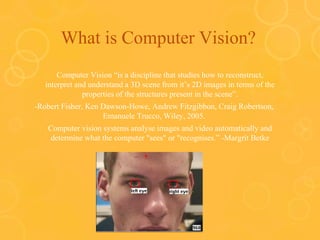
What is Computer Vision?
Computer Vision “is a discipline that studies how to reconstruct,
interpret and understand a 3D scene from it’s 2D images in terms of the
properties of the structures present in the scene”.
-Robert Fisher, Ken Dawson-Howe, Andrew Fitzgibbon, Craig Robertson,
Emanuele Trucco, Wiley, 2005.
Computer vision systems analyse images and video automatically and
determine what the computer "sees" or "recognises.” -Margrit Betke
Using Computer Vision: Facial
Expression
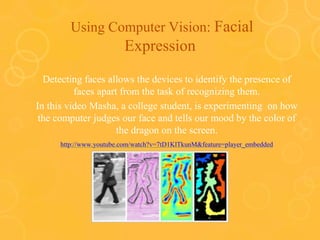
Detecting faces allows the devices to identify the presence of
faces apart from the task of recognizing them.
In this video Masha, a college student, is experimenting on how
the computer judges our face and tells our mood by the color of
the dragon on the screen.
http://www.youtube.com/watch?v=7tD1KlTkunM&feature=player_embedded
Using Computer Vision:
Facial Expressions
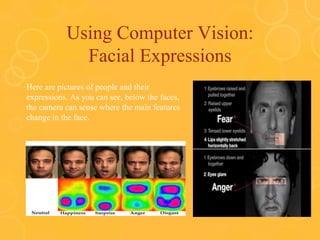
Here are pictures of people and their
expressions. As you can see, below the faces,
the camera can sense where the main features
change in the face.
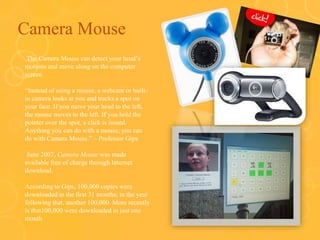
Camera Mouse
o The Camera Mouse can detect your head’s
motions and move along on the computer
screen.
o “Instead of using a mouse, a webcam or built-
in camera looks at you and tracks a spot on
your face. If you move your head to the left,
the mouse moves to the left. If you hold the
pointer over the spot, a click is issued.
Anything you can do with a mouse, you can
do with Camera Mouse.” – Professor Gips
o June 2007, Camera Mouse was made
available free of charge through Internet
download.
o According to Gips, 100,000 copies were
downloaded in the first 31 months; in the year
following that, another 100,000. More recently
is that100,000 were downloaded in just one
month
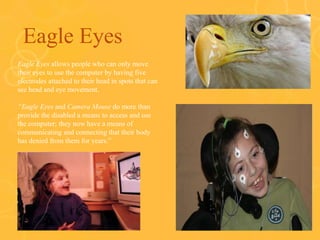
Eagle Eyes
o Eagle Eyes allows people who can only move
their eyes to use the computer by having five
electrodes attached to their head in spots that can
see head and eye movement.
o “Eagle Eyes and Camera Mouse do more than
provide the disabled a means to access and use
the computer; they now have a means of
communicating and connecting that their body
has denied from them for years.”
Computer Vision to the rescue !!
Computer Vision can also be used to help people in need
Such as those who can’t use certain body parts to communicate.
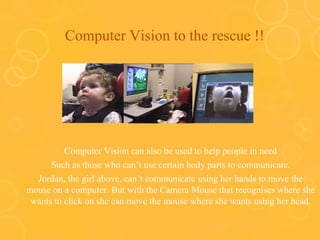
Jordan, the girl above, can’t communicate using her hands to move the
mouse on a computer. But with the Camera Mouse that recognises where she
wants to click on she can move the mouse where she wants using her head.
Computer Vision : Speaking with
Eyes
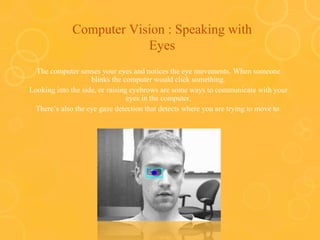
The computer senses your eyes and notices the eye movements. When someone
blinks the computer would click something.
Looking into the side, or raising eyebrows are some ways to communicate with your
eyes in the computer.
There’s also the eye gaze detection that detects where you are trying to move to.
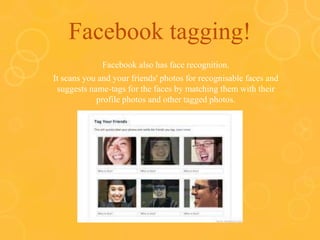
Facebook tagging!
Facebook also has face recognition.
It scans you and your friends' photos for recognisable faces and
suggests name-tags for the faces by matching them with their
profile photos and other tagged photos.
APPLICATIONS
Applications range from tasks such as industrial machine vision
systems which, say, inspect bottles speeding by on a production line,
to research into artificial intelligence and computers or robots that
can comprehend the world around them. The computer vision and
machine vision fields have significant overlap. Computer vision
covers the core technology of automated image analysis which is
used in many fields. Machine vision usually refers to a process of
combining automated image analysis with other methods and
technologies to provide automated inspection and robot guidance in
industrial applications. In many computer-vision applications, the
computers are pre-programmed to solve a particular task, but
methods based on learning are now becoming increasingly common.
APPLICATIONS
Learning 3D shapes has been a challenging task in computer vision. Recent advances in deep
learning has enabled researchers to build models that are able to generate and reconstruct 3D
shapes from single or multi-view depth maps or silhouettes seamlessly and efficiently
• Automatic inspection, e.g., in manufacturing applications;
• Assisting humans in identification tasks, e.g., a species identification system;
• Controlling processes, e.g., an industrial robot;
• Detecting events, e.g., for visual surveillance or people counting, e.g., in the
restaurant industry;
• Interaction, e.g., as the input to a device for computer-human interaction;
• Modeling objects or environments, e.g., medical image analysis or topographical
modeling;
• Navigation, e.g., by an autonomous vehicle or mobile robot; and
• Organising information, e.g., for indexing databases of images and image sequences.
• Tracking surfaces or planes in 3D coordinates for allowing Augmented Reality
experiences.
APPLICATIONS
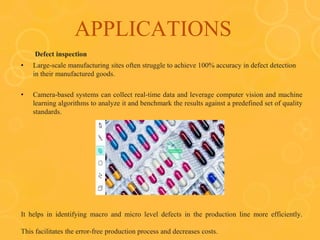
Defect inspection
• Large-scale manufacturing sites often struggle to achieve 100% accuracy in defect detection
in their manufactured goods.
• Camera-based systems can collect real-time data and leverage computer vision and machine
learning algorithms to analyze it and benchmark the results against a predefined set of quality
standards.
It helps in identifying macro and micro level defects in the production line more efficiently.
This facilitates the error-free production process and decreases costs.
APPLICATIONS
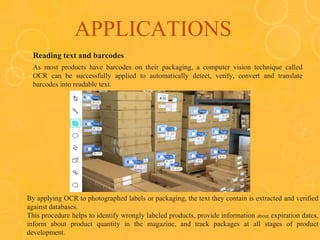
Reading text and barcodes
As most products have barcodes on their packaging, a computer vision technique called
OCR can be successfully applied to automatically detect, verify, convert and translate
barcodes into readable text.
By applying OCR to photographed labels or packaging, the text they contain is extracted and verified
against databases.
This procedure helps to identify wrongly labeled products, provide information about expiration dates,
inform about product quantity in the magazine, and track packages at all stages of product
development.
APPLICATIONS
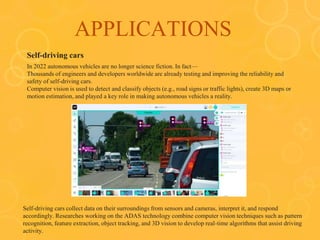
Self-driving cars
In 2022 autonomous vehicles are no longer science fiction. In fact—
Thousands of engineers and developers worldwide are already testing and improving the reliability and
safety of self-driving cars.

Computer vision is used to detect and classify objects (e.g., road signs or traffic lights), create 3D maps or
motion estimation, and played a key role in making autonomous vehicles a reality.
Self-driving cars collect data on their surroundings from sensors and cameras, interpret it, and respond
accordingly. Researches working on the ADAS technology combine computer vision techniques such as pattern
recognition, feature extraction, object tracking, and 3D vision to develop real-time algorithms that assist driving
activity.
Typical tasks
Each of the application areas described above employ a range of
computer vision tasks; more or less well-defined measurement problems
or processing problems, which can be solved using a variety of methods.
Some examples of typical computer vision tasks are presented below.
Computer vision tasks include methods for acquiring, processing,
analyzing and understanding digital images, and extraction of high-
dimensional data from the real world in order to produce numerical or
symbolic information, e.g., in the forms of decisions. Understanding in
this context means the transformation of visual images (the input of the
retina) into descriptions of the world that can interface with other thought
processes and elicit appropriate action. This image understanding can be
seen as the disentangling of symbolic information from image data using
models constructed with the aid of geometry, physics, statistics, and
learning theory.
CONCLUSION
In this report we have attempted to give an overview of eye-tracking
technology; how the techniques work, what the history and background
is, what present-day implementations are like and the most famous
application of it i.e. Defect Inspection , Reading Text And Barcodes , Self
Driving Cars. What are limitations of the eye tracking technique. and as
well as we spoke about eye tracking it have delivered details about
Human Computer Interaction as a big field contains eye tracking and
Computer Vision as the general field contains HCI and ET.
Computer Vision typically requires a combination of a low level image
processing to enhance the image quality and higher level pattern
recognization and image understanding to recoganize things present in
the image.
Thank
you

Saksham presentation

  • 1.
  • 2.
    Submitted by :Saksham Turki Roll Number : 181203040 Semester : 7th A1 Department : CSE DATED : 15 JAN, 2022 INSTITUTE NAME : MIET
  • 3.
    TABLE OF CONTENT S.NOTOPIC SLIDE NUMBER 1 What is computer vision 5 2 Using computer vision 6 3 Camera Mouse 8 4 Eagle Eyes 9 5 Computer Vision to the rescue 10
  • 4.
    TABLE OF CONTENT 6Computer Vision 11 7 Facebook Tagging 12 9 Applications 13-17 10 Typical Tasks 18 11 Conclusion 19
  • 5.
    What is ComputerVision? Computer Vision “is a discipline that studies how to reconstruct, interpret and understand a 3D scene from it’s 2D images in terms of the properties of the structures present in the scene”. -Robert Fisher, Ken Dawson-Howe, Andrew Fitzgibbon, Craig Robertson, Emanuele Trucco, Wiley, 2005. Computer vision systems analyse images and video automatically and determine what the computer "sees" or "recognises.” -Margrit Betke
  • 6.
    Using Computer Vision:Facial Expression Detecting faces allows the devices to identify the presence of faces apart from the task of recognizing them. In this video Masha, a college student, is experimenting on how the computer judges our face and tells our mood by the color of the dragon on the screen. http://www.youtube.com/watch?v=7tD1KlTkunM&feature=player_embedded
  • 7.
    Using Computer Vision: FacialExpressions Here are pictures of people and their expressions. As you can see, below the faces, the camera can sense where the main features change in the face.
  • 8.
    Camera Mouse o TheCamera Mouse can detect your head’s motions and move along on the computer screen. o “Instead of using a mouse, a webcam or built- in camera looks at you and tracks a spot on your face. If you move your head to the left, the mouse moves to the left. If you hold the pointer over the spot, a click is issued. Anything you can do with a mouse, you can do with Camera Mouse.” – Professor Gips o June 2007, Camera Mouse was made available free of charge through Internet download. o According to Gips, 100,000 copies were downloaded in the first 31 months; in the year following that, another 100,000. More recently is that100,000 were downloaded in just one month
  • 9.
    Eagle Eyes o EagleEyes allows people who can only move their eyes to use the computer by having five electrodes attached to their head in spots that can see head and eye movement. o “Eagle Eyes and Camera Mouse do more than provide the disabled a means to access and use the computer; they now have a means of communicating and connecting that their body has denied from them for years.”
  • 10.
    Computer Vision tothe rescue !! Computer Vision can also be used to help people in need Such as those who can’t use certain body parts to communicate. Jordan, the girl above, can’t communicate using her hands to move the mouse on a computer. But with the Camera Mouse that recognises where she wants to click on she can move the mouse where she wants using her head.
  • 11.
    Computer Vision :Speaking with Eyes The computer senses your eyes and notices the eye movements. When someone blinks the computer would click something. Looking into the side, or raising eyebrows are some ways to communicate with your eyes in the computer. There’s also the eye gaze detection that detects where you are trying to move to.
  • 12.
    Facebook tagging! Facebook alsohas face recognition. It scans you and your friends' photos for recognisable faces and suggests name-tags for the faces by matching them with their profile photos and other tagged photos.
  • 13.
    APPLICATIONS Applications range fromtasks such as industrial machine vision systems which, say, inspect bottles speeding by on a production line, to research into artificial intelligence and computers or robots that can comprehend the world around them. The computer vision and machine vision fields have significant overlap. Computer vision covers the core technology of automated image analysis which is used in many fields. Machine vision usually refers to a process of combining automated image analysis with other methods and technologies to provide automated inspection and robot guidance in industrial applications. In many computer-vision applications, the computers are pre-programmed to solve a particular task, but methods based on learning are now becoming increasingly common.
  • 14.
    APPLICATIONS Learning 3D shapeshas been a challenging task in computer vision. Recent advances in deep learning has enabled researchers to build models that are able to generate and reconstruct 3D shapes from single or multi-view depth maps or silhouettes seamlessly and efficiently • Automatic inspection, e.g., in manufacturing applications; • Assisting humans in identification tasks, e.g., a species identification system; • Controlling processes, e.g., an industrial robot; • Detecting events, e.g., for visual surveillance or people counting, e.g., in the restaurant industry; • Interaction, e.g., as the input to a device for computer-human interaction; • Modeling objects or environments, e.g., medical image analysis or topographical modeling; • Navigation, e.g., by an autonomous vehicle or mobile robot; and • Organising information, e.g., for indexing databases of images and image sequences. • Tracking surfaces or planes in 3D coordinates for allowing Augmented Reality experiences.
  • 15.
    APPLICATIONS Defect inspection • Large-scalemanufacturing sites often struggle to achieve 100% accuracy in defect detection in their manufactured goods. • Camera-based systems can collect real-time data and leverage computer vision and machine learning algorithms to analyze it and benchmark the results against a predefined set of quality standards. It helps in identifying macro and micro level defects in the production line more efficiently. This facilitates the error-free production process and decreases costs.
  • 16.
    APPLICATIONS Reading text andbarcodes As most products have barcodes on their packaging, a computer vision technique called OCR can be successfully applied to automatically detect, verify, convert and translate barcodes into readable text. By applying OCR to photographed labels or packaging, the text they contain is extracted and verified against databases. This procedure helps to identify wrongly labeled products, provide information about expiration dates, inform about product quantity in the magazine, and track packages at all stages of product development.
  • 17.
    APPLICATIONS Self-driving cars In 2022autonomous vehicles are no longer science fiction. In fact— Thousands of engineers and developers worldwide are already testing and improving the reliability and safety of self-driving cars. Computer vision is used to detect and classify objects (e.g., road signs or traffic lights), create 3D maps or motion estimation, and played a key role in making autonomous vehicles a reality. Self-driving cars collect data on their surroundings from sensors and cameras, interpret it, and respond accordingly. Researches working on the ADAS technology combine computer vision techniques such as pattern recognition, feature extraction, object tracking, and 3D vision to develop real-time algorithms that assist driving activity.
  • 18.
    Typical tasks Each ofthe application areas described above employ a range of computer vision tasks; more or less well-defined measurement problems or processing problems, which can be solved using a variety of methods. Some examples of typical computer vision tasks are presented below. Computer vision tasks include methods for acquiring, processing, analyzing and understanding digital images, and extraction of high- dimensional data from the real world in order to produce numerical or symbolic information, e.g., in the forms of decisions. Understanding in this context means the transformation of visual images (the input of the retina) into descriptions of the world that can interface with other thought processes and elicit appropriate action. This image understanding can be seen as the disentangling of symbolic information from image data using models constructed with the aid of geometry, physics, statistics, and learning theory.
  • 19.
    CONCLUSION In this reportwe have attempted to give an overview of eye-tracking technology; how the techniques work, what the history and background is, what present-day implementations are like and the most famous application of it i.e. Defect Inspection , Reading Text And Barcodes , Self Driving Cars. What are limitations of the eye tracking technique. and as well as we spoke about eye tracking it have delivered details about Human Computer Interaction as a big field contains eye tracking and Computer Vision as the general field contains HCI and ET. Computer Vision typically requires a combination of a low level image processing to enhance the image quality and higher level pattern recognization and image understanding to recoganize things present in the image.
  • 20.