KX-NS Step by Step Guide
SIP Trunk to SIP Trunk
October 2, 2015
Specifications are subject to change without notice.
Panasonic System Networks
PBX SE team
2
2. Demo
Ext101 Ext 102
060-5432-1101 060-5432-1102
0605551108
1. Actual Use
Ext101 Ext 102
060-5432-1101 060-5432-1102
KX-NS PBX
1. Overview
SIP
Provider
IP Network
060-5432-1xxx
060-5555-1108
Customer
KX-NS PBX
060-5432-1xxx
060-5555-1108
(Ext 108)
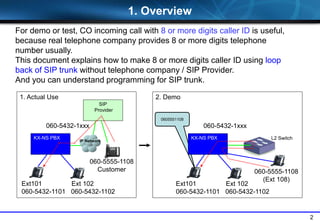
For demo or test, CO incoming call with 8 or more digits caller ID is useful,
because real telephone company provides 8 or more digits telephone
number usually.
This document explains how to make 8 or more digits caller ID using loop
back of SIP trunk without telephone company / SIP Provider.
And you can understand programming for SIP trunk.
L2 Switch
3
2. Activation Key
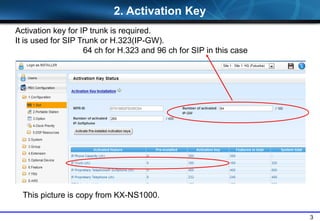
Activation key for IP trunk is required.
It is used for SIP Trunk or H.323(IP-GW).
64 ch for H.323 and 96 ch for SIP in this case
This picture is copy from KX-NS1000.
4
Chapter 1
Programming for
SIP Registration
5
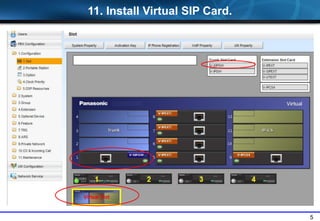
11. Install Virtual SIP Card.
6
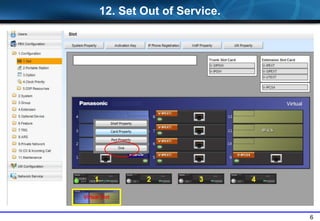
12. Set Out of Service.
7
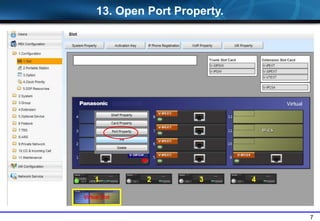
13. Open Port Property.
8
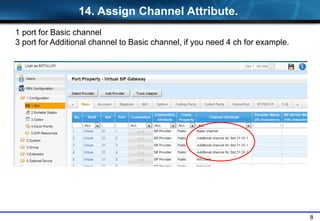
1 port for Basic channel
3 port for Additional channel to Basic channel, if you need 4 ch for example.
14. Assign Channel Attribute.
9
KX-NS PBX
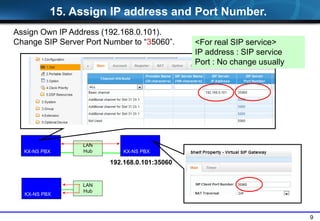
Assign Own IP Address (192.168.0.101).
Change SIP Server Port Number to “35060”.
15. Assign IP address and Port Number.
KX-NS PBX
LAN
Hub
LAN
Hub KX-NS PBX
192.168.0.101:35060
<For real SIP service>
IP address : SIP service
Port : No change usually
10
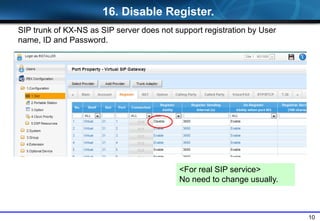
<For real SIP service>
No need to change usually.
16. Disable Register.
SIP trunk of KX-NS as SIP server does not support registration by User
name, ID and Password.
11
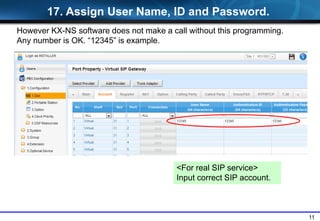
<For real SIP service>
Input correct SIP account.
17. Assign User Name, ID and Password.
However KX-NS software does not make a call without this programming.
Any number is OK. “12345” is example.
12
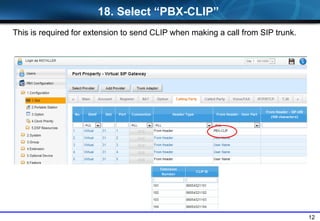
18. Select “PBX-CLIP”
This is required for extension to send CLIP when making a call from SIP trunk.
13
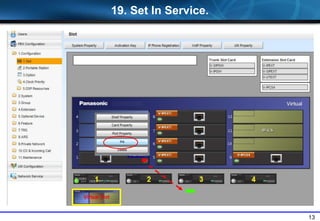
19. Set In Service.
14
Chapter 2
Programming for
DDI / CLIP / Dialing Plan
15
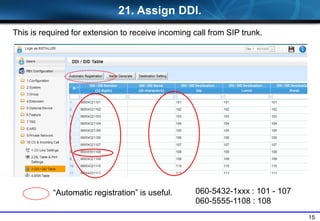
21. Assign DDI.
This is required for extension to receive incoming call from SIP trunk.
“Automatic registration” is useful. 060-5432-1xxx : 101 - 107
060-5555-1108 : 108
16
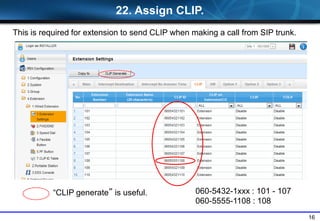
22. Assign CLIP.
060-5432-1xxx : 101 - 107
060-5555-1108 : 108
This is required for extension to send CLIP when making a call from SIP trunk.
“CLIP generate” is useful.
17
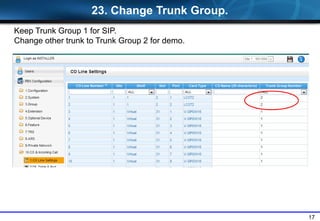
Keep Trunk Group 1 for SIP.
Change other trunk to Trunk Group 2 for demo.
23. Change Trunk Group.
18
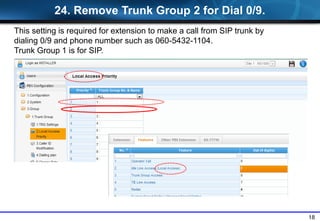
24. Remove Trunk Group 2 for Dial 0/9.
This setting is required for extension to make a call from SIP trunk by
dialing 0/9 and phone number such as 060-5432-1104.
Trunk Group 1 is for SIP.
19
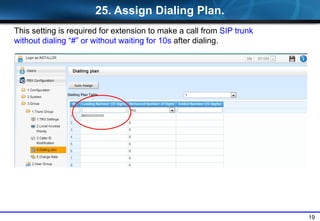
25. Assign Dialing Plan.
This setting is required for extension to make a call from SIP trunk
without dialing “#” or without waiting for 10s after dialing.
20
Chapter 3
Demo after Setup
21
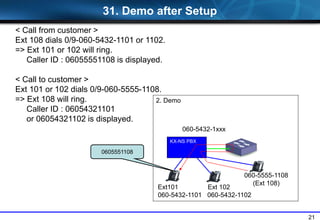
2. Demo
Ext101 Ext 102
060-5432-1101 060-5432-1102
< Call from customer >
Ext 108 dials 0/9-060-5432-1101 or 1102.
=> Ext 101 or 102 will ring.
Caller ID : 06055551108 is displayed.
< Call to customer >
Ext 101 or 102 dials 0/9-060-5555-1108.
=> Ext 108 will ring.
Caller ID : 06054321101
or 06054321102 is displayed.
31. Demo after Setup
KX-NS PBX
060-5432-1xxx
060-5555-1108
(Ext 108)
0605551108
22
Thank you !
23
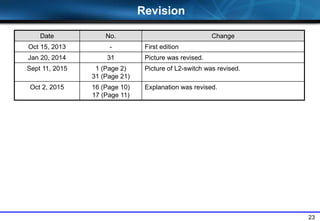
Revision
Date No. Change
Oct 15, 2013 - First edition
Jan 20, 2014 31 Picture was revised.
Sept 11, 2015 1 (Page 2)
31 (Page 21)
Picture of L2-switch was revised.
Oct 2, 2015 16 (Page 10)
17 (Page 11)
Explanation was revised.

S13. sip trunk to trunk 2015 1002

  • 1.
    KX-NS Step byStep Guide SIP Trunk to SIP Trunk October 2, 2015 Specifications are subject to change without notice. Panasonic System Networks PBX SE team
  • 2.
    2 2. Demo Ext101 Ext102 060-5432-1101 060-5432-1102 0605551108 1. Actual Use Ext101 Ext 102 060-5432-1101 060-5432-1102 KX-NS PBX 1. Overview SIP Provider IP Network 060-5432-1xxx 060-5555-1108 Customer KX-NS PBX 060-5432-1xxx 060-5555-1108 (Ext 108) For demo or test, CO incoming call with 8 or more digits caller ID is useful, because real telephone company provides 8 or more digits telephone number usually. This document explains how to make 8 or more digits caller ID using loop back of SIP trunk without telephone company / SIP Provider. And you can understand programming for SIP trunk. L2 Switch
  • 3.
    3 2. Activation Key Activationkey for IP trunk is required. It is used for SIP Trunk or H.323(IP-GW). 64 ch for H.323 and 96 ch for SIP in this case This picture is copy from KX-NS1000.
  • 4.
  • 5.
  • 6.
    6 12. Set Outof Service.
  • 7.
    7 13. Open PortProperty.
  • 8.
    8 1 port forBasic channel 3 port for Additional channel to Basic channel, if you need 4 ch for example. 14. Assign Channel Attribute.
  • 9.
    9 KX-NS PBX Assign OwnIP Address (192.168.0.101). Change SIP Server Port Number to “35060”. 15. Assign IP address and Port Number. KX-NS PBX LAN Hub LAN Hub KX-NS PBX 192.168.0.101:35060 <For real SIP service> IP address : SIP service Port : No change usually
  • 10.
    10 <For real SIPservice> No need to change usually. 16. Disable Register. SIP trunk of KX-NS as SIP server does not support registration by User name, ID and Password.
  • 11.
    11 <For real SIPservice> Input correct SIP account. 17. Assign User Name, ID and Password. However KX-NS software does not make a call without this programming. Any number is OK. “12345” is example.
  • 12.
    12 18. Select “PBX-CLIP” Thisis required for extension to send CLIP when making a call from SIP trunk.
  • 13.
    13 19. Set InService.
  • 14.
    14 Chapter 2 Programming for DDI/ CLIP / Dialing Plan
  • 15.
    15 21. Assign DDI. Thisis required for extension to receive incoming call from SIP trunk. “Automatic registration” is useful. 060-5432-1xxx : 101 - 107 060-5555-1108 : 108
  • 16.
    16 22. Assign CLIP. 060-5432-1xxx: 101 - 107 060-5555-1108 : 108 This is required for extension to send CLIP when making a call from SIP trunk. “CLIP generate” is useful.
  • 17.
    17 Keep Trunk Group1 for SIP. Change other trunk to Trunk Group 2 for demo. 23. Change Trunk Group.
  • 18.
    18 24. Remove TrunkGroup 2 for Dial 0/9. This setting is required for extension to make a call from SIP trunk by dialing 0/9 and phone number such as 060-5432-1104. Trunk Group 1 is for SIP.
  • 19.
    19 25. Assign DialingPlan. This setting is required for extension to make a call from SIP trunk without dialing “#” or without waiting for 10s after dialing.
  • 20.
  • 21.
    21 2. Demo Ext101 Ext102 060-5432-1101 060-5432-1102 < Call from customer > Ext 108 dials 0/9-060-5432-1101 or 1102. => Ext 101 or 102 will ring. Caller ID : 06055551108 is displayed. < Call to customer > Ext 101 or 102 dials 0/9-060-5555-1108. => Ext 108 will ring. Caller ID : 06054321101 or 06054321102 is displayed. 31. Demo after Setup KX-NS PBX 060-5432-1xxx 060-5555-1108 (Ext 108) 0605551108
  • 22.
  • 23.
    23 Revision Date No. Change Oct15, 2013 - First edition Jan 20, 2014 31 Picture was revised. Sept 11, 2015 1 (Page 2) 31 (Page 21) Picture of L2-switch was revised. Oct 2, 2015 16 (Page 10) 17 (Page 11) Explanation was revised.