Technical User Group
EMEA Architects, Bart van den Heuvel
Running an OpenStack Instance
July, 2014
8/5/2014 2Red Hat Confidential
Agenda
• Introduction to IaaS with OpenStack
• demo
• OpenStack components available to images
• Creating Cloud Images
• Image factoryline
as a service
Software as a Service
Platform as a Service
Infrastructure as a Service
Data Center as a Service
What they have in common
• Self service
• Automated deployment
• Management built in
• Low initial cost to deploy
• Incremental cost as your usage grows
• Best Practices embedded
• Lifecycle built in
• Re-use
• Resource sharing
IaaS
Common misinterpretations
• Scale out of the box
• Is same as Virtualization
• IaaS is cloud management or cloud orchestration solution
• Runs any workload, i can replace my virtualization with
this
IaaS Jargon
• Stateful and stateless workloads
• Scale out not scale up
• Tenants
• Flavors
• Private and public networks
SLA for cloud services typically target the
Infrastructure, not the actual virtual machine
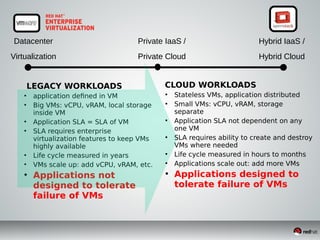
Datacenter
Virtualization
Private IaaS /
Private Cloud
Hybrid IaaS /
Hybrid Cloud
LEGACY WORKLOADS
●
application defined in VM
●
Big VMs: vCPU, vRAM, local storage
inside VM
●
Application SLA = SLA of VM
●
SLA requires enterprise
virtualization features to keep VMs
highly available
●
Life cycle measured in years
●
VMs scale up: add vCPU, vRAM, etc.
●
Applications not
designed to tolerate
failure of VMs
CLOUD WORKLOADS
●
Stateless VMs, application distributed
●
Small VMs: vCPU, vRAM, storage
separate
●
Application SLA not dependent on any
one VM
●
SLA requires ability to create and destroy
VMs where needed
●
Life cycle measured in hours to months
●
Applications scale out: add more VMs
●
Applications designed to
tolerate failure of VMs
OpenStack
OpenStack is a NOT a replacement for
Enterprise Virtualization!
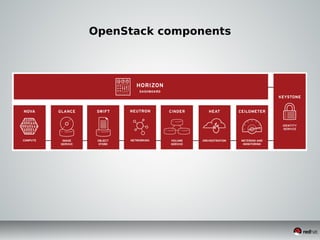
OpenStack components
8/5/2014 10Red Hat Confidential
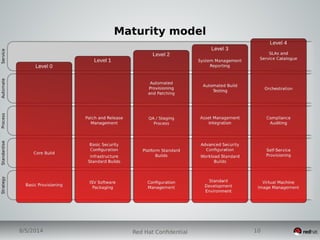
Maturity model
Demo
The OpenStack VM
●
Called 'Instance'
●
Only exists for a limited amount of time
●
'ephemeral' disk
●
Based on a 'cloud' OS image
●
Can be Linux, Windows, ...
●
Small replaceable engine, made to be unimportant
Features directly available to the Instance
Compute
Storage
Networking
VPNaaS, DBaaS, LBaaS, MaaS, ...
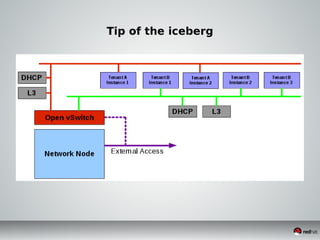
Networking in OpenStack (SDN)
• Tenant networks are completely isolated
• Tenants are free to create what they want:
• Any number of layer 2 networks
• Subnets, IP4 / IP6
• Connect networks via virtual routers
• Connect to a external network, created by admin
Tip of the iceberg
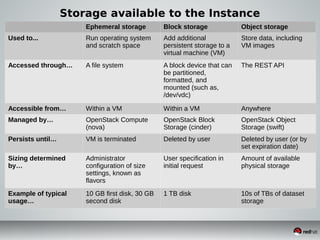
Storage available to the Instance
Ephemeral storage Block storage Object storage
Used to... Run operating system
and scratch space
Add additional
persistent storage to a
virtual machine (VM)
Store data, including
VM images
Accessed through… A file system A block device that can
be partitioned,
formatted, and
mounted (such as,
/dev/vdc)
The REST API
Accessible from… Within a VM Within a VM Anywhere
Managed by… OpenStack Compute
(nova)
OpenStack Block
Storage (cinder)
OpenStack Object
Storage (swift)
Persists until… VM is terminated Deleted by user Deleted by user (or by
set expiration date)
Sizing determined
by…
Administrator
configuration of size
settings, known as
flavors
User specification in
initial request
Amount of available
physical storage
Example of typical
usage…
10 GB first disk, 30 GB
second disk
1 TB disk 10s of TBs of dataset
storage
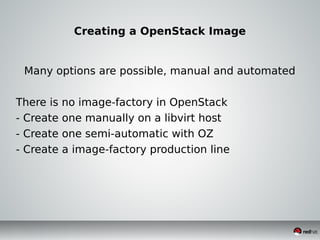
Creating a OpenStack Image
Many options are possible, manual and automated
There is no image-factory in OpenStack
- Create one manually on a libvirt host
- Create one semi-automatic with OZ
- Create a image-factory production line
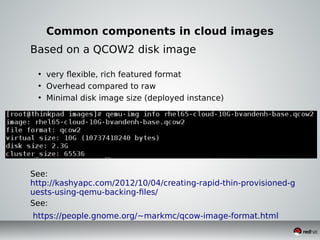
Common components in cloud images
Based on a QCOW2 disk image
• very flexible, rich featured format
• Overhead compared to raw
• Minimal disk image size (deployed instance)
•
•
See:
http://kashyapc.com/2012/10/04/creating-rapid-thin-provisioned-g
uests-using-qemu-backing-files/
See:
https://people.gnome.org/~markmc/qcow-image-format.html
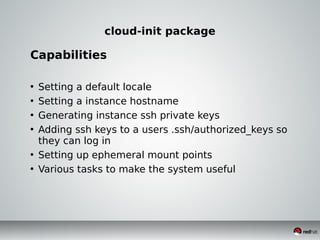
cloud-init package
Capabilities
• Setting a default locale
• Setting a instance hostname
• Generating instance ssh private keys
• Adding ssh keys to a users .ssh/authorized_keys so
they can log in
• Setting up ephemeral mount points
• Various tasks to make the system useful
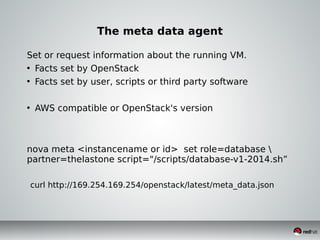
The meta data agent
Set or request information about the running VM.
• Facts set by OpenStack
• Facts set by user, scripts or third party software
• AWS compatible or OpenStack's version
nova meta <instancename or id> set role=database 
partner=thelastone script="/scripts/database-v1-2014.sh”
curl http://169.254.169.254/openstack/latest/meta_data.json
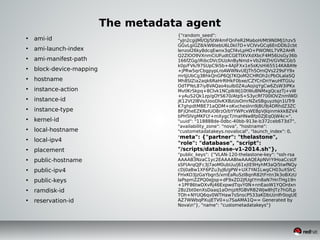
The metadata agent
• ami-id
• ami-launch-index
• ami-manifest-path
• block-device-mapping
• hostname
• instance-action
• instance-id
• instance-type
• kernel-id
• local-hostname
• local-ipv4
• placement
• public-hostname
• public-ipv4
• public-keys
• ramdisk-id
• reservation-id
{"random_seed":
"yJn2cgiJMI/OJ/StW4mFQnFeR2MaboH/Mt9N0MJ1hzv5
GGvLgiGZ8/kW6tebU6L0kI7D+VCIVvGCq6EnDDb2cbt
lenzol26ky8dcqEwnx3qCf4vLpHO+PWONtL7VR2AHR
Q2ZIOO9VXnmCiUFudtCGETlXVXdXbcF4M56UsGy36b
166fZGg/iRibcDVcDUzAnByNmd+Vb2WZH/GVNCGb5
k0p/FVk/97SUpC9i5b+4AJiFXx1e5sK/sHi65514KA8AYe
+jPRw5qrCbgpypLroAWWNvUEJTh5OmQVs229sFY9x
mrIjjUbCg3BhkQnGP6QJ7KQoM2CHROh2cPbOLalaSQ
Mh8SlZia2aqk6RaHrRlHkF0bxe/CZYCnDnYwuHlTGUu
OdTPYeL87iy8VAQao4sulb0Z4uAojiqYgCw6ZsW3iPKx
MvtlKrSkpq+8Clvk1NCplkWj10tWuBNMxgQcazTj+vW
+yAuS2Qk1zp/gOYS670/AtpS+S3ycRf700IOVZnmlWD
jK12Vt2l8Vs/UooDlvKXBzUoOmrNZeSBguyzIsjn1UTr9
K7ghpdtMBE71aQDM+oKvchesInn9jBU9j4DRhdZ3ZC
BFjQheEZKReIUO8rzO/bYYWPcxWEBpVJlqinmkkk8ZV4
bPH5lVgMKFLY+mXygcT/maHNw8fp0ZJEqOjW4c=",
"uuid": "118888de-0dbc-40bb-913e-b372ceb673d7",
"availability_zone": "nova", "hostname":
"custometadatakeys.novalocal", "launch_index": 0,
"meta": {"partner": "thelastone",
"role": "database", "script":
"/scripts/database-v1-2014.sh"},
"public_keys": {"VLAN-120-thelastone-key": "ssh-rsa
AAAAB3NzaC1yc2EAAAABIwAAAQEApNVrYIHoaCcsUf
sSFtArqQJFc3J7aoM0ubUu/j61xjtE9HyhM3aQi5twfNQy
cDj0aBw1XF6PZu3yJ6/gPW+UX7YAl1LwgCH03uXSIrC
FHxKO3JzGaYbgn5/xmEaRuSzl8qnR82tFntn3k3oBXzU
laPspmZZPQ0eJjsp+dF9xZD2JfUgtYm8aN7HnTHg19n
+1PF86twDXvRj46ExpwdTqvY0N+nnEaoW1YQOrdxn
2Bz2bt0enXsDaaq1aOmjzItfGBVRB2WJw8hJTz7hGfLp
TOh+NYUQ6qv0WTHaw7sSnscP533aKDbUznlfr0ogUE
AZ7WWbqPXujETV0+u7SaAMA1Q== Generated by
Novan"}, "name": "custometadatakeys"}
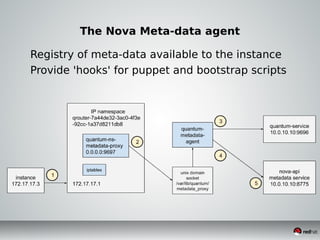
The Nova Meta-data agent
Registry of meta-data available to the instance
Provide 'hooks' for puppet and bootstrap scripts
Creating your own, via libvirt
• create a qcow2 file
• install the desired OS in the qcow2 file
• tune the OS, install any add-ons
• make the cloud alterations
• install the cloud-init package
• run virt-sysprep
• upload the image to glance
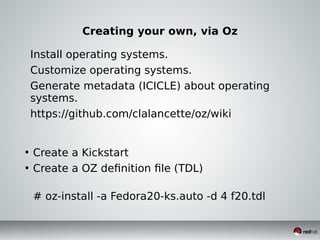
Creating your own, via Oz
Install operating systems.
Customize operating systems.
Generate metadata (ICICLE) about operating
systems.
https://github.com/clalancette/oz/wiki
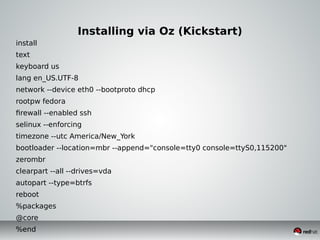
• Create a Kickstart
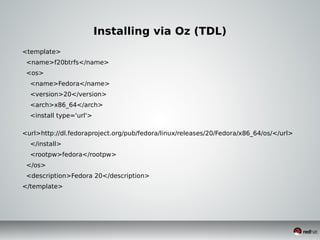
• Create a OZ definition file (TDL)
# oz-install -a Fedora20-ks.auto -d 4 f20.tdl
Installing via Oz (Kickstart)
install
text
keyboard us
lang en_US.UTF-8
network --device eth0 --bootproto dhcp
rootpw fedora
firewall --enabled ssh
selinux --enforcing
timezone --utc America/New_York
bootloader --location=mbr --append="console=tty0 console=ttyS0,115200"
zerombr
clearpart --all --drives=vda
autopart --type=btrfs
reboot
%packages
@core
%end
Installing via Oz (TDL)
<template>
<name>f20btrfs</name>
<os>
<name>Fedora</name>
<version>20</version>
<arch>x86_64</arch>
<install type='url'>
<url>http://dl.fedoraproject.org/pub/fedora/linux/releases/20/Fedora/x86_64/os/</url>
</install>
<rootpw>fedora</rootpw>
</os>
<description>Fedora 20</description>
</template>
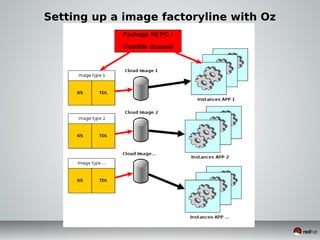
Setting up a image factoryline with Oz
What should be in the image
• Common collection of packages
• OS layout
• Filesystems
• Network
• Management tools

Running an openstack instance

  • 1.
    Technical User Group EMEAArchitects, Bart van den Heuvel Running an OpenStack Instance July, 2014
  • 2.
    8/5/2014 2Red HatConfidential Agenda • Introduction to IaaS with OpenStack • demo • OpenStack components available to images • Creating Cloud Images • Image factoryline
  • 3.
    as a service Softwareas a Service Platform as a Service Infrastructure as a Service Data Center as a Service
  • 4.
    What they havein common • Self service • Automated deployment • Management built in • Low initial cost to deploy • Incremental cost as your usage grows • Best Practices embedded • Lifecycle built in • Re-use • Resource sharing
  • 5.
    IaaS Common misinterpretations • Scaleout of the box • Is same as Virtualization • IaaS is cloud management or cloud orchestration solution • Runs any workload, i can replace my virtualization with this
  • 6.
    IaaS Jargon • Statefuland stateless workloads • Scale out not scale up • Tenants • Flavors • Private and public networks SLA for cloud services typically target the Infrastructure, not the actual virtual machine
  • 7.
    Datacenter Virtualization Private IaaS / PrivateCloud Hybrid IaaS / Hybrid Cloud LEGACY WORKLOADS ● application defined in VM ● Big VMs: vCPU, vRAM, local storage inside VM ● Application SLA = SLA of VM ● SLA requires enterprise virtualization features to keep VMs highly available ● Life cycle measured in years ● VMs scale up: add vCPU, vRAM, etc. ● Applications not designed to tolerate failure of VMs CLOUD WORKLOADS ● Stateless VMs, application distributed ● Small VMs: vCPU, vRAM, storage separate ● Application SLA not dependent on any one VM ● SLA requires ability to create and destroy VMs where needed ● Life cycle measured in hours to months ● Applications scale out: add more VMs ● Applications designed to tolerate failure of VMs
  • 8.
    OpenStack OpenStack is aNOT a replacement for Enterprise Virtualization!
  • 9.
  • 10.
    8/5/2014 10Red HatConfidential Maturity model
  • 11.
  • 12.
    The OpenStack VM ● Called'Instance' ● Only exists for a limited amount of time ● 'ephemeral' disk ● Based on a 'cloud' OS image ● Can be Linux, Windows, ... ● Small replaceable engine, made to be unimportant
  • 13.
    Features directly availableto the Instance Compute Storage Networking VPNaaS, DBaaS, LBaaS, MaaS, ...
  • 14.
    Networking in OpenStack(SDN) • Tenant networks are completely isolated • Tenants are free to create what they want: • Any number of layer 2 networks • Subnets, IP4 / IP6 • Connect networks via virtual routers • Connect to a external network, created by admin
  • 15.
    Tip of theiceberg
  • 16.
    Storage available tothe Instance Ephemeral storage Block storage Object storage Used to... Run operating system and scratch space Add additional persistent storage to a virtual machine (VM) Store data, including VM images Accessed through… A file system A block device that can be partitioned, formatted, and mounted (such as, /dev/vdc) The REST API Accessible from… Within a VM Within a VM Anywhere Managed by… OpenStack Compute (nova) OpenStack Block Storage (cinder) OpenStack Object Storage (swift) Persists until… VM is terminated Deleted by user Deleted by user (or by set expiration date) Sizing determined by… Administrator configuration of size settings, known as flavors User specification in initial request Amount of available physical storage Example of typical usage… 10 GB first disk, 30 GB second disk 1 TB disk 10s of TBs of dataset storage
  • 17.
    Creating a OpenStackImage Many options are possible, manual and automated There is no image-factory in OpenStack - Create one manually on a libvirt host - Create one semi-automatic with OZ - Create a image-factory production line
  • 18.
    Common components incloud images Based on a QCOW2 disk image • very flexible, rich featured format • Overhead compared to raw • Minimal disk image size (deployed instance) • • See: http://kashyapc.com/2012/10/04/creating-rapid-thin-provisioned-g uests-using-qemu-backing-files/ See: https://people.gnome.org/~markmc/qcow-image-format.html
  • 19.
    cloud-init package Capabilities • Settinga default locale • Setting a instance hostname • Generating instance ssh private keys • Adding ssh keys to a users .ssh/authorized_keys so they can log in • Setting up ephemeral mount points • Various tasks to make the system useful
  • 20.
    The meta dataagent Set or request information about the running VM. • Facts set by OpenStack • Facts set by user, scripts or third party software • AWS compatible or OpenStack's version nova meta <instancename or id> set role=database partner=thelastone script="/scripts/database-v1-2014.sh” curl http://169.254.169.254/openstack/latest/meta_data.json
  • 21.
    The metadata agent •ami-id • ami-launch-index • ami-manifest-path • block-device-mapping • hostname • instance-action • instance-id • instance-type • kernel-id • local-hostname • local-ipv4 • placement • public-hostname • public-ipv4 • public-keys • ramdisk-id • reservation-id {"random_seed": "yJn2cgiJMI/OJ/StW4mFQnFeR2MaboH/Mt9N0MJ1hzv5 GGvLgiGZ8/kW6tebU6L0kI7D+VCIVvGCq6EnDDb2cbt lenzol26ky8dcqEwnx3qCf4vLpHO+PWONtL7VR2AHR Q2ZIOO9VXnmCiUFudtCGETlXVXdXbcF4M56UsGy36b 166fZGg/iRibcDVcDUzAnByNmd+Vb2WZH/GVNCGb5 k0p/FVk/97SUpC9i5b+4AJiFXx1e5sK/sHi65514KA8AYe +jPRw5qrCbgpypLroAWWNvUEJTh5OmQVs229sFY9x mrIjjUbCg3BhkQnGP6QJ7KQoM2CHROh2cPbOLalaSQ Mh8SlZia2aqk6RaHrRlHkF0bxe/CZYCnDnYwuHlTGUu OdTPYeL87iy8VAQao4sulb0Z4uAojiqYgCw6ZsW3iPKx MvtlKrSkpq+8Clvk1NCplkWj10tWuBNMxgQcazTj+vW +yAuS2Qk1zp/gOYS670/AtpS+S3ycRf700IOVZnmlWD jK12Vt2l8Vs/UooDlvKXBzUoOmrNZeSBguyzIsjn1UTr9 K7ghpdtMBE71aQDM+oKvchesInn9jBU9j4DRhdZ3ZC BFjQheEZKReIUO8rzO/bYYWPcxWEBpVJlqinmkkk8ZV4 bPH5lVgMKFLY+mXygcT/maHNw8fp0ZJEqOjW4c=", "uuid": "118888de-0dbc-40bb-913e-b372ceb673d7", "availability_zone": "nova", "hostname": "custometadatakeys.novalocal", "launch_index": 0, "meta": {"partner": "thelastone", "role": "database", "script": "/scripts/database-v1-2014.sh"}, "public_keys": {"VLAN-120-thelastone-key": "ssh-rsa AAAAB3NzaC1yc2EAAAABIwAAAQEApNVrYIHoaCcsUf sSFtArqQJFc3J7aoM0ubUu/j61xjtE9HyhM3aQi5twfNQy cDj0aBw1XF6PZu3yJ6/gPW+UX7YAl1LwgCH03uXSIrC FHxKO3JzGaYbgn5/xmEaRuSzl8qnR82tFntn3k3oBXzU laPspmZZPQ0eJjsp+dF9xZD2JfUgtYm8aN7HnTHg19n +1PF86twDXvRj46ExpwdTqvY0N+nnEaoW1YQOrdxn 2Bz2bt0enXsDaaq1aOmjzItfGBVRB2WJw8hJTz7hGfLp TOh+NYUQ6qv0WTHaw7sSnscP533aKDbUznlfr0ogUE AZ7WWbqPXujETV0+u7SaAMA1Q== Generated by Novan"}, "name": "custometadatakeys"}
  • 22.
    The Nova Meta-dataagent Registry of meta-data available to the instance Provide 'hooks' for puppet and bootstrap scripts
  • 23.
    Creating your own,via libvirt • create a qcow2 file • install the desired OS in the qcow2 file • tune the OS, install any add-ons • make the cloud alterations • install the cloud-init package • run virt-sysprep • upload the image to glance
  • 24.
    Creating your own,via Oz Install operating systems. Customize operating systems. Generate metadata (ICICLE) about operating systems. https://github.com/clalancette/oz/wiki • Create a Kickstart • Create a OZ definition file (TDL) # oz-install -a Fedora20-ks.auto -d 4 f20.tdl
  • 25.
    Installing via Oz(Kickstart) install text keyboard us lang en_US.UTF-8 network --device eth0 --bootproto dhcp rootpw fedora firewall --enabled ssh selinux --enforcing timezone --utc America/New_York bootloader --location=mbr --append="console=tty0 console=ttyS0,115200" zerombr clearpart --all --drives=vda autopart --type=btrfs reboot %packages @core %end
  • 26.
    Installing via Oz(TDL) <template> <name>f20btrfs</name> <os> <name>Fedora</name> <version>20</version> <arch>x86_64</arch> <install type='url'> <url>http://dl.fedoraproject.org/pub/fedora/linux/releases/20/Fedora/x86_64/os/</url> </install> <rootpw>fedora</rootpw> </os> <description>Fedora 20</description> </template>
  • 27.
    Setting up aimage factoryline with Oz
  • 28.
    What should bein the image • Common collection of packages • OS layout • Filesystems • Network • Management tools