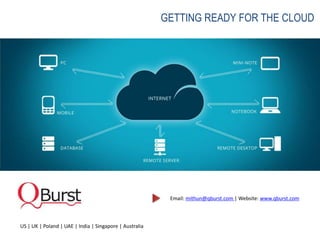

GETTING READY FOR THE CLOUD


                                                          Email: mithun@qburst.com | Website: www.qburst.com


US | UK | Poland | UAE | India | Singapore | Australia
Infrastructure as a Service - Amazon Web Services
February, 2013
Overview


 Infrastructure as a Service - IaaS
 Introduction to Amazon Web Service
 Advantages of Amazon Web Service
 Amazon Global Physical Infrastructure
 Amazon Costing Model
 Amazon Support & Services
 Common Use Cases and Real world scenarios
Infrastructure as a Service - IaaS


    Characteristics and components of IaaS includes:
    Utility computing service and billing model
    Internet connectivity
    Automation of administrative tasks
    Dynamic scaling
    Desktop virtualization
    Policy-based services
Introduction to Amazon Web Services

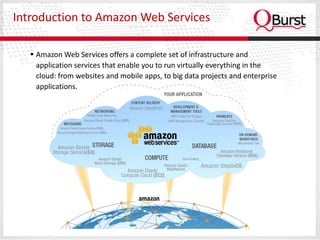
    Amazon Web Services offers a complete set of infrastructure and
     application services that enable you to run virtually everything in the
     cloud: from websites and mobile apps, to big data projects and enterprise
     applications.
Amazon Web Service: EC2


  Amazon Elastic Compute Cloud (EC2)
   Amazon EC2 = Virtual Machine which supports Windows,
    Linux, FreeBSD or Open Solaris
   Supports all major web and application platforms
   Offers additional optional service called Cloudwatch to keep
    a close monitor of these server instances
   Amazon EC2 : on-demand compute power advantages are:
         Obtain and boot new server instances in minutes
         Quickly scale capacity up or down
         Servers from $0.02 (2 cents) per hour
         On Demand, Reserved and Spot pricing
Amazon Web Service: EC2 Instance Types


  • Standard Instances
     – Well suited for most applications
  • High Memory Instances
     – Offer large memory sizes for high throughput applications,
       including database and memory caching applications
  • High CPU Instances
     – Have proportionally more CPU resources than memory
       (RAM) and are well suited for compute-intensive
       applications
  • Cluster Compute Instances
     – Low latency, 10 Gbps networking between instances
Amazon Web Service: EBS


  Elastic Block Storage
   You can use Amazon EBS as you would use a hard drive on a
    physical server
   Amazon EBS is particularly well-suited for use as the primary
    storage for a file system, database or any application that
    requires fine granular updates and access to raw,
    unformatted block-level storage
   EBS volumes offers
         Data availability from replication across an Availability Zone
         Data persistence independent of the life of the instance
         The ability to create snapshots and incremental backups
Amazon Web Service: S3


  Simple Storage Service, S3 (Object Based Storage)
   In traditional on-premise applications, this type of storage is
    maintained on SAN or NAS
   In Amazon this mechanism is called S3 which is far more agile,
    flexible and geo-redundant
   S3 is highly scalable, durable and available distributed object store
    designed for mission-critical data
   Easily manageable via web service interfaces
   The number of objects you can store is unlimited.
   S3 is designed for 99.999999999% durability and 99.99%
    availability of objects over a given year.
How your organization benefits from
Amazon Cloud ?
Advantages of AWS


   True Elastic Capacity: Scale up and down
   No Capital Expenditure
   Pay as you go and pay only for what you use
   You get to focus on the engineering resources on what
    differentiates you vs managing undifferentiated
    infrastructure services
   Improves time to market with Business Agility and
    Innovation
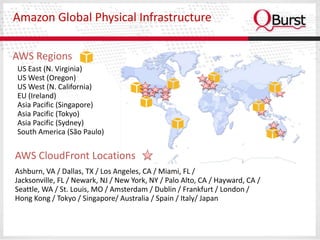
Amazon Global Physical Infrastructure

AWS Regions
US East (N. Virginia)
US West (Oregon)
US West (N. California)
EU (Ireland)
Asia Pacific (Singapore)
Asia Pacific (Tokyo)
Asia Pacific (Sydney)
South America (São Paulo)


AWS CloudFront Locations
Ashburn, VA / Dallas, TX / Los Angeles, CA / Miami, FL /
Jacksonville, FL / Newark, NJ / New York, NY / Palo Alto, CA / Hayward, CA /
Seattle, WA / St. Louis, MO / Amsterdam / Dublin / Frankfurt / London /
Hong Kong / Tokyo / Singapore/ Australia / Spain / Italy/ Japan
How Amazon pricing works?
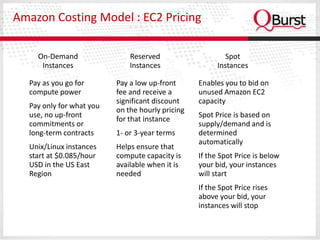
Amazon Costing Model : EC2 Pricing

    On-Demand                 Reserved                     Spot
     Instances                Instances                 Instances

  Pay as you go for       Pay a low up-front      Enables you to bid on
  compute power           fee and receive a       unused Amazon EC2
                          significant discount    capacity
  Pay only for what you
                          on the hourly pricing
  use, no up-front                                Spot Price is based on
                          for that instance
  commitments or                                  supply/demand and is
  long-term contracts     1- or 3-year terms      determined
                                                  automatically
  Unix/Linux instances    Helps ensure that
  start at $0.085/hour    compute capacity is     If the Spot Price is below
  USD in the US East      available when it is    your bid, your instances
  Region                  needed                  will start
                                                  If the Spot Price rises
                                                  above your bid, your
                                                  instances will stop
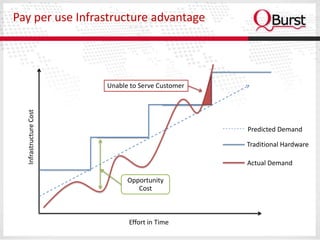
Pay per use Infrastructure advantage


                        Unable to Serve Customer
  Infrastructure Cost


                                                   Predicted Demand

                                                   Traditional Hardware

                                                   Actual Demand

                              Opportunity
                                 Cost


                              Effort in Time
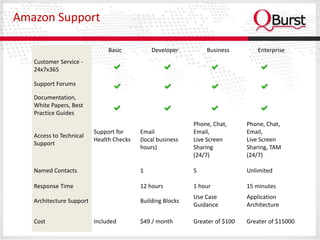
Amazon Support

                               Basic          Developer         Business          Enterprise
   Customer Service -
   24x7x365

   Support Forums

   Documentation,
   White Papers, Best
   Practice Guides
                                                            Phone, Chat,      Phone, Chat,
                          Support for     Email             Email,            Email,
   Access to Technical
                          Health Checks   (local business   Live Screen       Live Screen
   Support
                                          hours)            Sharing           Sharing, TAM
                                                            (24/7)            (24/7)

   Named Contacts                         1                 5                 Unlimited

   Response Time                          12 hours          1 hour            15 minutes
                                                            Use Case          Application
   Architecture Support                   Building Blocks
                                                            Guidance          Architecture

   Cost                   Included        $49 / month       Greater of $100   Greater of $15000
Concern on Cloud Security
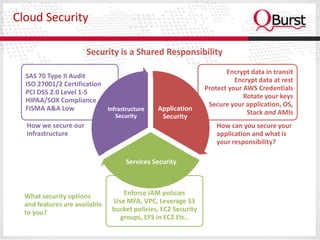
Cloud Security

                      Security is a Shared Responsibility
                                                                      Encrypt data in transit
  SAS 70 Type II Audit
                                                                         Encrypt data at rest
  ISO 27001/2 Certification
                                                               Protect your AWS Credentials
  PCI DSS 2.0 Level 1-5
                                                                            Rotate your keys
  HIPAA/SOX Compliance
                                                                Secure your application, OS,
  FISMA A&A Low             Infrastructure    Application
                                Security
                                                                             Stack and AMIs
                                               Security
  How we secure our                                                How can you secure your
  infrastructure                                                   application and what is
                                                                   your responsibility?

                                   Services Security


  What security options           Enforce IAM policies
  and features are available   Use MFA, VPC, Leverage S3
  to you?                      bucket policies, EC2 Security
                                 groups, EFS in EC2 Etc..
Use Cases and Real World Scenarios
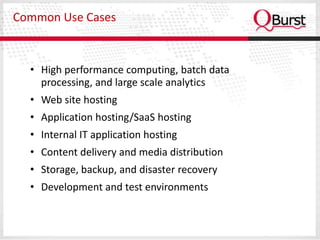
Common Use Cases


  • High performance computing, batch data
    processing, and large scale analytics
  • Web site hosting
  • Application hosting/SaaS hosting
  • Internal IT application hosting
  • Content delivery and media distribution
  • Storage, backup, and disaster recovery
  • Development and test environments
Real World Scenarios

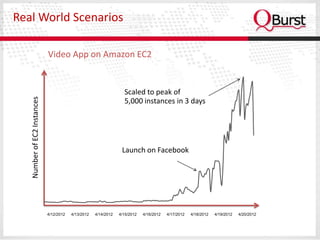
                             Video App on Amazon EC2


                                                                   Scaled to peak of
   Number of EC2 Instances


                                                                   5,000 instances in 3 days


                                                                  Launch on Facebook


                             4/12/2012   4/13/2012   4/14/2012   4/15/2012   4/16/2012   4/17/2012   4/18/2012   4/19/2012   4/20/2012
Real World Scenarios

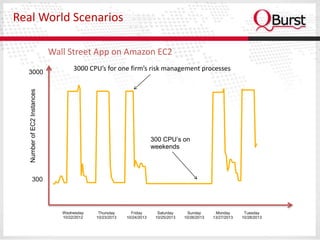
                             Wall Street App on Amazon EC2

  3000 -
                                     3000 CPU’s for one firm’s risk management processes
   Number of EC2 Instances


                                                                       300 CPU’s on
                                                                       weekends


         300 -


                                Wednesday     Thursday      Friday       Saturday     Sunday       Monday       Tuesday
                                10/22/2012   10/23/2013   10/24/2013    10/25/2013   10/26/2013   13/27/2013   10/28/2013
Future Plans - 2012


 Thank You !

Getting ready for the cloud iaa s

  • 1.
    GETTING READY FORTHE CLOUD Email: mithun@qburst.com | Website: www.qburst.com US | UK | Poland | UAE | India | Singapore | Australia
  • 2.
    Infrastructure as aService - Amazon Web Services February, 2013
  • 3.
    Overview Infrastructure asa Service - IaaS Introduction to Amazon Web Service Advantages of Amazon Web Service Amazon Global Physical Infrastructure Amazon Costing Model Amazon Support & Services Common Use Cases and Real world scenarios
  • 4.
    Infrastructure as aService - IaaS Characteristics and components of IaaS includes: Utility computing service and billing model Internet connectivity Automation of administrative tasks Dynamic scaling Desktop virtualization Policy-based services
  • 5.
    Introduction to AmazonWeb Services  Amazon Web Services offers a complete set of infrastructure and application services that enable you to run virtually everything in the cloud: from websites and mobile apps, to big data projects and enterprise applications.
  • 6.
    Amazon Web Service:EC2 Amazon Elastic Compute Cloud (EC2)  Amazon EC2 = Virtual Machine which supports Windows, Linux, FreeBSD or Open Solaris  Supports all major web and application platforms  Offers additional optional service called Cloudwatch to keep a close monitor of these server instances  Amazon EC2 : on-demand compute power advantages are:  Obtain and boot new server instances in minutes  Quickly scale capacity up or down  Servers from $0.02 (2 cents) per hour  On Demand, Reserved and Spot pricing
  • 7.
    Amazon Web Service:EC2 Instance Types • Standard Instances – Well suited for most applications • High Memory Instances – Offer large memory sizes for high throughput applications, including database and memory caching applications • High CPU Instances – Have proportionally more CPU resources than memory (RAM) and are well suited for compute-intensive applications • Cluster Compute Instances – Low latency, 10 Gbps networking between instances
  • 8.
    Amazon Web Service:EBS Elastic Block Storage  You can use Amazon EBS as you would use a hard drive on a physical server  Amazon EBS is particularly well-suited for use as the primary storage for a file system, database or any application that requires fine granular updates and access to raw, unformatted block-level storage  EBS volumes offers  Data availability from replication across an Availability Zone  Data persistence independent of the life of the instance  The ability to create snapshots and incremental backups
  • 9.
    Amazon Web Service:S3 Simple Storage Service, S3 (Object Based Storage)  In traditional on-premise applications, this type of storage is maintained on SAN or NAS  In Amazon this mechanism is called S3 which is far more agile, flexible and geo-redundant  S3 is highly scalable, durable and available distributed object store designed for mission-critical data  Easily manageable via web service interfaces  The number of objects you can store is unlimited.  S3 is designed for 99.999999999% durability and 99.99% availability of objects over a given year.
  • 10.
    How your organizationbenefits from Amazon Cloud ?
  • 11.
    Advantages of AWS  True Elastic Capacity: Scale up and down  No Capital Expenditure  Pay as you go and pay only for what you use  You get to focus on the engineering resources on what differentiates you vs managing undifferentiated infrastructure services  Improves time to market with Business Agility and Innovation
  • 12.
    Amazon Global PhysicalInfrastructure AWS Regions US East (N. Virginia) US West (Oregon) US West (N. California) EU (Ireland) Asia Pacific (Singapore) Asia Pacific (Tokyo) Asia Pacific (Sydney) South America (São Paulo) AWS CloudFront Locations Ashburn, VA / Dallas, TX / Los Angeles, CA / Miami, FL / Jacksonville, FL / Newark, NJ / New York, NY / Palo Alto, CA / Hayward, CA / Seattle, WA / St. Louis, MO / Amsterdam / Dublin / Frankfurt / London / Hong Kong / Tokyo / Singapore/ Australia / Spain / Italy/ Japan
  • 13.
  • 14.
    Amazon Costing Model: EC2 Pricing On-Demand Reserved Spot Instances Instances Instances Pay as you go for Pay a low up-front Enables you to bid on compute power fee and receive a unused Amazon EC2 significant discount capacity Pay only for what you on the hourly pricing use, no up-front Spot Price is based on for that instance commitments or supply/demand and is long-term contracts 1- or 3-year terms determined automatically Unix/Linux instances Helps ensure that start at $0.085/hour compute capacity is If the Spot Price is below USD in the US East available when it is your bid, your instances Region needed will start If the Spot Price rises above your bid, your instances will stop
  • 15.
    Pay per useInfrastructure advantage Unable to Serve Customer Infrastructure Cost Predicted Demand Traditional Hardware Actual Demand Opportunity Cost Effort in Time
  • 16.
    Amazon Support Basic Developer Business Enterprise Customer Service - 24x7x365 Support Forums Documentation, White Papers, Best Practice Guides Phone, Chat, Phone, Chat, Support for Email Email, Email, Access to Technical Health Checks (local business Live Screen Live Screen Support hours) Sharing Sharing, TAM (24/7) (24/7) Named Contacts 1 5 Unlimited Response Time 12 hours 1 hour 15 minutes Use Case Application Architecture Support Building Blocks Guidance Architecture Cost Included $49 / month Greater of $100 Greater of $15000
  • 17.
  • 18.
    Cloud Security Security is a Shared Responsibility Encrypt data in transit SAS 70 Type II Audit Encrypt data at rest ISO 27001/2 Certification Protect your AWS Credentials PCI DSS 2.0 Level 1-5 Rotate your keys HIPAA/SOX Compliance Secure your application, OS, FISMA A&A Low Infrastructure Application Security Stack and AMIs Security How we secure our How can you secure your infrastructure application and what is your responsibility? Services Security What security options Enforce IAM policies and features are available Use MFA, VPC, Leverage S3 to you? bucket policies, EC2 Security groups, EFS in EC2 Etc..
  • 19.
    Use Cases andReal World Scenarios
  • 20.
    Common Use Cases • High performance computing, batch data processing, and large scale analytics • Web site hosting • Application hosting/SaaS hosting • Internal IT application hosting • Content delivery and media distribution • Storage, backup, and disaster recovery • Development and test environments
  • 21.
    Real World Scenarios Video App on Amazon EC2 Scaled to peak of Number of EC2 Instances 5,000 instances in 3 days Launch on Facebook 4/12/2012 4/13/2012 4/14/2012 4/15/2012 4/16/2012 4/17/2012 4/18/2012 4/19/2012 4/20/2012
  • 22.
    Real World Scenarios Wall Street App on Amazon EC2 3000 - 3000 CPU’s for one firm’s risk management processes Number of EC2 Instances 300 CPU’s on weekends 300 - Wednesday Thursday Friday Saturday Sunday Monday Tuesday 10/22/2012 10/23/2013 10/24/2013 10/25/2013 10/26/2013 13/27/2013 10/28/2013
  • 23.
    Future Plans -2012 Thank You !