


Architecting for the
   AWS Cloud
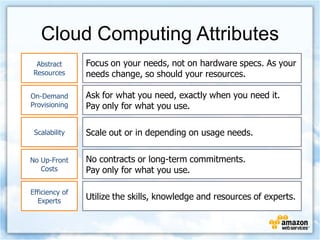
Cloud Computing Attributes
  Abstract      Focus on your needs, not on hardware specs. As your
 Resources      needs change, so should your resources.

On-Demand       Ask for what you need, exactly when you need it.
Provisioning    Pay only for what you use.

 Scalability    Scale out or in depending on usage needs.


No Up-Front     No contracts or long-term commitments.
   Costs        Pay only for what you use.

Efficiency of
  Experts
                Utilize the skills, knowledge and resources of experts.
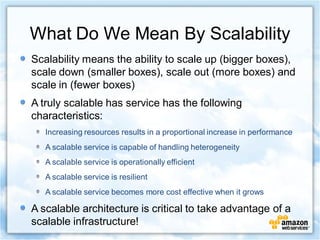
What Do We Mean By Scalability
Scalability means the ability to scale up (bigger boxes),
scale down (smaller boxes), scale out (more boxes) and
scale in (fewer boxes)
A truly scalable has service has the following
characteristics:
   Increasing resources results in a proportional increase in performance
   A scalable service is capable of handling heterogeneity
   A scalable service is operationally efficient
   A scalable service is resilient
   A scalable service becomes more cost effective when it grows

A scalable architecture is critical to take advantage of a
scalable infrastructure!
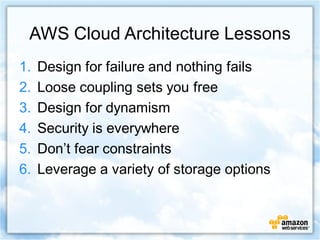
AWS Cloud Architecture Lessons
1.   Design for failure and nothing fails
2.   Loose coupling sets you free
3.   Design for dynamism
4.   Security is everywhere
5.   Don’t fear constraints
6.   Leverage a variety of storage options
Design for Failure and Nothing Fails
Never expect your systems to be stable
Never expect your code to be perfect
Everything fails
   IO controllers
   Ethernet chips
   Hard disks
   Fans
   Power supplies
   Cabling
   Network ports
   Switches
   Load-balancers
If you can add it, it can fail
Examples of Handling Failure on AWS
• Use Elastic IP addresses for consistent and
  re-mappable routes
• Use multiple Amazon EC2 Availability Zones
  (AZs)
• Create multiple database slaves across AZs
• Use real-time monitoring across key access
  points (Amazon CloudWatch)
• Use Amazon Elastic Block Store (EBS) for
  persistent file systems
Build Loosely Couple Systems
Make no assumptions about the inner workings
of your components
Design for a jumble of black boxes

Loosely coupled systems on AWS
  De-coupling systems allows for hybrid models (in-
  cloud + in-physical data center)
  Balancing between clusters enables easier scaling
  Using queues (Amazon SQS) buffers against failures
Design for Dynamism
Components should not assume the
health or location of other components
Bootstrapping and dynamic configuration
helps you scale dynamically

Dynamism on AWS
  Use Auto Scaling
  Use Elastic Load Balancing on multiple layers
  Use configurations in SimpleDB to bootstrap
  instance
Security is Everywhere
With AWS, physical security is free, network security is
easy, and other security can be added

Building secure systems with AWS
• Create distinct Security Groups for each Amazon EC2
  cluster
• Use group-based rules for controlling access between
  layers
• Restrict external access to specific IP ranges
• Encrypt data stored in Amazon S3
• Encrypt all information transmitted across the wire
• Consider encrypted file systems for sensitive data
Don’t Fear Constraints
Architectural constraints can be broken
Having a flexible, on-demand pool of resources allows for different
architectures that remove constraints

I need more than xxGB of RAM per instance
   Distribute load across multiple instances; use a shared distributed cache
I need more than xxK IOPS on my database
   Run multiple read-only copies; sharding; database clustering software
My current server specs are better than an Amazon EC2 instance
   Run more Amazon EC2 instances but only when you need them
I need static IPs for my servers
   Boot scripts that re-configure software from configuration database
Leverage Many Storage Options
Amazon S3 is optimized for storing large objects
  Store persistent data
Amazon CloudFront for performance
  Push popular objects to 14 worldwide edge locations
Amazon SimpleDB for speed, scale, and simplicity
  Store small bits of data that have no dependencies, such
  as metadata
Amazon EC2 local disk space for transient data
Amazon EBS acts like a disk drive for persistent
storage
  Store dynamic content or a traditional RDBMS
  Use snapshots to S3 for backup
Diverse Use Cases
Web Site Hosting
Application Hosting
Media Distribution
Storage, Backup, Disaster Recovery
Content Delivery
High-Performance Computing
Software Development and Testing
Sample Architecture:
  Migrating Your
 Web Applications
Web Application Design
A typical web application could need:
  Compute power
  Storage capacity for images, music, etc.
  Content distribution
  Database storage
  Messaging between components
  Payment options to enable e-commerce
  Load balancing for optimal performance
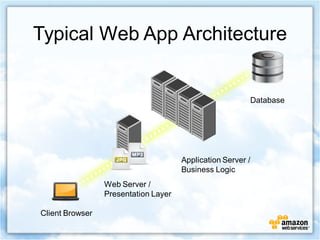
Typical Web App Architecture


                                                         Database


                                      Application Server /
                                      Business Logic
                 Web Server /
                 Presentation Layer

Client Browser
Web Application Design on AWS
An AWS-based web application could use:
  Compute power (Amazon EC2)
  Storage capacity for images, music, etc. (Amazon S3)
  Content distribution (Amazon CloudFront)
  Database storage (Amazon EBS)
  Messaging btw. components (Amazon SQS)
  Payment options to enable e-commerce (Amazon
  FPS)
  Load balancing for optimal performance (Amazon
  EC2)
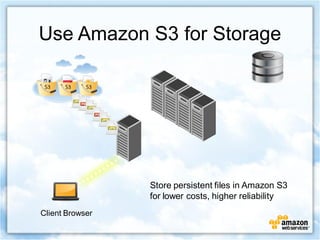
Use Amazon S3 for Storage


                 Store persistent files in Amazon S3
                 for lower costs, higher reliability
Client Browser
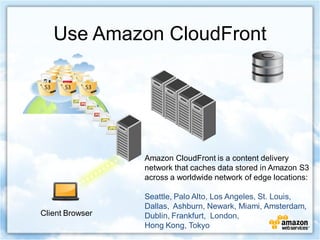
Use Amazon CloudFront


                 Amazon CloudFront is a content delivery
                 network that caches data stored in Amazon S3
                 across a worldwide network of edge locations:

                 Seattle, Palo Alto, Los Angeles, St. Louis,
                 Dallas, Ashburn, Newark, Miami, Amsterdam,
Client Browser   Dublin, Frankfurt, London,
                 Hong Kong, Tokyo
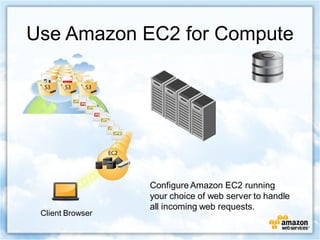
Use Amazon EC2 for Compute


                  Configure Amazon EC2 running
                  your choice of web server to handle
                  all incoming web requests.
 Client Browser
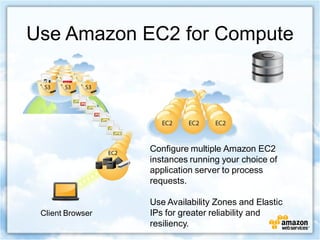
Use Amazon EC2 for Compute


                  Configure multiple Amazon EC2
                  instances running your choice of
                  application server to process
                  requests.

                  Use Availability Zones and Elastic
 Client Browser   IPs for greater reliability and
                  resiliency.
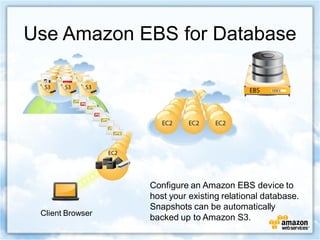
Use Amazon EBS for Database


                  Configure an Amazon EBS device to
                  host your existing relational database.
                  Snapshots can be automatically
 Client Browser
                  backed up to Amazon S3.
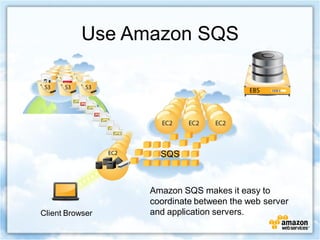
Use Amazon SQS


                   SQS


                 Amazon SQS makes it easy to
                 coordinate between the web server
Client Browser   and application servers.
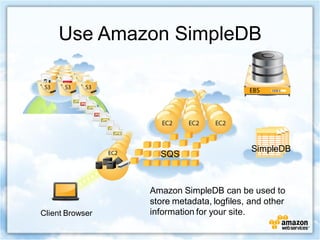
Use Amazon SimpleDB


                                           SimpleDB
                   SQS


                 Amazon SimpleDB can be used to
                 store metadata, logfiles, and other
Client Browser   information for your site.
Additional Features and Other Serivces
 New Features
   CloudWatch (monitoring), Elastic Load Balancing, and
   Auto Scaling services just launched
   AWS Import/Export adds “sneaker net” to S3
 Other Services
   Amazon Elastic MapReduce can be used to crunch
   and analyze large amounts of data
   Amazon Flexible Payments Service can handle
   checkout pipelines and payment methods
   Amazon Mechanical Turk can be used for tasks best
   suited for human intervention (e.g., image upload and
   content approval)
Amazon EC2 Tools
AWS Management Console
AWS Toolkit for Eclipse:
  Eclipse Java IDE plug-in
iPhone Apps:
  Manage EC2 from your iPhone with
  ec2Phone, ElasticPod or directEC2
ElasticFox:
  Mozilla Firefox extension
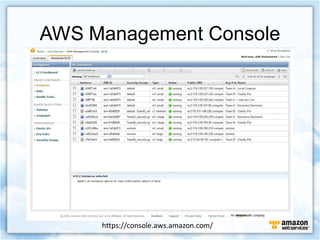
AWS Management Console


     https://console.aws.amazon.com/
Other Tools
Managing Amazon S3 & Amazon
CloudFront:
 S3Fox, CloudBerry Explorer, Manager for
 CloudFront
Managing Amazon SimpleDB:
 AWSZone
Managing Elastic MapReduce:
 AWS Management Console
In Conclusion
Most Important Lesson From Our
Customers:
  Start small with a well-defined proof of
  concept that will highlight the power of AWS
  Build support in your organization
  Once one application is launched others will
  follow…
Thank You
training@varnaaz.com
   +91 98455 62620

AMAZON CLOUD Course Content

  • 1.
  • 2.
    Cloud Computing Attributes Abstract Focus on your needs, not on hardware specs. As your Resources needs change, so should your resources. On-Demand Ask for what you need, exactly when you need it. Provisioning Pay only for what you use. Scalability Scale out or in depending on usage needs. No Up-Front No contracts or long-term commitments. Costs Pay only for what you use. Efficiency of Experts Utilize the skills, knowledge and resources of experts.
  • 3.
    What Do WeMean By Scalability Scalability means the ability to scale up (bigger boxes), scale down (smaller boxes), scale out (more boxes) and scale in (fewer boxes) A truly scalable has service has the following characteristics: Increasing resources results in a proportional increase in performance A scalable service is capable of handling heterogeneity A scalable service is operationally efficient A scalable service is resilient A scalable service becomes more cost effective when it grows A scalable architecture is critical to take advantage of a scalable infrastructure!
  • 4.
    AWS Cloud ArchitectureLessons 1. Design for failure and nothing fails 2. Loose coupling sets you free 3. Design for dynamism 4. Security is everywhere 5. Don’t fear constraints 6. Leverage a variety of storage options
  • 5.
    Design for Failureand Nothing Fails Never expect your systems to be stable Never expect your code to be perfect Everything fails IO controllers Ethernet chips Hard disks Fans Power supplies Cabling Network ports Switches Load-balancers If you can add it, it can fail
  • 6.
    Examples of HandlingFailure on AWS • Use Elastic IP addresses for consistent and re-mappable routes • Use multiple Amazon EC2 Availability Zones (AZs) • Create multiple database slaves across AZs • Use real-time monitoring across key access points (Amazon CloudWatch) • Use Amazon Elastic Block Store (EBS) for persistent file systems
  • 7.
    Build Loosely CoupleSystems Make no assumptions about the inner workings of your components Design for a jumble of black boxes Loosely coupled systems on AWS De-coupling systems allows for hybrid models (in- cloud + in-physical data center) Balancing between clusters enables easier scaling Using queues (Amazon SQS) buffers against failures
  • 8.
    Design for Dynamism Componentsshould not assume the health or location of other components Bootstrapping and dynamic configuration helps you scale dynamically Dynamism on AWS Use Auto Scaling Use Elastic Load Balancing on multiple layers Use configurations in SimpleDB to bootstrap instance
  • 9.
    Security is Everywhere WithAWS, physical security is free, network security is easy, and other security can be added Building secure systems with AWS • Create distinct Security Groups for each Amazon EC2 cluster • Use group-based rules for controlling access between layers • Restrict external access to specific IP ranges • Encrypt data stored in Amazon S3 • Encrypt all information transmitted across the wire • Consider encrypted file systems for sensitive data
  • 10.
    Don’t Fear Constraints Architecturalconstraints can be broken Having a flexible, on-demand pool of resources allows for different architectures that remove constraints I need more than xxGB of RAM per instance Distribute load across multiple instances; use a shared distributed cache I need more than xxK IOPS on my database Run multiple read-only copies; sharding; database clustering software My current server specs are better than an Amazon EC2 instance Run more Amazon EC2 instances but only when you need them I need static IPs for my servers Boot scripts that re-configure software from configuration database
  • 11.
    Leverage Many StorageOptions Amazon S3 is optimized for storing large objects Store persistent data Amazon CloudFront for performance Push popular objects to 14 worldwide edge locations Amazon SimpleDB for speed, scale, and simplicity Store small bits of data that have no dependencies, such as metadata Amazon EC2 local disk space for transient data Amazon EBS acts like a disk drive for persistent storage Store dynamic content or a traditional RDBMS Use snapshots to S3 for backup
  • 12.
    Diverse Use Cases WebSite Hosting Application Hosting Media Distribution Storage, Backup, Disaster Recovery Content Delivery High-Performance Computing Software Development and Testing
  • 13.
    Sample Architecture: Migrating Your Web Applications
  • 14.
    Web Application Design Atypical web application could need: Compute power Storage capacity for images, music, etc. Content distribution Database storage Messaging between components Payment options to enable e-commerce Load balancing for optimal performance
  • 15.
    Typical Web AppArchitecture Database Application Server / Business Logic Web Server / Presentation Layer Client Browser
  • 16.
    Web Application Designon AWS An AWS-based web application could use: Compute power (Amazon EC2) Storage capacity for images, music, etc. (Amazon S3) Content distribution (Amazon CloudFront) Database storage (Amazon EBS) Messaging btw. components (Amazon SQS) Payment options to enable e-commerce (Amazon FPS) Load balancing for optimal performance (Amazon EC2)
  • 17.
    Use Amazon S3for Storage Store persistent files in Amazon S3 for lower costs, higher reliability Client Browser
  • 18.
    Use Amazon CloudFront Amazon CloudFront is a content delivery network that caches data stored in Amazon S3 across a worldwide network of edge locations: Seattle, Palo Alto, Los Angeles, St. Louis, Dallas, Ashburn, Newark, Miami, Amsterdam, Client Browser Dublin, Frankfurt, London, Hong Kong, Tokyo
  • 19.
    Use Amazon EC2for Compute Configure Amazon EC2 running your choice of web server to handle all incoming web requests. Client Browser
  • 20.
    Use Amazon EC2for Compute Configure multiple Amazon EC2 instances running your choice of application server to process requests. Use Availability Zones and Elastic Client Browser IPs for greater reliability and resiliency.
  • 21.
    Use Amazon EBSfor Database Configure an Amazon EBS device to host your existing relational database. Snapshots can be automatically Client Browser backed up to Amazon S3.
  • 22.
    Use Amazon SQS SQS Amazon SQS makes it easy to coordinate between the web server Client Browser and application servers.
  • 23.
    Use Amazon SimpleDB SimpleDB SQS Amazon SimpleDB can be used to store metadata, logfiles, and other Client Browser information for your site.
  • 24.
    Additional Features andOther Serivces New Features CloudWatch (monitoring), Elastic Load Balancing, and Auto Scaling services just launched AWS Import/Export adds “sneaker net” to S3 Other Services Amazon Elastic MapReduce can be used to crunch and analyze large amounts of data Amazon Flexible Payments Service can handle checkout pipelines and payment methods Amazon Mechanical Turk can be used for tasks best suited for human intervention (e.g., image upload and content approval)
  • 25.
    Amazon EC2 Tools AWSManagement Console AWS Toolkit for Eclipse: Eclipse Java IDE plug-in iPhone Apps: Manage EC2 from your iPhone with ec2Phone, ElasticPod or directEC2 ElasticFox: Mozilla Firefox extension
  • 26.
    AWS Management Console https://console.aws.amazon.com/
  • 27.
    Other Tools Managing AmazonS3 & Amazon CloudFront: S3Fox, CloudBerry Explorer, Manager for CloudFront Managing Amazon SimpleDB: AWSZone Managing Elastic MapReduce: AWS Management Console
  • 28.
    In Conclusion Most ImportantLesson From Our Customers: Start small with a well-defined proof of concept that will highlight the power of AWS Build support in your organization Once one application is launched others will follow…
  • 29.