1
Trema Test
@otahi
2015-12-12
Tremaday #8
Run Run
る
ん
る
ん
る
ん
る
ん
2
Self Introduction
● @otahi
– A network engineer?
● Trying to be an SDN engineer
● Charged in (mainly) DC internal network
– Programmer?
● Almost Weekends and early mornings only
– Favorite language
● Ruby
3
Trema and Test
“Trema is an OpenFlow controller programming
framework that provides everything needed to
create OpenFlow controllers in Ruby. It provides a
high-level OpenFlow library and also a network
emulator that can create OpenFlow-based
networks for testing on your PC. This self-
contained environment helps streamlines the
entire process of development and testing.”
https://github.com/trema/trema
4
Problems?
● How can I test my OFC?
– You can test your OFC with Trema and test
frameworks like Serverspec and Infrataster.
● Do I need to create test cases for each
environment of a testing network and a real
network?
– No. You can use common test cases for both.
5
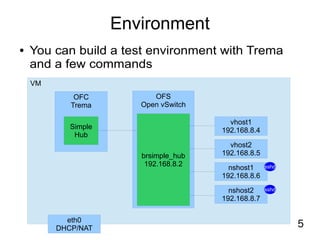
Environment
● You can build a test environment with Trema
and a few commands
VM
vhost1
192.168.8.4
vhost2
192.168.8.5
nshost1
192.168.8.6
nshost2
192.168.8.7
OFC
Trema
OFS
Open vSwitch
eth0
DHCP/NAT
Simple
Hub
brsimple_hub
192.168.8.2
sshd
sshd
6
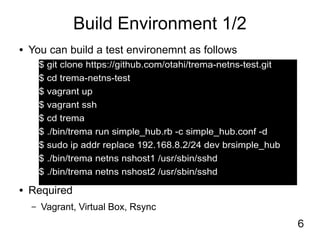
Build Environment 1/2
● You can build a test environemnt as follows
● Required
– Vagrant, Virtual Box, Rsync
$ git clone https://github.com/otahi/trema-netns-test.git
$ cd trema-netns-test
$ vagrant up
$ vagrant ssh
$ cd trema
$ ./bin/trema run simple_hub.rb -c simple_hub.conf -d
$ sudo ip addr replace 192.168.8.2/24 dev brsimple_hub
$ ./bin/trema netns nshost1 /usr/sbin/sshd
$ ./bin/trema netns nshost2 /usr/sbin/sshd
7
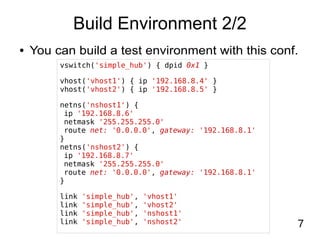
Build Environment 2/2
vswitch('simple_hub') { dpid 0x1 }
vhost('vhost1') { ip '192.168.8.4' }
vhost('vhost2') { ip '192.168.8.5' }
netns('nshost1') {
ip '192.168.8.6'
netmask '255.255.255.0'
route net: '0.0.0.0', gateway: '192.168.8.1'
}
netns('nshost2') {
ip '192.168.8.7'
netmask '255.255.255.0'
route net: '0.0.0.0', gateway: '192.168.8.1'
}
link 'simple_hub', 'vhost1'
link 'simple_hub', 'vhost2'
link 'simple_hub', 'nshost1'
link 'simple_hub', 'nshost2'
● You can build a test environment with this conf.
8
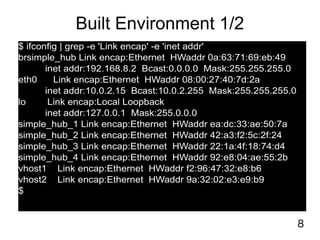
Built Environment 1/2
$ ifconfig | grep -e 'Link encap' -e 'inet addr'
brsimple_hub Link encap:Ethernet HWaddr 0a:63:71:69:eb:49
inet addr:192.168.8.2 Bcast:0.0.0.0 Mask:255.255.255.0
eth0 Link encap:Ethernet HWaddr 08:00:27:40:7d:2a
inet addr:10.0.2.15 Bcast:10.0.2.255 Mask:255.255.255.0
lo Link encap:Local Loopback
inet addr:127.0.0.1 Mask:255.0.0.0
simple_hub_1 Link encap:Ethernet HWaddr ea:dc:33:ae:50:7a
simple_hub_2 Link encap:Ethernet HWaddr 42:a3:f2:5c:2f:24
simple_hub_3 Link encap:Ethernet HWaddr 22:1a:4f:18:74:d4
simple_hub_4 Link encap:Ethernet HWaddr 92:e8:04:ae:55:2b
vhost1 Link encap:Ethernet HWaddr f2:96:47:32:e8:b6
vhost2 Link encap:Ethernet HWaddr 9a:32:02:e3:e9:b9
$
9
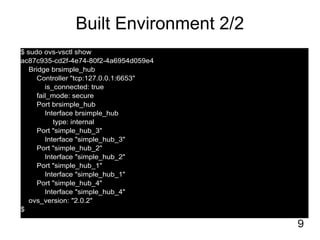
Built Environment 2/2
$ sudo ovs-vsctl show
ac87c935-cd2f-4e74-80f2-4a6954d059e4
Bridge brsimple_hub
Controller "tcp:127.0.0.1:6653"
is_connected: true
fail_mode: secure
Port brsimple_hub
Interface brsimple_hub
type: internal
Port "simple_hub_3"
Interface "simple_hub_3"
Port "simple_hub_2"
Interface "simple_hub_2"
Port "simple_hub_1"
Interface "simple_hub_1"
Port "simple_hub_4"
Interface "simple_hub_4"
ovs_version: "2.0.2"
$
10
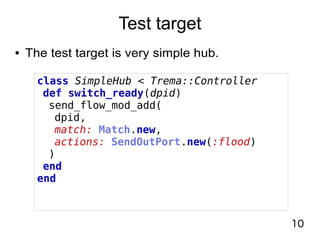
Test target
● The test target is very simple hub.
class SimpleHub < Trema::Controller
def switch_ready(dpid)
send_flow_mod_add(
dpid,
match: Match.new,
actions: SendOutPort.new(:flood)
)
end
end
11
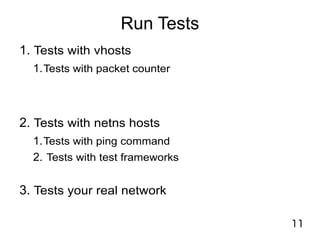
Run Tests
1. Tests with vhosts
1.Tests with packet counter
2. Tests with netns hosts
1.Tests with ping command
2. Tests with test frameworks
3. Tests your real network
12
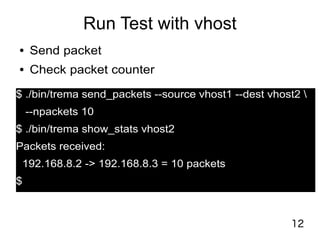
Run Test with vhost
● Send packet
● Check packet counter
$ ./bin/trema send_packets --source vhost1 --dest vhost2 
--npackets 10
$ ./bin/trema show_stats vhost2
Packets received:
192.168.8.2 -> 192.168.8.3 = 10 packets
$
13
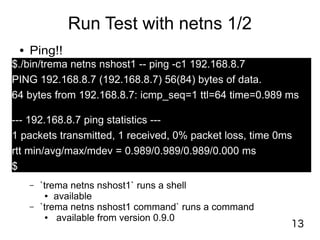
Run Test with netns 1/2
● Ping!!
$./bin/trema netns nshost1 -- ping -c1 192.168.8.7
PING 192.168.8.7 (192.168.8.7) 56(84) bytes of data.
64 bytes from 192.168.8.7: icmp_seq=1 ttl=64 time=0.989 ms
--- 192.168.8.7 ping statistics ---
1 packets transmitted, 1 received, 0% packet loss, time 0ms
rtt min/avg/max/mdev = 0.989/0.989/0.989/0.000 ms
$
– `trema netns nshost1` runs a shell
● available
– `trema netns nshost1 command` runs a command
● available from version 0.9.0
14
Run Test with netns 2/2
● Send packet
● Check captured packet
$ ssh 192.168.8.6 nc -zv 192.168.8.7 80
nc: connect to 192.168.8.7 port 80 (tcp) failed: Connection refused
$
$ ssh -t 192.168.8.7 sudo tcpdump -n port 80
tcpdump: verbose output suppressed, use -v or -vv for full protocol decode
listening on nshost2, link-type EN10MB (Ethernet), capture size 65535 bytes
23:49:53.373696 IP 192.168.8.6.56359 > 192.168.8.7.80: Flags [S], seq 2713544332, win 29200, options [mss
1460,sackOK,TS val 1613252 ecr 0,nop,wscale 6], length 0
23:49:53.373753 IP 192.168.8.7.80 > 192.168.8.6.56359: Flags [R.], seq 0, ack 2713544333, win 0, length 0
^C
2 packets captured
2 packets received by filter
0 packets dropped by kernel
Connection to 192.168.8.7 closed.
$
15
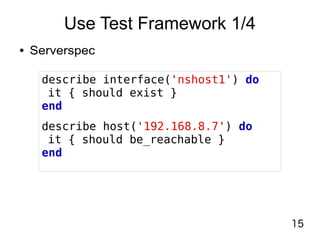
Use Test Framework 1/4
● Serverspec
describe interface('nshost1') do
it { should exist }
end
describe host('192.168.8.7') do
it { should be_reachable }
end
16
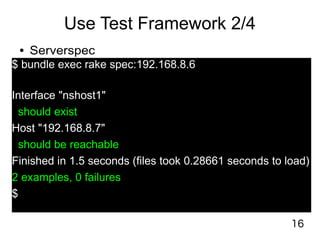
Use Test Framework 2/4
● Serverspec
$ bundle exec rake spec:192.168.8.6
Interface "nshost1"
should exist
Host "192.168.8.7"
should be reachable
Finished in 1.5 seconds (files took 0.28661 seconds to load)
2 examples, 0 failures
$
17
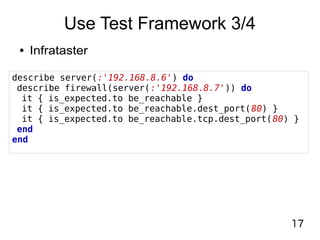
Use Test Framework 3/4
● Infrataster
describe server(:'192.168.8.6') do
describe firewall(server(:'192.168.8.7')) do
it { is_expected.to be_reachable }
it { is_expected.to be_reachable.dest_port(80) }
it { is_expected.to be_reachable.tcp.dest_port(80) }
end
end
18
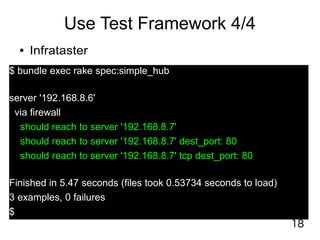
Use Test Framework 4/4
● Infrataster
$ bundle exec rake spec:simple_hub
server '192.168.8.6'
via firewall
should reach to server '192.168.8.7'
should reach to server '192.168.8.7' dest_port: 80
should reach to server '192.168.8.7' tcp dest_port: 80
Finished in 5.47 seconds (files took 0.53734 seconds to load)
3 examples, 0 failures
$
19
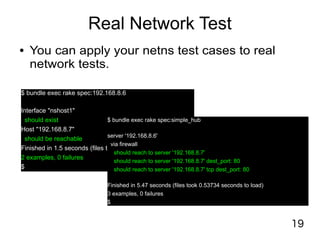
Real Network Test
● You can apply your netns test cases to real
network tests.
$ bundle exec rake spec:192.168.8.6
Interface "nshost1"
should exist
Host "192.168.8.7"
should be reachable
Finished in 1.5 seconds (files took 0.28661 seconds to load)
2 examples, 0 failures
$
$ bundle exec rake spec:simple_hub
server '192.168.8.6'
via firewall
should reach to server '192.168.8.7'
should reach to server '192.168.8.7' dest_port: 80
should reach to server '192.168.8.7' tcp dest_port: 80
Finished in 5.47 seconds (files took 0.53734 seconds to load)
3 examples, 0 failures
$
20
Conclusion
● You can create and test your OFC with Trema.
● You can create tests effectively with test
frameworks.
● You can run common tests for both
environment of a testing network and a real
network.
See also: https://github.com/otahi/trema-netns-test/
21
Thank you!

Run Run Trema Test

  • 1.
    1 Trema Test @otahi 2015-12-12 Tremaday #8 RunRun る ん る ん る ん る ん
  • 2.
    2 Self Introduction ● @otahi –A network engineer? ● Trying to be an SDN engineer ● Charged in (mainly) DC internal network – Programmer? ● Almost Weekends and early mornings only – Favorite language ● Ruby
  • 3.
    3 Trema and Test “Tremais an OpenFlow controller programming framework that provides everything needed to create OpenFlow controllers in Ruby. It provides a high-level OpenFlow library and also a network emulator that can create OpenFlow-based networks for testing on your PC. This self- contained environment helps streamlines the entire process of development and testing.” https://github.com/trema/trema
  • 4.
    4 Problems? ● How canI test my OFC? – You can test your OFC with Trema and test frameworks like Serverspec and Infrataster. ● Do I need to create test cases for each environment of a testing network and a real network? – No. You can use common test cases for both.
  • 5.
    5 Environment ● You canbuild a test environment with Trema and a few commands VM vhost1 192.168.8.4 vhost2 192.168.8.5 nshost1 192.168.8.6 nshost2 192.168.8.7 OFC Trema OFS Open vSwitch eth0 DHCP/NAT Simple Hub brsimple_hub 192.168.8.2 sshd sshd
  • 6.
    6 Build Environment 1/2 ●You can build a test environemnt as follows ● Required – Vagrant, Virtual Box, Rsync $ git clone https://github.com/otahi/trema-netns-test.git $ cd trema-netns-test $ vagrant up $ vagrant ssh $ cd trema $ ./bin/trema run simple_hub.rb -c simple_hub.conf -d $ sudo ip addr replace 192.168.8.2/24 dev brsimple_hub $ ./bin/trema netns nshost1 /usr/sbin/sshd $ ./bin/trema netns nshost2 /usr/sbin/sshd
  • 7.
    7 Build Environment 2/2 vswitch('simple_hub'){ dpid 0x1 } vhost('vhost1') { ip '192.168.8.4' } vhost('vhost2') { ip '192.168.8.5' } netns('nshost1') { ip '192.168.8.6' netmask '255.255.255.0' route net: '0.0.0.0', gateway: '192.168.8.1' } netns('nshost2') { ip '192.168.8.7' netmask '255.255.255.0' route net: '0.0.0.0', gateway: '192.168.8.1' } link 'simple_hub', 'vhost1' link 'simple_hub', 'vhost2' link 'simple_hub', 'nshost1' link 'simple_hub', 'nshost2' ● You can build a test environment with this conf.
  • 8.
    8 Built Environment 1/2 $ifconfig | grep -e 'Link encap' -e 'inet addr' brsimple_hub Link encap:Ethernet HWaddr 0a:63:71:69:eb:49 inet addr:192.168.8.2 Bcast:0.0.0.0 Mask:255.255.255.0 eth0 Link encap:Ethernet HWaddr 08:00:27:40:7d:2a inet addr:10.0.2.15 Bcast:10.0.2.255 Mask:255.255.255.0 lo Link encap:Local Loopback inet addr:127.0.0.1 Mask:255.0.0.0 simple_hub_1 Link encap:Ethernet HWaddr ea:dc:33:ae:50:7a simple_hub_2 Link encap:Ethernet HWaddr 42:a3:f2:5c:2f:24 simple_hub_3 Link encap:Ethernet HWaddr 22:1a:4f:18:74:d4 simple_hub_4 Link encap:Ethernet HWaddr 92:e8:04:ae:55:2b vhost1 Link encap:Ethernet HWaddr f2:96:47:32:e8:b6 vhost2 Link encap:Ethernet HWaddr 9a:32:02:e3:e9:b9 $
  • 9.
    9 Built Environment 2/2 $sudo ovs-vsctl show ac87c935-cd2f-4e74-80f2-4a6954d059e4 Bridge brsimple_hub Controller "tcp:127.0.0.1:6653" is_connected: true fail_mode: secure Port brsimple_hub Interface brsimple_hub type: internal Port "simple_hub_3" Interface "simple_hub_3" Port "simple_hub_2" Interface "simple_hub_2" Port "simple_hub_1" Interface "simple_hub_1" Port "simple_hub_4" Interface "simple_hub_4" ovs_version: "2.0.2" $
  • 10.
    10 Test target ● Thetest target is very simple hub. class SimpleHub < Trema::Controller def switch_ready(dpid) send_flow_mod_add( dpid, match: Match.new, actions: SendOutPort.new(:flood) ) end end
  • 11.
    11 Run Tests 1. Testswith vhosts 1.Tests with packet counter 2. Tests with netns hosts 1.Tests with ping command 2. Tests with test frameworks 3. Tests your real network
  • 12.
    12 Run Test withvhost ● Send packet ● Check packet counter $ ./bin/trema send_packets --source vhost1 --dest vhost2 --npackets 10 $ ./bin/trema show_stats vhost2 Packets received: 192.168.8.2 -> 192.168.8.3 = 10 packets $
  • 13.
    13 Run Test withnetns 1/2 ● Ping!! $./bin/trema netns nshost1 -- ping -c1 192.168.8.7 PING 192.168.8.7 (192.168.8.7) 56(84) bytes of data. 64 bytes from 192.168.8.7: icmp_seq=1 ttl=64 time=0.989 ms --- 192.168.8.7 ping statistics --- 1 packets transmitted, 1 received, 0% packet loss, time 0ms rtt min/avg/max/mdev = 0.989/0.989/0.989/0.000 ms $ – `trema netns nshost1` runs a shell ● available – `trema netns nshost1 command` runs a command ● available from version 0.9.0
  • 14.
    14 Run Test withnetns 2/2 ● Send packet ● Check captured packet $ ssh 192.168.8.6 nc -zv 192.168.8.7 80 nc: connect to 192.168.8.7 port 80 (tcp) failed: Connection refused $ $ ssh -t 192.168.8.7 sudo tcpdump -n port 80 tcpdump: verbose output suppressed, use -v or -vv for full protocol decode listening on nshost2, link-type EN10MB (Ethernet), capture size 65535 bytes 23:49:53.373696 IP 192.168.8.6.56359 > 192.168.8.7.80: Flags [S], seq 2713544332, win 29200, options [mss 1460,sackOK,TS val 1613252 ecr 0,nop,wscale 6], length 0 23:49:53.373753 IP 192.168.8.7.80 > 192.168.8.6.56359: Flags [R.], seq 0, ack 2713544333, win 0, length 0 ^C 2 packets captured 2 packets received by filter 0 packets dropped by kernel Connection to 192.168.8.7 closed. $
  • 15.
    15 Use Test Framework1/4 ● Serverspec describe interface('nshost1') do it { should exist } end describe host('192.168.8.7') do it { should be_reachable } end
  • 16.
    16 Use Test Framework2/4 ● Serverspec $ bundle exec rake spec:192.168.8.6 Interface "nshost1" should exist Host "192.168.8.7" should be reachable Finished in 1.5 seconds (files took 0.28661 seconds to load) 2 examples, 0 failures $
  • 17.
    17 Use Test Framework3/4 ● Infrataster describe server(:'192.168.8.6') do describe firewall(server(:'192.168.8.7')) do it { is_expected.to be_reachable } it { is_expected.to be_reachable.dest_port(80) } it { is_expected.to be_reachable.tcp.dest_port(80) } end end
  • 18.
    18 Use Test Framework4/4 ● Infrataster $ bundle exec rake spec:simple_hub server '192.168.8.6' via firewall should reach to server '192.168.8.7' should reach to server '192.168.8.7' dest_port: 80 should reach to server '192.168.8.7' tcp dest_port: 80 Finished in 5.47 seconds (files took 0.53734 seconds to load) 3 examples, 0 failures $
  • 19.
    19 Real Network Test ●You can apply your netns test cases to real network tests. $ bundle exec rake spec:192.168.8.6 Interface "nshost1" should exist Host "192.168.8.7" should be reachable Finished in 1.5 seconds (files took 0.28661 seconds to load) 2 examples, 0 failures $ $ bundle exec rake spec:simple_hub server '192.168.8.6' via firewall should reach to server '192.168.8.7' should reach to server '192.168.8.7' dest_port: 80 should reach to server '192.168.8.7' tcp dest_port: 80 Finished in 5.47 seconds (files took 0.53734 seconds to load) 3 examples, 0 failures $
  • 20.
    20 Conclusion ● You cancreate and test your OFC with Trema. ● You can create tests effectively with test frameworks. ● You can run common tests for both environment of a testing network and a real network. See also: https://github.com/otahi/trema-netns-test/
  • 21.