RUBY IN MULE
Ruby is a scripting language designed by Yukihiro
Matsumoto, also known as Matz. It runs on a
variety of platforms, such as Windows, Mac OS,
and the various versions of UNIX. Ruby is a pure
object-oriented programming language. It was
created in 1993 by Yukihiro Matsumoto of Japan.
Features of Ruby
• Free format - You can start writing your program from any line and
column.
• Ruby is an open-source and is freely available on the Web, but it is
subject to a license.
• Ruby is a general-purpose, interpreted programming language.
• Ruby is a true object-oriented programming language.
• Ruby is a server-side scripting language similar to Python and PERL.
• Ruby can be used to write Common Gateway Interface (CGI) scripts.
• Ruby can be embedded into Hypertext Markup Language (HTML).
• Ruby has a clean and easy syntax that allows a new developer to learn
Ruby very quickly and easily.
• Ruby has similar syntax to that of many programming languages such as
C++ and Perl.
• Ruby is very much scalable and big programs written in Ruby are easily
maintainable.
• Ruby can be used for developing Internet and intranet applications.
• Ruby can be installed in Windows and POSIX environments.
Ruby Syntax
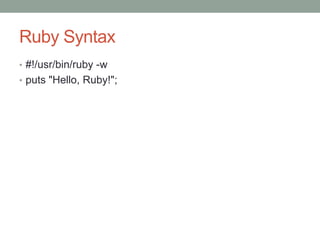
• #!/usr/bin/ruby -w
• puts "Hello, Ruby!";
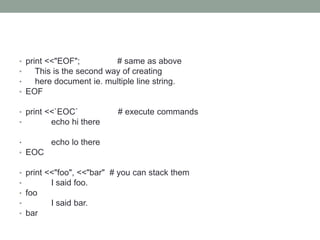
• print <<"EOF"; # same as above
• This is the second way of creating
• here document ie. multiple line string.
• EOF
• print <<`EOC` # execute commands
• echo hi there
• echo lo there
• EOC
• print <<"foo", <<"bar" # you can stack them
• I said foo.
• foo
• I said bar.
• bar
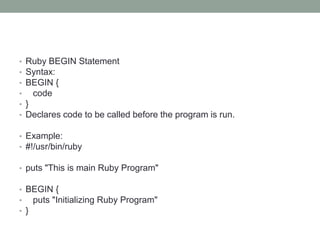
• Ruby BEGIN Statement
• Syntax:
• BEGIN {
• code
• }
• Declares code to be called before the program is run.
• Example:
• #!/usr/bin/ruby
• puts "This is main Ruby Program"
• BEGIN {
• puts "Initializing Ruby Program"
• }
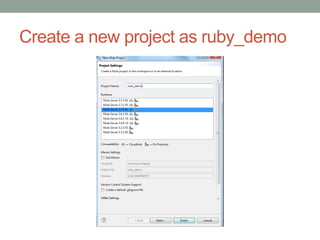
Create a new project as ruby_demo
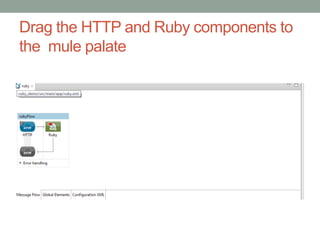
Drag the HTTP and Ruby components to
the mule palate
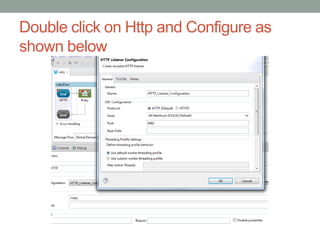
Double click on Http and Configure as
shown below
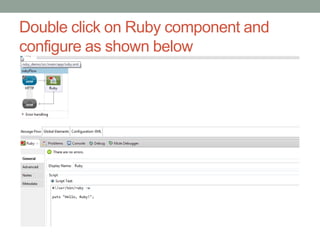
Double click on Ruby component and
configure as shown below
Right click on ruby demo and run as Mule
application
• After deployed successfully hit the below URL on browser.
• http://localhost:8081/ruby
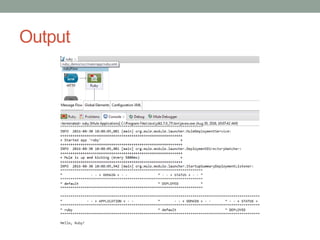
• This will produce the result
Hello, Ruby!
Output

Ruby in mule

  • 1.
    RUBY IN MULE Rubyis a scripting language designed by Yukihiro Matsumoto, also known as Matz. It runs on a variety of platforms, such as Windows, Mac OS, and the various versions of UNIX. Ruby is a pure object-oriented programming language. It was created in 1993 by Yukihiro Matsumoto of Japan.
  • 2.
    Features of Ruby •Free format - You can start writing your program from any line and column. • Ruby is an open-source and is freely available on the Web, but it is subject to a license. • Ruby is a general-purpose, interpreted programming language. • Ruby is a true object-oriented programming language. • Ruby is a server-side scripting language similar to Python and PERL. • Ruby can be used to write Common Gateway Interface (CGI) scripts. • Ruby can be embedded into Hypertext Markup Language (HTML). • Ruby has a clean and easy syntax that allows a new developer to learn Ruby very quickly and easily. • Ruby has similar syntax to that of many programming languages such as C++ and Perl. • Ruby is very much scalable and big programs written in Ruby are easily maintainable. • Ruby can be used for developing Internet and intranet applications. • Ruby can be installed in Windows and POSIX environments.
  • 3.
    Ruby Syntax • #!/usr/bin/ruby-w • puts "Hello, Ruby!";
  • 4.
    • print <<"EOF";# same as above • This is the second way of creating • here document ie. multiple line string. • EOF • print <<`EOC` # execute commands • echo hi there • echo lo there • EOC • print <<"foo", <<"bar" # you can stack them • I said foo. • foo • I said bar. • bar
  • 5.
    • Ruby BEGINStatement • Syntax: • BEGIN { • code • } • Declares code to be called before the program is run. • Example: • #!/usr/bin/ruby • puts "This is main Ruby Program" • BEGIN { • puts "Initializing Ruby Program" • }
  • 6.
    Create a newproject as ruby_demo
  • 7.
    Drag the HTTPand Ruby components to the mule palate
  • 8.
    Double click onHttp and Configure as shown below
  • 9.
    Double click onRuby component and configure as shown below
  • 10.
    Right click onruby demo and run as Mule application • After deployed successfully hit the below URL on browser. • http://localhost:8081/ruby • This will produce the result Hello, Ruby!
  • 11.