Ruby Programming
Language
Contents
Introduction01
02
03
04
Features
Reference
Pros & Cons
05
Installation
Our Team Members
Mathunujan Nirojan Matheeshan Logetha
Content
Kowshika
Content
Introduction
About Ruby
 Ruby is a dynamic, reflective, object-oriented, general purpose programming
language. It was designed and developed in mid-1990s by Yukihiro Japan.
 Ruby is a programming language designed for writing a software in a wide variety of
application domains like server side (Ruby on Rails), Web Servers, Low level system,
Common GUI interfaces.
 Ruby has many syntax to that of many programming languages like. C++ and Perl.
 It emphasizes the necessity for software to be understood by humans first and compu
ters second.
Features
 Ruby is a server-side scripting language similar to Python and PERL.
 Ruby has a clean and easy syntax that allows a new developer to learn very quickly
and easily.
 Lowercase letters and uppercase letters are distinct. The keyword end, for example,
is completely different from the keyword END.
 Ruby has a feature of single inheritance only. Ruby has classes as well as modules. A
module has methods but no instances.
• It is a flexible language as you can easily remove, redefine or add existing parts to it.
It allows its users to freely alter its parts as they wish.
Features Of Ruby
Pros & Cons
Pros Of Ruby
• Developing software products with Ruby is 30 to 40 percent faster than with other
programming languages.
• There are a lot of developers out there actively working with Ruby. They will help
when send run in to a problem.
• Tons of features out of the box for web development.
• Quick to embrace new things.
• Open Sourced & works on multiple platforms.
Cons Of Ruby
 As of July 2011, the latest version of Ruby is version 1.9, with a few updates. When
compared to other programming languages, Ruby's development and updates are
slower.
 When run and test response times of programming languages often describe Ruby as
one of the slower programming languages.
 Can be very hard to debug at times.
 Difficult to move from PHP to Ruby.
Installation
Framework For Ruby
• Ruby is a popular programming language in the last years. We have had the born of
new languages such as Go, powerful and simple, but anyone can deny that Ruby still
is most popular.
• Ruby on Rails is one of the frameworks and it’s designed to make programming web
apps a lot easier by making assumptions about what every developer needs to get
started.
• Ruby on Rails lets you write less code while accomplishing more than many other
languages and frameworks.
IDE For Ruby
o An integrated development environment (IDE) is a software application that provides
comprehensive facilities to computer programmers for software development.
o An IDE normally consists of a source code editor, build automation tools, and a
debugger.
o Most popular IDE for Ruby is Ruby Mine is a cross-platform IDE that works on
Windows, mac OS, and Linux.
o Many modern IDEs also have a class browser, an object browser, and a class
hierarchy, for use in object-oriented software development.
Installation Of Ruby Mine
• Download Ruby Mine for your operating system.
• Install the Ruby Mine by accepting the installation wizard.
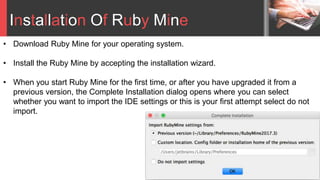
• When you start Ruby Mine for the first time, or after you have upgraded it from a
previous version, the Complete Installation dialog opens where you can select
whether you want to import the IDE settings or this is your first attempt select do not
import.
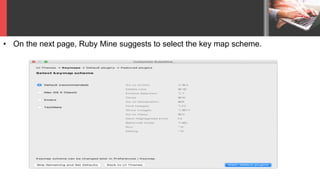
• On the next page, Ruby Mine suggests to select the key map scheme.
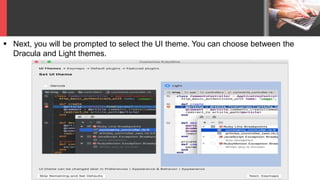
 Next, you will be prompted to select the UI theme. You can choose between the
Dracula and Light themes.
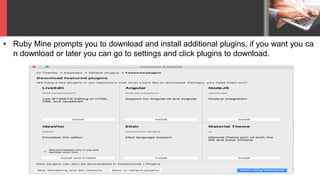
• Ruby Mine prompts you to download and install additional plugins, if you want you ca
n download or later you can go to settings and click plugins to download.
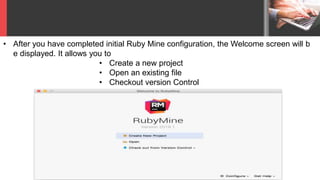
• After you have completed initial Ruby Mine configuration, the Welcome screen will b
e displayed. It allows you to
• Create a new project
• Open an existing file
• Checkout version Control
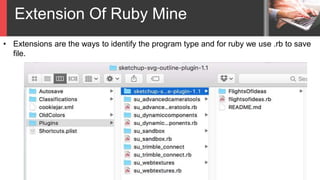
Extension Of Ruby Mine
• Extensions are the ways to identify the program type and for ruby we use .rb to save
file.
References
• https://www.jetbrains.com/help/ruby/install-and-set-up-product.html
• https://en.wikipedia.org/wiki/Ruby_(programming_language)
• https://www.slideshare.net/platico_dev/ruby-presentation-53765390
Ruby And Ruby On Rails

Ruby And Ruby On Rails

  • 1.
  • 2.
  • 3.
    Our Team Members MathunujanNirojan Matheeshan Logetha Content Kowshika Content
  • 4.
  • 5.
    About Ruby  Rubyis a dynamic, reflective, object-oriented, general purpose programming language. It was designed and developed in mid-1990s by Yukihiro Japan.  Ruby is a programming language designed for writing a software in a wide variety of application domains like server side (Ruby on Rails), Web Servers, Low level system, Common GUI interfaces.  Ruby has many syntax to that of many programming languages like. C++ and Perl.  It emphasizes the necessity for software to be understood by humans first and compu ters second.
  • 6.
  • 7.
     Ruby isa server-side scripting language similar to Python and PERL.  Ruby has a clean and easy syntax that allows a new developer to learn very quickly and easily.  Lowercase letters and uppercase letters are distinct. The keyword end, for example, is completely different from the keyword END.  Ruby has a feature of single inheritance only. Ruby has classes as well as modules. A module has methods but no instances. • It is a flexible language as you can easily remove, redefine or add existing parts to it. It allows its users to freely alter its parts as they wish. Features Of Ruby
  • 8.
  • 9.
    Pros Of Ruby •Developing software products with Ruby is 30 to 40 percent faster than with other programming languages. • There are a lot of developers out there actively working with Ruby. They will help when send run in to a problem. • Tons of features out of the box for web development. • Quick to embrace new things. • Open Sourced & works on multiple platforms.
  • 10.
    Cons Of Ruby As of July 2011, the latest version of Ruby is version 1.9, with a few updates. When compared to other programming languages, Ruby's development and updates are slower.  When run and test response times of programming languages often describe Ruby as one of the slower programming languages.  Can be very hard to debug at times.  Difficult to move from PHP to Ruby.
  • 11.
  • 12.
    Framework For Ruby •Ruby is a popular programming language in the last years. We have had the born of new languages such as Go, powerful and simple, but anyone can deny that Ruby still is most popular. • Ruby on Rails is one of the frameworks and it’s designed to make programming web apps a lot easier by making assumptions about what every developer needs to get started. • Ruby on Rails lets you write less code while accomplishing more than many other languages and frameworks.
  • 13.
    IDE For Ruby oAn integrated development environment (IDE) is a software application that provides comprehensive facilities to computer programmers for software development. o An IDE normally consists of a source code editor, build automation tools, and a debugger. o Most popular IDE for Ruby is Ruby Mine is a cross-platform IDE that works on Windows, mac OS, and Linux. o Many modern IDEs also have a class browser, an object browser, and a class hierarchy, for use in object-oriented software development.
  • 14.
    Installation Of RubyMine • Download Ruby Mine for your operating system. • Install the Ruby Mine by accepting the installation wizard. • When you start Ruby Mine for the first time, or after you have upgraded it from a previous version, the Complete Installation dialog opens where you can select whether you want to import the IDE settings or this is your first attempt select do not import.
  • 15.
    • On thenext page, Ruby Mine suggests to select the key map scheme.
  • 16.
     Next, youwill be prompted to select the UI theme. You can choose between the Dracula and Light themes.
  • 17.
    • Ruby Mineprompts you to download and install additional plugins, if you want you ca n download or later you can go to settings and click plugins to download.
  • 18.
    • After youhave completed initial Ruby Mine configuration, the Welcome screen will b e displayed. It allows you to • Create a new project • Open an existing file • Checkout version Control
  • 19.
    Extension Of RubyMine • Extensions are the ways to identify the program type and for ruby we use .rb to save file.
  • 20.