Rough Cut 1 – Edit Guide 
I started the progress of my music video in editing aiming for more 
simple edits first, focusing more on getting the footage in the right 
order and lined up nicely, over editing heavily a small section of 
footage. I did this because I felt better getting the skeletal structure of 
a video would be more beneficial to me than doing the heavy 
transitions, overlays etc. However, along the way I have been 
inspired, and impulsive doing small bits of editing here and there, 
and this is what I have done. 
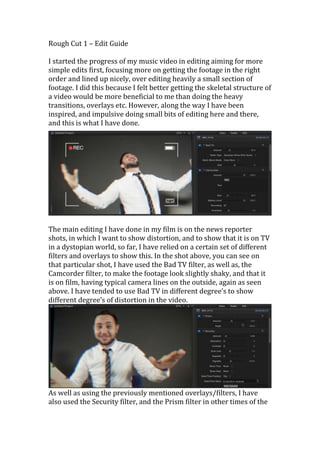
The main editing I have done in my film is on the news reporter 
shots, in which I want to show distortion, and to show that it is on TV 
in a dystopian world, so far, I have relied on a certain set of different 
filters and overlays to show this. In the shot above, you can see on 
that particular shot, I have used the Bad TV filter, as well as, the 
Camcorder filter, to make the footage look slightly shaky, and that it 
is on film, having typical camera lines on the outside, again as seen 
above. I have tended to use Bad TV in different degree’s to show 
different degree’s of distortion in the video. 
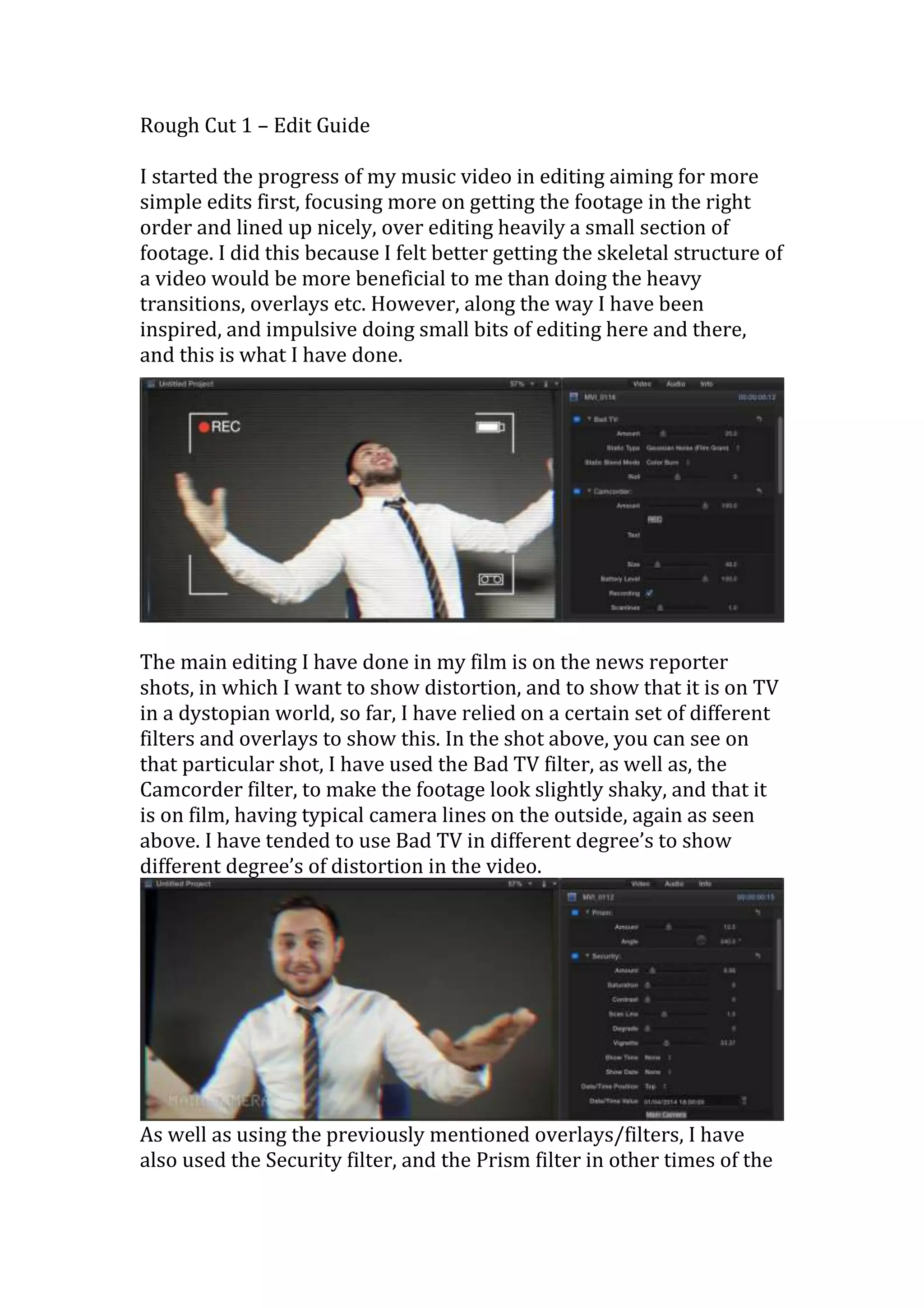
As well as using the previously mentioned overlays/filters, I have 
also used the Security filter, and the Prism filter in other times of the
edit, this again is supposed to be giving an odd out of focus look to 
the footage, and to make it look like a TV screen. Security I used, 
because it makes it seem like a TV studio camera, having the words 
Main Camera in the corner, and the static lines scraped across the 
screen. Prism also helped , as it left a ghostly red/blue shadow 
around the news presenter, this made it look reminiscent of old TV’s 
being only slightly out of signal, which shows a good level of 
distortion, and dystopian elements which is successful. 
The obvious choice for the transitions I have so far in the 
newsreporter was the Static transition, I use this several times in the 
first cut, and this splices up my footage in a distorted way which 
makes the footage look like my intended effect of cutting out TV, and 
in the static, the true intention of the presenter is revealed. 
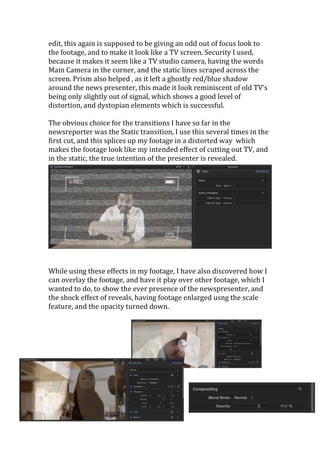
While using these effects in my footage, I have also discovered how I 
can overlay the footage, and have it play over other footage, which I 
wanted to do, to show the ever presence of the newspresenter, and 
the shock effect of reveals, having footage enlarged usng the scale 
feature, and the opacity turned down.

Rough cut 1 – edit guide

  • 1.
    Rough Cut 1– Edit Guide I started the progress of my music video in editing aiming for more simple edits first, focusing more on getting the footage in the right order and lined up nicely, over editing heavily a small section of footage. I did this because I felt better getting the skeletal structure of a video would be more beneficial to me than doing the heavy transitions, overlays etc. However, along the way I have been inspired, and impulsive doing small bits of editing here and there, and this is what I have done. The main editing I have done in my film is on the news reporter shots, in which I want to show distortion, and to show that it is on TV in a dystopian world, so far, I have relied on a certain set of different filters and overlays to show this. In the shot above, you can see on that particular shot, I have used the Bad TV filter, as well as, the Camcorder filter, to make the footage look slightly shaky, and that it is on film, having typical camera lines on the outside, again as seen above. I have tended to use Bad TV in different degree’s to show different degree’s of distortion in the video. As well as using the previously mentioned overlays/filters, I have also used the Security filter, and the Prism filter in other times of the
  • 2.
    edit, this againis supposed to be giving an odd out of focus look to the footage, and to make it look like a TV screen. Security I used, because it makes it seem like a TV studio camera, having the words Main Camera in the corner, and the static lines scraped across the screen. Prism also helped , as it left a ghostly red/blue shadow around the news presenter, this made it look reminiscent of old TV’s being only slightly out of signal, which shows a good level of distortion, and dystopian elements which is successful. The obvious choice for the transitions I have so far in the newsreporter was the Static transition, I use this several times in the first cut, and this splices up my footage in a distorted way which makes the footage look like my intended effect of cutting out TV, and in the static, the true intention of the presenter is revealed. While using these effects in my footage, I have also discovered how I can overlay the footage, and have it play over other footage, which I wanted to do, to show the ever presence of the newspresenter, and the shock effect of reveals, having footage enlarged usng the scale feature, and the opacity turned down.