http://roboticvision.org/
ROS Intro/Tutorial
Juxi Leitner
<j.leitner@roboticvision.org>
http://Juxi.net/
Hands-onV
http://roboticvision.org/
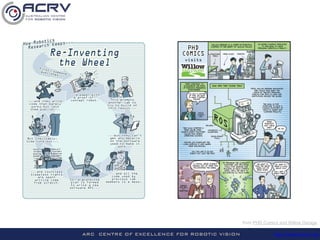
from PHD Comics and Willow Garage
http://roboticvision.org/
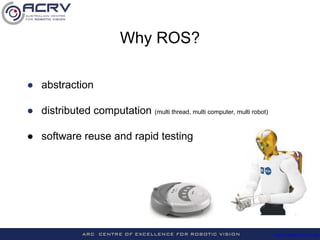
Why ROS?
● abstraction
● distributed computation (multi thread, multi computer, multi robot)
● software reuse and rapid testing
http://roboticvision.org/
What is ROS?
● free and open source
● thin, multi-lingual, peer-to-peer
● tools-based
It is NOT a
● programming language or IDE
● (just a) library
● (full) operating system
http://roboticvision.org/
Mount the USB stick and install VirtualBox.
In VirtualBox go to Machine -> Add… and select the
Ubuntu_14.04_ROS.vbox image from the stick.
How?
Try it out!
http://roboticvision.org/
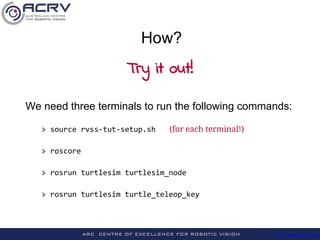
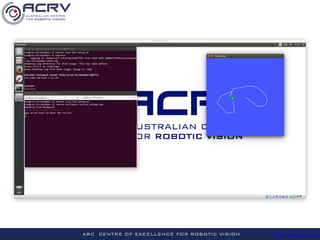
We need three terminals to run the following commands:
> roscore
> rosrun turtlesim turtlesim_node
> rosrun turtlesim turtle_teleop_key
How?
Try it out!
http://roboticvision.org/
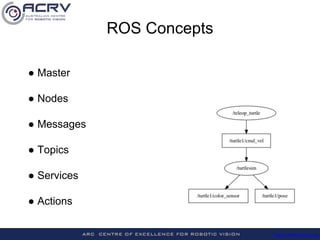
ROS Concepts
● Master
● Nodes
● Messages
● Topics
● Services
● Actions
http://roboticvision.org/
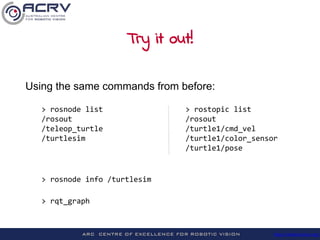
Try it out!
Using the same commands from before:
> rosnode list > rostopic list
/rosout /rosout
/teleop_turtle /turtle1/cmd_vel
/turtlesim /turtle1/color_sensor
/turtle1/pose
> rosnode info /turtlesim
> rqt_graph
http://roboticvision.org/
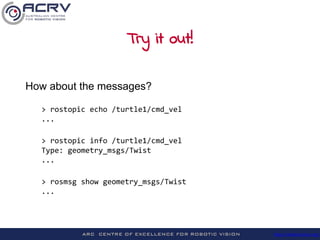
Try it out!
How about the messages?
> rostopic echo /turtle1/cmd_vel
...
> rostopic info /turtle1/cmd_vel
Type: geometry_msgs/Twist
...
> rosmsg show geometry_msgs/Twist
...
http://roboticvision.org/
Logging & Playback
Try it out!
We need three terminals to run:
> rosbag record /turtle1/cmd_vel -O test
[ move the teleop-ed turtle …]^C
> rosbag info test.bag
path: test.bag
duration: 0.6s
messages: 7
topics: /turtle1/cmd_vel 7 msgs : geometry_msgs/Twist
> rosbag play test.bag
http://roboticvision.org/
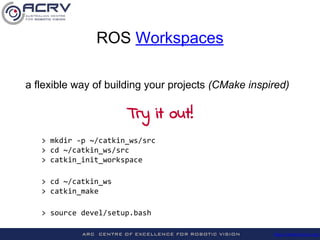
> mkdir -p ~/catkin_ws/src
> cd ~/catkin_ws/src
> catkin_init_workspace
> cd ~/catkin_ws
> catkin_make
> source devel/setup.bash
a flexible way of building your projects (CMake inspired)
ROS Workspaces
Try it out!
http://roboticvision.org/
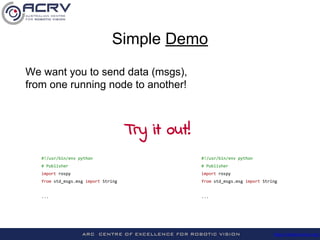
We want you to send data (msgs),
from one running node to another!
#!/usr/bin/env python #!/usr/bin/env python
# Publisher # Publisher
import rospy import rospy
from std_msgs.msg import String from std_msgs.msg import String
... ...
Simple Demo
Try it out!
http://roboticvision.org/
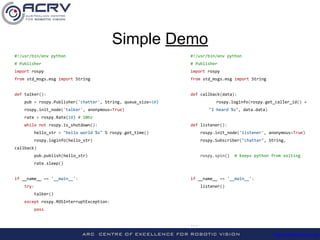
#!/usr/bin/env python #!/usr/bin/env python
# Publisher # Publisher
import rospy import rospy
from std_msgs.msg import String from std_msgs.msg import String
def talker(): def callback(data):
pub = rospy.Publisher('chatter', String, queue_size=10) rospy.loginfo(rospy.get_caller_id() +
rospy.init_node('talker', anonymous=True) "I heard %s", data.data)
rate = rospy.Rate(10) # 10hz
while not rospy.is_shutdown(): def listener():
hello_str = "hello world %s" % rospy.get_time() rospy.init_node('listener', anonymous=True)
rospy.loginfo(hello_str) rospy.Subscriber("chatter", String,
callback)
pub.publish(hello_str) rospy.spin() # keeps python from exiting
rate.sleep()
if __name__ == '__main__': if __name__ == '__main__':
try: listener()
talker()
except rospy.ROSInterruptException:
pass
...
Simple Demo
http://roboticvision.org/
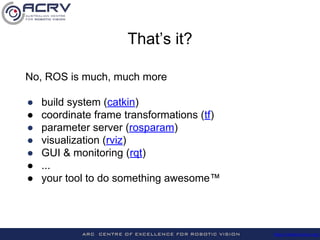
No, ROS is much, much more
● build system (catkin)
● coordinate frame transformations (tf)
● parameter server (rosparam)
● visualization (rviz)
● GUI & monitoring (rqt)
● ...
● your tool to do something awesome™
That’s it?
http://roboticvision.org/
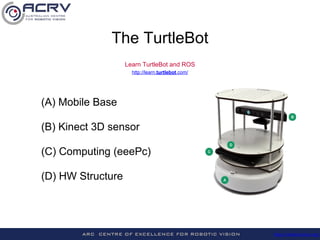
(A) Mobile Base
(B) Kinect 3D sensor
(C) Computing (eeePc)
(D) HW Structure
The TurtleBot
Learn TurtleBot and ROS
http://learn.turtlebot.com/
http://roboticvision.org/
Further Reading
● Morgan Quigley et al. (2009) ROS: an open-source Robot Operating System
● J. M. O'Kane. A Gentle Introduction to ROS: http://www.cse.sc.edu/~jokane/agitr/
● http://wiki.ros.org/ROS/StartGuide
● http://wiki.ros.org/ROS/Tutorials/WhereNext
● Lost? Ask us! And check http://wiki.ros.org & http://answers.ros.org
● http://robohow.eu/_media/meetings/first-integration-workshop/ros-best-practices.pdf

ROS Hands-On Intro/Tutorial (Robotic Vision Summer School 2015) #RVSS #ACRV

  • 1.
  • 2.
  • 3.
    http://roboticvision.org/ Why ROS? ● abstraction ●distributed computation (multi thread, multi computer, multi robot) ● software reuse and rapid testing
  • 4.
    http://roboticvision.org/ What is ROS? ●free and open source ● thin, multi-lingual, peer-to-peer ● tools-based It is NOT a ● programming language or IDE ● (just a) library ● (full) operating system
  • 5.
    http://roboticvision.org/ Mount the USBstick and install VirtualBox. In VirtualBox go to Machine -> Add… and select the Ubuntu_14.04_ROS.vbox image from the stick. How? Try it out!
  • 6.
    http://roboticvision.org/ We need threeterminals to run the following commands: > roscore > rosrun turtlesim turtlesim_node > rosrun turtlesim turtle_teleop_key How? Try it out!
  • 7.
  • 8.
    http://roboticvision.org/ ROS Concepts ● Master ●Nodes ● Messages ● Topics ● Services ● Actions
  • 9.
    http://roboticvision.org/ Try it out! Usingthe same commands from before: > rosnode list > rostopic list /rosout /rosout /teleop_turtle /turtle1/cmd_vel /turtlesim /turtle1/color_sensor /turtle1/pose > rosnode info /turtlesim > rqt_graph
  • 10.
    http://roboticvision.org/ Try it out! Howabout the messages? > rostopic echo /turtle1/cmd_vel ... > rostopic info /turtle1/cmd_vel Type: geometry_msgs/Twist ... > rosmsg show geometry_msgs/Twist ...
  • 11.
    http://roboticvision.org/ Logging & Playback Tryit out! We need three terminals to run: > rosbag record /turtle1/cmd_vel -O test [ move the teleop-ed turtle …]^C > rosbag info test.bag path: test.bag duration: 0.6s messages: 7 topics: /turtle1/cmd_vel 7 msgs : geometry_msgs/Twist > rosbag play test.bag
  • 12.
    http://roboticvision.org/ > mkdir -p~/catkin_ws/src > cd ~/catkin_ws/src > catkin_init_workspace > cd ~/catkin_ws > catkin_make > source devel/setup.bash a flexible way of building your projects (CMake inspired) ROS Workspaces Try it out!
  • 13.
    http://roboticvision.org/ We want youto send data (msgs), from one running node to another! #!/usr/bin/env python #!/usr/bin/env python # Publisher # Publisher import rospy import rospy from std_msgs.msg import String from std_msgs.msg import String ... ... Simple Demo Try it out!
  • 14.
    http://roboticvision.org/ #!/usr/bin/env python #!/usr/bin/envpython # Publisher # Publisher import rospy import rospy from std_msgs.msg import String from std_msgs.msg import String def talker(): def callback(data): pub = rospy.Publisher('chatter', String, queue_size=10) rospy.loginfo(rospy.get_caller_id() + rospy.init_node('talker', anonymous=True) "I heard %s", data.data) rate = rospy.Rate(10) # 10hz while not rospy.is_shutdown(): def listener(): hello_str = "hello world %s" % rospy.get_time() rospy.init_node('listener', anonymous=True) rospy.loginfo(hello_str) rospy.Subscriber("chatter", String, callback) pub.publish(hello_str) rospy.spin() # keeps python from exiting rate.sleep() if __name__ == '__main__': if __name__ == '__main__': try: listener() talker() except rospy.ROSInterruptException: pass ... Simple Demo
  • 15.
    http://roboticvision.org/ No, ROS ismuch, much more ● build system (catkin) ● coordinate frame transformations (tf) ● parameter server (rosparam) ● visualization (rviz) ● GUI & monitoring (rqt) ● ... ● your tool to do something awesome™ That’s it?
  • 16.
    http://roboticvision.org/ (A) Mobile Base (B)Kinect 3D sensor (C) Computing (eeePc) (D) HW Structure The TurtleBot Learn TurtleBot and ROS http://learn.turtlebot.com/
  • 17.
    http://roboticvision.org/ Further Reading ● MorganQuigley et al. (2009) ROS: an open-source Robot Operating System ● J. M. O'Kane. A Gentle Introduction to ROS: http://www.cse.sc.edu/~jokane/agitr/ ● http://wiki.ros.org/ROS/StartGuide ● http://wiki.ros.org/ROS/Tutorials/WhereNext ● Lost? Ask us! And check http://wiki.ros.org & http://answers.ros.org ● http://robohow.eu/_media/meetings/first-integration-workshop/ros-best-practices.pdf