Morgan Quigley                Presented By:-
Computer Science Department,
    Stanford University.        Ubaidullah Alias Kashif
Willow Garage, Menlo Park, CA           MSCS-III
Computer Science Department,           Sukkur IBA
   University of Southern
         California

                                                          1
Robot Operating System
 INTRODUCTION
 DESIGN GOALS
 NOMENCLATURE
 USE CASES
USE CASES
 Debugging a single node
 Logging and playback
 Packaged subsystems
 Collaborative Development
 Visualization and Monitoring
 Composition of functionality
 Transformations
 Conclusion
Debugging a single node
 A node is the well defined limited area of the system where
    planning, reasoning, perception or control is performed.
   To get a robotic system up and running for experiments,
    larger software ecosystem must exist.
   This adds a significant amount of difficulty to integrative
    robotics research.
   ROS modular structure minimize the difficulty of
    debugging in settings
   Nods connect to each other at run time
   The ease of inserting and removing nodes from a running
    ROS based system is one of its most powerful and
    fundamental features.
Logging and playback
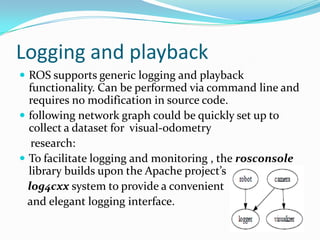
 ROS supports generic logging and playback
  functionality. Can be performed via command line and
  requires no modification in source code.
 following network graph could be quickly set up to
  collect a dataset for visual-odometry
   research:
 To facilitate logging and monitoring , the rosconsole
  library builds upon the Apache project’s
  log4cxx system to provide a convenient
  and elegant logging interface.
Packaged subsystems
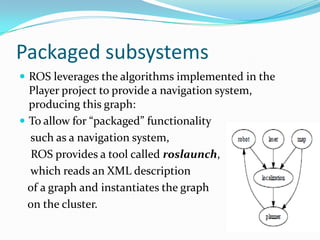
 ROS leverages the algorithms implemented in the
  Player project to provide a navigation system,
  producing this graph:
 To allow for “packaged” functionality
  such as a navigation system,
   ROS provides a tool called roslaunch,
  which reads an XML description
  of a graph and instantiates the graph
  on the cluster.
Collaborative Development
 To support collaborative development,
 the ROS software system is organized into packages.
 A ROS package is simply a directory which contains an
  XML file describing the package and stating any
  dependencies.
 For example, one ROS repository has root directories
  including “nav,” “vision,” and “motion planning,” each of
  which contains many packages as subdirectories.
 ROS provides a utility called rospack to query and inspect
  the code tree, search dependencies, find packages by name,
  etc
Visualization and Monitoring
 While designing and debugging robotics software, it often
    becomes necessary to observe some state while the system is
    running.
   Printf technique can be difficult to extend to large-scale
    distributed systems, and can become unwieldy for general-
    purpose monitoring.
   Instead, ROS can exploit the dynamic nature of the connectivity
    graph to “tap into” any message stream on the system.
   rviz program, which is distributed with ROS. Visualization
    panels can be dynamically instantiated to view a large variety of
    data types, point clouds, geometric primitives (such as object
   recognition results), render robot poses and trajectories, etc.
Composition of functionality
 In ROS, a “stack” of software is a cluster of nodes that
  does something useful.
 The previous graph was automatically generated by the
  rxgraph tool, which can inspect and monitor any
  ROS graph at runtime. Its output renders nodes as
  ovals, topics as squares, and connectivity as arcs.
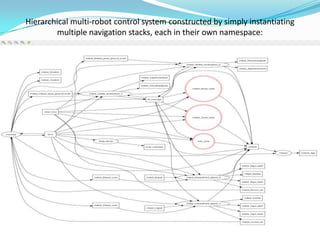
Hierarchical multi-robot control system constructed by simply instantiating
        multiple navigation stacks, each in their own namespace:
Transformations
 Robotic systems often need to track spatial
  relationships for a variety of reasons: between a mobile
  robot and some fixed frame of reference for
  localization.
 The tf system constructs a dynamic transformation
  tree which relates all frames of reference in the system.
 For example, the tf system can be used to easily
  generate point clouds in a stationary “map” frame from
  laser scans received by a tilting laser scanner on a
  moving robot
 ROS robot software distributions
 ROS Fuerte (April, 2012)
 ROS Electric (August, 2011)
 ROS Diamondback (March, 2011)
 ROS C Turtle (August, 2010)
 ROS Box Turtle (March, 2010)
 Robots Using ROS (Ongoing Series)
 From small differential-drive robots to mobile manipulators to
    autonomous cars, robots of every size and shape are using ROS
    to do interesting research and applications development. Groups
    around the world are also releasing free, open-source software to
    get you started on your own robot.
   Part 6: Helicopters Using ROS
   Part 5: Meka, Qbo, Mini-PR2, Lego NXT
   Part 4: Shadow Dextrous Hand, Robotino, Penn Quadrotors,
    Washington University's B21r and Videre ERRATICs
   Part 3: TUM-Rosie, Marvin, HERB, CKBots
   Part 2: Care-O-bot 3, BOSCH RTC, EL-E and Cody, Kawada
    HRP2-V
   Part 1: STAIR 1, Aldebaran Nao, Junior
   App Sprints
THANKS

 http://www.ros.org
 http://www.willowgarage.com/pages/software/ros-platform
 http://www.ros.org/wiki/rviz
 https://www.developers.google.com/chart/image/docs/gallery/graphviz
 http://answers.ros.org/question/35884/rviz-camera-display-camera_info-
  problem/

Ros Kd

  • 1.
    Morgan Quigley Presented By:- Computer Science Department, Stanford University. Ubaidullah Alias Kashif Willow Garage, Menlo Park, CA MSCS-III Computer Science Department, Sukkur IBA University of Southern California 1
  • 2.
    Robot Operating System INTRODUCTION  DESIGN GOALS  NOMENCLATURE  USE CASES
  • 3.
    USE CASES  Debugginga single node  Logging and playback  Packaged subsystems  Collaborative Development  Visualization and Monitoring  Composition of functionality  Transformations  Conclusion
  • 4.
    Debugging a singlenode  A node is the well defined limited area of the system where planning, reasoning, perception or control is performed.  To get a robotic system up and running for experiments, larger software ecosystem must exist.  This adds a significant amount of difficulty to integrative robotics research.  ROS modular structure minimize the difficulty of debugging in settings  Nods connect to each other at run time  The ease of inserting and removing nodes from a running ROS based system is one of its most powerful and fundamental features.
  • 5.
    Logging and playback ROS supports generic logging and playback functionality. Can be performed via command line and requires no modification in source code.  following network graph could be quickly set up to collect a dataset for visual-odometry research:  To facilitate logging and monitoring , the rosconsole library builds upon the Apache project’s log4cxx system to provide a convenient and elegant logging interface.
  • 6.
    Packaged subsystems  ROSleverages the algorithms implemented in the Player project to provide a navigation system, producing this graph:  To allow for “packaged” functionality such as a navigation system, ROS provides a tool called roslaunch, which reads an XML description of a graph and instantiates the graph on the cluster.
  • 7.
    Collaborative Development  Tosupport collaborative development,  the ROS software system is organized into packages.  A ROS package is simply a directory which contains an XML file describing the package and stating any dependencies.  For example, one ROS repository has root directories including “nav,” “vision,” and “motion planning,” each of which contains many packages as subdirectories.  ROS provides a utility called rospack to query and inspect the code tree, search dependencies, find packages by name, etc
  • 8.
    Visualization and Monitoring While designing and debugging robotics software, it often becomes necessary to observe some state while the system is running.  Printf technique can be difficult to extend to large-scale distributed systems, and can become unwieldy for general- purpose monitoring.  Instead, ROS can exploit the dynamic nature of the connectivity graph to “tap into” any message stream on the system.  rviz program, which is distributed with ROS. Visualization panels can be dynamically instantiated to view a large variety of data types, point clouds, geometric primitives (such as object  recognition results), render robot poses and trajectories, etc.
  • 9.
    Composition of functionality In ROS, a “stack” of software is a cluster of nodes that does something useful.  The previous graph was automatically generated by the rxgraph tool, which can inspect and monitor any ROS graph at runtime. Its output renders nodes as ovals, topics as squares, and connectivity as arcs.
  • 10.
    Hierarchical multi-robot controlsystem constructed by simply instantiating multiple navigation stacks, each in their own namespace:
  • 11.
    Transformations  Robotic systemsoften need to track spatial relationships for a variety of reasons: between a mobile robot and some fixed frame of reference for localization.  The tf system constructs a dynamic transformation tree which relates all frames of reference in the system.  For example, the tf system can be used to easily generate point clouds in a stationary “map” frame from laser scans received by a tilting laser scanner on a moving robot
  • 12.
     ROS robotsoftware distributions  ROS Fuerte (April, 2012)  ROS Electric (August, 2011)  ROS Diamondback (March, 2011)  ROS C Turtle (August, 2010)  ROS Box Turtle (March, 2010)
  • 13.
     Robots UsingROS (Ongoing Series)  From small differential-drive robots to mobile manipulators to autonomous cars, robots of every size and shape are using ROS to do interesting research and applications development. Groups around the world are also releasing free, open-source software to get you started on your own robot.  Part 6: Helicopters Using ROS  Part 5: Meka, Qbo, Mini-PR2, Lego NXT  Part 4: Shadow Dextrous Hand, Robotino, Penn Quadrotors, Washington University's B21r and Videre ERRATICs  Part 3: TUM-Rosie, Marvin, HERB, CKBots  Part 2: Care-O-bot 3, BOSCH RTC, EL-E and Cody, Kawada HRP2-V  Part 1: STAIR 1, Aldebaran Nao, Junior  App Sprints
  • 14.
    THANKS  http://www.ros.org  http://www.willowgarage.com/pages/software/ros-platform http://www.ros.org/wiki/rviz  https://www.developers.google.com/chart/image/docs/gallery/graphviz  http://answers.ros.org/question/35884/rviz-camera-display-camera_info- problem/

Editor's Notes

  • #6 In robotics and computer vision, visual odometry is the process of determining the position and orientation of a robot by analyzing the associated camera images
  • #9 http://www.ros.org/wiki/rviz