Manimozhi
Vijay Kiran
Whats RMI ??
The Java Remote Method Invocation
Application Programming Interface (API),
Java RMI, is a Java API that performs the
object-oriented equivalent of remote
procedure calls (RPC), with support for
direct transfer of Java objects over a
distributed network.
RMI Vs RPC
RPC is C based, and as such it has structured
programming semantics, on the other side,
 RMI is a Java based technology and it's object oriented
and can be used for complex applications.
With RPC you can just call remote functions exported into
a server,
 RMI you can have references to remote objects and
invoke their methods, and also pass and return more
remote object references that can be distributed among
many JVM instances, so it's much more powerful.
Sockets Vs RMI
If your programming games, chat programs,
streaming media, file transfer use sockets
and read/write bytes. You have tighter control
over what is sent, you can optimize the
streams, by buffering, or compressing date.
If you programming business applications
which require remote method calls, use RMI.
Corba however would be useless for lets say,
file transfer, or any streaming type app.
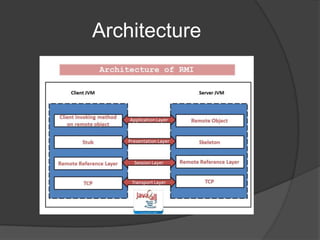
Architecture
Working of RMI
Marshalling
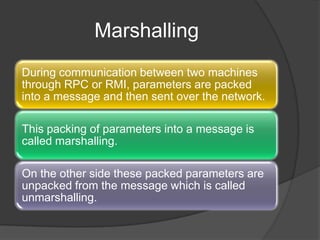
During communication between two machines
through RPC or RMI, parameters are packed
into a message and then sent over the network.
This packing of parameters into a message is
called marshalling.
On the other side these packed parameters are
unpacked from the message which is called
unmarshalling.
RMI Application Development
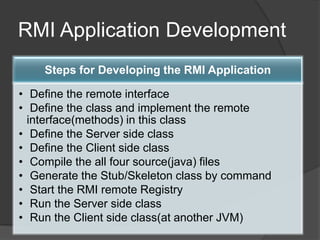
Steps for Developing the RMI Application
• Define the remote interface
• Define the class and implement the remote
interface(methods) in this class
• Define the Server side class
• Define the Client side class
• Compile the all four source(java) files
• Generate the Stub/Skeleton class by command
• Start the RMI remote Registry
• Run the Server side class
• Run the Client side class(at another JVM)
(1) Define the remote interface:
 This is an interface in which we are declaring
the methods as per our logic and further
these methods will be called using RMI.
 (2) Define the class and implement the
remote interface(methods) in this class:
 The next step is to implement the interface
so define a class(ServerImpl.java) and
implements the interface(Vinterface.java) so
now in the class we must define the body of
those methods.This class run on the remote
server.
(3) Define the Server side class:
 The server must bind its name to the registry by passing the
reference link with remote object name.
 For that here we are going to use rebind method which has two
arguments:
 The first parameter is a URL to a registry that includes the name
of the application and The second parameter is an object name
that is access remotely in between the client and server.
 This rebind method is a method of the Naming class which is
available in the java.rmi.* package.
 The server name is specified in URL as a application name and
here the name is (ServerImp) in our application.
Note:
 The general form of the URL:
 rmi://localhost:port/application_name
 Here, 1099 is the default RMI port and
127.0.0.1 is a localhost-ip address.
(4) Define the Client side class:
 To access an object remotely by client side
that is already bind at a server side by one
reference URL we use the lookup method
which has one argument that is a same
reference URL as already applied at server
side class.
 This lookup method is a method of the
Naming class which is available in the
java.rmi.* package.
(5) Compile the all four source(java) files:
 javac InterfaceFile.java
 javac InterfaceFileImpl.java
 javac Client.java
 javac Server.java
After compiled, in the folder we can see the four
class files such as
 InterfaceFile.class , InterfaceFileImpl.class
 Client.class , Server.class
(6) Generate the Stub/Skeleton class by
command:
 There is a command rmic by which we can
generate a Stub/Skeleton class.
 Syntax:
 rmic class_name
 Here the class_name is a java file in which
the all methods are defined so in this
application the class name
is ServerImpl.java file.
(7) Start the RMI remote Registry:
 The references of the objects are registered
into the RMI Registry So now you need to
start the RMI registry for that use the
command
 start rmiregistry
 So the system will open rmiregistry.exe (like
a blank command prompt)
(8) Run the Server side class:
 Now you need to run the RMI Server class.
(9) Run the Client side class(at another JVM):
 Now open a new command prompt for the client
because current command prompt working as a
server and finally run the RMI client class.
 Here Client.java file is a working as a Client so
finally run this fie.
 java Client
Demo time

Rmi

  • 1.
  • 2.
    Whats RMI ?? TheJava Remote Method Invocation Application Programming Interface (API), Java RMI, is a Java API that performs the object-oriented equivalent of remote procedure calls (RPC), with support for direct transfer of Java objects over a distributed network.
  • 3.
    RMI Vs RPC RPCis C based, and as such it has structured programming semantics, on the other side,  RMI is a Java based technology and it's object oriented and can be used for complex applications. With RPC you can just call remote functions exported into a server,  RMI you can have references to remote objects and invoke their methods, and also pass and return more remote object references that can be distributed among many JVM instances, so it's much more powerful.
  • 4.
    Sockets Vs RMI Ifyour programming games, chat programs, streaming media, file transfer use sockets and read/write bytes. You have tighter control over what is sent, you can optimize the streams, by buffering, or compressing date. If you programming business applications which require remote method calls, use RMI. Corba however would be useless for lets say, file transfer, or any streaming type app.
  • 5.
  • 6.
  • 7.
    Marshalling During communication betweentwo machines through RPC or RMI, parameters are packed into a message and then sent over the network. This packing of parameters into a message is called marshalling. On the other side these packed parameters are unpacked from the message which is called unmarshalling.
  • 8.
    RMI Application Development Stepsfor Developing the RMI Application • Define the remote interface • Define the class and implement the remote interface(methods) in this class • Define the Server side class • Define the Client side class • Compile the all four source(java) files • Generate the Stub/Skeleton class by command • Start the RMI remote Registry • Run the Server side class • Run the Client side class(at another JVM)
  • 9.
    (1) Define theremote interface:  This is an interface in which we are declaring the methods as per our logic and further these methods will be called using RMI.
  • 10.
     (2) Definethe class and implement the remote interface(methods) in this class:  The next step is to implement the interface so define a class(ServerImpl.java) and implements the interface(Vinterface.java) so now in the class we must define the body of those methods.This class run on the remote server.
  • 11.
    (3) Define theServer side class:  The server must bind its name to the registry by passing the reference link with remote object name.  For that here we are going to use rebind method which has two arguments:  The first parameter is a URL to a registry that includes the name of the application and The second parameter is an object name that is access remotely in between the client and server.  This rebind method is a method of the Naming class which is available in the java.rmi.* package.  The server name is specified in URL as a application name and here the name is (ServerImp) in our application.
  • 12.
    Note:  The generalform of the URL:  rmi://localhost:port/application_name  Here, 1099 is the default RMI port and 127.0.0.1 is a localhost-ip address.
  • 13.
    (4) Define theClient side class:  To access an object remotely by client side that is already bind at a server side by one reference URL we use the lookup method which has one argument that is a same reference URL as already applied at server side class.  This lookup method is a method of the Naming class which is available in the java.rmi.* package.
  • 14.
    (5) Compile theall four source(java) files:  javac InterfaceFile.java  javac InterfaceFileImpl.java  javac Client.java  javac Server.java After compiled, in the folder we can see the four class files such as  InterfaceFile.class , InterfaceFileImpl.class  Client.class , Server.class
  • 15.
    (6) Generate theStub/Skeleton class by command:  There is a command rmic by which we can generate a Stub/Skeleton class.  Syntax:  rmic class_name  Here the class_name is a java file in which the all methods are defined so in this application the class name is ServerImpl.java file.
  • 16.
    (7) Start theRMI remote Registry:  The references of the objects are registered into the RMI Registry So now you need to start the RMI registry for that use the command  start rmiregistry  So the system will open rmiregistry.exe (like a blank command prompt)
  • 17.
    (8) Run theServer side class:  Now you need to run the RMI Server class. (9) Run the Client side class(at another JVM):  Now open a new command prompt for the client because current command prompt working as a server and finally run the RMI client class.  Here Client.java file is a working as a Client so finally run this fie.  java Client
  • 18.