RMI


      http://www.java2all.com
Chapter 1


RMI Introduction


                   http://www.java2all.com
RMI Introduction:


                    http://www.java2all.com
RMI stands for “Remote Method
Invocation” means communicating the object
across the network.
    RMI is a one type of structure or system
that allows an object running in one Java
virtual machine (Client) to invoke methods on
an object running in another Java virtual
machine (Server).This object is called a
Remote Object and such a system is also
called RMI Distributed Application.

                                    http://www.java2all.com
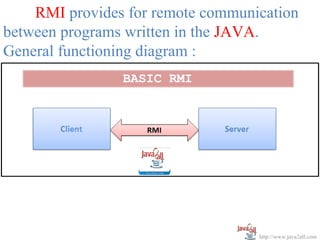
RMI provides for remote communication
between programs written in the JAVA.
General functioning diagram :


                                   http://www.java2all.com
The complete RMI system has a FOUR layer,

(1)   Application Layer
(2)   Proxy Layer
(3)   Remote Reference Layer
(4)   Transport Layer

Mainly the RMI application contains the THREE
components,
(1) RMI Server
(2) RMI Client
(3) RMI Registry

                                        http://www.java2all.com
RMI Architecture:


                    http://www.java2all.com
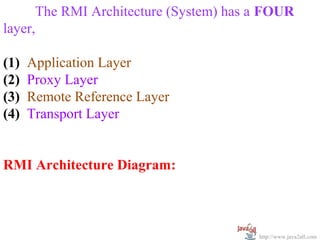
The RMI Architecture (System) has a FOUR
layer,

(1)   Application Layer
(2)   Proxy Layer
(3)   Remote Reference Layer
(4)   Transport Layer


RMI Architecture Diagram:


                                        http://www.java2all.com
http://www.java2all.com
(1) Application Layer:
      It’s a responsible for the actual logic
(implementation) of the client and server applications.
Generally at the server side class contain
implementation logic and also apply the reference to
the appropriate object as per the requirement of the
logic in application.
(2) Proxy Layer:
      It’s also called the “Stub/Skeleton layer”.
      A Stub class is a client side proxy handles the
remote objects which are getting from the reference.
A Skeleton class is a server side proxy that set the
reference to the objects which are communicates with
the Stub.                                     http://www.java2all.com
(3) Remote Reference Layer (RRL):
       It’s a responsible for manage the references
made by the client to the remote object on the server
so it is available on both JVM (Client and Server).
The Client side RRL receives the request for methods
from the Stub that is transferred into byte stream
process called serialization (Marshaling) and then
these data are send to the Server side RRL.

     The Server side RRL doing reverse process and
convert the binary data into object. This process called
deserialization or unmarshaling and then sent to the
Skeleton class.
                                              http://www.java2all.com
(4) Transport Layer:

       It’s also called the “Connection layer”.
It’s a responsible for the managing the existing
connection and also setting up new connections.
So it is a work like a link between the RRL on the
Client side and the RRL on the Server side.


                                            http://www.java2all.com
RMI Components:


                  http://www.java2all.com
The RMI application contains the THREE components

(1) RMI Server
(2) RMI Client
(3) RMI Registry


                                        http://www.java2all.com
http://www.java2all.com
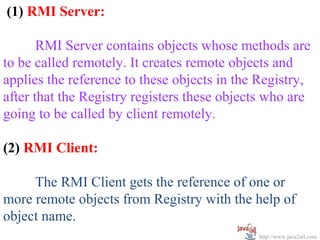
(1) RMI Server:

       RMI Server contains objects whose methods are
to be called remotely. It creates remote objects and
applies the reference to these objects in the Registry,
after that the Registry registers these objects who are
going to be called by client remotely.

(2) RMI Client:

     The RMI Client gets the reference of one or
more remote objects from Registry with the help of
object name.
                                             http://www.java2all.com
Now, it can be invokes the methods on the
remote object to access the services of the objects as
per the requirement of logic in RMI application.

       Once the client gets the reference of remote
object, the methods in the remote object are invoked
just like as the methods of a local object.

(3) RMI Registry:

In the Server side the reference of the object (which is
invoked remotely) is applied and after that this
reference is set in the RMI registry.
                                              http://www.java2all.com
When the Client call the method on this object,
it’s not directly call but it call by the reference which
is already set in the Registry so first get the object
from this reference which is available at RMI Registry
then after calls the methods as per the requirement of
logic in RMI application.


                                              http://www.java2all.com
RMI Registry:


                http://www.java2all.com
The RMI Registry is a naming service.
RMI server programs use this service to bind the
remote java object with the names.

      Clients executing on local or remote machines
retrieve the remote objects by their name registered
with the RMI registry and then execute methods on
the objects.

      RMI creates a remote proxy for that object and
sent it to clients.
      An object proxy contains the reference to an
object. In order to work with the RMI registry...
                                             http://www.java2all.com
1. Start registry by using following command
           start rmiregistry

       By default the port 1099 is used by RMI registry
to look up the remote objects. After the RMI registry
starts objects can bind to it.

2. Now in second step to bind the remote object with
the RMI registry, execute the server program.

3. To use the remote object execute the client
program.

                                             http://www.java2all.com
http://www.java2all.com
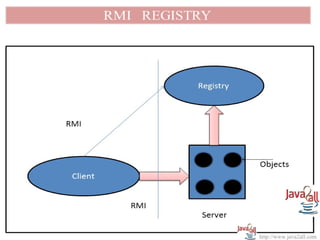
From the figure we can see that server calls the
RMI registry to map a name with a remote object
represented by black circle.

     By using the name of remote objects in the
server's registry client program locate the remote
object and then methods are called on the remote
object by the client program.


                                             http://www.java2all.com

Java rmi

  • 1.
    RMI http://www.java2all.com
  • 2.
    Chapter 1 RMI Introduction http://www.java2all.com
  • 3.
    RMI Introduction: http://www.java2all.com
  • 4.
    RMI stands for“Remote Method Invocation” means communicating the object across the network. RMI is a one type of structure or system that allows an object running in one Java virtual machine (Client) to invoke methods on an object running in another Java virtual machine (Server).This object is called a Remote Object and such a system is also called RMI Distributed Application. http://www.java2all.com
  • 5.
    RMI provides forremote communication between programs written in the JAVA. General functioning diagram : http://www.java2all.com
  • 6.
    The complete RMIsystem has a FOUR layer, (1) Application Layer (2) Proxy Layer (3) Remote Reference Layer (4) Transport Layer Mainly the RMI application contains the THREE components, (1) RMI Server (2) RMI Client (3) RMI Registry http://www.java2all.com
  • 7.
    RMI Architecture: http://www.java2all.com
  • 8.
    The RMI Architecture(System) has a FOUR layer, (1) Application Layer (2) Proxy Layer (3) Remote Reference Layer (4) Transport Layer RMI Architecture Diagram: http://www.java2all.com
  • 9.
  • 10.
    (1) Application Layer: It’s a responsible for the actual logic (implementation) of the client and server applications. Generally at the server side class contain implementation logic and also apply the reference to the appropriate object as per the requirement of the logic in application. (2) Proxy Layer: It’s also called the “Stub/Skeleton layer”. A Stub class is a client side proxy handles the remote objects which are getting from the reference. A Skeleton class is a server side proxy that set the reference to the objects which are communicates with the Stub. http://www.java2all.com
  • 11.
    (3) Remote ReferenceLayer (RRL): It’s a responsible for manage the references made by the client to the remote object on the server so it is available on both JVM (Client and Server). The Client side RRL receives the request for methods from the Stub that is transferred into byte stream process called serialization (Marshaling) and then these data are send to the Server side RRL. The Server side RRL doing reverse process and convert the binary data into object. This process called deserialization or unmarshaling and then sent to the Skeleton class. http://www.java2all.com
  • 12.
    (4) Transport Layer: It’s also called the “Connection layer”. It’s a responsible for the managing the existing connection and also setting up new connections. So it is a work like a link between the RRL on the Client side and the RRL on the Server side. http://www.java2all.com
  • 13.
    RMI Components: http://www.java2all.com
  • 14.
    The RMI applicationcontains the THREE components (1) RMI Server (2) RMI Client (3) RMI Registry http://www.java2all.com
  • 15.
  • 16.
    (1) RMI Server: RMI Server contains objects whose methods are to be called remotely. It creates remote objects and applies the reference to these objects in the Registry, after that the Registry registers these objects who are going to be called by client remotely. (2) RMI Client: The RMI Client gets the reference of one or more remote objects from Registry with the help of object name. http://www.java2all.com
  • 17.
    Now, it canbe invokes the methods on the remote object to access the services of the objects as per the requirement of logic in RMI application. Once the client gets the reference of remote object, the methods in the remote object are invoked just like as the methods of a local object. (3) RMI Registry: In the Server side the reference of the object (which is invoked remotely) is applied and after that this reference is set in the RMI registry. http://www.java2all.com
  • 18.
    When the Clientcall the method on this object, it’s not directly call but it call by the reference which is already set in the Registry so first get the object from this reference which is available at RMI Registry then after calls the methods as per the requirement of logic in RMI application. http://www.java2all.com
  • 19.
    RMI Registry: http://www.java2all.com
  • 20.
    The RMI Registryis a naming service. RMI server programs use this service to bind the remote java object with the names. Clients executing on local or remote machines retrieve the remote objects by their name registered with the RMI registry and then execute methods on the objects. RMI creates a remote proxy for that object and sent it to clients. An object proxy contains the reference to an object. In order to work with the RMI registry... http://www.java2all.com
  • 21.
    1. Start registryby using following command start rmiregistry By default the port 1099 is used by RMI registry to look up the remote objects. After the RMI registry starts objects can bind to it. 2. Now in second step to bind the remote object with the RMI registry, execute the server program. 3. To use the remote object execute the client program. http://www.java2all.com
  • 22.
  • 23.
    From the figurewe can see that server calls the RMI registry to map a name with a remote object represented by black circle. By using the name of remote objects in the server's registry client program locate the remote object and then methods are called on the remote object by the client program. http://www.java2all.com