Introduction To RMIBySwarup Kulkarni(MCA-II, VIT, Pune)
Remote Method InvocationRMI - Remote Method InvocationAllows to invoke a method of a Java object that executes on another machine.Important feature, because it allows  to build distributed applications.Lets discus a simple Client/Server application using RMI.The server receives a request from client and processes itIn this req. two numbers are specifiedServer add these numbers and returns it3/11/20092RMI - Swarup Kulkarni
Step 1: Enter and Compile the Source CodeWe use four source files -First source file:RmiDemoIntf.javaDefines remote interface, a remote method,All remote interfaces must inherit Remote interfaceRemote interface is a part of java.rmi.remoteDefines no members ,purpose is to indicate that interface uses remote methods.All remote methods can throw RemoteException3/11/20093RMI - Swarup Kulkarni
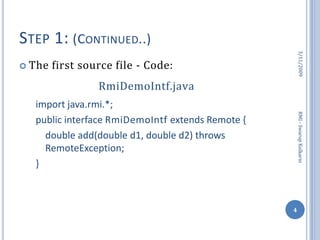
Step 1: (Continued..)The first source file - Code:RmiDemoIntf.javaimport java.rmi.*;public interface RmiDemoIntf extends Remote {	double add(double d1, double d2) throws RemoteException;}3/11/20094RMI - Swarup Kulkarni
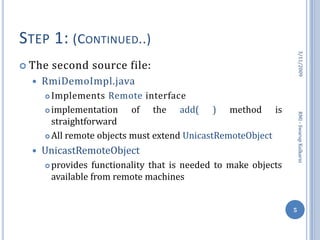
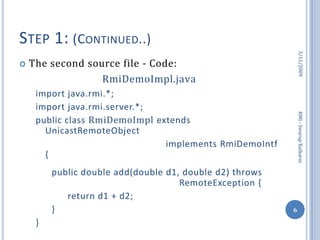
Step 1: (Continued..)The second source file:RmiDemoImpl.javaImplements Remote interfaceimplementation of the add( ) method is straightforwardAll remote objects must extend UnicastRemoteObjectUnicastRemoteObjectprovides functionality that is needed to make objects available from remote machines3/11/20095RMI - Swarup Kulkarni
Step 1: (Continued..)The second source file - Code:RmiDemoImpl.javaimport java.rmi.*;import java.rmi.server.*;public class RmiDemoImpl extends UnicastRemoteObject					       implements RmiDemoIntf{public double add(double d1, double d2) throws 					RemoteException {return d1 + d2;}}3/11/20096RMI - Swarup Kulkarni
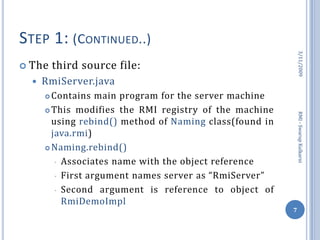
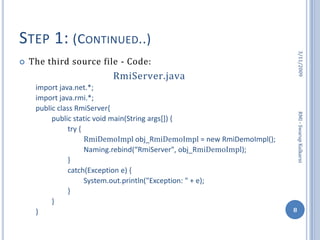
Step 1: (Continued..)The third source file:RmiServer.javaContains main program for the server machineThis modifies the RMI registry of the machine using rebind() method of Naming class(found in java.rmi)Naming.rebind()Associates name with the object reference
First argument names server as “RmiServer”
Second argument is reference to object of  RmiDemoImpl3/11/20097RMI - Swarup Kulkarni
Step 1: (Continued..)The third source file - Code:RmiServer.javaimport java.net.*;import java.rmi.*;public class RmiServer{public static void main(String args[]) {try {RmiDemoImpl obj_RmiDemoImpl = new RmiDemoImpl();Naming.rebind(“RmiServer", obj_RmiDemoImpl);}catch(Exception e) {System.out.println("Exception: " + e);}}}3/11/20098RMI - Swarup Kulkarni
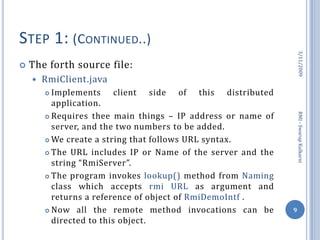
Step 1: (Continued..)The forth source file:RmiClient.javaImplements client side of this distributed application.Requires thee main things – IP address or name of server, and the two numbers to be added.We create a string that follows URL syntax.The URL includes IP or Name of the server and the string “RmiServer”.The program invokes lookup() method from Naming class which accepts rmi URL as argument and returns a reference of object of RmiDemoIntf .Now all the remote method invocations can be directed to this object.3/11/20099RMI - Swarup Kulkarni
Step 1: (Continued..)The forth source file - Code:RmiClient.javaimport java.rmi.*;public class RmiClient {public static void main(String args[]) {try {double d1 = 24.73;double d2 = 11.12;String RmiDemoURL = "rmi://" + “127.0.0.1” + "/RmiServer";//127.0.0.1 is loopback address replace it with server IP/nameRmiDemoIntf obj = 	(RmiDemoIntf)Naming.lookup(RmiDemoURL);3/11/200910RMI - Swarup Kulkarni
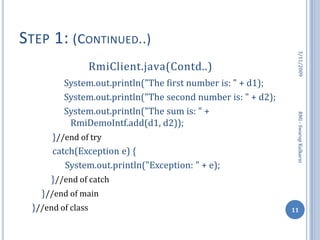
Step 1: (Continued..)RmiClient.java(Contd..)System.out.println("The first number is: " + d1);System.out.println("The second number is: " + d2);System.out.println("The sum is: " + RmiDemoIntf.add(d1, d2));	     }//end of try	     catch(Exception e) {	System.out.println("Exception: " + e);	}//end of catch	}//end of main}//end of class3/11/200911RMI - Swarup Kulkarni
Step 2: Generate Stubs and SkeletonsBefore using  client and  server we have to generate stub and skeleton.Stub resides on client machine.Remote method calls initiated by client are directed to stub.A remote method can have simple arguments or objects as arguments.Objects may have reference to other objects, to send whole information to server the objects in arguments must be serialized.Skeletons are not required by Java 2.(Needed for compatibility with java1.1)Skeleton resides on sever machine, when it receives request, it performs deserialization and invokes appropriate method.In case of response to client, the process works reverse.3/11/200912RMI - Swarup Kulkarni
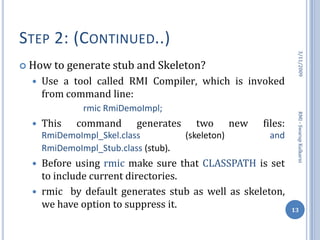
Step 2: (Continued..)How to generate stub and Skeleton?Use a tool called RMI Compiler, which is invoked from command line:		rmic RmiDemoImpl;This command generates two new files: RmiDemoImpl_Skel.class (skeleton) and RmiDemoImpl_Stub.class (stub).Before using rmic make sure that CLASSPATH is set to include current directories.rmic  by default generates stub as well as skeleton, we have option to suppress it.3/11/200913RMI - Swarup Kulkarni
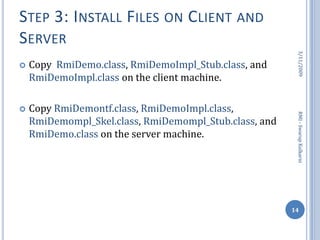
Step 3: Install Files on Client and ServerCopy  RmiDemo.class, RmiDemoImpl_Stub.class, and RmiDemoImpl.class on the client machine.Copy RmiDemontf.class, RmiDemoImpl.class, RmiDemompl_Skel.class, RmiDemompl_Stub.class, and RmiDemo.class on the server machine.3/11/200914RMI - Swarup Kulkarni
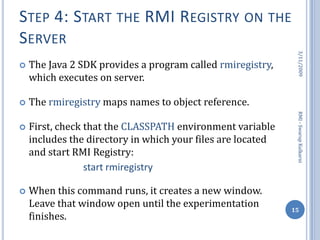
Step 4: Start the RMI Registry on the ServerThe Java 2 SDK provides a program called rmiregistry, which executes on server.The rmiregistry maps names to object reference.First, check that the CLASSPATH environment variable includes the directory in which your files are located and start RMI Registry:			start rmiregistryWhen this command runs, it creates a new window. Leave that window open until the experimentation finishes.3/11/200915RMI - Swarup Kulkarni

Introduction To Rmi

  • 1.
    Introduction To RMIBySwarupKulkarni(MCA-II, VIT, Pune)
  • 2.
    Remote Method InvocationRMI- Remote Method InvocationAllows to invoke a method of a Java object that executes on another machine.Important feature, because it allows to build distributed applications.Lets discus a simple Client/Server application using RMI.The server receives a request from client and processes itIn this req. two numbers are specifiedServer add these numbers and returns it3/11/20092RMI - Swarup Kulkarni
  • 3.
    Step 1: Enterand Compile the Source CodeWe use four source files -First source file:RmiDemoIntf.javaDefines remote interface, a remote method,All remote interfaces must inherit Remote interfaceRemote interface is a part of java.rmi.remoteDefines no members ,purpose is to indicate that interface uses remote methods.All remote methods can throw RemoteException3/11/20093RMI - Swarup Kulkarni
  • 4.
    Step 1: (Continued..)Thefirst source file - Code:RmiDemoIntf.javaimport java.rmi.*;public interface RmiDemoIntf extends Remote { double add(double d1, double d2) throws RemoteException;}3/11/20094RMI - Swarup Kulkarni
  • 5.
    Step 1: (Continued..)Thesecond source file:RmiDemoImpl.javaImplements Remote interfaceimplementation of the add( ) method is straightforwardAll remote objects must extend UnicastRemoteObjectUnicastRemoteObjectprovides functionality that is needed to make objects available from remote machines3/11/20095RMI - Swarup Kulkarni
  • 6.
    Step 1: (Continued..)Thesecond source file - Code:RmiDemoImpl.javaimport java.rmi.*;import java.rmi.server.*;public class RmiDemoImpl extends UnicastRemoteObject implements RmiDemoIntf{public double add(double d1, double d2) throws RemoteException {return d1 + d2;}}3/11/20096RMI - Swarup Kulkarni
  • 7.
    Step 1: (Continued..)Thethird source file:RmiServer.javaContains main program for the server machineThis modifies the RMI registry of the machine using rebind() method of Naming class(found in java.rmi)Naming.rebind()Associates name with the object reference
  • 8.
    First argument namesserver as “RmiServer”
  • 9.
    Second argument isreference to object of RmiDemoImpl3/11/20097RMI - Swarup Kulkarni
  • 10.
    Step 1: (Continued..)Thethird source file - Code:RmiServer.javaimport java.net.*;import java.rmi.*;public class RmiServer{public static void main(String args[]) {try {RmiDemoImpl obj_RmiDemoImpl = new RmiDemoImpl();Naming.rebind(“RmiServer", obj_RmiDemoImpl);}catch(Exception e) {System.out.println("Exception: " + e);}}}3/11/20098RMI - Swarup Kulkarni
  • 11.
    Step 1: (Continued..)Theforth source file:RmiClient.javaImplements client side of this distributed application.Requires thee main things – IP address or name of server, and the two numbers to be added.We create a string that follows URL syntax.The URL includes IP or Name of the server and the string “RmiServer”.The program invokes lookup() method from Naming class which accepts rmi URL as argument and returns a reference of object of RmiDemoIntf .Now all the remote method invocations can be directed to this object.3/11/20099RMI - Swarup Kulkarni
  • 12.
    Step 1: (Continued..)Theforth source file - Code:RmiClient.javaimport java.rmi.*;public class RmiClient {public static void main(String args[]) {try {double d1 = 24.73;double d2 = 11.12;String RmiDemoURL = "rmi://" + “127.0.0.1” + "/RmiServer";//127.0.0.1 is loopback address replace it with server IP/nameRmiDemoIntf obj = (RmiDemoIntf)Naming.lookup(RmiDemoURL);3/11/200910RMI - Swarup Kulkarni
  • 13.
    Step 1: (Continued..)RmiClient.java(Contd..)System.out.println("Thefirst number is: " + d1);System.out.println("The second number is: " + d2);System.out.println("The sum is: " + RmiDemoIntf.add(d1, d2)); }//end of try catch(Exception e) { System.out.println("Exception: " + e); }//end of catch }//end of main}//end of class3/11/200911RMI - Swarup Kulkarni
  • 14.
    Step 2: GenerateStubs and SkeletonsBefore using client and server we have to generate stub and skeleton.Stub resides on client machine.Remote method calls initiated by client are directed to stub.A remote method can have simple arguments or objects as arguments.Objects may have reference to other objects, to send whole information to server the objects in arguments must be serialized.Skeletons are not required by Java 2.(Needed for compatibility with java1.1)Skeleton resides on sever machine, when it receives request, it performs deserialization and invokes appropriate method.In case of response to client, the process works reverse.3/11/200912RMI - Swarup Kulkarni
  • 15.
    Step 2: (Continued..)Howto generate stub and Skeleton?Use a tool called RMI Compiler, which is invoked from command line: rmic RmiDemoImpl;This command generates two new files: RmiDemoImpl_Skel.class (skeleton) and RmiDemoImpl_Stub.class (stub).Before using rmic make sure that CLASSPATH is set to include current directories.rmic by default generates stub as well as skeleton, we have option to suppress it.3/11/200913RMI - Swarup Kulkarni
  • 16.
    Step 3: InstallFiles on Client and ServerCopy RmiDemo.class, RmiDemoImpl_Stub.class, and RmiDemoImpl.class on the client machine.Copy RmiDemontf.class, RmiDemoImpl.class, RmiDemompl_Skel.class, RmiDemompl_Stub.class, and RmiDemo.class on the server machine.3/11/200914RMI - Swarup Kulkarni
  • 17.
    Step 4: Startthe RMI Registry on the ServerThe Java 2 SDK provides a program called rmiregistry, which executes on server.The rmiregistry maps names to object reference.First, check that the CLASSPATH environment variable includes the directory in which your files are located and start RMI Registry: start rmiregistryWhen this command runs, it creates a new window. Leave that window open until the experimentation finishes.3/11/200915RMI - Swarup Kulkarni