Introduction to Remote
Method Invocation (RMI)
Chris Matthews
eLink Business Innovations, Inc
Notices
• The following terms are copyrights or trademarks in US
and/or other countries.
- Java
- Sun Microsystems
Introduction to Java RMI
• What is Java RMI ?
• Features of Java RMI ?
• Who would use Java RMI ?
• How do I use Java RMI ?
• Additional Resources .
• Questions ?
What is Java RMI ?
• Java Remote Method Invocation (RMI) is a
distributive system programming interface
introduced in JDK 1.1
Features of Java RMI
• Object Parameter Passing via Serialization
• Built in Security Model
• Platform Independence (Write Once Run Anywhere 100%
Pure Java)
• Client/Server architecture
• Support included in JDK with no external dependencies
• Transport layer is TCP/IP based
Features of Java RMI (continued)
• Distributive Garbage Collector
• Legacy connection can be supported via Corba IIOP,
Java Native Interface (JNI), JDBC, J2EE Services like
(JNDI, JMS) or JDO.
Who Would Use Java RMI ?
• Anyone wanting to use the benefits of Java to do
distributive computing development on the network
– Developers wanting to externalize their local classes to
network computing environment
– Developers writing distributive computing applications
or parallel processing applications
– Server developers wanting better interactivity clients
and/or other servers, like EJBs.
How Do I Use Java RMI ?
• The Java RMI architecture
• Components of Java RMI
• Java Interfaces and how they relate to RMI
• RMI and Java Serialization
• Building an RMI Sample Client/Server Application
• Distributive garbage collection
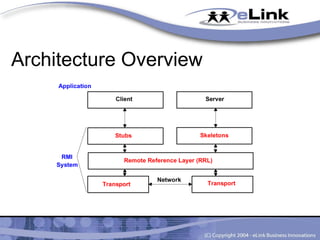
Architecture Overview
RMI Layers
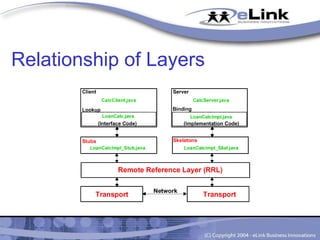
• Stubs/Skeleton Interface
• Remote Reference Layer (RRL)
• Java Remote Method Protocol (JRMP)
• Transport Layer (TCP/IP)
Java Interfaces
• Interfaces are native to the Java Language
• Interfaces allow externalization of methods without
exposing the code
• Java RMI utilizes interfaces for exposing distributed
methods to clients
Serialization of Objects
• Serialization is part of the Java Language
• RMI uses the power of serialization pass objects by value.
It “flattens” the object into a byte stream to transmit
between the client/server.
• Local objects passed as parameters or returned from
methods are done by copy and not by reference.
Serialization of Objects (continued)
• Remote objects are passed by reference and the remote
reference layer manages the liveliness of the objects
Create a RMI Application
• How do I build an application ?
Relationship of Layers
Interface Definitions
• Defining the remote interface
• Managing exceptions on the interface
• See LoanCalc.java for interface definitions.
Interface Implementation
• Adding the implementation code to support the remote
interface
• Extend the UnicastRemoteObject class
• Managing remote exceptions
• See LoanCalcImpl.java for interface implementation
Stubs & Skeleton Generation
• Use the rmic compiler to compile and generate the stubs &
skeletons form LoanCalcImpl.java
• See LoanCalcImpl_Stub.class and
LoanCalcImpl_Skel.class as generated files
• Use the –keepgenerated flag on the rmic compiler to
generate the .java files LoanCalcImpl_Stub.java and
LoanCalcImpl_Skel.java
Creating the Server
• Extending the RMI Interface
• Registering a security manager for the server
• Creating an instance of the RMI registry
• Binding a name to a remote object for registry lookup by
the client.
• See CalcServer.java for more details.
Creating The Client
• Registering a Security Manager
– Applications require registration of a security manager
– Applets have build in security registration via the
browser or applet viewer.
• Name lookup of remote object
• Execute routines on the remote server using defined
externalized interfaces
• See CalcClient.java for the client code
Building the RMI Sample
• Compile interface implementation class
– javac LoanCalcImpl.java
• Create stubs/skeletons using the implementation
class
– rmic LoanCalcImpl.java
• Compile client and server classes
– javac CalcClient.java
– javac CalcServer.java
Starting the RMI Sample
• Starting the registry
• Starting the server
• Starting the client
RMI Registry
• RMI Registry provides name lookup for clients to resolve
the server’s remote objects
• Two ways to start the RMI Registry
– Command Line
• rmiregistry (optional port:Default is 1099)
– Dynamically with static method
• LocateRegistry.createRegistry( port )
Starting the Server
• Starts the RMI Server
– java CalcServer
Starting the Client
• Start the client, passing it the URL name of the server
along with the remote object to reference
– java CalcClient //www.server.com/objectname
Distributive Garbage Collector
• RMI runtime garbage collector manages liveliness of the
remote object. When the object becomes “out of scope”
the server’s distributive garbage collector flags the object.
RMI Conclusion
• It is simple to develop distributive computing applications
• RMI is designed to be a natural interface for writing
distributive computing applications in Java using existing
features of the language
• It is a cross platform solution for distributive computing
development
Advanced Topics on RMI
• Externalization of Objects without a registry
• Closed vs. Open RMI systems
• Security in RMI
• Distributive Garbage Collector in Detail
• RMI Transaction Log
• IIOP instead of JRMP for RMI Protocol
• Persistent References
• Other RMI Enhancements
Additional References
• RMI – Javasoft
– http://www.javasoft.com
• Orielly - Java Network Programming,
– ISBN 1-56592-227-1
• RMI/IIOP JavaWorld
– http://www.javaworld.com
• IIOP – Object Management Group (OMG) CORBA
– http://www.omg.org
Questions ?

Introduction to Remote Method Invocation (RMI)

  • 1.
    Introduction to Remote MethodInvocation (RMI) Chris Matthews eLink Business Innovations, Inc
  • 2.
    Notices • The followingterms are copyrights or trademarks in US and/or other countries. - Java - Sun Microsystems
  • 3.
    Introduction to JavaRMI • What is Java RMI ? • Features of Java RMI ? • Who would use Java RMI ? • How do I use Java RMI ? • Additional Resources . • Questions ?
  • 4.
    What is JavaRMI ? • Java Remote Method Invocation (RMI) is a distributive system programming interface introduced in JDK 1.1
  • 5.
    Features of JavaRMI • Object Parameter Passing via Serialization • Built in Security Model • Platform Independence (Write Once Run Anywhere 100% Pure Java) • Client/Server architecture • Support included in JDK with no external dependencies • Transport layer is TCP/IP based
  • 6.
    Features of JavaRMI (continued) • Distributive Garbage Collector • Legacy connection can be supported via Corba IIOP, Java Native Interface (JNI), JDBC, J2EE Services like (JNDI, JMS) or JDO.
  • 7.
    Who Would UseJava RMI ? • Anyone wanting to use the benefits of Java to do distributive computing development on the network – Developers wanting to externalize their local classes to network computing environment – Developers writing distributive computing applications or parallel processing applications – Server developers wanting better interactivity clients and/or other servers, like EJBs.
  • 8.
    How Do IUse Java RMI ? • The Java RMI architecture • Components of Java RMI • Java Interfaces and how they relate to RMI • RMI and Java Serialization • Building an RMI Sample Client/Server Application • Distributive garbage collection
  • 9.
  • 10.
    RMI Layers • Stubs/SkeletonInterface • Remote Reference Layer (RRL) • Java Remote Method Protocol (JRMP) • Transport Layer (TCP/IP)
  • 11.
    Java Interfaces • Interfacesare native to the Java Language • Interfaces allow externalization of methods without exposing the code • Java RMI utilizes interfaces for exposing distributed methods to clients
  • 12.
    Serialization of Objects •Serialization is part of the Java Language • RMI uses the power of serialization pass objects by value. It “flattens” the object into a byte stream to transmit between the client/server. • Local objects passed as parameters or returned from methods are done by copy and not by reference.
  • 13.
    Serialization of Objects(continued) • Remote objects are passed by reference and the remote reference layer manages the liveliness of the objects
  • 14.
    Create a RMIApplication • How do I build an application ?
  • 15.
  • 16.
    Interface Definitions • Definingthe remote interface • Managing exceptions on the interface • See LoanCalc.java for interface definitions.
  • 17.
    Interface Implementation • Addingthe implementation code to support the remote interface • Extend the UnicastRemoteObject class • Managing remote exceptions • See LoanCalcImpl.java for interface implementation
  • 18.
    Stubs & SkeletonGeneration • Use the rmic compiler to compile and generate the stubs & skeletons form LoanCalcImpl.java • See LoanCalcImpl_Stub.class and LoanCalcImpl_Skel.class as generated files • Use the –keepgenerated flag on the rmic compiler to generate the .java files LoanCalcImpl_Stub.java and LoanCalcImpl_Skel.java
  • 19.
    Creating the Server •Extending the RMI Interface • Registering a security manager for the server • Creating an instance of the RMI registry • Binding a name to a remote object for registry lookup by the client. • See CalcServer.java for more details.
  • 20.
    Creating The Client •Registering a Security Manager – Applications require registration of a security manager – Applets have build in security registration via the browser or applet viewer. • Name lookup of remote object • Execute routines on the remote server using defined externalized interfaces • See CalcClient.java for the client code
  • 21.
    Building the RMISample • Compile interface implementation class – javac LoanCalcImpl.java • Create stubs/skeletons using the implementation class – rmic LoanCalcImpl.java • Compile client and server classes – javac CalcClient.java – javac CalcServer.java
  • 22.
    Starting the RMISample • Starting the registry • Starting the server • Starting the client
  • 23.
    RMI Registry • RMIRegistry provides name lookup for clients to resolve the server’s remote objects • Two ways to start the RMI Registry – Command Line • rmiregistry (optional port:Default is 1099) – Dynamically with static method • LocateRegistry.createRegistry( port )
  • 24.
    Starting the Server •Starts the RMI Server – java CalcServer
  • 25.
    Starting the Client •Start the client, passing it the URL name of the server along with the remote object to reference – java CalcClient //www.server.com/objectname
  • 26.
    Distributive Garbage Collector •RMI runtime garbage collector manages liveliness of the remote object. When the object becomes “out of scope” the server’s distributive garbage collector flags the object.
  • 27.
    RMI Conclusion • Itis simple to develop distributive computing applications • RMI is designed to be a natural interface for writing distributive computing applications in Java using existing features of the language • It is a cross platform solution for distributive computing development
  • 28.
    Advanced Topics onRMI • Externalization of Objects without a registry • Closed vs. Open RMI systems • Security in RMI • Distributive Garbage Collector in Detail • RMI Transaction Log • IIOP instead of JRMP for RMI Protocol • Persistent References • Other RMI Enhancements
  • 29.
    Additional References • RMI– Javasoft – http://www.javasoft.com • Orielly - Java Network Programming, – ISBN 1-56592-227-1 • RMI/IIOP JavaWorld – http://www.javaworld.com • IIOP – Object Management Group (OMG) CORBA – http://www.omg.org
  • 30.