Download free for 30 days
Sign in
Upload
Language (EN)
Support
Business
Mobile
Social Media
Marketing
Technology
Art & Photos
Career
Design
Education
Presentations & Public Speaking
Government & Nonprofit
Healthcare
Internet
Law
Leadership & Management
Automotive
Engineering
Software
Recruiting & HR
Retail
Sales
Services
Science
Small Business & Entrepreneurship
Food
Environment
Economy & Finance
Data & Analytics
Investor Relations
Sports
Spiritual
News & Politics
Travel
Self Improvement
Real Estate
Entertainment & Humor
Health & Medicine
Devices & Hardware
Lifestyle
Change Language
Language
English
Español
Português
Français
Deutsche
Cancel
Save
EN
Uploaded by
幹雄 小川
PPTX, PDF
1,567 views
RでKaggleの登竜門に挑戦
Kaggleのtitanic問題をRを使って予測するまでの一連の手順
Data & Analytics
◦
Read more
4
Save
Share
Embed
Embed presentation
Download
Downloaded 222 times
1
/ 49
2
/ 49
3
/ 49
4
/ 49
5
/ 49
6
/ 49
7
/ 49
8
/ 49
9
/ 49
10
/ 49
11
/ 49
12
/ 49
13
/ 49
14
/ 49
15
/ 49
16
/ 49
17
/ 49
18
/ 49
19
/ 49
20
/ 49
21
/ 49
22
/ 49
23
/ 49
24
/ 49
25
/ 49
26
/ 49
27
/ 49
28
/ 49
29
/ 49
30
/ 49
31
/ 49
32
/ 49
33
/ 49
34
/ 49
35
/ 49
36
/ 49
37
/ 49
38
/ 49
39
/ 49
40
/ 49
41
/ 49
42
/ 49
43
/ 49
44
/ 49
45
/ 49
46
/ 49
47
/ 49
48
/ 49
49
/ 49
More Related Content
PPTX
クラウドから始めるRのビッグデータ分析- Oracle R Enterprise in Cloud
by
幹雄 小川
PPTX
機械学習ハンズオン
by
幹雄 小川
PPTX
Hcm cloudをpaasでカスタマイズ
by
幹雄 小川
PDF
実はDatabase cloudだけで実現できる巷で噂の機械学習とは?
by
Kazuki Nakajima
PDF
Deep Dive into Spark SQL with Advanced Performance Tuning
by
Takuya UESHIN
PDF
hscj2019_ishizaki_public
by
Kazuaki Ishizaki
PDF
Oracle Cloud Developers Meetup@東京
by
tuchimur
PDF
ゼロから始めるSparkSQL徹底活用!
by
Nagato Kasaki
クラウドから始めるRのビッグデータ分析- Oracle R Enterprise in Cloud
by
幹雄 小川
機械学習ハンズオン
by
幹雄 小川
Hcm cloudをpaasでカスタマイズ
by
幹雄 小川
実はDatabase cloudだけで実現できる巷で噂の機械学習とは?
by
Kazuki Nakajima
Deep Dive into Spark SQL with Advanced Performance Tuning
by
Takuya UESHIN
hscj2019_ishizaki_public
by
Kazuaki Ishizaki
Oracle Cloud Developers Meetup@東京
by
tuchimur
ゼロから始めるSparkSQL徹底活用!
by
Nagato Kasaki
What's hot
PDF
Spark/MapReduceの 機械学習ライブラリ比較検証
by
Recruit Technologies
PDF
1000台規模のHadoopクラスタをHive/Tezアプリケーションにあわせてパフォーマンスチューニングした話
by
Yahoo!デベロッパーネットワーク
PDF
(LT)Spark and Cassandra
by
datastaxjp
PDF
Java8 Stream APIとApache SparkとAsakusa Frameworkの類似点・相違点
by
hishidama
PPSX
HBaseとSparkでセンサーデータを有効活用 #hbasejp
by
FwardNetwork
PDF
Sparkのクエリ処理系と周辺の話題
by
Takeshi Yamamuro
PPTX
Oracle APEX 概要
by
Yosuke Arai
PDF
HiveとImpalaのおいしいとこ取り
by
Yukinori Suda
PDF
レコメンドバッチ高速化に向けたSpark/MapReduceの機械学習ライブラリ比較検証
by
Recruit Technologies
PDF
Sparkを用いたビッグデータ解析 〜 前編 〜
by
x1 ichi
PPTX
sparksql-hive-bench-by-nec-hwx-at-hcj16
by
Yifeng Jiang
PDF
Sparkによる GISデータを題材とした時系列データ処理 (Hadoop / Spark Conference Japan 2016 講演資料)
by
Hadoop / Spark Conference Japan
PPTX
Struggle against crossdomain data complexity in Recruit Group
by
DataWorks Summit/Hadoop Summit
PDF
SASとHadoopとの連携 2015
by
SAS Institute Japan
PDF
Impala データサイエンティストのための 高速大規模分散基盤 #tokyowebmining
by
Sho Shimauchi
PPTX
Pythonで入門するApache Spark at PyCon2016
by
Tatsuya Atsumi
PDF
2016-02-08 Spark MLlib Now and Beyond@Spark Conference Japan 2016
by
Yu Ishikawa
PDF
基幹業務もHadoop(EMR)で!!のその後
by
Keigo Suda
PDF
Spot Instance + Spark + MLlibで実現する簡単低コスト機械学習
by
Katsushi Yamashita
PDF
Spark Streamingを活用したシステムの検証結果と設計時のノウハウ
by
Future Of Data Japan
Spark/MapReduceの 機械学習ライブラリ比較検証
by
Recruit Technologies
1000台規模のHadoopクラスタをHive/Tezアプリケーションにあわせてパフォーマンスチューニングした話
by
Yahoo!デベロッパーネットワーク
(LT)Spark and Cassandra
by
datastaxjp
Java8 Stream APIとApache SparkとAsakusa Frameworkの類似点・相違点
by
hishidama
HBaseとSparkでセンサーデータを有効活用 #hbasejp
by
FwardNetwork
Sparkのクエリ処理系と周辺の話題
by
Takeshi Yamamuro
Oracle APEX 概要
by
Yosuke Arai
HiveとImpalaのおいしいとこ取り
by
Yukinori Suda
レコメンドバッチ高速化に向けたSpark/MapReduceの機械学習ライブラリ比較検証
by
Recruit Technologies
Sparkを用いたビッグデータ解析 〜 前編 〜
by
x1 ichi
sparksql-hive-bench-by-nec-hwx-at-hcj16
by
Yifeng Jiang
Sparkによる GISデータを題材とした時系列データ処理 (Hadoop / Spark Conference Japan 2016 講演資料)
by
Hadoop / Spark Conference Japan
Struggle against crossdomain data complexity in Recruit Group
by
DataWorks Summit/Hadoop Summit
SASとHadoopとの連携 2015
by
SAS Institute Japan
Impala データサイエンティストのための 高速大規模分散基盤 #tokyowebmining
by
Sho Shimauchi
Pythonで入門するApache Spark at PyCon2016
by
Tatsuya Atsumi
2016-02-08 Spark MLlib Now and Beyond@Spark Conference Japan 2016
by
Yu Ishikawa
基幹業務もHadoop(EMR)で!!のその後
by
Keigo Suda
Spot Instance + Spark + MLlibで実現する簡単低コスト機械学習
by
Katsushi Yamashita
Spark Streamingを活用したシステムの検証結果と設計時のノウハウ
by
Future Of Data Japan
Viewers also liked
PPTX
R超入門機械学習をはじめよう
by
幹雄 小川
PDF
CTFはとんでもないものを 盗んでいきました。私の時間です…
by
Hiromu Yakura
PDF
できない英語を駆使してKaggleに挑戦してみた
by
Keisuke Tokuda
PPTX
TokyoR #57 初心者セッション
by
kotora_0507
PPTX
実践:今日から使えるビックデータハンズオン あなたはタイタニック号で生き残れるか?知的生産性UPのための機械学習超入門
by
健一 茂木
PDF
PyData Tokyo Tutorial & Hackathon #1
by
Akira Shibata
PDF
機械学習 入門
by
Hayato Maki
PDF
Kaggle bosch presentation material for Kaggle Tokyo Meetup #2
by
Keisuke Hosaka
PDF
Kaggle boschコンペ振り返り
by
Keisuke Hosaka
PDF
Rstudio事始め
by
Takashi Yamane
PDF
160924 Deep Learning Tuningathon
by
Takanori Ogata
PDF
エクセルで統計分析 統計プログラムHADについて
by
Hiroshi Shimizu
PDF
Pythonで動かして学ぶ機械学習入門_予測モデルを作ってみよう
by
洋資 堅田
PDF
Information sharing and Experience consistency at Cookpad mobile application
by
ichiko_revjune
PDF
パッケージングの今
by
Atsushi Odagiri
PDF
Pythonではじめる競技プログラミング
by
cocodrips
PDF
2017年3月版データマエショリスト入門
by
Yuya Matsumura
R超入門機械学習をはじめよう
by
幹雄 小川
CTFはとんでもないものを 盗んでいきました。私の時間です…
by
Hiromu Yakura
できない英語を駆使してKaggleに挑戦してみた
by
Keisuke Tokuda
TokyoR #57 初心者セッション
by
kotora_0507
実践:今日から使えるビックデータハンズオン あなたはタイタニック号で生き残れるか?知的生産性UPのための機械学習超入門
by
健一 茂木
PyData Tokyo Tutorial & Hackathon #1
by
Akira Shibata
機械学習 入門
by
Hayato Maki
Kaggle bosch presentation material for Kaggle Tokyo Meetup #2
by
Keisuke Hosaka
Kaggle boschコンペ振り返り
by
Keisuke Hosaka
Rstudio事始め
by
Takashi Yamane
160924 Deep Learning Tuningathon
by
Takanori Ogata
エクセルで統計分析 統計プログラムHADについて
by
Hiroshi Shimizu
Pythonで動かして学ぶ機械学習入門_予測モデルを作ってみよう
by
洋資 堅田
Information sharing and Experience consistency at Cookpad mobile application
by
ichiko_revjune
パッケージングの今
by
Atsushi Odagiri
Pythonではじめる競技プログラミング
by
cocodrips
2017年3月版データマエショリスト入門
by
Yuya Matsumura
Similar to RでKaggleの登竜門に挑戦
PDF
R+pythonでKAGGLEの2値予測に挑戦!
by
Yurie Oka
PPTX
20170707 rでkaggle入門
by
Nobuaki Oshiro
PPTX
Rプログラミング02 データ入出力編
by
wada, kazumi
PDF
初心者講習会資料(Osaka.R#7)
by
Masahiro Hayashi
PPTX
統計環境R_データ入出力編2016
by
wada, kazumi
PDF
R による文書分類入門
by
Takeshi Arabiki
PDF
初心者講習会資料(Osaka.R#5)
by
Masahiro Hayashi
PDF
20170923 excelユーザーのためのr入門
by
Takashi Kitano
PDF
初心者講習会資料(Osaka.r#6)
by
Masahiro Hayashi
PDF
R入門(dplyrでデータ加工)-TokyoR42
by
Atsushi Hayakawa
PPTX
0610 TECH & BRIDGE MEETING
by
健司 亀本
PDF
Python 機械学習プログラミング データ分析演習編
by
Etsuji Nakai
PPT
12-11-30 Kashiwa.R #5 初めてのR Rを始める前に知っておきたい10のこと
by
Haruka Ozaki
PDF
機械学習
by
Hikaru Takemura
PPTX
StanとRでベイズ統計モデリングに関する読書会(Osaka.stan) 第四章
by
nocchi_airport
PDF
Rブートキャンプ
by
Kosuke Sato
PDF
第8回 大規模データを用いたデータフレーム操作実習(2)
by
Wataru Shito
PDF
R言語勉強会#8.pdf
by
Takuya Kubo
PDF
20180807_全部見せます、データサイエンティストの仕事
by
Shunsuke Nakamura
PDF
Yamadai.Rデモンストレーションセッション
by
考司 小杉
R+pythonでKAGGLEの2値予測に挑戦!
by
Yurie Oka
20170707 rでkaggle入門
by
Nobuaki Oshiro
Rプログラミング02 データ入出力編
by
wada, kazumi
初心者講習会資料(Osaka.R#7)
by
Masahiro Hayashi
統計環境R_データ入出力編2016
by
wada, kazumi
R による文書分類入門
by
Takeshi Arabiki
初心者講習会資料(Osaka.R#5)
by
Masahiro Hayashi
20170923 excelユーザーのためのr入門
by
Takashi Kitano
初心者講習会資料(Osaka.r#6)
by
Masahiro Hayashi
R入門(dplyrでデータ加工)-TokyoR42
by
Atsushi Hayakawa
0610 TECH & BRIDGE MEETING
by
健司 亀本
Python 機械学習プログラミング データ分析演習編
by
Etsuji Nakai
12-11-30 Kashiwa.R #5 初めてのR Rを始める前に知っておきたい10のこと
by
Haruka Ozaki
機械学習
by
Hikaru Takemura
StanとRでベイズ統計モデリングに関する読書会(Osaka.stan) 第四章
by
nocchi_airport
Rブートキャンプ
by
Kosuke Sato
第8回 大規模データを用いたデータフレーム操作実習(2)
by
Wataru Shito
R言語勉強会#8.pdf
by
Takuya Kubo
20180807_全部見せます、データサイエンティストの仕事
by
Shunsuke Nakamura
Yamadai.Rデモンストレーションセッション
by
考司 小杉
RでKaggleの登竜門に挑戦
1.
Copyright © 2016,
Oracle and/or its affiliates. All rights reserved. | Oracle Cloud Developers Meetup @東京 「R」中級編 機械学習コンテスト「Kaggle」に挑戦しよう! 日本オラクル株式会社 クラウド・テクノロジー事業統括 Cloud Platform事業推進室 ソリューション・アーキテクト部 クラウドアーキテクト 小川幹雄
2.
Copyright © 2016,
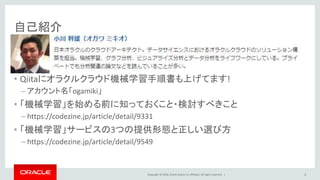
Oracle and/or its affiliates. All rights reserved. | 自己紹介 • Qiitaにオラクルクラウド機械学習手順書も上げてます! – アカウント名「ogamiki」 • 「機械学習」を始める前に知っておくこと・検討すべきこと – https://codezine.jp/article/detail/9331 • 「機械学習」サービスの3つの提供形態と正しい選び方 – https://codezine.jp/article/detail/9549 2
3.
Copyright © 2016,
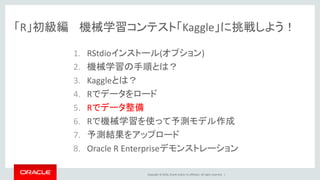
Oracle and/or its affiliates. All rights reserved. | 「R」初級編 機械学習コンテスト「Kaggle」に挑戦しよう! 1. RStudioインストール(オプション) 2. 機械学習の手順とは? 3. Kaggleとは? 4. Rでデータをロード 5. Rでデータ整備 6. Rで機械学習を使って予測モデル作成 7. 予測結果をアップロード 8. Oracle R Enterpriseデモンストレーション
4.
Copyright © 2016,
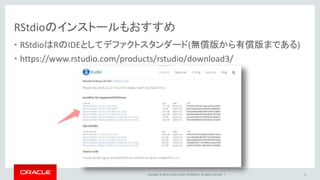
Oracle and/or its affiliates. All rights reserved. | RStudioのインストールもおすすめ • RStudioはRのIDEとしてデファクトスタンダード(無償版から有償版まである) • https://www.rstudio.com/products/rstudio/download3/ 4
5.
Copyright © 2016,
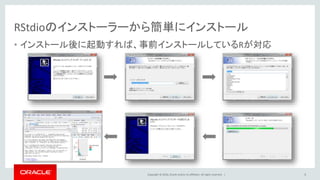
Oracle and/or its affiliates. All rights reserved. | RStudioのインストーラーから簡単にインストール • インストール後に起動すれば、事前インストールしているRが対応 5
6.
Copyright © 2016,
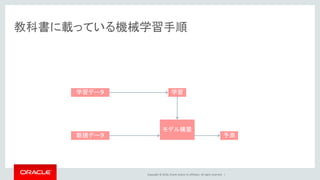
Oracle and/or its affiliates. All rights reserved. | 教科書に載っている機械学習手順 モデル構築 学習学習データ 新規データ 予測
7.
Copyright © 2016,
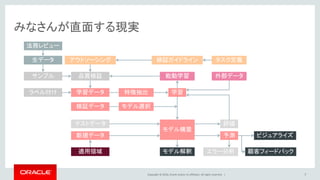
Oracle and/or its affiliates. All rights reserved. | みなさんが直面する現実 7 モデル構築 学習学習データ 新規データ 予測 評価 ビジュアライズ 顧客フィードバックエラー分析モデル解釈 外部データ ラベル付け テストデータ 適用領域 品質検証サンプル 検証データ 生データ 法務レビュー アウトソーシング 検証ガイドライン タスク定義 特徴抽出 モデル選択 能動学習
8.
Copyright © 2016,
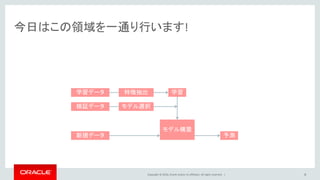
Oracle and/or its affiliates. All rights reserved. | 今日はこの領域を一通り行います! 8 モデル構築 学習学習データ 新規データ 予測 検証データ 特徴抽出 モデル選択
9.
Copyright © 2016,
Oracle and/or its affiliates. All rights reserved. | Kaggleとは? 9
10.
Copyright © 2016,
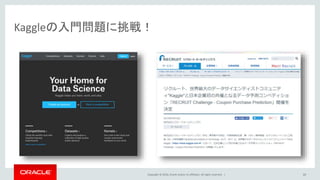
Oracle and/or its affiliates. All rights reserved. | Kaggleの入門問題に挑戦! 10
11.
Copyright © 2016,
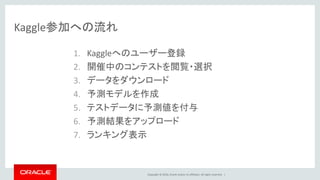
Oracle and/or its affiliates. All rights reserved. | Kaggle参加への流れ 1. Kaggleへのユーザー登録 2. 開催中のコンテストを閲覧・選択 3. データをダウンロード 4. 予測モデルを作成 5. テストデータに予測値を付与 6. 予測結果をアップロード 7. ランキング表示
12.
Copyright © 2016,
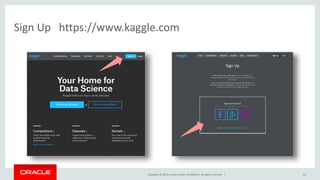
Oracle and/or its affiliates. All rights reserved. | Sign Up https://www.kaggle.com 12
13.
Copyright © 2016,
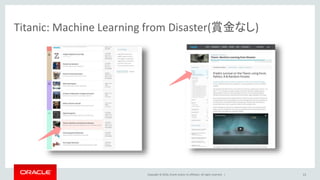
Oracle and/or its affiliates. All rights reserved. | Titanic: Machine Learning from Disaster(賞金なし) 13
14.
Copyright © 2016,
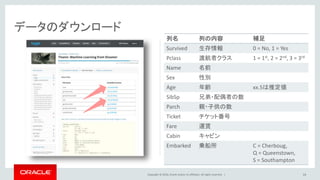
Oracle and/or its affiliates. All rights reserved. | 列名 列の内容 補足 Survived 生存情報 0 = No, 1 = Yes Pclass 渡航者クラス 1 = 1st, 2 = 2nd, 3 = 3rd Name 名前 Sex 性別 Age 年齢 xx.5は推定値 SibSp 兄弟・配偶者の数 Parch 親・子供の数 Ticket チケット番号 Fare 運賃 Cabin キャビン Embarked 乗船所 C = Cherboug, Q = Queenstown, S = Southampton 14 データのダウンロード
15.
Copyright © 2016,
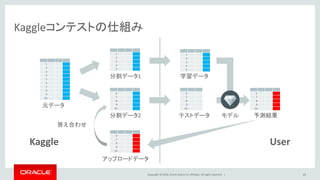
Oracle and/or its affiliates. All rights reserved. | Kaggleコンテストの仕組み 15 1 2 3 4 5 6 7 8 9 10 1 2 3 4 5 6 7 8 9 10 1 2 3 4 5 6 7 8 9 10 元データ 分割データ1 分割データ2 アップロードデータ 6 7 8 9 10 学習データ 予測結果 6 7 8 9 10 テストデータ Kaggle User モデル 答え合わせ
16.
Copyright © 2016,
Oracle and/or its affiliates. All rights reserved. | Rでデータをロード 16
17.
Copyright © 2016,
Oracle and/or its affiliates. All rights reserved. | RにCSVファイルを読み込む • 作業ディレクトリを確認し、そこにダウンロードしたcsvファイルを置く • デフォルトで区切りはカンマとして扱う • 学習データとテストデータの中身を見てみる 17 > getwd() [1] "C:/Users/miogawa/Documents" > train <- read.csv("train.csv",header = T) > test <- read.csv("test.csv",header = T) > summary(train) > summary(test)
18.
Copyright © 2016,
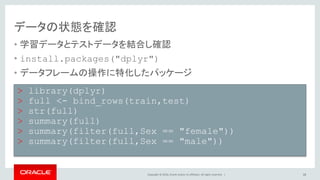
Oracle and/or its affiliates. All rights reserved. | データの状態を確認 • 学習データとテストデータを結合し確認 • install.packages("dplyr") – データフレームの操作に特化したパッケージ • bind_rowsによって、trainとtestデータフレームを結合 18 > library(dplyr) > full <- bind_rows(train,test) > str(full) > summary(full) > summary(filter(full,Sex == "female")) > summary(filter(full,Sex == "male"))
19.
Copyright © 2016,
Oracle and/or its affiliates. All rights reserved. | Rでデータ整備 19
20.
Copyright © 2016,
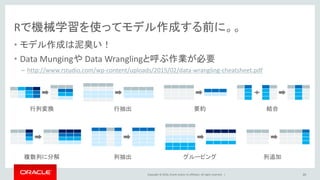
Oracle and/or its affiliates. All rights reserved. | Rで機械学習を使ってモデル作成する前に。。 • モデル作成は泥臭い! • Data Mungingや Data Wranglingと呼ぶ作業が必要 – http://www.rstudio.com/wp-content/uploads/2015/02/data-wrangling-cheatsheet.pdf 20 行列変換 複数列に分解 要約 グルーピング 結合 列追加列抽出 行抽出
21.
Copyright © 2016,
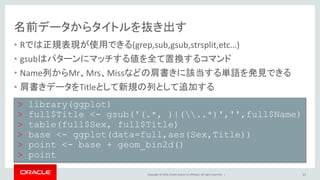
Oracle and/or its affiliates. All rights reserved. | 名前データからタイトルを抜き出す • Rでは正規表現が使用できる(grep,sub,gsub,strsplit,etc…) • gsubはパターンにマッチする値を全て置換するコマンド • Name列からMr、Mrs、Missなどの肩書きに該当する単語を発見できる • 肩書きデータをTitleとして新規の列として追加する 21 > library(ggplot2) > full$Title <- gsub('(.*, )|(..*)','',full$Name) > table(full$Sex, full$Title) > base <- ggplot(data=full,aes(Sex,Title)) > point <- base + geom_bin2d() > point
22.
Copyright © 2016,
Oracle and/or its affiliates. All rights reserved. | 寄り道コマンド解説 • full$TitleはfullデータフレームのTitle列を表す – 元々Title列はfullにないため、新規にTitle列がfullに作成される • full$Title <- XXXによって、fullのTitle列にXXXを代入 • gsubは一括置換した結果を返すコマンド – 似たものにsubがあるがこちらは単一置換した結果を返すコマンド • gsub(PATTERN, REPLACEMENT, X) – Xの中でPATTERNに当てはまるものをREPLACEMENTに置き換える – Full$Nameの中で(.*, )または(..*)に当てはまるものを消す • ''は空文字に置換して消している 22 > full$Title <- gsub('(.*, )|(..*)','',full$Name)
23.
Copyright © 2016,
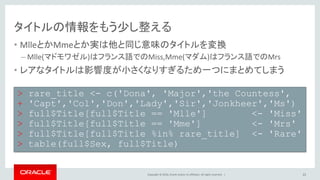
Oracle and/or its affiliates. All rights reserved. | タイトルの情報をもう少し整える • MlleとかMmeとか実は他と同じ意味のタイトルを変換 – Mlle(マドモワゼル)はフランス語でのMiss,Mme(マダム)はフランス語でのMrs • レアなタイトルは影響度が小さくなりすぎるため一つにまとめてしまう 23 > rare_title <- c('Dona', 'Major','the Countess', + 'Capt','Col','Don','Lady','Sir','Jonkheer','Ms') > full$Title[full$Title == 'Mlle'] <- 'Miss' > full$Title[full$Title == 'Mme'] <- 'Mrs' > full$Title[full$Title %in% rare_title] <- 'Rare' > table(full$Sex, full$Title)
24.
Copyright © 2016,
Oracle and/or its affiliates. All rights reserved. | 家族の人数を表す列を追加する • SibSpは兄弟・配偶者の数でParchは親・子供の数 • 自分自身も含めてSibSpとParchに1を足したものを家族の人数とする • 先ほどのTitleと合わせてSurvivedな人の状況を確認 24 > full$Familysize <- full$SibSp + full$Parch + 1 > base1 <- ggplot(full[1:891,], + aes(x = Familysize, fill = factor(Survived))) > base1 + geom_bar(position='dodge') > base2 <- ggplot(full[1:891,], + aes(x = Title, fill = factor(Survived))) > base2 + geom_bar(position='dodge')
25.
Copyright © 2016,
Oracle and/or its affiliates. All rights reserved. | キャビンの番号から宿泊した場所を想像する • Cabinの値を見ると先頭の一文字がアルファベットのものが多い • Cabinの先頭一文字を新しい変数とする • Survivedな人の状況を確認 25 > head(full$Cabin,30) > full$Deck<-factor(sapply(full$Cabin, + function(x) strsplit(x, NULL)[[1]][1])) > base3 <- ggplot(full[1:891,], + aes(x = Deck, fill = factor(Survived))) > base3 + geom_bar(position='dodge')
26.
Copyright © 2016,
Oracle and/or its affiliates. All rights reserved. | 寄り道コマンド解説 • sapplyは複数のデータに対して一括して処理を実施する • sapply(X, FUN, ...) – Xのデータ全てに対して定義したFUN処理を実行する – full$Cabinに対して、strsplit(x, NULL)[[1]][1]を実行する – function(x)は関数を作成するという宣言 • strsplit(x, split) – splitがNULLだと一文字ずつ分割 – strsplit(x, NULL)[[1]][1]から分割した結果の一行一列目を取得 26 sapply(full$Cabin, function(x) strsplit(x, NULL)[[1]][1])
27.
Copyright © 2016,
Oracle and/or its affiliates. All rights reserved. | 27 グラフの出力結果の確認 > base3 <- ggplot(full[1:891,], + aes(x = Deck, fill = factor(Survived))) > base3 + geom_bar(position='dodge') > base1 <- ggplot(full[1:891,], + aes(x = Familysize, fill = factor(Survived))) > base1 + geom_bar(position='dodge') > base2 <- ggplot(full[1:891,], + aes(x = Title, fill = factor(Survived))) > base2 + geom_bar(position='dodge')
28.
Copyright © 2016,
Oracle and/or its affiliates. All rights reserved. | データのカテゴリを直す • Pclassは1,2,3と数字で入っているが、客室のClassを表すフラグ – 1等、2等、3等で数字でもいい気もするが、客室に大きな差があった事実がある • これまで作成した変数の中でカテゴリに該当するものを変換 28 > factor_vars <- c('PassengerId','Pclass','Sex', + 'Embarked','Title','Deck') > full[factor_vars] <- lapply(full[factor_vars], + function(x) factor(x))
29.
Copyright © 2016,
Oracle and/or its affiliates. All rights reserved. | 欠損値の状態を確認する • Miceパッケージのmd.patternによって、欠損値の状態を確認 • +αでVIMパッケージを使って欠損値の状態を視覚化する • DeckとAgeとFareに欠損値があるのがわかる(Survivedは今回の課題列) 29 > library(mice) > md.pattern(full[,-2]) > install.packages("VIM") > library(VIM) > mice_plot <- aggr(full, + sortVars = TRUE, numbers = TRUE)
30.
Copyright © 2016,
Oracle and/or its affiliates. All rights reserved. | 欠損値の状態を確認 30
31.
Copyright © 2016,
Oracle and/or its affiliates. All rights reserved. | 欠損値を補完する • Miceパッケージのmiceによって、欠損値を補完する • 指定したすべての列の欠損値を補完するため、Survivedは除く • 補完された値を元のデータフレームの値と置き換えて使用する 31 > imputed <- mice(full[,c("Age","Deck","Fare")]) > head(complete(imputed)) > full$Age <- complete(imputed)$Age > full$Fare <- complete(imputed)$Fare > full$Deck <- complete(imputed)$Deck
32.
Copyright © 2016,
Oracle and/or its affiliates. All rights reserved. | Rで機械学習を使って予測モデル作成 32
33.
Copyright © 2016,
Oracle and/or its affiliates. All rights reserved. | 予測モデル構築の流れ データの リサンプリング モデルの フィッティング テストデータに 対する予測 33 学習用データとテストデータを事前に作成しておく > train <- full[1:891,] > test <- full[892:1309,]
34.
Copyright © 2016,
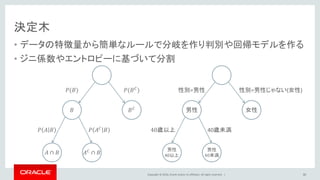
Oracle and/or its affiliates. All rights reserved. | 決定木 • データの特徴量から簡単なルールで分岐を作り判別や回帰モデルを作る • ジニ係数やエントロピーに基づいて分割 34 𝑃(𝐵) 𝑃(𝐵 𝐶 ) 𝐵 𝐵 𝐶 𝑃 𝐴 𝐵 𝑃 𝐴 𝐶 𝐵 𝐴 ∩ 𝐵 𝐴 𝐶 ∩ 𝐵 性別=男性 男性 女性 40歳以上 40歳未満 男性 40以上 男性 40未満 性別=男性じゃない(女性)
35.
Copyright © 2016,
Oracle and/or its affiliates. All rights reserved. | ランダムフォレスト • 決定木を弱学習器とするアンサンブル学習アルゴリズム • 決定木に比べて負荷は高いが手軽に高精度 35 強学習機(弱学習機の多数決) 弱学習機(決定木) 学習データ リサンプリング リサンプリング リサンプリング
36.
Copyright © 2016,
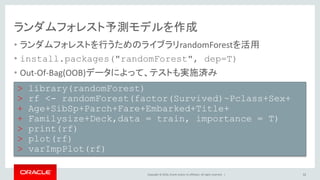
Oracle and/or its affiliates. All rights reserved. | ランダムフォレスト予測モデルを作成 • ランダムフォレストを行うためのライブラリrandomForestを活用 • install.packages("randomForest", dep=T) • Out-Of-Bag(OOB)データによって、テストも実施済み 36 > library(randomForest) > rf <- randomForest(factor(Survived)~Pclass+Sex+ + Age+SibSp+Parch+Fare+Embarked+Title+ + Familysize+Deck,data = train, importance = T) > print(rf) > plot(rf) > varImpPlot(rf)
37.
Copyright © 2016,
Oracle and/or its affiliates. All rights reserved. | 予測結果を作成する • 予測モデルを作ったデータでないtestに対してpredict関数を実施 • PassengerIdと予測したSurvivedの値のみのデータフレームに変換 • 行番号を排除してcsvファイルに出力 37 > prediction <- predict(rf,test) > solution <- data.frame(PassengerID = + test$PassengerId, Survived = prediction) > write.csv(solution, file = ‘solution.csv’, + row.names = F) > getwd()
38.
Copyright © 2016,
Oracle and/or its affiliates. All rights reserved. | 予測結果をアップロード 38
39.
Copyright © 2016,
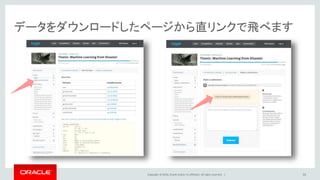
Oracle and/or its affiliates. All rights reserved. | データをダウンロードしたページから直リンクで飛べます 39
40.
Copyright © 2016,
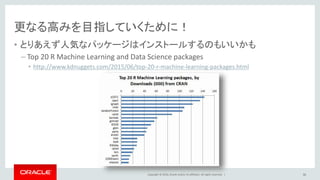
Oracle and/or its affiliates. All rights reserved. | 更なる高みを目指していくために! • とりあえず人気なパッケージはインストールするのもいいかも – Top 20 R Machine Learning and Data Science packages • http://www.kdnuggets.com/2015/06/top-20-r-machine-learning-packages.html 40
41.
Copyright © 2016,
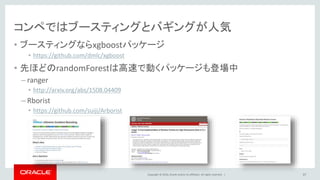
Oracle and/or its affiliates. All rights reserved. | コンペではブースティングとバギングが人気 • ブースティングならxgboostパッケージ • https://github.com/dmlc/xgboost • 先ほどのrandomForestは高速で動くパッケージも登場中 – ranger • http://arxiv.org/abs/1508.04409 – Rborist • https://github.com/suiji/Arborist 41
42.
Copyright © 2016,
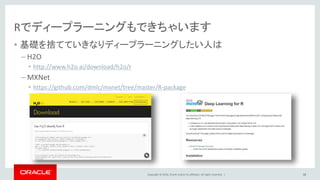
Oracle and/or its affiliates. All rights reserved. | Rでディープラーニングもできちゃいます • 基礎を捨てていきなりディープラーニングしたい人は – H2O • http://www.h2o.ai/download/h2o/r – MXNet • https://github.com/dmlc/mxnet/tree/master/R-package 42
43.
Copyright © 2016,
Oracle and/or its affiliates. All rights reserved. | Oracle R Enterpriseデモンストレーション 43
44.
Copyright © 2016,
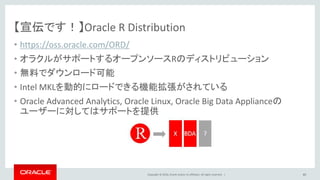
Oracle and/or its affiliates. All rights reserved. | 【宣伝です!】Oracle R Distribution • https://oss.oracle.com/ORD/ • オラクルがサポートするオープンソースRのディストリビューション • 無料でダウンロード可能 • Intel MKLを動的にロードできる機能拡張がされている • Oracle Advanced Analytics, Oracle Linux, Oracle Big Data Applianceの ユーザーに対してはサポートを提供 44
45.
Copyright © 2016,
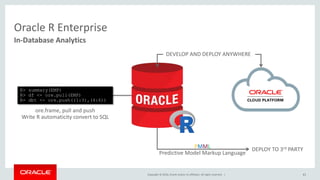
Oracle and/or its affiliates. All rights reserved. | 45 In-Database Analytics Oracle R Enterprise R> summary(EMP) R> df <- ore.pull(EMP) R> dbt <- ore.push((1:3),(4:6)) ore.frame, pull and push Write R automaticity convert to SQL PMML Predictive Model Markup Language DEPLOY TO 3rd PARTY DEVELOP AND DEPLOY ANYWHERE
46.
Copyright © 2016,
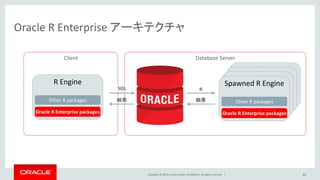
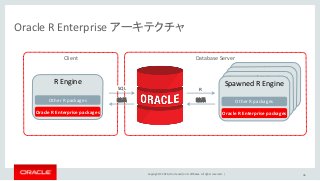
Oracle and/or its affiliates. All rights reserved. | Spawned R Engine Spawned R Engine Spawned R Engine Oracle R Enterprise アーキテクチャ 46 Database Server R Engine Other R packages Oracle R Enterprise packages R Client Spawned R Engine Other R packages Oracle R Enterprise packages SQL 結果 結果
47.
Copyright © 2016,
Oracle and/or its affiliates. All rights reserved. | Oracle R Enterpriseを簡単トライ • Oracle CloudでOracle R Enterpriseをセットアップ – http://qiita.com/ogamiki/items/71c81f70b766f7bdbd1d • tryit – https://cloud.oracle.com/ja_JP/tryit • tryit進め方手順 – https://faq.oracle.co.jp/app/answers/detail/a_id/2855 47
48.
Copyright © 2016,
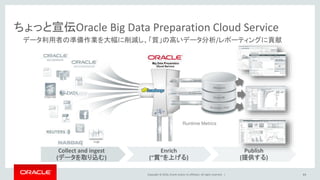
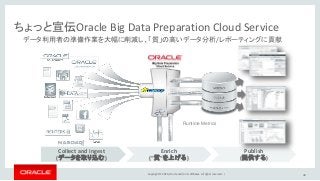
Oracle and/or its affiliates. All rights reserved. | Collect and ingest (データを取り込む) Enrich (“質”を上げる) Publish (提供する) ちょっと宣伝Oracle Big Data Preparation Cloud Service データ利用者の準備作業を大幅に削減し、「質」の高いデータ分析/レポーティングに貢献 Runtime Metrics 48
49.
Copyright © 2016,
Oracle and/or its affiliates. All rights reserved. | 49
Editor's Notes
#29
1等船室の船賃は870ポンド、2等船室は13ポンド、 3等船室は3~6ポンド タイタニックの利用客層としては、1等は富豪が漫遊のために乗り、2等は中流の人たちが仕事や所要のために乗り、3等は主に移民が利用 脱出の際、三等船客から上部甲板に通じる階段のゲートは閉じられていました。これは当時のアメリカの移民法に「三等船客を物理的に隔離する」といった規定があった 「家族連れ」と「単身の男性」と「単身の女性」に3ブロックに分けられていた
#49
Nullデータの量によってアラートを設定可能 Oracle Storage Cloud、BI Cloud ServiceまたはHDFSからのデータロードが可能 ファイル同士の結合(inner、left、right)が可能 ファイル形式は、txt、csv、xml、pdf、jsonと幅広く対応 質的データであれば、変換も可能
Download


![Copyright © 2016, Oracle and/or its affiliates. All rights reserved. |
RにCSVファイルを読み込む
• 作業ディレクトリを確認し、そこにダウンロードしたcsvファイルを置く
• デフォルトで区切りはカンマとして扱う
• 学習データとテストデータの中身を見てみる
17
> getwd()
[1] "C:/Users/miogawa/Documents"
> train <- read.csv("train.csv",header = T)
> test <- read.csv("test.csv",header = T)
> summary(train)
> summary(test)](https://image.slidesharecdn.com/kaggle-160830094350/85/R-Kaggle-17-320.jpg)
![Copyright © 2016, Oracle and/or its affiliates. All rights reserved. |
タイトルの情報をもう少し整える
• MlleとかMmeとか実は他と同じ意味のタイトルを変換
– Mlle(マドモワゼル)はフランス語でのMiss,Mme(マダム)はフランス語でのMrs
• レアなタイトルは影響度が小さくなりすぎるため一つにまとめてしまう
23
> rare_title <- c('Dona', 'Major','the Countess',
+ 'Capt','Col','Don','Lady','Sir','Jonkheer','Ms')
> full$Title[full$Title == 'Mlle'] <- 'Miss'
> full$Title[full$Title == 'Mme'] <- 'Mrs'
> full$Title[full$Title %in% rare_title] <- 'Rare'
> table(full$Sex, full$Title)](https://image.slidesharecdn.com/kaggle-160830094350/85/R-Kaggle-23-320.jpg)
![Copyright © 2016, Oracle and/or its affiliates. All rights reserved. |
家族の人数を表す列を追加する
• SibSpは兄弟・配偶者の数でParchは親・子供の数
• 自分自身も含めてSibSpとParchに1を足したものを家族の人数とする
• 先ほどのTitleと合わせてSurvivedな人の状況を確認
24
> full$Familysize <- full$SibSp + full$Parch + 1
> base1 <- ggplot(full[1:891,],
+ aes(x = Familysize, fill = factor(Survived)))
> base1 + geom_bar(position='dodge')
> base2 <- ggplot(full[1:891,],
+ aes(x = Title, fill = factor(Survived)))
> base2 + geom_bar(position='dodge')](https://image.slidesharecdn.com/kaggle-160830094350/85/R-Kaggle-24-320.jpg)
![Copyright © 2016, Oracle and/or its affiliates. All rights reserved. |
キャビンの番号から宿泊した場所を想像する
• Cabinの値を見ると先頭の一文字がアルファベットのものが多い
• Cabinの先頭一文字を新しい変数とする
• Survivedな人の状況を確認
25
> head(full$Cabin,30)
> full$Deck<-factor(sapply(full$Cabin,
+ function(x) strsplit(x, NULL)[[1]][1]))
> base3 <- ggplot(full[1:891,],
+ aes(x = Deck, fill = factor(Survived)))
> base3 + geom_bar(position='dodge')](https://image.slidesharecdn.com/kaggle-160830094350/85/R-Kaggle-25-320.jpg)
![Copyright © 2016, Oracle and/or its affiliates. All rights reserved. |
寄り道コマンド解説
• sapplyは複数のデータに対して一括して処理を実施する
• sapply(X, FUN, ...)
– Xのデータ全てに対して定義したFUN処理を実行する
– full$Cabinに対して、strsplit(x, NULL)[[1]][1]を実行する
– function(x)は関数を作成するという宣言
• strsplit(x, split)
– splitがNULLだと一文字ずつ分割
– strsplit(x, NULL)[[1]][1]から分割した結果の一行一列目を取得
26
sapply(full$Cabin, function(x) strsplit(x, NULL)[[1]][1])](https://image.slidesharecdn.com/kaggle-160830094350/85/R-Kaggle-26-320.jpg)
![Copyright © 2016, Oracle and/or its affiliates. All rights reserved. | 27
グラフの出力結果の確認
> base3 <- ggplot(full[1:891,],
+ aes(x = Deck, fill = factor(Survived)))
> base3 + geom_bar(position='dodge')
> base1 <- ggplot(full[1:891,],
+ aes(x = Familysize, fill = factor(Survived)))
> base1 + geom_bar(position='dodge')
> base2 <- ggplot(full[1:891,],
+ aes(x = Title, fill = factor(Survived)))
> base2 + geom_bar(position='dodge')](https://image.slidesharecdn.com/kaggle-160830094350/85/R-Kaggle-27-320.jpg)
![Copyright © 2016, Oracle and/or its affiliates. All rights reserved. |
データのカテゴリを直す
• Pclassは1,2,3と数字で入っているが、客室のClassを表すフラグ
– 1等、2等、3等で数字でもいい気もするが、客室に大きな差があった事実がある
• これまで作成した変数の中でカテゴリに該当するものを変換
28
> factor_vars <- c('PassengerId','Pclass','Sex',
+ 'Embarked','Title','Deck')
> full[factor_vars] <- lapply(full[factor_vars],
+ function(x) factor(x))](https://image.slidesharecdn.com/kaggle-160830094350/85/R-Kaggle-28-320.jpg)
![Copyright © 2016, Oracle and/or its affiliates. All rights reserved. |
欠損値の状態を確認する
• Miceパッケージのmd.patternによって、欠損値の状態を確認
• +αでVIMパッケージを使って欠損値の状態を視覚化する
• DeckとAgeとFareに欠損値があるのがわかる(Survivedは今回の課題列)
29
> library(mice)
> md.pattern(full[,-2])
> install.packages("VIM")
> library(VIM)
> mice_plot <- aggr(full,
+ sortVars = TRUE, numbers = TRUE)](https://image.slidesharecdn.com/kaggle-160830094350/85/R-Kaggle-29-320.jpg)
![Copyright © 2016, Oracle and/or its affiliates. All rights reserved. |
欠損値を補完する
• Miceパッケージのmiceによって、欠損値を補完する
• 指定したすべての列の欠損値を補完するため、Survivedは除く
• 補完された値を元のデータフレームの値と置き換えて使用する
31
> imputed <- mice(full[,c("Age","Deck","Fare")])
> head(complete(imputed))
> full$Age <- complete(imputed)$Age
> full$Fare <- complete(imputed)$Fare
> full$Deck <- complete(imputed)$Deck](https://image.slidesharecdn.com/kaggle-160830094350/85/R-Kaggle-31-320.jpg)
![Copyright © 2016, Oracle and/or its affiliates. All rights reserved. |
予測モデル構築の流れ
データの
リサンプリング
モデルの
フィッティング
テストデータに
対する予測
33
学習用データとテストデータを事前に作成しておく
> train <- full[1:891,]
> test <- full[892:1309,]](https://image.slidesharecdn.com/kaggle-160830094350/85/R-Kaggle-33-320.jpg)