© Cloudera, Inc. All rights reserved. 1
Risk Management for Data
Eddie Garcia
Chief Security Architect
© Cloudera, Inc. All rights reserved. 2
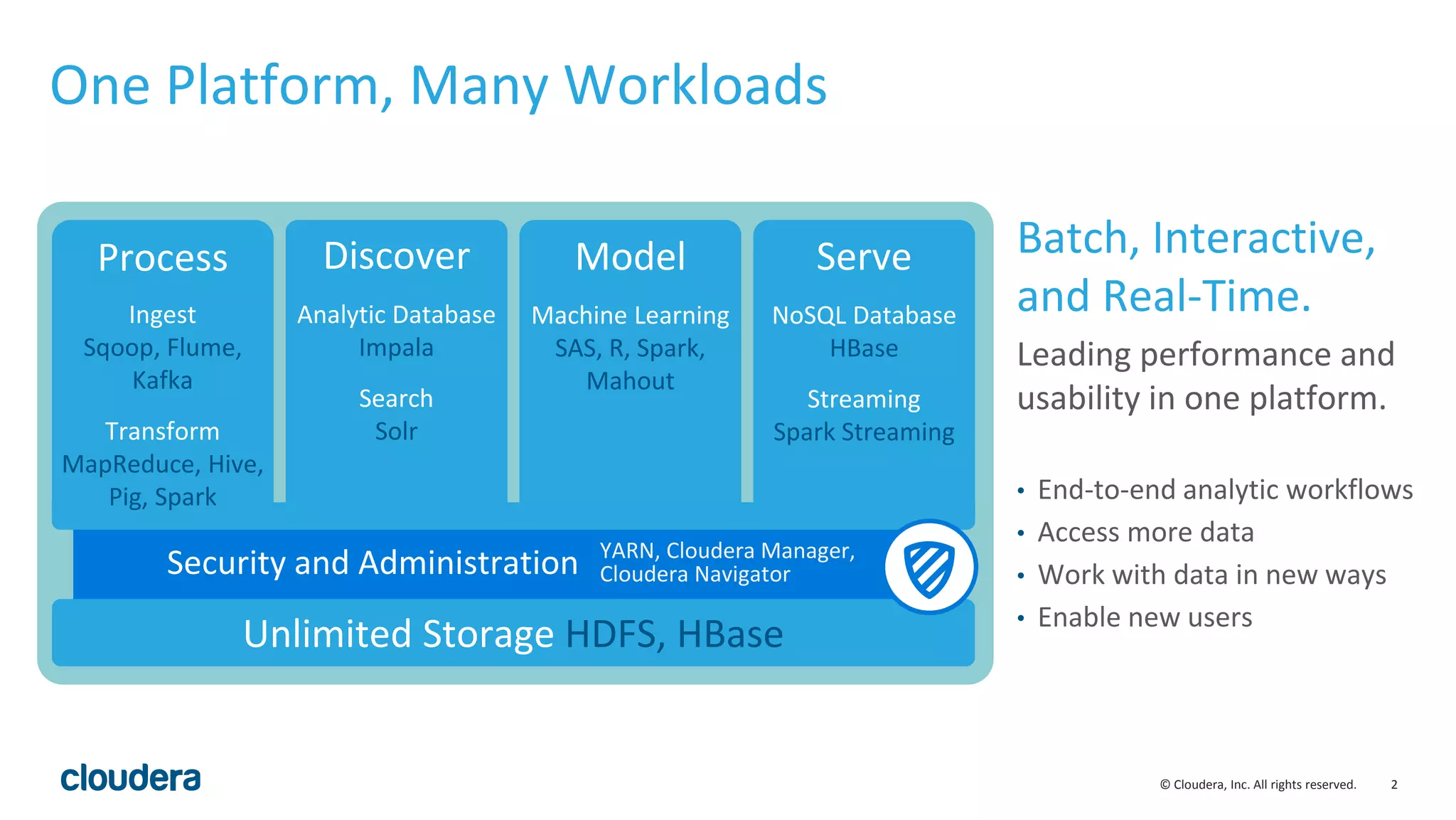
One Platform, Many Workloads
Batch, Interactive,
and Real-Time.
Leading performance and
usability in one platform.
• End-to-end analytic workflows
• Access more data
• Work with data in new ways
• Enable new users
Security and Administration
Process
Ingest
Sqoop, Flume,
Kafka
Transform
MapReduce, Hive,
Pig, Spark
Discover
Analytic Database
Impala
Search
Solr
Model
Machine Learning
SAS, R, Spark,
Mahout
Serve
NoSQL Database
HBase
Streaming
Spark Streaming
Unlimited Storage HDFS, HBase
YARN, Cloudera Manager,
Cloudera Navigator
© Cloudera, Inc. All rights reserved. 3
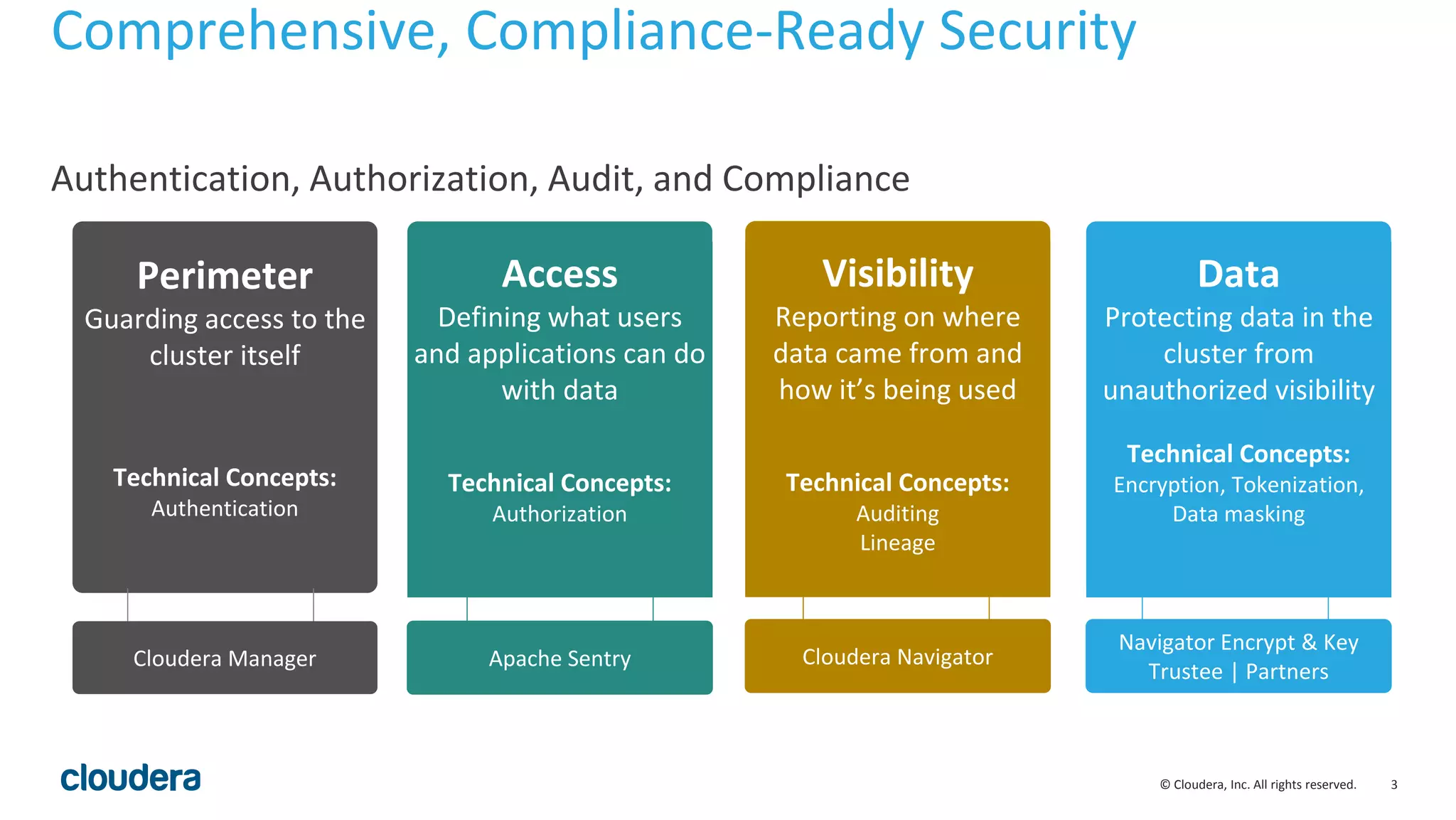
Comprehensive, Compliance-Ready Security
Authentication, Authorization, Audit, and Compliance
Perimeter
Guarding access to the
cluster itself
Technical Concepts:
Authentication
Access
Defining what users
and applications can do
with data
Technical Concepts:
Authorization
Data
Protecting data in the
cluster from
unauthorized visibility
Technical Concepts:
Encryption, Tokenization,
Data masking
Visibility
Reporting on where
data came from and
how it’s being used
Technical Concepts:
Auditing
Lineage
Cloudera Manager Apache Sentry Cloudera Navigator
Navigator Encrypt & Key
Trustee | Partners
© Cloudera, Inc. All rights reserved. 4
What is HDFS encryption and why
do I care?
© Cloudera, Inc. All rights reserved. 5
Background
• Our customers are increasingly wanting to use HDFS to store sensitive data
• Customers often are mandated to protect data at rest
• PCI
• HIPAA
• National Security
• Company confidential
• Encryption of data at rest helps mitigate certain security threats
• Rogue administrators (insider threat)
• Compromised accounts (masquerade attacks)
• Lost/stolen hard drives
© Cloudera, Inc. All rights reserved. 6
Encryption, core concepts and
terminology
© Cloudera, Inc. All rights reserved. 7
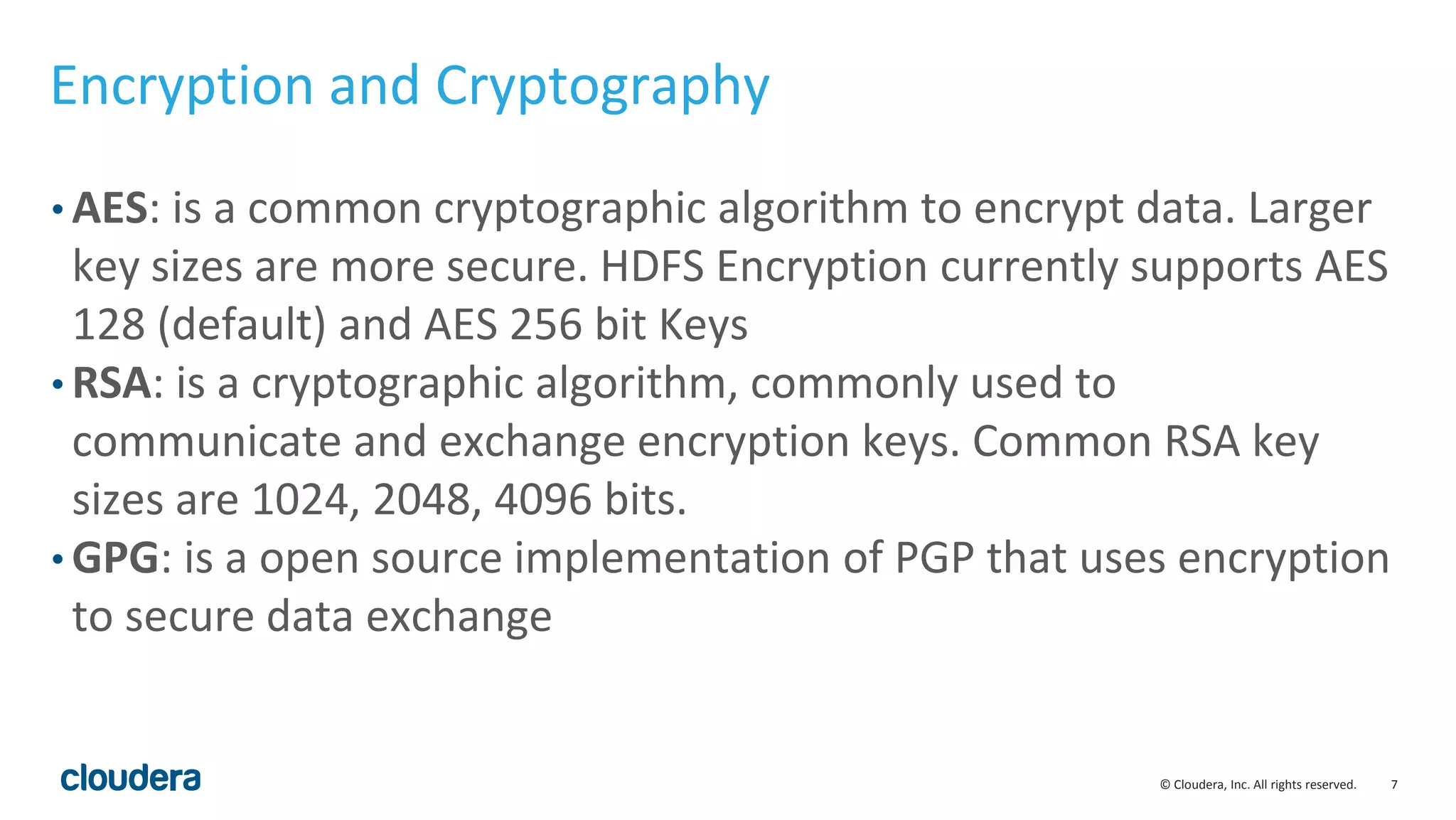
Encryption and Cryptography
• AES: is a common cryptographic algorithm to encrypt data. Larger
key sizes are more secure. HDFS Encryption currently supports AES
128 (default) and AES 256 bit Keys
• RSA: is a cryptographic algorithm, commonly used to
communicate and exchange encryption keys. Common RSA key
sizes are 1024, 2048, 4096 bits.
• GPG: is a open source implementation of PGP that uses encryption
to secure data exchange
© Cloudera, Inc. All rights reserved. 8
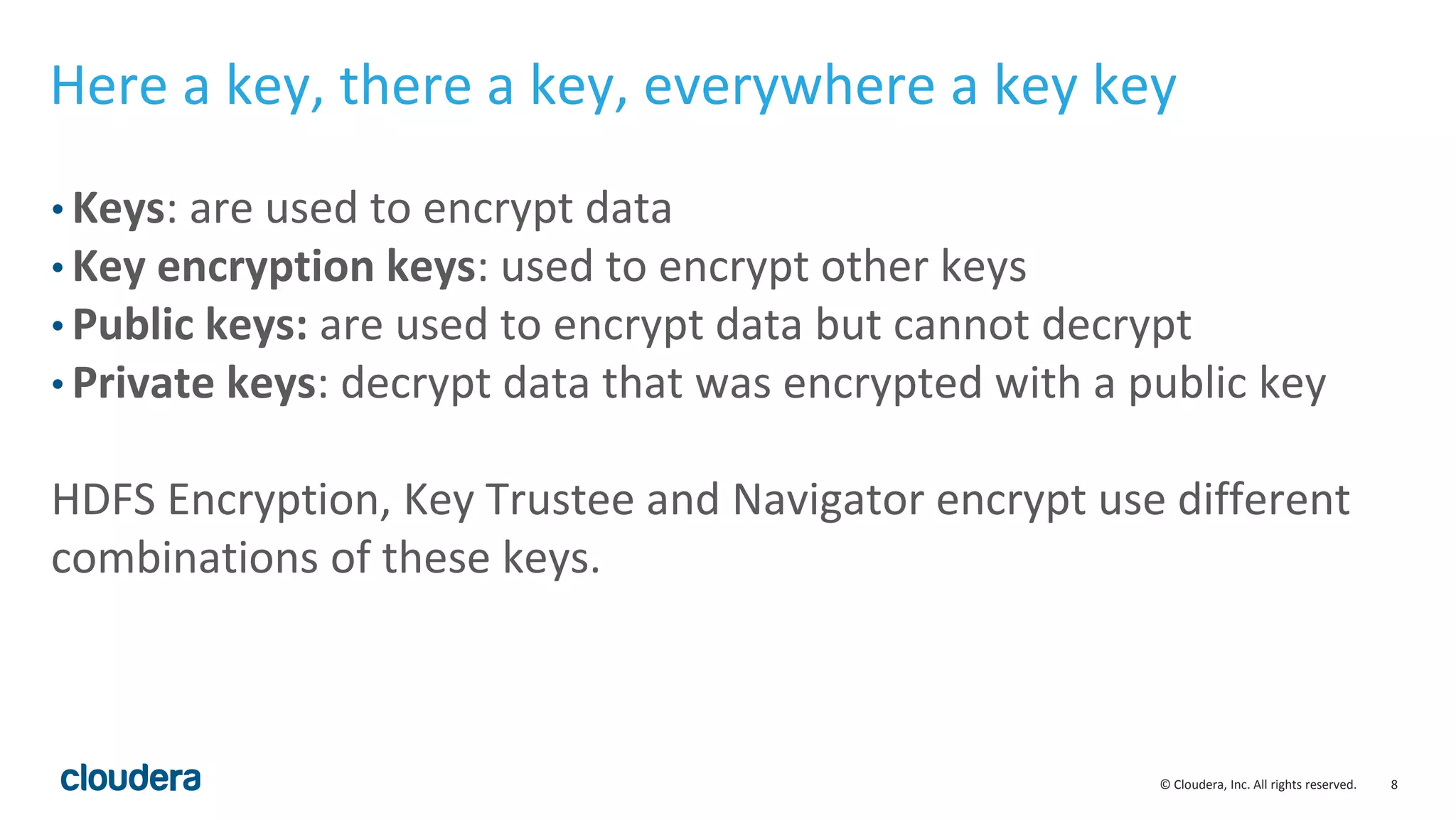
Here a key, there a key, everywhere a key key
• Keys: are used to encrypt data
• Key encryption keys: used to encrypt other keys
• Public keys: are used to encrypt data but cannot decrypt
• Private keys: decrypt data that was encrypted with a public key
HDFS Encryption, Key Trustee and Navigator encrypt use different
combinations of these keys.
© Cloudera, Inc. All rights reserved. 9
HDFS Encryption Zones and Keys
• Encryption Zone Keys (EZ Keys): HDFS Encryption uses a randomly
generated AES key to protect Encryption Zones
• Data Encryption Keys (DEKs): are generated automatically to
encrypt any new file created in the Encryption Zone
• Encrypted Data Encryption Keys (EDEKs): are DEKs that have been
encrypted with an EZ Key. Encryption and decryption of EDEKs
happens entirely on the KMS
© Cloudera, Inc. All rights reserved. 10
Key Trustee and Hardware Security Module Keys
• Key Trustee Client GPG Key: Each client to the Key Trustee server
has a unique GPG Keypair
• Key Trustee Server GPG Key: the key trustee server also has a
unique GPG keypair
• HSM Keys: are private keys that never leave the HSM. Are used for
root of trust by encrypting keys stored in Key Trustee. HSMs are
common in Financial Services and Government, not so common in
other industries.
© Cloudera, Inc. All rights reserved. 11
KMS and Key Trustee what’s the
difference?
© Cloudera, Inc. All rights reserved. 12
Key Management Service (KMS)
• When encrypting any data it is important to securely store your encryption
keys away from the encrypted data
• KMS is a Key Management Service for HDFS Encryption to store and retrieve
encryption keys
• KMS is open source and provides a standard interface for pluggable key
providers
• The default key provider for KMS is the Java Key Store
• The Java Key Store is not recommended for production key management, it
is meant for development and testing
© Cloudera, Inc. All rights reserved. 13
Navigator Key Trustee
• Navigator Key Trustee provides secure, centralized and scalable key storage
and administration
• Is not open source and licensed with Cloudera Navigator
• Is the recommended option for production deployments
• Provides the hooks to integrate with Hardware Security Modules for
physically tamper proof requirements (FIPS 140-2 level 3)
• Also provides centralized Key Management for Navigator Encrypt
© Cloudera, Inc. All rights reserved. 14
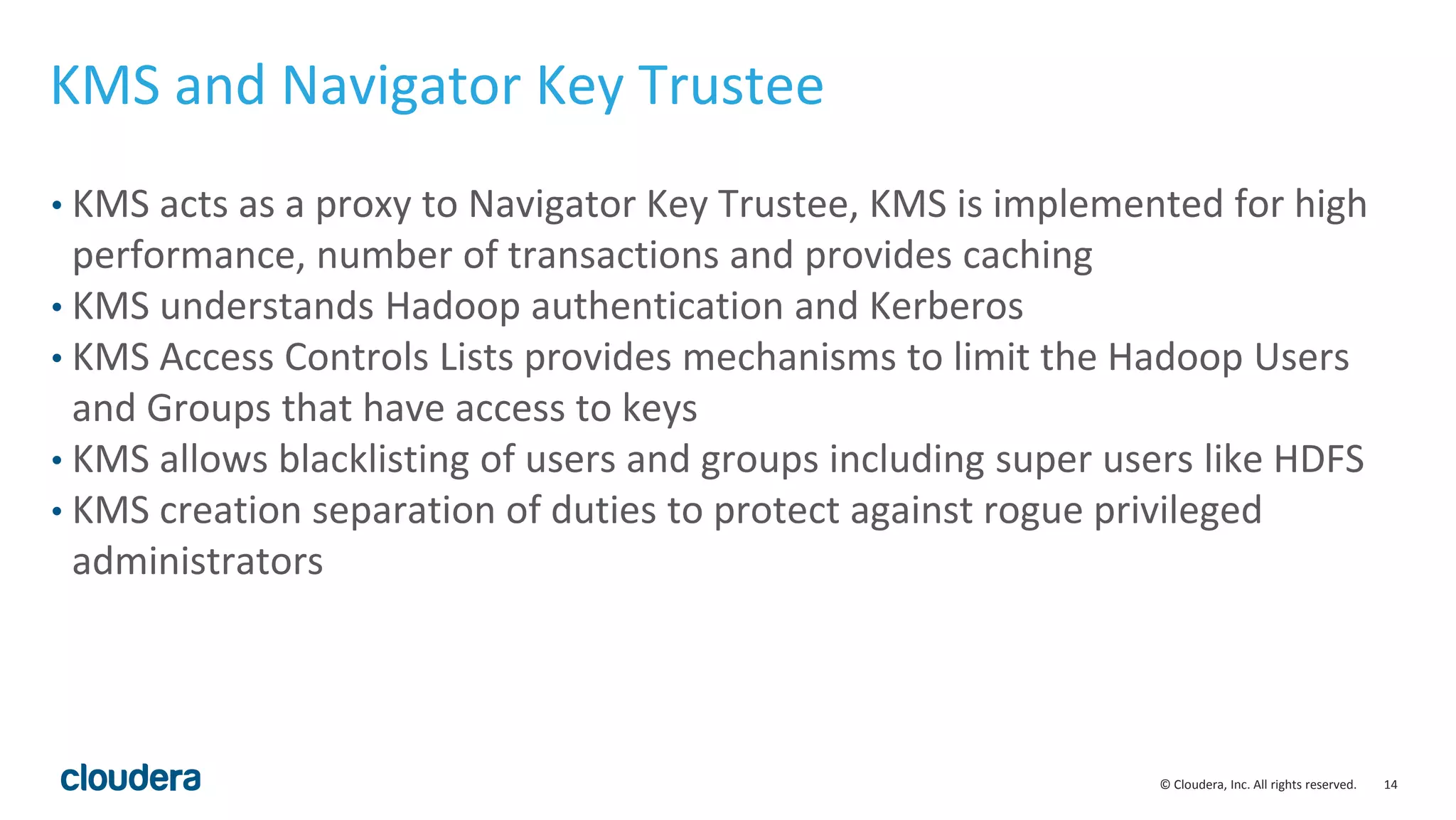
KMS and Navigator Key Trustee
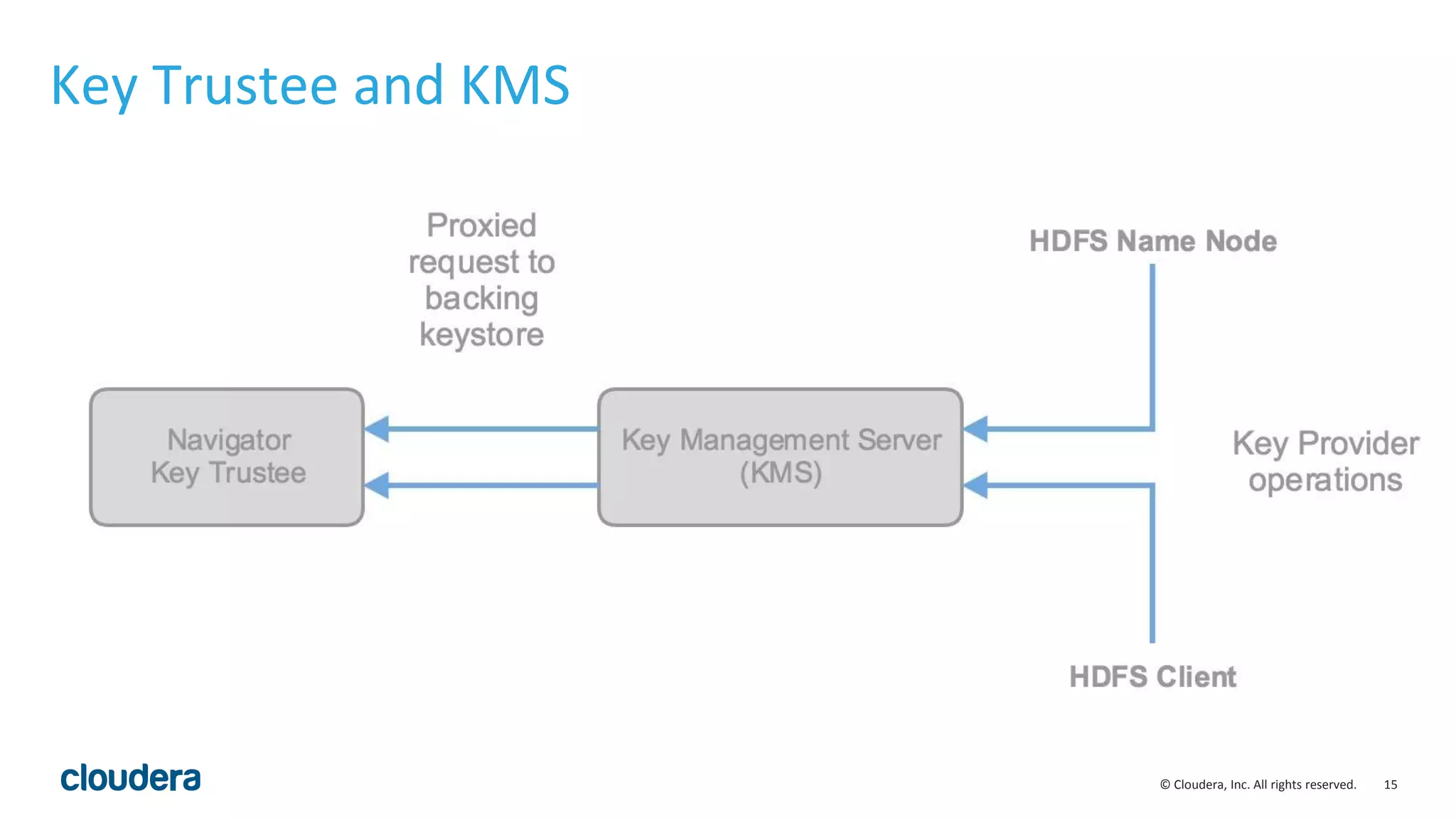
• KMS acts as a proxy to Navigator Key Trustee, KMS is implemented for high
performance, number of transactions and provides caching
• KMS understands Hadoop authentication and Kerberos
• KMS Access Controls Lists provides mechanisms to limit the Hadoop Users
and Groups that have access to keys
• KMS allows blacklisting of users and groups including super users like HDFS
• KMS creation separation of duties to protect against rogue privileged
administrators
© Cloudera, Inc. All rights reserved. 15
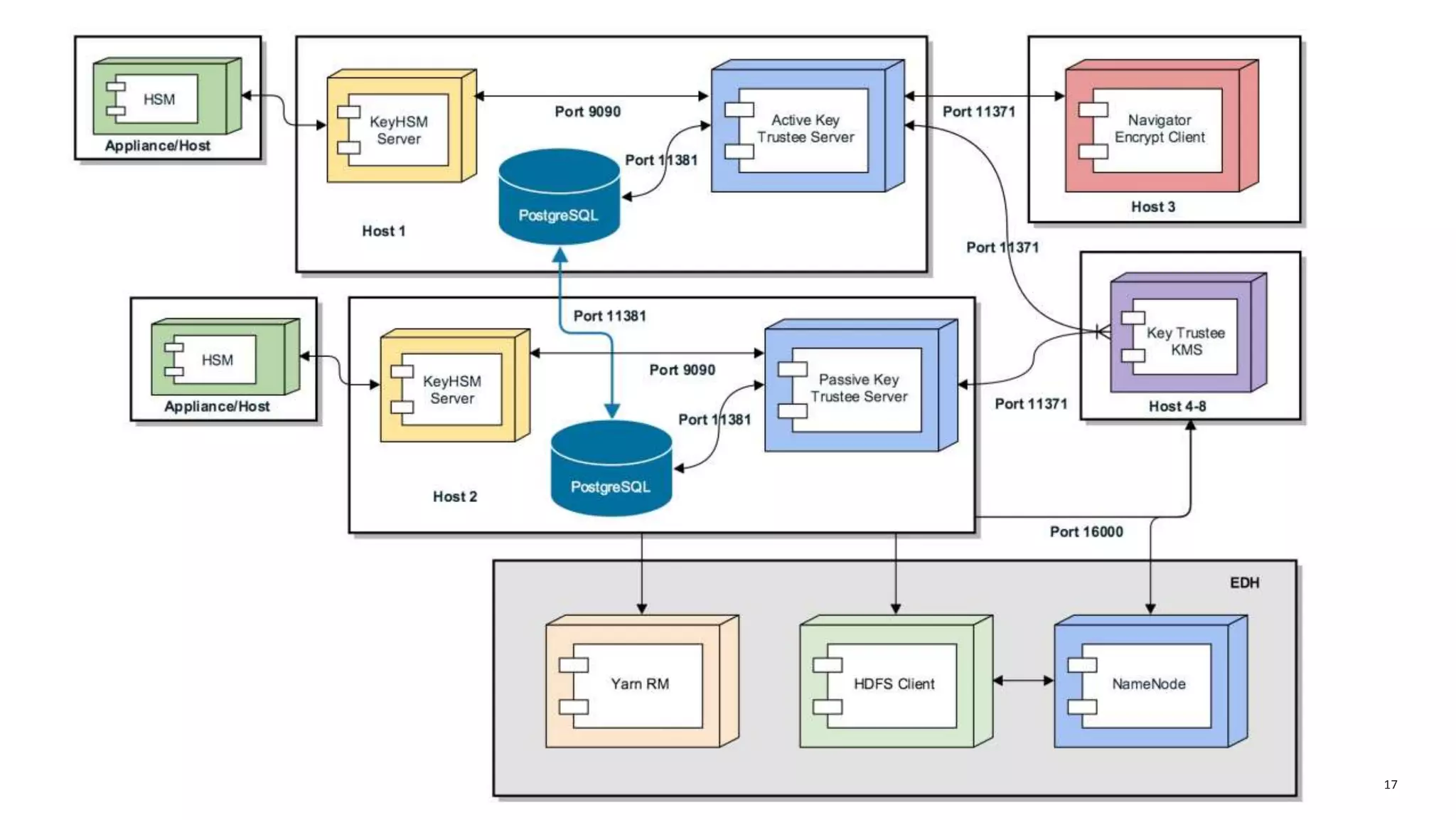
Key Trustee and KMS
© Cloudera, Inc. All rights reserved. 16
© Cloudera, Inc. All rights reserved. 17
© Cloudera, Inc. All rights reserved. 18
Pre-requisites and pre-planning
before you encrypt your cluster
© Cloudera, Inc. All rights reserved. 19
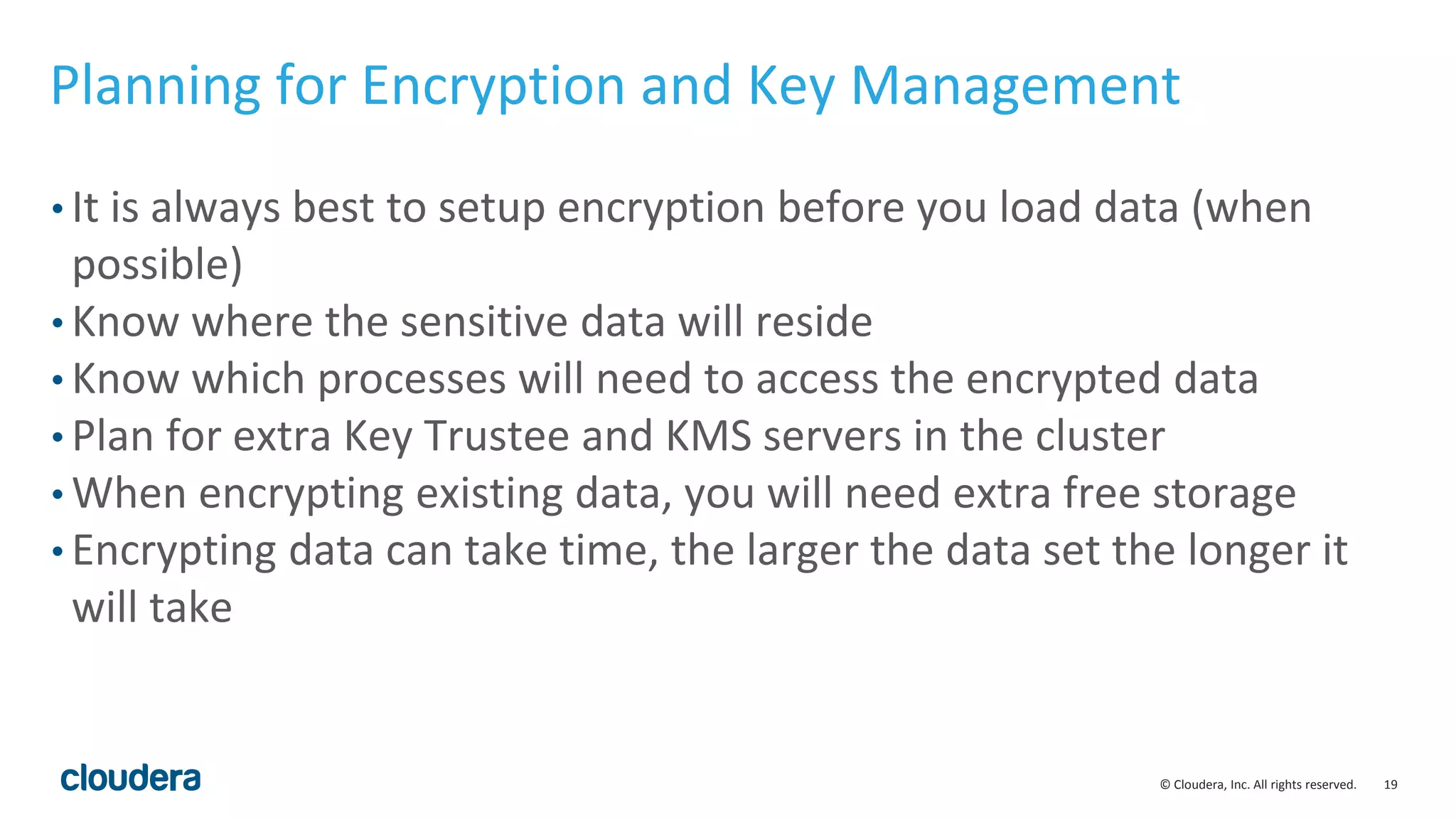
Planning for Encryption and Key Management
• It is always best to setup encryption before you load data (when
possible)
• Know where the sensitive data will reside
• Know which processes will need to access the encrypted data
• Plan for extra Key Trustee and KMS servers in the cluster
• When encrypting existing data, you will need extra free storage
• Encrypting data can take time, the larger the data set the longer it
will take
© Cloudera, Inc. All rights reserved. 20
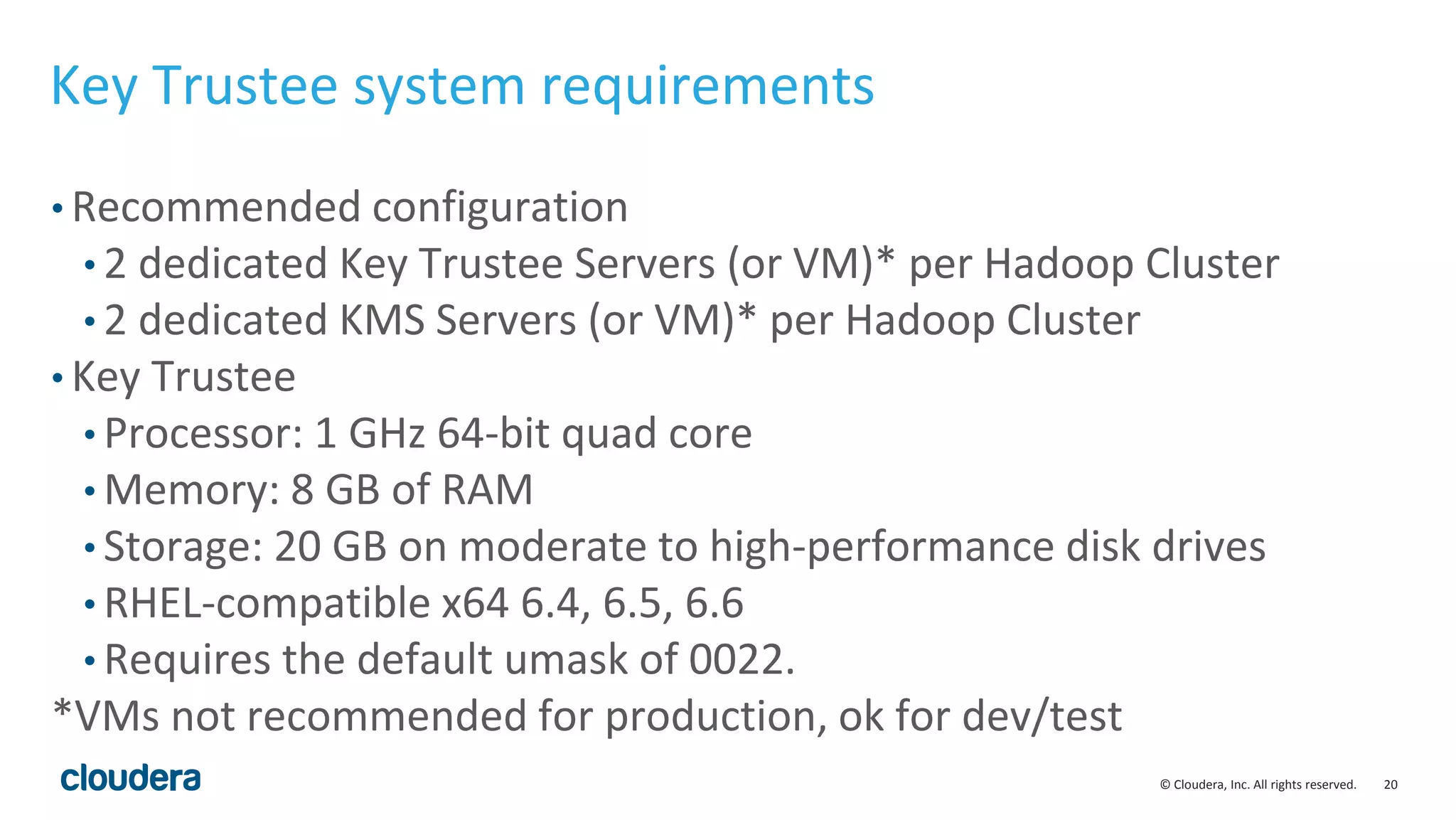
Key Trustee system requirements
• Recommended configuration
• 2 dedicated Key Trustee Servers (or VM)* per Hadoop Cluster
• 2 dedicated KMS Servers (or VM)* per Hadoop Cluster
• Key Trustee
• Processor: 1 GHz 64-bit quad core
• Memory: 8 GB of RAM
• Storage: 20 GB on moderate to high-performance disk drives
• RHEL-compatible x64 6.4, 6.5, 6.6
• Requires the default umask of 0022.
*VMs not recommended for production, ok for dev/test
© Cloudera, Inc. All rights reserved. 21
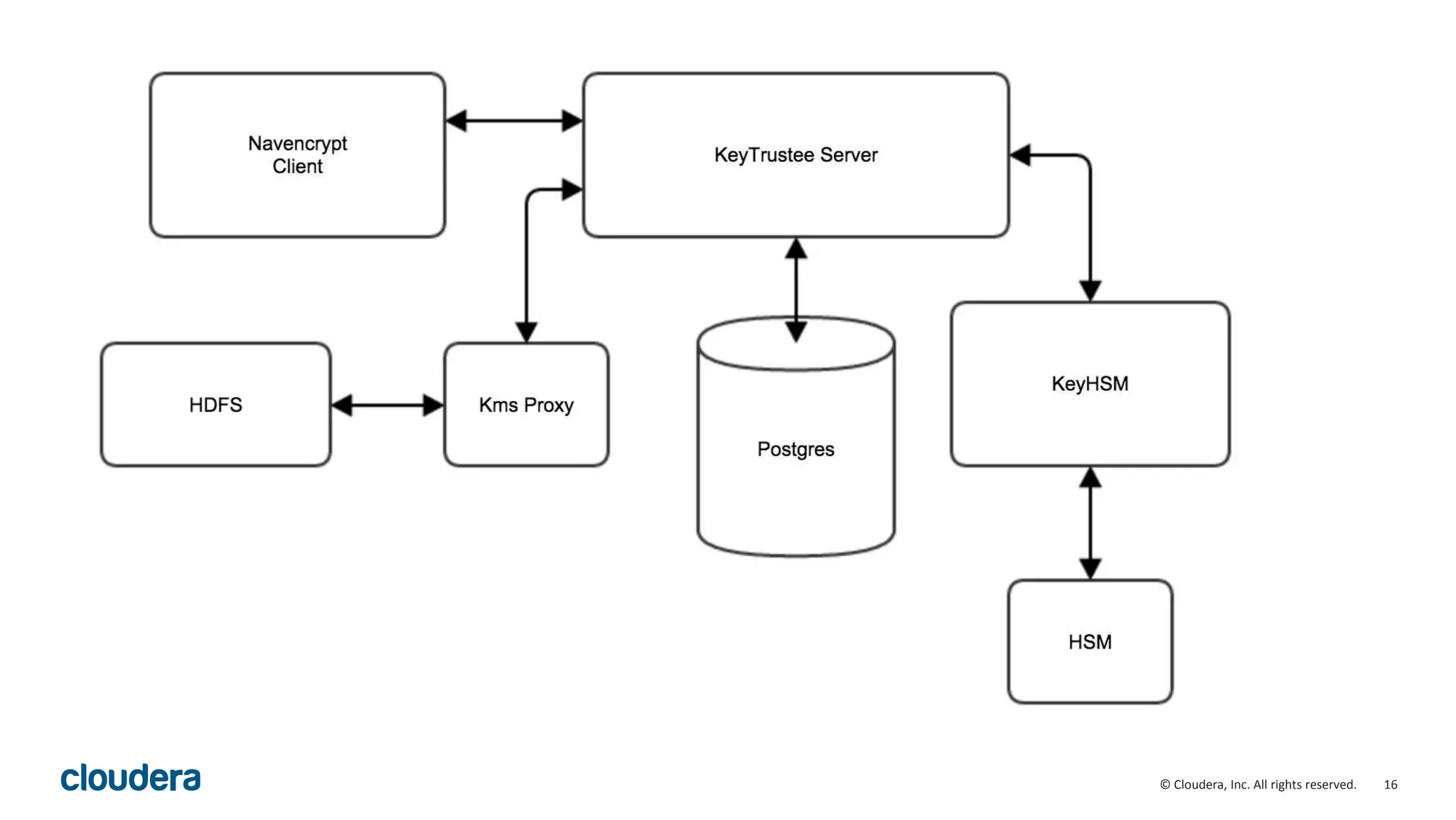
Integrating with HSMs
• Requires the HSM vendor supplied jars / libraries
• Requires KeyHSM, a Key Trustee service that creates the binding
between Key Trustee and the HSM
• Supports the major HSMs
• SafeNet Luna
• SafeNet DataSecure, KeySecure
• Thales nCipher
• Account for additional time for the HSM administrator to
provision the accounts, software, network connectivity
© Cloudera, Inc. All rights reserved. 22
Security Reference Architecture
© Cloudera, Inc. All rights reserved. 23
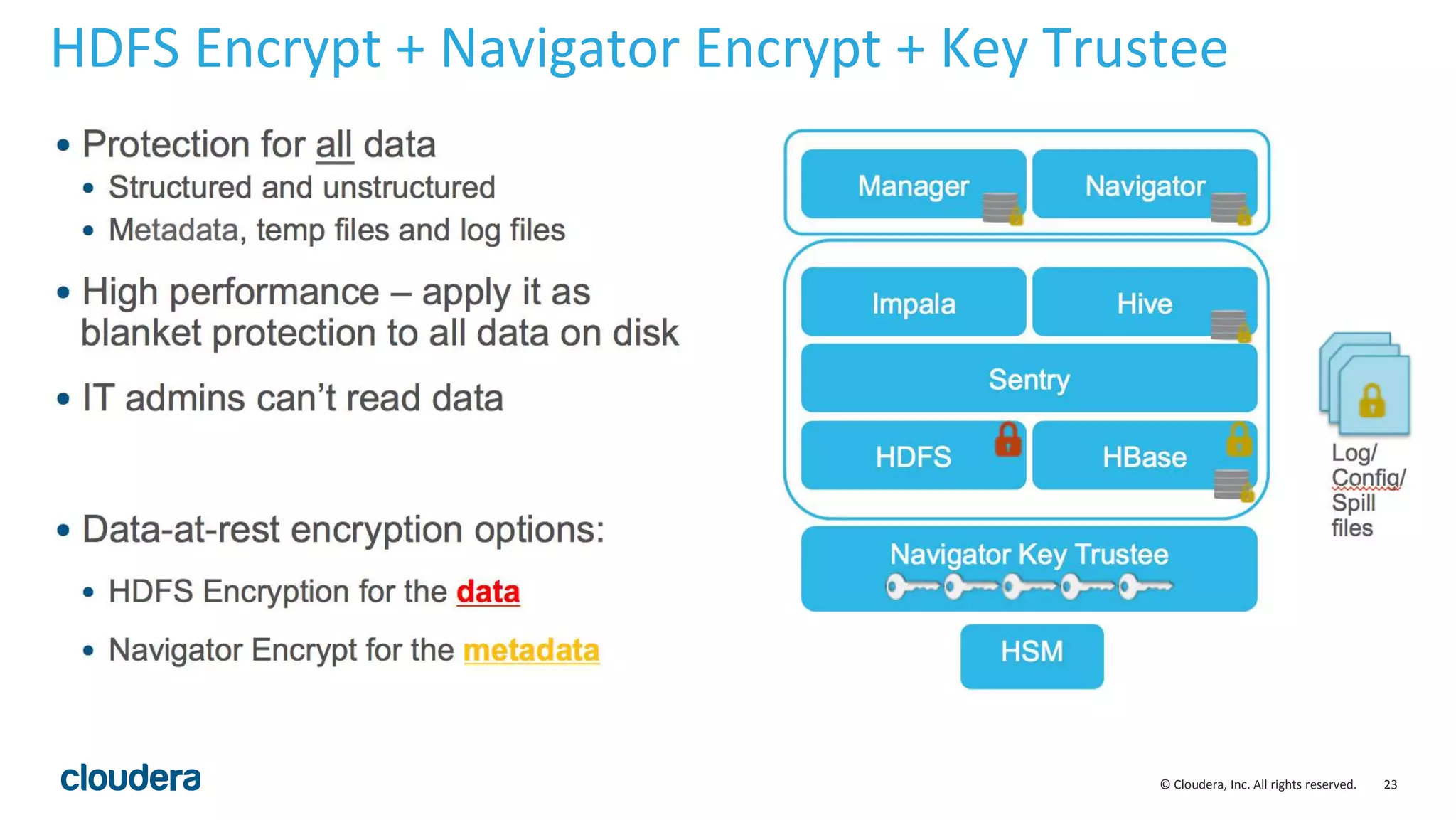
HDFS Encrypt + Navigator Encrypt + Key Trustee
© Cloudera, Inc. All rights reserved. 24
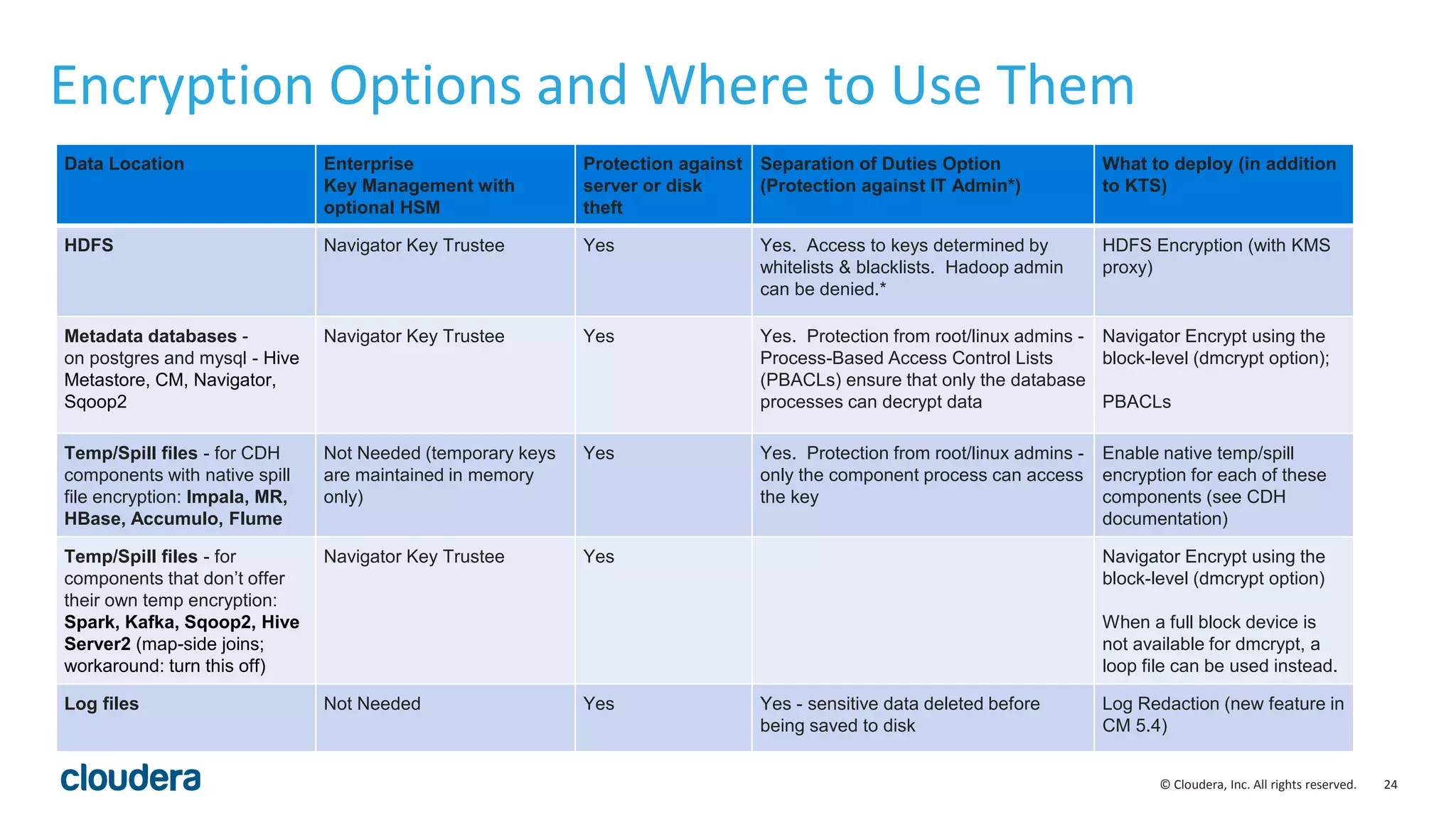
Encryption Options and Where to Use Them
Data Location Enterprise
Key Management with
optional HSM
Protection against
server or disk
theft
Separation of Duties Option
(Protection against IT Admin*)
What to deploy (in addition
to KTS)
HDFS Navigator Key Trustee Yes Yes. Access to keys determined by
whitelists & blacklists. Hadoop admin
can be denied.*
HDFS Encryption (with KMS
proxy)
Metadata databases -
on postgres and mysql - Hive
Metastore, CM, Navigator,
Sqoop2
Navigator Key Trustee Yes Yes. Protection from root/linux admins -
Process-Based Access Control Lists
(PBACLs) ensure that only the database
processes can decrypt data
Navigator Encrypt using the
block-level (dmcrypt option);
PBACLs
Temp/Spill files - for CDH
components with native spill
file encryption: Impala, MR,
HBase, Accumulo, Flume
Not Needed (temporary keys
are maintained in memory
only)
Yes Yes. Protection from root/linux admins -
only the component process can access
the key
Enable native temp/spill
encryption for each of these
components (see CDH
documentation)
Temp/Spill files - for
components that don’t offer
their own temp encryption:
Spark, Kafka, Sqoop2, Hive
Server2 (map-side joins;
workaround: turn this off)
Navigator Key Trustee Yes Navigator Encrypt using the
block-level (dmcrypt option)
When a full block device is
not available for dmcrypt, a
loop file can be used instead.
Log files Not Needed Yes Yes - sensitive data deleted before
being saved to disk
Log Redaction (new feature in
CM 5.4)
© Cloudera, Inc. All rights reserved. 25
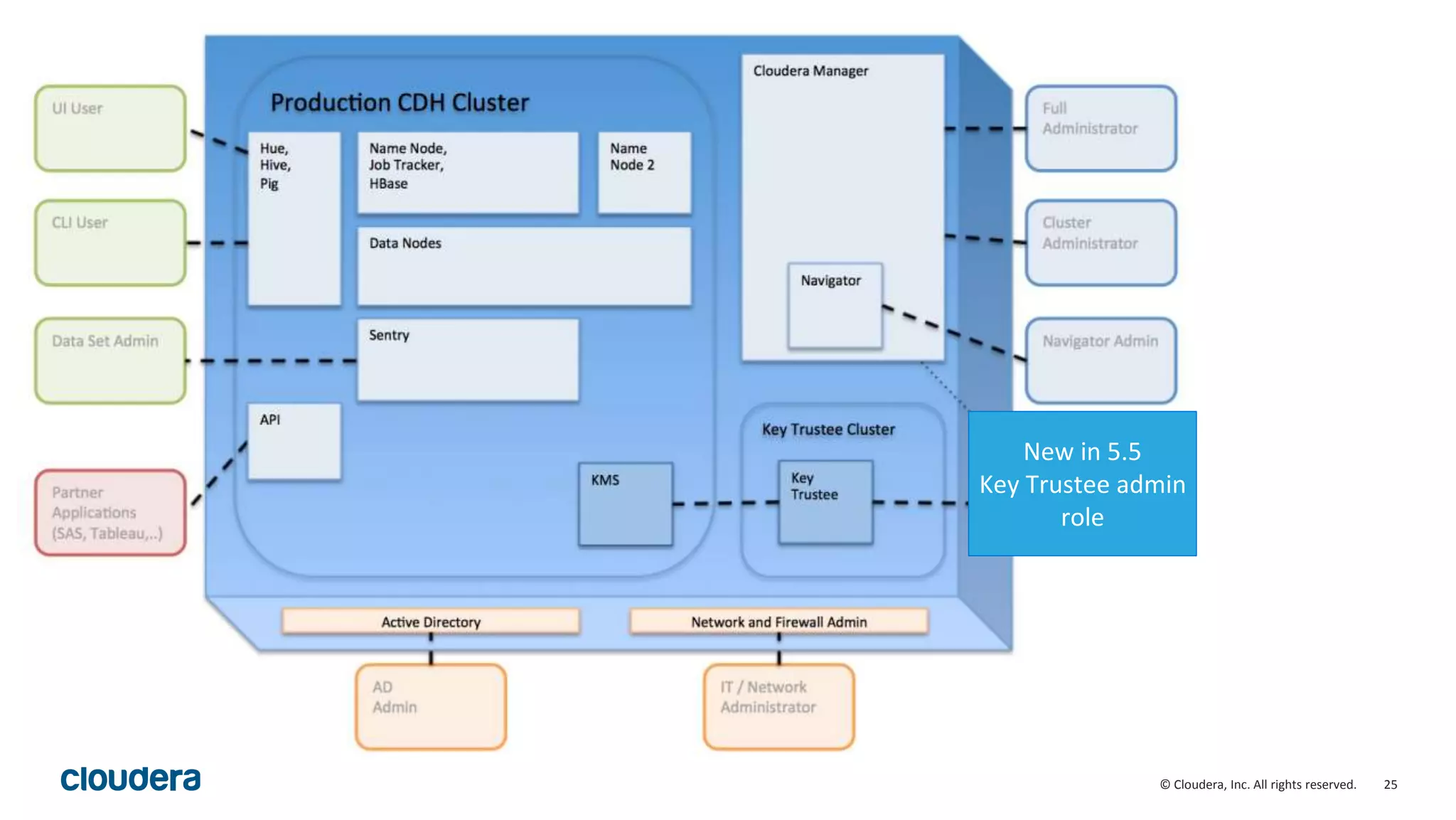
New in 5.5
Key Trustee admin
role
© Cloudera, Inc. All rights reserved. 26
HDFS Encryption Workflow
© Cloudera, Inc. All rights reserved.
©2014 Cloudera, Inc. All rights reserved.
27
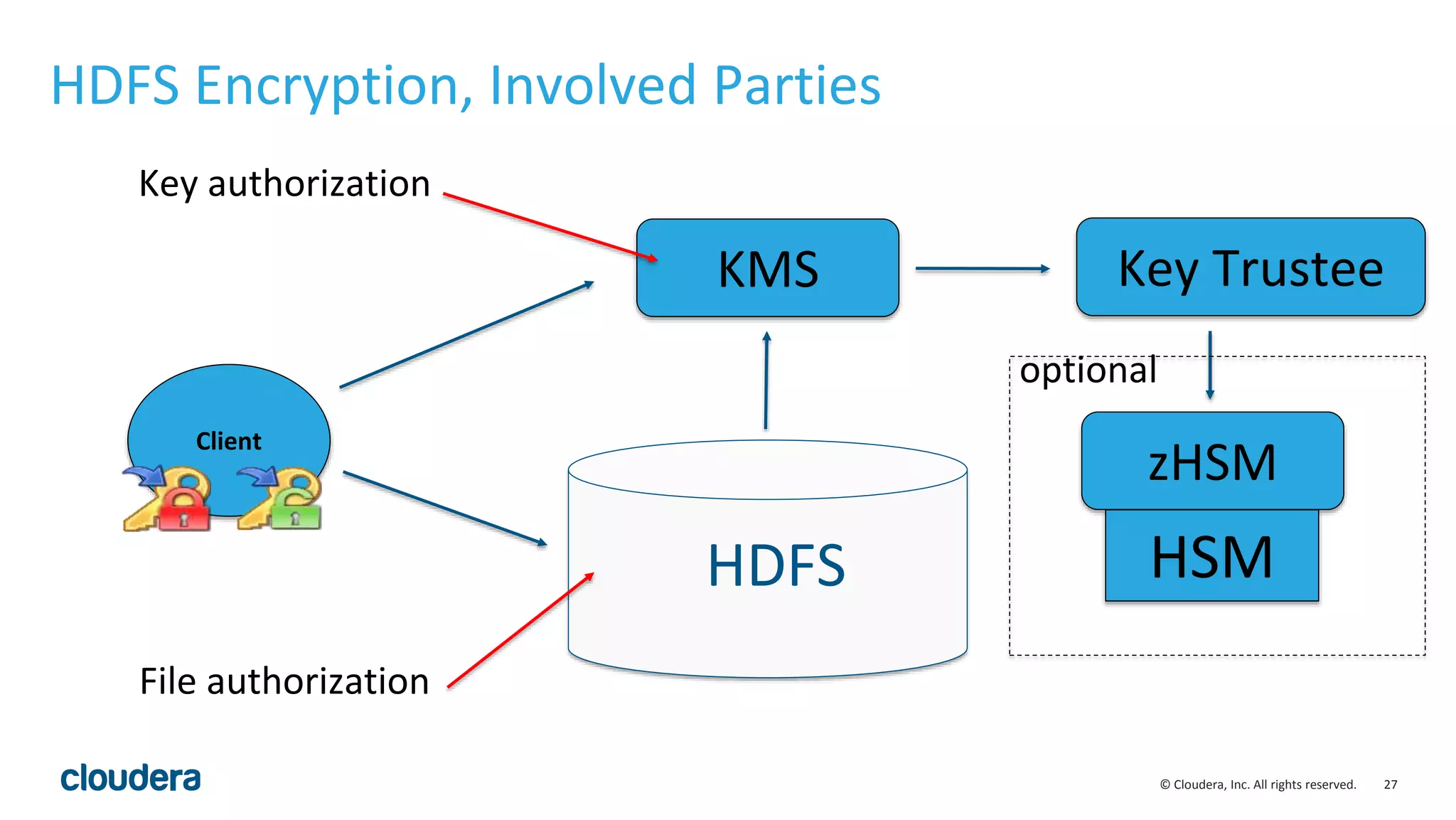
HDFS Encryption, Involved Parties
HDFS
KMS Key Trustee
zHSM
HSM
Client
optional
Key authorization
File authorization
© Cloudera, Inc. All rights reserved.
©2014 Cloudera, Inc. All rights reserved.
28
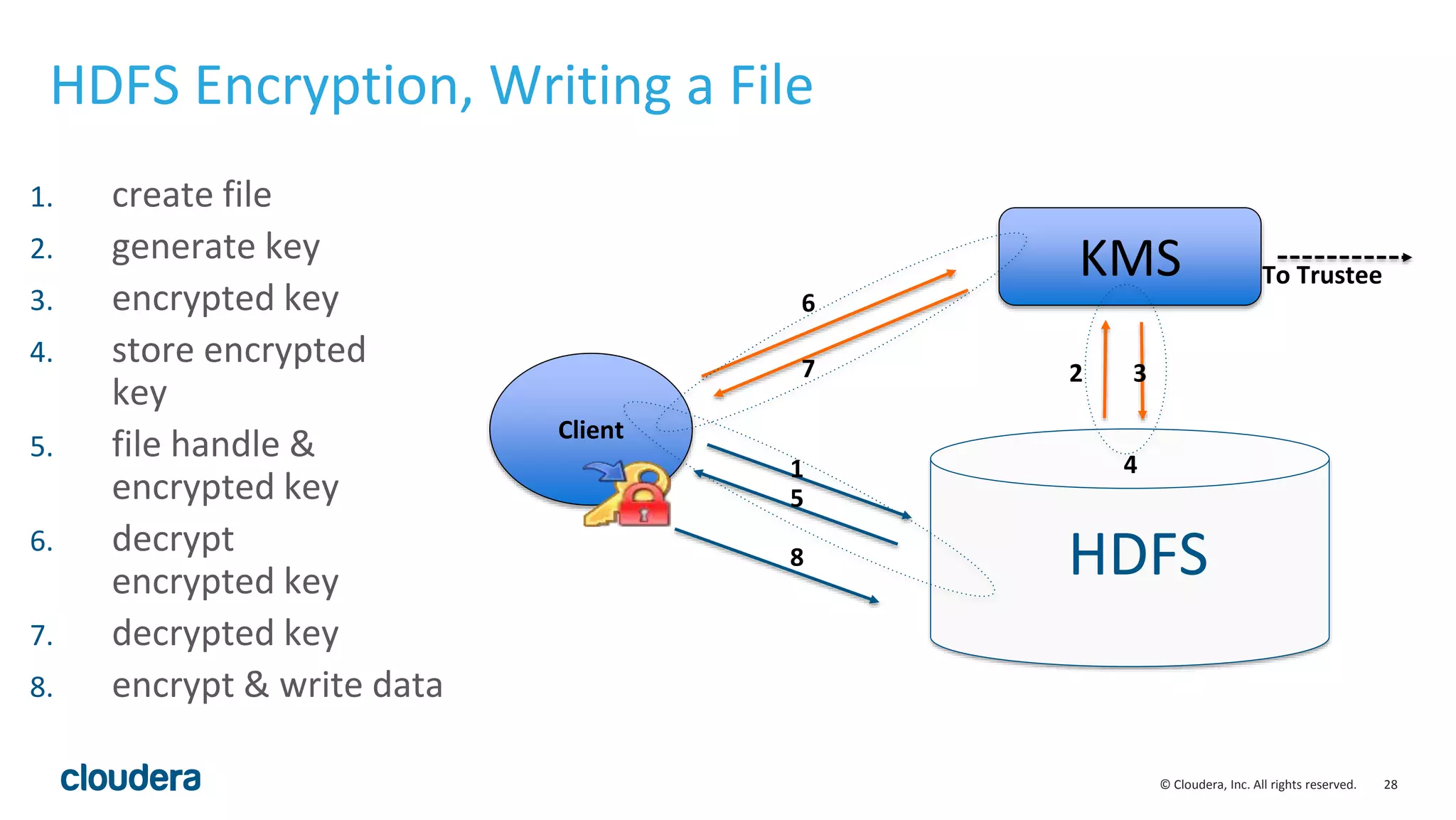
HDFS Encryption, Writing a File
HDFS
KMS
Client
To Trustee
2 3
6
7
1
5
8
1. create file
2. generate key
3. encrypted key
4. store encrypted
key
5. file handle &
encrypted key
6. decrypt
encrypted key
7. decrypted key
8. encrypt & write data
4
© Cloudera, Inc. All rights reserved.
©2014 Cloudera, Inc. All rights reserved.
29
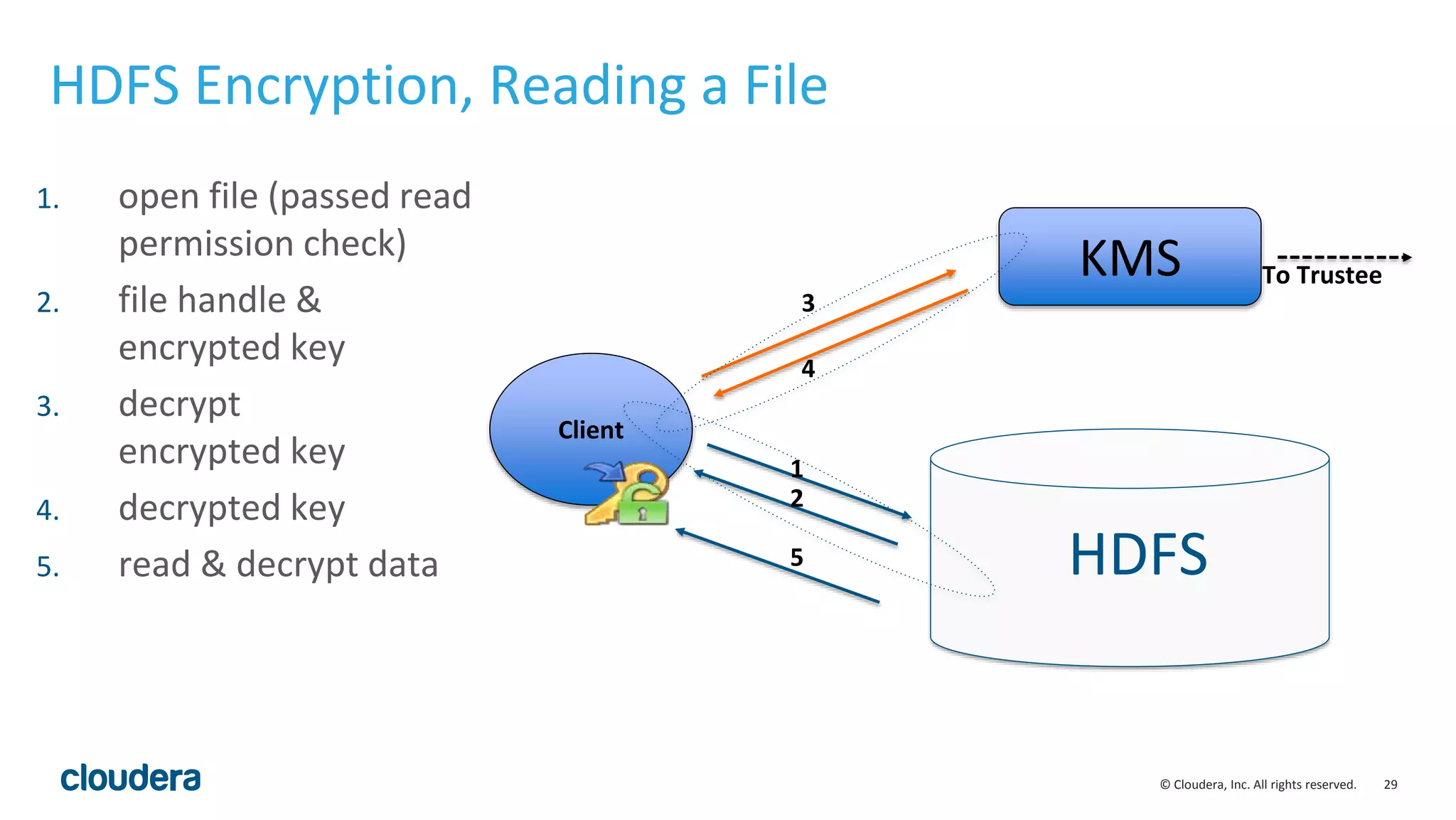
HDFS Encryption, Reading a File
HDFS
KMS
Client
To Trustee
3
4
1
2
5
1. open file (passed read
permission check)
2. file handle &
encrypted key
3. decrypt
encrypted key
4. decrypted key
5. read & decrypt data
© Cloudera, Inc. All rights reserved. 30
HDFS Encryption Implementation
and Usage
© Cloudera, Inc. All rights reserved. 31
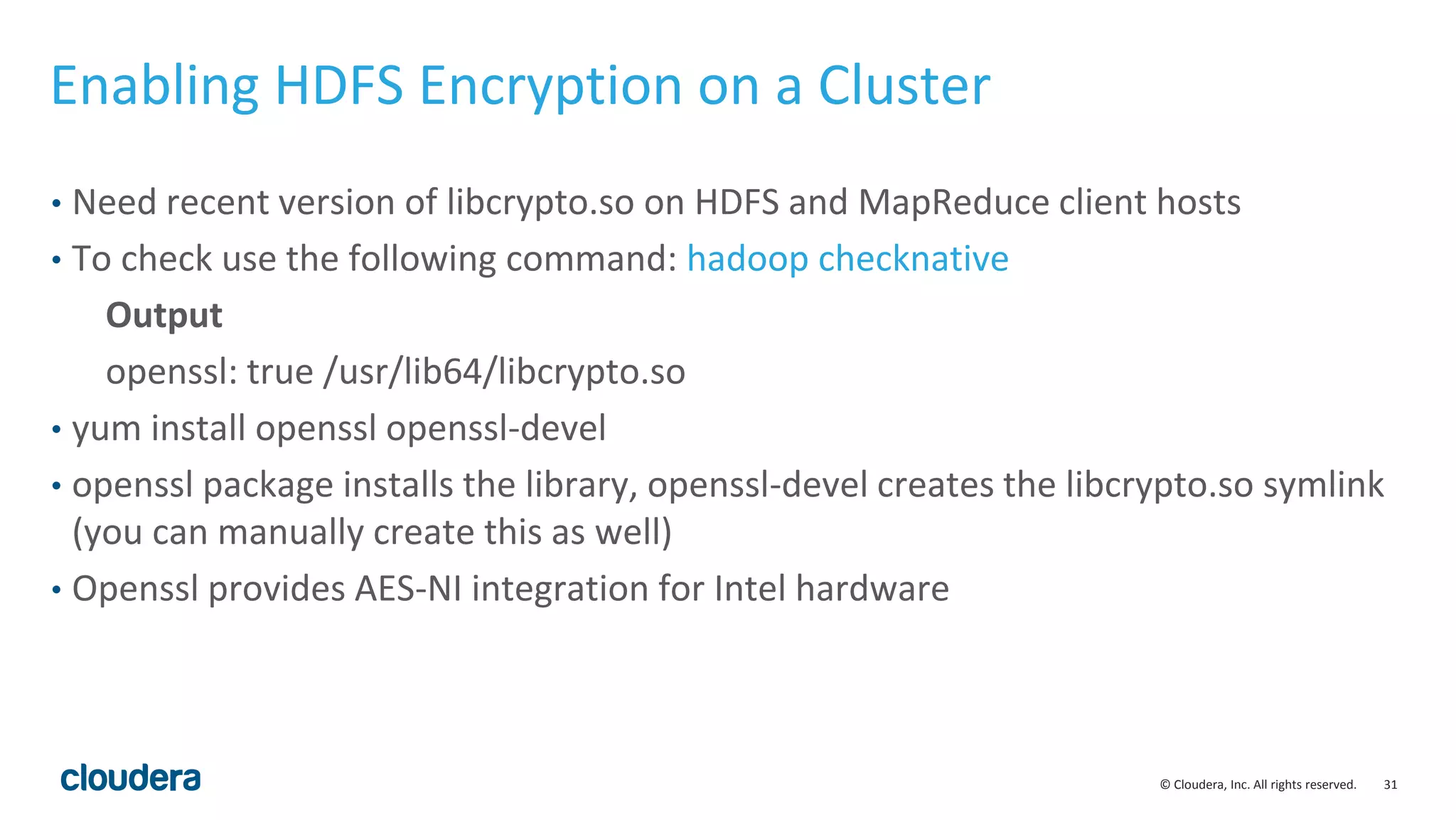
Enabling HDFS Encryption on a Cluster
• Need recent version of libcrypto.so on HDFS and MapReduce client hosts
• To check use the following command: hadoop checknative
Output
openssl: true /usr/lib64/libcrypto.so
• yum install openssl openssl-devel
• openssl package installs the library, openssl-devel creates the libcrypto.so symlink
(you can manually create this as well)
• Openssl provides AES-NI integration for Intel hardware
© Cloudera, Inc. All rights reserved. 32
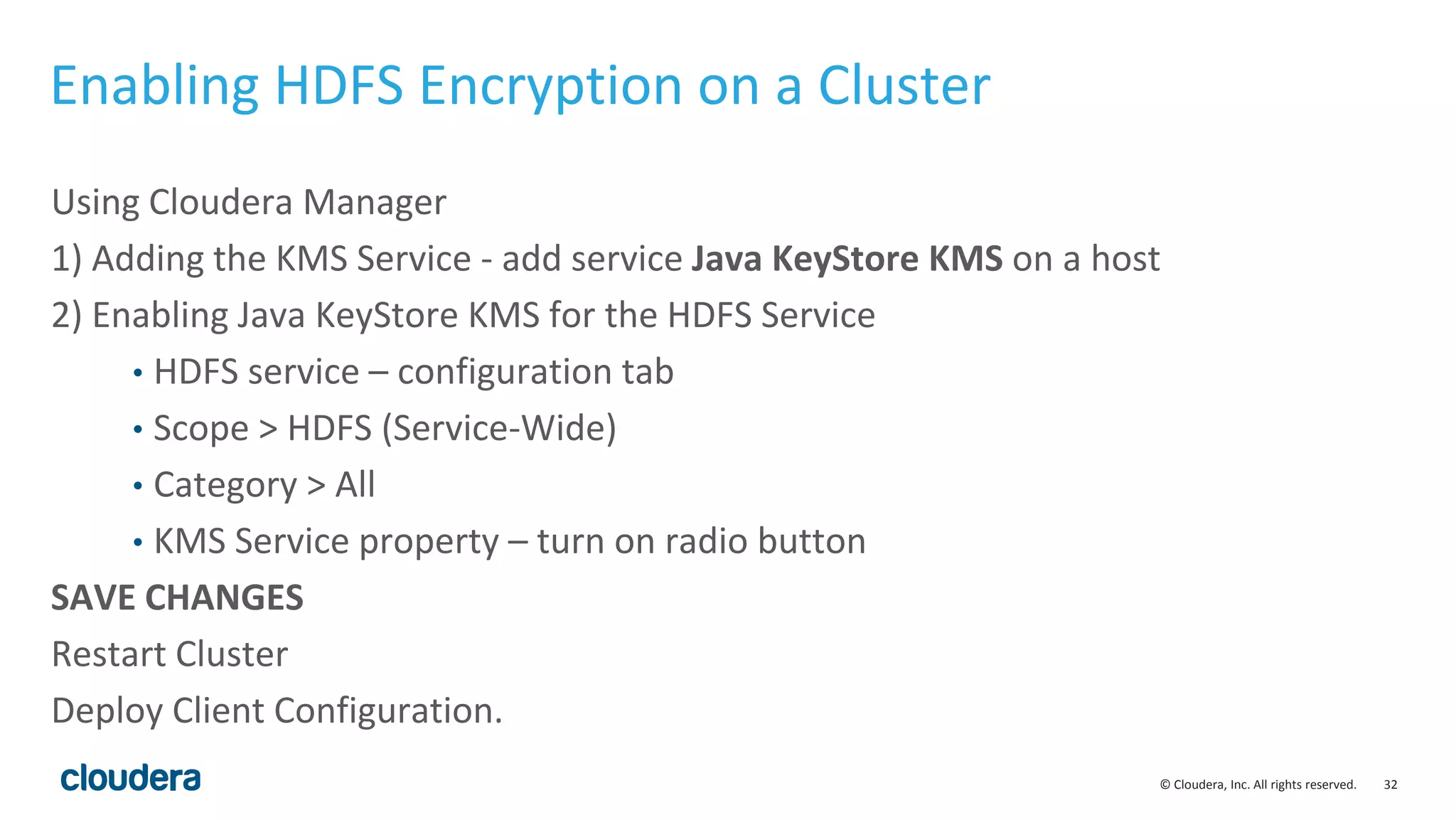
Enabling HDFS Encryption on a Cluster
Using Cloudera Manager
1) Adding the KMS Service - add service Java KeyStore KMS on a host
2) Enabling Java KeyStore KMS for the HDFS Service
• HDFS service – configuration tab
• Scope > HDFS (Service-Wide)
• Category > All
• KMS Service property – turn on radio button
SAVE CHANGES
Restart Cluster
Deploy Client Configuration.
© Cloudera, Inc. All rights reserved. 33
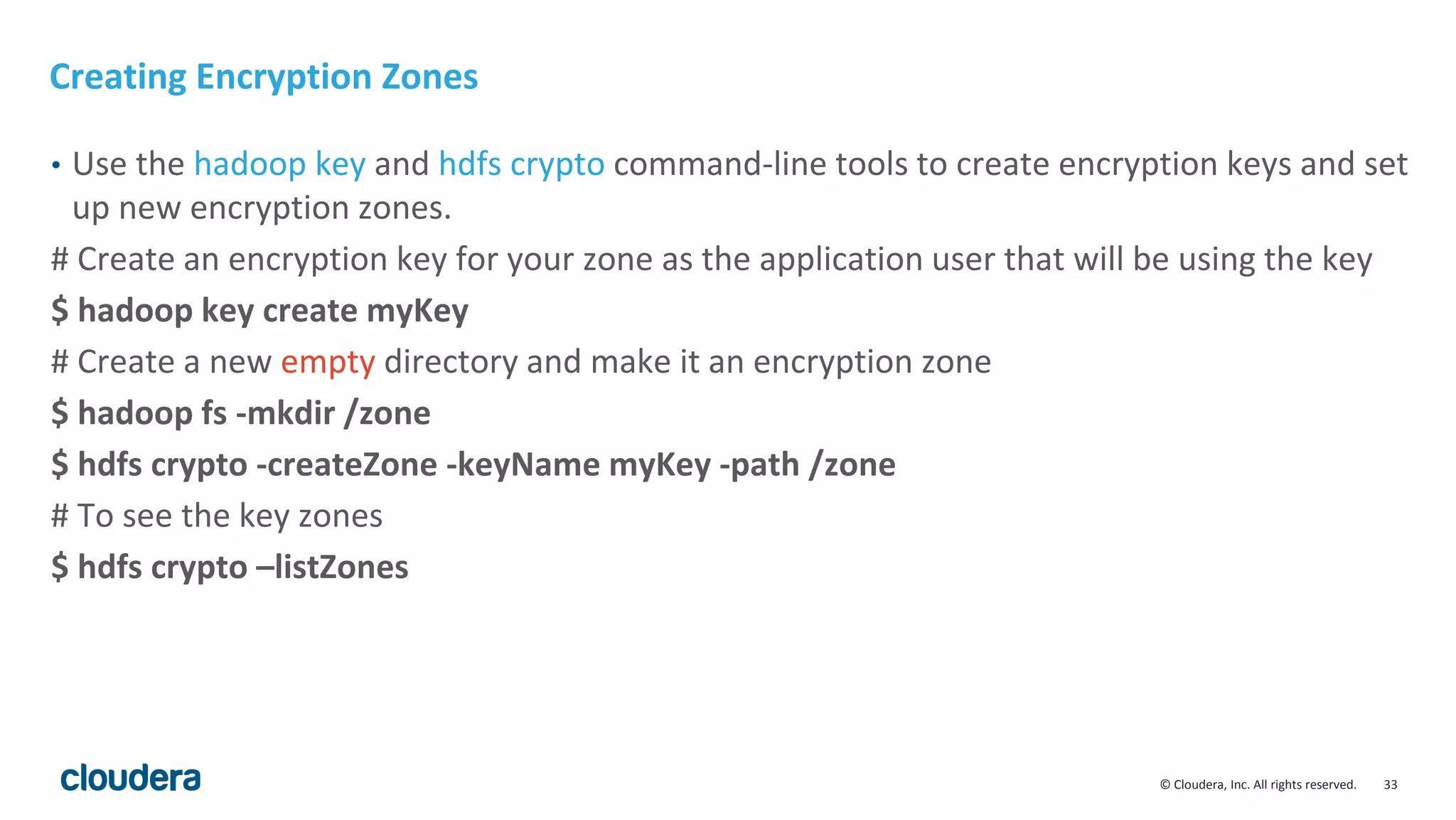
Creating Encryption Zones
• Use the hadoop key and hdfs crypto command-line tools to create encryption keys and set
up new encryption zones.
# Create an encryption key for your zone as the application user that will be using the key
$ hadoop key create myKey
# Create a new empty directory and make it an encryption zone
$ hadoop fs -mkdir /zone
$ hdfs crypto -createZone -keyName myKey -path /zone
# To see the key zones
$ hdfs crypto –listZones
© Cloudera, Inc. All rights reserved. 34
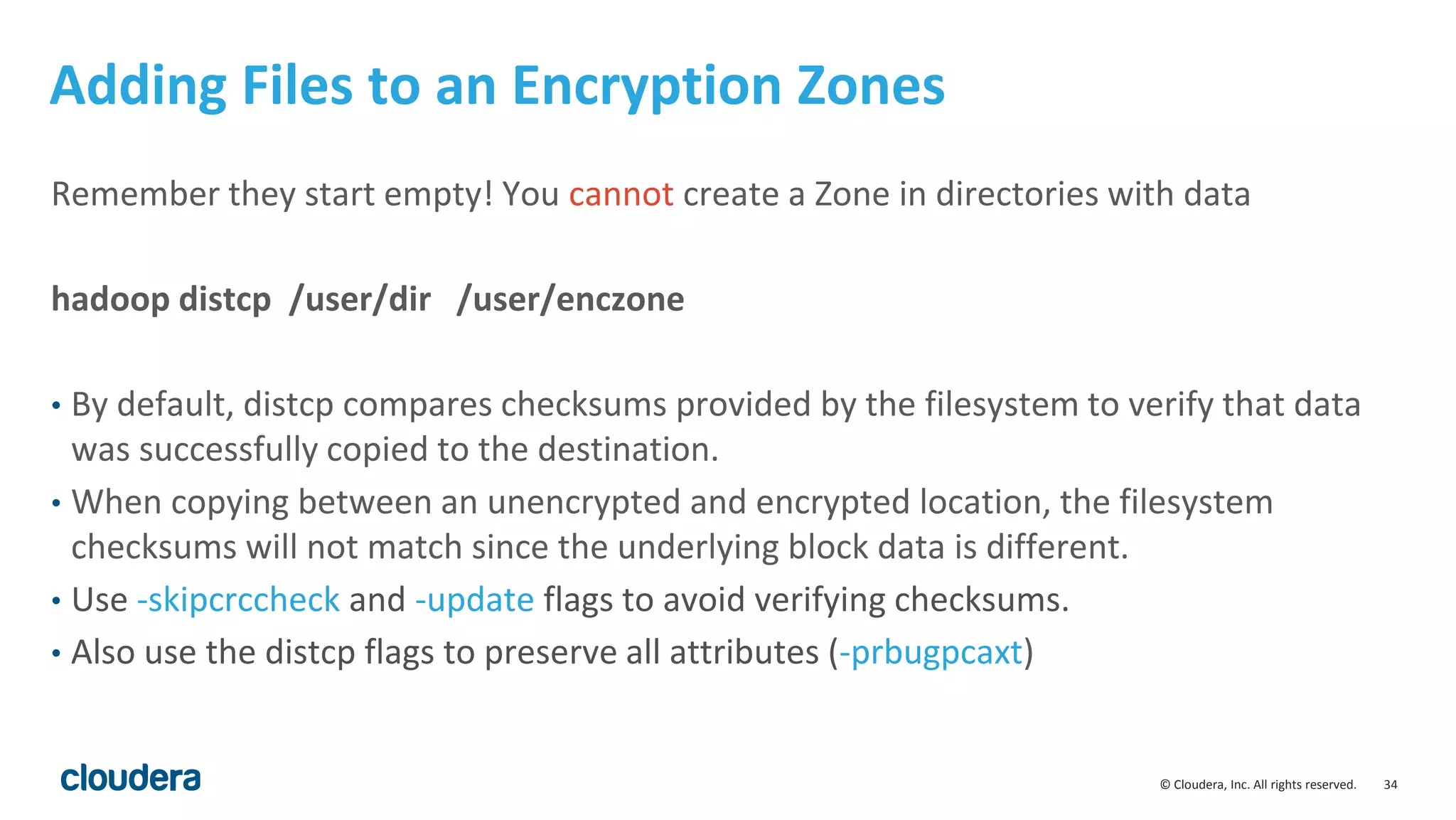
Adding Files to an Encryption Zones
Remember they start empty! You cannot create a Zone in directories with data
hadoop distcp /user/dir /user/enczone
• By default, distcp compares checksums provided by the filesystem to verify that data
was successfully copied to the destination.
• When copying between an unencrypted and encrypted location, the filesystem
checksums will not match since the underlying block data is different.
• Use -skipcrccheck and -update flags to avoid verifying checksums.
• Also use the distcp flags to preserve all attributes (-prbugpcaxt)
© Cloudera, Inc. All rights reserved. 35
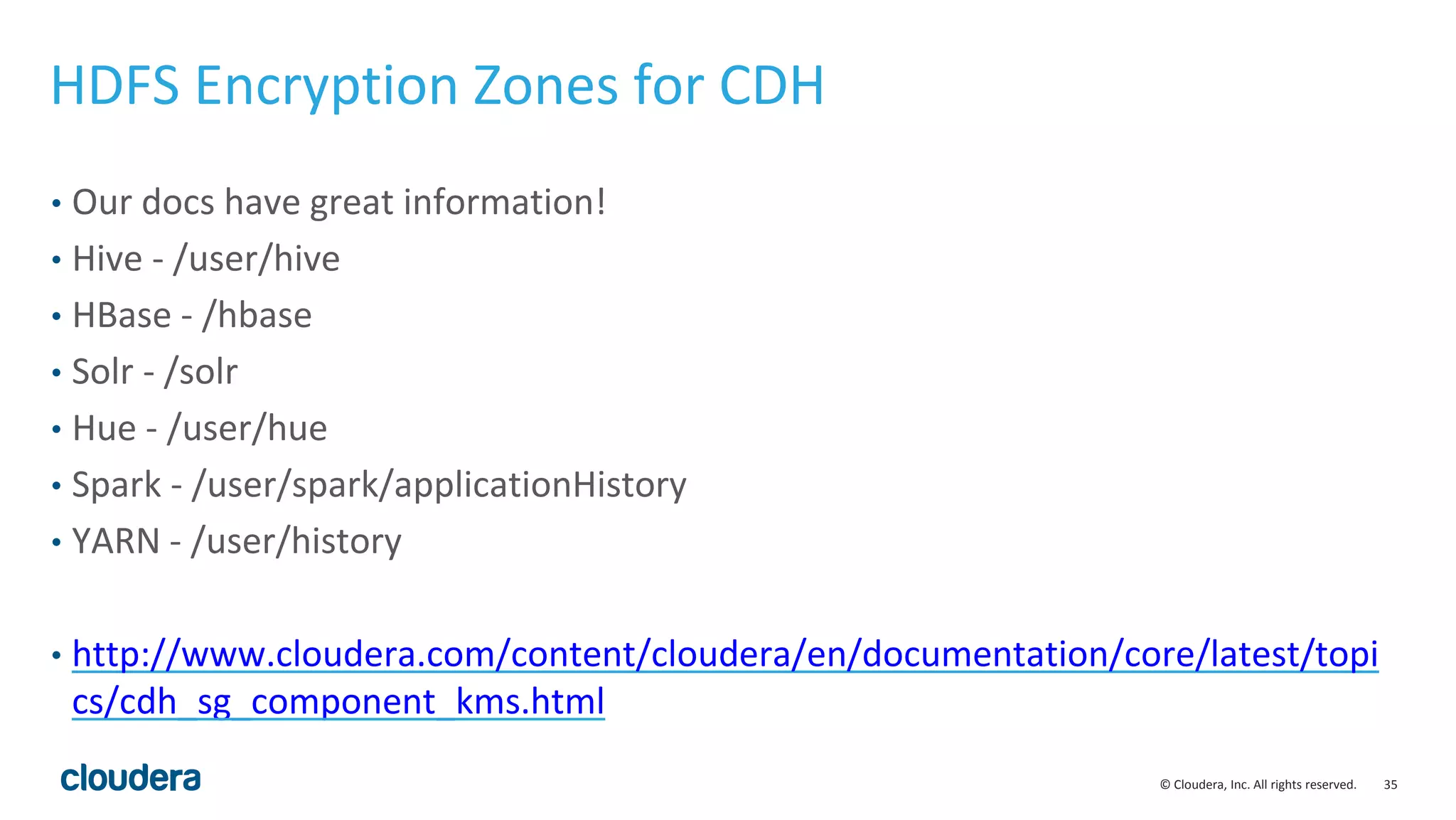
HDFS Encryption Zones for CDH
• Our docs have great information!
• Hive - /user/hive
• HBase - /hbase
• Solr - /solr
• Hue - /user/hue
• Spark - /user/spark/applicationHistory
• YARN - /user/history
• http://www.cloudera.com/content/cloudera/en/documentation/core/latest/topi
cs/cdh_sg_component_kms.html
© Cloudera, Inc. All rights reserved. 36
Thank you

Risk Management for Data: Secured and Governed

  • 1.
    © Cloudera, Inc.All rights reserved. 1 Risk Management for Data Eddie Garcia Chief Security Architect
  • 2.
    © Cloudera, Inc.All rights reserved. 2 One Platform, Many Workloads Batch, Interactive, and Real-Time. Leading performance and usability in one platform. • End-to-end analytic workflows • Access more data • Work with data in new ways • Enable new users Security and Administration Process Ingest Sqoop, Flume, Kafka Transform MapReduce, Hive, Pig, Spark Discover Analytic Database Impala Search Solr Model Machine Learning SAS, R, Spark, Mahout Serve NoSQL Database HBase Streaming Spark Streaming Unlimited Storage HDFS, HBase YARN, Cloudera Manager, Cloudera Navigator
  • 3.
    © Cloudera, Inc.All rights reserved. 3 Comprehensive, Compliance-Ready Security Authentication, Authorization, Audit, and Compliance Perimeter Guarding access to the cluster itself Technical Concepts: Authentication Access Defining what users and applications can do with data Technical Concepts: Authorization Data Protecting data in the cluster from unauthorized visibility Technical Concepts: Encryption, Tokenization, Data masking Visibility Reporting on where data came from and how it’s being used Technical Concepts: Auditing Lineage Cloudera Manager Apache Sentry Cloudera Navigator Navigator Encrypt & Key Trustee | Partners
  • 4.
    © Cloudera, Inc.All rights reserved. 4 What is HDFS encryption and why do I care?
  • 5.
    © Cloudera, Inc.All rights reserved. 5 Background • Our customers are increasingly wanting to use HDFS to store sensitive data • Customers often are mandated to protect data at rest • PCI • HIPAA • National Security • Company confidential • Encryption of data at rest helps mitigate certain security threats • Rogue administrators (insider threat) • Compromised accounts (masquerade attacks) • Lost/stolen hard drives
  • 6.
    © Cloudera, Inc.All rights reserved. 6 Encryption, core concepts and terminology
  • 7.
    © Cloudera, Inc.All rights reserved. 7 Encryption and Cryptography • AES: is a common cryptographic algorithm to encrypt data. Larger key sizes are more secure. HDFS Encryption currently supports AES 128 (default) and AES 256 bit Keys • RSA: is a cryptographic algorithm, commonly used to communicate and exchange encryption keys. Common RSA key sizes are 1024, 2048, 4096 bits. • GPG: is a open source implementation of PGP that uses encryption to secure data exchange
  • 8.
    © Cloudera, Inc.All rights reserved. 8 Here a key, there a key, everywhere a key key • Keys: are used to encrypt data • Key encryption keys: used to encrypt other keys • Public keys: are used to encrypt data but cannot decrypt • Private keys: decrypt data that was encrypted with a public key HDFS Encryption, Key Trustee and Navigator encrypt use different combinations of these keys.
  • 9.
    © Cloudera, Inc.All rights reserved. 9 HDFS Encryption Zones and Keys • Encryption Zone Keys (EZ Keys): HDFS Encryption uses a randomly generated AES key to protect Encryption Zones • Data Encryption Keys (DEKs): are generated automatically to encrypt any new file created in the Encryption Zone • Encrypted Data Encryption Keys (EDEKs): are DEKs that have been encrypted with an EZ Key. Encryption and decryption of EDEKs happens entirely on the KMS
  • 10.
    © Cloudera, Inc.All rights reserved. 10 Key Trustee and Hardware Security Module Keys • Key Trustee Client GPG Key: Each client to the Key Trustee server has a unique GPG Keypair • Key Trustee Server GPG Key: the key trustee server also has a unique GPG keypair • HSM Keys: are private keys that never leave the HSM. Are used for root of trust by encrypting keys stored in Key Trustee. HSMs are common in Financial Services and Government, not so common in other industries.
  • 11.
    © Cloudera, Inc.All rights reserved. 11 KMS and Key Trustee what’s the difference?
  • 12.
    © Cloudera, Inc.All rights reserved. 12 Key Management Service (KMS) • When encrypting any data it is important to securely store your encryption keys away from the encrypted data • KMS is a Key Management Service for HDFS Encryption to store and retrieve encryption keys • KMS is open source and provides a standard interface for pluggable key providers • The default key provider for KMS is the Java Key Store • The Java Key Store is not recommended for production key management, it is meant for development and testing
  • 13.
    © Cloudera, Inc.All rights reserved. 13 Navigator Key Trustee • Navigator Key Trustee provides secure, centralized and scalable key storage and administration • Is not open source and licensed with Cloudera Navigator • Is the recommended option for production deployments • Provides the hooks to integrate with Hardware Security Modules for physically tamper proof requirements (FIPS 140-2 level 3) • Also provides centralized Key Management for Navigator Encrypt
  • 14.
    © Cloudera, Inc.All rights reserved. 14 KMS and Navigator Key Trustee • KMS acts as a proxy to Navigator Key Trustee, KMS is implemented for high performance, number of transactions and provides caching • KMS understands Hadoop authentication and Kerberos • KMS Access Controls Lists provides mechanisms to limit the Hadoop Users and Groups that have access to keys • KMS allows blacklisting of users and groups including super users like HDFS • KMS creation separation of duties to protect against rogue privileged administrators
  • 15.
    © Cloudera, Inc.All rights reserved. 15 Key Trustee and KMS
  • 16.
    © Cloudera, Inc.All rights reserved. 16
  • 17.
    © Cloudera, Inc.All rights reserved. 17
  • 18.
    © Cloudera, Inc.All rights reserved. 18 Pre-requisites and pre-planning before you encrypt your cluster
  • 19.
    © Cloudera, Inc.All rights reserved. 19 Planning for Encryption and Key Management • It is always best to setup encryption before you load data (when possible) • Know where the sensitive data will reside • Know which processes will need to access the encrypted data • Plan for extra Key Trustee and KMS servers in the cluster • When encrypting existing data, you will need extra free storage • Encrypting data can take time, the larger the data set the longer it will take
  • 20.
    © Cloudera, Inc.All rights reserved. 20 Key Trustee system requirements • Recommended configuration • 2 dedicated Key Trustee Servers (or VM)* per Hadoop Cluster • 2 dedicated KMS Servers (or VM)* per Hadoop Cluster • Key Trustee • Processor: 1 GHz 64-bit quad core • Memory: 8 GB of RAM • Storage: 20 GB on moderate to high-performance disk drives • RHEL-compatible x64 6.4, 6.5, 6.6 • Requires the default umask of 0022. *VMs not recommended for production, ok for dev/test
  • 21.
    © Cloudera, Inc.All rights reserved. 21 Integrating with HSMs • Requires the HSM vendor supplied jars / libraries • Requires KeyHSM, a Key Trustee service that creates the binding between Key Trustee and the HSM • Supports the major HSMs • SafeNet Luna • SafeNet DataSecure, KeySecure • Thales nCipher • Account for additional time for the HSM administrator to provision the accounts, software, network connectivity
  • 22.
    © Cloudera, Inc.All rights reserved. 22 Security Reference Architecture
  • 23.
    © Cloudera, Inc.All rights reserved. 23 HDFS Encrypt + Navigator Encrypt + Key Trustee
  • 24.
    © Cloudera, Inc.All rights reserved. 24 Encryption Options and Where to Use Them Data Location Enterprise Key Management with optional HSM Protection against server or disk theft Separation of Duties Option (Protection against IT Admin*) What to deploy (in addition to KTS) HDFS Navigator Key Trustee Yes Yes. Access to keys determined by whitelists & blacklists. Hadoop admin can be denied.* HDFS Encryption (with KMS proxy) Metadata databases - on postgres and mysql - Hive Metastore, CM, Navigator, Sqoop2 Navigator Key Trustee Yes Yes. Protection from root/linux admins - Process-Based Access Control Lists (PBACLs) ensure that only the database processes can decrypt data Navigator Encrypt using the block-level (dmcrypt option); PBACLs Temp/Spill files - for CDH components with native spill file encryption: Impala, MR, HBase, Accumulo, Flume Not Needed (temporary keys are maintained in memory only) Yes Yes. Protection from root/linux admins - only the component process can access the key Enable native temp/spill encryption for each of these components (see CDH documentation) Temp/Spill files - for components that don’t offer their own temp encryption: Spark, Kafka, Sqoop2, Hive Server2 (map-side joins; workaround: turn this off) Navigator Key Trustee Yes Navigator Encrypt using the block-level (dmcrypt option) When a full block device is not available for dmcrypt, a loop file can be used instead. Log files Not Needed Yes Yes - sensitive data deleted before being saved to disk Log Redaction (new feature in CM 5.4)
  • 25.
    © Cloudera, Inc.All rights reserved. 25 New in 5.5 Key Trustee admin role
  • 26.
    © Cloudera, Inc.All rights reserved. 26 HDFS Encryption Workflow
  • 27.
    © Cloudera, Inc.All rights reserved. ©2014 Cloudera, Inc. All rights reserved. 27 HDFS Encryption, Involved Parties HDFS KMS Key Trustee zHSM HSM Client optional Key authorization File authorization
  • 28.
    © Cloudera, Inc.All rights reserved. ©2014 Cloudera, Inc. All rights reserved. 28 HDFS Encryption, Writing a File HDFS KMS Client To Trustee 2 3 6 7 1 5 8 1. create file 2. generate key 3. encrypted key 4. store encrypted key 5. file handle & encrypted key 6. decrypt encrypted key 7. decrypted key 8. encrypt & write data 4
  • 29.
    © Cloudera, Inc.All rights reserved. ©2014 Cloudera, Inc. All rights reserved. 29 HDFS Encryption, Reading a File HDFS KMS Client To Trustee 3 4 1 2 5 1. open file (passed read permission check) 2. file handle & encrypted key 3. decrypt encrypted key 4. decrypted key 5. read & decrypt data
  • 30.
    © Cloudera, Inc.All rights reserved. 30 HDFS Encryption Implementation and Usage
  • 31.
    © Cloudera, Inc.All rights reserved. 31 Enabling HDFS Encryption on a Cluster • Need recent version of libcrypto.so on HDFS and MapReduce client hosts • To check use the following command: hadoop checknative Output openssl: true /usr/lib64/libcrypto.so • yum install openssl openssl-devel • openssl package installs the library, openssl-devel creates the libcrypto.so symlink (you can manually create this as well) • Openssl provides AES-NI integration for Intel hardware
  • 32.
    © Cloudera, Inc.All rights reserved. 32 Enabling HDFS Encryption on a Cluster Using Cloudera Manager 1) Adding the KMS Service - add service Java KeyStore KMS on a host 2) Enabling Java KeyStore KMS for the HDFS Service • HDFS service – configuration tab • Scope > HDFS (Service-Wide) • Category > All • KMS Service property – turn on radio button SAVE CHANGES Restart Cluster Deploy Client Configuration.
  • 33.
    © Cloudera, Inc.All rights reserved. 33 Creating Encryption Zones • Use the hadoop key and hdfs crypto command-line tools to create encryption keys and set up new encryption zones. # Create an encryption key for your zone as the application user that will be using the key $ hadoop key create myKey # Create a new empty directory and make it an encryption zone $ hadoop fs -mkdir /zone $ hdfs crypto -createZone -keyName myKey -path /zone # To see the key zones $ hdfs crypto –listZones
  • 34.
    © Cloudera, Inc.All rights reserved. 34 Adding Files to an Encryption Zones Remember they start empty! You cannot create a Zone in directories with data hadoop distcp /user/dir /user/enczone • By default, distcp compares checksums provided by the filesystem to verify that data was successfully copied to the destination. • When copying between an unencrypted and encrypted location, the filesystem checksums will not match since the underlying block data is different. • Use -skipcrccheck and -update flags to avoid verifying checksums. • Also use the distcp flags to preserve all attributes (-prbugpcaxt)
  • 35.
    © Cloudera, Inc.All rights reserved. 35 HDFS Encryption Zones for CDH • Our docs have great information! • Hive - /user/hive • HBase - /hbase • Solr - /solr • Hue - /user/hue • Spark - /user/spark/applicationHistory • YARN - /user/history • http://www.cloudera.com/content/cloudera/en/documentation/core/latest/topi cs/cdh_sg_component_kms.html
  • 36.
    © Cloudera, Inc.All rights reserved. 36 Thank you