


JBoss RichFaces
 Webinar Series
      Skins
    Webinar #4

    Max Katz
  Charley Cowens


    © Exadel
Webinar Recordings
http://www.exadel.com/web/portal/webinars
Who Is This Guy?
  Senior Systems Engineer
  RIA strategy, development, training
   http://mkblog.exadel.com
   http://twitter.com/maxkatz
Author of                 Co-author of
Practical                 RichFaces
RichFaces                 Dzone
(Apress)                  RefCard
The Plan
Review what we have done so far
Skins – using and extending
Future plans
Questions
RichFaces
1. JSF-AJAX components (100+)
   a4j:* tag library
   rich:* tag library
2. Skins
3. CDK (Component Development Kit)
What You Should Know
Runs in:
 Any servlet container, application
  server
 Portals: JBoss, WebLogic, Liferay
Works with:
 JSF (1.1, 1.2, 2.0soon)
Works with:
 Seam, Spring
Works with any 3rd party components
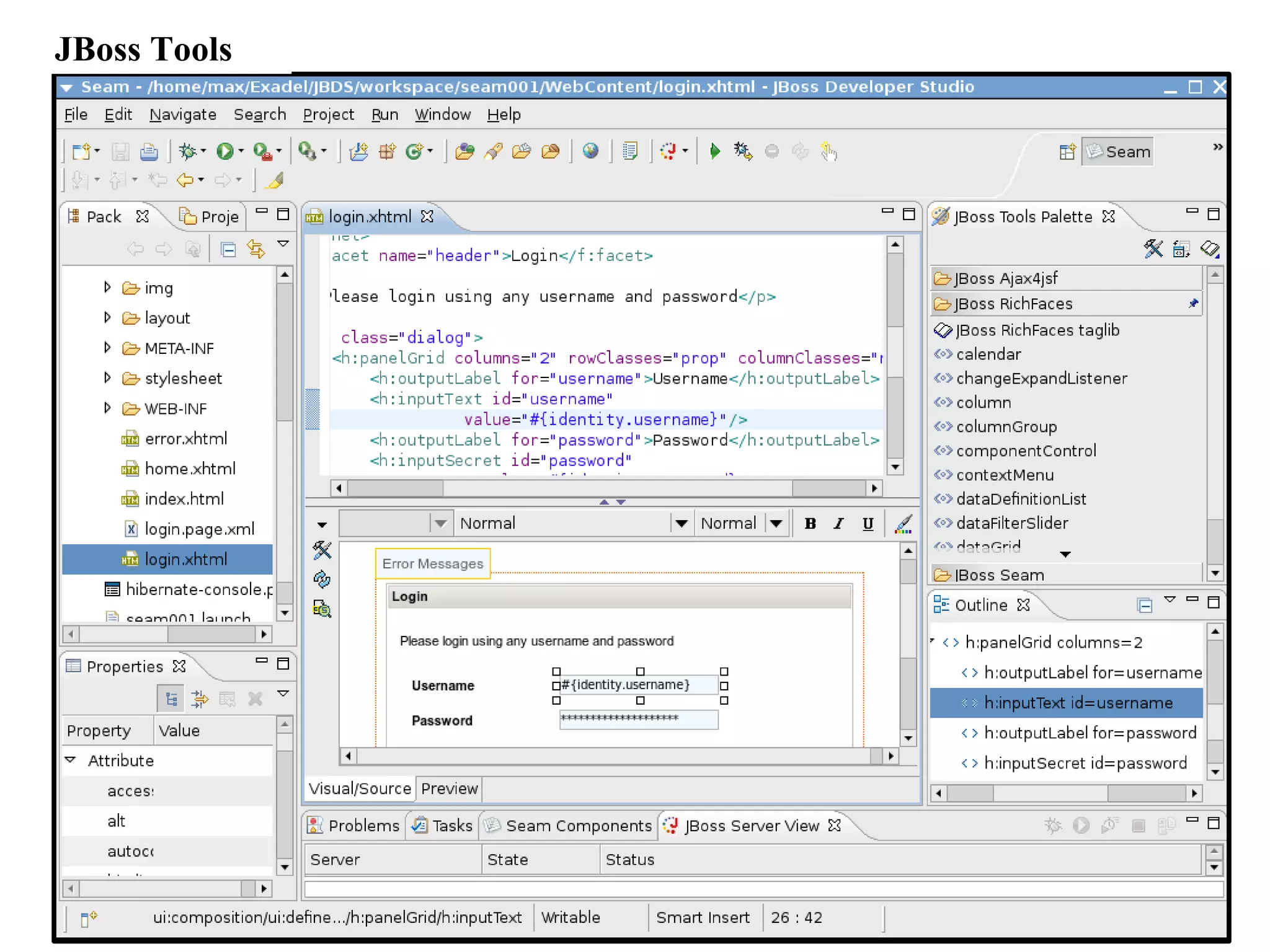
JBoss Tools
What is Skinnability?
High-level extension to CSS
Not replacement for CSS
Changing a few skin-parameters will modify the
appearance of all components on a page
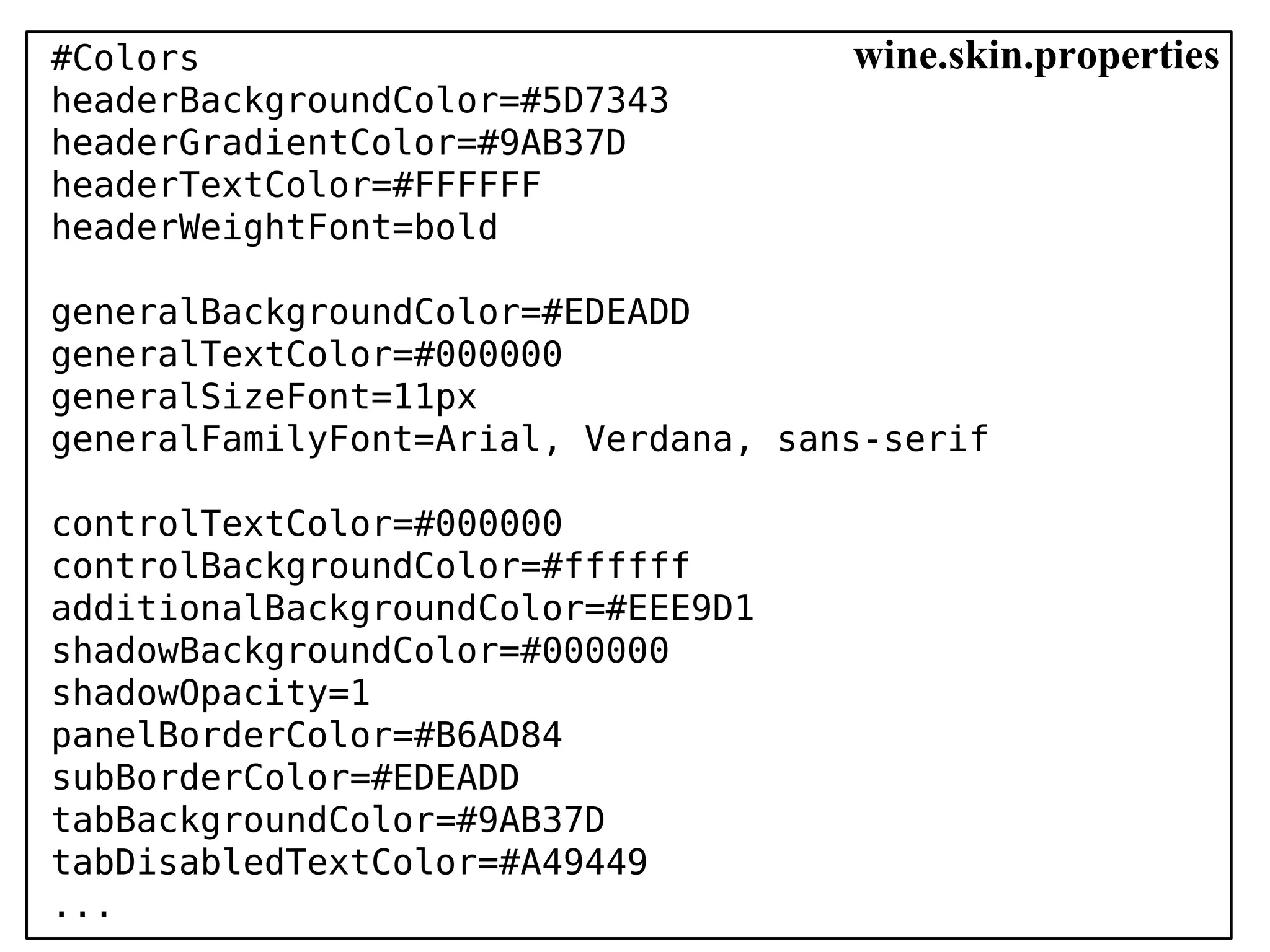
#Colors                              wine.skin.properties
headerBackgroundColor=#5D7343
headerGradientColor=#9AB37D
headerTextColor=#FFFFFF
headerWeightFont=bold

generalBackgroundColor=#EDEADD
generalTextColor=#000000
generalSizeFont=11px
generalFamilyFont=Arial, Verdana, sans-serif

controlTextColor=#000000
controlBackgroundColor=#ffffff
additionalBackgroundColor=#EEE9D1
shadowBackgroundColor=#000000
shadowOpacity=1
panelBorderColor=#B6AD84
subBorderColor=#EDEADD
tabBackgroundColor=#9AB37D
tabDisabledTextColor=#A49449
...
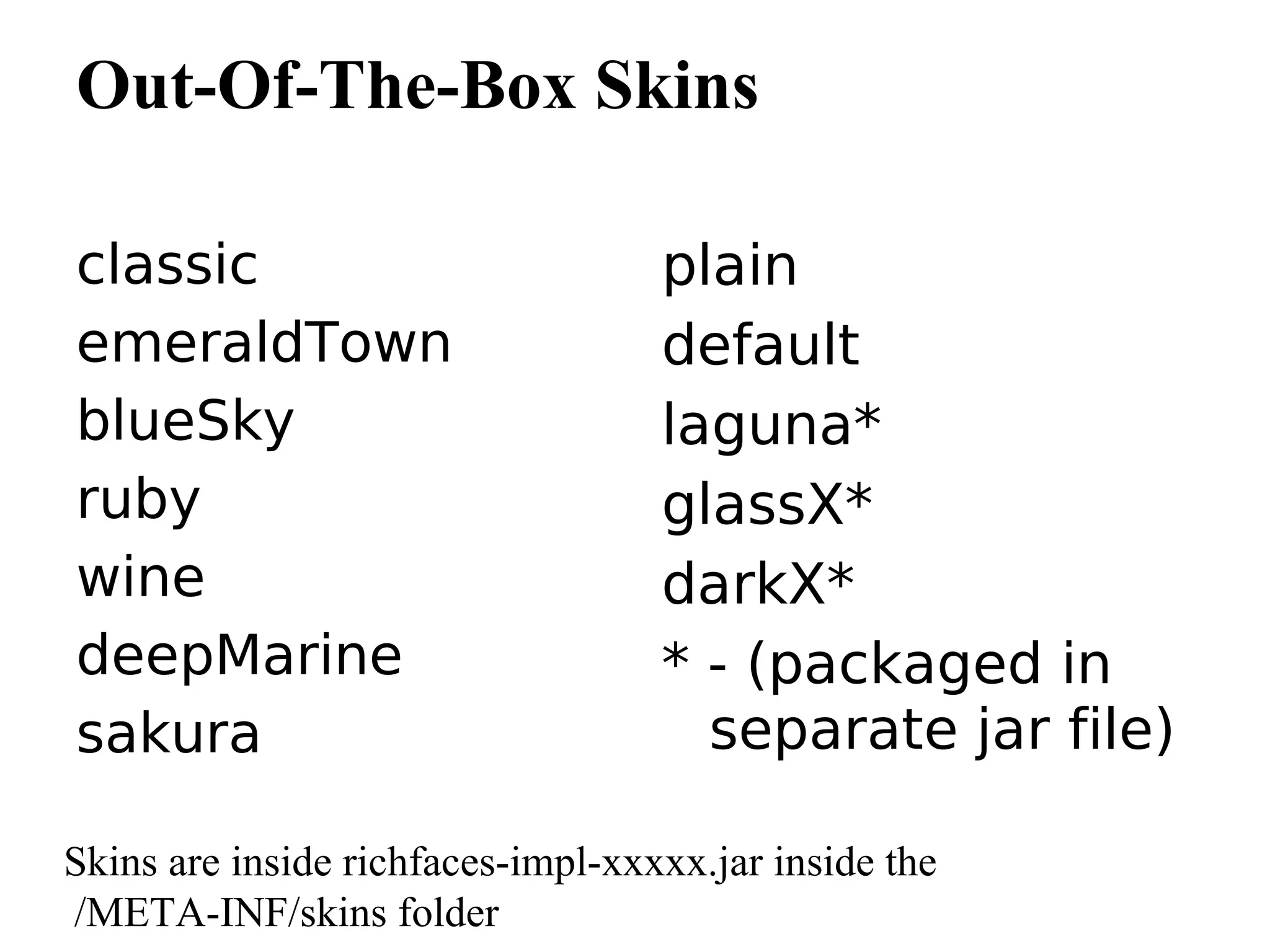
Out-Of-The-Box Skins

classic                            plain
emeraldTown                        default
blueSky                            laguna*
ruby                               glassX*
wine                               darkX*
deepMarine                         * - (packaged in
sakura                               separate jar file)

Skins are inside richfaces-impl-xxxxx.jar inside the
/META-INF/skins folder
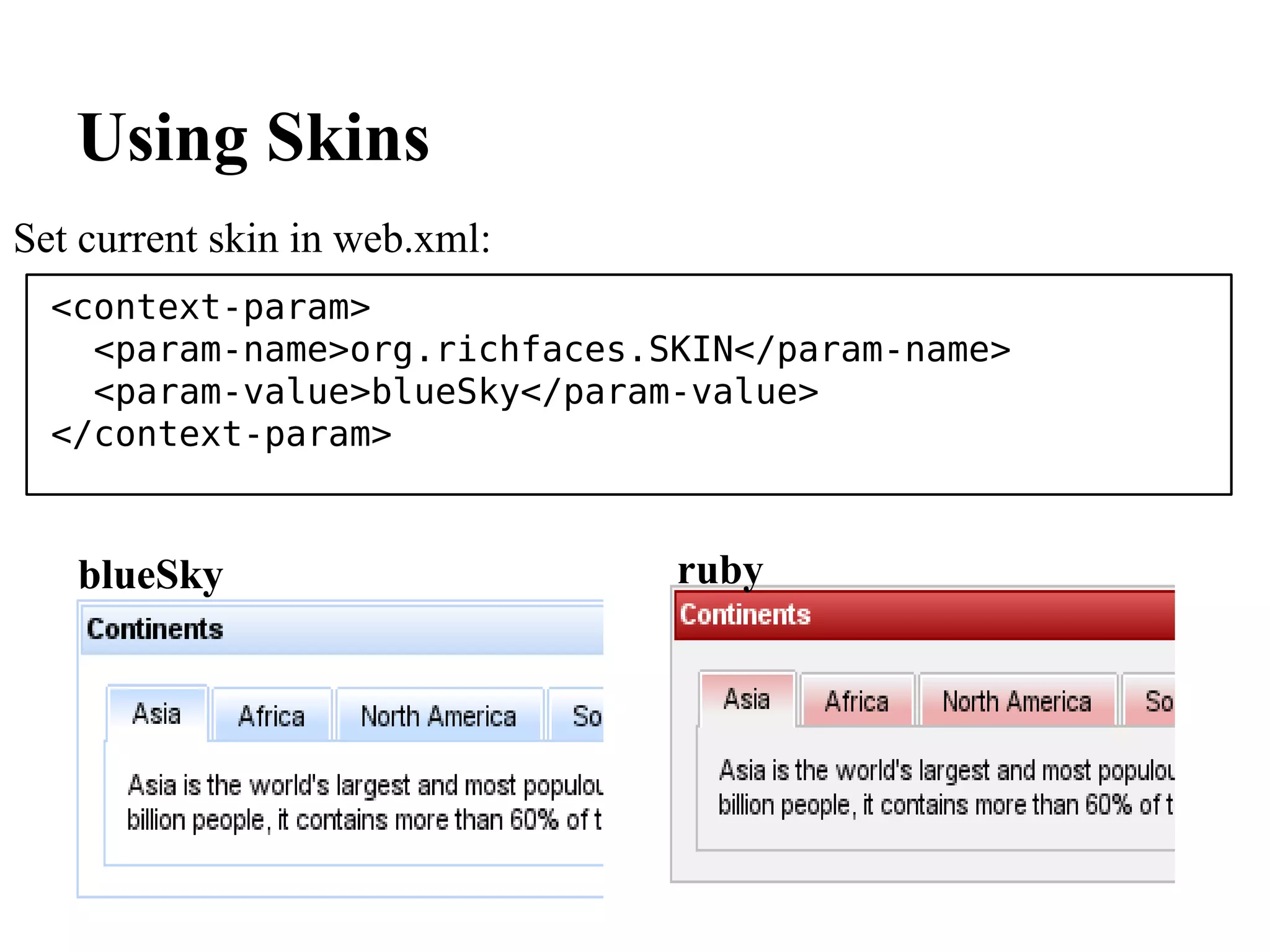
Using Skins
Set current skin in web.xml:
  <context-param>
    <param-name>org.richfaces.SKIN</param-name>
    <param-value>blueSky</param-value>
  </context-param>


   blueSky                     ruby
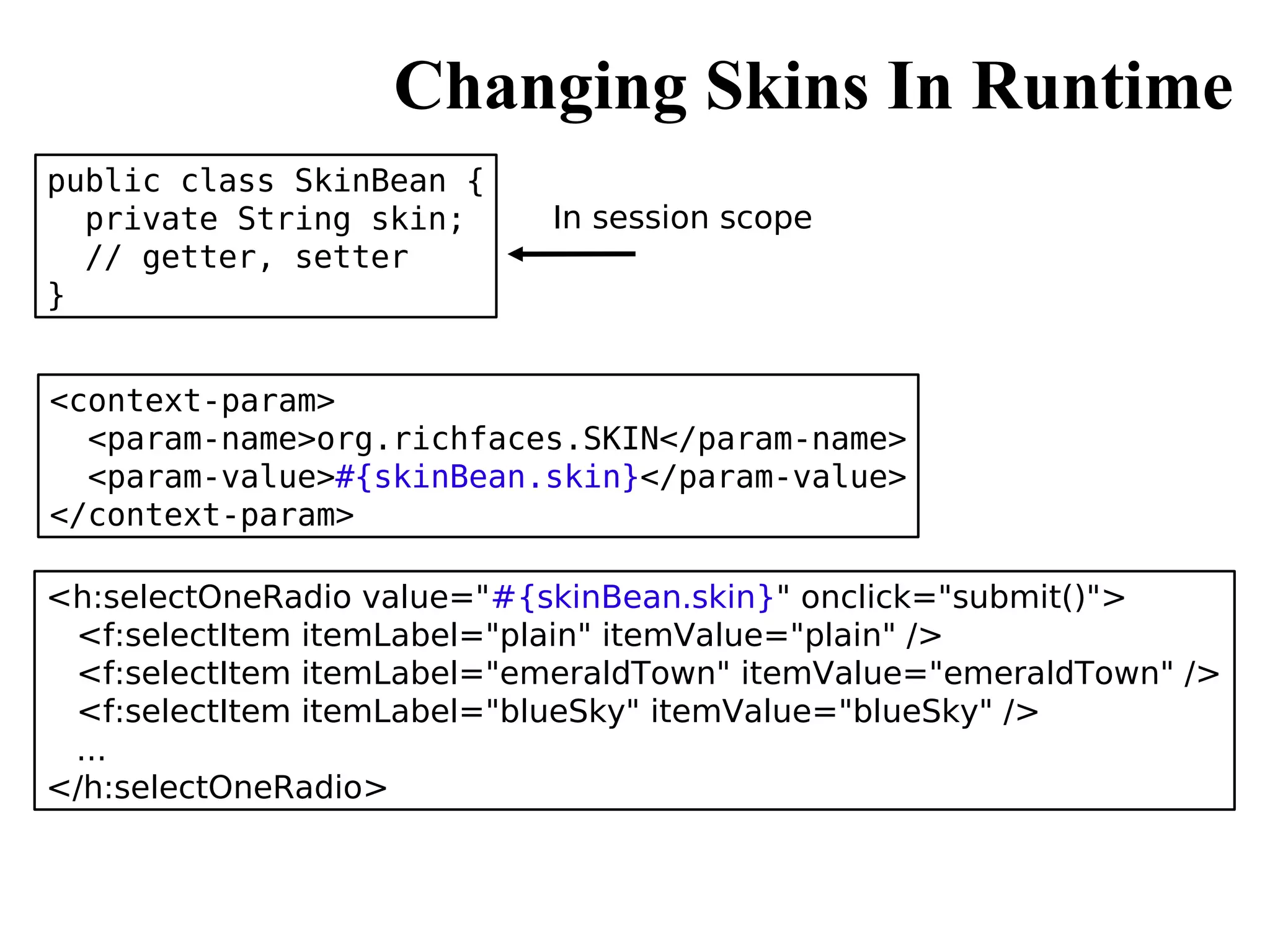
Changing Skins In Runtime
public class SkinBean {
  private String skin;      In session scope
  // getter, setter
}


<context-param>
  <param-name>org.richfaces.SKIN</param-name>
  <param-value>#{skinBean.skin}</param-value>
</context-param>

<h:selectOneRadio value="#{skinBean.skin}" onclick="submit()">
 <f:selectItem itemLabel="plain" itemValue="plain" />
 <f:selectItem itemLabel="emeraldTown" itemValue="emeraldTown" />
 <f:selectItem itemLabel="blueSky" itemValue="blueSky" />
 ...
</h:selectOneRadio>
Creating Custom Skins
1. Take an existing skin and start
   modifying it (create as many as you
     want)
2. Name the skin <name>.skin.properties
3. Place the skin:
  META-INF/skins
  WEB-INF/classes
                         #Colors
4. Register skin in      headerBackgroundColor=#5D7343
   web.xml file          headerGradientColor=#9AB37D
                         headerTextColor=#FFFFFF
                         headerWeightFont=bold
                         ...
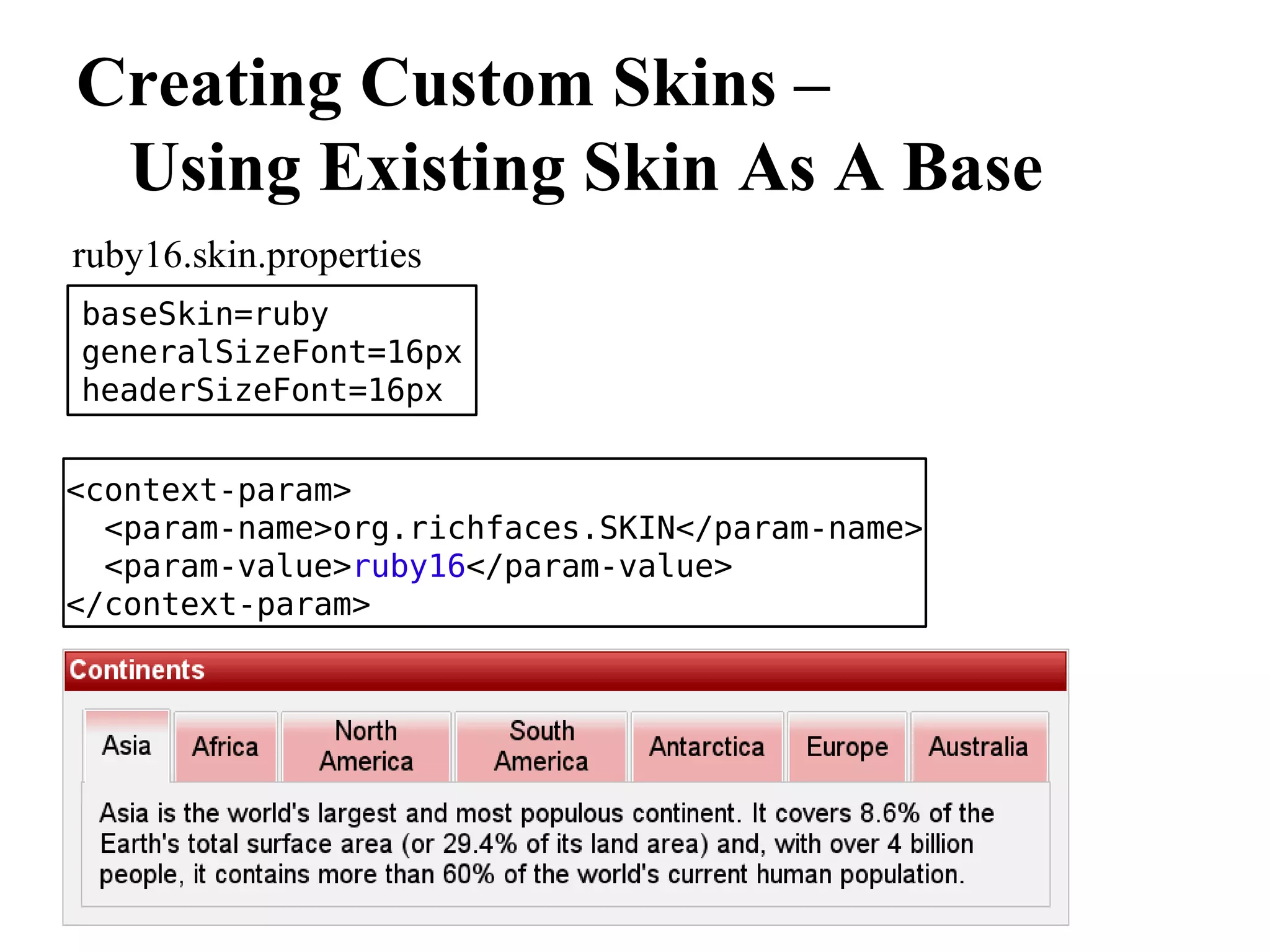
Creating Custom Skins –
 Using Existing Skin As A Base
ruby16.skin.properties
baseSkin=ruby
generalSizeFont=16px
headerSizeFont=16px


<context-param>
  <param-name>org.richfaces.SKIN</param-name>
  <param-value>ruby16</param-value>
</context-param>
Skin Parameters Redefinition
How to find out how skin parameters map into CSS properties? Every
component has a section like this:
Customizing Styles
Four ways:
 1. Any of the default skins
 2. Create custom skins
 3. Skin extension: overwrite skin
      generated styles
 4. Use component defined style
      attributes
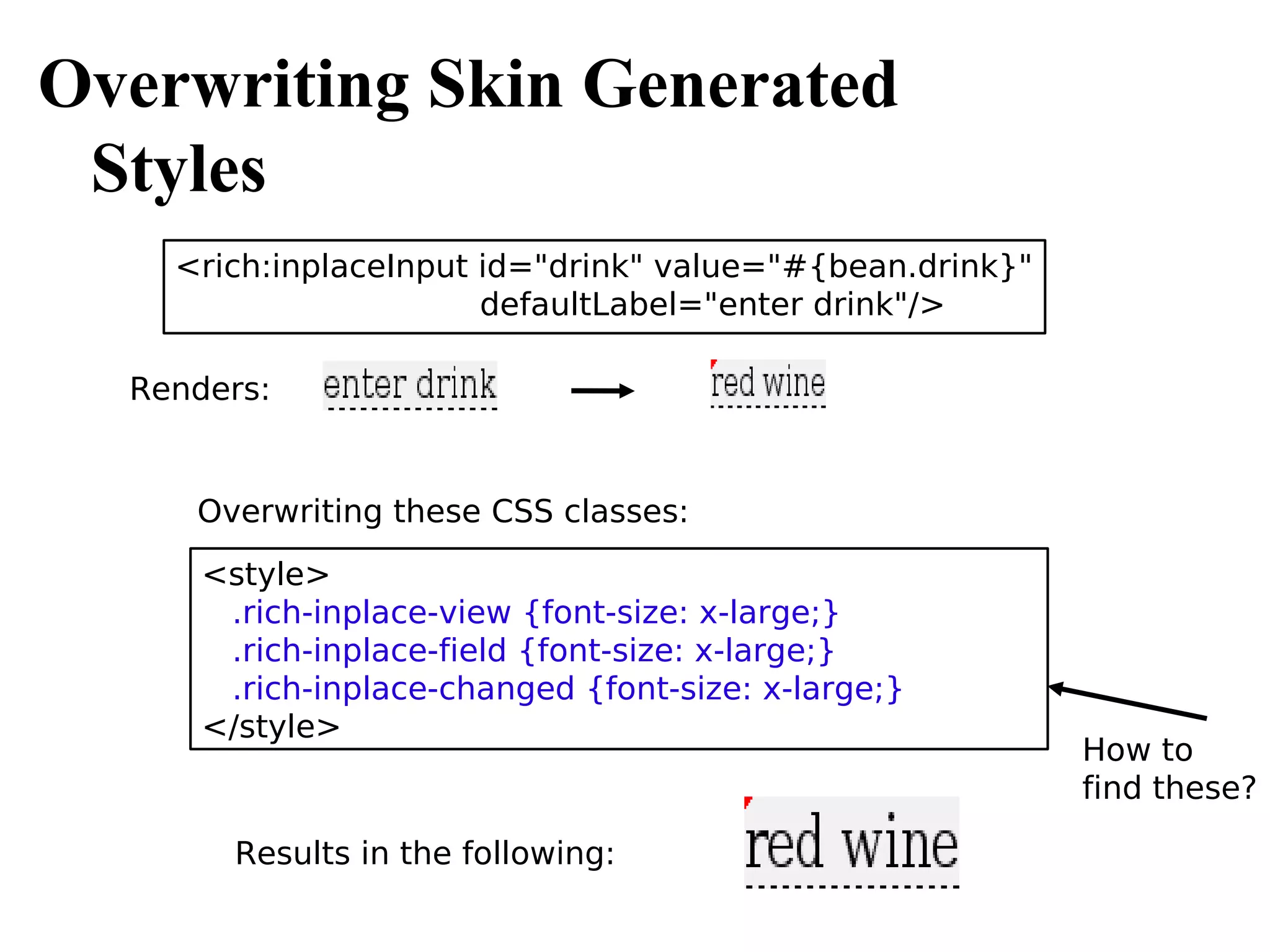
Overwriting Skin Generated
 Styles
    <rich:inplaceInput id="drink" value="#{bean.drink}"
                       defaultLabel="enter drink"/>

  Renders:


     Overwriting these CSS classes:
      <style>
       .rich-inplace-view {font-size: x-large;}
       .rich-inplace-field {font-size: x-large;}
       .rich-inplace-changed {font-size: x-large;}
      </style>
                                                          How to
                                                          find these?

        Results in the following:
So, how do you know which
CSS class to overwrite?

Every rich component has
a picture shown on the left

Each picture is followed
by a table (below) describing
Each style class

All styles are available in
RichFaces Developer Guide
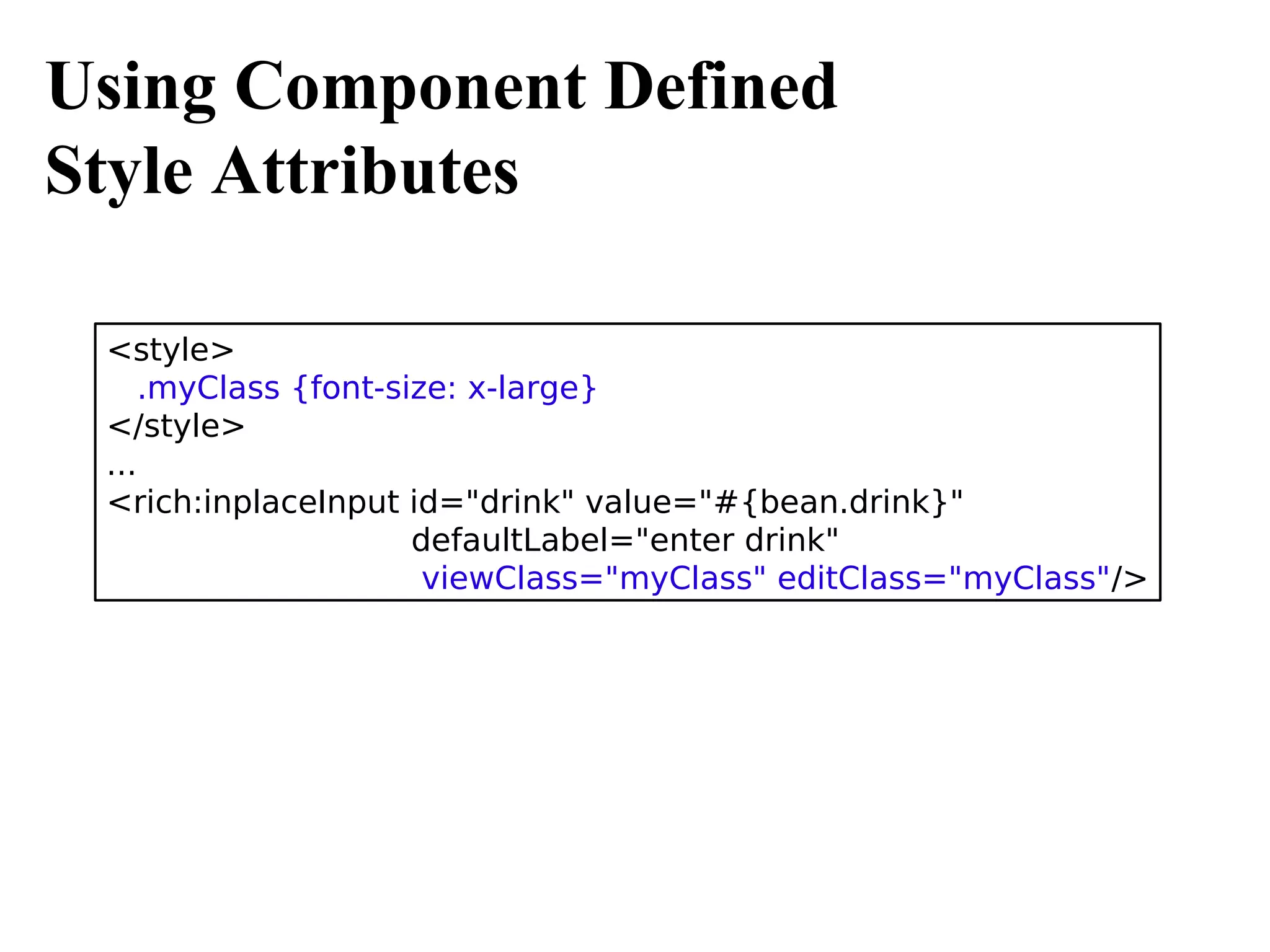
Using Component Defined
Style Attributes

 <style>
     .myClass {font-size: x-large}
 </style>
 ...
 <rich:inplaceInput id="drink" value="#{bean.drink}"
                      defaultLabel="enter drink"
                       viewClass="myClass" editClass="myClass"/>
Standard Control Skinning

Using rich components with standard or HTML controls could result
in the following:


             Out of sync button
Standard Control Skinning
One option is to use #{richSkin.<skinParam>} implicit
object:

<h:commandButton action="next"
                  value="Next page -
                    I want to learn about world oceans!"
      style="background-color:#{richSkin.tabBackgroundColor}"/>

All skin parameters are accessible in this fashion
Standard Control Skinning
  Another option is to set this context param. This will skin all standard
  and HTML controls automatically

  <context-param>
    <param-name>org.richfaces.CONTROL_SKINNING</param-name>
    <param-value>enable</param-value>
  </context-param>


The following controls will be skinned:                     Standard:
• input                                                     • IE 6
• select                                                    • IE 7 (BackComp
• textarea                                                  • Mode)
• keygen                                                    • Opera
• isindex                                                   • Safari
• legend                                                    Extended:
• fieldset                                                  • IE7
• hr                                                        • Firefox
• a (together with a:hover, a:visited "pseudo"-elements)    • Chrome
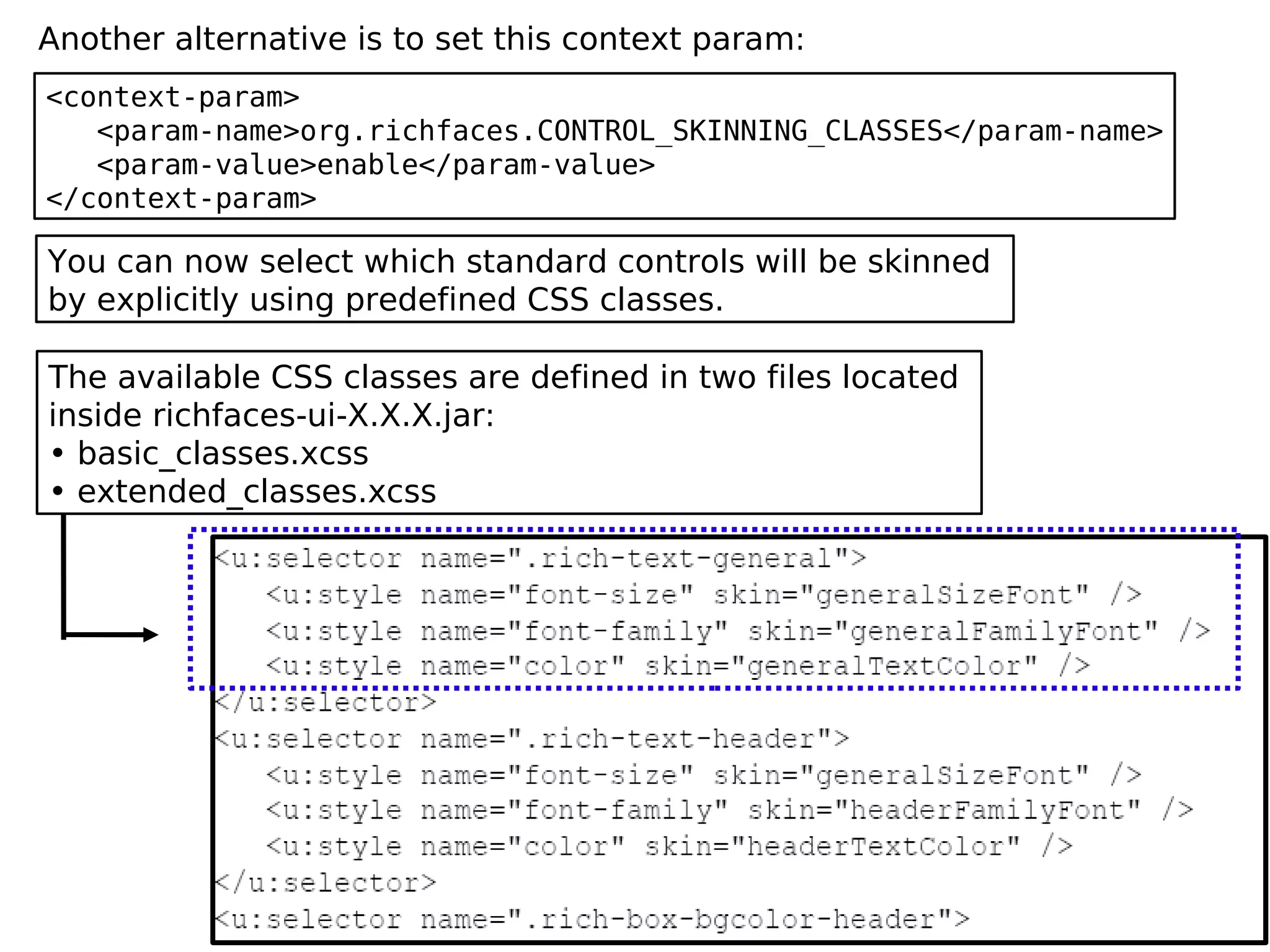
Another alternative is to set this context param:
<context-param>
   <param-name>org.richfaces.CONTROL_SKINNING_CLASSES</param-name>
   <param-value>enable</param-value>
</context-param>

You can now select which standard controls will be skinned
by explicitly using predefined CSS classes.

The available CSS classes are defined in two files located
inside richfaces-ui-X.X.X.jar:
• basic_classes.xcss
• extended_classes.xcss
This means that you have the class .rich-text-general
available to use on a page and it consists of:

 .rich-text-general {
    font-size: generalSizeFont;
    font-family: generalFamilyFont;
    color: generalTextColor;
 }


 Instead of applying a CSS class to each component, .rich-container
 class can be used to skin all standard components inside a
 container <rich:panel>, <h:panelGrid> and <div>:

 <h:panelGrid class="rich-container">
   ...
 </h:panelGrid>

 <div class="rich-container">
   ...
 </div>
RichFaces 3.3.1
Released May 18th, 2009
rich:colorPicker
rich:page
rich:layout, rich:layoutPanel
themes - predefined and packaged
  layouts
rich:page
             header
 subheader
sidebar


             footer    rich:layout, rich:layoutPanel
                               top


                      left      center      right


                               bottom
RichFaces Demo
http://livedemo.exadel.com/richfaces-demo


RichFaces Photo Album
Complete RichFaces-Seam application
Best practices
http://livedemo.exadel.com/photoalbum
RichFaces 4.0
Full integration with JSF 2.0
Will be updated for
 consistency, performance
Release schedule (2009):
 Alpha June
 Beta August
 CR September
 GA October
http://www.jboss.org/community/wiki/RichFace
s40Planning
What We Covered
1.Skins
2.Creating, extending
3.Skinning standard controls
Webinar Recordings
http://www.exadel.com/web/portal/webinars
JSF/RichFaces Training
On-site 1-3 days
More info: http://mkblog.exadel.com
Thank You.
Questions?
mkatz@exadel.com
http://mkblog.exadel.com

RichFaces skins

  • 1.
    JBoss RichFaces WebinarSeries Skins Webinar #4 Max Katz Charley Cowens © Exadel
  • 2.
  • 3.
    Who Is ThisGuy? Senior Systems Engineer RIA strategy, development, training http://mkblog.exadel.com http://twitter.com/maxkatz Author of Co-author of Practical RichFaces RichFaces Dzone (Apress) RefCard
  • 4.
    The Plan Review whatwe have done so far Skins – using and extending Future plans Questions
  • 5.
    RichFaces 1. JSF-AJAX components(100+) a4j:* tag library rich:* tag library 2. Skins 3. CDK (Component Development Kit)
  • 6.
    What You ShouldKnow Runs in: Any servlet container, application server Portals: JBoss, WebLogic, Liferay Works with: JSF (1.1, 1.2, 2.0soon) Works with: Seam, Spring Works with any 3rd party components
  • 7.
  • 8.
    What is Skinnability? High-levelextension to CSS Not replacement for CSS Changing a few skin-parameters will modify the appearance of all components on a page
  • 9.
    #Colors wine.skin.properties headerBackgroundColor=#5D7343 headerGradientColor=#9AB37D headerTextColor=#FFFFFF headerWeightFont=bold generalBackgroundColor=#EDEADD generalTextColor=#000000 generalSizeFont=11px generalFamilyFont=Arial, Verdana, sans-serif controlTextColor=#000000 controlBackgroundColor=#ffffff additionalBackgroundColor=#EEE9D1 shadowBackgroundColor=#000000 shadowOpacity=1 panelBorderColor=#B6AD84 subBorderColor=#EDEADD tabBackgroundColor=#9AB37D tabDisabledTextColor=#A49449 ...
  • 10.
    Out-Of-The-Box Skins classic plain emeraldTown default blueSky laguna* ruby glassX* wine darkX* deepMarine * - (packaged in sakura separate jar file) Skins are inside richfaces-impl-xxxxx.jar inside the /META-INF/skins folder
  • 11.
    Using Skins Set currentskin in web.xml: <context-param> <param-name>org.richfaces.SKIN</param-name> <param-value>blueSky</param-value> </context-param> blueSky ruby
  • 12.
    Changing Skins InRuntime public class SkinBean { private String skin; In session scope // getter, setter } <context-param> <param-name>org.richfaces.SKIN</param-name> <param-value>#{skinBean.skin}</param-value> </context-param> <h:selectOneRadio value="#{skinBean.skin}" onclick="submit()"> <f:selectItem itemLabel="plain" itemValue="plain" /> <f:selectItem itemLabel="emeraldTown" itemValue="emeraldTown" /> <f:selectItem itemLabel="blueSky" itemValue="blueSky" /> ... </h:selectOneRadio>
  • 13.
    Creating Custom Skins 1.Take an existing skin and start modifying it (create as many as you want) 2. Name the skin <name>.skin.properties 3. Place the skin: META-INF/skins WEB-INF/classes #Colors 4. Register skin in headerBackgroundColor=#5D7343 web.xml file headerGradientColor=#9AB37D headerTextColor=#FFFFFF headerWeightFont=bold ...
  • 14.
    Creating Custom Skins– Using Existing Skin As A Base ruby16.skin.properties baseSkin=ruby generalSizeFont=16px headerSizeFont=16px <context-param> <param-name>org.richfaces.SKIN</param-name> <param-value>ruby16</param-value> </context-param>
  • 15.
    Skin Parameters Redefinition Howto find out how skin parameters map into CSS properties? Every component has a section like this:
  • 16.
    Customizing Styles Four ways: 1. Any of the default skins 2. Create custom skins 3. Skin extension: overwrite skin generated styles 4. Use component defined style attributes
  • 17.
    Overwriting Skin Generated Styles <rich:inplaceInput id="drink" value="#{bean.drink}" defaultLabel="enter drink"/> Renders: Overwriting these CSS classes: <style> .rich-inplace-view {font-size: x-large;} .rich-inplace-field {font-size: x-large;} .rich-inplace-changed {font-size: x-large;} </style> How to find these? Results in the following:
  • 18.
    So, how doyou know which CSS class to overwrite? Every rich component has a picture shown on the left Each picture is followed by a table (below) describing Each style class All styles are available in RichFaces Developer Guide
  • 19.
    Using Component Defined StyleAttributes <style> .myClass {font-size: x-large} </style> ... <rich:inplaceInput id="drink" value="#{bean.drink}" defaultLabel="enter drink" viewClass="myClass" editClass="myClass"/>
  • 20.
    Standard Control Skinning Usingrich components with standard or HTML controls could result in the following: Out of sync button
  • 21.
    Standard Control Skinning Oneoption is to use #{richSkin.<skinParam>} implicit object: <h:commandButton action="next" value="Next page - I want to learn about world oceans!" style="background-color:#{richSkin.tabBackgroundColor}"/> All skin parameters are accessible in this fashion
  • 22.
    Standard Control Skinning Another option is to set this context param. This will skin all standard and HTML controls automatically <context-param> <param-name>org.richfaces.CONTROL_SKINNING</param-name> <param-value>enable</param-value> </context-param> The following controls will be skinned: Standard: • input • IE 6 • select • IE 7 (BackComp • textarea • Mode) • keygen • Opera • isindex • Safari • legend Extended: • fieldset • IE7 • hr • Firefox • a (together with a:hover, a:visited "pseudo"-elements) • Chrome
  • 23.
    Another alternative isto set this context param: <context-param> <param-name>org.richfaces.CONTROL_SKINNING_CLASSES</param-name> <param-value>enable</param-value> </context-param> You can now select which standard controls will be skinned by explicitly using predefined CSS classes. The available CSS classes are defined in two files located inside richfaces-ui-X.X.X.jar: • basic_classes.xcss • extended_classes.xcss
  • 24.
    This means thatyou have the class .rich-text-general available to use on a page and it consists of: .rich-text-general { font-size: generalSizeFont; font-family: generalFamilyFont; color: generalTextColor; } Instead of applying a CSS class to each component, .rich-container class can be used to skin all standard components inside a container <rich:panel>, <h:panelGrid> and <div>: <h:panelGrid class="rich-container"> ... </h:panelGrid> <div class="rich-container"> ... </div>
  • 25.
    RichFaces 3.3.1 Released May18th, 2009 rich:colorPicker rich:page rich:layout, rich:layoutPanel themes - predefined and packaged layouts
  • 26.
    rich:page header subheader sidebar footer rich:layout, rich:layoutPanel top left center right bottom
  • 27.
    RichFaces Demo http://livedemo.exadel.com/richfaces-demo RichFaces PhotoAlbum Complete RichFaces-Seam application Best practices http://livedemo.exadel.com/photoalbum
  • 28.
    RichFaces 4.0 Full integrationwith JSF 2.0 Will be updated for consistency, performance Release schedule (2009): Alpha June Beta August CR September GA October http://www.jboss.org/community/wiki/RichFace s40Planning
  • 29.
    What We Covered 1.Skins 2.Creating,extending 3.Skinning standard controls
  • 30.
  • 31.
    JSF/RichFaces Training On-site 1-3days More info: http://mkblog.exadel.com
  • 32.