




Deep Dive into
Mobile Flex
Skinning
Who are You?
Agenda
•   Introduction to Skinning
•   Concepts
•   Skinning Components
•   Conclusions
Not a hands on
  workshop
Why?
Lots and lots of
  little details
Content
• https://github.com/tpryan/SkinExample
   – Complete, no shortcuts
• https://github.com/tpryan/SkinExampleExercise
  – Finished version of class exercise but incomplete due
    to shortcuts
• https://github.com/tpryan/SkinExampleStarted
  – Starting point for class
Be like a crazy
HTML standards
facist
No presentation
in markup
Starting
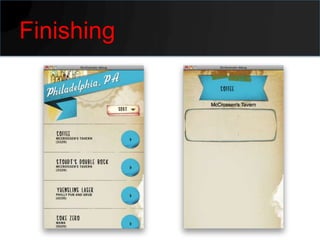
Finishing
WHY SKIN
CSS
• Font Changes
  – Family
  – Color
  – Size
• Flex UI Changes
  – Color
  – Flex CSS Properties
Skinning
• Changing Behavior
• Radical change in look and feel
• Implementation of custom graphics
CLASSES YOU NEED TO
KNOW
StylableTextField
•   Lightweight
•   Can be Styled
•   Can used for editable and static text
•   It can’t be used in MXML markup though
BitmapImage
• Lightweight image component
• Doesn’t have ability to load dynamic
  content… yet.
• This is fine, skin assets should be
  embedded
• Fast performing
SkinableComponent
• Like a Group, but you can skin it.
IconItemRenderer
• High performance renderer
• Handles a lot of cases.
• Can be extended.
CONCEPTS
Performance is
key
ActionScript
Components
Perform Best
Almost all of
your skins will
be ActionScript
    Skins
CSS
What I use CSS for
• As much font selection as possible
• Class specifications
Why?
setStyle is
 relatively
expensive
SKIN LIFECYCLE
Important Methods
• Constructor
  – Very beginning
  – No Children available
  – Good for manipulating “this” and setting variables
• onChildrenCreate
  – After everything is done setting up
  – Good for set once display properties
• layoutContents
  – After any thing that requires a redistribution of
    elements
  – Good for reacting to location and content
    changes
Final Thought
Before we get
     into
Components
I will break every
   best practice I
  just mentioned
    in this class
WORKING WITH
COMPONENTS
APPLICATION
Compare
Skinning Application
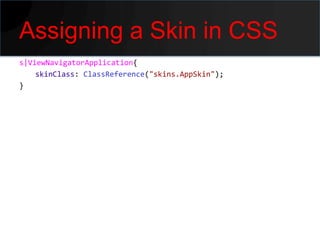
Assigning a Skin in CSS
s|ViewNavigatorApplication{
    skinClass: ClassReference("skins.AppSkin");
}
Why
• Prevents you from cluttering up Flex with
  presentational information
Dealing with DPI
switch (applicationDPI)
{
    case 320:
    {
        break;
    }
    case 240:
    {
        break;
    }
    default:
    {
        break;
    }
}
Why
• Custom graphics look like crap if you
  design for too small a screen.
• But smaller DPI devices are usually less
  powerful meaning pushing around larger
  images is ineffiecient
LABEL
You cannot
skin a label
CUSTOM COMPONENT
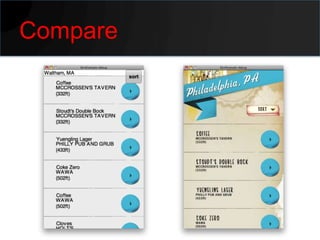
Compare
Skinning Custom
Component
Removing the
Background
override protected function drawBackground(
       unscaledWidth:Number, unscaledHeight:Number):void{

}
Why
• Almost all components have a background
  that will look dumb once you start adding
  custom ui.
WORKING WITH FONTS
Font Recap
• There are 2 font rendering engines in
  Flash
• This means 2 ways of embedding fonts
  – TLF
  – NonTLF
• Most Mobile components use NonTLF
• Label uses TLF
Consequence
• You have to embed both TLF and NonTLF
  fonts
• You can do this with Metadata
• I’ve never done it that way
• Because Flash Professional makes this
  very easy
Embedding fonts with
Flash Professional
BUTTON
Compare
Skinning Button
Replacing the Border
override protected function getBorderClassForCurrentState():Class
{
    if (currentState == "down"){
        labelDisplay.setStyle("color",0xFFFFFF);
        return downBorderSkin;
    }
    else{
        labelDisplay.setStyle("color",0x48250A);
        return upBorderSkin;
    }


}
VIEW
Compare
Skinning View
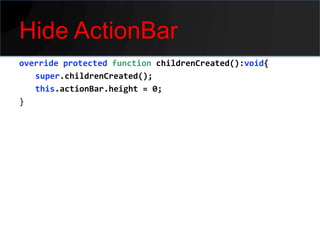
Hide ActionBar
override protected function childrenCreated():void{
   super.childrenCreated();
   this.actionBar.height = 0;
}
ITEMRENDERER
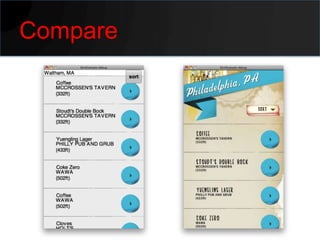
Compare
Working with an
Iterator
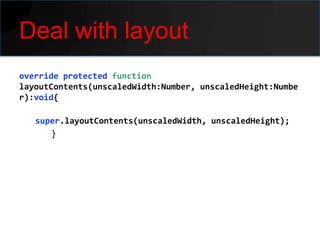
Deal with layout
override protected function
layoutContents(unscaledWidth:Number, unscaledHeight:Numbe
r):void{

   super.layoutContents(unscaledWidth, unscaledHeight);
      }
TEXT AREA
Compare
Skinning Text Area
CONCLUSIONS
Typical Process
•   Remove the background
•   Slap in graphics
•   Account for DPI
•   Account for redraws
Good resources
• Deep Dive Into Flex Mobile Item
  Renderers
  – http://www.slideshare.net/JasonHanson/deep-
    dive-into-flex-mobile-item-renderers-7501594
• Jason San Jose
  – http://www.adobe.com/devnet/flex/articles/mo
    bile-skinning-part1.html
  – http://www.adobe.com/devnet/flex/articles/mo
    bile-skinning-part2.html
  – http://www.adobe.com/devnet/flex/articles/mo
Follow up?
• Feel free to contact me
  – terry.ryan@adobe.com
  – http://terrenceryan.com
  – Twitter: @tpryan

Flex Mobile Skinning Workshop