









JBoss RichFaces
 Webinar Series
 Rich UI Components
 (rich:* Tag Library)
     Webinar #3

      Max Katz
   Charley Cowens

      © Exadel
Upcoming Webinars:
June 16th, 2009 - Skins
Who Is This Guy?
  Senior Systems Engineer
  RIA strategy, development, training
    http://mkblog.exadel.com
    http://twitter.com/maxkatz
Author of            Co-author of
Practical            RichFaces
RichFaces            Dzone
(Apress)             RefCard
The Plan
Review what we have done so far
Components from rich:* tag library
What's new in version 3.3.1
Future plans
Questions
RichFaces
1. JSF-AJAX components (100+)
2. Skins
3. CDK (Component Development Kit)
What You Should Know
Runs in:
• Any servlet container, application
  server
• Portals: JBoss, WebLogic, Liferay
Works with:
• Any JSF implementation (1.1, 1.2,
  2.0soon)
Works with:
• Seam, Spring
Works with any 3rd party components:
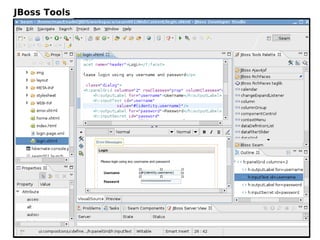
JBoss Tools
Basic Concepts and More
1.Sending AJAX requests
2.Partial view (page) rendering
3.Partial view processing
4.Controlling traffic
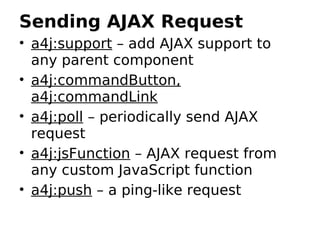
Sending AJAX Request
• a4j:support – add AJAX support to
  any parent component
• a4j:commandButton,
  a4j:commandLink
• a4j:poll – periodically send AJAX
  request
• a4j:jsFunction – AJAX request from
  any custom JavaScript function
• a4j:push – a ping-like request
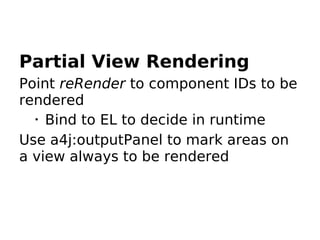
Partial View Rendering
Point reRender to component IDs to be
rendered
  •
    Bind to EL to decide in runtime
Use a4j:outputPanel to mark areas on
a view always to be rendered
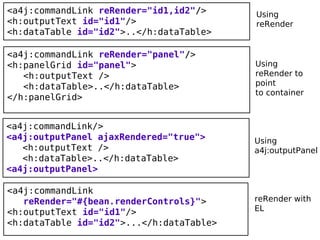
<a4j:commandLink reRender="id1,id2"/>     Using
<h:outputText id="id1"/>                  reRender
<h:dataTable id="id2">..</h:dataTable>

<a4j:commandLink reRender="panel"/>
<h:panelGrid id="panel">                  Using
   <h:outputText />                       reRender to
   <h:dataTable>..</h:dataTable>          point
                                          to container
</h:panelGrid>


<a4j:commandLink/>
<a4j:outputPanel ajaxRendered="true">     Using
   <h:outputText />                       a4j:outputPanel
   <h:dataTable>..</h:dataTable>
<a4j:outputPanel>

<a4j:commandLink
   reRender="#{bean.renderControls}">     reRender with
<h:outputText id="id1"/>                  EL
<h:dataTable id="id2">...</h:dataTable>
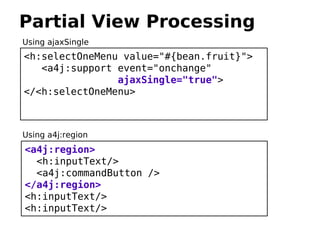
Partial View Processing
Using ajaxSingle
<h:selectOneMenu value="#{bean.fruit}">
   <a4j:support event="onchange"
                ajaxSingle="true">
</<h:selectOneMenu>


Using a4j:region
<a4j:region>
  <h:inputText/>
  <a4j:commandButton />
</a4j:region>
<h:inputText/>
<h:inputText/>
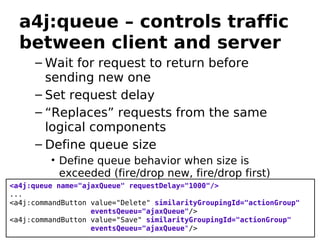
a4j:queue – controls traffic
  between client and server
     – Wait for request to return before
       sending new one
     – Set request delay
     – “Replaces” requests from the same
       logical components
     – Define queue size
         • Define queue behavior when size is
           exceeded (fire/drop new, fire/drop first)
<a4j:queue name="ajaxQueue" requestDelay="1000"/>
...
<a4j:commandButton value="Delete" similarityGroupingId="actionGroup"
                   eventsQeueu="ajaxQueue"/>
<a4j:commandButton value="Save" similarityGroupingId="actionGroup"
                   eventsQeueu="ajaxQueue"/>
Rich UI Components
rich:* tag library
Self-contained, ready-to-use rich UI
controls
Over 80 components
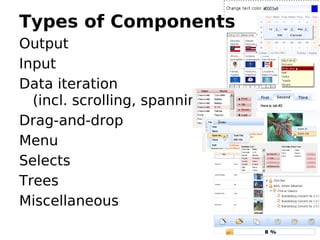
Types of Components
Output
Input
Data iteration
  (incl. scrolling, spanning)
Drag-and-drop
Menu
Selects
Trees
Miscellaneous
RichFaces 3.3.1
Released May 18th, 2009
rich:colorPicker
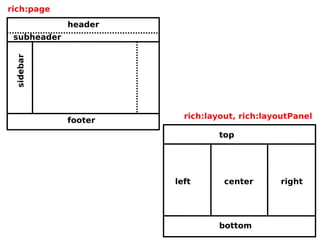
rich:page
rich:layout, rich:layoutPanel
themes - predefined and packaged
  layouts
rich:page
                    header
 subheader
 sidebar


                               rich:layout, rich:layoutPanel
                    footer
                                      top


                             left       center      right

           Header


                                      bottom
RichFaces Demo
http://livedemo.exadel.com/richfaces-demo
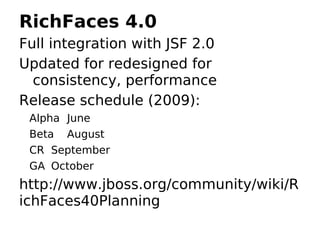
RichFaces 4.0
Full integration with JSF 2.0
Updated for redesigned for
  consistency, performance
Release schedule (2009):
 Alpha June
 Beta August
 CR September
 GA October
http://www.jboss.org/community/wiki/R
ichFaces40Planning
What We Covered
Reviewed basic concepts
Rich UI components
What's new in RichFaces 3.3.1
RichFaces 4.0 plans
Upcoming Webinars:
June 16th, 2009 - Skins
JSF/RichFaces Training
On-site 1-3 days
More info: http://mkblog.exadel.com
Thank You.
Questions?
mkatz@exadel.com
http://mkblog.exadel.com

RichFaces: rich:* component library

  • 1.
    JBoss RichFaces WebinarSeries Rich UI Components (rich:* Tag Library) Webinar #3 Max Katz Charley Cowens © Exadel
  • 2.
  • 3.
    Who Is ThisGuy? Senior Systems Engineer RIA strategy, development, training http://mkblog.exadel.com http://twitter.com/maxkatz Author of Co-author of Practical RichFaces RichFaces Dzone (Apress) RefCard
  • 4.
    The Plan Review whatwe have done so far Components from rich:* tag library What's new in version 3.3.1 Future plans Questions
  • 5.
    RichFaces 1. JSF-AJAX components(100+) 2. Skins 3. CDK (Component Development Kit)
  • 6.
    What You ShouldKnow Runs in: • Any servlet container, application server • Portals: JBoss, WebLogic, Liferay Works with: • Any JSF implementation (1.1, 1.2, 2.0soon) Works with: • Seam, Spring Works with any 3rd party components:
  • 7.
  • 8.
    Basic Concepts andMore 1.Sending AJAX requests 2.Partial view (page) rendering 3.Partial view processing 4.Controlling traffic
  • 9.
    Sending AJAX Request •a4j:support – add AJAX support to any parent component • a4j:commandButton, a4j:commandLink • a4j:poll – periodically send AJAX request • a4j:jsFunction – AJAX request from any custom JavaScript function • a4j:push – a ping-like request
  • 10.
    Partial View Rendering PointreRender to component IDs to be rendered • Bind to EL to decide in runtime Use a4j:outputPanel to mark areas on a view always to be rendered
  • 11.
    <a4j:commandLink reRender="id1,id2"/> Using <h:outputText id="id1"/> reRender <h:dataTable id="id2">..</h:dataTable> <a4j:commandLink reRender="panel"/> <h:panelGrid id="panel"> Using <h:outputText /> reRender to <h:dataTable>..</h:dataTable> point to container </h:panelGrid> <a4j:commandLink/> <a4j:outputPanel ajaxRendered="true"> Using <h:outputText /> a4j:outputPanel <h:dataTable>..</h:dataTable> <a4j:outputPanel> <a4j:commandLink reRender="#{bean.renderControls}"> reRender with <h:outputText id="id1"/> EL <h:dataTable id="id2">...</h:dataTable>
  • 12.
    Partial View Processing UsingajaxSingle <h:selectOneMenu value="#{bean.fruit}"> <a4j:support event="onchange" ajaxSingle="true"> </<h:selectOneMenu> Using a4j:region <a4j:region> <h:inputText/> <a4j:commandButton /> </a4j:region> <h:inputText/> <h:inputText/>
  • 13.
    a4j:queue – controlstraffic between client and server – Wait for request to return before sending new one – Set request delay – “Replaces” requests from the same logical components – Define queue size • Define queue behavior when size is exceeded (fire/drop new, fire/drop first) <a4j:queue name="ajaxQueue" requestDelay="1000"/> ... <a4j:commandButton value="Delete" similarityGroupingId="actionGroup" eventsQeueu="ajaxQueue"/> <a4j:commandButton value="Save" similarityGroupingId="actionGroup" eventsQeueu="ajaxQueue"/>
  • 14.
    Rich UI Components rich:*tag library Self-contained, ready-to-use rich UI controls Over 80 components
  • 15.
    Types of Components Output Input Dataiteration (incl. scrolling, spanning) Drag-and-drop Menu Selects Trees Miscellaneous
  • 16.
    RichFaces 3.3.1 Released May18th, 2009 rich:colorPicker rich:page rich:layout, rich:layoutPanel themes - predefined and packaged layouts
  • 17.
    rich:page header subheader sidebar rich:layout, rich:layoutPanel footer top left center right Header bottom
  • 18.
  • 19.
    RichFaces 4.0 Full integrationwith JSF 2.0 Updated for redesigned for consistency, performance Release schedule (2009): Alpha June Beta August CR September GA October http://www.jboss.org/community/wiki/R ichFaces40Planning
  • 20.
    What We Covered Reviewedbasic concepts Rich UI components What's new in RichFaces 3.3.1 RichFaces 4.0 plans
  • 21.
  • 22.
    JSF/RichFaces Training On-site 1-3days More info: http://mkblog.exadel.com
  • 23.