By
Mudit Verma & Radovan Zvonček
         KTH Sweden
Supervisor: Luis Veiga, IST Lisbon
       December 5, 2012
                                     1
Outline
• Motivation
• Introduction
• Scheduling
    Workflow Scheduling
    VM Scheduling
• Design
    Utility Based Scheduling
    Partial Utility function
• Implementation
    Condor
    Utility Scheduler
• Evaluation
• Conclusion
• Future Work
                                     2
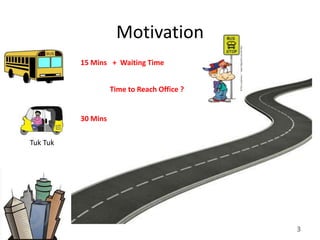
Motivation
          15 Mins + Waiting Time


                    Time to Reach Office ?


          30 Mins


Tuk Tuk


                                             3
Motivation
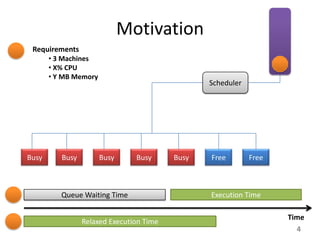
 Requirements
       • 3 Machines
       • X% CPU
       • Y MB Memory
                                                 Scheduler


Busy      Busy         Busy     Busy      Busy   Free        Free


          Queue Waiting Time                     Execution Time

                                                                    Time
                 Relaxed Execution Time
                                                                      4
Introduction
• Scheduling is at the heart of Distributed Compute .
    PaaS model -> Workflow (job) Scheduling
    IaaS model -> Virtual Machines (VM) Scheduling.

• Scheduler decides which job/VM should go on which machine.
• An effective scheduler can
    Reduce operational costs
    Reduce queue waiting time
    Increase resource utilization


                                                          5
Outline
• Introduction
• Scheduling
    Workflow Scheduling
    VM Scheduling
• Design
    Utility Based Scheduling
    Partial Utility function
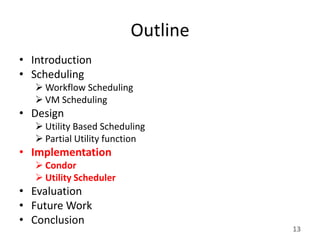
• Implementation
    Condor
    Utility Scheduler
• Evaluation
• Conclusion
• Future Work
                                   6
Workflow Scheduling
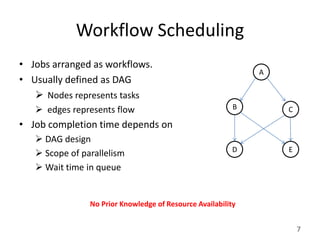
• Jobs arranged as workflows.
                                                              A
• Usually defined as DAG
    Nodes represents tasks
    edges represents flow                                B       C
• Job completion time depends on
    DAG design
                                                          D       E
    Scope of parallelism
    Wait time in queue


                No Prior Knowledge of Resource Availability


                                                                      7
Workflow Scheduling
                                                A

    A
                                                B

B         C
                                                C
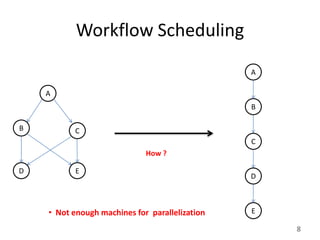
                             How ?

D          E
                                                D


    • Not enough machines for parallelization   E

                                                    8
VM Scheduling
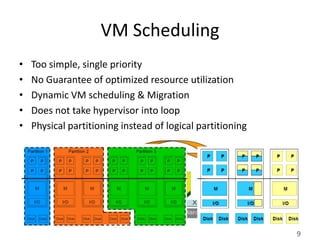
•   Too simple, single priority
•   No Guarantee of optimized resource utilization
•   Dynamic VM scheduling & Migration
•   Does not take hypervisor into loop
•   Physical partitioning instead of logical partitioning


                                                            9
Outline
• Introduction
• Scheduling
    Workflow Scheduling
    VM Scheduling
• Design
    Utility Based Scheduling
    Partial Utility function
• Implementation
    Condor
    Utility Scheduler
• Evaluation
• Conclusion
• Future Work
                                   10
Utility Driven Scheduling
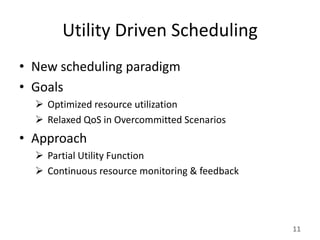
• New scheduling paradigm
• Goals
   Optimized resource utilization
   Relaxed QoS in Overcommitted Scenarios
• Approach
   Partial Utility Function
   Continuous resource monitoring & feedback


                                                11
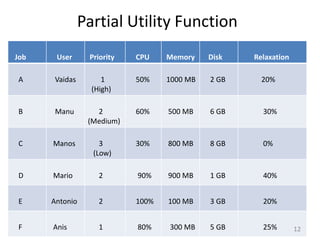
Partial Utility Function
Job    User     Priority   CPU    Memory    Disk   Relaxation

A     Vaidas        1      50%    1000 MB   2 GB     20%
                 (High)

B     Manu        2        60%    500 MB    6 GB     30%
                (Medium)

C     Manos        3       30%    800 MB    8 GB     0%
                 (Low)

D     Mario        2       90%    900 MB    1 GB     40%


E     Antonio      2       100%   100 MB    3 GB     20%


F     Anis         1       80%    300 MB    5 GB     25%        12
Outline
• Introduction
• Scheduling
    Workflow Scheduling
    VM Scheduling
• Design
    Utility Based Scheduling
    Partial Utility function
• Implementation
    Condor
    Utility Scheduler
• Evaluation
• Future Work
• Conclusion
                                   13
Condor
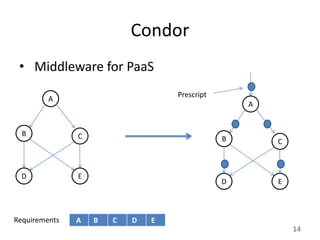
 • Middleware for PaaS
                                   Prescript
         A
                                                   A


  B            C                               B       C


  D            E
                                               D       E


Requirements   A   B   C   D   E
                                                           14
Condor
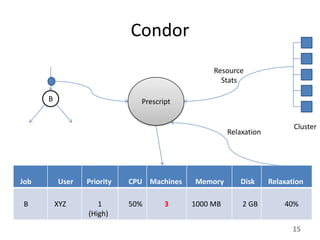
                                                Resource
                                                  Stats

      B                       Prescript


                                                                         Cluster
                                                     Relaxation


Job       User   Priority   CPU Machines   Memory       Disk      Relaxation

B         XYZ       1       50%      3
                                     5     1000 MB       2 GB         40%
                 (High)
                                                                        15
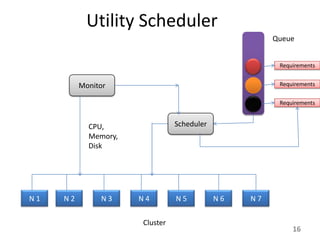
Utility Scheduler
                                                      Queue


                                                       Requirements


          Monitor                                      Requirements

                                                       Requirements


            CPU,                Scheduler
            Memory,
            Disk


N1   N2        N3     N4        N5          N6   N7


                      Cluster
                                                           16
Outline
• Introduction
• Scheduling
    Workflow Scheduling
    VM Scheduling
• Design
    Utility Based Scheduling
    Partial Utility function
• Implementation
    Condor
    Utility Scheduler
• Evaluation
• Conclusion
• Future Work
                                   17
Test Bed
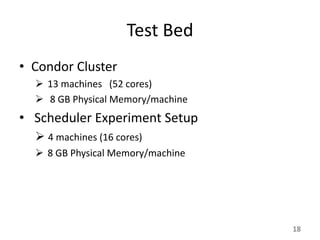
• Condor Cluster
   13 machines (52 cores)
   8 GB Physical Memory/machine
• Scheduler Experiment Setup
   4 machines (16 cores)
   8 GB Physical Memory/machine


                                   18
Result 1


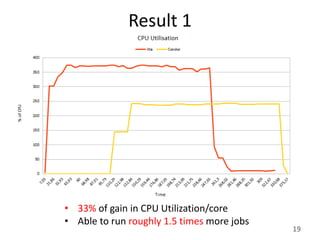
• 33% of gain in CPU Utilization/core
• Able to run roughly 1.5 times more jobs
                                            19
Result 2


           20
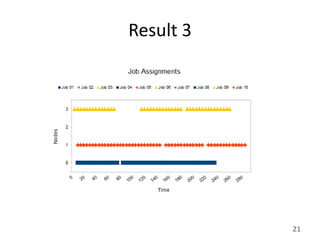
Result 3


           21
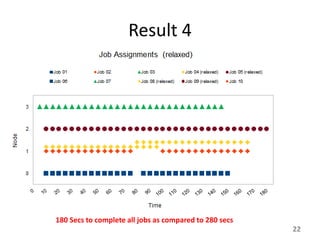
Result 4


180 Secs to complete all jobs as compared to 280 secs
                                                        22
Outline
• Introduction
• Scheduling
    Workflow Scheduling
    VM Scheduling
• Design
    Utility Based Scheduling
    Partial Utility function
• Implementation
    Condor
    Utility Scheduler
• Evaluation
• Conclusion
• Future Work
                                   23
Conclusion
• Partial Utility is good
    Optimizes resources
    Reduces operational costs
    More jobs can run in parallel
• Reducing queue waiting time is important
• QoS degrades during execution but may give better
  results in long run.


                                                      24
Future Work
• Use statistics to determine future decisions

• Incorporate Priorities and User Classes

• Incorporate SLA agreements

• Build a cloud middleware for IaaS

• Build a workflow management for PaaS


                                                 25
26
Pictures Sources
•   http://www.clker.com/clipart-6795.html
•   http://www.freesoftwaremagazine.com/files/nodes/1159/slide4.jpg
•   Luis Veiga , Virtual Execution Slides , IST Lisbon
•   http://1.bp.blogspot.com/-
    84QgrNkjzwE/UBfdGe0X41I/AAAAAAAAAIE/pFF0FIqEJ6A/s1600/computer-cartoon-happy-
    guy2.gif
•   http://3.bp.blogspot.com/-demIQI7r9LA/UEHsQk-
    YHQI/AAAAAAAAAa4/oWnTqjAYv_E/s1600/oppa+gangnam+style1.jpg


                                                                                    27

cloud scheduling

  • 1.
    By Mudit Verma &Radovan Zvonček KTH Sweden Supervisor: Luis Veiga, IST Lisbon December 5, 2012 1
  • 2.
    Outline • Motivation • Introduction •Scheduling  Workflow Scheduling  VM Scheduling • Design  Utility Based Scheduling  Partial Utility function • Implementation  Condor  Utility Scheduler • Evaluation • Conclusion • Future Work 2
  • 3.
    Motivation 15 Mins + Waiting Time Time to Reach Office ? 30 Mins Tuk Tuk 3
  • 4.
    Motivation Requirements • 3 Machines • X% CPU • Y MB Memory Scheduler Busy Busy Busy Busy Busy Free Free Queue Waiting Time Execution Time Time Relaxed Execution Time 4
  • 5.
    Introduction • Scheduling isat the heart of Distributed Compute .  PaaS model -> Workflow (job) Scheduling  IaaS model -> Virtual Machines (VM) Scheduling. • Scheduler decides which job/VM should go on which machine. • An effective scheduler can  Reduce operational costs  Reduce queue waiting time  Increase resource utilization 5
  • 6.
    Outline • Introduction • Scheduling  Workflow Scheduling  VM Scheduling • Design  Utility Based Scheduling  Partial Utility function • Implementation  Condor  Utility Scheduler • Evaluation • Conclusion • Future Work 6
  • 7.
    Workflow Scheduling • Jobsarranged as workflows. A • Usually defined as DAG  Nodes represents tasks  edges represents flow B C • Job completion time depends on  DAG design D E  Scope of parallelism  Wait time in queue No Prior Knowledge of Resource Availability 7
  • 8.
    Workflow Scheduling A A B B C C How ? D E D • Not enough machines for parallelization E 8
  • 9.
    VM Scheduling • Too simple, single priority • No Guarantee of optimized resource utilization • Dynamic VM scheduling & Migration • Does not take hypervisor into loop • Physical partitioning instead of logical partitioning 9
  • 10.
    Outline • Introduction • Scheduling  Workflow Scheduling  VM Scheduling • Design  Utility Based Scheduling  Partial Utility function • Implementation  Condor  Utility Scheduler • Evaluation • Conclusion • Future Work 10
  • 11.
    Utility Driven Scheduling •New scheduling paradigm • Goals  Optimized resource utilization  Relaxed QoS in Overcommitted Scenarios • Approach  Partial Utility Function  Continuous resource monitoring & feedback 11
  • 12.
    Partial Utility Function Job User Priority CPU Memory Disk Relaxation A Vaidas 1 50% 1000 MB 2 GB 20% (High) B Manu 2 60% 500 MB 6 GB 30% (Medium) C Manos 3 30% 800 MB 8 GB 0% (Low) D Mario 2 90% 900 MB 1 GB 40% E Antonio 2 100% 100 MB 3 GB 20% F Anis 1 80% 300 MB 5 GB 25% 12
  • 13.
    Outline • Introduction • Scheduling  Workflow Scheduling  VM Scheduling • Design  Utility Based Scheduling  Partial Utility function • Implementation  Condor  Utility Scheduler • Evaluation • Future Work • Conclusion 13
  • 14.
    Condor • Middlewarefor PaaS Prescript A A B C B C D E D E Requirements A B C D E 14
  • 15.
    Condor Resource Stats B Prescript Cluster Relaxation Job User Priority CPU Machines Memory Disk Relaxation B XYZ 1 50% 3 5 1000 MB 2 GB 40% (High) 15
  • 16.
    Utility Scheduler Queue Requirements Monitor Requirements Requirements CPU, Scheduler Memory, Disk N1 N2 N3 N4 N5 N6 N7 Cluster 16
  • 17.
    Outline • Introduction • Scheduling  Workflow Scheduling  VM Scheduling • Design  Utility Based Scheduling  Partial Utility function • Implementation  Condor  Utility Scheduler • Evaluation • Conclusion • Future Work 17
  • 18.
    Test Bed • CondorCluster  13 machines (52 cores)  8 GB Physical Memory/machine • Scheduler Experiment Setup  4 machines (16 cores)  8 GB Physical Memory/machine 18
  • 19.
    Result 1 • 33%of gain in CPU Utilization/core • Able to run roughly 1.5 times more jobs 19
  • 20.
  • 21.
  • 22.
    Result 4 180 Secsto complete all jobs as compared to 280 secs 22
  • 23.
    Outline • Introduction • Scheduling  Workflow Scheduling  VM Scheduling • Design  Utility Based Scheduling  Partial Utility function • Implementation  Condor  Utility Scheduler • Evaluation • Conclusion • Future Work 23
  • 24.
    Conclusion • Partial Utilityis good  Optimizes resources  Reduces operational costs  More jobs can run in parallel • Reducing queue waiting time is important • QoS degrades during execution but may give better results in long run. 24
  • 25.
    Future Work • Usestatistics to determine future decisions • Incorporate Priorities and User Classes • Incorporate SLA agreements • Build a cloud middleware for IaaS • Build a workflow management for PaaS 25
  • 26.
  • 27.
    Pictures Sources • http://www.clker.com/clipart-6795.html • http://www.freesoftwaremagazine.com/files/nodes/1159/slide4.jpg • Luis Veiga , Virtual Execution Slides , IST Lisbon • http://1.bp.blogspot.com/- 84QgrNkjzwE/UBfdGe0X41I/AAAAAAAAAIE/pFF0FIqEJ6A/s1600/computer-cartoon-happy- guy2.gif • http://3.bp.blogspot.com/-demIQI7r9LA/UEHsQk- YHQI/AAAAAAAAAa4/oWnTqjAYv_E/s1600/oppa+gangnam+style1.jpg 27

Editor's Notes

  • #6 http://1.bp.blogspot.com/-84QgrNkjzwE/UBfdGe0X41I/AAAAAAAAAIE/pFF0FIqEJ6A/s1600/computer-cartoon-happy-guy2.gifhttp://www.funnyworldpictures.com/wp-content/uploads/2012/10/dancefunnygangnamstylegif-cartoon.jpg
  • #10 http://www.freesoftwaremagazine.com/files/nodes/1159/slide4.jpg
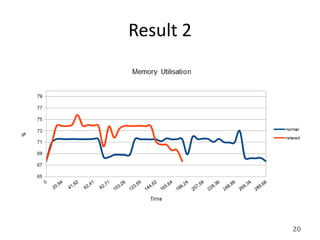
  • #20 30% relaxation
  • #25 We have introduced you to a new level of scheduling technique where on fly we reduce the requirements based on the availability
  • #26 http://www.clker.com/clipart-6795.html