LESSON PLAN GUIDE

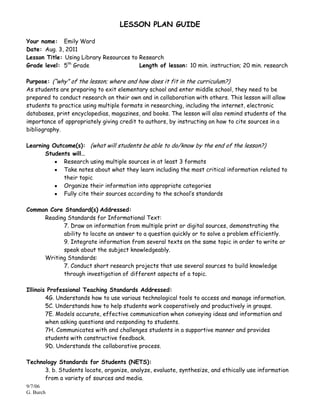
Your name: Emily Ward
Date: Aug. 3, 2011
Lesson Title: Using Library Resources to Research
Grade level: 5th Grade                   Length of lesson: 10 min. instruction; 20 min. research

Purpose: (“why” of the lesson; where and how does it fit in the curriculum?)
As students are preparing to exit elementary school and enter middle school, they need to be
prepared to conduct research on their own and in collaboration with others. This lesson will allow
students to practice using multiple formats in researching, including the internet, electronic
databases, print encyclopedias, magazines, and books. The lesson will also remind students of the
importance of appropriately giving credit to authors, by instructing on how to cite sources in a
bibliography.

Learning Outcome(s): (what will students be able to do/know by the end of the lesson?)
       Students will…
             Research using multiple sources in at least 3 formats
             Take notes about what they learn including the most critical information related to
             their topic
             Organize their information into appropriate categories
             Fully cite their sources according to the school’s standards

Common Core Standard(s) Addressed:
     Reading Standards for Informational Text:
           7. Draw on information from multiple print or digital sources, demonstrating the
           ability to locate an answer to a question quickly or to solve a problem efficiently.
           9. Integrate information from several texts on the same topic in order to write or
           speak about the subject knowledgeably.
     Writing Standards:
           7. Conduct short research projects that use several sources to build knowledge
           through investigation of different aspects of a topic.

Illinois Professional Teaching Standards Addressed:
        4G. Understands how to use various technological tools to access and manage information.
        5C. Understands how to help students work cooperatively and productively in groups.
        7E. Models accurate, effective communication when conveying ideas and information and
        when asking questions and responding to students.
        7H. Communicates with and challenges students in a supportive manner and provides
        students with constructive feedback.
        9D. Understands the collaborative process.

Technology Standards for Students (NETS):
      3. b. Students locate, organize, analyze, evaluate, synthesize, and ethically use information
      from a variety of sources and media.
9/7/06
G. Burch
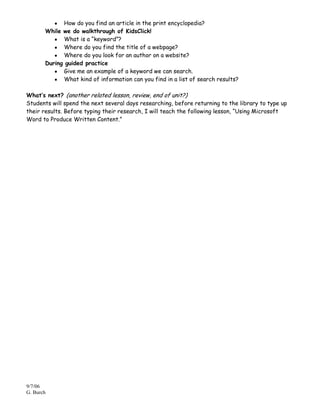
3.c. Students evaluate and select information sources and digital tools based on the
       appropriateness to specific tasks.
       5.a. Students advocate and practice safe, legal, and responsible use of information and
       technology.

Materials:
      Needed by you:
           Bibliography of helpful websites and informational texts available to students to
           research the women’s suffrage movement
           Resource Matrix for keeping track of resources
      Needed by students:
           Computer access

Instructional procedures:
      Focusing event: (how will you get the students’ attention?)
      To gather students’ attention and prepare them to focus on their topic of choice, I will do
      very brief booktalks of the print materials available in the library media center regarding
      the women’s suffrage movement.

       Input from you: (what are you teaching & how are you delivering the content?)
       While students are at library tables in front of the projector screen, I will guide students
       through the online databases we have available, including Kids Search, KidsClick! and the
       Grolier Encyclopedia. I will demonstrate, first using KidsClick! to search for “women’s
       suffrage”. Selecting one the websites available (“Not For Ourselves Alone”) I will walk them
       through what type of information they can find on such a site. Next I will exhibit how I
       would cite this source, according to our school’s citation standards, which express that
       upper elementary students should cite sources in an abbreviated form of MLA: Author Last
       Name, First Name. “Title of article/webpage.” Title of book/website/resource. I will write
       this citation on the moveable dry erase board.

       Guided practice: (application of knowledge by students)
       To assess how students are understanding this research process, I will have them
       participate in going through the Grolier Encyclopedia. First I will ask for keywords from the
       students to use in the search. Then, I will have students choose the most appropriate
       article. Then I will have students come up to the white board to fill in each part of the
       citation.

       Closure (how will you end the lesson?)
       To end the lesson I will pass out the Resource Matrices to guide students through their
       research and invite them to use the computers or use the available print resources.

Check for understanding (what questions will you ask and when to determine students’
understanding?)
       During introductory booktalks
             Where can you find the index of a book?
9/7/06
G. Burch
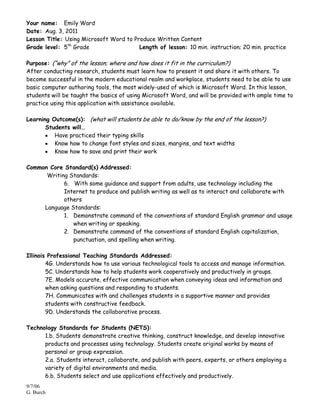
How do you find an article in the print encyclopedia?
       While we do walkthrough of KidsClick!
             What is a “keyword”?
             Where do you find the title of a webpage?
             Where do you look for an author on a website?
       During guided practice
             Give me an example of a keyword we can search.
             What kind of information can you find in a list of search results?

What’s next? (another related lesson, review, end of unit?)
Students will spend the next several days researching, before returning to the library to type up
their results. Before typing their research, I will teach the following lesson, “Using Microsoft
Word to Produce Written Content.”


9/7/06
G. Burch
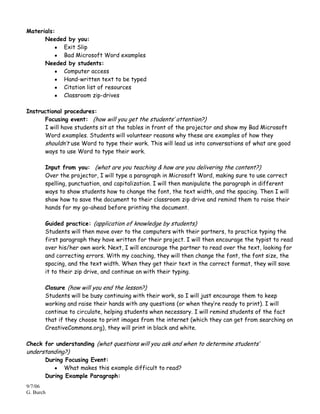
Your name: Emily Ward
Date: Aug. 3, 2011
Lesson Title: Using Microsoft Word to Produce Written Content
Grade level: 5th Grade                  Length of lesson: 10 min. instruction; 20 min. practice

Purpose: (“why” of the lesson; where and how does it fit in the curriculum?)
After conducting research, students must learn how to present it and share it with others. To
become successful in the modern educational realm and workplace, students need to be able to use
basic computer authoring tools, the most widely-used of which is Microsoft Word. In this lesson,
students will be taught the basics of using Microsoft Word, and will be provided with ample time to
practice using this application with assistance available.

Learning Outcome(s): (what will students be able to do/know by the end of the lesson?)
       Students will…
          Have practiced their typing skills
          Know how to change font styles and sizes, margins, and text widths
          Know how to save and print their work

Common Core Standard(s) Addressed:
      Writing Standards:
            6. With some guidance and support from adults, use technology including the
            Internet to produce and publish writing as well as to interact and collaborate with
            others
     Language Standards:
            1. Demonstrate command of the conventions of standard English grammar and usage
               when writing or speaking.
            2. Demonstrate command of the conventions of standard English capitalization,
               punctuation, and spelling when writing.

Illinois Professional Teaching Standards Addressed:
        4G. Understands how to use various technological tools to access and manage information.
        5C. Understands how to help students work cooperatively and productively in groups.
        7E. Models accurate, effective communication when conveying ideas and information and
        when asking questions and responding to students.
        7H. Communicates with and challenges students in a supportive manner and provides
        students with constructive feedback.
        9D. Understands the collaborative process.

Technology Standards for Students (NETS):
      1.b. Students demonstrate creative thinking, construct knowledge, and develop innovative
      products and processes using technology. Students create original works by means of
      personal or group expression.
      2.a. Students interact, collaborate, and publish with peers, experts, or others employing a
      variety of digital environments and media.
      6.b. Students select and use applications effectively and productively.
9/7/06
G. Burch
Materials:
      Needed by you:
           Exit Slip
           Bad Microsoft Word examples
      Needed by students:
           Computer access
           Hand-written text to be typed
           Citation list of resources
           Classroom zip-drives

Instructional procedures:
      Focusing event: (how will you get the students’ attention?)
      I will have students sit at the tables in front of the projector and show my Bad Microsoft
      Word examples. Students will volunteer reasons why these are examples of how they
      shouldn’t use Word to type their work. This will lead us into conversations of what are good
      ways to use Word to type their work.

       Input from you: (what are you teaching & how are you delivering the content?)
       Over the projector, I will type a paragraph in Microsoft Word, making sure to use correct
       spelling, punctuation, and capitalization. I will then manipulate the paragraph in different
       ways to show students how to change the font, the text width, and the spacing. Then I will
       show how to save the document to their classroom zip drive and remind them to raise their
       hands for my go-ahead before printing the document.

       Guided practice: (application of knowledge by students)
       Students will then move over to the computers with their partners, to practice typing the
       first paragraph they have written for their project. I will then encourage the typist to read
       over his/her own work. Next, I will encourage the partner to read over the text, looking for
       and correcting errors. With my coaching, they will then change the font, the font size, the
       spacing, and the text width. When they get their text in the correct format, they will save
       it to their zip drive, and continue on with their typing.

       Closure (how will you end the lesson?)
       Students will be busy continuing with their work, so I will just encourage them to keep
       working and raise their hands with any questions (or when they’re ready to print). I will
       continue to circulate, helping students when necessary. I will remind students of the fact
       that if they choose to print images from the internet (which they can get from searching on
       CreativeCommons.org), they will print in black and white.

Check for understanding (what questions will you ask and when to determine students’
understanding?)
       During Focusing Event:
             What makes this example difficult to read?
       During Example Paragraph:
9/7/06
G. Burch
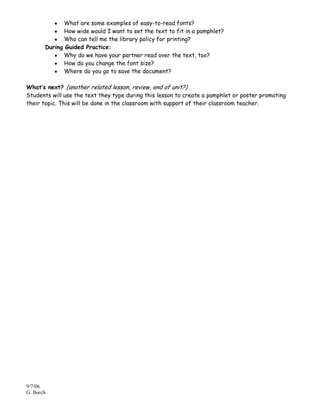
What are some examples of easy-to-read fonts?
             How wide would I want to set the text to fit in a pamphlet?
             Who can tell me the library policy for printing?
       During Guided Practice:
             Why do we have your partner read over the text, too?
             How do you change the font size?
             Where do you go to save the document?

What’s next? (another related lesson, review, end of unit?)
Students will use the text they type during this lesson to create a pamphlet or poster promoting
their topic. This will be done in the classroom with support of their classroom teacher.


9/7/06
G. Burch
SUPPLEMENTAL INFORMATION:

Evaluation plans:
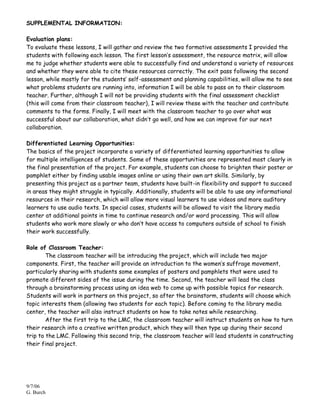
To evaluate these lessons, I will gather and review the two formative assessments I provided the
students with following each lesson. The first lesson’s assessment, the resource matrix, will allow
me to judge whether students were able to successfully find and understand a variety of resources
and whether they were able to cite these resources correctly. The exit pass following the second
lesson, while mostly for the students’ self-assessment and planning capabilities, will allow me to see
what problems students are running into, information I will be able to pass on to their classroom
teacher. Further, although I will not be providing students with the final assessment checklist
(this will come from their classroom teacher), I will review these with the teacher and contribute
comments to the forms. Finally, I will meet with the classroom teacher to go over what was
successful about our collaboration, what didn’t go well, and how we can improve for our next
collaboration.

Differentiated Learning Opportunities:
The basics of the project incorporate a variety of differentiated learning opportunities to allow
for multiple intelligences of students. Some of these opportunities are represented most clearly in
the final presentation of the project. For example, students can choose to brighten their poster or
pamphlet either by finding usable images online or using their own art skills. Similarly, by
presenting this project as a partner team, students have built-in flexibility and support to succeed
in areas they might struggle in typically. Additionally, students will be able to use any informational
resources in their research, which will allow more visual learners to use videos and more auditory
learners to use audio texts. In special cases, students will be allowed to visit the library media
center at additional points in time to continue research and/or word processing. This will allow
students who work more slowly or who don’t have access to computers outside of school to finish
their work successfully.

Role of Classroom Teacher:
        The classroom teacher will be introducing the project, which will include two major
components. First, the teacher will provide an introduction to the women’s suffrage movement,
particularly sharing with students some examples of posters and pamphlets that were used to
promote different sides of the issue during the time. Second, the teacher will lead the class
through a brainstorming process using an idea web to come up with possible topics for research.
Students will work in partners on this project, so after the brainstorm, students will choose which
topic interests them (allowing two students for each topic). Before coming to the library media
center, the teacher will also instruct students on how to take notes while researching.
        After the first trip to the LMC, the classroom teacher will instruct students on how to turn
their research into a creative written product, which they will then type up during their second
trip to the LMC. Following this second trip, the classroom teacher will lead students in constructing
their final project.


9/7/06
G. Burch
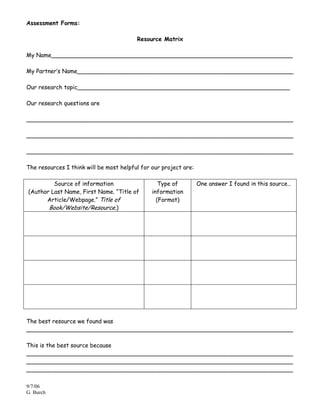
Assessment Forms:

                                         Resource Matrix

My Name___________________________________________________________________

My Partner’s Name____________________________________________________________

Our research topic___________________________________________________________

Our research questions are

__________________________________________________________________________

__________________________________________________________________________

__________________________________________________________________________

The resources I think will be most helpful for our project are:

         Source of information                    Type of         One answer I found in this source…
(Author Last Name, First Name. “Title of       information
      Article/Webpage.” Title of                 (Format)
       Book/Website/Resource.)


The best resource we found was
__________________________________________________________________________

This is the best source because
__________________________________________________________________________
__________________________________________________________________________
__________________________________________________________________________

9/7/06
G. Burch
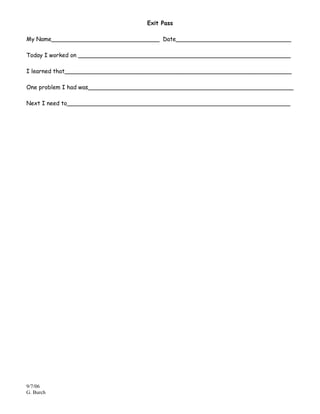
Exit Pass

My Name______________________________ Date________________________________

Today I worked on ___________________________________________________________

I learned that_______________________________________________________________

One problem I had was_________________________________________________________

Next I need to______________________________________________________________


9/7/06
G. Burch
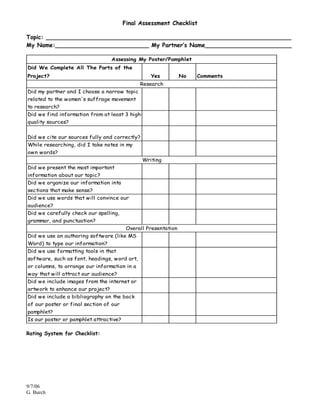
Final Assessment Checklist

Topic: ____________________________________________________________________
My Name:__________________________ My Partner’s Name________________________

                                  Assessing My Poster/Pamphlet
Did We Complete All The Parts of the
Project?                                          Yes           No   Comments
                                              Research
Did my partner and I choose a narrow topic
related to the women's suffrage movement
to research?
Did we find information from at least 3 high-
quality sources?


Did we cite our sources fully and correctly?
While researching, did I take notes in my
own words?
                                               Writing
Did we present the most important
information about our topic?
Did we organize our information into
sections that make sense?
Did we use words that will convince our
audience?
Did we carefully check our spelling,
grammar, and punctuation?
                                         Overall Presentation
Did we use an authoring software (like MS
Word) to type our information?
Did we use formatting tools in that
software, such as font, headings, word art,
or columns, to arrange our information in a
way that will attract our audience?
Did we include images from the internet or
artwork to enhance our project?
Did we include a bibliography on the back
of our poster or final section of our
pamphlet?
Is our poster or pamphlet attractive?

Rating System for Checklist:


9/7/06
G. Burch
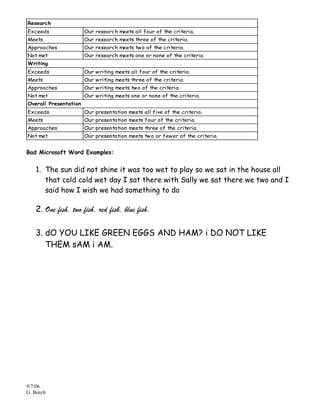
Research
Exceeds                Our research meets all four of the criteria.
Meets                  Our research meets three of the criteria.
Approaches             Our research meets two of the criteria.
Not met                Our research meets one or none of the criteria.
Writing
Exceeds                Our writing meets all four of the criteria.
Meets                  Our writing meets three of the criteria.
Approaches             Our writing meets two of the criteria.
Not met                Our writing meets one or none of the criteria.
Overall Presentation
Exceeds                Our presentation meets all five of the criteria.
Meets                  Our presentation meets four of the criteria.
Approaches             Our presentation meets three of the criteria.
Not met                Our presentation meets two or fewer of the criteria.


Bad Microsoft Word Examples:


   1. The sun did not shine it was too wet to play so we sat in the house all
      that cold cold wet day I sat there with Sally we sat there we two and I
      said how I wish we had something to do

   2. One fish, two fish, red fish, blue fish.

   3. dO YOU LIKE GREEN EGGS AND HAM? i DO NOT LIKE
      THEM sAM i AM.


9/7/06
G. Burch

Research Project Lesson Plan

  • 1.
    LESSON PLAN GUIDE Yourname: Emily Ward Date: Aug. 3, 2011 Lesson Title: Using Library Resources to Research Grade level: 5th Grade Length of lesson: 10 min. instruction; 20 min. research Purpose: (“why” of the lesson; where and how does it fit in the curriculum?) As students are preparing to exit elementary school and enter middle school, they need to be prepared to conduct research on their own and in collaboration with others. This lesson will allow students to practice using multiple formats in researching, including the internet, electronic databases, print encyclopedias, magazines, and books. The lesson will also remind students of the importance of appropriately giving credit to authors, by instructing on how to cite sources in a bibliography. Learning Outcome(s): (what will students be able to do/know by the end of the lesson?) Students will… Research using multiple sources in at least 3 formats Take notes about what they learn including the most critical information related to their topic Organize their information into appropriate categories Fully cite their sources according to the school’s standards Common Core Standard(s) Addressed: Reading Standards for Informational Text: 7. Draw on information from multiple print or digital sources, demonstrating the ability to locate an answer to a question quickly or to solve a problem efficiently. 9. Integrate information from several texts on the same topic in order to write or speak about the subject knowledgeably. Writing Standards: 7. Conduct short research projects that use several sources to build knowledge through investigation of different aspects of a topic. Illinois Professional Teaching Standards Addressed: 4G. Understands how to use various technological tools to access and manage information. 5C. Understands how to help students work cooperatively and productively in groups. 7E. Models accurate, effective communication when conveying ideas and information and when asking questions and responding to students. 7H. Communicates with and challenges students in a supportive manner and provides students with constructive feedback. 9D. Understands the collaborative process. Technology Standards for Students (NETS): 3. b. Students locate, organize, analyze, evaluate, synthesize, and ethically use information from a variety of sources and media. 9/7/06 G. Burch
  • 2.
    3.c. Students evaluateand select information sources and digital tools based on the appropriateness to specific tasks. 5.a. Students advocate and practice safe, legal, and responsible use of information and technology. Materials: Needed by you: Bibliography of helpful websites and informational texts available to students to research the women’s suffrage movement Resource Matrix for keeping track of resources Needed by students: Computer access Instructional procedures: Focusing event: (how will you get the students’ attention?) To gather students’ attention and prepare them to focus on their topic of choice, I will do very brief booktalks of the print materials available in the library media center regarding the women’s suffrage movement. Input from you: (what are you teaching & how are you delivering the content?) While students are at library tables in front of the projector screen, I will guide students through the online databases we have available, including Kids Search, KidsClick! and the Grolier Encyclopedia. I will demonstrate, first using KidsClick! to search for “women’s suffrage”. Selecting one the websites available (“Not For Ourselves Alone”) I will walk them through what type of information they can find on such a site. Next I will exhibit how I would cite this source, according to our school’s citation standards, which express that upper elementary students should cite sources in an abbreviated form of MLA: Author Last Name, First Name. “Title of article/webpage.” Title of book/website/resource. I will write this citation on the moveable dry erase board. Guided practice: (application of knowledge by students) To assess how students are understanding this research process, I will have them participate in going through the Grolier Encyclopedia. First I will ask for keywords from the students to use in the search. Then, I will have students choose the most appropriate article. Then I will have students come up to the white board to fill in each part of the citation. Closure (how will you end the lesson?) To end the lesson I will pass out the Resource Matrices to guide students through their research and invite them to use the computers or use the available print resources. Check for understanding (what questions will you ask and when to determine students’ understanding?) During introductory booktalks Where can you find the index of a book? 9/7/06 G. Burch
  • 3.
    How do youfind an article in the print encyclopedia? While we do walkthrough of KidsClick! What is a “keyword”? Where do you find the title of a webpage? Where do you look for an author on a website? During guided practice Give me an example of a keyword we can search. What kind of information can you find in a list of search results? What’s next? (another related lesson, review, end of unit?) Students will spend the next several days researching, before returning to the library to type up their results. Before typing their research, I will teach the following lesson, “Using Microsoft Word to Produce Written Content.” 9/7/06 G. Burch
  • 4.
    Your name: EmilyWard Date: Aug. 3, 2011 Lesson Title: Using Microsoft Word to Produce Written Content Grade level: 5th Grade Length of lesson: 10 min. instruction; 20 min. practice Purpose: (“why” of the lesson; where and how does it fit in the curriculum?) After conducting research, students must learn how to present it and share it with others. To become successful in the modern educational realm and workplace, students need to be able to use basic computer authoring tools, the most widely-used of which is Microsoft Word. In this lesson, students will be taught the basics of using Microsoft Word, and will be provided with ample time to practice using this application with assistance available. Learning Outcome(s): (what will students be able to do/know by the end of the lesson?) Students will… Have practiced their typing skills Know how to change font styles and sizes, margins, and text widths Know how to save and print their work Common Core Standard(s) Addressed: Writing Standards: 6. With some guidance and support from adults, use technology including the Internet to produce and publish writing as well as to interact and collaborate with others Language Standards: 1. Demonstrate command of the conventions of standard English grammar and usage when writing or speaking. 2. Demonstrate command of the conventions of standard English capitalization, punctuation, and spelling when writing. Illinois Professional Teaching Standards Addressed: 4G. Understands how to use various technological tools to access and manage information. 5C. Understands how to help students work cooperatively and productively in groups. 7E. Models accurate, effective communication when conveying ideas and information and when asking questions and responding to students. 7H. Communicates with and challenges students in a supportive manner and provides students with constructive feedback. 9D. Understands the collaborative process. Technology Standards for Students (NETS): 1.b. Students demonstrate creative thinking, construct knowledge, and develop innovative products and processes using technology. Students create original works by means of personal or group expression. 2.a. Students interact, collaborate, and publish with peers, experts, or others employing a variety of digital environments and media. 6.b. Students select and use applications effectively and productively. 9/7/06 G. Burch
  • 5.
    Materials: Needed by you: Exit Slip Bad Microsoft Word examples Needed by students: Computer access Hand-written text to be typed Citation list of resources Classroom zip-drives Instructional procedures: Focusing event: (how will you get the students’ attention?) I will have students sit at the tables in front of the projector and show my Bad Microsoft Word examples. Students will volunteer reasons why these are examples of how they shouldn’t use Word to type their work. This will lead us into conversations of what are good ways to use Word to type their work. Input from you: (what are you teaching & how are you delivering the content?) Over the projector, I will type a paragraph in Microsoft Word, making sure to use correct spelling, punctuation, and capitalization. I will then manipulate the paragraph in different ways to show students how to change the font, the text width, and the spacing. Then I will show how to save the document to their classroom zip drive and remind them to raise their hands for my go-ahead before printing the document. Guided practice: (application of knowledge by students) Students will then move over to the computers with their partners, to practice typing the first paragraph they have written for their project. I will then encourage the typist to read over his/her own work. Next, I will encourage the partner to read over the text, looking for and correcting errors. With my coaching, they will then change the font, the font size, the spacing, and the text width. When they get their text in the correct format, they will save it to their zip drive, and continue on with their typing. Closure (how will you end the lesson?) Students will be busy continuing with their work, so I will just encourage them to keep working and raise their hands with any questions (or when they’re ready to print). I will continue to circulate, helping students when necessary. I will remind students of the fact that if they choose to print images from the internet (which they can get from searching on CreativeCommons.org), they will print in black and white. Check for understanding (what questions will you ask and when to determine students’ understanding?) During Focusing Event: What makes this example difficult to read? During Example Paragraph: 9/7/06 G. Burch
  • 6.
    What are someexamples of easy-to-read fonts? How wide would I want to set the text to fit in a pamphlet? Who can tell me the library policy for printing? During Guided Practice: Why do we have your partner read over the text, too? How do you change the font size? Where do you go to save the document? What’s next? (another related lesson, review, end of unit?) Students will use the text they type during this lesson to create a pamphlet or poster promoting their topic. This will be done in the classroom with support of their classroom teacher. 9/7/06 G. Burch
  • 7.
    SUPPLEMENTAL INFORMATION: Evaluation plans: Toevaluate these lessons, I will gather and review the two formative assessments I provided the students with following each lesson. The first lesson’s assessment, the resource matrix, will allow me to judge whether students were able to successfully find and understand a variety of resources and whether they were able to cite these resources correctly. The exit pass following the second lesson, while mostly for the students’ self-assessment and planning capabilities, will allow me to see what problems students are running into, information I will be able to pass on to their classroom teacher. Further, although I will not be providing students with the final assessment checklist (this will come from their classroom teacher), I will review these with the teacher and contribute comments to the forms. Finally, I will meet with the classroom teacher to go over what was successful about our collaboration, what didn’t go well, and how we can improve for our next collaboration. Differentiated Learning Opportunities: The basics of the project incorporate a variety of differentiated learning opportunities to allow for multiple intelligences of students. Some of these opportunities are represented most clearly in the final presentation of the project. For example, students can choose to brighten their poster or pamphlet either by finding usable images online or using their own art skills. Similarly, by presenting this project as a partner team, students have built-in flexibility and support to succeed in areas they might struggle in typically. Additionally, students will be able to use any informational resources in their research, which will allow more visual learners to use videos and more auditory learners to use audio texts. In special cases, students will be allowed to visit the library media center at additional points in time to continue research and/or word processing. This will allow students who work more slowly or who don’t have access to computers outside of school to finish their work successfully. Role of Classroom Teacher: The classroom teacher will be introducing the project, which will include two major components. First, the teacher will provide an introduction to the women’s suffrage movement, particularly sharing with students some examples of posters and pamphlets that were used to promote different sides of the issue during the time. Second, the teacher will lead the class through a brainstorming process using an idea web to come up with possible topics for research. Students will work in partners on this project, so after the brainstorm, students will choose which topic interests them (allowing two students for each topic). Before coming to the library media center, the teacher will also instruct students on how to take notes while researching. After the first trip to the LMC, the classroom teacher will instruct students on how to turn their research into a creative written product, which they will then type up during their second trip to the LMC. Following this second trip, the classroom teacher will lead students in constructing their final project. 9/7/06 G. Burch
  • 8.
    Assessment Forms: Resource Matrix My Name___________________________________________________________________ My Partner’s Name____________________________________________________________ Our research topic___________________________________________________________ Our research questions are __________________________________________________________________________ __________________________________________________________________________ __________________________________________________________________________ The resources I think will be most helpful for our project are: Source of information Type of One answer I found in this source… (Author Last Name, First Name. “Title of information Article/Webpage.” Title of (Format) Book/Website/Resource.) The best resource we found was __________________________________________________________________________ This is the best source because __________________________________________________________________________ __________________________________________________________________________ __________________________________________________________________________ 9/7/06 G. Burch
  • 9.
    Exit Pass My Name______________________________Date________________________________ Today I worked on ___________________________________________________________ I learned that_______________________________________________________________ One problem I had was_________________________________________________________ Next I need to______________________________________________________________ 9/7/06 G. Burch
  • 10.
    Final Assessment Checklist Topic:____________________________________________________________________ My Name:__________________________ My Partner’s Name________________________ Assessing My Poster/Pamphlet Did We Complete All The Parts of the Project? Yes No Comments Research Did my partner and I choose a narrow topic related to the women's suffrage movement to research? Did we find information from at least 3 high- quality sources? Did we cite our sources fully and correctly? While researching, did I take notes in my own words? Writing Did we present the most important information about our topic? Did we organize our information into sections that make sense? Did we use words that will convince our audience? Did we carefully check our spelling, grammar, and punctuation? Overall Presentation Did we use an authoring software (like MS Word) to type our information? Did we use formatting tools in that software, such as font, headings, word art, or columns, to arrange our information in a way that will attract our audience? Did we include images from the internet or artwork to enhance our project? Did we include a bibliography on the back of our poster or final section of our pamphlet? Is our poster or pamphlet attractive? Rating System for Checklist: 9/7/06 G. Burch
  • 11.
    Research Exceeds Our research meets all four of the criteria. Meets Our research meets three of the criteria. Approaches Our research meets two of the criteria. Not met Our research meets one or none of the criteria. Writing Exceeds Our writing meets all four of the criteria. Meets Our writing meets three of the criteria. Approaches Our writing meets two of the criteria. Not met Our writing meets one or none of the criteria. Overall Presentation Exceeds Our presentation meets all five of the criteria. Meets Our presentation meets four of the criteria. Approaches Our presentation meets three of the criteria. Not met Our presentation meets two or fewer of the criteria. Bad Microsoft Word Examples: 1. The sun did not shine it was too wet to play so we sat in the house all that cold cold wet day I sat there with Sally we sat there we two and I said how I wish we had something to do 2. One fish, two fish, red fish, blue fish. 3. dO YOU LIKE GREEN EGGS AND HAM? i DO NOT LIKE THEM sAM i AM. 9/7/06 G. Burch