One of the easiest and least stressful ways of
   getting started with technology in the
                  classroom.
We can use the web sites in the classroom in
                several ways

As printed pages
With one computer with Internet connection
In a computer lab with a set of networked and
connected computers
Use of Internet is a part of the learning
    process, not occasional activity.
Both can be used, it depends on what you
          want to achieve with it.
ELT websites: provide valuable opportunities
     for more controlled language work.
     Authentic websites: provide ideal
 opportunities for more authentic and natural.
Google: www.google.com
   Yahoo: www.yahoo.com
Ask.com: http://www.ask.com/
 Altavista: www.altavista.com
  Clusty: http://clusty.com/
Lycos: http://www.lycos.com/
Yandex: http:// yandex.com.tr/
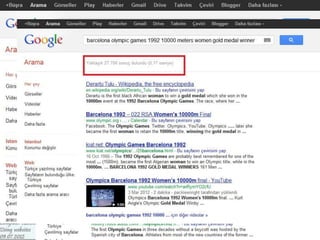
Ex: have a project about the history of
 Olimpic Games focused on Barcelona
            games in 1992.
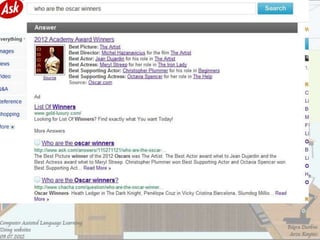
search as phrase on google
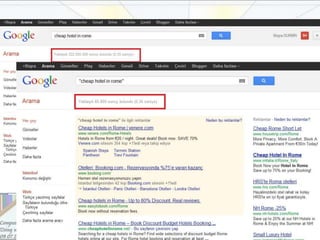
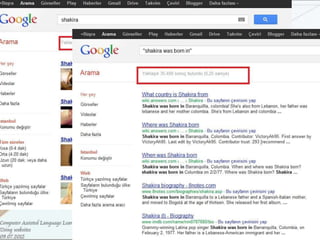
Tip to find specific result
Yahoo: http://search.yahoo.com/
Ask.com: http://www.ask.com/
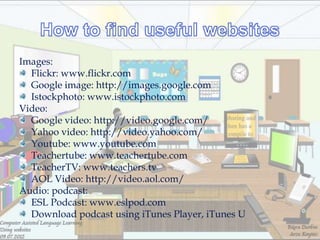
Images:
  Flickr: www.flickr.com
  Google image: http://images.google.com
  Istockphoto: www.istockphoto.com
Video:
  Google video: http://video.google.com/
  Yahoo video: http://video.yahoo.com/
  Youtube: www.youtube.com
  Teachertube: www.teachertube.com
  TeacherTV: www.teachers.tv
  AOL Video: http://video.aol.com/
Audio: podcast:
  ESL Podcast: www.eslpod.com
  Download podcast using iTunes Player, iTunes U
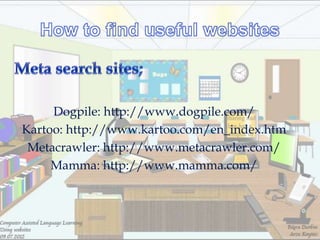
Dogpile: http://www.dogpile.com/
Kartoo: http://www.kartoo.com/en_index.htm
 Metacrawler: http://www.metacrawler.com/
     Mamma: http://www.mamma.com/
Who wrote the page? Is this person an expert in the
subject matter?
Is the page content reliable and factually correct?
Is the content up-to-date?
When was the page last updated?
Is the content interesting and stimulating?
Is it attractive and easy to navigate?
Does the site work well? Are there any broken
links?
Does it use a lot of large files or alternative
technologies (e.g. Flash)?
Before computers and the Internet, teachers
 generally answered the ―What do I teach
 Monday?‖ query by working with other
 teachers, consulting school curriculum
 guides, reading books and professional
 journals, and gathering materials from
 libraries and school resources.
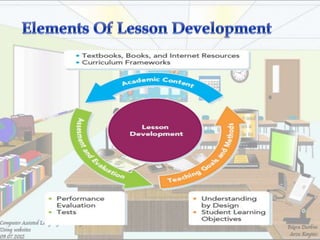
Lesson development refers to all the activities that teachers
do     as    they    create,    teach,     and       evaluate
lessons with students. Lesson development involves a
teacher‘s decisions about three interrelated elements of
teaching lessons:
            Academic content (what to teach)
 Teaching goals, methods, and procedures (how to teach)
 Learning assessments (how to know what students have
                       learned)
Every time they teach, teachers make
choices about academic content—the facts,
concepts,      ideas,     skills,    and
understandingsthey intend to share with
students.

Lesson development must be connected to
local curriculum frameworks, which are
aligned to state and national standards.
Technology plays an essential role in
          assisting teachers to
answer the academic content or ―what to
            teach‖ question.
Digital content available on the Internet
         includes a vast collection
of curriculum resources and information.
As they answer the ―what to teach‖
question, teachers simultaneously decide
    the teaching goals, methods, and
 procedures they will use in their classes.
Goals are the reason why a lesson is being
  taught. Methods are the instructional
                strategies.
Teachers combine goals, methods, and
 procedures into formats for daily learning.
                Sometimes
curriculum content dictates these processes;
    sometimes the goals, methods, and
             procedures dictate
           the choice of content.
Either way, content, goals, methods, and
     procedures mutually support each
    other in a dynamic process of lesson
development, which technology can support
                in a variety of
      ways such as teacher-developed
  websites,podcasts, blogs, and wikis etc.
Learning assessments occur
 before, during, and after teaching lessons
  and enable teachers to evaluate student
     knowledge, understanding, and
   performance. They can be summative
(summarizing what students have learned
     at the end of a lesson), formative
      (happening as a lesson unfolds
Assessment tools include multiple-choice
 and short answer tests, essays and other
  written tasks, oral discussions, teacher
  observations, class participation, and
     student projects, portfolios, and
    performances,all of which provide
 evidence of what students have learned
    and are able to do as a result of the
                 teaching.
Technology tools that support the
assessment and evaluation process include
        Electronic tests and quizzes
             Digital portfolios
        Personal response systems
              Online surveys
Planning a web-based lesson,rather than
   one where the web content plays an
ancillary role,is not different from planning
              a traditional one.
We divide a typical web-based session
 into three parts: warmer,web,what
                 next.
It is the kind of thing we all do as a
          matter,with introductory
     activities,generating ideas,and so
    on.Thanks to this part learners are
prepared for what they are going to do in
                  web part.
It is important here to spend only as much
        time as we need working with
  computers.We prepare to take learners to
    a computer room rather than spend the
             entire class in there.
This allows us to keeping classroom focused
           during their time there.
On the other hand moving from traditional
   class to a computer room may distract
    learners attention,so we need careful
                planning here.
If we have limited access to
computers,we can use web-based
      printable materials.
As a teacher we may want to replace
   materials with website-based ones.For
  example listening texts or materials.We
 should help learners to evaluate materials
by asking them to talk about what they like
           and what they don‘t.
Time and ask are important issuses
here.Make sure your learners have a clearly-
 defined task to achieve and clearly-defined
              time to achieve it.
Educators are particularly interested in
technology‘s interactive capabilities, such as
      providing immediate feedback and
                   increasing
     learner autonomy, in addition to the
      capability of simulating real-world
  situations via audio,video, and graphics.
But in working with lower-levels the choice
 of websites will be more limited than for
              higher levels.
Websites which are more suitable for lower
             levels include:

websites with simple,clearly presented text

websites with non-linguistic data which is
            easy to interpret
websites with visuals-a task can be based on
                visuals only

 ELT websites,where the content has been
  written, edited and prepared with this
            audience in mind.
Planning carefully and adopting a
 structured approach to the way you use
websites in the classroom should give you
the confidence to try out different ways of
   introducing your learners to internet
                  content.
We should bear in mind that it is not
necessarily the all singing-dancing websites-
 ones with a lot of animation,video or other
  multimedia contenwhich will be of most
      interest or use in our classrooms.
Don‘t discount simple text-based websites
which might be very beneficial in your own
                 content.
Here are some considerations and
       contingency plans:
Whenever you use technology you should
 always have a backup plan.The electricity
might go off,computers might crash etc.Be
                prepared.
Use the knowledge of other teachers and of your
   learners to help you with the technical side of
      the lesson.We often team teach with less
    experienced teachers,taking care of the small
       technical problems which occasionally
         arise,and leaving them free to enjoy
               technology and to teach.
If it is a lesson that involves few pages try
      saving them to your computer hard
   disk.With the help of this,you will open
  the pages even if the internet goes down.
It is rarely conductive to have learners
 working alone on computers.Pair works
     and small-group work will help to
encourage oral communication and break
   down the ‗computer as barrier‘ effect
    often prevalent in technology-based
                  classes.
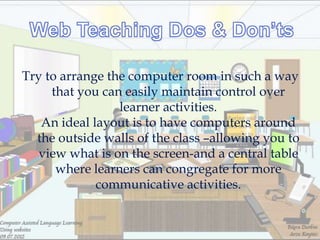
Try to arrange the computer room in such a way
     that you can easily maintain control over
                 learner activities.
   An ideal layout is to have computers around
  the outside walls of the class –allowing you to
  view what is on the screen-and a central table
      where learners can congregate for more
             communicative activities.
Not all of the content that you come across
   with your learners will be suitable for
                     them.
     You should be in a position to fully
    explore the web with your learners.
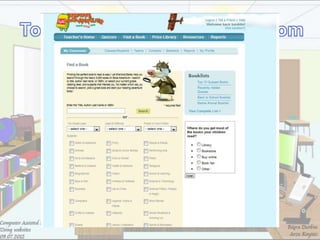
Terra Clues for Schools
        Free Rice
       Netsmartz
         Fanlala
         Starfall
        Game goo
       Wonderville
        Artsonia
    Book Adventure
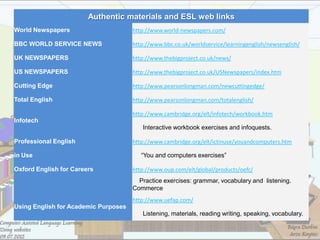
Authentic materials and ESL web links
World Newspapers                      http://www.world-newspapers.com/

BBC WORLD SERVICE NEWS                http://www.bbc.co.uk/worldservice/learningenglish/newsenglish/

UK NEWSPAPERS                         http://www.thebigproject.co.uk/news/

US NEWSPAPERS                         http://www.thebigproject.co.uk/USNewspapers/index.htm

Cutting Edge                          http://www.pearsonlongman.com/newcuttingedge/

Total English                         http://www.pearsonlongman.com/totalenglish/

                                      http://www.cambridge.org/elt/infotech/workbook.htm
Infotech
                                         Interactive workbook exercises and infoquests.

Professional English                  http://www.cambridge.org/elt/ictinuse/youandcomputers.htm

in Use                                   “You and computers exercises”

Oxford English for Careers            http://www.oup.com/elt/global/products/oefc/
                                        Practice exercises: grammar, vocabulary and listening.
                                      Commerce
                                      http://www.uefap.com/
Using English for Academic Purposes
                                         Listening, materials, reading writing, speaking, vocabulary.
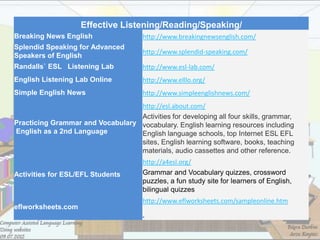
Effective Listening/Reading/Speaking/
Breaking News English                 http://www.breakingnewsenglish.com/
Splendid Speaking for Advanced
                                      http://www.splendid-speaking.com/
Speakers of English
Randalls` ESL Listening Lab           http://www.esl-lab.com/
English Listening Lab Online          http://www.elllo.org/
Simple English News                   http://www.simpleenglishnews.com/
                                  http://esl.about.com/
                                  Activities for developing all four skills, grammar,
Practicing Grammar and Vocabulary vocabulary. English learning resources including
English as a 2nd Language         English language schools, top Internet ESL EFL
                                  sites, English learning software, books, teaching
                                  materials, audio cassettes and other reference.
                                      http://a4esl.org/
Activities for ESL/EFL Students       Grammar and Vocabulary quizzes, crossword
                                      puzzles, a fun study site for learners of English,
                                      bilingual quizzes
                                      http://www.eflworksheets.com/sampleonline.htm
eflworksheets.com
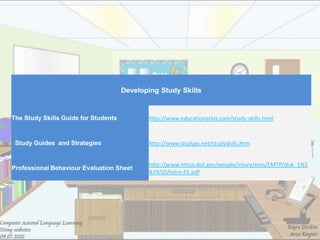
Developing Study Skills


The Study Skills Guide for Students          http://www.educationatlas.com/study-skills.html


 Study Guides and Strategies                 http://www.studygs.net/studyskills.htm


                                             http://www.nhtsa.dot.gov/people/injury/ems/EMTP/disk_1%5
Professional Behaviour Evaluation Sheet
                                             B1%5D/Intro-F5.pdf
Integrating the internet in the classroom:
http://www.lclark.edu/~krauss/usia/home.html
Finding information on the Internet:
http://www.lib.berkeley.edu/TeachingLib/Guides/Internet/FindInfo.html
Searching the internet: Recommended sites and search techniques:
http://www.internettutorials.net/search.html
Developing lessons with technology, State Educational Technology
Director‘s Association, International Society for Technology in Education, and
Partnership for 21st Century Skills, Maximizing the Impact: The Pivotal Role of
Technology in a 21st Century Education System (2007)
A Look at the Research on Computer-Based Technology Use in Second
Language Learning: Review of Literature from 1990-2000, Min Liu, Zena
Moore, Leah Graham, & Shinwoong Lee The University of Texas at Austin
Computer Assisted Language Learning - Using websites

Computer Assisted Language Learning - Using websites

  • 2.
    One of theeasiest and least stressful ways of getting started with technology in the classroom.
  • 3.
    We can usethe web sites in the classroom in several ways As printed pages With one computer with Internet connection In a computer lab with a set of networked and connected computers
  • 4.
    Use of Internetis a part of the learning process, not occasional activity.
  • 5.
    Both can beused, it depends on what you want to achieve with it. ELT websites: provide valuable opportunities for more controlled language work. Authentic websites: provide ideal opportunities for more authentic and natural.
  • 7.
    Google: www.google.com Yahoo: www.yahoo.com Ask.com: http://www.ask.com/ Altavista: www.altavista.com Clusty: http://clusty.com/ Lycos: http://www.lycos.com/ Yandex: http:// yandex.com.tr/
  • 9.
    Ex: have aproject about the history of Olimpic Games focused on Barcelona games in 1992.
  • 10.
  • 11.
    Tip to findspecific result
  • 12.
  • 13.
  • 15.
    Images: Flickr:www.flickr.com Google image: http://images.google.com Istockphoto: www.istockphoto.com Video: Google video: http://video.google.com/ Yahoo video: http://video.yahoo.com/ Youtube: www.youtube.com Teachertube: www.teachertube.com TeacherTV: www.teachers.tv AOL Video: http://video.aol.com/ Audio: podcast: ESL Podcast: www.eslpod.com Download podcast using iTunes Player, iTunes U
  • 16.
    Dogpile: http://www.dogpile.com/ Kartoo: http://www.kartoo.com/en_index.htm Metacrawler: http://www.metacrawler.com/ Mamma: http://www.mamma.com/
  • 17.
    Who wrote thepage? Is this person an expert in the subject matter? Is the page content reliable and factually correct?
  • 18.
    Is the contentup-to-date? When was the page last updated?
  • 19.
    Is the contentinteresting and stimulating? Is it attractive and easy to navigate?
  • 20.
    Does the sitework well? Are there any broken links? Does it use a lot of large files or alternative technologies (e.g. Flash)?
  • 22.
    Before computers andthe Internet, teachers generally answered the ―What do I teach Monday?‖ query by working with other teachers, consulting school curriculum guides, reading books and professional journals, and gathering materials from libraries and school resources.
  • 23.
    Lesson development refersto all the activities that teachers do as they create, teach, and evaluate lessons with students. Lesson development involves a teacher‘s decisions about three interrelated elements of teaching lessons: Academic content (what to teach) Teaching goals, methods, and procedures (how to teach) Learning assessments (how to know what students have learned)
  • 25.
    Every time theyteach, teachers make choices about academic content—the facts, concepts, ideas, skills, and understandingsthey intend to share with students. Lesson development must be connected to local curriculum frameworks, which are aligned to state and national standards.
  • 26.
    Technology plays anessential role in assisting teachers to answer the academic content or ―what to teach‖ question.
  • 27.
    Digital content availableon the Internet includes a vast collection of curriculum resources and information.
  • 28.
    As they answerthe ―what to teach‖ question, teachers simultaneously decide the teaching goals, methods, and procedures they will use in their classes. Goals are the reason why a lesson is being taught. Methods are the instructional strategies.
  • 29.
    Teachers combine goals,methods, and procedures into formats for daily learning. Sometimes curriculum content dictates these processes; sometimes the goals, methods, and procedures dictate the choice of content.
  • 30.
    Either way, content,goals, methods, and procedures mutually support each other in a dynamic process of lesson development, which technology can support in a variety of ways such as teacher-developed websites,podcasts, blogs, and wikis etc.
  • 31.
    Learning assessments occur before, during, and after teaching lessons and enable teachers to evaluate student knowledge, understanding, and performance. They can be summative (summarizing what students have learned at the end of a lesson), formative (happening as a lesson unfolds
  • 32.
    Assessment tools includemultiple-choice and short answer tests, essays and other written tasks, oral discussions, teacher observations, class participation, and student projects, portfolios, and performances,all of which provide evidence of what students have learned and are able to do as a result of the teaching.
  • 33.
    Technology tools thatsupport the assessment and evaluation process include Electronic tests and quizzes Digital portfolios Personal response systems Online surveys
  • 34.
    Planning a web-basedlesson,rather than one where the web content plays an ancillary role,is not different from planning a traditional one.
  • 35.
    We divide atypical web-based session into three parts: warmer,web,what next.
  • 36.
    It is thekind of thing we all do as a matter,with introductory activities,generating ideas,and so on.Thanks to this part learners are prepared for what they are going to do in web part.
  • 37.
    It is importanthere to spend only as much time as we need working with computers.We prepare to take learners to a computer room rather than spend the entire class in there.
  • 38.
    This allows usto keeping classroom focused during their time there. On the other hand moving from traditional class to a computer room may distract learners attention,so we need careful planning here.
  • 39.
    If we havelimited access to computers,we can use web-based printable materials.
  • 40.
    As a teacherwe may want to replace materials with website-based ones.For example listening texts or materials.We should help learners to evaluate materials by asking them to talk about what they like and what they don‘t.
  • 41.
    Time and askare important issuses here.Make sure your learners have a clearly- defined task to achieve and clearly-defined time to achieve it.
  • 43.
    Educators are particularlyinterested in technology‘s interactive capabilities, such as providing immediate feedback and increasing learner autonomy, in addition to the capability of simulating real-world situations via audio,video, and graphics.
  • 44.
    But in workingwith lower-levels the choice of websites will be more limited than for higher levels.
  • 45.
    Websites which aremore suitable for lower levels include: websites with simple,clearly presented text websites with non-linguistic data which is easy to interpret
  • 46.
    websites with visuals-atask can be based on visuals only ELT websites,where the content has been written, edited and prepared with this audience in mind.
  • 48.
    Planning carefully andadopting a structured approach to the way you use websites in the classroom should give you the confidence to try out different ways of introducing your learners to internet content.
  • 49.
    We should bearin mind that it is not necessarily the all singing-dancing websites- ones with a lot of animation,video or other multimedia contenwhich will be of most interest or use in our classrooms.
  • 50.
    Don‘t discount simpletext-based websites which might be very beneficial in your own content.
  • 51.
    Here are someconsiderations and contingency plans:
  • 52.
    Whenever you usetechnology you should always have a backup plan.The electricity might go off,computers might crash etc.Be prepared.
  • 53.
    Use the knowledgeof other teachers and of your learners to help you with the technical side of the lesson.We often team teach with less experienced teachers,taking care of the small technical problems which occasionally arise,and leaving them free to enjoy technology and to teach.
  • 54.
    If it isa lesson that involves few pages try saving them to your computer hard disk.With the help of this,you will open the pages even if the internet goes down.
  • 55.
    It is rarelyconductive to have learners working alone on computers.Pair works and small-group work will help to encourage oral communication and break down the ‗computer as barrier‘ effect often prevalent in technology-based classes.
  • 56.
    Try to arrangethe computer room in such a way that you can easily maintain control over learner activities. An ideal layout is to have computers around the outside walls of the class –allowing you to view what is on the screen-and a central table where learners can congregate for more communicative activities.
  • 57.
    Not all ofthe content that you come across with your learners will be suitable for them. You should be in a position to fully explore the web with your learners.
  • 59.
    Terra Clues forSchools Free Rice Netsmartz Fanlala Starfall Game goo Wonderville Artsonia Book Adventure
  • 61.
    Authentic materials andESL web links World Newspapers http://www.world-newspapers.com/ BBC WORLD SERVICE NEWS http://www.bbc.co.uk/worldservice/learningenglish/newsenglish/ UK NEWSPAPERS http://www.thebigproject.co.uk/news/ US NEWSPAPERS http://www.thebigproject.co.uk/USNewspapers/index.htm Cutting Edge http://www.pearsonlongman.com/newcuttingedge/ Total English http://www.pearsonlongman.com/totalenglish/ http://www.cambridge.org/elt/infotech/workbook.htm Infotech Interactive workbook exercises and infoquests. Professional English http://www.cambridge.org/elt/ictinuse/youandcomputers.htm in Use “You and computers exercises” Oxford English for Careers http://www.oup.com/elt/global/products/oefc/ Practice exercises: grammar, vocabulary and listening. Commerce http://www.uefap.com/ Using English for Academic Purposes Listening, materials, reading writing, speaking, vocabulary.
  • 62.
    Effective Listening/Reading/Speaking/ Breaking NewsEnglish http://www.breakingnewsenglish.com/ Splendid Speaking for Advanced http://www.splendid-speaking.com/ Speakers of English Randalls` ESL Listening Lab http://www.esl-lab.com/ English Listening Lab Online http://www.elllo.org/ Simple English News http://www.simpleenglishnews.com/ http://esl.about.com/ Activities for developing all four skills, grammar, Practicing Grammar and Vocabulary vocabulary. English learning resources including English as a 2nd Language English language schools, top Internet ESL EFL sites, English learning software, books, teaching materials, audio cassettes and other reference. http://a4esl.org/ Activities for ESL/EFL Students Grammar and Vocabulary quizzes, crossword puzzles, a fun study site for learners of English, bilingual quizzes http://www.eflworksheets.com/sampleonline.htm eflworksheets.com
  • 63.
    Developing Study Skills TheStudy Skills Guide for Students http://www.educationatlas.com/study-skills.html Study Guides and Strategies http://www.studygs.net/studyskills.htm http://www.nhtsa.dot.gov/people/injury/ems/EMTP/disk_1%5 Professional Behaviour Evaluation Sheet B1%5D/Intro-F5.pdf
  • 64.
    Integrating the internetin the classroom: http://www.lclark.edu/~krauss/usia/home.html Finding information on the Internet: http://www.lib.berkeley.edu/TeachingLib/Guides/Internet/FindInfo.html Searching the internet: Recommended sites and search techniques: http://www.internettutorials.net/search.html Developing lessons with technology, State Educational Technology Director‘s Association, International Society for Technology in Education, and Partnership for 21st Century Skills, Maximizing the Impact: The Pivotal Role of Technology in a 21st Century Education System (2007) A Look at the Research on Computer-Based Technology Use in Second Language Learning: Review of Literature from 1990-2000, Min Liu, Zena Moore, Leah Graham, & Shinwoong Lee The University of Texas at Austin