Dr.	Birgit	Penzenstadler	 1	
Photo	Credit:	Rob	Bates,	Unsplash	
Requirements Engineering:
Principles: Process & Roles	
CECS 542
Principles	
•  Process	
•  Roles	and	Interfaces	
in	RE	
•  Ac@vity-orienta@on	
and	Artefact-
orienta@on	
•  Problem-orienta@on	
vs.	Solu@on-
orienta@on	
Dr.	Birgit	Penzenstadler	 2
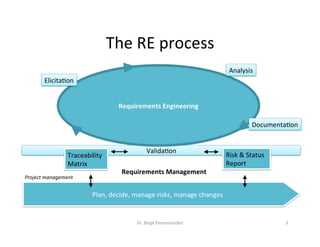
The	RE	process	
Dr.	Birgit	Penzenstadler	 3	
Valida@on	
Traceability	
Matrix	
Plan,	decide,	manage	risks,	manage	changes	
Risk	&	Status	
Report	
Requirements	Engineering	
Project	management	
Requirements	Management	
Requirements	Engineering	
Analysis	
Elicita@on	
Documenta@on
Principles:	Roles	and	Interfaces	in	RE	
Major	roles:	
•  Requirements	Engineer	
•  Product	Owner/Entrepreneuer	
/Business	Analyst	
•  Domain	expert	
•  Architect	
•  Tester	
	
Dr.	Birgit	Penzenstadler	 4
Principles:	Roles	and	Interfaces	in	RE	
The	results	of	requirements	engineering	are	used	in		
•  Budget	calcula@on	
•  Project	planning	(releases,	test	plan,	etc.)	
•  Coordina@on	between	stakeholders	(customer,	user,	developer,	…)	
•  Contract	nego@a@on	and	assignment		
•  Design,	implementa@on	and	integra@on	
•  Verifica@on	and	acceptance	(also	test	specifica@on)	within	quality	
assurance	
•  System/user	documenta@on	
•  Future	development	(evolu@on)	
Dr.	Birgit	Penzenstadler	 5
Principles for process
models
•  We	have	a	rough	idea	what	the	process	looks	like.	
•  Now	how	do	we	get	started?	
•  What	do	we	need	to	define	in	order	to	organize	how	to	
perform	RE?	
Dr.	Birgit	Penzenstadler	 6
General	process	model	
Dr.	Birgit	Penzenstadler	 7	
Process Task
Next Process
A
This has an
associated...Note or
suggestion
Process
model
Ac@vi@es/	Methods	Ar@facts	
Tools	Roles	
These	are	the	5	elements	you	need	in	any	process:	
Milestones
Principle:	Ac@vity-orienta@on	
•  Ques@ons:		
–  How	do	you	process	sth.	during	the	project?	
–  How	to	perform	it?	
•  	Focus:	
–  Elements	of	ac@vity	model	
–  Roles	perform	ac@vi@es	
–  Artefacts	are	in-/output	
Dr.	Birgit	Penzenstadler	 8	
Task 1
Task 2
Advantage	 Disadvantage	
Descrip@on	of	the	work	process	 Restric@ve:	„This	way	–	only!“	
Defini@on	of	order	in	@me	 Extensive	planning	required	
Detailed	instruc@ons	for	ac@on	 Quality	of	results	hard	to	assess	
Reference	to	all	affected	artefacts	 Underspecifica@on	of	artefacts	(error	source)	
Good	integra@on	of	„ac@ve“	methods		
(see	instruc@ons	for	ac@ons)	
Quality	and	extent	of	ac@vity	descrip@ons	
crucial	for	efficiency
Principle:	Ar@fact-orienta@on	
•  Ques@ons:		
–  What	is	developed	in	the	project?	
–  What	does	the	result	look	like?	
–  Who	is	responsible	for	the	result?	
•  Focus:	
–  Elements	of	the	artefact	model	
–  Roles	responsible	for	results	
–  Ar@facts	have	dependencies	
–  Ac@vi@es	serve	exclusively	for	planning	and	elabora@ng	results	
Dr.	Birgit	Penzenstadler	 9	
Creation Task for
Artifact 1
Creation Task for
Artifact 2
Creation Task for
Artifact 3
Creation Task for
Artifact 4
Advantages	 Disadvantages	
Detailed	descrip@on	of	quality	req.	for	results	 High	learning	curve	(used	to	thinking	in	processes)	
Method-neutral	elabora@on	of	consistent	results	 Selec@on	and	tailoring	of	adequate	methods	
Assessable	quality	due	to	descrip@on	and	
dependencies	(progress	control)	
Deduc@on	of	plans	is	costly	
	
Good	scalability	in	terms	of	results	extent	
Clear	responsibili@es	
Consistent	terminology	across	all	projects
Principles:	Ac@vity-orienta@on	and	
Ar@fact-orienta@on	
Dr.	Birgit	Penzenstadler	 10	
Activity Orientation
Focus on methods and interdependencies
Method 1
Method 2
Method 3
Artifact orientation
Focus on artifacts and interdependencies
Method
for Artefact 1
Method
for Artefact 2
Method
for Artefact 3
Principles:	Problem-orienta@on	vs.	
Solu@on-orienta@on	
Dr.	Birgit	Penzenstadler	 11	
•  Solu@on-orienta@on	
– Customer	proposes	solu@on	instead	of	problem	
– Developer	starts	implementa@on	
•  Dangers:	
– Subop@mal	solu@on	
– Mismatch	between	solu@on	and	problem	
– Work-around	instead	of	solu@on	
•  Instead:	focus	on	problem
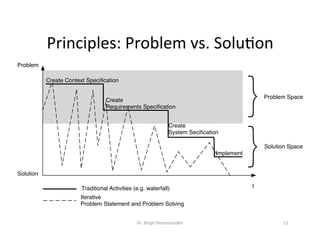
Principles:	Problem	vs.	Solu@on	
Dr.	Birgit	Penzenstadler	 12	
t
Problem
Solution
}
}
Problem Space
Solution Space
Create Context Specification
Create
Requirements Specification
Create
System Secification
Implement
Traditional Activities (e.g. waterfall)
Iterative
Problem Statement and Problem Solving
Principles:		
Problem	vs.	
Solu@on	
Dr.	Birgit	Penzenstadler	 13	
Component Model
Behaviour Model
Usage
Model
Business Processes
Functional
Hierarchy
Component 1
Port 1 SM1.
2
SM1.
4
SM1.
3
Context
Requirements
System
F1
... ...
...... ...
Modes
Modes
Modes
... ... ...
User System
States
Component ...
External
SystemsStake
holder
•  Collect	domain	
–  Characteris@cs	of	system	(family)	
–  Terminology	
–  Rules	and	rela@ons	
•  Iden@fy	stakeholders	
•  Document	goals	and	constraints	
•  Analyse	the	current	situa@on	
(strengths,	weaknesses,	needs)	
•  Define	scope	
–  Delimit	Problem	and		
System		
–  Document	opera@onal	context	
–  Interfaces	
•  Analyse	the	user-visible	
func@onality	
•  Define	the	func@onality	and		
quality	
•  Itera@vely	transform	into		
system	specifica@on
Remember:	Current	challenges	
14	
16	
11	
9	
1	
7	
7	
5	
3	
3	
1	
5	
1	
4	
3	
0	
2	
1	
1	
0	
31	
22	
22	
20	
16	
13	
13	
12	
11	
11	
9	
9	
8	
8	
5	
3	
3	
2	
2	
0	 5	 10	 15	 20	 25	 30	 35	
Incomplete	/	hidden	reqs.	
Moving	targets	
Time	boxing	
Separa@on	reqs.	from	known	solu@ons	
Underspecified	reqs.	
Communica@on	flaws	to	customer	
Inconsistent	reqs.	
Communica@on	flaws	in	team	
Missing	traceability	
Gold	pla@ng	
Unclear	non-func@onal	reqs.	
Terminological	problems	
Insufficient	support	by	customer	
Unclear	responsibili@es	
Vola@le	domain		
Weak	access	to	customer	needs	
Insufficient	support	by	project	lead	
Technically	unfeasible	reqs.	
High	degree	of	innova@on	vs.	need	for	formal	acceptance	
Overall	frequency	
Cause	for	project	fail	
Mendez	et	al.	Naming	the	Pain	in	Requirements	Engineering	–	NaPiRE-Report	
Dr.	Birgit	Penzenstadler	
See	hmp://www.requirementsengineering.org/

Requirements Engineering - Process & Roles