From Development to Production
Deploying Java and Scala Apps on Kubernetes
Daniel Olanga
@0chieng0langa
github.com/ochiengolanga
Today’s objectives
● Introduction to Docker and
Kubernetes
● Do a little bit of development
● Package and deploy our app
locally and to Kubernetes
● Talk about crosscutting concerns
● Questions
From Dev to Prod
Kubernetes
Kubernetes
Kubernetes (k8s) is an open-source system for automating deployment, scaling, and
management of containerized applications.
Kubernetes
● Manages cluster containers
● Inspired from Google’s 15 year experiences and internal systems called “Borg”
and “Omega”
● Supports various cloud and bare-metal environments
● 100% open source and written in Go
● Manage applications not machines
Fun fact: Means κυβερνήτης in Greek; for “governor”
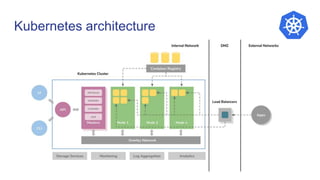
Kubernetes architecture
A little development
Create a Java app, build, package and deploy
Kubernetes concepts
● Pods: Smallest deployable unit
● Deployment: Manages lifecycle of your application pods
● Replica Set: Defines the desired scale and set of a group of pods
● Service: DNS entry for a group of pods
● Ingress: Route external traffic to your cluster
● ConfigMap: Store arbitrary config values and files
● Secrets: Manages sensitive information such as passwords, OAuth tokens, and
ssh keys
Pods
● Smallest unit that can be deployed in Kubernetes
● Consists of one or more containers that are always scheduled together
● Each pod is give a unique IP address
Deployment
● Level of abstraction above ReplicaSets
● Deployments create and update ReplicaSets
● Allow you to easily scala and perform rolling upgrades
Services
● Defines a DNS entry that can be used to refer to a group of pods
● Provides a consistent endpoint for the group of pods
● Different types: Node Port, ClusterIP, Load Balancer
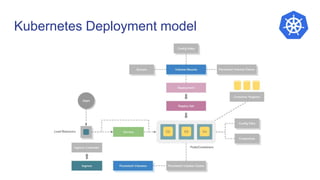
Kubernetes Deployment model
Kubernetes momentum
● K8s’s scalability and robust design patterns have made it the platform of choice in
the industry
● Large software companies (like Github) have publicized their use of K8s
● Many major IT vendors have recently added k8s managed offerings (GCP, AWS,
Azure, Openshift, Oracle Cloud, IBM Cloud)
● Docker packaging and runtime adoption in continuous development, integration,
and deployment
Why Kubernetes?
● Workload scalability
● High availability
● Security
● Portability
Kubernetes in Production
1. Run the container in a production-like cluster
2. Scale our application
3. Upgrade our application to a new version
4. Monitor our cluster
Grand finale: Make a node disappear. Only if you are good folks
Demo
[“Hip”, “Hip”]
Hip Hip Array
From Development to Production recap
1. Build and package application e.g. to jar file locally.
2. Test the application locally e.g. java -jar …..
3. Build, package and test application’s Docker image locally
4. Push the docker image to a docker registry e.g. DockerHub, Google Cloud
Registry, secure Private registry e.t.c
5. Deploy application to an environment and promote towards Production
6. Monitor
Q & A
Links & Resources
● Kubernetes Official Docs (https://kubernetes.io/docs/home/)
● Minikube (https://kubernetes.io/docs/setup/minikube/)
● Rancher Server (https://rancher.com/docs/rancher/v2.x/en/)
● Rancher Kubernetes Engine (https://rancher.com/docs/rke/v0.1.x/en/)
● Rancher Labs YouTube
(https://www.youtube.com/channel/UCh5Xtp82q8wjijP8npkVTBA)
● Prometheus (https://prometheus.io/)
● Jib (https://github.com/GoogleContainerTools/jib)
● Greetings App: (https://github.com/ochiengolanga/nairobijvm-greetings-app)
Thank you

From development to production: Deploying Java and Scala apps to kubernetes

  • 1.
    From Development toProduction Deploying Java and Scala Apps on Kubernetes Daniel Olanga @0chieng0langa github.com/ochiengolanga
  • 2.
    Today’s objectives ● Introductionto Docker and Kubernetes ● Do a little bit of development ● Package and deploy our app locally and to Kubernetes ● Talk about crosscutting concerns ● Questions From Dev to Prod
  • 3.
  • 4.
    Kubernetes Kubernetes (k8s) isan open-source system for automating deployment, scaling, and management of containerized applications.
  • 5.
    Kubernetes ● Manages clustercontainers ● Inspired from Google’s 15 year experiences and internal systems called “Borg” and “Omega” ● Supports various cloud and bare-metal environments ● 100% open source and written in Go ● Manage applications not machines Fun fact: Means κυβερνήτης in Greek; for “governor”
  • 6.
  • 7.
    A little development Createa Java app, build, package and deploy
  • 8.
    Kubernetes concepts ● Pods:Smallest deployable unit ● Deployment: Manages lifecycle of your application pods ● Replica Set: Defines the desired scale and set of a group of pods ● Service: DNS entry for a group of pods ● Ingress: Route external traffic to your cluster ● ConfigMap: Store arbitrary config values and files ● Secrets: Manages sensitive information such as passwords, OAuth tokens, and ssh keys
  • 9.
    Pods ● Smallest unitthat can be deployed in Kubernetes ● Consists of one or more containers that are always scheduled together ● Each pod is give a unique IP address
  • 10.
    Deployment ● Level ofabstraction above ReplicaSets ● Deployments create and update ReplicaSets ● Allow you to easily scala and perform rolling upgrades
  • 11.
    Services ● Defines aDNS entry that can be used to refer to a group of pods ● Provides a consistent endpoint for the group of pods ● Different types: Node Port, ClusterIP, Load Balancer
  • 12.
  • 13.
    Kubernetes momentum ● K8s’sscalability and robust design patterns have made it the platform of choice in the industry ● Large software companies (like Github) have publicized their use of K8s ● Many major IT vendors have recently added k8s managed offerings (GCP, AWS, Azure, Openshift, Oracle Cloud, IBM Cloud) ● Docker packaging and runtime adoption in continuous development, integration, and deployment
  • 14.
    Why Kubernetes? ● Workloadscalability ● High availability ● Security ● Portability
  • 15.
    Kubernetes in Production 1.Run the container in a production-like cluster 2. Scale our application 3. Upgrade our application to a new version 4. Monitor our cluster Grand finale: Make a node disappear. Only if you are good folks
  • 16.
  • 17.
    From Development toProduction recap 1. Build and package application e.g. to jar file locally. 2. Test the application locally e.g. java -jar ….. 3. Build, package and test application’s Docker image locally 4. Push the docker image to a docker registry e.g. DockerHub, Google Cloud Registry, secure Private registry e.t.c 5. Deploy application to an environment and promote towards Production 6. Monitor
  • 18.
  • 19.
    Links & Resources ●Kubernetes Official Docs (https://kubernetes.io/docs/home/) ● Minikube (https://kubernetes.io/docs/setup/minikube/) ● Rancher Server (https://rancher.com/docs/rancher/v2.x/en/) ● Rancher Kubernetes Engine (https://rancher.com/docs/rke/v0.1.x/en/) ● Rancher Labs YouTube (https://www.youtube.com/channel/UCh5Xtp82q8wjijP8npkVTBA) ● Prometheus (https://prometheus.io/) ● Jib (https://github.com/GoogleContainerTools/jib) ● Greetings App: (https://github.com/ochiengolanga/nairobijvm-greetings-app)
  • 20.

Editor's Notes

  • #10 A collection of containers that share network space and storage Think of a pod as a container Demo: # Create pod kubectl apply -f pod.yaml Kubectl get pods # Delete one pod Kubectl delete pod <name of pod> # Watch k8s create a new pod to maintain state Kubectl get pods
  • #11 Deployment manages a series of replicas Demo: # Create deployment kubectl apply -f deployment.yaml Kubectl get pods # Delete one pod Kubectl delete -f deployment.yaml # Watch k8s create a new pod to maintain state Kubectl get pods
  • #12 Pods are treated like cattle in K8s. One second a pod is in a certain node with a certain port and the next second it isnt there. We need a way of keeping track of pods as the come and go ClusterIP - Coms between deployments, Coms between namespaces NodePort - Creates clusterIP and nodeport, creates and opens a random port on each node unless you have something talking to your pods from outside the cluster e.g. External loadbalancer LoadBalancer - Creates CluserIP, NodePort and External LB e.g. AWS LB will be updated with internal addressing scheme Demo Create deployment Create service
  • #14 You cannot deny that k8s has taken over the industry It doesnt matter if believe in it or not; if you don’t learn these skills, you will find yourself unable to compete Price of compute and storage
  • #15 Kubernetes is designed on the principles of scalability, availability, security and portability. It optimizes the cost of infrastructure by efficiently distributing the workload across available resources. A Kubernetes cluster can be configured on mainstream Linux distributions, including CentOS, CoreOS, Debian, Fedora, Red Hat Linux and Ubuntu. It can be deployed to run on local development machines; cloud platforms such as AWS, Azure and Google Cloud; virtualization environments based on KVM, vSphere and libvirt; and bare metal