Remo Recover Mac (Pro)
http://www.remosoftware.com/mac-recovery
Securely restore data from inaccessible, non booting, lost Mac Volumes
• About Remo Recover Mac (Pro)
• Scenarios for data loss or deletion from Mac system
• Features of Remo Recover Mac
• Method of recovering files from Mac system
Overview
About Remo Recover Mac (Pro)
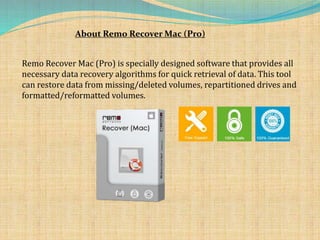
Remo Recover Mac (Pro) is specially designed software that provides all
necessary data recovery algorithms for quick retrieval of data. This tool
can restore data from missing/deleted volumes, repartitioned drives and
formatted/reformatted volumes.
Deletion/Loss Scenarios
• Accidental Formatting of Mac Volumes
• Repartitioning
• Volume Header Corruption
• Improper file transfer from one device to another
• Memory card corruption
• Journal Corruption
• Abrupt removal of memory card/Sudden power surge
All the above discussed scenarios are supported by Remo Recover
Mac (Pro) edition.
Features of Remo Recover Mac
• Recovers lost files from non booting, inaccessible, unmountable
Mac volumes
• Recovers data emptied from Trash
• Recovered files can be viewed using Mac finder styled interface
• Recovers data from different hard drives, memory cards, iPod, USB
external drive
• Supports different types of file systems
• Recovered data can be sorted on basis of size, name, date and file
type
• Locate required files using “Find tool” after recovery process
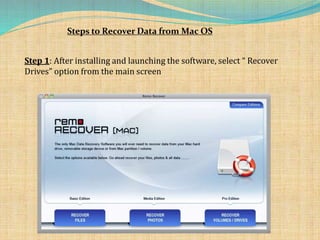
Steps to Recover Data from Mac OS
Step 1: After installing and launching the software, select “ Recover
Drives” option from the main screen
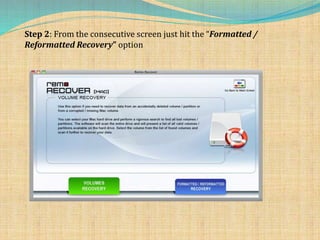
Step 2: From the consecutive screen just hit the “Formatted /
Reformatted Recovery” option
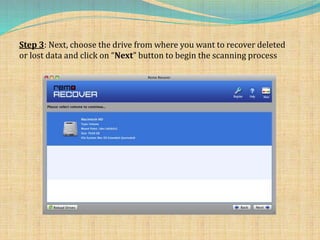
Step 3: Next, choose the drive from where you want to recover deleted
or lost data and click on “Next” button to begin the scanning process
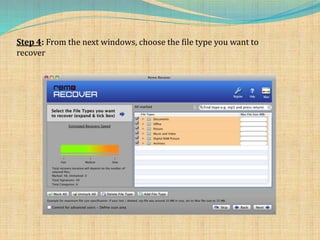
Step 4: From the next windows, choose the file type you want to
recover
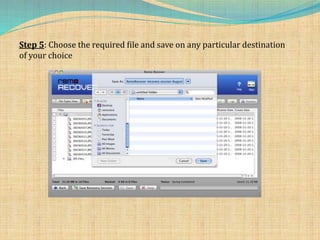
Step 5: Choose the required file and save on any particular destination
of your choice
Visit this site to download the software
http://www.remosoftware.com/mac-recovery

Remo Recover Mac (Pro)

  • 1.
    Remo Recover Mac(Pro) http://www.remosoftware.com/mac-recovery Securely restore data from inaccessible, non booting, lost Mac Volumes
  • 2.
    • About RemoRecover Mac (Pro) • Scenarios for data loss or deletion from Mac system • Features of Remo Recover Mac • Method of recovering files from Mac system Overview
  • 3.
    About Remo RecoverMac (Pro) Remo Recover Mac (Pro) is specially designed software that provides all necessary data recovery algorithms for quick retrieval of data. This tool can restore data from missing/deleted volumes, repartitioned drives and formatted/reformatted volumes.
  • 4.
    Deletion/Loss Scenarios • AccidentalFormatting of Mac Volumes • Repartitioning • Volume Header Corruption • Improper file transfer from one device to another • Memory card corruption • Journal Corruption • Abrupt removal of memory card/Sudden power surge All the above discussed scenarios are supported by Remo Recover Mac (Pro) edition.
  • 5.
    Features of RemoRecover Mac • Recovers lost files from non booting, inaccessible, unmountable Mac volumes • Recovers data emptied from Trash • Recovered files can be viewed using Mac finder styled interface • Recovers data from different hard drives, memory cards, iPod, USB external drive • Supports different types of file systems • Recovered data can be sorted on basis of size, name, date and file type • Locate required files using “Find tool” after recovery process
  • 6.
    Steps to RecoverData from Mac OS Step 1: After installing and launching the software, select “ Recover Drives” option from the main screen
  • 7.
    Step 2: Fromthe consecutive screen just hit the “Formatted / Reformatted Recovery” option
  • 8.
    Step 3: Next,choose the drive from where you want to recover deleted or lost data and click on “Next” button to begin the scanning process
  • 9.
    Step 4: Fromthe next windows, choose the file type you want to recover
  • 10.
    Step 5: Choosethe required file and save on any particular destination of your choice
  • 11.
    Visit this siteto download the software http://www.remosoftware.com/mac-recovery