Relevance, Trust, Authority
After this presentation you will;
• understand more about what Google wants
• know how you can give Google what it wants
• be able to improve your visibility ‘locally’ on the web
• be able to optimize a webpage for relevant searches
• be able to make improvements to your website to
increase conversions
SEO is GO.
Google is currently the only player in the UK
search engine market.
Google is great...
...because these people are already searching for a
particular product or service
So you don’t have to sell to them...
...just make it easy for them to buy from you!
Keyword reseacrh
Google is replacing the keyword tool with
something called the keyword planner.
Keyword research is the cornerstone for success
– target the wrong keywords and you lose!
Fortunately for local businesses most keywords
will be service + location, or product + location
How you rank;
giving Google what it wants
Google looks for;
• relevance
• trust
• authority
Giving Google what it wants:
Trust
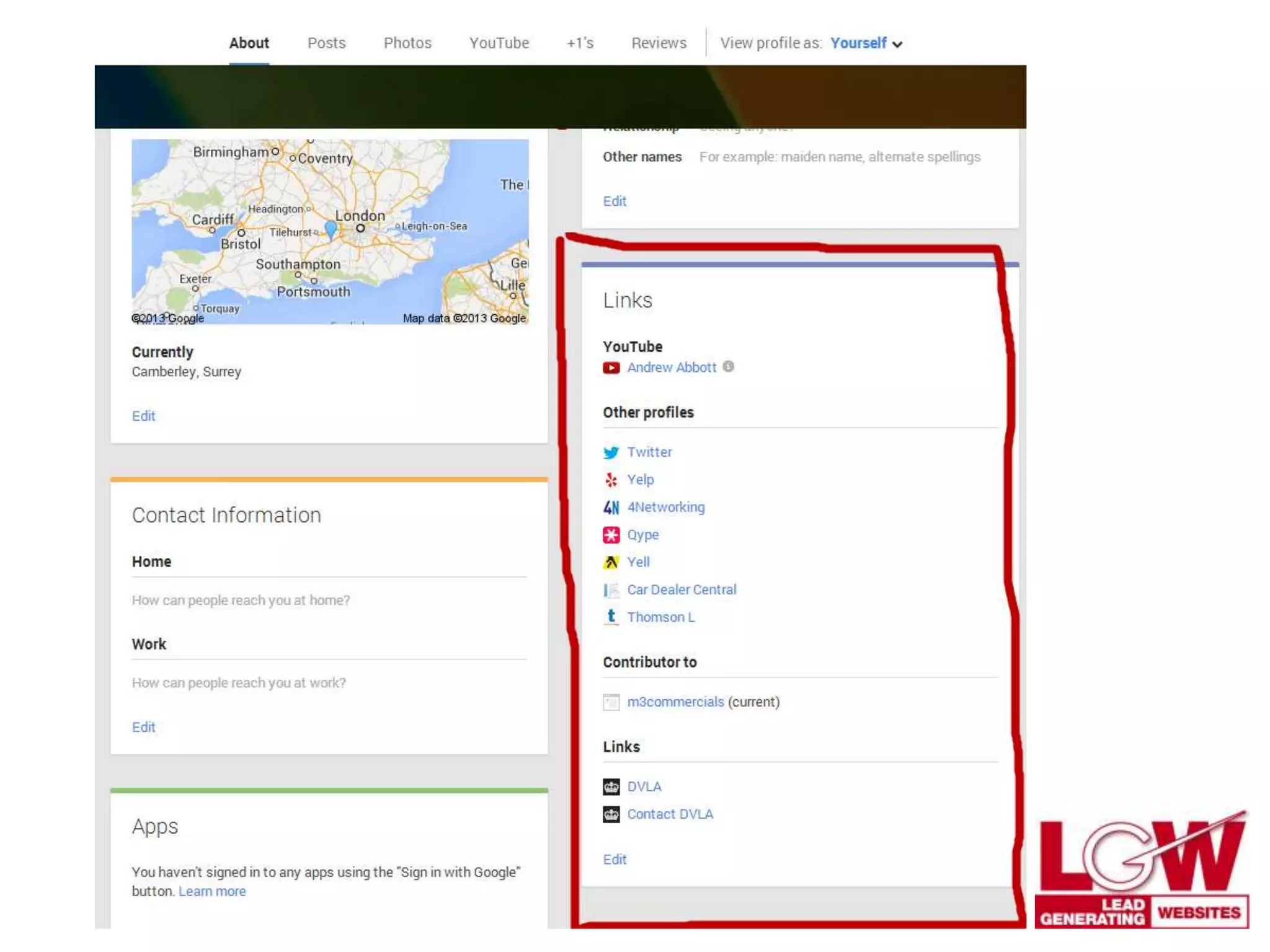
• Set up Google ‘authorship’ via Google+ personal profile
• Create Google+ business page and link to website with
‘publisher’ tag
Done correctly this can function as an index for Google
of your online persona as a business
Trust... and Relevance
By setting up authorship and linking all your profiles
together in Google+ you are ‘going public’.
No more anonymity!
You are also showing Google that you are extremely
relevant to a particular niche.
‘Local’ search Vs ‘global’ search
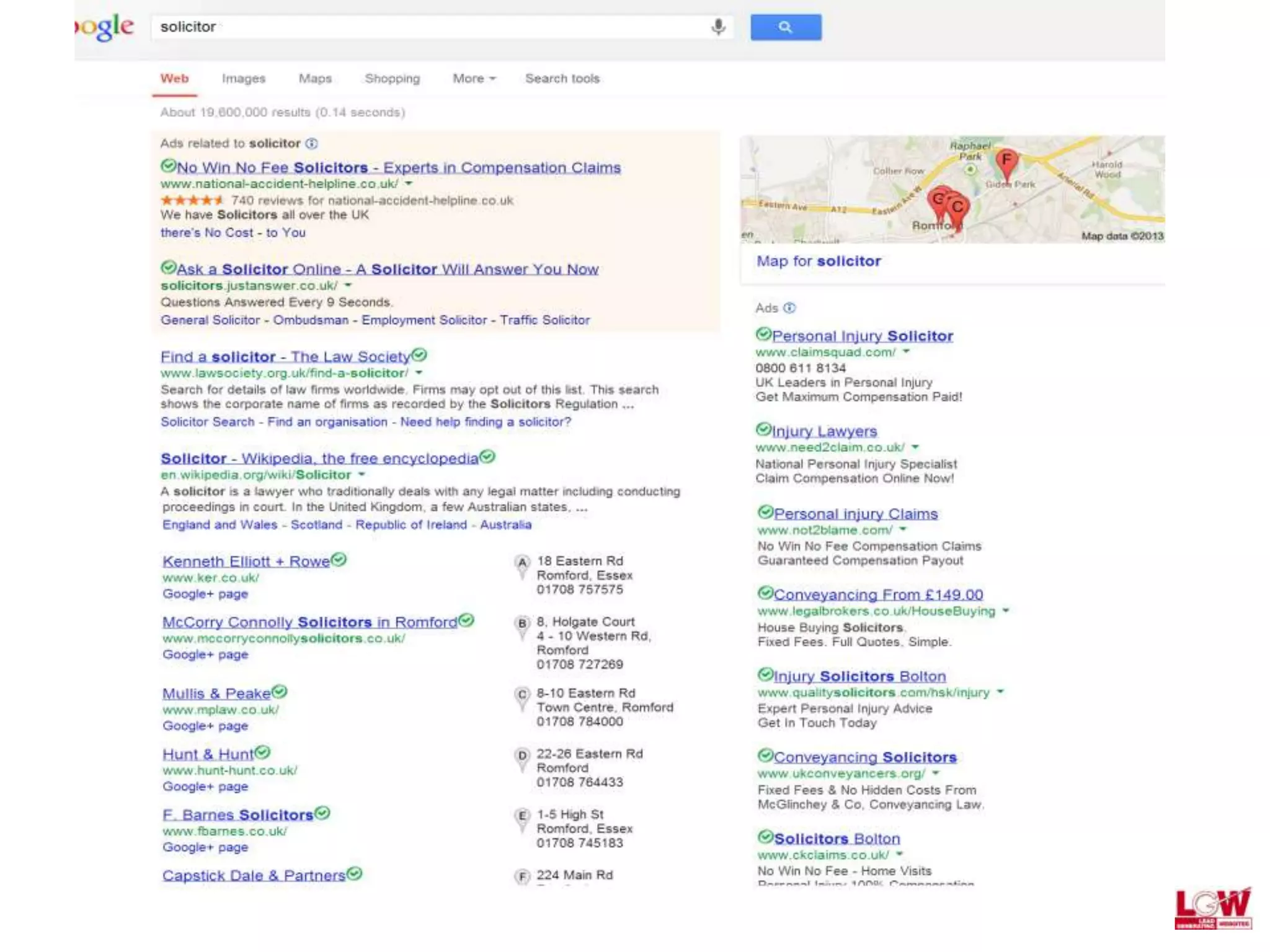
Local results are displayed differently from regular
Google results.
These rankings are driven by reviews and citations.
A well-optimised G+ personal profile, along with a
business page will be an advantage.
Local search vs global search
Text content goes here
Don’t be invisible!
The local listings work on citations and reviews.
• Biggest negatives for rankings are incorrect NAP
information
• Name, address and phone number MUST be consistent
• Use keywords in G+ profiles and pages
•Encourage customers to give you reviews in Google
Giving Google what it wants: Relevancy
Optimize web pages
• keyword in;
• URL
• headings & sub-headings
• image ALT tags
• meta-description
• 300 words content + image
• keyword in first, middle & last paragraphs
• outbound link to authority (opens in new window)
Giving Google what it wants: Authority
• Google has become a content distribution system
• Content bestows authority
• Google loves ‘problem to solution’ content
• But ultimately it just loves content that is shared
online
Creating multi-media content
Start with one good-quality 400 word article that you post
to blog or website.
• Publish as PDF and submit to scribd.com
• Pull out main points and create PowerPoint for Slideshare
• Add voiceover and record then upload video to Youtube
• Extract mp.3 and upload to iTunes
• Rewrite article slightly and submit to article directories
• Share on social media (including G+)
• Ask for shares and retweets
Building links
• RSS directories
• Business directories
• Paid directories
• Web2.0 sites
• Blogger
• WordPress
• Squidoo
• Tumblr
• Youtube, Slideshare, Scribd, iTunes
• Forums and industry websites
Random SEO tips
• Link out to authority sites on each page
• Open internal links in a new window
• Check page load speed – host media on 3rd party servers
• Register domains for more than one year at all times
• Burn RSS feed at FeedBurner and submit to directories
• Submit sitemap to Google Webmaster Tools
• If you write a blog use keyword categories and always link
to your money pages
Website conversion tips
• Have phone number + call-to-action in header
• Have an offer + strong call to action on home page
• Have relevant offer + strong call-to-action on every page
• Have a lead capture form on every page
Need help with online marketing?
For training & implementation call:
Lead Generating Websites
01708 208 889

Relevance, Trust, Authority - Giving Google What It Wants

  • 1.
    Relevance, Trust, Authority Afterthis presentation you will; • understand more about what Google wants • know how you can give Google what it wants • be able to improve your visibility ‘locally’ on the web • be able to optimize a webpage for relevant searches • be able to make improvements to your website to increase conversions
  • 2.
    SEO is GO. Googleis currently the only player in the UK search engine market.
  • 3.
    Google is great... ...becausethese people are already searching for a particular product or service So you don’t have to sell to them... ...just make it easy for them to buy from you!
  • 4.
    Keyword reseacrh Google isreplacing the keyword tool with something called the keyword planner. Keyword research is the cornerstone for success – target the wrong keywords and you lose! Fortunately for local businesses most keywords will be service + location, or product + location
  • 5.
    How you rank; givingGoogle what it wants Google looks for; • relevance • trust • authority
  • 6.
    Giving Google whatit wants: Trust • Set up Google ‘authorship’ via Google+ personal profile • Create Google+ business page and link to website with ‘publisher’ tag Done correctly this can function as an index for Google of your online persona as a business
  • 8.
    Trust... and Relevance Bysetting up authorship and linking all your profiles together in Google+ you are ‘going public’. No more anonymity! You are also showing Google that you are extremely relevant to a particular niche.
  • 9.
    ‘Local’ search Vs‘global’ search Local results are displayed differently from regular Google results. These rankings are driven by reviews and citations. A well-optimised G+ personal profile, along with a business page will be an advantage.
  • 10.
    Local search vsglobal search Text content goes here
  • 11.
    Don’t be invisible! Thelocal listings work on citations and reviews. • Biggest negatives for rankings are incorrect NAP information • Name, address and phone number MUST be consistent • Use keywords in G+ profiles and pages •Encourage customers to give you reviews in Google
  • 12.
    Giving Google whatit wants: Relevancy Optimize web pages • keyword in; • URL • headings & sub-headings • image ALT tags • meta-description • 300 words content + image • keyword in first, middle & last paragraphs • outbound link to authority (opens in new window)
  • 13.
    Giving Google whatit wants: Authority • Google has become a content distribution system • Content bestows authority • Google loves ‘problem to solution’ content • But ultimately it just loves content that is shared online
  • 14.
    Creating multi-media content Startwith one good-quality 400 word article that you post to blog or website. • Publish as PDF and submit to scribd.com • Pull out main points and create PowerPoint for Slideshare • Add voiceover and record then upload video to Youtube • Extract mp.3 and upload to iTunes • Rewrite article slightly and submit to article directories • Share on social media (including G+) • Ask for shares and retweets
  • 15.
    Building links • RSSdirectories • Business directories • Paid directories • Web2.0 sites • Blogger • WordPress • Squidoo • Tumblr • Youtube, Slideshare, Scribd, iTunes • Forums and industry websites
  • 16.
    Random SEO tips •Link out to authority sites on each page • Open internal links in a new window • Check page load speed – host media on 3rd party servers • Register domains for more than one year at all times • Burn RSS feed at FeedBurner and submit to directories • Submit sitemap to Google Webmaster Tools • If you write a blog use keyword categories and always link to your money pages
  • 17.
    Website conversion tips •Have phone number + call-to-action in header • Have an offer + strong call to action on home page • Have relevant offer + strong call-to-action on every page • Have a lead capture form on every page
  • 18.
    Need help withonline marketing? For training & implementation call: Lead Generating Websites 01708 208 889