Introduction to Drupal

                      Shawna Reibling
       Knowledge mobilization coordinator, CSAHS
sreiblin@uoguelph.ca      x53714 @ICESGuelph
                                   May 16, 2012
Outline:
  •What is it?
  •Why use it?
  •Drupal elements and menu parts
  •Tips and tricks
  •Resources
  •Questions
What is it?
•Content management system: “computer
system that allows publishing, editing, and
modifying content as well as site maintenance
from a central page.”http://en.wikipedia.org/wiki/Content_management_system


•Data is separate from layout
•Open source
•Drupal.org
•Example sites:
   •http://www.fastcompany.com/
   •http://www.economist.com/
   •http://www.whitehouse.gov/
Why use it?
•System of choice at UofG
•Data stored in SQL database, so easy to
migrate to the next, new thing later.
•Better choice than wordpress for sites that
do more than blog
•Feeds
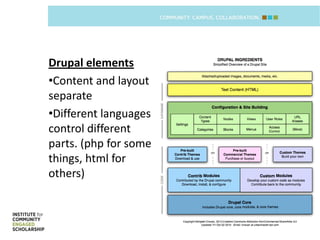
Drupal elements
•Content and layout
separate
•Different languages
control different
parts. (php for some
things, html for
others)
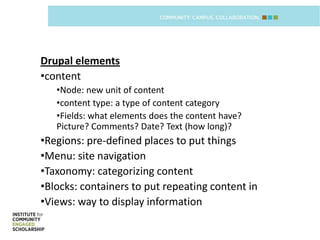
Drupal elements
•content
   •Node: new unit of content
   •content type: a type of content category
   •Fields: what elements does the content have?
   Picture? Comments? Date? Text (how long)?
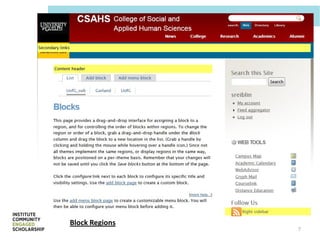
•Regions: pre-defined places to put things
•Menu: site navigation
•Taxonomy: categorizing content
•Blocks: containers to put repeating content in
•Views: way to display information
Block Regions
                7
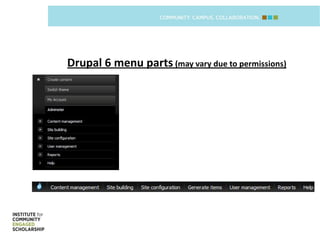
Drupal 6 menu parts (may vary due to permissions)
Tips & Tricks
•   To login: <websitename>/user
•   Refresh your pages
•   Draw what you want, then make it
•   Access to specific site areas is customizable
•   Ask for help, drupal has a steep learning curve
•   When asking for help, be sure to state which
    version of drupal you are working in.


                                                      9
Resources

• Powerpoint posted on: www.theResearchShop.ca/Training
• Drupal.org
• Drupalgardens.org


                                                          10
Questions?


                               Shawna Reibling,
           Knowledge mobilization coordinator,
  College of Social and Applied Human Sciences
sreiblin@uoguelph.ca x53714 @ICESGuelph


                                                  11

Reibling intro to drupal 20 june12

  • 1.
    Introduction to Drupal Shawna Reibling Knowledge mobilization coordinator, CSAHS sreiblin@uoguelph.ca x53714 @ICESGuelph May 16, 2012
  • 2.
    Outline: •Whatis it? •Why use it? •Drupal elements and menu parts •Tips and tricks •Resources •Questions
  • 3.
    What is it? •Contentmanagement system: “computer system that allows publishing, editing, and modifying content as well as site maintenance from a central page.”http://en.wikipedia.org/wiki/Content_management_system •Data is separate from layout •Open source •Drupal.org •Example sites: •http://www.fastcompany.com/ •http://www.economist.com/ •http://www.whitehouse.gov/
  • 4.
    Why use it? •Systemof choice at UofG •Data stored in SQL database, so easy to migrate to the next, new thing later. •Better choice than wordpress for sites that do more than blog •Feeds
  • 5.
    Drupal elements •Content andlayout separate •Different languages control different parts. (php for some things, html for others)
  • 6.
    Drupal elements •content •Node: new unit of content •content type: a type of content category •Fields: what elements does the content have? Picture? Comments? Date? Text (how long)? •Regions: pre-defined places to put things •Menu: site navigation •Taxonomy: categorizing content •Blocks: containers to put repeating content in •Views: way to display information
  • 7.
  • 8.
    Drupal 6 menuparts (may vary due to permissions)
  • 9.
    Tips & Tricks • To login: <websitename>/user • Refresh your pages • Draw what you want, then make it • Access to specific site areas is customizable • Ask for help, drupal has a steep learning curve • When asking for help, be sure to state which version of drupal you are working in. 9
  • 10.
    Resources • Powerpoint postedon: www.theResearchShop.ca/Training • Drupal.org • Drupalgardens.org 10
  • 11.
    Questions? Shawna Reibling, Knowledge mobilization coordinator, College of Social and Applied Human Sciences sreiblin@uoguelph.ca x53714 @ICESGuelph 11