Regular Expressions
for Regular Joes
(and SEOs)
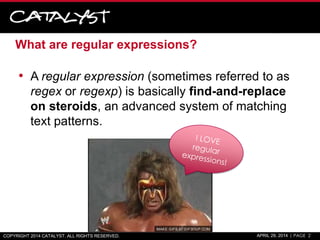
What are regular expressions?
• A regular expression (sometimes referred to as
regex or regexp) is basically find-and-replace
on steroids, an advanced system of matching
text patterns.
COPYRIGHT 2014 CATALYST. ALL RIGHTS RESERVED. APRIL 29, 2014 | PAGE 2
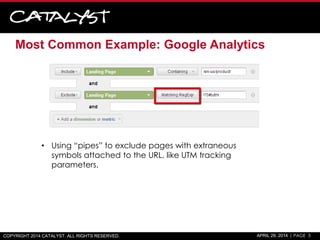
Most Common Example: Google Analytics
COPYRIGHT 2014 CATALYST. ALL RIGHTS RESERVED. APRIL 29, 2014 | PAGE 3
• Using “pipes” to exclude pages with extraneous
symbols attached to the URL, like UTM tracking
parameters.
Where can I use regular expressions?
• Many text editors
– Notepad++ is an awesome one for Windows
• SEO Tools for Excel add-on
– http://nielsbosma.se/projects/seotools/
• Google Docs
– =regexextract() function
– =regexmatch() function
– =regexreplace() function
• Google Analytics
• Screaming Frog
• DeepCrawl
• .htaccess
– RewriteCond
– RewriteRule
• Programming Languages
COPYRIGHT 2014 CATALYST. ALL RIGHTS RESERVED. APRIL 29, 2014 | PAGE 4
RegEx Basics
Each one of these you learn, the more helpful it is.
You don’t have to learn all of them.
COPYRIGHT 2014 CATALYST. ALL RIGHTS RESERVED. APRIL 29, 2014 | PAGE 5
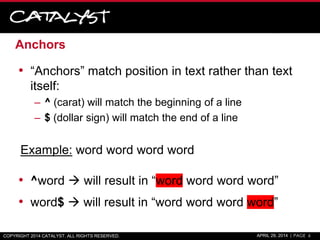
Anchors
• “Anchors” match position in text rather than text
itself:
– ^ (carat) will match the beginning of a line
– $ (dollar sign) will match the end of a line
Example: word word word word
• ^word  will result in “word word word word”
• word$  will result in “word word word word”
COPYRIGHT 2014 CATALYST. ALL RIGHTS RESERVED. APRIL 29, 2014 | PAGE 6
Character Classes
• [ starts a character class
• ] ends a character class
– Any of the characters within [ ] will be matched
Note: ranges like [G-V] (letters g though v) or [1-10] (number 1 through
10) also work.
Example: hnaeyesdtlaeck
• [nedl]  will result in “hnaeyesdtlaeck”
Example: Do you do SEO or SEM?
• SE[OM]  will result in “Do you do SEO or SEM?”
COPYRIGHT 2014 CATALYST. ALL RIGHTS RESERVED. APRIL 29, 2014 | PAGE 7
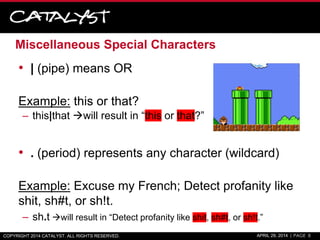
Miscellaneous Special Characters
• | (pipe) means OR
Example: this or that?
– this|that will result in “this or that?”
• . (period) represents any character (wildcard)
Example: Excuse my French; Detect profanity like
shit, sh#t, or sh!t.
– sh.t will result in “Detect profanity like shit, sh#t, or sh!t.”
COPYRIGHT 2014 CATALYST. ALL RIGHTS RESERVED. APRIL 29, 2014 | PAGE 8
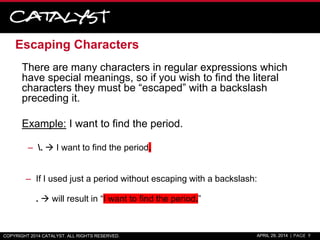
Escaping Characters
There are many characters in regular expressions which
have special meanings, so if you wish to find the literal
characters they must be “escaped” with a backslash
preceding it.
Example: I want to find the period.
– .  I want to find the period.
– If I used just a period without escaping with a backslash:
.  will result in “I want to find the period.”
COPYRIGHT 2014 CATALYST. ALL RIGHTS RESERVED. APRIL 29, 2014 | PAGE 9
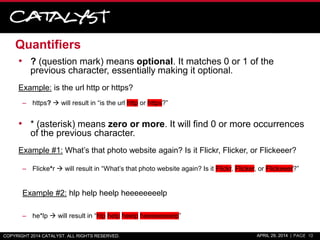
Quantifiers
• ? (question mark) means optional. It matches 0 or 1 of the
previous character, essentially making it optional.
Example: is the url http or https?
– https?  will result in “is the url http or https?”
• * (asterisk) means zero or more. It will find 0 or more occurrences
of the previous character.
Example #1: What’s that photo website again? Is it Flickr, Flicker, or Flickeeer?
– Flicke*r  will result in “What’s that photo website again? Is it Flickr, Flicker, or Flickeeer?”
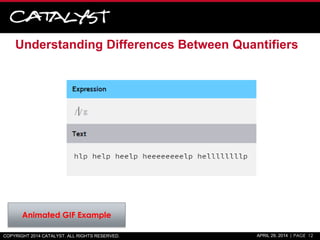
Example #2: hlp help heelp heeeeeeeelp
– he*lp  will result in “hlp help heelp heeeeeeeelp”
COPYRIGHT 2014 CATALYST. ALL RIGHTS RESERVED. APRIL 29, 2014 | PAGE 10
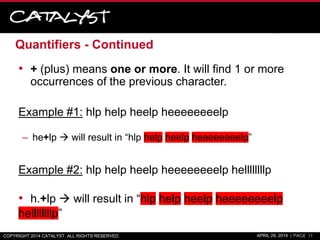
Quantifiers - Continued
• + (plus) means one or more. It will find 1 or more
occurrences of the previous character.
Example #1: hlp help heelp heeeeeeeelp
– he+lp  will result in “hlp help heelp heeeeeeeelp”
Example #2: hlp help heelp heeeeeeeelp hellllllllp
• h.+lp  will result in “hlp help heelp heeeeeeeelp
hellllllllp”
COPYRIGHT 2014 CATALYST. ALL RIGHTS RESERVED. APRIL 29, 2014 | PAGE 11
Understanding Differences Between Quantifiers
COPYRIGHT 2014 CATALYST. ALL RIGHTS RESERVED. APRIL 29, 2014 | PAGE 12
Animated GIF Example
Quantifiers - Continued
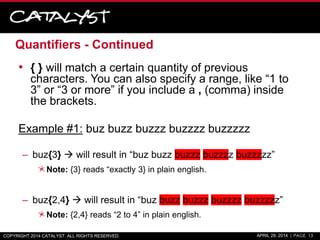
• { } will match a certain quantity of previous
characters. You can also specify a range, like “1 to
3” or “3 or more” if you include a , (comma) inside
the brackets.
Example #1: buz buzz buzzz buzzzz buzzzzz
– buz{3}  will result in “buz buzz buzzz buzzzz buzzzzz”
Note: {3} reads “exactly 3} in plain english.
– buz{2,4}  will result in “buz buzz buzzz buzzzz buzzzzz”
Note: {2,4} reads “2 to 4” in plain english.
COPYRIGHT 2014 CATALYST. ALL RIGHTS RESERVED. APRIL 29, 2014 | PAGE 13
Groups
• Groups are encapsulated in parenthesis ( )
Example: hahaha haha ha haha ha!
– (ha)+  will render “hahaha haha ha haha ha!”
( )COPYRIGHT 2014 CATALYST. ALL RIGHTS RESERVED. APRIL 29, 2014 | PAGE 14
Capture Groups
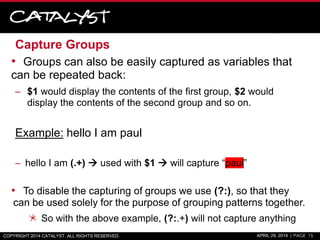
• Groups can also be easily captured as variables that
can be repeated back:
– $1 would display the contents of the first group, $2 would
display the contents of the second group and so on.
Example: hello I am paul
– hello I am (.+)  used with $1  will capture “paul”
• To disable the capturing of groups we use (?:), so that they
can be used solely for the purpose of grouping patterns together.
So with the above example, (?:.+) will not capture anything
COPYRIGHT 2014 CATALYST. ALL RIGHTS RESERVED. APRIL 29, 2014 | PAGE 15
Lookarounds
COPYRIGHT 2014 CATALYST. ALL RIGHTS RESERVED. APRIL 29, 2014 | PAGE 16
• Positive Lookaheads will match a group after the main pattern
without actually including it in the result. The expression is
(?=)
Example: 1in 250px 2in 3em 40px
– [0-9]+(?=px)  will result in “1in 250px 2in 3em 40px”
Everything WITH “px”
• A Negative Lookahead is used to specify a group that won’t
be matched after the main pattern. The expression is (?!)
Example: 1in 250px 2in 3em 40px
– [0-9]+(?!em)  will result in “1in 250px 2in 3em 40px”
Everything BUT “em”
RegEx in Practice
Real Use Cases
COPYRIGHT 2014 CATALYST. ALL RIGHTS RESERVED. APRIL 29, 2014 | PAGE 17
Problem #1
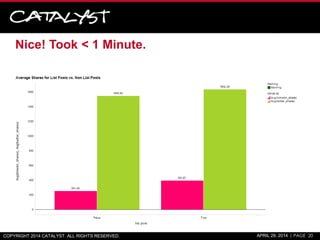
I want to take a list of >2,000 Mashable.com URLs,
exported from BuzzSumo.com and segment the
<titles> into different segments (list posts, title as a
question, etc.) and see which ones received a
greater number of social shares.
What is the fastest way of doing this?
Hint:
COPYRIGHT 2014 CATALYST. ALL RIGHTS RESERVED. APRIL 29, 2014 | PAGE 18
Solution #1: SEO Tools for Excel Add-on w/ RegEx
• Is the post title a question?
– =RegexpIsMatch(A2,"?$")
• Is the post a listacle/list post?
– =RegexpIsMatch(A2,"^[0-9]*s|^[0-9],[0-9]*s")
• Extract publishing year from URL
– =RegexpFind(D2,"https?://(?:www.)?mashable.com/([0-
9]{4})/.+","$1")
• Presence of a year in the title
– =IFERROR(RegexpFind(A40,"([0-9]{4})","$1"),“N/A")
COPYRIGHT 2014 CATALYST. ALL RIGHTS RESERVED. APRIL 29, 2014 | PAGE 19
Nice! Took < 1 Minute.
COPYRIGHT 2014 CATALYST. ALL RIGHTS RESERVED. APRIL 29, 2014 | PAGE 20
Problem #2
• There are hundreds of pages with <span> tags
that should be rendered as <h2>. Some have
class and/or id attributes and some don’t. I want
to grab the contents (only) of these span tags for
a client.
What is the fastest way?
…RegEx!
COPYRIGHT 2014 CATALYST. ALL RIGHTS RESERVED. APRIL 29, 2014 | PAGE 21
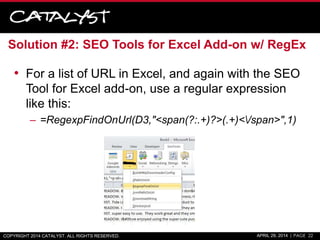
Solution #2: SEO Tools for Excel Add-on w/ RegEx
• For a list of URL in Excel, and again with the SEO
Tool for Excel add-on, use a regular expression
like this:
– =RegexpFindOnUrl(D3,"<span(?:.+)?>(.+)</span>",1)
COPYRIGHT 2014 CATALYST. ALL RIGHTS RESERVED. APRIL 29, 2014 | PAGE 22
Problem #3:
• I want to grab the full description from a long list of
YouTube videos. We can grab it from the meta
description, but it might be an incomplete
description that is truncated, so we need to grab
the actual page text.
What’s the fastest way?
COPYRIGHT 2014 CATALYST. ALL RIGHTS RESERVED. APRIL 29, 2014 | PAGE 23
…Probably XPath, but we can also use RegEx 
COPYRIGHT 2014 CATALYST. ALL RIGHTS RESERVED. APRIL 29, 2014 | PAGE 24
Solution #3: SEO Tools for Excel Add-on
• For a list of YouTube video URLs in Excel, use the
SEO Tools for Excel Add-on with the following
regular expression:
– =RegexpFindOnUrl(A1,"<p id=.eow-
description.s?>(.+)</p>",1)
Please note, that because the HTML utilized a double-
quote, you have to use another character in its place so as
not to break Excel, like the period, to represent ANY
character.
COPYRIGHT 2014 CATALYST. ALL RIGHTS RESERVED. APRIL 29, 2014 | PAGE 25
Problem #4
• I want to quickly change a long list of keywords
into the exact match format with the keyword
surrounded by brackets, [ ].
What’s the fastest way?
COPYRIGHT 2014 CATALYST. ALL RIGHTS RESERVED. APRIL 29, 2014 | PAGE 26
Solution #4: Notepad++ Example
1. Copy a column of keywords
from Excel into Notepad++
2. Control + F and switch to the
“Replace” tab.
3. Switch the “Search Mode” to
“Regular Expression”
4. Enter ^ in the “Find what” field
and [ in the “Replace with” field.
5. Hit the “Replace All” button.
6. Then, enter $ in the “Find what”
field and ] in the “Replace with”
field.
7. Again, hit the “Replace All”
button.
COPYRIGHT 2014 CATALYST. ALL RIGHTS RESERVED. APRIL 29, 2014 | PAGE 27
Problem #5
• I want to identify which keywords from Google
Webmaster Tools is Branded/Non-
Branded, along with misspellings, from our SQL
database in Spotfire.
What’s the fastest way?
COPYRIGHT 2014 CATALYST. ALL RIGHTS RESERVED. APRIL 29, 2014 | PAGE 28
A Solution: Calculated Column with ~= Operator
• Create a calculated column with an expression
like the below:
If([keyword]~="unstopable|unstopables|unstoppable|unstoppables|inst
opable|instopabales|[ui]nstop[a-z]+?b[a-z]+?s?|(scent booster)|(scent
boosters)",true,false)
– This should find spellings/mis-spellings of Downy Unstopables
COPYRIGHT 2014 CATALYST. ALL RIGHTS RESERVED. APRIL 29, 2014 | PAGE 29
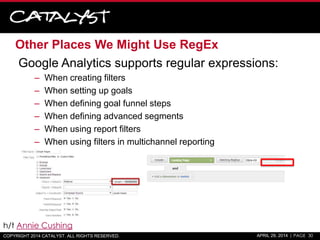
Other Places We Might Use RegEx
Google Analytics supports regular expressions:
– When creating filters
– When setting up goals
– When defining goal funnel steps
– When defining advanced segments
– When using report filters
– When using filters in multichannel reporting
COPYRIGHT 2014 CATALYST. ALL RIGHTS RESERVED. APRIL 29, 2014 | PAGE 30
h/t Annie Cushing
Other Places We Might Use RegEx
.htaccess
– Redirect a set of URLs matching a certain pattern to a new URL
pattern:
Example:
RewriteRule ^/dir/index.php?id=(0-9+).htm$ file-$1 [L]
Screaming Frog
– URL Rewriting: RegEx Replace
– Spider Include/Exclude URLs
COPYRIGHT 2014 CATALYST. ALL RIGHTS RESERVED. APRIL 29, 2014 | PAGE 31
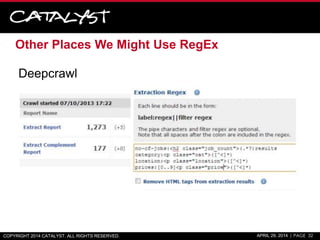
Other Places We Might Use RegEx
Deepcrawl
COPYRIGHT 2014 CATALYST. ALL RIGHTS RESERVED. APRIL 29, 2014 | PAGE 32
Resources
Helpful tool for testing RegEx and gives a good
breakdown of your patterns:
• http://www.regexr.com/
A handy cheat sheet to print and put on your desk:
• http://www.cheatography.com/davechild/cheat-
sheets/regular-expressions/pdf/
SEO Tools for Excel Add-on
• http://nielsbosma.se/projects/seotools/
Notepad++
• http://notepad-plus-plus.org/
COPYRIGHT 2014 CATALYST. ALL RIGHTS RESERVED. APRIL 29, 2014 | PAGE 33
Thank You!
Paul Shapiro
paul.shapiro@catalystsearchmarketing.com
@fighto
http://blog.paulshapiro.com

Regular Expressions for Regular Joes (and SEOs)

  • 1.
  • 2.
    What are regularexpressions? • A regular expression (sometimes referred to as regex or regexp) is basically find-and-replace on steroids, an advanced system of matching text patterns. COPYRIGHT 2014 CATALYST. ALL RIGHTS RESERVED. APRIL 29, 2014 | PAGE 2
  • 3.
    Most Common Example:Google Analytics COPYRIGHT 2014 CATALYST. ALL RIGHTS RESERVED. APRIL 29, 2014 | PAGE 3 • Using “pipes” to exclude pages with extraneous symbols attached to the URL, like UTM tracking parameters.
  • 4.
    Where can Iuse regular expressions? • Many text editors – Notepad++ is an awesome one for Windows • SEO Tools for Excel add-on – http://nielsbosma.se/projects/seotools/ • Google Docs – =regexextract() function – =regexmatch() function – =regexreplace() function • Google Analytics • Screaming Frog • DeepCrawl • .htaccess – RewriteCond – RewriteRule • Programming Languages COPYRIGHT 2014 CATALYST. ALL RIGHTS RESERVED. APRIL 29, 2014 | PAGE 4
  • 5.
    RegEx Basics Each oneof these you learn, the more helpful it is. You don’t have to learn all of them. COPYRIGHT 2014 CATALYST. ALL RIGHTS RESERVED. APRIL 29, 2014 | PAGE 5
  • 6.
    Anchors • “Anchors” matchposition in text rather than text itself: – ^ (carat) will match the beginning of a line – $ (dollar sign) will match the end of a line Example: word word word word • ^word  will result in “word word word word” • word$  will result in “word word word word” COPYRIGHT 2014 CATALYST. ALL RIGHTS RESERVED. APRIL 29, 2014 | PAGE 6
  • 7.
    Character Classes • [starts a character class • ] ends a character class – Any of the characters within [ ] will be matched Note: ranges like [G-V] (letters g though v) or [1-10] (number 1 through 10) also work. Example: hnaeyesdtlaeck • [nedl]  will result in “hnaeyesdtlaeck” Example: Do you do SEO or SEM? • SE[OM]  will result in “Do you do SEO or SEM?” COPYRIGHT 2014 CATALYST. ALL RIGHTS RESERVED. APRIL 29, 2014 | PAGE 7
  • 8.
    Miscellaneous Special Characters •| (pipe) means OR Example: this or that? – this|that will result in “this or that?” • . (period) represents any character (wildcard) Example: Excuse my French; Detect profanity like shit, sh#t, or sh!t. – sh.t will result in “Detect profanity like shit, sh#t, or sh!t.” COPYRIGHT 2014 CATALYST. ALL RIGHTS RESERVED. APRIL 29, 2014 | PAGE 8
  • 9.
    Escaping Characters There aremany characters in regular expressions which have special meanings, so if you wish to find the literal characters they must be “escaped” with a backslash preceding it. Example: I want to find the period. – .  I want to find the period. – If I used just a period without escaping with a backslash: .  will result in “I want to find the period.” COPYRIGHT 2014 CATALYST. ALL RIGHTS RESERVED. APRIL 29, 2014 | PAGE 9
  • 10.
    Quantifiers • ? (questionmark) means optional. It matches 0 or 1 of the previous character, essentially making it optional. Example: is the url http or https? – https?  will result in “is the url http or https?” • * (asterisk) means zero or more. It will find 0 or more occurrences of the previous character. Example #1: What’s that photo website again? Is it Flickr, Flicker, or Flickeeer? – Flicke*r  will result in “What’s that photo website again? Is it Flickr, Flicker, or Flickeeer?” Example #2: hlp help heelp heeeeeeeelp – he*lp  will result in “hlp help heelp heeeeeeeelp” COPYRIGHT 2014 CATALYST. ALL RIGHTS RESERVED. APRIL 29, 2014 | PAGE 10
  • 11.
    Quantifiers - Continued •+ (plus) means one or more. It will find 1 or more occurrences of the previous character. Example #1: hlp help heelp heeeeeeeelp – he+lp  will result in “hlp help heelp heeeeeeeelp” Example #2: hlp help heelp heeeeeeeelp hellllllllp • h.+lp  will result in “hlp help heelp heeeeeeeelp hellllllllp” COPYRIGHT 2014 CATALYST. ALL RIGHTS RESERVED. APRIL 29, 2014 | PAGE 11
  • 12.
    Understanding Differences BetweenQuantifiers COPYRIGHT 2014 CATALYST. ALL RIGHTS RESERVED. APRIL 29, 2014 | PAGE 12 Animated GIF Example
  • 13.
    Quantifiers - Continued •{ } will match a certain quantity of previous characters. You can also specify a range, like “1 to 3” or “3 or more” if you include a , (comma) inside the brackets. Example #1: buz buzz buzzz buzzzz buzzzzz – buz{3}  will result in “buz buzz buzzz buzzzz buzzzzz” Note: {3} reads “exactly 3} in plain english. – buz{2,4}  will result in “buz buzz buzzz buzzzz buzzzzz” Note: {2,4} reads “2 to 4” in plain english. COPYRIGHT 2014 CATALYST. ALL RIGHTS RESERVED. APRIL 29, 2014 | PAGE 13
  • 14.
    Groups • Groups areencapsulated in parenthesis ( ) Example: hahaha haha ha haha ha! – (ha)+  will render “hahaha haha ha haha ha!” ( )COPYRIGHT 2014 CATALYST. ALL RIGHTS RESERVED. APRIL 29, 2014 | PAGE 14
  • 15.
    Capture Groups • Groupscan also be easily captured as variables that can be repeated back: – $1 would display the contents of the first group, $2 would display the contents of the second group and so on. Example: hello I am paul – hello I am (.+)  used with $1  will capture “paul” • To disable the capturing of groups we use (?:), so that they can be used solely for the purpose of grouping patterns together. So with the above example, (?:.+) will not capture anything COPYRIGHT 2014 CATALYST. ALL RIGHTS RESERVED. APRIL 29, 2014 | PAGE 15
  • 16.
    Lookarounds COPYRIGHT 2014 CATALYST.ALL RIGHTS RESERVED. APRIL 29, 2014 | PAGE 16 • Positive Lookaheads will match a group after the main pattern without actually including it in the result. The expression is (?=) Example: 1in 250px 2in 3em 40px – [0-9]+(?=px)  will result in “1in 250px 2in 3em 40px” Everything WITH “px” • A Negative Lookahead is used to specify a group that won’t be matched after the main pattern. The expression is (?!) Example: 1in 250px 2in 3em 40px – [0-9]+(?!em)  will result in “1in 250px 2in 3em 40px” Everything BUT “em”
  • 17.
    RegEx in Practice RealUse Cases COPYRIGHT 2014 CATALYST. ALL RIGHTS RESERVED. APRIL 29, 2014 | PAGE 17
  • 18.
    Problem #1 I wantto take a list of >2,000 Mashable.com URLs, exported from BuzzSumo.com and segment the <titles> into different segments (list posts, title as a question, etc.) and see which ones received a greater number of social shares. What is the fastest way of doing this? Hint: COPYRIGHT 2014 CATALYST. ALL RIGHTS RESERVED. APRIL 29, 2014 | PAGE 18
  • 19.
    Solution #1: SEOTools for Excel Add-on w/ RegEx • Is the post title a question? – =RegexpIsMatch(A2,"?$") • Is the post a listacle/list post? – =RegexpIsMatch(A2,"^[0-9]*s|^[0-9],[0-9]*s") • Extract publishing year from URL – =RegexpFind(D2,"https?://(?:www.)?mashable.com/([0- 9]{4})/.+","$1") • Presence of a year in the title – =IFERROR(RegexpFind(A40,"([0-9]{4})","$1"),“N/A") COPYRIGHT 2014 CATALYST. ALL RIGHTS RESERVED. APRIL 29, 2014 | PAGE 19
  • 20.
    Nice! Took <1 Minute. COPYRIGHT 2014 CATALYST. ALL RIGHTS RESERVED. APRIL 29, 2014 | PAGE 20
  • 21.
    Problem #2 • Thereare hundreds of pages with <span> tags that should be rendered as <h2>. Some have class and/or id attributes and some don’t. I want to grab the contents (only) of these span tags for a client. What is the fastest way? …RegEx! COPYRIGHT 2014 CATALYST. ALL RIGHTS RESERVED. APRIL 29, 2014 | PAGE 21
  • 22.
    Solution #2: SEOTools for Excel Add-on w/ RegEx • For a list of URL in Excel, and again with the SEO Tool for Excel add-on, use a regular expression like this: – =RegexpFindOnUrl(D3,"<span(?:.+)?>(.+)</span>",1) COPYRIGHT 2014 CATALYST. ALL RIGHTS RESERVED. APRIL 29, 2014 | PAGE 22
  • 23.
    Problem #3: • Iwant to grab the full description from a long list of YouTube videos. We can grab it from the meta description, but it might be an incomplete description that is truncated, so we need to grab the actual page text. What’s the fastest way? COPYRIGHT 2014 CATALYST. ALL RIGHTS RESERVED. APRIL 29, 2014 | PAGE 23
  • 24.
    …Probably XPath, butwe can also use RegEx  COPYRIGHT 2014 CATALYST. ALL RIGHTS RESERVED. APRIL 29, 2014 | PAGE 24
  • 25.
    Solution #3: SEOTools for Excel Add-on • For a list of YouTube video URLs in Excel, use the SEO Tools for Excel Add-on with the following regular expression: – =RegexpFindOnUrl(A1,"<p id=.eow- description.s?>(.+)</p>",1) Please note, that because the HTML utilized a double- quote, you have to use another character in its place so as not to break Excel, like the period, to represent ANY character. COPYRIGHT 2014 CATALYST. ALL RIGHTS RESERVED. APRIL 29, 2014 | PAGE 25
  • 26.
    Problem #4 • Iwant to quickly change a long list of keywords into the exact match format with the keyword surrounded by brackets, [ ]. What’s the fastest way? COPYRIGHT 2014 CATALYST. ALL RIGHTS RESERVED. APRIL 29, 2014 | PAGE 26
  • 27.
    Solution #4: Notepad++Example 1. Copy a column of keywords from Excel into Notepad++ 2. Control + F and switch to the “Replace” tab. 3. Switch the “Search Mode” to “Regular Expression” 4. Enter ^ in the “Find what” field and [ in the “Replace with” field. 5. Hit the “Replace All” button. 6. Then, enter $ in the “Find what” field and ] in the “Replace with” field. 7. Again, hit the “Replace All” button. COPYRIGHT 2014 CATALYST. ALL RIGHTS RESERVED. APRIL 29, 2014 | PAGE 27
  • 28.
    Problem #5 • Iwant to identify which keywords from Google Webmaster Tools is Branded/Non- Branded, along with misspellings, from our SQL database in Spotfire. What’s the fastest way? COPYRIGHT 2014 CATALYST. ALL RIGHTS RESERVED. APRIL 29, 2014 | PAGE 28
  • 29.
    A Solution: CalculatedColumn with ~= Operator • Create a calculated column with an expression like the below: If([keyword]~="unstopable|unstopables|unstoppable|unstoppables|inst opable|instopabales|[ui]nstop[a-z]+?b[a-z]+?s?|(scent booster)|(scent boosters)",true,false) – This should find spellings/mis-spellings of Downy Unstopables COPYRIGHT 2014 CATALYST. ALL RIGHTS RESERVED. APRIL 29, 2014 | PAGE 29
  • 30.
    Other Places WeMight Use RegEx Google Analytics supports regular expressions: – When creating filters – When setting up goals – When defining goal funnel steps – When defining advanced segments – When using report filters – When using filters in multichannel reporting COPYRIGHT 2014 CATALYST. ALL RIGHTS RESERVED. APRIL 29, 2014 | PAGE 30 h/t Annie Cushing
  • 31.
    Other Places WeMight Use RegEx .htaccess – Redirect a set of URLs matching a certain pattern to a new URL pattern: Example: RewriteRule ^/dir/index.php?id=(0-9+).htm$ file-$1 [L] Screaming Frog – URL Rewriting: RegEx Replace – Spider Include/Exclude URLs COPYRIGHT 2014 CATALYST. ALL RIGHTS RESERVED. APRIL 29, 2014 | PAGE 31
  • 32.
    Other Places WeMight Use RegEx Deepcrawl COPYRIGHT 2014 CATALYST. ALL RIGHTS RESERVED. APRIL 29, 2014 | PAGE 32
  • 33.
    Resources Helpful tool fortesting RegEx and gives a good breakdown of your patterns: • http://www.regexr.com/ A handy cheat sheet to print and put on your desk: • http://www.cheatography.com/davechild/cheat- sheets/regular-expressions/pdf/ SEO Tools for Excel Add-on • http://nielsbosma.se/projects/seotools/ Notepad++ • http://notepad-plus-plus.org/ COPYRIGHT 2014 CATALYST. ALL RIGHTS RESERVED. APRIL 29, 2014 | PAGE 33
  • 34.