Regular	
  Expressions	
  
David	
  Foster	
  
So6ware	
  Engineer	
  
Aug	
  2013	
  
What	
  is	
  a	
  regular	
  expression?	
  
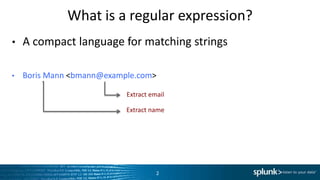
•  A	
  compact	
  language	
  for	
  matching	
  strings	
  
•  Boris	
  Mann	
  <bmann@example.com>	
  	
  
2	
  
Extract	
  email	
  
Extract	
  name	
  
•  Regexes	
  are	
  good	
  for:	
  
–  Mechanical	
  text	
  transformaLons	
  
–  Fuzzy	
  searching	
  
–  OpLmized	
  text	
  manipulaLon	
  
When	
  to	
  use	
  them	
  
hPp://xkcd.com/208/	
  
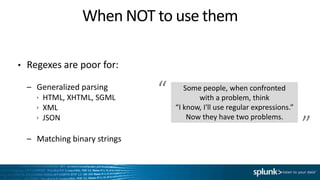
•  Regexes	
  are	
  poor	
  for:	
  
–  Generalized	
  parsing	
  
  HTML,	
  XHTML,	
  SGML	
  
  XML	
  
  JSON	
  
–  Matching	
  binary	
  strings	
  
When	
  NOT	
  to	
  use	
  them	
  
Some	
  people,	
  when	
  confronted	
  	
  
with	
  a	
  problem,	
  think	
  	
  
“I	
  know,	
  I'll	
  use	
  regular	
  expressions.”	
  
Now	
  they	
  have	
  two	
  problems.	
  
“	
  
”	
  
Don’t	
  do	
  this	
  
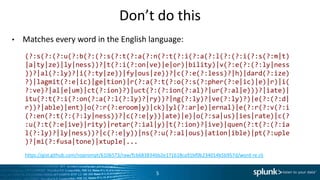
•  Matches	
  every	
  word	
  in	
  the	
  English	
  language:	
  
5	
  
(?:s(?:(?:u(?:b(?:(?:s(?:t(?:a(?:n(?:t(?:i(?:a(?:l(?:(?:i(?:s(?:m|
t)|a|ty|ze)|ly|ness))?|t(?:i(?:on|ve)|e|or)|bility)|v(?:e(?:(?:ly|
ness))?|al(?:ly)?|i(?:ty|ze))|fy|ous|ze))?|c(?:e(?:less)?|h)|
dard(?:ize)?)|lagmit(?:e|ic)|ge|tion)|r(?:a(?:t(?:o(?:s(?:pher(?:e|
ic)|e)|r)|i(?:ve)?|al|e|um)|ct(?:ion)?)|uct(?:(?:ion(?:al)?|
ur(?:al|e)))?|iate)|itu(?:t(?:i(?:on(?:a(?:l(?:ly)?|ry))?|
ng(?:ly)?|ve(?:ly)?)|e(?:(?:d|r))?|able)|ent)|o(?:r(?:eroom|y)|ck)|
yl(?:ar|e)|ernal)|e(?:r(?:v(?:i(?:en(?:t(?:(?:ly|ness))?|c(?:e|y))|
ate)|e)|o(?:sa|us)|ies|rate)|c(?:u(?:t(?:e|ive)|rity)|retar(?:ial|
y)|t(?:ion)?|ive)|quen(?:t(?:(?:ial(?:ly)?|ly|ness))?|c(?:e|y))|
ns(?:u(?:al|ous)|ation|ible)|pt(?:uple)?|mi(?:fusa|tone)|xtuple|...	
  
hPps://gist.github.com/noprompt/6106573/raw/fcb683834bb2e171618ca91bf0b234014b5b957d/word-­‐re.clj	
  
Simple	
  Expressions	
  
6	
  
Simple	
  Expressions	
  (1/4)	
  
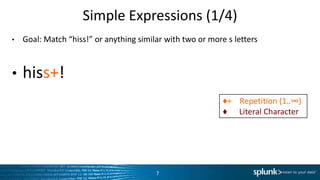
•  Goal:	
  Match	
  “hiss!”	
  or	
  anything	
  similar	
  with	
  two	
  or	
  more	
  s	
  lePers	
  
•  hiss+!	
  
7	
  
♦+	


  RepeLLon	
  (1..∞)	
  
♦	


  Literal	
  Character	
  
Simple	
  Expressions	
  (2/4)	
  
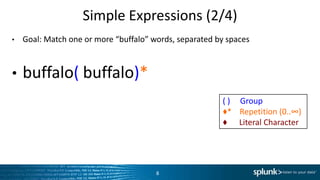
•  Goal:	
  Match	
  one	
  or	
  more	
  “buffalo”	
  words,	
  separated	
  by	
  spaces	
  
•  buffalo(	
  buffalo)*	
  
8	
  
(	
  )	


  Group	
  
♦*	


  RepeLLon	
  (0..∞)	
  
♦	


  Literal	
  Character	
  
Simple	
  Expressions	
  (3/4)	
  
•  Goal:	
  Match	
  any	
  “word”	
  
•  [a-­‐zA-­‐Z]+	
  	
  
•  But	
  what	
  about	
  words	
  like	
  “can't”?	
  
•  [a-­‐zA-­‐Z']+	
  	
  
9	
  
[⬦]	
  	
  	
  Char	
  in	
  ⬦	
  
♦+	


  RepeLLon	
  (1..∞)	
  
♦	


  Literal	
  Character	
  
Need	
  to	
  accept	
  apostrophes	
  too.	
  
(The	
  computer	
  can’t	
  guess	
  this	
  magically.)	
  
☝	
  
Simple	
  Expressions	
  (4/4)	
  
•  Goal:	
  Match	
  the	
  same	
  word	
  repeated	
  1	
  or	
  more	
  Lmes	
  
•  ([a-­‐zA-­‐Z]+)(	
  1)*	
  
•  Now	
  things	
  are	
  getng	
  interesLng…	
  
10	
  
(	
  )	


  Group	
  
[⬦]	
  	
  	
  Char	
  in	
  ⬦	
  
♦*	


  RepeLLon	
  (0..∞)	
  
♦+	


  RepeLLon	
  (1..∞)	
  
1	


  Backreference	
  
♦	


  Literal	
  Character	
  
1	
   2	
  
Real	
  World	
  Examples	
  
11	
  
Example:	
  Email	
  ExtracLon	
  
•  Boris	
  Mann	
  <bmann@example.com>	


  ➞	
  bmann@example.com	
  
•  John	
  Doe	
  <jdoe@example.com>	


  ➞	
  jdoe@example.com	
  
•  Bob	
  Waters	
  <bwaters@example.com>	
  	
  ➞	
  bwaters@example.com	
  
•  [^<]*	
  <([^>]+)>	
  	
  	
  ➞	
  	
  	
  1	
  
12	
  
(	
  )	


  Group	
  
[^⬦]	
  Char	
  NOT	
  in	
  ⬦	
  
♦*	


  RepeLLon	
  (0..∞)	
  
♦+	


  RepeLLon	
  (1..∞)	
  
1	


  Backreference	
  
♦	


  Literal	
  Character	
  
Example:	
  Fuzzy	
  Matching	
  
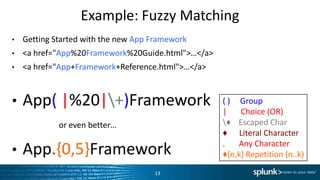
•  Getng	
  Started	
  with	
  the	
  new	
  App	
  Framework	
  
•  <a	
  href="App%20Framework%20Guide.html">…</a>	
  
•  <a	
  href="App+Framework+Reference.html">…</a>	
  
•  App(	
  |%20|+)Framework	
  
•  App.{0,5}Framework	
  
13	
  
(	
  )	


  Group	
  
|	


  Choice	
  (OR)	
  
♦	


  Escaped	
  Char	
  
♦	


  Literal	
  Character	
  
.	


  Any	
  Character	
  
♦{n,k}	
  RepeLLon	
  (n..k)	
  
or	
  even	
  bePer…	
  
Example:	
  Change	
  File	
  Extension	
  
•  README.markdown	


  ➞	
  README.md	
  
•  BuPercup.JPG	


  ➞	
  BuPercup.jpg	
  
•  com.splunk.Input.htm	
  ➞	
  com.splunk.Input.html	
  
•  ^(.+).([a-­‐z]+)$	
  	
  	
  ➞	
  	
  	
  1.md	
  
•  hPps://github.com/davidfstr/renameregex	
  
–  Note:	
  Java	
  replacement	
  expressions	
  use	
  $1	
  instead	
  of	
  1.	
  
14	
  
(	
  )	


  Group	
  
[⬦]	
  	
  	
  Char	
  in	
  ⬦	
  
^⬦	


  Anchor	
  to	
  start	
  
⬦$	


  Anchor	
  to	
  end	
  
Only	
  1	
  is	
  special	
  for	
  replacements.	
  
Dot	
  is	
  not	
  special	
  here.	
  
☝	
  
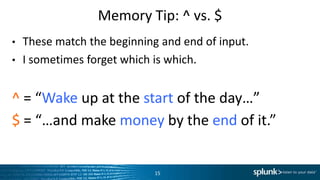
Memory	
  Tip:	
  ^	
  vs.	
  $	
  
•  These	
  match	
  the	
  beginning	
  and	
  end	
  of	
  input.	
  
•  I	
  someLmes	
  forget	
  which	
  is	
  which.	
  
^	
  =	
  “Wake	
  up	
  at	
  the	
  start	
  of	
  the	
  day…”	
  
$	
  =	
  “…and	
  make	
  money	
  by	
  the	
  end	
  of	
  it.”	
  
15	
  
Example:	
  Find	
  IdenLfiers	
  
•  ChartElement	


  ➞	
  ChartView	
  	
  
•  SingleElement	
  	
  	
  ➞	
  SingleView	
  
•  TableElement	


  ➞	
  TableView	
  
•  b([a-­‐zA-­‐Z]+)Elementb	
  	
  	
  ➞	
  	
  	
  1View	
  
•  When	
  matching	
  word	
  boundaries	
  on	
  both	
  ends,	


  many	
  editors	
  have	
  a	
  “Match	
  EnLre	
  Word”	
  opLon	


  that	
  does	
  the	
  same	
  thing	
  as	
  adding	
  b	
  to	
  each	
  side.	
  
16	
  
b	


  Anchor	
  to	
  word	


  boundary	
  
Advanced	
  Expressions	
  
17	
  
Advanced:	
  Reluctant	
  QuanLfiers	
  (1/3)	
  
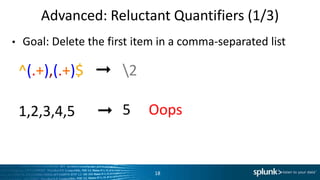
•  Goal:	
  Delete	
  the	
  first	
  item	
  in	
  a	
  comma-­‐separated	
  list	
  
^(.+),(.+)$	
  	
  	
  ➞	
  	
  	
  2	
  
1,2,3,4,5	


  ➞	
  
18	
  
5	


  Oops	
  
Advanced:	
  Reluctant	
  QuanLfiers	
  (2/3)	
  
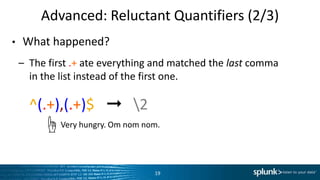
•  What	
  happened?	
  
–  The	
  first	
  .+	
  ate	
  everything	
  and	
  matched	
  the	
  last	
  comma	
  	
  
in	
  the	
  list	
  instead	
  of	
  the	
  first	
  one.	
  
– ^(.+),(.+)$	
  	
  	
  ➞	
  	
  	
  2	
  
19	
  
Very	
  hungry.	
  Om	
  nom	
  nom.	
  ☝	
  
Advanced:	
  Reluctant	
  QuanLfiers	
  (3/3)	
  
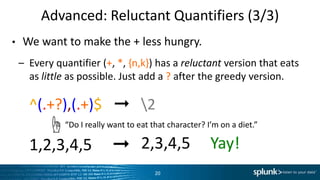
•  We	
  want	
  to	
  make	
  the	
  +	
  less	
  hungry.	
  
–  Every	
  quanLfier	
  (+,	
  *,	
  {n,k})	
  has	
  a	
  reluctant	
  version	
  that	
  eats	
  
as	
  li+le	
  as	
  possible.	
  Just	
  add	
  a	
  ?	
  a6er	
  the	
  greedy	
  version.	
  
– ^(.+?),(.+)$	
  	
  	
  ➞	
  	
  	
  2	
  
– 1,2,3,4,5	


  ➞	
  
20	
  
“Do	
  I	
  really	
  want	
  to	
  eat	
  that	
  character?	
  I’m	
  on	
  a	
  diet.”	
  ☝	
  
2,3,4,5	


  Yay!	
  
Tip:	
  Avoid	
  the	
  dot	
  
•  If	
  we	
  had	
  used	
  a	
  more	
  specific	
  regex,	
  it	
  wouldn’t	
  even	
  
be	
  necessary	
  to	
  use	
  a	
  reluctant	
  quanLfier:	
  
– ^([^,]+),(.+)$	
  	
  	
  ➞	
  	
  	
  2	
  
– 1,2,3,4,5	


  ➞	
  
21	
  
No	
  dot?	
  No	
  ambiguity.	
  ☝	
  
2,3,4,5	


  SLll	
  good	
  
Advanced:	
  Abbreviated	
  Character	
  Classes	
  
•  Not	
  recommended	
  since	
  they’re	
  hard	
  to	
  remember.	
  
•  Prefer	
  wriLng	
  out	
  character	
  sets	
  explicitly.	
  
22	
  
Character	
  Set	
   Abbrevia.on	
  
[A-­‐Za-­‐z0-­‐9_]	
   w	


  (word,	
  NOT	
  whitespace)	
  
[^A-­‐Za-­‐z0-­‐9_]	
   W	
  	
  	
  (non-­‐word)	
  
[	
  trnvf]	
   s	


  (whitespace)	
  
[0-­‐9]	
   d	


  (digit)	
  
Advanced:	
  Noncapturing	
  Groups	
  
"   A	
  special	
  kind	
  of	
  (	
  )	
  that	
  cannot	
  be	
  referenced	
  by	
  1,	
  2,	
  …,	
  n	
  
–  Useful	
  when	
  the	
  (	
  )	
  is	
  only	
  there	
  for	
  a	
  |	
  or	
  a	
  quanLfier:	
  (⬦)?,	
  (⬦)+,	
  (⬦)*	
  
"   Goal:	
  Recognize	
  an	
  integer	
  (5)	
  or	
  decimal	
  (5.37)	
  
–  but	
  not	
  .37	
  (to	
  keep	
  this	
  demo	
  simple)	
  
"  ([0-­‐9]+)(?:.([0-­‐9]+))?	
  
23	
  
(?:⬦)	
  	
  Non-­‐C	
  Group	
  
Noncapturing	
  Group	
  ☝	
  
1	
   2	
  
Syntax	
  Summary	
  
(	
  )	


  Group	
  
[⬦]	
  	
  	
  Char	
  in	
  ⬦	
  
[^⬦]	
  Char	
  NOT	
  in	
  ⬦	
  
|	


  Choice	
  (OR)	
  
.	


  Any	
  Character	
  
♦?	


  RepeLLon	
  (0..1)	
  
♦*	


  RepeLLon	
  (0..∞)	
  
♦+	


  RepeLLon	
  (1..∞)	
  
1	


  Backreference	
  
♦	


  Escaped	
  Char	
  
♦	


  Literal	
  Character	
  
(?:⬦)	
  	
  Noncapturing	
  Group	
  
w	


  Word	
  Character	
  
s	


  Whitespace	
  Character	
  
d	


  Digit	
  Character	
  
♦??	


  Reluctant	
  RepeLLon	
  (0..1)	
  
♦*?	


  Reluctant	
  RepeLLon	
  (0..∞)	
  
♦+?	


  Reluctant	
  RepeLLon	
  (1..∞)	
  
^⬦	


  Anchor	
  to	
  start	
  
⬦$	


  Anchor	
  to	
  end	
  
b	


  Anchor	
  to	
  word	
  boundary	
  
Thank	
  You	
  

Regular expressions

  • 1.
    Regular  Expressions   David  Foster   So6ware  Engineer   Aug  2013  
  • 2.
    What  is  a  regular  expression?   •  A  compact  language  for  matching  strings   •  Boris  Mann  <bmann@example.com>     2   Extract  email   Extract  name  
  • 3.
    •  Regexes  are  good  for:   –  Mechanical  text  transformaLons   –  Fuzzy  searching   –  OpLmized  text  manipulaLon   When  to  use  them   hPp://xkcd.com/208/  
  • 4.
    •  Regexes  are  poor  for:   –  Generalized  parsing     HTML,  XHTML,  SGML     XML     JSON   –  Matching  binary  strings   When  NOT  to  use  them   Some  people,  when  confronted     with  a  problem,  think     “I  know,  I'll  use  regular  expressions.”   Now  they  have  two  problems.   “   ”  
  • 5.
    Don’t  do  this   •  Matches  every  word  in  the  English  language:   5   (?:s(?:(?:u(?:b(?:(?:s(?:t(?:a(?:n(?:t(?:i(?:a(?:l(?:(?:i(?:s(?:m| t)|a|ty|ze)|ly|ness))?|t(?:i(?:on|ve)|e|or)|bility)|v(?:e(?:(?:ly| ness))?|al(?:ly)?|i(?:ty|ze))|fy|ous|ze))?|c(?:e(?:less)?|h)| dard(?:ize)?)|lagmit(?:e|ic)|ge|tion)|r(?:a(?:t(?:o(?:s(?:pher(?:e| ic)|e)|r)|i(?:ve)?|al|e|um)|ct(?:ion)?)|uct(?:(?:ion(?:al)?| ur(?:al|e)))?|iate)|itu(?:t(?:i(?:on(?:a(?:l(?:ly)?|ry))?| ng(?:ly)?|ve(?:ly)?)|e(?:(?:d|r))?|able)|ent)|o(?:r(?:eroom|y)|ck)| yl(?:ar|e)|ernal)|e(?:r(?:v(?:i(?:en(?:t(?:(?:ly|ness))?|c(?:e|y))| ate)|e)|o(?:sa|us)|ies|rate)|c(?:u(?:t(?:e|ive)|rity)|retar(?:ial| y)|t(?:ion)?|ive)|quen(?:t(?:(?:ial(?:ly)?|ly|ness))?|c(?:e|y))| ns(?:u(?:al|ous)|ation|ible)|pt(?:uple)?|mi(?:fusa|tone)|xtuple|...   hPps://gist.github.com/noprompt/6106573/raw/fcb683834bb2e171618ca91bf0b234014b5b957d/word-­‐re.clj  
  • 6.
  • 7.
    Simple  Expressions  (1/4)   •  Goal:  Match  “hiss!”  or  anything  similar  with  two  or  more  s  lePers   •  hiss+!   7   ♦+        RepeLLon  (1..∞)   ♦            Literal  Character  
  • 8.
    Simple  Expressions  (2/4)   •  Goal:  Match  one  or  more  “buffalo”  words,  separated  by  spaces   •  buffalo(  buffalo)*   8   (  )          Group   ♦*        RepeLLon  (0..∞)   ♦            Literal  Character  
  • 9.
    Simple  Expressions  (3/4)   •  Goal:  Match  any  “word”   •  [a-­‐zA-­‐Z]+     •  But  what  about  words  like  “can't”?   •  [a-­‐zA-­‐Z']+     9   [⬦]      Char  in  ⬦   ♦+        RepeLLon  (1..∞)   ♦            Literal  Character   Need  to  accept  apostrophes  too.   (The  computer  can’t  guess  this  magically.)   ☝  
  • 10.
    Simple  Expressions  (4/4)   •  Goal:  Match  the  same  word  repeated  1  or  more  Lmes   •  ([a-­‐zA-­‐Z]+)(  1)*   •  Now  things  are  getng  interesLng…   10   (  )          Group   [⬦]      Char  in  ⬦   ♦*        RepeLLon  (0..∞)   ♦+        RepeLLon  (1..∞)   1          Backreference   ♦            Literal  Character   1   2  
  • 11.
  • 12.
    Example:  Email  ExtracLon   •  Boris  Mann  <bmann@example.com>        ➞  bmann@example.com   •  John  Doe  <jdoe@example.com>                          ➞  jdoe@example.com   •  Bob  Waters  <bwaters@example.com>    ➞  bwaters@example.com   •  [^<]*  <([^>]+)>      ➞      1   12   (  )          Group   [^⬦]  Char  NOT  in  ⬦   ♦*        RepeLLon  (0..∞)   ♦+        RepeLLon  (1..∞)   1          Backreference   ♦            Literal  Character  
  • 13.
    Example:  Fuzzy  Matching   •  Getng  Started  with  the  new  App  Framework   •  <a  href="App%20Framework%20Guide.html">…</a>   •  <a  href="App+Framework+Reference.html">…</a>   •  App(  |%20|+)Framework   •  App.{0,5}Framework   13   (  )          Group   |              Choice  (OR)   ♦        Escaped  Char   ♦            Literal  Character   .              Any  Character   ♦{n,k}  RepeLLon  (n..k)   or  even  bePer…  
  • 14.
    Example:  Change  File  Extension   •  README.markdown        ➞  README.md   •  BuPercup.JPG                              ➞  BuPercup.jpg   •  com.splunk.Input.htm  ➞  com.splunk.Input.html   •  ^(.+).([a-­‐z]+)$      ➞      1.md   •  hPps://github.com/davidfstr/renameregex   –  Note:  Java  replacement  expressions  use  $1  instead  of  1.   14   (  )          Group   [⬦]      Char  in  ⬦   ^⬦        Anchor  to  start   ⬦$        Anchor  to  end   Only  1  is  special  for  replacements.   Dot  is  not  special  here.   ☝  
  • 15.
    Memory  Tip:  ^  vs.  $   •  These  match  the  beginning  and  end  of  input.   •  I  someLmes  forget  which  is  which.   ^  =  “Wake  up  at  the  start  of  the  day…”   $  =  “…and  make  money  by  the  end  of  it.”   15  
  • 16.
    Example:  Find  IdenLfiers   •  ChartElement        ➞  ChartView     •  SingleElement      ➞  SingleView   •  TableElement        ➞  TableView   •  b([a-­‐zA-­‐Z]+)Elementb      ➞      1View   •  When  matching  word  boundaries  on  both  ends,      many  editors  have  a  “Match  EnLre  Word”  opLon      that  does  the  same  thing  as  adding  b  to  each  side.   16   b        Anchor  to  word                    boundary  
  • 17.
  • 18.
    Advanced:  Reluctant  QuanLfiers  (1/3)   •  Goal:  Delete  the  first  item  in  a  comma-­‐separated  list   ^(.+),(.+)$      ➞      2   1,2,3,4,5            ➞   18   5          Oops  
  • 19.
    Advanced:  Reluctant  QuanLfiers  (2/3)   •  What  happened?   –  The  first  .+  ate  everything  and  matched  the  last  comma     in  the  list  instead  of  the  first  one.   – ^(.+),(.+)$      ➞      2   19   Very  hungry.  Om  nom  nom.  ☝  
  • 20.
    Advanced:  Reluctant  QuanLfiers  (3/3)   •  We  want  to  make  the  +  less  hungry.   –  Every  quanLfier  (+,  *,  {n,k})  has  a  reluctant  version  that  eats   as  li+le  as  possible.  Just  add  a  ?  a6er  the  greedy  version.   – ^(.+?),(.+)$      ➞      2   – 1,2,3,4,5          ➞   20   “Do  I  really  want  to  eat  that  character?  I’m  on  a  diet.”  ☝   2,3,4,5          Yay!  
  • 21.
    Tip:  Avoid  the  dot   •  If  we  had  used  a  more  specific  regex,  it  wouldn’t  even   be  necessary  to  use  a  reluctant  quanLfier:   – ^([^,]+),(.+)$      ➞      2   – 1,2,3,4,5          ➞   21   No  dot?  No  ambiguity.  ☝   2,3,4,5          SLll  good  
  • 22.
    Advanced:  Abbreviated  Character  Classes   •  Not  recommended  since  they’re  hard  to  remember.   •  Prefer  wriLng  out  character  sets  explicitly.   22   Character  Set   Abbrevia.on   [A-­‐Za-­‐z0-­‐9_]   w        (word,  NOT  whitespace)   [^A-­‐Za-­‐z0-­‐9_]   W      (non-­‐word)   [  trnvf]   s            (whitespace)   [0-­‐9]   d          (digit)  
  • 23.
    Advanced:  Noncapturing  Groups   "   A  special  kind  of  (  )  that  cannot  be  referenced  by  1,  2,  …,  n   –  Useful  when  the  (  )  is  only  there  for  a  |  or  a  quanLfier:  (⬦)?,  (⬦)+,  (⬦)*   "   Goal:  Recognize  an  integer  (5)  or  decimal  (5.37)   –  but  not  .37  (to  keep  this  demo  simple)   "  ([0-­‐9]+)(?:.([0-­‐9]+))?   23   (?:⬦)    Non-­‐C  Group   Noncapturing  Group  ☝   1   2  
  • 24.
    Syntax  Summary   (  )          Group   [⬦]      Char  in  ⬦   [^⬦]  Char  NOT  in  ⬦   |              Choice  (OR)   .              Any  Character   ♦?        RepeLLon  (0..1)   ♦*        RepeLLon  (0..∞)   ♦+        RepeLLon  (1..∞)   1          Backreference   ♦        Escaped  Char   ♦            Literal  Character   (?:⬦)    Noncapturing  Group   w              Word  Character   s                Whitespace  Character   d                Digit  Character   ♦??        Reluctant  RepeLLon  (0..1)   ♦*?        Reluctant  RepeLLon  (0..∞)   ♦+?        Reluctant  RepeLLon  (1..∞)   ^⬦          Anchor  to  start   ⬦$          Anchor  to  end   b            Anchor  to  word  boundary  
  • 25.

Editor's Notes

  • #5 Classic lore:* http://stackoverflow.com/questions/1732348/regex-match-open-tags-except-xhtml-self-contained-tags/1732454#1732454* http://www.codinghorror.com/blog/2008/06/regular-expressions-now-you-have-two-problems.html
  • #8 Here’s a simple first regular expression. It matches …A character in a regex matches the same character in a string, unless it is a symbol. Most symbols do special things.Here the + causes whatever occurs directly before it to be matched multiple times.And notice the key on the right side. This key shows the meaning of the various regexes symbols used on each slide of this presentation. I’ve also color-coded all special symbols.
  • #9 Now we’d like to match …To do that we need a repetition operator. Here the * operator repeats whatever comes directly before it 0 or more times.In order to get the * to apply to an entire word, we need to put the word in a group, marked with parentheses.
  • #10 Now we want to match any word, not just a particular word. For this we need character classes.A character class matches a single character chosen from a particular set.
  • #14 Fuzzy matching is great for bulk-updating free-form textual documentation.If you need to use a match special symbol as a literal, use a backslash.
  • #15 Anchors are useful for forcing a match to occur at the beginning of end of the input.If you don’t use an anchor, matches could occur in the middle of the input, which could be undesirable.
  • #17 Anchors are useful for forcing a match to occur at the beginning of end of the input.If you don’t use an anchor, matches could occur in the middle of the input, which could be undesirable.
  • #23 Capitalized versions are the NOT-version of their uncapitalized counterparts.