Regular Expressions

21 Januari 2014
Sido Grond
Exception Twente
1
Index

•
•
•
•
•
•
•

Introduction
Applications
Constructs
Regular expressions in C#
Demos
Pros and cons
Conclusions

2
Introduction
• Regular Expression (RE or regex) is a text
string that describes a search pattern
• Some similarity to wildcards (e.g. *.txt)
• Platform/language independent but some
minor differences among them
• Available in a.o. C#, Perl, Python, Java,
Javascript, Visual Studio, Notepad++, Linux
command line tools
3
Applications
• Syntax highlighting
• Find and replace
– Visual Studio (as usual: different syntax)
– Notepad++

• Text searching
– Unix tools: grep, sed, find

• Programming
– Pattern matching, filtering, replacing
4
Constructs: single character
Regex

Strings that match

Strings that don’t match

a

“abc”, “bad”

“xyz”

^a

“abc”

“bad”, “xyz”, “^a”

a$

“cba”

“abc”, “bad”, “xyz”

^[a-z]$

“a”, “x”

“aa”, “A”

^[a-z0-9+-]$

“s”, “3”, “+”, “-”

“12”, “Q”, “a1”

^[^a-zA-Z]$

“5”, “+”

“p”, “R”, “abc”, “15”

^[a-zA-Z]

“b”, “C123”, “dd”

“1cba”, “ f”(note space)

[^a-zA-Z]

“1cba”, “ f”

“b”, “dd”

^.$

“m”, “3”, “%”

“13”, “%a”, “xyz”

.

“%”, “e4”, “xyz”, “.”

“”

.

“.”

“%”, “e4”, “xyz”
5
Constructs: word groups
•
•
•
•
•
•

d is shorthand for Digits [0-9]
w is shorthand for Words [a-zA-Z0-9]
s is shorthand for whiteSpace [ trn]
D is shorthand for non-Digits [^0-9]
W is shorthand for non-Words [^a-zA-Z0-9]
S is shorthand for non-whiteSpace [^ trn]

6
Constructs: multiple character
Regex

Strings that match

Strings that don’t match

abc

“abcde”, “rabco”

“bac”, “ABC”, “bcde”

^abc

“abc”, “abcde”

“rabco”, “ABC”, “bcde”

Ed

“ME3”, “E85”, “EBE5” “ACME”, “E”, “E 8”

Ed+$

“ME35”, “EBE5”

“E85x”, “E3EB”, “E 8”

foo|bar

“foot”, “bart”

“ooba”

a(b|c)d

“Tabd”, “acdc”

“abcd”, “aed”, “ad”

^foo|bar

“foo1”, “Harbar”

“toofoo”

^(foo|bar)

“foo1”, “bart”

“toofoo”, “Harbar”

7
Constructs: quantifiers
Regex

Strings that match

Strings that don’t match

^a?$

“”, “a”

“aa”, “aaaaa”

^a*$

“a”, “aaaaa”, “”

“aaab”, “c”, “ba”

^a+$

“a”, “aaaaa”

“aaab”, “c”, “ba”, “”

^a{4}$

“aaaa”

“a”, “aaaaa”, “”

^a{2,6}$

“aa”, “aaa”, “aaaaaa”

“a”, “”, “aaaaaaa”

(e|o){2}

“koe”, “booom”, “veel” “kol”, “omo”, “vele”

e|(o{2})

“nest”, “booom”, “koe” “kol”

(a[0-9]*){2}

“aa”, “ba45a”, “a3a0”

“abacus”, “a3b8a0”

8
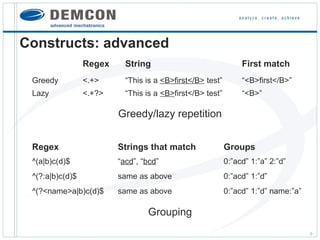
Constructs: advanced
Regex

String

First match

Greedy

<.+>

“This is a <B>first</B> test”

“<B>first</B>”

Lazy

<.+?>

“This is a <B>first</B> test”

“<B>”

Greedy/lazy repetition
Regex

Strings that match

Groups

^(a|b)c(d)$

“acd”, “bcd”

0:”acd” 1:”a” 2:”d”

^(?:a|b)c(d)$

same as above

0:”acd” 1:”d”

^(?<name>a|b)c(d)$

same as above

0:”acd” 1:”d” name:”a”

Grouping
9
Constructs: advanced
Regex

Strings that match

Strings that don’t match

^([a-c])x1x1

“axaxa”, “bxbxbyyyy”

“axaxb”, “bxaxc”

<(b)><(i)>.*?</2></1>

“<b><i>bla</i></b>”

“<b><i>bla</b></i>”

Backreferences: inside regex
Regex

Strings that match Replace pattern Result strings

^(var)(1|2)$

“var1”, “var2”

1iable

“variable”

^(a|b)c(d|e)

“acd”, “bcd”

2XXX1

“dXXXa”, “dXXXb”

Backreferences: find and replace
10
Constructs: advanced
Regex

Strings that match

Strings that don’t match

([a-b](?=x))

“blaax”, “bxa”

“ab”, “bacx”

((?<=x)[a-b])

“yyxa”, “bxb”

“ab”, “aax”

([a-b](?!x))

“bla”, “a”, “bxa”

“bxc”, “ax”

((?<!x)[a-b])

“ral”, “dbx”, “bxa”

“xa”, “lxb”

Look ahead/behind

11
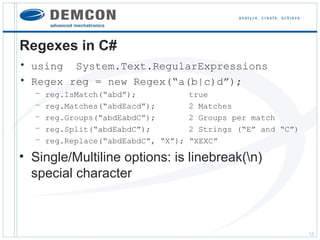
Regexes in C#
• using System.Text.RegularExpressions
• Regex reg = new Regex(“a(b|c)d”);
–
–
–
–
–

reg.IsMatch(“abd”);
reg.Matches(“abdEacd”);
reg.Groups(“abdEabdC”);
reg.Split(“abdEabdC”);
reg.Replace(“abdEabdC”, “X”);

true
2 Matches
2 Groups per match
2 Strings (“E” and “C”)
“XEXC”

• Single/Multiline options: is linebreak(n)
special character

12
Regexes in C#
• Demo

13
Regexes in editors
• Notepad++

14
Regexes in Linux
• grep, sed, find, vi

15
Pros and cons
• Advantages
–
–
–
–
–

Very flexible
Fast processing
Language independent
A lot of work in a single line of code
Often simpler than ‘substring+indexes’ approach

• Disadvantages
– Hard to read, for example ‘?’ has three meanings depending on
context
– Hard to debug: no info given when no match
– Compilation only at runtime
– Typos are very easily made (e.g. forget escape character)

16
Conclusions
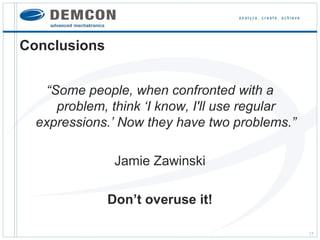
“Some people, when confronted with a
problem, think ‘I know, I'll use regular
expressions.’ Now they have two problems.”
Jamie Zawinski
Don’t overuse it!
17
Conclusions
•
•
•
•

Very handy tool for string matching and replacing
Built-in support in most programming languages
Support in/for multiple applications
More info
– http://www.regular-expressions.info/
– http://msdn.microsoft.com/en-us/library/az24scfc
%28v=vs.110%29.aspx

• Fun
– http://regex.alf.nu/
– http://www.i-programmer.info/news/144-graphics-and-games/5450can-you-do-the-regular-expression-crossword.html
18

Regular Expressions

  • 1.
    Regular Expressions 21 Januari2014 Sido Grond Exception Twente 1
  • 2.
  • 3.
    Introduction • Regular Expression(RE or regex) is a text string that describes a search pattern • Some similarity to wildcards (e.g. *.txt) • Platform/language independent but some minor differences among them • Available in a.o. C#, Perl, Python, Java, Javascript, Visual Studio, Notepad++, Linux command line tools 3
  • 4.
    Applications • Syntax highlighting •Find and replace – Visual Studio (as usual: different syntax) – Notepad++ • Text searching – Unix tools: grep, sed, find • Programming – Pattern matching, filtering, replacing 4
  • 5.
    Constructs: single character Regex Stringsthat match Strings that don’t match a “abc”, “bad” “xyz” ^a “abc” “bad”, “xyz”, “^a” a$ “cba” “abc”, “bad”, “xyz” ^[a-z]$ “a”, “x” “aa”, “A” ^[a-z0-9+-]$ “s”, “3”, “+”, “-” “12”, “Q”, “a1” ^[^a-zA-Z]$ “5”, “+” “p”, “R”, “abc”, “15” ^[a-zA-Z] “b”, “C123”, “dd” “1cba”, “ f”(note space) [^a-zA-Z] “1cba”, “ f” “b”, “dd” ^.$ “m”, “3”, “%” “13”, “%a”, “xyz” . “%”, “e4”, “xyz”, “.” “” . “.” “%”, “e4”, “xyz” 5
  • 6.
    Constructs: word groups • • • • • • dis shorthand for Digits [0-9] w is shorthand for Words [a-zA-Z0-9] s is shorthand for whiteSpace [ trn] D is shorthand for non-Digits [^0-9] W is shorthand for non-Words [^a-zA-Z0-9] S is shorthand for non-whiteSpace [^ trn] 6
  • 7.
    Constructs: multiple character Regex Stringsthat match Strings that don’t match abc “abcde”, “rabco” “bac”, “ABC”, “bcde” ^abc “abc”, “abcde” “rabco”, “ABC”, “bcde” Ed “ME3”, “E85”, “EBE5” “ACME”, “E”, “E 8” Ed+$ “ME35”, “EBE5” “E85x”, “E3EB”, “E 8” foo|bar “foot”, “bart” “ooba” a(b|c)d “Tabd”, “acdc” “abcd”, “aed”, “ad” ^foo|bar “foo1”, “Harbar” “toofoo” ^(foo|bar) “foo1”, “bart” “toofoo”, “Harbar” 7
  • 8.
    Constructs: quantifiers Regex Strings thatmatch Strings that don’t match ^a?$ “”, “a” “aa”, “aaaaa” ^a*$ “a”, “aaaaa”, “” “aaab”, “c”, “ba” ^a+$ “a”, “aaaaa” “aaab”, “c”, “ba”, “” ^a{4}$ “aaaa” “a”, “aaaaa”, “” ^a{2,6}$ “aa”, “aaa”, “aaaaaa” “a”, “”, “aaaaaaa” (e|o){2} “koe”, “booom”, “veel” “kol”, “omo”, “vele” e|(o{2}) “nest”, “booom”, “koe” “kol” (a[0-9]*){2} “aa”, “ba45a”, “a3a0” “abacus”, “a3b8a0” 8
  • 9.
    Constructs: advanced Regex String First match Greedy <.+> “Thisis a <B>first</B> test” “<B>first</B>” Lazy <.+?> “This is a <B>first</B> test” “<B>” Greedy/lazy repetition Regex Strings that match Groups ^(a|b)c(d)$ “acd”, “bcd” 0:”acd” 1:”a” 2:”d” ^(?:a|b)c(d)$ same as above 0:”acd” 1:”d” ^(?<name>a|b)c(d)$ same as above 0:”acd” 1:”d” name:”a” Grouping 9
  • 10.
    Constructs: advanced Regex Strings thatmatch Strings that don’t match ^([a-c])x1x1 “axaxa”, “bxbxbyyyy” “axaxb”, “bxaxc” <(b)><(i)>.*?</2></1> “<b><i>bla</i></b>” “<b><i>bla</b></i>” Backreferences: inside regex Regex Strings that match Replace pattern Result strings ^(var)(1|2)$ “var1”, “var2” 1iable “variable” ^(a|b)c(d|e) “acd”, “bcd” 2XXX1 “dXXXa”, “dXXXb” Backreferences: find and replace 10
  • 11.
    Constructs: advanced Regex Strings thatmatch Strings that don’t match ([a-b](?=x)) “blaax”, “bxa” “ab”, “bacx” ((?<=x)[a-b]) “yyxa”, “bxb” “ab”, “aax” ([a-b](?!x)) “bla”, “a”, “bxa” “bxc”, “ax” ((?<!x)[a-b]) “ral”, “dbx”, “bxa” “xa”, “lxb” Look ahead/behind 11
  • 12.
    Regexes in C# •using System.Text.RegularExpressions • Regex reg = new Regex(“a(b|c)d”); – – – – – reg.IsMatch(“abd”); reg.Matches(“abdEacd”); reg.Groups(“abdEabdC”); reg.Split(“abdEabdC”); reg.Replace(“abdEabdC”, “X”); true 2 Matches 2 Groups per match 2 Strings (“E” and “C”) “XEXC” • Single/Multiline options: is linebreak(n) special character 12
  • 13.
  • 14.
  • 15.
    Regexes in Linux •grep, sed, find, vi 15
  • 16.
    Pros and cons •Advantages – – – – – Very flexible Fast processing Language independent A lot of work in a single line of code Often simpler than ‘substring+indexes’ approach • Disadvantages – Hard to read, for example ‘?’ has three meanings depending on context – Hard to debug: no info given when no match – Compilation only at runtime – Typos are very easily made (e.g. forget escape character) 16
  • 17.
    Conclusions “Some people, whenconfronted with a problem, think ‘I know, I'll use regular expressions.’ Now they have two problems.” Jamie Zawinski Don’t overuse it! 17
  • 18.
    Conclusions • • • • Very handy toolfor string matching and replacing Built-in support in most programming languages Support in/for multiple applications More info – http://www.regular-expressions.info/ – http://msdn.microsoft.com/en-us/library/az24scfc %28v=vs.110%29.aspx • Fun – http://regex.alf.nu/ – http://www.i-programmer.info/news/144-graphics-and-games/5450can-you-do-the-regular-expression-crossword.html 18