
PRESENTED BY
Redis + Spark Structured Streaming:
A Perfect Combination to Scale-out Your Continuous
Applications
Dave Nielsen
Redis Labs
PRESENTED BY
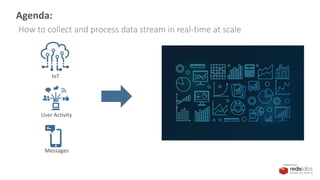
Agenda:
How to collect and process data stream in real-time at scale
IoT
User Activity
Messages
PRESENTED BY
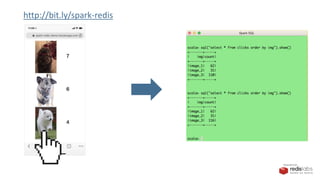
http://bit.ly/spark-redis
PRESENTED BY
http://bit.ly/spark-redis
PRESENTED BY
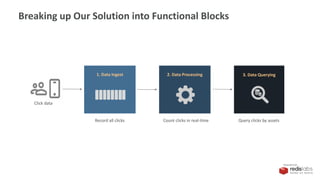
Breaking up Our Solution into Functional Blocks
Click data
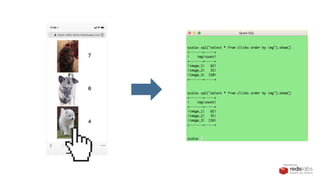
Record all clicks Count clicks in real-time Query clicks by assets
2. Data Processing1. Data Ingest 3. Data Querying
PRESENTED BY
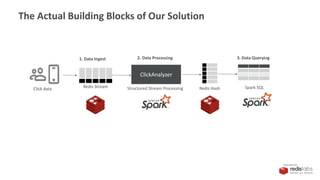
ClickAnalyzer
Redis Stream Redis Hash Spark SQLStructured Stream Processing
1. Data Ingest 2. Data Processing 3. Data Querying
The Actual Building Blocks of Our Solution
Click data
PRESENTED BY
1. Data Ingest
PRESENTED BY
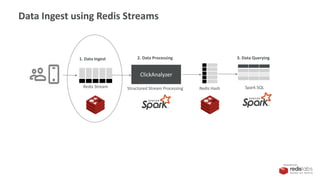
ClickAnalyzer
Redis Stream Redis Hash Spark SQLStructured Stream Processing
1. Data Ingest 2. Data Processing 3. Data Querying
Data Ingest using Redis Streams
PRESENTED BY
What is Redis Streams?
PRESENTED BY
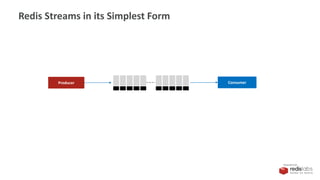
Redis Streams in its Simplest Form
ConsumerProducer
PRESENTED BY
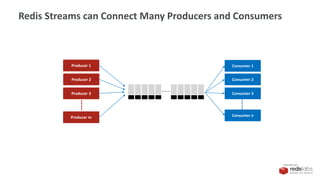
Redis Streams can Connect Many Producers and Consumers
Producer 2
Producer m
Producer 1
Producer 3
Consumer 1
Consumer n
Consumer 2
Consumer 3
PRESENTED BY
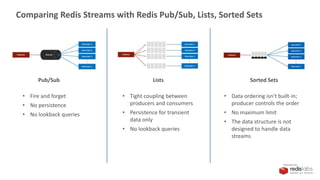
Comparing Redis Streams with Redis Pub/Sub, Lists, Sorted Sets
Pub/Sub
• Fire and forget
• No persistence
• No lookback queries
Lists
• Tight coupling between
producers and consumers
• Persistence for transient
data only
• No lookback queries
Sorted Sets
• Data ordering isn’t built-in;
producer controls the order
• No maximum limit
• The data structure is not
designed to handle data
streams
PRESENTED BY
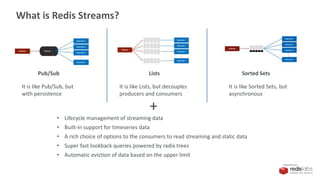
What is Redis Streams?
Pub/Sub Lists Sorted Sets
It is like Pub/Sub, but
with persistence
It is like Lists, but decouples
producers and consumers
It is like Sorted Sets, but
asynchronous
+
• Lifecycle management of streaming data
• Built-in support for timeseries data
• A rich choice of options to the consumers to read streaming and static data
• Super fast lookback queries powered by radix trees
• Automatic eviction of data based on the upper limit
PRESENTED BY
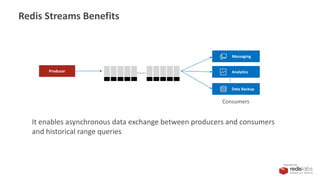
Redis Streams Benefits
Analytics
Data Backup
Consumers
Producer
Messaging
It enables asynchronous data exchange between producers and consumers
and historical range queries
PRESENTED BY
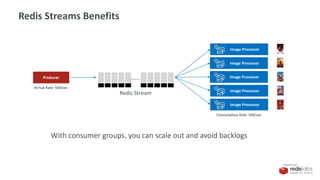
Redis Streams Benefits
Producer
Image Processor
Arrival Rate: 500/sec
Consumption Rate: 500/sec
Image Processor
Image Processor
Image Processor
Image Processor
Redis Stream
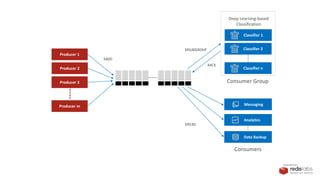
With consumer groups, you can scale out and avoid backlogs
PRESENTED BY
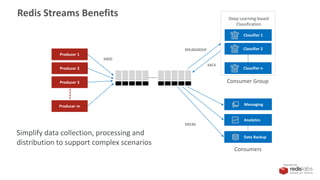
Classifier 1
Classifier 2
Classifier n
Consumer Group
XREADGROUP
XREAD
Consumers
Producer 2
Producer m
Producer 1
Producer 3
XADD
XACK
Deep Learning-based
Classification
Analytics
Data Backup
Messaging
Redis Streams Benefits
Simplify data collection, processing and
distribution to support complex scenarios
PRESENTED BY
Classifier 1
Classifier 2
Classifier n
Consumer Group
XREADGROUP
XREAD
Consumers
Producer 2
Producer m
Producer 1
Producer 3
XADD
XACK
Deep Learning-based
Classification
Analytics
Data Backup
Messaging
PRESENTED BY
Our Ingest Solution
Redis Stream
1. Data Ingest
Command
xadd clickstream * img [image_id]
Sample data
127.0.0.1:6379> xrange clickstream - +
1) 1) "1553536458910-0"
2) 1) ”image_1"
2) "1"
2) 1) "1553536469080-0"
2) 1) ”image_3"
2) "1"
3) 1) "1553536489620-0"
2) 1) ”image_3"
2) "1”
.
.
.
.
PRESENTED BY
2. Data Processing
PRESENTED BY
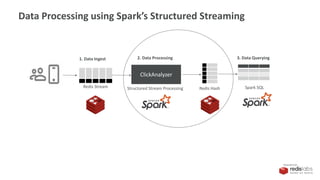
ClickAnalyzer
Redis Stream Redis Hash Spark SQLStructured Stream Processing
1. Data Ingest 2. Data Processing 3. Data Querying
Data Processing using Spark’s Structured Streaming
PRESENTED BY
What is Structured Streaming?
PRESENTED BY
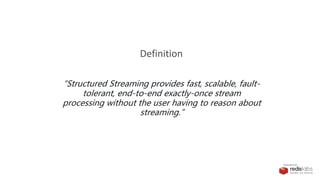
“Structured Streaming provides fast, scalable, fault-
tolerant, end-to-end exactly-once stream
processing without the user having to reason about
streaming.”
Definition
PRESENTED BY
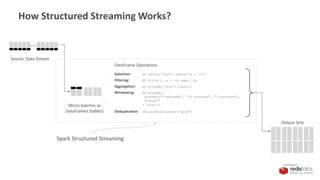
How Structured Streaming Works?
Micro-batches as
DataFrames (tables)
Source: Data Stream
DataFrame Operations
Selection: df.select(“xyz”).where(“a > 10”)
Filtering: df.filter(_.a > 10).map(_.b)
Aggregation: df.groupBy(”xyz").count()
Windowing: df.groupBy(
window($"timestamp", "10 minutes", "5 minutes"),
$"word"”
).count()
Deduplication: df.dropDuplicates("guid")
Output Sink
Spark Structured Streaming
PRESENTED BY
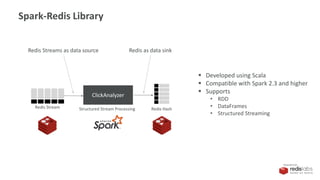
ClickAnalyzer
Redis Stream Redis HashStructured Stream Processing
Redis Streams as data source
Spark-Redis Library
Redis as data sink
 Developed using Scala
 Compatible with Spark 2.3 and higher
 Supports
• RDD
• DataFrames
• Structured Streaming
PRESENTED BY
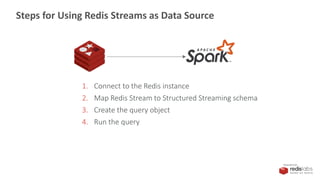
1. Connect to the Redis instance
2. Map Redis Stream to Structured Streaming schema
3. Create the query object
4. Run the query
Steps for Using Redis Streams as Data Source
PRESENTED BY
Redis Streams as Data Source
1. Connect to the Redis instance
val spark = SparkSession.builder()
.appName("redis-df")
.master("local[*]")
.config("spark.redis.host", "localhost")
.config("spark.redis.port", "6379")
.getOrCreate()
val clickstream = spark.readStream
.format("redis")
.option("stream.keys","clickstream")
.schema(StructType(Array(
StructField("img", StringType)
)))
.load()
val queryByImg = clickstream.groupBy("img").count
PRESENTED BY
Redis Streams as Data Source
2. Map Redis Stream to Structured Streaming schema
val spark = SparkSession.builder()
.appName("redis-df")
.master("local[*]")
.config("spark.redis.host", "localhost")
.config("spark.redis.port", "6379")
.getOrCreate()
val clickstream = spark.readStream
.format("redis")
.option("stream.keys","clickstream")
.schema(StructType(Array(
StructField("img", StringType)
)))
.load()
val queryByImg = clickstream.groupBy("img").count
xadd clickstream * img [image_id]
PRESENTED BY
Redis Streams as Data Source
3. Create the query object
val spark = SparkSession.builder()
.appName("redis-df")
.master("local[*]")
.config("spark.redis.host", "localhost")
.config("spark.redis.port", "6379")
.getOrCreate()
val clickstream = spark.readStream
.format("redis")
.option("stream.keys","clickstream")
.schema(StructType(Array(
StructField("img", StringType)
)))
.load()
val queryByImg = clickstream.groupBy("img").count
PRESENTED BY
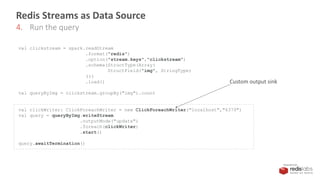
Redis Streams as Data Source
4. Run the query
val clickstream = spark.readStream
.format("redis")
.option("stream.keys","clickstream")
.schema(StructType(Array(
StructField("img", StringType)
)))
.load()
val queryByImg = clickstream.groupBy("img").count
val clickWriter: ClickForeachWriter = new ClickForeachWriter("localhost","6379")
val query = queryByImg.writeStream
.outputMode("update")
.foreach(clickWriter)
.start()
query.awaitTermination()
Custom output sink
PRESENTED BY
How to Setup Redis as Output Sink
override def process(record: Row) = {
var img = record.getString(0);
var count = record.getLong(1);
if(jedis == null){
connect()
}
jedis.hset("clicks:"+img, "img", img)
jedis.hset("clicks:"+img, "count", count.toString)
}
Create a custom class extending ForeachWriter and override the method, process()
Save as Hash with structure
clicks:[image]
img [image]
count [count]
Example
clicks:image_1001
img image_1001
count 1029
clicks:image_1002
img image_1002
count 392
.
.
.
img count
image_1001 1029
image_1002 392
. .
. .
Table: Clicks
PRESENTED BY
3. Data Querying
PRESENTED BY
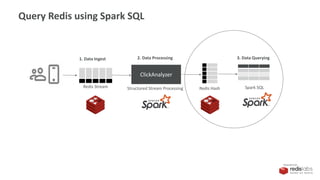
ClickAnalyzer
Redis Stream Redis Hash Spark SQLStructured Stream Processing
1. Data Ingest 2. Data Processing 3. Data Querying
Query Redis using Spark SQL
PRESENTED BY
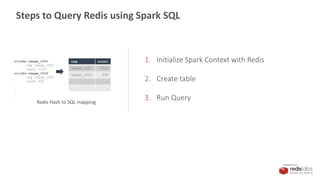
1. Initialize Spark Context with Redis
2. Create table
3. Run Query
Steps to Query Redis using Spark SQL
clicks:image_1001
img image_1001
count 1029
clicks:image_1002
img image_1002
count 392
.
.
.
.
img count
image_1001 1029
image_1002 392
. .
. .
Redis Hash to SQL mapping
PRESENTED BY
1. Initialize
scala> import org.apache.spark.sql.SparkSession
scala> val spark = SparkSession.builder().appName("redis-
test").master("local[*]").config("spark.redis.host","localhost").config("spark.redis.port","6379").getOrCreate()
scala> val sc = spark.sparkContext
scala> import spark.sql
scala> import spark.implicits._
2. Create table
scala> sql("CREATE TABLE IF NOT EXISTS clicks(img STRING, count INT) USING org.apache.spark.sql.redis OPTIONS (table
'clicks’)”)
How to Query Redis using Spark SQL
PRESENTED BY
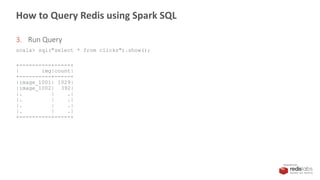
3. Run Query
scala> sql("select * from clicks").show();
+----------+-----+
| img|count|
+----------+-----+
|image_1001| 1029|
|image_1002| 392|
|. | .|
|. | .|
|. | .|
|. | .|
+----------+-----+
How to Query Redis using Spark SQL
PRESENTED BY
Code
Email dave@redislabs.com for this slide deck
Or download from https://github.com/redislabsdemo/
PRESENTED BY
Recap
PRESENTED BY
PRESENTED BY
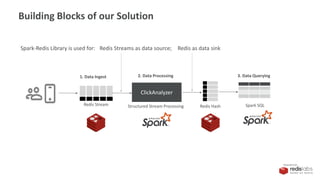
ClickAnalyzer
Redis Stream Redis Hash Spark SQLStructured Stream Processing
1. Data Ingest 2. Data Processing 3. Data Querying
Building Blocks of our Solution
Redis Streams as data source; Redis as data sinkSpark-Redis Library is used for:
PRESENTED BY
Questions
?
?
?
?
?
?
?
?
?
?
?
Thank you!
dave@redislabs.com
@davenielsen
Dave Nielsen

Redis Streams plus Spark Structured Streaming

  • 1.
    PRESENTED BY Redis +Spark Structured Streaming: A Perfect Combination to Scale-out Your Continuous Applications Dave Nielsen Redis Labs
  • 2.
    PRESENTED BY Agenda: How tocollect and process data stream in real-time at scale IoT User Activity Messages
  • 3.
  • 4.
  • 5.
    PRESENTED BY Breaking upOur Solution into Functional Blocks Click data Record all clicks Count clicks in real-time Query clicks by assets 2. Data Processing1. Data Ingest 3. Data Querying
  • 6.
    PRESENTED BY ClickAnalyzer Redis StreamRedis Hash Spark SQLStructured Stream Processing 1. Data Ingest 2. Data Processing 3. Data Querying The Actual Building Blocks of Our Solution Click data
  • 7.
  • 8.
    PRESENTED BY ClickAnalyzer Redis StreamRedis Hash Spark SQLStructured Stream Processing 1. Data Ingest 2. Data Processing 3. Data Querying Data Ingest using Redis Streams
  • 9.
    PRESENTED BY What isRedis Streams?
  • 10.
    PRESENTED BY Redis Streamsin its Simplest Form ConsumerProducer
  • 11.
    PRESENTED BY Redis Streamscan Connect Many Producers and Consumers Producer 2 Producer m Producer 1 Producer 3 Consumer 1 Consumer n Consumer 2 Consumer 3
  • 12.
    PRESENTED BY Comparing RedisStreams with Redis Pub/Sub, Lists, Sorted Sets Pub/Sub • Fire and forget • No persistence • No lookback queries Lists • Tight coupling between producers and consumers • Persistence for transient data only • No lookback queries Sorted Sets • Data ordering isn’t built-in; producer controls the order • No maximum limit • The data structure is not designed to handle data streams
  • 13.
    PRESENTED BY What isRedis Streams? Pub/Sub Lists Sorted Sets It is like Pub/Sub, but with persistence It is like Lists, but decouples producers and consumers It is like Sorted Sets, but asynchronous + • Lifecycle management of streaming data • Built-in support for timeseries data • A rich choice of options to the consumers to read streaming and static data • Super fast lookback queries powered by radix trees • Automatic eviction of data based on the upper limit
  • 14.
    PRESENTED BY Redis StreamsBenefits Analytics Data Backup Consumers Producer Messaging It enables asynchronous data exchange between producers and consumers and historical range queries
  • 15.
    PRESENTED BY Redis StreamsBenefits Producer Image Processor Arrival Rate: 500/sec Consumption Rate: 500/sec Image Processor Image Processor Image Processor Image Processor Redis Stream With consumer groups, you can scale out and avoid backlogs
  • 16.
    PRESENTED BY Classifier 1 Classifier2 Classifier n Consumer Group XREADGROUP XREAD Consumers Producer 2 Producer m Producer 1 Producer 3 XADD XACK Deep Learning-based Classification Analytics Data Backup Messaging Redis Streams Benefits Simplify data collection, processing and distribution to support complex scenarios
  • 17.
    PRESENTED BY Classifier 1 Classifier2 Classifier n Consumer Group XREADGROUP XREAD Consumers Producer 2 Producer m Producer 1 Producer 3 XADD XACK Deep Learning-based Classification Analytics Data Backup Messaging
  • 18.
    PRESENTED BY Our IngestSolution Redis Stream 1. Data Ingest Command xadd clickstream * img [image_id] Sample data 127.0.0.1:6379> xrange clickstream - + 1) 1) "1553536458910-0" 2) 1) ”image_1" 2) "1" 2) 1) "1553536469080-0" 2) 1) ”image_3" 2) "1" 3) 1) "1553536489620-0" 2) 1) ”image_3" 2) "1” . . . .
  • 19.
  • 20.
    PRESENTED BY ClickAnalyzer Redis StreamRedis Hash Spark SQLStructured Stream Processing 1. Data Ingest 2. Data Processing 3. Data Querying Data Processing using Spark’s Structured Streaming
  • 21.
    PRESENTED BY What isStructured Streaming?
  • 22.
    PRESENTED BY “Structured Streamingprovides fast, scalable, fault- tolerant, end-to-end exactly-once stream processing without the user having to reason about streaming.” Definition
  • 23.
    PRESENTED BY How StructuredStreaming Works? Micro-batches as DataFrames (tables) Source: Data Stream DataFrame Operations Selection: df.select(“xyz”).where(“a > 10”) Filtering: df.filter(_.a > 10).map(_.b) Aggregation: df.groupBy(”xyz").count() Windowing: df.groupBy( window($"timestamp", "10 minutes", "5 minutes"), $"word"” ).count() Deduplication: df.dropDuplicates("guid") Output Sink Spark Structured Streaming
  • 24.
    PRESENTED BY ClickAnalyzer Redis StreamRedis HashStructured Stream Processing Redis Streams as data source Spark-Redis Library Redis as data sink  Developed using Scala  Compatible with Spark 2.3 and higher  Supports • RDD • DataFrames • Structured Streaming
  • 25.
    PRESENTED BY 1. Connectto the Redis instance 2. Map Redis Stream to Structured Streaming schema 3. Create the query object 4. Run the query Steps for Using Redis Streams as Data Source
  • 26.
    PRESENTED BY Redis Streamsas Data Source 1. Connect to the Redis instance val spark = SparkSession.builder() .appName("redis-df") .master("local[*]") .config("spark.redis.host", "localhost") .config("spark.redis.port", "6379") .getOrCreate() val clickstream = spark.readStream .format("redis") .option("stream.keys","clickstream") .schema(StructType(Array( StructField("img", StringType) ))) .load() val queryByImg = clickstream.groupBy("img").count
  • 27.
    PRESENTED BY Redis Streamsas Data Source 2. Map Redis Stream to Structured Streaming schema val spark = SparkSession.builder() .appName("redis-df") .master("local[*]") .config("spark.redis.host", "localhost") .config("spark.redis.port", "6379") .getOrCreate() val clickstream = spark.readStream .format("redis") .option("stream.keys","clickstream") .schema(StructType(Array( StructField("img", StringType) ))) .load() val queryByImg = clickstream.groupBy("img").count xadd clickstream * img [image_id]
  • 28.
    PRESENTED BY Redis Streamsas Data Source 3. Create the query object val spark = SparkSession.builder() .appName("redis-df") .master("local[*]") .config("spark.redis.host", "localhost") .config("spark.redis.port", "6379") .getOrCreate() val clickstream = spark.readStream .format("redis") .option("stream.keys","clickstream") .schema(StructType(Array( StructField("img", StringType) ))) .load() val queryByImg = clickstream.groupBy("img").count
  • 29.
    PRESENTED BY Redis Streamsas Data Source 4. Run the query val clickstream = spark.readStream .format("redis") .option("stream.keys","clickstream") .schema(StructType(Array( StructField("img", StringType) ))) .load() val queryByImg = clickstream.groupBy("img").count val clickWriter: ClickForeachWriter = new ClickForeachWriter("localhost","6379") val query = queryByImg.writeStream .outputMode("update") .foreach(clickWriter) .start() query.awaitTermination() Custom output sink
  • 30.
    PRESENTED BY How toSetup Redis as Output Sink override def process(record: Row) = { var img = record.getString(0); var count = record.getLong(1); if(jedis == null){ connect() } jedis.hset("clicks:"+img, "img", img) jedis.hset("clicks:"+img, "count", count.toString) } Create a custom class extending ForeachWriter and override the method, process() Save as Hash with structure clicks:[image] img [image] count [count] Example clicks:image_1001 img image_1001 count 1029 clicks:image_1002 img image_1002 count 392 . . . img count image_1001 1029 image_1002 392 . . . . Table: Clicks
  • 31.
  • 32.
    PRESENTED BY ClickAnalyzer Redis StreamRedis Hash Spark SQLStructured Stream Processing 1. Data Ingest 2. Data Processing 3. Data Querying Query Redis using Spark SQL
  • 33.
    PRESENTED BY 1. InitializeSpark Context with Redis 2. Create table 3. Run Query Steps to Query Redis using Spark SQL clicks:image_1001 img image_1001 count 1029 clicks:image_1002 img image_1002 count 392 . . . . img count image_1001 1029 image_1002 392 . . . . Redis Hash to SQL mapping
  • 34.
    PRESENTED BY 1. Initialize scala>import org.apache.spark.sql.SparkSession scala> val spark = SparkSession.builder().appName("redis- test").master("local[*]").config("spark.redis.host","localhost").config("spark.redis.port","6379").getOrCreate() scala> val sc = spark.sparkContext scala> import spark.sql scala> import spark.implicits._ 2. Create table scala> sql("CREATE TABLE IF NOT EXISTS clicks(img STRING, count INT) USING org.apache.spark.sql.redis OPTIONS (table 'clicks’)”) How to Query Redis using Spark SQL
  • 35.
    PRESENTED BY 3. RunQuery scala> sql("select * from clicks").show(); +----------+-----+ | img|count| +----------+-----+ |image_1001| 1029| |image_1002| 392| |. | .| |. | .| |. | .| |. | .| +----------+-----+ How to Query Redis using Spark SQL
  • 36.
    PRESENTED BY Code Email dave@redislabs.comfor this slide deck Or download from https://github.com/redislabsdemo/
  • 37.
  • 38.
  • 39.
    PRESENTED BY ClickAnalyzer Redis StreamRedis Hash Spark SQLStructured Stream Processing 1. Data Ingest 2. Data Processing 3. Data Querying Building Blocks of our Solution Redis Streams as data source; Redis as data sinkSpark-Redis Library is used for:
  • 40.
  • 41.

Editor's Notes

  • #3 Agendaa: Takeaway: Use Redis Streams + Spark-Redis + Structured Streaming with Microbatches in Spark to collect and process data stream in real-time at scale
  • #4 Call the spark engine with spark-submit in scala directory: spark-submit --class com.redislabs.streaming.ClickAnalysis --jars ./lib/spark-redis-2.4.0-SNAPSHOT-jar-with-dependencies.jar --master local[*] ./target/scala-2.11/redisexample_2.11-1.0.jar 4 datastructures clickstream – redis stream data structure to collect all clicks $ XLEN clickstream Spark 2.3 introduced Structured streaming that does microbatches – collect from streams, such as Redis Streams or Kafka A few messages every few milliseconds. Then Spark runs queries to aggregate and collecting and storing somewhere, such as Redis Trick – Any hash data structure that starts with clicks: belongs to a table called Clicks $ HGETALL clicks:image_1 Fields called image and count are columns in the table Configure Spark SQL so it knows that any field that starts with clicks belongs to a table called Clicks $ HMSET clicks:image_test img test count 10000
  • #5 Summarize demo
  • #6 Read then go to next slide
  • #7 What are the functional blocks: Data ingest-collect all clicks without losing any – Redis Cloud w/Streams  free up to 30 MB Spark-Redis into Spark Process data in real-time – Spark w/Structured Streaming for Microbatches Data Querying – some kind of custom chart, leaderboard, or Grafana  Using Spark SQL with Redis Cloud again
  • #11 Cover at high level Connects producers with consumers. May have many of either
  • #12 Redis Streams supports both asynchronous communication and look-back queries
  • #13 How many have used pubsub, list or sorted sets Pubsub – no lookback queries. All asynchrous List – one list cannot support many consumers. Sorted Sets – solves problem  don’t need copy for each consumer, but have to always poll for data. Can use blocking call, but transforms into a list. For streaming you have to poll.
  • #14 Redis Streams manages the life cycle of the streaming data effectively (Example: Consumer groups and their commands XREADGROUP, XACK and XCLAIM ensure every data object is consumed properly) It offers consumers a rich choice of options from to consume the data – they can read from where they left off, or only the new data, or from the beginning The lookback queries are super fast as they are powered by the radix trees Kafka or Kenisis have a timeframe limit. Redis has no timeframe, you can cap by maxlength / size
  • #15 If you have different types of consumers …
  • #16 Ex: toll booth – can back up – but we can match rate of arrival with rate of departure
  • #18 So this is our stream example
  • #19 clickstream is the stream key Lets redis create the timestamp img is the field So that’s how data ingest works. Any questions?
  • #20 Stop and run query to see latest count scala> sql("select * from clicks").show(); $ DEL clicks:image_test
  • #23 Marketing definition from databricks
  • #24 With Structured Streaming, Spark pulls data in micro-batches (like a table) Every microbatch has rows and each row is like a dataframe so you can run dataframe operations on these microbatches Windowing – can aggregate for last 30 mins Can also dedupe Go to databricks website to see more I’m doing aggregations in my demo Used to only do batches Now in 2.4 microbatches- batches in miliseconds Now in experimental mode – is continuous processing, get dataframes in microsections Finally can define an Output sink, Or output to console 3 modes: dump everything, append only, or update sync,
  • #25 Redis Labs developed and supports this open source library Data Source and Data Sync Redis streams Dump data into Redis Query Redis from Spark All written in Scala
  • #26 How do you use Redis as a Datasource? There are 4 steps Connect to Redis db Map Redis Streams keyvaalue pairs to microbatch Query object Run the query in a loop
  • #27 Connect to Redis Cloud Move to next sldie
  • #28 2. Interpreting the stream data Clickstream is key name Img is field name
  • #29 3. Defining the query Group by img Count
  • #30 4. Dumping into a ForEachWriter - Custom – see next slide -
  • #32 Stop and run query to see latest count scala> sql("select * from clicks").show();
  • #33 Any questions? How do you query redis? Can connect ODBC drivers to Spark and can query Redis?
  • #34 How to connect to Redis How to map to Redis? Run Query
  • #35 1. 2. Create a table (do it only once). Tell it to use class name org.apache.spark.sql.redis Map to table ‘clicks’
  • #36 3. Run query