INTRODUCING

NEW web-based electronic data capture software
   for data management of multi-center
    clinical research trials, developed by
About BioStat
            International…
• A proven Contract
  Research Organization
  (CRO)
• Provides a full range of
  product development
  services to device and
  pharmaceutical companies
• Serves major clients such
  as device giant Roche       BSI’s headquarters in Tampa
  Diagnostics and women’s
  health leader Hologic
BSI’s culture…
• Respect and support to our clients
• Embracing change and innovation
• Taking clients’ priorities as our own
• Aiming for affordability and environmental
  responsibility
• Knowing that every circumstance creates its own
  opportunity
Our niche…
“Most clinical trial software is geared towards
well-funded industry research. BSI recognized a
void in the market for a well-managed and
affordable web-based data management solution.
We developed software to fill that niche.”
                                 -- Maureen Lyden, M.S.
                                      President and CEO
                                BioStat International, Inc.
We wanted a name for our new
 software that reflected our
     company’s culture.
We were inspired by
the story of Red Cap 42.
   Hence, our name.
   • “Red Cap 42” was a baggage handler at
     Grand Central Station during World
     War II.
   • He shared a philosophy of service in the
     way he lived and treated others.
   • We believe his philosophy was very
     much like our own.
         Look up…….seek wisdom.
         Look in……..grow as a person.
         Look out……help others.
Why will you like rED Cap?
  You’ll work with an experienced CRO to
    design your eCRF, manage your hosting, and
provide statistical expertise to your data management.

You’ll get up to speed quickly with rED Cap.
   This system is easy and intuitive to use, with
     flexibility, adaptability and sophisticated
               data checking capability.
rED Cap is not just for
       regulated clinical trials…
           it’s also ideal for
•   Observational studies
•   Pre-clinical
•   R&D
•   Post-Marketing/Marketing
•   Registries
•   Phase I
•   Pilot/Feasibility
rED Cap is easy to use…

• Works with iPad, laptops, & supported desktop
  browsers (Explorer, Firefox, Google, Safari 5)

• Fully supports web page display & data segregation

• Includes ODM v1.3 base full-cycle clinical data
  warehouse
rED Cap offers professional
           design and training…

• eCRF design by experienced database & SAS®
  programmers

• Ongoing data review by data analysts & statisticians
  trained in protocol endpoints

• Customized training designed by experienced data
  managers & clinical monitors
rED Cap has cost-effective
  pricing…
  • Based upon hours/tasks at competitive rates

  • No license fees
AND NOW…


  rED Cap at a glance
Get Help instantly!

         • Use mouse-over tips presented
           by rED Cap.

         • See alert messages as you type.

         • If you have questions, just go to
           the Information Booth. It’s
           always visible!
Use the Contact Help Desk
           • Enjoy an on-line Help Desk
             with technical support that
             does not require logging in to
             the rED Cap study.

           • Get an immediate ticket
             number assignment.

           • Get a response within 24
             hours.
Use the Contact Help Desk


            •   Complete tech support form.
            •   Click submit.
            •   A ticket number is assigned.
            •   A confirmation email receipt
                is sent.
Get customized training and support

             • Get separate URL, user ID and
               password.
             • Select Training Station.
             • Choose a Platform.
             • Complete Review.
             • Print certificate.
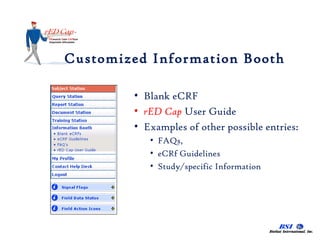
Customized Information Booth

        • Blank eCRF
        • rED Cap User Guide
        • Examples of other possible entries:
           • FAQs,
           • eCRf Guidelines
           • Study/specific Information
Standardized study reports

          At the Report Station:
          • Standard reports:
             • Subject disposition
             • Query summary
             • Outstanding SDV
          • Customized reports upon
            request
          • Flexible report format
            (HTML, PDF, Excel)
          • Print or save to PC
Upload relevant files from a study
visit
                 • Laboratory data

                 • Diagnostic data

                 • Photographs/Images

                 • Device outputs, e.g.
                   glucose meters, etc.
Enjoy user-friendly operation

          • See color or mouse-over for text.

          • Select Signal Flags to view flags,
            padlocks and Q’s.
          • Select Field Data Status to view
            Incomplete, Complete, Pending
            SDV, Frozen and Signed-Off.
Share documents by study and site
              •   Current protocol
              •   Instructions for use
              •   Guidelines
              •   Training materials
              •   Specific study forms/logs
              •   Source document templates
View or download documents

               • Select Document Station.

               • Click on ‘+’ to expand.

               • Click on icon to
                 download or save to your
                 PC.
Upload documents to share

               •   Select Document Station
               •   Click on “Upload”
               •   Browse and attach file
               •   Add a description
               •   Click here to save
               •   Add additional files to
                   existing uploads
Queries are easy!

           • Select Query Station.
           • Filter by Site, Open,
             Answered or Closed
             Queries.
           • Sort and print listing.
           • Use one click to answer
             Query directly into the
             eCRF.
Even eCRF layout is flexible...


               • Listing

               • Multiple columns per
                 row

               • Tabular
Need a paper CRF for the file?

               • Select subject station
               • Check the CRF Tool Box
               • Click on the ‘folder’ icon
               • View subject’s completed
                 CRFs
               • Click on print
How do I navigate rED Cap?

               • Stations, flags, status and
                 icons on the left
               • Study # and site/PI in
                 header
               • Click on Subject # to
                 view visits
               • Each visit tab contains all
                 the eCRFs for that visit
Ready to add a subject?
             • Select Subject Station
                Note: This listing is
                   customizable
             • Click on Add a new
               Subject.
             • Enter and Submit.
             • rED Cap will not allow you
               to enter the same I.D.
               twice!
             • Next....
…Subject Station

         • Click on your subject.
         • All the Required Visit tabs
           will appear.
         • Enter in any visit order
           desired.
         • Follow rED Cap’s prompts,
           tips and messages.
Enter an AE
        • The Common Form tab
          contains forms/logs that
          may/may not be needed.
        • Multiple forms may be
          entered for each subject.
        • Select “Adverse Events.”

        • Enter data, submit and
          click Add: Adverse Event
          to add more.
Other Features in rED Cap
• CFR 21 Part 11 compliance with audit trails and e-signature
• Double-data entry system for paper CRF or hybrid studies
• Excel data exports allowed by permission
• Sophisticated third-party access/viewing and entry
 system.
• Ability to design powerful validation checks, create
 calculations, and disable entry fields and forms according
 to protocol requirements.
Get a quote for a project in rED Cap
Do you know your data collection
        requirements?

Provide your protocol/CRF template to BSI, along
 with site and user requirements. BSI will provide
 you with a quote for eCRF design and CRO
 support.
OR,
are you planning a project but don’t
    know exactly what you really
               need?

Just contact us at BSI. Our biostatisticians and
      clinical managers will assist you in
  protocol development and data collection.
Contact BSI today

Go to www.biostatinc.com and complete a
       Request for Information form.

       Or call us!! 813-979-1619

rEDCap At A Glance

  • 1.
    INTRODUCING NEW web-based electronicdata capture software for data management of multi-center clinical research trials, developed by
  • 2.
    About BioStat International… • A proven Contract Research Organization (CRO) • Provides a full range of product development services to device and pharmaceutical companies • Serves major clients such as device giant Roche BSI’s headquarters in Tampa Diagnostics and women’s health leader Hologic
  • 3.
    BSI’s culture… • Respectand support to our clients • Embracing change and innovation • Taking clients’ priorities as our own • Aiming for affordability and environmental responsibility • Knowing that every circumstance creates its own opportunity
  • 4.
    Our niche… “Most clinicaltrial software is geared towards well-funded industry research. BSI recognized a void in the market for a well-managed and affordable web-based data management solution. We developed software to fill that niche.” -- Maureen Lyden, M.S. President and CEO BioStat International, Inc.
  • 5.
    We wanted aname for our new software that reflected our company’s culture.
  • 6.
    We were inspiredby the story of Red Cap 42. Hence, our name. • “Red Cap 42” was a baggage handler at Grand Central Station during World War II. • He shared a philosophy of service in the way he lived and treated others. • We believe his philosophy was very much like our own. Look up…….seek wisdom. Look in……..grow as a person. Look out……help others.
  • 8.
    Why will youlike rED Cap? You’ll work with an experienced CRO to design your eCRF, manage your hosting, and provide statistical expertise to your data management. You’ll get up to speed quickly with rED Cap. This system is easy and intuitive to use, with flexibility, adaptability and sophisticated data checking capability.
  • 9.
    rED Cap isnot just for regulated clinical trials… it’s also ideal for • Observational studies • Pre-clinical • R&D • Post-Marketing/Marketing • Registries • Phase I • Pilot/Feasibility
  • 10.
    rED Cap iseasy to use… • Works with iPad, laptops, & supported desktop browsers (Explorer, Firefox, Google, Safari 5) • Fully supports web page display & data segregation • Includes ODM v1.3 base full-cycle clinical data warehouse
  • 11.
    rED Cap offersprofessional design and training… • eCRF design by experienced database & SAS® programmers • Ongoing data review by data analysts & statisticians trained in protocol endpoints • Customized training designed by experienced data managers & clinical monitors
  • 12.
    rED Cap hascost-effective pricing… • Based upon hours/tasks at competitive rates • No license fees
  • 13.
    AND NOW… rED Cap at a glance
  • 14.
    Get Help instantly! • Use mouse-over tips presented by rED Cap. • See alert messages as you type. • If you have questions, just go to the Information Booth. It’s always visible!
  • 15.
    Use the ContactHelp Desk • Enjoy an on-line Help Desk with technical support that does not require logging in to the rED Cap study. • Get an immediate ticket number assignment. • Get a response within 24 hours.
  • 16.
    Use the ContactHelp Desk • Complete tech support form. • Click submit. • A ticket number is assigned. • A confirmation email receipt is sent.
  • 17.
    Get customized trainingand support • Get separate URL, user ID and password. • Select Training Station. • Choose a Platform. • Complete Review. • Print certificate.
  • 18.
    Customized Information Booth • Blank eCRF • rED Cap User Guide • Examples of other possible entries: • FAQs, • eCRf Guidelines • Study/specific Information
  • 19.
    Standardized study reports At the Report Station: • Standard reports: • Subject disposition • Query summary • Outstanding SDV • Customized reports upon request • Flexible report format (HTML, PDF, Excel) • Print or save to PC
  • 20.
    Upload relevant filesfrom a study visit • Laboratory data • Diagnostic data • Photographs/Images • Device outputs, e.g. glucose meters, etc.
  • 21.
    Enjoy user-friendly operation • See color or mouse-over for text. • Select Signal Flags to view flags, padlocks and Q’s. • Select Field Data Status to view Incomplete, Complete, Pending SDV, Frozen and Signed-Off.
  • 22.
    Share documents bystudy and site • Current protocol • Instructions for use • Guidelines • Training materials • Specific study forms/logs • Source document templates
  • 23.
    View or downloaddocuments • Select Document Station. • Click on ‘+’ to expand. • Click on icon to download or save to your PC.
  • 24.
    Upload documents toshare • Select Document Station • Click on “Upload” • Browse and attach file • Add a description • Click here to save • Add additional files to existing uploads
  • 25.
    Queries are easy! • Select Query Station. • Filter by Site, Open, Answered or Closed Queries. • Sort and print listing. • Use one click to answer Query directly into the eCRF.
  • 26.
    Even eCRF layoutis flexible... • Listing • Multiple columns per row • Tabular
  • 27.
    Need a paperCRF for the file? • Select subject station • Check the CRF Tool Box • Click on the ‘folder’ icon • View subject’s completed CRFs • Click on print
  • 28.
    How do Inavigate rED Cap? • Stations, flags, status and icons on the left • Study # and site/PI in header • Click on Subject # to view visits • Each visit tab contains all the eCRFs for that visit
  • 29.
    Ready to adda subject? • Select Subject Station Note: This listing is customizable • Click on Add a new Subject. • Enter and Submit. • rED Cap will not allow you to enter the same I.D. twice! • Next....
  • 30.
    …Subject Station • Click on your subject. • All the Required Visit tabs will appear. • Enter in any visit order desired. • Follow rED Cap’s prompts, tips and messages.
  • 31.
    Enter an AE • The Common Form tab contains forms/logs that may/may not be needed. • Multiple forms may be entered for each subject. • Select “Adverse Events.” • Enter data, submit and click Add: Adverse Event to add more.
  • 32.
    Other Features inrED Cap • CFR 21 Part 11 compliance with audit trails and e-signature • Double-data entry system for paper CRF or hybrid studies • Excel data exports allowed by permission • Sophisticated third-party access/viewing and entry system. • Ability to design powerful validation checks, create calculations, and disable entry fields and forms according to protocol requirements.
  • 33.
    Get a quotefor a project in rED Cap Do you know your data collection requirements? Provide your protocol/CRF template to BSI, along with site and user requirements. BSI will provide you with a quote for eCRF design and CRO support.
  • 34.
    OR, are you planninga project but don’t know exactly what you really need? Just contact us at BSI. Our biostatisticians and clinical managers will assist you in protocol development and data collection.
  • 35.
    Contact BSI today Goto www.biostatinc.com and complete a Request for Information form. Or call us!! 813-979-1619