MANAGEMENT AND
UPDATING OF 201
FILES
CLARISSA P. JAMIG
What’s an employee’s “201” file?
 The term “201” files originated from the Army.
Form 201 in the US Army, Which is a set of documents
containing a person’s comprehensive profile, including all
previous and new information necessary about the
individual.
 The modern organizations, have “adopted” military terms
such as rank and file, a chain of command, division, and
many others.
What is a 201 file Philippines?
 An employee 201 file, usually contained records/data
pertaining to the employee’s personal information,
financial information, employment contract, duties, job
grade, performance, and employment history for future
employment requirements.
What does an HR 201 personnel file include?
This sample covers the 3 main categories of the
employment life cycle are;
 The hiring process
 The employment period
 The separation process
Here’s a sample check-list:
 Employee information/Application form
 Employment contracts
 Certificates from previous employers
 Comprehensive resume or curriculum vitae
 Result of pre-employment examinations/Results of the hiring process
 Statutory numbers e.g. SSS number
 Tax identification number.
 Education/Transcripts/Diplomas
 BIR update of taxpayer’s information (Those with the previous employer (If an employee
was employed within the calendar year prior to date hired)
 Other credentials (ATM Payroll Accounts, acknowledgements)
 Ledger of leave credits (Vacation and Sick Leaves)
 Birth Certificates of qualified dependents
 Withholding tax certificates (BIR Form 2316)
 Training History/Records
 Written reprimands/Incident reports
 Resignation letter/Termination letter
 Acknowledgement of receipt of quitclaim, withholding tax certificates, etc.)
 Clearance forms
Managing the 201 Files:
 It can either be hard-copy documents that are filed in cabinets or folders or
soft-copy documents
The latter part of the process is usually fulfilled through an in-
house automated HRIS (Human Resource Information System.
 As an administrative in nature, it is the human resources administration’s role
and responsibility to manage all documents pertaining to an employee’s work
history within the organization.
The Key Roles of 201 File Management:
 To help keep track of the employee records
 To provide post-employment information and employees certifications
 The ability to support or document defenses e.g. leagal cases filed by an
employee at the Department of Labor and Employment
Managing the 201 Files:
 HR Teams handle a lot of 201 files since all employees go through
them. It could take days to gather reports and manage those
files. Handling these documents can be very draining because it’s
piling up every single day.
 Keeping accurate data on any record changes and staff movement
in/out of the organization helps understand demographics and
statistics of the manpower structure which draws an accurate
picture and value of the overall organizations’ human resources.
The said updating of 201 Files aims to:
 Upgrade the Maturity Level of the Division Offices Human
Resource Management on its competences, systems, and practices.
Managing 201 Files:
• One location vs multiple locations
• Physical storage space
• Streamlining access
• Length of time needed
Digitization – factors to consider
A well designed filing system:
• Must make filling less difficult, tedious, and unattractive
• Must offer quick and easy filing and retrieval information
• Must ensure integrity and continuity of record keeping despite changes in
office personnel
• Must have uniform practices
• Must allow for easy identification and purging of inactive records according
to RM policies
• Should provide clear and simple filing categories
• Should be expandable and flexible enough to meet everyone’s needs
Structuring and
Organizing of 201
files:
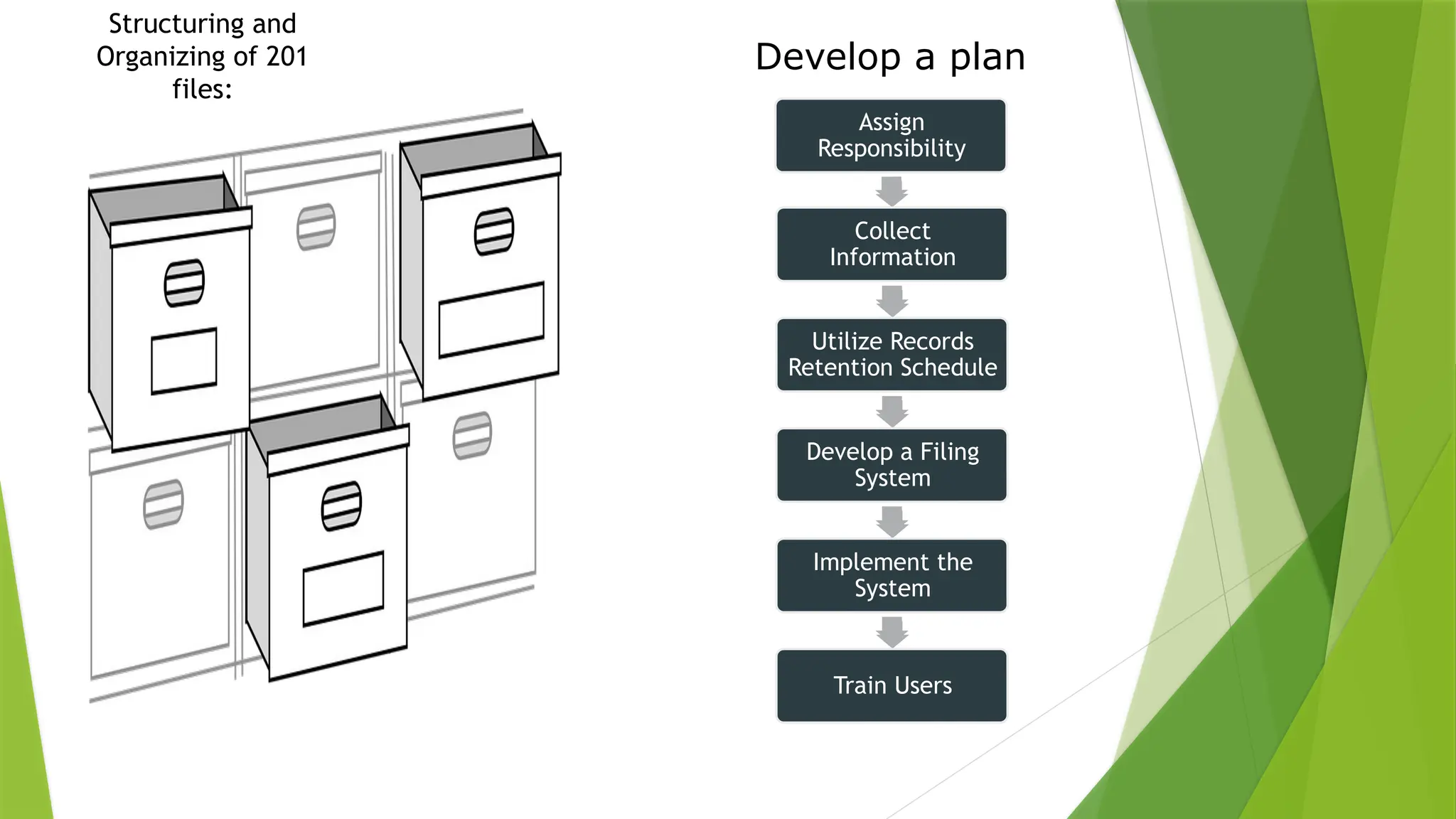
Develop a plan
AAssign
Responsibility
ssign Responsibility
Assign
Responsibility
Collect
Information
Utilize Records
Retention Schedule
Develop a Filing
System
Implement the
System
Train Users
Things to consider
Centralized or Decentralized?
Arrangement
Subject
Chronological
Numerical
Subject Filing
Records cover a range of
topics where a topical
arrangement becomes logical.
Arranged two different ways:
Dictionary order—each subject is
provided its own folder
Encyclopedic order—subjects are
grouped into major headings.
Individual folders are filed in
alphabetical order behind each
heading.
Structured function order—based
on organizational structure,
functions, and processes.
Chronological Filing
Records that are created and monitored using a date
Numerical Filing
Records that have unique numbers assigned to
them at creation or have an assigned code
that has a meaning
Naming conventions for your paper
& electronic records
A good format for date designations is YYYYMMDD or YYMMDD.
This format makes sure all of your files stay in chronological
order, even over the span of many years.
Try not to make file names too long, since long file names do
not work well with all types of software.
Special characters such as ~ ! @ # $ % ^ & * ( ) ` ; < > ? , [ ] { } '
" and | should be avoided.
When using a sequential numbering system, using leading zeros
for clarity and to make sure files sort in sequential order. For
example, use "001, 002, ...010, 011 ... 100, 101, etc." instead of
"1, 2, ...10, 11 ... 100, 101, etc."
Do not use spaces. Some software will not recognize file names
with spaces, and file names with spaces must be enclosed in
quotes when using the command line. Other options include:
Underscores, e.g. file_name.xxx
Dashes, e.g. file-name.xxx
No separation, e.g. filename.xxx
Camel case, where the first letter of each section of text is
capitalized, e.g. FileName.xxx
Managing active & inactive records
Where to go from here:
Review the retention schedules online and identify the records that you create in your office
Implement guidelines for maintaining active and inactive records:
•Keep your active records that are referenced frequently in office
•Move inactive records to a departmental storage room or the Records Center
•Setup a annual cycle to review records that have met their legal retention and then submit a request
to destroy!
Managing copies
 Sort out your "Office of Record" records and focus on those records first.
This means any records for which your office creates or maintains the official
record copy. Those records are your top priority. For other records, you may
need to keep a reference copy for a short time.
 Reference and/or convenience copies do not need to come through Records
Management for permission to destroy.
Thank You

Management and Updating of 201 Files.pptx

  • 1.
    MANAGEMENT AND UPDATING OF201 FILES CLARISSA P. JAMIG
  • 2.
    What’s an employee’s“201” file?  The term “201” files originated from the Army. Form 201 in the US Army, Which is a set of documents containing a person’s comprehensive profile, including all previous and new information necessary about the individual.  The modern organizations, have “adopted” military terms such as rank and file, a chain of command, division, and many others. What is a 201 file Philippines?  An employee 201 file, usually contained records/data pertaining to the employee’s personal information, financial information, employment contract, duties, job grade, performance, and employment history for future employment requirements.
  • 3.
    What does anHR 201 personnel file include? This sample covers the 3 main categories of the employment life cycle are;  The hiring process  The employment period  The separation process
  • 4.
    Here’s a samplecheck-list:  Employee information/Application form  Employment contracts  Certificates from previous employers  Comprehensive resume or curriculum vitae  Result of pre-employment examinations/Results of the hiring process  Statutory numbers e.g. SSS number  Tax identification number.  Education/Transcripts/Diplomas  BIR update of taxpayer’s information (Those with the previous employer (If an employee was employed within the calendar year prior to date hired)  Other credentials (ATM Payroll Accounts, acknowledgements)  Ledger of leave credits (Vacation and Sick Leaves)  Birth Certificates of qualified dependents  Withholding tax certificates (BIR Form 2316)  Training History/Records  Written reprimands/Incident reports  Resignation letter/Termination letter  Acknowledgement of receipt of quitclaim, withholding tax certificates, etc.)  Clearance forms
  • 5.
    Managing the 201Files:  It can either be hard-copy documents that are filed in cabinets or folders or soft-copy documents The latter part of the process is usually fulfilled through an in- house automated HRIS (Human Resource Information System.  As an administrative in nature, it is the human resources administration’s role and responsibility to manage all documents pertaining to an employee’s work history within the organization. The Key Roles of 201 File Management:  To help keep track of the employee records  To provide post-employment information and employees certifications  The ability to support or document defenses e.g. leagal cases filed by an employee at the Department of Labor and Employment
  • 6.
    Managing the 201Files:  HR Teams handle a lot of 201 files since all employees go through them. It could take days to gather reports and manage those files. Handling these documents can be very draining because it’s piling up every single day.  Keeping accurate data on any record changes and staff movement in/out of the organization helps understand demographics and statistics of the manpower structure which draws an accurate picture and value of the overall organizations’ human resources. The said updating of 201 Files aims to:  Upgrade the Maturity Level of the Division Offices Human Resource Management on its competences, systems, and practices.
  • 7.
    Managing 201 Files: •One location vs multiple locations • Physical storage space • Streamlining access • Length of time needed Digitization – factors to consider A well designed filing system: • Must make filling less difficult, tedious, and unattractive • Must offer quick and easy filing and retrieval information • Must ensure integrity and continuity of record keeping despite changes in office personnel • Must have uniform practices • Must allow for easy identification and purging of inactive records according to RM policies • Should provide clear and simple filing categories • Should be expandable and flexible enough to meet everyone’s needs
  • 8.
    Structuring and Organizing of201 files: Develop a plan AAssign Responsibility ssign Responsibility Assign Responsibility Collect Information Utilize Records Retention Schedule Develop a Filing System Implement the System Train Users
  • 9.
    Things to consider Centralizedor Decentralized? Arrangement Subject Chronological Numerical Subject Filing Records cover a range of topics where a topical arrangement becomes logical. Arranged two different ways: Dictionary order—each subject is provided its own folder Encyclopedic order—subjects are grouped into major headings. Individual folders are filed in alphabetical order behind each heading. Structured function order—based on organizational structure, functions, and processes.
  • 10.
    Chronological Filing Records thatare created and monitored using a date Numerical Filing Records that have unique numbers assigned to them at creation or have an assigned code that has a meaning Naming conventions for your paper & electronic records A good format for date designations is YYYYMMDD or YYMMDD. This format makes sure all of your files stay in chronological order, even over the span of many years. Try not to make file names too long, since long file names do not work well with all types of software. Special characters such as ~ ! @ # $ % ^ & * ( ) ` ; < > ? , [ ] { } ' " and | should be avoided. When using a sequential numbering system, using leading zeros for clarity and to make sure files sort in sequential order. For example, use "001, 002, ...010, 011 ... 100, 101, etc." instead of "1, 2, ...10, 11 ... 100, 101, etc." Do not use spaces. Some software will not recognize file names with spaces, and file names with spaces must be enclosed in quotes when using the command line. Other options include: Underscores, e.g. file_name.xxx Dashes, e.g. file-name.xxx No separation, e.g. filename.xxx Camel case, where the first letter of each section of text is capitalized, e.g. FileName.xxx
  • 11.
    Managing active &inactive records Where to go from here: Review the retention schedules online and identify the records that you create in your office Implement guidelines for maintaining active and inactive records: •Keep your active records that are referenced frequently in office •Move inactive records to a departmental storage room or the Records Center •Setup a annual cycle to review records that have met their legal retention and then submit a request to destroy! Managing copies  Sort out your "Office of Record" records and focus on those records first. This means any records for which your office creates or maintains the official record copy. Those records are your top priority. For other records, you may need to keep a reference copy for a short time.  Reference and/or convenience copies do not need to come through Records Management for permission to destroy.
  • 12.