With Expo
Leonardo Park
React Native
With EXPO
React Native Development
With EXPO
What is EXPO
How to use
What is EXPO React Native Development With EXPO
What is EXPO
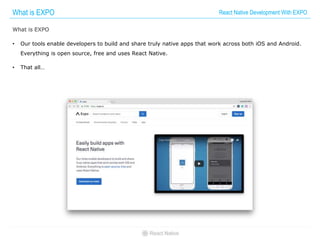
• Our tools enable developers to build and share truly native apps that work across both iOS and Android.
Everything is open source, free and uses React Native.
• That all…
How to use React Native Development With EXPO
Install Expo
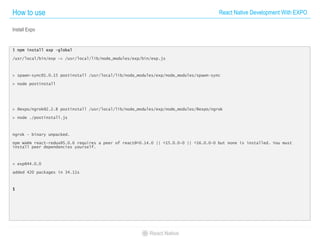
$ npm install exp –global
/usr/local/bin/exp -> /usr/local/lib/node_modules/exp/bin/exp.js
> spawn-sync@1.0.15 postinstall /usr/local/lib/node_modules/exp/node_modules/spawn-sync
> node postinstall
> @expo/ngrok@2.2.8 postinstall /usr/local/lib/node_modules/exp/node_modules/@expo/ngrok
> node ./postinstall.js
ngrok - binary unpacked.
npm WARN react-redux@5.0.6 requires a peer of react@^0.14.0 || ^15.0.0-0 || ^16.0.0-0 but none is installed. You must
install peer dependencies yourself.
+ exp@44.0.0
added 420 packages in 34.11s
$
How to use React Native Development With EXPO
Create Expo Project
$ exp init first-exp
? Choose a template type: tabs
[exp] Downloading project files...
[exp] Extracting project files...
[exp] Customizing project...
[exp] Starting project...
[exp] Your project is ready at /Users/ageofblue/Developments/Workspaces/ReactNativeBook/first-exp. Use "exp start
/Users/ageofblue/Developments/Workspaces/ReactNativeBook/first-exp" to get started.
$
$ exp init first-exp
? Choose a template type: tabs
[exp] Downloading project files...
[exp] Extracting project files...
[exp] Customizing project...
[exp] Starting project...
[exp] Your project is ready at /Users/ageofblue/Developments/Workspaces/ReactNativeBook/first-exp. Use "exp start
/Users/ageofblue/Developments/Workspaces/ReactNativeBook/first-exp" to get started.
$
How to use React Native Development With EXPO
Start Expo Project
$ exp start
[exp] exp may have exited improperly. Proceeding, but you should check for orphaned processes.
[exp] Using project at /Users/ageofblue/Developments/Workspaces/ReactNativeBook/first-exp
[exp] Warning: You are using npm version 5.4.2. There may be bugs in this version, use it at your own risk. We recommend
version 4.6.1.
[exp] Starting React Native packager...
[exp] Scanning folders for symlinks in /Users/ageofblue/Developments/Workspaces/ReactNativeBook/first-exp/node_modules (7ms)
[exp] Loading dependency graph.
[exp] Running packager on port 19001.
[exp] Expo is ready.
[exp] You can scan this QR code:
스크린샷 2017-10-15 오후 3.22.33
[exp] Your URL is
exp://7s-b29.ageofblue.first-exp.exp.direct:80
[exp] Logs for your project will appear below. Press Ctrl+C to exit.
[exp] Dependency graph loaded.
How to use React Native Development With EXPO
Download Expo Client
• iOS
https://itunes.apple.com/app/apple-store/id982107779?pt=17102800&ct=www&mt=8
• Android
https://play.google.com/store/apps/details?id=host.exp.exponent
How to use React Native Development With EXPO
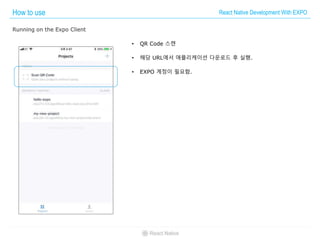
Running on the Expo Client
• QR Code 스캔
• 해당 URL에서 애플리케이션 다운로드 후 실행.
• EXPO 계정이 필요함.
How to use React Native Development With EXPO
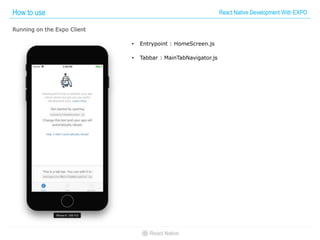
Running on the Expo Client
• Entrypoint : HomeScreen.js
• Tabbar : MainTabNavigator.js
How to use React Native Development With EXPO
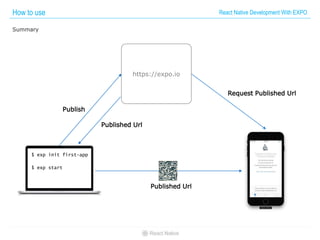
Summary
https://expo.io
$ exp init first-app
$ exp start
Publish
Published Url
Published Url
Request Published Url
How to use React Native Development With EXPO
Expo Front-end UI
• Download
https://expo.io/tools
How to use React Native Development With EXPO
Snack
• Web prototyping tools.
• Drag and Drop 지원
• Device 테스트 지원
• https://snack.expo.io/

React native development with expo

  • 1.
  • 2.
    With EXPO React NativeDevelopment With EXPO What is EXPO How to use
  • 3.
    What is EXPOReact Native Development With EXPO What is EXPO • Our tools enable developers to build and share truly native apps that work across both iOS and Android. Everything is open source, free and uses React Native. • That all…
  • 4.
    How to useReact Native Development With EXPO Install Expo $ npm install exp –global /usr/local/bin/exp -> /usr/local/lib/node_modules/exp/bin/exp.js > spawn-sync@1.0.15 postinstall /usr/local/lib/node_modules/exp/node_modules/spawn-sync > node postinstall > @expo/ngrok@2.2.8 postinstall /usr/local/lib/node_modules/exp/node_modules/@expo/ngrok > node ./postinstall.js ngrok - binary unpacked. npm WARN react-redux@5.0.6 requires a peer of react@^0.14.0 || ^15.0.0-0 || ^16.0.0-0 but none is installed. You must install peer dependencies yourself. + exp@44.0.0 added 420 packages in 34.11s $
  • 5.
    How to useReact Native Development With EXPO Create Expo Project $ exp init first-exp ? Choose a template type: tabs [exp] Downloading project files... [exp] Extracting project files... [exp] Customizing project... [exp] Starting project... [exp] Your project is ready at /Users/ageofblue/Developments/Workspaces/ReactNativeBook/first-exp. Use "exp start /Users/ageofblue/Developments/Workspaces/ReactNativeBook/first-exp" to get started. $ $ exp init first-exp ? Choose a template type: tabs [exp] Downloading project files... [exp] Extracting project files... [exp] Customizing project... [exp] Starting project... [exp] Your project is ready at /Users/ageofblue/Developments/Workspaces/ReactNativeBook/first-exp. Use "exp start /Users/ageofblue/Developments/Workspaces/ReactNativeBook/first-exp" to get started. $
  • 6.
    How to useReact Native Development With EXPO Start Expo Project $ exp start [exp] exp may have exited improperly. Proceeding, but you should check for orphaned processes. [exp] Using project at /Users/ageofblue/Developments/Workspaces/ReactNativeBook/first-exp [exp] Warning: You are using npm version 5.4.2. There may be bugs in this version, use it at your own risk. We recommend version 4.6.1. [exp] Starting React Native packager... [exp] Scanning folders for symlinks in /Users/ageofblue/Developments/Workspaces/ReactNativeBook/first-exp/node_modules (7ms) [exp] Loading dependency graph. [exp] Running packager on port 19001. [exp] Expo is ready. [exp] You can scan this QR code: 스크린샷 2017-10-15 오후 3.22.33 [exp] Your URL is exp://7s-b29.ageofblue.first-exp.exp.direct:80 [exp] Logs for your project will appear below. Press Ctrl+C to exit. [exp] Dependency graph loaded.
  • 7.
    How to useReact Native Development With EXPO Download Expo Client • iOS https://itunes.apple.com/app/apple-store/id982107779?pt=17102800&ct=www&mt=8 • Android https://play.google.com/store/apps/details?id=host.exp.exponent
  • 8.
    How to useReact Native Development With EXPO Running on the Expo Client • QR Code 스캔 • 해당 URL에서 애플리케이션 다운로드 후 실행. • EXPO 계정이 필요함.
  • 9.
    How to useReact Native Development With EXPO Running on the Expo Client • Entrypoint : HomeScreen.js • Tabbar : MainTabNavigator.js
  • 10.
    How to useReact Native Development With EXPO Summary https://expo.io $ exp init first-app $ exp start Publish Published Url Published Url Request Published Url
  • 11.
    How to useReact Native Development With EXPO Expo Front-end UI • Download https://expo.io/tools
  • 12.
    How to useReact Native Development With EXPO Snack • Web prototyping tools. • Drag and Drop 지원 • Device 테스트 지원 • https://snack.expo.io/