Data Exploration and Visualisation with R ∗
Yanchang Zhao
http://www.RDataMining.com
R and Data Mining Course
Beijing University of Posts and Telecommunications,
Beijing, China
July 2019
∗
Chapter 3: Data Exploration, in R and Data Mining: Examples and Case Studies.
http://www.rdatamining.com/docs/RDataMining-book.pdf
1 / 45
Contents
Introduction
Have a Look at Data
Explore Individual Variables
Explore Multiple Variables
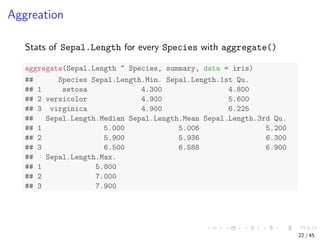
More Explorations
Save Charts to Files
Further Readings and Online Resources
2 / 45
Data Exploration and Visualisation with R
Data Exploration and Visualisation
Summary and stats
Various charts like pie charts and histograms
Exploration of multiple variables
Level plot, contour plot and 3D plot
Saving charts into files
3 / 45
Quiz: What’s the Name of This Flower?
Oleg Yunakov [CC BY-SA 3.0 (https://creativecommons.org/licenses/by-sa/3.0)], from Wikimedia
Commons.
4 / 45
The Iris Dataset
The iris dataset [Frank and Asuncion, 2010] consists of 50
samples from each of three classes of iris flowers. There are five
attributes in the dataset:
sepal length in cm,
sepal width in cm,
petal length in cm,
petal width in cm, and
class: Iris Setosa, Iris Versicolour, and Iris Virginica.
Detailed desription of the dataset can be found at the UCI
Machine Learning Repository †.
†
https://archive.ics.uci.edu/ml/datasets/Iris
5 / 45
Contents
Introduction
Have a Look at Data
Explore Individual Variables
Explore Multiple Variables
More Explorations
Save Charts to Files
Further Readings and Online Resources
6 / 45
Size and Variables Names of Data
# number of rows
nrow(iris)
## [1] 150
# number of columns
ncol(iris)
## [1] 5
# dimensionality
dim(iris)
## [1] 150 5
# column names
names(iris)
## [1] "Sepal.Length" "Sepal.Width" "Petal.Length" "Petal.Wid...
## [5] "Species"
7 / 45
Structure of Data
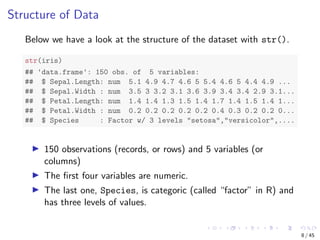
Below we have a look at the structure of the dataset with str().
str(iris)
## 'data.frame': 150 obs. of 5 variables:
## $ Sepal.Length: num 5.1 4.9 4.7 4.6 5 5.4 4.6 5 4.4 4.9 ...
## $ Sepal.Width : num 3.5 3 3.2 3.1 3.6 3.9 3.4 3.4 2.9 3.1...
## $ Petal.Length: num 1.4 1.4 1.3 1.5 1.4 1.7 1.4 1.5 1.4 1...
## $ Petal.Width : num 0.2 0.2 0.2 0.2 0.2 0.4 0.3 0.2 0.2 0...
## $ Species : Factor w/ 3 levels "setosa","versicolor",....
150 observations (records, or rows) and 5 variables (or
columns)
The first four variables are numeric.
The last one, Species, is categoric (called “factor” in R) and
has three levels of values.
8 / 45
Attributes of Data
attributes(iris)
## $names
## [1] "Sepal.Length" "Sepal.Width" "Petal.Length" "Petal.Wid...
## [5] "Species"
##
## $class
## [1] "data.frame"
##
## $row.names
## [1] 1 2 3 4 5 6 7 8 9 10 11 12 13 ...
## [16] 16 17 18 19 20 21 22 23 24 25 26 27 28 ...
## [31] 31 32 33 34 35 36 37 38 39 40 41 42 43 ...
## [46] 46 47 48 49 50 51 52 53 54 55 56 57 58 ...
## [61] 61 62 63 64 65 66 67 68 69 70 71 72 73 ...
## [76] 76 77 78 79 80 81 82 83 84 85 86 87 88 ...
## [91] 91 92 93 94 95 96 97 98 99 100 101 102 103 1...
## [106] 106 107 108 109 110 111 112 113 114 115 116 117 118 1...
## [121] 121 122 123 124 125 126 127 128 129 130 131 132 133 1...
## [136] 136 137 138 139 140 141 142 143 144 145 146 147 148 1...
9 / 45
First/Last Rows of Data
iris[1:3, ]
## Sepal.Length Sepal.Width Petal.Length Petal.Width Species
## 1 5.1 3.5 1.4 0.2 setosa
## 2 4.9 3.0 1.4 0.2 setosa
## 3 4.7 3.2 1.3 0.2 setosa
head(iris, 3)
## Sepal.Length Sepal.Width Petal.Length Petal.Width Species
## 1 5.1 3.5 1.4 0.2 setosa
## 2 4.9 3.0 1.4 0.2 setosa
## 3 4.7 3.2 1.3 0.2 setosa
tail(iris, 3)
## Sepal.Length Sepal.Width Petal.Length Petal.Width Spe...
## 148 6.5 3.0 5.2 2.0 virgi...
## 149 6.2 3.4 5.4 2.3 virgi...
## 150 5.9 3.0 5.1 1.8 virgi...
10 / 45
A Single Column
The first 10 values of Sepal.Length
iris[1:10, "Sepal.Length"]
## [1] 5.1 4.9 4.7 4.6 5.0 5.4 4.6 5.0 4.4 4.9
iris$Sepal.Length[1:10]
## [1] 5.1 4.9 4.7 4.6 5.0 5.4 4.6 5.0 4.4 4.9
11 / 45
Contents
Introduction
Have a Look at Data
Explore Individual Variables
Explore Multiple Variables
More Explorations
Save Charts to Files
Further Readings and Online Resources
12 / 45
Summary of Data
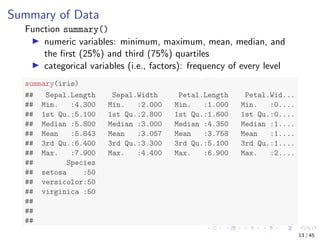
Function summary()
numeric variables: minimum, maximum, mean, median, and
the first (25%) and third (75%) quartiles
categorical variables (i.e., factors): frequency of every level
summary(iris)
## Sepal.Length Sepal.Width Petal.Length Petal.Wid...
## Min. :4.300 Min. :2.000 Min. :1.000 Min. :0....
## 1st Qu.:5.100 1st Qu.:2.800 1st Qu.:1.600 1st Qu.:0....
## Median :5.800 Median :3.000 Median :4.350 Median :1....
## Mean :5.843 Mean :3.057 Mean :3.758 Mean :1....
## 3rd Qu.:6.400 3rd Qu.:3.300 3rd Qu.:5.100 3rd Qu.:1....
## Max. :7.900 Max. :4.400 Max. :6.900 Max. :2....
## Species
## setosa :50
## versicolor:50
## virginica :50
##
##
##
13 / 45
library(Hmisc)
# describe(iris) # check all columns
describe(iris[, c(1, 5)]) # check columns 1 and 5
## iris[, c(1, 5)]
##
## 2 Variables 150 Observations
## -----------------------------------------------------------...
## Sepal.Length
## n missing distinct Info Mean Gmd ...
## 150 0 35 0.998 5.843 0.9462 4....
## .10 .25 .50 .75 .90 .95
## 4.800 5.100 5.800 6.400 6.900 7.255
##
## lowest : 4.3 4.4 4.5 4.6 4.7, highest: 7.3 7.4 7.6 7.7 7.9
## -----------------------------------------------------------...
## Species
## n missing distinct
## 150 0 3
##
## Value setosa versicolor virginica
## Frequency 50 50 50
## Proportion 0.333 0.333 0.333
## -----------------------------------------------------------...
14 / 45
Mean, Median, Range and Quartiles
Mean, median and range: mean(), median(), range()
Quartiles and percentiles: quantile()
range(iris$Sepal.Length)
## [1] 4.3 7.9
quantile(iris$Sepal.Length)
## 0% 25% 50% 75% 100%
## 4.3 5.1 5.8 6.4 7.9
quantile(iris$Sepal.Length, c(0.1, 0.3, 0.65))
## 10% 30% 65%
## 4.80 5.27 6.20
15 / 45
Variance and Histogram
var(iris$Sepal.Length)
## [1] 0.6856935
hist(iris$Sepal.Length)
Histogram of iris$Sepal.Length
iris$Sepal.Length
Frequency
4 5 6 7 8
051015202530
16 / 45
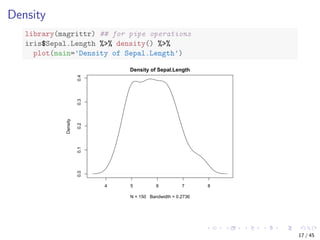
Density
library(magrittr) ## for pipe operations
iris$Sepal.Length %>% density() %>%
plot(main='Density of Sepal.Length')
4 5 6 7 8
0.00.10.20.30.4
Density of Sepal.Length
N = 150 Bandwidth = 0.2736
Density
17 / 45
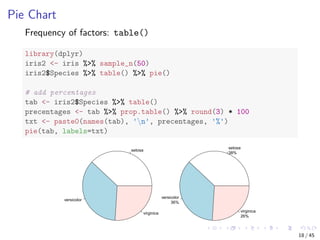
Pie Chart
Frequency of factors: table()
library(dplyr)
iris2 <- iris %>% sample_n(50)
iris2$Species %>% table() %>% pie()
# add percentages
tab <- iris2$Species %>% table()
precentages <- tab %>% prop.table() %>% round(3) * 100
txt <- paste0(names(tab), 'n', precentages, '%')
pie(tab, labels=txt)
setosa
versicolor
virginica
setosa
38%
versicolor
36%
virginica
26%
18 / 45
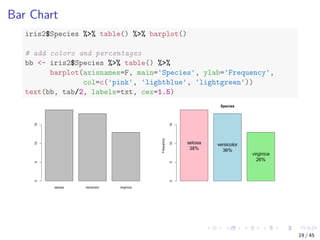
Bar Chart
iris2$Species %>% table() %>% barplot()
# add colors and percentages
bb <- iris2$Species %>% table() %>%
barplot(axisnames=F, main='Species', ylab='Frequency',
col=c('pink', 'lightblue', 'lightgreen'))
text(bb, tab/2, labels=txt, cex=1.5)
setosa versicolor virginica
051015
Species
Frequency
051015
setosa
38%
versicolor
36%
virginica
26%
19 / 45
Contents
Introduction
Have a Look at Data
Explore Individual Variables
Explore Multiple Variables
More Explorations
Save Charts to Files
Further Readings and Online Resources
20 / 45
Correlation
Covariance and correlation: cov() and cor()
cov(iris$Sepal.Length, iris$Petal.Length)
## [1] 1.274315
cor(iris$Sepal.Length, iris$Petal.Length)
## [1] 0.8717538
cov(iris[, 1:4])
## Sepal.Length Sepal.Width Petal.Length Petal.Width
## Sepal.Length 0.6856935 -0.0424340 1.2743154 0.5162707
## Sepal.Width -0.0424340 0.1899794 -0.3296564 -0.1216394
## Petal.Length 1.2743154 -0.3296564 3.1162779 1.2956094
## Petal.Width 0.5162707 -0.1216394 1.2956094 0.5810063
# cor(iris[,1:4])
21 / 45
Aggreation
Stats of Sepal.Length for every Species with aggregate()
aggregate(Sepal.Length ~ Species, summary, data = iris)
## Species Sepal.Length.Min. Sepal.Length.1st Qu.
## 1 setosa 4.300 4.800
## 2 versicolor 4.900 5.600
## 3 virginica 4.900 6.225
## Sepal.Length.Median Sepal.Length.Mean Sepal.Length.3rd Qu.
## 1 5.000 5.006 5.200
## 2 5.900 5.936 6.300
## 3 6.500 6.588 6.900
## Sepal.Length.Max.
## 1 5.800
## 2 7.000
## 3 7.900
22 / 45
Boxplot
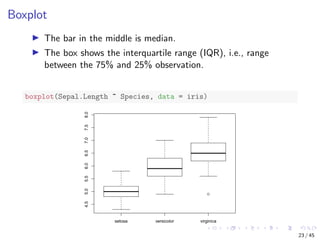
The bar in the middle is median.
The box shows the interquartile range (IQR), i.e., range
between the 75% and 25% observation.
boxplot(Sepal.Length ~ Species, data = iris)
setosa versicolor virginica
4.55.05.56.06.57.07.58.0
23 / 45
Scatter Plot
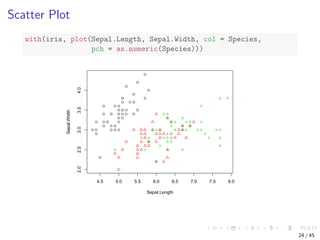
with(iris, plot(Sepal.Length, Sepal.Width, col = Species,
pch = as.numeric(Species)))
4.5 5.0 5.5 6.0 6.5 7.0 7.5 8.0
2.02.53.03.54.0
Sepal.Length
Sepal.Width
24 / 45
Scatter Plot with Jitter
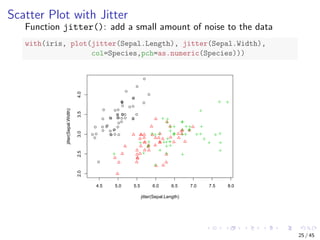
Function jitter(): add a small amount of noise to the data
with(iris, plot(jitter(Sepal.Length), jitter(Sepal.Width),
col=Species,pch=as.numeric(Species)))
4.5 5.0 5.5 6.0 6.5 7.0 7.5 8.0
2.02.53.03.54.0
jitter(Sepal.Length)
jitter(Sepal.Width)
25 / 45
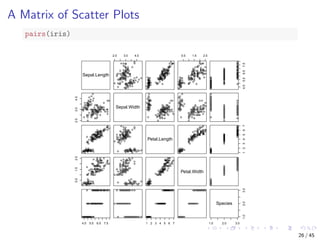
A Matrix of Scatter Plots
pairs(iris)
Sepal.Length2.03.04.00.51.52.5
4.5 5.5 6.5 7.5
2.0 3.0 4.0
Sepal.Width
Petal.Length
1 2 3 4 5 6 7
0.5 1.5 2.5
Petal.Width
4.55.56.57.51234567
1.0 2.0 3.0
1.02.03.0
Species
26 / 45
Contents
Introduction
Have a Look at Data
Explore Individual Variables
Explore Multiple Variables
More Explorations
Save Charts to Files
Further Readings and Online Resources
27 / 45
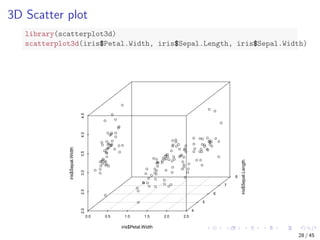
3D Scatter plot
library(scatterplot3d)
scatterplot3d(iris$Petal.Width, iris$Sepal.Length, iris$Sepal.Width)
0.0 0.5 1.0 1.5 2.0 2.5
2.02.53.03.54.04.5
4
5
6
7
8
iris$Petal.Width
iris$Sepal.Length
iris$Sepal.Width
28 / 45
Interactive 3D Scatter Plot
Package rgl supports interactive 3D scatter plot with plot3d().
library(rgl)
plot3d(iris$Petal.Width, iris$Sepal.Length, iris$Sepal.Width)
29 / 45
Heat Map
Calculate the similarity between different flowers in the iris data
with dist() and then plot it with a heat map
dist.matrix <- as.matrix(dist(iris[, 1:4]))
heatmap(dist.matrix)
422314943394132463674831634154561921322425274417333749112247202631303510385411250284082918111910612313211813110811013613010312610114412114561999458658081826383936860709054107855667627291899796100955276665755598869987586797492641091371051251411461421401131041381171161491291331151351121111487853518777841501471241341271281397173120122114102143
422314943394132463674831634154561921322425274417333749112247202631303510385411250284082918111910612313211813110811013613010312610114412114561999458658081826383936860709054107855667627291899796100955276665755598869987586797492641091371051251411461421401131041381171161491291331151351121111487853518777841501471241341271281397173120122114102143
30 / 45
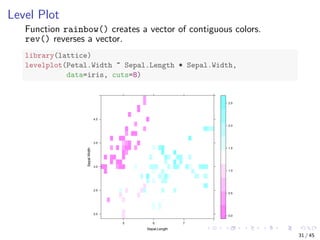
Level Plot
Function rainbow() creates a vector of contiguous colors.
rev() reverses a vector.
library(lattice)
levelplot(Petal.Width ~ Sepal.Length * Sepal.Width,
data=iris, cuts=8)
Sepal.Length
Sepal.Width
2.0
2.5
3.0
3.5
4.0
5 6 7
0.0
0.5
1.0
1.5
2.0
2.5
31 / 45
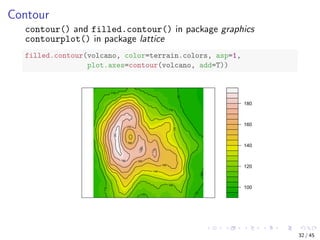
Contour
contour() and filled.contour() in package graphics
contourplot() in package lattice
filled.contour(volcano, color=terrain.colors, asp=1,
plot.axes=contour(volcano, add=T))
100
120
140
160
180
100
100
100
110
110
110
110
120
130
140
150
160
160
170
170
180
180
190
32 / 45
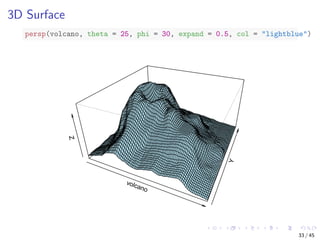
3D Surface
persp(volcano, theta = 25, phi = 30, expand = 0.5, col = "lightblue")
volcano
Y
Z
33 / 45
Parallel Coordinates
Visualising multiple dimensions
library(MASS)
parcoord(iris[1:4], col = iris$Species)
Sepal.Length Sepal.Width Petal.Length Petal.Width
34 / 45
Parallel Coordinates with Package lattice
library(lattice)
parallelplot(~iris[1:4] | Species, data = iris)
Sepal.Length
Sepal.Width
Petal.Length
Petal.Width
Min Max
setosa versicolor
Sepal.Length
Sepal.Width
Petal.Length
Petal.Width
virginica
35 / 45
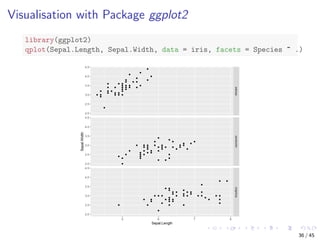
Visualisation with Package ggplot2
library(ggplot2)
qplot(Sepal.Length, Sepal.Width, data = iris, facets = Species ~ .)
setosaversicolorvirginica
5 6 7 8
2.0
2.5
3.0
3.5
4.0
4.5
2.0
2.5
3.0
3.5
4.0
4.5
2.0
2.5
3.0
3.5
4.0
4.5
Sepal.Length
Sepal.Width
36 / 45
Contents
Introduction
Have a Look at Data
Explore Individual Variables
Explore Multiple Variables
More Explorations
Save Charts to Files
Further Readings and Online Resources
37 / 45
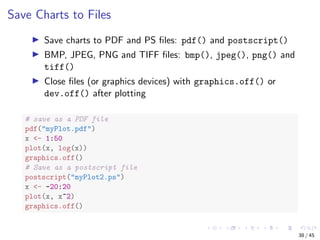
Save Charts to Files
Save charts to PDF and PS files: pdf() and postscript()
BMP, JPEG, PNG and TIFF files: bmp(), jpeg(), png() and
tiff()
Close files (or graphics devices) with graphics.off() or
dev.off() after plotting
# save as a PDF file
pdf("myPlot.pdf")
x <- 1:50
plot(x, log(x))
graphics.off()
# Save as a postscript file
postscript("myPlot2.ps")
x <- -20:20
plot(x, x^2)
graphics.off()
38 / 45
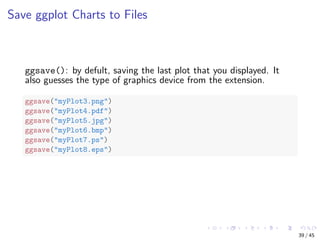
Save ggplot Charts to Files
ggsave(): by defult, saving the last plot that you displayed. It
also guesses the type of graphics device from the extension.
ggsave("myPlot3.png")
ggsave("myPlot4.pdf")
ggsave("myPlot5.jpg")
ggsave("myPlot6.bmp")
ggsave("myPlot7.ps")
ggsave("myPlot8.eps")
39 / 45
Contents
Introduction
Have a Look at Data
Explore Individual Variables
Explore Multiple Variables
More Explorations
Save Charts to Files
Further Readings and Online Resources
40 / 45
Further Readings
Examples of ggplot2 plotting:
https://ggplot2.tidyverse.org/
Package iplots: interactive scatter plot, histogram, bar plot, and parallel
coordinates plot (iplots)
http://rosuda.org/software/iPlots/
Package googleVis: interactive charts with the Google Visualisation API
http://cran.r-project.org/web/packages/googleVis/vignettes/
googleVis_examples.html
Package ggvis: interactive grammar of graphics
http://ggvis.rstudio.com/
Package rCharts: interactive javascript visualisations from R
https://ramnathv.github.io/rCharts/
41 / 45
Online Resources
Book titled R and Data Mining: Examples and Case Studies
http://www.rdatamining.com/docs/RDataMining-book.pdf
R Reference Card for Data Mining
http://www.rdatamining.com/docs/RDataMining-reference-card.pdf
Free online courses and documents
http://www.rdatamining.com/resources/
RDataMining Group on LinkedIn (27,000+ members)
http://group.rdatamining.com
Twitter (3,300+ followers)
@RDataMining
42 / 45
The End
Thanks!
Email: yanchang(at)RDataMining.com
Twitter: @RDataMining
43 / 45
How to Cite This Work
Citation
Yanchang Zhao. R and Data Mining: Examples and Case Studies. ISBN
978-0-12-396963-7, December 2012. Academic Press, Elsevier. 256
pages. URL: http://www.rdatamining.com/docs/RDataMining-book.pdf.
BibTex
@BOOK{Zhao2012R,
title = {R and Data Mining: Examples and Case Studies},
publisher = {Academic Press, Elsevier},
year = {2012},
author = {Yanchang Zhao},
pages = {256},
month = {December},
isbn = {978-0-123-96963-7},
keywords = {R, data mining},
url = {http://www.rdatamining.com/docs/RDataMining-book.pdf}
}
44 / 45
References I
Frank, A. and Asuncion, A. (2010).
UCI machine learning repository. university of california, irvine, school of information and computer sciences.
http://archive.ics.uci.edu/ml.
45 / 45

RDataMining slides-data-exploration-visualisation

  • 1.
    Data Exploration andVisualisation with R ∗ Yanchang Zhao http://www.RDataMining.com R and Data Mining Course Beijing University of Posts and Telecommunications, Beijing, China July 2019 ∗ Chapter 3: Data Exploration, in R and Data Mining: Examples and Case Studies. http://www.rdatamining.com/docs/RDataMining-book.pdf 1 / 45
  • 2.
    Contents Introduction Have a Lookat Data Explore Individual Variables Explore Multiple Variables More Explorations Save Charts to Files Further Readings and Online Resources 2 / 45
  • 3.
    Data Exploration andVisualisation with R Data Exploration and Visualisation Summary and stats Various charts like pie charts and histograms Exploration of multiple variables Level plot, contour plot and 3D plot Saving charts into files 3 / 45
  • 4.
    Quiz: What’s theName of This Flower? Oleg Yunakov [CC BY-SA 3.0 (https://creativecommons.org/licenses/by-sa/3.0)], from Wikimedia Commons. 4 / 45
  • 5.
    The Iris Dataset Theiris dataset [Frank and Asuncion, 2010] consists of 50 samples from each of three classes of iris flowers. There are five attributes in the dataset: sepal length in cm, sepal width in cm, petal length in cm, petal width in cm, and class: Iris Setosa, Iris Versicolour, and Iris Virginica. Detailed desription of the dataset can be found at the UCI Machine Learning Repository †. † https://archive.ics.uci.edu/ml/datasets/Iris 5 / 45
  • 6.
    Contents Introduction Have a Lookat Data Explore Individual Variables Explore Multiple Variables More Explorations Save Charts to Files Further Readings and Online Resources 6 / 45
  • 7.
    Size and VariablesNames of Data # number of rows nrow(iris) ## [1] 150 # number of columns ncol(iris) ## [1] 5 # dimensionality dim(iris) ## [1] 150 5 # column names names(iris) ## [1] "Sepal.Length" "Sepal.Width" "Petal.Length" "Petal.Wid... ## [5] "Species" 7 / 45
  • 8.
    Structure of Data Belowwe have a look at the structure of the dataset with str(). str(iris) ## 'data.frame': 150 obs. of 5 variables: ## $ Sepal.Length: num 5.1 4.9 4.7 4.6 5 5.4 4.6 5 4.4 4.9 ... ## $ Sepal.Width : num 3.5 3 3.2 3.1 3.6 3.9 3.4 3.4 2.9 3.1... ## $ Petal.Length: num 1.4 1.4 1.3 1.5 1.4 1.7 1.4 1.5 1.4 1... ## $ Petal.Width : num 0.2 0.2 0.2 0.2 0.2 0.4 0.3 0.2 0.2 0... ## $ Species : Factor w/ 3 levels "setosa","versicolor",.... 150 observations (records, or rows) and 5 variables (or columns) The first four variables are numeric. The last one, Species, is categoric (called “factor” in R) and has three levels of values. 8 / 45
  • 9.
    Attributes of Data attributes(iris) ##$names ## [1] "Sepal.Length" "Sepal.Width" "Petal.Length" "Petal.Wid... ## [5] "Species" ## ## $class ## [1] "data.frame" ## ## $row.names ## [1] 1 2 3 4 5 6 7 8 9 10 11 12 13 ... ## [16] 16 17 18 19 20 21 22 23 24 25 26 27 28 ... ## [31] 31 32 33 34 35 36 37 38 39 40 41 42 43 ... ## [46] 46 47 48 49 50 51 52 53 54 55 56 57 58 ... ## [61] 61 62 63 64 65 66 67 68 69 70 71 72 73 ... ## [76] 76 77 78 79 80 81 82 83 84 85 86 87 88 ... ## [91] 91 92 93 94 95 96 97 98 99 100 101 102 103 1... ## [106] 106 107 108 109 110 111 112 113 114 115 116 117 118 1... ## [121] 121 122 123 124 125 126 127 128 129 130 131 132 133 1... ## [136] 136 137 138 139 140 141 142 143 144 145 146 147 148 1... 9 / 45
  • 10.
    First/Last Rows ofData iris[1:3, ] ## Sepal.Length Sepal.Width Petal.Length Petal.Width Species ## 1 5.1 3.5 1.4 0.2 setosa ## 2 4.9 3.0 1.4 0.2 setosa ## 3 4.7 3.2 1.3 0.2 setosa head(iris, 3) ## Sepal.Length Sepal.Width Petal.Length Petal.Width Species ## 1 5.1 3.5 1.4 0.2 setosa ## 2 4.9 3.0 1.4 0.2 setosa ## 3 4.7 3.2 1.3 0.2 setosa tail(iris, 3) ## Sepal.Length Sepal.Width Petal.Length Petal.Width Spe... ## 148 6.5 3.0 5.2 2.0 virgi... ## 149 6.2 3.4 5.4 2.3 virgi... ## 150 5.9 3.0 5.1 1.8 virgi... 10 / 45
  • 11.
    A Single Column Thefirst 10 values of Sepal.Length iris[1:10, "Sepal.Length"] ## [1] 5.1 4.9 4.7 4.6 5.0 5.4 4.6 5.0 4.4 4.9 iris$Sepal.Length[1:10] ## [1] 5.1 4.9 4.7 4.6 5.0 5.4 4.6 5.0 4.4 4.9 11 / 45
  • 12.
    Contents Introduction Have a Lookat Data Explore Individual Variables Explore Multiple Variables More Explorations Save Charts to Files Further Readings and Online Resources 12 / 45
  • 13.
    Summary of Data Functionsummary() numeric variables: minimum, maximum, mean, median, and the first (25%) and third (75%) quartiles categorical variables (i.e., factors): frequency of every level summary(iris) ## Sepal.Length Sepal.Width Petal.Length Petal.Wid... ## Min. :4.300 Min. :2.000 Min. :1.000 Min. :0.... ## 1st Qu.:5.100 1st Qu.:2.800 1st Qu.:1.600 1st Qu.:0.... ## Median :5.800 Median :3.000 Median :4.350 Median :1.... ## Mean :5.843 Mean :3.057 Mean :3.758 Mean :1.... ## 3rd Qu.:6.400 3rd Qu.:3.300 3rd Qu.:5.100 3rd Qu.:1.... ## Max. :7.900 Max. :4.400 Max. :6.900 Max. :2.... ## Species ## setosa :50 ## versicolor:50 ## virginica :50 ## ## ## 13 / 45
  • 14.
    library(Hmisc) # describe(iris) #check all columns describe(iris[, c(1, 5)]) # check columns 1 and 5 ## iris[, c(1, 5)] ## ## 2 Variables 150 Observations ## -----------------------------------------------------------... ## Sepal.Length ## n missing distinct Info Mean Gmd ... ## 150 0 35 0.998 5.843 0.9462 4.... ## .10 .25 .50 .75 .90 .95 ## 4.800 5.100 5.800 6.400 6.900 7.255 ## ## lowest : 4.3 4.4 4.5 4.6 4.7, highest: 7.3 7.4 7.6 7.7 7.9 ## -----------------------------------------------------------... ## Species ## n missing distinct ## 150 0 3 ## ## Value setosa versicolor virginica ## Frequency 50 50 50 ## Proportion 0.333 0.333 0.333 ## -----------------------------------------------------------... 14 / 45
  • 15.
    Mean, Median, Rangeand Quartiles Mean, median and range: mean(), median(), range() Quartiles and percentiles: quantile() range(iris$Sepal.Length) ## [1] 4.3 7.9 quantile(iris$Sepal.Length) ## 0% 25% 50% 75% 100% ## 4.3 5.1 5.8 6.4 7.9 quantile(iris$Sepal.Length, c(0.1, 0.3, 0.65)) ## 10% 30% 65% ## 4.80 5.27 6.20 15 / 45
  • 16.
    Variance and Histogram var(iris$Sepal.Length) ##[1] 0.6856935 hist(iris$Sepal.Length) Histogram of iris$Sepal.Length iris$Sepal.Length Frequency 4 5 6 7 8 051015202530 16 / 45
  • 17.
    Density library(magrittr) ## forpipe operations iris$Sepal.Length %>% density() %>% plot(main='Density of Sepal.Length') 4 5 6 7 8 0.00.10.20.30.4 Density of Sepal.Length N = 150 Bandwidth = 0.2736 Density 17 / 45
  • 18.
    Pie Chart Frequency offactors: table() library(dplyr) iris2 <- iris %>% sample_n(50) iris2$Species %>% table() %>% pie() # add percentages tab <- iris2$Species %>% table() precentages <- tab %>% prop.table() %>% round(3) * 100 txt <- paste0(names(tab), 'n', precentages, '%') pie(tab, labels=txt) setosa versicolor virginica setosa 38% versicolor 36% virginica 26% 18 / 45
  • 19.
    Bar Chart iris2$Species %>%table() %>% barplot() # add colors and percentages bb <- iris2$Species %>% table() %>% barplot(axisnames=F, main='Species', ylab='Frequency', col=c('pink', 'lightblue', 'lightgreen')) text(bb, tab/2, labels=txt, cex=1.5) setosa versicolor virginica 051015 Species Frequency 051015 setosa 38% versicolor 36% virginica 26% 19 / 45
  • 20.
    Contents Introduction Have a Lookat Data Explore Individual Variables Explore Multiple Variables More Explorations Save Charts to Files Further Readings and Online Resources 20 / 45
  • 21.
    Correlation Covariance and correlation:cov() and cor() cov(iris$Sepal.Length, iris$Petal.Length) ## [1] 1.274315 cor(iris$Sepal.Length, iris$Petal.Length) ## [1] 0.8717538 cov(iris[, 1:4]) ## Sepal.Length Sepal.Width Petal.Length Petal.Width ## Sepal.Length 0.6856935 -0.0424340 1.2743154 0.5162707 ## Sepal.Width -0.0424340 0.1899794 -0.3296564 -0.1216394 ## Petal.Length 1.2743154 -0.3296564 3.1162779 1.2956094 ## Petal.Width 0.5162707 -0.1216394 1.2956094 0.5810063 # cor(iris[,1:4]) 21 / 45
  • 22.
    Aggreation Stats of Sepal.Lengthfor every Species with aggregate() aggregate(Sepal.Length ~ Species, summary, data = iris) ## Species Sepal.Length.Min. Sepal.Length.1st Qu. ## 1 setosa 4.300 4.800 ## 2 versicolor 4.900 5.600 ## 3 virginica 4.900 6.225 ## Sepal.Length.Median Sepal.Length.Mean Sepal.Length.3rd Qu. ## 1 5.000 5.006 5.200 ## 2 5.900 5.936 6.300 ## 3 6.500 6.588 6.900 ## Sepal.Length.Max. ## 1 5.800 ## 2 7.000 ## 3 7.900 22 / 45
  • 23.
    Boxplot The bar inthe middle is median. The box shows the interquartile range (IQR), i.e., range between the 75% and 25% observation. boxplot(Sepal.Length ~ Species, data = iris) setosa versicolor virginica 4.55.05.56.06.57.07.58.0 23 / 45
  • 24.
    Scatter Plot with(iris, plot(Sepal.Length,Sepal.Width, col = Species, pch = as.numeric(Species))) 4.5 5.0 5.5 6.0 6.5 7.0 7.5 8.0 2.02.53.03.54.0 Sepal.Length Sepal.Width 24 / 45
  • 25.
    Scatter Plot withJitter Function jitter(): add a small amount of noise to the data with(iris, plot(jitter(Sepal.Length), jitter(Sepal.Width), col=Species,pch=as.numeric(Species))) 4.5 5.0 5.5 6.0 6.5 7.0 7.5 8.0 2.02.53.03.54.0 jitter(Sepal.Length) jitter(Sepal.Width) 25 / 45
  • 26.
    A Matrix ofScatter Plots pairs(iris) Sepal.Length2.03.04.00.51.52.5 4.5 5.5 6.5 7.5 2.0 3.0 4.0 Sepal.Width Petal.Length 1 2 3 4 5 6 7 0.5 1.5 2.5 Petal.Width 4.55.56.57.51234567 1.0 2.0 3.0 1.02.03.0 Species 26 / 45
  • 27.
    Contents Introduction Have a Lookat Data Explore Individual Variables Explore Multiple Variables More Explorations Save Charts to Files Further Readings and Online Resources 27 / 45
  • 28.
    3D Scatter plot library(scatterplot3d) scatterplot3d(iris$Petal.Width,iris$Sepal.Length, iris$Sepal.Width) 0.0 0.5 1.0 1.5 2.0 2.5 2.02.53.03.54.04.5 4 5 6 7 8 iris$Petal.Width iris$Sepal.Length iris$Sepal.Width 28 / 45
  • 29.
    Interactive 3D ScatterPlot Package rgl supports interactive 3D scatter plot with plot3d(). library(rgl) plot3d(iris$Petal.Width, iris$Sepal.Length, iris$Sepal.Width) 29 / 45
  • 30.
    Heat Map Calculate thesimilarity between different flowers in the iris data with dist() and then plot it with a heat map dist.matrix <- as.matrix(dist(iris[, 1:4])) heatmap(dist.matrix) 422314943394132463674831634154561921322425274417333749112247202631303510385411250284082918111910612313211813110811013613010312610114412114561999458658081826383936860709054107855667627291899796100955276665755598869987586797492641091371051251411461421401131041381171161491291331151351121111487853518777841501471241341271281397173120122114102143 422314943394132463674831634154561921322425274417333749112247202631303510385411250284082918111910612313211813110811013613010312610114412114561999458658081826383936860709054107855667627291899796100955276665755598869987586797492641091371051251411461421401131041381171161491291331151351121111487853518777841501471241341271281397173120122114102143 30 / 45
  • 31.
    Level Plot Function rainbow()creates a vector of contiguous colors. rev() reverses a vector. library(lattice) levelplot(Petal.Width ~ Sepal.Length * Sepal.Width, data=iris, cuts=8) Sepal.Length Sepal.Width 2.0 2.5 3.0 3.5 4.0 5 6 7 0.0 0.5 1.0 1.5 2.0 2.5 31 / 45
  • 32.
    Contour contour() and filled.contour()in package graphics contourplot() in package lattice filled.contour(volcano, color=terrain.colors, asp=1, plot.axes=contour(volcano, add=T)) 100 120 140 160 180 100 100 100 110 110 110 110 120 130 140 150 160 160 170 170 180 180 190 32 / 45
  • 33.
    3D Surface persp(volcano, theta= 25, phi = 30, expand = 0.5, col = "lightblue") volcano Y Z 33 / 45
  • 34.
    Parallel Coordinates Visualising multipledimensions library(MASS) parcoord(iris[1:4], col = iris$Species) Sepal.Length Sepal.Width Petal.Length Petal.Width 34 / 45
  • 35.
    Parallel Coordinates withPackage lattice library(lattice) parallelplot(~iris[1:4] | Species, data = iris) Sepal.Length Sepal.Width Petal.Length Petal.Width Min Max setosa versicolor Sepal.Length Sepal.Width Petal.Length Petal.Width virginica 35 / 45
  • 36.
    Visualisation with Packageggplot2 library(ggplot2) qplot(Sepal.Length, Sepal.Width, data = iris, facets = Species ~ .) setosaversicolorvirginica 5 6 7 8 2.0 2.5 3.0 3.5 4.0 4.5 2.0 2.5 3.0 3.5 4.0 4.5 2.0 2.5 3.0 3.5 4.0 4.5 Sepal.Length Sepal.Width 36 / 45
  • 37.
    Contents Introduction Have a Lookat Data Explore Individual Variables Explore Multiple Variables More Explorations Save Charts to Files Further Readings and Online Resources 37 / 45
  • 38.
    Save Charts toFiles Save charts to PDF and PS files: pdf() and postscript() BMP, JPEG, PNG and TIFF files: bmp(), jpeg(), png() and tiff() Close files (or graphics devices) with graphics.off() or dev.off() after plotting # save as a PDF file pdf("myPlot.pdf") x <- 1:50 plot(x, log(x)) graphics.off() # Save as a postscript file postscript("myPlot2.ps") x <- -20:20 plot(x, x^2) graphics.off() 38 / 45
  • 39.
    Save ggplot Chartsto Files ggsave(): by defult, saving the last plot that you displayed. It also guesses the type of graphics device from the extension. ggsave("myPlot3.png") ggsave("myPlot4.pdf") ggsave("myPlot5.jpg") ggsave("myPlot6.bmp") ggsave("myPlot7.ps") ggsave("myPlot8.eps") 39 / 45
  • 40.
    Contents Introduction Have a Lookat Data Explore Individual Variables Explore Multiple Variables More Explorations Save Charts to Files Further Readings and Online Resources 40 / 45
  • 41.
    Further Readings Examples ofggplot2 plotting: https://ggplot2.tidyverse.org/ Package iplots: interactive scatter plot, histogram, bar plot, and parallel coordinates plot (iplots) http://rosuda.org/software/iPlots/ Package googleVis: interactive charts with the Google Visualisation API http://cran.r-project.org/web/packages/googleVis/vignettes/ googleVis_examples.html Package ggvis: interactive grammar of graphics http://ggvis.rstudio.com/ Package rCharts: interactive javascript visualisations from R https://ramnathv.github.io/rCharts/ 41 / 45
  • 42.
    Online Resources Book titledR and Data Mining: Examples and Case Studies http://www.rdatamining.com/docs/RDataMining-book.pdf R Reference Card for Data Mining http://www.rdatamining.com/docs/RDataMining-reference-card.pdf Free online courses and documents http://www.rdatamining.com/resources/ RDataMining Group on LinkedIn (27,000+ members) http://group.rdatamining.com Twitter (3,300+ followers) @RDataMining 42 / 45
  • 43.
  • 44.
    How to CiteThis Work Citation Yanchang Zhao. R and Data Mining: Examples and Case Studies. ISBN 978-0-12-396963-7, December 2012. Academic Press, Elsevier. 256 pages. URL: http://www.rdatamining.com/docs/RDataMining-book.pdf. BibTex @BOOK{Zhao2012R, title = {R and Data Mining: Examples and Case Studies}, publisher = {Academic Press, Elsevier}, year = {2012}, author = {Yanchang Zhao}, pages = {256}, month = {December}, isbn = {978-0-123-96963-7}, keywords = {R, data mining}, url = {http://www.rdatamining.com/docs/RDataMining-book.pdf} } 44 / 45
  • 45.
    References I Frank, A.and Asuncion, A. (2010). UCI machine learning repository. university of california, irvine, school of information and computer sciences. http://archive.ics.uci.edu/ml. 45 / 45