Scopus
Christina Maria Amendola
Stephanie Gladyck
Garrett Liddil
Introduction
● What is Scopus?
○
○
○

An online abstract and citation database for peerreviewed literature in the science field
Contains journal titles for more than 5,000
publishers
Uses various search tools to help refine and
organize topic of interest

● To access Scopus:
○
○

library.syr.edu
Recommended Databases > SCOPUS
About Scopus
Produced by Elsevier (Reed Elsevier)
4 subject areas
Life Sciences
Health Sciences
Physical Sciences
Social Sciences and Humanities
Elsevier has 80 products, 7 databases
available to SU students
Basic Search
Basic Search
Search Term:
Forensic DNA Analysis
Basic Search Results
Document Retrieval Screen
Advanced Search

Operators
AND
OR
AND NOT
PRE/
W/
Codes
ABS
AF-ID
AFFIL
AFFILCITY
AFFILCOUNTRY
AFFILORG
ALL
MANUFACTURER
ARTNUM
AU-ID
AUTH
AUTHCOLLAB
AUTHFIRST
PUBDATETXT
AUTHKEY
AUTHLASTNAME
AUTHOR-NAME
REFARTNUM
CASREGNUMBER
CHEM
CHEMNAME
REFPAGEFIRST
CODEN
REFPUBYEAR
CONF
REFSRCTITLE
CONFLOC
CONFNAME
CONFSPONSORS
SEQNUMBER
DOCTYPE
DOI
EDFIRST
EDITOR

ISSN
ISSNP
EISSN
ISSUE
KEY
LANGUAGE
PAGEFIRST
PAGELAST
PAGES
PMID
PUBYEAR
REF
REFAUTH
REFPAGE

REFTITLE
SEQBANK
SRCTITLE
SRCTYPE
SUBJAREA
TITLE
Conclusion
● Scopus can help refine, sort, and analyze results for
research
● View and download abstracts, PDFs, and citation
information
● Email, export, print and save search results
● View the full text through the publisher
○

“View at Publisher” link

● More information and tips found at
trainingdesk.elsevier.com
● Definitely worth using for scientific paper searches
Conclusion
● Scopus can help refine, sort, and analyze results for
research
● View and download abstracts, PDFs, and citation
information
● Email, export, print and save search results
● View the full text through the publisher
○

“View at Publisher” link

● More information and tips found at
trainingdesk.elsevier.com
● Definitely worth using for scientific paper searches

Scopus Overview

Editor's Notes

  • #5 Enter search terms and select a search area from the pull down menu shown You can also select date ranges, type of document and the specific subject area in which to search Results are automatically sorted newest to oldest Search term is listed as single terms and boolean operators must be added manually Stemming is done automatically, truncated searches can be done with the asterisk (*)
  • #6 Basic search for “Forensic DNA analysis”
  • #7 Search results listed by date newest to oldest Show document title, journal or book title, date, and authors Side has additional search limiting options such as source type, date range, etc.
  • #8 Upon selecting a document to retrieve, the abstract is shown along with keywords and additional information about the article The document can downloaded as a PDF, the citation can be retireved as well and exported in multiple formats depending on whether or not a citation manager is being used At the top of the page is a link for the SULinks that takes you directly to the article on the host journal site
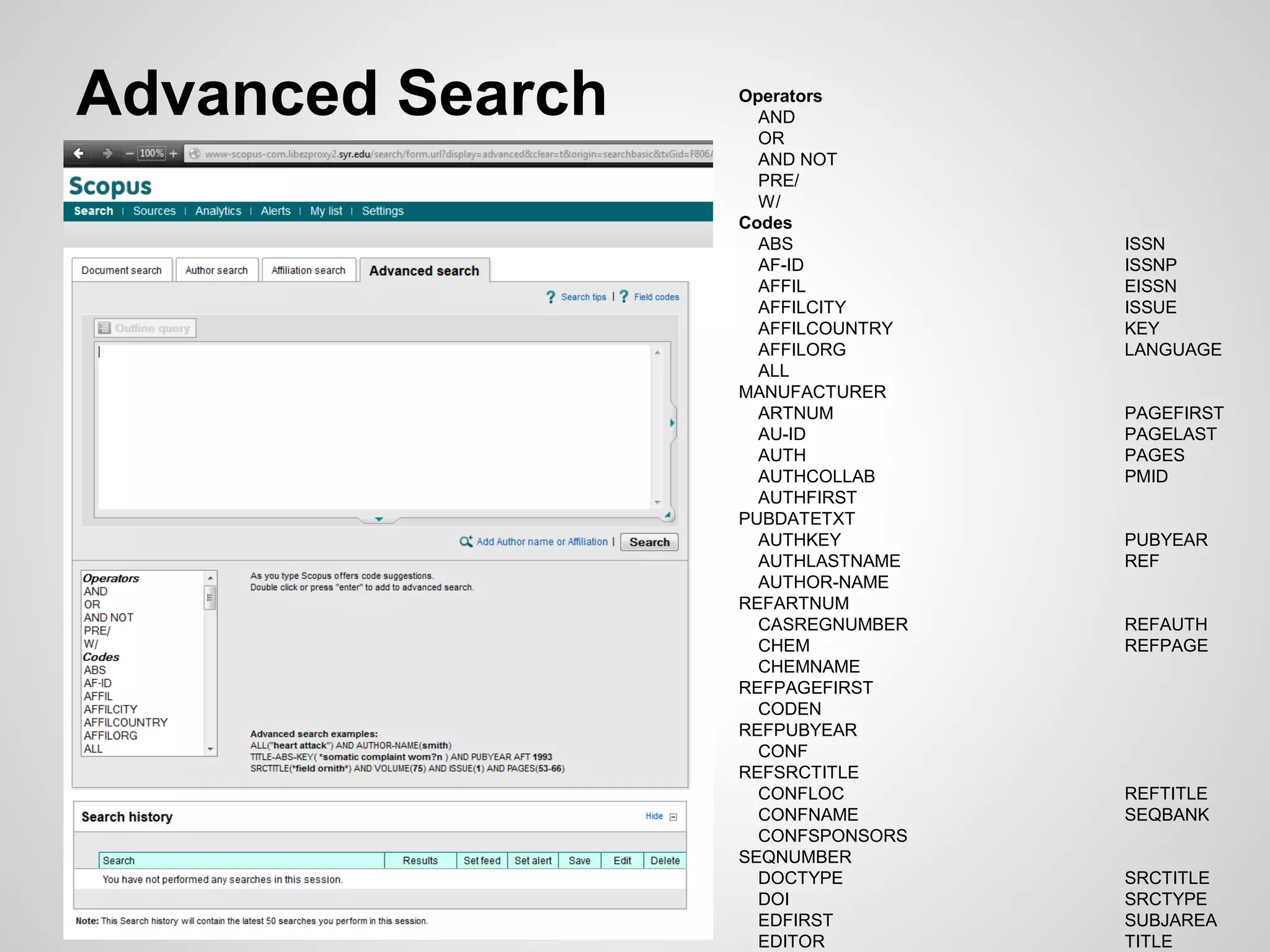
  • #9 Not user friendly upon first glance as it is just the blank search box Allows user to add specific search codes The search codes are listed below the search area and when selected will give a brief description and example of use