









Scopus hands-on workshop
Michaela Kurschildgen, Customer Consultant Elsevier
15th July 2019
How do you…
Identify or analyse which journals to read or
submit your paper to?
Manage your career?
Decide what, where and with whom to collaborate?
Track research or monitor trends?
Find out what already exists in the global world
of research?
Find new ideas?
A brief introduction to Scopus &
its coverage
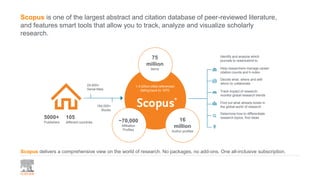
Scopus is one of the largest abstract and citation database of peer-reviewed literature,
and features smart tools that allow you to track, analyze and visualize scholarly
research.
5000+
Publishers
Scopus delivers a comprehensive view on the world of research. No packages, no add-ons. One all-inclusive subscription.
24,600+
Serial titles
194,000+
Books
75
million
Items
16
million
Author profiles
~70,000
Affiliation
Profiles
1.4 billion cited references
dating back to 1970
Identify and analyze which
journals to read/submit to
Help researchers manage career-
citation counts and h-index
Decide what, where and with
whom to collaborate
Track impact of research;
monitor global research trends
Find out what already exists in
the global world of research
Determine how to differentiate
research topics, find ideas105
different countries
CONFERENCES
100K events
9.2M records
>10%
Special issue of
regular journal &
conference
proceedings.
Mainly Engineering
and Physical
Sciences
BOOKS
613 book series
- 38K Volumes
- 1.5M items
194 stand
alone books
monographs, edited
volumes, major
reference works
and graduate level
textbooks
Focus on Social
Sciences and
A&H
PATENTS
38M patents
from 5 major
patent offices:
• UK
• US
• Japan
• Europe
• World
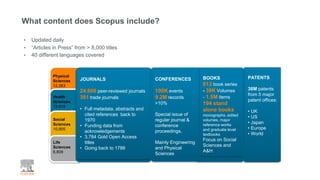
JOURNALS
24.600 peer-reviewed journals
301 trade journals
• Full metadata, abstracts and
cited references back to
1970
• Funding data from
acknowledgements
• 3,784 Gold Open Access
titles
• Going back to 1788
Physical
Sciences
12,263
Health
Sciences
13,819
Social
Sciences
10,905
Life
Sciences
6,809
• Updated daily
• “Articles in Press” from > 8,000 titles
• 40 different languages covered
What content does Scopus include?
How does Scopus choose
content?
Coverage of high quality journals via selection by the
independent Content election & Advisory Board (CSAB)
The CSAB is an independent
board of subject experts from
all over the world.
Board members are chosen for
their expertise in specific
subject areas; many have
(journal) Editor experience.
https://www.elsevier.com/solutions/scopus/how-scopus-works/content/scopus-content-selection-and-advisory-board
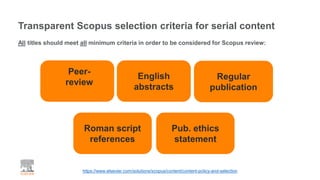
Transparent Scopus selection criteria for serial content
Peer-
review
English
abstracts
Regular
publication
Roman script
references
Pub. ethics
statement
https://www.elsevier.com/solutions/scopus/content/content-policy-and-selection
All titles should meet all minimum criteria in order to be considered for Scopus review:
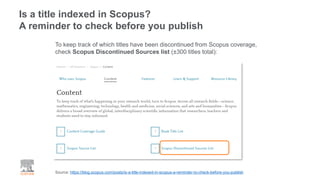
Is a title indexed in Scopus?
A reminder to check before you publish
Source: https://blog.scopus.com/posts/is-a-title-indexed-in-scopus-a-reminder-to-check-before-you-publish
To keep track of which titles have been discontinued from Scopus coverage,
check Scopus Discontinued Sources list (±300 titles total):
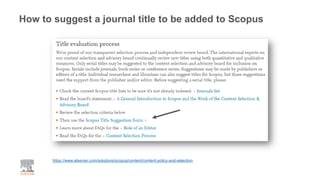
How to suggest a journal title to be added to Scopus
https://www.elsevier.com/solutions/scopus/content/content-policy-and-selection
Scopus Search Tips
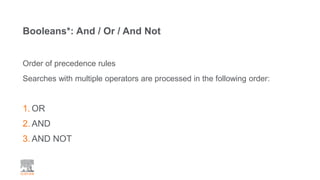
Booleans*: And / Or / And Not
Order of precedence rules
Searches with multiple operators are processed in the following order:
1. OR
2. AND
3. AND NOT
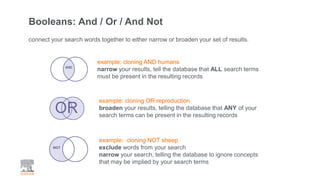
Booleans: And / Or / And Not
connect your search words together to either narrow or broaden your set of results.
example: cloning AND humans
narrow your results, tell the database that ALL search terms
must be present in the resulting records
example: cloning OR reproduction
broaden your results, telling the database that ANY of your
search terms can be present in the resulting records
example: cloning NOT sheep
exclude words from your search
narrow your search, telling the database to ignore concepts
that may be implied by your search terms
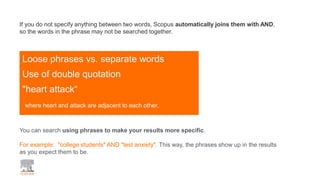
Loose phrases vs. separate words
Use of double quotation
"heart attack“
where heart and attack are adjacent to each other.
If you do not specify anything between two words, Scopus automatically joins them with AND,
so the words in the phrase may not be searched together.
You can search using phrases to make your results more specific.
For example: "college students" AND "test anxiety". This way, the phrases show up in the results
as you expect them to be.
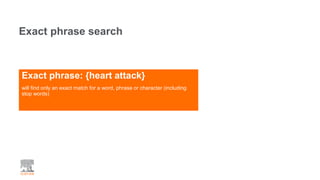
Exact phrase: {heart attack}
will find only an exact match for a word, phrase or character (including
stop words)
Exact phrase search
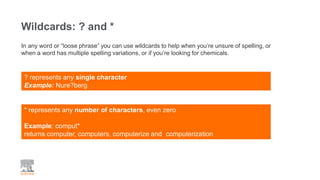
Wildcards: ? and *
? represents any single character
Example: Nure?berg
In any word or “loose phrase” you can use wildcards to help when you’re unsure of spelling, or
when a word has multiple spelling variations, or if you’re looking for chemicals.
* represents any number of characters, even zero
Example: comput*
returns computer, computers, computerize and computerization
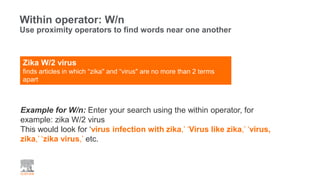
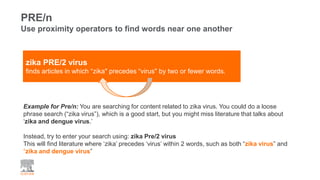
Zika W/2 virus
finds articles in which “zika" and “virus" are no more than 2 terms
apart
Within operator: W/n
Use proximity operators to find words near one another
Example for W/n: Enter your search using the within operator, for
example: zika W/2 virus
This would look for ‘virus infection with zika,’ ‘Virus like zika,’ ‘virus,
zika,’ ‘zika virus,’ etc.
PRE/n
Use proximity operators to find words near one another
Example for Pre/n: You are searching for content related to zika virus. You could do a loose
phrase search (“zika virus”), which is a good start, but you might miss literature that talks about
‘zika and dengue virus.’
Instead, try to enter your search using: zika Pre/2 virus
This will find literature where ‘zika’ precedes ‘virus’ within 2 words, such as both “zika virus” and
“zika and dengue virus”
zika PRE/2 virus
finds articles in which “zika" precedes “virus" by two or fewer words.
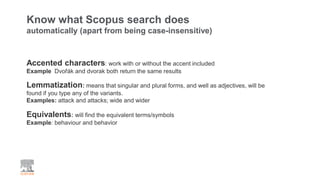
Know what Scopus search does
automatically (apart from being case-insensitive)
Accented characters: work with or without the accent included
Example Dvořák and dvorak both return the same results
Lemmatization: means that singular and plural forms, and well as adjectives, will be
found if you type any of the variants.
Examples: attack and attacks; wide and wider
Equivalents: will find the equivalent terms/symbols
Example: behaviour and behavior
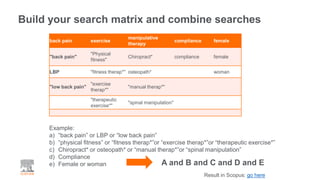
Build your search matrix and combine searches
back pain exercise
manipulative
therapy
compliance female
"back pain"
"Physical
fitness"
Chiropract* compliance female
LBP "fitness therap*" osteopath* woman
"low back pain"
"exercise
therap*"
"manual therap*"
"therapeutic
exercise*"
"spinal manipulation"
Example:
a) “back pain” or LBP or “low back pain”
b) “physical fitness” or “fitness therap*”or “exercise therap*”or “therapeutic exercise*”
c) Chiropract* or osteopath* or “manual therap*”or “spinal manipulation”
d) Compliance
e) Female or woman A and B and C and D and E
Result in Scopus: go here
Let’s go online
www.scopus.com
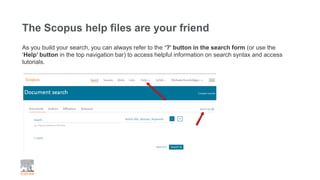
The Scopus help files are your friend
As you build your search, you can always refer to the ‘?’ button in the search form (or use the
‘Help’ button in the top navigation bar) to access helpful information on search syntax and access
tutorials.
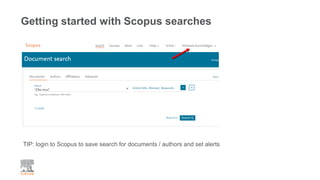
Getting started with Scopus searches
TIP: login to Scopus to save search for documents / authors and set alerts
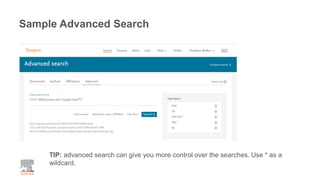
Sample Advanced Search
TIP: advanced search can give you more control over the searches. Use * as a
wildcard.
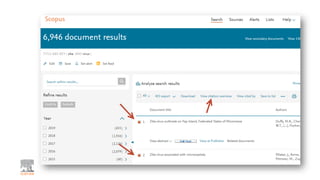
Citation Trends
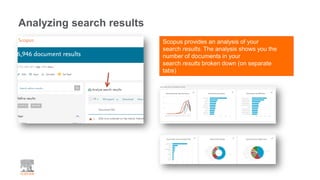
Analyzing search results
Scopus provides an analysis of your
search results. The analysis shows you the
number of documents in your
search results broken down (on separate
tabs)
Author Profile
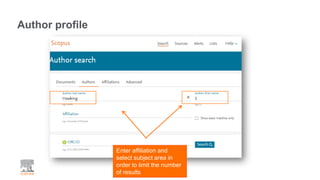
Author profile
Enter affiliation and
select subject area in
order to limit the number
of results
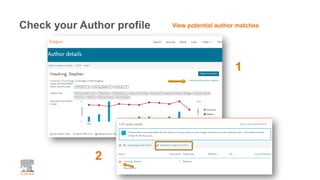
Check your Author profile View potential author matches
1
2
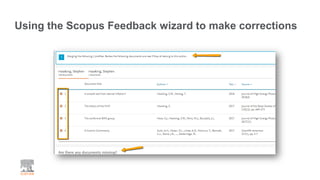
Using the Scopus Feedback wizard to make corrections
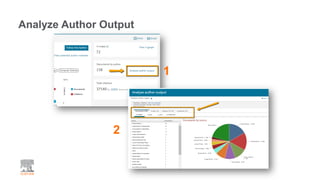
Analyze Author Output
1
2
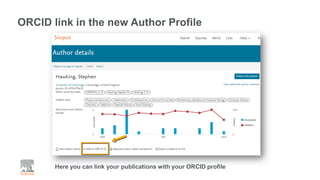
ORCID link in the new Author Profile
Here you can link your publications with your ORCID profile
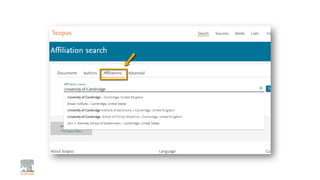
Affiliation Search
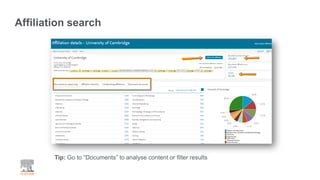
Affiliation search
Tip: Go to “Documents” to analyse content or filter results
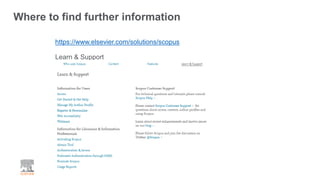
Where to find further information
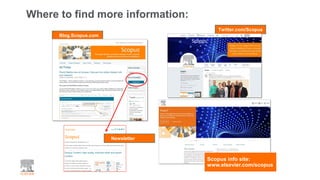
Where to find more information:
Blog.Scopus.com
Twitter.com/Scopus
Scopus info site:
www.elsevier.com/scopus
Newsletter
https://www.elsevier.com/solutions/scopus
Learn & Support
Where to find further information
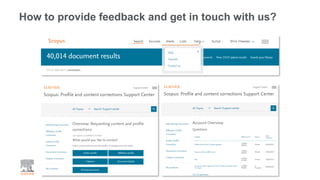
How to provide feedback and get in touch with us?
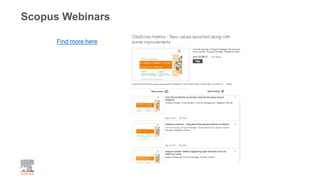
Scopus Webinars
Find more here
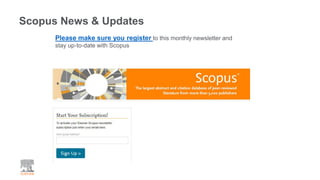
Scopus News & Updates
Please make sure you register to this monthly newsletter and
stay up-to-date with Scopus
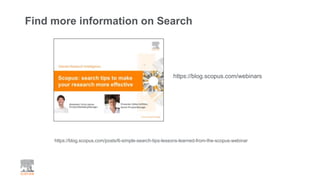
Find more information on Search
https://blog.scopus.com/posts/6-simple-search-tips-lessons-learned-from-the-scopus-webinar
https://blog.scopus.com/webinars
Scopus
Let’s stay in touch
Facebook
facebook.com/elsevierscopus/
Twitter
@Scopus https://blog.scopus.com/Subscribe here

Scopus Workshop

  • 1.
    Scopus hands-on workshop MichaelaKurschildgen, Customer Consultant Elsevier 15th July 2019
  • 2.
    How do you… Identifyor analyse which journals to read or submit your paper to? Manage your career? Decide what, where and with whom to collaborate? Track research or monitor trends? Find out what already exists in the global world of research? Find new ideas?
  • 3.
    A brief introductionto Scopus & its coverage
  • 4.
    Scopus is oneof the largest abstract and citation database of peer-reviewed literature, and features smart tools that allow you to track, analyze and visualize scholarly research. 5000+ Publishers Scopus delivers a comprehensive view on the world of research. No packages, no add-ons. One all-inclusive subscription. 24,600+ Serial titles 194,000+ Books 75 million Items 16 million Author profiles ~70,000 Affiliation Profiles 1.4 billion cited references dating back to 1970 Identify and analyze which journals to read/submit to Help researchers manage career- citation counts and h-index Decide what, where and with whom to collaborate Track impact of research; monitor global research trends Find out what already exists in the global world of research Determine how to differentiate research topics, find ideas105 different countries
  • 5.
    CONFERENCES 100K events 9.2M records >10% Specialissue of regular journal & conference proceedings. Mainly Engineering and Physical Sciences BOOKS 613 book series - 38K Volumes - 1.5M items 194 stand alone books monographs, edited volumes, major reference works and graduate level textbooks Focus on Social Sciences and A&H PATENTS 38M patents from 5 major patent offices: • UK • US • Japan • Europe • World JOURNALS 24.600 peer-reviewed journals 301 trade journals • Full metadata, abstracts and cited references back to 1970 • Funding data from acknowledgements • 3,784 Gold Open Access titles • Going back to 1788 Physical Sciences 12,263 Health Sciences 13,819 Social Sciences 10,905 Life Sciences 6,809 • Updated daily • “Articles in Press” from > 8,000 titles • 40 different languages covered What content does Scopus include?
  • 6.
    How does Scopuschoose content?
  • 7.
    Coverage of highquality journals via selection by the independent Content election & Advisory Board (CSAB) The CSAB is an independent board of subject experts from all over the world. Board members are chosen for their expertise in specific subject areas; many have (journal) Editor experience. https://www.elsevier.com/solutions/scopus/how-scopus-works/content/scopus-content-selection-and-advisory-board
  • 8.
    Transparent Scopus selectioncriteria for serial content Peer- review English abstracts Regular publication Roman script references Pub. ethics statement https://www.elsevier.com/solutions/scopus/content/content-policy-and-selection All titles should meet all minimum criteria in order to be considered for Scopus review:
  • 9.
    Is a titleindexed in Scopus? A reminder to check before you publish Source: https://blog.scopus.com/posts/is-a-title-indexed-in-scopus-a-reminder-to-check-before-you-publish To keep track of which titles have been discontinued from Scopus coverage, check Scopus Discontinued Sources list (±300 titles total):
  • 10.
    How to suggesta journal title to be added to Scopus https://www.elsevier.com/solutions/scopus/content/content-policy-and-selection
  • 11.
  • 12.
    Booleans*: And /Or / And Not Order of precedence rules Searches with multiple operators are processed in the following order: 1. OR 2. AND 3. AND NOT
  • 13.
    Booleans: And /Or / And Not connect your search words together to either narrow or broaden your set of results. example: cloning AND humans narrow your results, tell the database that ALL search terms must be present in the resulting records example: cloning OR reproduction broaden your results, telling the database that ANY of your search terms can be present in the resulting records example: cloning NOT sheep exclude words from your search narrow your search, telling the database to ignore concepts that may be implied by your search terms
  • 14.
    Loose phrases vs.separate words Use of double quotation "heart attack“ where heart and attack are adjacent to each other. If you do not specify anything between two words, Scopus automatically joins them with AND, so the words in the phrase may not be searched together. You can search using phrases to make your results more specific. For example: "college students" AND "test anxiety". This way, the phrases show up in the results as you expect them to be.
  • 15.
    Exact phrase: {heartattack} will find only an exact match for a word, phrase or character (including stop words) Exact phrase search
  • 16.
    Wildcards: ? and* ? represents any single character Example: Nure?berg In any word or “loose phrase” you can use wildcards to help when you’re unsure of spelling, or when a word has multiple spelling variations, or if you’re looking for chemicals. * represents any number of characters, even zero Example: comput* returns computer, computers, computerize and computerization
  • 17.
    Zika W/2 virus findsarticles in which “zika" and “virus" are no more than 2 terms apart Within operator: W/n Use proximity operators to find words near one another Example for W/n: Enter your search using the within operator, for example: zika W/2 virus This would look for ‘virus infection with zika,’ ‘Virus like zika,’ ‘virus, zika,’ ‘zika virus,’ etc.
  • 18.
    PRE/n Use proximity operatorsto find words near one another Example for Pre/n: You are searching for content related to zika virus. You could do a loose phrase search (“zika virus”), which is a good start, but you might miss literature that talks about ‘zika and dengue virus.’ Instead, try to enter your search using: zika Pre/2 virus This will find literature where ‘zika’ precedes ‘virus’ within 2 words, such as both “zika virus” and “zika and dengue virus” zika PRE/2 virus finds articles in which “zika" precedes “virus" by two or fewer words.
  • 19.
    Know what Scopussearch does automatically (apart from being case-insensitive) Accented characters: work with or without the accent included Example Dvořák and dvorak both return the same results Lemmatization: means that singular and plural forms, and well as adjectives, will be found if you type any of the variants. Examples: attack and attacks; wide and wider Equivalents: will find the equivalent terms/symbols Example: behaviour and behavior
  • 20.
    Build your searchmatrix and combine searches back pain exercise manipulative therapy compliance female "back pain" "Physical fitness" Chiropract* compliance female LBP "fitness therap*" osteopath* woman "low back pain" "exercise therap*" "manual therap*" "therapeutic exercise*" "spinal manipulation" Example: a) “back pain” or LBP or “low back pain” b) “physical fitness” or “fitness therap*”or “exercise therap*”or “therapeutic exercise*” c) Chiropract* or osteopath* or “manual therap*”or “spinal manipulation” d) Compliance e) Female or woman A and B and C and D and E Result in Scopus: go here
  • 21.
  • 22.
    The Scopus helpfiles are your friend As you build your search, you can always refer to the ‘?’ button in the search form (or use the ‘Help’ button in the top navigation bar) to access helpful information on search syntax and access tutorials.
  • 23.
    Getting started withScopus searches TIP: login to Scopus to save search for documents / authors and set alerts
  • 24.
    Sample Advanced Search TIP:advanced search can give you more control over the searches. Use * as a wildcard.
  • 25.
  • 27.
    Analyzing search results Scopusprovides an analysis of your search results. The analysis shows you the number of documents in your search results broken down (on separate tabs)
  • 28.
  • 29.
    Author profile Enter affiliationand select subject area in order to limit the number of results
  • 30.
    Check your Authorprofile View potential author matches 1 2
  • 31.
    Using the ScopusFeedback wizard to make corrections
  • 32.
  • 33.
    ORCID link inthe new Author Profile Here you can link your publications with your ORCID profile
  • 34.
  • 36.
    Affiliation search Tip: Goto “Documents” to analyse content or filter results
  • 37.
    Where to findfurther information
  • 38.
    Where to findmore information: Blog.Scopus.com Twitter.com/Scopus Scopus info site: www.elsevier.com/scopus Newsletter
  • 39.
  • 40.
    How to providefeedback and get in touch with us?
  • 41.
  • 42.
    Scopus News &Updates Please make sure you register to this monthly newsletter and stay up-to-date with Scopus
  • 43.
    Find more informationon Search https://blog.scopus.com/posts/6-simple-search-tips-lessons-learned-from-the-scopus-webinar https://blog.scopus.com/webinars
  • 44.
    Scopus Let’s stay intouch Facebook facebook.com/elsevierscopus/ Twitter @Scopus https://blog.scopus.com/Subscribe here